EP2808773B1 - Mobiles endgerät, fernsehsendungsempfänger und vorrichtungsverknüpfungsverfahren - Google Patents
Mobiles endgerät, fernsehsendungsempfänger und vorrichtungsverknüpfungsverfahren Download PDFInfo
- Publication number
- EP2808773B1 EP2808773B1 EP12866773.0A EP12866773A EP2808773B1 EP 2808773 B1 EP2808773 B1 EP 2808773B1 EP 12866773 A EP12866773 A EP 12866773A EP 2808773 B1 EP2808773 B1 EP 2808773B1
- Authority
- EP
- European Patent Office
- Prior art keywords
- content
- icon
- display device
- mobile terminal
- unit
- Prior art date
- Legal status (The legal status is an assumption and is not a legal conclusion. Google has not performed a legal analysis and makes no representation as to the accuracy of the status listed.)
- Active
Links
Images






Classifications
-
- G—PHYSICS
- G06—COMPUTING OR CALCULATING; COUNTING
- G06F—ELECTRIC DIGITAL DATA PROCESSING
- G06F3/00—Input arrangements for transferring data to be processed into a form capable of being handled by the computer; Output arrangements for transferring data from processing unit to output unit, e.g. interface arrangements
- G06F3/14—Digital output to display device ; Cooperation and interconnection of the display device with other functional units
- G06F3/1454—Digital output to display device ; Cooperation and interconnection of the display device with other functional units involving copying of the display data of a local workstation or window to a remote workstation or window so that an actual copy of the data is displayed simultaneously on two or more displays, e.g. teledisplay
-
- G—PHYSICS
- G06—COMPUTING OR CALCULATING; COUNTING
- G06F—ELECTRIC DIGITAL DATA PROCESSING
- G06F13/00—Interconnection of, or transfer of information or other signals between, memories, input/output devices or central processing units
-
- G—PHYSICS
- G06—COMPUTING OR CALCULATING; COUNTING
- G06F—ELECTRIC DIGITAL DATA PROCESSING
- G06F3/00—Input arrangements for transferring data to be processed into a form capable of being handled by the computer; Output arrangements for transferring data from processing unit to output unit, e.g. interface arrangements
- G06F3/01—Input arrangements or combined input and output arrangements for interaction between user and computer
- G06F3/03—Arrangements for converting the position or the displacement of a member into a coded form
- G06F3/041—Digitisers, e.g. for touch screens or touch pads, characterised by the transducing means
-
- G—PHYSICS
- G06—COMPUTING OR CALCULATING; COUNTING
- G06F—ELECTRIC DIGITAL DATA PROCESSING
- G06F3/00—Input arrangements for transferring data to be processed into a form capable of being handled by the computer; Output arrangements for transferring data from processing unit to output unit, e.g. interface arrangements
- G06F3/01—Input arrangements or combined input and output arrangements for interaction between user and computer
- G06F3/048—Interaction techniques based on graphical user interfaces [GUI]
- G06F3/0481—Interaction techniques based on graphical user interfaces [GUI] based on specific properties of the displayed interaction object or a metaphor-based environment, e.g. interaction with desktop elements like windows or icons, or assisted by a cursor's changing behaviour or appearance
- G06F3/04817—Interaction techniques based on graphical user interfaces [GUI] based on specific properties of the displayed interaction object or a metaphor-based environment, e.g. interaction with desktop elements like windows or icons, or assisted by a cursor's changing behaviour or appearance using icons
-
- G—PHYSICS
- G06—COMPUTING OR CALCULATING; COUNTING
- G06F—ELECTRIC DIGITAL DATA PROCESSING
- G06F3/00—Input arrangements for transferring data to be processed into a form capable of being handled by the computer; Output arrangements for transferring data from processing unit to output unit, e.g. interface arrangements
- G06F3/01—Input arrangements or combined input and output arrangements for interaction between user and computer
- G06F3/048—Interaction techniques based on graphical user interfaces [GUI]
- G06F3/0484—Interaction techniques based on graphical user interfaces [GUI] for the control of specific functions or operations, e.g. selecting or manipulating an object, an image or a displayed text element, setting a parameter value or selecting a range
- G06F3/04842—Selection of displayed objects or displayed text elements
-
- G—PHYSICS
- G06—COMPUTING OR CALCULATING; COUNTING
- G06F—ELECTRIC DIGITAL DATA PROCESSING
- G06F3/00—Input arrangements for transferring data to be processed into a form capable of being handled by the computer; Output arrangements for transferring data from processing unit to output unit, e.g. interface arrangements
- G06F3/01—Input arrangements or combined input and output arrangements for interaction between user and computer
- G06F3/048—Interaction techniques based on graphical user interfaces [GUI]
- G06F3/0487—Interaction techniques based on graphical user interfaces [GUI] using specific features provided by the input device, e.g. functions controlled by the rotation of a mouse with dual sensing arrangements, or of the nature of the input device, e.g. tap gestures based on pressure sensed by a digitiser
- G06F3/0488—Interaction techniques based on graphical user interfaces [GUI] using specific features provided by the input device, e.g. functions controlled by the rotation of a mouse with dual sensing arrangements, or of the nature of the input device, e.g. tap gestures based on pressure sensed by a digitiser using a touch-screen or digitiser, e.g. input of commands through traced gestures
-
- G—PHYSICS
- G06—COMPUTING OR CALCULATING; COUNTING
- G06F—ELECTRIC DIGITAL DATA PROCESSING
- G06F3/00—Input arrangements for transferring data to be processed into a form capable of being handled by the computer; Output arrangements for transferring data from processing unit to output unit, e.g. interface arrangements
- G06F3/01—Input arrangements or combined input and output arrangements for interaction between user and computer
- G06F3/048—Interaction techniques based on graphical user interfaces [GUI]
- G06F3/0487—Interaction techniques based on graphical user interfaces [GUI] using specific features provided by the input device, e.g. functions controlled by the rotation of a mouse with dual sensing arrangements, or of the nature of the input device, e.g. tap gestures based on pressure sensed by a digitiser
- G06F3/0488—Interaction techniques based on graphical user interfaces [GUI] using specific features provided by the input device, e.g. functions controlled by the rotation of a mouse with dual sensing arrangements, or of the nature of the input device, e.g. tap gestures based on pressure sensed by a digitiser using a touch-screen or digitiser, e.g. input of commands through traced gestures
- G06F3/04883—Interaction techniques based on graphical user interfaces [GUI] using specific features provided by the input device, e.g. functions controlled by the rotation of a mouse with dual sensing arrangements, or of the nature of the input device, e.g. tap gestures based on pressure sensed by a digitiser using a touch-screen or digitiser, e.g. input of commands through traced gestures for inputting data by handwriting, e.g. gesture or text
-
- G—PHYSICS
- G06—COMPUTING OR CALCULATING; COUNTING
- G06F—ELECTRIC DIGITAL DATA PROCESSING
- G06F3/00—Input arrangements for transferring data to be processed into a form capable of being handled by the computer; Output arrangements for transferring data from processing unit to output unit, e.g. interface arrangements
- G06F3/14—Digital output to display device ; Cooperation and interconnection of the display device with other functional units
- G06F3/1423—Digital output to display device ; Cooperation and interconnection of the display device with other functional units controlling a plurality of local displays, e.g. CRT and flat panel display
-
- H—ELECTRICITY
- H04—ELECTRIC COMMUNICATION TECHNIQUE
- H04M—TELEPHONIC COMMUNICATION
- H04M1/00—Substation equipment, e.g. for use by subscribers
- H04M1/72—Mobile telephones; Cordless telephones, i.e. devices for establishing wireless links to base stations without route selection
- H04M1/724—User interfaces specially adapted for cordless or mobile telephones
- H04M1/72403—User interfaces specially adapted for cordless or mobile telephones with means for local support of applications that increase the functionality
- H04M1/72409—User interfaces specially adapted for cordless or mobile telephones with means for local support of applications that increase the functionality by interfacing with external accessories
- H04M1/72412—User interfaces specially adapted for cordless or mobile telephones with means for local support of applications that increase the functionality by interfacing with external accessories using two-way short-range wireless interfaces
-
- H—ELECTRICITY
- H04—ELECTRIC COMMUNICATION TECHNIQUE
- H04M—TELEPHONIC COMMUNICATION
- H04M1/00—Substation equipment, e.g. for use by subscribers
- H04M1/72—Mobile telephones; Cordless telephones, i.e. devices for establishing wireless links to base stations without route selection
- H04M1/724—User interfaces specially adapted for cordless or mobile telephones
- H04M1/72403—User interfaces specially adapted for cordless or mobile telephones with means for local support of applications that increase the functionality
- H04M1/72409—User interfaces specially adapted for cordless or mobile telephones with means for local support of applications that increase the functionality by interfacing with external accessories
- H04M1/72415—User interfaces specially adapted for cordless or mobile telephones with means for local support of applications that increase the functionality by interfacing with external accessories for remote control of appliances
-
- H—ELECTRICITY
- H04—ELECTRIC COMMUNICATION TECHNIQUE
- H04N—PICTORIAL COMMUNICATION, e.g. TELEVISION
- H04N21/00—Selective content distribution, e.g. interactive television or video on demand [VOD]
- H04N21/40—Client devices specifically adapted for the reception of or interaction with content, e.g. set-top-box [STB]; Operations thereof
- H04N21/41—Structure of client; Structure of client peripherals
- H04N21/4104—Peripherals receiving signals from specially adapted client devices
- H04N21/4126—The peripheral being portable, e.g. PDAs or mobile phones
- H04N21/41265—The peripheral being portable, e.g. PDAs or mobile phones having a remote control device for bidirectional communication between the remote control device and client device
-
- H—ELECTRICITY
- H04—ELECTRIC COMMUNICATION TECHNIQUE
- H04N—PICTORIAL COMMUNICATION, e.g. TELEVISION
- H04N21/00—Selective content distribution, e.g. interactive television or video on demand [VOD]
- H04N21/40—Client devices specifically adapted for the reception of or interaction with content, e.g. set-top-box [STB]; Operations thereof
- H04N21/41—Structure of client; Structure of client peripherals
- H04N21/418—External card to be used in combination with the client device, e.g. for conditional access
- H04N21/4183—External card to be used in combination with the client device, e.g. for conditional access providing its own processing capabilities, e.g. external module for video decoding
-
- H—ELECTRICITY
- H04—ELECTRIC COMMUNICATION TECHNIQUE
- H04N—PICTORIAL COMMUNICATION, e.g. TELEVISION
- H04N21/00—Selective content distribution, e.g. interactive television or video on demand [VOD]
- H04N21/40—Client devices specifically adapted for the reception of or interaction with content, e.g. set-top-box [STB]; Operations thereof
- H04N21/41—Structure of client; Structure of client peripherals
- H04N21/422—Input-only peripherals, i.e. input devices connected to specially adapted client devices, e.g. global positioning system [GPS]
- H04N21/42204—User interfaces specially adapted for controlling a client device through a remote control device; Remote control devices therefor
- H04N21/42206—User interfaces specially adapted for controlling a client device through a remote control device; Remote control devices therefor characterized by hardware details
- H04N21/4222—Remote control device emulator integrated into a non-television apparatus, e.g. a PDA, media center or smart toy
-
- H—ELECTRICITY
- H04—ELECTRIC COMMUNICATION TECHNIQUE
- H04N—PICTORIAL COMMUNICATION, e.g. TELEVISION
- H04N21/00—Selective content distribution, e.g. interactive television or video on demand [VOD]
- H04N21/40—Client devices specifically adapted for the reception of or interaction with content, e.g. set-top-box [STB]; Operations thereof
- H04N21/41—Structure of client; Structure of client peripherals
- H04N21/422—Input-only peripherals, i.e. input devices connected to specially adapted client devices, e.g. global positioning system [GPS]
- H04N21/42204—User interfaces specially adapted for controlling a client device through a remote control device; Remote control devices therefor
- H04N21/42206—User interfaces specially adapted for controlling a client device through a remote control device; Remote control devices therefor characterized by hardware details
- H04N21/42224—Touch pad or touch panel provided on the remote control
-
- H—ELECTRICITY
- H04—ELECTRIC COMMUNICATION TECHNIQUE
- H04N—PICTORIAL COMMUNICATION, e.g. TELEVISION
- H04N21/00—Selective content distribution, e.g. interactive television or video on demand [VOD]
- H04N21/40—Client devices specifically adapted for the reception of or interaction with content, e.g. set-top-box [STB]; Operations thereof
- H04N21/43—Processing of content or additional data, e.g. demultiplexing additional data from a digital video stream; Elementary client operations, e.g. monitoring of home network or synchronising decoder's clock; Client middleware
- H04N21/431—Generation of visual interfaces for content selection or interaction; Content or additional data rendering
- H04N21/4312—Generation of visual interfaces for content selection or interaction; Content or additional data rendering involving specific graphical features, e.g. screen layout, special fonts or colors, blinking icons, highlights or animations
-
- H—ELECTRICITY
- H04—ELECTRIC COMMUNICATION TECHNIQUE
- H04N—PICTORIAL COMMUNICATION, e.g. TELEVISION
- H04N21/00—Selective content distribution, e.g. interactive television or video on demand [VOD]
- H04N21/40—Client devices specifically adapted for the reception of or interaction with content, e.g. set-top-box [STB]; Operations thereof
- H04N21/43—Processing of content or additional data, e.g. demultiplexing additional data from a digital video stream; Elementary client operations, e.g. monitoring of home network or synchronising decoder's clock; Client middleware
- H04N21/432—Content retrieval operation from a local storage medium, e.g. hard-disk
- H04N21/4325—Content retrieval operation from a local storage medium, e.g. hard-disk by playing back content from the storage medium
-
- H—ELECTRICITY
- H04—ELECTRIC COMMUNICATION TECHNIQUE
- H04N—PICTORIAL COMMUNICATION, e.g. TELEVISION
- H04N21/00—Selective content distribution, e.g. interactive television or video on demand [VOD]
- H04N21/40—Client devices specifically adapted for the reception of or interaction with content, e.g. set-top-box [STB]; Operations thereof
- H04N21/43—Processing of content or additional data, e.g. demultiplexing additional data from a digital video stream; Elementary client operations, e.g. monitoring of home network or synchronising decoder's clock; Client middleware
- H04N21/433—Content storage operation, e.g. storage operation in response to a pause request, caching operations
-
- H—ELECTRICITY
- H04—ELECTRIC COMMUNICATION TECHNIQUE
- H04N—PICTORIAL COMMUNICATION, e.g. TELEVISION
- H04N21/00—Selective content distribution, e.g. interactive television or video on demand [VOD]
- H04N21/40—Client devices specifically adapted for the reception of or interaction with content, e.g. set-top-box [STB]; Operations thereof
- H04N21/47—End-user applications
- H04N21/478—Supplemental services, e.g. displaying phone caller identification, shopping application
- H04N21/4782—Web browsing, e.g. WebTV
-
- H—ELECTRICITY
- H04—ELECTRIC COMMUNICATION TECHNIQUE
- H04N—PICTORIAL COMMUNICATION, e.g. TELEVISION
- H04N21/00—Selective content distribution, e.g. interactive television or video on demand [VOD]
- H04N21/40—Client devices specifically adapted for the reception of or interaction with content, e.g. set-top-box [STB]; Operations thereof
- H04N21/47—End-user applications
- H04N21/482—End-user interface for program selection
-
- G—PHYSICS
- G06—COMPUTING OR CALCULATING; COUNTING
- G06F—ELECTRIC DIGITAL DATA PROCESSING
- G06F2203/00—Indexing scheme relating to G06F3/00 - G06F3/048
- G06F2203/048—Indexing scheme relating to G06F3/048
- G06F2203/04807—Pen manipulated menu
-
- H—ELECTRICITY
- H04—ELECTRIC COMMUNICATION TECHNIQUE
- H04M—TELEPHONIC COMMUNICATION
- H04M2250/00—Details of telephonic subscriber devices
- H04M2250/12—Details of telephonic subscriber devices including a sensor for measuring a physical value, e.g. temperature or motion
-
- H—ELECTRICITY
- H04—ELECTRIC COMMUNICATION TECHNIQUE
- H04M—TELEPHONIC COMMUNICATION
- H04M2250/00—Details of telephonic subscriber devices
- H04M2250/22—Details of telephonic subscriber devices including a touch pad, a touch sensor or a touch detector
Definitions
- the present disclosure relates to a mobile terminal, a television broadcast receiver, and a method for linking these devices, and in particular to a user interface which is of a mobile terminal mounting a touch panel and is related to a device linkage with an external device.
- a touch panel is an electronic component in which a display device such as a liquid crystal panel and a position input device such as a touch pad are combined, and is also referred to as a touch screen.
- US 2011/092222 A1 (KUO LUN-CHIA [TW] ET AL) 21 April 2011 describes a method for initiating e.g. data transfer, between source and target devices e.g. proxy server, involves acquiring positioning information through proxy server such that user uses information to assign target device for initiation.
- US 2011/083111 A1 (FORUTANPOUR BABAK [US] ET AL) 7 April 2011 describes a method for sharing files among mobile device and e.g. computing device, involves identifying targeted computing device based on detected file sharing gesture, and transmitting file sharing message to targeted computing device.
- US 2010/149096 A1 MIGOS CHARLES J [US] ET AL 17 June 2010 describes a method for controlling computing devices on network, involves identifying several commands associated with type of gesture so that communication is generated and sent to network device via network to perform operation of command.
- EP 2 192 478 A2 (GETAC TECHNOLOGY CORP [TW]) 2 June 2010 , US 2010/122194 A1 (ROGERS SEAN S [US]) 13 May 2010 (2010-05-13), US 2010/205628 A1 (DAVIS BRUCE L [US] ET AL) 12 August 2010 , US2009/298419 A1 (AHYA DEEPAK P [US] ET AL) 3 December 2009 , US 2011/035691 A1 (KIM JONGHWAN [KR]) 10 February 2011 (2011-02-10) and EP 2 395 416 A1 (SONY CORP [JP]) 14 December 2011 (2011-12-14) describe further devices and methods to transfer data between electronic devices.
- Patent Literature 1 requires that an object is selected on a touch panel provided on a front surface of a mobile terminal, and sequentially that an instruction for a transmission to the TV is given using a touch pad provided on a back surface of the mobile terminal.
- the technique requires touch operations on the respective front and back surfaces of the mobile terminal, causing a problem that the operations are complicated.
- touch sensors the touch panel and the touch pad
- a mobile terminal is a mobile terminal as defined in the appended claims and which is connected to a display device through a communication path, the mobile terminal including: a communication interface unit for communicating with the display device; a storage unit configured to store content to be displayed on the display device; a display unit having a touch pad and a display screen; and a control unit configured to display, on the display screen, a content icon which is an icon associated with the content, wherein when detecting that the content icon is pressed and held and then is flicked on the display unit, the control unit is configured to read the content from the storage unit and transmit the content to the display device through the communication interface unit, so that the content is displayed on the display device.
- a mobile terminal which is connected to a display device through a communication path, the mobile terminal including: a communication interface unit for communicating with the display device; a storage unit configured to store content to be displayed on the display device; a display unit having a touch pad and a display screen; and a control unit configured to display, on the display screen, a content icon which is an icon associated with the content, wherein when detecting that the content icon is pressed and held and then is flicked on the display unit, the control unit is configured to read the content from the storage unit and transmit the content to the display device through the communication interface unit, so that the content is displayed on the display device.
- a "swipe” (or a “swipe operation”) is an operation of stroking an icon etc. on a display screen in a particular direction with a finger touched thereon.
- control unit when detecting that the content icon is pressed and held, the control unit may be configured to display a display device icon which is an icon associated with the display device, at a predetermined position on the display screen, and transmit the content when the content icon is flicked toward the display device icon.
- control unit may further be configured to: display a mobile terminal icon which is an icon associated with the mobile terminal, at a predetermined position on the display screen when detecting that the content icon is pressed and held; and read the content from the storage unit and display the content on the display screen when the content icon is flicked toward the mobile terminal icon.
- control unit may further be configured to transmit the content when the content icon is dragged to the display device icon, and display the content when the content icon is dragged to the mobile terminal icon
- the storage unit may further be configured to store a first Web page
- the control unit may further be configured to: read the first Web page from the storage unit and display the first Web page on the display screen; and when detecting that the first Web page is pressed and held and then is flicked in a first direction on the display unit, transmit location information of the first Web page to the display device through the communication interface unit, so that the first Web page is displayed on the display device.
- control unit when detecting that the first Web page is pressed and held and then is flicked in a second direction on the display unit, the control unit may further be configured to: direct the display device to transmit location information of the second Web page displayed on the display device so that the second Web page is displayed on the display screen; receive the location information transmitted from the display device through the communication interface unit; obtain the second Web page based on the received location information; and display the second Web page on the display screen.
- control unit may further be configured to: display a link icon associated with location information of a third Web page on the display screen; and when detecting that the link icon is pressed and held and then is flicked on the display unit, transmit the location information to the display device through the communication interface unit, so that the third Web page is displayed on the display device.
- the storage unit may be configured to store a plurality of content items
- the control unit may be configured to: display, on the display screen, a folder icon which is an icon associated with the plurality of content items; and when detecting that the folder icon is pressed and held on the display unit, read the plurality of content items from the storage unit and transmit the plurality of content items to the display device through the communication interface unit, so that the plurality of content items are displayed on the display device sequentially or at sight.
- control unit may further be configured to: when detecting that the content icon is pressed and held with a finger and then is flicked in a third direction, transmit the content to the display device and cause the display device to display the content; and when detecting that the content icon is pressed with two fingers and then is flicked in the third direction, transmit the content to the display device and cause the display device to store the content internally.
- the user can upload the content inside the mobile terminal from the mobile terminal to the display device by the one- or two-finger flick in the particular direction, and switch the post-upload processes in the display device, that are, displaying (reproducing) the content on the display device and storing the content in the display device.
- control unit may further be configured to: display, on the display screen, a display device content icon which is an icon associated with at least one of content stored in the display device and content displayed on the display device; and when detecting that the display device content icon is pressed, obtain the content associated with the display device content icon from the display device. In this way, it is possible to download the content stored in the display device, or the content displayed on the display device, from the display device to the mobile terminal.
- control unit may be configured to: when detecting that the display device content icon is pressed and held with a finger and then is flicked in a fourth direction, obtain, from the display device, the content associated with the display device content icon and display the content on the display screen; and when detecting that the display device content icon is flicked with two fingers in the fourth direction, obtain, from the display device, the content associated with the display device content icon and store the content in the storage unit.
- the user can download the content inside the display device from the display device to the mobile terminal by the one- or two-finger flick in the particular direction, and switch the post-download processes in the mobile terminal, that are, displaying (reproducing) the content on the mobile terminal and storing the content in the mobile terminal.
- a mobile terminal is a television broadcast receiver which is connected to a mobile terminal through a communication path, the television broadcast receiver including: a display screen; a receiving unit configured to receive content including a broadcast program; a communication interface unit for communicating with the mobile terminal; and a control unit configured to display the content received by the receiving unit on the display screen, and notify the mobile terminal that the content is displayed on the display screen through the communication interface, wherein when receiving a transmission request for the content displayed on the display screen from the mobile terminal through the communication interface unit, the control unit is further configured to transmit the content to the mobile terminal through the communication interface unit.
- the mobile terminal can download the content displayed on the display device at the time point.
- a device linkage method wherein a mobile terminal is connected to an external display device through a communication path, wherein the mobile terminal includes: a communication interface unit for communicating with the display device; a storage unit configured to store content to be displayed on the display device; and a display unit having a touch pad and a display screen, the device linkage method including: displaying, on the display screen, a content icon which is an icon associated with the content; and when detecting that the content icon is pressed and held and then is flicked on the display unit, reading the content from the storage unit and transmitting the content to the display device through the communication interface unit, so that the content is displayed on the display device.
- the subject of the present disclosure can be realized not only as a device and a method but also as a program for causing a computer (or a processor) to execute the steps of the method, a recording medium such as a computer-readable CD-ROM having the program recorded thereon, information, data and/or a signal which represent the program, etc.
- the program, information, data, and/or signal can be distributed through communication networks such as the Internet etc.
- FIG. 1 is a diagram showing a configuration of a communication system 1 in this embodiment.
- the communication system 1 is an example of a communication system which enables a device linkage in which content stored in a mobile terminal 10 is transmitted to a display device (here, a TV 20) which is an external device, and causes the TV 20 to display the content.
- the communication system 1 includes the mobile terminal 10, the TV 20, and a wireless router 30 which are connected through a wireless LAN in a home.
- the mobile terminal 10 is an example of a mobile terminal which is connected to the display device (here, the TV 20), and is a smart phone, a tablet PC, or the like which includes a display unit 13 such as a touch panel and a button 11.
- the TV 20 is an example of a display device connected to the mobile terminal 10 through a communication path, and functions as an external device for a device linkage with the mobile terminal 10 through the communication path by mounting not only a function as a television broadcast receiver which displays a received broadcast program on a display screen 23 but also as a CPU which executes an application program and a communication interface (I/F) unit 24 etc. for wireless LAN.
- I/F communication interface
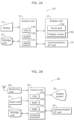
- FIG. 2A is a block diagram showing a structure of the mobile terminal 10 in FIG. 1 .
- This mobile terminal 10 is a mobile terminal having a device linkage function, and includes a button 11, a control unit 12, a display unit 13, a communication interface (I/F) unit 14, and a storage unit 15.
- I/F communication interface
- the display unit 13 is a touch panel having a display screen 13b which is, for example, a touch pad 13a, a liquid crystal panel, or the like.
- “icons” are image objects which are displayed on the display screen 13b, and include not only a pictorial one but also a symbol, a character, a still image, a video, a thumbnail image, and an image object configured as a mixture of the symbol etc.
- the control unit 12 displays a TV icon which is an icon associated with the TV 20 and a mobile terminal icon which is an icon associated with the mobile terminal 10, on predetermined positions on the display screen 13b as guide display.
- the TV icon is displayed at an upper part (upper end) and the mobile terminal icon is displayed at a lower part (lower end) of the display screen 13b.
- the control unit 12 when detecting that the Web page is pressed and held and then is flicked in a second direction (different from the first direction) on the display unit 13, the control unit 12 directs the TV 20 to transmit the URL of the Web page displayed on the TV 20 so that the Web page displayed on the TV 20 is displayed on the display screen 13b, receives the URL of the Web page transmitted from the TV 20 through the communication I/F unit 14, obtains the Web page corresponding to the received URL through the Internet 31, and displays the Web page on the display screen 13b.
- the first and second directions may be predetermined directions (for example, upward and downward directions) on the display screen 13b, or directions in each of which the aforementioned guide display is present (for example, a direction in which the TV icon is displayed and a direction in which the mobile terminal icon is displayed).
- FIG. 2B is a block diagram showing a structure of the TV 20 in FIG. 1 .
- the TV 20 is an example of a display device (here, a television broadcast receiver) for a device linkage with the mobile terminal 10.
- the TV 20 includes an input unit 21, a control unit 22, a display screen 23, a communication interface (I/F) unit 24, a storage unit 25, and a receiving unit 26.
- I/F communication interface
- the control unit 22 is a processing unit which, according to a user instruction through the input unit 21, (i) displays, on the display screen 23, content including a broadcast program received by the receiving unit 26, content stored in the storage unit 25, content received through the communication I/F unit 24, and (ii) stores the content received through the communication I/F unit 24.
- the control unit 22 includes a CPU 22a, a ROM 22b, a RAM 22c, and a CODEC 22d.
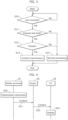
- control unit 12 when determining that the content is not pressed continuously (in other word, is pressed shortly) (No in S11 of FIG. 3 ), the control unit 12 performs a normal operation corresponding to the short press (for example, determines that the content is tapped, and displays, on the display screen 13b, the content associated with the content icon) (S14 in FIG. 3 ).
- the control unit 12 when determining that the content is pressed and held (Yes in S11 of FIG. 3 ), the control unit 12 subsequently determines whether or not the content icon is flicked, using the touch pad 13a (S12 in FIG. 3 ). For example, the control unit 12 determines whether or not a trace operation (here, any trace direction is possible) is performed on the touch pad 13a at a certain speed or more.
- a trace operation here, any trace direction is possible
- the control unit 12 recognizes presence of an instruction for transmitting the content associated with the content icon (S20 in FIG. 4 ), reads the content from the storage unit 15, and transmits it to the TV 20 through the communication I/F unit 14 and the wireless router 30 (S13 in FIG. 3 , S21 and S22 in FIG. 4 ).
- the content transmitted from the mobile terminal 10 is then displayed (or is reproduced if the content is a video content) by the TV 20 in which the predetermined application program is being executed (S23 in FIG. 4 ).
- the control unit 22 of the TV 20 receives the content transmitted from the mobile terminal 10 through the communication I/F unit 24, and displays the content on the display screen 23.
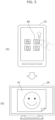
- FIG. 5 the user can display or reproduce the content 41 associated with the content icon 40 on the large display screen of the TV 20 ((b) in FIG. 5 ) only by performing the simple operations of pressing and holding and then flicking the content icon 40 displayed on the mobile terminal 10 ((a) in FIG. 5 ).
- FIG. 5 shows an example where a user performs an operation of an upward flick on the display screen 13b. However, in this example, the same process is performed irrespective of a flick direction.
- steps in FIG. 6 correspond to a flowchart obtained by adding Steps S30, S31, and S32 to the flowchart of FIG. 3 .
- steps S30, S31, and S32 correspond to a flowchart obtained by adding Steps S30, S31, and S32 to the flowchart of FIG. 3 .
- steps S30, S31, and S32 correspond to a flowchart obtained by adding Steps S30, S31, and S32 to the flowchart of FIG. 3 .
- steps different from the steps in FIG. 3 are described.
- the control unit 12 when determining that the touched content icon 45 is pressed and held (Yes in S11 of FIG. 6 ), the control unit 12 next displays, as guide display, a TV icon 46 which is an icon associated with the TV 20 at an upper part (upper end) of the display screen 13b, and displays a mobile terminal icon 47 which is an icon associated with the mobile terminal 10 at a lower part (lower end) of the display screen 13b (S30 of FIG. 6 ).
- the control unit 12 When determining that the pressed and held content icon 45 is flicked (Yes in S12 of FIG. 6 ), the control unit 12 next determines the flick direction (S31 of FIG. 6 ).
- the control unit 12 When determining that the pressed and held content icon 45 is flicked toward the TV icon 46 ("upward" in S31 of FIG. 6 ), the control unit 12 reads the content 48 associated with the content icon 45 from the storage unit 15, and transmits it to the TV 20 through the communication I/F unit 14 and the wireless router 30. The content 48 transmitted from the mobile terminal 10 is then displayed (or is reproduced if the content is a video content) by the TV 20 in which the predetermined application program is being executed ((c) in FIG. 7 ). In other words, the control unit 22 of the TV 20 receives the content transmitted from the mobile terminal 10 through the communication I/F unit 24, and displays the content on the display screen 23.
- the control unit 12 reads the content 48 associated with the content icon 45 from the storage unit 15, and displays the content (or reproduces if the content is a video content) on the display screen 13b ((d) in FIG. 7 ).
- FIG. 8 is a flowchart of other operations (a device linkage method in the case where a Web page is displayed on each of the mobile terminal 10 and the TV 20) of the mobile terminal 10 in content transmission.
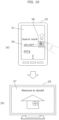
- FIG. 9 is a diagram showing an example of display by the mobile terminal 10 and the TV 20 in the content transmission.
- steps in FIG. 8 correspond to a flowchart obtained by replacing Step S13 and S32 of FIG. 6 with Steps S35 and S36, respectively.
- steps S35 and S36 operations different from the steps in FIG. 6 are described.
- a content icon 50 associated with the Web page 51 is displayed pop-up as guide display when the Web page 51 is pressed and held.
- the control unit 12 transmits the URL of the Web page 51 stored in the RAM 12c or the storage unit 15 to the TV 20 through the communication I/F unit 14 and the wireless router 30. Consequently, upon receiving the URL, the control unit 22 of the TV 20 accesses the Internet based on the URL to obtain the Web page 51, displays the Web page 51 (or reproduces the Web page 51 if it is a video) ((b) of FIG. 9 ) by overwriting (for update) the obtained Web page 51 on the Web page 52 displayed before, or providing the Web page 51 in a window other than the window for the Web page 52.
- the control unit 12 gives the TV 20 an instruction for transmitting the URL of the Web page 52 displayed on the TV 20, so that the Web page 52 displayed on the TV 20 can be displayed on the display screen 13b.
- the control unit 22 of the TV 20 notifies the mobile terminal 10 of the URL of the Web page 52 displayed on the display screen 23.
- the control unit 12 of the mobile terminal 10 After receiving the URL transmitted from the TV 20, the control unit 12 of the mobile terminal 10 accesses the Internet 31 based on the URL to obtain the Web page 52, and displays the Web page 52 (or reproduces the Web page 52 if it is a video) ((c) of FIG. 9 ) by overwriting (for update) the obtained Web page 52 on the Web page 51 displayed before, or providing the Web page 52 in a window other than the window for the Web page 51.
- the user can continue browsing the Internet using the TV 20 in succession to the browsing using the mobile terminal 10, and can continue browsing the Internet using the mobile terminal 10 in succession to the browsing using the TV 20.
- exchange of Web pages shown in FIGs. 8 and 9 have been described assuming that the Web pages are displayed respectively on the mobile terminal 10 and the TV 20.
- content items other than Web pages may be exchanged.
- the control unit 12 may determine whether or not the content or the content associated with the content icon is a Web page.
- the control unit 12 may transmit the URL of the Web page displayed on the TV 20 to the mobile terminal 10 when determining that the content is the Web page, and may display the content (or reproduce the content if it is a video) on the mobile terminal 10 when determining that the content is not the Web page.
- the URL of the Web page is transmitted between the mobile terminal 10 and the TV 20.
- transmission targets are not limited thereto, and may be Web pages as they are, or image data generated by rasterizing the Web pages.
- link information 55 (the URL which is location information of the link destination, or information associated with the URL) in the Web page 51 displayed on the mobile terminal 10 is touched, the control unit 12 displays pop-up a link icon 56 associated with the link information 55, and when detecting that the link icon 56 is pressed and held and then is flicked, transmits the URL associated with the link icon 56 to the TV 20.
- the control unit 22 of the TV 20 accesses the URL (a communication device located on the Internet 31) through the communication I/F unit 24 and the wireless router 30, obtains the Web page 57 located thereat, and displays it on the display screen 23 of the TV 20 ((b) of FIG. 10 ).
- the link destination (a Web page 57) of the Web page 51 displayed on the mobile terminal 10 is displayed on the TV 20.
- the user can keep accessing the Internet 31 using the TV 20 having the large display screen.
- a content item 41 associated with the content icon 40 is transmitted to the TV 20.
- a folder icon including a plurality of content items may be pressed and held and then is flicked.
- a plurality of content icons 70 associated respectively with the plurality of content items are displayed and one or more content icons which are operation targets are selected from among the plurality of content icons 70 using check boxes 71.
- the one or more content icons assigned with check marks in their check boxes collectively become the processing targets.
- the user can assign the check marks to the plurality of content icons by tapping the check boxes 71 thereof, and perform the aforementioned one- or two-finger operations on one of the plurality of content icons. In this way, the user can perform a single operation on the plurality of content icons instead of performing the processes respectively on the plurality of content icons.
- the check boxes 71 may be displayed outside the content icons 70, or may be displayed inside the content icons 70 (to be superimposed on part of the content icons).
- the fact that the plurality of content icons are currently being selected may be clearly displayed (for example, an icon showing, as a group, the plurality of content icons may be displayed).
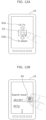
- FIGs. 14A and 14B are diagram showing a sixth variation (an example of a download operation) of the embodiment.
- FIG. 14A shows an example of an operation performed with a finger
- FIG. 14B shows an example of an operation performed with two fingers.
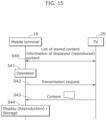
- FIG. 15 is a diagram showing a communication sequence in a communication system 1 in the sixth variation. Here for simplicity, FIG. 15 does not illustrate a router 30.
- a content icon 72a associated with content stored in the storage unit 25 of the TV 20 and an icon 72b associated with the content displayed (reproduced) on the display screen 23 of the TV 20 at the time point (hereinafter these icons 72a and 72b are collectively referred to as "display device content icons 72").
- the mobile terminal 10 requests the TV 20 to transmit a list of content items stored in the TV 20, obtains the list from the TV 20, and displays the icon 72a on the display screen 13b based on the obtained list (S40 of FIG. 15 ).
- the TV 20 periodically transmits, to the mobile terminal 10, information identifying content that is displayed (reproduced) on the display screen 23 of the TV 20 (or provides a notification that content is displayed on the display screen 23).
- the mobile terminal 10 displays the received information or the icon 72b corresponding to the notification on the display screen 13b (S40 of FIG. 15 ).
- the control unit 12 of the mobile terminal 10 transmits the transmission request for the content 73 associated with the display device content icon 72 to the TV 20 (S42 of FIG. 15 ).
- the control unit 22 of the TV 20 reads the requested content 73 from the storage unit 25 of the TV 20 or the memory for display, and transmits the read content 73 to the mobile terminal 10 ((b) of FIG.
- the content stored in the TV 20 and the display device content icon 72 which is the icon associated with the content displayed on the TV 20 are displayed on the display screen 13b of the mobile terminal 10.
- the control unit 12 of the mobile terminal 10 obtains the content 73 associated with the display device content icon 72.
- control unit 22 of the TV 20 in this variation displays the content received by the receiving unit 26 on the display screen 23, and notifies, through the communication I/F unit 24, the mobile terminal 10 of the fact that the content is displayed on the display screen 23.
- the control unit 22 of the TV 20 transmits the content to the mobile terminal 10 through the communication I/F unit 24.
- the user can download the content displayed (reproduced) on the TV 20 at the time point to the mobile terminal 10 at hand, and views the content by displaying (reproducing) the content on the mobile terminal 10 at hand.
- both of the icon 72a associated with the content stored in the storage unit 25 of the TV 20 and the icon 72b associated with the content displayed (reproduced) on the display screen 23 of the TV 20 at the time point are displayed.
- only one of the icons 72a and 72b is displayed instead.
- Such a case is a case where no content is stored in the storage unit 25 of the TV 20, or where the content is displayed (reproduced) on the display screen 23 of the TV 20 at the time point.
- the present disclosure is not limited to the embodiment and variations thereof.
- the present disclosure includes embodiments obtained by adding various kinds of modifications that persons skilled in the art may arrive at to the embodiment and variations, and embodiments obtainable by arbitrarily combining the various kinds of functions and procedures described in the embodiment and variations, provided they fall under the scope of the claims, which solely define the invention.
- the guides are displayed at the upper and lower parts of the display screen 13b.
- a guide may be displayed only one of the parts, or in one or more directions (right, left, upper right, lower right, upper left, or/and lower left).
- the directions such as the upper and lower directions on the display screen 13b may be (absolute) directions which do not depend on the orientation of the mobile terminal 10, or may be (relative) directions which depend on the orientation of the mobile terminal 10.
- the orientation of the mobile terminal changes (for example, from portrait to landscape)
- the displayed content on the display screen is rotated accordingly, and thus the (relative) upper and lower directions may be defined with respect to the displayed content on the display screen.
- the external device which is the transmission destination of the content etc. is the display device (TV 20).
- the external device may be a device of another kind such as an audio reproduction device.
- the mobile terminal 10 may transmit the music content to the audio reproduction device which is the external device, and the audio reproduction device may reproduce the music content.
- the content that is a transmission target is not limited to an image only, and may be music, a script for controlling the device, etc.
- the control unit 12 regards the operation is cancelled, and returns to a normal state (in which the display unit 13 is untouched).
- an operation that is to be employed among the exclusive operations may be determined by setting in advance in the mobile terminal 10 (by storing setting information in the storage unit 15).
- a “flick” operation in each of the embodiment and the variations thereof may be an operation called a "swipe". Both of the operations are operations of tracking a target on the display screen in a particular direction with one or more fingers touched on the target. Thus, it is possible to employ such a swipe operation in any of the embodiment and variations. Accordingly, the "flick" in any of the embodiments and variations may be read as a “swipe” or a “flick or swipe".
- the number of fingers and one or more functions assigned thereto are arbitrary.
- functions of reproducing and storing a target at the same time may be assigned, or a function for transmitting a raw GUI which is currently being displayed on the mobile terminal 10 to the TV 20 and causing the TV 20 to display the GUI.
- a function using WiFiMiracast (R) may be used as a technique for transmitting the GUI.
- the structural elements described in the attached drawings and detailed embodiments may include not only structural elements which are essential for solving the problem but also structural elements which are not essential for solving the problem but are provided for illustrating the techniques. Therefore, the non-essential structural elements described in the attached drawings and/or the detailed embodiments should not be instantly acknowledged to be essential structural elements.
- the subject of the present disclosure is applicable as a mobile terminal and a television broadcast receiver each mounting a touch panel, for example, as a smart phone, a tablet PC, and a television receiver, and especially as a mobile terminal and a television broadcast receiver each having a function of linking with an external device which is connected through a communication path.
Landscapes
- Engineering & Computer Science (AREA)
- Signal Processing (AREA)
- Theoretical Computer Science (AREA)
- Multimedia (AREA)
- Human Computer Interaction (AREA)
- General Engineering & Computer Science (AREA)
- Physics & Mathematics (AREA)
- General Physics & Mathematics (AREA)
- Computer Networks & Wireless Communication (AREA)
- Databases & Information Systems (AREA)
- User Interface Of Digital Computer (AREA)
- Two-Way Televisions, Distribution Of Moving Picture Or The Like (AREA)
- Telephone Function (AREA)
Claims (9)
- Mobiles Endgerät (10), das angepasst ist, über einen Kommunikationspfad mit einer externen Anzeigevorrichtung (20) verbunden zu werden, wobei das mobile Endgerät (10) Folgendes umfasst:eine Kommunikationsschnittstelleneinheit (14) zum Kommunizieren mit der externen Anzeigevorrichtung (20);eine Speichereinheit (15), die dazu ausgelegt ist, eine Vielzahl von Inhaltselementen zu speichern, die auf der externen Anzeigevorrichtung (20) anzuzeigen sind;eine Anzeigeeinheit (13) die ein Touchpad (13a) und einen Anzeigebildschirm (13b) aufweist; undeine Steuereinheit (12), die, wenn das mobile Endgerät über einen Kommunikationspfad mit der externen Anzeigevorrichtung verbunden ist, dazu ausgelegt ist, eine Vielzahl von Inhaltssymbolen, die jeweils mit der Vielzahl von Inhaltselementen verknüpft sind, zusammen auf dem Anzeigebildschirm (13b) anzuzeigen,wobei, wenn die Steuereinheit (12) detektiert, dass ein Inhaltssymbol der Vielzahl von Inhaltssymbolen über eine vorbestimmte Zeitdauer mit einem Finger gedrückt und gehalten und dann auf der Anzeigeeinheit (13) durch Berühren und Gleiten auf der Anzeigeeinheit (13) mit einem Finger geschoben wird, die Steuereinheit (12), während das mobile Endgerät über einen Kommunikationspfad mit der externen Anzeigevorrichtung verbunden ist, dazu ausgelegt ist, ein Inhaltselement, das in der Vielzahl von Inhaltselementen beinhaltet und mit dem Inhaltssymbol der Vielzahl von Inhaltssymbolen verknüpft ist, aus der Speichereinheit (15) zu lesen und das Inhaltselement über die Kommunikationsschnittstelleneinheit (14) zur externen Anzeigevorrichtung (20) zu übertragen, derart, dass das Inhaltselement auf der externen Anzeigevorrichtung (20) angezeigt wird,wobei, wenn detektiert wird, dass das Inhaltssymbol gedrückt und gehalten wird, die Steuereinheit (12), während das mobile Endgerät über einen Kommunikationspfad mit der externen Anzeigevorrichtung verbunden ist, dazu ausgelegt ist, ein Anzeigevorrichtungssymbol, bei dem es sich um ein Symbol handelt, das mit der externen Anzeigevorrichtung (20) verknüpft ist, in einer vorbestimmten Position auf dem Anzeigebildschirm (13b) anzuzeigen und das Inhaltselement zu übertragen, wenn das Inhaltssymbol zum Anzeigevorrichtungssymbol geschoben wird,wobei die Steuereinheit (12), während das mobile Endgerät über einen Kommunikationspfad mit der externen Anzeigevorrichtung verbunden ist, ferner zu Folgendem ausgelegt ist:Anzeigen eines mobilen Endgerätesymbols (47), bei dem es sich um ein Symbol handelt, das mit dem mobilen Endgerät (10) verknüpft ist, in einer vorbestimmten Position auf dem Anzeigebildschirm (13b), wenn detektiert wird, dass das Inhaltssymbol gedrückt und gehalten wird; undLesen des Inhalts in der Speichereinheit (15) und Anzeigen des Inhaltselements auf dem Anzeigebildschirm (13b), wenn das Inhaltssymbol zum mobilen Endgerätesymbol (47) geschoben wird, undwobei, wenn die Steuereinheit detektiert, dass das Inhaltssymbol der Vielzahl von Inhaltssymbolen mit einem Finger gedrückt und gehalten und der Finger, nachdem er für eine gewisse Zeitdauer bei derselben Koordinate oder um dieselbe Koordinate herum verblieben ist, gelöst wird, die Steuereinheit sieht, dass die Operation abgebrochen ist und zum Zustand zurückkehrt, in dem die Anzeigeeinheit (13) nicht berührt wird.
- Mobiles Endgerät (10) nach Anspruch 1,wobei die Speichereinheit (15) ferner dazu ausgelegt ist, eine erste Webseite zu speichern, unddie Steuereinheit (12) ist, während das mobile Endgerät über einen Kommunikationspfad mit der externen Anzeigevorrichtung verbunden ist, ferner zu Folgendem ausgelegt:Lesen der ersten Webseite in der Speichereinheit (15) und Anzeigen der ersten Webseite auf dem Anzeigebildschirm (13b); undwenn detektiert wird, dass die erste Webseite gedrückt und gehalten und dann in eine erste Richtung auf der Anzeigeeinheit (13) geschoben wird, Übertragen von Lageinformationen auf der ersten Webseite über die Kommunikationsschnittstelleneinheit (14) zur externen Anzeigevorrichtung (20), derart, dass die erste Webseite auf der externen Anzeigevorrichtung (20) angezeigt wird.
- Mobiles Endgerät (10) nach Anspruch 2,
wobei, wenn detektiert wird, dass die erste Webseite gedrückt und gehalten und dann in eine zweite Richtung auf der Anzeigeeinheit (13) geschoben wird, die Steuereinheit (12), wenn das mobile Endgerät über einen Kommunikationspfad mit der externen Anzeigevorrichtung verbunden ist, ferner zu Folgendem ausgelegt ist:Anweisen der externen Anzeigevorrichtung (20), Lageinformationen einer zweiten Webseite zu übertragen, die auf der externen Anzeigevorrichtung (20) angezeigt wird, derart, dass die zweite Webseite auf dem Anzeigebildschirm (13b) angezeigt wird;Empfangen der Lageinformationen, die von der externen Anzeigevorrichtung (20) übertragen werden, über die Kommunikationsschnittstelleneinheit (14);Erhalten der zweiten Webseite auf Basis der empfangenen Lageinformationen; undAnzeigen der zweiten Webseite auf dem Anzeigebildschirm (13b) . - Mobiles Endgerät (10) nach Anspruch 2,
wobei die Steuereinheit (12), während das mobile Endgerät über einen Kommunikationspfad mit der externen Anzeigevorrichtung verbunden ist, ferner zu Folgendem ausgelegt ist:Anzeigen eines Verbindungssymbols (56), das mit den Lageinformationen einer zweiten Webseite auf dem Anzeigebildschirm (13b) verknüpft ist; undwenn detektiert wird, dass das Verbindungssymbol (56) gedrückt und gehalten und dann auf der Anzeigeeinheit (13) geschoben wird, Übertragen der Lageinformationen über die Kommunikationsschnittstelleneinheit (14) zur externen Anzeigevorrichtung (20), derart, dass die zweite Webseite auf der externen Anzeigevorrichtung (20) angezeigt wird. - Mobiles Endgerät (10) nach Anspruch 1,
wobei die Steuereinheit (12), während das mobile Endgerät über einen Kommunikationspfad mit der externen Anzeigevorrichtung verbunden ist, zu Folgendem ausgelegt ist:Anzeigen eines Ordnersymbols (60), bei dem es sich um ein Symbol handelt, das mit der Vielzahl von Inhaltselementen verknüpft ist, auf dem Anzeigebildschirm (13b); undwenn detektiert wird, dass das Ordnersymbol (60) auf der Anzeigeeinheit (13) gedrückt und gehalten wird, Lesen der Vielzahl von Inhaltselementen in der Speichereinheit (15) und erneutes Übertragen der Vielzahl von Inhaltselementen über die Kommunikationsschnittstelleneinheit (14) zur externen Anzeigevorrichtung (20), derart, dass die Vielzahl von Inhaltselementen auf der externen Anzeigevorrichtung (20) sequenziell oder zusammen angezeigt wird. - Mobiles Endgerät (10) nach Anspruch 1,
wobei die Steuereinheit (12), während das mobile Endgerät über einen Kommunikationspfad mit der externen Anzeigevorrichtung verbunden ist, ferner zu Folgendem ausgelegt ist:wenn detektiert wird, dass das Inhaltssymbol mit einem Finger gedrückt und gehalten und dann in eine erste Richtung geschoben wird, Übertragen des Inhaltselements zur externen Anzeigevorrichtung (20) und Veranlassen der externen Anzeigevorrichtung (20), das Inhaltselement anzuzeigen; undwenn detektiert wird, dass das Inhaltssymbol mit zwei Fingern gedrückt und dann in die erste Richtung geschoben wird, Übertragen des Inhaltselements zur externen Anzeigevorrichtung (20) und Veranlassen der externen Anzeigevorrichtung (20), das Inhaltselement intern zu speichern. - Mobiles Endgerät (10) nach Anspruch 1,
wobei die Steuereinheit (12), während das mobile Endgerät über einen Kommunikationspfad mit der externen Anzeigevorrichtung verbunden ist, ferner zu Folgendem ausgelegt ist:Anzeigen eines Anzeigevorrichtungsinhaltssymbols (72), bei dem es sich um ein Symbol handelt, das mit mindestens einem von Inhaltselementen, die in der externen Anzeigevorrichtung (20) gespeichert sind, und Inhaltselementen, die auf der externen Anzeigevorrichtung (20) angezeigt werden, handelt, auf dem Anzeigebildschirm (13b); undwenn detektiert wird, dass das Anzeigevorrichtungsinhaltssymbol (72) gedrückt wird, Erhalten des Inhaltselements, das mit dem Anzeigevorrichtungsinhaltssymbol (72) verknüpft ist, von der externen Anzeigevorrichtung (20). - Mobiles Endgerät (10) nach Anspruch 7,
wobei die Steuereinheit (12), während das mobile Endgerät über einen Kommunikationspfad mit der externen Anzeigevorrichtung verbunden ist, zu Folgendem ausgelegt ist:wenn detektiert wird, dass das Anzeigevorrichtungsinhaltssymbol (72) mit einem Finger gedrückt und gehalten und dann in eine zweite Richtung geschoben wird, Erhalten des Inhaltselements, das mit dem Anzeigevorrichtungsinhaltssymbol (72) verknüpft ist, von der externen Anzeigevorrichtung (20) und Anzeigen des Stücks Inhalt auf dem Anzeigebildschirm (13b); undwenn detektiert wird, dass das Anzeigevorrichtungsinhaltssymbol (72) mit zwei Fingern in die zweite Richtung geschoben wird, Erhalten des Inhaltselements, das mit dem Anzeigevorrichtungsinhaltssymbol (72) verknüpft ist, von der externen Anzeigevorrichtung (20) und Speichern des Inhaltselements in der Speichereinheit (15). - Vorrichtungsverlinkungsverfahren, das von einem mobilen Endgerät (10) auszuführen ist, das über einen Kommunikationspfad mit einer externen Anzeigevorrichtung (20) verbunden ist,
wobei das mobile Endgerät (10) Folgendes beinhaltet:eine Kommunikationsschnittstelleneinheit (14) zum Kommunizieren mit der externen Anzeigevorrichtung (20);eine Speichereinheit (15), die dazu ausgelegt ist, eine Vielzahl von Inhaltselementen zu speichern, die auf der externen Anzeigevorrichtung (20) anzuzeigen sind; undeine Anzeigeeinheit (13), die ein Touchpad (13a) und einen Anzeigebildschirm (13b) aufweist,wobei das Vorrichtungsverlinkungsverfahren Folgendes umfasst:Anzeigen einer Vielzahl von Inhaltssymbolen, die jeweils mit der Vielzahl von Inhaltselementen verknüpft sind, zusammen auf dem Anzeigebildschirm (13b); undwenn detektiert wird, dass ein Inhaltssymbol der Vielzahl von Inhaltssymbolen über eine vorbestimmte Zeitdauer mit einem Finger gedrückt und gehalten und dann auf der Anzeigeeinheit (13) durch Berühren und Gleiten auf der Anzeigeeinheit (13) mit einem Finger geschoben wird, Lesen eines Inhaltselements, das in der Vielzahl von Inhaltselementen beinhaltet und mit dem Inhaltssymbol der Vielzahl von Inhaltssymbolen verknüpft ist, aus der Speichereinheit (15) und Übertragen des Inhaltselements über die Kommunikationsschnittstelleneinheit (14) zur externen Anzeigevorrichtung (20), derart, dass das Inhaltselement auf der externen Anzeigevorrichtung (20) angezeigt wird,wobei, wenn detektiert wird, dass das Inhaltssymbol gedrückt und gehalten wird, Anzeigen eines Anzeigevorrichtungssymbols (72), bei dem es sich um ein Symbol handelt, das mit der externen Anzeigevorrichtung (20) verknüpft ist, in einer vorbestimmten Position auf dem Anzeigebildschirm (13b) und Übertragen des Inhaltselements, wenn das Inhaltssymbol zum Anzeigevorrichtungssymbol (72) geschoben wird, undAnzeigen eines mobilen Endgerätesymbols (47), bei dem es sich um ein Symbol handelt, das mit dem mobilen Endgerät (10) verknüpft ist, in einer vorbestimmten Position auf dem Anzeigebildschirm (13b), wenn detektiert wird, dass das Inhaltssymbol gedrückt und gehalten wird; undLesen des Inhalts in der Speichereinheit (15) und Anzeigen des Inhaltselements auf dem Anzeigebildschirm (13b), wenn das Inhaltssymbol zum mobilen Endgerätesymbol (47) geschoben wird, undwobei, wenn detektiert wird, dass das Inhaltssymbol der Vielzahl von Inhaltssymbolen mit einem Finger gedrückt und gehalten und der Finger, nachdem er für eine gewisse Zeitdauer bei derselben Koordinate oder um dieselbe Koordinate herum verblieben ist, gelöst wird, Abbrechen der Operation und Zurückkehren zu dem Zustand, in dem die Anzeigeeinheit (13) nicht berührt wird.
Applications Claiming Priority (2)
| Application Number | Priority Date | Filing Date | Title |
|---|---|---|---|
| JP2012014619 | 2012-01-26 | ||
| PCT/JP2012/008103 WO2013111239A1 (ja) | 2012-01-26 | 2012-12-19 | 携帯端末、テレビ放送受信装置及び機器連携方法 |
Publications (3)
| Publication Number | Publication Date |
|---|---|
| EP2808773A1 EP2808773A1 (de) | 2014-12-03 |
| EP2808773A4 EP2808773A4 (de) | 2015-12-16 |
| EP2808773B1 true EP2808773B1 (de) | 2025-03-05 |
Family
ID=48873017
Family Applications (1)
| Application Number | Title | Priority Date | Filing Date |
|---|---|---|---|
| EP12866773.0A Active EP2808773B1 (de) | 2012-01-26 | 2012-12-19 | Mobiles endgerät, fernsehsendungsempfänger und vorrichtungsverknüpfungsverfahren |
Country Status (4)
| Country | Link |
|---|---|
| US (3) | US9226015B2 (de) |
| EP (1) | EP2808773B1 (de) |
| JP (2) | JP5999452B2 (de) |
| WO (1) | WO2013111239A1 (de) |
Families Citing this family (80)
| Publication number | Priority date | Publication date | Assignee | Title |
|---|---|---|---|---|
| US8875180B2 (en) * | 2010-12-10 | 2014-10-28 | Rogers Communications Inc. | Method and device for controlling a video receiver |
| US8769624B2 (en) | 2011-09-29 | 2014-07-01 | Apple Inc. | Access control utilizing indirect authentication |
| US9002322B2 (en) | 2011-09-29 | 2015-04-07 | Apple Inc. | Authentication with secondary approver |
| EP2808773B1 (de) * | 2012-01-26 | 2025-03-05 | Panasonic Holdings Corporation | Mobiles endgerät, fernsehsendungsempfänger und vorrichtungsverknüpfungsverfahren |
| KR102027357B1 (ko) * | 2012-04-24 | 2019-10-01 | 삼성전자주식회사 | 외부 기기의 스크린 상에 디스플레이된 정보를 탐색하는 터치 스크린을 가지는 휴대용 기기 및 그의 정보 탐색 방법 |
| CN105190522B (zh) * | 2013-03-13 | 2018-10-23 | 歌乐株式会社 | 显示装置 |
| JP6270325B2 (ja) * | 2013-03-15 | 2018-01-31 | キヤノン株式会社 | 情報処理装置およびその制御方法 |
| WO2014143776A2 (en) | 2013-03-15 | 2014-09-18 | Bodhi Technology Ventures Llc | Providing remote interactions with host device using a wireless device |
| KR102064952B1 (ko) * | 2013-07-12 | 2020-01-10 | 삼성전자주식회사 | 수신 데이터를 이용하여 어플리케이션을 운영하는 전자 장치 |
| JP6277626B2 (ja) | 2013-08-08 | 2018-02-14 | 株式会社リコー | 再生システム、再生制御システム、情報端末、表示装置、再生制御プログラム及び再生制御方法 |
| JP6319970B2 (ja) * | 2013-08-20 | 2018-05-09 | キヤノン株式会社 | 画像通信装置およびその制御方法 |
| JP5882973B2 (ja) * | 2013-10-11 | 2016-03-09 | Necパーソナルコンピュータ株式会社 | 情報処理装置、方法及びプログラム |
| WO2015063361A1 (en) | 2013-10-28 | 2015-05-07 | Nokia Technologies Oy | Causing rendering of a content item segment on a bead apparatus |
| JP6054892B2 (ja) * | 2014-01-14 | 2016-12-27 | レノボ・シンガポール・プライベート・リミテッド | 複数のディスプレイに対するアプリケーション画像の表示方法、電子機器およびコンピュータ・プログラム |
| JP6381106B2 (ja) * | 2014-01-31 | 2018-08-29 | 日本放送協会 | 受信装置、端末装置、および放送通信連携システム |
| JP2015162801A (ja) * | 2014-02-27 | 2015-09-07 | パイオニア株式会社 | 通信装置、制御方法、プログラム、及び記憶媒体 |
| US20150253946A1 (en) * | 2014-03-10 | 2015-09-10 | Verizon Patent And Licensing Inc. | Method and apparatus for transferring files based on user interaction |
| CN106063285A (zh) | 2014-03-11 | 2016-10-26 | 索尼公司 | 信息处理设备、信息处理系统和信息处理方法 |
| EP3121732B1 (de) * | 2014-03-19 | 2020-06-10 | Sony Corporation | Informationsverarbeitungsvorrichtung, informationsverarbeitungssystem und informationsverarbeitungsverfahren |
| US11343335B2 (en) | 2014-05-29 | 2022-05-24 | Apple Inc. | Message processing by subscriber app prior to message forwarding |
| US9967401B2 (en) | 2014-05-30 | 2018-05-08 | Apple Inc. | User interface for phone call routing among devices |
| US20170192730A1 (en) | 2014-05-30 | 2017-07-06 | Apple Inc. | Continuity |
| KR20150142347A (ko) * | 2014-06-11 | 2015-12-22 | 삼성전자주식회사 | 사용자 단말 및 이의 제어 방법, 그리고 멀티미디어 시스템 |
| KR20150144641A (ko) * | 2014-06-17 | 2015-12-28 | 삼성전자주식회사 | 사용자 단말 장치 및 그 제어 방법 |
| US10418034B1 (en) * | 2014-06-20 | 2019-09-17 | Nvoq Incorporated | Systems and methods for a wireless microphone to access remotely hosted applications |
| EP4036685A1 (de) | 2014-06-27 | 2022-08-03 | Apple Inc. | Benutzerschnittstelle mit reduzierter grösse |
| TWI616808B (zh) * | 2014-06-30 | 2018-03-01 | 緯創資通股份有限公司 | 分享顯示畫面的方法及裝置 |
| WO2016014601A2 (en) | 2014-07-21 | 2016-01-28 | Apple Inc. | Remote user interface |
| EP3742272B1 (de) | 2014-08-02 | 2022-09-14 | Apple Inc. | Kontextspezifische benutzeroberflächen |
| US10339293B2 (en) | 2014-08-15 | 2019-07-02 | Apple Inc. | Authenticated device used to unlock another device |
| JP6187547B2 (ja) * | 2014-08-29 | 2017-08-30 | キヤノンマーケティングジャパン株式会社 | 情報処理装置、その制御方法、及びプログラム、並びに、情報処理システム、その制御方法、及びプログラム |
| CN115665320B (zh) | 2014-09-02 | 2024-10-11 | 苹果公司 | 电子设备、存储介质和用于操作电子设备的方法 |
| JP2016063304A (ja) * | 2014-09-16 | 2016-04-25 | セイコーインスツル株式会社 | 通信システム、電子機器、通信方法及びプログラム |
| JP6482862B2 (ja) * | 2014-12-25 | 2019-03-13 | 株式会社トルク | コンテンツ転送方法 |
| CN105808089A (zh) * | 2014-12-30 | 2016-07-27 | 联想(北京)有限公司 | 一种数据传输方法及第一电子设备 |
| JP2016129579A (ja) * | 2015-01-14 | 2016-07-21 | 株式会社コロプラ | インターフェースプログラム及びゲームプログラム |
| US10055121B2 (en) | 2015-03-07 | 2018-08-21 | Apple Inc. | Activity based thresholds and feedbacks |
| US10567477B2 (en) | 2015-03-08 | 2020-02-18 | Apple Inc. | Virtual assistant continuity |
| US10102824B2 (en) * | 2015-05-19 | 2018-10-16 | Microsoft Technology Licensing, Llc | Gesture for task transfer |
| KR20160147441A (ko) * | 2015-06-15 | 2016-12-23 | 엘지전자 주식회사 | 이동 단말기 및 그의 동작 방법 |
| JP2017072951A (ja) * | 2015-10-06 | 2017-04-13 | キヤノン株式会社 | 表示処理装置およびその制御方法 |
| CN109901765B (zh) | 2015-10-06 | 2022-06-21 | 佳能株式会社 | 电子设备及其控制方法 |
| CN105578231B (zh) * | 2015-12-18 | 2018-11-27 | 网易(杭州)网络有限公司 | 游戏控制方法、装置及系统 |
| CN105635820B (zh) * | 2015-12-30 | 2019-04-16 | 深圳Tcl数字技术有限公司 | 智能设备启动方法及装置 |
| KR102442527B1 (ko) * | 2016-02-26 | 2022-09-13 | 엘지전자 주식회사 | 무선 디바이스 |
| JP6428693B2 (ja) * | 2016-03-28 | 2018-11-28 | 京セラドキュメントソリューションズ株式会社 | 表示操作装置及び操作指示受付プログラム |
| JP6455476B2 (ja) * | 2016-03-28 | 2019-01-23 | 京セラドキュメントソリューションズ株式会社 | 表示操作装置及び操作指示受付プログラム |
| DK179186B1 (en) | 2016-05-19 | 2018-01-15 | Apple Inc | REMOTE AUTHORIZATION TO CONTINUE WITH AN ACTION |
| AU2017100667A4 (en) | 2016-06-11 | 2017-07-06 | Apple Inc. | Activity and workout updates |
| DK201670622A1 (en) | 2016-06-12 | 2018-02-12 | Apple Inc | User interfaces for transactions |
| KR20180005377A (ko) * | 2016-07-06 | 2018-01-16 | 엘지전자 주식회사 | 이동단말기 및 그 제어 방법, 디스플레이 디바이스 및 그 제어 방법 |
| EP3534342A4 (de) * | 2016-10-27 | 2020-06-24 | Patlite Corporation | Signalanzeigelampensystem und signalanzeigelampe dafür |
| US11132167B2 (en) * | 2016-12-29 | 2021-09-28 | Samsung Electronics Co., Ltd. | Managing display of content on one or more secondary device by primary device |
| KR20180081390A (ko) * | 2017-01-06 | 2018-07-16 | 삼성전자주식회사 | 전자 장치 및 그 동작방법 |
| KR102681312B1 (ko) * | 2017-02-17 | 2024-07-04 | 삼성전자주식회사 | 화면을 공유하기 위한 전자 장치 및 방법 |
| US10992795B2 (en) | 2017-05-16 | 2021-04-27 | Apple Inc. | Methods and interfaces for home media control |
| US11431836B2 (en) | 2017-05-02 | 2022-08-30 | Apple Inc. | Methods and interfaces for initiating media playback |
| US20220279063A1 (en) | 2017-05-16 | 2022-09-01 | Apple Inc. | Methods and interfaces for home media control |
| CN111343060B (zh) | 2017-05-16 | 2022-02-11 | 苹果公司 | 用于家庭媒体控制的方法和界面 |
| JP2019008365A (ja) * | 2017-06-20 | 2019-01-17 | シャープ株式会社 | 表示装置及びプログラム |
| US11188287B2 (en) | 2017-12-27 | 2021-11-30 | Sony Corporation | Display control apparatus, display control method, and computer program |
| KR102404364B1 (ko) * | 2018-01-25 | 2022-06-07 | 삼성전자주식회사 | 외부 전자 장치와 페어링되는 전자 장치 및 그 전자 장치의 제어 방법 |
| CN108595137B (zh) * | 2018-04-25 | 2021-05-04 | 广州视源电子科技股份有限公司 | 无线投屏方法、装置和投屏器 |
| JP7000289B2 (ja) * | 2018-09-19 | 2022-01-19 | 株式会社コロプラ | プログラム、情報処理装置、および方法 |
| JP7373294B2 (ja) * | 2019-04-12 | 2023-11-02 | 株式会社ソニー・インタラクティブエンタテインメント | 画像処理装置、画像提供サーバ、画像表示方法、および画像提供方法 |
| EP4525423A3 (de) | 2019-05-31 | 2025-05-28 | Apple Inc. | Benutzerschnittstellen zur audiomediensteuerung |
| US10996917B2 (en) | 2019-05-31 | 2021-05-04 | Apple Inc. | User interfaces for audio media control |
| US11477609B2 (en) | 2019-06-01 | 2022-10-18 | Apple Inc. | User interfaces for location-related communications |
| US11481094B2 (en) | 2019-06-01 | 2022-10-25 | Apple Inc. | User interfaces for location-related communications |
| US12175154B2 (en) * | 2019-06-05 | 2024-12-24 | K-Tronics (Suzhou) Technology Co., Ltd. | Electronic board, system and control method for controlling electronic board |
| US11340921B2 (en) * | 2019-06-28 | 2022-05-24 | Snap Inc. | Contextual navigation menu |
| CN115793950A (zh) | 2019-08-29 | 2023-03-14 | 荣耀终端有限公司 | 一种应用于投屏场景的控制方法以及相关设备 |
| US11392291B2 (en) | 2020-09-25 | 2022-07-19 | Apple Inc. | Methods and interfaces for media control with dynamic feedback |
| JP7087046B2 (ja) * | 2020-11-25 | 2022-06-20 | 株式会社コロプラ | プログラム、情報処理装置、および方法 |
| US11847378B2 (en) | 2021-06-06 | 2023-12-19 | Apple Inc. | User interfaces for audio routing |
| EP4654592A2 (de) | 2021-06-06 | 2025-11-26 | Apple Inc. | Benutzerschnittstellen für audiorouting |
| CN113986427B (zh) * | 2021-10-26 | 2025-08-22 | 维沃移动通信有限公司 | 对象显示方法、装置、电子设备及存储介质 |
| CN116204250B (zh) * | 2021-11-30 | 2025-08-26 | 腾讯科技(深圳)有限公司 | 基于会话的信息展示方法、装置、设备、介质及程序产品 |
| US12131009B2 (en) * | 2022-01-13 | 2024-10-29 | Motorola Mobility Llc | Configuring an external presentation device based on user handedness |
| US11726734B2 (en) | 2022-01-13 | 2023-08-15 | Motorola Mobility Llc | Configuring an external presentation device based on an impairment of a user |
Citations (5)
| Publication number | Priority date | Publication date | Assignee | Title |
|---|---|---|---|---|
| US20090298419A1 (en) * | 2008-05-28 | 2009-12-03 | Motorola, Inc. | User exchange of content via wireless transmission |
| US20100149096A1 (en) * | 2008-12-17 | 2010-06-17 | Migos Charles J | Network management using interaction with display surface |
| US20110035691A1 (en) * | 2009-08-04 | 2011-02-10 | Lg Electronics Inc. | Mobile terminal and icon collision controlling method thereof |
| US20110083111A1 (en) * | 2009-10-02 | 2011-04-07 | Babak Forutanpour | User interface gestures and methods for providing file sharing functionality |
| EP2395416A1 (de) * | 2009-02-04 | 2011-12-14 | Sony Corporation | Informationsverarbeitungsvorrichtung, informationsverarbeitungsverfahren und programm |
Family Cites Families (18)
| Publication number | Priority date | Publication date | Assignee | Title |
|---|---|---|---|---|
| US20060241864A1 (en) * | 2005-04-22 | 2006-10-26 | Outland Research, Llc | Method and apparatus for point-and-send data transfer within an ubiquitous computing environment |
| JP5194673B2 (ja) * | 2007-09-26 | 2013-05-08 | 株式会社日立製作所 | 携帯端末、及び情報の送受信方法 |
| US8059111B2 (en) * | 2008-01-21 | 2011-11-15 | Sony Computer Entertainment America Llc | Data transfer using hand-held device |
| US8458363B2 (en) * | 2008-06-08 | 2013-06-04 | Apple Inc. | System and method for simplified data transfer |
| US20100205628A1 (en) * | 2009-02-12 | 2010-08-12 | Davis Bruce L | Media processing methods and arrangements |
| US8321802B2 (en) * | 2008-11-13 | 2012-11-27 | Qualcomm Incorporated | Method and system for context dependent pop-up menus |
| CN101751286B (zh) | 2008-11-28 | 2015-05-13 | 汉达精密电子(昆山)有限公司 | 直觉化档案传输方法 |
| JP2010141545A (ja) * | 2008-12-11 | 2010-06-24 | Sharp Corp | 広告表示装置、広告配信システム及びプログラム |
| US8813166B2 (en) * | 2008-12-15 | 2014-08-19 | Centurylink Intellectual Property Llc | System and method for transferring a partially viewed media content file |
| US8547342B2 (en) * | 2008-12-22 | 2013-10-01 | Verizon Patent And Licensing Inc. | Gesture-based delivery from mobile device |
| US8407756B2 (en) * | 2009-09-22 | 2013-03-26 | At&T Intellectual Property I, L.P. | Systems and methods for remote web query and image selection exchange to video screen |
| TW201115451A (en) * | 2009-10-20 | 2011-05-01 | Ind Tech Res Inst | A vectoring data transfer system and method based on sensor assisted positioning method |
| US20110163944A1 (en) * | 2010-01-05 | 2011-07-07 | Apple Inc. | Intuitive, gesture-based communications with physics metaphors |
| JP2011217316A (ja) * | 2010-04-02 | 2011-10-27 | Funai Electric Co Ltd | 携帯情報処理装置 |
| JP2011248497A (ja) | 2010-05-25 | 2011-12-08 | Sony Corp | 情報処理装置、コンテンツ表示方法およびコンピュータプログラム |
| US8464184B1 (en) * | 2010-11-30 | 2013-06-11 | Symantec Corporation | Systems and methods for gesture-based distribution of files |
| US9632688B2 (en) * | 2011-03-31 | 2017-04-25 | France Telecom | Enhanced user interface to transfer media content |
| EP2808773B1 (de) * | 2012-01-26 | 2025-03-05 | Panasonic Holdings Corporation | Mobiles endgerät, fernsehsendungsempfänger und vorrichtungsverknüpfungsverfahren |
-
2012
- 2012-12-19 EP EP12866773.0A patent/EP2808773B1/de active Active
- 2012-12-19 WO PCT/JP2012/008103 patent/WO2013111239A1/ja not_active Ceased
- 2012-12-19 US US14/353,385 patent/US9226015B2/en active Active
- 2012-12-19 JP JP2013555013A patent/JP5999452B2/ja active Active
-
2015
- 2015-08-14 US US14/826,269 patent/US9491501B2/en active Active
-
2016
- 2016-06-06 JP JP2016113015A patent/JP6241766B2/ja active Active
- 2016-09-30 US US15/281,762 patent/US20170017458A1/en not_active Abandoned
Patent Citations (5)
| Publication number | Priority date | Publication date | Assignee | Title |
|---|---|---|---|---|
| US20090298419A1 (en) * | 2008-05-28 | 2009-12-03 | Motorola, Inc. | User exchange of content via wireless transmission |
| US20100149096A1 (en) * | 2008-12-17 | 2010-06-17 | Migos Charles J | Network management using interaction with display surface |
| EP2395416A1 (de) * | 2009-02-04 | 2011-12-14 | Sony Corporation | Informationsverarbeitungsvorrichtung, informationsverarbeitungsverfahren und programm |
| US20110035691A1 (en) * | 2009-08-04 | 2011-02-10 | Lg Electronics Inc. | Mobile terminal and icon collision controlling method thereof |
| US20110083111A1 (en) * | 2009-10-02 | 2011-04-07 | Babak Forutanpour | User interface gestures and methods for providing file sharing functionality |
Also Published As
| Publication number | Publication date |
|---|---|
| JP6241766B2 (ja) | 2017-12-06 |
| EP2808773A1 (de) | 2014-12-03 |
| US20150346967A1 (en) | 2015-12-03 |
| US9491501B2 (en) | 2016-11-08 |
| WO2013111239A1 (ja) | 2013-08-01 |
| US20170017458A1 (en) | 2017-01-19 |
| EP2808773A4 (de) | 2015-12-16 |
| JP2016192216A (ja) | 2016-11-10 |
| JP5999452B2 (ja) | 2016-09-28 |
| US9226015B2 (en) | 2015-12-29 |
| JPWO2013111239A1 (ja) | 2015-05-11 |
| US20140282728A1 (en) | 2014-09-18 |
Similar Documents
| Publication | Publication Date | Title |
|---|---|---|
| EP2808773B1 (de) | Mobiles endgerät, fernsehsendungsempfänger und vorrichtungsverknüpfungsverfahren | |
| US9632688B2 (en) | Enhanced user interface to transfer media content | |
| EP2788885B1 (de) | System und verfahren zur freigabe von seiten durch eine vorrichtung | |
| US9569159B2 (en) | Apparatus, systems and methods for presenting displayed image information of a mobile media device on a large display and control of the mobile media device therefrom | |
| US20110285658A1 (en) | Information processing device, information processing method, and program | |
| US20130152024A1 (en) | Electronic device and page zooming method thereof | |
| JP5331935B1 (ja) | 無線による画面表示制御方法及びシステム | |
| EP3309670B1 (de) | Verfahren zur reaktion auf eine bedienungsspur und bedienungsspurreaktionsvorrichtung | |
| EP2693323B1 (de) | Verfahren und vorrichtung zur erstellung virtueller rundgänge in einer mobilen vorrichtung | |
| CN103677985A (zh) | 用于在便携式终端中切换分割视图的设备和方法 | |
| KR20120135694A (ko) | 디바이스에서 제스처를 이용한 웹브라우저 인터페이스 제공 장치 및 방법 | |
| TW201435716A (zh) | 具視覺支應性之剪輯板系統 | |
| US9509733B2 (en) | Program, communication apparatus and control method | |
| US20150339026A1 (en) | User terminal device, method for controlling user terminal device, and multimedia system thereof | |
| US10257411B2 (en) | Electronic device, method, and storage medium for controlling touch operations | |
| CN108228020A (zh) | 一种信息处理方法及终端 | |
| US20160077795A1 (en) | Display apparatus and method of controlling thereof | |
| US9513796B2 (en) | Method and device for controlling contents using touch, recording medium therefor, and user terminal having same | |
| US10779148B2 (en) | Data transmission method and first electronic device | |
| US9548894B2 (en) | Proximity based cross-screen experience App framework for use between an industrial automation console server and smart mobile devices | |
| US20140091986A1 (en) | Information display apparatus, control method, and computer program product | |
| KR20170103378A (ko) | 모바일 게임에서의 화면 제어 방법 | |
| KR20140130778A (ko) | 썸네일을 이용한 파일 관리 방법 및 장치 | |
| KR20160087287A (ko) | 전자책 설명을 위한 방송 콘텐츠 제공 방법, 및 이를 수행하는 전자 장치 |
Legal Events
| Date | Code | Title | Description |
|---|---|---|---|
| PUAI | Public reference made under article 153(3) epc to a published international application that has entered the european phase |
Free format text: ORIGINAL CODE: 0009012 |
|
| 17P | Request for examination filed |
Effective date: 20140417 |
|
| AK | Designated contracting states |
Kind code of ref document: A1 Designated state(s): AL AT BE BG CH CY CZ DE DK EE ES FI FR GB GR HR HU IE IS IT LI LT LU LV MC MK MT NL NO PL PT RO RS SE SI SK SM TR |
|
| DAX | Request for extension of the european patent (deleted) | ||
| RIC1 | Information provided on ipc code assigned before grant |
Ipc: G06F 3/0488 20130101AFI20150603BHEP Ipc: G06F 13/00 20060101ALI20150603BHEP Ipc: G06F 3/041 20060101ALI20150603BHEP |
|
| RA4 | Supplementary search report drawn up and despatched (corrected) |
Effective date: 20151117 |
|
| RIC1 | Information provided on ipc code assigned before grant |
Ipc: G06F 13/00 20060101ALI20151111BHEP Ipc: G06F 3/0488 20130101AFI20151111BHEP Ipc: G06F 3/041 20060101ALI20151111BHEP Ipc: H04N 5/44 20110101ALI20151111BHEP |
|
| STAA | Information on the status of an ep patent application or granted ep patent |
Free format text: STATUS: EXAMINATION IS IN PROGRESS |
|
| 17Q | First examination report despatched |
Effective date: 20171127 |
|
| RAP3 | Party data changed (applicant data changed or rights of an application transferred) |
Owner name: PANASONIC HOLDINGS CORPORATION |
|
| REG | Reference to a national code |
Ref country code: DE Ref legal event code: R079 Free format text: PREVIOUS MAIN CLASS: G06F0003048800 Ipc: H04N0021422000 Ref country code: DE Ref legal event code: R079 Ref document number: 602012081401 Country of ref document: DE Free format text: PREVIOUS MAIN CLASS: G06F0003048800 Ipc: H04N0021422000 |
|
| RIC1 | Information provided on ipc code assigned before grant |
Ipc: H04M 1/72412 20210101ALI20240312BHEP Ipc: G06F 3/0488 20130101ALI20240312BHEP Ipc: H04N 21/41 20110101ALI20240312BHEP Ipc: H04N 21/4782 20110101ALI20240312BHEP Ipc: H04N 21/433 20110101ALI20240312BHEP Ipc: H04N 21/432 20110101ALI20240312BHEP Ipc: H04N 21/431 20110101ALI20240312BHEP Ipc: H04N 21/418 20110101ALI20240312BHEP Ipc: H04N 21/422 20110101AFI20240312BHEP |
|
| GRAP | Despatch of communication of intention to grant a patent |
Free format text: ORIGINAL CODE: EPIDOSNIGR1 |
|
| STAA | Information on the status of an ep patent application or granted ep patent |
Free format text: STATUS: GRANT OF PATENT IS INTENDED |
|
| INTG | Intention to grant announced |
Effective date: 20240425 |
|
| GRAJ | Information related to disapproval of communication of intention to grant by the applicant or resumption of examination proceedings by the epo deleted |
Free format text: ORIGINAL CODE: EPIDOSDIGR1 |
|
| STAA | Information on the status of an ep patent application or granted ep patent |
Free format text: STATUS: EXAMINATION IS IN PROGRESS |
|
| INTC | Intention to grant announced (deleted) | ||
| GRAP | Despatch of communication of intention to grant a patent |
Free format text: ORIGINAL CODE: EPIDOSNIGR1 |
|
| STAA | Information on the status of an ep patent application or granted ep patent |
Free format text: STATUS: GRANT OF PATENT IS INTENDED |
|
| INTG | Intention to grant announced |
Effective date: 20241004 |
|
| GRAS | Grant fee paid |
Free format text: ORIGINAL CODE: EPIDOSNIGR3 |
|
| GRAA | (expected) grant |
Free format text: ORIGINAL CODE: 0009210 |
|
| STAA | Information on the status of an ep patent application or granted ep patent |
Free format text: STATUS: THE PATENT HAS BEEN GRANTED |
|
| AK | Designated contracting states |
Kind code of ref document: B1 Designated state(s): AL AT BE BG CH CY CZ DE DK EE ES FI FR GB GR HR HU IE IS IT LI LT LU LV MC MK MT NL NO PL PT RO RS SE SI SK SM TR |
|
| REG | Reference to a national code |
Ref country code: GB Ref legal event code: FG4D |
|
| REG | Reference to a national code |
Ref country code: CH Ref legal event code: EP |
|
| REG | Reference to a national code |
Ref country code: DE Ref legal event code: R096 Ref document number: 602012081401 Country of ref document: DE |
|
| REG | Reference to a national code |
Ref country code: IE Ref legal event code: FG4D |
|
| PG25 | Lapsed in a contracting state [announced via postgrant information from national office to epo] |
Ref country code: RS Free format text: LAPSE BECAUSE OF FAILURE TO SUBMIT A TRANSLATION OF THE DESCRIPTION OR TO PAY THE FEE WITHIN THE PRESCRIBED TIME-LIMIT Effective date: 20250605 |
|
| PG25 | Lapsed in a contracting state [announced via postgrant information from national office to epo] |
Ref country code: FI Free format text: LAPSE BECAUSE OF FAILURE TO SUBMIT A TRANSLATION OF THE DESCRIPTION OR TO PAY THE FEE WITHIN THE PRESCRIBED TIME-LIMIT Effective date: 20250305 |
|
| REG | Reference to a national code |
Ref country code: NL Ref legal event code: MP Effective date: 20250305 |
|
| PG25 | Lapsed in a contracting state [announced via postgrant information from national office to epo] |
Ref country code: ES Free format text: LAPSE BECAUSE OF FAILURE TO SUBMIT A TRANSLATION OF THE DESCRIPTION OR TO PAY THE FEE WITHIN THE PRESCRIBED TIME-LIMIT Effective date: 20250305 |
|
| REG | Reference to a national code |
Ref country code: LT Ref legal event code: MG9D |
|
| PG25 | Lapsed in a contracting state [announced via postgrant information from national office to epo] |
Ref country code: NO Free format text: LAPSE BECAUSE OF FAILURE TO SUBMIT A TRANSLATION OF THE DESCRIPTION OR TO PAY THE FEE WITHIN THE PRESCRIBED TIME-LIMIT Effective date: 20250605 |
|
| PG25 | Lapsed in a contracting state [announced via postgrant information from national office to epo] |
Ref country code: HR Free format text: LAPSE BECAUSE OF FAILURE TO SUBMIT A TRANSLATION OF THE DESCRIPTION OR TO PAY THE FEE WITHIN THE PRESCRIBED TIME-LIMIT Effective date: 20250305 |
|
| PG25 | Lapsed in a contracting state [announced via postgrant information from national office to epo] |
Ref country code: LV Free format text: LAPSE BECAUSE OF FAILURE TO SUBMIT A TRANSLATION OF THE DESCRIPTION OR TO PAY THE FEE WITHIN THE PRESCRIBED TIME-LIMIT Effective date: 20250305 |
|
| PG25 | Lapsed in a contracting state [announced via postgrant information from national office to epo] |
Ref country code: BG Free format text: LAPSE BECAUSE OF FAILURE TO SUBMIT A TRANSLATION OF THE DESCRIPTION OR TO PAY THE FEE WITHIN THE PRESCRIBED TIME-LIMIT Effective date: 20250305 Ref country code: GR Free format text: LAPSE BECAUSE OF FAILURE TO SUBMIT A TRANSLATION OF THE DESCRIPTION OR TO PAY THE FEE WITHIN THE PRESCRIBED TIME-LIMIT Effective date: 20250606 |
|
| REG | Reference to a national code |
Ref country code: AT Ref legal event code: MK05 Ref document number: 1774038 Country of ref document: AT Kind code of ref document: T Effective date: 20250305 |
|
| PG25 | Lapsed in a contracting state [announced via postgrant information from national office to epo] |
Ref country code: NL Free format text: LAPSE BECAUSE OF FAILURE TO SUBMIT A TRANSLATION OF THE DESCRIPTION OR TO PAY THE FEE WITHIN THE PRESCRIBED TIME-LIMIT Effective date: 20250305 |
|
| PG25 | Lapsed in a contracting state [announced via postgrant information from national office to epo] |
Ref country code: SM Free format text: LAPSE BECAUSE OF FAILURE TO SUBMIT A TRANSLATION OF THE DESCRIPTION OR TO PAY THE FEE WITHIN THE PRESCRIBED TIME-LIMIT Effective date: 20250305 |
|
| PG25 | Lapsed in a contracting state [announced via postgrant information from national office to epo] |
Ref country code: PT Free format text: LAPSE BECAUSE OF FAILURE TO SUBMIT A TRANSLATION OF THE DESCRIPTION OR TO PAY THE FEE WITHIN THE PRESCRIBED TIME-LIMIT Effective date: 20250707 |
|
| PG25 | Lapsed in a contracting state [announced via postgrant information from national office to epo] |
Ref country code: PL Free format text: LAPSE BECAUSE OF FAILURE TO SUBMIT A TRANSLATION OF THE DESCRIPTION OR TO PAY THE FEE WITHIN THE PRESCRIBED TIME-LIMIT Effective date: 20250305 Ref country code: IT Free format text: LAPSE BECAUSE OF FAILURE TO SUBMIT A TRANSLATION OF THE DESCRIPTION OR TO PAY THE FEE WITHIN THE PRESCRIBED TIME-LIMIT Effective date: 20250305 |
|
| PG25 | Lapsed in a contracting state [announced via postgrant information from national office to epo] |
Ref country code: AT Free format text: LAPSE BECAUSE OF FAILURE TO SUBMIT A TRANSLATION OF THE DESCRIPTION OR TO PAY THE FEE WITHIN THE PRESCRIBED TIME-LIMIT Effective date: 20250305 |
|
| PG25 | Lapsed in a contracting state [announced via postgrant information from national office to epo] |
Ref country code: CZ Free format text: LAPSE BECAUSE OF FAILURE TO SUBMIT A TRANSLATION OF THE DESCRIPTION OR TO PAY THE FEE WITHIN THE PRESCRIBED TIME-LIMIT Effective date: 20250305 Ref country code: EE Free format text: LAPSE BECAUSE OF FAILURE TO SUBMIT A TRANSLATION OF THE DESCRIPTION OR TO PAY THE FEE WITHIN THE PRESCRIBED TIME-LIMIT Effective date: 20250305 |
|
| PG25 | Lapsed in a contracting state [announced via postgrant information from national office to epo] |
Ref country code: RO Free format text: LAPSE BECAUSE OF FAILURE TO SUBMIT A TRANSLATION OF THE DESCRIPTION OR TO PAY THE FEE WITHIN THE PRESCRIBED TIME-LIMIT Effective date: 20250305 |
|
| PG25 | Lapsed in a contracting state [announced via postgrant information from national office to epo] |
Ref country code: SK Free format text: LAPSE BECAUSE OF FAILURE TO SUBMIT A TRANSLATION OF THE DESCRIPTION OR TO PAY THE FEE WITHIN THE PRESCRIBED TIME-LIMIT Effective date: 20250305 |
|
| PG25 | Lapsed in a contracting state [announced via postgrant information from national office to epo] |
Ref country code: IS Free format text: LAPSE BECAUSE OF FAILURE TO SUBMIT A TRANSLATION OF THE DESCRIPTION OR TO PAY THE FEE WITHIN THE PRESCRIBED TIME-LIMIT Effective date: 20250705 |