EP2784633A2 - Endgerätevorrichtung und Tasteneingabeverfahren - Google Patents
Endgerätevorrichtung und Tasteneingabeverfahren Download PDFInfo
- Publication number
- EP2784633A2 EP2784633A2 EP20140153226 EP14153226A EP2784633A2 EP 2784633 A2 EP2784633 A2 EP 2784633A2 EP 20140153226 EP20140153226 EP 20140153226 EP 14153226 A EP14153226 A EP 14153226A EP 2784633 A2 EP2784633 A2 EP 2784633A2
- Authority
- EP
- European Patent Office
- Prior art keywords
- touch
- key
- processor
- time
- touched
- Prior art date
- Legal status (The legal status is an assumption and is not a legal conclusion. Google has not performed a legal analysis and makes no representation as to the accuracy of the status listed.)
- Withdrawn
Links
Images




Classifications
-
- G—PHYSICS
- G06—COMPUTING OR CALCULATING; COUNTING
- G06F—ELECTRIC DIGITAL DATA PROCESSING
- G06F3/00—Input arrangements for transferring data to be processed into a form capable of being handled by the computer; Output arrangements for transferring data from processing unit to output unit, e.g. interface arrangements
- G06F3/01—Input arrangements or combined input and output arrangements for interaction between user and computer
- G06F3/03—Arrangements for converting the position or the displacement of a member into a coded form
- G06F3/041—Digitisers, e.g. for touch screens or touch pads, characterised by the transducing means
- G06F3/0416—Control or interface arrangements specially adapted for digitisers
- G06F3/0418—Control or interface arrangements specially adapted for digitisers for error correction or compensation, e.g. based on parallax, calibration or alignment
-
- G—PHYSICS
- G06—COMPUTING OR CALCULATING; COUNTING
- G06F—ELECTRIC DIGITAL DATA PROCESSING
- G06F3/00—Input arrangements for transferring data to be processed into a form capable of being handled by the computer; Output arrangements for transferring data from processing unit to output unit, e.g. interface arrangements
- G06F3/01—Input arrangements or combined input and output arrangements for interaction between user and computer
- G06F3/02—Input arrangements using manually operated switches, e.g. using keyboards or dials
- G06F3/023—Arrangements for converting discrete items of information into a coded form, e.g. arrangements for interpreting keyboard generated codes as alphanumeric codes, operand codes or instruction codes
- G06F3/0233—Character input methods
-
- G—PHYSICS
- G06—COMPUTING OR CALCULATING; COUNTING
- G06F—ELECTRIC DIGITAL DATA PROCESSING
- G06F3/00—Input arrangements for transferring data to be processed into a form capable of being handled by the computer; Output arrangements for transferring data from processing unit to output unit, e.g. interface arrangements
- G06F3/01—Input arrangements or combined input and output arrangements for interaction between user and computer
- G06F3/048—Interaction techniques based on graphical user interfaces [GUI]
- G06F3/0487—Interaction techniques based on graphical user interfaces [GUI] using specific features provided by the input device, e.g. functions controlled by the rotation of a mouse with dual sensing arrangements, or of the nature of the input device, e.g. tap gestures based on pressure sensed by a digitiser
- G06F3/0488—Interaction techniques based on graphical user interfaces [GUI] using specific features provided by the input device, e.g. functions controlled by the rotation of a mouse with dual sensing arrangements, or of the nature of the input device, e.g. tap gestures based on pressure sensed by a digitiser using a touch-screen or digitiser, e.g. input of commands through traced gestures
- G06F3/04886—Interaction techniques based on graphical user interfaces [GUI] using specific features provided by the input device, e.g. functions controlled by the rotation of a mouse with dual sensing arrangements, or of the nature of the input device, e.g. tap gestures based on pressure sensed by a digitiser using a touch-screen or digitiser, e.g. input of commands through traced gestures by partitioning the display area of the touch-screen or the surface of the digitising tablet into independently controllable areas, e.g. virtual keyboards or menus
Definitions
- the embodiments discussed herein are related to a terminal device, a key entry method, and a key entry program.
- mobile terminal devices hereafter, also referred to as “mobile terminal” as an abbreviation
- smart phones have been prevalent in place of the conventional mobile telephones having mechanical button keys (hereafter, also referred to as “old-type mobile phone”).
- the toggle entry is an entry system in which one key is allocated with a plurality of characters such as the characters of one row of the Japanese syllabary or three or four characters of the alphabet, and every time a key is pressed down, next character appears sequentially as a candidate for entering text.
- some of the ten-keys on the old-type mobile phones have the convex shapes, which are different from respective keys on its touch surfaces in order to allow a user to distinguish respective keys of the ten-key by the user's feeling in a finger without looking at the ten-key. This supports the text entry by the visually impaired users.
- text entry to a smart phone is often made by the user touching by the user's finger to the touch panel that is laminated on the LCD (Liquid Crystal Display) provided on the surface of the smart phone.
- the ten-key used in the text entry is displayed on the LCD as an image.
- the LCD displays not only the ten-key but also various images according to the usage of the smart phone.
- the surface of the general touch panel can be a flat shape only. Therefore, it is difficult to form the convex shapes for distinguishing respective keys on the touch panel of the smart phone, unlike in the old-type mobile phone.
- a technique for supporting a visually impaired user to made the text entry to the smart phone there is a technique of voice notification by reading aloud the touched key when any of the ten-key on the touch panel is touched. For example, in the toggle entry, a voice tells “ei” when the key with "ABC” written thereon is touched for one time, a voice tells "bi” when it is touched for two times, and a voice tells "si” when it is touched for three times.
- the voice notification of the touched key allows the visually impaired user and the like to know the position of the desired key on the touch panel.
- the surface of the general touch panel can take a flat shape only. Therefore, when the user of the smart phone has visual impairment, when the user makes the text entry without looking at the key image, or the like, the key which is different from the desired key recognized by the user may be touched by the user. In particular, when the user intends to successively touch the same key for making the toggle entry, there is a case that every time the key is touched, the touched position shifts and the key different from the desired key is touched.
- a terminal device includes a touch panel that accepts a touch entry including a first touch on a first key corresponding to a first position and a second touch on a second key corresponding to a second position that is different from the first position, and a processor that detects the first touch and the second touch, determines elapsed time from the first touch to the second touch when detecting the second touch after detecting the first touch, and decides that the second touch is a touch to the first key when the elapsed time is less than a threshold.
- terminal device the key entry method, and the key entry program disclosed by the present application are not limited by the embodiment. Further, in the following embodiment, the component having the same function and the step performing the same process will be denoted with the same numeral reference, and thus the duplicated description will be omitted. It is noted that, in the followings, the terminal device is also referred to as "terminal" as an abbreviation.
- FIG. 1 is a view illustrating a hardware configuration example of the terminal of the first embodiment.
- a terminal 10 has a processor 11, a touch panel 12, an LCD 13, a memory 15, and a speaker 16.
- the example of the terminal 10 includes a smart phone, a tablet terminal, and so on.
- the processor 11 performs various processes in the terminal 10. In particular, the processor 11 controls the touch entry to the touch panel 12.
- An example of the processor 11 includes a CPU (Central Processing Unit), a DSP (Digital Signal Processor), an FPGA (Field Programmable Gate Array), and the like.
- the touch panel 12 and the LCD 13 are laminated to configure a display module 14, and the display module 14 is attached onto the surface of the terminal 10.
- the memory 15 stores various application programs, various tables, and so on. Further, the memory 15 is used as a buffer memory.
- An example of the memory 15 includes a RAM such as an SDRAM and the like, a ROM, a flash memory, and the like.
- the speaker 16 outputs a voice, an alert, and so on.
- FIG. 2 is a view provided for describing the operation of the terminal device of the first embodiment
- the ten-key on which each of the keys is allocated with three or four alphabet characters is displayed.
- a key k1 is allocated with A, B, and C
- a key k2 is allocated with D, E, and F. Therefore, every time the key k1 is touched, the candidate for entering text changes in the order of "A ⁇ B ⁇ C ⁇ A ⁇ ##. Also, every time the key k2 is touched, the candidate for entering text changes in the order of "D ⁇ E ⁇ F ⁇ D ⁇ ## As illustrated in FIG. 2 , the candidate for entering text is displayed on a predetermined area of the display module 14 with an underline. Further, as illustrated in FIG.
- respective keys of the ten-key are displayed at the positions different from each other.
- the positions of these keys are the position on the two-dimensional plane common to both the touch panel 12 and the LCD 13. That is, the touch panel 12 is adapted to accept the touch entries on the key k1 corresponding to a first position and the key k2 corresponding to a second position that is different from the first position.
- the touched position shifts from the second touch and a position T3 is touched as the third touch.
- the touched position T3 is within the area of the key k2. Therefore, the third touch is the first touch on the key k2.
- the processor 11 which has detected that the key k2 different from the key k1 touched in the second time is touched in the third time, determines the elapsed time from the time t2 at which the second touch was made to the time t3 at which the third touch was made. When the elapsed time is less than a threshold, the processor 11 then decides that the touch on the key k2 at the time t3 is the touch on the key k1.
- the processor 11 determines the elapsed time from the touch on the key k1 to the touch on the key k2. When the elapsed time is less than the threshold, the processor 11 then decides that the touch on the key k2 is the touch on the key k1. Therefore, as the candidate for entering text, the processor 11 causes the LCD 13 to display "C" corresponding to the third touch to the key k1 instead of "D" corresponding to the first touch on the key k2.
- the processor 11 recognizes, as a decision process of the entered text, that the elapsed time from the time t3 is equal to or greater than the threshold without any touch made after the touch was made at the time t3. Therefore, the processor 11 fixes the entered character to "C" at the time t5 that is the time when the elapsed time from the time t3 reaches the time equal to or greater than the threshold, and waits for a next touch.
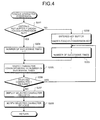
- FIG. 3 and FIG. 4 are flowcharts provided for the description of the process in the terminal device of the first embodiment.
- the processor 11 repeatedly performs the processes of steps S101 to S124.
- step S101 Upon causing the LCD 13 to display the ten-key (step S101), the processor 11 monitors the operation made to the touch panel 12 and waits for the first touch that is the initial touch after the ten-key is displayed (step S102: No).
- the processor 11 In response to the detection of the first touch on the touch panel 12 (step S102), the processor 11 causes a timer provided in the processor 11 to start (step S103). Upon starting, the timer times a predetermined time.
- the processor 11 determines the key on which the touch is made at step S102 (step S104), saves the determined result in an "entered key buffer” of the memory 15 (step S105), and copies the content of the entered key buffer to a "touched key buffer” of the memory 15 (step S106). Further, the processor 11 derives the center coordinate of the entered key, that is, the key on which the touch is made at step S102, and saves the value of the center coordinate in a "center coordinate buffer" of the memory 15 (step S107).
- FIG. 5 is a view illustrating an example of the XY coordinate of the display module of the first embodiment
- FIG. 6 is a view illustrating an example of a key display table of the first embodiment.
- the area size of the display module 14 that is, the touched area size of the touch panel 12 and the display area size of the LCD 13 are defined by the rectangular represented by the origin and the upper right corner coordinate (X2, Y2).
- the area of each key of the ten-key on the display module 14 is defined using the XY coordinate in the key display table as illustrated in FIG. 6 .
- the processor 11 determines that the key corresponding to the touched position is the key k1. Further, when the touched position on the touch panel 12 is included in the area (290, 300) - (370, 365), the processor 11 determines that the key corresponding to the touched position is the key k2. In addition, the center coordinate of the key k1 whose key type is "ABC” is (240, 333) and the center coordinate of the key k2 whose key type is "DEF" is (330, 333).
- FIG. 7 is a view illustrating an example of the toggle character selection table of the first embodiment
- FIG. 8 is a view illustrating an example of an under-toggle-conversion table of the first embodiment.
- the toggle character selection table defined is the association among respective keys of the ten-key, the number of successive times of the touch on respective keys, and the candidate for entering text to be selected. For example, it is defined that, when the key k1 ( FIG. 2 ) whose key type is "ABC" is successively touched, the candidate for entering text repeatedly changes in the order of "A ⁇ B ⁇ C ⁇ A ⁇ ## depending on the touched times. Also, for example, it is defined that, when the key k2 ( FIG. 2 ) whose key type is "DEF” is successively touched, the candidate for entering text repeatedly changes in the order of "D ⁇ E ⁇ F ⁇ D ⁇ ! depending on the touched times.
- under-toggle-conversion table has "under-toggle-conversion key” that is the item representing the key under the toggle conversion and "the number of successive times” that is the item representing the number of successive times of the touch on the under-toggle-conversion key.
- the processor 11 determines whether or not the content of the entered key buffer matches the under-toggle-conversion key of the under-toggle-conversion table (step S201).
- step S201 If the content of the entered key buffer does not match the under-toggle-conversion key of the under-toggle-conversion table (step S201: No), the processor 11 copies the content of the entered key buffer to the under-toggle-conversion key of the under-toggle-conversion table (step S202). Further, the processor 11 sets the number of successive times in the under-toggle-conversion table to "1" (step S203). It is noted that, since the first touch is the initial touch after the ten-key is displayed, the under-toggle-conversion key is empty when the first touch is made. Therefore, when the first touch is made, the content of the entered key buffer does not match the under-toggle-conversion key.
- step S201 if the content of the entered key buffer matches the under-toggle-conversion key of the under-toggle-conversion table (step S201: Yes), the processor 11 adds "1" to the number of successive times in the under-toggle-conversion table (step S204).
- the processor 11 refers to the toggle character selection table based on the under-toggle-conversion key and the number of successive times in the under-toggle-conversion table and selects, from the toggle character selection table, a character corresponding to the under-toggle-conversion key and the number of successive times as the candidate for entering text (step S205).
- the processor 11 determines whether or not the character selected from the toggle character selection table is "return” (step S206) and, if it is "return” (step S206: Yes), sets the number of successive times in the under-toggle-conversion table to "1'" again (step S203).
- step S206 determines whether the character selected from the toggle character selection table is "return" (step S206: No). If the character selected from the toggle character selection table is not "return" (step S206: No), the processor 11 causes the LCD 13 to display the character selected at step S205 as the candidate for entering text (step S207).
- the processor 11 reads aloud the character selected at step S205 to voice notify the user of the character from the speaker 16 (step S208). After the voice notification, the process returns to the flowchart of FIG. 3 .
- the processor 11 determines whether or not it detects the second or subsequent touch after the ten-key is displayed, that is, the touch made on and after the second touch (step S108).
- the processor 11 determines the touched position, that is, the coordinate of the touch position and saves the determined result in a "touched position buffer" of the memory 15 (step S109). Further, the processor 11 determines the key on which the touch is made at step S108 (step S110) and saves the determined result in the entered key buffer of the memory 15 (step S111).
- the processor 11 determines whether or not the content of the entered key buffer matches the content of the touched key buffer (step S112). If the content of the entered key buffer does not match the content of the touched key buffer (step S112: No), the processor 11 determines whether or not the time expires, that is, whether or not the timeout of the timer is detected (step S113). If the content of the entered key buffer matches the content of the touched key buffer (step S112: Yes), the process proceeds to step S116.
- step S112 the processor 11 overwrites the content of the entered key buffer with the content of the touched key buffer (step S114).
- step S112 if the content of the entered key buffer does not match the content of the touched key buffer and if the timeout of the timer is detected (step S112: No, step S113: Yes), the processor 11 overwrites the content of the touched key buffer with the content of the entered key buffer (step S115).
- the processor 11 resets and restarts the timer (step S116) and performs the toggle character conversion (step S200).
- the toggle character conversion has been described above and thus the description will be omitted.
- step S108: No the processor 11 determines whether or not there is a "decision operation" of the entered character (step S117). If there is no decision operation (step S117: No), the process proceeds to step S118, while, if there is a decision operation (step S117: Yes), the process proceeds to step S120.
- the "decision operation” refers to the following first operation or second operation.
- the first operation refers to the operation by which the same key is continuously touched for a predetermined time or longer.
- the processor 11 determines that there is a decision operation of the entered character.
- the second operation refers to the operation by which the touch panel 12 is pressed down for a press-down amount above a threshold.
- the touch panel 12 takes the configuration depicted in FIG. 9.
- FIG. 9 is a view illustrating a configuration example of the touch panel of the first embodiment. That is, an electrostatic capacity measuring circuit 17 connected to the touch panel 12 measures the electrostatic capacity at the touched position of the touch panel 12. The larger the press-down amount at the touched position is, the larger the electrostatic capacity will be. The processor 11 therefore determines that there is a decision operation of the entered character when the electrostatic capacity measured by the electrostatic capacity measuring circuit 17 is equal to or greater than the threshold.
- step S118 the processor 11 determines whether or not the timeout of the timer is detected. If the timeout of the timer is not detected (step S118: No), the process returns to step S108.
- step S118 if the timeout of the timer is detected (step S118: Yes), the processor 11 outputs, from the speaker 16, the notification sound telling that the timeout has been detected (step S119).
- the processor 11 fixes the current candidate for entering text as the entered character (step S120). That is, if the decision operation is made at step S117 (step S117: Yes) or if the timeout is detected at step S118 (step S118: Yes), the processor 11 fixes the entered character. That is, the touch entry to the touch panel 12 is fixed.
- the processor 11 calculates the difference "dXdY" between the coordinate saved in the center coordinate buffer and the coordinate saved in the touched position buffer at the time when the touch entry to the touch panel 12 has been fixed (step S121).
- the processor 11 determines whether or not it is possible to move the displayed position of the ten-key from the current position by the difference dXdY within the display module 14 (step S122).
- step S122 If it is determined at step S122 that the movement is possible (step S122: Yes), the processor 11 reflects the difference dXdY to the whole XY coordinate of the key display table (step S123).
- the area size of the display module 14 is the one illustrated in FIG. 5 and the current state of the key display table is the one illustrated in FIG. 6 .
- FIG. 10 is a view illustrating an example of the key display table of the first embodiment.
- step S122 determines whether the movement is possible (step S122: No) or notifies the user of the difference dXdY from the speaker 16 and does not reflect the difference dXdY to the XY coordinate of the key display table (step S124).
- the processor 11 causes the LCD 13 to display the ten-key (step S101) and waits for a touch on the touch panel 12 (step S102).
- step S102 upon detecting the touch on the touched position T1 (step S102: Yes), the processor 11 starts the timer (step S103), determines that the key corresponding to the touched position T1 is the key k1 (step S104), and saves the determined result "key k1" in the entered key buffer (step S105). Further, the processor 11 copies the content "key k1" in the entered key buffer to the touched key buffer (step S106) and saves the center coordinate (240, 333) of the key k1 in the center coordinate buffer (step S107). The processor 11 then performs toggle character conversion (step S200). Since the key k1 is the key of the key type "ABC", in response to the touch at the time t1, "A" is displayed on the LCD 13 as the candidate for entering text.
- the processor 11 determines that the key corresponding to the touched position is the key k1 based on the key display table of FIG. 6 .
- step S108 upon detecting the touch at the touched position T2 (step S108: Yes), the processor 11 saves the coordinate of the touched position T2 in the touch position buffer (step S109). Further, the processor 11 determines that the key corresponding to the touched position T2 is the key k1 (step S110) and saves the determined result "key k1" in the entered key buffer (step S111).
- the processor 11 compares the content of the entered key buffer with the content of the touched key buffer (step S112). At the time t2, the content of the entered key buffer and the content of the touched key buffer are "key k1", and thus both match to each other (step S112: Yes). The processor 11 then resets and restarts the timer (step S116) and performs the toggle character conversion (step S200). Since the touch at the time t2 is the second touch successively made on the key k1, in response to the touch at the time t2, "B" is displayed on the LCD 13 as the candidate for entering text.
- step S117: No it is assumed that no decision operation has been made. Further, it is assumed that the timeout of the timer has not been detected before the touch is made at the time t3 after the time t2 (step S118: No).
- step S108 upon detecting the touch on the touched position T3 (step S108: Yes), the processor 11 saves the coordinate at the touched position T3 in the touched position buffer (step S109). Further, the processor 11 determines that the key corresponding to the touched position T3 is the key k2 (step S110) and saves the determined result "key k2" in the entered key buffer (step S111).
- the processor 11 compares the content of the entered key buffer with the content of the touched key buffer (step S112). At the time t3, while the content of the entered key buffer is "key k2", the content of the touched key buffer is "key k1", and thus they do not match each other (step S112: No). The processor 11 then determines whether or not the timer restarted at the time t2 has expired, that is, whether or not the timer has timed out (step S113). That is, the processor 11 determines whether or not the elapsed time from the touch of the touch T2 at the time t2 to the touch of the touch T3 at the time t3 is equal to or greater than the threshold.
- step S113 the timeout of the timer is not detected, that is, the elapsed time from the touch at the time t2 to the touch at the time t3 is less than the threshold (step S113: No).
- the processor 11 then changes the content of the entered key buffer from "key k2" to "key k1" by saving the content of the touched key buffer "key k1" in the entered key buffer (step S114). That is, the processor 11 decides that the touch on the key k2 at the time t3 is the touch on the key k1.
- the processor 11 then resets and restarts the timer (step S116) and performs the toggle character conversion (step S200).
- the processor 11 has decided that the touch on the key k2 at the time t3 is the touch on the key k1, so that the touch at the time t3 on the key k2 is the third touch successively made to the key k1. Therefore, in response to the touch at the time t3, "C" is displayed on the LCD 13 as the candidate for entering text.
- the processor 11 determines that the key corresponding to the touched position is the key k2 based on the key display table of FIG. 6 .
- step S117: No it is assumed that no decision operation has been made. However, it is assumed that the time has elapsed after the time t3 without any touch made and the timeout of the timer restarted at the time t3 is detected at the time t5 (step S118: Yes).
- the processor 11 Because the processor 11 has detected the timeout of the timer at the time t5, that is, the elapsed time from the time t3 reaches the time equal to or greater than the threshold at the time t5 (step S118: Yes), the processor 11 outputs, from the speaker 16, the notification sound telling that the timeout has been detected (step S119) and fixes the current candidate for entering text "C" as the entered character (step S120). That is, the notification sound tells that the touch entry to the touch panel 12 has been fixed.
- the processor 11 determines that the displayed position of the ten-key can be moved by the difference dXdY within the area of the display module 14 (step S122: Yes). Then, the processor 11 reflects (+55, ⁇ 0) to X1, X2, Y1, and Y2 of FIG. 6 and updates the key display table (step S123), so that the updated key display table results in the one illustrated in FIG. 10 . Therefore, the processor 11 causes the LCD 13 to display the ten-key based on the key display table of FIG. 10 at the time t5.
- the processor 11 determines the elapsed time from the touch on the key k1 to the touch on the key k2. When the elapsed time is less than the threshold, the processor 11 then decides that the touch on the key k2 is the touch on the key k1.
- the present embodiment can prevent the erroneous entry in the key entry using the touch panel. In particular, it can prevent the erroneous entry when the toggle entry is made by the user who is visually impaired or the user who makes the key entry without looking at the key image.
- the terminal 10 has the LCD 13 that displays the key k1 and the key k2. Upon deciding that the touch on the key k2 is the touch on the key k1, the processor 11 moves the displayed position of the key k1 in the LCD 13 to the touched position on the key k2.
- Doing so allows the displayed position of the key k1 to shift by the amount of the shifting of the touched position, so that the user who can visually recognize the key to be touched is able to confirm that the touch on the key k2 decided that the touch is for the key k1 is the touch on the key k1. Therefore, it can improve the convenience at the user when deciding that the touch on the key k2 is the touch on the key k1.
- the processor 11 outputs the notification sound telling that the touch entry has been fixed.
- Doing so allows for notifying the user who is visually impaired, the user who makes the key entry without looking at the key image, or the like of the fixing of the touch entry that is automatically made by the terminal 10 based on the elapsed time.
- the erroneous entry in the key entry using the touch panel can be prevented.
Landscapes
- Engineering & Computer Science (AREA)
- General Engineering & Computer Science (AREA)
- Theoretical Computer Science (AREA)
- Human Computer Interaction (AREA)
- Physics & Mathematics (AREA)
- General Physics & Mathematics (AREA)
- User Interface Of Digital Computer (AREA)
- Input From Keyboards Or The Like (AREA)
- Position Input By Displaying (AREA)
Applications Claiming Priority (1)
| Application Number | Priority Date | Filing Date | Title |
|---|---|---|---|
| JP2013070692A JP6135242B2 (ja) | 2013-03-28 | 2013-03-28 | 端末装置、キー入力方法及びキー入力プログラム |
Publications (2)
| Publication Number | Publication Date |
|---|---|
| EP2784633A2 true EP2784633A2 (de) | 2014-10-01 |
| EP2784633A3 EP2784633A3 (de) | 2015-06-17 |
Family
ID=50031171
Family Applications (1)
| Application Number | Title | Priority Date | Filing Date |
|---|---|---|---|
| EP14153226.7A Withdrawn EP2784633A3 (de) | 2013-03-28 | 2014-01-30 | Endgerätevorrichtung und Tasteneingabeverfahren |
Country Status (3)
| Country | Link |
|---|---|
| US (1) | US9189103B2 (de) |
| EP (1) | EP2784633A3 (de) |
| JP (1) | JP6135242B2 (de) |
Families Citing this family (3)
| Publication number | Priority date | Publication date | Assignee | Title |
|---|---|---|---|---|
| CN103294222B (zh) * | 2013-05-22 | 2017-06-16 | 小米科技有限责任公司 | 一种输入方法和系统 |
| JP6467712B2 (ja) * | 2015-08-10 | 2019-02-13 | 富士通コネクテッドテクノロジーズ株式会社 | 電子機器および入力制御プログラム |
| US12061747B1 (en) * | 2023-04-27 | 2024-08-13 | Mihuan Technology (Changchun) Co., Ltd. | Keyboard with key position layout and input method thereof applied to electronic device |
Citations (2)
| Publication number | Priority date | Publication date | Assignee | Title |
|---|---|---|---|---|
| WO2003027826A1 (en) | 2001-09-21 | 2003-04-03 | International Business Machines Corporation | Input apparatus, computer apparatus, method for identifying input object, method for identifying input object in keyboard, and computer program |
| JP2011013730A (ja) | 2009-06-30 | 2011-01-20 | Sony Corp | 入力装置および入力方法 |
Family Cites Families (6)
| Publication number | Priority date | Publication date | Assignee | Title |
|---|---|---|---|---|
| JPH0863289A (ja) * | 1994-08-17 | 1996-03-08 | Omron Corp | タッチ入力装置および取引処理装置 |
| FI20021162A0 (fi) * | 2002-06-14 | 2002-06-14 | Nokia Corp | Elektroninen laite ja menetelmä sen näppäimistön hallintaan |
| JP2008276277A (ja) * | 2007-04-25 | 2008-11-13 | Kyocera Mita Corp | 操作表示装置及び画像形成装置 |
| US8286106B2 (en) * | 2009-03-13 | 2012-10-09 | Oracle America, Inc. | System and method for interacting with status information on a touch screen device |
| CN102200874B (zh) * | 2010-03-26 | 2015-04-01 | 腾讯科技(深圳)有限公司 | 一种基于触摸屏的按键输入方法和装置 |
| KR101701932B1 (ko) * | 2010-07-22 | 2017-02-13 | 삼성전자 주식회사 | 입력 디바이스와 이의 제어 방법 |
-
2013
- 2013-03-28 JP JP2013070692A patent/JP6135242B2/ja active Active
-
2014
- 2014-01-30 EP EP14153226.7A patent/EP2784633A3/de not_active Withdrawn
- 2014-02-11 US US14/177,365 patent/US9189103B2/en active Active
Patent Citations (2)
| Publication number | Priority date | Publication date | Assignee | Title |
|---|---|---|---|---|
| WO2003027826A1 (en) | 2001-09-21 | 2003-04-03 | International Business Machines Corporation | Input apparatus, computer apparatus, method for identifying input object, method for identifying input object in keyboard, and computer program |
| JP2011013730A (ja) | 2009-06-30 | 2011-01-20 | Sony Corp | 入力装置および入力方法 |
Also Published As
| Publication number | Publication date |
|---|---|
| JP6135242B2 (ja) | 2017-05-31 |
| US9189103B2 (en) | 2015-11-17 |
| JP2014194673A (ja) | 2014-10-09 |
| US20140292727A1 (en) | 2014-10-02 |
| EP2784633A3 (de) | 2015-06-17 |
Similar Documents
| Publication | Publication Date | Title |
|---|---|---|
| JP4896932B2 (ja) | 入力装置 | |
| US8896562B2 (en) | Portable terminal, key operation control method thereof, and program | |
| JP5958215B2 (ja) | 情報端末装置、タッチ座標決定方法及びタッチ座標決定プログラム | |
| US8760435B2 (en) | Touch panel | |
| JP5904440B2 (ja) | 操作入力装置、操作入力方法およびプログラム | |
| JP5654118B2 (ja) | タッチパネル装置及びその表示方法並びに表示用プログラム | |
| US20160349985A1 (en) | Mobile terminal | |
| US20160259458A1 (en) | Touch screen device | |
| JP2016197284A (ja) | 電子機器、制御方法および制御プログラム | |
| US20150242094A1 (en) | Method for Processing Information and Electronic Device | |
| US10095277B2 (en) | Electronic apparatus and display control method thereof | |
| EP2784633A2 (de) | Endgerätevorrichtung und Tasteneingabeverfahren | |
| US20110012843A1 (en) | Touch-controlled electronic apparatus and related control method | |
| JP6236640B2 (ja) | 静電容量式センサを用いた検出方法と電子機器 | |
| JP5449269B2 (ja) | 入力装置 | |
| CN105487697B (zh) | 一种防止触屏按键失效的方法与装置 | |
| JP2014123327A (ja) | 携帯情報端末 | |
| JP5639487B2 (ja) | 入力装置 | |
| CN104076970B (zh) | 信息处理设备和方法 | |
| JP6098986B1 (ja) | 携帯端末装置 | |
| CN111131614A (zh) | 终端设备防误接电话方法及其系统、存储介质及终端设备 | |
| JP2012181806A (ja) | 入力装置、入力方法、及び、プログラム | |
| JP6467712B2 (ja) | 電子機器および入力制御プログラム | |
| JP5336328B2 (ja) | 携帯端末及び入力制御プログラム | |
| JP2016201029A (ja) | 携帯端末、表示制御方法および表示制御プログラム |
Legal Events
| Date | Code | Title | Description |
|---|---|---|---|
| 17P | Request for examination filed |
Effective date: 20140130 |
|
| AK | Designated contracting states |
Kind code of ref document: A2 Designated state(s): AL AT BE BG CH CY CZ DE DK EE ES FI FR GB GR HR HU IE IS IT LI LT LU LV MC MK MT NL NO PL PT RO RS SE SI SK SM TR |
|
| AX | Request for extension of the european patent |
Extension state: BA ME |
|
| PUAI | Public reference made under article 153(3) epc to a published international application that has entered the european phase |
Free format text: ORIGINAL CODE: 0009012 |
|
| PUAL | Search report despatched |
Free format text: ORIGINAL CODE: 0009013 |
|
| AK | Designated contracting states |
Kind code of ref document: A3 Designated state(s): AL AT BE BG CH CY CZ DE DK EE ES FI FR GB GR HR HU IE IS IT LI LT LU LV MC MK MT NL NO PL PT RO RS SE SI SK SM TR |
|
| AX | Request for extension of the european patent |
Extension state: BA ME |
|
| RIC1 | Information provided on ipc code assigned before grant |
Ipc: G06F 3/023 20060101AFI20150512BHEP Ipc: G06F 3/0488 20130101ALI20150512BHEP Ipc: G06F 3/041 20060101ALI20150512BHEP |
|
| R17P | Request for examination filed (corrected) |
Effective date: 20151204 |
|
| RBV | Designated contracting states (corrected) |
Designated state(s): AL AT BE BG CH CY CZ DE DK EE ES FI FR GB GR HR HU IE IS IT LI LT LU LV MC MK MT NL NO PL PT RO RS SE SI SK SM TR |
|
| STAA | Information on the status of an ep patent application or granted ep patent |
Free format text: STATUS: EXAMINATION IS IN PROGRESS |
|
| 17Q | First examination report despatched |
Effective date: 20170213 |
|
| GRAP | Despatch of communication of intention to grant a patent |
Free format text: ORIGINAL CODE: EPIDOSNIGR1 |
|
| STAA | Information on the status of an ep patent application or granted ep patent |
Free format text: STATUS: GRANT OF PATENT IS INTENDED |
|
| INTG | Intention to grant announced |
Effective date: 20180822 |
|
| STAA | Information on the status of an ep patent application or granted ep patent |
Free format text: STATUS: THE APPLICATION IS DEEMED TO BE WITHDRAWN |
|
| 18D | Application deemed to be withdrawn |
Effective date: 20190103 |