EP2587791B1 - Anzeigeansteuerungsvorrichtung und Verfahren zur Steuerung einer Anzeigeansteuerungsvorrichtung - Google Patents
Anzeigeansteuerungsvorrichtung und Verfahren zur Steuerung einer Anzeigeansteuerungsvorrichtung Download PDFInfo
- Publication number
- EP2587791B1 EP2587791B1 EP12190266.2A EP12190266A EP2587791B1 EP 2587791 B1 EP2587791 B1 EP 2587791B1 EP 12190266 A EP12190266 A EP 12190266A EP 2587791 B1 EP2587791 B1 EP 2587791B1
- Authority
- EP
- European Patent Office
- Prior art keywords
- menu
- display
- specific
- control unit
- displayed
- Prior art date
- Legal status (The legal status is an assumption and is not a legal conclusion. Google has not performed a legal analysis and makes no representation as to the accuracy of the status listed.)
- Active
Links
Images


Classifications
-
- G—PHYSICS
- G06—COMPUTING OR CALCULATING; COUNTING
- G06F—ELECTRIC DIGITAL DATA PROCESSING
- G06F3/00—Input arrangements for transferring data to be processed into a form capable of being handled by the computer; Output arrangements for transferring data from processing unit to output unit, e.g. interface arrangements
- G06F3/01—Input arrangements or combined input and output arrangements for interaction between user and computer
- G06F3/048—Interaction techniques based on graphical user interfaces [GUI]
- G06F3/0481—Interaction techniques based on graphical user interfaces [GUI] based on specific properties of the displayed interaction object or a metaphor-based environment, e.g. interaction with desktop elements like windows or icons, or assisted by a cursor's changing behaviour or appearance
- G06F3/0482—Interaction with lists of selectable items, e.g. menus
-
- H—ELECTRICITY
- H04—ELECTRIC COMMUNICATION TECHNIQUE
- H04N—PICTORIAL COMMUNICATION, e.g. TELEVISION
- H04N23/00—Cameras or camera modules comprising electronic image sensors; Control thereof
- H04N23/60—Control of cameras or camera modules
- H04N23/62—Control of parameters via user interfaces
-
- G—PHYSICS
- G06—COMPUTING OR CALCULATING; COUNTING
- G06F—ELECTRIC DIGITAL DATA PROCESSING
- G06F3/00—Input arrangements for transferring data to be processed into a form capable of being handled by the computer; Output arrangements for transferring data from processing unit to output unit, e.g. interface arrangements
- G06F3/01—Input arrangements or combined input and output arrangements for interaction between user and computer
- G06F3/048—Interaction techniques based on graphical user interfaces [GUI]
- G06F3/0487—Interaction techniques based on graphical user interfaces [GUI] using specific features provided by the input device, e.g. functions controlled by the rotation of a mouse with dual sensing arrangements, or of the nature of the input device, e.g. tap gestures based on pressure sensed by a digitiser
-
- G—PHYSICS
- G06—COMPUTING OR CALCULATING; COUNTING
- G06F—ELECTRIC DIGITAL DATA PROCESSING
- G06F3/00—Input arrangements for transferring data to be processed into a form capable of being handled by the computer; Output arrangements for transferring data from processing unit to output unit, e.g. interface arrangements
- G06F3/01—Input arrangements or combined input and output arrangements for interaction between user and computer
- G06F3/048—Interaction techniques based on graphical user interfaces [GUI]
- G06F3/0487—Interaction techniques based on graphical user interfaces [GUI] using specific features provided by the input device, e.g. functions controlled by the rotation of a mouse with dual sensing arrangements, or of the nature of the input device, e.g. tap gestures based on pressure sensed by a digitiser
- G06F3/0489—Interaction techniques based on graphical user interfaces [GUI] using specific features provided by the input device, e.g. functions controlled by the rotation of a mouse with dual sensing arrangements, or of the nature of the input device, e.g. tap gestures based on pressure sensed by a digitiser using dedicated keyboard keys or combinations thereof
-
- G—PHYSICS
- G06—COMPUTING OR CALCULATING; COUNTING
- G06F—ELECTRIC DIGITAL DATA PROCESSING
- G06F3/00—Input arrangements for transferring data to be processed into a form capable of being handled by the computer; Output arrangements for transferring data from processing unit to output unit, e.g. interface arrangements
- G06F3/14—Digital output to display device ; Cooperation and interconnection of the display device with other functional units
-
- H—ELECTRICITY
- H04—ELECTRIC COMMUNICATION TECHNIQUE
- H04N—PICTORIAL COMMUNICATION, e.g. TELEVISION
- H04N5/00—Details of television systems
- H04N5/76—Television signal recording
Definitions
- the present invention relates to a display control apparatus, a method for controlling a display control apparatus, and a recording medium storing a program.
- Devices such as digital cameras, digital video cameras, and mobile phones have recently become more sophisticated and diversified in functions.
- the functions have ever been bloated.
- user interfaces for a user to use are bloated.
- hierarchical menus typically known as a user interface are becoming hierarchically deeper and their menu items are increasing in number.
- the user needs to descend many hierarchical levels and scroll many screens before reaching an intended menu item. Accordingly, there is a problem that there are many operations to reach an intended menu item, so that it takes time.
- Japanese Patent Application Laid-Open No. 2008-203910 discusses an information recording and reproducing apparatus that includes an external key to which a function can be freely assigned according to a user's preference.
- a shortcut function for directly opening a specific menu screen may be assigned to the external key, in which case a menu to be repeatedly used can be displayed by a single key operation with improved usability.
- Japanese Patent Application Laid-Open No. 2008-203910 discusses the operation of the information recording and reproducing apparatus when a menu screen is opened, but no subsequent operations. For example, the usability is considered to improve if a shortcut key can be used to open a menu to check or modify settings and then the same shortcut key can be used to close the menu. When a menu is open and the user wishes to open a desired menu by operating a shortcut key, then the usability is considered to improve if the desired menu can be opened.
- US2004/179122 discloses a digital camera having the function of registering a captured image or the like in an album file and includes a display such as an LCD and a switch button (QV button) for switching a display image on the display.
- An image to be displayed on the display is changed in response to depression of a switch button among a live view image in a capturing mode, a reproduction image regarding a data file in a reproduction mode, and an album image regarding an album file in an album reproduction mode.
- the images are sequentially displayed in the above-described order.
- a reproduced image is not displayed.
- JP2008203910 aims to provide an information recording/reproducing device for displaying a menu of a function to be frequently used separately from a fixed menu screen on a short-cut menu picture.
- a menu screen display means reads menu screen data from a flash ROM, and makes a display device display a fixed menu screen in response to one time depression of the menu key.
- a short-cut menu screen display means reads short-cut menu screen data from the flash ROM, and makes the display device display the short-cut menu screen in response to the second time depression of the menu key.
- US2005/054381 describes a proactive user interface, which could optionally be installed in (or otherwise control and/or be associated with) any type of computational device.
- the proactive user interface actively makes suggestions to the user, based upon prior experience with a particular user and/or various preprogrammed patterns from which the computational device could select, depending upon user behavior. These suggestions could optionally be made by altering the appearance of at least a portion of the display, for example by changing a menu or a portion thereof; providing different menus for display; and/or altering touch screen functionality. The suggestions could also optionally be made audibly.
- EP2381353 describes a system and method for displaying a graphical context menu on a display screen of a mobile communication device.
- the method includes receiving a menu request, determining the number of menu items based on the context of the menu request, generating a graphical context menu based on the determined number of the determined number of menu items, inserting the menu items into the generated graphical context menu, and displaying the generated graphical context menu on the display screen with the inserted menu items.
- the graphical context menu can include menu items displayed in a 3x3 grid, a 2x3 grid or a 1x3 grid.
- the graphical context menu can include a default menu item in the center of the grid and a full menu option in the bottom most right slot of the grid.
- US2002/105549 discloses an apparatus in which menu items are displayed on a screen, and when a predetermined menu item is selected, a function corresponding to the selected menu item is executed.
- the menu item displaying method comprises the steps of determining whether a function corresponding to a menu item displayed on the screen can be executed, and when it is determined that the function cannot be executed, disabling the menu item corresponding to the function from being selected and displaying a reason why the menu item cannot be selected.
- EP 1 667 013 describes a graphical user interface for a data processing device providing a user friendly menu system and navigation capabilities.
- a menu system provides a first plurality of primary menu items to a display, each of the primary menu items having a visual field.
- a navigation module enables a user to navigate the menu system.
- a reveal process displays, within the visual field of a first primary menu item, a first plurality of secondary menu items associated with the first primary menu item, in response to a navigation to the first primary menu item, while continuing to display a remainder of the first plurality of primary menu items.
- the present invention is directed to a display control apparatus that includes a shortcut key of improved operability. According to an aspect of the present invention, there is provided a display control apparatus which can make processing for, when a menu is open, pressing a shortcut key to close the menu compatible with processing for pressing the same shortcut key to open a specific menu.
- the present invention in its first aspect provides a display control apparatus as specified in claims 1 to 8.
- the present invention in its second aspect provides a method for controlling a display control apparatus as specified in claim 9.
- the present invention in its third aspect provides a computer program as specified in claim 10.
- a display control apparatus is described by using a digital video camera as an example.
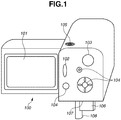
- FIG. 1 is a diagram illustrating the appearance configuration of the digital video camera 100.
- the digital video camera 100 includes a display unit 101, a shooting button 102, a mode change switch 103, an operation unit 104, a power switch 105, a recording medium 106, a recording medium slot 107, and a lid 108.
- the display unit 101 displays images and various types of information.
- the shooting button 102 is a button for the user to make a shooting instruction.
- the mode change switch 103 is a switch for the user to change the operation mode of the digital video camera 100.
- the mode change switch 103 will be described in detail later.
- the operation unit 104 includes operation members for accepting various user operations such as various switches, buttons, and a touch panel.
- the power switch 105 is used to power on/off the digital video camera 100. Examples of the recording medium 106 include a semiconductor memory, a memory card, a magnetic disk, and a hard disk.
- the recording medium slot 107 is a slot for the recording medium 106 to be inserted into. The recording medium 106 inserted in the recording medium slot 107 can communicate with the digital video camera 100 and records video images captured by the digital video camera 100.
- the lid 108 closes the recording medium slot 107.
- Fig. 2 is a block diagram illustrating the configuration of the digital video camera 100.
- the same components as those of Fig. 1 will be designated by the same reference numerals. Description thereof will be omitted where appropriate.
- the digital video camera 100 includes a shooting lens 201, an image capturing unit 202, an analog-to-digital (A/D) converter 203, a barrier 204, an image processing unit 205, a memory control unit 206, a system control unit 207, a memory 208, and a digital-to-analog (D/A) converter 209.
- the digital video camera 100 further includes a nonvolatile memory 210, a backup memory 211, a system memory 212, a system timer 213, a power supply control unit 214, a power supply unit 215, and a recording medium interface (I/F) 216.
- the shooting lens 201 is a lens unit including a zoom lens and a focus lens.
- the image capturing unit 202 is an image sensor including a charge-coupled device (CCD) or complementary metal oxide semiconductor (CMOS) sensor for converting an optical image into an electrical signal.
- the A/D converter 203 converts an analog signal output from the image capturing unit 202 into a digital signal.
- the barrier 204 covers an imaging optical system including the shooting lens 201 of the digital video camera 100, to prevent the imaging optical system including the shooting lens 201 and the image capturing unit 202 from becoming dirty and being damaged.
- the image processing unit 205 performs predetermined resize processing, such as pixel interpolation and reduction, and color conversion processing on image data from the A/D converter 203 or image data from the memory control unit 206.
- the image processing unit 205 further performs predetermined arithmetic processing by using captured image data.
- the system control unit 207 performs an exposure control and a ranging control based on the result of the arithmetic processing.
- the image processing unit 205 also performs predetermined arithmetic processing by using the captured image data and performs an automatic white balance (AWB) processing based on the result of the arithmetic processing.
- ABM automatic white balance
- the image data from the A/D converter 203 is written to the memory 208 via the image processing unit 205 and the memory control unit 206 or directly via the memory control unit 206.
- the memory 208 stores the image data that is acquired by the image capturing unit 202 and converted into digital data by the A/D converter 203, and image data to be displayed on the display unit 101.
- the memory 208 has a storage capacity sufficient to store a predetermined number of still images and a predetermined duration of moving images and sound.
- the memory 208 also serves as a memory for image display (video memory) .
- the D/A converter 209 converts display image data stored in the memory 208 into an analog signal, and supplies the analog signal to the display unit 101.
- the display image data written in the memory 208 is displayed on the display unit 101 via the D/A converter 209.
- the display unit 101 displays an image on a monitor such as a liquid crystal display (LCD) according to the analog signal from the D/A converter 209.
- the digital signal that is once A/D-converted by the A/D converter 203 and stored in the memory 208 may be converted into the analog signal by the D/A converter 209 and sequentially transferred to the display unit 101 for display.
- the display unit 101 can thus function as an electronic viewfinder to display a through-the-lens image.
- the nonvolatile memory 210 is an electrically erasable and recordable memory. Examples include an electrically erasable programmable read-only memory (EEPROM) .
- the nonvolatile memory 210 records constants and a program intended for the operation of the system control unit 207. The program is one for executing the variety of flowcharts of the present example to be described later.
- the backup memory 221 is an electrically erasable and recordable memory. Examples include an EEPROM and a static random access memory (SRAM).
- the backup memory 211 records user setting information.
- the system control unit 207 controls the entire digital video camera 100.
- the system control unit 207 executes the foregoing program recorded in the nonvolatile memory 210 to implement each of the processing of the present example to be described later.
- An example of the system memory 212 is a random access memory (RAM). Constants and variables intended for the operation of the memory control unit 207 and the program read from the nonvolatile memory 210 are loaded into the system memory 212.
- the system control unit 207 also controls the memory 208, the D/A converter 209, and the display unit 101 for display control.
- the system timer 213 is a time measuring unit for measuring time used for various controls and the time of a built-in clock.
- the shooting button 102, the mode change switch 103, and the operation unit 104 are intended to input various operation instructions to the system control unit 207.
- the shooting button 102 and the mode change switch 103 may be configured as a part of the operation unit 104.
- the mode change switch 103 is a switch for changing the operation mode of the system control unit 207 to any one of modes including shooting modes (still image shooting mode and moving image shooting mode) and a playback mode.
- the still image shooting mode includes an automatic shooting mode, an automatic scene determination mode, a manual mode, various scene modes, a programmed automatic exposure (AE) mode, and a custom mode.
- the various scene modes include photographing settings for respective shooting scenes.
- the mode change switch 103 can be used to directly switch to any one of the foregoing modes included in the still image shooting mode.
- a different operation member may be configured to be used, once the operation mode is switched to the still image shooting mode by using the mode change switch 103, to switch to any one of the modes included in the still image shooting mode.
- the moving image shooting mode may similarly include a plurality of modes.
- the system control unit 207 starts a series of shooting processing operations from the reading of the signal from the image capturing unit 202 to the writing of the image data into the recording medium 106.
- various function icons displayed on the display unit 101 are selected and operated, scene-specific different functions are assigned to each of the operation members of the operation unit 104.
- the operation members thus function as various function keys.
- the function keys include an end key, a return key, an image advancing key, a jump key, a narrow-down key, an attribute change key, a shortcut key, and a menu key.
- the menu key is pressed to display various settable menus on the display unit 101. The user can intuitively make various settings by using the menus displayed on the display unit 101, up, down, right, and left arrow keys, and a set key.
- the shortcut key is an operation member for opening a specific menu among hierarchically structured menus according to the present example. More than one shortcut key may be provided. Different menus can be assigned to the respective plurality of shortcut keys.
- the menu key is an operation member for opening a top menu (menu of the highest hierarchy) among the hierarchically structured menus, or the same menu as the one closed last time.
- the various keys are described as operation members arranged on the exterior of the digital video camera 100. Similar effects can be obtained by operating soft keys on a touch panel.
- the power supply control unit 214 includes a battery detection circuit, a direct-current-to-direct-current (DC-DC) converter, and a switch circuit for switching blocks to energize.
- the power supply control circuit 214 detects whether a battery is attached, the type of the battery, and the remaining battery capacity. Based on the detection results and an instruction from the system control unit 207, the power supply control unit 214 controls the DC-DC converter to supply necessary voltages to various components including the recording medium 106 for necessary periods .
- the power supply unit 215 includes a primary battery such as an alkali battery and a lithium battery, a secondary battery such as a nickel-cadmium (NiCd) battery, a nickel metal halide (NiHM) battery, and a lithium (Li) battery, and/or an alternating-current (AC) adapter.
- the recording medium I/F 216 is an interface with the recording medium 106.
- the menus used in the present example are menus of hierarchical type (hierarchical menus) whose settable items are classified according to the types of the functions.
- the menus of hierarchical type include grouped lower level menus and higher level menus including menu items that are entrances to the lower level menus.
- the menu of the highest hierarchy (first level), or top menu includes menu items "camera setup,” "audio setup,” "video setup,” "other functions,” and "custom menu.”
- menu item “other functions” If the user selects the menu item "other functions" on the top menu, a menu one level below the top menu (second level menu), “other functions, " is displayed.
- the menu “other functions” includes menu items “reset,” “time zone,” “clock set,” “WFM,” “language,” and “wireless controller.”
- the menu “other functions” further includes menu items such as “tally lamp, " “ “media access LED, " "NTSC/PAL, " "bit rate/resolution,” and “frame rate.”
- the menu “reset” includes menu items “CF-A,” “CF-B,” and “SD-CARD.”
- the menu “reset” is a menu for selecting a recording medium to initialize from a CompactFlash (CF) card A, a CF card B, or a Secure Digital (SD) card.
- CF CompactFlash
- SD Secure Digital
- the menu “SD-CARD” includes menu items “execute” and "cancel” as setting value candidates.
- the user selects and determines either one of the setting value candidates, and the operation or setting indicated by the setting value candidate is executed. For example, if the user instructs an "execute” on the menu “SD-CARD, " an SD card among a plurality of recording media 106 mounted on the digital video camera 100 is initialized (formatted) . There is no level below the menu “SD-CARD,” and the menu “SD-CARD” is a menu of the lowest hierarchy.
- Figs. 3A to 3C are diagrams illustrating display examples of a menu screen displayed on the display unit 101.
- Fig. 3A illustrates a display example when displaying menus of lower hierarchy, where menu items of higher hierarchy leading to the menus of lower hierarchy are displayed.
- menu items 301 of the respective levels and setting value candidates 302 settable on the third level menu D are displayed.
- some items are displayed with hatching. The hatching indicates that the first level menu D, the second level menu C, and the third level menu D are selected in this order, and the setting value candidate 3 is selected from the setting value candidates 1 to 3 constituting the third level menu D.
- This menu screen illustrates a menu for selecting any one of the setting value candidates 1 to 3, i.e., the third level menu D of the lowest hierarchy.
- Fig. 3 illustrates another display example of the menu screen, where the name of the menu of the lowest hierarchy and a list of the setting value candidates 303 as menu items are displayed.
- setting value candidates 303 settable on the third level menu D and a cursor 304 for indicating the selected setting value candidate 303 are displayed.
- the menu name coincides with the name of the menu item 301 that is on the menu one level above and intended to open the menu of the lowest hierarchy.
- Fig. 3B illustrates a display example where the menu items 301 of higher hierarchy leading to the menus of lower hierarchy are not displayed.
- Fig. 3C illustrates another display example of the menu screen, where menu items 305 on the second level menu C one level above the third level menu D are displayed.
- the menu items 305 on the second level menu C are alternatives for selecting third level menus A to D of the same hierarchy as that of the third level menu D.
- the second level menu C one level above is displayed with the menu item 305 of the third level menu D having been operated selected.
- any one of the menus of the lowest hierarchy can be assigned to each of a plurality of shortcut keys.
- the assigned menu can be immediately opened.
- a shortcut key to which the third level menu D is assigned a menu screen like illustrated in Fig. 3A or 3B is displayed.
- the operations of descending the hierarchy from the top menu to open the third level menu D can be omitted to quickly open the desired menu.
- the user initially operates the operation unit 104 to select a menu item "assign" which is included in any one of the menus.
- the system control unit 207 displays alternatives as setting value candidates for selecting which shortcut key to assign a menu. Suppose, for example, that "shortcut key A, " "shortcut key B, " and "shortcut key C" are displayed as the alternatives.
- the user uses the arrow keys to select the shortcut key to assign a menu to, and presses the set key.
- the menu control unit 207 displays a menu for selecting which menu to assign to the selected shortcut key.
- the displayed menu is generally similar to the foregoing top menu.
- the user operates the operation unit 104 to proceed from the displayed menu to a menu or menus of lower hierarchy, and presses the set key with the desired menu of the lowest hierarchy selected.
- the system control unit 207 assigns the selected menu to the shortcut key, and records the association between the menu and the shortcut key into the backup memory 211 as shortcut function information.
- the shortcut function information recorded in the backup memory 211 is recorded into the nonvolatile memory 210 before the system control unit 207 powers off the digital video camera 100. The same assignment is thus reproduced next time the digital video camera 100 is powered on.
- FIG. 4 is a flowchart illustrating menu display processing according to the first example. Each of the processes of the flowchart is implemented by the system control unit 207 loading the program recorded in the nonvolatile memory 210 into the system memory 212 and executing the program.
- step S401 the system control unit 207 detects whether the user presses a shortcut key of the operation unit 104. If the system control unit 207 detects that any one of the plurality of shortcut keys is pressed (YES in step S401), the system control unit 207 proceeds to step S402. On the other hand, if the system control unit 207 does not detect that a shortcut key is pressed but detects an operation other than on the shortcut keys (NO in step S401), the system control unit 207 proceeds to step S408. Note that a menu may already be open before step S401.
- step S402 the system control unit 207 acquires information about the menu that is assigned to the shortcut key pressed in step S401 from the shortcut function information stored in the backup memory 211. The system control unit 207 then proceeds to step S403.
- step S403 the system control unit 207 detects whether a menu is open. If any menu is open (YES in step S403), the system control unit 207 proceeds to step S404. If no menu is open (NO in step S403), the system control unit 207 proceeds to step S406.
- step S404 the system control unit 207 compares the menu assigned to the shortcut key acquired in step S402 with the currently displayed menu to determine whether the two menus coincide. If the two menus coincide (YES in step S404), the system control unit 207 proceeds to step S405. If not (NO in step S404), the system control unit 207 proceeds to step S406.
- step S405 the system control unit 207 closes the currently displayed menu, makes other display, and ends the processing based on the shortcut key.
- making other display refers to returning to a state of display before the menu is opened, for example.
- step S406 the system control unit 207 displays the menu assigned to the shortcut key acquired in step S402. For example, if the third level menu D is assigned to the pressed shortcut key, a menu screen like illustrated in Fig. 3A or 3B is displayed on the display unit 101.
- step S407 the system control unit 207 performs processing according to operations the user makes via the operation unit 104 (menu operations) . More specifically, when the user operates the up and down of the arrow keys to select a menu item and presses the set key, the system control unit 207 executes the selected menu item. If the selected menu item is a menu of the lowest hierarchy, the system control unit 207 reflects the setting value or executes an operation instruction indicated by the menu item. If the selected menu item is not a menu of the lowest hierarchy, the system control unit 207 opens the menu of lower hierarchy corresponding to the selected menu item. If the selected menu item is a return button, the system control unit 207 opens a menu of higher hierarchy.
- step S408 the system control unit 207 detects whether the user presses the menu key of the operation unit 104. If the system control unit 207 detects that the menu key is pressed (YES in step S408), the system control unit 207 proceeds to step S409. If the system control unit 207 does not detect that the menu key is pressed (NO in step S408), the system control unit 207 proceeds to step S413 and performs other processing. In step S409, the system control unit 207 determines whether a menu is already open. If a menu is already open (YES in step S409), the system control unit 207 proceeds to step S410. If no menu is open (NO in step S409), the system control unit 207 proceeds to step S411.
- step S410 the system control unit 207 closes the menu.
- the system control unit 207 performs the processing for closing a menu no matter which level or which menu. In other words, when the menu key is pressed, the system control unit 207 performs the processing for closing a menu regardless of the level of the displayed menu.
- step S411 the system control unit 207 displays the top menu or the menu previously displayed when closed last time. Specifically, if the user presses the menu key for the first time after the digital video camera 100 is powered on, the system control unit 207 opens the top menu. If not, the system control unit 207 opens the menu that was previously displayed when closed last time. For the sake of such processing, the system control unit 207, when closing a menu, records the information about the menu previously displayed into the system memory 212. In step S412, the system control unit 207 then performs processing according to menu operations.
- the operation to be performed when a shortcut key is pressed is switched depending on whether the menu indicated by the shortcut function information recorded in the backup memory 211 coincides with the currently displayed menu.
- An identical shortcut key can thus be used to perform both the operation for opening a menu and the operation for closing a menu.
- the user can press a predetermined shortcut key to open a desired menu, simply check which setting value candidate is selected, i.e., check the current setting, and press the shortcut key again to close the menu without any other operations.
- the user can perform the operation for opening a menu related to a frequently used setting, checking the setting, and closing the menu without moving the finger from the shortcut key. This enables quick, simple operations.
- the user need not move the finger from the shortcut key, the user need not visually check the operation unit 104 and can continue watching the display unit 101 during the operation. If the user has pressed a shortcut key to open a menu, moved to another level, and opened a different menu, then the user can press the shortcut key to quickly enter the menu assigned to the shortcut key.
- the system control unit 207 opens a menu one level above the menu assigned to the shortcut key, and displays recognizably to the user that the menu item for opening the menu assigned to the shortcut key is disabled.
- the system control unit 207 displays the disabled menu item in a different display form like grayout. For example, suppose that a shortcut key is assigned to the foregoing menu "SD-CARD" and there is no SD card inserted. In such a case, settings about the menu "SD-CARD" cannot be made.
- the system control unit 207 thus opens the menu “reset” one level above the menu “SD-CARD.”
- the system control unit 207 then grays out the menu item "SD-CARD” among the displayed menu items "CF-A,” “CF-B,” and “SD-CARD,” and displays the menu item "SD-CARD” as selected.
- the user can recognize that the menu assigned to the shortcut key is "SD-CARD,” and that the menu "SD-CARD” is not able to be opened since the menu "SD-CARD" is currently unavailable.
- FIG. 5 is a flowchart illustrating menu display processing according to the first exemplary embodiment. The processes of the flowchart are implemented by the system control unit 207 loading the program recorded in the nonvolatile memory 210 into the system memory 212 and executing the program.
- step S506 the system control unit 207 determines whether the current operation mode of the digital video camera 100 is a shooting mode. If the current operation mode is a shooting mode (YES in step S506), the system control unit 207 proceeds to step S508. If the current operation mode is not a shooting mode (NO in step S506), the system control unit 207 proceeds to step S507. Examples of the operation mode other than a shooting mode include a playback mode.
- step S507 the system control unit 207 compares the menu assigned to the shortcut key acquired in step S502 with the currently displayed menu.
- the system control unit 207 initially determines whether the currently displayed menu is the menu one level above the menu assigned to the shortcut key.
- the system control unit 207 further determines whether the currently displayed menu is in a state where the menu item for opening the menu assigned to the shortcut key is selected among a plurality of menu items.
- the system control unit 207 determines whether the menu "reset” one level above, not the menu “SD-CARD” itself, is open. The system control unit 207 determines that the menu “reset” is open, and further determines whether the menu item "SD-CARD” is selected among the displayed menu items "CF-A,” “CF-B,” and "SD-CARD.” Possible situations where the menu item "SD-CARD” is selected include when the user has just finished an operation on the menu "SD-CARD” and when the user has pressed the set key and is about to make an operation on the menu “SD-CARD.” In such cases, the user need not intentionally open the menu "SD-CARD” with the shortcut key. The user's pressing operation on the shortcut key is thus considered to be made for a purpose other than opening the menu "SD-CARD.”
- step S507 the system control unit 207 proceeds to step S505 to close the menu.
- step S508 the system control unit 207 opens the menu assigned to the shortcut key.
- step S509 is similar to that of the foregoing step S407 illustrated in Fig. 4 .
- the processing of steps S510 to S515 is similar to that of the foregoing steps S408 to S413 illustrated in Fig. 4 , respectively. Description thereof will thus be omitted.
- the system control unit 207 performs control to close a menu if a shortcut key is pressed in the following case. Specifically, the digital video camera 100 is not in a shooting mode, the displayed menu is one level above the menu assigned to the shortcut key, and the menu item for opening the menu assigned to the shortcut key is selected. Consequently, the system control unit 207 closes a menu when the user presses a shortcut key immediately after an operation on the menu assigned to the shortcut key has finished or if the menu assigned to the shortcut key can be opened in one operation without pressing the shortcut key. Such a control can further improve the user-friendliness.
- Shooting is a top priority to image capturing apparatuses like the digital video camera 100. If menu settings need to be changed during intervals between shots, it is important to quickly switch to the menu. In a shooting mode, higher priority is thus given to opening a menu.
- the system control unit 207 When the user presses a shortcut key, the system control unit 207 then performs control to open the menu assigned to the shortcut key, not to close a menu, even if the menu one level above the menu assigned to the shortcut key is displayed.
- step S506 illustrated in Fig. 5 of the present exemplary embodiment may be omitted so that if the determination in step S504 is NO, the system control unit 207 proceeds to step S507.
- step S507 illustrated in step S507 may be omitted so that if the determination in step S506 is NO, the system control unit 207 proceeds to step S508.
- a second exemplary embodiment will be described.
- the user selects a menu item to make an apparatus setting or an operation instruction.
- a setting or an operation instruction may be enabled or disabled depending on the operation state of the apparatus. If the selected setting or operation instruction is disabled, it is controlled such that menu is not displayed even if the menu item is selected. As a result, even if the user operates the shortcut key to which the shortcut function is assigned, the assigned menu will not be displayed.
- the shortcut key since the user operates a shortcut key and no shortcut function comes into operation, there is the problem that the user is not able to determine whether the selected setting or operation instruction is disabled or the shortcut key is malfunctioning.
- Another problem is that even when the user operates an external key in attempting to check a setting state of the apparatus, the setting state cannot be checked by using the shortcut key if the setting or operation instruction is disabled.
- the second exemplary embodiment and a fourth exemplary embodiment to be described later will deal with a configuration that makes the user recognize that a setting or an operation instruction by a menu assigned to a shortcut key is disabled, thereby preventing the misrecognition that the shortcut key is malfunctioning.
- the second exemplary embodiment deals with the operation of the digital video camera 100 that can prevent the misrecognition that a shortcut key is malfunctioning when a setting or an operation instruction of the menu assigned to the shortcut key is disabled.
- the digital video camera 100 according to the present exemplary embodiment and display examples of the menus are similar to those of the first example described with reference to Figs. 1 up to 3A to 3C. Description thereof will thus be omitted.
- Fig. 6 is a flowchart illustrating menu display processing according to the second exemplary embodiment. The processes of the flowchart are implemented by the system control unit 207 loading the program recorded in the nonvolatile memory 210 into the system memory 212 and executing the program.
- step S601 the system control 207 detects whether the user presses a shortcut key of the operation unit 104. If the system control unit 207 detects that any one of the plurality of shortcut keys is pressed (YES in step S601), the system control unit 207 proceeds to step S602. On the other hand, if the system control unit 207 does not detect that a shortcut key is pressed but detects an operation on other than the shortcut keys (NO in step S601), the system control unit 207 proceeds to step S606.
- step S602 the system control unit 207 acquires information about the menu assigned to the shortcut key pressed in step S601 from the shortcut function information recorded in the backup memory 211.
- the system control unit 207 further acquires a condition that disables a setting or an operation instruction of the assigned menu (hereinafter, referred to as a setting disabling condition), and proceeds to step S603.
- step S603 the system control unit 207 determines whether the setting disabling condition acquired in step S602 is satisfied, i.e., whether a setting or an operation instruction of the menu assigned to the shortcut key acquired in step S602 can be made. If a setting or an operation instruction can be made (YES in step S603), the system control unit 207 proceeds to step S604. If no setting or operation instruction can be made (NO in step S603), the system control unit 207 proceeds to step S605. In step S604, the system control unit 207 displays the menu corresponding to the menu information acquired in step S602 on the display unit 101. For example, a menu screen like illustrated in Fig. 3A or 3B is displayed on the display unit 101.
- step S605 the system control unit 207 displays a menu one level above the menu corresponding to the menu information acquired in step S602 on the display unit 101.
- the system control unit 207 displays the menu item for entering the menu assigned to the shortcut key acquired in step S602 as selected among the menu items displayed on the menu one level above.
- the system control unit 207 also displays recognizably to the user that the selected menu item is currently not settable. For example, the system control unit 207 displays the menu item in a different display form like grayout.
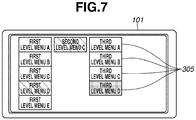
- Fig. 7 illustrates a display example where the menu assigned to the shortcut key is "third level menu D," and a setting or an operation instruction of the menu “third level menu D” is determined to be not able to be made.
- the menu “second level menu C” one level above the menu “third level menu D” is displayed.
- the menu item "third level menu D” for entering the menu “third level menu D” is grayed out to recognizably display the disabled state. In such a state, the system control unit 207 will not enter the menu "third level menu D" even if the user presses the set key.
- the system control unit 207 opens the menu “reset” one level above the menu “SD-CARD.”
- the system control unit 207 grays out the menu item "SD-CARD” among the displayed menu items "CF-A,” “CF-B,” and “SD-CARD,” and displays the menu item "SD-CARD” as selected.
- the user can recognize that the menu assigned to the shortcut key is "SD-CARD, " and that the menu "SD-CARD” is not able to be opened because the menu "SD-CARD" is currently unavailable.
- step S606 the system control unit 207 detects whether the user presses the menu key of the operation unit 104. If the menu key is pressed (YES in step S606), the system control unit 207 proceeds to step S607. If the menu key is not pressed (NO in step S606), the system control unit 207 returns to step S601.
- step S607 the system control unit 207 displays the top menu or the menu that was previously displayed when closed last time. Specifically, if the user presses the menu key for the first time after the digital video camera 100 is powered on, the system control unit 207 opens the top menu. If not, the system control unit 207 opens the menu that was previously displayed when closed last time. For the sake of such processing, the system control unit 207, when closing a menu, records the information about the menu previously displayed into the system memory 212.
- step S608 the system control unit 207 performs processing according to operations the user makes via the operation unit 104 (menu operations). Specifically, when the user operates the up and down arrow keys to select a menu item and presses the set key, the system control unit 207 executes the selected menu item. More specifically, if the selected menu item is a menu of the lowest hierarchy, the system control unit 207 reflects the setting value or executes an operation instruction indicated by the menu item. If the selected menu item is not a menu of the lowest hierarchy, the system control unit 207 opens the menu of lower hierarchy corresponding to the selected menu item. If the selected menu item is a return button, the system control unit 207 opens a menu of higher hierarchy.
- step S609 the system control unit 207 detects whether the user presses the menu key of the operation unit 104. If the menu key is pressed (YES in step S609), the system control unit 207 proceeds to step S610. If the menu key is not pressed (NO in step S609), the system control unit 207 returns to step S608. In step S610, the system control unit 207 closes and hides (clears the display of) the displayed menu, returns to a display state prior to the menu display, and ends the processing.
- the system control unit 207 displays a menu regardless of whether a setting or an operation instruction of the menu assigned to the shortcut key can be made.
- a menu can be opened even if no setting or operation instruction of the menu assigned to the shortcut key is able to be made.
- it can be recognizably displayed for user recognition that no setting or operation instruction by the menu assigned to the shortcut key is able to be made. This can prevent user's misrecognition that the shortcut key is malfunctioning, like the menu is not properly registered to the shortcut key or the shortcut key is broken.
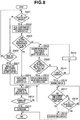
- FIG. 8 is a flowchart illustrating menu display processing according to the third exemplary embodiment. The steps of the flowchart are implemented by the system control unit 207 loading the program recorded in the nonvolatile memory 210 into the system memory 212 and executing the program.
- step S809 the system control unit 207 determines whether the setting disabling condition acquired in step S808 is satisfied, i.e., whether a setting or an operation instruction of the menu N levels above the menu acquired in step S802 can be made. If a setting or an operation instruction can be made (YES in step S809), the system control unit 207 proceeds to step S810. If no setting or operation instruction can be made (NO in step S809), the system control unit 207 proceeds to step S814.
- step S810 the system control unit 207 displays the menu N levels above the menu acquired in step S802 on the display unit 101.
- the system control unit 207 then proceeds to step S811.
- the processing of steps S811 to S813 is similar to that of steps S608 to S610 illustrated in Fig 6 , described in the first example, respectively. Description thereof will thus be omitted.
- step S814 the system control unit 207 determines whether the menu acquired in step S808 is the menu of the highest hierarchy, i.e., the top menu. If the menu is of the highest hierarchy (YES in step S814), the system control unit 207 proceeds to step S816. If the menu is not of the highest hierarchy (NO in step S814), the system control unit 207 proceeds to step S815.
- step S815 the system control unit 207 adds 1 to N to ascend the hierarchy by one level.
- the system control unit 207 then proceeds to step S808.
- step S816 the system control unit 207 displays a warning display on the display unit 101 that there is no menu including a menu item on which a setting or an operation instruction can be made, like "No shortcut function is available.”
- step S817 the system control unit 207 counts the display time of the warning display displayed in the step S816, and determines whether a predetermined time has elapsed. If a predetermined time has elapsed (YES in step S817), the system control unit 207 proceeds to step S819. If the predetermined time has not elapsed yet (NO in step S817), the system control unit 207 proceeds to step S818.
- step S818 the system control unit 207 detects whether the user presses a shortcut key of the operation unit 104. If the system control unit 207 detects that a shortcut key is pressed (YES in step S818), the system control unit 207 proceeds to step S819. If the system control unit 207 does not detect that a shortcut key is pressed (NO in step S818), the system control unit 207 returns to step S817. In step S818, the system control unit 207 may determine whether the user presses the same shortcut key as that pressed in step S801. In step S819, the system control unit 207 hides (clears the display of) the warning display on the display unit 101, and ends the menu display processing.
- the system control unit 207 displays a menu of higher hierarchy.
- the system control unit 207 ascends the hierarchy up to a menu where a setting or an operation setting is enabled.
- the system control unit 207 displays a menu of the lowest hierarchy that includes a menu item on which a setting or an operation instruction can be made, among menus of higher hierarchy than the menu assigned to the shortcut key. The user can thus omit operations to open a menu that includes a menu item on which a setting or an operation instruction is able to be made, and can quickly enter the menu. This can further improve the user-friendliness.
- the foregoing control of the system control unit 207 may be implemented by a single piece of hardware. Alternatively, a plurality of pieces of hardware may share the processing to control the entire apparatus. While the present invention has been described based on its advantageous exemplary embodiments, the present invention is not limited to such specific exemplary embodiments. Various forms not departing from the gist of the invention are also embraced in the present invention. The foregoing exemplary embodiments are just a few exemplary embodiments of the present invention. The exemplary embodiments may be combined as appropriate.
- An exemplary embodiment of the present invention is not limited thereto, and may be applied to a display control apparatus that displays a specific menu among hierarchical menus including a plurality of menus by an operation of a specific operation unit. More specifically, an exemplary embodiment of the present invention may be applied to a personal computer, a personal digital assistant (PDA), a mobile phone terminal, a portable image viewer, a printer apparatus equipped with a display, a digital photo frame, a music player, a game machine, an electronic book reader, and a tablet terminal.
- PDA personal digital assistant
- aspects of the present invention can also be realized by a computer of a system or apparatus (or devices such as a CPU or MPU) that reads out and executes a program recorded on a memory device to perform the functions of the above-described embodiments, and by a method, the steps of which are performed by a computer of a system or apparatus by, for example, reading out and executing a program recorded on a memory device to perform the functions of the above-described embodiments.
- the program is provided to the computer for example via a network or from a recording medium of various types serving as the memory device (e.g., a non-transitory computer-readable medium).
- the system or apparatus, and the recording medium where the program is stored are included as being within the scope of the present invention.
Landscapes
- Engineering & Computer Science (AREA)
- Theoretical Computer Science (AREA)
- General Engineering & Computer Science (AREA)
- Human Computer Interaction (AREA)
- Physics & Mathematics (AREA)
- General Physics & Mathematics (AREA)
- Multimedia (AREA)
- Signal Processing (AREA)
- User Interface Of Digital Computer (AREA)
- Studio Devices (AREA)
- Input From Keyboards Or The Like (AREA)
Claims (10)
- Anzeigesteuerungsvorrichtung, umfassend:eine spezifische Bedieneinrichtung, die konfiguriert ist, eine Benutzerbedienung anzunehmen, die eine Anzeige eines spezifischen Menüs unter hierarchischen Menüs einschließlich mehrerer Menüs zum Vornehmen einer Einstellung oder einen Bedienungsbefehl für die Anzeigesteuerungsvorrichtung angibt; undeine Anzeigesteuerungseinrichtung zum Steuern einer Anzeigeeinrichtung, die konfiguriert ist, die Anzeige des spezifischen Menüs zu schließen, falls die spezifische Bedieneinrichtung bedient wird, wenn das spezifische Menü auf der Anzeigeeinrichtung angezeigt wird, und das spezifische Menü anzuzeigen, falls die spezifische Bedieneinrichtung bedient wird, wenn ein vom spezifischen Menü und von einem eine Stufe über dem spezifischen Menü befindlichen Menü verschiedenes Menü angezeigt wird, unddie Anzeige des eine Stufe über dem spezifischen Menü befindlichen Menüs zu schließen, falls die spezifische Bedieneinrichtung bedient wird, wenn das eine Stufe über dem spezifischen Menü befindliche Menü auf der Anzeigeeinrichtung angezeigt wird und das spezifische Menü nicht auf der Anzeigeeinrichtung angezeigt wird und ein Menüpunkt des eine Stufe über dem spezifischen Menü befindlichen Menüs zum Aufrufen des spezifischen Menüs auf der Anzeigeeinrichtung als ausgewählt angegeben wird, unddas spezifische Menü anzuzeigen, falls die spezifische Bedieneinrichtung bedient wird, wenn das eine Stufe über dem spezifischen Menü befindliche Menü auf der Anzeigeeinrichtung angezeigt wird und das spezifische Menü nicht auf der Anzeigeeinrichtung angezeigt wird und der Menüpunkt zum Aufrufen des spezifischen Menüs auf der Anzeigeeinrichtung nicht als ausgewählt angegeben wird.
- Anzeigesteuerungsvorrichtung nach Anspruch 1, wobei die Anzeigesteuerungseinrichtung konfiguriert ist, einen Anzeigezustand der Anzeigeeinrichtung wiederherzustellen, wie er vor Öffnen der hierarchischen Menüs gewesen ist, wenn das Menü geschlossen wird.
- Anzeigesteuerungsvorrichtung nach Anspruch 1, ferner umfassend eine Einrichtung, die konfiguriert ist, basierend auf einer Benutzerbedienung der spezifischen Bedieneinrichtung irgendeines der mehreren Menüs als das spezifische Menü zuzuordnen.
- Anzeigesteuerungsvorrichtung nach Anspruch 1, umfassend mehrere spezifische Bedieneinrichtungen,
wobei den jeweiligen mehreren spezifischen Bedieneinrichtungen verschiedene Menüs zugeordnet sind. - Anzeigesteuerungsvorrichtung nach Anspruch 1, ferner umfassend eine Menübedienungseinrichtung, die konfiguriert ist, unter den hierarchischen Menüs ein vom spezifischen Menü verschiedenes Menü anzuzeigen.
- Anzeigesteuerungsvorrichtung nach Anspruch 5, wobei die Anzeigesteuerungsvorrichtung konfiguriert ist, unter den mehreren Menüs ein Menü der höchsten Hierarchiestufe anzuzeigen, falls die Menübedienungseinrichtung bedient wird.
- Anzeigesteuerungsvorrichtung nach Anspruch 5, wobei die Anzeigesteuerungseinrichtung konfiguriert ist, unter den mehreren Menüs das beim letztmaligen Schließen des Menüs zuvor angezeigte Menü anzuzeigen, falls die Menübedienungseinrichtung bedient wird.
- Anzeigesteuerungsvorrichtung nach Anspruch 1, wobei die Anzeigesteuerungsvorrichtung konfiguriert ist, als eine Bildaufnahmevorrichtung einschließlich einer zum Umwandeln eines optischen Bildes in ein elektrisches Signal konfigurierten Bildaufnahmevorrichtung zu funktionieren.
- Verfahren zum Steuern einer Anzeigesteuerungsvorrichtung, wobei das Verfahren umfasst:Anzeigen, auf einer Anzeigeeinrichtung, eines spezifischen Menüs unter hierarchischen Menüs einschließlich mehrerer Menüs zum Vornehmen einer Einstellung oder eines Bedienungsbefehls für die Anzeigesteuerungsvorrichtung, ansprechend auf eine Bedienung einer spezifischen Bedieneinrichtung der Anzeigesteuerungsvorrichtung; undDurchführen einer Anzeigesteuerung der Anzeigeeinrichtung, sodass das spezifische Menü geschlossen wird, falls die spezifische Bedieneinrichtung bedient wird, wenn das spezifische Menü auf der Anzeigeeinrichtung angezeigt wird, und das spezifische Menü angezeigt wird, falls die spezifische Bedieneinrichtung bedient wird, wenn ein vom spezifischen Menü und von einem eine Stufe über dem spezifischen Menü befindlichen Menü verschiedenes Menü angezeigt wird, undSchließen der Anzeige des eine Stufe über dem spezifischen Menü befindlichen Menüs, falls die spezifische Bedieneinrichtung bedient wird, wenn das eine Stufe über dem spezifischen Menü befindliche Menü auf der Anzeigeeinrichtung angezeigt wird und das spezifische Menü nicht auf der Anzeigeeinrichtung angezeigt wird und ein Menüpunkt des eine Stufe über dem spezifischen Menü befindlichen Menüs zum Aufrufen des spezifischen Menüs auf der Anzeigeeinrichtung als ausgewählt angegeben wird, undAnzeigen des spezifischen Menüs, falls die spezifische Bedieneinrichtung bedient wird, wenn das eine Stufe über dem spezifischen Menü befindliche Menü auf der Anzeigeeinrichtung angezeigt wird und das spezifische Menü nicht auf der Anzeigeeinrichtung angezeigt wird und der Menüpunkt zum Aufrufen des spezifischen Menüs auf der Anzeigeeinrichtung nicht als ausgewählt angegeben wird.
- Programm zum Veranlassen eines Computers, ein Verfahren zum Steuern einer Anzeigesteuerungsvorrichtung nach Anspruch 9 durchzuführen.
Priority Applications (1)
| Application Number | Priority Date | Filing Date | Title |
|---|---|---|---|
| EP17199260.5A EP3306912B1 (de) | 2011-10-28 | 2012-10-26 | Anzeigeansteuerungsvorrichtung und verfahren zur steuerung einer anzeigeansteuerungsvorrichtung |
Applications Claiming Priority (2)
| Application Number | Priority Date | Filing Date | Title |
|---|---|---|---|
| JP2011237500A JP5893341B2 (ja) | 2011-10-28 | 2011-10-28 | 表示制御装置、表示制御装置の制御方法およびプログラム |
| JP2011237501A JP5901228B2 (ja) | 2011-10-28 | 2011-10-28 | 表示制御装置、表示制御装置の制御方法およびプログラム |
Related Child Applications (2)
| Application Number | Title | Priority Date | Filing Date |
|---|---|---|---|
| EP17199260.5A Division EP3306912B1 (de) | 2011-10-28 | 2012-10-26 | Anzeigeansteuerungsvorrichtung und verfahren zur steuerung einer anzeigeansteuerungsvorrichtung |
| EP17199260.5A Division-Into EP3306912B1 (de) | 2011-10-28 | 2012-10-26 | Anzeigeansteuerungsvorrichtung und verfahren zur steuerung einer anzeigeansteuerungsvorrichtung |
Publications (3)
| Publication Number | Publication Date |
|---|---|
| EP2587791A2 EP2587791A2 (de) | 2013-05-01 |
| EP2587791A3 EP2587791A3 (de) | 2013-06-26 |
| EP2587791B1 true EP2587791B1 (de) | 2017-12-13 |
Family
ID=47358529
Family Applications (2)
| Application Number | Title | Priority Date | Filing Date |
|---|---|---|---|
| EP17199260.5A Active EP3306912B1 (de) | 2011-10-28 | 2012-10-26 | Anzeigeansteuerungsvorrichtung und verfahren zur steuerung einer anzeigeansteuerungsvorrichtung |
| EP12190266.2A Active EP2587791B1 (de) | 2011-10-28 | 2012-10-26 | Anzeigeansteuerungsvorrichtung und Verfahren zur Steuerung einer Anzeigeansteuerungsvorrichtung |
Family Applications Before (1)
| Application Number | Title | Priority Date | Filing Date |
|---|---|---|---|
| EP17199260.5A Active EP3306912B1 (de) | 2011-10-28 | 2012-10-26 | Anzeigeansteuerungsvorrichtung und verfahren zur steuerung einer anzeigeansteuerungsvorrichtung |
Country Status (4)
| Country | Link |
|---|---|
| US (1) | US9485411B2 (de) |
| EP (2) | EP3306912B1 (de) |
| KR (1) | KR101581306B1 (de) |
| CN (1) | CN103095986B (de) |
Families Citing this family (27)
| Publication number | Priority date | Publication date | Assignee | Title |
|---|---|---|---|---|
| MY168889A (en) | 2013-02-20 | 2018-12-04 | Panasonic Ip Corp America | Control method for information apparatus and program |
| MY181880A (en) * | 2013-02-20 | 2021-01-12 | Panasonic Ip Corp America | Method for controlling information apparatus and program |
| US9235407B1 (en) * | 2013-03-15 | 2016-01-12 | The Mathworks, Inc. | Scoped settings for a programming environment |
| JP2015158753A (ja) * | 2014-02-21 | 2015-09-03 | ソニー株式会社 | ウェアラブル機器および制御装置 |
| JP6365093B2 (ja) | 2014-08-06 | 2018-08-01 | 富士ゼロックス株式会社 | 情報処理装置及びプログラム |
| CN104216633B (zh) * | 2014-08-27 | 2018-05-15 | 深圳市金立通信设备有限公司 | 一种终端 |
| CN104219385B (zh) * | 2014-08-27 | 2017-08-25 | 深圳市金立通信设备有限公司 | 一种按键功能控制方法 |
| CN105430244B (zh) | 2014-09-12 | 2019-03-19 | 佳能株式会社 | 电子装置及其控制方法 |
| CN105573593B (zh) * | 2014-10-09 | 2019-01-18 | 珠海金山办公软件有限公司 | 一种快捷菜单的显示方法及装置 |
| JP6494376B2 (ja) * | 2015-03-31 | 2019-04-03 | キヤノン株式会社 | 電子機器及びその制御方法 |
| CN107735761B (zh) | 2015-07-17 | 2022-03-04 | 克朗设备公司 | 用于工业车辆的具有图形用户界面的处理设备 |
| JP6564684B2 (ja) * | 2015-10-27 | 2019-08-21 | シャープ株式会社 | 情報処理装置及び画像形成装置 |
| US10423202B2 (en) * | 2016-04-07 | 2019-09-24 | Intel Corporation | System power management |
| CN109891380A (zh) | 2016-11-22 | 2019-06-14 | 克朗设备公司 | 用于工业车辆的用户界面设备 |
| US10739842B2 (en) | 2017-04-01 | 2020-08-11 | Intel Corporation | Power management and protection |
| JP2019040426A (ja) * | 2017-08-25 | 2019-03-14 | 東芝テック株式会社 | 情報処理装置およびプログラム |
| JP6885289B2 (ja) * | 2017-09-29 | 2021-06-09 | トヨタ自動車株式会社 | 表示制御装置 |
| US10790682B2 (en) | 2018-03-30 | 2020-09-29 | Intel Corporation | Hybrid power boost charging with peak power protection |
| JP2020004283A (ja) * | 2018-06-29 | 2020-01-09 | キヤノン株式会社 | 電子機器 |
| GB201908996D0 (en) * | 2018-06-29 | 2019-08-07 | Canon Kk | Electronic device, control method for electronic device, program, and computer readable medium |
| JP2020004285A (ja) * | 2018-06-29 | 2020-01-09 | キヤノン株式会社 | 電子機器 |
| JP7204434B2 (ja) * | 2018-11-15 | 2023-01-16 | キヤノン株式会社 | 電子機器及びその制御方法 |
| EP4009152B1 (de) * | 2019-08-01 | 2026-02-18 | Panasonic Intellectual Property Management Co., Ltd. | Elektronische ausrüstung |
| JP7467229B2 (ja) * | 2020-05-15 | 2024-04-15 | キヤノン株式会社 | 撮像装置、その制御方法およびプログラム |
| CN113342486B (zh) * | 2021-05-20 | 2023-03-10 | 深圳市鸿合创新信息技术有限责任公司 | 电子设备及其控制方法、控制系统及存储介质 |
| CN114003133A (zh) * | 2021-09-22 | 2022-02-01 | 西安震有信通科技有限公司 | 一种快捷操作控制方法、系统及终端 |
| JP2024120426A (ja) * | 2023-02-24 | 2024-09-05 | キヤノン株式会社 | 電子機器、その制御方法およびプログラム |
Family Cites Families (21)
| Publication number | Priority date | Publication date | Assignee | Title |
|---|---|---|---|---|
| US5208910A (en) * | 1990-04-19 | 1993-05-04 | International Business Machines | Menu driven and method system for informing which past selections have caused disabled actions |
| JPH04207694A (ja) | 1990-11-30 | 1992-07-29 | Matsushita Electric Ind Co Ltd | 遠隔操作システム |
| US5760776A (en) * | 1995-12-13 | 1998-06-02 | Oracle Corporation | Menu editor for a graphical user interface |
| JP3346333B2 (ja) | 1999-04-16 | 2002-11-18 | 村田機械株式会社 | 操作装置 |
| US6968510B2 (en) | 2001-02-05 | 2005-11-22 | Alpine Electronics, Inc. | Function executing apparatus and menu item displaying method therefor |
| US6959422B2 (en) * | 2001-11-09 | 2005-10-25 | Corel Corporation | Shortcut key manager and method for managing shortcut key assignment |
| US7191411B2 (en) * | 2002-06-06 | 2007-03-13 | Moehrle Armin E | Active path menu navigation system |
| US7827508B2 (en) | 2002-09-13 | 2010-11-02 | Eastman Kodak Company | Hotkey function in digital camera user interface |
| JP3700031B2 (ja) | 2003-03-10 | 2005-09-28 | コニカミノルタフォトイメージング株式会社 | デジタルカメラ |
| US20050054381A1 (en) | 2003-09-05 | 2005-03-10 | Samsung Electronics Co., Ltd. | Proactive user interface |
| JP2005221771A (ja) | 2004-02-05 | 2005-08-18 | Canon Inc | 撮像装置及び機能表示方法 |
| US20060123360A1 (en) | 2004-12-03 | 2006-06-08 | Picsel Research Limited | User interfaces for data processing devices and systems |
| KR101156685B1 (ko) | 2005-08-24 | 2012-06-14 | 삼성전자주식회사 | 디지털 이미지의 설정변경 방법 및 이를 수행하는 디지털이미지 처리장치 |
| US8959476B2 (en) * | 2006-01-11 | 2015-02-17 | Microsoft Technology Licensing, Llc | Centralized context menus and tooltips |
| US20070240073A1 (en) | 2006-04-07 | 2007-10-11 | Mccarthy Kevin | Mobile communication terminal |
| JP2008203910A (ja) | 2007-02-16 | 2008-09-04 | Funai Electric Co Ltd | 情報記録再生装置 |
| JP5101373B2 (ja) | 2007-04-10 | 2012-12-19 | 古野電気株式会社 | 情報表示装置 |
| US8862252B2 (en) | 2009-01-30 | 2014-10-14 | Apple Inc. | Audio user interface for displayless electronic device |
| US9213466B2 (en) | 2009-07-20 | 2015-12-15 | Apple Inc. | Displaying recently used functions in context sensitive menu |
| US20110119626A1 (en) | 2009-11-19 | 2011-05-19 | Robert Bosch Gmbh | Entertainment system smart keys |
| US8631350B2 (en) | 2010-04-23 | 2014-01-14 | Blackberry Limited | Graphical context short menu |
-
2012
- 2012-10-23 US US13/658,230 patent/US9485411B2/en active Active
- 2012-10-26 EP EP17199260.5A patent/EP3306912B1/de active Active
- 2012-10-26 EP EP12190266.2A patent/EP2587791B1/de active Active
- 2012-10-29 CN CN201210423281.2A patent/CN103095986B/zh active Active
- 2012-10-29 KR KR1020120120181A patent/KR101581306B1/ko active Active
Non-Patent Citations (1)
| Title |
|---|
| None * |
Also Published As
| Publication number | Publication date |
|---|---|
| EP2587791A3 (de) | 2013-06-26 |
| KR20130047638A (ko) | 2013-05-08 |
| US9485411B2 (en) | 2016-11-01 |
| EP2587791A2 (de) | 2013-05-01 |
| KR101581306B1 (ko) | 2015-12-31 |
| EP3306912A1 (de) | 2018-04-11 |
| EP3306912B1 (de) | 2020-04-22 |
| CN103095986B (zh) | 2016-06-29 |
| US20130111410A1 (en) | 2013-05-02 |
| CN103095986A (zh) | 2013-05-08 |
Similar Documents
| Publication | Publication Date | Title |
|---|---|---|
| EP2587791B1 (de) | Anzeigeansteuerungsvorrichtung und Verfahren zur Steuerung einer Anzeigeansteuerungsvorrichtung | |
| US9692971B2 (en) | Image capturing apparatus capable of automatically switching from reproduction mode to shooting mode and displaying live view image and control method thereof | |
| US10165175B2 (en) | Electronic device and method for controlling the same | |
| US10511761B2 (en) | Image capturing control apparatus, control method, and storage medium | |
| JP2019164423A (ja) | 電子機器、電子機器の制御方法、プログラム、及び、記録媒体 | |
| JP2019193131A (ja) | 電子機器、電子機器の制御方法、プログラム、及び、記録媒体 | |
| US20240267612A1 (en) | Electronic apparatus capable of easily registering setting item, method of controlling electronic apparatus, and storage medium | |
| US20210127048A1 (en) | Control apparatus, control method, and storage medium | |
| JP5893341B2 (ja) | 表示制御装置、表示制御装置の制御方法およびプログラム | |
| US9996219B2 (en) | Display control apparatus, method and program, and storage medium storing program | |
| JP2015022339A (ja) | 電子機器及びその制御方法 | |
| JP6399897B2 (ja) | 表示制御装置及びその制御方法 | |
| JP6188484B2 (ja) | 電子機器、その制御方法及びプログラム並びに記憶媒体 | |
| US10225460B2 (en) | Electronic device and method of controlling the same | |
| JP6444350B2 (ja) | 表示制御装置およびその制御方法 | |
| JP5901228B2 (ja) | 表示制御装置、表示制御装置の制御方法およびプログラム | |
| US11336829B2 (en) | Display control apparatus capable of performing display control for display apparatus with variable orientation, control method therefor, and storage medium | |
| US10616472B2 (en) | Electronic apparatus, method of controlling electronic apparatus, and recording medium | |
| JP2018037892A (ja) | 電子機器及びその制御方法 | |
| JP2025053819A (ja) | 撮像装置、撮像装置の制御方法、プログラムおよび記憶媒体 | |
| JP6210795B2 (ja) | 表示制御装置及びその制御方法 | |
| JP2016092542A (ja) | 画像処理装置及びその制御方法、プログラム、並びに記憶媒体 | |
| JP2020204955A (ja) | 電子機器、制御方法、プログラム、記憶媒体 | |
| JP2021026031A (ja) | 表示制御装置及びその制御方法 | |
| JP2018037858A (ja) | 電子機器及びその制御方法 |
Legal Events
| Date | Code | Title | Description |
|---|---|---|---|
| PUAI | Public reference made under article 153(3) epc to a published international application that has entered the european phase |
Free format text: ORIGINAL CODE: 0009012 |
|
| AK | Designated contracting states |
Kind code of ref document: A2 Designated state(s): AL AT BE BG CH CY CZ DE DK EE ES FI FR GB GR HR HU IE IS IT LI LT LU LV MC MK MT NL NO PL PT RO RS SE SI SK SM TR |
|
| AX | Request for extension of the european patent |
Extension state: BA ME |
|
| PUAL | Search report despatched |
Free format text: ORIGINAL CODE: 0009013 |
|
| AK | Designated contracting states |
Kind code of ref document: A3 Designated state(s): AL AT BE BG CH CY CZ DE DK EE ES FI FR GB GR HR HU IE IS IT LI LT LU LV MC MK MT NL NO PL PT RO RS SE SI SK SM TR |
|
| AX | Request for extension of the european patent |
Extension state: BA ME |
|
| RIC1 | Information provided on ipc code assigned before grant |
Ipc: G06F 3/0482 20130101ALI20130522BHEP Ipc: H04N 5/232 20060101AFI20130522BHEP |
|
| 17P | Request for examination filed |
Effective date: 20140102 |
|
| RBV | Designated contracting states (corrected) |
Designated state(s): AL AT BE BG CH CY CZ DE DK EE ES FI FR GB GR HR HU IE IS IT LI LT LU LV MC MK MT NL NO PL PT RO RS SE SI SK SM TR |
|
| 17Q | First examination report despatched |
Effective date: 20160630 |
|
| GRAP | Despatch of communication of intention to grant a patent |
Free format text: ORIGINAL CODE: EPIDOSNIGR1 |
|
| INTG | Intention to grant announced |
Effective date: 20170619 |
|
| GRAS | Grant fee paid |
Free format text: ORIGINAL CODE: EPIDOSNIGR3 |
|
| GRAA | (expected) grant |
Free format text: ORIGINAL CODE: 0009210 |
|
| AK | Designated contracting states |
Kind code of ref document: B1 Designated state(s): AL AT BE BG CH CY CZ DE DK EE ES FI FR GB GR HR HU IE IS IT LI LT LU LV MC MK MT NL NO PL PT RO RS SE SI SK SM TR |
|
| REG | Reference to a national code |
Ref country code: GB Ref legal event code: FG4D |
|
| REG | Reference to a national code |
Ref country code: AT Ref legal event code: REF Ref document number: 955359 Country of ref document: AT Kind code of ref document: T Effective date: 20171215 Ref country code: CH Ref legal event code: EP |
|
| REG | Reference to a national code |
Ref country code: IE Ref legal event code: FG4D |
|
| REG | Reference to a national code |
Ref country code: DE Ref legal event code: R096 Ref document number: 602012040791 Country of ref document: DE |
|
| REG | Reference to a national code |
Ref country code: NL Ref legal event code: MP Effective date: 20171213 |
|
| REG | Reference to a national code |
Ref country code: LT Ref legal event code: MG4D |
|
| PG25 | Lapsed in a contracting state [announced via postgrant information from national office to epo] |
Ref country code: LT Free format text: LAPSE BECAUSE OF FAILURE TO SUBMIT A TRANSLATION OF THE DESCRIPTION OR TO PAY THE FEE WITHIN THE PRESCRIBED TIME-LIMIT Effective date: 20171213 Ref country code: NO Free format text: LAPSE BECAUSE OF FAILURE TO SUBMIT A TRANSLATION OF THE DESCRIPTION OR TO PAY THE FEE WITHIN THE PRESCRIBED TIME-LIMIT Effective date: 20180313 Ref country code: FI Free format text: LAPSE BECAUSE OF FAILURE TO SUBMIT A TRANSLATION OF THE DESCRIPTION OR TO PAY THE FEE WITHIN THE PRESCRIBED TIME-LIMIT Effective date: 20171213 Ref country code: SE Free format text: LAPSE BECAUSE OF FAILURE TO SUBMIT A TRANSLATION OF THE DESCRIPTION OR TO PAY THE FEE WITHIN THE PRESCRIBED TIME-LIMIT Effective date: 20171213 |
|
| REG | Reference to a national code |
Ref country code: AT Ref legal event code: MK05 Ref document number: 955359 Country of ref document: AT Kind code of ref document: T Effective date: 20171213 |
|
| PG25 | Lapsed in a contracting state [announced via postgrant information from national office to epo] |
Ref country code: HR Free format text: LAPSE BECAUSE OF FAILURE TO SUBMIT A TRANSLATION OF THE DESCRIPTION OR TO PAY THE FEE WITHIN THE PRESCRIBED TIME-LIMIT Effective date: 20171213 Ref country code: GR Free format text: LAPSE BECAUSE OF FAILURE TO SUBMIT A TRANSLATION OF THE DESCRIPTION OR TO PAY THE FEE WITHIN THE PRESCRIBED TIME-LIMIT Effective date: 20180314 Ref country code: LV Free format text: LAPSE BECAUSE OF FAILURE TO SUBMIT A TRANSLATION OF THE DESCRIPTION OR TO PAY THE FEE WITHIN THE PRESCRIBED TIME-LIMIT Effective date: 20171213 Ref country code: BG Free format text: LAPSE BECAUSE OF FAILURE TO SUBMIT A TRANSLATION OF THE DESCRIPTION OR TO PAY THE FEE WITHIN THE PRESCRIBED TIME-LIMIT Effective date: 20180313 Ref country code: RS Free format text: LAPSE BECAUSE OF FAILURE TO SUBMIT A TRANSLATION OF THE DESCRIPTION OR TO PAY THE FEE WITHIN THE PRESCRIBED TIME-LIMIT Effective date: 20171213 |
|
| PG25 | Lapsed in a contracting state [announced via postgrant information from national office to epo] |
Ref country code: NL Free format text: LAPSE BECAUSE OF FAILURE TO SUBMIT A TRANSLATION OF THE DESCRIPTION OR TO PAY THE FEE WITHIN THE PRESCRIBED TIME-LIMIT Effective date: 20171213 |
|
| PG25 | Lapsed in a contracting state [announced via postgrant information from national office to epo] |
Ref country code: CZ Free format text: LAPSE BECAUSE OF FAILURE TO SUBMIT A TRANSLATION OF THE DESCRIPTION OR TO PAY THE FEE WITHIN THE PRESCRIBED TIME-LIMIT Effective date: 20171213 Ref country code: SK Free format text: LAPSE BECAUSE OF FAILURE TO SUBMIT A TRANSLATION OF THE DESCRIPTION OR TO PAY THE FEE WITHIN THE PRESCRIBED TIME-LIMIT Effective date: 20171213 Ref country code: CY Free format text: LAPSE BECAUSE OF FAILURE TO SUBMIT A TRANSLATION OF THE DESCRIPTION OR TO PAY THE FEE WITHIN THE PRESCRIBED TIME-LIMIT Effective date: 20171213 Ref country code: EE Free format text: LAPSE BECAUSE OF FAILURE TO SUBMIT A TRANSLATION OF THE DESCRIPTION OR TO PAY THE FEE WITHIN THE PRESCRIBED TIME-LIMIT Effective date: 20171213 Ref country code: ES Free format text: LAPSE BECAUSE OF FAILURE TO SUBMIT A TRANSLATION OF THE DESCRIPTION OR TO PAY THE FEE WITHIN THE PRESCRIBED TIME-LIMIT Effective date: 20171213 |
|
| PG25 | Lapsed in a contracting state [announced via postgrant information from national office to epo] |
Ref country code: IS Free format text: LAPSE BECAUSE OF FAILURE TO SUBMIT A TRANSLATION OF THE DESCRIPTION OR TO PAY THE FEE WITHIN THE PRESCRIBED TIME-LIMIT Effective date: 20180413 Ref country code: RO Free format text: LAPSE BECAUSE OF FAILURE TO SUBMIT A TRANSLATION OF THE DESCRIPTION OR TO PAY THE FEE WITHIN THE PRESCRIBED TIME-LIMIT Effective date: 20171213 Ref country code: SM Free format text: LAPSE BECAUSE OF FAILURE TO SUBMIT A TRANSLATION OF THE DESCRIPTION OR TO PAY THE FEE WITHIN THE PRESCRIBED TIME-LIMIT Effective date: 20171213 Ref country code: IT Free format text: LAPSE BECAUSE OF FAILURE TO SUBMIT A TRANSLATION OF THE DESCRIPTION OR TO PAY THE FEE WITHIN THE PRESCRIBED TIME-LIMIT Effective date: 20171213 Ref country code: AT Free format text: LAPSE BECAUSE OF FAILURE TO SUBMIT A TRANSLATION OF THE DESCRIPTION OR TO PAY THE FEE WITHIN THE PRESCRIBED TIME-LIMIT Effective date: 20171213 Ref country code: PL Free format text: LAPSE BECAUSE OF FAILURE TO SUBMIT A TRANSLATION OF THE DESCRIPTION OR TO PAY THE FEE WITHIN THE PRESCRIBED TIME-LIMIT Effective date: 20171213 |
|
| REG | Reference to a national code |
Ref country code: DE Ref legal event code: R097 Ref document number: 602012040791 Country of ref document: DE |
|
| PLBE | No opposition filed within time limit |
Free format text: ORIGINAL CODE: 0009261 |
|
| STAA | Information on the status of an ep patent application or granted ep patent |
Free format text: STATUS: NO OPPOSITION FILED WITHIN TIME LIMIT |
|
| 26N | No opposition filed |
Effective date: 20180914 |
|
| PG25 | Lapsed in a contracting state [announced via postgrant information from national office to epo] |
Ref country code: DK Free format text: LAPSE BECAUSE OF FAILURE TO SUBMIT A TRANSLATION OF THE DESCRIPTION OR TO PAY THE FEE WITHIN THE PRESCRIBED TIME-LIMIT Effective date: 20171213 |
|
| PG25 | Lapsed in a contracting state [announced via postgrant information from national office to epo] |
Ref country code: SI Free format text: LAPSE BECAUSE OF FAILURE TO SUBMIT A TRANSLATION OF THE DESCRIPTION OR TO PAY THE FEE WITHIN THE PRESCRIBED TIME-LIMIT Effective date: 20171213 |
|
| REG | Reference to a national code |
Ref country code: CH Ref legal event code: PL |
|
| REG | Reference to a national code |
Ref country code: BE Ref legal event code: MM Effective date: 20181031 |
|
| PG25 | Lapsed in a contracting state [announced via postgrant information from national office to epo] |
Ref country code: MC Free format text: LAPSE BECAUSE OF FAILURE TO SUBMIT A TRANSLATION OF THE DESCRIPTION OR TO PAY THE FEE WITHIN THE PRESCRIBED TIME-LIMIT Effective date: 20171213 Ref country code: LU Free format text: LAPSE BECAUSE OF NON-PAYMENT OF DUE FEES Effective date: 20181026 |
|
| REG | Reference to a national code |
Ref country code: IE Ref legal event code: MM4A |
|
| PG25 | Lapsed in a contracting state [announced via postgrant information from national office to epo] |
Ref country code: LI Free format text: LAPSE BECAUSE OF NON-PAYMENT OF DUE FEES Effective date: 20181031 Ref country code: BE Free format text: LAPSE BECAUSE OF NON-PAYMENT OF DUE FEES Effective date: 20181031 Ref country code: FR Free format text: LAPSE BECAUSE OF NON-PAYMENT OF DUE FEES Effective date: 20181031 Ref country code: CH Free format text: LAPSE BECAUSE OF NON-PAYMENT OF DUE FEES Effective date: 20181031 |
|
| PG25 | Lapsed in a contracting state [announced via postgrant information from national office to epo] |
Ref country code: IE Free format text: LAPSE BECAUSE OF NON-PAYMENT OF DUE FEES Effective date: 20181026 |
|
| PG25 | Lapsed in a contracting state [announced via postgrant information from national office to epo] |
Ref country code: MT Free format text: LAPSE BECAUSE OF NON-PAYMENT OF DUE FEES Effective date: 20181026 |
|
| PG25 | Lapsed in a contracting state [announced via postgrant information from national office to epo] |
Ref country code: TR Free format text: LAPSE BECAUSE OF FAILURE TO SUBMIT A TRANSLATION OF THE DESCRIPTION OR TO PAY THE FEE WITHIN THE PRESCRIBED TIME-LIMIT Effective date: 20171213 |
|
| PG25 | Lapsed in a contracting state [announced via postgrant information from national office to epo] |
Ref country code: PT Free format text: LAPSE BECAUSE OF FAILURE TO SUBMIT A TRANSLATION OF THE DESCRIPTION OR TO PAY THE FEE WITHIN THE PRESCRIBED TIME-LIMIT Effective date: 20171213 |
|
| PG25 | Lapsed in a contracting state [announced via postgrant information from national office to epo] |
Ref country code: MK Free format text: LAPSE BECAUSE OF NON-PAYMENT OF DUE FEES Effective date: 20171213 Ref country code: HU Free format text: LAPSE BECAUSE OF FAILURE TO SUBMIT A TRANSLATION OF THE DESCRIPTION OR TO PAY THE FEE WITHIN THE PRESCRIBED TIME-LIMIT; INVALID AB INITIO Effective date: 20121026 |
|
| PG25 | Lapsed in a contracting state [announced via postgrant information from national office to epo] |
Ref country code: AL Free format text: LAPSE BECAUSE OF FAILURE TO SUBMIT A TRANSLATION OF THE DESCRIPTION OR TO PAY THE FEE WITHIN THE PRESCRIBED TIME-LIMIT Effective date: 20171213 |
|
| REG | Reference to a national code |
Ref country code: DE Ref legal event code: R079 Ref document number: 602012040791 Country of ref document: DE Free format text: PREVIOUS MAIN CLASS: H04N0005232000 Ipc: H04N0023600000 |
|
| PGFP | Annual fee paid to national office [announced via postgrant information from national office to epo] |
Ref country code: GB Payment date: 20250923 Year of fee payment: 14 |
|
| PGFP | Annual fee paid to national office [announced via postgrant information from national office to epo] |
Ref country code: DE Payment date: 20250923 Year of fee payment: 14 |