EP2363802B1 - Elektronische Vorrichtung und Verfahren zur Bereitstellung der Benutzerschnittstelle davon - Google Patents
Elektronische Vorrichtung und Verfahren zur Bereitstellung der Benutzerschnittstelle davon Download PDFInfo
- Publication number
- EP2363802B1 EP2363802B1 EP11152807.1A EP11152807A EP2363802B1 EP 2363802 B1 EP2363802 B1 EP 2363802B1 EP 11152807 A EP11152807 A EP 11152807A EP 2363802 B1 EP2363802 B1 EP 2363802B1
- Authority
- EP
- European Patent Office
- Prior art keywords
- information
- user
- criterion
- multilayer
- request
- Prior art date
- Legal status (The legal status is an assumption and is not a legal conclusion. Google has not performed a legal analysis and makes no representation as to the accuracy of the status listed.)
- Not-in-force
Links
Images




Classifications
-
- H—ELECTRICITY
- H04—ELECTRIC COMMUNICATION TECHNIQUE
- H04N—PICTORIAL COMMUNICATION, e.g. TELEVISION
- H04N5/00—Details of television systems
- H04N5/44—Receiver circuitry for the reception of television signals according to analogue transmission standards
- H04N5/445—Receiver circuitry for the reception of television signals according to analogue transmission standards for displaying additional information
-
- G—PHYSICS
- G06—COMPUTING OR CALCULATING; COUNTING
- G06F—ELECTRIC DIGITAL DATA PROCESSING
- G06F8/00—Arrangements for software engineering
- G06F8/30—Creation or generation of source code
- G06F8/38—Creation or generation of source code for implementing user interfaces
-
- H—ELECTRICITY
- H04—ELECTRIC COMMUNICATION TECHNIQUE
- H04N—PICTORIAL COMMUNICATION, e.g. TELEVISION
- H04N21/00—Selective content distribution, e.g. interactive television or video on demand [VOD]
- H04N21/40—Client devices specifically adapted for the reception of or interaction with content, e.g. set-top-box [STB]; Operations thereof
- H04N21/41—Structure of client; Structure of client peripherals
- H04N21/422—Input-only peripherals, i.e. input devices connected to specially adapted client devices, e.g. global positioning system [GPS]
- H04N21/4227—Providing Remote input by a user located remotely from the client device, e.g. at work
-
- H—ELECTRICITY
- H04—ELECTRIC COMMUNICATION TECHNIQUE
- H04N—PICTORIAL COMMUNICATION, e.g. TELEVISION
- H04N21/00—Selective content distribution, e.g. interactive television or video on demand [VOD]
- H04N21/40—Client devices specifically adapted for the reception of or interaction with content, e.g. set-top-box [STB]; Operations thereof
- H04N21/47—End-user applications
-
- H—ELECTRICITY
- H04—ELECTRIC COMMUNICATION TECHNIQUE
- H04N—PICTORIAL COMMUNICATION, e.g. TELEVISION
- H04N5/00—Details of television systems
- H04N5/44—Receiver circuitry for the reception of television signals according to analogue transmission standards
- H04N5/445—Receiver circuitry for the reception of television signals according to analogue transmission standards for displaying additional information
- H04N5/45—Picture in picture, e.g. displaying simultaneously another television channel in a region of the screen
Definitions
- the present invention relates to an electronic device and method for providing a User Interface (UI) thereof.
- UI User Interface
- Analog broadcast environments have been rapidly transitioned to digital broadcast environments.
- the amount of content is considerably increased and the type of content is diversified, as compared to an analog broadcast environment of the related art.
- production of three-dimensional (3D) content which provides realism and stereoscopic effect has increased.
- Research into an electronic apparatus for enabling a user to view 3D content has also been conducted.
- a manufacturer of an electronic device has a limitation in UI configuration and design. Thus, the manufacturer cannot satisfy consumer demand, thereby adversely affecting sales of the electronic device.
- WO 2009/122214 A2 discloses a method of presenting objects in stereoscopic 3D displays using a multilayer graphical user interface and rules for a "pseudo-stereoscopic" 3D effect.
- US 7 441 201 B1 discloses the creation of a 3D user interface for a software program based on a number of 2D GUI components.
- EP 2 088 500 A1 discloses providing a user interface in a computing device by arranging a plurality of components in a plurality of layers.
- the present invention is directed to an electronic device and a method for providing a User Interface (UI) that substantially obviate one or more problems due to limitations and disadvantages of the related art.
- UI User Interface
- An object of the present invention is to provide an electronic device for providing a UI which appears to protrude from a screen in a Z-axis direction in a multilayer structure such that a user can easily recognize and conveniently use the UI.
- an electronic device for providing a User Interface is defined in claim 6.
- the present invention by providing a 3D UI configured in a multilayer structure to a user, it is possible to enable to the user to easily recognize and conveniently use the UI, to increase good feeling and consumer demand for a product, and to improve competitiveness of a device.
- the present invention relates to an electronic device and method for providing a User Interface (UI) thereof, which are capable of enabling a user of the electronic device to easily recognize and use the UI.
- UI User Interface
- an electronic device 100 may be a personal computer system such as a desktop, a laptop, a tablet or a handheld personal computer (PC).
- the electronic device 100 may be a mobile terminal such as a mobile telephone, a smart phone, a Personal Digital Assistants (PDA), a Portable Multimedia Player (PMP) or a navigation device or a fixed terminal such as a digital TV receiver.
- PDA Personal Digital Assistants
- PMP Portable Multimedia Player
- a navigation device or a fixed terminal such as a digital TV receiver.
- Such an electronic device may configure and provide a UI in a three-dimensional (3D) format such that a user can easily recognize and use the UI.
- 3D three-dimensional
- the UI configured in the 3D format may be, for example, formed in a layered structure, arranged from a screen in a specific direction, or formed by a combination thereof.
- Various embodiments of the UI configuration for convenience of the user according to the present invention will be described in detail below.
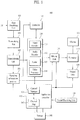
- FIG. 1 is a block diagram showing the configuration of an electronic device according to an embodiment of the present invention.
- An example of the electronic device for providing the UI according to the present invention may include a receiving unit configured to receive a request for provision of a UI, a controller configured to collect information for configuring the requested UI, classify the collected information according to a first criterion so as to generate a plurality of pages, hierarchize the generated pages, and arrange the layers according to a second criterion so as to form a multilayer UI, and an output unit configured to provide the multilayer UI as the requested UI.
- the electronic device 100 includes a first receiving unit 101, a demodulating unit 102, a demultiplexing unit 103, a signaling information processor 104, an application controller 105, a storage unit 108, a second receiving unit 109, a decoding unit 110, a controller 115, a mixing unit 118, a formatter 119, and an output unit 120.
- the electronic device 100 may further include a network interface unit configured to receive or transmit packets over a network.
- the electronic device 100 may receive Internet Protocol (IP) packets for delivering audio/video data, signaling information and data for UI configuration from a transmitter such as a service provider or a content provider through the network interface unit.
- IP Internet Protocol
- the signaling information may include Program Specific Information/Program and System Information Protocol (PSI/PSIP) information or Digital Video Broadcasting-Service Information (DVB-SI).
- PSI/PSIP Program Specific Information/Program and System Information Protocol
- DVD-SI Digital Video Broadcasting-Service Information
- the electronic device 100 may be implemented in the form of a set-top box (STB) without the output unit 120.
- STB set-top box
- the electronic device 100 may output a variety of data such as the UI configured according to the present invention and an actual image to the output unit 120. If the electronic device 100 is a mobile terminal such as a smart phone, the electronic device 100 may output a variety of data to an output unit having a size greater than the output unit of the terminal. If the output unit is separated from the electronic device 100 and a separate output unit is used, a wired/wireless communication protocol may be used and an interface therefor may be further included.
- the first receiving unit 101 receives a signal including a variety of data through a tuned channel or a network interface unit.
- the data may have different data structures according to the format of the signal and includes at least one of A/V data, signaling information and UI data.
- the first receiving unit 101 may be controlled by a channel manager 106.
- the demodulating unit 102 demodulates the signal using a demodulation method corresponding to a modulation method of the received signal.
- the first receiving unit 101 and the demodulating unit 102 may be configured as one module in the system.
- a plurality of first receiving units 101 and demodulating units 102 may be included, thereby receiving signals having various formats.
- the demultiplexing unit 103 demultiplexes the signal, for example, the A/V data and the signaling information. Demultiplexing may be performed through Packet Identifier (PID) filtering.
- PID Packet Identifier
- the demultiplexing unit 103 outputs the demultiplexed A/V data to the decoder 110 and outputs the demultiplexed signaling information to the signaling information processor 104.
- a multiplexing unit configured to multiplex signals using a predetermined method and outputting the multiplexed signal to a Conditional Access System (CAS) unit (e.g., a cable card or a Point of Deployment (POD) module) may be included in a front stage of the demultiplexing unit 103, in order to perform a CAS process with respect to the signal passing through the plurality of first receiving units and demodulating units.
- the predetermined method may be, for example, a method of attaching separate identifiers to signal streams or packets and multiplexing the signals.
- an external device may perform the CAS process with respect to the signal output from the multiplexing unit and the demultiplexing unit 103 may receive and demultiplex the signal subjected to the CAS process.
- the electronic device 100 may download and utilize a Downloadable CAS (DCAS) module from a server, in order to perform the CAS process.
- DCAS Downloadable CAS
- the signaling information processor 104 processes the input signaling information and outputs the processed signaling information to the application controller 105, the controller 115 and the mixing unit 118.
- the signaling information processor 104 may temporarily store the processed signaling information in a database (not shown).
- the signaling information may include type information indicating whether specific data included in the received signal is a two-dimensional (2D) image or a 3D image. Accordingly, the signaling information processor 104 may parse and decode the type information and transmit information for determining whether or not the received data is a 3D image based on the decoded type information to the controller 115 or transmit the decoded type information to the controller 115 such that the controller 115 appropriately controls the data. If the type information is not included in the signaling information, the result alone may be transmitted to the controller 115.
- the application controller 105 may include a channel manager 106, a channel map 107 and a UI data generator.
- the application controller 105 may further include a second receiving unit 109 or may interface with the second receiving unit 109.
- the channel manager 106 may generate and manage the channel map 107 based on channel information in the signaling information and provide information for channel switching or (broadcast) guide configuration according to a user request received through the second receiving unit 109.
- the UI data generator may read and transmit UI data stored in the storage unit 108 to the controller 115 or may directly configure the UI according to the present invention. In this case, the UI may be displayed in an On Screen Display (OSD) manner.
- OSD On Screen Display
- the decoder 110 includes a video decoder 111, an audio decoder 112, a scaler 113 and a video processor 114.
- the video/audio decoder 111/112 decodes input video/audio data.
- the scaler 113 scales the video/audio data processed by the video/audio decoder 111/112 to a signal having a size suitable for an output format.
- the video processor 114 processes the video data decoded by the video decoder 111 according to the output format or identifies the type of the input video data according to a control signal of the controller 115.
- the video processor 114 may identify the type of the video data if the above-described type information is not included or it is difficult to identify the type of the input video data by the type information.
- the controller 115 controls the decoder 110 to appropriately process the video data based on the type information received from the signaling information processor 104 or the information about the type of the video data identified by the video processor 114.
- the controller 115 controls to configure the UI according to the present invention based on the stored UI data according to various user requests.
- the controller 115 may control the overall system.
- the application controller 105 receives user input through the second receiving unit 109.
- the user input may include a physical button of an input device such as a remote controller or a front end of the electronic device, a touch operation using a touch screen, a predetermined gesture recognized from an image captured by an imaging unit and predetermined voice recognized by voice recognition.
- Examples of the user input include a request for provision of a channel or favorite channel UI, a recording or reserved-recording UI, a channel browser UI, a broadcast guide UI, or a specific event UI.
- the application controller 105 may transmit the request for provision of the UI to the controller 115 or directly configure the UI in response to the request for provision of the UI.
- the application controller 105 receives data necessary for configuring the UI from the storage unit 108 and/or a transmitter through the first receiving unit 101, configures the UI, and provides the UI to a user through the output unit.
- the application controller 105 may update the data for configuring the UI based on newest information if specific information is repeated or contradicted when the UI is configured.
- the application controller 105 may refer to broadcast guide information, recording/reserved-recording information, type information, size information, depth information, disparity information and position information in order to configure the UI.
- the broadcast guide information may be collected from the signaling information, the size information may indicate the size of the UI, the depth information may indicate the depth value of a stereoscopic image, the disparity information may indicate the disparity value of a disparity between the left image data and the right image data configuring the stereoscopic image and the position information may indicate the position of the UI which will be displayed on the screen.
- the size information, the depth information, disparity information and the position information may be set by the user or may be set by the application controller 105 or the controller 115.
- the UI data generator configured to configure the UI may be configured separately from the application controller 105.
- the UI data generator will be described in greater detail in the use scenario part of the UI and a detailed description thereof is omitted herein.
- the function of the application controller 105 may be performed by the controller 115.
- the storage unit 108 may store a set of UI data for UI provision in advance.
- the set of UI data may include a first set of pixel data for a left-view image and a second set of pixel data for a right-view image. That is, the first set of pixel data and the second set of pixel data are used to display the UI in the form of a stereoscopic image.
- the storage unit 108 may store supplementary information associated with a receiver.
- the mixing unit 118 mixes the signals output from the signaling information processor 104, the decoder 110 and the application controller 105 or the controller 115 and outputs the mixed data.
- the mixing unit 118 may mix UI data with the received video data and output the mixed data.
- the output unit 120 outputs the video data mixed with the UI data.
- the formatter 119 configures the output of the mixing unit 118 to suit the output format of the output unit 120.
- the formatter 119 may operate, for example, as a 3D formatter for bypassing a 2D image and processing a 3D image to suit a 3D format such as an output frequency of the output unit 120 under the control of the controller 115 or the application controller 105.
- the formatter 119 may configure the UI data input through the mixing unit 118 or the application controller 105 or the controller 105 into a 3D image under the control of the application controller 105 or the controller 115.
- the output unit 120 outputs a variety of content such as A/V data and the UI configured according to the present invention.
- the output unit 120 includes a display unit for outputting an image, for example, a 2D image and a 3D image, and a speaker for outputting audio synchronized with the image.
- the output unit 120 may output the image information and the audio information included in the UI configured according to the present invention.
- Information necessary for providing the UI according to the present invention may be received from an external server, a production server or a homepage over a network and may be provided.
- a method of displaying a 3D image includes a glasses method and a non-glasses method.
- the glasses method is divided into a passive type and an active type.
- a left image and a right image are separately displayed using a polarization filter.
- a method of using glasses having a blue-color lens and a red-color lens is also included in the passive type.
- the active type left and right eyes are identified using a liquid crystal shutter and the left eye and the right eye are hidden in time series so as to identify a left image and a right image. That is, in the active type, the temporally divided screen is periodically repeated and glasses having an electronic shutter synchronized with the period are used.
- the active type is also referred to as a time split type or a shuttered glasses type.
- Representative examples of the non-glasses method include a lenticular method in which a lenticular lens plate in which a cylindrical lens array is vertically arranged is provided in front of an image panel and a parallax barrier method including a barrier layer having a periodic slit on an image panel.
- a stereoscopic method and a glasses method will be described as the 3D display method.
- the present invention is not limited to the above-described methods.
- the formatter 119 outputs the 3D image data to the output unit 120 if necessary and generates a synchronization signal (Vsync) in order to perform synchronization when a user views the output 3D image data with glasses 121.
- the formatter 119 outputs the Vsync to an IR emitter (not shown) included in the glasses such that the user views the 3D image data output through the glasses 121.
- the IR emitter receives the Vsync generated by the formatter 119 and outputs the Vsync to a light receiving unit (not shown) included in the glasses 121.
- the period of the glasses 121 is adjusted according to the Vsync of the formatter 119 received through the light receiving unit so as to perform synchronization with the 3D image data output from the output unit 120.
- the electronic device 100 may process the 3D image data based on the principle of the stereoscopic method. That is, one object is photographed using two cameras located at different positions so as to generate left image data and right image data, the left image data and the right image data are respectively orthogonally input to the left eye and the right eye of a viewer, and the left image data and the right image data respectively input to the left eye and the right eye are combined by the brain, thereby generating a 3D image.
- the arrangement of the left image data and the right image data to be orthogonal to each other indicates that the left image data and the right image data do not cause mutual interference.
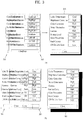
- FIG. 2 is a diagram illustrating perspective according to a disparity between left image data and right image data.
- FIG. 2A shows the position 203 of an image formed by the right image data 201 and the left image data 202 if the disparity (or a gap) between the right image data 201 and the left image data 202 is small
- FIG. 2B shows the position 213 of an image formed by the right image data 201 and the left image data 202 if the disparity between the right image data 201 and the left image data 202 is large.
- FIGs. 2A and 2B show perspective degrees of images formed at different positions according to the disparity between the left image data and the right image data in the image processing apparatus.
- an image is formed at a point 213 where the extension R3 of the right image data and the extension L3 of the left image data cross each other at a position separated from the right eye and the left eye by a predetermined distance d2, similar to FIG. 2A .
- d1 is greater than d2. That is, the image shown in FIG. 2A is formed at a position further from the left and right eyes than the position of the image shown in FIG. 2B .
- the reason why the distances d1 and d2 are different is because the disparities between the right image data and the left image data are different.
- the disparity between the right image data 201 and the left image data 202 of FIG. 2A is narrower than the disparity between the right image data 203 and the left image data 204 of FIG. 2B . Therefore, as can be seen from FIGs. 2A and 2B , as the disparity between the right image data and the left image data is reduced, the distance between the image formed by the left image data and the right image data and the person's eyes is increased.
- the UI may be configured in 3D or only a specific item in the UI may be configured in 3D as shown in FIGs. 3A and 3B .
- FIG. 3 is a diagram illustrating an example of a method of implementing a UI in 3D according to the present invention.
- FIGs. 3A and 3B show the cases where the UI including a plurality of items is implemented in 3D, wherein FIG. 3A shows the case where the disparity between the left image data 301 and the right image data 302 configuring the UI is narrow and FIG. 3B shows the case where the disparity between the left image data 304 and the right image data 305 configuring the UI is wide.
- the 3D UI 303 shown in FIG. 3A appears to be located a long distance from the person's eyes and the 3D UI 306 shown in FIG. 3B appears to be located a short distance from the person's eyes, that is, appears to protrude.
- the 3D UI 303 shown in FIG. 3A appears to be located a long distance from the person's eyes and the 3D UI 306 shown in FIG. 3B appears to be located a short distance from the person's eyes, that is, appears to protrude.
- Based upon the above-described principle that is, by adjusting the disparity between the left image data and the right image data configuring the UI, it is possible to give appropriate depth to the UI so as to obtain a 3D effect.
- the UI of the electronic device of the related art is generally configured in a 2D format.
- the UI of the 2D format since the relationship between the components configuring the UI is horizontal, it is difficult to recognize the UI or the components of the UI. Thus, use convenience deteriorates.
- a UI having a multilayer structure is provided.
- pages configuring the UI are hierarchized and the hierarchized pages are arranged according to a specific criterion, displayed to protrude from a screen in a specific direction, and provided to the user.
- the specific direction is a Z-axis direction in the present disclosure, the present invention is not limited thereto and any one of X-, Y- and Z-axis directions may be used according to a coordinate set for recognition and use convenience of the user for the UI.
- the UI having the multilayer structure such as a channel UI, a favorite channel UI, a recording list UI, a reserved-recording UI, a channel browser UI or a broadcast guide UI, will be described.
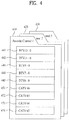
- FIG. 4 is a diagram illustrating an example of a UI configured according to the present invention.
- FIG. 4 an example of a channel list or favorite channel list UI configured in a multilayer structure according to the present invention is disclosed.
- the electronic device 100 may hierarchize pages configuring the channel list or favorite channel list UI and configure a higher level layer to appear to protrude from the screen in the Z-axis direction.
- the electronic device 100 may hierarchize the pages in the Z-axis direction by adjusting the disparity between the left image data and the right image data of each page as shown in FIGs. 2 and 3 .
- the electronic device 100 may control the degrees of clearness of the layers to be the same or may control the degrees of clearness of the layers to be different in order to increase the UI recognition of the user if necessary.
- the electronic device 100 decreases the degree of clearness of the higher-level layer and the increases degree of clearness of the lower-level layer. In this case, the degree of clearness of an uppermost-level layer which the user initially encounters is lowest, enabling that the user to easily recognize the page.
- the electronic device 100 may configure page information of each layer to be more easily selected or recognized. For example, the electronic device 100 may configure the layers such that at least parts of the IDs of the layers do not overlap each other, thereby conveniently accessing layers other than the uppermost-level layer.
- the favorite channel list UI having three layers is shown.
- a favorite channel 1 page is disposed on an uppermost-level layer 410
- a favorite channel 2 page is disposed on a next higher-level layer 420
- a favorite channel 3 page is disposed on a last layer 430.
- the order of the pages disposed on the layers may be set by the user or may be automatically set according to a predetermined criterion.
- the favorite channel 1 page of each layer, for example, the uppermost-level layer 410 includes a plurality of items 441 to 444 and 451 to 454 and each item provides favorite channel information.
- the favorite channel information includes information for identifying whether the favorite channel information of the item is information about a terrestrial wave, a cable or an internet protocol television (IPTV) and a virtual channel number. At this time, the favorite channel information may be provided along with program information of the virtual channel.
- the program information may include current broadcast program information of the virtual channel or may include current broadcast program information and future program information.
- the program information may include, for example, at least one of a program start time and end time, a duration, a program title, a thumbnail image and detailed program information.
- the items of the page of the uppermost-level layer 410 may be divisionally provided with different colors according to a predetermined criterion, for example, a genre or a medium.
- a predetermined criterion for example, a genre or a medium.
- an item selected by the user may be provided differently from the other items in terms of a color, a degree of clearness, or a size.
- Information about each layer or the page of the layer may be divided and provided according to users.
- the uppermost-level layer may provide the favorite channel information of USER 1 and a next layer may provide the favorite channel information of USER 2. If each item configuring the page of a specific layer is selected according to a user request, the priority of the channel corresponding thereto may be changed, the channel corresponding thereto may be deleted from the favorite channel, or immediate recording or reserved-recording of a specific program of the channel corresponding thereto may be set.
- the electronic device 100 may not horizontally provide the channel lists or the favorite channel list pages as in the related art but may provide the channel lists or the favorite channel list pages arranged on the screen in a layered structure in the Z-axis direction as shown in FIG. 4 , thereby enabling the user to easily recognize and use the UI.
- the channel list or favorite channel list UI is shown in FIG. 4
- a broadcast guide screen may be configured and provided as shown in FIG. 4 .
- the electronic device may apply predetermined disparities between the layers in the Z-axis direction and degrees of clearness to the pages of the changed layers.
- a pointing device or a gesture (or a gesture input tool) and voice may be used and the electronic device operates the receiving unit and the controller in response thereto.
- FIG. 5 is a diagram illustrating another example of a UI configured according to the present invention.
- FIG. 5 shows an example of a recording list or reserved-recording list UI configured in a multilayer structure according to the present invention.
- the electronic device 100 receives a request for provision of the recording list or reserved-recording list UI from the user and collects information associated with the request for the provision of the UI. As described above, the information may be obtained from information (including signaling information) stored in the storage unit or a transmitter. If a plurality of pieces of information is collected, the electronic device 100 hierarchizes the information as shown in FIG. 5 , sets the order of information according to the priority of the hierarchized information, and provides the recording list or reserved recording list UI on the screen in 3D in the multilayer structure.
- the electronic device may provide a recording program "Kung Fu Panda", 2 hours and 10 minutes, October 23, Friday, on an uppermost-level layer 511, a recording program, October 22, Thursday, on a next higher-level layer 512, and a recording program, October 19, Monday, on a lowermost-level layer 513 according to time information.
- the page of each recording list may include a variety of information.
- the electronic device 100 may provide at least one of a thumbnail image of the recording list, a title, time information associated with a recording capacity, information about a total reproduction time, information about a recording date, channel or program information associated with the recording list or a total amount of available storage unit, along with the UI.
- the electronic device 100 may further provide at least one of caption information, character information and provision server information.
- the electronic device 100 may provide codec information of a recording list in the page or a tool or information for changing a format based on the codec information, editing, division and deletion of a time and frame unit, transfer to another medium.
- the electronic device 100 may provide a tool and information for performing a Personal Video Recorder (PVR) function for the recording list of the page or a time-machine function.
- PVR Personal Video Recorder
- the electronic device 100 may provide a tool for playing, fast forwarding or rewinding recorded material or for starting and playing a time-machine.
- the electronic device 100 may provide information about the recorded material as an individual UI.
- the electronic device 100 When a user selects a layer other than an uppermost-level layer, the electronic device 100 provides the layer as an uppermost-level layer and rearranges and provides the remaining layers. In this case, the layers may be rearranged by referring to the previously set order.
- FIG. 6 is a diagram illustrating another example of a UI configured according to the present invention.
- FIG. 6 shows an example of a channel browser UI of a multilayer structure according to the present invention.
- the electronic device 100 collects information for configuring the channel browser UI according to the request. At this time, the electronic device 100 does not provide cells, that is, channels, of the channel browser on the same plane. That is, the electronic device 100 provides the cells in a multilayer structure based on the collected information according to the present invention.
- the electronic device 100 first provides the horizontal channel browser UI according to a user request. At this time, if specific channels are selected, the electronic device 100 may sequentially configure and provide cells corresponding to the selected channels based on time information in a multilayer structure.
- the time information refers to, for example, the order of selected channels.
- the electronic device may configure and provide the cells corresponding to the three channels in a multilayer structure.
- the selected channel cells may be configured on a higher-level layer of the first channel browser screen or the same layer of the first channel browser screen.
- a lastly selected cell may be arranged on an uppermost-level layer based on the time order of selected channels.
- the electronic device 100 may configure the selected channel cells to have different degrees of clearness or sizes.
- the electronic device 100 may configure the lastly selected channel cell to have a size greater than those of the other channel cells, a degree of clearness lower than those of the other channel cells, or a color different from those of the other channel cells.
- the degree of clearness, the color or the size may be set by the user or may be automatically set according to a predetermined criterion within the electronic device 100.
- the channel browser UI including the cell UI having the layered structure is shown FIG. 6 .
- the channel cells selected by the user within the channel browser UI appear to protrude from the screen in the layered structure in the Z-axis direction, the user easily recognize and use the channel cells.
- the cells selected from the channel browser UI configured as shown in FIG. 6 may be separately moved so as to configure a new channel browser or channel list UI.
- the electronic device 100 may provide the selected channels in a bookmark or tilt structure.
- FIG. 7 is a diagram illustrating another example of a UI configured according to the present invention.
- FIG. 7 shows an example of an 8-day broadcast guide UI of a multilayer structure according to the present invention. Accordingly, broadcast guide pages 711 to 714 may be configured and provided based on a predetermined criterion, for example, a date or a genre.
- the electronic device 100 collects information according to the request and configures 8-day broadcast guide pages.
- the broadcast guide pages may be, for example, the same UI as a broadcast guide provided by the electronic device of the related art.
- the user makes a request for the 8-day broadcast guide UI, it is impossible to simultaneously provide the 8-day broadcast guide UI on the screen.
- the broadcast guide page of a specific date is too small to be identified.
- the broadcast guide pages are configured and provided in a multilayer structure, for example, as shown in FIG. 7 .
- the broadcast guide pages 711 to 714 of the layers include a variety of information based on a genre or a date.
- the broadcast guide page of the uppermost-level layer 711 provides, for example, a channel for today and event information, that is, broadcast guide information of the channel
- the broadcast guide page of a next higher-level layer 712 provides broadcast guide information for tomorrow
- a lowermost-level layer 714 provides broadcast guide information for a specific future date, for example, eight days in the future.
- the electronic device 100 arranges the broadcast guide page of the selected date on an uppermost-level layer and sequentially arranges the broadcast guide pages after the broadcast guide page of the selected date using the conventional method, thereby providing the 8-day broadcast guide UI.
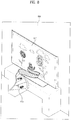
- FIG. 8 is a diagram illustrating an example of indication information configured according to the present invention.
- FIG. 8 shows indication information of a function which is currently being executed as the event in order to prevent information loss in association with a specific event according to the present invention.
- a specific event is currently being recorded according to a user request.
- information indicating that recording is currently being performed is displayed in a predetermined region of the screen using text.
- the information with a predetermined color is provided to the user at a specific position along with text information in the electronic device of the related art, it is difficult for the user to recognize the information due to interruption of a background screen or another UI. Accordingly, the user who does not recognize the information may erroneously make a request for other information, thereby causing a problem in the currently executed function, that is, the recording function.
- the electronic device 100 configures the indication information using the UI of the 3D format such that the user can easily identify the currently executed function, thereby preventing the above-described problem.
- the electronic device 100 provides an indication UI of a 3D format on the screen so as to prevent the user from erroneously changing the currently executed function, as described above. If the user makes a request for changing the currently executed function even when the indication UI of the 3D format is provided, the electronic device 100 may configure and provide a message UI for identifying the change of the function so as to minimize errors of the currently executed function.
- the electronic device 100 may configure and provide an indication UI for indicating that a recording function is currently being executed as an event in a shape in which a film appears to protrude from the screen as shown in FIG. 8 .
- the electronic device 100 may provide text information indicating that the recording function is being performed in a specific region of the screen 810 along with the indication UI, similar to the related art. Then, the user can easily recognize that the recording function is currently being executed as the event. Therefore, it is possible to easily recognize the currently executed function using the 3D UI configured according to the present invention, to suppress errors, and to improve access convenience and readability.
- a thumbnail image or program title information may be periodically provided through the film of the UI 820.
- Such a principle may be equally provided to a main menu UI.
- the electronic device 100 provides information provided in the main menu UI, for example, broadcast guide information, a channel browser, a channel list, a favorite channel list, and a recording/reserved-recording list in a multilayer structure.
- Information of each layer may be set by various methods.
- the electronic device 100 may provide the UI using any one of methods shown in FIGs. 4 to 8 according to the characteristics of the item or the page of the layer.
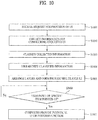
- FIGs. 9 and 10 are flowcharts illustrating a method for controlling a UI according to the present invention.
- FIG. 9 shows the case where a UI is controlled when a request for a first main menu UI is made
- FIG. 10 shows the case where a UI is controlled when a request for a first specific function is directly made.
- the request may be input in various manners using a general remote controller, a motion controller, a pointing device, a touch screen, a touch pad or voice, as described above.
- An example of a method of providing a UI in an electronic device 100 includes receiving a request for provision of a UI, collecting information configuring the requested UI, classifying the collected information according to a first criterion so as to generate a plurality of pages, hierarchizing the generated pages, arranging layers according to a second criterion so as to form a multilayer UI, and providing the formed multilayer UI as the requested UI.
- the electronic device 100 receives a request for provision of a main menu screen UI from the user (S901).
- the electronic device 100 provides the main menu screen UI through OSD screen according to the request (S902) and receives a request for provision of the UI shown in at least one of FIGs. 4 to 8 from the provided main menu screen UI (S903).
- the electronic device 100 collects information about the specific UI requested in step S903 (S904).
- the electronic device 100 classifies the collected information about the specific UI (S905) and hierarchizes the classified information so as to match the layers (S906).
- the electronic device 100 arranges the layers according to a specific criterion so as to form a multilayer UI and provides the multilayer UI through OSD screen (S907).
- the electronic device 100 determines whether or not a user request is received with respect to the UI provided through the OSD screen in step S907 (S908) and provides the UI associated with the request or performs the function corresponding thereto as the determination result (S909).
- the electronic device 100 receives a request for provision of a UI shown in at least one of FIGs. 4 to 8 from the user (S1001).
- the electronic device 100 collects information for configuring the specific UI requested in step S1001 (S1002).
- the electronic device 100 classifies the collected information about the specific UI (S1003) and hierarchizes the classified information so as to match the layers (S1004).
- the electronic device 100 arranges the layers according to a specific criterion so as to form a multilayer UI and provides the multilayer UI using the screen (S1005).
- the electronic device 100 determines whether or not the user makes a request for a specific function or points a specific item or page with respect to the UI provided using the screen in step S1005 (S1006) and performs the specific function requested by the user or provides the individual UI for the pointed specific item or page as the determination result (S1007).
- the information configuring the UI is classified and hierarchized according to the predetermined criterion and the UI having the multilayer structure configured through hierarchization is provided to the user according to a specific criterion such as a date, a genre, a time or a favorite in the Z-axis direction, it is possible to enable the user to easily recognize and conveniently use the UI so as to induce the user to buy a product.
- a specific criterion such as a date, a genre, a time or a favorite in the Z-axis direction
- the method for operating the augmented remote controller may be implemented as code that can be written on a computer-readable recording medium and can thus be read by a processor.
- the computer-readable recording medium may be any type of recording device in which data is stored in a computer-readable manner. Examples of the computer-readable recording medium include a Read Only Memory (ROM), a Random Access Memory (RAM), a Compact Disc (CD)-ROM, a magnetic tape, a floppy disc, an optical data storage, and a carrier wave (e.g., data transmission through the Internet).
- the computer-readable recording medium can be distributed over a plurality of computer systems connected to a network so that computer-readable code is written thereto and executed therefrom in a decentralized manner. Functional programs, code, and code segments needed to realize the embodiments herein can be construed by one of ordinary skill in the art.
Landscapes
- Engineering & Computer Science (AREA)
- Software Systems (AREA)
- General Engineering & Computer Science (AREA)
- Theoretical Computer Science (AREA)
- Multimedia (AREA)
- Signal Processing (AREA)
- Human Computer Interaction (AREA)
- Physics & Mathematics (AREA)
- General Physics & Mathematics (AREA)
- User Interface Of Digital Computer (AREA)
- Two-Way Televisions, Distribution Of Moving Picture Or The Like (AREA)
Claims (10)
- Verfahren zum Bereitstellen einer Benutzerschnittstelle, UI, in einem Fernsehgerät, wobei das Verfahren die Schritte aufweist:Empfangen (S901-S903; S1001) einer Anforderung zum Bereitstellen der UI;Sammeln (S904; S1002) von Information zum Konfigurieren der angeforderten UI;Klassifizieren (S905; S1003) der gesammelten Information gemäß einem ersten Kriterium, um mehrere Seiten zu erzeugen; undAnzeigen (S907; S1005) der erzeugten Seiten gemäß einem zweiten Kriterium, um eine mehrschichtige UI als die angeforderte UI zu bilden;dadurch gekennzeichnet, dassdie gebildete mehrschichtige UI von einem Formatierer (119) empfangen wird, der ferner ein Synchronisationssignal (Vsync) erzeugt, um eine Synchronisation auszuführen, wenn ein Benutzer 3D-Bilddaten mit einer Brille (121) betrachtet, wobei der Formatierer das Synchronisationssignal an einen in der Brille vorgesehenen Infrarot-, IR-, Emitter ausgibt,wobei das Verfahren ferner aufweist:Empfangen (S908; S1006) eines Anforderungssignals zum Auswählen einer spezifischen Schicht;Ändern des zweiten Kriteriums entsprechend dem Anforderungssignal; undUmorganisieren der Schichten gemäß dem zweiten Kriterium, um eine individuelle UI zu bilden,wobei das erste Kriterium und das zweite Kriterium durch den Benutzer festgelegt werden oder gemäß einem vorgegebenen Kriterium automatisch gesetzt werden und mindestens ein Element unter einem Datum, einem Genre, einer Zeit, einem Favoriten und einer Benutzer-ID aufweisen,wobei Information über jede Schicht, die die mehrschichtige UI konfigurieren, entsprechend jedem von verschiedenen Benutzern, die das Fernsehgerät nutzen, geteilt und bereitgestellt wird,wobei eine Schicht einer obersten Ebene Favoriten-Kanalinformation eines ersten Benutzers und eine nächste Schicht Favoriten-Kanalinformation eines zweiten Benutzers bereitstellt,wobei die Favoriten-Kanalinformation Information aufweist, die anzeigt, ob die Favoriten-Kanalinformation Information über terrestrisches Fernsehen, Kabel- oder Internetprotokollfernsehen, IPTV, enthält, undwobei die Favoriten-Kanalinformation zusammen mit Programminformation eines virtuellen Kanals bereitgestellt wird.
- Verfahren nach Anspruch 1, wobei die UI ein dreidimensionales, 3D-, Format aufweist und eine Hauptmenü-UI und/oder eine UI zum Anfordern einer spezifischen Funktion aufweist, und wobei die UI zum Anfordern einer spezifischen Funktion mindestens ein Element unter einer Kanallisten-UI, einer Favoriten-Kanallisten-UI, einer Aufzeichnungslistenanforderungs-UI, einer UI zum Anfordern einer Liste für reservierte Aufzeichnungen, einer Kanal-Browser-UI und einer Programmführungs-UI aufweist.
- Verfahren nach Anspruch 2, wobei jede der Schichten, die die mehrschichtige UI konfigurieren, durch eine Ungleichheit zwischen linken Bilddaten und rechten Bilddaten einer der Schicht entsprechenden Seite hierarchisiert ist, und wobei die Schichten, die die mehrschichtige UI konfigurieren, sich in mindestens einem Parameter unter dem Schärfegrad, der Größe und der Farbe unterscheiden.
- Verfahren nach Anspruch 3, wobei die Schichten, die die mehrschichtige UI konfigurieren, derart konfiguriert sind, dass mindestens Teile der IDs der Schichten sich einander überlappen, um den Zugang zu einer anderen Schicht zu erleichtern.
- Verfahren nach Anspruch 1, wobei, wenn eine spezifische Funktion ausgeführt wird, das Fernsehgerät eine 3D-Anzeige-UI bereitstellt, die anzeigt, dass die Funktion gerade ausgeführt wird, und wobei die bereitgestellte 3D-Anzeige-UI ein Miniaturbild und/oder Titelinformation in Form eines Films aufweist.
- Fernsehgerät zum Bereitstellen einer Benutzerschnittstelle, UI, mit:einer Empfangseinheit, die dafür konfiguriert ist, eine Anforderung zum Bereitstellen der UI zu empfangen;einer Steuereinheit, die dafür konfiguriert ist, Information zum Konfigurieren der angeforderten UI zu sammeln, die gesammelte Information gemäß einem ersten Kriterium zu klassifizieren, um mehrere Seiten zu erzeugen, die erzeugten Seiten gemäß einem zweiten Kriterium anzuzeigen, um eine mehrschichtige UI zu bilden, das zweite Kriterium entsprechend einem Anforderungssignal zum Auswählen einer spezifischen Schicht zu ändern und die Schichten gemäß dem geänderten zweiten Kriterium neu zu organisieren, um eine individuelle UI zu bilden; undeiner Ausgabeeinheit, die dafür konfiguriert ist, die gebildete mehrschichtige UI als die angeforderte UI und die gebildete individuelle UI bereitzustellen,wobei die gebildete mehrschichtige UI von einem Formatierer (119) empfangen wird, der ferner ein Synchronisationssignal (Vsync) erzeugt, um eine Synchronisation auszuführen, wenn ein Benutzer 3D-Bilddaten mit einer Brille (121) betrachtet, wobei der Formatierer das Synchronisationssignal an einen in der Brille vorgesehenen Infrarot-, IR-, Emitter ausgibt,wobei das erste Kriterium und das zweite Kriterium in der Steuereinheit durch den Benutzer festgelegt oder automatisch gesetzt werden und mindestens einen Parameter unter einem Datum, einem Genre, einer Zeit, einem Favoriten und einer Benutzer-ID aufweisen,wobei Information über jede Schicht, die die mehrschichtige UI konfigurieren, entsprechend jedem von verschiedenen Benutzern, die das Fernsehgerät nutzen, geteilt und bereitgestellt wird,wobei eine Schicht einer obersten Ebene Favoriten-Kanalinformation eines ersten Benutzers und eine nächste Schicht Favoriten-Kanalinformation eines zweiten Benutzers bereitstellt,wobei die Favoriten-Kanalinformation Information aufweist, die anzeigt, ob die Favoriten-Kanalinformation Information über terrestrisches Fernsehen, Kabel- oder Internetprotokollfernsehen, IPTV, enthält, undwobei die Favoriten-Kanalinformation zusammen mit Programminformation eines virtuellen Kanals bereitgestellt wird.
- Fernsehgerät nach Anspruch 6, wobei die angeforderte UI eine Hauptmenü-UI und/oder eine UI zum Anfordern einer spezifischen Funktion aufweist, und wobei die Steuereinheit die UI in drei Dimensionen, 3D, konfiguriert, und wobei die Steuereinheit mindestens eine UI unter einer Kanallisten-UI, einer Favoriten-Kanallisten-UI, einer Aufzeichnungslistenanforderungs-UI, einer UI zum Anfordern einer Liste für reservierte Aufzeichnungen, einer Kanal-Browser-UI und einer Programmführungs-UI als die UI zum Anfordern einer spezifischen Funktion konfiguriert.
- Fernsehgerät nach Anspruch 7, wobei die Steuereinheit eine Ungleichheit zwischen linken Bilddaten und rechten Bilddaten einer Seite steuert, die jeder der Schichten entspricht, die die mehrschichtige UI konfigurieren, um eine Hierarchisierung zu steuern, und wobei die Steuereinheit mindestens einen Parameter unter dem Schärfegrad, der Größe und der Farbe der Schichten, die die mehrschichtige UI konfigurieren, unterschiedlich steuert.
- Fernsehgerät nach Anspruch 8, wobei die Steuereinheit die Schichten, die die mehrschichtige UI konfigurieren, derart konfiguriert, dass mindestens Teile von IDs der Schichten sich einander überlappen, um den Zugriff auf eine andere Schicht zu erleichtern.
- Fernsehgerät nach Anspruch 6, wobei, wenn eine spezifische Funktion ausgeführt wird, die Steuereinheit eine 3D-Anzeige-UI bereitstellt, die anzeigt, dass die Funktion gerade ausgeführt wird, und wobei die bereitgestellte 3D-Anzeige-UI ein Miniaturbild und/oder Titelinformationen in Form eines Films aufweist.
Applications Claiming Priority (1)
| Application Number | Priority Date | Filing Date | Title |
|---|---|---|---|
| KR1020100011231A KR101719979B1 (ko) | 2010-02-05 | 2010-02-05 | Ui 제공 방법 및 디지털 방송 수신기 |
Publications (2)
| Publication Number | Publication Date |
|---|---|
| EP2363802A1 EP2363802A1 (de) | 2011-09-07 |
| EP2363802B1 true EP2363802B1 (de) | 2018-03-07 |
Family
ID=44170266
Family Applications (1)
| Application Number | Title | Priority Date | Filing Date |
|---|---|---|---|
| EP11152807.1A Not-in-force EP2363802B1 (de) | 2010-02-05 | 2011-01-31 | Elektronische Vorrichtung und Verfahren zur Bereitstellung der Benutzerschnittstelle davon |
Country Status (4)
| Country | Link |
|---|---|
| US (1) | US20110231802A1 (de) |
| EP (1) | EP2363802B1 (de) |
| KR (1) | KR101719979B1 (de) |
| CN (1) | CN102147703A (de) |
Families Citing this family (21)
| Publication number | Priority date | Publication date | Assignee | Title |
|---|---|---|---|---|
| US20110202845A1 (en) * | 2010-02-17 | 2011-08-18 | Anthony Jon Mountjoy | System and method for generating and distributing three dimensional interactive content |
| CN102508651B (zh) | 2011-09-29 | 2015-04-15 | 深圳超多维光电子有限公司 | 用户界面的实现方法及系统、电子设备 |
| US9628843B2 (en) * | 2011-11-21 | 2017-04-18 | Microsoft Technology Licensing, Llc | Methods for controlling electronic devices using gestures |
| US9229632B2 (en) | 2012-10-29 | 2016-01-05 | Facebook, Inc. | Animation sequence associated with image |
| US9547627B2 (en) | 2012-11-14 | 2017-01-17 | Facebook, Inc. | Comment presentation |
| US9081410B2 (en) | 2012-11-14 | 2015-07-14 | Facebook, Inc. | Loading content on electronic device |
| US9507757B2 (en) | 2012-11-14 | 2016-11-29 | Facebook, Inc. | Generating multiple versions of a content item for multiple platforms |
| US9696898B2 (en) | 2012-11-14 | 2017-07-04 | Facebook, Inc. | Scrolling through a series of content items |
| US9507483B2 (en) * | 2012-11-14 | 2016-11-29 | Facebook, Inc. | Photographs with location or time information |
| US9547416B2 (en) | 2012-11-14 | 2017-01-17 | Facebook, Inc. | Image presentation |
| US9607289B2 (en) | 2012-11-14 | 2017-03-28 | Facebook, Inc. | Content type filter |
| US9684935B2 (en) | 2012-11-14 | 2017-06-20 | Facebook, Inc. | Content composer for third-party applications |
| US9606717B2 (en) | 2012-11-14 | 2017-03-28 | Facebook, Inc. | Content composer |
| US9606695B2 (en) | 2012-11-14 | 2017-03-28 | Facebook, Inc. | Event notification |
| US9218188B2 (en) | 2012-11-14 | 2015-12-22 | Facebook, Inc. | Animation sequence associated with feedback user-interface element |
| US9245312B2 (en) | 2012-11-14 | 2016-01-26 | Facebook, Inc. | Image panning and zooming effect |
| US9235321B2 (en) | 2012-11-14 | 2016-01-12 | Facebook, Inc. | Animation sequence associated with content item |
| US9239661B2 (en) * | 2013-03-15 | 2016-01-19 | Qualcomm Incorporated | Methods and apparatus for displaying images on a head mounted display |
| JP6428020B2 (ja) * | 2014-07-24 | 2018-11-28 | セイコーエプソン株式会社 | Gui装置 |
| CN106155496A (zh) * | 2015-04-27 | 2016-11-23 | 阿里巴巴集团控股有限公司 | 一种信息展示方法及装置 |
| JP6701476B1 (ja) * | 2019-07-16 | 2020-05-27 | 有限会社C−Rise | コンピュータプログラム、記録装置、記録システム、解析装置及び記録方法 |
Citations (1)
| Publication number | Priority date | Publication date | Assignee | Title |
|---|---|---|---|---|
| EP2088500A1 (de) * | 2008-02-11 | 2009-08-12 | Idean Enterprises Oy | Benutzerschnittstelle auf Schichtbasis |
Family Cites Families (24)
| Publication number | Priority date | Publication date | Assignee | Title |
|---|---|---|---|---|
| EP0605945B1 (de) * | 1992-12-15 | 1997-12-29 | Sun Microsystems, Inc. | Darstellung von Informationen in einem Anzeigesystem mit transparenten Fenstern |
| US6057811A (en) * | 1993-09-28 | 2000-05-02 | Oxmoor Corporation | 3-D glasses for use with multiplexed video images |
| JP2976879B2 (ja) * | 1996-03-22 | 1999-11-10 | 日本電気株式会社 | 深さ付きウィンドウ表示方式 |
| US7119819B1 (en) * | 1999-04-06 | 2006-10-10 | Microsoft Corporation | Method and apparatus for supporting two-dimensional windows in a three-dimensional environment |
| KR100512138B1 (ko) * | 2000-03-08 | 2005-09-02 | 엘지전자 주식회사 | 합성 키프레임을 이용한 비디오 브라우징 시스템 |
| US6819344B2 (en) * | 2001-03-12 | 2004-11-16 | Microsoft Corporation | Visualization of multi-dimensional data having an unbounded dimension |
| AUPS058602A0 (en) * | 2002-02-15 | 2002-03-14 | Canon Kabushiki Kaisha | Representing a plurality of independent data items |
| JP2004199142A (ja) * | 2002-12-16 | 2004-07-15 | Matsushita Electric Ind Co Ltd | 携帯端末機器及び画像表示方法 |
| US8230359B2 (en) * | 2003-02-25 | 2012-07-24 | Microsoft Corporation | System and method that facilitates computer desktop use via scaling of displayed objects with shifts to the periphery |
| US8065614B2 (en) * | 2003-04-09 | 2011-11-22 | Ati Technologies, Inc. | System for displaying video and method thereof |
| KR100587538B1 (ko) * | 2003-08-01 | 2006-06-08 | 삼성전자주식회사 | 전자 프로그램 가이드 제공 장치 및 방법 |
| US6990637B2 (en) * | 2003-10-23 | 2006-01-24 | Microsoft Corporation | Graphical user interface for 3-dimensional view of a data collection based on an attribute of the data |
| US7441201B1 (en) * | 2004-10-19 | 2008-10-21 | Sun Microsystems, Inc. | Method for placing graphical user interface components in three dimensions |
| KR100735188B1 (ko) * | 2005-04-29 | 2007-07-03 | 엘지전자 주식회사 | 디지털 티브이의 epg 표시 방법 |
| KR100758985B1 (ko) * | 2005-12-05 | 2007-09-17 | 삼성전자주식회사 | 유저인터페이스를 조작하는 영상 디스플레이 장치 및 그방법 |
| KR20080064056A (ko) * | 2007-01-03 | 2008-07-08 | 삼성전자주식회사 | 3차원의 입력장치를 이용한 3차원 메뉴의 사용자인터페이스 장치 및 방법 |
| JP4557058B2 (ja) * | 2007-12-07 | 2010-10-06 | ソニー株式会社 | 情報表示端末、情報表示方法、およびプログラム |
| US8555311B2 (en) * | 2007-12-19 | 2013-10-08 | United Video Properties, Inc. | Methods and devices for presenting guide listings and guidance data in three dimensions in an interactive media guidance application |
| US20090278987A1 (en) * | 2008-01-07 | 2009-11-12 | Toshiba America Consumer Products | User interface for consumer electronic product |
| JP5232478B2 (ja) * | 2008-01-09 | 2013-07-10 | 任天堂株式会社 | 情報処理プログラム、情報処理装置、情報処理システムおよび情報処理方法 |
| GB0806183D0 (en) * | 2008-04-04 | 2008-05-14 | Picsel Res Ltd | Presentation of objects in 3D displays |
| US8085265B2 (en) * | 2008-04-23 | 2011-12-27 | Honeywell International Inc. | Methods and systems of generating 3D user interface for physical environment |
| US8612883B2 (en) * | 2009-06-08 | 2013-12-17 | Apple Inc. | User interface for managing the display of multiple display regions |
| JP5338549B2 (ja) * | 2009-08-05 | 2013-11-13 | ソニー株式会社 | 表示装置及び表示方法 |
-
2010
- 2010-02-05 KR KR1020100011231A patent/KR101719979B1/ko not_active Expired - Fee Related
-
2011
- 2011-01-31 EP EP11152807.1A patent/EP2363802B1/de not_active Not-in-force
- 2011-02-04 US US13/021,068 patent/US20110231802A1/en not_active Abandoned
- 2011-02-09 CN CN2011100363923A patent/CN102147703A/zh active Pending
Patent Citations (1)
| Publication number | Priority date | Publication date | Assignee | Title |
|---|---|---|---|---|
| EP2088500A1 (de) * | 2008-02-11 | 2009-08-12 | Idean Enterprises Oy | Benutzerschnittstelle auf Schichtbasis |
Also Published As
| Publication number | Publication date |
|---|---|
| KR20110091405A (ko) | 2011-08-11 |
| KR101719979B1 (ko) | 2017-03-27 |
| CN102147703A (zh) | 2011-08-10 |
| US20110231802A1 (en) | 2011-09-22 |
| EP2363802A1 (de) | 2011-09-07 |
Similar Documents
| Publication | Publication Date | Title |
|---|---|---|
| EP2363802A1 (de) | Elektronische Vorrichtung und Verfahren zur Bereitstellung der Benutzerschnittstelle davon | |
| US8984556B2 (en) | Receiver apparatus and reproducing apparatus | |
| KR101631451B1 (ko) | 영상표시장치 및 그 동작방법 | |
| US9030467B2 (en) | Electronic apparatus and method for displaying graphical user interface as 3D image | |
| CN102223555B (zh) | 图像显示装置及其控制方法 | |
| KR100900949B1 (ko) | Epg 생성장치 및 epg 생성방법 | |
| CN102550031B (zh) | 图像显示装置及其操作方法 | |
| KR20110052771A (ko) | 영상표시장치 및 그 동작방법 | |
| KR20140038799A (ko) | 영상표시장치, 서버 및 그 동작방법 | |
| CN102907109A (zh) | 眼镜、立体视觉影像处理装置、系统 | |
| US20130271570A1 (en) | Program information display device, television receiver, program information display method, program information display program, and storage medium | |
| KR20120034996A (ko) | 영상표시장치 및 그 동작방법 | |
| JP5671120B2 (ja) | 装置および表示制御方法 | |
| US20110193879A1 (en) | Electronic device and a method for providing a graphical user interface (gui) for broadcast information | |
| KR20110094740A (ko) | 아날로그 시계 3d 오브젝트를 표시할 수 있는 영상표시장치 및 그 동작 제어방법 | |
| KR101679570B1 (ko) | 영상표시장치 및 그 동작방법 | |
| KR101700451B1 (ko) | 컨텐츠 제어 방법 및 그를 이용한 디스플레이 장치 | |
| KR101760939B1 (ko) | 컨텐츠 제어 방법 및 그를 이용한 컨텐츠 재생 장치 | |
| KR101698787B1 (ko) | 영상표시장치 및 그 동작방법 | |
| KR20120062428A (ko) | 영상표시장치 및 그 동작방법 | |
| KR20110091406A (ko) | Ui 제공 방법 및 디지털 방송 수신기 | |
| KR101882214B1 (ko) | 영상표시장치, 서버 및 그 동작방법 | |
| KR101691801B1 (ko) | 멀티비전 시스템 | |
| KR101645247B1 (ko) | 방송 채널 표시 방법 및 그를 이용한 디스플레이 장치 | |
| KR20140089794A (ko) | 영상표시장치 및 그 동작방법 |
Legal Events
| Date | Code | Title | Description |
|---|---|---|---|
| PUAI | Public reference made under article 153(3) epc to a published international application that has entered the european phase |
Free format text: ORIGINAL CODE: 0009012 |
|
| 17P | Request for examination filed |
Effective date: 20110131 |
|
| AK | Designated contracting states |
Kind code of ref document: A1 Designated state(s): AL AT BE BG CH CY CZ DE DK EE ES FI FR GB GR HR HU IE IS IT LI LT LU LV MC MK MT NL NO PL PT RO RS SE SI SK SM TR |
|
| AX | Request for extension of the european patent |
Extension state: BA ME |
|
| 17Q | First examination report despatched |
Effective date: 20130222 |
|
| 17Q | First examination report despatched |
Effective date: 20160714 |
|
| STAA | Information on the status of an ep patent application or granted ep patent |
Free format text: STATUS: EXAMINATION IS IN PROGRESS |
|
| GRAP | Despatch of communication of intention to grant a patent |
Free format text: ORIGINAL CODE: EPIDOSNIGR1 |
|
| STAA | Information on the status of an ep patent application or granted ep patent |
Free format text: STATUS: GRANT OF PATENT IS INTENDED |
|
| INTG | Intention to grant announced |
Effective date: 20170920 |
|
| GRAS | Grant fee paid |
Free format text: ORIGINAL CODE: EPIDOSNIGR3 |
|
| GRAA | (expected) grant |
Free format text: ORIGINAL CODE: 0009210 |
|
| STAA | Information on the status of an ep patent application or granted ep patent |
Free format text: STATUS: THE PATENT HAS BEEN GRANTED |
|
| AK | Designated contracting states |
Kind code of ref document: B1 Designated state(s): AL AT BE BG CH CY CZ DE DK EE ES FI FR GB GR HR HU IE IS IT LI LT LU LV MC MK MT NL NO PL PT RO RS SE SI SK SM TR |
|
| REG | Reference to a national code |
Ref country code: GB Ref legal event code: FG4D |
|
| REG | Reference to a national code |
Ref country code: AT Ref legal event code: REF Ref document number: 977259 Country of ref document: AT Kind code of ref document: T Effective date: 20180315 Ref country code: CH Ref legal event code: EP |
|
| REG | Reference to a national code |
Ref country code: IE Ref legal event code: FG4D |
|
| REG | Reference to a national code |
Ref country code: DE Ref legal event code: R096 Ref document number: 602011046193 Country of ref document: DE |
|
| REG | Reference to a national code |
Ref country code: NL Ref legal event code: MP Effective date: 20180307 |
|
| REG | Reference to a national code |
Ref country code: LT Ref legal event code: MG4D |
|
| PG25 | Lapsed in a contracting state [announced via postgrant information from national office to epo] |
Ref country code: LT Free format text: LAPSE BECAUSE OF FAILURE TO SUBMIT A TRANSLATION OF THE DESCRIPTION OR TO PAY THE FEE WITHIN THE PRESCRIBED TIME-LIMIT Effective date: 20180307 Ref country code: HR Free format text: LAPSE BECAUSE OF FAILURE TO SUBMIT A TRANSLATION OF THE DESCRIPTION OR TO PAY THE FEE WITHIN THE PRESCRIBED TIME-LIMIT Effective date: 20180307 Ref country code: ES Free format text: LAPSE BECAUSE OF FAILURE TO SUBMIT A TRANSLATION OF THE DESCRIPTION OR TO PAY THE FEE WITHIN THE PRESCRIBED TIME-LIMIT Effective date: 20180307 Ref country code: FI Free format text: LAPSE BECAUSE OF FAILURE TO SUBMIT A TRANSLATION OF THE DESCRIPTION OR TO PAY THE FEE WITHIN THE PRESCRIBED TIME-LIMIT Effective date: 20180307 Ref country code: CY Free format text: LAPSE BECAUSE OF FAILURE TO SUBMIT A TRANSLATION OF THE DESCRIPTION OR TO PAY THE FEE WITHIN THE PRESCRIBED TIME-LIMIT Effective date: 20180307 Ref country code: NO Free format text: LAPSE BECAUSE OF FAILURE TO SUBMIT A TRANSLATION OF THE DESCRIPTION OR TO PAY THE FEE WITHIN THE PRESCRIBED TIME-LIMIT Effective date: 20180607 |
|
| REG | Reference to a national code |
Ref country code: AT Ref legal event code: MK05 Ref document number: 977259 Country of ref document: AT Kind code of ref document: T Effective date: 20180307 |
|
| PG25 | Lapsed in a contracting state [announced via postgrant information from national office to epo] |
Ref country code: BG Free format text: LAPSE BECAUSE OF FAILURE TO SUBMIT A TRANSLATION OF THE DESCRIPTION OR TO PAY THE FEE WITHIN THE PRESCRIBED TIME-LIMIT Effective date: 20180607 Ref country code: RS Free format text: LAPSE BECAUSE OF FAILURE TO SUBMIT A TRANSLATION OF THE DESCRIPTION OR TO PAY THE FEE WITHIN THE PRESCRIBED TIME-LIMIT Effective date: 20180307 Ref country code: LV Free format text: LAPSE BECAUSE OF FAILURE TO SUBMIT A TRANSLATION OF THE DESCRIPTION OR TO PAY THE FEE WITHIN THE PRESCRIBED TIME-LIMIT Effective date: 20180307 Ref country code: SE Free format text: LAPSE BECAUSE OF FAILURE TO SUBMIT A TRANSLATION OF THE DESCRIPTION OR TO PAY THE FEE WITHIN THE PRESCRIBED TIME-LIMIT Effective date: 20180307 Ref country code: GR Free format text: LAPSE BECAUSE OF FAILURE TO SUBMIT A TRANSLATION OF THE DESCRIPTION OR TO PAY THE FEE WITHIN THE PRESCRIBED TIME-LIMIT Effective date: 20180608 |
|
| PG25 | Lapsed in a contracting state [announced via postgrant information from national office to epo] |
Ref country code: PL Free format text: LAPSE BECAUSE OF FAILURE TO SUBMIT A TRANSLATION OF THE DESCRIPTION OR TO PAY THE FEE WITHIN THE PRESCRIBED TIME-LIMIT Effective date: 20180307 Ref country code: AL Free format text: LAPSE BECAUSE OF FAILURE TO SUBMIT A TRANSLATION OF THE DESCRIPTION OR TO PAY THE FEE WITHIN THE PRESCRIBED TIME-LIMIT Effective date: 20180307 Ref country code: RO Free format text: LAPSE BECAUSE OF FAILURE TO SUBMIT A TRANSLATION OF THE DESCRIPTION OR TO PAY THE FEE WITHIN THE PRESCRIBED TIME-LIMIT Effective date: 20180307 Ref country code: EE Free format text: LAPSE BECAUSE OF FAILURE TO SUBMIT A TRANSLATION OF THE DESCRIPTION OR TO PAY THE FEE WITHIN THE PRESCRIBED TIME-LIMIT Effective date: 20180307 Ref country code: NL Free format text: LAPSE BECAUSE OF FAILURE TO SUBMIT A TRANSLATION OF THE DESCRIPTION OR TO PAY THE FEE WITHIN THE PRESCRIBED TIME-LIMIT Effective date: 20180307 |
|
| PG25 | Lapsed in a contracting state [announced via postgrant information from national office to epo] |
Ref country code: SM Free format text: LAPSE BECAUSE OF FAILURE TO SUBMIT A TRANSLATION OF THE DESCRIPTION OR TO PAY THE FEE WITHIN THE PRESCRIBED TIME-LIMIT Effective date: 20180307 Ref country code: AT Free format text: LAPSE BECAUSE OF FAILURE TO SUBMIT A TRANSLATION OF THE DESCRIPTION OR TO PAY THE FEE WITHIN THE PRESCRIBED TIME-LIMIT Effective date: 20180307 Ref country code: SK Free format text: LAPSE BECAUSE OF FAILURE TO SUBMIT A TRANSLATION OF THE DESCRIPTION OR TO PAY THE FEE WITHIN THE PRESCRIBED TIME-LIMIT Effective date: 20180307 Ref country code: CZ Free format text: LAPSE BECAUSE OF FAILURE TO SUBMIT A TRANSLATION OF THE DESCRIPTION OR TO PAY THE FEE WITHIN THE PRESCRIBED TIME-LIMIT Effective date: 20180307 |
|
| REG | Reference to a national code |
Ref country code: DE Ref legal event code: R097 Ref document number: 602011046193 Country of ref document: DE |
|
| PG25 | Lapsed in a contracting state [announced via postgrant information from national office to epo] |
Ref country code: PT Free format text: LAPSE BECAUSE OF FAILURE TO SUBMIT A TRANSLATION OF THE DESCRIPTION OR TO PAY THE FEE WITHIN THE PRESCRIBED TIME-LIMIT Effective date: 20180709 |
|
| PLBE | No opposition filed within time limit |
Free format text: ORIGINAL CODE: 0009261 |
|
| STAA | Information on the status of an ep patent application or granted ep patent |
Free format text: STATUS: NO OPPOSITION FILED WITHIN TIME LIMIT |
|
| PG25 | Lapsed in a contracting state [announced via postgrant information from national office to epo] |
Ref country code: DK Free format text: LAPSE BECAUSE OF FAILURE TO SUBMIT A TRANSLATION OF THE DESCRIPTION OR TO PAY THE FEE WITHIN THE PRESCRIBED TIME-LIMIT Effective date: 20180307 |
|
| 26N | No opposition filed |
Effective date: 20181210 |
|
| PG25 | Lapsed in a contracting state [announced via postgrant information from national office to epo] |
Ref country code: IT Free format text: LAPSE BECAUSE OF FAILURE TO SUBMIT A TRANSLATION OF THE DESCRIPTION OR TO PAY THE FEE WITHIN THE PRESCRIBED TIME-LIMIT Effective date: 20180307 Ref country code: SI Free format text: LAPSE BECAUSE OF FAILURE TO SUBMIT A TRANSLATION OF THE DESCRIPTION OR TO PAY THE FEE WITHIN THE PRESCRIBED TIME-LIMIT Effective date: 20180307 |
|
| PG25 | Lapsed in a contracting state [announced via postgrant information from national office to epo] |
Ref country code: MC Free format text: LAPSE BECAUSE OF FAILURE TO SUBMIT A TRANSLATION OF THE DESCRIPTION OR TO PAY THE FEE WITHIN THE PRESCRIBED TIME-LIMIT Effective date: 20180307 |
|
| REG | Reference to a national code |
Ref country code: CH Ref legal event code: PL |
|
| GBPC | Gb: european patent ceased through non-payment of renewal fee |
Effective date: 20190131 |
|
| PG25 | Lapsed in a contracting state [announced via postgrant information from national office to epo] |
Ref country code: LU Free format text: LAPSE BECAUSE OF NON-PAYMENT OF DUE FEES Effective date: 20190131 |
|
| REG | Reference to a national code |
Ref country code: BE Ref legal event code: MM Effective date: 20190131 |
|
| REG | Reference to a national code |
Ref country code: IE Ref legal event code: MM4A |
|
| PG25 | Lapsed in a contracting state [announced via postgrant information from national office to epo] |
Ref country code: FR Free format text: LAPSE BECAUSE OF NON-PAYMENT OF DUE FEES Effective date: 20190131 |
|
| PG25 | Lapsed in a contracting state [announced via postgrant information from national office to epo] |
Ref country code: BE Free format text: LAPSE BECAUSE OF NON-PAYMENT OF DUE FEES Effective date: 20190131 |
|
| PG25 | Lapsed in a contracting state [announced via postgrant information from national office to epo] |
Ref country code: GB Free format text: LAPSE BECAUSE OF NON-PAYMENT OF DUE FEES Effective date: 20190131 Ref country code: LI Free format text: LAPSE BECAUSE OF NON-PAYMENT OF DUE FEES Effective date: 20190131 Ref country code: CH Free format text: LAPSE BECAUSE OF NON-PAYMENT OF DUE FEES Effective date: 20190131 |
|
| PG25 | Lapsed in a contracting state [announced via postgrant information from national office to epo] |
Ref country code: IE Free format text: LAPSE BECAUSE OF NON-PAYMENT OF DUE FEES Effective date: 20190131 |
|
| PG25 | Lapsed in a contracting state [announced via postgrant information from national office to epo] |
Ref country code: TR Free format text: LAPSE BECAUSE OF FAILURE TO SUBMIT A TRANSLATION OF THE DESCRIPTION OR TO PAY THE FEE WITHIN THE PRESCRIBED TIME-LIMIT Effective date: 20180307 |
|
| PGFP | Annual fee paid to national office [announced via postgrant information from national office to epo] |
Ref country code: DE Payment date: 20191205 Year of fee payment: 10 |
|
| PG25 | Lapsed in a contracting state [announced via postgrant information from national office to epo] |
Ref country code: MT Free format text: LAPSE BECAUSE OF NON-PAYMENT OF DUE FEES Effective date: 20190131 |
|
| PG25 | Lapsed in a contracting state [announced via postgrant information from national office to epo] |
Ref country code: IS Free format text: LAPSE BECAUSE OF FAILURE TO SUBMIT A TRANSLATION OF THE DESCRIPTION OR TO PAY THE FEE WITHIN THE PRESCRIBED TIME-LIMIT Effective date: 20180707 |
|
| PG25 | Lapsed in a contracting state [announced via postgrant information from national office to epo] |
Ref country code: HU Free format text: LAPSE BECAUSE OF FAILURE TO SUBMIT A TRANSLATION OF THE DESCRIPTION OR TO PAY THE FEE WITHIN THE PRESCRIBED TIME-LIMIT; INVALID AB INITIO Effective date: 20110131 |
|
| REG | Reference to a national code |
Ref country code: DE Ref legal event code: R119 Ref document number: 602011046193 Country of ref document: DE |
|
| PG25 | Lapsed in a contracting state [announced via postgrant information from national office to epo] |
Ref country code: DE Free format text: LAPSE BECAUSE OF NON-PAYMENT OF DUE FEES Effective date: 20210803 |
|
| PG25 | Lapsed in a contracting state [announced via postgrant information from national office to epo] |
Ref country code: MK Free format text: LAPSE BECAUSE OF FAILURE TO SUBMIT A TRANSLATION OF THE DESCRIPTION OR TO PAY THE FEE WITHIN THE PRESCRIBED TIME-LIMIT Effective date: 20180307 |