EP2124140A1 - Vorrichtung und Verfahren zur Verwaltung von Terminplänen in einem tragbaren Endgerät - Google Patents
Vorrichtung und Verfahren zur Verwaltung von Terminplänen in einem tragbaren Endgerät Download PDFInfo
- Publication number
- EP2124140A1 EP2124140A1 EP20090160630 EP09160630A EP2124140A1 EP 2124140 A1 EP2124140 A1 EP 2124140A1 EP 20090160630 EP20090160630 EP 20090160630 EP 09160630 A EP09160630 A EP 09160630A EP 2124140 A1 EP2124140 A1 EP 2124140A1
- Authority
- EP
- European Patent Office
- Prior art keywords
- coordinates
- schedule data
- touched
- standby screen
- touch
- Prior art date
- Legal status (The legal status is an assumption and is not a legal conclusion. Google has not performed a legal analysis and makes no representation as to the accuracy of the status listed.)
- Ceased
Links
Images


Classifications
-
- G—PHYSICS
- G06—COMPUTING OR CALCULATING; COUNTING
- G06F—ELECTRIC DIGITAL DATA PROCESSING
- G06F3/00—Input arrangements for transferring data to be processed into a form capable of being handled by the computer; Output arrangements for transferring data from processing unit to output unit, e.g. interface arrangements
- G06F3/01—Input arrangements or combined input and output arrangements for interaction between user and computer
- G06F3/048—Interaction techniques based on graphical user interfaces [GUI]
- G06F3/0487—Interaction techniques based on graphical user interfaces [GUI] using specific features provided by the input device, e.g. functions controlled by the rotation of a mouse with dual sensing arrangements, or of the nature of the input device, e.g. tap gestures based on pressure sensed by a digitiser
- G06F3/0488—Interaction techniques based on graphical user interfaces [GUI] using specific features provided by the input device, e.g. functions controlled by the rotation of a mouse with dual sensing arrangements, or of the nature of the input device, e.g. tap gestures based on pressure sensed by a digitiser using a touch-screen or digitiser, e.g. input of commands through traced gestures
- G06F3/04883—Interaction techniques based on graphical user interfaces [GUI] using specific features provided by the input device, e.g. functions controlled by the rotation of a mouse with dual sensing arrangements, or of the nature of the input device, e.g. tap gestures based on pressure sensed by a digitiser using a touch-screen or digitiser, e.g. input of commands through traced gestures for inputting data by handwriting, e.g. gesture or text
-
- H—ELECTRICITY
- H04—ELECTRIC COMMUNICATION TECHNIQUE
- H04B—TRANSMISSION
- H04B1/00—Details of transmission systems, not covered by a single one of groups H04B3/00 - H04B13/00; Details of transmission systems not characterised by the medium used for transmission
- H04B1/38—Transceivers, i.e. devices in which transmitter and receiver form a structural unit and in which at least one part is used for functions of transmitting and receiving
- H04B1/40—Circuits
-
- G—PHYSICS
- G04—HOROLOGY
- G04G—ELECTRONIC TIME-PIECES
- G04G9/00—Visual time or date indication means
- G04G9/0064—Visual time or date indication means in which functions not related to time can be displayed
-
- G—PHYSICS
- G06—COMPUTING OR CALCULATING; COUNTING
- G06F—ELECTRIC DIGITAL DATA PROCESSING
- G06F15/00—Digital computers in general; Data processing equipment in general
- G06F15/02—Digital computers in general; Data processing equipment in general manually operated with input through keyboard and computation using a built-in program, e.g. pocket calculators
- G06F15/025—Digital computers in general; Data processing equipment in general manually operated with input through keyboard and computation using a built-in program, e.g. pocket calculators adapted to a specific application
- G06F15/0266—Digital computers in general; Data processing equipment in general manually operated with input through keyboard and computation using a built-in program, e.g. pocket calculators adapted to a specific application for time management, e.g. calendars, diaries
-
- G—PHYSICS
- G06—COMPUTING OR CALCULATING; COUNTING
- G06F—ELECTRIC DIGITAL DATA PROCESSING
- G06F3/00—Input arrangements for transferring data to be processed into a form capable of being handled by the computer; Output arrangements for transferring data from processing unit to output unit, e.g. interface arrangements
- G06F3/01—Input arrangements or combined input and output arrangements for interaction between user and computer
- G06F3/048—Interaction techniques based on graphical user interfaces [GUI]
- G06F3/0487—Interaction techniques based on graphical user interfaces [GUI] using specific features provided by the input device, e.g. functions controlled by the rotation of a mouse with dual sensing arrangements, or of the nature of the input device, e.g. tap gestures based on pressure sensed by a digitiser
- G06F3/0488—Interaction techniques based on graphical user interfaces [GUI] using specific features provided by the input device, e.g. functions controlled by the rotation of a mouse with dual sensing arrangements, or of the nature of the input device, e.g. tap gestures based on pressure sensed by a digitiser using a touch-screen or digitiser, e.g. input of commands through traced gestures
-
- G—PHYSICS
- G06—COMPUTING OR CALCULATING; COUNTING
- G06Q—INFORMATION AND COMMUNICATION TECHNOLOGY [ICT] SPECIALLY ADAPTED FOR ADMINISTRATIVE, COMMERCIAL, FINANCIAL, MANAGERIAL OR SUPERVISORY PURPOSES; SYSTEMS OR METHODS SPECIALLY ADAPTED FOR ADMINISTRATIVE, COMMERCIAL, FINANCIAL, MANAGERIAL OR SUPERVISORY PURPOSES, NOT OTHERWISE PROVIDED FOR
- G06Q10/00—Administration; Management
- G06Q10/06—Resources, workflows, human or project management; Enterprise or organisation planning; Enterprise or organisation modelling
- G06Q10/063—Operations research, analysis or management
- G06Q10/0631—Resource planning, allocation, distributing or scheduling for enterprises or organisations
- G06Q10/06311—Scheduling, planning or task assignment for a person or group
-
- G—PHYSICS
- G06—COMPUTING OR CALCULATING; COUNTING
- G06Q—INFORMATION AND COMMUNICATION TECHNOLOGY [ICT] SPECIALLY ADAPTED FOR ADMINISTRATIVE, COMMERCIAL, FINANCIAL, MANAGERIAL OR SUPERVISORY PURPOSES; SYSTEMS OR METHODS SPECIALLY ADAPTED FOR ADMINISTRATIVE, COMMERCIAL, FINANCIAL, MANAGERIAL OR SUPERVISORY PURPOSES, NOT OTHERWISE PROVIDED FOR
- G06Q10/00—Administration; Management
- G06Q10/10—Office automation; Time management
- G06Q10/109—Time management, e.g. calendars, reminders, meetings or time accounting
-
- G—PHYSICS
- G06—COMPUTING OR CALCULATING; COUNTING
- G06Q—INFORMATION AND COMMUNICATION TECHNOLOGY [ICT] SPECIALLY ADAPTED FOR ADMINISTRATIVE, COMMERCIAL, FINANCIAL, MANAGERIAL OR SUPERVISORY PURPOSES; SYSTEMS OR METHODS SPECIALLY ADAPTED FOR ADMINISTRATIVE, COMMERCIAL, FINANCIAL, MANAGERIAL OR SUPERVISORY PURPOSES, NOT OTHERWISE PROVIDED FOR
- G06Q10/00—Administration; Management
- G06Q10/10—Office automation; Time management
- G06Q10/109—Time management, e.g. calendars, reminders, meetings or time accounting
- G06Q10/1093—Calendar-based scheduling for persons or groups
Definitions
- the present invention relates to an apparatus and method for managing a schedule. More particularly, the present invention relates to an apparatus and method for managing a schedule input/output through a whiteboard-type user interface including an analog watch.
- a portable terminal provides various services for user's convenience.
- a schedule management service for managing a user's schedule.
- schedules such as engagements, what to do, and commemoration days are received from the user to map and store the schedules in a corresponding date and time.
- the schedule management service helps the user to avoid missing scheduled events by informing the events, including the corresponding data and time, to the user.
- FIG. 1 is a view of a schedule output screen in a conventional portable terminal. As illustrated in FIG. 1 , the conventional schedule management service links the input schedule to the specific icon to display the schedule by month, week, or day.
- An aspect of the present invention is to address at least the above-mentioned problems and/or disadvantages and to provide at least the advantages described below. Accordingly, an aspect of the present invention is to provide an apparatus and method for managing a schedule in a portable terminal.
- Another aspect of the present invention is to provide an apparatus and method for managing a schedule which may improve instinctive recognition using a touch screen in a portable terminal.
- Still another aspect of the present invention is to provide an apparatus and method for managing a schedule which may simplify an input process using a whiteboard-type user interface in a portable terminal.
- a method for managing a schedule in a portable terminal supporting a touch screen includes displaying a user interface including a whiteboard on a standby screen, receiving schedule data from a user through coordinates at which the standby screen is touched, and displaying the received schedule data on the whiteboard.
- an apparatus for managing a schedule in a portable terminal supporting a touch screen includes a display unit for displaying a user interface including a whiteboard on a standby screen, a touch sensor for providing coordinates at which the standby screen is touched, and a control unit for controlling such that schedule data input by a user is displayed on the display unit through touch coordinates provided from the touch sensor.
- FIG. 1 is a view of a schedule output screen in a conventional portable terminal
- FIG. 2 is a block diagram of a portable terminal according to an exemplary embodiment of the present invention.
- FIGs. 3A and 3B are flowcharts of a process for managing a schedule in a portable terminal according to an exemplary embodiment of the present invention.
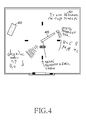
- FIG. 4 is a view of a whiteboard-type user interface for managing a schedule in a portable terminal according to an exemplary embodiment of the present invention.
- FIG. 2 is a block diagram of a portable terminal according to an exemplary embodiment of the present invention.
- a portable terminal includes a control unit 200, a display unit 204, a touch sensor 206, and a storage unit 208.
- the control unit 200 includes a schedule management part 202.
- the control unit 200 controls and processes overall operations of a portable terminal. Since the control unit 200 includes the schedule management part 202 according to an exemplary embodiment of the present invention, the control unit 200 controls and processes a function for receiving and outputting a schedule through a whiteboard-type user interface. In an exemplary implementation, the whiteboard may also include an analog watch.
- the schedule management part 202 controls and processes a function for displaying a whiteboard on the display unit 204 and receives coordinates of a screen touched by a user from the touch sensor 206 to detect whether an event for at least one of adding, deleting, and searching schedule data occurs.
- the schedule management part 202 controls functions for confirming time information corresponding to the coordinates of the touched screen, mapping data input through the touch sensor 206 with the coordinates and the time information to provide the mapped data to the storage unit 208, and displaying the input data on a corresponding position of display unit 204 as it is.
- the schedule management part 202 controls functions for recognizing methods (e.g., a touch direction, a touch shape, and a touch frequency) in which the display unit 204 is touched through the touch sensor 206 to recognize the input data and display the recognized data on a contact position as it is.
- recognizing methods e.g., a touch direction, a touch shape, and a touch frequency
- the schedule management part 202 controls and processes a function for activating a data deletion icon (e.g., an icon having an eraser shape) to delete the data mapped in the coordinates of the contact position touched by the user.
- a data deletion icon e.g., an icon having an eraser shape
- the schedule management part 202 controls and processes a function for determining the touch direction and time to search a corresponding schedule data from the storage unit 208 and display the schedule data on the display unit 204.
- the display unit 204 displays the status information of the portable terminal, numerals and characters, a large amount of moving pictures and still pictures, and so on. Specifically, the display unit 204 according to an exemplary embodiment of the present invention displays a whiteboard including an analog watch under the control of the control unit 200 to display the schedule data input by the user.
- the touch sensor 206 may provide a plurality of functional keys such as keys provided on a conventional keypad. Also, the touch sensor 206 recognizes an operation touched on the display unit 204 to perform a corresponding function. That is, the touch sensor 206 provides the coordinates corresponding to the contact position of the screen touched by the user to the control unit 200 and recognizes the touch methods, e.g., the touch direction, the touch shape, and the touch frequency to provide the touch methods to the control unit 200.
- the touch methods e.g., the touch direction, the touch shape, and the touch frequency to provide the touch methods to the control unit 200.
- the storage unit 208 includes a program memory, a data memory, and a nonvolatile memory to store temporary data generated during operations of the portable terminal, system parameters, backup data, and the like. Specifically, the storage unit 208 stores a table including time information corresponding to each of coordinates of the touch screen according to an exemplary embodiment of the present invention. In addition, the storage unit 208 stores the schedule data provided from the control unit 200 and the touch coordinates and the time information mapped in the schedule data according to an exemplary embodiment of the present invention.
- FIGs. 3A and 3B are flowcharts illustrating a process for managing a schedule in a portable terminal according to an exemplary embodiment of the present invention.
- the portable terminal when the portable terminal enters an idle state in step 301, the portable terminal displays a user interface including a whiteboard on a standby screen in step 303.
- step 305 the portable terminal determines whether the screen is touched by a user.
- the portable terminal proceeds to step 307 to determine whether an occurrence of an event for at least one of adding, deleting, and searching schedule data is detected through coordinates corresponding to a contact position of the screen. For example, when the coordinates of the contact position are coordinates corresponding to a portion in which the analog watch is displayed, the portable terminal may detect that the event for searching the schedule data occurs. Also, when the coordinates of the contact position correspond to a portion in which a data deletion icon (e.g., an icon having an eraser shape) is displayed, the portable terminal may detect that the event for deleting the schedule data occurs. In addition, when the coordinates of the contact position are coordinates corresponding to a background portion of the whiteboard, the portable terminal may detect that the event for adding the schedule data occurs.
- a data deletion icon e.g., an icon having an eraser shape
- the portable terminal proceeds to step 309 to confirm the coordinates at which the screen is touched and the time information corresponding to the touched coordinates. For example, as illustrated in FIG. 4 , when the touched coordinates (x, y) correspond to the background portion 401 of the whiteboard, the portable terminal detects that the event for adding the schedule date occurs and confirms that the time information corresponding to the touched coordinates is three o'clock.
- the portable terminal determines the method (e.g., a touch direction, a touch shape, and a touch frequency) in which the screen is touched to recognize the input data.
- the method e.g., a touch direction, a touch shape, and a touch frequency
- step 313 the portable terminal determines whether input data having the touched coordinates and the time information exists.
- the portable terminal maps and stores the recognized input data in the touched coordinates and the time information in step 315.
- step 317 the portable terminal displays the mapped data on the contact position as it is.
- the portable terminal proceeds to step 319 to map and store previously existing input data and the recognized input data.
- the portable terminal proceeds to step 317 to display the recognized input data on the contact position.
- the portable terminal may display all of the input data or only a portion of the input data. When all of the input data is displayed, the input data may be adjusted in size to display the size-adjusted data.
- step 307 when the occurrence of the event for deleting the schedule data is detected, the portable terminal proceeds to step 321 to activate a data deletion icon.
- a data deletion icon For example, as illustrated in FIG. 4 , when the touched coordinates (x, y) correspond to a portion in which the data deletion icon 403 is displayed, the portable terminal detects that the event for deleting the schedule data occurs to activate the data deletion icon.
- the portable terminal confirms the coordinates at which the screen is touched in step 323 and deletes the schedule data displayed on the confirmed coordinates, i.e., the input data, in step 325.
- the portable terminal deletes data input in a corresponding position while the activated data deletion icon is moved and displayed according to the direction or shape in which the screen is touched. That is, similar to an eraser function used for erasing an image in a conventional image editing program, the user may drag the data deletion icon through a touch screen to delete the whole or a portion of the input schedule data.
- the portable terminal terminates the process according to an exemplary embodiment of the present invention.
- the portable terminal When the occurrence of the event for searching the schedule data is detected, the portable terminal recognizes the direction in which the screen is touched, i.e., a direction in which the touch rotates and confirms time information according to the rotation direction of the touch to search a corresponding schedule in step 327. And then, in step 329, the searched schedule is displayed. For example, as illustrated in FIG. 4 , when the touched coordinates (x, y) correspond to a portion on which an hour hand 405 of the analog watch is displayed, the portable terminal detects that the event for searching the schedule data occurs. When the touch rotates in a clockwise direction, the portable terminal searches and displays a schedule mapped in the future with respect to the current time, i.e., input data.
- the portable terminal may sequentially display schedule data mapped in the future or the past corresponding to a direction in which the touch rotates such as clockwise or counter-clockwise, or list the schedule data to display the listed schedule data. Also, the portable terminal may display schedule data corresponding to time information of coordinates at which the touch stays considering to the coordinates stayed while the touch rotates.
- the portable terminal terminates the process according to an exemplary embodiment of the present invention.
- the portable terminal including the touch screen receives the schedule using the whiteboard-type user interface including the analog watch to display the received schedule.
- the schedule management method according to exemplary embodiments of the present invention can instinctively recognize the input data and improve utilization of the touch interface.
Landscapes
- Engineering & Computer Science (AREA)
- Business, Economics & Management (AREA)
- Human Resources & Organizations (AREA)
- Theoretical Computer Science (AREA)
- Physics & Mathematics (AREA)
- General Physics & Mathematics (AREA)
- Entrepreneurship & Innovation (AREA)
- Strategic Management (AREA)
- General Engineering & Computer Science (AREA)
- Economics (AREA)
- General Business, Economics & Management (AREA)
- Quality & Reliability (AREA)
- Operations Research (AREA)
- Marketing (AREA)
- Tourism & Hospitality (AREA)
- Human Computer Interaction (AREA)
- Data Mining & Analysis (AREA)
- Educational Administration (AREA)
- Game Theory and Decision Science (AREA)
- Development Economics (AREA)
- Computer Hardware Design (AREA)
- Computing Systems (AREA)
- Signal Processing (AREA)
- Computer Networks & Wireless Communication (AREA)
- User Interface Of Digital Computer (AREA)
- Calculators And Similar Devices (AREA)
- Management, Administration, Business Operations System, And Electronic Commerce (AREA)
Applications Claiming Priority (1)
| Application Number | Priority Date | Filing Date | Title |
|---|---|---|---|
| KR20080045965A KR101059835B1 (ko) | 2008-05-19 | 2008-05-19 | 휴대용 단말기에서 스케줄 관리 방법 및 장치 |
Publications (1)
| Publication Number | Publication Date |
|---|---|
| EP2124140A1 true EP2124140A1 (de) | 2009-11-25 |
Family
ID=40935023
Family Applications (1)
| Application Number | Title | Priority Date | Filing Date |
|---|---|---|---|
| EP20090160630 Ceased EP2124140A1 (de) | 2008-05-19 | 2009-05-19 | Vorrichtung und Verfahren zur Verwaltung von Terminplänen in einem tragbaren Endgerät |
Country Status (5)
| Country | Link |
|---|---|
| US (1) | US8949139B2 (de) |
| EP (1) | EP2124140A1 (de) |
| JP (1) | JP5294977B2 (de) |
| KR (1) | KR101059835B1 (de) |
| CN (1) | CN101599000A (de) |
Cited By (2)
| Publication number | Priority date | Publication date | Assignee | Title |
|---|---|---|---|---|
| EP2618493A4 (de) * | 2010-09-15 | 2014-08-13 | Lg Electronics Inc | Planungsanzeigeverfahren und vorrichtung bei einem mobilen kommunikationsendgerät |
| EP2360902A3 (de) * | 2010-02-11 | 2014-09-24 | Samsung Electronics Co., Ltd. | Verfahren und Vorrichtung zur Bereitstellung des Informationsverlaufs im Zusammenhang mit Zeitinformationen |
Families Citing this family (17)
| Publication number | Priority date | Publication date | Assignee | Title |
|---|---|---|---|---|
| CN102193716A (zh) * | 2010-03-11 | 2011-09-21 | 龙旗科技(上海)有限公司 | 一种移动终端实景闹钟的人机交互方式 |
| KR102006740B1 (ko) * | 2010-10-20 | 2019-08-02 | 삼성전자 주식회사 | 휴대 단말기의 화면 표시 방법 및 장치 |
| CN102467337A (zh) * | 2010-11-19 | 2012-05-23 | 比亚迪股份有限公司 | 触摸式移动终端的时间设定方法及移动终端 |
| TWI494802B (zh) * | 2012-01-04 | 2015-08-01 | Asustek Comp Inc | 操作方法與使用其之可攜式電子裝置 |
| KR102061776B1 (ko) * | 2012-09-05 | 2020-01-02 | 후아웨이 테크놀러지 컴퍼니 리미티드 | 객체 위치를 변경하기 위한 방법 및 그 전자 장치 |
| CN103617002A (zh) * | 2013-12-16 | 2014-03-05 | 深圳市理邦精密仪器股份有限公司 | 一种触控界面的实现方法及装置 |
| KR102281133B1 (ko) * | 2014-06-12 | 2021-07-26 | 엘지전자 주식회사 | 와치 타입 단말기 및 그것의 제어 방법 |
| CN104618582A (zh) * | 2014-12-31 | 2015-05-13 | 宇龙计算机通信科技(深圳)有限公司 | 日程提示方法、日程提示装置与时钟 |
| KR20160113906A (ko) * | 2015-03-23 | 2016-10-04 | 엘지전자 주식회사 | 이동 단말기 및 그것의 제어 방법 |
| CN105183270B (zh) * | 2015-05-22 | 2019-06-07 | 努比亚技术有限公司 | 桌面图标卸载方法及装置 |
| CN104980549A (zh) * | 2015-06-12 | 2015-10-14 | 努比亚技术有限公司 | 一种信息处理方法及移动终端 |
| US10628014B2 (en) * | 2015-07-01 | 2020-04-21 | Lg Electronics Inc. | Mobile terminal and control method therefor |
| KR102412386B1 (ko) * | 2015-10-06 | 2022-06-23 | 엘지전자 주식회사 | 이동 단말기 및 그 제어 방법 |
| CN105208218B (zh) * | 2015-10-29 | 2020-03-31 | 努比亚技术有限公司 | 在移动终端中查找信息的装置和方法 |
| CN105955756A (zh) * | 2016-05-18 | 2016-09-21 | 广州视睿电子科技有限公司 | 图像擦除方法和系统 |
| JP2019021281A (ja) * | 2017-07-18 | 2019-02-07 | 抱 今中 | 勤怠管理システム |
| CN107920165A (zh) * | 2017-11-16 | 2018-04-17 | 宁波萨瑞通讯有限公司 | 一种日程删除方法及系统 |
Citations (5)
| Publication number | Priority date | Publication date | Assignee | Title |
|---|---|---|---|---|
| EP1091278A2 (de) * | 1999-09-28 | 2001-04-11 | Nokia Mobile Phones Ltd. | Elektronisches Gerät |
| US20020131331A1 (en) * | 2001-03-19 | 2002-09-19 | International Business Machines Corporation | Simplified method for setting time using a graphical representation of an analog clock face |
| US20020196294A1 (en) * | 2001-06-26 | 2002-12-26 | Robert Sesek | Calendar screensaver for a computer display |
| US20060007785A1 (en) * | 2004-07-08 | 2006-01-12 | Fernandez Juan C | Method and system for displaying appointments |
| WO2006032721A1 (en) * | 2004-09-24 | 2006-03-30 | Nokia Corporation | Method for receiving inputs from user of electronic device |
Family Cites Families (10)
| Publication number | Priority date | Publication date | Assignee | Title |
|---|---|---|---|---|
| JPH0895695A (ja) | 1994-09-27 | 1996-04-12 | Casio Comput Co Ltd | データ入力装置 |
| KR20000013269A (ko) | 1998-08-06 | 2000-03-06 | 윤종용 | 문자인식 디지털 휴대용 전화기에서 사용자 일정 관리 방법 |
| US6587895B1 (en) | 1999-08-03 | 2003-07-01 | Xerox Corporation | Method for accepting a freeform input containing message with time reference thereupon providing an alert message according to the time reference |
| US20040207606A1 (en) * | 1999-11-08 | 2004-10-21 | Atwood Stephen P. | Sensing the size of a touch point in a touch-sensitive panel employing resistive membranes |
| JP2002342372A (ja) | 2001-05-16 | 2002-11-29 | Casio Comput Co Ltd | 情報端末装置及びスケジュール検索プログラム |
| JP3952896B2 (ja) * | 2002-07-30 | 2007-08-01 | キヤノン株式会社 | 座標入力装置及びその制御方法、プログラム |
| US7750892B2 (en) * | 2004-06-04 | 2010-07-06 | Polyvision Corporation | Portable interactive communication systems |
| JP4469779B2 (ja) * | 2005-10-31 | 2010-05-26 | 三菱電機インフォメーションシステムズ株式会社 | 携帯端末、スケジュール管理プログラムおよびスケジュール管理プログラムを記録したコンピュータ読み取り可能な記録媒体 |
| KR20080056559A (ko) * | 2006-12-18 | 2008-06-23 | 엘지전자 주식회사 | 터치스크린 장치 및 이를 구비한 디지털 기기 그리고 이의명령 입력방법 |
| US20080165151A1 (en) * | 2007-01-07 | 2008-07-10 | Lemay Stephen O | System and Method for Viewing and Managing Calendar Entries |
-
2008
- 2008-05-19 KR KR20080045965A patent/KR101059835B1/ko not_active Expired - Fee Related
-
2009
- 2009-05-19 CN CNA2009101595051A patent/CN101599000A/zh active Pending
- 2009-05-19 EP EP20090160630 patent/EP2124140A1/de not_active Ceased
- 2009-05-19 JP JP2009121072A patent/JP5294977B2/ja not_active Expired - Fee Related
- 2009-05-19 US US12/468,396 patent/US8949139B2/en not_active Expired - Fee Related
Patent Citations (5)
| Publication number | Priority date | Publication date | Assignee | Title |
|---|---|---|---|---|
| EP1091278A2 (de) * | 1999-09-28 | 2001-04-11 | Nokia Mobile Phones Ltd. | Elektronisches Gerät |
| US20020131331A1 (en) * | 2001-03-19 | 2002-09-19 | International Business Machines Corporation | Simplified method for setting time using a graphical representation of an analog clock face |
| US20020196294A1 (en) * | 2001-06-26 | 2002-12-26 | Robert Sesek | Calendar screensaver for a computer display |
| US20060007785A1 (en) * | 2004-07-08 | 2006-01-12 | Fernandez Juan C | Method and system for displaying appointments |
| WO2006032721A1 (en) * | 2004-09-24 | 2006-03-30 | Nokia Corporation | Method for receiving inputs from user of electronic device |
Cited By (2)
| Publication number | Priority date | Publication date | Assignee | Title |
|---|---|---|---|---|
| EP2360902A3 (de) * | 2010-02-11 | 2014-09-24 | Samsung Electronics Co., Ltd. | Verfahren und Vorrichtung zur Bereitstellung des Informationsverlaufs im Zusammenhang mit Zeitinformationen |
| EP2618493A4 (de) * | 2010-09-15 | 2014-08-13 | Lg Electronics Inc | Planungsanzeigeverfahren und vorrichtung bei einem mobilen kommunikationsendgerät |
Also Published As
| Publication number | Publication date |
|---|---|
| KR20090120091A (ko) | 2009-11-24 |
| CN101599000A (zh) | 2009-12-09 |
| JP2009282978A (ja) | 2009-12-03 |
| US8949139B2 (en) | 2015-02-03 |
| US20090287531A1 (en) | 2009-11-19 |
| KR101059835B1 (ko) | 2011-08-29 |
| JP5294977B2 (ja) | 2013-09-18 |
Similar Documents
| Publication | Publication Date | Title |
|---|---|---|
| US8949139B2 (en) | Apparatus and method for managing schedule in portable terminal | |
| US8584038B2 (en) | Techniques for use with a calendar and messaging component | |
| KR102276766B1 (ko) | 지능형 출발 시간 리마인더를 생성하고 제공하는 시스템 및 방법 | |
| CN101589349B (zh) | 将任务和约会相集成的灵活电子日历 | |
| US6336125B2 (en) | Method and device for generating application data and storage medium containing thereon a program for generating application data | |
| EP2405337B1 (de) | Verfahren zur Darstellung einer Mensch-Maschinen-Schnittstelle, tragbare Vorrichtung damit und computerlesbares Medium dafür | |
| US20080177609A1 (en) | Electronic calendar associating tasks and appointments | |
| EP1387286A2 (de) | Datenverarbeitungsgerät, -verfahren und -programm und Speichermittel für das Programm | |
| CN107705094B (zh) | 日历项上的个人笔记 | |
| CN113785267A (zh) | 用于操纵用户界面的设备、方法和系统 | |
| EP2759919A2 (de) | Verfahren und Vorrichtungen zur simultanen Mehrfachberührungseingabe | |
| JP5989903B2 (ja) | 電子機器、方法及びプログラム | |
| EP2557770A2 (de) | Vorrichtung und Verfahren zur Durchführung einer Aufnahme eines Bildes auf einem tragbaren Endgerät | |
| JPH09282285A (ja) | スケジュール管理装置 | |
| JP2013101630A (ja) | タッチスクリーンを備える携帯端末機のユーザインターフェース装置及びその方法 | |
| JP2010103919A (ja) | 携帯情報端末およびその制御方法 | |
| JPH08147247A (ja) | スケジュール管理装置 | |
| WO2014019059A1 (en) | Apparatus and method for attribute-based scheduling | |
| EP0803823A2 (de) | Informationsprozessor mit Ablauffolgeplanungsfunktion | |
| EP0704808A2 (de) | Datenspeicher zur Aufzeichnung aufgezeichneter Daten | |
| US8171036B2 (en) | Method and apparatus for processing data records in a given order upon receiving input data from a touchscreen | |
| KR101029670B1 (ko) | 이동통신단말기의 스케쥴관리 방법 | |
| KR101433148B1 (ko) | 일정 재사용을 위한 사용자 인터페이스 및 휴대용 전자장치 | |
| JP2000163383A (ja) | 情報処理装置及び情報処理制御プログラムを記録した記録媒体 | |
| JP2003084906A (ja) | メッセージ表示装置、メッセージ表示システム、メッセージ表示方法およびメッセージ表示プログラム |
Legal Events
| Date | Code | Title | Description |
|---|---|---|---|
| PUAI | Public reference made under article 153(3) epc to a published international application that has entered the european phase |
Free format text: ORIGINAL CODE: 0009012 |
|
| AK | Designated contracting states |
Kind code of ref document: A1 Designated state(s): AT BE BG CH CY CZ DE DK EE ES FI FR GB GR HR HU IE IS IT LI LT LU LV MC MK MT NL NO PL PT RO SE SI SK TR |
|
| 17P | Request for examination filed |
Effective date: 20100104 |
|
| 17Q | First examination report despatched |
Effective date: 20100302 |
|
| RAP1 | Party data changed (applicant data changed or rights of an application transferred) |
Owner name: SAMSUNG ELECTRONICS CO., LTD. |
|
| STAA | Information on the status of an ep patent application or granted ep patent |
Free format text: STATUS: THE APPLICATION HAS BEEN REFUSED |
|
| 18R | Application refused |
Effective date: 20141211 |