EP2017581A2 - Kartenrollverfahren und Navigationsendgerät - Google Patents
Kartenrollverfahren und Navigationsendgerät Download PDFInfo
- Publication number
- EP2017581A2 EP2017581A2 EP08160269A EP08160269A EP2017581A2 EP 2017581 A2 EP2017581 A2 EP 2017581A2 EP 08160269 A EP08160269 A EP 08160269A EP 08160269 A EP08160269 A EP 08160269A EP 2017581 A2 EP2017581 A2 EP 2017581A2
- Authority
- EP
- European Patent Office
- Prior art keywords
- dragging
- generated
- input
- map image
- map
- Prior art date
- Legal status (The legal status is an assumption and is not a legal conclusion. Google has not performed a legal analysis and makes no representation as to the accuracy of the status listed.)
- Withdrawn
Links
Images



Classifications
-
- G—PHYSICS
- G01—MEASURING; TESTING
- G01C—MEASURING DISTANCES, LEVELS OR BEARINGS; SURVEYING; NAVIGATION; GYROSCOPIC INSTRUMENTS; PHOTOGRAMMETRY OR VIDEOGRAMMETRY
- G01C21/00—Navigation; Navigational instruments not provided for in groups G01C1/00 - G01C19/00
- G01C21/26—Navigation; Navigational instruments not provided for in groups G01C1/00 - G01C19/00 specially adapted for navigation in a road network
-
- G—PHYSICS
- G01—MEASURING; TESTING
- G01C—MEASURING DISTANCES, LEVELS OR BEARINGS; SURVEYING; NAVIGATION; GYROSCOPIC INSTRUMENTS; PHOTOGRAMMETRY OR VIDEOGRAMMETRY
- G01C21/00—Navigation; Navigational instruments not provided for in groups G01C1/00 - G01C19/00
- G01C21/26—Navigation; Navigational instruments not provided for in groups G01C1/00 - G01C19/00 specially adapted for navigation in a road network
- G01C21/34—Route searching; Route guidance
- G01C21/36—Input/output arrangements for on-board computers
- G01C21/3667—Display of a road map
- G01C21/367—Details, e.g. road map scale, orientation, zooming, illumination, level of detail, scrolling of road map or positioning of current position marker
-
- G—PHYSICS
- G01—MEASURING; TESTING
- G01C—MEASURING DISTANCES, LEVELS OR BEARINGS; SURVEYING; NAVIGATION; GYROSCOPIC INSTRUMENTS; PHOTOGRAMMETRY OR VIDEOGRAMMETRY
- G01C21/00—Navigation; Navigational instruments not provided for in groups G01C1/00 - G01C19/00
- G01C21/26—Navigation; Navigational instruments not provided for in groups G01C1/00 - G01C19/00 specially adapted for navigation in a road network
- G01C21/34—Route searching; Route guidance
- G01C21/36—Input/output arrangements for on-board computers
- G01C21/3664—Details of the user input interface, e.g. buttons, knobs or sliders, including those provided on a touch screen; remote controllers; input using gestures
-
- G—PHYSICS
- G01—MEASURING; TESTING
- G01C—MEASURING DISTANCES, LEVELS OR BEARINGS; SURVEYING; NAVIGATION; GYROSCOPIC INSTRUMENTS; PHOTOGRAMMETRY OR VIDEOGRAMMETRY
- G01C21/00—Navigation; Navigational instruments not provided for in groups G01C1/00 - G01C19/00
- G01C21/26—Navigation; Navigational instruments not provided for in groups G01C1/00 - G01C19/00 specially adapted for navigation in a road network
- G01C21/34—Route searching; Route guidance
- G01C21/36—Input/output arrangements for on-board computers
- G01C21/3667—Display of a road map
- G01C21/3673—Labelling using text of road map data items, e.g. road names, POI names
-
- G—PHYSICS
- G01—MEASURING; TESTING
- G01C—MEASURING DISTANCES, LEVELS OR BEARINGS; SURVEYING; NAVIGATION; GYROSCOPIC INSTRUMENTS; PHOTOGRAMMETRY OR VIDEOGRAMMETRY
- G01C21/00—Navigation; Navigational instruments not provided for in groups G01C1/00 - G01C19/00
- G01C21/26—Navigation; Navigational instruments not provided for in groups G01C1/00 - G01C19/00 specially adapted for navigation in a road network
- G01C21/34—Route searching; Route guidance
- G01C21/36—Input/output arrangements for on-board computers
- G01C21/3679—Retrieval, searching and output of POI information, e.g. hotels, restaurants, shops, filling stations, parking facilities
- G01C21/3682—Retrieval, searching and output of POI information, e.g. hotels, restaurants, shops, filling stations, parking facilities output of POI information on a road map
-
- G—PHYSICS
- G06—COMPUTING OR CALCULATING; COUNTING
- G06F—ELECTRIC DIGITAL DATA PROCESSING
- G06F3/00—Input arrangements for transferring data to be processed into a form capable of being handled by the computer; Output arrangements for transferring data from processing unit to output unit, e.g. interface arrangements
- G06F3/01—Input arrangements or combined input and output arrangements for interaction between user and computer
- G06F3/048—Interaction techniques based on graphical user interfaces [GUI]
- G06F3/0484—Interaction techniques based on graphical user interfaces [GUI] for the control of specific functions or operations, e.g. selecting or manipulating an object, an image or a displayed text element, setting a parameter value or selecting a range
- G06F3/0485—Scrolling or panning
-
- G—PHYSICS
- G08—SIGNALLING
- G08G—TRAFFIC CONTROL SYSTEMS
- G08G1/00—Traffic control systems for road vehicles
- G08G1/09—Arrangements for giving variable traffic instructions
- G08G1/0962—Arrangements for giving variable traffic instructions having an indicator mounted inside the vehicle, e.g. giving voice messages
- G08G1/0968—Systems involving transmission of navigation instructions to the vehicle
- G08G1/0969—Systems involving transmission of navigation instructions to the vehicle having a display in the form of a map
Definitions
- the present invention relates to a map scrolling method in a navigation terminal and the same navigation terminal, and more particularly to a method for easily and rapidly scrolling through a map image by the user, and a navigation terminal for the same.
- a navigation terminal displays a map showing a current position on a touch screen.
- the current position is displayed on a certain reduced scale, and position data of the map is changed and displayed according to a traveling direction of the navigation terminal.
- the user In order for the user to see a map image including a desired position using the touch screen in the navigation terminal, the user must repeatedly touch a point in a desired direction with respect to the center of the touch screen, or must repeatedly drag the map in the desired direction. Otherwise, when a separate map scroll button is included in the touch screen, the user scrolls through a map image by adjusting the map scroll button. For example, when the user wants to shift a certain point currently indicated in an upper portion in a screen to the center of the screen, the user moves the map image by touching an upper portion, by dragging the map, or by adjusting the map scroll button. In this case, since the movement of the map image is slowly performed, the user must repeatedly perform a key adjustment.
- the present invention has been made to solve the above-mentioned problems occurring in the prior art, and the present invention provides a method and apparatus for enabling the user to easily and rapidly scrolling through a map image in a touch screen of a navigation terminal.
- a map scrolling method in a navigation terminal that includes a touch screen, with the method including determining if an input event through the touch screen is generated within a map image region in a route guidance mode; displaying a multi-directional keypad at a point where the input event is generated, when the input event is generated within the map image region; determining if a dragging event is generated in a state where the multi-directional keypad is displayed within the map image region; calculating a dragging direction and a dragging displacement corresponding to the generated dragging event; and adjusting a moving direction and a moving speed of the map image according to the calculated dragging direction and displacement.
- a navigation terminal that performs a map scrolling operation and includes a touch screen for outputting one among input, dragging and release signals through a screen touch by a user, and outputting a map image in a route guidance mode; a touch screen input calculation unit for, when a dragging signal is transferred after an input signal is generated from the touch screen, calculating a first position value of a point where a touch input by the user is generated and a second position value of a point to which a dragging operation is performed at a state where the touch input is applied, thereby calculating a dragging direction and a dragging displacement; a map output calculation unit for calculating map data to be displayed on the touch screen according to the dragging direction and dragging displacement calculated by the touch screen input calculation unit; and a controller for determining if the input signal is generated within a region of the map image in a route guidance mode, displaying a multi-directional keypad at a point where the input signal is generated when the input signal is generated
- the present invention provides a method for enabling the user to easily and rapidly access a map image showing a desired position in a navigation terminal.
- a virtual scroll button in the form of a multi-directional keypad is displayed, a dragging direction and a dragging displacement are calculated through the virtual scroll button.
- Map scrolling is performed in accordance with the calculated dragging direction and displacement, thereby displaying a corresponding map image. Accordingly, the user can easily and rapidly move the map image, and can easily find and see a desired position.
- FIG. 1 The configuration of a navigation terminal for implementing the aforementioned function is shown in FIG. 1 , showing a controller 100, a position measurement unit 110, a map database (DB) unit 120, a route calculation unit 130, a route guidance unit 140, a touch screen 150, a touch screen input calculation unit 160, and a map output calculation unit 170.
- DB map database
- the position measurement unit 110 measures the current position by using a GPS receiver or a position measurement sensor, such as a gyro-sensor, an acceleration sensor, etc., and provides a result of the measurement to the controller 100.
- the map DB unit 120 stores and manages network data and maps, which are used for route calculation and route guidance, and displays data used for a screen output of a Point of Interest (POI).
- POI Point of Interest
- the route calculation unit 130 calculates an optimal route from the current position to a destination selected by the user, and the route guidance unit 140 performs route guidance for the user through a screen output or voice output based on a result calculated by the route calculation unit 130.
- the touch screen 150 receives an input through a screen touch by the user and outputs a graphic image through the touch screen.
- the touch screen 150 outputs any one among input, dragging and release signals generated through a screen touch by the user.
- the touch screen 150 outputs a virtual scroll button at the point where a touch input is applied.
- the touch screen input calculation unit 160 calculates a position value of a first point where the touch input is generated by the user, and a position value of a second point to which movement has been made by dragging in a touched state.
- a position value of the second point to which movement has been made by dragging may be defined as a "displacement,” wherein the displacement is consecutively calculated while dragging is in progress until a touch input is released, after the touch input is generated. For example, unless the user releases his finger and is no longer touching a virtual scroll button displayed on the touch screen 150, the touch screen input calculation unit 160 will consecutively calculate a displacement according to the dragging movement.
- the map output calculation unit 170 calculates map data to be displayed on the screen according to position values calculated by the touch screen input calculation unit 160 and changes in the position values, i.e., according to a calculated dragging direction and displacement.
- the controller 100 enables the components to communicate with each other, and controls the respective components.
- the controller 100 determines if an input signal that is entered via the touch screen 150 is generated within a map image region in a route guidance mode, and displays a multi-directional keypad at the point where the input signal is generated when the input signal is generated within the map image region.
- the controller 100 controls a moving speed and a moving direction of a map image according to a dragging direction and a dragging displacement calculated by the touch screen input calculation unit 160, by using map data provided by the map output calculation unit 170.
- the controller 100 removes the displayed multi-directional keypad when a release signal is generated, after the input signal has been generated.
- FIG. 2 is a flowchart illustrating a control method of a navigation terminal that provides a scroll function for a map image according to an exemplary embodiment of the present invention
- the current position of the user who is moving, is indicated in a map image displayed on a touch screen of a navigation terminal through measurement for the current position.
- the navigation terminal determines if an input event is generated through the touch screen 150. That is, the navigation terminal determines if an input event signal is transferred to the navigation terminal.
- the navigation terminal determines if the input event has been generated within a map image region in step 205. In this case, since not only the map image region, but also a menu key region is generally displayed on the screen, when an input event is generated at a position outside of the displayed map image region, the navigation terminal performs a function corresponding to the input event generated through the menu key region in step 210.
- the navigation terminal acquires a position value of a position where the input event has been generated, from the touch screen input calculation unit 160. With this, the navigation terminal determines if an acquired position value corresponds to a point within the map image region.
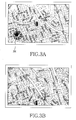
- the navigation terminal outputs a virtual scroll button at an input-event generation point in step 215. Accordingly, the virtual scroll button 300 ( Fig. 4 ) is overlapped and displayed on the map image of the touch screen 150, as shown in FIG. 3A .
- the virtual scroll button 300 has the form of a multi-directional keypad so that the user can easily select a dragging direction. The operation and formation of the virtual scroll button is described in further detail below.
- the navigation terminal determines if a dragging event is generated in step 220.
- the navigation terminal calculates a dragging displacement and a dragging direction through the touch screen input calculation unit 160 in step 225.
- the touch screen input calculation unit 160 calculates a direction along which dragging is performed from an initial position where the input event has been generated to the current position, and a displacement that is a movement distance from the initial position to the current position. In this case, when the user is continuously dragging in a certain direction, without separating his/her finger from the map image, a movement distance from the initial input position to the current position will continuously change, so that a displacement is consecutively calculated according to the change.
- the navigation terminal controls the map image to be scrolled according to the calculated dragging direction and dragging displacement.
- the navigation terminal controls the map output calculation unit 170 to calculate map data to be displayed on the screen corresponding to the displacement and direction calculated by the touch screen input calculation unit 160. Accordingly, the map image is displayed as if it moves on the touch screen 150.
- FIGs. 3A and 3B are map images showing changes depending on a map scrolling operation using a virtual scroll button according to an exemplary embodiment of the present invention.
- a running car is positioned at the center, as shown in FIG. 3A
- a map image corresponding to an upward area is displayed as shown in FIG. 3B , so that the current position of the car is displayed in a lower portion of the map image.
- the user can move the map image to display a desired position by performing a dragging operation in a desired direction, with his/her finger pressing the virtual scroll button.
- the virtual scroll button displayed at the point where the first touch input event has been generated disappears, so that the user can see a map image without a certain portion obscured by the button.
- a method capable of controlling a map scroll speed via a single virtual scroll button may be stored in advance. For example, it may be established that, as the dragging distance is longer with respect to a first input position, the map scroll speed is faster.
- the map output calculation unit 170 determines a moving speed of a map image corresponding to a calculated displacement, and also calculates map data to output a map image corresponding to the calculated dragging direction. That is, a direction in which and a distance by which the current map image is to move are calculated according to a dragging displacement.
- the navigation terminal determines if a release event, such as release of the touched user's finger, is generated in step 235. When the release event is not generated, the navigation terminal returns to step 225. Otherwise, when the release event is generated as a result of the determination, the navigation terminal proceeds to step 240, where the navigation terminal removes the virtual scroll button displayed on the touch screen 150. When an input through the touch screen 150 is terminated, as described above, the navigation terminal returns to a wait state of waiting for a user input, as shown in FIG. 3B .
- a release event such as release of the touched user's finger
- FIG. 4 is a plan view showing the operation of a virtual scroll button according to an exemplary embodiment of the present invention.
- FIG. 4 illustrates a case where the user performs a dragging operation in a due north direction, wherein a first input point corresponds to the center 400 of the virtual scroll button 300.
- the center 400 is (X1, Y1)
- a map is scrolled continuously corresponding to a dragging displacement. For example, as shown in FIG.
- dragging displacements are established in a sequence of S0 S1, S2 and S3, when the user performs a dragging operation to displacement "S0," a map image will scrolled slowly.
- the map image may be scrolled quickly, which is advantageous when a position that the user wishes to find is far away from the currently-displayed map image.
- the maximum value of the map scroll speed is preset by taking into consideration a time required for calculating map data to be output through the screen so that the required time can be ensured although the user continuously performs a dragging operation in the upward direction.
- Such a method does not require a plurality of touch operations and repeated dragging operations, and enables the user to control the map scroll speed, as well as to drag a map image in a desired direction, even with only one finger, without a large movement.
- the user can easily scroll a map image to a desired position even with only one finger, without a large movement, thereby improving the convenience in use of the navigation terminal.
- the user can directly adjust the scroll speed for the map image, it is possible for the user to easily and rapidly see a map image positioned far away from the currently-displayed map image.
Landscapes
- Engineering & Computer Science (AREA)
- Radar, Positioning & Navigation (AREA)
- Remote Sensing (AREA)
- Physics & Mathematics (AREA)
- General Physics & Mathematics (AREA)
- Automation & Control Theory (AREA)
- General Engineering & Computer Science (AREA)
- Human Computer Interaction (AREA)
- Theoretical Computer Science (AREA)
- Navigation (AREA)
- User Interface Of Digital Computer (AREA)
- Instructional Devices (AREA)
Applications Claiming Priority (1)
| Application Number | Priority Date | Filing Date | Title |
|---|---|---|---|
| KR1020070072366A KR20090008976A (ko) | 2007-07-19 | 2007-07-19 | 네비게이션 단말에서의 지도 스크롤 방법 및 그 네비게이션단말 |
Publications (2)
| Publication Number | Publication Date |
|---|---|
| EP2017581A2 true EP2017581A2 (de) | 2009-01-21 |
| EP2017581A3 EP2017581A3 (de) | 2010-04-21 |
Family
ID=39876817
Family Applications (1)
| Application Number | Title | Priority Date | Filing Date |
|---|---|---|---|
| EP08160269A Withdrawn EP2017581A3 (de) | 2007-07-19 | 2008-07-11 | Kartenrollverfahren und Navigationsendgerät |
Country Status (4)
| Country | Link |
|---|---|
| US (1) | US8108137B2 (de) |
| EP (1) | EP2017581A3 (de) |
| KR (1) | KR20090008976A (de) |
| CN (1) | CN101382438A (de) |
Cited By (2)
| Publication number | Priority date | Publication date | Assignee | Title |
|---|---|---|---|---|
| EP2472380A3 (de) * | 2010-12-29 | 2015-11-18 | Samsung Electronics Co., Ltd. | Bilddurchlaufverfahren und -vorrichtung für elektronische Vorrichtungen |
| EP2439629A3 (de) * | 2010-10-08 | 2016-01-20 | Sony Corporation | Informationsverarbeitungsvorrichtung, Informationsverarbeitungsverfahren und Programm |
Families Citing this family (60)
| Publication number | Priority date | Publication date | Assignee | Title |
|---|---|---|---|---|
| US8302033B2 (en) | 2007-06-22 | 2012-10-30 | Apple Inc. | Touch screen device, method, and graphical user interface for providing maps, directions, and location-based information |
| US8327272B2 (en) | 2008-01-06 | 2012-12-04 | Apple Inc. | Portable multifunction device, method, and graphical user interface for viewing and managing electronic calendars |
| CN101655765A (zh) * | 2008-08-22 | 2010-02-24 | 深圳富泰宏精密工业有限公司 | 利用虚拟方向键进行操作的电子装置及相应的操作方法 |
| JP5228755B2 (ja) * | 2008-09-29 | 2013-07-03 | 富士通株式会社 | 携帯端末装置、表示制御方法および表示制御プログラム |
| KR101555552B1 (ko) * | 2008-12-29 | 2015-09-24 | 엘지전자 주식회사 | 네비게이션 장치 및 그의 네비게이팅 방법 |
| JP5792424B2 (ja) * | 2009-07-03 | 2015-10-14 | ソニー株式会社 | 地図情報表示装置、地図情報表示方法およびプログラム |
| KR101451999B1 (ko) * | 2009-07-28 | 2014-10-21 | 삼성전자주식회사 | 데이터 스크롤 방법 및 장치 |
| KR101618152B1 (ko) * | 2009-09-11 | 2016-05-04 | 주식회사 엘지유플러스 | 터치스크린을 구비한 모바일 단말 및 그의 웹 페이지 드래그 방법 |
| KR101629645B1 (ko) * | 2009-09-18 | 2016-06-21 | 엘지전자 주식회사 | 휴대 단말기 및 그 동작방법 |
| CA2781945C (en) * | 2009-11-26 | 2015-09-15 | Rakuten, Inc. | Information processing device, terminal device and program, content of interest determination method and program, recording medium on which program is recorded, and information provision system |
| US8862576B2 (en) * | 2010-01-06 | 2014-10-14 | Apple Inc. | Device, method, and graphical user interface for mapping directions between search results |
| KR20110093097A (ko) * | 2010-02-11 | 2011-08-18 | 삼성전자주식회사 | 휴대 단말기의 리스트 편집 방법 및 장치 |
| US8887086B2 (en) | 2010-04-19 | 2014-11-11 | Blackberry Limited | Portable electronic device and method of controlling same |
| US9026359B2 (en) * | 2010-11-01 | 2015-05-05 | Nokia Corporation | Visually representing a three-dimensional environment |
| KR102060962B1 (ko) * | 2011-08-19 | 2020-01-02 | 삼성전자 주식회사 | 포인팅 장치를 이용한 컨텐츠 이동 방법 및 장치 |
| CN103024133A (zh) * | 2011-09-23 | 2013-04-03 | 中兴通讯股份有限公司 | 触屏待机墙纸显示设置方法及其装置 |
| US9347791B2 (en) * | 2011-10-07 | 2016-05-24 | The Boeing Company | Methods and systems for operating a touch screen display |
| US20140067366A1 (en) * | 2012-08-30 | 2014-03-06 | Google Inc. | Techniques for selecting languages for automatic speech recognition |
| JP6220116B2 (ja) * | 2012-09-06 | 2017-10-25 | 株式会社ナビタイムジャパン | 情報処理システム、情報処理装置、情報処理方法、及び情報処理プログラム |
| KR101713784B1 (ko) * | 2013-01-07 | 2017-03-08 | 삼성전자주식회사 | 전자 장치 및 그 제어 방법 |
| KR20140110646A (ko) * | 2013-03-08 | 2014-09-17 | 삼성전자주식회사 | 사용자 단말 및 사용자 단말에서 화면 표시 방법 |
| GB201306937D0 (en) | 2013-04-17 | 2013-05-29 | Tomtom Int Bv | Methods, devices and computer software for facilitating searching and display of locations relevant to a digital map |
| GB201306942D0 (en) | 2013-04-17 | 2013-05-29 | Tomtom Int Bv | Methods, devices and computer software for facilitating searching and display of locations relevant to a digital map |
| GB201306944D0 (en) * | 2013-04-17 | 2013-05-29 | Tomtom Int Bv | Methods, devices and computer software for facilitating searching and display of locations relevant to a digital map |
| CN103455248B (zh) * | 2013-08-22 | 2017-02-01 | 广东欧珀移动通信有限公司 | 浏览文件的内容滑动方法和系统 |
| EP3147747A1 (de) | 2014-06-27 | 2017-03-29 | Apple Inc. | Bedienung einer kalendaranwendung in einem gerät mit berührungsempfindlichem bildschirm |
| TWI647608B (zh) | 2014-07-21 | 2019-01-11 | 美商蘋果公司 | 遠端使用者介面 |
| EP4160376A1 (de) | 2014-08-02 | 2023-04-05 | Apple Inc. | Verfahren zum bearbeiten einer benutzerschnittstelle eines zifferblatts bei einer uhr mit einem berührungsempfindlichen display |
| US10452253B2 (en) | 2014-08-15 | 2019-10-22 | Apple Inc. | Weather user interface |
| CN104216634A (zh) * | 2014-08-27 | 2014-12-17 | 小米科技有限责任公司 | 一种显示稿件的方法和装置 |
| EP4209872B1 (de) | 2014-09-02 | 2025-12-17 | Apple Inc. | Benutzerschnittstelle für ein telefon |
| US10254948B2 (en) | 2014-09-02 | 2019-04-09 | Apple Inc. | Reduced-size user interfaces for dynamically updated application overviews |
| EP4089534A1 (de) | 2014-09-02 | 2022-11-16 | Apple Inc. | Benutzerschnittstelle zum empfangen von benutzereingaben |
| US10055121B2 (en) | 2015-03-07 | 2018-08-21 | Apple Inc. | Activity based thresholds and feedbacks |
| WO2016144385A1 (en) | 2015-03-08 | 2016-09-15 | Apple Inc. | Sharing user-configurable graphical constructs |
| KR20160139113A (ko) * | 2015-05-26 | 2016-12-07 | 한국교통대학교산학협력단 | 차량 주행 정보 제공 방법 및 장치 |
| US9916075B2 (en) | 2015-06-05 | 2018-03-13 | Apple Inc. | Formatting content for a reduced-size user interface |
| US10304347B2 (en) | 2015-08-20 | 2019-05-28 | Apple Inc. | Exercised-based watch face and complications |
| WO2017183652A1 (ja) | 2016-04-19 | 2017-10-26 | 日立マクセル株式会社 | 携帯端末装置 |
| US12175065B2 (en) | 2016-06-10 | 2024-12-24 | Apple Inc. | Context-specific user interfaces for relocating one or more complications in a watch or clock interface |
| DK201770423A1 (en) | 2016-06-11 | 2018-01-15 | Apple Inc | Activity and workout updates |
| DK179412B1 (en) | 2017-05-12 | 2018-06-06 | Apple Inc | Context-Specific User Interfaces |
| US11327650B2 (en) | 2018-05-07 | 2022-05-10 | Apple Inc. | User interfaces having a collection of complications |
| JP7265822B2 (ja) * | 2018-08-27 | 2023-04-27 | キヤノン株式会社 | 表示制御装置および表示制御方法、並びにプログラム |
| JP7669109B2 (ja) * | 2018-12-26 | 2025-04-28 | Lineヤフー株式会社 | 表示制御方法、プログラム及び表示装置 |
| JP6921338B2 (ja) | 2019-05-06 | 2021-08-18 | アップル インコーポレイテッドApple Inc. | 電子デバイスの制限された動作 |
| US11960701B2 (en) | 2019-05-06 | 2024-04-16 | Apple Inc. | Using an illustration to show the passing of time |
| US11131967B2 (en) | 2019-05-06 | 2021-09-28 | Apple Inc. | Clock faces for an electronic device |
| US10878782B1 (en) | 2019-09-09 | 2020-12-29 | Apple Inc. | Techniques for managing display usage |
| US11372659B2 (en) | 2020-05-11 | 2022-06-28 | Apple Inc. | User interfaces for managing user interface sharing |
| DK202070624A1 (en) | 2020-05-11 | 2022-01-04 | Apple Inc | User interfaces related to time |
| CN115552375A (zh) | 2020-05-11 | 2022-12-30 | 苹果公司 | 用于管理用户界面共享的用户界面 |
| KR102876254B1 (ko) | 2020-05-18 | 2025-10-27 | 애플 인크. | 전자 디바이스의 현재 위치를 보고 리파인하기 위한 사용자 인터페이스들 |
| US11694590B2 (en) | 2020-12-21 | 2023-07-04 | Apple Inc. | Dynamic user interface with time indicator |
| US11720239B2 (en) | 2021-01-07 | 2023-08-08 | Apple Inc. | Techniques for user interfaces related to an event |
| US12182373B2 (en) | 2021-04-27 | 2024-12-31 | Apple Inc. | Techniques for managing display usage |
| US11921992B2 (en) | 2021-05-14 | 2024-03-05 | Apple Inc. | User interfaces related to time |
| US12493267B2 (en) | 2022-01-24 | 2025-12-09 | Apple Inc. | User interfaces for indicating time |
| US12578975B2 (en) | 2022-09-15 | 2026-03-17 | Apple Inc. | User interfaces for indicating time |
| US12602154B2 (en) | 2024-01-18 | 2026-04-14 | Apple Inc. | User interfaces integrating hardware buttons |
Family Cites Families (6)
| Publication number | Priority date | Publication date | Assignee | Title |
|---|---|---|---|---|
| JP3624626B2 (ja) | 1997-05-28 | 2005-03-02 | ソニー株式会社 | 情報処理装置および方法、並びに記録媒体 |
| JP2001108475A (ja) | 1999-10-12 | 2001-04-20 | Yazaki Corp | 車両用ナビゲーション装置 |
| US7161504B2 (en) * | 2003-01-31 | 2007-01-09 | Alpine Electronics, Inc. | Navigation system for finding optimum route using traffic incidents information |
| US7309287B2 (en) * | 2003-12-10 | 2007-12-18 | Nintendo Co., Ltd. | Game machine having display screen with touch panel |
| JP2008508628A (ja) * | 2004-08-02 | 2008-03-21 | コーニンクレッカ フィリップス エレクトロニクス エヌ ヴィ | タッチスクリーンにおける圧力制御ナビゲーション |
| JP4516853B2 (ja) | 2005-02-07 | 2010-08-04 | 株式会社ケンウッド | ナビゲーション装置 |
-
2007
- 2007-07-19 KR KR1020070072366A patent/KR20090008976A/ko not_active Ceased
-
2008
- 2008-07-07 US US12/168,365 patent/US8108137B2/en not_active Expired - Fee Related
- 2008-07-11 EP EP08160269A patent/EP2017581A3/de not_active Withdrawn
- 2008-07-21 CN CNA2008101714802A patent/CN101382438A/zh active Pending
Cited By (10)
| Publication number | Priority date | Publication date | Assignee | Title |
|---|---|---|---|---|
| EP2439629A3 (de) * | 2010-10-08 | 2016-01-20 | Sony Corporation | Informationsverarbeitungsvorrichtung, Informationsverarbeitungsverfahren und Programm |
| US9619135B2 (en) | 2010-10-08 | 2017-04-11 | SONY Corporatuon | Information processing apparatus, information processing method, and program |
| US9904454B2 (en) | 2010-10-08 | 2018-02-27 | Sony Corporation | Information processing apparatus, information processing method, and program |
| US9965163B2 (en) | 2010-10-08 | 2018-05-08 | Sony Corporation | Information processing apparatus, information processing method, and program |
| US10514840B2 (en) | 2010-10-08 | 2019-12-24 | Sony Corporation | Information processing apparatus, method, and program for displaying an image during overdrag |
| EP3627306A1 (de) * | 2010-10-08 | 2020-03-25 | Sony Corporation | Informationsverarbeitungsvorrichtung, informationsverarbeitungsverfahren und programm |
| US11010038B2 (en) | 2010-10-08 | 2021-05-18 | Sony Corporation | Information processing apparatus, information processing method and program for displaying an image during overdrag |
| US11487419B2 (en) | 2010-10-08 | 2022-11-01 | Sony Corporation | Information processing apparatus, information processing method, and program |
| US12032818B2 (en) | 2010-10-08 | 2024-07-09 | Sony Corporation | Information processing apparatus, information processing method, and program |
| EP2472380A3 (de) * | 2010-12-29 | 2015-11-18 | Samsung Electronics Co., Ltd. | Bilddurchlaufverfahren und -vorrichtung für elektronische Vorrichtungen |
Also Published As
| Publication number | Publication date |
|---|---|
| KR20090008976A (ko) | 2009-01-22 |
| EP2017581A3 (de) | 2010-04-21 |
| CN101382438A (zh) | 2009-03-11 |
| US8108137B2 (en) | 2012-01-31 |
| US20090024314A1 (en) | 2009-01-22 |
Similar Documents
| Publication | Publication Date | Title |
|---|---|---|
| US8108137B2 (en) | Map scrolling method and navigation terminal | |
| JP5028038B2 (ja) | 車載表示装置および車載表示装置の表示方法 | |
| US8150619B2 (en) | Device and program product for controlling map display | |
| JP4631957B2 (ja) | ナビゲーション装置 | |
| US20040107043A1 (en) | Navigation method and system | |
| JP2002311820A (ja) | 情報処理装置 | |
| JP2012137866A (ja) | 車載装置 | |
| JP2007190947A (ja) | 車載情報端末 | |
| JP2000180188A (ja) | ナビゲーション装置 | |
| JP2008185452A (ja) | ナビゲーション装置 | |
| JP5358215B2 (ja) | 地図表示装置 | |
| JP2013050305A (ja) | 地図表示装置およびプログラム | |
| JP3967218B2 (ja) | ナビゲーション装置 | |
| JP2007042029A (ja) | 表示装置およびプログラム | |
| JP5232370B2 (ja) | 地図表示装置 | |
| US10365119B2 (en) | Map display control device and method for controlling operating feel aroused by map scrolling | |
| JPH10340045A (ja) | ナビゲーション装置の地図表示方法 | |
| JP4695957B2 (ja) | ナビゲーション装置 | |
| JP2024063031A (ja) | 表示装置、制御方法、プログラム及び記憶媒体 | |
| JP4897342B2 (ja) | 車載地図表示装置 | |
| JP4921943B2 (ja) | ナビゲーション装置 | |
| JP2009098086A (ja) | ナビゲーション装置、スクロール方法 | |
| JP5626934B2 (ja) | 入力装置、及び入力方法 | |
| JP2005308411A (ja) | 車載情報端末、道路地図表示方法 | |
| JP2009204591A (ja) | ナビゲーション装置 |
Legal Events
| Date | Code | Title | Description |
|---|---|---|---|
| PUAI | Public reference made under article 153(3) epc to a published international application that has entered the european phase |
Free format text: ORIGINAL CODE: 0009012 |
|
| 17P | Request for examination filed |
Effective date: 20080711 |
|
| AK | Designated contracting states |
Kind code of ref document: A2 Designated state(s): AT BE BG CH CY CZ DE DK EE ES FI FR GB GR HR HU IE IS IT LI LT LU LV MC MT NL NO PL PT RO SE SI SK TR |
|
| AX | Request for extension of the european patent |
Extension state: AL BA MK RS |
|
| PUAL | Search report despatched |
Free format text: ORIGINAL CODE: 0009013 |
|
| AK | Designated contracting states |
Kind code of ref document: A3 Designated state(s): AT BE BG CH CY CZ DE DK EE ES FI FR GB GR HR HU IE IS IT LI LT LU LV MC MT NL NO PL PT RO SE SI SK TR |
|
| AX | Request for extension of the european patent |
Extension state: AL BA MK RS |
|
| RIC1 | Information provided on ipc code assigned before grant |
Ipc: G06F 3/048 20060101ALI20100316BHEP Ipc: G01C 21/36 20060101AFI20081104BHEP |
|
| STAA | Information on the status of an ep patent application or granted ep patent |
Free format text: STATUS: THE APPLICATION HAS BEEN WITHDRAWN |
|
| 18W | Application withdrawn |
Effective date: 20101018 |