EP1662429A1 - Method and computer-readable medium for previewing and performing actions on attachments to electronic mail messages - Google Patents
Method and computer-readable medium for previewing and performing actions on attachments to electronic mail messages Download PDFInfo
- Publication number
- EP1662429A1 EP1662429A1 EP05105464A EP05105464A EP1662429A1 EP 1662429 A1 EP1662429 A1 EP 1662429A1 EP 05105464 A EP05105464 A EP 05105464A EP 05105464 A EP05105464 A EP 05105464A EP 1662429 A1 EP1662429 A1 EP 1662429A1
- Authority
- EP
- European Patent Office
- Prior art keywords
- attachment
- computer
- document
- electronic mail
- preview
- Prior art date
- Legal status (The legal status is an assumption and is not a legal conclusion. Google has not performed a legal analysis and makes no representation as to the accuracy of the status listed.)
- Ceased
Links
Images



Classifications
-
- H—ELECTRICITY
- H04—ELECTRIC COMMUNICATION TECHNIQUE
- H04L—TRANSMISSION OF DIGITAL INFORMATION, e.g. TELEGRAPHIC COMMUNICATION
- H04L51/00—User-to-user messaging in packet-switching networks, transmitted according to store-and-forward or real-time protocols, e.g. e-mail
- H04L51/07—User-to-user messaging in packet-switching networks, transmitted according to store-and-forward or real-time protocols, e.g. e-mail characterised by the inclusion of specific contents
-
- G—PHYSICS
- G06—COMPUTING OR CALCULATING; COUNTING
- G06F—ELECTRIC DIGITAL DATA PROCESSING
- G06F3/00—Input arrangements for transferring data to be processed into a form capable of being handled by the computer; Output arrangements for transferring data from processing unit to output unit, e.g. interface arrangements
- G06F3/01—Input arrangements or combined input and output arrangements for interaction between user and computer
- G06F3/048—Interaction techniques based on graphical user interfaces [GUI]
- G06F3/0484—Interaction techniques based on graphical user interfaces [GUI] for the control of specific functions or operations, e.g. selecting or manipulating an object, an image or a displayed text element, setting a parameter value or selecting a range
-
- G—PHYSICS
- G06—COMPUTING OR CALCULATING; COUNTING
- G06Q—INFORMATION AND COMMUNICATION TECHNOLOGY [ICT] SPECIALLY ADAPTED FOR ADMINISTRATIVE, COMMERCIAL, FINANCIAL, MANAGERIAL OR SUPERVISORY PURPOSES; SYSTEMS OR METHODS SPECIALLY ADAPTED FOR ADMINISTRATIVE, COMMERCIAL, FINANCIAL, MANAGERIAL OR SUPERVISORY PURPOSES, NOT OTHERWISE PROVIDED FOR
- G06Q10/00—Administration; Management
- G06Q10/10—Office automation; Time management
- G06Q10/107—Computer-aided management of electronic mailing [e-mailing]
-
- G—PHYSICS
- G06—COMPUTING OR CALCULATING; COUNTING
- G06Q—INFORMATION AND COMMUNICATION TECHNOLOGY [ICT] SPECIALLY ADAPTED FOR ADMINISTRATIVE, COMMERCIAL, FINANCIAL, MANAGERIAL OR SUPERVISORY PURPOSES; SYSTEMS OR METHODS SPECIALLY ADAPTED FOR ADMINISTRATIVE, COMMERCIAL, FINANCIAL, MANAGERIAL OR SUPERVISORY PURPOSES, NOT OTHERWISE PROVIDED FOR
- G06Q50/00—Information and communication technology [ICT] specially adapted for implementation of business processes of specific business sectors, e.g. utilities or tourism
- G06Q50/60—Business processes related to postal services
Definitions
- a preview is a read-only rendering of a document that mimics what a user would have seen if the document was opened with an application program associated with the document.
- the user is required to select the attachment and then launch the application program associated with the attachment to view its contents.
- the above and other problems are solved by a method and computer-readable medium for previewing and performing actions on attachments to e-mail messages.
- the various embodiments of the invention allow a user to quickly preview the contents of e-mail attachments without switching application contexts. Moreover, a user can quickly perform a number of custom actions on e-mail attachments, including the quick creation of a reply message that includes an attachment with changes.
- a method for generating a visual preview of a document attached to an e-mail message.
- header information may be displayed for a number of e-mail messages in a list pane.
- the header information may include such items as the identity of the sender, a subject line, the time the e-mail message was sent and other information.
- an indication is displayed for each attachment to an e-mail message that identifies the attachment and indicates the e-mail message to which it has been attached.
- the attachment indication may include an icon identifying the type of the attachment, the name of the attachment, the size of the attachment and other information.
- the attachment indication may be selected by a user.
- a preview is generated of the attachment and displayed in an adjacent window pane. Because the preview is displayed within an adjacent window pane, no application context switch is necessary to view the preview.
- Other attachments may also be selected and previewed in the adjacent window pane one at a time.
- actions that may be performed on the attachment may be identified based on the attachment file type.
- User interface objects such as selectable buttons, may be displayed for the actions that may be performed on the attachment.
- the actions may be displayed adjacent to the preview of the attachment. For instance, if the attachment comprises a picture, one action that may be performed is the generation of an image slide show for the picture and any other pictures attached to the message.
- the slide show may be launched by selecting the user interface object corresponding to the slide show.
- an action may be provided that allows the quick creation of a reply message that includes a changed version of the document.
- this action will cause an application program to be launched for editing the document.
- the application program Through the application program, the user can modify the document.
- the user may elect to transmit the reply message with the changed document attached.
- the reply message has been sent, the user is returned to the preview display.
- the invention may be implemented as a computer process, a computing system, or as an article of manufacture such as a computer program product or computer readable media.
- the computer program product may be a computer storage media readable by a computer system and encoding a computer program of instructions for executing a computer process.
- the computer program product may also be a propagated signal on a carrier readable by a computing system and encoding a computer program of instructions for executing a computer process.
- FIGURE 1 and the corresponding discussion are intended to provide a brief, general description of a suitable computing environment in which embodiments of the invention may be implemented. While the invention will be described in the general context of program modules that execute in conjunction with program modules that run on an operating system on a personal computer, those skilled in the art will recognize that the invention may also be implemented in combination with other types of computer systems and program modules.
- program modules include routines, programs, components, data structures, and other types of structures that perform particular tasks or implement particular abstract data types.
- program modules may be located in both local and remote memory storage devices.
- FIGURE 1 an illustrative computer architecture for a computer 2 utilized in the various embodiments of the invention will be described.
- the computer architecture shown in FIGURE 1 illustrates a conventional desktop or laptop computer, including a central processing unit 5 ("CPU"), a system memory 7, including a random access memory 9 (“RAM”) and a read-only memory (“ROM”) 11, and a system bus 12 that couples the memory to the CPU 5.
- CPU central processing unit
- RAM random access memory
- ROM read-only memory
- the computer 2 further includes a mass storage device 14 for storing an operating system 16, application programs, and other program modules, which will be described in greater detail below.
- the mass storage device 14 is connected to the CPU 5 through a mass storage controller (not shown) connected to the bus 12.
- the mass storage device 14 and its associated computer-readable media provide non-volatile storage for the computer 2.
- computer-readable media can be any available media that can be accessed by the computer 2.
- Computer-readable media may comprise computer storage media and communication media.
- Computer storage media includes volatile and non-volatile, removable and non-removable media implemented in any method or technology for storage of information such as computer-readable instructions, data structures, program modules or other data.
- Computer storage media includes, but is not limited to, RAM, ROM, EPROM, EEPROM, flash memory or other solid state memory technology, CD-ROM, digital versatile disks (“DVD”), or other optical storage, magnetic cassettes, magnetic tape, magnetic disk storage or other magnetic storage devices, or any other medium which can be used to store the desired information and which can be accessed by the computer 2.
- the computer 2 may operate in a networked environment using logical connections to remote computers through a network 18, such as the Internet.
- the computer 2 may connect to the network 18 through a network interface unit 20 connected to the bus 12.
- the network interface unit 20 may also be utilized to connect to other types of networks and remote computer systems.
- the computer 2 may also include an input/output controller 22 for receiving and processing input from a number of other devices, including a keyboard, mouse, or electronic stylus (not shown in FIGURE 1).
- an input/output controller 22 may provide output to a display screen, a printer, or other type of output device.
- a number of program modules and data files may be stored in the mass storage device 14 and RAM 9 of the computer 2, including an operating system 16 suitable for controlling the operation of a networked personal computer, such as the WINDOWS XP operating system from MICROSOFT CORPORATION of Redmond, Washington.
- the mass storage device 14 and RAM 9 may also store one or more program modules.
- the mass storage device 14 and RAM 9 may store an e-mail client application 24.
- the e-mail client application 24 is operative to send and receive e-mail messages 26 over the network 18.
- the e-mail messages sent or received may also include attachments 28.
- the attachments may comprises any file type, and commonly include pictures, word processing documents, compressed files, and other types of files.
- the e-mail client application 24 is operative to provide a user interface for displaying a preview of a document attached to an e-mail message without requiring a user to switch to another application program. Details regarding the user interface and a process for generating the interface are provided below with respect to FIGURES 2 and 4, respectively.
- the e-mail client application 24 is also operative to identify one or more actions that may be performed on a document attached to an e-mail messages. User interface objects for performing the actions may be displayed to a user as a part of the preview user interface.
- One of the actions provided by the e-mail client application 24 comprises an action for quickly generating an e-mail message in reply to an e-mail message having an attachment.
- the reply e-mail message includes a changed version of the original attachment.
- the e-mail client application 24 may launch an application program 30 capable of editing the original attachment. The user may then be permitted to edit the attachment and quickly transmit the changed attachment as a reply to the original e-mail message. Additional details regarding an action for replying to an e-mail message with a changed attachment are provided below with respect to FIGURES 3 and 5.
- the e-mail client application 24 comprises the OUTLOOK personal information manager application program from MICROSOFT CORPORATION. It should be appreciated, however, that the invention may be utilized with other application programs capable of sending and receiving e-mail messages provided by other manufacturers.
- the application 30 comprises a word processing application program, such as the WORD word processing application program from MICROSOFT CORPORATION. It should be appreciated, however, that other types of application programs and other word processing application programs from other manufacturers may be utilized to embody the various aspects of the present invention.
- the e-mail client application 24 utilizes the services of a preview handler 32.
- the preview handler 32 is responsible for locating and executing a previewer capable of generating a visual preview for the attachment.
- the previewer renders the preview into a window provided by the e-mail client application 24. In this manner, the preview appears to have been rendered by the e-mail client application program 24 even though it was rendered by a separate previewer.
- the operation of an illustrative preview handler is described in concurrently filed U.S. Patent Application No. Attorney Docket No. 60046.416US01 and entitled "Method, System, and Apparatus for Providing A Document Preview" which is expressly incorporated herein by reference.
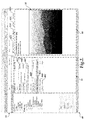
- FIGURE 2 shows a screen display 40 generated by the e-mail client application 24.
- the screen display 40 comprises a user interface window having a list pane 42 in which one or more e-mail messages 44A-44D are identified.
- the e-mail messages 44A-44D are identified by displaying a portion of the e-mail header information including the sender's name, the message subject, and the time the message was sent. It should be appreciated that other information may be displayed to identify the e-mail messages 44A-44D in the list pane 42.
- the e-mail message 44D includes three attached documents 46A-46D.
- the attachments 46A-46C are indicated as being attachments to the e-mail message 44D by a line extending from the e-mail message 44D to each of the attachments.
- the attachments 46A-46C are identified by an icon corresponding to the document type, by the name of the each attachment, and by an indication of the size of each attachment.
- the indicator for the attachments 46A-46C are also offset from the indicator for the e-mail message 44D to indicate the child/parent relationship. Other types of information may also be displayed for each attachment.
- a paperclip icon is also displayed in conjunction with the e-mail message 44D to indicate that attachments are present but any type of icon or visual indicator may be utilized.
- a user may select one of the attachments 46A-46C utilizing an appropriate user input device. For instance, a single mouse click may be made upon the attachment 46A to select the attachment. In response to such a selection, a preview 50 will be generated of the attachment and displayed in the reading pane 48.
- the reading pane 48 is displayed adjacent to the list pane 42.
- the reading pane 48 may also include other information regarding the attachment 46A such as the name of the attachment and the size of the attachment. Information particular to a type of attachment may also be displayed such as the number of pixels in an attached picture.
- the e-mail client application 24 may also be operative to identify one or more actions that can be performed upon an attachment and to display the available actions in conjunction with the preview 50. For instance, as shown in FIGURE 2, a number of actions 52A-52D have been identified for the attachment 46A.
- the action 52A allows the attachment to be saved to the mass storage device 14, the action 52B causes a slide show to be generated and displayed for the attachments 46A-46C, the action 52C causes the previewed attachment 46A to be printed, and the action 52D causes the attachment 52D to be deleted.
- a slide show action may be made available for pictures and presentation documents
- actions may be made available for accepting or declining attached meeting requests
- attached contact files may be added to a contacts list in a personal information manager
- playback controls may be displayed for audio files
- actions may be provided for displaying attached facsimile documents.
- Other actions may also be displayed that are appropriated for all file types, such as opening, saving, deleting, and printing. In one embodiment, only the actions specific to a particular file type are displayed adjacent to the preview 50. Other actions common to all file types may be displayed in a tool bar 54. When multiple attachments are selected, the header and the preview shown may be for the first attachment. Only the actions that are available for all of the selected attachments will be displayed in proximity to the preview 50.
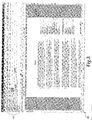
- FIGURE 3 shows a screen display 60 generated by a word processing application utilized in conjunction with the various embodiments of the present invention.
- an action may be provided for certain types of attached documents that allows a user to quickly edit the attachment and transmit a reply e-mail that includes the changed document as an attachment.
- the word processing application program is launched for editing with the attached document.
- the screen display 60 shown in FIGURE 3 illustrates the screen display shown by the word processing application once it has been launched in this manner.
- the word processing application program provides the conventional tools for editing the document 28.
- "Reply with changes" button 62 is also displayed in conjunction with the user interface for editing the document 28. Selection of the button 62 causes a reply message to be generated with the e-mail fields populated and the document 28 attached. The user may then edit the contents of the reply message and send the message.
- an e-mail message includes a presentation document as an attachment
- a presentation program may be launched in response to a request to transmit a reply message including a modified attachment.
- Any other type of document may be edited and transmitted in a similar manner.
- routine 400 will be described illustrating a process performed by the e-mail client application 24 for previewing and performing actions on attachments to e-mail messages. It should be appreciated that although the embodiments of the invention described herein are presented in the context of an e-mail client application program 24, the invention may be utilized in other types of application programs.
- the routine 400 begins at operation 402, where the e-mail client application 24 displays e-mail messages in the list pane 42.
- the routine 400 then continues to operation 404, where the documents attached to the e-mail messages shown in the list pane are also displayed.
- the attachments may be displayed in the manner described above with respect to FIGURE 2. From operation 404, the routine 400 continues to operation 406.
- the e-mail client application 24 receives the user selection of an attachment to an e-mail message. In response to the selection, the e-mail client application 24 instructs the preview handler 32 to identify a previewer for the attachment and to generate a preview of the attachment. The generated preview is then displayed by the e-mail client application 24 in the reading pane 48 at operation 408. From operation 408, the routine 400 continues to operation 410.
- the e-mail client application 24 identifies the actions that may be performed on the attachment.
- User interface objects such as buttons, are then displayed for the identified actions adjacent to the preview 50. This occurs at operation 412.
- the routine 400 continues to operation 414, where a request is received from the user to perform one of the displayed actions. The request may be made, for instance, through a selection of one of the displayed user interface objects.
- the routine 400 then continues to operation 416, where the requested operation is performed. From operation 416, the routine 400 continues to operation 418, where it ends.
- the routine 500 begins at operation 502, where an e-mail message having an attachment is received by the e-mail client application 24. From operation 502, the routine 500 continues to operation 504, where a request is receive to reply to the original e-mail with changes to the attached document. This request may be made, for instance, through a user selection of one of the actions associated with a preview. From operation 504, the routine 500 continues to operation 506.
- the e-mail client application 24 launches an application program associated with the attachment. For instance, if the attachment comprises a word processing document, the e-mail client application 24 may launch a word processing application for editing the document.
- the application program may also be launched in a state specifically designated for reviewing and modifying documents. Such a state is commonly referred to as a "review" mode and provides functionality for making document modifications in a manner that allows the modifications to be easily identified and read by another user.
- the application program may also be launched in a manner to cause the "reply with changes" button 62 to be displayed in conjunction with the editing screen. This occurs at operation 506 and allows a user to easily and quickly transmit the changed document as a reply to the original e-mail message. From operation 508, the routine 500 continues to operation 508, where changes to the attached document are received from the user. The routine 500 then continues to operation 510, where a request is received from the user to transmit the reply e-mail message including the changed document through the selection of the button 62.
- the routine 500 In response to receiving the request to transmit the reply e-mail including the changed document, the routine 500 continues to operation 512 where a reply message is created with the changed document attached. The user can then add comments. If the user indicates the message should be sent, the routine continues to operation 516, where the e-mail client application transmits the reply e-mail with the changed document attached. The application program is closed and the user is returned to the display provided by the e-mail client application 24. The user may then preview other documents and interact with the e-mail client application 24 in the manner described herein. From operation 514, the routine 500 continues to operation 518, where it ends.
Landscapes
- Engineering & Computer Science (AREA)
- Business, Economics & Management (AREA)
- Human Resources & Organizations (AREA)
- Strategic Management (AREA)
- Theoretical Computer Science (AREA)
- Entrepreneurship & Innovation (AREA)
- Physics & Mathematics (AREA)
- General Physics & Mathematics (AREA)
- Economics (AREA)
- General Business, Economics & Management (AREA)
- Tourism & Hospitality (AREA)
- Marketing (AREA)
- Data Mining & Analysis (AREA)
- Operations Research (AREA)
- Quality & Reliability (AREA)
- Computer Hardware Design (AREA)
- General Engineering & Computer Science (AREA)
- Health & Medical Sciences (AREA)
- Human Computer Interaction (AREA)
- General Health & Medical Sciences (AREA)
- Primary Health Care (AREA)
- Computer Networks & Wireless Communication (AREA)
- Signal Processing (AREA)
- Information Transfer Between Computers (AREA)
- User Interface Of Digital Computer (AREA)
Applications Claiming Priority (1)
| Application Number | Priority Date | Filing Date | Title |
|---|---|---|---|
| US10/955,361 US7243298B2 (en) | 2004-09-30 | 2004-09-30 | Method and computer-readable medium for previewing and performing actions on attachments to electronic mail messages |
Publications (1)
| Publication Number | Publication Date |
|---|---|
| EP1662429A1 true EP1662429A1 (en) | 2006-05-31 |
Family
ID=36002322
Family Applications (1)
| Application Number | Title | Priority Date | Filing Date |
|---|---|---|---|
| EP05105464A Ceased EP1662429A1 (en) | 2004-09-30 | 2005-06-21 | Method and computer-readable medium for previewing and performing actions on attachments to electronic mail messages |
Country Status (10)
| Country | Link |
|---|---|
| US (1) | US7243298B2 (https=) |
| EP (1) | EP1662429A1 (https=) |
| JP (1) | JP4385009B2 (https=) |
| KR (1) | KR101169080B1 (https=) |
| CN (2) | CN100543734C (https=) |
| AU (1) | AU2005202716B2 (https=) |
| BR (1) | BRPI0502432A8 (https=) |
| CA (1) | CA2510662C (https=) |
| MX (1) | MXPA05007155A (https=) |
| RU (1) | RU2406126C2 (https=) |
Cited By (3)
| Publication number | Priority date | Publication date | Assignee | Title |
|---|---|---|---|---|
| WO2011055013A1 (en) * | 2009-11-03 | 2011-05-12 | Nokia Corporation | Method and apparatus for organizing messages and attachments as a conversation |
| EP2751770A4 (en) * | 2011-08-31 | 2015-04-15 | Hewlett Packard Development Co | PROVIDING AN APPLICATION CONTEXT FOR A TALK |
| USRE47865E1 (en) * | 2004-09-30 | 2020-02-18 | Microsoft Technology Licensing, Llc | Method, system, and apparatus for providing a document preview |
Families Citing this family (103)
| Publication number | Priority date | Publication date | Assignee | Title |
|---|---|---|---|---|
| US9715678B2 (en) | 2003-06-26 | 2017-07-25 | Microsoft Technology Licensing, Llc | Side-by-side shared calendars |
| US8799808B2 (en) | 2003-07-01 | 2014-08-05 | Microsoft Corporation | Adaptive multi-line view user interface |
| US7707255B2 (en) | 2003-07-01 | 2010-04-27 | Microsoft Corporation | Automatic grouping of electronic mail |
| US7703036B2 (en) | 2004-08-16 | 2010-04-20 | Microsoft Corporation | User interface for displaying selectable software functionality controls that are relevant to a selected object |
| US9015621B2 (en) | 2004-08-16 | 2015-04-21 | Microsoft Technology Licensing, Llc | Command user interface for displaying multiple sections of software functionality controls |
| US7895531B2 (en) | 2004-08-16 | 2011-02-22 | Microsoft Corporation | Floating command object |
| US8255828B2 (en) | 2004-08-16 | 2012-08-28 | Microsoft Corporation | Command user interface for displaying selectable software functionality controls |
| US8146016B2 (en) | 2004-08-16 | 2012-03-27 | Microsoft Corporation | User interface for displaying a gallery of formatting options applicable to a selected object |
| JP2006092013A (ja) * | 2004-09-21 | 2006-04-06 | Konica Minolta Business Technologies Inc | メール管理プログラムおよび記録媒体 |
| US7647559B2 (en) * | 2004-09-30 | 2010-01-12 | Microsoft Corporation | Method and computer-readable medium for navigating between attachments to electronic mail messages |
| US7747966B2 (en) | 2004-09-30 | 2010-06-29 | Microsoft Corporation | User interface for providing task management and calendar information |
| JP4398343B2 (ja) * | 2004-10-18 | 2010-01-13 | 富士通株式会社 | 電子メール通信装置、添付ファイル更新装置、電子メール通信方法、添付ファイル更新方法、電子メール通信プログラム |
| US8140975B2 (en) | 2005-01-07 | 2012-03-20 | Apple Inc. | Slide show navigation |
| US7599830B2 (en) * | 2005-03-16 | 2009-10-06 | Research In Motion Limited | Handheld electronic device with reduced keyboard and associated method of providing quick text entry in a message |
| US8689137B2 (en) | 2005-09-07 | 2014-04-01 | Microsoft Corporation | Command user interface for displaying selectable functionality controls in a database application |
| US8627222B2 (en) | 2005-09-12 | 2014-01-07 | Microsoft Corporation | Expanded search and find user interface |
| US8108464B1 (en) | 2006-03-31 | 2012-01-31 | Google Inc. | Collaborative workflow through messaging conversations |
| US8156187B2 (en) | 2006-04-20 | 2012-04-10 | Research In Motion Limited | Searching for electronic mail (email) messages with attachments at a wireless communication device |
| US9727989B2 (en) | 2006-06-01 | 2017-08-08 | Microsoft Technology Licensing, Llc | Modifying and formatting a chart using pictorially provided chart elements |
| US8605090B2 (en) | 2006-06-01 | 2013-12-10 | Microsoft Corporation | Modifying and formatting a chart using pictorially provided chart elements |
| US7778957B2 (en) | 2006-06-14 | 2010-08-17 | Research In Motion Limited | Handheld electronic device with assisted text entry using existing message thread, and associated method |
| US7979469B2 (en) * | 2006-06-14 | 2011-07-12 | Research In Motion Limited | Handheld electronic device and associated method employing a multiple-axis input device and arranging words of an existing message thread in various linguistic categories for selection during text entry |
| US8132106B2 (en) * | 2006-06-23 | 2012-03-06 | Microsoft Corporation | Providing a document preview |
| US20080005149A1 (en) * | 2006-06-29 | 2008-01-03 | Adobe Systems Incorporated | Collection presentation |
| US7882185B2 (en) * | 2006-09-26 | 2011-02-01 | International Business Machines Corporation | Method and apparatus for managing e-mail attachments |
| US8156201B2 (en) | 2007-02-20 | 2012-04-10 | Microsoft Corporation | Unifying discoverability of a website's services |
| US8458263B1 (en) | 2007-03-27 | 2013-06-04 | Emc Corporation | Method and apparatus for electronic message archive verification |
| US8930464B1 (en) | 2007-03-30 | 2015-01-06 | Emc Corporation | Email content pre-caching to a local archive store |
| US8156188B1 (en) | 2007-03-30 | 2012-04-10 | Emc Corporation | Email archive server priming for a content request |
| US8527593B1 (en) | 2007-03-30 | 2013-09-03 | Emc Corporation | Change of an archived email property in the email system local store |
| US8856241B1 (en) | 2007-03-30 | 2014-10-07 | Emc Corporation | Management of email archive server requests |
| US8032599B1 (en) * | 2007-03-30 | 2011-10-04 | Emc Corporation | Display of archived email content in a preview pane |
| US7730147B1 (en) | 2007-03-30 | 2010-06-01 | Emc Corporation | Prioritizing archived email requests |
| US7730146B1 (en) | 2007-03-30 | 2010-06-01 | Emc Corporation | Local email archive store size management |
| US7730148B1 (en) | 2007-03-30 | 2010-06-01 | Emc Corporation | Backfilling a local email archive store |
| US20080281922A1 (en) * | 2007-05-09 | 2008-11-13 | Microsoft Corporation | Automatic generation of email previews and summaries |
| US8762880B2 (en) | 2007-06-29 | 2014-06-24 | Microsoft Corporation | Exposing non-authoring features through document status information in an out-space user interface |
| US8484578B2 (en) | 2007-06-29 | 2013-07-09 | Microsoft Corporation | Communication between a document editor in-space user interface and a document editor out-space user interface |
| US20090112999A1 (en) * | 2007-10-26 | 2009-04-30 | Richard Nicholas | System and Method for Handling E-Mail Attachments in Data Processing Systems |
| US8146110B2 (en) | 2007-12-10 | 2012-03-27 | Microsoft Corporation | Service platform for in-context results |
| US20090228804A1 (en) * | 2008-03-05 | 2009-09-10 | Microsoft Corporation | Service Preview And Access From an Application Page |
| US9588781B2 (en) | 2008-03-31 | 2017-03-07 | Microsoft Technology Licensing, Llc | Associating command surfaces with multiple active components |
| US20090276696A1 (en) * | 2008-04-30 | 2009-11-05 | Microsoft Corporation | High-fidelity rendering of documents in viewer clients |
| US20090299807A1 (en) * | 2008-05-30 | 2009-12-03 | Microsoft Corporation | Scheduling opportunity previewer |
| US8631079B2 (en) * | 2008-06-20 | 2014-01-14 | Microsoft Corporation | Displaying a list of file attachments associated with a message thread |
| US9665850B2 (en) * | 2008-06-20 | 2017-05-30 | Microsoft Technology Licensing, Llc | Synchronized conversation-centric message list and message reading pane |
| US8631340B2 (en) * | 2008-06-25 | 2014-01-14 | Microsoft Corporation | Tab management in a user interface window |
| US9396281B2 (en) | 2008-08-13 | 2016-07-19 | Microsoft Technology Licensing, Llc | Activities operating on structured data |
| US9824071B2 (en) * | 2008-12-03 | 2017-11-21 | Microsoft Technology Licensing, Llc | Viewing messages and message attachments in different languages |
| US20100192098A1 (en) * | 2009-01-29 | 2010-07-29 | Microsoft Corporation | Accelerators for capturing content |
| JP2012518222A (ja) * | 2009-02-13 | 2012-08-09 | ヴィシアーク アーベー | 移動通信端末で電子メールメッセージと添付ファイルを処理する方法 |
| US9046983B2 (en) | 2009-05-12 | 2015-06-02 | Microsoft Technology Licensing, Llc | Hierarchically-organized control galleries |
| US8832587B2 (en) | 2009-08-21 | 2014-09-09 | Avaya Inc. | Video window with integrated content |
| US20110176747A1 (en) * | 2010-01-15 | 2011-07-21 | Dumitru Dan Mihai | Method and portable electronic device for processing |
| EP2550629A4 (en) * | 2010-03-23 | 2017-01-11 | Nokia Technologies Oy | Method and apparatus for managing files in an online account |
| US9418356B2 (en) | 2010-05-07 | 2016-08-16 | Microsoft Technology Licensing, Llc | Streamlined collaboration on document |
| US20120084644A1 (en) * | 2010-09-30 | 2012-04-05 | Julien Robert | Content preview |
| US8689116B2 (en) * | 2011-01-14 | 2014-04-01 | Apple Inc. | Email user interface |
| CN102622686A (zh) * | 2011-01-30 | 2012-08-01 | 国际商业机器公司 | 用于管理电子邮件的方法和系统 |
| US9852401B2 (en) | 2011-04-04 | 2017-12-26 | Microsoft Technology Licensing, Llc | Providing additional email content in an email client |
| KR101801188B1 (ko) * | 2011-07-05 | 2017-11-24 | 엘지전자 주식회사 | 휴대 전자기기 및 이의 제어방법 |
| CN102902459B (zh) * | 2011-07-26 | 2016-10-05 | 联想(北京)有限公司 | 一种浏览电子邮件的方法、电子邮件浏览器和计算机 |
| KR101843980B1 (ko) * | 2011-09-01 | 2018-03-30 | 삼성전자주식회사 | 휴대단말기의 데이터 송수신 관리 장치 및 방법 |
| US9043411B2 (en) | 2011-09-29 | 2015-05-26 | Microsoft Technology Licensing, Llc | Inline message composing with visible list view |
| CN103136264B (zh) * | 2011-11-30 | 2016-06-15 | 中国联合网络通信集团有限公司 | 附件查询方法和用户终端 |
| CN103188128B (zh) * | 2011-12-29 | 2016-06-08 | 盈世信息科技(北京)有限公司 | 邮件附件的预览方法及邮件系统 |
| US9679163B2 (en) | 2012-01-17 | 2017-06-13 | Microsoft Technology Licensing, Llc | Installation and management of client extensions |
| US9449112B2 (en) * | 2012-01-30 | 2016-09-20 | Microsoft Technology Licensing, Llc | Extension activation for related documents |
| US9256445B2 (en) | 2012-01-30 | 2016-02-09 | Microsoft Technology Licensing, Llc | Dynamic extension view with multiple levels of expansion |
| US20140040762A1 (en) * | 2012-08-01 | 2014-02-06 | Google Inc. | Sharing a digital object |
| US11483266B2 (en) * | 2013-03-04 | 2022-10-25 | Paul Everton | Method and system for electronic collaboration |
| CN104065681B (zh) * | 2013-03-20 | 2018-06-15 | 腾讯科技(深圳)有限公司 | 对附件中的加密压缩包进行预览的方法和系统 |
| KR102104651B1 (ko) * | 2013-07-12 | 2020-04-24 | 삼성전자주식회사 | 파일 첨부 방법 및 그 전자 장치 |
| CN103516592B (zh) * | 2013-09-03 | 2017-07-28 | 盈世信息科技(北京)有限公司 | 一种基于imap协议的邮件附件自动预览方法及系统 |
| CN103455298A (zh) * | 2013-09-06 | 2013-12-18 | 深圳市中兴移动通信有限公司 | 一种外来数据显示方法和外来数据显示设备 |
| KR102152709B1 (ko) * | 2013-10-11 | 2020-09-07 | 엘지전자 주식회사 | 이동 단말기 및 이의 제어 방법 |
| KR101891245B1 (ko) * | 2014-02-24 | 2018-09-28 | 에스케이테크엑스 주식회사 | 미리보기 화면을 이용한 문서 편집 시스템 및 방법 |
| US10698591B2 (en) | 2014-03-31 | 2020-06-30 | Microsoft Technology Licensing, Llc | Immersive document interaction with device-aware scaling |
| US20150277724A1 (en) | 2014-03-31 | 2015-10-01 | Microsoft Corporation | Inline document collaboration workflow |
| US10466882B2 (en) * | 2014-03-31 | 2019-11-05 | Microsoft Technology Licensing, Llc | Collaborative co-authoring via an electronic user interface |
| US10404637B2 (en) * | 2014-03-31 | 2019-09-03 | Microsoft Technology Licensing, Llc | Electronic communication-based storage of documents to support multiple workflows |
| US20150281148A1 (en) * | 2014-03-31 | 2015-10-01 | Microsoft Corporation | Immersive document view |
| US20150277711A1 (en) * | 2014-03-31 | 2015-10-01 | Microsoft Corporation | User interaction and motion driving updates to components in an immersive document view |
| US20160196013A1 (en) * | 2015-01-07 | 2016-07-07 | Blackberry Limited | Electronic device and method of controlling display of information |
| US10650085B2 (en) | 2015-03-26 | 2020-05-12 | Microsoft Technology Licensing, Llc | Providing interactive preview of content within communication |
| US9929990B2 (en) | 2015-04-28 | 2018-03-27 | Dropbox, Inc. | Inserting content into an application from an online synchronized content management system |
| US10191891B2 (en) | 2015-08-26 | 2019-01-29 | Microsoft Technology Licensing, Llc | Interactive preview teasers in communications |
| US20170090705A1 (en) * | 2015-09-30 | 2017-03-30 | Microsoft Technology Licensing, Llc | Conversation and version control for objects in communications |
| US10474428B2 (en) * | 2015-10-02 | 2019-11-12 | Microsoft Technology Licensing, Llc | Sorting parsed attachments from communications |
| CN105893027A (zh) * | 2016-03-28 | 2016-08-24 | 联想(北京)有限公司 | 一种信息显示方法、电子设备及电子装置 |
| US10262006B2 (en) | 2016-04-29 | 2019-04-16 | Microsoft Technology Licensing, Llc | Contextually triggered entry point |
| US10778621B2 (en) * | 2016-06-06 | 2020-09-15 | Microsoft Technology Licensing, Llc | Location integration into electronic mail system |
| US11075871B2 (en) * | 2016-09-14 | 2021-07-27 | Microsoft Technology Licensing, Llc | Task assignment from a file through a contextual action |
| US11290402B2 (en) * | 2016-09-30 | 2022-03-29 | Dropbox, Inc. | Managing message attachments |
| US10241848B2 (en) | 2016-09-30 | 2019-03-26 | Microsoft Technology Licensing, Llc | Personalized diagnostics, troubleshooting, recovery, and notification based on application state |
| US10476768B2 (en) | 2016-10-03 | 2019-11-12 | Microsoft Technology Licensing, Llc | Diagnostic and recovery signals for disconnected applications in hosted service environment |
| GB2557576A (en) * | 2016-10-13 | 2018-06-27 | Joivy Ltd | Improvements relating to messaging applications |
| US10810204B2 (en) | 2017-02-27 | 2020-10-20 | Microsoft Technology Licensing, Llc | Providing access to an electronic message attachment |
| US10832211B2 (en) | 2017-02-27 | 2020-11-10 | Microsoft Technology Licensing, Llc | Opening an attachment and conversation from a messaging application |
| KR102285073B1 (ko) * | 2017-03-31 | 2021-08-03 | 삼성전자주식회사 | 복수개의 액세서리 장치들에 대응하는 콘텐트를 제공하기 위한 방법 및 그 전자 장치 |
| US11556548B2 (en) * | 2017-08-08 | 2023-01-17 | Microsoft Technology Licensing, Llc | Intelligent query system for attachments |
| US10574615B2 (en) * | 2017-09-06 | 2020-02-25 | Microsoft Technology Licensing, Llc | Heterogeneous content in email inbox |
| CN111817946B (zh) * | 2020-06-28 | 2022-03-15 | 北京字节跳动网络技术有限公司 | 文档共享的处理方法、装置、设备、介质和系统 |
Citations (5)
| Publication number | Priority date | Publication date | Assignee | Title |
|---|---|---|---|---|
| US5818447A (en) * | 1996-06-06 | 1998-10-06 | Microsoft Corporation | System and method for in-place editing of an electronic mail message using a separate program |
| GB2347581A (en) * | 1999-03-01 | 2000-09-06 | Mitel Inc | Messaging system with graphical user interface |
| EP1182600A2 (en) * | 2000-08-21 | 2002-02-27 | Mitel Knowledge Corporation | Methods and apparatus for previewing multimedia attachments of electronic messages |
| US6405225B1 (en) * | 1998-06-17 | 2002-06-11 | Microsoft Corporation | Integrating email functionality into a word processor by incorporating an email GUI within the word processor |
| US20040068545A1 (en) * | 2002-10-08 | 2004-04-08 | Bellsouth Intellectual Property Corporation | Displaying and working with email attachments |
Family Cites Families (22)
| Publication number | Priority date | Publication date | Assignee | Title |
|---|---|---|---|---|
| GB2237581A (en) | 1989-11-03 | 1991-05-08 | Du Pont | Dyeing of pile fabrics aided by xanthan gum |
| US5307086A (en) | 1991-10-08 | 1994-04-26 | International Business Machines Corporation | Method of implementing a preview window in an object oriented programming system |
| US5680629A (en) | 1992-12-07 | 1997-10-21 | Microsoft Corporation | Method and system for previewing computer output |
| DE69518610T2 (de) | 1994-06-24 | 2001-01-11 | Microsoft Corp | Methode und System zum Durchblättern von Daten |
| US5579466A (en) | 1994-09-01 | 1996-11-26 | Microsoft Corporation | Method and system for editing and formatting data in a dialog window |
| US5652901A (en) | 1994-12-23 | 1997-07-29 | Microsoft Corporation | Method and system for previewing computer output |
| US5903905A (en) | 1996-04-30 | 1999-05-11 | Microsoft Corporation | Method for simultaneously constructing and displaying a dynamic preview of a document that provides an accurate customized document |
| US5832208A (en) * | 1996-09-05 | 1998-11-03 | Cheyenne Software International Sales Corp. | Anti-virus agent for use with databases and mail servers |
| US6134566A (en) | 1997-06-30 | 2000-10-17 | Microsoft Corporation | Method for controlling an electronic mail preview pane to avoid system disruption |
| US6546417B1 (en) * | 1998-12-10 | 2003-04-08 | Intellinet, Inc. | Enhanced electronic mail system including methods and apparatus for identifying mime types and for displaying different icons |
| KR20010048628A (ko) * | 1999-11-29 | 2001-06-15 | 김맹호 | 웹페이지에서 인터넷카드를 이용한 개인간 또는 기업간광고 방법 및 그 장치 |
| JP2001273205A (ja) * | 2000-03-27 | 2001-10-05 | Matsushita Electric Ind Co Ltd | 電子メール送受信装置、及び、電子メール送受信方法、ならびに記憶媒体 |
| KR20010105618A (ko) * | 2000-05-16 | 2001-11-29 | 정우협 | 전자우편 미리보기 |
| US6734883B1 (en) | 2000-05-25 | 2004-05-11 | International Business Machines Corporation | Spinlist graphical user interface control with preview and postview |
| US6772031B1 (en) * | 2000-05-30 | 2004-08-03 | International Business Machines Corporation | Method of, system for, and computer program product for providing a job monitor |
| US7664824B2 (en) * | 2000-07-24 | 2010-02-16 | Panasonic Corporation | System for transmission/reception of e-mail with attached files |
| JP2002091871A (ja) * | 2000-09-14 | 2002-03-29 | Sharp Corp | 電子メールシステム並びに電子メール端末装置 |
| KR100422435B1 (ko) * | 2001-06-20 | 2004-03-12 | 정홍대 | 다수간의 이메일 전송 관리 방법 |
| US8549434B2 (en) | 2001-10-18 | 2013-10-01 | Microsoft Corporation | Method for graphical representation of a content collection |
| WO2003063132A1 (en) * | 2002-01-23 | 2003-07-31 | Konica Corporation | Image delivery apparatus |
| US20040158607A1 (en) | 2003-02-06 | 2004-08-12 | Coppinger Clifford L. | System and method for associating an email attachment file with a storage location |
| US7805683B2 (en) * | 2004-07-09 | 2010-09-28 | Sap Ag | Action pad |
-
2004
- 2004-09-30 US US10/955,361 patent/US7243298B2/en not_active Expired - Lifetime
-
2005
- 2005-06-21 EP EP05105464A patent/EP1662429A1/en not_active Ceased
- 2005-06-22 AU AU2005202716A patent/AU2005202716B2/en not_active Ceased
- 2005-06-23 CA CA2510662A patent/CA2510662C/en not_active Expired - Lifetime
- 2005-06-23 JP JP2005183578A patent/JP4385009B2/ja not_active Expired - Fee Related
- 2005-06-28 BR BRPI0502432A patent/BRPI0502432A8/pt not_active Application Discontinuation
- 2005-06-29 RU RU2005120362/08A patent/RU2406126C2/ru active
- 2005-06-29 MX MXPA05007155A patent/MXPA05007155A/es active IP Right Grant
- 2005-06-29 KR KR1020050056790A patent/KR101169080B1/ko not_active Expired - Fee Related
- 2005-07-29 CN CNB2005100885133A patent/CN100543734C/zh not_active Expired - Fee Related
- 2005-08-30 CN CN2005100996545A patent/CN1770184B/zh not_active Expired - Fee Related
Patent Citations (5)
| Publication number | Priority date | Publication date | Assignee | Title |
|---|---|---|---|---|
| US5818447A (en) * | 1996-06-06 | 1998-10-06 | Microsoft Corporation | System and method for in-place editing of an electronic mail message using a separate program |
| US6405225B1 (en) * | 1998-06-17 | 2002-06-11 | Microsoft Corporation | Integrating email functionality into a word processor by incorporating an email GUI within the word processor |
| GB2347581A (en) * | 1999-03-01 | 2000-09-06 | Mitel Inc | Messaging system with graphical user interface |
| EP1182600A2 (en) * | 2000-08-21 | 2002-02-27 | Mitel Knowledge Corporation | Methods and apparatus for previewing multimedia attachments of electronic messages |
| US20040068545A1 (en) * | 2002-10-08 | 2004-04-08 | Bellsouth Intellectual Property Corporation | Displaying and working with email attachments |
Cited By (3)
| Publication number | Priority date | Publication date | Assignee | Title |
|---|---|---|---|---|
| USRE47865E1 (en) * | 2004-09-30 | 2020-02-18 | Microsoft Technology Licensing, Llc | Method, system, and apparatus for providing a document preview |
| WO2011055013A1 (en) * | 2009-11-03 | 2011-05-12 | Nokia Corporation | Method and apparatus for organizing messages and attachments as a conversation |
| EP2751770A4 (en) * | 2011-08-31 | 2015-04-15 | Hewlett Packard Development Co | PROVIDING AN APPLICATION CONTEXT FOR A TALK |
Also Published As
| Publication number | Publication date |
|---|---|
| CA2510662A1 (en) | 2006-03-30 |
| US7243298B2 (en) | 2007-07-10 |
| CN1770184B (zh) | 2012-05-16 |
| MXPA05007155A (es) | 2006-04-05 |
| CN1770184A (zh) | 2006-05-10 |
| RU2406126C2 (ru) | 2010-12-10 |
| KR101169080B1 (ko) | 2012-07-26 |
| JP4385009B2 (ja) | 2009-12-16 |
| CN1755680A (zh) | 2006-04-05 |
| BRPI0502432A (pt) | 2006-05-09 |
| AU2005202716B2 (en) | 2010-04-22 |
| AU2005202716A1 (en) | 2006-04-13 |
| CA2510662C (en) | 2014-04-22 |
| JP2006107443A (ja) | 2006-04-20 |
| RU2005120362A (ru) | 2007-01-20 |
| KR20060048673A (ko) | 2006-05-18 |
| US20060069990A1 (en) | 2006-03-30 |
| CN100543734C (zh) | 2009-09-23 |
| BRPI0502432A8 (pt) | 2018-05-29 |
Similar Documents
| Publication | Publication Date | Title |
|---|---|---|
| CA2510662C (en) | Method and computer-readable medium for previewing and performing actions on attachments to electronic mail messages | |
| CA2517402C (en) | Method and computer-readable medium for navigating between attachments to electronic mail messages | |
| US7250955B1 (en) | System for displaying a notification window from completely transparent to intermediate level of opacity as a function of time to indicate an event has occurred | |
| US8631079B2 (en) | Displaying a list of file attachments associated with a message thread | |
| JP4980357B2 (ja) | スレッドナビゲーション | |
| US8234663B2 (en) | Transferring data from an application to a destination | |
| CN106170807A (zh) | 沉浸式文档查看 | |
| KR20120058489A (ko) | 전자 메일 메시지의 첨부물을 미리보기하고 그에 대하여 동작을 수행하기 위한 방법 및 컴퓨터 판독 가능 매체 | |
| US11861139B1 (en) | Deferring and accessing deferred content from multiple applications | |
| JP2005216197A (ja) | 電子メールシステムにおける宛先属性表示方法 | |
| JP2017117329A (ja) | 情報処理装置、制御方法、およびプログラム。 | |
| JP2018156268A (ja) | 情報処理装置とその制御方法及びプログラム |
Legal Events
| Date | Code | Title | Description |
|---|---|---|---|
| PUAI | Public reference made under article 153(3) epc to a published international application that has entered the european phase |
Free format text: ORIGINAL CODE: 0009012 |
|
| AK | Designated contracting states |
Kind code of ref document: A1 Designated state(s): AT BE BG CH CY CZ DE DK EE ES FI FR GB GR HU IE IS IT LI LT LU MC NL PL PT RO SE SI SK TR |
|
| AX | Request for extension of the european patent |
Extension state: AL BA HR LV MK YU |
|
| 17P | Request for examination filed |
Effective date: 20061114 |
|
| AKX | Designation fees paid |
Designated state(s): AT BE BG CH CY CZ DE DK EE ES FI FR GB GR HU IE IS IT LI LT LU MC NL PL PT RO SE SI SK TR |
|
| 17Q | First examination report despatched |
Effective date: 20070412 |
|
| RAP1 | Party data changed (applicant data changed or rights of an application transferred) |
Owner name: MICROSOFT TECHNOLOGY LICENSING, LLC |
|
| APBK | Appeal reference recorded |
Free format text: ORIGINAL CODE: EPIDOSNREFNE |
|
| APBN | Date of receipt of notice of appeal recorded |
Free format text: ORIGINAL CODE: EPIDOSNNOA2E |
|
| APAF | Appeal reference modified |
Free format text: ORIGINAL CODE: EPIDOSCREFNE |
|
| APBT | Appeal procedure closed |
Free format text: ORIGINAL CODE: EPIDOSNNOA9E |
|
| STAA | Information on the status of an ep patent application or granted ep patent |
Free format text: STATUS: THE APPLICATION HAS BEEN REFUSED |
|
| 18R | Application refused |
Effective date: 20161019 |