EP1536348B1 - Techniques for integrating note-taking and multimedia information - Google Patents
Techniques for integrating note-taking and multimedia information Download PDFInfo
- Publication number
- EP1536348B1 EP1536348B1 EP04024390A EP04024390A EP1536348B1 EP 1536348 B1 EP1536348 B1 EP 1536348B1 EP 04024390 A EP04024390 A EP 04024390A EP 04024390 A EP04024390 A EP 04024390A EP 1536348 B1 EP1536348 B1 EP 1536348B1
- Authority
- EP
- European Patent Office
- Prior art keywords
- information
- note
- request
- taking device
- server
- Prior art date
- Legal status (The legal status is an assumption and is not a legal conclusion. Google has not performed a legal analysis and makes no representation as to the accuracy of the status listed.)
- Expired - Lifetime
Links
Images



Classifications
-
- G—PHYSICS
- G06—COMPUTING OR CALCULATING; COUNTING
- G06F—ELECTRIC DIGITAL DATA PROCESSING
- G06F40/00—Handling natural language data
- G06F40/10—Text processing
- G06F40/166—Editing, e.g. inserting or deleting
- G06F40/169—Annotation, e.g. comment data or footnotes
Definitions
- the present invention relates to a note-taking system, and more particularly to techniques that improve a user's note-taking experience in an environment where information of various types is being recorded.
- slides e.g., from a PowerPoint presentation
- video clips may be shown on a projection device while the presenter discusses information related to the slides and/or video clips.
- Attendees of the meeting may also join in the discussion.
- the presenter may also write on a whiteboard during the presentation.
- one or more information capture devices may be provided to record the multimedia information output during the presentation.
- a video camera may be used to record the slides/video clips presented on the projection device or the actual scene of the presentation.
- Audio devices such as microphones may be used to capture the audio information spoken by the presenter or the attendees of the meeting.
- a whiteboard capture device may be used to capture information written on the whiteboard.
- Various other types of devices may be used to record other types of information output during the presentation.
- the recorded information captured by the various capture devices is usually stored and can be accessed or consumed by a user after the presentation. For example, a user who could not attend the meeting can access the recorded information and play back the information after the meeting. In this manner, the archived information is available for use subsequent to the meeting.
- NoteLook is a client-server system designed and built to support multimedia note taking in meetings with digital video and ink. It is integrated into a conference room equipped with computer controllable video cameras, video conference camera, and a large display rear video projector.
- the NoteLook client application runs on wireless pen-based notebook computers.
- Video channels containing images of the room activity and presentation material are transmitted by the NoteLook servers to the clients, and the images can be interactively and automatically incorporated into the note pages. Users can select channels, snap in large background images and sequences of thumbnails, and write freeform ink notes.
- a smart video source management component enables the capture of high quality images of the presentation material from a variety of sources. For accessing and browsing the notes and recorded video, NoteLook generates Web pages with links from the images and ink strokes correlated to the video.
- LiteMinutes an Internet-based system for multimedia meeting minutes
- PROCEEDINGS OF TENTH WORLD WIDE WEB CONFERENCE 2 May 2001
- XP002316510 relates to an Intemet-based system for multimedia meeting minutes.
- the Internet provides a highly suitable infrastructure for sharing multimedia meeting records, especially as multimedia technologies become more lightweight and workers more mobile.
- LiteMinutes is a system that uses both the Web and email for creating, revising, distributing, and accessing multimedia information captured in a meeting.
- Supported media include text notes taken on wireless laptops, slide images captured from presentations, and video recorded by cameras in the room.
- text notes are sent by the note taking applet to the server, which formats them in HTML with links from each note item to the captured slide images and video recording.
- Smart link generation is achieved by capturing contextual metadata such as the on/off state of the media equipment and the room location of the laptop, and inferring whether it makes sense to supply media links to a particular note item.
- XP002316511 relates to an architectural support for building automated capture and access applications.
- applications that automatically capture some details of a live experience and provide future access to that experience are increasingly common in the ubiquitous computing community.
- the exploration of this class of applications raises software engineering problems pertaining to proper software structuring and programming abstractions to support the design development and evolution of these systems.
- the building of a number of capture and access applications, sharing insights on relative successes and failures are explained.
- a toolkit called Infrastructure for Capture and Access (INCA) which supports a distillation of the essential architectural features for this class of applications. It is demonstrated how this toolkit encourages a simplified model for designing, implementing, and evolving such applications - lowering the barrier for building automated capture and access applications and inspiring the construction of a larger variety of applications previously unexplored.
- the invention is defined by the subject-matter of the independent claims.
- the dependent claims are directed to advantageous embodiments.
- Embodiments of the present invention improve a user's note-taking experience. While taking notes for a presentation, a user can request one or more portions of information recorded during the presentation to be inserted into the user's notes document. User information requests that cannot be immediately processed are stored or cached in the notes document for later processing. These cached requests are processed and the requested information inserted into the user's notes document at a later time.
- techniques for taking notes in an environment comprising a server configured to respond to requests requesting a portion of stored information, the stored information comprising first information captured by one or more capture devices during a first presentation, and a note-taking device for taking notes during the first presentation in a notes document.
- a first request is received at the note-taking device during the first presentation to insert a first portion of the first information in a first location in the notes document.
- a determination is made if the first request can be processed.
- the first request is stored in the notes document upon determining that the first request cannot be processed.
- the first request is processed upon determining that the note-taking device can communicate with the server.
- the first portion of the first information is inserted in the notes document in the first location.
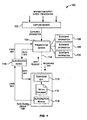
- Fig. 1 is a simplified block diagram of a system 100 that may incorporate an embodiment of the present invention.
- System 100 depicted in Fig. 1 is merely illustrative of an embodiment incorporating the present invention and does not limit the scope of the invention as recited in the claims.
- One of ordinary skill in the art would recognize other variations, modifications, and alternatives.
- system 100 includes one or more information capture devices 102 that are configured to capture (or record) information during a presentation.
- a "presentation" is intended to refer to any event or period of time during which information is presented or output Examples of presentations include meetings, lectures, discussions, classes, conferences, speeches, demonstrations, playback of previously recorded information, and the like.
- a presentation need not be contiguous in time and can be spread out over non-contiguous time periods. For example, a presentation may be spread out over several days and may be interspersed by other events.
- an "information capture device” is intended to refer to any device, system, or apparatus that is configured to capture or record information of one or more types.
- Various different types or streams of information such as audio information, video information, slides or images, whiteboard information, text information (e.g., user contributed comments), etc. may be output during a presentation and captured by information capture devices 102.
- Examples of information capture devices 102 include microphones, video cameras, analog or digital photo cameras, scanners, screen capture devices (e.g., a device configured to capture information printed on a whiteboard), presentation recorders, etc.
- Information capture devices 102 may also be configured to capture temporal information when the information is captured.
- a presentation recorder is a device that is able to capture information presented during a presentation, for example, by tapping into and capturing streams of information from an information source such as a computer executing a PowerPoint application and displaying slides from a *.ppt file.
- a presentation recorder may be configured to tap into the video output of the computer and capture keyframes every time a significant difference is detected between displayed video keyframes of the slides.
- the presentation recorder may also be configured to capture other types of information such as audio information, video information, slides information stream, etc.
- Time stamps indicating time of capture may also be stored by the presentation recorder. The temporal information indicating when the information was output or captured may be used to synchronize the different types of captured information streams.
- Examples of presentation recorders include a screen capture software application that allows recording of slides and time elapsed for each slide during a presentation. Examples of presentation recorders are described in US 2001/0020954 A and US 2002/0056082 A .
- the information recorded by information capture devices 102 is pushed to server 104 ("presentation server 104") that caches and maintains the recorded information.
- the information may be pushed to presentation server 104 in a continuous stream or in bursts.
- the recorded information may include streams of information of various types including slides, images, audio segments, (e.g., MP3 audio segments), video clips or segments, whiteboard information segments, text information, etc.
- Presentation server 104 may store the information received from information capture devices 102 in a memory location accessible (locally or via a network) to presentation server 104.
- presentation server 104 is configured to coordinate access to the stored information.
- presentation server 104 is configured to respond to requests requesting portions of the recorded information.
- the recorded information may be organized into "sessions" 106.
- a "session” is a collection of recorded information.
- a session may correspond to information streams captured by information capture devices 102 during a certain time period.
- information recorded during a first presentation e.g., a meeting between 1:00pm and 2:00pm
- information recorded during a second presentation e.g., a meeting between 3:00pm and 5:00pm
- a session may also store information recorded over different time periods or different presentations. For example, information captured during a series of lectures may be stored as a single session.
- Presentation server 104 is configured to control access to the various sessions information.
- a user uses a computing device 108 ("note-taking device 108") to take notes.
- the notes may include text, figures, etc. entered by the user.
- the notes may also include portions of recorded information (e.g., multimedia streams or objects).
- Examples of note-taking device 108 include a personal computer, a portable or laptop computer, a personal digital assistant (PDA), a tablet PC, etc.
- the user or note-taker may use an application (“composing application 110") 110 executing on note-taking device 108 to take notes in a document 112 ("notes document”) created by composing application 110.
- Examples of composing applications 110 include applications such as Microsoft WordTM, Microsoft ExcelTM, WordPerfectTM, text editors (e.g., TextEdit, WinEdit), and the like. Any application that can be used to create or open a document and write information to the document can be classified as a composing application.
- the user may open a document 112 using Microsoft WordTM executing on note-taking device 108 and take notes in the document.
- the notes document 112 may be stored on note-taking device 108.
- a user while taking notes during a presentation, can specify that portions of information recorded by capture devices 102 during the presentation be incorporated or inserted into the user's notes.
- the portion may correspond to a slide or other image, an audio segment, a video segment, a text segment (e.g., user contributed text notes), etc.
- a portion may correspond to a multimedia object included in the information captured by information capture devices 102.
- the user may request that: a slide being presently shown on a projection device be inserted at a particular location in the user's notes; an audio segment comprising the last 5-minutes of recorded audio information be inserted into the user's notes; a video clip being presently shown be inserted into the user's notes; and the like.
- Embodiments of the present invention thus enable a user to incorporate information recorded during a presentation or portions thereof into the user's notes while the presentation is proceeding. Recorded information of various types that is captured during the presentation may be incorporated into the user's notes. Details related to how a user can incorporate such information in the user's notes are provided below.
- note-taking device 108 can communicate with presentation server 104 and receive the requested information for presentation server 104.
- Note-taking device 108 may or may not be communicatively coupled (i.e., can communicate with presentation server 104) to presentation server 104.
- This on/off nature of the connection between note-taking device 108 and presentation server 104 is indicated by dotted line 114 depicted in Fig. 1 .
- note-taking device 108 may be connected or may not be connected to presentation server 104 during (or after) a presentation when the user is taking notes using note-taking device 108.
- the connection between the note-taking device 108 and the presentation server 104 may be volatile in some situations where it comes and goes (e.g., a weak wireless connection) during a presentation.
- note-taking device 108 When note-taking device 108 is connected to presentation server 104, then note-taking device 108 can access information recorded during the presentation by information capture devices 102 and pushed to presentation server 104. Note-taking device 108 may not have access to the captured information when not connected to presentation server 104. According to the teachings of the present invention, the ability of a user to take notes, including specifying portions of the captured information to be inserted in the notes, is not dependent on whether or not note-taking device 108 is communicatively coupled to presentation server 104 (i.e., not dependent on whether note-taking device 108 has access to the captured information or not).
- note-taking device 108 when note-taking device 108 can communicate with presentation server 104, user requests for portions of recorded information to be incorporated into the user's notes are communicated from note-taking device 108 to presentation server 104. Presentation server 104 responds to the requests by sending the request information portions to note-taking device 108. The requested information portions received from the presentation server 104 are then incorporated into the user's notes in locations identified by the user. In this manner, portions of the information being recorded during the presentation can be inserted into the user's notes during the presentation.
- note-taking device 108 when note-taking device 108 cannot communicate with presentation server 104, user requests for portions of recorded information to be incorporated into the user's notes are cached (or stored) in the notes document that the user is composing. Information identifying locations within the notes document where the requested information portions are to be placed may also be cached in the notes document. A visible place holder or marker is placed in the notes document at a location where the requested information is to be inserted The place holder or marker may indicate contextual information (e.g., a slide number from a particular session) regarding the requested information. Accordingly, a user need not have access to the recorded information when the information request is made.
- contextual information e.g., a slide number from a particular session
- Information requests that are cached in the notes document are then processed at a later time.
- the cached requests may be automatically processed when note-taking device 108 detects that communication with presentation server 104 has been established.
- Note-taking device 108 may periodically check if communication with the presentation server 104 has been established. The check to determine if communication has been established may be performed upon receiving a signal generated in response to a user action (e.g., user opens the notes document, user explicitly requests a communication check) or in response to an automated signal (e.g., a signal generated by a timer, a signal generated in response to some event related to the notes document).
- a user action e.g., user opens the notes document, user explicitly requests a communication check
- an automated signal e.g., a signal generated by a timer, a signal generated in response to some event related to the notes document.
- the information recorded by information capture devices 102 and pushed to presentation server 104 may be stored and organized into sessions.
- a user's access to the recorded information is regulated on a per session basis.
- a user or note-taker is allowed to request information stored in a session only if the user is authorized to access information from that session.
- a user has to secure authorization for a session before the user request recorded information from the session.
- authorization device 116 In the example depicted in Fig. 1 , authorization device 116, presentation server 104, and an authorization module 118 executing on note-taking device 108 perform the authorization operations.
- a user gains authorization by logging in using authorization module 118 and authorization device 116.
- Authorization module 118 is independent of composing application 110.
- the authorization process is initiated when authorization module 118 communicates login information from the user's note-taking device 108 to authorization device 116 which in turn communicates the information to presentation server 104.
- the login information may include usemame information, IP address of note-taking device 108, clock information of the note-taking device 108, and other information used for authorization.
- Presentation server 104 responds by communicating authorization information to authorization device 116 which in turn communicates the information to note-taking device 108.
- the authorization information comprises a session identifier that identifies the session for which authorization is granted for the user. For example, if the user is attending a presentation, the session identifier may identify a session storing information recorded for the presentation that the user is attending. Presentation server 104 may also communicate other information as part of the authorization information such as a login key, the presentation server's host IP address that the note-taking device 108 can use to communicate with the presentation server 104, and other information. Presentation server 104 can be configured to implement several strategies of authorization depending on the access level of a session in a manner similar to those of a file system protection.
- a session is declared private, only password protected users are authorized to access session information. These password protected user accounts may be created in advance through another process such as conference registration and made known to the user. Alternatively, a login account may be dynamically created if the authorization request is received through an infrared authorization device during the presentation. If a session is declared public, then any authorization request is granted.
- a user may be also gain authorization to multiple sessions. For example, in addition to the current session storing recorded information for the current presentation that the user is attending, the user may have previously attended three other presentations and gotten authorization to sessions storing recorded information for the three presentations. Different session identifiers may be used to identify different sessions. Presentation server 104 may store a list of authorized session identifiers for each user. The status of the login/authorization process may also be output to the user using note-taking device 108.
- authorization device 116 may be an IR receiver/transmitter and authorization module 118 may be an IR module configured to communicate with an IR receiver.
- IR module 118 may be configured to automatically start when note-taking device 108 is started (e.g., when a laptop boots up).
- IR Module 118 is configured to monitor the IR port on note-taking device 108 and send protocol information to an IR authorization device 116 when it comes within range of authorization device.
- a note-taking device 108 when a note-taking device 108 comprising an IR module 118 comes within range of an IR authorization device 116, it sends the usemame information, note-taking device's IP address, and clock information to authorization device 116. In return, note-taking device 108 receives a session identifier and other information (e.g., a login key, presentation server's IP address) from authorization device 116.
- the IR authorization module 118 is implemented using VC++ (Visual C++) and IR communication is based on IR sockets.
- the status of the login/authorization process may also be output to the user using note-taking device 108.
- a message may be displayed on the note-taking device 108 indicating success or failure of the login/authorization process.
- An audible signal (e.g., a bell sound) may also be used to indicate the status of the login and authorization.
- the physical presence/location of the user's note-taking device 108 may initiate the authorization and login process.
- one or more IR authorization devices 116 may be placed at convenient locations in a conference room. When the conference room is used for a presentation, attendees of the presentation may automatically login and gain access to information recorded for the presentation by bringing their note-taking devices within range of the IR authorization devices 116.
- IR authorization devices 116 may be placed on the table.
- people attending a meeting sit down around the table and start their note-taking devices 108, they are automatically logged in when the IR authorization modules 118 executing on their note-taking devices 108 come within range of the IR authorization devices 116.
- an "intelligent" environment may be created that facilitates recording of information and note-taking according to the teachings of the present invention.
- Various other technologies besides IR technology may also be used to accomplish the login and authorization process.
- a web page may be provided for the user to login and gain authorization.
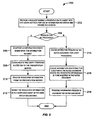
- Fig. 2 is a simplified high-level flowchart 200 depicting a method of processing requests for inserting recorded information in a user's notes document according to an embodiment of the present invention.
- the method depicted in Fig. 2 may be performed by software modules executed by note-taking device 108, hardware modules of note-taking device 108, or combinations thereof.
- Flowchart 200 depicted in Fig. 2 is merely illustrative of an embodiment of the present invention and is not intended to limit the scope of the present invention. Other variations, modifications, and alternatives are also within the scope of the present invention.
- processing is initiated in step 202 upon receiving a request during a presentation to insert into the user's notes a portion of information recorded and stored in a session.
- the request may identify the type of information requested, for example, a slide or other image, an audio segment, a video segment, a text segment, etc. Multiple types of information (e.g., a slide along with an audio clip) may be requested in a single request.
- the request may also identify a particular location within the note-takers' notes document where the requested information is to be inserted.
- the request may include information specifying a session identifier identifying a session from which information is requested.
- the session identifier may identify a session storing information for the presentation in progress or any other session storing information recorded from a previous presentation to which the user has gained authorization. According to an example of the present invention, each information request received in step 202 is assigned a unique request identifier.
- the information request in step 202 may be received at any time whether or not note-taking device 108 is communicatively coupled to presentation server 104. Accordingly, the user can request the information while taking notes irrespective of whether the requested information is accessible to note-taking device 108.
- a note-taker may use various techniques to configure a request.
- a user interface may be displayed on note-taking device 108 that allows the user to specify information to be incorporated into the user's notes.
- the user interface for specifying the information to be inserted may be integrated with the user interface provided by composing application 110 that is used to take the notes.
- the user interface of a composing application 110 such as Microsoft WordTM may be customized to provide options (e.g., buttons, menus, etc.) that allow a user to configure requests requesting a portion of recorded information to be inserted into the user's notes.
- options e.g., buttons, menus, etc.
- the information to be inserted into the user's notes may be based upon the time when the user makes the request and the type of information selected by the user.
- user-selectable options e.g., buttons, menus, etc.
- the type e.g., slide, audio segment
- the selected information type along with the time when the selection is made and the session identifier form the information request.
- the location of the cursor within the notes document when the option is selected indicates the location in the notes document where the requested information is to be placed.
- buttons may be displayed each corresponding to an information type such as slides, audio, video, text, etc. If the user wants to insert the presently displayed slide in the user's notes, the user can move the cursor to a location in the notes document where the slide is to be inserted and then select the "slides” button. This generates an information request requesting that the currently displayed slide (i.e., the slide being displayed when the user selected the "slides” button) be inserted in the cursor location in the user's notes. The user may select other buttons corresponding to the other types of information to configure requests to insert portions of those particular types of information. For example, if the user selects the "audio" button, then a request for audio information is generated.
- an information type such as slides, audio, video, text, etc.
- the amount of audio information requested may be based upon the time when the request was made.
- a predetermined and user configurable time buffer relative to the time of selection e.g., 1 minute prior to the time of selection
- the user may be allowed to specify the time length of the audio information to be inserted in the user's notes.
- a user may specifically identify the information to be incorporated into the user's notes. For example, the user may specify a slide number identifying a slide (which may have been previously displayed during the presentation) to be inserted into the user's notes. Likewise, the user may specify a portion of other types of recorded information (e.g., video clip shown during the first 5 minutes of the presentation, audio information spoken by a particular speaker during the presentation) to incorporated into the user's notes.
- a slide number identifying a slide (which may have been previously displayed during the presentation) to be inserted into the user's notes.
- the user may specify a portion of other types of recorded information (e.g., video clip shown during the first 5 minutes of the presentation, audio information spoken by a particular speaker during the presentation) to incorporated into the user's notes.
- a user may be authorized to access information from multiple sessions. For example, in addition to the presently recorded session, the user may also be authorized to access information from other previously recorded sessions.
- the user can configure requests requesting information not only from a session corresponding to the present presentation but also from other sessions. For each request, the user may specify the session (e.g., using a session identifier) from which information is requested.
- step 204 it is determined if the information request received in step 202 can be processed.
- a request can be processed if the requested information is accessible to note-taking device 108.
- the requested information may be accessible via presentation server 104 or in some situations may be accessible locally (i.e., if the requested information is locally cached on note-taking device 108).
- a request cannot be processed if the requested information is not accessible.
- a user's request to insert information in the notes generally depends upon whether note-taking device 108 can communicate with presentation server 104 and receive the requested information from presentation server 104.
- the request can be processed if note-taking device 108 can communicate with presentation server 104.
- a check is made in step 204 to see if the note-taking device 108 and presentation server 104 can communicate with each other. If it is determined that the note-taking device 108 and presentation server 104 can communicate with each other, then it is deemed that the request can be processed and processing continues with step 206. If it is determined that the note-taking device 108 and presentation server 104 cannot communicate with each, then it is deemed that the request cannot be processed and processing continues with step 214.
- step 204 it may be determined in step 204 that the information request received in step 202 cannot be processed even though the note-taking device 108 and presentation server 104 can communicate with each other. For example, the information requested may not yet be available. In this situation processing continues with step 214.
- an information query is composed based upon the information request.
- the information query comprises a session identifier identifying the session from which information is requested, a login key received during authorization, and information identifying the requested information.
- the query composed in step 206 is then communicated to the presentation server 104 in step 208.
- presentation server 104 Upon receiving a query from a note-taking device 108, presentation server 104 determines if the user is authorized to access the requested information. The query is not processed if the requested information is part of a session which the user is not authorized to access. If the user is authorized, then presentation server 104 determines the requested information and communicates the requested information to the note-taking device that was the source of the information request. Accordingly, in step 210, the note-taking device 108 receives the requested information from presentation server 104. In step 212, the requested information received in step 210 is inserted into the notes document in the user-specified location. This terminates the processing of the request received in step 202.
- various different types of recorded information may be requested and inserted in the user's notes document.
- a small icon is placed in the notes document where the information is inserted. Clicking on the audio icon automatically opens the inserted audio clip for playback using a preferred player.
- the inserted data is actually embedded in the notes document--this is substantially different from hyperlinks that provide links to data.
- various operations that can ordinarily be performed on a document can be performed on the notes document.
- the document can be copied, distributed, etc.
- the authorization to access session information is stored separately from the document; thereby allowing distribution of selective data without giving access to the entire session. It should be noted that a user can take notes and include portions of recorded information from different presentations in a single document.
- each cached request is stored as a property associated with the notes document.
- the request may be stored as custom properties of the document (e.g., the "CustomDocumentProperties" associated with a Microsoft WordTM document).
- Each cached request may be assigned a unique identifier, e.g., "mrRequest#", where # is a unique request identifier. Uniqueness of cached request identifiers in a notes document is preserved.
- the data type associated with the request, the request time, and other additional information associated with the request may also be stored.
- Information identifying the location in the notes document where the requested information is to be inserted may also be cached in the notes document in step 216.
- a visible mark or cue is placed in the notes document where the information requested by the cached request is to be inserted.
- the visible mark acts as a reminder to the user that information corresponding to an unprocessed request is to be inserted in that location.
- the visible mark may also provide information identifying the requested information.
- the information requests that are cached in the notes document are then processed at a later time, as indicated in step 218.
- the cached requests may be automatically processed when note-taking device 108 detects that communication with presentation server 104 has been established.
- note-taking device 108 may be configured to periodically check communications between note-taking device 108 and presentation server 104 in order to automatically process the cached requests when communication is established.
- an attempt to process cached requests may be made by note-taking device 108 responsive to various stimuli. For example, such an attempt may be made upon receiving a signal generated in response to a user action (e.g., user opens the notes document, user explicitly requests a communication check).
- the signal may also be automatically generated, e.g., a signal generated by a timer on a periodic basis, a signal generated in response to some event related to the notes document.
- note-taking device 108 may be configured to check communications between the note-taking device 108 and the presentation server 104 and to process cached requests if communications are possible.
- step 218 the processing performed in steps 206, 208, 210, and 212 is performed for the cached requests. After a request is processed, it is removed from the cache.
- an error occurs as a result of processing, the request is also removed from the cache and an error message inserted at the location where the requested information would have been inserted.
- an error may occur when a user tries to request information from an unauthorized session, or when the user makes a request for a current slide when no presentation is being captured.
- the errors can be detected in a number of ways.
- a process error is detected by note-taking device 108 when receiving an explicit error signal from presentation server 104 as a result of request processing.
- code modules are provided on the note-taking device 108 that provide the note-taking functionality of the present invention and run inside any standard Microsoft Word TM package. These code modules and forms, along with other layout and formatting guidelines may be saved and distributed as a Word template file. These modules cause a menu interface to be shown inside Microsoft Word TM that allows users to configure requests for recorded information. For example, a user can specify a slide, an audio segment, a video clip, etc. to be incorporated into the user's notes during a presentation. The modules provide the functionality needed to support user information requests for inserting portions of recorded information in the user's notes. In one embodiment, the modules that run on note-taking device 108 are implemented using Visual Basic for Applications (VBA).
- VBA Visual Basic for Applications
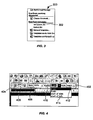
- modules implementing the note-taking functionality according to the teachings of the present invention may be distributed as a Word template file. Any document opened with this template will have the note-taking functionality of the present invention. For example, when a new document is to be opened for taking notes using Microsoft Word TM , the user can select the template that provides the functionality of the present invention to open the document. As depicted in Fig. 3 , a list 300 of templates may be displayed to the user and the user can select can select a template 302 (the "mrCapture.dot" template) which provides the note-taking functionality according to the teachings of the present invention.
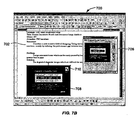
- Fig. 4 depicts a section of a Microsoft Word TM tool bar showing a menu bar 402 comprising user-selectable options for inserting portions of recorded information into a notes document according to an embodiment of the present invention.
- menu bar 402 comprises several buttons and toggles: button ("Insert") 404, button (“Calendar”) 406, “Slide” toggle 408, “Audio” toggle 410, and "Video” button 412.
- the user can select "Slide” toggle 408 to indicate that the presently displayed slide should be inserted in the user's notes document.
- the position of the cursor within the notes document at the time when "Slides” toggle 408 is clicked indicates the position in the document where the slide is to be inserted.
- the user can set “Audio” toggle 410 to indicate that an audio segment is to be inserted. Users can configure the length of audio clip to be inserted using pull-down menu 414 associated with "Audio" toggle 410.
- the “Insert” button 404 When the user clicks the "Insert" button 404, the specified information will be inserted in the user's notes document at the position of the cursor. It should be apparent that buttons and/or toggles for other types of information may be provided in other examples.
- a user can be authorized to access information from multiple sessions and can incorporate portions of recorded information from these sessions into the user's notes.
- Selecting ("Calendar") button 406 in Fig. 4 brings up a dialog box 500 as depicted in Fig. 5 that displays information regarding the various other sessions from which the user is authorized to access information according to an example.
- a calendar interface is displayed in Fig. 5 .
- the user can select a range of dates from the calendar interface.
- the user has selected a range of days including October 6, 2002 to October 11, 2002.
- a list of sessions 502 that a user is authorized to access within the selected range of days is displayed. Summary information for each session is displayed including the starting time of the recording included in the session, the duration of the session information, and the number of slides included in the session information.
- the user can specify that a portion of recorded information from another presentation, which is stored as another session to which the user is authorized, be inserted into the user's notes.
- the user can specify the particular session from which information is to be inserted. For example, in Fig. 5 , the user can select one of the sessions displayed in list 502. The user can then specify the portion of information to be inserted. For example, the user can specify a slide number to be inserted.
- the recorded information for user-selected session is accessible to the note-taking device used by the user, then the recorded information from that session may be displayed to the user on the note-taking device 108 and the user can then pick and chose the information to be inserted in the user's notes.
- the recorded information for the selected session may be stored by presentation server 104 and accessible to note-taking device 108 via server 104.
- the recorded information for sessions which are authorized for the user may be downloaded to the user's note-taking device and cached in the note-taking device's memory. According to an example, the download may be performed when the user logs in and get authorized for accessing information recorded for the present presentation.
- Fig. 6 displays a user interface that allows a user to browse through previously recorded session information when the information is accessible to the user's note-taking device according to an example.
- the user can select "Slide" tab 504 to bring up the user interface displayed in Fig. 6 which displays slides recorded for the selected session.
- recorded slides are displayed in window 602.
- the user can browse through the slides using slider 604 or step through them one at a time using previous and next buttons 606.
- Several control buttons 608 are provided for inserting a slide or audio segment into the user's notes.
- Controls 610 are also provided for playing back the recorded information stored for the session.
- a slide counter 612 is also displayed.
- the request for the selected slide is immediately processed and the requested data is inserted into the user's notes document. If the request information is not accessible, then the information request is cached in the notes document, and processed later when the requested information becomes accessible, as described above.
- the user interfaces depicted in Figs. 5 and 6 allow the user to specify information to be inserted into the user notes from previously recorded sessions which the user is authorized to access.
- the user interfaces can also be used to view and select information previously displayed during the present presentation that the user is attending and which is stored as part of the current session. For example, using the interface depicted in Fig. 6 , the user can step back through slides that have already been displayed in the presentation the user is attending and select a slide for insertion in the user's notes. As new slides are displayed during the presentation, slide counter 612 is updated to include the new slides.
- Fig. 7A depicts a Microsoft WordTM interface 700 that has been configured to provide options for taking notes according to an embodiment of the present invention.
- Interface 700 displays a section 702 of a user's notes document.
- a visible marker 704 is displayed in the notes document corresponding to an information request that has not yet been processed and is accordingly stored or cached in the notes document.
- Visible marker 704 is placed in a location where the information requested by the cached information request is to be inserted.
- Visible marker 704 provides a context of the requested information such as "[mrRequest1: To be inserted slide4 from 13:09:23 10/1/0/02]".
- the user may have requested the information to be inserted dialog window 706 (which is similar to the user interface depicted in Fig. 6 and described above).
- the information request is stored in the notes document until the request can be processed, i.e., the information requested by the request can be accessed and inserted into the notes document.
- Fig. 7B depicts the notes document of Fig. 7A wherein the cached information request has been processed according to an embodiment of the present invention.
- a slide 708 corresponding to the cached information request has been inserted into the notes document at the specified location.
- Visible marker 704 has accordingly been automatically removed and replaced by the requested slide 708.
- Audio information associated with the inserted slide has also been inserted into the notes document as indicated by icon 710. The user can playback the audio segment by clicking or selecting icon 710.
- VBA Visual Basic for Applications
- a "user request module” may be provided that provides the functionality needed to support user information requests such as inserting slides, audio segments, and so on.
- the "user request module” may interact with different types of objects including a Word document object, a user request object, and a presentation or session object.
- the user request object is a class object that handles creation of a user information request (e.g., a request created using the interfaces depicted in Figs. 5 and 6 ), processing the user information request to obtain the requested information and inserting the information in the notes document, caching the request when it cannot be processed, and loading in cached requests during module startup.
- the session object comprises information about presentations (or sessions) and is configured for formulating a query for the information request, communicating the query to the presentation server 104, receiving requested information from the presentation server 104, managing cached sessions on the note taking device, and processing of login keys.
- the Word object is part of the Microsoft Office Object Model that is provided for manipulation of document elements.
- Fig. 8 is a simplified block diagram of a note-taking device 108 that may be used to perform processing according to an example.
- note-taking device 108 includes at least one processor 802, which communicates with a number of peripheral devices via a bus subsystem 804.
- peripheral devices may include a storage subsystem 806, comprising a memory subsystem 808 and a file storage subsystem 810, user interface input devices 812, user interface output devices 814, and a network interface subsystem 816.
- the input and output devices allow user interaction with data processing system 802.
- Network interface subsystem 816 provides an interface to other computer systems such as presentation server 104 and authorization device 116.
- the networks may include the Internet, a local area network (LAN), a wide area network (WAN), a wireless network, an intranet, a private network, a public network, a switched network, or any other suitable communication network.
- Network interface subsystem 816 serves as an interface for receiving data from other sources and for transmitting data to other sources from note-taking device 108.
- note-taking device 108 may send information requests to presentation server 104 and receive the requested information from presentation server 104 via network interface subsystem 816.
- Embodiments of network interface subsystem 816 include an Ethernet card, a modem (telephone, satellite, cable, ISDN, etc.), (asynchronous) digital subscriber line (DSL) units, and the like.
- User interface input devices 812 may include a keyboard, pointing devices such as a mouse, trackball, touchpad, or graphics tablet, a scanner, a barcode scanner, a touchscreen incorporated into the display, audio input devices such as voice recognition systems, microphones, and other types of input devices.
- pointing devices such as a mouse, trackball, touchpad, or graphics tablet
- audio input devices such as voice recognition systems, microphones, and other types of input devices.
- use of the term "input device” is intended to include all possible types of devices and ways to input information to note-taking device 108.
- a user may use user input devices 812 to take notes.
- User interface output devices 814 may include a display subsystem, a printer, a fax machine, or non-visual displays such as audio output devices.
- the display subsystem may be a cathode ray tube (CRT), a flat-panel device such as a liquid crystal display (LCD), or a projection device.
- CTR cathode ray tube
- LCD liquid crystal display
- output device is intended to include all possible types of devices and ways to output information from note-taking device 108.
- Storage subsystem 806 may be configured to store the basic programming and data constructs and modules that provide the functionality of the present invention. For example, software modules such as authorization module 118 may be stored in storage subsystem 806. These software modules may be executed by processor(s) 802. Storage subsystem 806 may also provide a repository for storing data used in accordance with the present invention. For example, the notes documents, cached sessions information, etc. may be stored in storage subsystem 806. Storage subsystem 806 may comprise memory subsystem 808 and file/disk storage subsystem 810.
- Memory subsystem 808 may include a number of memories including a main random access memory (RAM) 818 for storage of instructions and data during program execution and a read only memory (ROM) 820 in which fixed instructions are stored.
- File storage subsystem 810 provides persistent (non-volatile) storage for program and data files, and may include a hard disk drive, a floppy disk drive along with associated removable media, a Compact Disk Read Only Memory (CD-ROM) drive, an optical drive, removable media cartridges, and other like storage media.
- CD-ROM Compact Disk Read Only Memory
- Bus subsystem 804 provides a mechanism for letting the various components and subsystems of note-taking device 108 communicate with each other as intended. Although bus subsystem 804 is shown schematically as a single bus, alternative examples of the bus subsystem may utilize multiple busses.
- note-taking device 108 can be of varying types including a personal computer, a portable computer, a laptop, a kiosk, a PDA, a tablet PC, and the like.
- the description of note-taking device 108 depicted in Fig. 8 is intended only as a specific example. Many other configurations having more or fewer components than the system depicted in Fig. 8 are possible.
Landscapes
- Engineering & Computer Science (AREA)
- Theoretical Computer Science (AREA)
- Health & Medical Sciences (AREA)
- Artificial Intelligence (AREA)
- Audiology, Speech & Language Pathology (AREA)
- Computational Linguistics (AREA)
- General Health & Medical Sciences (AREA)
- Physics & Mathematics (AREA)
- General Engineering & Computer Science (AREA)
- General Physics & Mathematics (AREA)
- Information Transfer Between Computers (AREA)
- Two-Way Televisions, Distribution Of Moving Picture Or The Like (AREA)
Applications Claiming Priority (2)
| Application Number | Priority Date | Filing Date | Title |
|---|---|---|---|
| US722834 | 1996-09-27 | ||
| US10/722,834 US7689712B2 (en) | 2003-11-26 | 2003-11-26 | Techniques for integrating note-taking and multimedia information |
Publications (2)
| Publication Number | Publication Date |
|---|---|
| EP1536348A1 EP1536348A1 (en) | 2005-06-01 |
| EP1536348B1 true EP1536348B1 (en) | 2010-05-05 |
Family
ID=34465696
Family Applications (1)
| Application Number | Title | Priority Date | Filing Date |
|---|---|---|---|
| EP04024390A Expired - Lifetime EP1536348B1 (en) | 2003-11-26 | 2004-10-13 | Techniques for integrating note-taking and multimedia information |
Country Status (4)
| Country | Link |
|---|---|
| US (1) | US7689712B2 (enExample) |
| EP (1) | EP1536348B1 (enExample) |
| JP (1) | JP4714458B2 (enExample) |
| DE (1) | DE602004026982D1 (enExample) |
Families Citing this family (77)
| Publication number | Priority date | Publication date | Assignee | Title |
|---|---|---|---|---|
| US8352400B2 (en) | 1991-12-23 | 2013-01-08 | Hoffberg Steven M | Adaptive pattern recognition based controller apparatus and method and human-factored interface therefore |
| US7904187B2 (en) | 1999-02-01 | 2011-03-08 | Hoffberg Steven M | Internet appliance system and method |
| US7299405B1 (en) * | 2000-03-08 | 2007-11-20 | Ricoh Company, Ltd. | Method and system for information management to facilitate the exchange of ideas during a collaborative effort |
| US7653925B2 (en) | 1999-11-17 | 2010-01-26 | Ricoh Company, Ltd. | Techniques for receiving information during multimedia presentations and communicating the information |
| US7793233B1 (en) * | 2003-03-12 | 2010-09-07 | Microsoft Corporation | System and method for customizing note flags |
| US7774799B1 (en) | 2003-03-26 | 2010-08-10 | Microsoft Corporation | System and method for linking page content with a media file and displaying the links |
| US20050154760A1 (en) * | 2004-01-12 | 2005-07-14 | International Business Machines Corporation | Capturing portions of an electronic document |
| US8442331B2 (en) | 2004-02-15 | 2013-05-14 | Google Inc. | Capturing text from rendered documents using supplemental information |
| US7707039B2 (en) | 2004-02-15 | 2010-04-27 | Exbiblio B.V. | Automatic modification of web pages |
| US10635723B2 (en) | 2004-02-15 | 2020-04-28 | Google Llc | Search engines and systems with handheld document data capture devices |
| US20060041484A1 (en) * | 2004-04-01 | 2006-02-23 | King Martin T | Methods and systems for initiating application processes by data capture from rendered documents |
| US7812860B2 (en) | 2004-04-01 | 2010-10-12 | Exbiblio B.V. | Handheld device for capturing text from both a document printed on paper and a document displayed on a dynamic display device |
| US8799303B2 (en) | 2004-02-15 | 2014-08-05 | Google Inc. | Establishing an interactive environment for rendered documents |
| US20050198525A1 (en) * | 2004-03-02 | 2005-09-08 | Nokia Corporation | System and associated terminal, method and computer program product for conveying context information and providing a context-based service based upon the context information |
| US20080313172A1 (en) | 2004-12-03 | 2008-12-18 | King Martin T | Determining actions involving captured information and electronic content associated with rendered documents |
| USRE50599E1 (en) | 2004-04-01 | 2025-09-23 | Kyocera Corporation | Search engines and systems with handheld document data capture devices |
| US20060081714A1 (en) | 2004-08-23 | 2006-04-20 | King Martin T | Portable scanning device |
| US7894670B2 (en) | 2004-04-01 | 2011-02-22 | Exbiblio B.V. | Triggering actions in response to optically or acoustically capturing keywords from a rendered document |
| US8081849B2 (en) | 2004-12-03 | 2011-12-20 | Google Inc. | Portable scanning and memory device |
| US8793162B2 (en) | 2004-04-01 | 2014-07-29 | Google Inc. | Adding information or functionality to a rendered document via association with an electronic counterpart |
| US9116890B2 (en) | 2004-04-01 | 2015-08-25 | Google Inc. | Triggering actions in response to optically or acoustically capturing keywords from a rendered document |
| US7990556B2 (en) | 2004-12-03 | 2011-08-02 | Google Inc. | Association of a portable scanner with input/output and storage devices |
| US8146156B2 (en) | 2004-04-01 | 2012-03-27 | Google Inc. | Archive of text captures from rendered documents |
| US20070300142A1 (en) | 2005-04-01 | 2007-12-27 | King Martin T | Contextual dynamic advertising based upon captured rendered text |
| US9008447B2 (en) | 2004-04-01 | 2015-04-14 | Google Inc. | Method and system for character recognition |
| US9143638B2 (en) | 2004-04-01 | 2015-09-22 | Google Inc. | Data capture from rendered documents using handheld device |
| US8621349B2 (en) * | 2004-04-01 | 2013-12-31 | Google Inc. | Publishing techniques for adding value to a rendered document |
| US8713418B2 (en) | 2004-04-12 | 2014-04-29 | Google Inc. | Adding value to a rendered document |
| US9811728B2 (en) * | 2004-04-12 | 2017-11-07 | Google Inc. | Adding value to a rendered document |
| US9460346B2 (en) | 2004-04-19 | 2016-10-04 | Google Inc. | Handheld device for capturing text from both a document printed on paper and a document displayed on a dynamic display device |
| US8620083B2 (en) | 2004-12-03 | 2013-12-31 | Google Inc. | Method and system for character recognition |
| US8874504B2 (en) | 2004-12-03 | 2014-10-28 | Google Inc. | Processing techniques for visual capture data from a rendered document |
| US8489624B2 (en) | 2004-05-17 | 2013-07-16 | Google, Inc. | Processing techniques for text capture from a rendered document |
| US8661331B2 (en) * | 2004-05-24 | 2014-02-25 | Xerox Corporation | Method of providing visual access to comment markings |
| US8091029B1 (en) | 2004-05-28 | 2012-01-03 | Adobe Systems Incorporated | Presenter-only meeting canvas for collaborative electronic meeting space |
| US7734802B1 (en) * | 2004-05-28 | 2010-06-08 | Adobe Systems Incorporated | Dynamically adaptable collaborative electronic meeting space |
| US8346620B2 (en) | 2004-07-19 | 2013-01-01 | Google Inc. | Automatic modification of web pages |
| US20100092095A1 (en) * | 2008-10-14 | 2010-04-15 | Exbiblio B.V. | Data gathering in digital and rendered document environments |
| US7712049B2 (en) | 2004-09-30 | 2010-05-04 | Microsoft Corporation | Two-dimensional radial user interface for computer software applications |
| US7788589B2 (en) * | 2004-09-30 | 2010-08-31 | Microsoft Corporation | Method and system for improved electronic task flagging and management |
| US20110075228A1 (en) * | 2004-12-03 | 2011-03-31 | King Martin T | Scanner having connected and unconnected operational behaviors |
| US8805929B2 (en) * | 2005-06-20 | 2014-08-12 | Ricoh Company, Ltd. | Event-driven annotation techniques |
| US7747557B2 (en) * | 2006-01-05 | 2010-06-29 | Microsoft Corporation | Application of metadata to documents and document objects via an operating system user interface |
| US7797638B2 (en) * | 2006-01-05 | 2010-09-14 | Microsoft Corporation | Application of metadata to documents and document objects via a software application user interface |
| US20070245229A1 (en) * | 2006-04-17 | 2007-10-18 | Microsoft Corporation | User experience for multimedia mobile note taking |
| US20070245223A1 (en) * | 2006-04-17 | 2007-10-18 | Microsoft Corporation | Synchronizing multimedia mobile notes |
| EP2024800A4 (en) * | 2006-05-07 | 2013-03-06 | Wellcomemat Llc | PROCESSES AND SYSTEMS FOR ONLINE REAL ESTATE TRADING ON VIDEO BASIS |
| KR100788698B1 (ko) * | 2006-07-13 | 2007-12-26 | 삼성전자주식회사 | 디스플레이 서비스 방법 및 그 방법을 수행할 수 있는네트워크 디바이스와 저장 매체 |
| EP2067119A2 (en) * | 2006-09-08 | 2009-06-10 | Exbiblio B.V. | Optical scanners, such as hand-held optical scanners |
| US7761785B2 (en) | 2006-11-13 | 2010-07-20 | Microsoft Corporation | Providing resilient links |
| US7707518B2 (en) | 2006-11-13 | 2010-04-27 | Microsoft Corporation | Linking information |
| US20080183467A1 (en) * | 2007-01-25 | 2008-07-31 | Yuan Eric Zheng | Methods and apparatuses for recording an audio conference |
| US8024652B2 (en) * | 2007-04-10 | 2011-09-20 | Microsoft Corporation | Techniques to associate information between application programs |
| US8762864B2 (en) * | 2007-08-06 | 2014-06-24 | Apple Inc. | Background removal tool for a presentation application |
| CN101686245B (zh) * | 2008-09-28 | 2014-06-11 | 国际商业机器公司 | 用于隔离超文本传输协议会话的方法和系统 |
| WO2010096193A2 (en) | 2009-02-18 | 2010-08-26 | Exbiblio B.V. | Identifying a document by performing spectral analysis on the contents of the document |
| EP2406767A4 (en) | 2009-03-12 | 2016-03-16 | Google Inc | AUTOMATIC CONTENT SUPPLY ASSOCIATED WITH CAPTURED INFORMATION, TYPE INFORMATION CAPTURED IN REAL TIME |
| US8447066B2 (en) | 2009-03-12 | 2013-05-21 | Google Inc. | Performing actions based on capturing information from rendered documents, such as documents under copyright |
| US8380866B2 (en) * | 2009-03-20 | 2013-02-19 | Ricoh Company, Ltd. | Techniques for facilitating annotations |
| US20100293469A1 (en) * | 2009-05-14 | 2010-11-18 | Gautam Khot | Providing Portions of a Presentation During a Videoconference |
| US9081799B2 (en) | 2009-12-04 | 2015-07-14 | Google Inc. | Using gestalt information to identify locations in printed information |
| US9323784B2 (en) | 2009-12-09 | 2016-04-26 | Google Inc. | Image search using text-based elements within the contents of images |
| US9575616B2 (en) | 2011-08-12 | 2017-02-21 | School Improvement Network, Llc | Educator effectiveness |
| US9165290B2 (en) * | 2011-11-02 | 2015-10-20 | Microsoft Technology Licensing, Llc | Sharing notes in online meetings |
| US9449303B2 (en) * | 2012-01-19 | 2016-09-20 | Microsoft Technology Licensing, Llc | Notebook driven accumulation of meeting documentation and notations |
| US8874648B2 (en) | 2012-01-23 | 2014-10-28 | International Business Machines Corporation | E-meeting summaries |
| US20130332804A1 (en) * | 2012-06-06 | 2013-12-12 | Conrad Delbert Seaman | Methods and devices for data entry |
| US8576995B1 (en) | 2012-10-30 | 2013-11-05 | Google Inc. | System and method for connecting an endpoint to an active multimedia communications session on a data network by setting metadata associated with a telephone call |
| US10176156B2 (en) | 2012-10-30 | 2019-01-08 | Microsoft Technology Licensing, Llc | System and method for providing linked note-taking |
| US8582475B1 (en) | 2012-10-30 | 2013-11-12 | Google Inc. | System and method for blended PSTN and computer network customer support interactions |
| US10558729B2 (en) | 2012-11-30 | 2020-02-11 | Microsoft Technology Licensing, Llc | Enhanced collection environments |
| US10629188B2 (en) | 2013-03-15 | 2020-04-21 | International Business Machines Corporation | Automatic note taking within a virtual meeting |
| US20150051958A1 (en) * | 2013-08-14 | 2015-02-19 | School Improvement Network | Apparatus and Method for Providing A Computer-Implemented Portable Environment for In-Class Educator Observation |
| US9496922B2 (en) | 2014-04-21 | 2016-11-15 | Sony Corporation | Presentation of content on companion display device based on content presented on primary display device |
| US9910644B2 (en) | 2015-03-03 | 2018-03-06 | Microsoft Technology Licensing, Llc | Integrated note-taking functionality for computing system entities |
| US9910840B2 (en) | 2015-04-03 | 2018-03-06 | Microsoft Technology Licensing, Llc | Annotating notes from passive recording with categories |
| EP3142052A1 (en) | 2015-09-11 | 2017-03-15 | Barco n.v. | Devices, system and method for sharing a presentation |
Family Cites Families (146)
| Publication number | Priority date | Publication date | Assignee | Title |
|---|---|---|---|---|
| US4578718A (en) | 1983-06-16 | 1986-03-25 | Bell & Howell Company | Control arrangement and method for video tape recorder |
| GB2166893B (en) | 1984-10-05 | 1988-03-23 | Sharp Kk | Checking memory at system power-up |
| US4787063A (en) | 1984-10-19 | 1988-11-22 | Francis Muguet | Acquisition and transmission system for a recorder and a computer center |
| US4686698A (en) | 1985-04-08 | 1987-08-11 | Datapoint Corporation | Workstation for interfacing with a video conferencing network |
| US4905094A (en) | 1988-06-30 | 1990-02-27 | Telaction Corporation | System for audio/video presentation |
| US5416495A (en) | 1988-07-07 | 1995-05-16 | Sentex Systems, Inc. | Liquid-crystal display unit for electronic directory |
| US4881135A (en) | 1988-09-23 | 1989-11-14 | Heilweil Jordan B | Concealed audio-video apparatus for recording conferences and meetings |
| US4963995A (en) | 1988-12-27 | 1990-10-16 | Explore Technology, Inc. | Audio/video transceiver apparatus including compression means |
| US5164839A (en) | 1988-12-27 | 1992-11-17 | Explore Technology, Inc. | Method for handling audio/video source information |
| DE3921943A1 (de) | 1989-07-04 | 1991-01-17 | Grundig Emv | Buerokommunikationssystem zur uebertragung von nachrichten- und/oder bildinformationen ueber ein nachrichtennetz fuer vermittelte verbindungen |
| US5091931A (en) | 1989-10-27 | 1992-02-25 | At&T Bell Laboratories | Facsimile-to-speech system |
| US5218672A (en) | 1990-01-19 | 1993-06-08 | Sony Corporation Of America | Offline editing system with user interface for controlling edit list generation |
| GB9100732D0 (en) | 1991-01-14 | 1991-02-27 | Xerox Corp | A data access system |
| US5321396A (en) | 1991-02-07 | 1994-06-14 | Xerox Corporation | Indexing of audio/video data |
| US5706290A (en) | 1994-12-15 | 1998-01-06 | Shaw; Venson | Method and apparatus including system architecture for multimedia communication |
| US5999173A (en) | 1992-04-03 | 1999-12-07 | Adobe Systems Incorporated | Method and apparatus for video editing with video clip representations displayed along a time line |
| US5502774A (en) | 1992-06-09 | 1996-03-26 | International Business Machines Corporation | Automatic recognition of a consistent message using multiple complimentary sources of information |
| US5363425A (en) | 1992-06-29 | 1994-11-08 | Northern Telecom Limited | Method and apparatus for providing a personal locator, access control and asset tracking service using an in-building telephone network |
| JPH06176492A (ja) | 1992-12-04 | 1994-06-24 | Sony Corp | ディジタルビデオ信号記録再生装置 |
| GB9315448D0 (en) | 1993-07-26 | 1993-09-08 | Rank Xerox Ltd | Recording and retrieval of information relevant to the activities of a user |
| US5436792A (en) | 1993-09-10 | 1995-07-25 | Compaq Computer Corporation | Pivotable docking station for use with notepad computer systems |
| JPH0795504A (ja) | 1993-09-20 | 1995-04-07 | Fuji Photo Film Co Ltd | ビデオプリンタ |
| US5610841A (en) | 1993-09-30 | 1997-03-11 | Matsushita Electric Industrial Co., Ltd. | Video server |
| US5689641A (en) | 1993-10-01 | 1997-11-18 | Vicor, Inc. | Multimedia collaboration system arrangement for routing compressed AV signal through a participant site without decompressing the AV signal |
| JPH07175868A (ja) | 1993-10-15 | 1995-07-14 | Internatl Business Mach Corp <Ibm> | デジタル情報を媒体に出力するための方法およびシステム |
| CA2174336A1 (en) | 1993-10-20 | 1995-04-27 | Leo M. Cortjens | Adaptive videoconferencing system |
| US5491511A (en) | 1994-02-04 | 1996-02-13 | Odle; James A. | Multimedia capture and audit system for a video surveillance network |
| EP0674414B1 (en) | 1994-03-21 | 2002-02-27 | Avid Technology, Inc. | Apparatus and computer-implemented process for providing real-time multimedia data transport in a distributed computing system |
| US5579183A (en) | 1994-04-08 | 1996-11-26 | U.S. Philips Corporation | Recording and reproducing an MPEG information signal on/from a record carrier |
| US5537141A (en) | 1994-04-15 | 1996-07-16 | Actv, Inc. | Distance learning system providing individual television participation, audio responses and memory for every student |
| US5635982A (en) | 1994-06-27 | 1997-06-03 | Zhang; Hong J. | System for automatic video segmentation and key frame extraction for video sequences having both sharp and gradual transitions |
| US5508734A (en) | 1994-07-27 | 1996-04-16 | International Business Machines Corporation | Method and apparatus for hemispheric imaging which emphasizes peripheral content |
| US5767897A (en) | 1994-10-31 | 1998-06-16 | Picturetel Corporation | Video conferencing system |
| WO1996015517A2 (en) | 1994-11-02 | 1996-05-23 | Visible Interactive Corporation | Interactive personal interpretive device and system for retrieving information about a plurality of objects |
| US5764789A (en) | 1994-11-28 | 1998-06-09 | Smarttouch, Llc | Tokenless biometric ATM access system |
| US5758257A (en) | 1994-11-29 | 1998-05-26 | Herz; Frederick | System and method for scheduling broadcast of and access to video programs and other data using customer profiles |
| EP1028374B1 (en) | 1994-12-13 | 2007-08-22 | Microsoft Corporation | Data transfer with expanded clipboard formats |
| US5485611A (en) | 1994-12-30 | 1996-01-16 | Intel Corporation | Video database indexing and method of presenting video database index to a user |
| US5530235A (en) | 1995-02-16 | 1996-06-25 | Xerox Corporation | Interactive contents revealing storage device |
| US5729741A (en) | 1995-04-10 | 1998-03-17 | Golden Enterprises, Inc. | System for storage and retrieval of diverse types of information obtained from different media sources which includes video, audio, and text transcriptions |
| US5990934A (en) | 1995-04-28 | 1999-11-23 | Lucent Technologies, Inc. | Method and system for panoramic viewing |
| US5721878A (en) | 1995-06-07 | 1998-02-24 | International Business Machines Corporation | Multimedia control system and method for controlling multimedia program presentation |
| AUPN390495A0 (en) | 1995-07-03 | 1995-07-27 | Wade, Rodney George | Improved gutter guard for corrugated roofing |
| US5673016A (en) | 1995-07-14 | 1997-09-30 | Lutes; Daniel M. | Multifunction visitor information system |
| US5760767A (en) | 1995-10-26 | 1998-06-02 | Sony Corporation | Method and apparatus for displaying in and out points during video editing |
| US5717879A (en) | 1995-11-03 | 1998-02-10 | Xerox Corporation | System for the capture and replay of temporal data representing collaborative activities |
| US20020002562A1 (en) | 1995-11-03 | 2002-01-03 | Thomas P. Moran | Computer controlled display system using a graphical replay device to control playback of temporal data representing collaborative activities |
| US5717869A (en) | 1995-11-03 | 1998-02-10 | Xerox Corporation | Computer controlled display system using a timeline to control playback of temporal data representing collaborative activities |
| US5568406A (en) | 1995-12-01 | 1996-10-22 | Gerber; Eliot S. | Stolen car detection system and method |
| US5751281A (en) | 1995-12-11 | 1998-05-12 | Apple Computer, Inc. | Apparatus and method for storing a movie within a movie |
| US5793365A (en) | 1996-01-02 | 1998-08-11 | Sun Microsystems, Inc. | System and method providing a computer user interface enabling access to distributed workgroup members |
| US6081829A (en) | 1996-01-31 | 2000-06-27 | Silicon Graphics, Inc. | General purpose web annotations without modifying browser |
| US6154601A (en) | 1996-04-12 | 2000-11-28 | Hitachi Denshi Kabushiki Kaisha | Method for editing image information with aid of computer and editing system |
| US5845261A (en) | 1996-06-12 | 1998-12-01 | Mcabian; Adi Jacob | Interactive multi-media presentation and marketing apparatus |
| US6628303B1 (en) | 1996-07-29 | 2003-09-30 | Avid Technology, Inc. | Graphical user interface for a motion video planning and editing system for a computer |
| US5854831A (en) | 1996-07-29 | 1998-12-29 | Elite Entry Phone Corporation | Access control apparatus for use with buildings, gated properties and the like |
| US5978477A (en) | 1996-11-21 | 1999-11-02 | Ricoh Company Limited | Automatic and transparent document archiving |
| US5991429A (en) | 1996-12-06 | 1999-11-23 | Coffin; Jeffrey S. | Facial recognition system for security access and identification |
| US6349297B1 (en) | 1997-01-10 | 2002-02-19 | Venson M. Shaw | Information processing system for directing information request from a particular user/application, and searching/forwarding/retrieving information from unknown and large number of information resources |
| US5946654A (en) | 1997-02-21 | 1999-08-31 | Dragon Systems, Inc. | Speaker identification using unsupervised speech models |
| US6449653B2 (en) | 1997-03-25 | 2002-09-10 | Microsoft Corporation | Interleaved multiple multimedia stream for synchronized transmission over a computer network |
| US5960085A (en) | 1997-04-14 | 1999-09-28 | De La Huerga; Carlos | Security badge for automated access control and secure data gathering |
| US6115718A (en) | 1998-04-01 | 2000-09-05 | Xerox Corporation | Method and apparatus for predicting document access in a collection of linked documents featuring link proprabilities and spreading activation |
| US5987454A (en) | 1997-06-09 | 1999-11-16 | Hobbs; Allen | Method and apparatus for selectively augmenting retrieved text, numbers, maps, charts, still pictures and/or graphics, moving pictures and/or graphics and audio information from a network resource |
| US6084582A (en) | 1997-07-02 | 2000-07-04 | Microsoft Corporation | Method and apparatus for recording a voice narration to accompany a slide show |
| US6008807A (en) | 1997-07-14 | 1999-12-28 | Microsoft Corporation | Method and system for controlling the display of objects in a slide show presentation |
| US5986655A (en) | 1997-10-28 | 1999-11-16 | Xerox Corporation | Method and system for indexing and controlling the playback of multimedia documents |
| US6061678A (en) | 1997-10-31 | 2000-05-09 | Oracle Corporation | Approach for managing access to large objects in database systems using large object indexes |
| US6393462B1 (en) | 1997-11-13 | 2002-05-21 | International Business Machines Corporation | Method and apparatus for automatic downloading of URLs and internet addresses |
| JPH11154179A (ja) | 1997-11-20 | 1999-06-08 | Hitachi Ltd | 携帯情報蓄積装置を利用したレクリエーション施設利用支援システム、レクリエーション施設利用支援方法およびそれを記録した記録媒体 |
| US6041360A (en) | 1997-11-21 | 2000-03-21 | International Business Machines Corporation | Web browser support for dynamic update of bookmarks |
| US5956026A (en) | 1997-12-19 | 1999-09-21 | Sharp Laboratories Of America, Inc. | Method for hierarchical summarization and browsing of digital video |
| US6055566A (en) | 1998-01-12 | 2000-04-25 | Lextron Systems, Inc. | Customizable media player with online/offline capabilities |
| US6807632B1 (en) | 1999-01-21 | 2004-10-19 | Emc Corporation | Content addressable information encapsulation, representation, and transfer |
| US6526426B1 (en) | 1998-02-23 | 2003-02-25 | David Lakritz | Translation management system |
| US6665490B2 (en) | 1998-04-01 | 2003-12-16 | Xerox Corporation | Obtaining and using data associating annotating activities with portions of recordings |
| US6789228B1 (en) | 1998-05-07 | 2004-09-07 | Medical Consumer Media | Method and system for the storage and retrieval of web-based education materials |
| US6421009B2 (en) | 1998-05-08 | 2002-07-16 | Peter Suprunov | Mobile station position tracking system for public safety |
| US6154771A (en) | 1998-06-01 | 2000-11-28 | Mediastra, Inc. | Real-time receipt, decompression and play of compressed streaming video/hypervideo; with thumbnail display of past scenes and with replay, hyperlinking and/or recording permissively intiated retrospectively |
| US6226618B1 (en) | 1998-08-13 | 2001-05-01 | International Business Machines Corporation | Electronic content delivery system |
| US7215436B2 (en) | 1998-09-09 | 2007-05-08 | Ricoh Company, Ltd. | Device for generating a multimedia paper document |
| US6721288B1 (en) * | 1998-09-16 | 2004-04-13 | Openwave Systems Inc. | Wireless mobile devices having improved operation during network unavailability |
| US6177939B1 (en) | 1998-10-08 | 2001-01-23 | Eastman Kodak Company | Method of saving sections of a document to random access memory |
| US6510553B1 (en) | 1998-10-26 | 2003-01-21 | Intel Corporation | Method of streaming video from multiple sources over a network |
| US6334109B1 (en) | 1998-10-30 | 2001-12-25 | International Business Machines Corporation | Distributed personalized advertisement system and method |
| US6392694B1 (en) | 1998-11-03 | 2002-05-21 | Telcordia Technologies, Inc. | Method and apparatus for an automatic camera selection system |
| JP2000168294A (ja) * | 1998-12-11 | 2000-06-20 | Ricoh Elemex Corp | 電子黒板システム |
| US20020048224A1 (en) | 1999-01-05 | 2002-04-25 | Dygert Timothy W. | Playback device having text display and communication with remote database of titles |
| US6490601B1 (en) | 1999-01-15 | 2002-12-03 | Infospace, Inc. | Server for enabling the automatic insertion of data into electronic forms on a user computer |
| US6782049B1 (en) | 1999-01-29 | 2004-08-24 | Hewlett-Packard Development Company, L.P. | System for selecting a keyframe to represent a video |
| US6529920B1 (en) | 1999-03-05 | 2003-03-04 | Audiovelocity, Inc. | Multimedia linking device and method |
| US6646655B1 (en) | 1999-03-09 | 2003-11-11 | Webex Communications, Inc. | Extracting a time-sequence of slides from video |
| US6535639B1 (en) | 1999-03-12 | 2003-03-18 | Fuji Xerox Co., Ltd. | Automatic video summarization using a measure of shot importance and a frame-packing method |
| US6396500B1 (en) | 1999-03-18 | 2002-05-28 | Microsoft Corporation | Method and system for generating and displaying a slide show with animations and transitions in a browser |
| US6647535B1 (en) | 1999-03-18 | 2003-11-11 | Xerox Corporation | Methods and systems for real-time storyboarding with a web page and graphical user interface for automatic video parsing and browsing |
| US6452615B1 (en) * | 1999-03-24 | 2002-09-17 | Fuji Xerox Co., Ltd. | System and apparatus for notetaking with digital video and ink |
| US7184100B1 (en) | 1999-03-24 | 2007-02-27 | Mate - Media Access Technologies Ltd. | Method of selecting key-frames from a video sequence |
| US6405203B1 (en) | 1999-04-21 | 2002-06-11 | Research Investment Network, Inc. | Method and program product for preventing unauthorized users from using the content of an electronic storage medium |
| US6369835B1 (en) | 1999-05-18 | 2002-04-09 | Microsoft Corporation | Method and system for generating a movie file from a slide show presentation |
| AUPQ439299A0 (en) | 1999-12-01 | 1999-12-23 | Silverbrook Research Pty Ltd | Interface system |
| US6636888B1 (en) | 1999-06-15 | 2003-10-21 | Microsoft Corporation | Scheduling presentation broadcasts in an integrated network environment |
| US6193658B1 (en) | 1999-06-24 | 2001-02-27 | Martin E Wendelken | Method and kit for wound evaluation |
| US7108192B2 (en) | 1999-09-17 | 2006-09-19 | Silverbrook Research Pty Ltd | Rotationally symmetric tags |
| US7299405B1 (en) | 2000-03-08 | 2007-11-20 | Ricoh Company, Ltd. | Method and system for information management to facilitate the exchange of ideas during a collaborative effort |
| US7653925B2 (en) | 1999-11-17 | 2010-01-26 | Ricoh Company, Ltd. | Techniques for receiving information during multimedia presentations and communicating the information |
| US6976032B1 (en) | 1999-11-17 | 2005-12-13 | Ricoh Company, Ltd. | Networked peripheral for visitor greeting, identification, biographical lookup and tracking |
| US7080386B2 (en) | 2000-01-25 | 2006-07-18 | Texas Instruments Incorporated | Architecture with digital signal processor plug-ins for general purpose processor media frameworks |
| US6249281B1 (en) | 2000-02-28 | 2001-06-19 | Presenter.Com | On-demand presentation graphical user interface |
| US6766363B1 (en) | 2000-02-28 | 2004-07-20 | Barpoint.Com, Inc. | System and method of linking items in audio, visual, and printed media to related information stored on an electronic network using a mobile device |
| US7343617B1 (en) | 2000-02-29 | 2008-03-11 | Goldpocket Interactive, Inc. | Method and apparatus for interaction with hyperlinks in a television broadcast |
| KR100554427B1 (ko) | 2000-03-27 | 2006-02-22 | 마츠시타 덴끼 산교 가부시키가이샤 | 정보수신기록 재생장치, 정보수신기록 재생방법 |
| US6816858B1 (en) | 2000-03-31 | 2004-11-09 | International Business Machines Corporation | System, method and apparatus providing collateral information for a video/audio stream |
| US6750978B1 (en) | 2000-04-27 | 2004-06-15 | Leapfrog Enterprises, Inc. | Print media information system with a portable print media receiving unit assembly |
| US20020010641A1 (en) | 2000-05-02 | 2002-01-24 | Stevens Jessica L. | Low cost system method apparatus and way of doing business for the conveyance and electronic labeling and transference of secure multimedia and data products |
| US7647259B2 (en) | 2000-06-16 | 2010-01-12 | De Fabrega Ingrid Perscky | E-commerce development intranet portal |
| JP3982736B2 (ja) | 2000-06-30 | 2007-09-26 | 沖電気工業株式会社 | 翻訳システム |
| AU2001283550A1 (en) | 2000-08-10 | 2002-02-18 | Quindi | Audio and video notetaker |
| US7039198B2 (en) | 2000-11-10 | 2006-05-02 | Quindi | Acoustic source localization system and method |
| EP1209527A1 (en) | 2000-11-28 | 2002-05-29 | Shipley Company LLC | Photoresist composition |
| WO2002051152A1 (en) | 2000-12-01 | 2002-06-27 | Tegrity, Ltd. | System, method and apparatus for capturing, recording, transmitting and displaying dynamic sessions |
| US20020128067A1 (en) | 2001-03-09 | 2002-09-12 | Victor Keith Blanco | Method and apparatus for creating and playing soundtracks in a gaming system |
| US7020721B1 (en) | 2001-04-02 | 2006-03-28 | Palmsource, Inc. | Extensible transcoder annotation for transcoding proxy servers |
| US20020169849A1 (en) | 2001-05-14 | 2002-11-14 | Schroath Leonard T. | Method and apparatus for providing software for office equipment at point-of-sale |
| JP2003036152A (ja) | 2001-05-17 | 2003-02-07 | Matsushita Electric Ind Co Ltd | 情報印刷システム |
| US6810146B2 (en) | 2001-06-01 | 2004-10-26 | Eastman Kodak Company | Method and system for segmenting and identifying events in images using spoken annotations |
| US20020185533A1 (en) | 2001-06-06 | 2002-12-12 | Ron-Yen Shieh | Externally connection type USB2.0 interface flash card reader |
| JP2003009107A (ja) * | 2001-06-22 | 2003-01-10 | Fuji Electric Co Ltd | 電子会議用端末、電子会議システム、電子会議方法、及び電子会議用プログラム |
| US7953219B2 (en) | 2001-07-19 | 2011-05-31 | Nice Systems, Ltd. | Method apparatus and system for capturing and analyzing interaction based content |
| US7478125B2 (en) | 2001-09-13 | 2009-01-13 | Intel Corporation | Automatic annotation of audio and/or visual data |
| US7346843B2 (en) * | 2001-09-18 | 2008-03-18 | International Business Machines Corporation | Low-latency, incremental rendering in a content framework |
| US7068309B2 (en) | 2001-10-09 | 2006-06-27 | Microsoft Corp. | Image exchange with image annotation |
| US7102670B2 (en) | 2001-10-31 | 2006-09-05 | Hewlett-Packard Development Company, L.P. | Bookmarking captured digital images at an event to all present devices |
| US20030236777A1 (en) * | 2002-02-07 | 2003-12-25 | Shevin Conway | System and method for managing internet transactions |
| JP2003330354A (ja) * | 2002-05-09 | 2003-11-19 | Hitachi Zosen Information Systems Co Ltd | 学習支援システム |
| US7260257B2 (en) | 2002-06-19 | 2007-08-21 | Microsoft Corp. | System and method for whiteboard and audio capture |
| US20040143602A1 (en) | 2002-10-18 | 2004-07-22 | Antonio Ruiz | Apparatus, system and method for automated and adaptive digital image/video surveillance for events and configurations using a rich multimedia relational database |
| US20040143630A1 (en) * | 2002-11-21 | 2004-07-22 | Roy Kaufmann | Method and system for sending questions, answers and files synchronously and asynchronously in a system for enhancing collaboration using computers and networking |
| US7349008B2 (en) | 2002-11-30 | 2008-03-25 | Microsoft Corporation | Automated camera management system and method for capturing presentations using videography rules |
| JP4381012B2 (ja) | 2003-03-14 | 2009-12-09 | ヒューレット・パッカード・カンパニー | 万物識別子を用いたデータ検索システムおよびデータ検索方法 |
| US7428000B2 (en) * | 2003-06-26 | 2008-09-23 | Microsoft Corp. | System and method for distributed meetings |
| EP2570918A1 (en) | 2003-07-07 | 2013-03-20 | Rovi Solutions Corporation | Reprogrammable security for controlling piracy and enabling interactive content |
| US7512883B2 (en) | 2004-06-30 | 2009-03-31 | Microsoft Corporation | Portable solution for automatic camera management |
| US7949666B2 (en) | 2004-07-09 | 2011-05-24 | Ricoh, Ltd. | Synchronizing distributed work through document logs |
| US20060041632A1 (en) | 2004-08-23 | 2006-02-23 | Microsoft Corporation | System and method to associate content types in a portable communication device |
| US7554576B2 (en) | 2005-06-20 | 2009-06-30 | Ricoh Company, Ltd. | Information capture and recording system for controlling capture devices |
| US8805929B2 (en) | 2005-06-20 | 2014-08-12 | Ricoh Company, Ltd. | Event-driven annotation techniques |
-
2003
- 2003-11-26 US US10/722,834 patent/US7689712B2/en not_active Expired - Lifetime
-
2004
- 2004-10-13 EP EP04024390A patent/EP1536348B1/en not_active Expired - Lifetime
- 2004-10-13 DE DE602004026982T patent/DE602004026982D1/de not_active Expired - Lifetime
- 2004-11-25 JP JP2004340904A patent/JP4714458B2/ja not_active Expired - Fee Related
Also Published As
| Publication number | Publication date |
|---|---|
| JP4714458B2 (ja) | 2011-06-29 |
| EP1536348A1 (en) | 2005-06-01 |
| JP2005174322A (ja) | 2005-06-30 |
| US20050114521A1 (en) | 2005-05-26 |
| US7689712B2 (en) | 2010-03-30 |
| DE602004026982D1 (de) | 2010-06-17 |
Similar Documents
| Publication | Publication Date | Title |
|---|---|---|
| US7689712B2 (en) | Techniques for integrating note-taking and multimedia information | |
| US7392475B1 (en) | Method and system for automatic insertion of context information into an application program module | |
| US20250168212A1 (en) | Privacy Management And Adaptive Layouts Within A Communication Session | |
| US7554576B2 (en) | Information capture and recording system for controlling capture devices | |
| Chiu et al. | LiteMinutes: an Internet-based system for multimedia meeting minutes | |
| US9071615B2 (en) | Shared space for communicating information | |
| US9514108B1 (en) | Automatic reference note generator | |
| US7653925B2 (en) | Techniques for receiving information during multimedia presentations and communicating the information | |
| US7149806B2 (en) | Data access in a distributed environment | |
| US20230154497A1 (en) | System and method for access control, group ownership, and redaction of recordings of events | |
| US20090319482A1 (en) | Auto-generation of events with annotation and indexing | |
| JP2006146415A (ja) | 会議支援システム | |
| US20070204229A1 (en) | Techniques for accessing information captured during a presentation using a paper document handout for the presentation | |
| US20040181711A1 (en) | Change request form annotation | |
| US20080072144A1 (en) | Online Learning Monitor | |
| CN100524291C (zh) | 登录前的数据存取 | |
| US8996992B2 (en) | Image forming apparatus and information processing apparatus | |
| JP2003037677A (ja) | マルチメディア会議議事録作成方法及びプログラマブル・デバイスと通信する方法 | |
| US10600448B2 (en) | Streaming digital media bookmark creation and management | |
| KR101182478B1 (ko) | 콘텐츠를 동기화하고 트래킹하기 위한 방법, 시스템 및 매체 | |
| WO2005099381A9 (en) | Expression and time-based data creation and creator-controlled organization | |
| JP4696480B2 (ja) | 遠隔会議システム、拠点サーバ及びプログラム | |
| WO2023246395A1 (zh) | 用于视听内容分享的方法、装置、设备和存储介质 | |
| JP2006005589A5 (enExample) | ||
| WO2017151012A1 (ru) | Способ обработки машиночитаемой информации |
Legal Events
| Date | Code | Title | Description |
|---|---|---|---|
| PUAI | Public reference made under article 153(3) epc to a published international application that has entered the european phase |
Free format text: ORIGINAL CODE: 0009012 |
|
| 17P | Request for examination filed |
Effective date: 20041013 |
|
| AK | Designated contracting states |
Kind code of ref document: A1 Designated state(s): AT BE BG CH CY CZ DE DK EE ES FI FR GB GR HU IE IT LI LU MC NL PL PT RO SE SI SK TR |
|
| AX | Request for extension of the european patent |
Extension state: AL HR LT LV MK |
|
| AKX | Designation fees paid |
Designated state(s): DE ES FR GB IT NL |
|
| 17Q | First examination report despatched |
Effective date: 20060112 |
|
| GRAP | Despatch of communication of intention to grant a patent |
Free format text: ORIGINAL CODE: EPIDOSNIGR1 |
|
| GRAS | Grant fee paid |
Free format text: ORIGINAL CODE: EPIDOSNIGR3 |
|
| GRAA | (expected) grant |
Free format text: ORIGINAL CODE: 0009210 |
|
| AK | Designated contracting states |
Kind code of ref document: B1 Designated state(s): DE ES FR GB IT NL |
|
| REG | Reference to a national code |
Ref country code: GB Ref legal event code: FG4D |
|
| REF | Corresponds to: |
Ref document number: 602004026982 Country of ref document: DE Date of ref document: 20100617 Kind code of ref document: P |
|
| REG | Reference to a national code |
Ref country code: NL Ref legal event code: VDEP Effective date: 20100505 |
|
| PG25 | Lapsed in a contracting state [announced via postgrant information from national office to epo] |
Ref country code: ES Free format text: LAPSE BECAUSE OF FAILURE TO SUBMIT A TRANSLATION OF THE DESCRIPTION OR TO PAY THE FEE WITHIN THE PRESCRIBED TIME-LIMIT Effective date: 20100816 Ref country code: NL Free format text: LAPSE BECAUSE OF FAILURE TO SUBMIT A TRANSLATION OF THE DESCRIPTION OR TO PAY THE FEE WITHIN THE PRESCRIBED TIME-LIMIT Effective date: 20100505 |
|
| PLBE | No opposition filed within time limit |
Free format text: ORIGINAL CODE: 0009261 |
|
| STAA | Information on the status of an ep patent application or granted ep patent |
Free format text: STATUS: NO OPPOSITION FILED WITHIN TIME LIMIT |
|
| PG25 | Lapsed in a contracting state [announced via postgrant information from national office to epo] |
Ref country code: IT Free format text: LAPSE BECAUSE OF FAILURE TO SUBMIT A TRANSLATION OF THE DESCRIPTION OR TO PAY THE FEE WITHIN THE PRESCRIBED TIME-LIMIT Effective date: 20100505 |
|
| 26N | No opposition filed |
Effective date: 20110208 |
|
| REG | Reference to a national code |
Ref country code: DE Ref legal event code: R097 Ref document number: 602004026982 Country of ref document: DE Effective date: 20110207 |
|
| REG | Reference to a national code |
Ref country code: FR Ref legal event code: PLFP Year of fee payment: 12 |
|
| REG | Reference to a national code |
Ref country code: FR Ref legal event code: PLFP Year of fee payment: 13 |
|
| PGFP | Annual fee paid to national office [announced via postgrant information from national office to epo] |
Ref country code: GB Payment date: 20161020 Year of fee payment: 13 Ref country code: DE Payment date: 20161020 Year of fee payment: 13 Ref country code: FR Payment date: 20161020 Year of fee payment: 13 |
|
| REG | Reference to a national code |
Ref country code: DE Ref legal event code: R119 Ref document number: 602004026982 Country of ref document: DE |
|
| GBPC | Gb: european patent ceased through non-payment of renewal fee |
Effective date: 20171013 |
|
| REG | Reference to a national code |
Ref country code: FR Ref legal event code: ST Effective date: 20180629 |
|
| PG25 | Lapsed in a contracting state [announced via postgrant information from national office to epo] |
Ref country code: DE Free format text: LAPSE BECAUSE OF NON-PAYMENT OF DUE FEES Effective date: 20180501 Ref country code: GB Free format text: LAPSE BECAUSE OF NON-PAYMENT OF DUE FEES Effective date: 20171013 |
|
| PG25 | Lapsed in a contracting state [announced via postgrant information from national office to epo] |
Ref country code: FR Free format text: LAPSE BECAUSE OF NON-PAYMENT OF DUE FEES Effective date: 20171031 |