EP1394519A2 - Verfahren zur Auswahl von ähnlichen Farben und entsprechendes Computersystem - Google Patents
Verfahren zur Auswahl von ähnlichen Farben und entsprechendes Computersystem Download PDFInfo
- Publication number
- EP1394519A2 EP1394519A2 EP03015149A EP03015149A EP1394519A2 EP 1394519 A2 EP1394519 A2 EP 1394519A2 EP 03015149 A EP03015149 A EP 03015149A EP 03015149 A EP03015149 A EP 03015149A EP 1394519 A2 EP1394519 A2 EP 1394519A2
- Authority
- EP
- European Patent Office
- Prior art keywords
- color
- coordinates
- coordinate system
- area
- colors
- Prior art date
- Legal status (The legal status is an assumption and is not a legal conclusion. Google has not performed a legal analysis and makes no representation as to the accuracy of the status listed.)
- Withdrawn
Links
Images

Classifications
-
- G—PHYSICS
- G01—MEASURING; TESTING
- G01J—MEASUREMENT OF INTENSITY, VELOCITY, SPECTRAL CONTENT, POLARISATION, PHASE OR PULSE CHARACTERISTICS OF INFRARED, VISIBLE OR ULTRAVIOLET LIGHT; COLORIMETRY; RADIATION PYROMETRY
- G01J3/00—Spectrometry; Spectrophotometry; Monochromators; Measuring colours
- G01J3/46—Measurement of colour; Colour measuring devices, e.g. colorimeters
-
- G—PHYSICS
- G01—MEASURING; TESTING
- G01J—MEASUREMENT OF INTENSITY, VELOCITY, SPECTRAL CONTENT, POLARISATION, PHASE OR PULSE CHARACTERISTICS OF INFRARED, VISIBLE OR ULTRAVIOLET LIGHT; COLORIMETRY; RADIATION PYROMETRY
- G01J3/00—Spectrometry; Spectrophotometry; Monochromators; Measuring colours
- G01J3/46—Measurement of colour; Colour measuring devices, e.g. colorimeters
- G01J3/462—Computing operations in or between colour spaces; Colour management systems
-
- G—PHYSICS
- G01—MEASURING; TESTING
- G01J—MEASUREMENT OF INTENSITY, VELOCITY, SPECTRAL CONTENT, POLARISATION, PHASE OR PULSE CHARACTERISTICS OF INFRARED, VISIBLE OR ULTRAVIOLET LIGHT; COLORIMETRY; RADIATION PYROMETRY
- G01J3/00—Spectrometry; Spectrophotometry; Monochromators; Measuring colours
- G01J3/46—Measurement of colour; Colour measuring devices, e.g. colorimeters
- G01J3/463—Colour matching
Definitions
- the invention relates to a method for selecting similar colors and a corresponding computer program product and a computer system.
- This information relating to color can be, for example, the Act color coordinates of the color and / or for further information such as Example customer information, information regarding the manufacture, in particular concerning the compounding of a polymer to a plastic with to produce the desired color.
- the color number is different from the color coordinates of the color in question:
- the color number is only used to identify the color in one Set of colors, whereas the color coordinates the location of a color in one Specify color space.
- the CIELAB or another color coordinate system are used.
- the color numbers are manufacturer-specific. For example Therefore, a customer's color of a new product in general about the color coordinates of the product and not about a manufacturer-specific color number specify. Alternatively, the customer will provide the manufacturer with a color sample present the desired product color. Then using a color measuring device the color coordinates of the color pattern are determined.
- a color measuring device is known from DE 196 44 616 A1, which a light source and a photo element for receiving the from the surface of the Sample has diffusely reflected radiation.
- DE 196 44 617 A1 describes a further method and a device for Color measurement known. This procedure is used to measure the color of one in one Containing sample of granular or granulated material by detection the remission of one of the measuring head of the color measuring device onto the surface of the Sample emitted measuring beam.
- the task of the manufacturer is, based on the color coordinates from the existing product range as similar as possible to the customer's specification Select type-color combination. This is generally based on a collection of color samples or accessed a color catalog. This is due to the very large number of different colors associated with considerable effort.
- the aim is to create similar products, which are almost the same color, to switch to a uniform product. by virtue of the multitude of colors and type-color combinations and the result The resulting variety of conversion options is also such a range adjustment associated with a considerable effort.
- the invention is therefore based on the object of an improved method for Selection of similar colors as well as a corresponding computer program product and to create computer system.
- the invention allows computer-aided selection of similar colors to meet.
- a color is specified for which one or more similar colors should be determined.
- This color can be the specification of a new customer product or a conversion target for the Act assortment optimization.
- the specified color in a central area of a display window in a corresponding colored area shown in a corresponding colored area shown.
- a peripheral area around this colored area there are more Color areas with similar colors are displayed.
- the user can use a graphical user interface individual of the colored areas in the peripheral Select the area so that it automatically over the central color area of the specified colors. This creates corresponding Color edges for direct color comparison.
- the Enter color coordinates and for the selection of similar colors three-dimensional color coordinate system, such as the LAB system used.
- the LAB color coordinates must therefore be displayed on the screen be implemented in the RGB color coordinate system.
- Procedure for Transformation of color coordinates between different color coordinate systems are known per se for example from US 6 108 442 and US 6 137 596.
- the Selection of similar colors uses a similarity measure.
- a measure of similarity the Euclidean distance between the color coordinates is preferably used in the color space.
- other product properties can also be included in the similarity measure come in with.
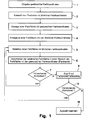
- FIG. 1 shows a flow diagram of a method for the selection of similar ones Colours.
- step 1 the color coordinates of a desired one are entered Colour. This can be, for example, the color coordinates of a color pattern act which a customer to specify the color of a new product has submitted. The task then is to create products with as similar as possible Determine colors from the manufacturer's range.
- step 2 a selection of products with similar color coordinates is made. This can be done on a database of the manufacturer with product information is accessed. This database also contains the color coordinates of the respective products. Products are then searched in this database, that have a color difference to the desired color coordinates that is smaller than a predetermined threshold.
- the Euclidean distance of the Color coordinates can be used in the color coordinate system.
- the Color coordinates can also include other product properties for selection be used. This is particularly the case when optimizing the range.
- step 3 a color area with the desired color coordinates is created displayed on a screen. This may require that the Color coordinates first in a used by the computer system in question Color coordinate system are implemented. Accordingly, for those in the Step 2 identified similar color coordinates in color areas on the screen displayed in step 4.
- step 5 the user selects one of the color areas with similar color coordinates for example, by clicking on a graphical user interface with the computer mouse.
- the selected color area is then over the Color surface "pushed" with the desired color coordinates, so that a color edge arises. Due to this color edge, the user can in step 7 judge particularly well whether the comparison colors are sufficiently similar or Not.
- step 5 If the user comes to the conclusion that there is no sufficient similarity is present, he goes back to step 5 to add another colored area to select similar color coordinates. However, the user puts one sufficient similarity, he uses a color pattern or in step 8 a color sample too. This access can be automatic or manual.
- the user can then immediately create a color sample of the color with the desired one Color coordinates with a color pattern of the similar one selected in step 5 Compare color.
- This direct visual comparison is preferably made under a standard light device in step 9.
- step 5 is repeated done to select another color. However, if the direct visual comparison reveals a sufficient similarity, so the Selection in step 10 are ended.
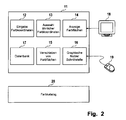
- FIG. 2 shows a block diagram of a corresponding computer system 11.
- the computer system 11 can be commercially available personnel Act computer.
- the computer system 11 contains a program module 12 for Input of color coordinates (cf. step 1 of FIG. 1), a program module 13 for Selection of similar color coordinates (cf. step 2 of FIG. 1) a program module 14 for the display of colored areas (cf. steps 3 and 4 of FIG. 1) and a Program module 15 for moving selected color areas (see step 6 of Figure 1).
- the computer system 11 has a graphical user interface 16 and a database 17.
- the database 17 can also be on another computer, for example a database server computer; in this case the computer system 11 has a corresponding connection to the external database.
- the computer system 11 also has a screen 18 and a computer mouse 19.
- color catalog 20 with color samples of the manufacturer's range.
- This color catalog 20 is either manually by the user or automatically accessed by computer system 11; in the latter case, that takes Computer system 11 the user to manually search for a desired color pattern in the color catalog 20.
- the desired color coordinates are first entered via the program module 12. Thereafter, the Program module 13 Products with similar color coordinates from the database 17 determined.
- the program module 14 then generates an output with color areas for the color with the desired color coordinates and color areas for the colors with the similar color coordinates determined by the program module 13. These colored areas are shown on the screen 18.
- the user can access these colored areas via the graphical user interface 16 access using the computer mouse 19, for example. If the user selects one the colored areas, for example by clicking on them with the computer mouse 19, see above this is automatically done by means of the program module 15 over the color area of the Color shifted with the desired color coordinates, so that a color edge for the comparison of the colors on the screen 18 arises.
- the user has a sufficient resemblance to that on the screen displayed colors, he can either manually depending on the embodiment access the color catalog 20 to manually select the corresponding color sample or this access to the color catalog 20 is done automatically by the Computer system 11 after the user has made a request to that Computer system has entered.
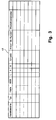
- FIG. 3 shows an embodiment of the database 17 for storing a Product range.
- Each line in the database 17 relates to a product of the range, which by its product name such as his trade name is marked.
- product name such as his trade name
- One or more of the properties of the product with the trade name are in the relevant line of the database entry of the database 17 is stored.
- These properties can be mechanical properties, for example of the product, processing properties and processing parameters of the product as well as commercial properties.
- mechanical Properties are ISO-ak (impact strength) and hardness.
- processing-related properties are MVR (flowability), Vicat (Heat resistance) and the shrinkage.
- commercial Properties of the product are the sales volume, the turnover, the number of Customers as well as the manufacturing costs.
- the color coordinates are used to coordinate the color of the plastic in a color space.
- the LAB coordinates of the CIELAB color space can be used for this to be used.
- the color there is also a color number, of color tolerances and, if necessary, of reflectance curves advantageous.
- the database 17 contains for each product in addition to the trade name the guy.
- the type specification identifies certain special properties of the commercial product concerned. A distinction is made between the types, for example between properties “good flow”, “heat stabilized”, “medium viscosity”, “additionally nucleated”, “weather-stabilized”, “higher viscosity”, “glass fiber content”, “flame retardant” etc.
- the database 17 of a plastic product range several contain hundreds to several thousand different products.
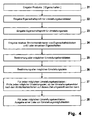
- FIG. 4 shows the determination of changeover candidates and changeover options for assortment adjustment, for example a plastic product range, as it is stored in the database 17 in FIG. 3.
- step 21 the products of the product range are entered with the properties assigned to the products.
- one is created Database for example in the form of database 17 in FIG. 3.
- a property profile for changeover candidates is entered.
- a "changeover candidate" is a product which for the assortment adjustment, that is, the conversion to another Product comes into question.
- the product in question must be a user definable Fulfill property profile.
- Such a property profile can consist of an or several properties.
- step 23 a property profile for conversion goals is entered.
- a product from the product range is referred to as the "conversion target" here which is a substitute for a changeover candidate.
- Conversion goal is therefore a product which one or more of the products of the Can replace the range because it is sufficiently similar to these products.
- This property profile can be defined by the user and contains one or more Properties that the product must meet in order to be classified as a conversion target become.
- step 24 relative similarity criteria between property blocks or entered individual properties that must be fulfilled in order for a Conversion candidate classified as sufficiently similar to a conversion target becomes.
- the property blocks combine several properties, such as Example the color coordinates or other properties that lead to a common one Belong to category.
- step 25 a database search is carried out in database 17 (cf. FIG. 3) the property profile of step 22 started as a search criteria to all possible change candidates of the database 17 to determine which the Property profile.
- step 26 a search for the Conversion goals made in the database 17, the property profile of step 23 is used as a search parameter.
- step 27 it is checked for one of the changeover candidates whether one of the Changeover goals that were determined in step 26, the similarity criteria of step 24 fulfilled. If so, it is changeover target concerned by an actual changeover option.
- Step 27 is with With respect to each of the changeover candidates determined in step 25, all the more so for each changeover candidate to none, one or more Changeover opportunities to come.
- These conversion options are, for example, in the form of a list for every changeover candidate. These lists preferably contain also the relevant properties of the conversion options to make a selection from the list for converting the conversion candidate to a product of Select list of changeover options.
- FIG. 5 An example of how the different colored areas are displayed on the screen 18 shows FIG. 5.
- a window 29 is displayed on the screen (cf. screen 18 in FIG. 2).
- a color area 30 is displayed in a central area of the window 29 corresponds to the desired color coordinates, i.e. depending on the application color desired by the customer or the changeover candidate for the Assortment optimization.
- color areas 31 to 35 are displayed around the periphery of the color area 30, each of a color with color coordinates similar to the color of the color surface 30 correspond. By clicking on one of the colored areas 31 to 35 the User select a similar color.
- This is then shifted from its basic position onto the color surface 30, so that a color edge is created.
- the user selects the color area 34, it is shifted onto the color surface 30, as is exemplified in FIG. 5 is shown. This creates a color edge 36 between the color areas 34 and 30.
- the color coordinates of the color area are shown in a display area 37 of the window 29 30 displayed; in a display area 38 the color coordinates are also the selected color area - in the example shown the color area 34 - is displayed. Furthermore, the Euclidean distance ⁇ E between the color coordinates the color area 30 and the color coordinates of the selected color area, that is the Color area 34 and the color area 30 are displayed. In addition, in the Display area 39 of window 29 shows the product identifiers of the comparison products displayed.
Landscapes
- Physics & Mathematics (AREA)
- Spectroscopy & Molecular Physics (AREA)
- General Physics & Mathematics (AREA)
- Engineering & Computer Science (AREA)
- Mathematical Physics (AREA)
- Theoretical Computer Science (AREA)
- Processing Or Creating Images (AREA)
Abstract
Description
- Figur 1
- ein Flussdiagramm einer ersten Ausführungsform eines erfindungsgemäßen Verfahrens,
- Figur 2
- ein Blockdiagramm einer Ausführungsform eines erfindungsgemäßen Computersystems,
- Figur 3
- eine schematische Darstellung der Datenbank des Computersystems der Figur 2,
- Figur 4
- ein Flussdiagramm einer Ausführungsform für die Sortimentsoptimierung,
- Figur 5
- eine Ausführungsform einer erfindungsgemäßen graphischen Benutzerschnittstelle.
- Computersystem
- 11
- Programmmodul
- 12
- Programmmodul
- 13
- Programmmodul
- 14
- Programmmodul
- 15
- Graphische Nutzerschnittstelle
- 16
- Datenbank
- 17
- Bildschirm
- 18
- Computer-Maus
- 19
- Farbkatalog
- 20
- Fenster
- 29
- Farbfläche
- 30
- Farbfläche
- 31
- Farbfläche
- 32
- Farbfläche
- 33
- Farbfläche
- 34
- Farbfläche
- 35
- Farbkante
- 36
- Anzeigebereich
- 37
- Anzeigebereich
- 38
- Anzeigebereich
- 39
Claims (25)
- Verfahren zur Auswahl von ähnlichen Farben mit folgenden Schritten:Eingabe von ersten Farbkoordinaten einer ersten Farbe,Auswahl von Farben mit zweiten Farbkoordinaten, die mit Bezug auf die ersten Farbkoordinaten ähnlich sind,Anzeige einer ersten Farbfläche für die erste Farbe auf einem Bildschirm,Anzeige von zweiten Farbflächen für die zweiten Farben auf dem Bildschirm,Selektion einer der zweiten Farbflächen,Verschiebung der selektierten zweiten Farbfläche in einen Bereich der ersten Farbfläche zur Erzeugung einer Farbkante.
- Verfahren nach Anspruch 1, wobei die erste Farbfläche in einem zentralen Bereich eines Anzeigefensters angezeigt wird und wobei die zweiten Farbflächen in einem peripheren Bereich um die erste Farbfläche angezeigt werden.
- Verfahren nach Anspruch 1 oder 2, wobei die ersten und zweiten Farbkoordinaten zu einem ersten Farbkoordinatensystem gehören und die Anzeige der ersten und zweiten Farbflächen auf dem Bildschirm auf einem zweiten Farbkoordinatensystem basiert und die ersten und zweiten Farbkoordinaten des ersten Farbkoordinatensystems in entsprechende erste und zweite Farbkoordinaten des zweiten Farbkoordinatensystems umgesetzt werden.
- Verfahren nach Anspruch 3, wobei es sich bei dem ersten Farbkoordinatensystem um das CIELAB-Koordinatensystem und bei dem zweiten Farbkoordinatensystem um das RGB-System handelt
- Verfahren nach einem der vorhergehenden Ansprüche 1 bis 4, wobei die Auswahl von zweiten Farben mit zweiten Farbkoordinaten, die mit Bezug auf die ersten Farbkoordinaten ähnlich sind, basierend auf einem Ahnlichkeitsmaß erfolgt, welches mit einem vorgegebenen Schwellwert verglichen wird.
- Verfahren nach Anspruch 5, wobei als Ähnlichkeitsmaß ein euklidischer Abstand zwischen den ersten und zweiten Farbkoordinaten in dem ersten Farbkoordinatensystem verwendet wird.
- Verfahren nach Anspruch 5 oder 6, wobei das Ähnlichkeitsmaß neben dem Abstand der Farbkoordinaten weitere Produkteigenschaften umfasst.
- Verfahren nach einem der vorhergehenden Ansprüche 1 bis 7, wobei die Selektion einer zweiten Farbfläche über eine graphische Benutzerschnittstelle erfolgt.
- Verfahren nach einem der vorhergehenden Ansprüche 1 bis 8, wobei ein Zugriff auf ein Farbmuster einer vom Nutzer als hinreichend ähnlich bewerteten zweiten Farbe erfolgt, um das Farbmuster mit einem Farbmuster der ersten Farbe unmittelbar zu vergleichen.
- Computerprogrammprodukt mit Programmmitteln zur Durchführung der folgenden Schritte:Eingabe von ersten Farbkoordinaten einer ersten Farbe,Auswahl von Farben mit zweiten Farbkoordinaten, die mit Bezug auf die ersten Farbkoordinaten ähnlich sind,Anzeige einer ersten Farbfläche für die erste Farbe auf einem Bildschirm,Anzeige von zweiten Farbflächen für die zweiten Farben auf dem Bildschirm,Selektion einer der zweiten Farbflächen,automatische Verschiebung der selektierten zweiten Farbfläche in einen Bereich der ersten Farbfläche zur Erzeugung einer Farbkante.
- Computerprogrammprodukt nach Anspruch 10, wobei die erste Farbfläche in einem zentralen Bereich eines Anzeigefensters angezeigt wird und wobei die zweiten Farbflächen in einem peripheren Bereich der ersten Farbfläche angezeigt werden.
- Computerprogrammprodukt nach Anspruch 10 oder 11, wobei die ersten und zweiten Farbkoordinaten zu einem ersten Farbkoordinatensystem gehören und die Anzeige der ersten und zweiten Farbflächen auf dem Bildschirm auf einem zweiten Farbkoordinatensystem basiert und die ersten und zweiten Farbkoordinaten des ersten Farbkoordinatensystems in entsprechende erste und zweite Farbkoordinaten des zweiten Farbkoordinatensystems umgesetzt werden.
- Computerprogrammprodukt nach Anspruch 12, wobei es sich bei dem ersten Farbkoordinatensystem um das CIELAB-Koordinatensystem und bei dem zweiten Farbkoordinatensystem um das RGB-System handelt.
- Computerprogrammprodukt nach einem der vorhergehenden Ansprüche 10 bis 13, wobei die Auswahl von zweiten Farben mit zweiten Farbkoordinaten, die mit Bezug auf die ersten Farbkoordinaten ähnlich sind, basierend auf einem Ähnlichkeitsmaß erfolgt, welches mit einem vorgegebenen Schwellwert verglichen wird.
- Computerprogrammprodukt nach Anspruch 14, wobei als Ähnlichkeitsmaß ein euklidischer Abstand zwischen den ersten und zweiten Farbkoordinaten in dem ersten Farbkoordinatensystem verwendet wird.
- Computerprogrammprodukt nach Anspruch 14 oder 15, wobei das Ähnlichkeitsmaß neben dem Abstand der Farbkoordinaten weitere Produkteigenschaften umfasst.
- Computerprogrammprodukt nach einem der vorhergehenden Ansprüche 10 bis 16, wobei die Selektion einer zweiten Farbfläche über eine graphische Benutzerschnittstelle erfolgt.
- Computersystem mitMitteln zur Eingabe von ersten Farbkoordinaten einer ersten Farbe,Mitteln zur Eingabe von zweiten Farben mit zweiten Farbkoordinaten, die mit Bezug auf die ersten Koordinaten ähnlich sind,Mitteln zur Anzeige einer ersten Farbfläche für die erste Farbe auf einem Bildschirm,Mitteln zur Anzeige von zweiten Farbflächen für die ausgewählten zweiten Farben auf dem Bildschirm,Mitteln zur Eingabe einer Selektion einer der zweiten Farbflächen,Mitteln zur automatischen Verschiebung der selektierten zweiten Farbfläche in einem Bereich der ersten Farbfläche zur Erzeugung einer Farbkante.
- Computersystem nach Anspruch 18, wobei die erste Farbfläche in einem zentralen Bereich eines Anzeigefensters angezeigt wird und wobei die zweiten Farbflächen in einem peripheren Bereich der ersten Farbfläche angezeigt werden.
- Computersystem nach Anspruch 18 oder 19, wobei die ersten und zweiten Farbkoordinaten zu einem ersten Farbkoordinatensystem gehören und die Anzeige der ersten und zweiten Farbflächen auf dem Bildschirm auf einem zweiten Farbkoordinatensystem basiert und die ersten und zweiten Farbkoordinaten des ersten Farbkoordinatensystems in entsprechende erste und zweite Farbkoordinaten des zweiten Farbkoordinatensystems umgesetzt werden.
- Computersystem nach Anspruch 20, wobei es sich bei dem ersten Farbkoordinatensystem um das CIELAB-Koordinatensystem und bei dem zweiten Farbkoordinatensystem um das RGB-System handelt
- Computersystem nach einem der vorhergehenden Ansprüche 18 bis 21, wobei die Auswahl von zweiten Farben mit zweiten Farbkoordinaten, die mit Bezug auf die ersten Farbkoordinaten ähnlich sind, basierend auf einem Ähnlichkeitsmaß erfolgt, welches mit einem vorgegebenen Schwellwert verglichen wird.
- Computersystem nach Anspruch 22, wobei als Ähnlichkeitsmaß ein euklidischer Abstand zwischen den ersten und zweiten Farbkoordinaten in dem ersten Farbkoordinatensystem verwendet wird.
- Computersystem nach Anspruch 22 oder 23, wobei das Ähnlichkeitsmaß neben dem Abstand der Farbkoordinaten weitere Produkteigenschaften umfasst.
- Computersystem nach einem der vorhergehenden Ansprüche 18 bis 24, wobei die Selektion einer zweiten Farbfläche über eine graphische Benutzerschnittstelle erfolgt.
Applications Claiming Priority (2)
| Application Number | Priority Date | Filing Date | Title |
|---|---|---|---|
| DE10231335 | 2002-07-11 | ||
| DE10231335A DE10231335A1 (de) | 2002-07-11 | 2002-07-11 | Verfahren zur Auswahl von ähnlichen Farben und Computersystem |
Publications (2)
| Publication Number | Publication Date |
|---|---|
| EP1394519A2 true EP1394519A2 (de) | 2004-03-03 |
| EP1394519A3 EP1394519A3 (de) | 2004-04-28 |
Family
ID=29761884
Family Applications (1)
| Application Number | Title | Priority Date | Filing Date |
|---|---|---|---|
| EP03015149A Withdrawn EP1394519A3 (de) | 2002-07-11 | 2003-07-04 | Verfahren zur Auswahl von ähnlichen Farben und entsprechendes Computersystem |
Country Status (3)
| Country | Link |
|---|---|
| US (1) | US20040047503A1 (de) |
| EP (1) | EP1394519A3 (de) |
| DE (1) | DE10231335A1 (de) |
Families Citing this family (3)
| Publication number | Priority date | Publication date | Assignee | Title |
|---|---|---|---|---|
| RU2297604C1 (ru) * | 2005-11-09 | 2007-04-20 | Общество с ограниченной ответственностью "Технолак" | Способ измерения цвета |
| RU2365881C1 (ru) * | 2007-12-18 | 2009-08-27 | Олег Валентинович Голосной | Гониоколориметрический способ измерения цвета глянцевых поверхностей |
| US11030778B2 (en) * | 2014-03-31 | 2021-06-08 | Healthy.Io Ltd. | Methods and apparatus for enhancing color vision and quantifying color interpretation |
Family Cites Families (6)
| Publication number | Priority date | Publication date | Assignee | Title |
|---|---|---|---|---|
| US5526285A (en) * | 1993-10-04 | 1996-06-11 | General Electric Company | Imaging color sensor |
| US5987168A (en) * | 1997-03-25 | 1999-11-16 | International Business Machines Corporation | System, method, and program for converting three dimensional colorants to more than three dimensional colorants |
| US6108442A (en) * | 1997-06-27 | 2000-08-22 | Minnesota Mining And Manufacturing Company | Characterization of color imaging systems |
| US6282312B1 (en) * | 1998-09-28 | 2001-08-28 | Eastman Kodak Company | System using one or more residual image(s) to represent an extended color gamut digital image |
| US6507824B1 (en) * | 1999-11-30 | 2003-01-14 | General Electric Company | Method and system for selecting product colors |
| US6563510B1 (en) * | 2000-03-30 | 2003-05-13 | Behr Process Corporation | Paint color matching and coordinating system |
-
2002
- 2002-07-11 DE DE10231335A patent/DE10231335A1/de not_active Withdrawn
-
2003
- 2003-07-04 EP EP03015149A patent/EP1394519A3/de not_active Withdrawn
- 2003-07-07 US US10/614,707 patent/US20040047503A1/en not_active Abandoned
Also Published As
| Publication number | Publication date |
|---|---|
| US20040047503A1 (en) | 2004-03-11 |
| EP1394519A3 (de) | 2004-04-28 |
| DE10231335A1 (de) | 2004-01-22 |
Similar Documents
| Publication | Publication Date | Title |
|---|---|---|
| DE69130509T2 (de) | Interaktive datenanzeige | |
| DE69615459T2 (de) | Benutzerschnittstelle für ein volltext-dokumentensuchsystem | |
| DE60100782T2 (de) | Programmiergerät für ein visuelles inspektionsprogramm | |
| DE69030550T2 (de) | Verfahren und System zur Erzeugung von Plänen für einen Herstellungsprozess | |
| DE60003246T2 (de) | Software Schnittstelle | |
| DE69701713T2 (de) | Editiervorrichtung für ein zusammengesetztes Bild | |
| DE69024107T2 (de) | Handhabung der Triggerbereiche auf einem Anzeigegerät | |
| DE102013217354B4 (de) | Kantenmessungs-videowerkzeug und schnittstelle mit automatischen parametersatzalternativen | |
| DE10144390A1 (de) | Visualisierung eines Vergleichsergebnisses mindestens zweier in Verzeichnisbäumen organisierter Datenstrukturen | |
| DE102011016691A1 (de) | Verfahren und System zur Unterstützung bei der Auswahl wenigstens eines Objektes aus einer Gruppe von gespeicherten Objekten | |
| DE102012219284A1 (de) | Interaktive vergleichende Analyse von Datenvisualisierungen mehrerer Objekte | |
| DE69708341T2 (de) | Verfahren und Vorrichtung zum Vergleichen von Geschosshülsen | |
| EP1154369A2 (de) | Verfahren zur zyklischen, interaktiven Bildanalyse sowie Computersystem und Computerprogramm zur Ausführung des Verfahrens | |
| EP1394519A2 (de) | Verfahren zur Auswahl von ähnlichen Farben und entsprechendes Computersystem | |
| DE69026668T2 (de) | Genaue Erkennung von Eingabemustern | |
| DE4414360C2 (de) | Interaktives Steuerungssystem mit mehreren Anzeigen und Verfahren zum Betreiben eines solchen | |
| DE1549893A1 (de) | Verfahren und Anordnung zur elektronischen Klassierung von Bildvorlagen | |
| DE212022000122U1 (de) | Stereoskopische Anzeigevorrichtung auf Basis einer Strahlenteilungsvorrichtung und Testvorrichtung | |
| DE112021002523T5 (de) | Analyseansichtsgerät, Anzeigesystem, Anzeigeverfahren und Anzeigeprogramm | |
| DE102006051772A1 (de) | Vorrichtung und Verfahren zur Bereitstellung und Darstellung von Relationen in einer Datenbank | |
| DE102019119852A1 (de) | Erzeugen nicht-semantischer Referenzdaten zur Positionsbestimmung eines Kraftfahrzeugs | |
| DE102007000627A1 (de) | Gekoppelte Darstellung von Flüssigchromatographie-Daten und Massenspektrometrie-Daten, insbesondere von Fragmentdaten | |
| DE2754596C2 (de) | ||
| DE102024102865A1 (de) | Verfahren zum Betreiben einer Bearbeitungseinrichtung für ein Kraftfahrzeugbauteil, Computerprogramm und elektronisch lesbarer Datenträger | |
| DE69016651T2 (de) | Benutzerschnittstelle für Datenverarbeitungsanlage und Datenverabeitungsanlage mit einer sochen Schnittstelle. |
Legal Events
| Date | Code | Title | Description |
|---|---|---|---|
| PUAI | Public reference made under article 153(3) epc to a published international application that has entered the european phase |
Free format text: ORIGINAL CODE: 0009012 |
|
| AK | Designated contracting states |
Kind code of ref document: A2 Designated state(s): AT BE BG CH CY CZ DE DK EE ES FI FR GB GR HU IE IT LI LU MC NL PT RO SE SI SK TR |
|
| AX | Request for extension of the european patent |
Extension state: AL LT LV MK |
|
| PUAL | Search report despatched |
Free format text: ORIGINAL CODE: 0009013 |
|
| AK | Designated contracting states |
Kind code of ref document: A3 Designated state(s): AT BE BG CH CY CZ DE DK EE ES FI FR GB GR HU IE IT LI LU MC NL PT RO SE SI SK TR |
|
| AX | Request for extension of the european patent |
Extension state: AL LT LV MK |
|
| RAP1 | Party data changed (applicant data changed or rights of an application transferred) |
Owner name: BAYER MATERIALSCIENCE AG |
|
| 17P | Request for examination filed |
Effective date: 20041028 |
|
| 17Q | First examination report despatched |
Effective date: 20041122 |
|
| AKX | Designation fees paid |
Designated state(s): DE ES FR IT NL |
|
| STAA | Information on the status of an ep patent application or granted ep patent |
Free format text: STATUS: THE APPLICATION IS DEEMED TO BE WITHDRAWN |
|
| 18D | Application deemed to be withdrawn |
Effective date: 20050603 |