EP1237368B1 - Système de traitement d'information - Google Patents
Système de traitement d'information Download PDFInfo
- Publication number
- EP1237368B1 EP1237368B1 EP02251301A EP02251301A EP1237368B1 EP 1237368 B1 EP1237368 B1 EP 1237368B1 EP 02251301 A EP02251301 A EP 02251301A EP 02251301 A EP02251301 A EP 02251301A EP 1237368 B1 EP1237368 B1 EP 1237368B1
- Authority
- EP
- European Patent Office
- Prior art keywords
- information
- program
- preset
- program information
- data
- Prior art date
- Legal status (The legal status is an assumption and is not a legal conclusion. Google has not performed a legal analysis and makes no representation as to the accuracy of the status listed.)
- Revoked
Links
Images


















Classifications
-
- H—ELECTRICITY
- H04—ELECTRIC COMMUNICATION TECHNIQUE
- H04H—BROADCAST COMMUNICATION
- H04H60/00—Arrangements for broadcast applications with a direct linking to broadcast information or broadcast space-time; Broadcast-related systems
- H04H60/09—Arrangements for device control with a direct linkage to broadcast information or to broadcast space-time; Arrangements for control of broadcast-related services
-
- H—ELECTRICITY
- H04—ELECTRIC COMMUNICATION TECHNIQUE
- H04N—PICTORIAL COMMUNICATION, e.g. TELEVISION
- H04N21/00—Selective content distribution, e.g. interactive television or video on demand [VOD]
- H04N21/40—Client devices specifically adapted for the reception of or interaction with content, e.g. set-top-box [STB]; Operations thereof
- H04N21/41—Structure of client; Structure of client peripherals
- H04N21/422—Input-only peripherals, i.e. input devices connected to specially adapted client devices, e.g. global positioning system [GPS]
- H04N21/4227—Providing Remote input by a user located remotely from the client device, e.g. at work
-
- H—ELECTRICITY
- H04—ELECTRIC COMMUNICATION TECHNIQUE
- H04N—PICTORIAL COMMUNICATION, e.g. TELEVISION
- H04N5/00—Details of television systems
- H04N5/76—Television signal recording
-
- H—ELECTRICITY
- H04—ELECTRIC COMMUNICATION TECHNIQUE
- H04H—BROADCAST COMMUNICATION
- H04H60/00—Arrangements for broadcast applications with a direct linking to broadcast information or broadcast space-time; Broadcast-related systems
- H04H60/27—Arrangements for recording or accumulating broadcast information or broadcast-related information
-
- H—ELECTRICITY
- H04—ELECTRIC COMMUNICATION TECHNIQUE
- H04H—BROADCAST COMMUNICATION
- H04H60/00—Arrangements for broadcast applications with a direct linking to broadcast information or broadcast space-time; Broadcast-related systems
- H04H60/68—Systems specially adapted for using specific information, e.g. geographical or meteorological information
- H04H60/72—Systems specially adapted for using specific information, e.g. geographical or meteorological information using electronic programme guides [EPG]
-
- H—ELECTRICITY
- H04—ELECTRIC COMMUNICATION TECHNIQUE
- H04H—BROADCAST COMMUNICATION
- H04H60/00—Arrangements for broadcast applications with a direct linking to broadcast information or broadcast space-time; Broadcast-related systems
- H04H60/76—Arrangements characterised by transmission systems other than for broadcast, e.g. the Internet
- H04H60/78—Arrangements characterised by transmission systems other than for broadcast, e.g. the Internet characterised by source locations or destination locations
- H04H60/80—Arrangements characterised by transmission systems other than for broadcast, e.g. the Internet characterised by source locations or destination locations characterised by transmission among terminal devices
-
- H—ELECTRICITY
- H04—ELECTRIC COMMUNICATION TECHNIQUE
- H04H—BROADCAST COMMUNICATION
- H04H60/00—Arrangements for broadcast applications with a direct linking to broadcast information or broadcast space-time; Broadcast-related systems
- H04H60/76—Arrangements characterised by transmission systems other than for broadcast, e.g. the Internet
- H04H60/81—Arrangements characterised by transmission systems other than for broadcast, e.g. the Internet characterised by the transmission system itself
- H04H60/82—Arrangements characterised by transmission systems other than for broadcast, e.g. the Internet characterised by the transmission system itself the transmission system being the Internet
- H04H60/83—Arrangements characterised by transmission systems other than for broadcast, e.g. the Internet characterised by the transmission system itself the transmission system being the Internet accessed over telephonic networks
- H04H60/85—Arrangements characterised by transmission systems other than for broadcast, e.g. the Internet characterised by the transmission system itself the transmission system being the Internet accessed over telephonic networks which are mobile communication networks
-
- H—ELECTRICITY
- H04—ELECTRIC COMMUNICATION TECHNIQUE
- H04H—BROADCAST COMMUNICATION
- H04H60/00—Arrangements for broadcast applications with a direct linking to broadcast information or broadcast space-time; Broadcast-related systems
- H04H60/76—Arrangements characterised by transmission systems other than for broadcast, e.g. the Internet
- H04H60/81—Arrangements characterised by transmission systems other than for broadcast, e.g. the Internet characterised by the transmission system itself
- H04H60/90—Wireless transmission systems
- H04H60/91—Mobile communication networks
-
- H—ELECTRICITY
- H04—ELECTRIC COMMUNICATION TECHNIQUE
- H04N—PICTORIAL COMMUNICATION, e.g. TELEVISION
- H04N21/00—Selective content distribution, e.g. interactive television or video on demand [VOD]
- H04N21/40—Client devices specifically adapted for the reception of or interaction with content, e.g. set-top-box [STB]; Operations thereof
- H04N21/41—Structure of client; Structure of client peripherals
- H04N21/4104—Peripherals receiving signals from specially adapted client devices
- H04N21/4126—The peripheral being portable, e.g. PDAs or mobile phones
- H04N21/41265—The peripheral being portable, e.g. PDAs or mobile phones having a remote control device for bidirectional communication between the remote control device and client device
-
- H—ELECTRICITY
- H04—ELECTRIC COMMUNICATION TECHNIQUE
- H04N—PICTORIAL COMMUNICATION, e.g. TELEVISION
- H04N21/00—Selective content distribution, e.g. interactive television or video on demand [VOD]
- H04N21/40—Client devices specifically adapted for the reception of or interaction with content, e.g. set-top-box [STB]; Operations thereof
- H04N21/43—Processing of content or additional data, e.g. demultiplexing additional data from a digital video stream; Elementary client operations, e.g. monitoring of home network or synchronising decoder's clock; Client middleware
- H04N21/432—Content retrieval operation from a local storage medium, e.g. hard-disk
- H04N21/4325—Content retrieval operation from a local storage medium, e.g. hard-disk by playing back content from the storage medium
-
- H—ELECTRICITY
- H04—ELECTRIC COMMUNICATION TECHNIQUE
- H04N—PICTORIAL COMMUNICATION, e.g. TELEVISION
- H04N21/00—Selective content distribution, e.g. interactive television or video on demand [VOD]
- H04N21/40—Client devices specifically adapted for the reception of or interaction with content, e.g. set-top-box [STB]; Operations thereof
- H04N21/43—Processing of content or additional data, e.g. demultiplexing additional data from a digital video stream; Elementary client operations, e.g. monitoring of home network or synchronising decoder's clock; Client middleware
- H04N21/433—Content storage operation, e.g. storage operation in response to a pause request, caching operations
- H04N21/4334—Recording operations
-
- H—ELECTRICITY
- H04—ELECTRIC COMMUNICATION TECHNIQUE
- H04N—PICTORIAL COMMUNICATION, e.g. TELEVISION
- H04N21/00—Selective content distribution, e.g. interactive television or video on demand [VOD]
- H04N21/40—Client devices specifically adapted for the reception of or interaction with content, e.g. set-top-box [STB]; Operations thereof
- H04N21/43—Processing of content or additional data, e.g. demultiplexing additional data from a digital video stream; Elementary client operations, e.g. monitoring of home network or synchronising decoder's clock; Client middleware
- H04N21/44—Processing of video elementary streams, e.g. splicing a video clip retrieved from local storage with an incoming video stream or rendering scenes according to encoded video stream scene graphs
- H04N21/4402—Processing of video elementary streams, e.g. splicing a video clip retrieved from local storage with an incoming video stream or rendering scenes according to encoded video stream scene graphs involving reformatting operations of video signals for household redistribution, storage or real-time display
- H04N21/440218—Processing of video elementary streams, e.g. splicing a video clip retrieved from local storage with an incoming video stream or rendering scenes according to encoded video stream scene graphs involving reformatting operations of video signals for household redistribution, storage or real-time display by transcoding between formats or standards, e.g. from MPEG-2 to MPEG-4
-
- H—ELECTRICITY
- H04—ELECTRIC COMMUNICATION TECHNIQUE
- H04N—PICTORIAL COMMUNICATION, e.g. TELEVISION
- H04N21/00—Selective content distribution, e.g. interactive television or video on demand [VOD]
- H04N21/40—Client devices specifically adapted for the reception of or interaction with content, e.g. set-top-box [STB]; Operations thereof
- H04N21/47—End-user applications
- H04N21/472—End-user interface for requesting content, additional data or services; End-user interface for interacting with content, e.g. for content reservation or setting reminders, for requesting event notification, for manipulating displayed content
- H04N21/47217—End-user interface for requesting content, additional data or services; End-user interface for interacting with content, e.g. for content reservation or setting reminders, for requesting event notification, for manipulating displayed content for controlling playback functions for recorded or on-demand content, e.g. using progress bars, mode or play-point indicators or bookmarks
-
- H—ELECTRICITY
- H04—ELECTRIC COMMUNICATION TECHNIQUE
- H04N—PICTORIAL COMMUNICATION, e.g. TELEVISION
- H04N5/00—Details of television systems
- H04N5/76—Television signal recording
- H04N5/78—Television signal recording using magnetic recording
- H04N5/782—Television signal recording using magnetic recording on tape
-
- H—ELECTRICITY
- H04—ELECTRIC COMMUNICATION TECHNIQUE
- H04N—PICTORIAL COMMUNICATION, e.g. TELEVISION
- H04N9/00—Details of colour television systems
- H04N9/79—Processing of colour television signals in connection with recording
Definitions
- the present invention relates to an information processing system, a portable information terminal apparatus, an information processing method, a program information providing apparatus, a program information providing method, a recording/reproducing apparatus, a recording/reproducing method, a program storage medium, and a program. More particularly, the invention relates for example to an information processing system, a portable information terminal apparatus, an information processing method, a program information providing apparatus, a program information providing method, a recording/reproducing apparatus, a recording/reproducing method, a program storage medium, and a program, whereby a user operating the portable information terminal apparatus such as a so-called PDA can preset a desired program to be recorded unattended.
- a user operating the portable information terminal apparatus such as a so-called PDA can preset a desired program to be recorded unattended.
- VTRs video tape recorders
- G code trademark of Gemstar Development Corp.
- This technology involves the user operating a remote commander to input a G code corresponding to the desired TV program, the G code being transmitted as an infrared ray signal to the VTR.
- the VTR decodes the G code carried by the signal to find out the date of broadcast, the name of the TV station concerned, the name of the TV program to be recorded, a program start time, and a program end time for analysis, and presets accordingly the TV program for recording.
- the method requires the user to look up a G code of up to eight digits corresponding to a desired TV program in the program list carried by the newspaper, magazines or other publications and to manually input the selected G code.
- a user operates a portable information terminal apparatus such as a PDA (Personal Digital Assistant) or a personal computer initially to access a TV program preset website offering TV program information (in the form of a TV program list). Browsing through the program information, the user searches for the desired TV program. Once the desired program is chosen, the user operates a preset button to download the relevant program information describing the name of the TV station concerned, the name of the TV program to be recorded, a program start time, and a program end time.
- a portable information terminal apparatus such as a PDA (Personal Digital Assistant) or a personal computer initially to access a TV program preset website offering TV program information (in the form of a TV program list). Browsing through the program information, the user searches for the desired TV program. Once the desired program is chosen, the user operates a preset button to download the relevant program information describing the name of the TV station concerned, the name of the TV program to be recorded, a program start time, and a program end time.
- a disadvantage of the recording preset system above is that users must keep displaying the TV program list on their PDA or personal computer screen after gaining access to the TV program preset website, until they find the programs they have been searching for.
- the search process is time-consuming and expensive in an online communication environment.
- GB 2343074 discloses an apparatus and method for recording broadcast material.
- a set-top box receives broadcast material, which can then be recorded onto a video storage device at the request of a user via a remote control unit.
- the remote control unit includes a display screen and a bi-directional communications interface for communicating with the set-top box.
- the display screen can be used to display a programme guide transmitted to the remote control unit from the set-top box. The user can select a programme for recording via the remote control unit.
- EP-A 1182871 which is only relevant to the present case under Article 54(3) EPC, discloses a broadcast program recording and playing apparatus that works with a home server and a portable terminal.
- Program information is stored in the home server and is transmitted to the portable terminal.
- the user of the portable terminal can select a program for recording, based on the provided program information, and transmit a command to the home server which interacts with the broadcast program recording and playing apparatus to complete the requested recording.
- the present invention has been made in view of the above circumstances and provides techniques involving a portable information terminal apparatus allowing users to acquire and record program information in advance so that they can later browse through the recorded program information as needed to look up a desired program offline and to preset unattended recording of the desired program.
- a program information providing apparatus provides stored program information to a portable information terminal apparatus. Based on the program information acquired from the program information providing apparatus, the portable information terminal apparatus establishes preset information for presetting a desired program to be recorded unattended and transmits the preset information thus established to the information processing apparatus. Given the preset information from the portable information terminal apparatus, the information processing apparatus controls the unattended recording of the program accordingly.
- program information about a desired program is first acquired and displayed.
- the user referring to the displayed program information, executes a suitable operational input to establish preset information for presetting the desired program to be recorded unattended.
- the preset information thus established is transmitted to the recording/reproducing apparatus.
- Fig. 1 is a schematic view showing a typical configuration of a TV program data acquisition system according to the invention.
- PDA 1-1 and PDA 1-2 are each a portable information terminal apparatus running on a Palm OS (trademark).
- the PDAs may be connected in a wired or wireless manner to a digital portable telephone 2, a personal computer 9, and a VCR (video cassette recorder) 13.
- the PDA 1-1 is wired to the digital portable telephone 2 via a communication module, not shown.
- the PDA 1-2 is wired to the personal computer 9 through a cradle 7 and is connected wirelessly to the VCR 13.
- the PDA 1-1 and PDA 1-2 may also be connected to any of the digital portable telephone 2, personal computer 9 and VCR 13 or may operate on a stand-alone basis.
- PDA 1-1 and PDA 1-2 will be referred to generically as the PDA 1 except where they need to be distinguished from one another.
- the cradle 7 is an interface device that connects the PDA 1 with the personal computer 9 to carry out what is called a hot sync process. This is the process of synchronizing files and data between two computers of different types, i.e., between the PDA 1 running on the Palm OS on the one hand and the personal computer 9 on the other hand. The synchronization is made possible regardless of dissimilar computer models.
- the cradle 7 interfaces with the PDA 1 through an RS-232C port and with the personal computer 9 through a serial bus interface or a USB (universal serial bus).
- the digital portable telephones 2 connect with a base station 3 (fixed wireless terminal) allocated to each of so-called cells suitably dividing the area where the communication service is offered.
- the base station 3 allows the digital portable telephones 2 to link up with a public communication network 4.
- the personal computer 9 is also connected to the public communication network 4.
- the base station 3 connects wirelessly with each digital portable telephone 2 (mobile wireless terminal) on a W-CDMA (Wideband-Code Division Multiple Access) basis.
- the wireless connection ensures high-speed communication of large quantities of data between the base station 3 and the digital portable telephone 2 at data transfer speeds of up to 2 Mbps over a 2-GHz frequency band.
- the base stations 3 are wired to the public communication network 4.
- the public communication network 4 is connected to the Internet 8 via an access server 6 of an Internet service provider.
- the network 4 is also connected to wired subscriber terminal equipment, computer networks, and local area networks such as those inside corporations, not shown.
- the digital portable telephone 2 is capable of exchanging large amounts of data at high speed with the base station 3 on a W-CDMA basis. Through the digital portable telephone 2 that it hooks up to, the PDA 1 can send and receive e-mail, browse simple-format websites, send and receive image data, and perform many other forms of data communication.
- the PDA 1-1 connects with a TV program information service provider 14 via the digital portable telephone 2, base station 3, public communication network 4, access server 6, and the Internet 8. Through the connection, the PDA 1-1 may request the service provider 14 to transmit TV program information.
- the transmitted program information allows the PDA user to look up a TV program list and preset accordingly the unattended recording of a desired program broadcast by a particular TV station.
- the personal computer 9 also connects with the TV program information service provider 14 via the public communication network 4, access server 6, and the Internet 8. Through the connection, the personal computer 9 can request the service provider 14 to transmit TV program information so that the PC user may likewise perform what the PDA user was shown carrying out above.
- the PDA 1-1 was described above as capable of connecting with the public communication network 4 via the digital portable telephone 2 and base station 3.
- the PDA 1-1 may gain access to the public communication network 4 through a PHS (Personal Handyphone System) terminal or a data card-type PHS terminal linked to a suitable base station that provides PHS call services.
- PHS Personal Handyphone System
- the PDA 1-1 When connected to the digital portable telephone 2, the PDA 1-1 obeys a simple-format transport protocol of 2 Mbps for connection to the base station 3 and in accordance with TCP/IP (Transmission Control Protocol/Internet Protocol) for communication from the base station 3 to the TV program information service provider 14 and a WWW (Word Wide Web) server, not shown, over the Internet 8.
- TCP/IP Transmission Control Protocol/Internet Protocol
- An administrative control unit 5 is connected to wired subscriber terminal equipment, to the personal computer 9 or to the digital portable telephone 2 via the public communication network 4. Through the connection, the administrative control unit 5 performs authentication, settlement of charges and other related processes with regard to the wired subscriber terminal equipment, personal computer 9 or digital portable telephone 2.
- the personal computer 9 admits signals from an antenna 17 that receives radio waves from TV stations. From the input signal, the personal computer 9 reproduces video and audio data (i.e., images and sounds of TV programs) and records them. The personal computer 9 further receives analog signals from a VCR 10 or digital data from a DVCR (digital video cassette recorder) 11 through a network 12 such as an IEEE (Institute of Electrical and Electronic Engineers) 1394 network. The personal computer 9 then reproduces and records images and sounds derived from the analog signals or digital data thus received.
- a VCR 10 or digital data from a DVCR (digital video cassette recorder) 11 through a network 12 such as an IEEE (Institute of Electrical and Electronic Engineers) 1394 network.
- the personal computer 9 then reproduces and records images and sounds derived from the analog signals or digital data thus received.
- the personal computer 9 supplies analog signals representing recorded sounds and images to the VCR 10 or feeds digital data constituting recorded sounds and images to the DVCR 11. Furthermore, the personal computer 9 receives TV program information from the TV program information service provider 14 over the Internet 8. Upon receipt of the program information, the personal computer 9 forwards the information to the PDA 1-2 or presets accordingly a TV program to be later recorded unattended.
- the TV program information service provider 14 provides the service of offering users TV program lists, detailed introductions to specific programs and other relevant information by way of the Internet 8.
- An internal database of the service provider 14 contains EPG (electronic program guide) information, TV program information used to preset unattended recording of particular TV programs from particular TV stations, advertisement information distributed along with the program information, and user information about registered users.
- the TV program information service provider 14 receives a message requesting transmission of TV program information pertaining to a specific date.
- the message is sent from the PDA 1-1 or personal computer 9 connected to the digital portable telephone 2.
- the service provider 14 transmits the program information to the PDA 1-1 or personal computer 9 through the digital portable telephone 2 and by way of the Internet 8, access server 6, and public communication network 4, for use in presetting unattended recording of a specific program from a specific TV station.
- the TV program information service provider 14 offers TV program information in pdb (Palm Database) format files to the personal computer 9 or to the PDA 1 in response to requests from the latter.
- Web-based TV program information offered by existing TV program service providers has been typically described in such page description languages as HTML (HyperText Markup Language), XML (extensible Markup Language) and Compact-HTML. while being fit for general use, the program information written in these languages tends to be bulky and structured hierarchically using tags. That means the data are flexible in terms of formats but require analysis before use following their retrieval. In its related-art form, the program information is thus not very suitable for browsing by the PDA 1.
- the pdb format is a general-purpose database format compatible with the Palm OS.
- Binary data and text data can be stored in mixed fashion in the pdb format that is dependent on Palm OS applications. Because pdb-format data are converted by a converter to a specific format, there is no need for data analysis. With no extra tag information to deal with, the amount of the data can be minimized.
- the problem above is bypassed by the TV program information service provider 14 accepting from each user a registration of desired TV channels in advance.
- the registered user is then supplied with program information about the desired channels.
- the TV program information service provider 14 issues a unique user ID to each user who has registered desired TV channels.
- the TV program information service provider 14 determines whether the user in question is a registered user. If the user is judged to be properly registered, the service provider 14 looks up the registered content applicable to the user ID, selects program information about the TV channels based on the registered content, and transmits the selected program information in keeping with a designated date. Upon receipt of a program information transmission request without a user ID, the TV program information service provider 14 transmits a relatively small quantity of terrestrial broadcast program information about the most-commonly-watched channels in keeping with a specified date.
- the TV program information service provider 14 can furnish users with desired TV program information that addresses multiple-channel broadcast services covering satellite broadcasts and cable TV distributions.
- the Internet 8 is connected with personal computers 16 owned by corporations 15 and with numerous WWW servers, not shown. While only one personal computer 16 of a corporation is shown connected to the Internet 8 in Fig. 1 , it is obvious that a plurality of personal computers 16 are in fact connected.
- the WWW servers, not shown, are accessed in accordance with TCP/IP by the PDA 1-1, by the personal computer 9, or by personal computers 16 owned by corporations 15.
- the corporation 15 in Fig. 1 is assumed to be a sponsor for advertisement attached to the program information offered by the TV program information service provider 14. Using a personal computer 16 typically over the Internet 8, the corporation 15 asks the service provider 14 to carry advertisement and is charged a fee for the advertisement.
- the corporation 15 may ask the TV program information service provider 14 to carry advertisement and be charged a fee for the advertisement by mail or by other suitable offline means.
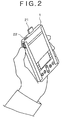
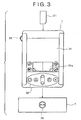
- Figs. 2 and 3 are provided to show what the PDA 1 typically looks like and how it is structured.
- Fig. 2 is a perspective view of the PDA 1 as gripped by a user's hand.
- Fig. 3 is a front view of the PDA 1.
- the PDA 1 is housed in an enclosure small enough to be gripped and handled by a single hand. At the top of the PDA 1 is a slot that accommodates a memory card 21 incorporating a semiconductor memory. Also located at the top is an infrared communication unit 22 that exchanges information with other devices.
- the PDA 1 further comprises a wireless LAN (local area network) communication unit 64, not shown (but is included in Fig. 5 ).
- a modem for connecting with the public communication network 4, and a USB port or an RS-232C port, not shown, for exchanging data with other devices.
- This PDA 1 is assumed to possess an RS-232C port.
- a display unit 31 keys 32, and a jog dial 33.
- the display unit 31 is made of a thinly formed display device such as a liquid crystal display which gives displays of icons, thumbnail images and text.
- a touch pad 31a In the lower part of the display unit 31 is a touch pad 31a that the user may push by fingertips or by a pen to enter relevant data or operation commands into the PDA 1.
- the keys 32 are operated by the user to input various commands into a CPU (central processing unit) 41 (see Fig. 4 ) of the PDA 1.
- a CPU central processing unit
- the jog dial 33 is rotated on its axis or pushed into the enclosure by the user selecting an icon, a thumbnail image or a text portion appearing on the display unit 31. With a plurality of icons displayed on the display unit 31, the user may rotate the jog dial 33 to reach a desired icon and then push the dial into the enclosure. The pushing action finalizes the selection of the currently displayed icon. If the finalized icon corresponds to an application program, that program is then started.
- a rotate-while-push action of the jog dial 33 may be arranged to correspond with commands different from those of ordinary dial rotating operations.
- a TV program list of a given channel shown on the display unit 31 turning the jog dial 33 may feed the program list of the same channel until a desired program name is reached; turning the jog dial 33 while pushing it may call up a TV program list of a different channel on the display unit 31.
- the PDA 1 is designed to be mountable on the cradle 7.
- the cradle 7 connects with the PDA 1 illustratively through the RS-232C interface.
- the PDA 1 automatically determines whether it is currently connected to the cradle 7.
- the cradle 7 has a hot sync button 35. With the PDA 1 mounted on the cradle 7, pushing the hot sync button 35 causes the PDA 1 and personal computer 9 to carry out the hot sync process to synchronize files and data therebetween.
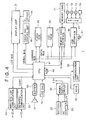
- Fig. 4 is a block diagram depicting a typical electrical structure of the PDA 1.
- the CPU 41 runs the operating system and performs various programs such as application programs, all retrieved from a flash ROM (read-only memory) 43 or an EDO-DRAM (extended data-out dynamic random-access memory) 44.
- various programs such as application programs, all retrieved from a flash ROM (read-only memory) 43 or an EDO-DRAM (extended data-out dynamic random-access memory) 44.
- the flash ROM 43 is made up of a flash memory, a variation of EEPROM (electrically erasable programmable read-only memory). Generally, the flash ROM 43 accommodates basically fixed data as part of those constituting programs and operation parameters used by the CPU 41.
- the EDO-DRAM 44 stores programs executed by the CPU 41, data needed for the program execution, and parameters varied as needed during the execution.
- a memory card interface 45 reads data from the memory card 21 loaded in the PDA 1 and writes data coming from the CPU 41 to the memory card 21.
- the memory card 21 is illustratively a Memory Stick (trademark), a variation of flash memory card developed by this applicant.
- the memory card 21 is composed of flash memory elements housed in a plastic case measuring 21.5 mm by 50 mm by 2.8 mm.
- the memory elements constitute an EEPROM, a nonvolatile read-only memory that is electrically erasable and programmable.
- EEPROM electrically erasable and programmable.
- the Memory Stick adopts a proprietary serial protocol that ensures the compatibility of the memory with a host device having undergone specification changes of a built-in flash memory for a larger storage capacity. Data are written to and read from the Memory Stick at high speeds of up to 1.5 MB/S and 2.45 MB/S respectively. A write-protect switch is provided to ensure high reliability of the memory.
- the PDA 1 can readily share data with other electronic devices through the card.
- a USB interface 46 In synchronism with a clock signal from an oscillator 47, a USB interface 46 admits data or programs from a drive 61, i.e., an attached USB device, and feeds data coming from the CPU 41 to the drive 61.
- the drive 61 reads data or programs from a magnetic disk 71, an optical disk 72, a magneto-optical disk 73, or a semiconductor memory 74 loaded into the drive as needed. The data or programs thus retrieved are fed to the CPU 41 or EDO-DRAM 44 through the USB interface 46. The drive 61 also writes data or programs to the magnetic disk 71, optical disk 72, magneto-optical disk 73, or semiconductor memory 74 that is loaded in the drive.
- the flash ROM 43, EDO-DRAM 44, memory card interface 45, and USB interface 46 are connected to the CPU 41 via an address bus and a data bus.
- the display unit 31 receives data from the CPU 41 through an LCD bus and displays images or characters represented by the received data.
- a touch pad control unit 48 receives data representative of the operation (e.g., coordinates of the touched location) from the display unit 31 or touch pad 31a and supplies a signal denoting the received data to the CPU 41 through the serial bus.
- An EL (electroluminescence) driver 49 drives electroluminescent elements at the back of a liquid crystal display portion of the display unit 31, controlling the brightness of displays on the display unit 31.
- the infrared communication unit 22 receives data from the CPU 41 through a UART (universal synchronous receiver-transmitter) and sends the received data as infrared ray signals to an external device, not shown.
- the unit 22 also receives infrared ray signals from the external device and transfers the received signals to the CPU 41.
- the UART also allows the PDA 1 to communicate with other devices.
- the wireless LAN communication unit 64 is used to communicate wirelessly with other devices (e.g., in a wireless communication setup based on Bluetooth that is a wireless communication scheme utilizing a 2.4-GHz frequency band). Data received from the CPU 41 are converted by a predetermined method into radio waves that are transmitted to other devices, not shown. Radio waves sent from another device are received by the wireless LAN communication unit 64 which in turn supplies the CPU 41 with data represented by the received radio waves.
- An audio reproduction unit 51 is made up of speakers and audio data decoding circuits. As such, the unit 51 decodes and audibly outputs audio data that were previously recorded by the PDA 1 or received from another device. Illustratively, the audio reproduction unit 51 is supplied with audio data from the CPU 41 via a buffer 50, reproduces the supplied data, and gives an audible output representative of the data.
- a power supply circuit 52 connected to a loaded battery 62 or an attached AC (alternating current) adapter 63, converts the supplied voltage into power at suitable levels. The power is then fed to the components ranging from the CPU 41 to the audio reproduction unit 51.
- a communication unit 53 is connected to the cradle 7 or to a communication module illustratively through the RS-232C interface. Typically, the communication unit 53 connects with the Internet 8 via the communication module and digital portable telephone 2. Using a suitable packetizing method, the communication unit 53 arranges data from the CPU 41 (e.g., e-mail) into packets that are sent to other devices over the Internet 8. Upon receipt of packets from another device over the Internet 8, the communication unit 53 retrieves data or programs from the packets and outputs what is retrieved to the CPU 41.
- the CPU 41 e.g., e-mail
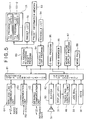
- Fig. 5 is a function block diagram of the PDA 1.
- a user may utilize such basic functions as address book, memo pad, e-mail and schedule list and may execute various applications called Palmware. All functions (i.e., programs) shown in Fig. 5 run under the Palm OS.
- a data communication program 81 controls communications that may take place between an application run by the CPU 41 (e.g., TV program recording preset program 83) on the one hand, and other devices on the other hand.
- the communications are effected through the communication unit 53, infrared communication unit 22, or wireless LAN communication unit 64.
- An I/O control program 82 furnishes a given application with signals representing operations or commands performed or entered by the user using the display unit 31, touch pad 31a, or keys 32. Based on the processing of the application executed by the CPU 41, the I/O control program 82 further controls output of data through the buffer 50 to the audio reproduction unit 51 for audio playback or to the display unit 31 for image display.
- a TV program recording preset program 83 writes to a preset information memory a date for which to acquire TV program information along with the program broadcast region of interest, remote commander mode, and/or user information including a member ID.
- the TV program recording preset program 83 downloads relevant program lists 101-1 and 101-2 from the TV program information service provider 14 and stores the downloaded lists into a TV program list memory 91.
- the user performs operations to select relevant program information from the program lists 101-1 and 101-2 held in the TV program list memory.
- the program information is established as preset information in a preset list 92 by the TV program recording preset program 83.
- the preset program 83 also causes the program list 101 stored in the TV program list memory 91, preset information established in the preset list 92, or user information held in a preset information memory 93, to be displayed on the display unit 31. Furthermore, in keeping with the user's operation, the TV program recording preset program 83 stores or establishes new information in the TV program list memory 91, preset list 92, or preset information memory 93 or updates what is stored or established in these memories or list.
- a schedule list program 84 is a schedule management program that allows the use to register his or her schedule in a schedule list along with start and end times of the events involved, their locations, and other details. Based on the user's operation, the schedule list program 84 writes new information to the schedule list 94 or updates what is stored therein. In addition, the schedule list program 84 allows the user to set an alarm that will be activated illustratively five or ten minutes before a specific start time so as to remind the user of the approaching event scheduled earlier.
- An e-mail program 85 is a software program that transmits and receives e-mail to and from the access server 6.
- a Web browser 86 is a software program that allows the client side to browse information provided by WWW servers. Between a WWW server and a WWW client, the Web browser 86 ensures communications based on appropriate communication protocols (HTTP and HTML). The Web browser 86 also ensures security in communication, provides reproduction of multimedia data such as audio data and moving picture data, and supports extended language (e.g., Java) enabling program transfer between the WWW server and the WWW client.
- HTTP and HTML appropriate communication protocols
- Java extended language
- a moving picture display program 87 under control of the I/O control program 82, performs data conversion and image processing causing the display unit 31 to display moving picture data retrieved from any one of the magnetic disk 71, optical disk 72, magneto-optical disk 73 and semiconductor memory 74 loaded in the drive 61.
- a memo pad 88 is a text editor program which, under control of the I/O control program 82, receives signals reflecting text data entered by the user operating the touch pad 31a. Text data are generated corresponding to the received signals and are displayed on the display unit 31 under control of the I/O control program 82.
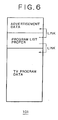
- the TV program list 101 is constituted by advertisement data, a program list proper, and program data.
- the advertisement data are data that describe an advertisement entrusted by each corporation 15.
- the advertisement data may include information such as a URL (Uniform Resource Locator) of the website run by the corporation 15 and an e-mail address through which the corporation 15 accepts inquiries from the public, or reference information allowing the public to send or receive the advertisement data using a protocol other than TCP/IP commonly adopted on the Internet.
- a URL Uniform Resource Locator
- advertisement data are sent to users possessing the PDA 1, it is conceivable more or less to identify a particular group of users to which particular advertisement data can be targeted. Illustratively, it is possible effectively to sell targeted PDA users on Palm OS applications, new mobile computers, and novel personal computers using suitable advertisements.
- the TV program list is a list of TV programs that are to be broadcast over specific channels on a particular date.
- the program data illustratively describe the cast of each program, program contents, and other detailed information associated with the program.
- the TV program list is linked to advertisement data and program data. That is, each program list is displayed together with a plurality of advertisements that are changed periodically.
- the program data about that program are displayed.
- the advertisement data contain information designating a display time during which the advertisement is allowed to appear continuously on the PDA 1.
- the TV program recording preset program 83 changes the advertisement data on display by referring to the display time information included in the data.
- the TV program recording preset program 83 may automatically set the advertisement data display time for, say, five seconds if the previously set time is anything other than three to seven seconds.
- each set of TV program information is furnished with a plurality of advertisements switched over time
- the business operator running the TV program information service provider 14 can gain more advertisement revenues than before.
- the advertisement data, program list proper, and program data making up the TV program list 101 may be provided with valid period information, update time limit information, and/or version information about the data involved.
- the program data are updated in one of two ways using such information.
- the TV program recording preset program 83 checks periodically or at certain events (e.g., upon writing of new data to the TV program list 101) whether or not the TV program list 101 has any expired data. If any expired data are detected, the preset program 83 attempts to update the data. Even if the updated data turn out to be identical to the old data, the data in the TV program list 101 are simply overwritten.
- the TV program recording preset program 83 is to write new data to the TV program list 101.
- the recording preset program 83 checks the data source (e.g., personal computer 9, another PDA 1, or TV program information service provider 14) to see whether the most recent information (updated information) is available. If the latest information is judged available, the program 83 obtains the information anew.
- the data source e.g., personal computer 9, another PDA 1, or TV program information service provider 14
- One of the two updating methods above may be adopted depending on the updating frequency or the size of the data involved.
- the data in the TV program list 101 may be furnished with valid period information eliminating any additional and wasteful communications. If an exact update time is uncertain, then it is better to furnish the data making up the TV program list 101 with data update time or version information whereby the latest information is made available reliably.
- TV program information (TV program list 101) is exchanged between the PDA 1-1 and the PDA 1-2 or between the PDA 1-2 and the personal computer 9, advertisement data are first to be transmitted ahead of the program list proper and program data. If advertisement data are deleted from the TV program list 101 or if program information excluding any advertisement data is written to the TV program list memory 91 as a TV program list 101, then the TV program recording preset program 83 will not display the program list 101 corresponding to the specified date, giving a warning message such as this: "The TV program list for this date cannot be displayed. Please download data again.”
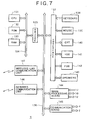
- Fig. 7 is a block diagram depicting a typical structure of the personal computer 9.
- a CPU 131 carries out various application programs under a basic OS (operating system).
- a ROM 132 generally accommodates basically fixed data as part of those constituting programs and operation parameters used by the CPU 131.
- a RAM 133 stores programs executed by the CPU 131 and parameters varied as needed during the program execution. These components are interconnected via a host bus 134 constituted by a CPU bus or a memory bus.
- a host bus 134 is connected via a bridge 135 to an external bus 136 such as a PCI (Peripheral Component Interconnect/Interface) bus.
- PCI Peripheral Component Interconnect/Interface
- a keyboard 138 is operated by the user entering various commands into the CPU 131.
- a mouse 139 is also operated by the user pointing to and making choices on the screen of a CRT (cathode ray tube) 140.
- the CRT 140 displays diverse kinds of information in text and images.
- a hard disk drive (HDD) 141 and a floppy disk drive (FDD) 142 drive a hard disk and a floppy disk respectively, writing programs and information to and from the disks for execution by the CPU 131.
- Speakers 143 provide audio reproduction.
- the components ranging from the keyboard 138 to the speakers 143 are connected to an interface 137.
- the interface 137 is connected to the CPU 131 via the external bus 136, bridge 135, and host bus 134.
- An image processing board 144 under control of the CPU 131 generates video and audio data based on video and audio analog signals from the antenna 17 or VCR 10 or on the basis of video and audio digital data coming from the DVCR 11 through the network 12.
- the video and audio data thus generated are output to the hard disk drive 141 via the external bus 136 and interface 137.
- the image processing board 144 also admits video and audio data retrieved from the hard disk drive 141 via the external bus 136 and interface 137. In turn, the image processing board 144 generates analog signals representing the input video and audio data before supplying the generated signals to the VCR 10, or produces digital data denoting the input video and audio data so as to feed the produced data to the DVCR 11 over the network 12.
- the image processing board 144 is connected to the CPU 131 via the external bus 136, bridge 135, and host bus 134.
- a communication board 145 is a device that ensures connection with the public communication network 4 or with the cradle 7.
- the communication board 145 is constituted by an Ethernet board or the like and connected to the CPU 131 through the external bus 136, bridge 135, and host bus 134.
- An infrared communication unit 146 receives infrared ray signals sent illustratively from the PDA 1. The received signals are output to the CPU 131 via the external bus 136, bridge 135, and host bus 134. Given signals from the CPU 131, the infrared communication unit 146 coverts them into infrared ray signals for output to the outside.
- a wireless LAN communication unit 147 receives radio waves sent illustratively from the PDA 1, converts the received radio waves by a suitable method into data compatible with the CPU 131, and outputs the data to the CPU 131 through the external bus 136, bridge 135, and host bus 134.
- the wireless LAN communication unit 147 also converts signals from the CPU 131 into radio waves for output to the outside.
- a 1394 interface 151 structured to comply with IEEE 1394 criteria, is connected to the network 12.
- the 1394 interface 151 receives video and audio digital data in DVCR format from the DVCR 11 and feeds the received data to a DV (digital video) data interface 152.
- the 1394 interface 151 supplies the DVCR 11 with video and audio digital data in DVCR format sent from the DV data interface 152.
- the supply of the digital data to the DVCR 11 is effected in accordance with the IEEE 1394-compatible protocol.
- the DV data interface 152 outputs to a DV data compression/decompression circuit 153 video and audio digital data in DVCR format coming from the 1394 interface 151 or from a digital selector 157 (such as 4:1:1 decompressed digital data).
- the DV data interface 152 also outputs to the 1394 interface 151 video and audio digital data in DVCR format coming from the DV data compression/decompression circuit 153, and supplies the digital selector 157 with decompressed audio and video digital data sent from the DV data compression/decompression circuit 153.
- the DV data compression/decompression circuit 153 converts video and audio digital data in DVCR format from the DV data interface 152 into decompressed video and audio digital data for output to the DV data interface 152.
- the compression/decompression circuit 153 also converts decompressed video and audio digital data from the DV data interface 152 into compressed video and audio digital data in DVCR format for output to the DV data interface 152.
- a tuner 154 admits RF (radio frequency) signals from the antenna 17 and outputs the corresponding video and audio analog signals on a given channel to an analog selector 155.
- the analog selector 155 selects the video and audio analog signals from any one of the tuner 154, VCR 10, and a D/A (digital/analog) conversion circuit 161.
- the selected signals are output to either an A/D (analog/digital) conversion circuit 156 or to the VCR 10.
- the A/D conversion circuit 156 converts the video and audio analog signals from the analog selector 155 into digital data for output to the digital selector 157.
- the digital selector 157 selectively admits the video and audio digital data from any one of the DV data interface 152, A/D conversion circuit 156, and an MPEG decoder 160.
- the selected digital data are output to a bridge 159 as well as to the DV data interface 152, to an MPEG encoder 158, or to the D/A conversion circuit 161.
- the MPEG encoder 158 converts the video and audio digital data sent from the digital selector 157 into compressed MPEG-format digital data for output to the bridge 159.
- the MPEG encoder 158 further converts scene switching images into still pictures for output to the bridge 159.
- the bridge 159 outputs decompressed video and audio digital data from the digital selector 157 to the CRT 140 by way of the external bus 136 and interface 137 of the personal computer 9 to which the image processing board 144 is attached.
- the bridge 159 also outputs MPEG-format video and audio digital data from the MPEG encoder 158 to the hard disk drive 141 or to the CPU 131 via the external bus 136 of the personal computer 9 to which the image processing board 144 is attached.
- the bridge 159 receives MPEG-format video and audio digital data from the hard disk drive 141 of the personal computer 9 via the external bus 136 and outputs the received data to the MPEG decoder 160.
- the MPEG decoder 160 converts the MPEG-format video and audio digital data from the bridge 159 into decompressed video and audio digital data.
- the decompressed data are output to the digital selector 157.
- the D/A conversion circuit 161 converts video and audio digital data from the digital selector 157 into analog signals.
- the converted analog signals are output to the analog selector 155.
- the above-described processes performed by the MPEG encoder 158 and MPEG decoder 160 may be taken over by the CPU 131 performing suitable programs.
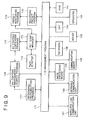
- Fig. 9 is a function block diagram of the personal computer 9.
- an I/O management program 171 provides control on furnishing a given application with signals denoting the operations or commands input by the user operating the keyboard 138 or mouse 139. Using its control capability, the I/O management program 171 outputs to the infrared communication unit 146 the data derived from the processes performed by various applications so that the communication unit 146 may transmit infrared ray signals representing the derived data to other devices; the program 171 may alternatively output the relevant data to the wireless LAN communication unit 147 so that the latter may output radio waves carrying the data to other devices.
- the I/O management program 171 outputs video data to the image processing board 144 for image processing, sends audio data to the speakers 143 for audio reproduction, and feeds image data to the CRT 140 for image display.
- the management program 171 further controls supply of data to the hard disk drive (HDD) 141 to record the data thereto.
- HDD hard disk drive
- a hot sync manager 172 is a program that permits exchanges of information with the PDA 1 running on the Palm OS.
- the program is designed to synchronize files and data between two different computers, i.e., between the PDA running on the Palm OS and the personal computer 9. The synchronization is effected regardless of dissimilar computer models.
- a Palm desktop 173 is a program that allows the personal computer 9 to share information with the PDA 1 running on the Palm OS, the information having been exchanged under control of the hot sync manager 172.
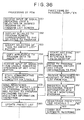
- a preset monitoring program 174 monitors presetting of TV programs for unattended recording based on TV program information received from the PDA 1 by means of the hot sync manager 172, as will be described later with reference to Fig. 36 , or on the basis of recording preset information established by a recording preset program 178, to be described later.
- An AV content conversion program 175 is used to convert AV content (i.e., recorded TV program data) held on the HDD 141 in a common image format such as MPEG into data of a format compatible with a portable terminal apparatus with limited image processing capability, such as the PDA 1.
- the conversion is performed prior to transmission of the AV content to the PDA 1 through the processing by the hot sync manager 172, as will be described later with reference to Fig. 36 .
- An AV content management/search program 176 receives a signal representing the user's operation or a command from another device under control of the I/O management program 171, and searches the hard disk drive 141 for the applicable AV content based on the received signal. The program 176 then outputs the retrieved content to the AV content conversion program 175 that is requested for data conversion or to a recording/reproduction program 177 which is solicited to provide content reproduction.
- the recording/reproduction program 177 is a program that reproduces the AV content searched for and retrieved by the AV content management/search program 176.
- the recording preset program 178 is a program that receives a signal representing the user's operation or a command from another device under control of the I/O management program 171, and presets unattended recording of a desired TV program over a specific broadcast channel on the basis of the received signal.
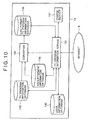
- Fig. 10 is a block diagram indicating a typical structure of the TV program information service provider 14 included in Fig. 1 .
- a TV program information server 191 controls a converter 193 and a charge server 197 based on information received over the Internet 8.
- the server 191 also stores information into a TV program information database 192, a pdb-format TV program information database 194, a user information database 195, and an advertisement information database 196.
- the TV program information server 191 searches for and retrieves specific pieces of information from the stored information as designated.
- the TV program information database 192 Stored in the TV program information database 192 in a suitable database format is EPG information for retrieving particular program information, as well as TV program information for use in presetting unattended recording of a desired TV program furnished by a specific TV broadcasting station.
- the TV program information comprises at least the TV channel of each TV program, the date of its broadcast, the name of the program, and the start and end times of the program broadcast, along with detailed information associated with the TV program in question.
- the detailed program information may include, as needed, a URL of the website run by the production company having produced each TV program and an e-mail address through which the company accepts inquiries from the public.
- the advertisement information database 196 stores in a suitable database format information about advertisements sent from corporations 15.
- the advertisement information includes, as needed, a URL of the website run by the sponsor (e.g., corporation 15) of each advertisement and an e-mail address through which each sponsor accepts inquiries from the public.
- the advertisement information database 196 has its advertisement information furnished with URLs and e-mail addresses. The information is sent and received in accordance with TCP/IP commonly used on the Internet or by use of any other suitable protocol.
- the converter 193 under control of the TV program information server 191 reads TV program information from the TV program information database 192 and advertisement information from the advertisement information database 196, and converts the retrieved information into pdb-format data. Following the conversion, the pdb-format advertisement information is attached to the TV program information which is then stored into the pdb-format TV program information database 194.
- the user information database 195 contains user-related information including user IDs and user-registered channels. Each user ID is associated with the channel information needed by the user identified by the user ID.
- the charge server 197 is used to settle charges on the corporations 15 for advertisements they sponsor.
- the TV program information server 191 receives a TV program information transmission request over the Internet 8. If the received transmission request is judged to be coming from the TV program data acquisition system embodying the invention, then the server 191 selectively retrieves from the pdb-format TV program information database 194 user-requested TV program information along with related advertisement information based on the information included in the transmission request, and sends the retrieved information to the user concerned.
- the TV program information server 191 retrieves registered information about the user identified by the user ID from the user information database 195 and, based on the registered information thus retrieved and on the date information included in the transmission request, selectively retrieves user-requested TV program information along with related advertisement information from the pdb-format TV program information database 194. The information retrieved by the server 191 is transmitted to the user in question.
- the TV program information server 191 may alternatively carry out a related-art Web-based TV program information providing process. That is, if the received TV program information transmission request turns out to be a program information transmission request described in page description language such as HTML, then the TV program information server 191 retrieves user-requested TV program information from the TV program information database 192 on the basis of the information included in the request. The retrieved information is converted to data of a specific format such as HTML before being sent to the user involved.
- the TV program information service provider 14 may operate in one of two ways.
- the information service provider 14 may transmit pdb-format TV program information to users through the use of the TV program information server 191 offering the related-art Web-based program information feeding service; the service provider 14 may also provide the pdb-format TV program information alone to users as described.
- the TV program information server 191 is connected via the Internet 8 to the personal computer 16 owned by each corporation 15.
- the connection allows the information server 191 to accept requests for carrying advertisements from the corporation 15 and to register advertisement information with the advertisement information database 196.
- the charge server 197 has calculated charges on the corporations 15 for the advertisements they sponsor and has sent the results of the calculations to the TV program information server 191, the server 191 in turn transmits the calculated charges to the personal computers 16 of the corporations 15 for settlement.
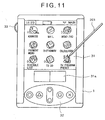
- Fig. 11 is a schematic view of an initial screen that appears on the PDA 1 when it is powered.
- the display unit 31 displays icons representing the programs described above with reference to Fig. 5 .
- the user may select any one of the icons with a pen 201 to start the desired program.
- the TV program recording preset program 83 is now started (by the user selecting the icon marked "TV Program Preset").
- a window 211 appears carrying a message prompting the user to acquire TV program information.
- the user selects an OK button 212 to proceed with operations to acquire TV program information.
- the PDA 1 may acquire TV program information from the TV program information service provider 14 by one of two methods.
- the PDA 1 may connect directly with the TV program information service provider 14 via the digital portable telephone 2, base station 3, public communication network 4, access server 6, and the Internet 8.
- the PDA 1 may be connected to the personal computer 9 by means of the cradle 7.
- the personal computer 9 then connects with the TV program information service provider 14 through the public communication network 4, access server 6 and the Internet 8, and acquires TV program information from the service provider 14.
- the PDA in turn obtains the TV program information from the personal computer 9 through the cradle 7.
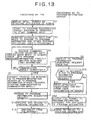
- Described below with reference to the flowchart of Fig. 13 is how the PDA 1 acquires TV program information by directly connecting with the TV program information service provider 14 via the digital portable telephone 2, base station 3, public communication network 4, access server 6, and the Internet 8.
- the flowchart specifically outlines the workings of the PDA 1-1 and the TV program information server 191 in the TV program information service provider 14.
- step S1 of Fig. 13 the Palm OS run by the CPU 41 of the PDA 1-1 detects application of power, and accordingly displays on the display unit 31 the initial screen shown in Fig. 11 .
- step S2 the Palm OS starts the TV program recording preset program 83 in response to a command input for program start-up (from the user selecting the icon marked "TV Program Preset" on the screen of Fig. 11 ) . If no TV program list is currently held in the TV program list memory 91, the display screen of Fig. 12 appears.
- step S3 the TV program recording preset program 83 writes to the preset information memory 93 a scheduled date for which to acquire TV program information and other settings reflecting the user's operations under control of the I/O control program 82.
- the settings are made as described below with reference to Figs. 14 through 19 .
- pushing the OK button 212 on the screen of Fig. 12 causes a TV program information management screen to appear as shown in Fig. 14 .
- This management screen contains a display area 221 in which the scheduled date for which to acquire TV program information is displayed, an OK button 222, a NEW button (for new registration), a CHANGE button 224, a DELETE button 225, and a tag 226 to be selected for calling up a menu.
- the OK button 222 is selected when what has been established on the screen is judged correct. Selecting the OK button causes the display screen preceding the TV program information management screen to reappear on the display unit 31.
- the NEW button 223 is selected to register a newly scheduled date for which to acquire TV program information.
- the CHANGE button 224 is selected when any established date for which to acquire TV program information needs to be changed.
- the DELETE button 225 is selected to delete any such established date for TV program information acquisition. Where scheduled dates for which to acquire TV program information are displayed in the display area 221, selecting any one of the dates and activating the DELETE button 225 deletes the information about the selected date.
- Selecting the tag 226 causes a TV program list tag 231 and an option tag 232 to appear as shown in Fig. 15 . If the option tag 232 is selected, a drop-down list box 233 is displayed.
- the setting screen includes a region setting list box 241, a remote commander mode setting box 242, a check box 243, a text box 244, another text box 245, an OK button 246, and a CANCEL button 247.
- the region setting list box 241 is used to set the region for which to acquire TV program information.
- the remote commander mode setting box 242 is used to set remote commander mode.
- the check box 243 is either checked or left unchecked to determine whether or not to reflect preset information in the schedule list 94 that is established under control of the schedule list program 84.
- the text box 244 is used to set an inserted keyword by which to distinguish a program recording preset schedule from other schedules when the preset information is to be reflected in the schedule list 94.
- the text box 245 is used to establish a member ID granted beforehand to each user who registered with the TV program information service provider 14.
- the OK button 246 is selected when the settings in the boxes ranging from the region setting list box 241 to the text box 245 are judged correct.
- the CANCEL button 247 is selected if it is desired to cancel the settings made so far.
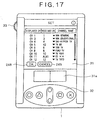
- the channel setting screen indicates in tabular form displayed channels (CHs), received channels, and channel names (i.e., station names). Details of these indications may be changed as needed depending on the selected region.
- the channel setting screen further includes an OK button 248 and a CANCEL button 249. The OK button 248 is selected when the channel settings are judged correct, and the CANCEL button 249 is selected to cancel the channel settings made so far.
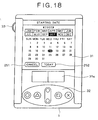
- a scheduled date setting screen for TV program information acquisition of Fig. 18 is displayed for the user to make a new registration.
- the user first calls up a calendar of a desired month by selecting the month and the year. In the calendar, the user chooses a desired date for which to acquire TV program information. If the user wants to obtain today's TV program information, selecting a TODAY button 252 generates a command designating this day as the date for which TV program information needs to be acquired. Selecting a CANCEL button 251 terminates the operation.
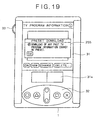
- a window 255 appears carrying a message such as "Download of any past TV program information cannot be preset," as shown in Fig. 19 .
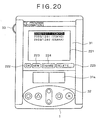
- the dates selected by the user are indicated in the display area 221 as shown in Fig. 20 and are stored into the preset information memory 93. In the state of Fig. 20 , only the dates are set for TV program information acquisition; the program information has yet to be obtained.
- the date in question is selected from the scheduled date list in the display area 221, and the CHANGE button 224 is selected. This causes a change window 261 of Fig. 21 to appear.
- the change window 261 includes a date setting box 262 in which to change the scheduled date, a region setting list box 263 in which to change the established region, an OK button 264 that is selected when the changes made are judged correct, and a CANCEL button 265 selected when it is desired to abandon the changes.
- the OK button 264 in the change window 261 the date and the region established in the window are stored into the preset information memory 93.
- the user may select a date or dates for which TV program information is desired to be obtained directly.
- the TV program information about the selected date or dates is acquired by connecting with the TV program information service provider 14 directly through the digital portable telephone 2, base station 3, public communication network 4, access server 6, and the Internet 8.
- step S4 the recording preset program 83 receives commands for selecting dates for which to acquire TV program information directly and for acquiring that information on the basis of the user's operations.
- the user when acquiring TV program information directly, the user first selects a date or a plurality of dates from among the scheduled dates for TV program information acquisition displayed on the TV program information management screen in Fig. 20 . The user then selects the tag 226 to get the TV program list tag 231 and option tag 232 displayed, and selects the TV program list tag 231.
- the TV program recording preset program 83 displays a drop-down list box 268 shown in Fig. 22 . It is assumed here that the user will select an "Acquire information" item in the box 268 to acquire TV program information for a desired date, by connecting with the TV program information service provider 14 through the digital portable telephone 2, base station 3, public communication network 4, access server 6, and the Internet 8. The connection will be established and the information obtained illustratively as described below.
- step S5 of Fig. 13 the TV program recording preset program 83 checks to see whether a communication module is attached to establish a link between the PDA 1-1 on the one hand, and the digital portable telephone 2, a PHS, a data card type PHS, or like connective device on the other hand for connection with the public communication network 4. The check is made based on the information entered under control of the data communication program 81.
- step S6 is reached in which the TV program recording preset program 83 generates an error message informing the user of the absence of the module.
- the message is output to the I/O control program 82 which in turn forwards the message to the display unit 31 for display. Control is then returned to step S4 and subsequent steps are repeated.
- step S7 the TV program recording preset program 83 starts connecting with the TV program information server 191 of the TV program information service provider 14 through the digital portable telephone 2, base station 3, public communication network 4, access server 6, and the Internet 8 under control of the data communication program 81.
- step S8 the TV program recording preset program 83 transmits a user-entered TV program information acquisition request (including the region and the date(s) for which to obtain the program information, or the date(s) and the user ID registered beforehand with the TV program information service provider 14) to the TV program information server 191 of the TV program information service provider 14.
- a user-entered TV program information acquisition request including the region and the date(s) for which to obtain the program information, or the date(s) and the user ID registered beforehand with the TV program information service provider 14
- step S9 the TV program information server 191 receives the TV program information acquisition request from the PDA 1-1.
- step S10 the server 191 checks to see whether any user ID is included in the received request.
- step S11 the TV program information server 191 reads from the user information database 195 the registered content corresponding to the date(s) and the user ID included in the received request.
- Step S12 is reached either at the end of step S11, or if in step S10 the user ID is not judged included in the received TV program information acquisition request.
- the TV program information server 191 retrieves the TV program information corresponding to the input TV program information acquisition request (including the region and the date(s) for which to obtain the program information, or the date(s) and the user ID registered beforehand with the TV program information service provider 14) from the pdb-format TV program information database 194.
- the server 191 transmits the retrieved TV program information to the PDA 1-1 that sent the information acquisition request earlier.
- step S14 the TV program recording preset program 83 of the PDA 1 receives the TV program information sent from the TV program information server 191 in step S13 under control of the data communication program 81. The received information is stored into the TV program list memory 91.
- step S15 the TV program recording preset program 83 severs the connection with the Internet 8 and terminates the processing.
- the processing described in reference to the flowchart of Fig. 13 stores the TV program information for the date desired by the user into the TV program list memory 91 in the PDA 1-1.
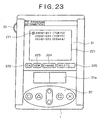
- the date whose TV program information has been recorded to the TV program list memory 91 is furnished with an icon 271 indicating that the information has been obtained already, as shown in Fig. 23 .
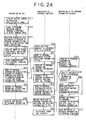
- Described below with reference to the flowchart of Fig. 24 is what takes place in a setup where the PDA 1-2 connects with the personal computer 9 via the cradle 7; where the personal computer 9 gains access to the TV program information service provider 14 through the public communication network 4, access server 6, and the Internet 8 in order to acquire TV program information from the service provider; and where the PDA 1-2 obtains the TV program information from the personal computer 9.
- the flowchart outlines the workings of the PDA 1-2, the personal computer 9, and the TV program information server 191 of the TV program information service provider 14.
- Steps S21 through S23 of Fig. 24 are equivalent to steps S1 through S3 in Fig. 13 .
- step S24 of Fig. 24 the TV program recording preset program 83 under control of the data communication program 81 receives through the communication unit 53 the input of a signal indicating that the hot sync button 35 is pushed on the cradle 7.
- step S25 the TV program recording preset program 83 starts communicating with the personal computer 9 via the cradle 7.
- step S26 the CPU 131 of the personal computer 9 activates the hot sync manager 172 to interface with the Palm desktop 173.
- the hot sync manager 172 illustratively transmits a TV program recording history and other information to the PDA 1.
- the hot sync process is a process that synchronizes files and data between two different computers, i.e., between the PDA running on the Palm OS and the personal computer 9.
- the synchronization is effected regardless of dissimilar computer models.
- step S28 the TV program recording preset program 83 of the PDA 1-2 transmits a TV program information acquisition request to the personal computer 9, and receives a TV program recording history and other information therefrom in return.
- step S29 the recording preset program 83 writes to the schedule list 94 the TV program recording history and other information sent from the personal computer 9 in step S27.
- step S30 the hot sync manager 172 receives the TV program information acquisition request from the PDA 1-2 through the cradle 7.
- step S31 the hot sync manager 172 under control of the I/O management program 171 connects with the TV program information service provider 14 over the Internet 8.
- step S32 the hot sync manager 172 sends to the TV program information service provider 14 the TV program information acquisition request received in step S30.
- step S33 the TV program information server 191 of the TV program information service provider 14 receives the TV program information acquisition request from the personal computer 9 over the Internet 8.
- step S34 the server 191 checks to see whether the received request contains any user ID.
- the user ID is unique identification information granted to each user of the PDA 1-2 who in advance registered detailed information such as desired TV channels for program information acquisition with the TV program information service provider 14 (i.e., the ID is given to the user whose detailed information about desired TV programs is stored in the user information database 195 described above with reference to Fig. 10 ).
- the user ID is established on the setting screen discussed above by referring to Fig. 16 .
- step S34 the TV program information server 191 judges that a user ID is included in the received TV program information acquisition request, then step S35 is reached.
- step S35 the server 191 reads the registered content corresponding to the user ID from the user information database 195.
- Step S36 is reached either at the end of step S35, or if in step S34 the TV program information server 191 judges that no user ID is contained in the received TV program information acquisition request.
- the TV program information server 191 searches for and retrieves the TV program information specified by the user-requested date, region, channel, etc., from the pdb-format TV program information database 194.
- step S37 the TV program information server 191 transmits the TV program information retrieved in step S36 to the personal computer 9 over the Internet 8.
- step S38 the I/O management program 171 of the personal computer 9 receives the TV program information from the TV program information service provider 14 via the Internet 8.
- the hot sync manager 172 sends the received TV program information to the PDA 1-2 through the cradle 7 under control of the I/O management program 171.
- step S39 the I/O management program 171 of the personal computer 9 disconnects from the Internet 8.
- step S40 the TV program recording preset program 83 of the PDA 1-2 receives the TV program information from the personal computer 9 through the cradle 7, writes the received information to the TV program list memory 91, and terminates the processing.
- any user who does not possess the digital portable telephone 2 can still acquire TV program information through the use of the personal computer 9.
- the personal computer 9 allows the user to acquire TV program information by connecting with the TV program information service provider 14 that may offer a flat-rate communication service at a particular telephone number during a specific time period (e.g., 23:00 to 8:00).
- the TV program list 101 is recorded into the TV program list memory 91 of the PDA 1.
- the user may select with the pen 201 the icon designating the TV program recording preset program 83 on the initial screen of Fig. 11 .
- the activated TV program recording preset program 83 causes the display unit 31 to display a TV program list screen shown in Fig. 25 .
- the TV program list screen displayed on the display unit 31 includes a TV program list 281, an advertisement banner 283, and a tag 282.
- the TV program list 281 includes a channel name 284, a date 285, and a time 286.
- the advertisement banner 283 illustratively changes its indication automatically in accordance with display time information contained in the advertisement data.
- the tag 282 indicates the current time (21:22 in this example).
- the display unit 31 displays a TV program list tag 291 and an option tag 292 as shown in Fig. 26 . If the user then selects the TV program list tag 291, then a drop-down list box 293 appears. When a "Preset list” item is selected in the drop-down list box 293, there appears a preset screen, to be described later by referring to Fig. 38 . If an "Information management" item is selected in the drop-down list box 293, the information management screen of Fig. 23 is displayed.
- a drop-down list box 294 appears as shown in Fig. 27 . Selecting a "Fonts" item in the drop-down list box 294 displays a setting screen that permits setting of a font in which to give displays on the display unit 31. Selecting a "Set” item in the drop-down list box 294 causes the setting screen of Fig. 16 to appear.
- a window 295 appears carrying a message prompting the user to confirm the ensuing erasure of TV program information, as shown in Fig. 28 .
- the user selects a CANCEL button 296 if not wishing to erase the TV program information; the user selects an OK button 297 when deleting the information. This arrangement is intended to prevent inadvertent erasure of TV program information if the user has made an erroneous operation.
- version information about the TV program recording preset program 83 is displayed.
- the display unit 31 displays a remote commander display screen, to be described later with reference to Fig. 48 .
- the remote commander display screen provides remote control processes that will be described later by referring to Figs. 47 through 50 .
- a channel list 301 appears as shown in Fig. 29 .
- the user selects the desired channel for display on the display unit 31.
- a list box 321 appears in which to set a time-of-day at which to start displaying the TV program list on the display unit 31, as shown in Fig. 31 .
- the user selects the desired start time from the time settings in the list box 321.
- the advertisement banner 283 changes its indication automatically at predetermined intervals as mentioned above.
- a click on the advertisement banner 283 by the user displays a detailed advertisement screen as shown in Fig. 32 .
- the detailed advertisement screen may include a link text 331 carrying a URL and/or a mail-to text 332 containing a mail address, as well as an OK button 333 by which to go back to the preceding display screen.
- the Web browser 86 is activated as shown in Fig. 33 .
- the Web browser 86 starts the data communication program 81 executing necessary steps to connect with a WWW server, not shown, over the Internet 8.
- a website page designated by the URL of the link text 331 then appears.
- the e-mail program 85 is activated as shown in Fig. 34 .
- the e-mail program 85 displays a mail preparation screen on which to prepare a mail message destined for the address designated by the mail-to text 332.
- the user's command to transmit the prepared mail causes the e-mail program 85 to start the data communication program 81 which in turn executes necessary steps to connect with a mail server, not shown, in the access server 6.
- the connection permits transmission of the e-mail to the designated address over the Internet 8.
- the user Before actually presetting the most desired TV program for unattended recording, the user may wish to know what TV programs are available on various channels in the same time slot. In that case, the user may first select the start time of the currently chosen program in the TV program list of Fig. 25 , get the drop-down list box 293 of Fig. 26 displayed, and select the "Time-slot TV program table" item. This will cause a table 335 of TV programs in the designated time slot to appear as shown in Fig. 35 .
- the TV program recording preset program 83 under control of the I/O control program 82 accepts input of the user-selected start time of the desired TV program. Whereas the user selects a TV program start time, the TV program recording preset program 83 extracts the start and end times, not the user-selected time, of the TV program in question from the TV program list memory 91 and retrieves accordingly the information about all TV programs to be broadcast between the extracted start and end times in order to create the table 335 of TV programs in the designated time slot shown in Fig. 35 .
- the TV program table thus created is output under control of the I/O control program 82 to the display unit 31 for display.
- the user can select the desired TV program and preset its unattended recording using the personal computer 9.
- step S51 of Fig. 36 the TV program recording preset program 83 of the PDA 1 under control of the I/O control program 82 receives input of a signal representing the selection of a desired TV program by the user in the TV program list 281.
- step S52 the recording preset program 83 displays a detailed TV program screen corresponding to the selected TV program as shown in Fig. 37 .
- the user first selects the desired TV program in the TV program list 281 (or from the table 335 of TV programs in the designated time slot in Fig. 35 ).
- the user's selecting action causes the detailed TV program screen to appear as depicted in Fig. 37 .
- the detailed TV program screen includes detailed information about the TV program of interest (detailed information is part of the TV program data in the TV program list 101 described with reference to Fig. 6 ), an OK button 341 that is pushed to go back to the preceding display screen (TV program list 281 or table 335 of TV programs in the designated time slot), and an "ADD TO PRESET LIST" button 342 that is operated to add this TV program to the preset list 92.
- the detailed TV program screen may alternatively indicate the URL of a website administered by the TV broadcasting station in question, or the URL of a website from which the information about the TV program in question is made available.
- step S53 the TV program recording preset program 83 of the PDA 1 under control of the I/O control program 82 accepts selection of the "ADD TO PRESET LIST" button 342.
- step S54 the recording preset program 83 retrieves the corresponding TV program list 101 from the TV program list memory 91 and copies the TV program data in the retrieved TV program list 101 to the preset list 92.
- the "ADD TO PRESET LIST" button 342 is selected to copy the relevant TV program data to the preset list 92.
- a preset list screen appears as shown in Fig. 38 .
- This preset list screen displays the dates, times and titles constituting the TV program data copied into the preset list 92, as well as a "TV PROGRAM LIST” button 351 and a check box 352.
- the "TV PROGRAM LIST” button 351 is used to go back to the TV program list 281.
- the check box 352 is checked or left unchecked to determine whether or not to display the past data yet to be deleted from the preset list 92.
- a schedule detail screen When the user selects a given TV program name in the preset list screen, a schedule detail screen appears as depicted in Fig. 39 .
- the schedule detail screen displays detailed information about the selected TV program such as the scheduled date and time for the program broadcast, the channel of the broadcast, the title of the program, and a comment.
- the schedule detail screen also includes an OK button 361, a DELETE button 362, and a SEND button 363.
- the OK button 361 is operated to go back to the preceding display screen, i.e., the preset list screen of Fig. 38 .
- the DELETE button 362 is selected when what is preset for this TV program needs to be erased.
- the SEND button 363 is used to transmit an unattended recording preset command regarding the TV program of interest to the personal computer 9 (or to the VCR 13) in a command transmission process that will be described later in more detail with reference to Fig. 46 .
- Selecting the DELETE button 362 displays a confirmation window 365 carrying a message such as "Are you sure you want to delete this schedule?" as shown in Fig. 40 .
- the window 365 also includes an OK button 366 that is pushed to delete the selected schedule, and a CANCEL button 367 that is activated to cancel the subsequent erasure.
- step S55 of Fig. 36 the TV program recording preset program 83 of the PDA 1 under control of the data communication program 81 receives a signal from the cradle 7 through the communication unit 53, the signal indicating that the hot sync button 35 is pushed.
- step S56 the data communication program 81 starts communicating with the personal computer 9 via the communication unit 53 and cradle 7.
- step S57 the CPU 131 of the personal computer 9 starts the hot sync manager 172 (discussed earlier in reference to Fig. 9 ) in response to a communication start signal sent from the cradle 7 via the communication board 145, external bus 136, bridge 135, and host bus 134.
- the CPU 131 interfaces with the Palm desktop 173.
- step S58 the CPU 131 under control of the I/O management program 171 transmits a history of TV program recordings made after the preceding hot sync process and other information to the PDA 1 through the communication board 145 and cradle 7.
- step S59 the TV program recording preset program 83 of the PDA 1 under control of the data communication program 81 transmits the registered content of the preset list 92 to the personal computer 9 through the cradle 7, and receives the TV program recording history and other information from the personal computer 9 (i.e., the information sent by the personal computer 9 in step S58).
- step S60 the TV program recording preset program 83 updates the preset list 92 based on the received TV program recording history.
- the TV program data currently recorded in the preset list 92 include the TV program recording history sent by the personal computer 9 in step S58, the history containing information about the status of previously established unattended recordings monitored by the preset monitoring program 174 of the personal computer 9.
- the preset list screen subsequently displayed by the user may indicate any or all of icons 371, 372 and 373 reflecting the content of the preset list 92, as shown in Fig. 41 .
- the icon 371 indicates that the icon-marked TV program has been recorded.
- the icon 372 shows that the corresponding TV program is currently preset for unattended recording.
- the icon 373 warns of an error such as double booking.
- step S61 the hot sync manager 172 of the personal computer 9 under control of the I/O management program 171 receives the registered content of the preset list 92 from the PDA 1 via the cradle 7 and communication board 145.
- step S62 the hot sync manager 172 registers new recording preset information with the preset monitoring program 174.
- step S63 the preset monitoring program 174 checks whether any of the start times preset for unattended TV program recording is reached. If in step S63 none of the start times preset for unattended recording is judged reached, step S63 is repeated until one of the start times is judged reached.
- step S63 If in step S63 one of the preset start times is judged reached, then step S64 is reached.
- step S64 the preset monitoring program 174 carries out an automatic recording process. After the recording, the processing is terminated.
- the above-described processing first causes the preset recording information registered in the preset list 92 on the PDA 1 to be sent to the personal computer 9.
- the personal computer 9 in turn takes over the automatic recording process of the TV program or programs as desired by the user.
- the PDA 1 has the schedule list program 84 installed therein in a readily executable manner, as described above with reference to Fig. 5 .
- the schedule list program 84 is a program that manages the user's schedule.
- the user may wish to include in his or her schedule the presetting of a desired TV program or programs for unattended recording.
- the user need only check the check box 243 on the setting screen of Fig. 16 in order to reflect the registered content of the preset list 92 in the schedule list 94.
- step S71 the TV program recording preset program 83 of the PDA 1 determines whether or not the check box 243 is checked, i.e., whether the preset information in the preset list 92 is set to be reflected in the schedule list 94 of the schedule list program 84, based on the content set in the preset information memory 93.
- step S71 the TV program recording preset program 83 judges that the preset information in the preset list 92 is set to be reflected in the schedule list 94, then step S72 is reached.
- step S72 the TV program recording preset program 83 checks to see if unattended recording of any TV program is newly preset in the preset list 92. If in step S71 the TV program recording preset program 83 judges the preset information in the preset list 92 is not set to be reflected in the schedule list 94, then the processing is brought to an end.
- step S73 the TV program recording preset program 83 determines whether the newly preset TV program extends beyond the time 0:00 (i.e., goes into the next day) if recorded. If in step S72 the TV program recording preset program 83 judges that unattended recording of any TV program is not newly preset in the preset list 92, then step S79 is reached.
- step S73 the TV program recording preset program 83 judges that the newly preset TV program will extend beyond the time 0:00 if recorded, then step S74 is reached.
- step S74 the TV program recording preset program 83 sets the recording end time of the TV program in question for 23:59 of the same day as the recording start time in the schedule list 94.
- Step S75 is reached either at the end of step S74, or if in step S73 the TV program recording preset program 83 judges that the newly preset TV program will not extend beyond the time 0:00 if recorded.
- the TV program recording preset program 83 creates a UID assigned uniquely to each newly preset TV program to be recorded unattended.
- the TV program recording preset program 83 copies the corresponding data from the preset list 92 and stores the copied data along with the UID to the schedule list 94 of the schedule list program 84.
- step S77 the schedule list program 84 determines whether an alarm has been set to go off a certain time period before a scheduled start time.
- step S77 the schedule list program 84 judges that the alarm is set, then step S78 is reached.
- step S78 the schedule list program 84 sets the alarm based on the preset recording start time of the newly booked TV program. For example, if the alarm has been set to go off 10 minutes before the start time of a certain event, then the schedule list program 84 sets the alarm to go off 10 minutes before the start time of the newly preset TV program for unattended recording. If in step S77 the schedule list program 84 judges that the alarm is not set, then step S79 is reached.
- step S79 the TV program recording preset program 83 checks to see whether any preset TV program has been deleted from the preset list 92 since the last change made in the preset list 92.
- step S80 the TV program recording preset program 83 supplies the schedule list program 84 with the UID of the preset TV program that has been deleted.
- the schedule list program 84 deletes from the schedule list 94 the information about the TV program corresponding to the supplied UID.
- step S80 The processing is terminated either at the end of step S80, of if in step S79 the TV program recording preset program 83 judges that no preset TV program has been deleted from the preset list 92.
- the data communication program 81 of the PDA 1 may also communicate with other devices by either using infrared rays through the infrared communication unit 22 or by utilizing radio waves via the wireless LAN communication unit 64.
- the user first displays the information management screen described above by referring to Fig. 20 , and selects on the screen the date corresponding to the acquired TV program information or the preset content of any unattended TV program recording to be transmitted. A plurality of dates may be selected.
- the user then causes the drop-down list box 268 shown in Fig. 22 to appear and selects an "Infrared communication of information" item in the box.
- the TV program recording preset program 83 transmits the acquired TV program information along with advertisement information or the preset content of the unattended TV program recording corresponding to the selected date or dates.
- the advertisement information is sent first so as to circumvent attempts to transmit only the information excluding the advertisement.
- the user may alternatively get menu items displayed including an application tag 391 and an option tag 392, as shown in Fig. 44 .
- the user selects the application tag 391.
- the Palm OS of the PDA 1-1 displays a drop-down list box 393.
- the user selects an "Infrared communication" item to get an infrared communication screen displayed as depicted in Fig. 45 .
- the infrared communication screen displays a table of applications possessed by the PDA 1-1.
- the screen also includes an END button 401 for terminating infrared communication mode, and an INFRARED COMMUNICATION button 402 by which to send the data of the selected application through infrared communication.
- the Palm OS of the PDA 1-1 searches for the destination device for infrared communication (PDA 1-2 in this example).
- the information held by the TV program recording preset program 83 (such as the downloaded TV program list 101 in the TV program list memory 91 or the scheduled TV programs for unattended recording in the preset list 92) is transmitted to that device through infrared communication.
- advertisement information is sent first.
- the TV program recording preset program 83 of the PDA 1-1 is capable of sending to the PDA 1-2 the data representing the preset TV programs from the preset list 92 by means of infrared or wireless communication, there can be an advantageous situation like this: one user possessing the PDA 1-1 may download beforehand TV program information to prepare a list of preset TV programs on behalf of another user who owns the PDA 1-2. The preset list 92 thus prepared may be transmitted to the PDA 1-2. In turn, the user of the PDA 1-2 may preset unattended recording of the TV programs in question on the personal computer 9 or on the VCR 13 in the manner described above with reference to Fig. 36 .
- the TV program recording preset program 83 is also capable of transmitting a preset TV program recording command to the personal computer 9 or to the VCR 13 using the infrared communication function of the PDA 1.
- a push on the SEND button 363 by the user on the schedule detail screen of Fig. 39 causes the TV program recording preset program 83 to generate a command for recording the currently displayed TV program.
- the recording command is output through the infrared communication unit 22 (or wireless LAN communication unit 64) under control of the data communication program 81.
- step S91 of Fig. 46 the TV program recording preset program 83 under control of the I/O control program 82 displays on the display unit 31 the preset list screen of Fig. 38 in response to the user's operation input from the touch pad control unit 48, jog dial 33, or keys 32.
- the TV program recording preset program 83 receives the selective input of the user's desired TV program from the touch pad control unit 48, jog dial 33, or keys 32 under control of the I/O control program 82.
- step S92 the TV program recording preset program 83 generates the schedule detail screen of Fig. 39 with regard to the selected TV program. Under control of the I/O control program 82, the generated screen is output to the display unit 31 for display.
- step S93 the TV program recording preset program 83 under control of the I/O control program 82 receives input of a signal representing the selection of the SEND button 363 from the touch pad control unit 48.
- step S94 the TV program recording preset program 83 generates a recording command based on the TV program data held in the preset list 92, and feeds the generated command to the data communication program 81.
- the recording command illustratively includes the channel on which the desired TV program is to be broadcast, as well as the start and end times of the broadcast.
- step S95 the data communication program 81 transmits the recording command generated in step S94 to the personal computer 9 through infrared communication.
- step S96 the recording preset program 178 of the personal computer 9 under control of the I/O management program 171 receives the recording command from the PDA 1 via the infrared communication unit 146 (or wireless LAN communication unit 147). At this point, the recording preset program 178 may generate an acknowledge command acknowledging the receipt of the recording command from the PDA 1 and send the acknowledge command back to the PDA 1 through the infrared communication unit 146 (or wireless LAN communication unit 147) under control of the I/O management program 171.
- the processing above allows the user simply to preset the personal computer 9 or VCR 13 for unattended recording of desired TV programs, without recourse to such tedious steps as entering a G code number.
- the TV program recording preset program 83 may also allow the user to make entries on a remote-controlled basis into programs run by the personal computer 9.
- the remote control procedure eliminates the need for the user to manipulate the keyboard 138 or mouse 139 of the personal computer 9.
- Described below with reference to the flowchart of Fig. 47 is a typical process of such remote control on the recording preset program 178 of the personal computer 9.
- the recording preset program 178 is started in the personal computer 9 and operated by the PDA 1 on a remote-controlled basis.
- step S111 of Fig. 47 the TV program recording preset program 83 under control of the I/O control program 82 displays a remote commander display screen in response to the user's operation input from the touch pad control unit 48, jog dial 33, or keys 32.
- Fig. 48 shows a typical remote commander display screen.
- This display screen includes a group of keys 411 through which to enter various commands, and a tag 412 for calling up menu items. Selecting the tag 412 displays a drop-down list box, not shown, in which the user may designate the end of the remote commander display screen.
- the drop-down list box includes a plurality of commands such as the command for effecting transition to a display font setting screen.
- step S112 the CPU 131 of the personal computer 9 starts the recording preset program 178 in response to the user's operation. Under control of the I/O management program 171, the CPU 131 displays on the CRT 140 a recording preset screen 415 shown in Fig. 49 .
- step S113 the TV program recording preset program 83 under control of the I/O control program 82 receives the user's operation input from the touch pad control unit 48, jog dial 33, or keys 32.
- step S114 the recording preset program 178 of the personal computer 9 under control of the I/O management program 171 receives input of a signal representing the user's operation from the PDA 1 through the infrared communication unit 146 (or wireless LAN communication unit 147). At this point, the recording preset program 178 may generate an acknowledge command acknowledging the receipt of the signal from the PDA 1 and send the acknowledge command back to the PDA 1 through the infrared communication unit 146 (or wireless LAN communication unit 147) under control of the I/O management program 171.
- step S115 the recording preset program 178 of the personal computer 9 carries out the process corresponding to the input signal. All signals representative of the user's operations input from the PDA 1 are arranged to correspond with commands ordering the recording preset program 178 to act accordingly. For example, if the user has rotated the jog dial 33, the selected tag on the menu bar or the location of the selected button is changed correspondingly on the recording preset screen displayed in step S112.
- step S116 the TV program recording preset program 83 under control of the I/O control program 82 checks to see whether an operation end command is received. If in step S116 the TV program recording preset program 83 judges that the operation end command has yet to be received, then step S113 is reached again and subsequent steps are repeated.
- step S116 the TV program recording preset program 83 judges that the operation end command is received, then step S117 is reached.
- the TV program recording preset program 83 under control of the I/O control program 82 calls up the display screen preceding the remote commander display screen of Fig. 48 . This terminates the processing.
- Fig. 47 allow the user simply to operate the PDA 1 in presetting the personal computer 9 for unattended recording of desired TV programs. In that case, the user need not be familiar with the handling of the keyboard 138 or mouse 139 in making the presetting.
- Described below is another example in which the PDA 1 is used to execute a remote-controlled process, with the recording/reproduction program 177 performing a content reproduction process causing a display screen shown in Fig. 50 to appear on the CRT 140.
- a video recorder window 422 shown in Fig. 50 illustratively displays either moving picture data selected by the user or a currently broadcast TV program.
- the user may select and reproduce one of a plurality of program contents listed in a content capsule selection window 423 within the video recorder window 422.
- the user may either push a suitable cursor key (i.e., a key with a directional arrow) among the group of keys 411 in Fig. 48 , or rotate the jog dial 33.
- the I/O management program 171 of the personal computer 9 controls the content name display in the content capsule selection window 423 in such a manner that each text displayed in reverse may be selected by turns.
- the I/O management program 171 supplies the recording/reproduction program 177 with a signal indicating that the selection has been finalized. Given the input signal, the recording/reproduction program 177 reproduces the selected content accordingly.
- the TV program recording preset program 83 may function as a remote controller of the VCR 13 in the same manner as described above.
- the TV program recording preset program 83 may retrieve content data from the HDD 141 of the personal computer 9 by use of the infrared communication function of the PDA 1 and may reproduce the retrieved content data.
- the HDD 141 of the personal computer 9 accommodates a plurality of content data items.
- the content data thus stored are managed and retrieved by the AV content management/search program 176.
- Fig. 51 shows an AV content management/search screen 431 displayed on the CRT 140 under control of the AV content management/search program 176.
- the AV content management/search screen 431 displays a table of content data held on the HDD 141.
- the content table shows content names illustratively along with the corresponding dates and times of creation (recording), content status information (reproduced or not reproduced), recorded content lengths, channel names, and recording modes used.
- the PDA 1 has a smaller data storage capacity and a lower level of performance in displaying moving pictures than the personal computer 9.
- the AV content conversion program 175 of the personal computer 9 converts stored content data to a suitable format that allows the PDA 1 to give adequate displays when supplied with limited amounts of content data.
- the converted content data are transmitted through the infrared communication unit 146 (or wireless LAN communication unit 147) to the PDA 1 under control of the I/O management program 171.
- the TV program recording preset program 83 of the PDA 1 under control of the data communication program 81 supplies the moving picture display program 87 with the moving picture data from among the content data received from the infrared communication unit 22 (or wireless LAN communication unit 64).
- the moving picture display program 87 displays the corresponding moving pictures on the display unit 31 in keeping with the user's operation.
- the audio data out of the content data are transferred to the audio reproduction unit 51 through the buffer 50 for audio playback.
- Fig. 52 Described below with reference to the flowchart of Fig. 52 is an example in which content data held in the personal computer 9 are transmitted to the PDA 1 through infrared communication for content data reproduction by the PDA 1.
- step S131 the TV program recording preset program 83 of the PDA 1 under control of the I/O control program 82 receives from the touch pad control unit 48, jog dial 33, or keys 32 a command for transition to content data reception/reproduction mode.
- step S132 the TV program recording preset program 83 displays a content data reception/reproduction screen as shown in Fig. 53 . At this point, no content name is displayed on the screen because any content list has not been received from the personal computer 9 in step S132.
- the content data reception/reproduction screen of Fig. 53 includes a "RECEIVE CONTENT DATA” button 441 and a “RECEIVE TABLE” button 442.
- the "RECEIVE CONTENT DATA” button 441 is pushed to receive desired content data from the personal computer 9.
- the "RECEIVE TABLE” button 442 is operated to receive a table of content data from the personal computer 9.
- step S133 the TV program recording preset program 83 of the PDA 1 under control of the data communication program 81 transmits a content data table transmission request to the personal computer 9 through the infrared communication unit 22 (or wireless LAN communication unit 64).
- step S134 the AV content management/search program 176 of the personal computer 9 under control of the I/O management program 171 receives the content data table transmission request via the infrared communication unit 146 (or wireless LAN communication unit 147).
- step S135 the AV content management/search program 176 creates a content data table and sends the table to the PDA 1 via the infrared communication unit 146 (or wireless LAN communication unit 147) under control of the I/O management program 171.
- step S136 the TV program recording preset program 83 of the PDA 1 under control of the data communication program 81 receives the content data table through the infrared communication unit 22 (or wireless LAN communication unit 64), generates display screen data making up a content data table screen, and outputs the generated data to the display unit 31 for display under control of the I/O control program 82.
- Step S136 when carried out, displays on the content data reception/reproduction screen the content data table shown in Fig. 53 , the table having been retrieved from within the personal computer 9.
- step S137 the TV program recording preset program 83 under control of the I/O control program 82 receives from the touch pad control unit 48, jog dial 33, or keys 32 the input of both the selection of the content name and a signal representing the user's operation ordering the reception of the selected content data (i.e., the signal indicating that the "RECEIVE CONTENT DATA" button 441 is pushed).
- step S138 the TV program recording preset program 83 generates a request to convert the relevant content data and to send the converted data. Under control of the data communication program 81, the TV program recording preset program 83 transmits the request to the personal computer 9 via the infrared communication unit 22 (or wireless LAN communication unit 64).
- step S139 the I/O management program 171 of the personal computer 9 receives the content data conversion and transmission request through the infrared communication unit 146 (or wireless LAN communication unit 147), and supplies the received request to the AV content management/search program 176.
- the AV content management/search program 176 searches for and retrieves the corresponding content data and feeds the retrieved data to the AV content conversion program 175.
- the AV content conversion program 175 converts the supplied content data into a format that allows the moving picture display program 87 of the PDA 1 to effect content displays on the display unit 31.
- the converted content data are sent to the I/O management program 171.
- step S140 the I/O management program 171 transmits the converted content data to the PDA 1 through the infrared communication unit 146 (or wireless LAN communication unit 147).
- step S141 the TV program recording preset program 83 of the PDA 1 under control of the data communication program 81 receives the content data through the infrared communication unit 22 (or wireless LAN communication unit 64), generates icons representing the content data that are available for reproduction, and outputs the generated icons to the display unit 31 for display under control of the I/O control program 82.
- Fig. 54 shows a typical reproduction command screen indicating the icons representing the content data that can be reproduced. That is, the reproduction command screen shows a group of icons 451 corresponding to the reproducible content data, and a "DISPLAY TABLE" button 452 that is operated to go back to the table of content data in the content data reception/reproduction screen of Fig. 53 .
- step S142 the TV program recording preset program 83 under control of the I/O control program 82 checks to see whether the selection of an icon is received on the basis of the signal input from the touch pad control unit 48, jog dial 33, or keys 32. If in step S142 the TV program recording preset program 83 judges that no icon selection has been received, then step S142 is repeated until selection of any icon is judged received.
- step S143 the TV program recording preset program 83 supplies the content data selected in step S142 to the moving picture display program 87.
- the moving picture display program 87 under control of the I/O control program 82 outputs the supplied content data to the display unit 31 for playback in response to the user's operation. The processing is then terminated.
- Fig. 55 shows a typical display screen 31 displaying content data.
- the display screen 31 may include a group of buttons 462 that may be easily operated by the user.
- Fig. 52 makes it possible for the PDA 1 to retrieve content data from the personal computer 9 and to reproduce the retrieved data.
- the user may enjoy watching content being reproduced on his or her PDA while moving in a train.
- the personal computer 9 can start the AV content conversion program 175 and thereby convert content data into a predetermined format.
- the AV content management/search screen 431 displayed as shown in Fig. 51
- activation of the AV content conversion program 175 causes a content conversion window 471 to appear as indicated in Fig. 56 .
- the user may drag the icon representing the desired content from the AV content management/search screen 431 into the content conversion window 471 and drop the icon there; the user may alternatively copy the icon of interest from the screen 431 into the window 471.
- the AV content conversion program 175 converts the content data corresponding to the user-selected icon into the predetermined format in the same manner as in step S139 above.
- the AV data After their conversion to the suitable format, the AV data appear represented by icons 472 in the content conversion window 471.
- the content conversion window 471 may include a menu screen allowing the user to operate the personal computer 9 so as to transmit the format-converted content data to the PDA 1 through infrared or wireless communication.
- the series of steps described above may be executed either by hardware or by software.
- programs constituting the software may be either incorporated beforehand in dedicated hardware or installed upon use from a suitable program storage medium into a general-purpose personal computer or like equipment capable of executing diverse functions.
- Computer-executable programs designed to perform the above-described processes when installed in a computer may be retained on such package media as the magnetic disk 71 (including floppy disks), optical disk 72 (including CD-ROM (compact disk-read only memory) and DVD (digital versatile disk)), magneto-optical disk 73 (including MD (Mini-Disc)), or semiconductor memory 124; or may be stored on the flash ROM 43 or the hard disk where the programs reside temporarily or permanently.
- the programs may be retained on these storage media after being transferred over wired or wireless communication media such as the public communication network 4, local area networks, the Internet 8, or digital satellite broadcasting networks via suitable interfaces such as routers and modems as needed.
- the steps which are stored on a program storage medium and which describe the programs to be executed represent not only the processes that are carried out in the depicted sequence (i.e., on a time series basis) but also the processes that are conducted parallelly or individually (e.g., in parallel or object-oriented fashion).
- system refers to an entire configuration made up of a plurality of component devices.
Landscapes
- Engineering & Computer Science (AREA)
- Signal Processing (AREA)
- Multimedia (AREA)
- Computer Networks & Wireless Communication (AREA)
- Databases & Information Systems (AREA)
- Human Computer Interaction (AREA)
- Information Transfer Between Computers (AREA)
- Two-Way Televisions, Distribution Of Moving Picture Or The Like (AREA)
- Details Of Television Systems (AREA)
- Television Signal Processing For Recording (AREA)
Claims (33)
- Dispositif de terminal d'information portable (1) destiné à être connecté à un dispositif de reproduction / enregistrement (13), ledit dispositif de terminal d'information portable comportant :un moyen d'acquisition pour acquérir des informations de programmes connexes à des programmes ;un moyen d'affichage pour afficher lesdites informations de programmes acquises par ledit moyen d'acquisition ;un moyen d'établissement pour établir des informations prédéfinies en vue de prédéfinir un programme désiré destiné à être enregistré de manière non surveillée sur la base d'une entrée fonctionnelle exécutée par un utilisateur en référence auxdites informations de programmes affichées par ledit moyen d'affichage ; etun moyen de transmission pour transmettre audit dispositif de reproduction / enregistrement, sur une première connexion, lesdites informations prédéfinies établies par ledit moyen d'établissement ; etcaractérisé en ce que ledit moyen d'acquisition acquiert des informations de programmes connexes à des programmes, sur une seconde connexion directe vers un fournisseur de services d'informations de programmes (14), en envoyant une demande, sur ladite seconde connexion directe, invitant le fournisseur de services à transmettre les informations de programmes.
- Dispositif de terminal d'information portable selon la revendication 1, comportant en outre un moyen de détermination ;
dans lequel lesdites informations de programmes comportent des informations de programmes détaillées associées à des informations publicitaires ;
dans lequel ledit moyen de détermination détermine si les informations de programmes acquises par ledit moyen d'acquisition sont associées auxdites informations publicitaires ; et
dans lequel, si ledit moyen de détermination détermine que lesdites informations de programmes ne sont pas associées auxdites informations publicitaires, alors ledit moyen d'affichage n'affiche pas lesdites informations de programmes. - Dispositif de terminal d'information portable selon la revendication 2, dans lequel lesdites informations de programmes détaillées comportent, soit un indicateur pointant vers un emplacement où des informations supplémentaires associées auxdites informations de programmes existent, soit des informations connexes à une référence aux informations associées.
- Dispositif de terminal d'information portable selon la revendication 2, dans lequel lesdites informations publicitaires comportent des informations publicitaires détaillées associées auxdites informations publicitaires ; et dans lequel lesdites informations publicitaires détaillées comportent, soit un indicateur pointant vers un emplacement où des informations supplémentaires associées auxdites informations publicitaires existent, soit des informations connexes à une référence aux informations associées.
- Dispositif de terminal d'information portable selon la revendication 1, comportant en outre un moyen de détermination et un moyen de mise à jour ;
dans lequel lesdites informations de programmes sont associées à des informations publicitaires ;
dans lequel lesdites informations publicitaires comportent des informations de limite temporelle désignant une limite temporelle ;
dans lequel ledit moyen de détermination détermine si ladite limite temporelle désignée par lesdites informations de limite temporelle dans lesdites informations publicitaires est arrivée à expiration ; et
dans lequel ledit moyen de mise à jour met à jour lesdites informations de programmes sur la base de la détermination mise en oeuvre par ledit moyen de détermination. - Dispositif de terminal d'information portable selon la revendication 1, comportant en outre :un moyen de stockage pour stocker lesdites informations prédéfinies établies par ledit moyen d'établissement ; etun moyen de commande pour commander les échanges d'informations avec ledit dispositif de reproduction / enregistrement ;dans lequel ledit moyen de transmission transmet lesdites informations prédéfinies, dudit moyen de stockage audit dispositif de reproduction / enregistrement, sous la commande dudit moyen de commande.
- Dispositif de terminal d'information portable selon la revendication 1, comportant en outre un moyen d'enregistrement pour enregistrer des informations détaillées destinées à désigner lesdites informations de programmes destinées à être acquises par ledit moyen d'acquisition ;
dans lequel ledit moyen d'affichage affiche en outre lesdites informations détaillées enregistrées par ledit moyen d'enregistrement. - Dispositif de terminal d'information portable selon la revendication 7, dans lequel lesdites informations détaillées comportent l'un quelconque des éléments parmi une zone, un canal, et un identifiant utilisateur.
- Dispositif de terminal d'information portable selon la revendication 7, dans lequel ledit moyen d'enregistrement enregistre une pluralité d'éléments desdites informations détaillées, et dans lequel ledit moyen d'acquisition acquiert lesdites informations de programmes correspondant à ladite pluralité d'éléments desdites informations détaillées enregistrées par ledit moyen d'enregistrement.
- Dispositif de terminal d'information portable selon la revendication 7, dans lequel, si lesdites informations de programmes correspondant auxdites informations détaillées sont acquises par ledit moyen d'acquisition, alors ledit moyen d'affichage affiche en outre une marque prédéterminée pointant vers lesdites informations détaillées.
- Dispositif de terminal d'information portable selon la revendication 7, comportant en outre :un moyen de commande pour commander des échanges d'informations avec ledit dispositif de reproduction / enregistrement ; etun moyen de réception, lequel, sous la commande dudit moyen de commande, reçoit, en provenance dudit dispositif de reproduction / enregistrement, un message concernant un état de prédéfinition dudit programme désiré, dans le cadre desdites informations prédéfinies transmises par ledit moyen de transmission ;dans lequel ledit moyen d'affichage affiche en outre une marque prédéterminée pointant vers lesdites informations détaillées sur la base dudit message reçu par ledit moyen de réception.
- Dispositif de terminal d'information portable selon la revendication 1, comportant en outre un moyen de réception pour recevoir des données d'image provenant-d'une conversion dudit programme désiré, enregistrées par ledit dispositif de reproduction / enregistrement, dans un format de fichier prédéterminé ;
dans lequel ledit moyen d'affichage affiche en outre lesdites données d'image reçues par ledit moyen de réception. - Dispositif de terminal d'information portable selon la revendication 1, comportant en outre :un moyen de gestion pour gérer une liste de planifications dans laquelle enregistrer ce qui est planifié par ledit utilisateur ;un moyen de détermination pour déterminer s'il convient ou non d'écrire lesdites informations prédéfinies établies par ledit moyen d'établissement dans ladite liste de planifications gérée par ledit moyen de gestion ; etun moyen d'écriture lequel, sur la base de la détermination mise en oeuvre par ledit moyen de détermination, écrit lesdites informations prédéfinies établies par ledit moyen d'établissement dans ladite liste de planifications gérée par ledit moyen de gestion ;dans lequel ledit moyen d'affichage affiche en outre ladite liste de planifications incluant lesdites informations prédéfinies écrites par ledit moyen d'écriture.
- Dispositif de terminal d'information portable selon la revendication 1, dans lequel ledit moyen de transmission transmet des rayons infrarouges modulés pour représenter un signal de prédéfinition correspondant auxdites informations prédéfinies.
- Dispositif de terminal d'information portable selon la revendication 1, dans lequel ledit moyen de transmission transmet des ondes radio modulées pour représenter un signal de prédéfinition correspondant auxdites informations prédéfinies.
- Dispositif de terminal d'information portable selon la revendication 1, dans lequel ledit moyen de transmission transmet des informations prédéfinies sur un réseau.
- Dispositif de terminal d'information portable selon la revendication 1, comportant en outre un moyen de mise à jour pour mettre à jour lesdites informations prédéfinies établies par ledit moyen d'établissement.
- Système de traitement d'informations comportant un dispositif de fourniture d'informations de programmes (14) d'un fournisseur de services d'informations de programmes, destiné à fournir des informations de programmes connexes à des programmes, un dispositif de terminal d'information portable (1) selon l'une quelconque des revendications précédentes et appartenant à un utilisateur, et un dispositif de traitement d'informations comportant un dispositif de reproduction / enregistrement, ledit dispositif de terminal d'information portable étant destiné à être connecté audit dispositif de reproduction / enregistrement ;
dans lequel ledit dispositif de fourniture d'informations de programmes comprend :un moyen de stockage pour stocker lesdites informations de programmes ; etun moyen de fourniture pour récupérer lesdites informations de programmes en provenance dudit moyen de stockage avant de fournir les informations de programmes récupérées audit dispositif de terminal d'information portable ;dans lequel ledit moyen d'acquisition du dispositif de terminal d'information portable acquiert lesdites informations de programmes à partir dudit dispositif de fourniture d'informations de programmes ; etdans lequel ledit dispositif de traitement d'informations comprend :un moyen de réception pour recevoir lesdites informations prédéfinies en provenance dudit dispositif de terminal d'information portable ; etun moyen de commande d'enregistrement pour commander l'enregistrement non surveillé dudit programme désiré sur la base desdites informations prédéfinies reçues par ledit moyen de réception. - Système de traitement d'informations selon la revendication 18, dans lequel ledit dispositif de fourniture d'informations de programmes comprend en outre un moyen de conversion pour récupérer lesdites informations de programmes à partir dudit moyen de stockage avant de convertir les informations de programmes récupérées en données d'un format de fichier compatible avec ledit dispositif de terminal d'information portable ; et dans lequel ledit moyen de fourniture fournit lesdites données converties par ledit moyen de conversion audit dispositif de terminal d'information portable.
- Système de traitement d'informations selon la revendication 18, dans lequel ledit dispositif de terminal d'information portable comprend en outre un moyen de génération pour générer un signal de prédéfinition correspondant auxdites informations prédéfinies établies par ledit moyen d'établissement ; et dans lequel ledit moyen de transmission transmet, audit dispositif de traitement d'informations, des rayons infrarouges modulés pour représenter ledit signal de prédéfinition généré par ledit moyen de génération.
- Système de traitement d'informations selon la revendication 18, dans lequel ledit dispositif de terminal d'information portable comprend en outre un moyen de génération pour générer un signal de prédéfinition correspondant auxdites informations prédéfinies établies par ledit moyen d'établissement ; et dans lequel ledit moyen de transmission transmet, audit dispositif de traitement d'informations, des ondes radio modulées pour représenter ledit signal de prédéfinition généré par ledit moyen de génération.
- Système de traitement d'informations selon la revendication 18, dans lequel ledit moyen de stockage pour stocker lesdites informations de programmes stocke en outre des informations publicitaires ;
dans lequel ledit moyen de fourniture destiné à récupérer lesdites informations de programmes récupère en outre lesdites informations publicitaires à partir dudit moyen de stockage avant de fournir les informations récupérées audit dispositif de terminal d'information portable ; et
dans lequel ledit moyen d'acquisition destiné à acquérir lesdites informations de programmes acquiert en outre lesdites informations publicitaires envoyées à partir dudit dispositif de fourniture d'informations de programmes. - Système de traitement d'informations selon la revendication 22, dans lequel ledit dispositif de fourniture d'informations de programmes comprend en outre un moyen de conversion destiné à récupérer lesdites informations de programmes et lesdites informations publicitaires à partir dudit moyen de stockage avant de convertir les informations récupérées en données d'un format de fichier compatible avec ledit dispositif de terminal d'information portable ; et dans lequel ledit moyen de fourniture fournit lesdites données converties par ledit moyen de conversion audit dispositif de terminal d'information portable.
- Système de traitement d'informations selon la revendication 18, dans lequel ledit dispositif de fourniture d'informations de programmes comprend en outre :un moyen de conversion, lequel, sur la base d'une demande émanant dudit dispositif de traitement d'informations, récupère lesdites informations de programmes et lesdites informations publicitaires à partir dudit moyen de stockage, avant de convertir les informations récupérées en données d'un format prédéterminé compatible avec ledit dispositif de traitement d'informations ; etun moyen de fourniture pour fournir lesdites données converties par ledit moyen de conversion audit dispositif de traitement d'informations sur ledit réseau.
- Système de traitement d'informations selon la revendication 24, comportant en outre un moyen de facturation destiné à calculer des frais pour l'insertion desdites informations publicitaires et à facturer lesdits frais à un promoteur desdites informations publicitaires.
- Système de traitement d'informations selon la revendication 24, dans lequel ledit moyen de stockage stocke en outre des informations utilisateur connexes à un utilisateur à qui appartient ledit dispositif de traitement d'informations.
- Système de traitement d'informations selon la revendication 24, dans lequel lesdites informations de programmes comportent des informations de programmes détaillées associées auxdites informations de programmes, et dans lequel lesdites informations publicitaires comportent des informations publicitaires détaillées associées auxdites informations publicitaires.
- Système de traitement d'informations selon la revendication 27, dans lequel lesdites informations de programmes détaillées comportent soit un indicateur pointant vers un emplacement où des informations supplémentaires associées auxdites informations de programmes existent, soit des informations connexes à une référence aux informations associées.
- Système de traitement d'informations selon la revendication 27, dans lequel lesdites informations publicitaires détaillées comportent soit un indicateur pointant vers un emplacement où des informations supplémentaires associées auxdites informations publicitaires existent, soit des informations connexes à une référence aux informations associées.
- Système de traitement d'informations selon la revendication 24, dans lequel lesdites informations publicitaires comportent des informations de limite temporelle désignant une limite temporelle.
- Procédé de traitement d'informations mis en oeuvre par un dispositif de terminal d'information portable connecté à un dispositif de reproduction / enregistrement, ledit procédé de traitement d'informations comportant les étapes ci-dessous consistant à :acquérir des informations de programmes connexes à des programmes ;commander l'affichage desdites informations de programmes acquises au cours de ladite étape d'acquisition ;établir des informations prédéfinies pour prédéfinir un programme désiré destiné à être enregistré de manière non surveillée sur la base d'une entrée fonctionnelle exécutée par un utilisateur en référence auxdites informations de programmes affichées sous la surveillance de ladite étape de commande ; ettransmettre audit dispositif de reproduction / enregistrement, sur une première connexion, lesdites informations prédéfinies établies au cours de ladite étape d'établissement ; etcaractérisé en ce que lesdites informations de programmes sont acquises sur une seconde connexion directe vers un fournisseur de services d'informations de programmes, en envoyant une demande sur ladite seconde connexion directe, invitant le fournisseur de services à transmettre les informations de programmes.
- Programme informatique lequel, lorsqu'il est exécuté sur un ordinateur, amène l'ordinateur à mettre en oeuvre les étapes du procédé selon la revendication 31.
- Support de stockage des programmes informatiques sur lequel est enregistré le programme informatique selon la revendication 32.
Applications Claiming Priority (2)
| Application Number | Priority Date | Filing Date | Title |
|---|---|---|---|
| JP2001053297A JP4686870B2 (ja) | 2001-02-28 | 2001-02-28 | 携帯型情報端末装置、情報処理方法、プログラム記録媒体及びプログラム |
| JP2001053297 | 2001-02-28 |
Publications (3)
| Publication Number | Publication Date |
|---|---|
| EP1237368A2 EP1237368A2 (fr) | 2002-09-04 |
| EP1237368A3 EP1237368A3 (fr) | 2005-12-07 |
| EP1237368B1 true EP1237368B1 (fr) | 2011-06-15 |
Family
ID=18913778
Family Applications (1)
| Application Number | Title | Priority Date | Filing Date |
|---|---|---|---|
| EP02251301A Revoked EP1237368B1 (fr) | 2001-02-28 | 2002-02-26 | Système de traitement d'information |
Country Status (4)
| Country | Link |
|---|---|
| US (4) | US8233775B2 (fr) |
| EP (1) | EP1237368B1 (fr) |
| JP (1) | JP4686870B2 (fr) |
| KR (1) | KR100957253B1 (fr) |
Families Citing this family (74)
| Publication number | Priority date | Publication date | Assignee | Title |
|---|---|---|---|---|
| US20030023975A1 (en) * | 2001-03-02 | 2003-01-30 | Microsoft Corporation | Enhanced music services for television |
| CA2386303C (fr) | 2001-05-14 | 2005-07-05 | At&T Corp. | Methode de commande non lineaire axee sur le contenu de lecture multimedia |
| FI114842B (fi) * | 2001-09-12 | 2004-12-31 | Icareus Oy | Menetelmä ja palvelualusta digitaaliseen televisiojärjestelmään |
| US20030177504A1 (en) * | 2002-03-18 | 2003-09-18 | Paulo Daniel Leonard | System and method for synchronizing interaction of a communication network with a broadcasting network |
| US7200611B2 (en) * | 2002-05-13 | 2007-04-03 | Microsoft Corporation | TV program database |
| JP4192498B2 (ja) * | 2002-05-17 | 2008-12-10 | 日本電気株式会社 | コンテンツ転送方法、そのプログラム、そのシステム及びサーバ |
| BR0313981A (pt) * | 2002-08-23 | 2005-07-19 | Lg Electronics Inc | Método de requisição/provisão de um documento eletrônico baseado em xml |
| US7426532B2 (en) * | 2002-08-27 | 2008-09-16 | Intel Corporation | Network of disparate processor-based devices to exchange and display media files |
| US20040044724A1 (en) * | 2002-08-27 | 2004-03-04 | Bell Cynthia S. | Apparatus and methods to exchange menu information among processor-based devices |
| US7376696B2 (en) | 2002-08-27 | 2008-05-20 | Intel Corporation | User interface to facilitate exchanging files among processor-based devices |
| JP4425533B2 (ja) * | 2002-09-18 | 2010-03-03 | 富士通株式会社 | 情報処理装置、情報処理装置におけるスケジュール入力方法、情報処理装置におけるスケジュール入力プログラム |
| KR20040047211A (ko) * | 2002-11-29 | 2004-06-05 | 전자부품연구원 | 이동 단말기를 통해 디지털 방송 데이터를 서비스하는 방법 |
| WO2004075479A1 (fr) * | 2003-02-19 | 2004-09-02 | Victor Company Of Japan Limited | Procede servant a transmettre des informations de controle, serveur de relais et dispositif controlable |
| CN100451990C (zh) | 2003-08-08 | 2009-01-14 | 安桥株式会社 | 网络音频及视频系统 |
| JP4036177B2 (ja) | 2003-10-01 | 2008-01-23 | ソニー株式会社 | 受信装置、受信方法、受信プログラムおよび記録媒体、ならびに、受信システム |
| JP4433754B2 (ja) | 2003-10-08 | 2010-03-17 | ソニー株式会社 | 情報提供システム及び情報提供方法、録画装置及び録画方法、並びにコンピュータ・プログラム |
| JP3865139B2 (ja) * | 2003-10-15 | 2007-01-10 | オンキヨー株式会社 | ネットワークavシステム |
| US8406341B2 (en) | 2004-01-23 | 2013-03-26 | The Nielsen Company (Us), Llc | Variable encoding and detection apparatus and methods |
| US8782711B2 (en) * | 2004-03-31 | 2014-07-15 | The Directv Group, Inc. | Satellite television network and near real-time method for downloading and verifying a subscriber remote record request |
| US20070009230A1 (en) * | 2004-07-21 | 2007-01-11 | Koujirou Tanaka | Content processing device, content processing method, and computer program |
| EP1805918B1 (fr) * | 2004-09-27 | 2019-02-20 | Nielsen Media Research, Inc. | Procedes et appareil d'utilisation d'information d'emplacement pour gerer un debordement dans un systeme de surveillance d'audience |
| EP2849364B1 (fr) * | 2005-03-08 | 2017-07-05 | Nielsen Media Research, Inc. | Appareil et procédé de codage variable et de détection |
| CN102833685B (zh) | 2005-03-25 | 2016-01-27 | 桥扬科技有限公司 | 用于数据通信的方法和设备以及数据分发设备 |
| WO2006135710A2 (fr) * | 2005-06-09 | 2006-12-21 | Neocific, Inc. | Procedes et appareils de radiodiffusion efficace de puissance et systemes de communication |
| US9661392B2 (en) * | 2005-03-31 | 2017-05-23 | Rovi Guides, Inc. | Systems and methods for using an interactive media guidance application on mobile user equipment |
| KR100664948B1 (ko) * | 2005-09-22 | 2007-01-04 | 삼성전자주식회사 | 방송 녹화 장치와 휴대용 컨텐츠 재생 장치 간의 방송컨텐츠 동기화 방법 및 이를 위한 장치 |
| US20080221989A1 (en) * | 2007-03-09 | 2008-09-11 | Samsung Electronics Co., Ltd. | Method and system for providing sponsored content on an electronic device |
| US8732154B2 (en) * | 2007-02-28 | 2014-05-20 | Samsung Electronics Co., Ltd. | Method and system for providing sponsored information on electronic devices |
| JP2008085515A (ja) | 2006-09-27 | 2008-04-10 | Hitachi Ltd | コンテンツ受信端末システム及びコンテンツ受信端末装置 |
| US20080141157A1 (en) * | 2006-12-06 | 2008-06-12 | Richard Eric Helvick | Over-air content shuffling for mobile electronic device |
| US10885543B1 (en) | 2006-12-29 | 2021-01-05 | The Nielsen Company (Us), Llc | Systems and methods to pre-scale media content to facilitate audience measurement |
| US8364778B2 (en) | 2007-04-11 | 2013-01-29 | The Directv Group, Inc. | Method and system for using a website to perform a remote action on a set top box with a secure authorization |
| US9693106B2 (en) | 2007-07-26 | 2017-06-27 | The Directv Group, Inc. | Method and system for preordering content in a user device associated with a content processing system |
| US20090031346A1 (en) * | 2007-07-26 | 2009-01-29 | The Directv Group, Inc. | Method and system for populating a menu structure on a user device |
| US8856835B2 (en) | 2007-07-26 | 2014-10-07 | The Directv Group, Inc. | Method and system for associating content and content information in a menu structure |
| US8046802B2 (en) * | 2007-10-13 | 2011-10-25 | The Directv Group, Inc. | Method and system for ordering and prioritizing the downloading of content from an interactive interface |
| US8707361B2 (en) * | 2007-10-13 | 2014-04-22 | The Directv Group, Inc. | Method and system for quickly recording linear content from an interactive interface |
| US20090099858A1 (en) * | 2007-10-13 | 2009-04-16 | Jeffs Alistair E | Method and system for ordering content from a first device for a selected user device through an interactive interface |
| US9824389B2 (en) * | 2007-10-13 | 2017-11-21 | The Directv Group, Inc. | Method and system for confirming the download of content at a user device |
| US8561114B2 (en) * | 2007-10-13 | 2013-10-15 | The Directv Group, Inc. | Method and system for ordering video content from a mobile device |
| US8789108B2 (en) * | 2007-11-20 | 2014-07-22 | Samsung Electronics Co., Ltd. | Personalized video system |
| US8200200B1 (en) * | 2008-02-04 | 2012-06-12 | Sprint Communications Company L.P. | Localized mobile digital TV |
| JP4896227B2 (ja) * | 2008-03-21 | 2012-03-14 | 株式会社電通 | 広告媒体決定装置および広告媒体決定方法 |
| US8954042B2 (en) * | 2008-05-19 | 2015-02-10 | Qualcomm Incorporated | System, method, and apparatus for increasing a likelihood of advertisement display |
| US8266249B2 (en) | 2008-08-22 | 2012-09-11 | At&T Mobility Ii Llc | Providing remote access to multimedia content |
| US10827066B2 (en) * | 2008-08-28 | 2020-11-03 | The Directv Group, Inc. | Method and system for ordering content using a voice menu system |
| US20100057583A1 (en) * | 2008-08-28 | 2010-03-04 | The Directv Group, Inc. | Method and system for ordering video content using a link |
| US8161506B2 (en) * | 2008-11-12 | 2012-04-17 | At&T Intellectual Property I, L.P. | System and method for monitoring and alarming IP-based video blackout events |
| US20100192183A1 (en) * | 2009-01-29 | 2010-07-29 | At&T Intellectual Property I, L.P. | Mobile Device Access to Multimedia Content Recorded at Customer Premises |
| CN102035700A (zh) * | 2009-09-29 | 2011-04-27 | 鸿富锦精密工业(深圳)有限公司 | 数字内容系统 |
| US8769560B2 (en) * | 2009-10-13 | 2014-07-01 | At&T Intellectual Property I, L.P. | System and method to obtain content and generate modified content based on a time limited content consumption state |
| US8855101B2 (en) | 2010-03-09 | 2014-10-07 | The Nielsen Company (Us), Llc | Methods, systems, and apparatus to synchronize actions of audio source monitors |
| US20130088450A1 (en) * | 2010-04-09 | 2013-04-11 | Sony Computer Entertainment Inc. | Information processing system, operation input device, information processing device, information processing method, program, and information storage medium |
| US9456247B1 (en) | 2010-05-19 | 2016-09-27 | The Directv Group, Inc. | Method and system for changing communication parameters of a content delivery system based on feedback from user devices |
| US8547884B2 (en) | 2010-09-28 | 2013-10-01 | Neocific, Inc. | Methods and apparatus for flexible use of frequency bands |
| US8885842B2 (en) | 2010-12-14 | 2014-11-11 | The Nielsen Company (Us), Llc | Methods and apparatus to determine locations of audience members |
| US8718536B2 (en) | 2011-01-18 | 2014-05-06 | Marwan Hannon | Apparatus, system, and method for detecting the presence and controlling the operation of mobile devices within a vehicle |
| US8686864B2 (en) | 2011-01-18 | 2014-04-01 | Marwan Hannon | Apparatus, system, and method for detecting the presence of an intoxicated driver and controlling the operation of a vehicle |
| US8584177B2 (en) * | 2011-04-11 | 2013-11-12 | Ericsson Television Inc. | Controlling delivery of video programs using user defined identifiers for video receiver devices |
| TW201413500A (zh) * | 2012-09-26 | 2014-04-01 | Chunghwa Picture Tubes Ltd | 觸控螢幕與觸控按鍵之整合系統 |
| WO2014129193A1 (fr) * | 2013-02-21 | 2014-08-28 | パナソニック インテレクチュアル プロパティ コーポレーション オブ アメリカ | Procédé et dispositif d'affichage d'état d'appareil |
| US9021516B2 (en) | 2013-03-01 | 2015-04-28 | The Nielsen Company (Us), Llc | Methods and systems for reducing spillover by measuring a crest factor |
| TW201436554A (zh) * | 2013-03-06 | 2014-09-16 | Hon Hai Prec Ind Co Ltd | 節目播放裝置及節目提醒方法 |
| US9118960B2 (en) | 2013-03-08 | 2015-08-25 | The Nielsen Company (Us), Llc | Methods and systems for reducing spillover by detecting signal distortion |
| US9219969B2 (en) | 2013-03-13 | 2015-12-22 | The Nielsen Company (Us), Llc | Methods and systems for reducing spillover by analyzing sound pressure levels |
| US9191704B2 (en) | 2013-03-14 | 2015-11-17 | The Nielsen Company (Us), Llc | Methods and systems for reducing crediting errors due to spillover using audio codes and/or signatures |
| US9185435B2 (en) | 2013-06-25 | 2015-11-10 | The Nielsen Company (Us), Llc | Methods and apparatus to characterize households with media meter data |
| US9948962B2 (en) | 2014-11-13 | 2018-04-17 | Time Warner Cable Enterprises Llc | Apparatus and methods for efficient delivery of electronic program guide data |
| US10667008B1 (en) | 2014-12-18 | 2020-05-26 | The Directv Group, Inc. | Method and system for setting and receiving user notifications for content available far in the future |
| US9924224B2 (en) | 2015-04-03 | 2018-03-20 | The Nielsen Company (Us), Llc | Methods and apparatus to determine a state of a media presentation device |
| EP3323000A4 (fr) | 2015-07-14 | 2019-11-13 | Driving Management Systems, Inc. | Détection de l'emplacement d'un téléphone à l'aide de signaux ultrasonores et sans fil rf |
| US9848222B2 (en) | 2015-07-15 | 2017-12-19 | The Nielsen Company (Us), Llc | Methods and apparatus to detect spillover |
| US9936389B2 (en) * | 2016-08-26 | 2018-04-03 | Rovi Guides, Inc. | Methods and systems for preventing a user input device from controlling user equipment |
| US10977316B2 (en) * | 2016-10-31 | 2021-04-13 | Splunk Inc. | Pushing data visualizations to registered displays |
Family Cites Families (25)
| Publication number | Priority date | Publication date | Assignee | Title |
|---|---|---|---|---|
| CA2005070C (fr) * | 1988-12-23 | 1999-04-27 | Henry C. Yuen | Dispositif et methode pour utiliser une information de preprogrammation codee pour minuterie de magnetoscope |
| JPH0765075A (ja) * | 1993-08-25 | 1995-03-10 | Toshiba Corp | データ処理装置及びデータ入力制御方法 |
| JPH0819063A (ja) * | 1994-06-29 | 1996-01-19 | Casio Comput Co Ltd | 電気製品制御システム及びこのシステムに使用される制御装置 |
| JP3401754B2 (ja) * | 1995-04-19 | 2003-04-28 | 日本電信電話株式会社 | ビデオ情報記録システム |
| JPH09102827A (ja) * | 1995-10-05 | 1997-04-15 | Sony Corp | 遠隔制御装置および通信装置 |
| US6230325B1 (en) * | 1995-10-05 | 2001-05-08 | Nec Corporation | Information network system making use of television or radio broadcasting and broadcast receiving user terminal |
| JP3911047B2 (ja) * | 1996-04-30 | 2007-05-09 | ソニー株式会社 | 録画予約制御システム及び録画予約制御方法 |
| KR100268373B1 (ko) * | 1997-05-31 | 2000-10-16 | 윤종용 | 원격 송수신기를 이용한 방송프로그램 예약녹화장치 |
| JP4053628B2 (ja) * | 1997-06-13 | 2008-02-27 | インターシア ソフトウェア エルエルシー | 電子透かしを利用するデジタルコンテンツ管理システム |
| JPH11232193A (ja) * | 1998-02-12 | 1999-08-27 | Sony Corp | 情報処理装置および方法、情報処理システム、並びに提供媒体 |
| JPH11284962A (ja) | 1998-03-27 | 1999-10-15 | Sony Corp | 地上波放送に関する情報供給方法と放送波の電子番組ガイド送出装置と放送波の受信装置 |
| US6040829A (en) | 1998-05-13 | 2000-03-21 | Croy; Clemens | Personal navigator system |
| JP2000067488A (ja) * | 1998-08-21 | 2000-03-03 | Sony Corp | 通信装置および方法、並びに提供媒体 |
| US6898762B2 (en) * | 1998-08-21 | 2005-05-24 | United Video Properties, Inc. | Client-server electronic program guide |
| US6437836B1 (en) * | 1998-09-21 | 2002-08-20 | Navispace, Inc. | Extended functionally remote control system and method therefore |
| GB2343074B (en) * | 1998-10-23 | 2003-05-14 | Sony Uk Ltd | Recording broadcast material |
| EP1142320B1 (fr) * | 1998-12-28 | 2009-05-27 | Thomson Licensing | Procede permettant de faire fonctionner un appareil de traitement de signaux video via un message electronique |
| JP4410882B2 (ja) * | 1999-03-24 | 2010-02-03 | キヤノン株式会社 | 電子番組ガイドの表示方法 |
| JP4171947B2 (ja) * | 1999-03-26 | 2008-10-29 | ソニー株式会社 | 画像処理装置および方法、並びに記録媒体 |
| JP2000287189A (ja) | 1999-03-31 | 2000-10-13 | Toshiba Corp | テレビ番組の視聴管理装置 |
| JP2001045322A (ja) * | 1999-07-28 | 2001-02-16 | Matsushita Electric Ind Co Ltd | リモコン、テレビ受信機、及び双方向リモコンシステム |
| IL145314A0 (en) * | 2000-01-14 | 2002-06-30 | Nds Ltd | Advertisements in an end-user controlled playback environment |
| JP4752093B2 (ja) * | 2000-08-16 | 2011-08-17 | ソニー株式会社 | 情報処理装置及び情報処理方法 |
| US7210100B2 (en) * | 2000-09-27 | 2007-04-24 | Eizel Technologies, Inc. | Configurable transformation of electronic documents |
| US20020083451A1 (en) * | 2000-12-21 | 2002-06-27 | Gill Komlika K. | User-friendly electronic program guide based on subscriber characterizations |
-
2001
- 2001-02-28 JP JP2001053297A patent/JP4686870B2/ja not_active Expired - Lifetime
-
2002
- 2002-02-26 EP EP02251301A patent/EP1237368B1/fr not_active Revoked
- 2002-02-27 US US10/085,192 patent/US8233775B2/en not_active Expired - Fee Related
- 2002-02-28 KR KR1020020010792A patent/KR100957253B1/ko not_active Expired - Fee Related
-
2012
- 2012-06-29 US US13/538,338 patent/US8805168B2/en not_active Expired - Fee Related
-
2014
- 2014-06-25 US US14/315,238 patent/US9681170B2/en not_active Expired - Fee Related
-
2017
- 2017-04-10 US US15/482,888 patent/US20170214959A1/en not_active Abandoned
Also Published As
| Publication number | Publication date |
|---|---|
| JP2002262202A (ja) | 2002-09-13 |
| US20140308019A1 (en) | 2014-10-16 |
| KR20020070853A (ko) | 2002-09-11 |
| JP4686870B2 (ja) | 2011-05-25 |
| EP1237368A2 (fr) | 2002-09-04 |
| KR100957253B1 (ko) | 2010-05-12 |
| US8805168B2 (en) | 2014-08-12 |
| US9681170B2 (en) | 2017-06-13 |
| US20120272275A1 (en) | 2012-10-25 |
| EP1237368A3 (fr) | 2005-12-07 |
| US20020150387A1 (en) | 2002-10-17 |
| US8233775B2 (en) | 2012-07-31 |
| US20170214959A1 (en) | 2017-07-27 |
Similar Documents
| Publication | Publication Date | Title |
|---|---|---|
| US7095402B2 (en) | Portable information terminal apparatus, information processing method, computer-program storage medium, and computer-program | |
| US8233775B2 (en) | Information processing system, portable information terminal apparatus, information processing method, program information providing apparatus, program information providing method, recording/reproducing apparatus, recording/reproducing method, computer-program storage medium, and computer program | |
| US8548299B2 (en) | Portable information terminal apparatus, information processing method, computer-program storage medium, and computer-program | |
| US8051449B2 (en) | Portable information terminal apparatus, information processing method, computer-program storage medium, and computer-program | |
| CN1757032B (zh) | 使用控制设备简化搜索媒体业务 | |
| EP1549055B1 (fr) | Dispositif de traitement de donnees, procede de traitement de donnees, programme informatique et systeme de traitement de donnees | |
| EP1324605A1 (fr) | Dispositif de traitement d'informations | |
| WO2004003756A1 (fr) | Dispositif et procede de distribution d'informations de contenus, systeme de panneau d'affichage electronique et programme informatique | |
| US20120331020A1 (en) | Mobile terminal apparatus, information output system, information output method and recording medium | |
| US8205234B1 (en) | Information processing device and method for controlling programmed video recording of television broadcast program and recorded medium on which program is recorded | |
| JP2002262220A (ja) | 情報処理装置および情報処理方法、プログラム格納媒体、並びにプログラム | |
| JPWO2000065828A1 (ja) | 情報処理装置及び方法、並びに記録媒体 | |
| JP2004165836A (ja) | コンテンツ管理装置および端末装置ならびにコンテンツ管理方法およびプログラム | |
| JP4569013B2 (ja) | 携帯型情報端末装置および情報処理方法、プログラム格納媒体、並びにプログラム | |
| JP2002262188A (ja) | 携帯型情報端末装置および情報処理方法、プログラム格納媒体、並びにプログラム | |
| JP4719989B2 (ja) | 携帯型情報端末装置および情報処理方法、録画再生装置、プログラム格納媒体、並びにプログラム | |
| JP2002262203A (ja) | 携帯型情報端末装置および情報処理方法、プログラム格納媒体、並びにプログラム | |
| JP4930812B2 (ja) | 情報処理システム、携帯型情報端末装置および情報処理方法、番組情報提供装置および番組情報提供方法、プログラム記録媒体、並びにプログラム | |
| JP2002262205A (ja) | 携帯型情報端末装置および情報処理方法、プログラム格納媒体、並びにプログラム |
Legal Events
| Date | Code | Title | Description |
|---|---|---|---|
| PUAI | Public reference made under article 153(3) epc to a published international application that has entered the european phase |
Free format text: ORIGINAL CODE: 0009012 |
|
| AK | Designated contracting states |
Kind code of ref document: A2 Designated state(s): AT BE CH CY DE DK ES FI FR GB GR IE IT LI LU MC NL PT SE TR |
|
| AX | Request for extension of the european patent |
Free format text: AL;LT;LV;MK;RO;SI |
|
| PUAL | Search report despatched |
Free format text: ORIGINAL CODE: 0009013 |
|
| AK | Designated contracting states |
Kind code of ref document: A3 Designated state(s): AT BE CH CY DE DK ES FI FR GB GR IE IT LI LU MC NL PT SE TR |
|
| AX | Request for extension of the european patent |
Extension state: AL LT LV MK RO SI |
|
| 17P | Request for examination filed |
Effective date: 20060518 |
|
| AKX | Designation fees paid |
Designated state(s): DE FR GB |
|
| 17Q | First examination report despatched |
Effective date: 20060915 |
|
| GRAP | Despatch of communication of intention to grant a patent |
Free format text: ORIGINAL CODE: EPIDOSNIGR1 |
|
| GRAS | Grant fee paid |
Free format text: ORIGINAL CODE: EPIDOSNIGR3 |
|
| GRAA | (expected) grant |
Free format text: ORIGINAL CODE: 0009210 |
|
| AK | Designated contracting states |
Kind code of ref document: B1 Designated state(s): DE FR GB |
|
| REG | Reference to a national code |
Ref country code: GB Ref legal event code: FG4D |
|
| REG | Reference to a national code |
Ref country code: DE Ref legal event code: R096 Ref document number: 60240268 Country of ref document: DE Effective date: 20110721 |
|
| PLBI | Opposition filed |
Free format text: ORIGINAL CODE: 0009260 |
|
| PLAX | Notice of opposition and request to file observation + time limit sent |
Free format text: ORIGINAL CODE: EPIDOSNOBS2 |
|
| 26 | Opposition filed |
Opponent name: INTERESSENGEMEINSCHAFT FUER RUNDFUNKSCHUTZRECHTE E Effective date: 20120315 |
|
| PGFP | Annual fee paid to national office [announced via postgrant information from national office to epo] |
Ref country code: FR Payment date: 20120227 Year of fee payment: 11 |
|
| REG | Reference to a national code |
Ref country code: DE Ref legal event code: R026 Ref document number: 60240268 Country of ref document: DE Effective date: 20120315 |
|
| PLBB | Reply of patent proprietor to notice(s) of opposition received |
Free format text: ORIGINAL CODE: EPIDOSNOBS3 |
|
| REG | Reference to a national code |
Ref country code: FR Ref legal event code: ST Effective date: 20131031 |
|
| REG | Reference to a national code |
Ref country code: DE Ref legal event code: R064 Ref document number: 60240268 Country of ref document: DE Ref country code: DE Ref legal event code: R103 Ref document number: 60240268 Country of ref document: DE |
|
| RDAF | Communication despatched that patent is revoked |
Free format text: ORIGINAL CODE: EPIDOSNREV1 |
|
| PG25 | Lapsed in a contracting state [announced via postgrant information from national office to epo] |
Ref country code: FR Free format text: LAPSE BECAUSE OF NON-PAYMENT OF DUE FEES Effective date: 20130228 |
|
| PGFP | Annual fee paid to national office [announced via postgrant information from national office to epo] |
Ref country code: DE Payment date: 20140219 Year of fee payment: 13 |
|
| RDAG | Patent revoked |
Free format text: ORIGINAL CODE: 0009271 |
|
| STAA | Information on the status of an ep patent application or granted ep patent |
Free format text: STATUS: PATENT REVOKED |
|
| 27W | Patent revoked |
Effective date: 20131212 |
|
| GBPR | Gb: patent revoked under art. 102 of the ep convention designating the uk as contracting state |
Effective date: 20131212 |
|
| PGFP | Annual fee paid to national office [announced via postgrant information from national office to epo] |
Ref country code: GB Payment date: 20140218 Year of fee payment: 13 |
|
| REG | Reference to a national code |
Ref country code: DE Ref legal event code: R107 Ref document number: 60240268 Country of ref document: DE Effective date: 20140710 |
|
| REG | Reference to a national code |
Ref country code: DE Ref legal event code: R084 Ref document number: 60240268 Country of ref document: DE |
|
| REG | Reference to a national code |
Ref country code: DE Ref legal event code: R084 Ref document number: 60240268 Country of ref document: DE Effective date: 20150410 |