EP1199186A2 - Verfahren zum Erzeugen von Druckereinstellungsanweisungen - Google Patents
Verfahren zum Erzeugen von Druckereinstellungsanweisungen Download PDFInfo
- Publication number
- EP1199186A2 EP1199186A2 EP01124262A EP01124262A EP1199186A2 EP 1199186 A2 EP1199186 A2 EP 1199186A2 EP 01124262 A EP01124262 A EP 01124262A EP 01124262 A EP01124262 A EP 01124262A EP 1199186 A2 EP1199186 A2 EP 1199186A2
- Authority
- EP
- European Patent Office
- Prior art keywords
- print job
- printer
- operator
- processing device
- instructions
- Prior art date
- Legal status (The legal status is an assumption and is not a legal conclusion. Google has not performed a legal analysis and makes no representation as to the accuracy of the status listed.)
- Withdrawn
Links
Images

Classifications
-
- G—PHYSICS
- G03—PHOTOGRAPHY; CINEMATOGRAPHY; ANALOGOUS TECHNIQUES USING WAVES OTHER THAN OPTICAL WAVES; ELECTROGRAPHY; HOLOGRAPHY
- G03G—ELECTROGRAPHY; ELECTROPHOTOGRAPHY; MAGNETOGRAPHY
- G03G15/00—Apparatus for electrographic processes using a charge pattern
- G03G15/50—Machine control of apparatus for electrographic processes using a charge pattern, e.g. regulating differents parts of the machine, multimode copiers, microprocessor control
- G03G15/5016—User-machine interface; Display panels; Control console
-
- B—PERFORMING OPERATIONS; TRANSPORTING
- B42—BOOKBINDING; ALBUMS; FILES; SPECIAL PRINTED MATTER
- B42C—BOOKBINDING
- B42C19/00—Multi-step processes for making books
- B42C19/02—Multi-step processes for making books starting with single sheets
-
- G—PHYSICS
- G06—COMPUTING OR CALCULATING; COUNTING
- G06F—ELECTRIC DIGITAL DATA PROCESSING
- G06F3/00—Input arrangements for transferring data to be processed into a form capable of being handled by the computer; Output arrangements for transferring data from processing unit to output unit, e.g. interface arrangements
- G06F3/12—Digital output to print unit, e.g. line printer, chain printer
- G06F3/1201—Dedicated interfaces to print systems
- G06F3/1202—Dedicated interfaces to print systems specifically adapted to achieve a particular effect
- G06F3/1203—Improving or facilitating administration, e.g. print management
- G06F3/1205—Improving or facilitating administration, e.g. print management resulting in increased flexibility in print job configuration, e.g. job settings, print requirements, job tickets
-
- G—PHYSICS
- G06—COMPUTING OR CALCULATING; COUNTING
- G06F—ELECTRIC DIGITAL DATA PROCESSING
- G06F3/00—Input arrangements for transferring data to be processed into a form capable of being handled by the computer; Output arrangements for transferring data from processing unit to output unit, e.g. interface arrangements
- G06F3/12—Digital output to print unit, e.g. line printer, chain printer
- G06F3/1201—Dedicated interfaces to print systems
- G06F3/1223—Dedicated interfaces to print systems specifically adapted to use a particular technique
- G06F3/1237—Print job management
- G06F3/126—Job scheduling, e.g. queuing, determine appropriate device
- G06F3/1264—Job scheduling, e.g. queuing, determine appropriate device by assigning post-processing resources
-
- G—PHYSICS
- G06—COMPUTING OR CALCULATING; COUNTING
- G06F—ELECTRIC DIGITAL DATA PROCESSING
- G06F3/00—Input arrangements for transferring data to be processed into a form capable of being handled by the computer; Output arrangements for transferring data from processing unit to output unit, e.g. interface arrangements
- G06F3/12—Digital output to print unit, e.g. line printer, chain printer
- G06F3/1201—Dedicated interfaces to print systems
- G06F3/1278—Dedicated interfaces to print systems specifically adapted to adopt a particular infrastructure
- G06F3/1284—Local printer device
-
- G—PHYSICS
- G06—COMPUTING OR CALCULATING; COUNTING
- G06F—ELECTRIC DIGITAL DATA PROCESSING
- G06F3/00—Input arrangements for transferring data to be processed into a form capable of being handled by the computer; Output arrangements for transferring data from processing unit to output unit, e.g. interface arrangements
- G06F3/12—Digital output to print unit, e.g. line printer, chain printer
- G06F3/1201—Dedicated interfaces to print systems
- G06F3/1278—Dedicated interfaces to print systems specifically adapted to adopt a particular infrastructure
- G06F3/1285—Remote printer device, e.g. being remote from client or server
-
- G—PHYSICS
- G06—COMPUTING OR CALCULATING; COUNTING
- G06K—GRAPHICAL DATA READING; PRESENTATION OF DATA; RECORD CARRIERS; HANDLING RECORD CARRIERS
- G06K15/00—Arrangements for producing a permanent visual presentation of the output data, e.g. computer output printers
- G06K15/002—Interacting with the operator
- G06K15/005—Interacting with the operator only locally
-
- G—PHYSICS
- G06—COMPUTING OR CALCULATING; COUNTING
- G06K—GRAPHICAL DATA READING; PRESENTATION OF DATA; RECORD CARRIERS; HANDLING RECORD CARRIERS
- G06K15/00—Arrangements for producing a permanent visual presentation of the output data, e.g. computer output printers
- G06K15/02—Arrangements for producing a permanent visual presentation of the output data, e.g. computer output printers using printers
- G06K15/18—Conditioning data for presenting it to the physical printing elements
- G06K15/1801—Input data handling means
- G06K15/1803—Receiving particular commands
- G06K15/1806—Receiving job control commands
- G06K15/1809—Receiving job control commands relating to the printing process
-
- B—PERFORMING OPERATIONS; TRANSPORTING
- B42—BOOKBINDING; ALBUMS; FILES; SPECIAL PRINTED MATTER
- B42P—INDEXING SCHEME RELATING TO BOOKS, FILING APPLIANCES OR THE LIKE
- B42P2261/00—Manufacturing; Forming
- B42P2261/04—Producing books by printing sheets in following order, e.g. for ordering via the Internet
-
- G—PHYSICS
- G06—COMPUTING OR CALCULATING; COUNTING
- G06F—ELECTRIC DIGITAL DATA PROCESSING
- G06F3/00—Input arrangements for transferring data to be processed into a form capable of being handled by the computer; Output arrangements for transferring data from processing unit to output unit, e.g. interface arrangements
- G06F3/12—Digital output to print unit, e.g. line printer, chain printer
- G06F3/1201—Dedicated interfaces to print systems
- G06F3/1202—Dedicated interfaces to print systems specifically adapted to achieve a particular effect
- G06F3/1203—Improving or facilitating administration, e.g. print management
- G06F3/1207—Improving or facilitating administration, e.g. print management resulting in the user being informed about print result after a job submission
-
- G—PHYSICS
- G06—COMPUTING OR CALCULATING; COUNTING
- G06F—ELECTRIC DIGITAL DATA PROCESSING
- G06F3/00—Input arrangements for transferring data to be processed into a form capable of being handled by the computer; Output arrangements for transferring data from processing unit to output unit, e.g. interface arrangements
- G06F3/12—Digital output to print unit, e.g. line printer, chain printer
- G06F3/1201—Dedicated interfaces to print systems
- G06F3/1223—Dedicated interfaces to print systems specifically adapted to use a particular technique
- G06F3/1237—Print job management
- G06F3/1259—Print job monitoring, e.g. job status
Definitions
- the present invention relates to a method for generating Printer setting instructions and how to control a printer connected processing equipment.
- the invention relates to a Process for creating a printed instruction sheet on which the Setting instructions for those connected to the printer Processing devices are listed and the person setting up the device Operator allows the printed instruction sheet to be attached to the To take user interface of the processing device and there the Enter setting instructions without removing the instructions from memory must enter.
- the method according to the invention enables the Coordinate setup instructions with a specific print job by all Print jobs are automatically put on hold until they are received by the operator be released.
- High-performance printers and copiers are often equipped with so-called processing devices connected, e.g. B. with perfect binders, punchers for triple punching, etc.
- processing devices connected e.g. B. with perfect binders, punchers for triple punching, etc.
- Each of these Processing equipment connected to the printer must be for a specific Print job can be set up.
- a punch device can e.g. B. mechanical elements included for a given print job in a given manner must be arranged.
- the finishing devices are out with the printer a relatively small number of cables, simple electrical connections connected. Therefore, by means of the electrical connection between the printer and a paper jam in the further processing device or a used paper supply is displayed. However, it is not possible to use this electrical connection large amounts of data or more complicated messages to the Logic and control unit (LCU) to transmit or receive from this.
- LCU Logic and control unit
- the Processing device can still come from a different manufacturer than that Printer, so that there are no or only rudimentary possibilities, the Control the finishing device via the LCU of the printer. Through this There are no restrictions with known printer systems, Setting instructions for the processing device on the operator interface of the Printer.
- a standalone network printer receives its print jobs over the network.
- the print job can also be entered from the operator interface. Regardless of the type of input of the print job, however, the operator gives certain data, often referred to as print job data or job ticket data become. These usually contain information about certain properties of the Print job and give z.
- a print job When a print job is entered through a network interface, it is printed in a print server queue is placed on the network until the raster image processor (RIP) a processing time window becomes free in the printer system.
- the print job arrives the RIP queue is transferred, the print job becomes one Print job number assigned, and the RIP generates an operator message when the Such a message is assigned to the print order.
- the setting instructions for a given print jobs are sent to the operator interface as operator messages displayed.
- the operator message tells the operator that a particular print job the setup of a processing device requires, and gives the respective Setting parameters of the processing device.
- the finishing devices are in a few meters from the printer operator interface. Therefore the operator must follow the setting instructions on the printer operator interface read the setting instructions for one or more finishing devices memorize within a short time, go to the processing device and there the Enter individual setting instructions for the respective print job. This increases the risk of operator errors because the operator instructs you Keep the print job in mind and on one of the display of the Instructions must enter remote location without errors. With the high printing performance that Enable high-speed or high-performance printing systems Operator errors when setting up the processing devices quickly to unusability whole printing processes when e.g. B. the punching device is set incorrectly and the punching not done at the desired location.
- the operator must set up the processor for several to be executed sequentially by the printing system at high speed Make print jobs individually. Therefore, there is a risk that the operator is a sets up specific postpress equipment for a specific print job, while other print jobs are on hold in the marking device that may not generate operator messages. So it can happen that the operator sets up the finishing devices for the first print job and a later print job is executed before the operator is able to print the Set up finishing devices for the later print job, so that the later Print job becomes unusable.
- One embodiment of the invention relates to a method for performing Settings on a device connected to an electrophotographic printer Processing device, wherein the printer has an operator interface on the setting instructions for at least one further processing device in the form of a Operator message containing print job is entered into the printer.
- the system automatically prints one Instruction sheet on which to do before the print job is completed Settings are listed, and all pending print jobs for which the relevant processing device is required, are placed in a waiting stage. Alternatively, all print jobs or all print jobs that Operator instructions included, are put on hold. Subsequently the operator takes the settings listed on the printed instruction sheet before and then enters a release code to wait for the print job resume and allow the print job to continue on the printer.
- the method contains additional steps, wherein the printer onto a database from at least one further processing device accesses setting instructions to be made, instructions for a particular Accesses the file containing the processing device from the database, reads it and into it converts a page description file that is rasterized and into the printed one Instruction sheet is integrated.
- the invention relates to a method for Control of a printing system as a step of receiving a print job and determining whether the print job contains operator instructions. If the If the print job is intended for a further processing device, the printing system determines whether the print job contains instructions for an operator to instruct him to do so Make settings. If so, all print jobs will be in one Waiting stage and printed an instruction sheet on which the by the Operator settings are listed. The operator takes then these settings and those listed on the printed instruction sheet will enter a code after the setup is complete that will continue Print jobs enabled.
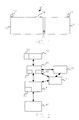
- a typical printing system 10 is shown in which the present Invention is applied.
- the printing system 10 includes a printer 20 with a Operator interface 22 and an upper sheet output 24.
- the exemplary Printing system 10 is a network printing system that is suitable for over to get a network connection input.
- the printing system can e.g. B. also around a standalone printer that uses a scanner for reading images on site includes.
- the invention is based on a specific printer configuration explained, but can also be used in printing systems of other configurations.
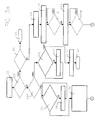
- Printer 20 includes a raster image processor (RIP) 26 that receives incoming data from a network 28 to which the printer 20 is connected. Before the The print job can be forwarded to the raster image processor 26 in a Queue 27 of the print server are filed in the network.
- the raster image Processor 26 includes a processing unit 30 that receives control commands and data from the Network 28 receives. Control commands are processed into a by the processing unit 30 Machine control language translated. Incoming print jobs and program codes will be stored in a print job buffer 32, which is also referred to below as a RIP queue referred to as.
- Printer 20 further includes a marking device 40, the conventional one Paper handling and processing components include as necessary to e.g. B. Create images on the output paper.
- the marking device 40 receives a data stream, the image data generated by the processing unit 30 and Contains control data and stores it in a multi-page frame buffer 23. The image data are processed and sent to a (not shown) Transmitted printhead, which transfers them to the paper.
- the marking device 40 furthermore comprises output devices which print the printed matter Pages to one connected to printer 20 via a simple electrical connection Processing device 42 or more with the printer 20 via a simple electrical connection connected processing device 42 forwards.
- the Processing device 42 includes an operator interface 42 and can be used as one any known processing device may be formed, for. B. as a punch or a binding device.
- the printer 20 comprises a logic and control device 40 with a Operator interface 22 for the printer, via which the operator enters functions and Receives messages from printer 20.
- the printer 20 also includes a database 60, which contains standard instructions and is stored in a local memory on which the RIP accesses.
- the instructions stored in the database include e.g. B. Setting instructions for a specific processing device, which of the Always carry out the operator regardless of the selected configuration got to.
- these instructions include information about how a particular one Processing device to be set up physically.
- a punch device can e.g. B. Contain stops that need to be physically moved to a desired position but are held by spring-loaded pins prior to the stroke's moves must be removed.
- the common instructions can the operator where appropriate, also remember the power supply to a particular Reduce finishing device before setting up on this be made.
- the database usually includes a file for any commercially available processing device in the desired number of languages (English, French, Spanish etc.), for which a separate file is provided becomes. If the operator in practice puts a text in the instruction field of the Inputting print job input menus on the network, this text instructs the RIP that File for the appropriate finishing device specified in the instructions call. The RIP calls the file, reads it in the for the selected one Processing device suitable language, translates the file into a Page description file, which is rasterized and integrated into the operating instructions, which in turn are printed as instruction sheets.
- languages English, French, Spanish etc.
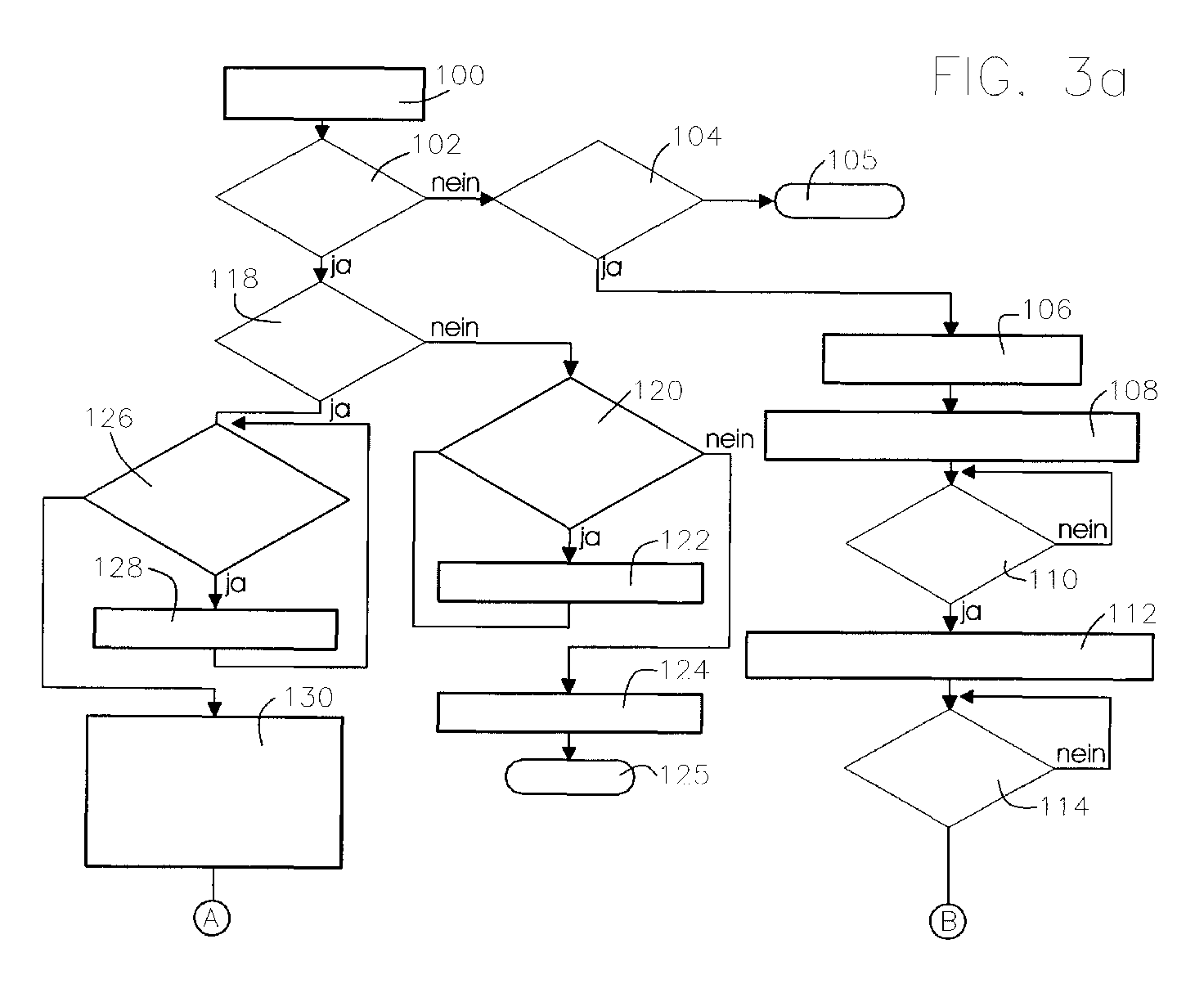
- a preferred embodiment of the method according to the invention is characterized in that 3a and 3b shown flowchart. Lines end by 3a to 3b merge in Fig. 3a in circles marked with letters and continue in Fig. 3b from circles marked with the same letters.
- the method includes receiving a print job from the network in step 100.
- Im Step 102 asks whether the print job is a further processing device, e.g. B. a Punching device or a perfect binding device determined. If the answer to step 102 is negative, it is queried in step 104 whether special instructions for the print job are specified. If the answer to step 104 is negative, the print job goes in Step 105 in which it is forwarded to the marking device and completed.
- step 110 a query is made as to whether the instructions have been printed. Is the answer negative, step 110 is repeated until the answer is positive.
- step 112 the message "resume order when ready” on the Operator interface of the printer is displayed, followed by step 114, in which you are asked whether the print job has been resumed. This step 114 becomes repeated until the answer is positive.
- the message "Order resumed” is displayed on the printer operator interface, and the Print job is forwarded to the marking device and completed.
- step 118 determines whether the Print job contains operator instructions. If the answer is negative, in a step 120 queries whether a further processing device is in the waiting stage located. If this is the case, then at the operator interface of the printer in one Step 122 displays the message "waiting stage" and step 120 is repeated, until the answer is negative. Then in a step 124 the Operator interface of the printer displays the message "Ready to print” and the Print job is forwarded to the marking device in a step 125 and completed.
- a step 126 asks whether there is a processing device waiting. If this is the case, then is on the operator interface of the printer in a step 128 the message "waiting stage" is displayed and step 126 is repeated until the answer is negative. If the If the answer is negative, all print jobs which are specified for the step 102 Processing device are determined, put on hold, and a Instruction sheet that is used by an operator when entering the print job in the Network entered instructions lists, is printed and in the top edition output. In step 132, a "Waiting for Instructions" message is displayed on the Operator interface of the printer is displayed. In a step 134 it is queried whether the Instruction sheet was printed.
- Step 134 repeats until the answer is affirmative, whereupon in a step 136 the printer operator interface a message, "Resume if the Processing device is set up "is displayed. In a step 138 asked whether the job was resumed. In the event of a negative answer step 138 is repeated until the answer is affirmative. In this case, a step 140, a message "job resumed "is displayed. In a step 142, the waiting stage for Print jobs determined for the processing device specified in step 102 are canceled. The print job is sent to the marking device in a step 143 forwarded and completed.
- the RIP 26 When a print job that has no text in the instruction field of the Job setup menu on network 28 was entered from the print server queue is forwarded to the RIP queue 32, the RIP 26 sends the Print job to the marker 40, and the print job is completed.
- the RIP 26 prints according to FIG Operator message the instruction sheet issued at the top output 24 and the printer 20 is put on hold for all incoming Print jobs either in print server queue 27 or in RIP queue 32 applies.
- the printing system 10 automatically prints the Instruction sheet triggers the waiting stage without operator intervention would be necessary, and remains in this status indefinitely until the operator Releases the print job after making the necessary settings on the Processing device has made.
- the RIP 26 causes the marking device 40 prints the instruction sheet and the printing system 10 only waits is offset when the instructions determine a processing device 42. If no further processing device 42 is selected, the print job is carried out without intervention the system is running.
- the operator takes out the printed instruction sheet the upper edition 24 and brings the instruction sheet to Processing device 42 to help him when setting up the processing device 42 consulted.
- This enables the operator to read the instructions from the printed Read instruction sheet while making the necessary settings on the next remotely located processing device 42. That way he has to Instructions not kept in mind and can check the settings without that he must go back to the printer operator interface 22.
- the operator returns to the operator interface 22 of the printer and gives the Free print job by z. B. by touching the appropriate point on a touch Screens of the user interface 22 or by clicking on one Computer screen of the operator interface 22 inputs a release code.
- the RIP 26 sends the print job to the marking device 40, and the print job is completed.
Landscapes
- Engineering & Computer Science (AREA)
- Theoretical Computer Science (AREA)
- Physics & Mathematics (AREA)
- General Physics & Mathematics (AREA)
- General Engineering & Computer Science (AREA)
- Human Computer Interaction (AREA)
- Microelectronics & Electronic Packaging (AREA)
- Accessory Devices And Overall Control Thereof (AREA)
Abstract
Description
- Fig. 1
- eine schematische Darstellung eines Drucksystems mit an diesem angeschlossenen Weiterverarbeitungsgeräten;
- Fig. 2
- ein Blockdiagramm der Architektur eines typischen Drucksystems, in dem die vorliegende Erfindung angewandt wird;
- Fig. 3a, b
- ein Ablaufdiagramm, das den Betrieb eines typischen Drucksystems darstellt, in dem die vorliegende Erfindung angewandt wird.
- 10
- Drucksystem
- 20
- Drucker
- 22
- Bedienerschnittstelle
- 23
- Zwischenspeicher
- 24
- obere Ausgabe
- 26
- Raster Image Prozessor
- 27
- Druckserver-Warteschleife
- 28
- Netzwerk
- 30
- Verarbeitungseinheit
- 32
- Zwischenspeicher/Warteschleife
- 40
- Markiervorrichtung
- 42
- Weiterverarbeitungsgerät
- 43
- Bedienerschnittstelle
- 50
- Logik- und Steuerungseinheit
- 60
- Datenbank
- 100, 102, 104, 105, 106, 108, 110, 112, 114, 118, 120, 122, 124, 125, 126, 128, 130, 132, 134, 138, 140, 142, 143
- Verfahrensschritte
Claims (11)
- Verfahren zum Vornehmen von Einstellungen an einem mit einem elektrofotografischen Drucker (20) verbundenen Weiterverarbeitungsgerät (42), wobei der Drucker (20) eine Bedienerschnittstelle (22) aufweist,
mit den folgenden Verfahrensschritten:a) Eingeben eines Einstellungsanweisungen für mindestens ein Weiterverarbeitungsgerät (42) in Form einer Bedienermeldung enthaltenden Druckauftrags in den Drucker (20);b) automatisches Drucken eines Anweisungsbogens, auf dem die vor der Fertigstellung des Druckauftrags vorzunehmenden Einstellungen aufgeführt sind;c) automatisches Versetzen aller anstehenden Druckaufträge in ein Wartestadium;d) Vornehmen der auf dem Anweisungsbogen aufgeführten vor der Fertigstellung des Druckauftrags vorzunehmenden Einstellungen;e) Eingeben eines Freigabecodes, um das Wartestadium für den Druckauftrag aufzuheben und die Fertigstellung des Druckauftrags am Drucker (20) zu ermöglichen. - Verfahren nach Anspruch 1,
mit folgenden weiteren Schritten:f) Zugreifen auf eine Datenbank (30), die an dem mindestens einen Weiterverarbeitungsgerät (42) vorzunehmende Einstellungsanweisungen enthält;g) Aufrufen einer Anweisungen für ein bestimmtes Weiterverarbeitungsgerät (42) enthaltenden Datei aus der Datenbank (30);h) Lesen der Datei; undi) Übersetzen der Datei in eine Seitenbeschreibungsdatei, die gerastert und in den gedruckten Anweisungsbogen integriert wird. - Verfahren nach einem der Ansprüche 1 bis 2,
dadurch gekennzeichnet, dass die Eingabe des Druckauftrags über ein Netzwerk (28) erfolgt. - Verfahren nach einem der Ansprüche 1 bis 3,
dadurch gekennzeichnet, dass es sich in dem Verfahrensschritt c) bei den anstehenden Druckaufträgen, die in Wartestadium versetzt werden um die für das Weiterverarbeitungsgerät (42) bestimmten Druckaufträge handelt. - Verfahren zum Handhaben eines Drucksystems (10) mit folgenden Verfahrensschritten:a) Empfangen eines Druckauftrags;b) Ermitteln, ob der Druckauftrag für ein Weiterverarbeitungsgerät (42) bestimmt ist und ob der Druckauftrag Anweisungen enthält, welche einen Bediener zum Ausführen bestimmter Einstellungen anweist; wenn dies der Fall ist,c) Versetzen aller Druckaufträge in ein Wartestadium;d) Drucken eines Anweisungsbogens, auf dem die von dem Bediener vorzunehmenden Einstellungen aufgeführt sind;e) Vornehmen der auf dem Anweisungsbogen aufgeführten Einstellungen; undf) Eingeben eines Codes, welcher das Wartestadium aufhebt und eine Fertigstellung des Druckauftrags ermöglicht.
- Verfahren nach Anspruch 5,
dadurch gekennzeichnet, dass es sich in dem Verfahrensschritt c) bei den anstehenden Druckaufträgen, die in Wartestadium versetzt werden, um die für das Weiterverarbeitungsgerät (42) bestimmten Druckaufträge handelt. - Verfahren zur Handhabung eines Drucksystems (10) mit folgenden Schritten:a) Erstellen eines Druckauftrags mittels eines Erstellungsmenüs, das ein Anweisungsfeld enthält, in das Bedienereinstellanweisungen eingebbar sind;b) Weiterleiten des Druckauftrags an den Drucker (20);c) Bestimmen, ob in das Anweisungsfeld Text eingegeben wurde; wenn ja, automatisches Versetzen aller Druckaufträge in ein Wartestadium;d) Drucken eines Anweisungsbogens, das den in das Bedieneranweisungsfeld eingegebenen Text enthält;e) Vornehmen der auf dem gedruckten Anweisungsbogen gedruckten Einstellungen;f) Eingeben eines Codes, der das Wartestadium aufhebt, um die Fertigstellung des Druckauftrags zu ermöglichen.
- Verfahren zum Handhaben eines Drucksystems mit den folgenden Schritten:a) Empfangen eines Druckauftrags;b) Bestimmen, ob der Druckauftrag Bedieneranweisungen enthält;c) automatisches Versetzen des Druckauftrags in ein Wartestadium, während ein Fortführen anderer Druckaufträge ermöglicht wird;d) Drucken eines Anweisungsbogens, das den Bedieneranweisungen entspricht;e) Überprüfen des gedruckten Anweisungsbogens und Vornehmen der auf dem gedruckten Anweisungsbogen aufgeführten Einstellungen;f) Eingeben eines Codes, der das Wartestadium aufhebt und die Fertigstellung des Druckauftrags ermöglicht.
- Verfahren nach einem der Ansprüche 4 bis 8,
dadurch gekennzeichnet, dass mindestens ein Teil der Einstellungsanweisungen in einem lokalen Speicher gespeichert ist. - Verfahren nach einem der Ansprüche 4 oder 9,
dadurch gekennzeichnet, dass der Druckauftrag über ein Netzwerk (28) eingeht. - Verfahren nach einem der Ansprüche 1 bis 10,
dadurch gekennzeichnet, dass der Drucker (20) als eine Standalone-Einheit ausgebildet ist, die einen Scanner umfasst, der dem Drucker (20) Bilddaten liefert.
Applications Claiming Priority (2)
| Application Number | Priority Date | Filing Date | Title |
|---|---|---|---|
| US692645 | 2000-10-19 | ||
| US09/692,645 US7184154B1 (en) | 2000-10-19 | 2000-10-19 | Method of generating printer setup instructions |
Publications (2)
| Publication Number | Publication Date |
|---|---|
| EP1199186A2 true EP1199186A2 (de) | 2002-04-24 |
| EP1199186A3 EP1199186A3 (de) | 2006-10-11 |
Family
ID=24781430
Family Applications (1)
| Application Number | Title | Priority Date | Filing Date |
|---|---|---|---|
| EP01124262A Withdrawn EP1199186A3 (de) | 2000-10-19 | 2001-10-17 | Verfahren zum Erzeugen von Druckereinstellungsanweisungen |
Country Status (6)
| Country | Link |
|---|---|
| US (1) | US7184154B1 (de) |
| EP (1) | EP1199186A3 (de) |
| JP (1) | JP2004512194A (de) |
| AU (1) | AU2001297024A1 (de) |
| DE (1) | DE10151254A1 (de) |
| WO (1) | WO2002033651A1 (de) |
Families Citing this family (3)
| Publication number | Priority date | Publication date | Assignee | Title |
|---|---|---|---|---|
| JP4848794B2 (ja) * | 2006-02-24 | 2011-12-28 | Nkワークス株式会社 | 表示制御方法 |
| US9007612B2 (en) * | 2011-01-21 | 2015-04-14 | Ricoh Company, Ltd. | Insertion of printer operator instructions onto separator pages in a print shop environment |
| JP6115025B2 (ja) * | 2012-05-22 | 2017-04-19 | セイコーエプソン株式会社 | 媒体処理装置、及び、posシステム |
Family Cites Families (21)
| Publication number | Priority date | Publication date | Assignee | Title |
|---|---|---|---|---|
| ES8506410A1 (es) | 1983-05-31 | 1985-07-01 | Fraver Sa | Un procediminento para transportar y tratar o trabajar en continuo un soporte flexible deformable de preferencia virgen,tal como una cinta. |
| US4862200A (en) | 1986-10-01 | 1989-08-29 | Ray Hicks | Automated photographic apparatus |
| US5283752A (en) | 1989-06-21 | 1994-02-01 | Hadewe B.V. | Method of preparing an item to be mailed and system for carrying out that method |
| US4987447A (en) | 1989-09-18 | 1991-01-22 | Eastman Kodak Company | Control sheet generation for copiers and printers |
| JPH03218160A (ja) * | 1990-01-24 | 1991-09-25 | Fuji Xerox Co Ltd | マニュアルシート作成および利用装置 |
| US5172326A (en) * | 1990-03-19 | 1992-12-15 | Forcam, Incorporated | Patterned web cutting method and system for operation manipulation of displayed nested templates relative to a displayed image of a patterned web |
| US5130806A (en) | 1990-09-28 | 1992-07-14 | Xerox Corporation | Job comment/operator messages for an electronic reprographic printing system |
| US5455681A (en) * | 1992-11-16 | 1995-10-03 | Eastman Kodak Company | Low resolution grey level printing method from high resolution binary input file |
| US5442732A (en) * | 1992-12-10 | 1995-08-15 | Xerox Corporation | Print folder application for electronic reprographic systems |
| US5243381A (en) | 1993-01-04 | 1993-09-07 | Xerox Corporation | Method for compiling multiple jobs with job reference sheets |
| US5822506A (en) * | 1993-10-28 | 1998-10-13 | International Business Machines Corporation | Selectable modification of medium in a printer system |
| US5461469A (en) | 1993-12-20 | 1995-10-24 | Xerox Corporation | Method of setting-up a finishing apparatus |
| US5525031A (en) | 1994-02-18 | 1996-06-11 | Xerox Corporation | Automated print jobs distribution system for shared user centralized printer |
| US5436730A (en) | 1994-07-05 | 1995-07-25 | Xerox Corporation | Method of managing a proof approval process for proofing documents in a printing system |
| US5615015A (en) | 1994-08-01 | 1997-03-25 | Xerox Corporation | Apparatus and method of programming a job to be processed at a location other than the location at which the job is prepared |
| US5715381A (en) | 1994-08-08 | 1998-02-03 | Xerox Corporation | Method of creating and managing packages, including multiple documents, in a printing system |
| JP3563783B2 (ja) | 1994-10-19 | 2004-09-08 | キヤノン株式会社 | 複合画像形成装置 |
| US5798738A (en) * | 1995-03-25 | 1998-08-25 | Ricoh Company, Ltd. | Printing manager system for a copier in a network |
| US6018774A (en) * | 1997-07-03 | 2000-01-25 | Yobaby Productions, Llc | Method and system for creating messages including image information |
| US5878237A (en) * | 1997-07-11 | 1999-03-02 | Compaq Computer Corp. | Apparatus, method and system for a comuter CPU and memory to PCI bridge having a pluarlity of physical PCI buses |
| US6041200A (en) | 1999-03-08 | 2000-03-21 | Electronics For Imaging, Inc. | Method and apparatus for split printing of color and monochrome documents |
-
2000
- 2000-10-19 US US09/692,645 patent/US7184154B1/en not_active Expired - Lifetime
-
2001
- 2001-10-10 AU AU2001297024A patent/AU2001297024A1/en not_active Abandoned
- 2001-10-10 JP JP2002536960A patent/JP2004512194A/ja active Pending
- 2001-10-10 WO PCT/US2001/042620 patent/WO2002033651A1/en not_active Ceased
- 2001-10-17 EP EP01124262A patent/EP1199186A3/de not_active Withdrawn
- 2001-10-17 DE DE10151254A patent/DE10151254A1/de not_active Withdrawn
Also Published As
| Publication number | Publication date |
|---|---|
| DE10151254A1 (de) | 2002-05-23 |
| AU2001297024A1 (en) | 2002-04-29 |
| JP2004512194A (ja) | 2004-04-22 |
| WO2002033651A1 (en) | 2002-04-25 |
| EP1199186A3 (de) | 2006-10-11 |
| US7184154B1 (en) | 2007-02-27 |
Similar Documents
| Publication | Publication Date | Title |
|---|---|---|
| DE69934468T2 (de) | Druckersystem und Drucker die Druckdaten wiederverwenden | |
| DE69938395T2 (de) | Bildscanner und vorrichtung zur optischen zeichenerkennung welche diesen scanner verwendet | |
| DE69724397T2 (de) | Informationsverarbeitungsgerät und -verfahren | |
| DE69834074T2 (de) | Drucker, der einen Netzwerkrechner beinhaltet und Rechnernetzwerk-System, das diesen verwendet | |
| DE3587996T2 (de) | Verfahren zur Bereitstellung einer "On-line"-Hilfestellung für interaktive Datenverarbeitungsanlagen. | |
| DE10034841B4 (de) | Vorrichtung und Verfahren zur Überwachung und Aufzeichnung der Verwendung von Druckern in einem System | |
| EP1197347A2 (de) | Schnittstellen-System und Verfahren | |
| EP1241563A2 (de) | Verfahren zur Verbesserung der Druckeffizienz | |
| DE69936595T2 (de) | Fernsteuerung des interaktiven Druckens | |
| DE10239399A1 (de) | Verfahren zur Ermittlung bestimmter Abweichungen zwischen Druckerresourcen und den Erfordernissen eines Druckauftrags | |
| EP1213644A2 (de) | Drucksystem und Verfahren zur Individualisierung eines Druckauftrags | |
| DE3640673C2 (de) | ||
| DE19510929A1 (de) | Mehrzweckeinrichtung | |
| WO2008104496A1 (de) | Verfahren, drucksystem und computerprogramm zum automatischen bearbeiten von auftragsbegleitdaten eines druckauftrages | |
| EP1155855B2 (de) | Druckprozesssteuerung | |
| DE69835569T2 (de) | Steuereinheit für ein Wiedergabegerät | |
| DE10151254A1 (de) | Verfahren zum Erzeugen von Druckereinstellungsanweisungen | |
| DE10316970A1 (de) | Drucker, der die Einstellung von Druckpapier betreffenden Parametern erleichtert | |
| EP1282883B1 (de) | Verfahren und system zur transformation digitaler druckdatenströme sowie zugehörige drucker und druckerserver | |
| DE10321952B4 (de) | Verfahren und Vorrichtung sowie Computer-lesbares Medium zur Durchführung eines Verfahrens zum Weiterleiten eines auf eine Bilderzeugung bezogenen Auftrags | |
| DE102005019931B4 (de) | Verfahren zum Bearbeiten bedruckter Stapel blattförmigen Materials | |
| DE69026134T2 (de) | Ausgabegerät mit anwenderdefinierbarer Beziehung zwischen Zeichenkoden und ausgegebenen Zeichen | |
| DE10107377B4 (de) | Verfahren zum Verarbeiten eines Druckauftrags, Computerprogramm mit einem auf einem maschinenlesbaren Träger gespeicherten Programm zur Durchführung des Verfahrens und Verfahren zum Verarbeiten eines Druckauftrags durch eine erste und zweite Druckvorrichtung | |
| DE102018133397B3 (de) | Verfahren zum Erzeugen eines Druckbilds mit einer digitalen Druckmaschine | |
| EP3244298B1 (de) | Jobmaker mit zentraler joberfassung |
Legal Events
| Date | Code | Title | Description |
|---|---|---|---|
| PUAI | Public reference made under article 153(3) epc to a published international application that has entered the european phase |
Free format text: ORIGINAL CODE: 0009012 |
|
| AK | Designated contracting states |
Kind code of ref document: A2 Designated state(s): AT BE CH CY DE DK ES FI FR GB GR IE IT LI LU MC NL PT SE TR |
|
| AX | Request for extension of the european patent |
Free format text: AL;LT;LV;MK;RO;SI |
|
| RAP1 | Party data changed (applicant data changed or rights of an application transferred) |
Owner name: EASTMAN KODAK COMPANY |
|
| PUAL | Search report despatched |
Free format text: ORIGINAL CODE: 0009013 |
|
| AK | Designated contracting states |
Kind code of ref document: A3 Designated state(s): AT BE CH CY DE DK ES FI FR GB GR IE IT LI LU MC NL PT SE TR |
|
| AX | Request for extension of the european patent |
Extension state: AL LT LV MK RO SI |
|
| 17P | Request for examination filed |
Effective date: 20061220 |
|
| AKX | Designation fees paid |
Designated state(s): DE GB NL |
|
| 17Q | First examination report despatched |
Effective date: 20090402 |
|
| STAA | Information on the status of an ep patent application or granted ep patent |
Free format text: STATUS: THE APPLICATION IS DEEMED TO BE WITHDRAWN |
|
| 18D | Application deemed to be withdrawn |
Effective date: 20140503 |