EP0805410B1 - Formloses Formular und papierbasierte Benutzeroberflächen - Google Patents
Formloses Formular und papierbasierte Benutzeroberflächen Download PDFInfo
- Publication number
- EP0805410B1 EP0805410B1 EP97302982A EP97302982A EP0805410B1 EP 0805410 B1 EP0805410 B1 EP 0805410B1 EP 97302982 A EP97302982 A EP 97302982A EP 97302982 A EP97302982 A EP 97302982A EP 0805410 B1 EP0805410 B1 EP 0805410B1
- Authority
- EP
- European Patent Office
- Prior art keywords
- document
- image
- mark
- user
- images
- Prior art date
- Legal status (The legal status is an assumption and is not a legal conclusion. Google has not performed a legal analysis and makes no representation as to the accuracy of the status listed.)
- Expired - Lifetime
Links
Images






Classifications
-
- G—PHYSICS
- G06—COMPUTING OR CALCULATING; COUNTING
- G06F—ELECTRIC DIGITAL DATA PROCESSING
- G06F40/00—Handling natural language data
- G06F40/10—Text processing
- G06F40/166—Editing, e.g. inserting or deleting
- G06F40/174—Form filling; Merging
-
- G—PHYSICS
- G06—COMPUTING OR CALCULATING; COUNTING
- G06V—IMAGE OR VIDEO RECOGNITION OR UNDERSTANDING
- G06V30/00—Character recognition; Recognising digital ink; Document-oriented image-based pattern recognition
- G06V30/10—Character recognition
- G06V30/14—Image acquisition
- G06V30/1444—Selective acquisition, locating or processing of specific regions, e.g. highlighted text, fiducial marks or predetermined fields
-
- G—PHYSICS
- G06—COMPUTING OR CALCULATING; COUNTING
- G06V—IMAGE OR VIDEO RECOGNITION OR UNDERSTANDING
- G06V30/00—Character recognition; Recognising digital ink; Document-oriented image-based pattern recognition
- G06V30/10—Character recognition
Definitions
- the present invention relates to user interfaces for computers and information processing systems and networks, and more particularly to paper-based user interfaces.
- the user interface is the gateway through which a human user communicates with a computer, computer network, or other system for processing digital information.
- a desktop personal computer's user interface can include a keyboard, a mouse or other pointing device, and a display screen, coupled with appropriate software such as a command-line interface or a window-and-icon or other graphical user interface (GUI).
- GUI graphical user interface
- the same local-area network can further accomodate a scanner or a multifunction device having a scanning capability, so that paper documents or portions thereof can be scanned and converted (as by optical character recognition software) to useable form, and then sent to the personal computer for editing or other processing.
- a paper-based user interface allows the user of a computer, computer network, or other digital information processing system to communicate with the system simply by making a mark or marks on a paper document or documents and then scanning the document thus marked into the system via a scanner, fax machine, multifunction device, or the like. The system can communicate back with the user by printing another document.
- Paper-based user interfaces are known, if not yet commonplace.
- an exemplary paper-based user interface is known that allows a personal computer to receive and respond to user commands sent remotely from a distant facscimile machine.
- the user is provided with a blank form that has been printed on paper.
- the user fills out the form by making marks (as with a pen or pencil) in specific designated fields on the form. For example, the user can enter a check-mark or an X in a blank box on the form.
- the user sends a facsimile of the form thus marked to the personal computer.
- the personal computer receives the facsimile transmission, for example, through a modem, and so is provided with a facsimile copy of the user's marked-up form.
- the personal computer can then interpret the marks on the form by running image processing and other special software for this purpose, and can respond to the marks accordingly by carrying out commands that correspond to the particular boxes the user has marked. For example, the personal computer can retrieve an electronically stored document that the user has requested and send this document to the user by return facsimile. Thus the user and the computer "fax" each other in much the same way that two human beings can communicate by sending facscimiles back and forth to one another.
- a paper-based user interface can serve as a complement or substitute for the more conventional keyboard-mouse-display type of user interface mentioned earlier.
- a paper-based user interface is particularly appealing when the user interacts with a computer network directly through a multifunction device, without recourse to a personal computer or workstation. In this situation, the user can initiate a number of functions, such as document copying, facsimile, electronic mail, document storage, and search using a simple paper form as an interface.
- the multifunction device "reads" what is on the form and responds accordingly, possibly with help from the network.
- Paper-based user interfaces typically require that forms be created in advance, either by the user with a form editor or automatically by computer, so that the receiving computer can readily determine whether and where a given form has been marked by the user. For example, suppose that a particular form contains a set of blank boxes in which the user can enter check-marks or Xs to indicate certain requests. The user selects the form, checks some of the boxes, scans the form into the system to produce a digital image, and transmits this image (more precisely, transmits data representing the image) to a computer. Upon receiving the transmitted image of the user's marked-up form, the computer compares the image with a stored representation of the unmarked form. Based on the results of the comparison, the computer can tell what the user has requested and take any action appropriate in response.
- the computer In order to make the comparison, however, the computer must first have the information necessary to interpret the form, such as information about where the blank boxes are located on the form, how big the boxes are, and what each box means, that is, how the computer should respond when certain boxes are marked.
- This information can be provided to the computer either in advance of the user's transmission, or concurrently with or as part of the user's transmission.
- the computer can be given access to a set of stored digital representations each indicating the layout or appearance of one of a set of forms, and the user can transmit along with the marked-up form image an identification number that uniquely corresponds to the particular type of form being used.
- specially coded information such as a pattern of data glyphs or a bar code
- the computer can be programmed in this case to seek the coded information at a predesignated location within the received image, and to use the coded information together with additional (stored or preprogrammed) information to identify what kind of form has been sent and to determine what is to be done in response to the boxes checked by the user.
- FIG. 1 is a Universal Send Form from the PaperWorks software product formerly available from Xerox Corporation (Stamford, CT).
- the form includes check boxes such as check boxes 1 and blank rectangles such as rectangles 2. as well as data glyphs 3 that are used by the computer to help it interpret the form
- the present invention offers a new approach to computer-readable forms, wherein arbitrary documents can be used as forms.
- This approach can be called formless forms.
- a stored digital document of almost any kind can be used as a form for a paper-based user interface, even if the document was not originally designed or intended for use as a form.
- a document containing an arbitrary combination of text, graphics, and bitmap images can be used, and any area of the document can become an active region or field of the form.
- Formless forms offer new flexibility when applied in existing paper-based user interfaces, and also can provide new applications for paper-based user interfaces.
- One such application is in a paper-based World Wide Web user interface, here called PaperWeb.
- a method carried out in a data processing system comprising: providing a first document image comprising digital image data including a first plurality of pixels, the first document image representing an instance of a reference document to which instance a mark has been added, the reference document having a plurality of elements; providing a second document image comprising digital image data including a second plurality of pixels, the second document image being selected from among a plurality of document images and representing the reference document without the mark; automatically extracting from the first document image a set of pixels representing the mark by performing a reference-based mark extraction technique wherein the second document image serves as a reference image and wherein substantially the entirety of the first document image is compared with substantially the entirety of the second document image; providing information about a set of active elements of the reference document, each active element being one element among the plurality of elements of the reference document, the reference document having at least one such active element, each active element being associated with at least one action; interpreting the extracted set of pixels representing the mark by determining whether any of the active elements
- the steps of registering the first and second images and computing a robust difference of the registered images are performed piecewise on local subregions of the document images.
- the interpreting step comprises determining whether the mark is proximate to any active element.
- the step of computing a robust difference comprises: determining a collection of pixels common to both the first and second images by matching pixels of the first image with pixels of the second image according to a matching criterion; and eliminating as between the first and second images the pixels of the collection thus determined, thereby determining a set of discrepancy pixels including a set of pixels representing the mark.
- the invention further provides a method according to claim 7 of the appended claims.
- the step of converting the second document instance may comprise scanning a hardcopy instance of the second document with a digital scanning device.
- the step of converting the second document instance may comprise rendering a symbolic description of the second document into a bitmap form.
- the step of converting the second document instance may comprise scanning a collection of hardcopy document instances including the second document instance with at least one digital scanning device, thereby producing a collection of scanned document instances, and storing the scanned document instances in a database accessible to the processor; and the providing step may comprise retrieving the second document image from the database by generating an image-based index from the first document image without recognition of any symbolic content of the first document image and selecting a second document image from among the scanned document images in the database.
- the annotating step is performed prior to the providing step and comprises storing the set of annotations and wherein the providing step comprises contemporaneously retrieving the second document image and the set of annotations.
- the invention further provides a method according to claim 8 of the appended claims.
- the first providing step comprises providing the processor with a first document image wherein the selected element is an element other than a form element selected from the group consisting of: a substantially blank region having a perimeter delimited at least in part by a perimetral boundary and within which blank region a substantial portion of the mark is disposed; a substantially blank region substantially underscored by a baseline proximate to which baseline a substantial portion of the mark is disposed; a textual word located in an array of textual words set apart from any surrounding text, the mark being proximate to the textual word; and a graphical symbol located in an array of graphical symbols set apart from any nearby nonblank elements, the mark being proximate to the graphical symbol.
- the selected element is an element other than a form element selected from the group consisting of: a substantially blank region having a perimeter delimited at least in part by a perimetral boundary and within which blank region a substantial portion of the mark is disposed; a substantially blank region substantially underscored by a baseline proximate to which baseline
- At least one action with which each active element is associated is an action of following a specified hypertext link; and the facilitating step, if performed, comprises initiating a traversal of the specified hypertext link.
- the invention further provides a programmable data processing system when suitably programmed for carrying out the method of any of claims 1 to 8 of the appended claims, or according to any of the particular embodiments described herein.
- a paper-based user interface provides a user interface to a computer, computer network, or other computational or information processing system in which a paper (or other hardcopy) document instance is marked up by a user, scanned into the system, and interpreted by the system in order to control some computational process
- PUI paper-based user interface
- Paper Web applies Formless Forms PUI technology to provide a new kind of browser for the World Wide Web and other hypertext databases.
- an ordinary paper document can become, in effect, a "form"; that is, it can be made recognizable by a PUI and used to control arbitrary computational processes.
- Associative links can be established between graphical or other compositional elements of a document and computational processes to be controlled. Any textual, graphic, photographic, or other compositional element of the document can be made computationally active (that is, can be treated as a cue to trigger an arbitrary computation or computations).
- a character, a word, or a graphical element can be marked by the user and the computer will respond by carrying out an action or actions associated with the marked item.
- the computer need not recognize the marked character, word, or graphical element as such in order to carry out the actions associated with the marked element. That is, the computer need not perform optical character recognition (OCR), word recognition, linguistic analysis, pattern recognition, or other symbolic processing. Instead, the computer can perform its processing in the image domain, using image processing techniques to distinguish (extract) the marks from the original unmarked document and thus to determine where the user has marked the document and which elements of the document are indicated. The computer can then readily determine whether and what computational processes are associated with the indicated elements, and respond accordingly.
- OCR optical character recognition
- word recognition word recognition
- linguistic analysis linguistic analysis
- pattern recognition or other symbolic processing.
- the computer can perform its processing in the image domain, using image processing techniques to distinguish (extract) the marks from the original unmarked document and thus to determine where the user has marked the document and which elements of the document are indicated. The computer can then readily determine whether and what computational processes are associated with the indicated elements, and respond accordingly.
- a computer can respond to a mark made on a document that was never intended for use as a form in the same way as if the user had marked a check box on a conventional form. Moreover, the computer can do this without symbolic reasoning and without recognizing the semantic content of the document.
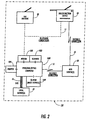
- FIG. 2 schematically depicts an example of a computational system 10 suitable to an embodiment of the system and method of the invention.
- System 10 includes a fax machine 20 , a "smart" multifunction device 30 (that is, a multifunction device incorporating a processor (CPU) and memory), a personal or office computer 100 , one or more local server computers 40 , and one or more World Wide Web server computers 50. These are connected by various communications pathways including telephone connections 11, a local area network 41, and the Internet 51.
- Computer 100 includes a modem 108 and optionally a CD-ROM mass storage device 109, and has attached peripherals including an optical scanner 103 and a printer 104 .
- system 10 is intended to be illustrative, not restrictive.
- connections through the Internet 51 generally involve packet switching by intermediate router computers (not shown), and computer 100 is likely to access any number of Web servers 50 during a typical Web browsing session.
- the devices of system 10 can be connected in different ways.
- printer 104 is shown as being an attached peripheral of computer 100 , but it could also be a networked printer, accessed via local area network 41 through a print server that is one of the local servers 40.
- the various communication pathways 11, 41, 51 in system 10 allow the devices 20, 30, 40, 50, 100 to communicate with one another.
- Telephone connections 11 allow fax machine 20 to communicate with multifunction device 30, and also with computer 100 by way of modem 108.
- Local area network 41 allows computer 100 to communicate with local server(s) 40.
- the Internet 51 allows multifunction device 30 and computer 100 to communicate with Web server(s) 50.
- fax machine 20 and multifunction device 30 can be in the same building as each other or around the globe from one another, and either or both can be in the same building as computer 100 or around the globe from computer 100 .
- Web server(s) 50 can likewise be at local (so-called "Intranet”) or remote sites with respect to computer 100 and multifunction device 30.
- the distance between computer 100 and local server(s) 40 is limited by the technology of local area network 41.
- a user or users can access system 10 at various points and in various ways.
- a user can provide inputs to and receive outputs from system 10 through fax machine 20, through multifunction device 30, or through the scanner 103 and printer 104 of computer 100 .
- a user who is near fax machine 20 can send a fax from fax machine 20 to computer 100.
- computer 100 (assumed here to be suitably programmed with Formless Forms PUI software) can automatically send a fax back to the user at fax machine 20 .
- the user can send a fax from fax machine 20 to multifunction device 30 and multifunction device 30 (likewise assumed to be suitably programmed) can automatically send a fax back to the user at fax machine 20 .
- a user who is near computer 100 can interact with computer 100 through its PUI in conjunction with scanner 103 and printer 104 .
- a user who is near multifunction device 30 can interact with multifunction device 30 through its scanning and printing capabilities, thereby using multifunction 30 as a kind of personal computer, a computer having a user interface that is primarily or even exclusively paper-based.
- the user can interact with Web server(s) 50 by browsing the Web. This can be done directly from computer 100 or multifunction device 30 , or indirectly from fax machine 20 by way of either computer 100 or multifunction device 30.
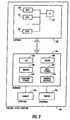
- FIG. 3 schematically depicts the components of computer 100 of the system of FIG. 2.
- Computer 100 is a personal or office computer that can be, for example, a workstation, personal computer, or other single-user or multi-user computer system.
- computer 100 can be conveniently divided into hardware components 101 and software components 102 ; however, persons of skill in the art will appreciate that this division is conceptual and somewhat arbitrary, and that the line between hardware and software is not a hard and fast one
- computer 100 is shown as including peripheral components, viz, scanner 103 and printer 104 ; again, it will be appreciated that the line between host computer and attached peripheral is not a hard and fast one, and that in particular, components that are considered peripherals of some computers are considered integral parts of other computers.
- Hardware components 101 include a processor (CPU) 105, memory 106 , persistent storage 107, modem 108, optional mass storage 109, and network interface 110 . These components are well known and, accordingly, will be explained only briefly.
- Processor 105 can be, for example, a microprocessor or a collection of microprocessors configured for multiprocessing. It will be appreciated that the role of computer 100 can be taken in some embodiments by multiple computers acting together (distributed computation); in such embodiments, the functionality of computer 100 in system 10 is taken on by the combination of these computers, and the processing capabilities of processor 105 are provided by the combined processors of the multiple computers.
- Memory 106 can include read-only memory (ROM), random-access memory (RAM), virtual memory, or other memory technologies, singly or in combination.
- Persistent storage 107 can include, for example, a magnetic hard disk, a floppy disk, or other persistent read-write data storage technologies, singly or in combination.
- Optional mass storage 109 provides additional (e.g., archival) storage and can be a CD-ROM (compact disc read-only memory) or other large-capacity storage technology.
- mass storage is provided by one of the local servers 40 rather than as part of computer 100 , for example, a file server or database server.
- mass storage as such is omitted, as where persistent storage 107 is of sufficient capacity to meet the needs of computer 100 that would otherwise be served by mass storage.
- Network interface 110 provides computer 100 and, more specifically, processor 105 with the ability to communicate via local-area network 41 and (either directly, or indirectly via one of local servers 40 ) with the Internet 51.
- keyboards 101 are a keyboard, mouse or other pointing device, and display screen.
- Such components while typically part of most computers, are not necessary to the invention. This is because such components are adapted for providing (for example) a graphical user interface, whereas here the focus is on a paper-based user interface.
- Software components 102 include a multitasking operating system 150 and a set of tasks under control of operating system 150, such as applications programs 160, 161, and 162.
- Operating system 150 also allows processor 105 to control various devices such as persistent storage 107 , modem 108 , mass storage 109 , and network interface 110 , as well as peripherals 103. 104 .
- Processor 105 executes the software of operating system 150 and its tasks in conjunction with memory 106 and other components of computer system 100.
- Software components 102 provide computer 100 with Formless Forms PUI capability. This capability can be divided up among operating system 150 and applications programs 160, 161. 162 as may be appropriate for the particular configuration of system 10 and the particular application of computer 100 in system 10 .
- operating system 150 can incorporate fax server and Internet server software, and the Formless Forms and Paper Web methods described below can be incorporated in an applications program or programs. It will be appreciated that there are any number of possibilities in this regard.
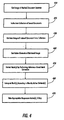
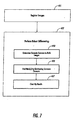
- FIG. 4 is a high-level flowchart for the method of Formless Forms in one embodiment. These steps are carried out using appropriate components of system 10 and. more particularly, computer 100 under control of processor 105.
- an image (more precisely, a set of digital data representing an image) of a marked document instance is obtained in computer 100 and is stored in memory 106 for use by processor 105 .
- the image can be a scanned, faxed, or other pixel (raster) image.
- the image can be scanned in from scanner 103 directly to computer 100 , or can be input to system 10 through fax machine 20 or multifunction device 30 and communicated by the appropriate pathways to computer 100 .
- the image can be an image that previously has been scanned and stored in mass storage 109, and retrieved therefrom by computer 100 . It is assumed in this embodiment that this image and all document images are black-and-white binary images, although the image can be gray-scale or color in other embodiments.
- a document image is an image of a single page or a portion thereof, although a document image can encompass multiple pages in some embodiments.
- the image is an image of a marked document instance. That is, it is an image of a particular hardcopy instance of a document (e.g., a printed, faxed, or reprographically produced paper copy, or a hardcopy on a medium other than paper) that the user has in her or his possession and on which instance the user has made a mark (e.g., a graphical or written annotation or addition to the basic document) with a pen, pencil, typewriter, rubber stamp, etc.
- a mark e.g., a graphical or written annotation or addition to the basic document
- the image is said to be an image of a "document instance,” rather than simply of a document, to highlight the fact that it is an image of a particular (and usually imperfect) copy, printout, or other rendering of a known document for which a (presumably good) original or other reference version has been stored in a database or other collection of documents present somewhere in system 10.
- the collection of documents can be stored, for example, in mass storage 109 , or on a local file or database server 40, or on a Web server 50.
- the image is used to generate an index into the stored collection of documents (step 420 ), from which an image of the corresponding stored reference document is retrieved and made available to processor 105 (step 430 ).
- an active element need not be a blank element and need not contain any interior whitespace. This is in contrast with the active elements of typical forms of the prior art (such as check boxes 1 and rectangles 2 of the form of FIG. 1), which are typically blank lines, spaces, boxes, or other blank elements.
- the active elements for each reference document are determined ahead of time and are stored in and retrieved from the collection of documents along with the reference document images. In some embodiments, the active elements can be separately determined after the reference document image has been retrieved.
- processor 105 extracts the user's mark from the marked document instance by performing reference-based mark extraction (step 450 ). That is, processor 105 compares the obtained image of the marked document instance with the retrieved image of the reference document to determine what the user has changed in her or his version of the document. Preferably, robust techniques are used for this step, as will be discussed below, so that scaling errors, translation errors, transmission and digitization errors, noise, and other image artifacts can be tolerated.
- processor 105 interprets the mark to determine what, if anything, the user wants done in response (step 460 ). In this embodiment, the interpretation is based on the proximity of the mark with respect to active elements of the document. If the mark is not located near to any active element, the mark is ignored. If the mark is located near to an active element, the mark is interpreted in conjunction with that element.
- the mark can be interpreted to mean that the user wants to do something pertaining to the word, such as selecting and following a hypertext link associated with the word or performing optical character recognition on the word and providing the result as input to a search engine, relational database, word processor, or other computational process.
- the interpretation can be based on additional factors, such as the shape of the mark and a more sophisticated analysis of the geometric relationship between the mark and the nearby active element.
- the interpretation of a line beneath a word can be distinguished from that of a line through a word.
- certain marks such as a large X mark substantially the size of an entire page, can be interpreted independently of any particular active elements of the document.
- processor 105 performs, initiates, or otherwise causes to be performed any action (or actions) indicated by the interpretation of the user's mark (step 470 ).
- the action can be any arbitrary computation.
- the action to be taken for each active element can be determined in advance and stored along with the active elements.
- the processor can follow a hypertext link to retrieve a document related to an element of the document as indicated by the user's mark.
- the assignment of links to active elements can be done ahead of time.
- the processor can take or initiate an action represented by a graphical element in the document; e.g., if the user circles an icon representing a sprinkler, the computer can cause an automatic sprinkler system to be activated.
- the association of active elements with actions to be taken is entirely arbitrary.
- the action prompted by the user's selection of the sprinkler icon could be something entirely unrelated to sprinklers, such as causing an audio recording to be played or starting a word processing program.
- the action to be taken in response to a user's mark can be computed after the mark has been interpreted. This can be appropriate, for example, where the action to be taken depends on the document content, as in the example given earlier of performing optical character recognition on an underlined word (e.g., a name from a list of employee names) and then providing the recognized word to another program (e.g., a relational database program), which in turn can retrieve new documents (e.g., personnel records) and output them to the user.
- an underlined word e.g., a name from a list of employee names
- another program e.g., a relational database program
- the indicated action calls for output of a document or documents
- these can be output from computer 100 to any point in system 10 .
- the document(s) can be output via printer 104, or can be communicated from computer 100 to other devices in system 10 (such as fax machine 20 or multifunction device 30 ) for output by those devices.
- the output document(s) can be electronically mailed from computer 100 to other computers across the Internet 50 .
- FIG. 5 schematically illustrates the flow of information in the method of FIG. 4.
- a marked document instance 510 obtained in step 410 , is used in step 420 to provide an index 511 into a database 520 or other collection of stored documents and so to retrieve a corresponding known reference document 521 .
- the pixel image 512 of marked document instance 510 is compared in step 450 with a pixel image 522 of reference document 521 to produce an extracted mark 550.
- activation information 524 is retrieved for reference document 521 (this information having been determined advance) and this supplies the active elements 540 of the document in step 440 .
- Given extracted mark 550 and active elements 540 the user's mark can be interpreted in step 460 to produce interpretation 560 . This interpretation yields action 570 that is carried out in step 470 .
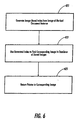
- FIG. 6 is a subsidiary flowchart showing in greater detail the indexing step 420 of FIG. 4.
- Processor 105 generates an index (step 421 ) and uses this index to find in the database or other collection of documents a stored image that corresponds to the index (step 423 ). A pointer to the image or other designator as to where the image data is to be found is then returned (step 425 ). so that the image can be retrieved (in step 430 of FIG. 4).
- an image-based indexing technique is used to generate the index in step 421 .
- An image-based index can be, for example, a number or set of numbers derivable from an image by performing certain image processing operations on that image. The number or numbers are defined such that visually similar documents will tend to have similar indices. Accordingly, an index generated from the image of the user's marked document instance will be close to an index generated from an image of the reference document from which the marked document instance derives.
- an index for each reference document image in the collection is precomputed and is stored in association with the image.
- the image processing operations needed to derive the index are performed on the image of the marked document instance.
- the documents of database 520 are stored together with their indices, which are precomputed, and a stored document having an index most closely matching the generated index is found in step 423 .
- step 423 a small set of documents, rather than a single document, is found in step 423 .
- each image in the set can be retrieved and compared with the marked document instance image (e.g., by robust matching or by simple correlation) to determine the most appropriate reference document image from among the documents of the small set.
- Various image-based indexing techniques can be used for Formless Forms.
- wavelet decomposition techniques can be used.
- One such suitable indexing technique is disclosed in "Fast Multiresolution Image Querying" by Charles E. Jacobs et al. (University of Washington Technical Report UW-CSE-95-01-06), wherein it is stated (in section 1, italics in original) "[W]e define an image querying metric that makes use of truncated, quantized versions of the wavelet decompositions [of the images], which we call signatures.
- the signatures contain only the most significant information about each image.” These signatures can be used as indices in the method of the present invention.
- a brute-force image-based technique (not strictly speaking an indexing technique, but nonetheless workable) can be used to find the reference document.
- each document in the collection is compared with the marked document instance, using a robust image comparison technique such as Hausdorff matching. Exhaustive search by this approach will eventually lead to the reference document, although this is less efficient than indexing.
- a symbolic indexing technique can be used to generate the index in step 421 .
- This approach depends on there being symbolic content in the document. For example, if the document contains printed text, optical character recognition can be performed on the textual portions of the document and the resulting characters used to generate a set of hash codes. The set of hash codes, in turn, is used as the index of the document. As another example, if the document happens to be already coded with a machine-readable symbolic code, such as a data glyph or bar code, this machine-readable code can be used as the index of the document.
- FIG. 7 is a subsidiary flowchart showing in greater detail the reference-based mark extraction step 450 of FIG. 4. Extraction proceeds in two basic steps: registration and differencing.
- registration step 451
- differencing step 452
- the pixels that represent the user's mark are isolated within the image. Essentially, processor 105 looks for every element in the image of the marked document instance that matches a corresponding element in the reference document image, and eliminates all these matches; whatever is left over is presumed to be something that the user added, that is, a mark.
- Registration is performed because the marked document instance image can be translated, rotated, scaled, skewed, distorted, and otherwise misaligned with respect to the reference document image. If differencing is performed on unregistered images, it is likely to produce spurious results. Preferably, registration is performed using Hausdorff matching techniques, although straightforward binary correlation techniques could also be used in principle (Notably, registration does not rely on the use of registration marks or other special symbols, and thus can be accomplished in the image domain, without symbolic processing.)
- processor 105 determines the elements that are common to both images (step 453 ), finds the user's mark or marks by eliminating the common elements (step 455 ), and then optionally performs thresholding or other "clean up" operations to eliminate noise, unintentional stray marks, and the like, thus leaving the meaningful mark or marks (step 457 ).
- differencing is performed on the registered images using robust image differencing techniques, although straightforward binary correlation techniques could also be used in principle.
- step 453 the common elements are found by applying a matching technique to the registered images. Any group of black pixels (assuming here that the images are black-on/white-off binary images) that is found in both of the registered images and whose respective positions in the two registered images are sufficiently "close” to one another are deemed to be common elements (that is, elements of the marked document instance image which are adequately accounted for by elements of the reference document image and which, therefore, presumably were not introduced by the user's mark.) In step 455, the complement of the matching result obtained in step 453 is taken, thus eliminating the common elements and leaving only those elements that were unmatched.
- step 455 the processor 105 finds groups of black pixels in the marked document instance image that have no counterparts in the reference document image. Thereafter, in step 457, a thresholding of connected components according to component size can be performed to eliminate isolated noise pixels and the like. This leaves only larger, substantially contiguous groups of black pixels to be considered as marks.
- pixel m 1 has coordinates (x m 1 , y m 1 ) and pixel i 1 has coordinates (x i 1 , y i 1 ).
- ⁇ ( i ) the minimum distance between pixel i and any pixel in M.
- the set Y optionally can be further processed (as in step 457 ) to eliminate mark pixels that are likely to be due to noise or otherwise insignificant.
- FIGS. 8A-8B The piecewise computation is illustrated schematically in FIGS. 8A-8B.
- an image 80 is divided into local regions (regions 81 in FIG. 8A and regions 81' in FIG. 8B), and each region is separately registered and differenced.
- the regions can be nonoverlapping, as shown in FIG. 8A, or can overlap, as shown in FIG. 8B.
- the pieces are independent of one another, so that the loop order implied by FIG. 7 can be reversed: That is, it is possible either to compute registrations for all pieces, then compute differencings for all pieces; or to compute registration and differencing for the first piece, registration and differencing for the second piece, etc. It will be appreciated that other approaches, such as processing the various pieces in parallel (as where the "processor” is in fact a multiprocessor architecture or a collection of computers operating in parallel), are also possible.
- the entire marked document instance image is compared with the entire reference image, whether or not differencing is accomplished piecewise as shown in FIGS. 8A-8B.
- FIG. 9 is a flowchart showing how the active elements of a document image (such as the retrieved document image obtained by processor 105 in step 440 ) can be designated.
- the active elements of reference document images are designated in advance and stored with the document images in database 520 , so that the active elements can be retrieved contemporaneously with the reference document image.
- the active elements can be stored separately from the reference document images, or can be designated or otherwise determined at run time.
- the reference document image is scanned, retrieved from storage, or otherwise made available to processor 105 (step 901 ). Thereafter, active elements are designated (step 903 ) and are linked (that is, associated) with their respective actions (step 905 ).
- the designation and linking can be done by a user with appropriate editor software, wherein the user manually designates which elements of the image are to be active and what actions are to be associated with each. Alternatively, designation and linking can be done semiautomatically, as where the processor carries out symbolic recognition of the image content (e.g., OCR plus word recognition), designates each recognized symbol as an active element, and assigns an action according to the type of symbol and the recognized content.
- the active elements and their associated actions are stored for later use (step 907 ) as a lookup table, association list, or other suitable data structure.
- the reference document is referred to as a "legacy" document, that is, a document that predates the Formless Forms system (here, system 10 ) in which it is used.
- a legacy document is a document that was not originally intended for use as a form
- it can be an original or photocopied paper document that has been scanned into system 10 .
- a legacy document can nevertheless be used as a reference document of the collection.
- a legacy document that was not designed for use as a form can nevertheless be used as a Formless Form.
- a legacy document can be converted into a Formless Form without symbolic recognition of the legacy document image, and the designation and assignment of active elements in the document and actions to be taken upon a user's selection of such elements can be essentially arbitrary.
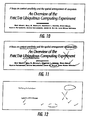
- FIGS. 10-12 show exemplary test results produced by reference-based mark extraction software suitable to carry out the steps of the flowchart of FIG. 7, using piecewise registration and differencing as was illustrated in FIG. 8.
- the software is written in Lisp and in C++ and was run on a Silicon Graphics Indy workstation.
- FIG 10 shows a portion of the reference document image.
- FIG. 11 shows the marked document instance, which in this example is a marked-up fax copy of the reference image.
- FIG. 12 shows the extracted marks.
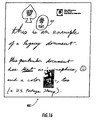
- FIGS. 13-19 show an illustrative example of processing a Formless Form according to the steps of the method of FIG. 4.
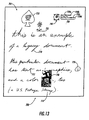
- FIG. 13 shows the original document 700, which will be used as the reference document in this example.
- Document 700 includes various elements surrounded by a whitespace background 701.
- the elements of document 700 include handwritten words such as words 710, 711, and 712, typeset text 720 , hand-drawn graphical elements including flower 731 , face 732 , and spade 733, typeset graphic element 740, and a detailed graphic 750 from a U.S. Postal Service first-class stamp.
- typeset text element 720 can also be considered to be a collection of many separate elements such as letter characters 720a , 720b and number characters 720c , 720d .
- FIG. 14 shows an instance 800 of document 700 .
- the user has instance 800 on hand and wants to use as input to a Formless Forms PUI that has document 700 among its collection of reference documents.
- Instance 800 is a photocopy of document 700 and is reduced in scale from the original. It is unmarked.
- FIG. 15 shows an instance 800' of document 700 . It is the same as document instance 800 of FIG. 14, except that it has been marked by the user with marks 810 and 820 .
- FIG. 16 shows an instance 800" of document 700. It is the marked document instance as received via fax (e.g., received by computer 100 from fax 20 ) and provided to processor 105 (step 410 ). Note the stairstepping artifacts ("jaggies") caused by the relatively low resolution of the fax. These are visible, for example, in the bottom portion of mark 810' (the faxed version of user mark 810 ).
- Processor 105 generates an image-based index from the image of instance 800" into the stored collection of documents (step 420 ), from which an image of the corresponding stored reference document, that is, document 700, is retrieved (step 430 ). Also, information about the active elements in the retrieved document image is obtained by processor 105 (step 440 ).
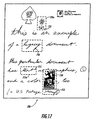
- FIG. 17 shows an exemplary designation of active elements for document 700. Dashed rectangles, such as rectangles 711a and 731a , have been drawn around elements 710, 711, 712, 731, and 750 to indicate schematically that these elements have been designated as active.
- the dashed rectangles in FIG. 17 delimit the extent of the elements they surround. This can be done in two ways: (1) An entire rectangle can be defined as an active region. A user mark near, in, or substantially overlapping this region is deemed to pertain to the rectangle, and thus to the active element surrounded by the rectangle. Note that with this approach, a rectangular region can be drawn anywhere in the image, and need not surround an element; for example, a rectangle could be drawn so as to encompass only the right-hand half of stamp 750 or only the upper half of flower 731 . (2) The rectangle indicates a group of black pixels that are to be treated as a single element, regardless of whether these pixels are contiguous.
- the actual boundaries of the element are not necessarily rectangular, but are determined by the shape of the element itself, e.g., by dilation of the boundary of the element. This approach is helpful in cases where it is not immediately clear whether a group of black pixels is to be treated as a single element or as multiple elements (as was discussed previously with respect to element 720 in FIG. 13, for example).
- dashed rectangles 711a and 731 can be seen either as themselves being the boundaries of their respective active elements 711 and 731 (approach (1)), or as simply being indicative of the general vicinity in which the actual boundaries, as determined by the element shape, are located (approach (2)).
- the latter approach (approach (2)) is preferably used in this embodiment.
- the location of active element boundaries can be important in determining which mark pertains to which active element in the mark interpretation step (step 460 ).
- an active link editor program (step 903 of FIG. 9) can be run on the image of document 700 .
- Methods are known for characterizing active elements in legacy documents, either manually or semiautomatically (e.g., methods for converting legacy documents into Web or other hypertext documents). These methods and similar methods can be applied in such an editor program.
- an editor program can be made to run interactively on a computer having a graphical user interface. The editor program presents an image of document 700 and allows the person running the program to designate elements to be activated by selecting these elements with an editing tool that establishes rectangular or other desired boundaries around particular pixel groupings. In particular, rectangular boundaries corresponding to the dashed rectangles of FIG. 17 can be selected for the elements of document 700 .
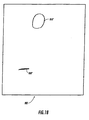
- FIG. 18 shows a difference image 880 containing extracted marks 810", 820". It is the result of performing mark extraction (step 450 ) on image 800" using the image of document 700 as the reference image.
- the image of FIG. 18 is, with respect to the example of FIGS. 13-19, what the image of FIG. 12 is with respect to the example of FIGS. 10-12.
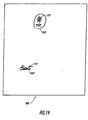
- FIG. 19 shows an image 890 that includes the extracted marks 810", 820" from difference image 880 plus the elements 731", 711" to which these marks respectively pertain
- image 890 need not explicitly be formed during the interpretation step (step 460 ), it is illustrative of an interpretation result, and is intended here to schematically depict such a result.
- the interpretation is that the user has selected two of the five active elements of document 700 , namely, word 711 and flower 731 .
- Processor 105 can then take any actions associated with these selected elements. (step 470 ).
- the World Wide Web has become the most active part of the Internet.
- the Web has a large and rapidly growing number of sites, each site typically offering a collection of hypertext documents, or pages. (For purposes of this description, it is convenient to speak of each Web page as being a single hypertext document, and to treat a collection of interlinked Web pages as being a database of hypertext documents, rather than as being a single larger hypertext document.)
- Each page in the Web has a unique identifier called a universal resource locator, or URL.
- the Web as a whole can be thought of as a heterarchically organized database of hypertext documents.
- Web pages are active documents. They can be linked to each other through hypertext links (also known as "hot links,” active links, hyperlinks, etc.).
- a link provides a reference from one Web page to another.
- Each link associates a displayed or displayable element of a Web page in which the link appears with a URL that identifies another Web page.
- the computer retrieves the associated URL and then uses the retrieved URL to retrieve the Web page that the URL identifies.
- the user can move through the Web from one page to another to another by following the links on successive pages.
- Web pages supporting textual, graphical, photographic, audio, and video materials are written in hypertext markup language (HTML). Web pages can also be written to support executable applications software, such as software written in the Java programming language (available from Sun Microsystems, Inc., Mountain View, CA).
- the Web is well suited for interactive, on-line use.
- a Web user browses (or "surfs") the Web by running browser (client) software on a computer equipped with a graphical user interface.
- the brower software can be an applications program, such as Netscape Navigator (available from Netscape Communications, Inc., Mountain View, CA), or can be built into the operating system.
- the browser lets the user display Web pages on a visual display device, such as a CRT or flat-panel display screen.
- the browser also lets the user select and follow links in the Web page with a pointing device, such as a mouse or a trackpad. Selecting a displayed link causes the computer to traverse the link, that is, to fetch the Web page pointed to by the URL associated with the link.
- Known Web browsers can render an HTML document as a pixel image and can instruct the computer about what portions of rendered image are "hot links,' that is, are to be treated as active elements that can be addressed by the user with a mouse or other pointing device so as to prompt the computer to retrieve other Web pages.
- Known Web browsers can also print out the rendered images of Web pages. Unfortunately, when the page is printed, the hypertext link information is ordinarily lost.
- the question, then, is how to restore the lost link information to the printed Web page. This can be done by treating a printed Web page as a Formless Form. The result is Paper Web.
- Paper Web is conceived as a new kind of Web browser It, too, can render an HTML document and determine the positions of active elements in the rendered image Paper Web creates and saves a map of the active elements, their positions in the rendered image, and their associated hypertext links. PaperWeb can then treat a printout of the rendered Web page as a Formless Form, by using its stored map to restore the hypertext links that would otherwise be lost.
- Paper Web can work: Suppose the user is situated at a fax machine located remotely to a host computer that is in connection with the Web.
- the computer runs software to support a Paper Web browser having an integrated fax server.
- the computer retrieves a Web page and faxes a hardcopy of the retrieved page to the user.
- the user marks the hardcopy to indicate a particular hypertext link that the user wishes to follow. For example, the user circles, underlines, or draws an X over a graphical object, text string, or other active element representing the link
- the user then faxes the hardcopy thus marked back to the computer.
- the computer determines what Web page the user has sent and what Web link the user has indicated.
- the computer then follows the indicated link to obtain a new Web page, which it faxes back to the user.
- FIG. 20 shows an example of a printed Web page 1000 which has been marked by the user and faxed back to computer 100 for processing by Paper Web.
- the user has marked a graphical button 1001 with an X mark 1002, indicating that the hypertext link represented by button 1001 is to be followed.
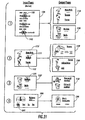
- the series of views in FIG. 21 illustrates an example of a sequence of interactions between a user and Paper Web.
- the user inputs an instance of (e.g., scans or faxes into the computer a paper copy or printout of) a page 1100 on which the user has indicated two links by writing X marks on active elements 1101, 1102 of page 1100 .
- Paper Web interprets these marks and follows the links to retrieve two new pages 1110, 1120 , which are printed out for the user.
- Paper Web also adds the new pages 1110, 1120 to its collection of known documents. (Note that with Paper Web, the user can follow multiple links at the same time, something not ordinarily possible with typical known GUI-based Web browsers.)
- the user inputs a marked instance 1110' of the page 1110 that was previously retrieved in view (1).
- the user has indicated by X marks on active elements 1111, 1112 two links to be followed from page 1110 .
- Paper Web recognizes page 1110 and calls up its stored image from the collection of reference documents. Then, using the stored image of page 1110 to extract and interpret the user's marks, Paper Web follows the indicated links to retrieve two additional new pages 1130, 1140, which are printed out for the user and which are also added to the collection.
- the user inputs a marked instance 1120' of the page 1120 that was previously retrieved in view (1).
- the user has indicated by an X mark on active element 1121 a link to be followed from page 1120 .
- Paper Web recognizes page 1120 and calls up its stored image from the collection of reference documents. Then, using the stored image of page 1120 to extract and interpret the user's marks, Paper Web follows the indicated link to retrieve another additional new page 1150, which is printed out for the user and which is also added to the collection.
- Paper Web is assumed to keep this page (or, more generally, at least one default page representing a convenient starting point for the user) in its collection at all times.
- the user has indicated by an X mark on active element 1091 a link to be followed from page 1110 .
- Paper Web recognizes page 1090 and calls up its stored image from the collection of reference documents. Then, using the stored image of page 1090 to extract and interpret the user's marks, Paper Web follows the indicated link to retrieve yet another additional new page 1190 , which is printed out for the user and which is also added to the collection.
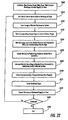
- FIG. 22 is a high-level flowchart for the method of Paper Web in one embodiment. These steps are carried out using appropriate components of system 10 and, more particularly, computer 100 under control of processor 105.
- Paper Web for example, by calling computer 100 on the telephone or by scanning in a special start-up document.
- the user's default page or pages e.g., the user's home page or the user's "bookmark list" containing links to the user's favorite Web sites
- Paper Web enters a work loop in which the user marks up instances of hardcopy Web page printouts in his or her possession (step 2210 ) and sends these instances to the computer, which follows the indicated links and sends back new printouts.
- the computer continually updates a cache of the Web pages previously visited by the user, so that these pages can be recognized if marked instances of the pages are presented as input.
- the loop begins with the user marking one or more links on a paper or other hardcopy instance of a Web page known to Paper Web (step 2210 ).
- a scanned, faxed, or other pixel image of this marked page instance is provided to system 10 , sent to computer 100 , and stored in memory 106 for use by processor 105 (step 2220 ).
- the image is used to find the corresponding known Web page in the cache (step 2230 ). This can be done, for example, by generating an image-based or other index from the marked page instance image.
- the cache stores associations between the indices of previously visited Web pages (i.e., pages known to the system and therefore usable as reference documents) and the contents of these pages.
- the cache can store the actual contents of each cached page (that is, the HTML representation of the page), or simply store the page's URL.
- processor 105 retrieves the image and hypertext link information for the page (step 2240 ). If the cache contains the HTML representation of the page, the processor can render the HTML directly to produce a bitmap and to determine where the active regions are in this bitmap. If the cache contains only the URL, the processor first can fetch the page from a Web server storing the reference documents.
- processor 105 extracts the user's mark from the marked document instance by performing reference-based mark extraction (step 2250 ), using as the reference document image the rendered image of the cached page. That is, processor 105 compares the image of the user's marked page instance with the rendered image of the cached page to determine what links the user has marked.
- reference-based mark extraction step 2250
- processor 105 compares the image of the user's marked page instance with the rendered image of the cached page to determine what links the user has marked.
- Hausdorff registration and robust differencing techniques are used to accomplish this step, as described earlier in connection with Formless Forms.
- processor 105 interprets the mark or marks to determine what links, if any, the user has selected (step 2260 ). This can be done, for example, by determining the proximity of the user's mark or marks to the pixels that represent the hypertext links of the page. In other words, Paper Web interprets the user's mark or marks by treating each mark as the paper-based equivalent of a mouse click.
- Paper Web can determine the location of the user's mark or marks with respect to the rendered image of the Web page and thereby can determine what link or links (if any) the user has selected.
- the pixels of the user's mark intersect (or are nearby to, or otherwise indicate) pixels of the rendered Web page that correspond to Web page elements representing one or more hypertext links, these links are deemed to have been selected by the user.
- Processor 105 follows any link or links that the user has the selected and retrieves the Web pages indicated by these links (step 2270).
- Processor 105 computes index values for these pages and saves the index values, together with the page's HTML contents or URL as the case may be, in the cache (step 2271 ). In this way, the newly retrieved pages will be recognizable if, at a future time, the user wishes presents them to Paper Web in hopes of revisiting them.
- processor 105 provides hardcopy output of the retrieved pages to the user (step 2272 ). At this point the loop can either continue (step 2280 ) or terminate, in which case Paper Web is exited (step 2290 ).
- Paper Web maintains a continually growing cache of known pages in this embodiment.
- the cache can be limited in size and be purged from time to time of little-used pages.
- at least one page such as the user's home page or other default page, should remain in the cache at all times, so that Paper Web always has at least one page that it can recognize and that the user can use as a starting point for Web exploration.
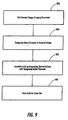
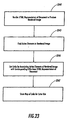
- FIG. 23 is a subsidiary flowchart showing in more detail how, in step 2240 of FIG. 22, Paper Web determines the locations of hypertext links in retrieved pages.
- Paper Web begins by rendering the HTML representation of the page to produce a rendered pixel image (step 2241 ).
- Paper Web determines which pixels of the rendered image correspond to the active elements specified in the HTML (step 2243 ). This can be done, for example, using methods similar to those known for solving the analogous problem in GUI-based Web browsers. That is, Paper Web can determine the locations of those pixels corresponding to hypertext links for a rendered image of a given Web page in much the same way that a GUI-based Web browser of the prior art can determine the corresponding pixel locations for a displayed image of that Web page.
- the links can be obtained by associating these active elements with their corresponding URLs, as specified in the HTML representation of the page (step 2245).
- the map of active links is stored (step 2247 ) for later use during the mark interpretation step (that is, in step 2260 of FIG. 22).
- the map need not be stored with the cached page.
- the map of active links for each reference document was preferably precomputed (as shown in FIG. 9) and stored with the reference document, here, the map of active links can conveniently be computed at run time. That is because unlike legacy documents, which must be specially converted for use as active or hypertext documents, HTML documents are intended from the outset to be hypertext documents. So, once Paper Web has found the appropriate cached page corresponding to a given input page instance, Paper Web can readily regenerate the map of pixels to links from the HTML representation of the page. Paper Web, in effect, restores the hypertext functionality that otherwise is lost upon printing out the Web page.
- Formless Forms provides a way to "bring paper documents to life" by turning ordinary, inactive/nonhypertext documents into active forms and hypertext documents.
- the Formless Forms approach can be used, for example, to turn legacy documents that were never intended for use as forms into forms, or (as in Paper Web) to make paper printouts of World Wide Web or other hypertext pages as powerful and useful as their on-screen counterparts.
- Formless Forms and Paper Web computer users can access the World Wide Web or any hypertext database without a mouse, keyboard, or display screen. All the user needs is a fax machine, a pen, and a telephone number to call their computer.
Landscapes
- Engineering & Computer Science (AREA)
- Theoretical Computer Science (AREA)
- Physics & Mathematics (AREA)
- General Physics & Mathematics (AREA)
- Audiology, Speech & Language Pathology (AREA)
- Multimedia (AREA)
- Health & Medical Sciences (AREA)
- Artificial Intelligence (AREA)
- Computer Vision & Pattern Recognition (AREA)
- Computational Linguistics (AREA)
- General Health & Medical Sciences (AREA)
- General Engineering & Computer Science (AREA)
- Processing Or Creating Images (AREA)
- Character Discrimination (AREA)
- Information Retrieval, Db Structures And Fs Structures Therefor (AREA)
- Character Input (AREA)
Claims (9)
- Verfahren, ausgeführt in einem Datenverarbeitungssystem, das aufweist:Bereitstellen (410) eines ersten Dokumentenbilds, aufweisend digitale Bilddaten, umfassend eine erste Vielzahl von Pixeln, wobei das erste Dokumentenbild einen Fall eines Referenz-Dokuments darstellt, wobei zu diesem Fall eine Markierung hinzugefügt worden ist, wobei das Referenz-Dokument eine Vielzahl von Elementen besitzt;Bereitstellen (430) eines zweiten Dokumentenbilds, aufweisend digitale Bilddaten, umfassend eine zweite Vielzahl von Pixeln, wobei das zweite Dokumentenbild unter einer Vielzahl von Dokumentenbildern ausgewählt wird und das das Referenz-Dokument ohne die Markierung darstellt;automatisches Extrahieren (450) von dem ersten Dokumentenbild eines Satzes von Pixeln, der die Markierung darstellt, unter Durchführen einer auf einer Referenz basierenden Markierungs-Extrahiertechnik, wobei das zweite Dokumentenbild als ein Referenzbild dient und wobei im Wesentlichen das gesamte erste Dokumentenbild mit im Wesentlichen dem gesamten zweiten Dokumentenbild verglichen wird;Bereitstellen von Informationen über einen Satz von aktiven Elementen des Referenz-Dokuments, wobei jedes aktive Element ein Element unter der Vielzahl von Elementen des Referenz-Dokuments ist, wobei das Referenz-Dokument mindestens ein solches aktives Element besitzt, wobei jedes aktive Element zu mindestens einer Aktion zugeordnet wird;Interpretieren (460) des extrahierten Satzes von Pixeln, der die Markierung darstellt, durch Bestimmen, ob irgendeines der aktiven Elemente des Referenz-Dokuments durch die Markierung angezeigt ist; undfalls ein aktives Element durch die Markierung angezeigt ist, Erleichtern des Vorgangs, mit dem ein solches aktives Element zugeordnet ist.
- Verfahren nach Anspruch 1, wobei, in dem Extrahierschritt (450), die auf der Referenz basierende Markierungs-Extrahiertechnik einen Schritt umfasst:Berechnen (452) einer stabilen Differenz des ersten und zweiten Bilds über einen Bildverarbeitungsvorgang, ausgeführt ohne Erkennung irgendeines symbolischen Inhalts in entweder dem ersten oder dem zweiten Dokumentenbild.
- Verfahren nach Anspruch 2, wobei der Schritt eines Berechnens einer stabilen Differenz aufweist:Bestimmen (453) einer Zusammenstellung von Pixeln, die für sowohl das erste als auch das zweite Bild gemeinsam sind, durch Anpassen von Pixeln in dem ersten Bild zu Pixeln des zweiten Bilds gemäß einem Anpassungskriterium; undEliminieren (455) zwischen dem ersten und dem zweiten Bild der Pixel der Zusammenstellung, die so bestimmt ist, um dadurch einen Satz von Diskrepanz-Pixeln, umfassend einen Satz von Pixeln, der die Markierung darstellt, zu bestimmen.
- Verfahren nach Anspruch 1, 2 oder 3, wobei, in dem Extrahierschritt, die auf der Referenz basierende Markierungs-Extrahiertechnik die Schritte umfasst:Ausrichten (451) des ersten und des zweiten Bilds zueinander; undBerechnen (452) einer stabilen Differenz des ausgerichteten ersten und zweiten Bilds.
- Verfahren nach Anspruch 4, wobei der Schritt eines Berechnens einer stabilen Differenz die Schritte aufweist:Finden (453) gemeinsamer Elemente zwischen den Bildern; undEliminieren (455) der gefundenen, gemeinsamen Elemente, um eine Diskrepanz zwischen dem ersten und dem zweiten Dokumentenbild zu lokalisieren.
- Verfahren nach einem der vorhergehenden Ansprüche, das weiterhin aufweist:wobei im Wesentlichen die Gesamtheit des ersten Dokumentenbilds mit im Wesentlichen der Gesamtheit des zweiten Dokumentenbilds durch Berechnen einer stabilen Differenz des ersten und des zweiten Bilds verglichen wird.Erzeugen (421) eines auf einem Bild basierenden Index von dem ersten Dokumentenbild ohne Erkennung irgendeines symbolischen Inhalts des ersten Dokumentenbilds; Auswählen des zweiten Dokumentenbilds von einer Vielzahl von Dokumentenbildern gemäß dem erzeugten Index; und
- Verfahren nach einem der vorhergehenden Ansprüche, aufweisend:Umwandeln eines ersten Dokumenten-Falls in das erste Dokumentenbild, wobei das Referenz-Dokument ein Dokument ein anderes als eine Form ist;Umwandeln eines zweiten Dokumenten-Falls in das zweite Dokumentenbild;Versehen des zweiten Dokumentenbilds mit einem Satz von Anmerkungen, aufweisend mindestens eine Anmerkung, wobei jede Anmerkung eine Zuordnung zwischen einem Element des Referenz-Dokuments und mindestens einer Aktion einrichtet, wobei jedes Element, für das eine solche Zuordnung demzufolge eingerichtet ist, als ein "aktives Element" bezeichnet wird; wobei der Schritt eines Interpretierens des extrahierten Satzes von Pixeln, der die Markierung darstellt, ein Bestimmen aufweist, unter Bezugnahme auf den Satz von Anmerkungen, ob irgendeines der aktiven Elemente des Referenz-Dokuments durch die Markierung angezeigt ist.
- Verfahren nach Anspruch 1, wobei die Markierung eine Auswahl eines bevorzugten Elements des Referenz-Dokuments anzeigt, wobei das bevorzugte Element, dessen Auswahl so angezeigt ist, ein Element ein anderes als ein Form-Element ist;
wobei die auf der Referenz basierende Markierungs-Extrahiertechnik mindestens eine Bild-Domänen-Operation zum Vergleichen des ersten und des zweiten Dokumentenbilds aufweist, wobei die Bild-Domänen-Operation eine Bildverarbeitungsoperation ist, die ohne Erkennung irgendeines symbolischen Inhalts in entweder dem ersten oder dem zweiten Dokumentenbild ausgeführt wird; und
wobei ein Interpretieren des extrahierten Satzes von Pixeln, der die Markierung darstellt, bestimmt, ob das bevorzugte Element, dessen Auswahl durch die Markierung angezeigt ist, ein aktives Element des Referenz-Dokuments ist. - Programmierbares Datenverarbeitungssystem, das, wenn es geeignet programmiert ist, zum Durchführen des Verfahrens nach einem der vorhergehenden Ansprüche dient, wobei das System einen Prozessor, einen Speicher und eine Eingabe/Ausgabe-Schaltung umfasst.
Applications Claiming Priority (4)
| Application Number | Priority Date | Filing Date | Title |
|---|---|---|---|
| US1681096P | 1996-05-03 | 1996-05-03 | |
| US16810 | 1996-05-03 | ||
| US08/688,704 US5692073A (en) | 1996-05-03 | 1996-07-30 | Formless forms and paper web using a reference-based mark extraction technique |
| US688704 | 1996-07-30 |
Publications (3)
| Publication Number | Publication Date |
|---|---|
| EP0805410A2 EP0805410A2 (de) | 1997-11-05 |
| EP0805410A3 EP0805410A3 (de) | 1999-03-03 |
| EP0805410B1 true EP0805410B1 (de) | 2003-02-12 |
Family
ID=26689100
Family Applications (1)
| Application Number | Title | Priority Date | Filing Date |
|---|---|---|---|
| EP97302982A Expired - Lifetime EP0805410B1 (de) | 1996-05-03 | 1997-05-01 | Formloses Formular und papierbasierte Benutzeroberflächen |
Country Status (4)
| Country | Link |
|---|---|
| US (1) | US5692073A (de) |
| EP (1) | EP0805410B1 (de) |
| JP (1) | JP3095709B2 (de) |
| DE (1) | DE69718959T2 (de) |
Cited By (1)
| Publication number | Priority date | Publication date | Assignee | Title |
|---|---|---|---|---|
| DE10331097A1 (de) * | 2003-07-09 | 2004-07-15 | Siemens Ag | Verfahren zur verbesserten Verwaltung und Auswertung von MR-Herzmessungsaufnahmen |
Families Citing this family (356)
| Publication number | Priority date | Publication date | Assignee | Title |
|---|---|---|---|---|
| AUPQ582900A0 (en) | 2000-02-24 | 2000-03-16 | Silverbrook Research Pty Ltd | Printed media production |
| AUPQ131399A0 (en) * | 1999-06-30 | 1999-07-22 | Silverbrook Research Pty Ltd | A method and apparatus (NPAGE02) |
| AUPQ055999A0 (en) | 1999-05-25 | 1999-06-17 | Silverbrook Research Pty Ltd | A method and apparatus (npage01) |
| US6076733A (en) * | 1993-11-24 | 2000-06-20 | Metrologic Instruments, Inc. | Web-based system and method for enabling a viewer to access and display HTML-encoded documents located on the world wide web (WWW) by reading URL-encoded bar code symbols printed on a web-based information resource guide |
| US6068188A (en) | 1993-11-24 | 2000-05-30 | Metrologic Instruments, Inc. | System and method for composing menus of URL-encoded bar code symbols while using internet browser program |
| US6375078B1 (en) | 1990-09-11 | 2002-04-23 | Metrologic Instruments, Inc. | Universal transaction machine for carrying out information-related transactions using html-encoded documents embodying transaction-enabling java-applets automatically launched and executed in response to reading code symbols |
| US5992752A (en) | 1993-11-24 | 1999-11-30 | Metrologic Instruments, Inc. | Internet-based system for enabling information-related transactions over the internet using Java-enabled internet terminals provided with bar code symbol readers for reading Java-Applet encoded bar code symbols |
| US8352400B2 (en) | 1991-12-23 | 2013-01-08 | Hoffberg Steven M | Adaptive pattern recognition based controller apparatus and method and human-factored interface therefore |
| US5838458A (en) * | 1992-02-25 | 1998-11-17 | Tsai; Irving | Method and apparatus for linking designated portions of a received document image with an electronic address |
| US6449377B1 (en) | 1995-05-08 | 2002-09-10 | Digimarc Corporation | Methods and systems for watermark processing of line art images |
| US7113615B2 (en) | 1993-11-18 | 2006-09-26 | Digimarc Corporation | Watermark embedder and reader |
| US6345104B1 (en) | 1994-03-17 | 2002-02-05 | Digimarc Corporation | Digital watermarks and methods for security documents |
| US5905251A (en) | 1993-11-24 | 1999-05-18 | Metrologic Instruments, Inc. | Hand-held portable WWW access terminal with visual display panel and GUI-based WWW browser program integrated with bar code symbol reader in a hand-supportable housing |
| US6942150B2 (en) * | 1993-11-24 | 2005-09-13 | Metrologic Instruments, Inc. | Web-based mobile information access terminal |
| US7286684B2 (en) | 1994-03-17 | 2007-10-23 | Digimarc Corporation | Secure document design carrying auxiliary machine readable information |
| US6869023B2 (en) | 2002-02-12 | 2005-03-22 | Digimarc Corporation | Linking documents through digital watermarking |
| US6522770B1 (en) | 1999-05-19 | 2003-02-18 | Digimarc Corporation | Management of documents and other objects using optical devices |
| US6473860B1 (en) | 1994-04-07 | 2002-10-29 | Hark C. Chan | Information distribution and processing system |
| US7991347B1 (en) | 1994-04-07 | 2011-08-02 | Data Innovation Llc | System and method for accessing set of digital data at a remote site |
| US6961712B1 (en) | 1996-10-25 | 2005-11-01 | Ipf, Inc. | Consumer product information request (CPIR) enabling servlets and web-based consumer product information catalogs employing the same |
| US5918214A (en) | 1996-10-25 | 1999-06-29 | Ipf, Inc. | System and method for finding product and service related information on the internet |
| US7181758B1 (en) | 1994-07-25 | 2007-02-20 | Data Innovation, L.L.C. | Information distribution and processing system |
| US8094949B1 (en) | 1994-10-21 | 2012-01-10 | Digimarc Corporation | Music methods and systems |
| US7986806B2 (en) | 1994-11-16 | 2011-07-26 | Digimarc Corporation | Paper products and physical objects as means to access and control a computer or to navigate over or act as a portal on a network |
| US6505776B1 (en) | 1995-06-07 | 2003-01-14 | Metrologic Instruments, Inc. | System for storing, accessing and displaying html-encoded documents relating to an object being worked upon in a work environment by a human operator wearing a wireless http-enabled client system equipped with a code symbol reader programmed to read a url-encoded symbol on the object, access said html-encoded documents from http-enabled information servers connected to an information network, and display same for review while working said object |
| US6965682B1 (en) | 1999-05-19 | 2005-11-15 | Digimarc Corp | Data transmission by watermark proxy |
| US6577746B1 (en) * | 1999-12-28 | 2003-06-10 | Digimarc Corporation | Watermark-based object linking and embedding |
| US7051086B2 (en) | 1995-07-27 | 2006-05-23 | Digimarc Corporation | Method of linking on-line data to printed documents |
| US7171018B2 (en) | 1995-07-27 | 2007-01-30 | Digimarc Corporation | Portable devices and methods employing digital watermarking |
| US5963964A (en) * | 1996-04-05 | 1999-10-05 | Sun Microsystems, Inc. | Method, apparatus and program product for updating visual bookmarks |
| US7024016B2 (en) * | 1996-05-16 | 2006-04-04 | Digimarc Corporation | Digital watermarking apparatus and methods |
| US5963950A (en) * | 1996-06-26 | 1999-10-05 | Sun Microsystems, Inc. | Method and system for facilitating access to selectable elements on a graphical user interface |
| US5887139A (en) * | 1996-08-19 | 1999-03-23 | 3Com Corporation | Configurable graphical user interface useful in managing devices connected to a network |
| US5938726A (en) * | 1996-10-04 | 1999-08-17 | Motorola, Inc. | Apparatus for reading an electronic network navigation device and a peripheral for use therewith |
| US5995105A (en) * | 1996-09-23 | 1999-11-30 | Motorola, Inc. | Methods and systems for providing a resource in an electronic network |
| US5902353A (en) * | 1996-09-23 | 1999-05-11 | Motorola, Inc. | Method, system, and article of manufacture for navigating to a resource in an electronic network |
| US6771381B1 (en) | 1998-11-13 | 2004-08-03 | Laurence C. Klein | Distributed computer architecture and process for virtual copying |
| US5870767A (en) * | 1996-11-22 | 1999-02-09 | International Business Machines Corporation | Method and system for rendering hyper-link information in a printable medium from a graphical user interface |
| CA2272583C (en) | 1996-11-25 | 2007-10-23 | Metrologic Instruments, Inc. | System and method for accessing internet-based information resources by scanning java-applet encoded bar code symbols |
| US6386453B1 (en) | 1996-11-25 | 2002-05-14 | Metrologic Instruments, Inc. | System and method for carrying out information-related transactions |
| US6122351A (en) * | 1997-01-21 | 2000-09-19 | Med Graph, Inc. | Method and system aiding medical diagnosis and treatment |
| US5974124A (en) * | 1997-01-21 | 1999-10-26 | Med Graph | Method and system aiding medical diagnosis and treatment |
| JP3634099B2 (ja) * | 1997-02-17 | 2005-03-30 | 株式会社リコー | 文書情報管理システム,媒体用紙情報作成装置および文書情報管理装置 |
| US6199071B1 (en) * | 1997-04-01 | 2001-03-06 | Sun Microsystems, Inc. | Method and apparatus for archiving hypertext documents |
| US6125383A (en) * | 1997-06-11 | 2000-09-26 | Netgenics Corp. | Research system using multi-platform object oriented program language for providing objects at runtime for creating and manipulating biological or chemical data |
| JP3478725B2 (ja) * | 1997-07-25 | 2003-12-15 | 株式会社リコー | 文書情報管理システム |
| JPH1153168A (ja) * | 1997-08-07 | 1999-02-26 | Matsushita Graphic Commun Syst Inc | 音声情報付文書作成装置及びこれを用いた方法 |
| US6108444A (en) * | 1997-09-29 | 2000-08-22 | Xerox Corporation | Method of grouping handwritten word segments in handwritten document images |
| JPH11110393A (ja) * | 1997-09-30 | 1999-04-23 | Ricoh Co Ltd | 情報処理方法および文書検索装置 |
| US7516403B1 (en) * | 1997-12-22 | 2009-04-07 | International Business Machines Corporation | Network distributed display pages with images and symbols selected from a universal library |
| GB9727322D0 (en) | 1997-12-29 | 1998-02-25 | Xerox Corp | Multilingual information retrieval |
| US6546151B1 (en) * | 1998-01-22 | 2003-04-08 | Matsushita Electric Industrial Co., Ltd | Information processing apparatus and information equipment using the information processing apparatus |
| US6583888B1 (en) * | 1998-03-02 | 2003-06-24 | Xerox Corporation | System for managing service access in a multifunctional printing system |
| US6348970B1 (en) * | 1998-04-29 | 2002-02-19 | Qwest Communications Int'l., Inc. | Apparatus and method for interfacing a computer network to a facsimile machine |
| WO1999057656A1 (en) * | 1998-05-01 | 1999-11-11 | Citizen 1 Software, Inc. | Method and apparatus for simultaneously accessing a plurality of dispersed databases |
| US20080015998A1 (en) * | 1998-10-01 | 2008-01-17 | Feyzi Celik | Method and Apparatus for Storing and Retrieving Business Contact Information in a Computer System |
| US7509349B2 (en) * | 1998-10-01 | 2009-03-24 | Onepin, Inc. | Method and apparatus for storing and retrieving business contact information in a computer system |
| US8326361B2 (en) | 1998-10-01 | 2012-12-04 | Lupine Investments Llc | Phone to phone data exchange |
| US7813725B2 (en) * | 1998-10-01 | 2010-10-12 | Onepin, Llc | Wireless data exchange |
| US7349907B2 (en) * | 1998-10-01 | 2008-03-25 | Onepin, Inc. | Method and apparatus for storing and retrieving business contact information in a computer system |
| US6374259B1 (en) | 1998-10-01 | 2002-04-16 | Onepin, Llc | Method and apparatus for storing and retreiving business contact information in computer system |
| US7836011B2 (en) | 1998-10-01 | 2010-11-16 | Onepin, Inc. | Phone to phone data exchange |
| US7970792B2 (en) * | 1998-10-01 | 2011-06-28 | Onepin, Inc. | Phone to phone data exchange |
| US6342901B1 (en) | 1998-12-22 | 2002-01-29 | Xerox Corporation | Interactive device for displaying information from multiple sources |
| US6675356B1 (en) * | 1998-12-22 | 2004-01-06 | Xerox Corporation | Distributed document-based calendaring system |
| US6249765B1 (en) * | 1998-12-22 | 2001-06-19 | Xerox Corporation | System and method for extracting data from audio messages |
| US7904187B2 (en) | 1999-02-01 | 2011-03-08 | Hoffberg Steven M | Internet appliance system and method |
| AU3395500A (en) * | 1999-03-04 | 2000-09-21 | Cardiff Software, Inc. | Automated form generation into an advanced page layout format with embedded field definitions |
| JP2002539534A (ja) * | 1999-03-08 | 2002-11-19 | サン・マイクロシステムズ・インコーポレイテッド | オンラインフォームシステムにデータを発信する方法および装置 |
| US7593899B1 (en) * | 1999-05-25 | 2009-09-22 | Silverbrook Research Pty Ltd | Method and system for online payments |
| US7178718B2 (en) * | 1999-05-25 | 2007-02-20 | Silverbrook Research Pty Ltd | Methods and systems for object identification and interaction |
| US7068382B1 (en) * | 1999-05-25 | 2006-06-27 | Silverbrook Research Pty Ltd | Interactive printer provider |
| AUPQ439299A0 (en) | 1999-12-01 | 1999-12-23 | Silverbrook Research Pty Ltd | Interface system |
| US7038066B2 (en) * | 1999-05-25 | 2006-05-02 | Silverbrook Research Pty Ltd | Dibenzoflourenone based chromophores |
| US7857201B2 (en) * | 1999-05-25 | 2010-12-28 | Silverbrook Research Pty Ltd | Method and system for selection |
| AUPQ363299A0 (en) | 1999-10-25 | 1999-11-18 | Silverbrook Research Pty Ltd | Paper based information inter face |
| US7105753B1 (en) | 1999-05-25 | 2006-09-12 | Silverbrook Research Pty Ltd | Orientation sensing device |
| US7760969B2 (en) * | 1999-05-25 | 2010-07-20 | Silverbrook Research Pty Ltd | Method of providing information via context searching from a printed substrate |
| US7175079B1 (en) | 1999-05-25 | 2007-02-13 | Silverbrook Research Pty Ltd | Method and system for online purchasing |
| US20070111713A1 (en) * | 1999-05-25 | 2007-05-17 | Silverbrook Research Pty Ltd | Method for accessing content from a computer network via a mobile phone using a two-step retrieval process |
| US7762453B2 (en) * | 1999-05-25 | 2010-07-27 | Silverbrook Research Pty Ltd | Method of providing information via a printed substrate with every interaction |
| US7384134B2 (en) * | 1999-05-25 | 2008-06-10 | Silverbrook Research Pty Ltd | Ink cartridge with collapsible ink containers for an inkjet printer |
| US6965439B1 (en) | 1999-05-25 | 2005-11-15 | Silverbrook Research Pty Ltd | Interactive printer |
| US7832626B2 (en) * | 1999-05-25 | 2010-11-16 | Silverbrook Research Pty Ltd | Anonymous competition entry |
| US7170499B1 (en) * | 1999-05-25 | 2007-01-30 | Silverbrook Research Pty Ltd | Handwritten text capture via interface surface |
| US7093991B2 (en) * | 1999-05-25 | 2006-08-22 | Silverbrook Research Pty Ltd | Combined printer and binder |
| US7468809B2 (en) | 1999-05-25 | 2008-12-23 | Silverbrook Research Pty Ltd | Method of printing an interface onto a surface using a complementary ink set |
| US7707082B1 (en) * | 1999-05-25 | 2010-04-27 | Silverbrook Research Pty Ltd | Method and system for bill management |
| US7982725B2 (en) * | 1999-05-25 | 2011-07-19 | Silverbrook Research Pty Ltd | Sensing device with inductive charging |
| US7721948B1 (en) * | 1999-05-25 | 2010-05-25 | Silverbrook Research Pty Ltd | Method and system for online payments |
| US7821507B2 (en) * | 1999-05-25 | 2010-10-26 | Silverbrook Research Pty Ltd | Method of providing information via a printed substrate and two-mode sensing device |
| US20070233513A1 (en) * | 1999-05-25 | 2007-10-04 | Silverbrook Research Pty Ltd | Method of providing merchant resource or merchant hyperlink to a user |
| US7099019B2 (en) * | 1999-05-25 | 2006-08-29 | Silverbrook Research Pty Ltd | Interface surface printer using invisible ink |
| US7102772B1 (en) * | 1999-05-25 | 2006-09-05 | Silverbrook Research Pty Ltd | Method and system for delivery of a facsimile |
| US6502614B1 (en) * | 1999-05-25 | 2003-01-07 | Silverbrook Research Pty Ltd | Printed media transverse binder |
| US7180609B2 (en) | 1999-05-25 | 2007-02-20 | Silverbrook Research Pty Ltd | Printer for printing an interface onto a surface using a complementary ink set |
| US7793824B2 (en) * | 1999-05-25 | 2010-09-14 | Silverbrook Research Pty Ltd | System for enabling access to information |
| US6816274B1 (en) * | 1999-05-25 | 2004-11-09 | Silverbrook Research Pty Ltd | Method and system for composition and delivery of electronic mail |
| US7094910B2 (en) * | 1999-05-25 | 2006-08-22 | Silverbrook Research Pty Ltd | Bridged diarylpolymethine chromophores |
| US6957768B1 (en) * | 1999-05-25 | 2005-10-25 | Silverbrook Research Pty Ltd | Computer system control via interface surface |
| US7190491B2 (en) * | 1999-05-25 | 2007-03-13 | Silverbrook Research Pty Ltd | Interactive publication printer and binder |
| US6785016B1 (en) * | 1999-05-25 | 2004-08-31 | Silverbrook Research Pty Ltd. | Portable interactive printer |
| US6832717B1 (en) * | 1999-05-25 | 2004-12-21 | Silverbrook Research Pty Ltd | Computer system interface surface |
| US7122685B2 (en) * | 1999-05-25 | 2006-10-17 | Silverbrook Research Pty Ltd | Dibenzoanthraquinone based chromophores |
| US7539937B2 (en) * | 1999-05-25 | 2009-05-26 | Silverbrook Research Pty Ltd | Periodical distribution via a computer network |
| US7243835B2 (en) * | 1999-05-25 | 2007-07-17 | Silverbrook Research Pty Ltd | Competition entry via label |
| US7971784B2 (en) | 1999-05-25 | 2011-07-05 | Silverbrook Research Pty Ltd | Sensing device with mode changes via nib switch |
| US8113950B2 (en) | 1999-05-25 | 2012-02-14 | Silverbrook Research Pty Ltd | Competition entry with limited return messaging |
| US6792165B1 (en) | 1999-05-25 | 2004-09-14 | Silverbrook Research Pty Ltd | Sensing device |
| US6987506B1 (en) * | 1999-05-25 | 2006-01-17 | Silverbrook Research Pty Ltd | Method and system for navigating a directory |
| US7091344B2 (en) * | 1999-05-25 | 2006-08-15 | Silverbrook Research Pty Ltd | Infrared chromophores |
| AUPQ291299A0 (en) * | 1999-09-17 | 1999-10-07 | Silverbrook Research Pty Ltd | A self mapping surface and related applications |
| US6880124B1 (en) * | 1999-06-04 | 2005-04-12 | Hewlett-Packard Development Company, L.P. | Methods of storing and retrieving information, and methods of document retrieval |
| US7663780B2 (en) * | 1999-06-30 | 2010-02-16 | Silverbrook Research Pty Ltd | Cartridge with identifiers |
| AU2002952259A0 (en) * | 2002-10-25 | 2002-11-07 | Silverbrook Research Pty Ltd | Methods and apparatus |
| US7831244B2 (en) * | 1999-06-30 | 2010-11-09 | Silverbrook Research Pty Ltd | Retrieving an image via a coded surface |
| US7792298B2 (en) * | 1999-06-30 | 2010-09-07 | Silverbrook Research Pty Ltd | Method of using a mobile device to authenticate a printed token and output an image associated with the token |
| CA2414749C (en) * | 1999-06-30 | 2010-12-14 | Silverbrook Research Pty Ltd | Method and system for conferencing |
| EP1203287A4 (de) | 1999-06-30 | 2003-08-20 | Silverbrook Res Pty Ltd | Interaktives druckerkonto |
| AU2003900983A0 (en) * | 2003-03-04 | 2003-03-20 | Silverbrook Research Pty Ltd | Methods, systems and apparatus (NPT023) |
| EP1214843A4 (de) * | 1999-06-30 | 2006-07-05 | Silverbrook Res Pty Ltd | Verfahren und system um ein dokument zu bekommen, welches sich auf ein video bezieht |
| WO2001003018A1 (en) * | 1999-06-30 | 2001-01-11 | Silverbrook Research Pty Ltd | Method and system for accessing travel services |
| US20050052661A1 (en) * | 1999-06-30 | 2005-03-10 | Paul Lapstun | Cartridge with identifiers |
| CA2414759C (en) * | 1999-06-30 | 2011-04-19 | Silverbrook Research Pty Ltd | Method and system for navigating a history list |
| US20040083174A1 (en) * | 2000-06-30 | 2004-04-29 | Kia Silverbrook | Method and system for banking using coded forms |
| US6587895B1 (en) | 1999-08-03 | 2003-07-01 | Xerox Corporation | Method for accepting a freeform input containing message with time reference thereupon providing an alert message according to the time reference |
| AU765063B2 (en) | 1999-09-17 | 2003-09-04 | Silverbrook Research Pty Ltd | Method and system for instruction of a computer |
| US7128270B2 (en) * | 1999-09-17 | 2006-10-31 | Silverbrook Research Pty Ltd | Scanning device for coded data |
| US20050212830A1 (en) * | 1999-09-17 | 2005-09-29 | Silverbrook Research Pty Ltd | Method of accessing a connection address using a mobile device with a sensing means |
| AU2003900746A0 (en) * | 2003-02-17 | 2003-03-06 | Silverbrook Research Pty Ltd | Methods, systems and apparatus (NPS041) |
| US7225979B2 (en) * | 1999-09-17 | 2007-06-05 | Silverbrook Research Pty Ltd | Methods and systems for object identification and interaction |
| US7605940B2 (en) * | 1999-09-17 | 2009-10-20 | Silverbrook Research Pty Ltd | Sensing device for coded data |
| US7108192B2 (en) * | 1999-09-17 | 2006-09-19 | Silverbrook Research Pty Ltd | Rotationally symmetric tags |
| US8136720B2 (en) * | 1999-09-17 | 2012-03-20 | Silverbrook Research Pty Ltd | Method of recording mail transactions |
| US7558563B2 (en) * | 1999-09-17 | 2009-07-07 | Silverbrook Research Pty Ltd | Retrieving contact details via a coded surface |
| US8416468B2 (en) | 1999-09-17 | 2013-04-09 | Silverbrook Research Pty Ltd | Sensing device for subsampling imaged coded data |
| SE517445C2 (sv) | 1999-10-01 | 2002-06-04 | Anoto Ab | Positionsbestämning på en yta försedd med ett positionskodningsmönster |
| US7015901B2 (en) * | 1999-10-25 | 2006-03-21 | Silverbrook Research Pty Ltd | Universal pen with code sensor |
| AU764601B2 (en) | 1999-10-25 | 2003-08-21 | Silverbrook Research Pty Ltd | Category buttons on interactive paper |
| AU2003262339B2 (en) * | 1999-10-25 | 2006-05-25 | Silverbrook Research Pty Ltd | Method and system for advertising |
| MXPA02004128A (es) | 1999-10-25 | 2004-04-02 | Silverbrook Res Pty Ltd | Pluma electronicamente controlable. |
| US7322524B2 (en) * | 2000-10-20 | 2008-01-29 | Silverbrook Research Pty Ltd | Graphic design software using an interface surface |
| KR100703964B1 (ko) * | 1999-10-25 | 2007-04-04 | 실버브룩 리서치 피티와이 리미티드 | 보험 서비스 제공 방법 및 시스템 |
| US7503493B2 (en) * | 1999-10-25 | 2009-03-17 | Silverbrook Research Pty Ltd | Method and system for digitizing freehand graphics with user-selected properties |
| US7558598B2 (en) * | 1999-12-01 | 2009-07-07 | Silverbrook Research Pty Ltd | Dialling a number via a coded surface |
| US6823341B1 (en) * | 1999-12-06 | 2004-11-23 | International Business Machines Corporation | Method, system and program for providing indexed web page contents to a search engine database |
| US6903838B1 (en) * | 1999-12-20 | 2005-06-07 | Hewlett-Packard Development Company, L.P. | Automatically specifying address where document is to be sent |
| US8332740B2 (en) * | 2000-01-19 | 2012-12-11 | Graham John D | Systems and method for management of intangible assets |
| WO2001054031A2 (en) * | 2000-01-19 | 2001-07-26 | Iddex Corporation | Systems and methods for managing intellectual property |
| EP1122632A1 (de) * | 2000-02-04 | 2001-08-08 | Bernd J. Hobrack | Verfahren und Datenverarbeitungssystem zur Koordinierung von Anwendungen einer Computer-Software |
| US20050060249A1 (en) * | 2000-02-24 | 2005-03-17 | Kia Silverbrook | Document supply control |
| WO2001063906A2 (en) * | 2000-02-24 | 2001-08-30 | Geoffrey Marshall | Faxing paper documents to a plurality of address types |
| US7149347B1 (en) | 2000-03-02 | 2006-12-12 | Science Applications International Corporation | Machine learning of document templates for data extraction |
| US6950553B1 (en) * | 2000-03-23 | 2005-09-27 | Cardiff Software, Inc. | Method and system for searching form features for form identification |
| US20020050982A1 (en) * | 2000-04-05 | 2002-05-02 | Petter Ericson | Data form having a position-coding pattern detectable by an optical sensor |
| US20060082557A1 (en) * | 2000-04-05 | 2006-04-20 | Anoto Ip Lic Hb | Combined detection of position-coding pattern and bar codes |
| SE519356C2 (sv) * | 2000-04-05 | 2003-02-18 | Anoto Ab | Förfarande och anordning för informationshantering |
| US20010056439A1 (en) * | 2000-04-26 | 2001-12-27 | International Business Machines Corporation | Method and system for accessing interactive multimedia information or services by touching marked items on physical documents |
| US7657128B2 (en) * | 2000-05-23 | 2010-02-02 | Silverbrook Research Pty Ltd | Optical force sensor |
| US7051271B1 (en) | 2000-05-31 | 2006-05-23 | Fuji Xerox Co., Ltd. | Method, system and article of manufacture for linking a video to a scanned document |
| US7162442B2 (en) * | 2000-06-30 | 2007-01-09 | Silverbrook Research Pty Ltd | Method and system for submitting bids using coded forms |
| GB2366689A (en) * | 2000-08-11 | 2002-03-13 | Nokia Mobile Phones Ltd | Server image display on a mobile |
| WO2002014438A1 (en) * | 2000-08-14 | 2002-02-21 | Silverbrook Research Pty Ltd | Infrared chromophores |
| TW528967B (en) | 2000-08-29 | 2003-04-21 | Ibm | System and method for locating on a physical document items referenced in an electronic document |
| TW494323B (en) * | 2000-08-29 | 2002-07-11 | Ibm | System and method for locating on a physical document items referenced in another physical document |
| US6671684B1 (en) * | 2000-09-01 | 2003-12-30 | Ricoh Co., Ltd. | Method and apparatus for simultaneous highlighting of a physical version of a document and an electronic version of a document |
| US7561287B1 (en) | 2000-09-16 | 2009-07-14 | Mmf Systems, Inc. | System and method for automatically routing and storing coded information and displaying an interaction device |
| US6657647B1 (en) * | 2000-09-25 | 2003-12-02 | Xoucin, Inc. | Controlling the order in which content is displayed in a browser |
| US20020044687A1 (en) * | 2000-10-16 | 2002-04-18 | Emailcard Feedback Systems, Inc. | Customer feedback system |
| US7456994B2 (en) * | 2000-10-20 | 2008-11-25 | Silverbrook Research Pty Ltd | Mobile telecommunications device with stylus having printhead tip |
| ATE368574T1 (de) * | 2000-10-20 | 2007-08-15 | Silverbrook Res Pty Ltd | Druckkopf für stift |
| US7431449B2 (en) * | 2000-10-20 | 2008-10-07 | Silverbrook Research Pty Ltd | Mobile telecommunications device with interactive paper sensor |
| SG152904A1 (en) * | 2000-10-20 | 2009-06-29 | Silverbrook Res Pty Ltd | Cartridge for an electronic pen |
| US6854008B1 (en) * | 2000-10-24 | 2005-02-08 | Canon Kabushiki Kaisha | Automatically uploading and organizing documents in a document server |
| DE60131018T2 (de) * | 2000-11-25 | 2008-07-17 | Silverbrook Research Pty. Ltd., Balmain | Verfahren und system zur online-bezahlung |
| US6980306B1 (en) | 2000-11-25 | 2005-12-27 | Silverbrook Research Pty Ltd | Printer with manual collation control |
| US7533816B2 (en) * | 2000-11-25 | 2009-05-19 | Silverbrook Research Pty Ltd | Method of associating audio with a position on a surface |
| US7515292B2 (en) * | 2000-11-25 | 2009-04-07 | Silverbrook Research Pty Ltd | Apparatus for cooling and storing produce |
| US6927871B1 (en) | 2000-11-25 | 2005-08-09 | Silverbrook Research Pty Ltd | Apparatus for interaction with a network computer system |
| US7346841B2 (en) * | 2000-12-19 | 2008-03-18 | Xerox Corporation | Method and apparatus for collaborative annotation of a document |
| US6965683B2 (en) | 2000-12-21 | 2005-11-15 | Digimarc Corporation | Routing networks for use with watermark systems |
| US8103877B2 (en) | 2000-12-21 | 2012-01-24 | Digimarc Corporation | Content identification and electronic tickets, coupons and credits |
| US6832349B1 (en) * | 2001-01-08 | 2004-12-14 | Cardiff Software, Inc. | Remote activation of enhanced functionality features in locally created documents |
| JP2002245226A (ja) * | 2001-02-21 | 2002-08-30 | Fujitsu Ltd | 情報伝達方法 |
| JP2002278984A (ja) * | 2001-03-22 | 2002-09-27 | Fujitsu Ltd | 文書管理装置 |
| AUPR440901A0 (en) * | 2001-04-12 | 2001-05-17 | Silverbrook Research Pty. Ltd. | Error detection and correction |
| US6554023B2 (en) * | 2001-06-13 | 2003-04-29 | Baxter International Inc. | Vacuum demand flow valve |
| US20030001020A1 (en) * | 2001-06-27 | 2003-01-02 | Kardach James P. | Paper identification information to associate a printed application with an electronic application |
| US20030004991A1 (en) * | 2001-06-29 | 2003-01-02 | Keskar Dhananjay V. | Correlating handwritten annotations to a document |
| JP2003115039A (ja) * | 2001-07-11 | 2003-04-18 | Ricoh Co Ltd | 文書ファイリング装置、文書ファイリング方法、プログラムおよび記憶媒体 |
| JP2003037842A (ja) * | 2001-07-26 | 2003-02-07 | Monolith Co Ltd | 画像符号化方法、復号方法および画像符号化装置、復号装置 |
| US6900819B2 (en) * | 2001-09-14 | 2005-05-31 | Fuji Xerox Co., Ltd. | Systems and methods for automatic emphasis of freeform annotations |
| US20040194021A1 (en) * | 2001-09-14 | 2004-09-30 | Fuji Xerox Co., Ltd. | Systems and methods for sharing high value annotations |
| US6781357B2 (en) * | 2001-09-27 | 2004-08-24 | Power Integrations, Inc. | Method and apparatus for maintaining a constant load current with line voltage in a switch mode power supply |
| AUPR824301A0 (en) * | 2001-10-15 | 2001-11-08 | Silverbrook Research Pty. Ltd. | Methods and systems (npw001) |
| AUPR824501A0 (en) * | 2001-10-15 | 2001-11-08 | Silverbrook Research Pty. Ltd. | Methods and systems (npw003) |
| AUPR824601A0 (en) * | 2001-10-15 | 2001-11-08 | Silverbrook Research Pty. Ltd. | Methods and system (npw004) |
| AUPR824401A0 (en) * | 2001-10-15 | 2001-11-08 | Silverbrook Research Pty. Ltd. | Methods and systems (npw002) |
| GB2381637B (en) * | 2001-10-31 | 2005-04-27 | James Au-Yeung | Apparatus and method for determining selection data from pre-printed forms |
| CA2465235C (en) * | 2001-11-13 | 2011-02-01 | International Business Machines Corporation | System and method for selecting electronic documents from a physical document and for displaying said electronic documents over said physical document |
| AUPR890201A0 (en) | 2001-11-16 | 2001-12-06 | Silverbrook Research Pty. Ltd. | Methods and systems (npw005) |
| US20030117378A1 (en) | 2001-12-21 | 2003-06-26 | International Business Machines Corporation | Device and system for retrieving and displaying handwritten annotations |
| US20050275871A1 (en) * | 2001-12-24 | 2005-12-15 | John Baird | System for digital users to manage received analog information |
| AUPS020302A0 (en) * | 2002-01-31 | 2002-02-21 | Silverbrook Research Pty. Ltd. | Methods and systems (npw007) |
| US7561734B1 (en) | 2002-03-02 | 2009-07-14 | Science Applications International Corporation | Machine learning of document templates for data extraction |
| US7142728B2 (en) * | 2002-05-17 | 2006-11-28 | Science Applications International Corporation | Method and system for extracting information from a document |
| US20040205662A1 (en) * | 2002-05-30 | 2004-10-14 | Brad Anderson | Image preservation and reconstruction |
| KR100497366B1 (ko) * | 2002-10-07 | 2005-06-28 | 삼성전자주식회사 | 웹 페이지 프린팅 방법 및 이에 적합한 장치 |
| KR100804519B1 (ko) * | 2002-10-10 | 2008-02-20 | 인터내셔널 비지네스 머신즈 코포레이션 | 물리적 문서들에서 저작권 보호된 정보를 선택,주문 및 액세스하기 위한 장치 및 방법 |
| AU2002952106A0 (en) * | 2002-10-15 | 2002-10-31 | Silverbrook Research Pty Ltd | Methods and systems (npw008) |
| WO2004038650A1 (en) * | 2002-10-25 | 2004-05-06 | Silverbrook Research Pty Ltd | Orientation-indicating cyclic position codes |
| US7156289B2 (en) * | 2002-10-25 | 2007-01-02 | Silverbrook Research Pty Ltd | Methods and systems for object identification and interaction |
| US7133563B2 (en) | 2002-10-31 | 2006-11-07 | Microsoft Corporation | Passive embedded interaction code |
| US7116840B2 (en) | 2002-10-31 | 2006-10-03 | Microsoft Corporation | Decoding and error correction in 2-D arrays |
| AU2002952483A0 (en) * | 2002-11-05 | 2002-11-21 | Silverbrook Research Pty Ltd | Methods and Systems (NPW009) |
| US7549595B2 (en) * | 2002-12-03 | 2009-06-23 | Silverbrook Research Pty Ltd | Rotationally symmetric tags |
| US20040119762A1 (en) * | 2002-12-24 | 2004-06-24 | Fuji Xerox Co., Ltd. | Systems and methods for freeform pasting |
| US20040139391A1 (en) * | 2003-01-15 | 2004-07-15 | Xerox Corporation | Integration of handwritten annotations into an electronic original |
| AU2003900861A0 (en) * | 2003-02-26 | 2003-03-13 | Silverbrook Research Pty Ltd | Methods,systems and apparatus (NPS042) |
| AU2003900865A0 (en) * | 2003-02-26 | 2003-03-13 | Silverbrook Research Pty Ltd | Methods, systems and apparatus (NPW010) |
| US7194106B2 (en) * | 2003-04-03 | 2007-03-20 | Digimarc Corporation | Creating electronic forms through digital watermarking |
| US7991432B2 (en) | 2003-04-07 | 2011-08-02 | Silverbrook Research Pty Ltd | Method of printing a voucher based on geographical location |
| EP1668575A4 (de) * | 2003-04-07 | 2006-11-08 | Silverbrook Res Pty Ltd | Werbung auf standortbasis |
| US7310779B2 (en) * | 2003-06-26 | 2007-12-18 | International Business Machines Corporation | Method for creating and selecting active regions on physical documents |
| US20060277159A1 (en) * | 2003-08-15 | 2006-12-07 | Napper Jonathon L | Accuracy in searching digital ink |
| US20050050439A1 (en) * | 2003-08-28 | 2005-03-03 | Xerox Corporation | Method to distribute a document to one or more recipients and document distributing apparatus arranged in accordance with the same method |
| US20050099650A1 (en) * | 2003-11-06 | 2005-05-12 | Brown Mark L. | Web page printer |
| JP4150923B2 (ja) * | 2003-12-09 | 2008-09-17 | 富士ゼロックス株式会社 | データ出力システムおよびその方法 |
| US20050129283A1 (en) * | 2003-12-16 | 2005-06-16 | Xerox Corporation | Braille paper UI |
| US7583842B2 (en) | 2004-01-06 | 2009-09-01 | Microsoft Corporation | Enhanced approach of m-array decoding and error correction |
| US7263224B2 (en) | 2004-01-16 | 2007-08-28 | Microsoft Corporation | Strokes localization by m-array decoding and fast image matching |
| US7707039B2 (en) | 2004-02-15 | 2010-04-27 | Exbiblio B.V. | Automatic modification of web pages |
| US8442331B2 (en) | 2004-02-15 | 2013-05-14 | Google Inc. | Capturing text from rendered documents using supplemental information |
| GB0402022D0 (en) * | 2004-01-30 | 2004-03-03 | Hewlett Packard Development Co | Method of obtaining at least a portion ofa document |
| EP1569140A3 (de) | 2004-01-30 | 2006-10-25 | Hewlett-Packard Development Company, L.P. | Geräte, Verfahren und Computerprogramme zum Verknüpfen von elektronischen und physikalischen Dokumenten |
| US10635723B2 (en) | 2004-02-15 | 2020-04-28 | Google Llc | Search engines and systems with handheld document data capture devices |
| US7812860B2 (en) | 2004-04-01 | 2010-10-12 | Exbiblio B.V. | Handheld device for capturing text from both a document printed on paper and a document displayed on a dynamic display device |
| US9008447B2 (en) | 2004-04-01 | 2015-04-14 | Google Inc. | Method and system for character recognition |
| US7990556B2 (en) | 2004-12-03 | 2011-08-02 | Google Inc. | Association of a portable scanner with input/output and storage devices |
| US8146156B2 (en) | 2004-04-01 | 2012-03-27 | Google Inc. | Archive of text captures from rendered documents |
| US8081849B2 (en) | 2004-12-03 | 2011-12-20 | Google Inc. | Portable scanning and memory device |
| US9116890B2 (en) | 2004-04-01 | 2015-08-25 | Google Inc. | Triggering actions in response to optically or acoustically capturing keywords from a rendered document |
| US9143638B2 (en) | 2004-04-01 | 2015-09-22 | Google Inc. | Data capture from rendered documents using handheld device |
| US7894670B2 (en) | 2004-04-01 | 2011-02-22 | Exbiblio B.V. | Triggering actions in response to optically or acoustically capturing keywords from a rendered document |
| US20060081714A1 (en) | 2004-08-23 | 2006-04-20 | King Martin T | Portable scanning device |
| KR100884427B1 (ko) * | 2004-04-02 | 2009-02-19 | 실버브룩 리서치 피티와이 리미티드 | 내부 또는 그 상면에 배치된 부호화된 데이터를 가지는표면 |
| US8713418B2 (en) | 2004-04-12 | 2014-04-29 | Google Inc. | Adding value to a rendered document |
| US8874504B2 (en) | 2004-12-03 | 2014-10-28 | Google Inc. | Processing techniques for visual capture data from a rendered document |
| US8489624B2 (en) | 2004-05-17 | 2013-07-16 | Google, Inc. | Processing techniques for text capture from a rendered document |
| US8620083B2 (en) | 2004-12-03 | 2013-12-31 | Google Inc. | Method and system for character recognition |
| JP4728327B2 (ja) * | 2004-05-18 | 2011-07-20 | シルバーブルック リサーチ ピーティワイ リミテッド | 取引端末 |
| US8346620B2 (en) | 2004-07-19 | 2013-01-01 | Google Inc. | Automatic modification of web pages |
| CN1993688B (zh) * | 2004-08-03 | 2012-01-18 | 西尔弗布鲁克研究有限公司 | 走近启动的打印 |
| US7550585B2 (en) * | 2004-08-09 | 2009-06-23 | Silverbrook Research Pty Ltd | Synthesis of metal cyanines |
| US7278727B2 (en) * | 2004-08-09 | 2007-10-09 | Silverbrook Research Pty Ltd | Method of minimizing absorption of visible light in infrared dyes |
| US7456277B2 (en) * | 2004-08-09 | 2008-11-25 | Silverbrook Research Pty Ltd | Method of minimizing absorption of visible light in ink compositions comprising IR-absorbing metal-cyanine dyes |
| US7417141B2 (en) * | 2004-08-09 | 2008-08-26 | Silverbrook Research Pty Ltd | Cyanine dye having reduced visible absorption |
| WO2006015415A1 (en) * | 2004-08-09 | 2006-02-16 | Silverbrook Research Pty Ltd | Synthetically expedient water-dispersible ir dyes having improved lightfastness |
| US7423145B2 (en) * | 2004-08-09 | 2008-09-09 | Silverbrook Research Pty Ltd | Method of minimizing absorption of visible light in ink compositions comprising infrared-absorbing macrocyclic cyanine dyes |
| US7367665B2 (en) * | 2004-08-09 | 2008-05-06 | Silverbrook Research Pty Ltd | Metal-cyanine dye having axial ligands which reduce visible absorption |
| US7153956B2 (en) * | 2004-08-09 | 2006-12-26 | Silverbrook Research Pty Ltd | Cyanine dye having multifunctional peripheral groups |
| US7122076B2 (en) * | 2004-08-09 | 2006-10-17 | Silverbrook Research Pty Ltd | Synthetically expedient water-dispersible IR dyes |
| US7452989B2 (en) * | 2004-08-09 | 2008-11-18 | Silverbrook Research Pty Ltd | Metal-cyanine dye having improved water solubility |
| JP4081056B2 (ja) | 2004-08-30 | 2008-04-23 | 株式会社東芝 | 情報処理装置、情報処理方法及びプログラム |
| JP4434886B2 (ja) * | 2004-08-31 | 2010-03-17 | キヤノン株式会社 | 印刷処理を管理するサーバ及びその制御方法並びにコンピュータプログラム |
| US7607076B2 (en) * | 2005-02-18 | 2009-10-20 | Microsoft Corporation | Embedded interaction code document |
| US7826074B1 (en) | 2005-02-25 | 2010-11-02 | Microsoft Corporation | Fast embedded interaction code printing with custom postscript commands |
| JP2006276915A (ja) * | 2005-03-25 | 2006-10-12 | Fuji Xerox Co Ltd | 翻訳処理方法、文書翻訳装置およびプログラム |
| JP2006277103A (ja) * | 2005-03-28 | 2006-10-12 | Fuji Xerox Co Ltd | 文書翻訳方法および文書翻訳装置 |
| US7421439B2 (en) | 2005-04-22 | 2008-09-02 | Microsoft Corporation | Global metadata embedding and decoding |
| US7599560B2 (en) | 2005-04-22 | 2009-10-06 | Microsoft Corporation | Embedded interaction code recognition |
| US7400777B2 (en) | 2005-05-25 | 2008-07-15 | Microsoft Corporation | Preprocessing for information pattern analysis |
| US7729539B2 (en) | 2005-05-31 | 2010-06-01 | Microsoft Corporation | Fast error-correcting of embedded interaction codes |
| US7580576B2 (en) | 2005-06-02 | 2009-08-25 | Microsoft Corporation | Stroke localization and binding to electronic document |
| US7619607B2 (en) | 2005-06-30 | 2009-11-17 | Microsoft Corporation | Embedding a pattern design onto a liquid crystal display |
| US7470315B2 (en) * | 2005-07-05 | 2008-12-30 | Silverbrook Research Pty Ltd | Red-shifted water dispersible napthalocyanine dyes |
| US7572327B2 (en) * | 2005-07-05 | 2009-08-11 | Silverbrook Research Pty Ltd | Nitrogen-substituted water-dispersible phthalocyanine dyes |
| US20070010645A1 (en) * | 2005-07-05 | 2007-01-11 | Silverbrook Research Pty Ltd | Red-shifted water dispersible IR dyes |
| CA2611759A1 (en) * | 2005-07-25 | 2007-02-01 | Silverbrook Research Pty Ltd | Product item having coded data identifying a layout |
| US7622182B2 (en) * | 2005-08-17 | 2009-11-24 | Microsoft Corporation | Embedded interaction code enabled display |
| US7817816B2 (en) | 2005-08-17 | 2010-10-19 | Microsoft Corporation | Embedded interaction code enabled surface type identification |
| US7928967B2 (en) * | 2005-08-19 | 2011-04-19 | Silverbrook Research Pty Ltd | Force sensor with angled coupling |
| US8128409B2 (en) * | 2005-09-20 | 2012-03-06 | Richard Feller | Method and system for improving interpersonal communication |
| US7913162B2 (en) * | 2005-12-20 | 2011-03-22 | Pitney Bowes Inc. | System and method for collaborative annotation using a digital pen |
| US8115948B2 (en) | 2006-04-21 | 2012-02-14 | Microsoft Corporation | Interactive paper system |
| US20070247655A1 (en) * | 2006-04-21 | 2007-10-25 | Microsoft Corporation | Dynamic printer system |
| US8014040B2 (en) * | 2006-04-21 | 2011-09-06 | Microsoft Corporation | Dynamic scanner system |
| US20100232459A1 (en) * | 2006-05-15 | 2010-09-16 | Mamoru Hashimoto | Pulse Laser Light Timing Adjusting Device, Adjusting Method, and Optical Microscope |
| US20110069127A1 (en) * | 2006-07-10 | 2011-03-24 | Silverbrook Research Pty Ltd. | Phthalocyanine dye formulations |
| US7658792B2 (en) * | 2006-07-10 | 2010-02-09 | Silverbrook Research Pty Ltd | Gallium naphthalocyanine salts for use as improved infrared dyes |
| US7709633B2 (en) * | 2006-07-10 | 2010-05-04 | Silverbrook Research Pty Ltd | Ink formulations comprising gallium naphthalocyanines |
| FR2903796B1 (fr) * | 2006-07-13 | 2008-10-31 | Wiziway Sa | Systeme et procede de gestion d'informations. |
| US8064956B2 (en) * | 2006-08-02 | 2011-11-22 | Onepin, Inc. | Event sharing |
| EP2067119A2 (de) | 2006-09-08 | 2009-06-10 | Exbiblio B.V. | Optische scanner, zum beispiel tragbare optische scanner |
| CA2662727A1 (en) * | 2006-10-16 | 2008-04-24 | Silverbrook Research Pty Ltd | Phthalocyanine dyes suitable for use in offset inks |
| US7855811B2 (en) * | 2006-10-17 | 2010-12-21 | Silverbrook Research Pty Ltd | Method of providing search results to a user |
| US20080092084A1 (en) * | 2006-10-17 | 2008-04-17 | Silverbrook Research Pty Ltd | System for collecting a click-through fee from an advertiser |
| US8511565B2 (en) * | 2006-10-17 | 2013-08-20 | Silverbrook Research Pty Ltd | Method of providing information via context searching of a printed graphic image |
| US20080091505A1 (en) * | 2006-10-17 | 2008-04-17 | Silverbrook Research Pty Ltd | Method of charging for ad associated with zone of printed substrate |
| US20080091534A1 (en) * | 2006-10-17 | 2008-04-17 | Silverbrook Research Pty Ltd | Method of delivering an advertisement after receiving a hyperlink context |
| US20080091506A1 (en) * | 2006-10-17 | 2008-04-17 | Silverbrook Research Pty Ltd | Selection of ad on display device causing printed substrate click facilitator to collect ad click-through fee |
| US20080103901A1 (en) * | 2006-10-17 | 2008-05-01 | Silverbrook Research Pty Ltd | Resource initiated by a computer system causing printed substrate click facilitator to collect ad click-through fee |
| US7775440B2 (en) * | 2006-10-17 | 2010-08-17 | Silverbrook Research Pty Ltd | Method of displaying advertisement to a user |
| US20080097823A1 (en) * | 2006-10-17 | 2008-04-24 | Silverbrook Research Pty Ltd | User interaction causing click facilitator to collect ad click-through fee |
| US20080090597A1 (en) * | 2006-10-17 | 2008-04-17 | Feyzi Celik | Short message formatting for information exchange |
| US20080091611A1 (en) * | 2006-10-17 | 2008-04-17 | Silverbrook Research Pty Ltd | User interaction causing click facilitator to collect sales commission fee |
| US20080088581A1 (en) * | 2006-10-17 | 2008-04-17 | Silverbrook Research Pty Ltd | Online ad placement in response to zone of paper input |
| US7447510B2 (en) * | 2006-10-22 | 2008-11-04 | Onepin, Inc. | Short message service network plug-in |
| US20080178555A1 (en) * | 2007-01-26 | 2008-07-31 | C. Green & Sons, Inc. | Tapered truss |
| US20080192234A1 (en) * | 2007-02-08 | 2008-08-14 | Silverbrook Research Pty Ltd | Method of sensing motion of a sensing device relative to a surface |
| US9196105B2 (en) * | 2007-03-26 | 2015-11-24 | Robert Kevin Runbeck | Method of operating an election ballot printing system |
| TW200907823A (en) * | 2007-04-11 | 2009-02-16 | Silverbrook Res Pty Co Ltd | Sensing device having capacitive force sensor |
| US8761744B2 (en) * | 2007-04-20 | 2014-06-24 | Lupine Investments Llc | Mobile virtual communication invitations |
| CA2587198A1 (en) * | 2007-05-02 | 2008-11-02 | Spartan Bioscience Inc. | Method for increasing the speed of nucleic acid amplification reactions |
| US8457544B2 (en) | 2008-12-19 | 2013-06-04 | Xerox Corporation | System and method for recommending educational resources |
| US8699939B2 (en) * | 2008-12-19 | 2014-04-15 | Xerox Corporation | System and method for recommending educational resources |
| US8725059B2 (en) | 2007-05-16 | 2014-05-13 | Xerox Corporation | System and method for recommending educational resources |
| WO2008157516A1 (en) * | 2007-06-15 | 2008-12-24 | Marvell World Trade Ltd. | Executing operations in connection with one or more images with a printer |
| JP2009005194A (ja) * | 2007-06-22 | 2009-01-08 | Canon Inc | 画像処理装置、方法及びプログラム |
| CN101354705B (zh) * | 2007-07-23 | 2012-06-13 | 夏普株式会社 | 文档图像处理装置和文档图像处理方法 |
| WO2009012514A1 (en) * | 2007-07-24 | 2009-01-29 | Silverbrook Research Pty Ltd | Phthalocyanine salts suitable for use in offset inks |
| US7997490B2 (en) * | 2007-08-01 | 2011-08-16 | Silverbrook Research Pty Ltd | Handheld scanner for coded surfaces |
| US7671194B2 (en) * | 2007-08-01 | 2010-03-02 | Silverbrook Research Pty Ltd | Method of preparing naphthalocyanines |
| TW200926002A (en) * | 2007-09-21 | 2009-06-16 | Silverbrook Res Pty Ltd | Coding pattern with data elements encoding by multi-pulse position modulation |
| US8285047B2 (en) * | 2007-10-03 | 2012-10-09 | Xerox Corporation | Automated method and system for naming documents from a scanned source based on manually marked text |
| US8350863B2 (en) | 2008-01-27 | 2013-01-08 | Citrix Systems, Inc. | Methods and systems for improving resource utilization by delaying rendering of three dimensional graphics |
| US8292995B2 (en) * | 2008-02-11 | 2012-10-23 | Silverbrook Research Pty Ltd | Sulfonated dye salts having improved stability |
| JP4630350B2 (ja) * | 2008-02-29 | 2011-02-09 | 株式会社沖データ | 画像処理装置および画像処理方法 |
| US8287204B2 (en) * | 2008-06-23 | 2012-10-16 | Silverbrook Research Pty Ltd | Electronic pen with retractable and replaceable cartridge |
| US8029611B2 (en) | 2008-07-03 | 2011-10-04 | Silverbrook Research Pty Ltd | Inkjet dyes exhibiting reduced kogation |
| US8028898B2 (en) * | 2008-08-04 | 2011-10-04 | Silverbrook Research Pty Ltd | Double conversion cheque-clearing process and system |
| US20100084472A1 (en) | 2008-10-02 | 2010-04-08 | Silverbrook Research Pty Ltd | Method of distinguishing first coding pattern from second coding pattern |
| US8375291B2 (en) * | 2008-11-07 | 2013-02-12 | Web Filings, Inc. | Method and system for generating and utilizing persistent electronic tick marks |
| WO2010096193A2 (en) | 2009-02-18 | 2010-08-26 | Exbiblio B.V. | Identifying a document by performing spectral analysis on the contents of the document |
| EP2406767A4 (de) | 2009-03-12 | 2016-03-16 | Google Inc | Automatische bereitstellung von mit erfassten informationen, z. b. in echtzeit erfassten informationen, assoziierten inhalten |
| US8447066B2 (en) | 2009-03-12 | 2013-05-21 | Google Inc. | Performing actions based on capturing information from rendered documents, such as documents under copyright |
| US9081799B2 (en) | 2009-12-04 | 2015-07-14 | Google Inc. | Using gestalt information to identify locations in printed information |
| US9323784B2 (en) | 2009-12-09 | 2016-04-26 | Google Inc. | Image search using text-based elements within the contents of images |
| US8768241B2 (en) | 2009-12-17 | 2014-07-01 | Xerox Corporation | System and method for representing digital assessments |
| US20110181916A1 (en) * | 2010-01-27 | 2011-07-28 | Silverbrook Research Pty Ltd | Method of encoding coding pattern to minimize clustering of macrodots |
| US8276828B2 (en) * | 2010-01-27 | 2012-10-02 | Silverbrook Research Pty Ltd | Method of decoding coding pattern comprising control symbols |
| US8276827B2 (en) * | 2010-01-27 | 2012-10-02 | Silverbrook Research Pty Ltd | Coding pattern comprising control symbols |
| US20110182514A1 (en) * | 2010-01-27 | 2011-07-28 | Silverbrook Research Pty Ltd | Method of decoding coding pattern having self-encoded format |
| US20110182521A1 (en) * | 2010-01-27 | 2011-07-28 | Silverbrook Research Pty Ltd | Method of decoding coding pattern with variable number of missing data symbols positioned outside imaging field-of-view |
| US20110180614A1 (en) * | 2010-01-27 | 2011-07-28 | Silverbrook Research Pty Ltd | Coding pattern comprising non-replicated coordinate data symbols |
| US20110180612A1 (en) * | 2010-01-27 | 2011-07-28 | Silverbrook Research Pty Ltd | Coding pattern comprising multi-ppm data symbols with minimal clustering of macrodots |
| US20110185252A1 (en) * | 2010-01-27 | 2011-07-28 | Silverbrook Research Pty Ltd | Coding pattern comprising multi-ppm data symbols with different layouts |
| US8292190B2 (en) * | 2010-01-27 | 2012-10-23 | Silverbrook Research Pty Ltd | Coding pattern comprising registration codeword having variants corresponding to possible registrations |
| US8413027B2 (en) * | 2010-01-27 | 2013-04-02 | Silverbrook Research Pty Ltd | Method of decoding a pattern-encoded coordinate |
| US20110180602A1 (en) * | 2010-01-27 | 2011-07-28 | Silverbrook Research Pty Ltd | Method of imaging coding pattern using variant registration codewords |
| US8606046B2 (en) * | 2010-06-21 | 2013-12-10 | Palo Alto Research Center Incorporated | System and method for clean document reconstruction from annotated document images |
| US8521077B2 (en) | 2010-07-21 | 2013-08-27 | Xerox Corporation | System and method for detecting unauthorized collaboration on educational assessments |
| US9280691B2 (en) * | 2012-03-30 | 2016-03-08 | Daniel Kleinman | System for determining alignment of a user-marked document and method thereof |
| CN105264486B (zh) * | 2012-12-18 | 2018-10-12 | 汤姆森路透社全球资源无限责任公司 | 用于智能研究平台的手机可访问系统和过程 |
| JP2015215853A (ja) * | 2014-05-13 | 2015-12-03 | 株式会社リコー | システム、画像処理装置、画像処理方法およびプログラム |
| US12437149B2 (en) * | 2022-03-04 | 2025-10-07 | International Business Machines Corporation | Guiding and validating document submissions |
Family Cites Families (19)
| Publication number | Priority date | Publication date | Assignee | Title |
|---|---|---|---|---|
| JPS57150062A (en) * | 1981-03-12 | 1982-09-16 | Fuji Xerox Co Ltd | Processing of papers |
| US5140650A (en) * | 1989-02-02 | 1992-08-18 | International Business Machines Corporation | Computer-implemented method for automatic extraction of data from printed forms |
| US4893333A (en) * | 1989-03-14 | 1990-01-09 | Paul Baran | Interactive facsimile system and method of information retrieval |
| US5060980A (en) * | 1990-05-30 | 1991-10-29 | Xerox Corporation | Form utilizing encoded indications for form field processing |
| CA2039652C (en) * | 1990-05-30 | 1996-12-24 | Frank Zdybel, Jr. | Hardcopy lossless data storage and communications for electronic document processing systems |
| US5020123A (en) * | 1990-08-03 | 1991-05-28 | At&T Bell Laboratories | Apparatus and method for image area identification |
| US5274468A (en) * | 1991-06-27 | 1993-12-28 | Ojha Purnendu S | Reproduction apparatus and method with user-definable editing and machine operation functions |
| JPH0573624A (ja) * | 1991-09-17 | 1993-03-26 | Toshiba Corp | 画像情報処理装置 |
| US5201011A (en) * | 1991-11-19 | 1993-04-06 | Xerox Corporation | Method and apparatus for image hand markup detection using morphological techniques |
| US5495581A (en) * | 1992-02-25 | 1996-02-27 | Tsai; Irving | Method and apparatus for linking a document with associated reference information using pattern matching |
| US5465167A (en) * | 1992-03-20 | 1995-11-07 | Xerox Corporation | Using an image from a form in automatic creation of a form or sheet |
| US5282052A (en) * | 1992-03-20 | 1994-01-25 | Xerox Corporation | Techniques for automatic form creation by combining partial operations |
| US5418865A (en) * | 1992-03-20 | 1995-05-23 | Xerox Corporation | Mark sensing on a form |
| US5317646A (en) * | 1992-03-24 | 1994-05-31 | Xerox Corporation | Automated method for creating templates in a forms recognition and processing system |
| TW274597B (de) * | 1992-04-27 | 1996-04-21 | Philips Electronics Nv | |
| US5416849A (en) * | 1992-10-21 | 1995-05-16 | International Business Machines Corporation | Data processing system and method for field extraction of scanned images of document forms |
| US5428694A (en) * | 1993-10-14 | 1995-06-27 | International Business Machines Corporation | Data processing system and method for forms definition, recognition and verification of scanned images of document forms |
| JPH07146875A (ja) * | 1993-11-24 | 1995-06-06 | Fuji Xerox Co Ltd | 情報検索装置 |
| US5455898A (en) * | 1993-11-24 | 1995-10-03 | Xerox Corporation | Analyzing an image showing a graphical representation of a layout |
-
1996
- 1996-07-30 US US08/688,704 patent/US5692073A/en not_active Expired - Lifetime
-
1997
- 1997-04-25 JP JP09123345A patent/JP3095709B2/ja not_active Expired - Fee Related
- 1997-05-01 DE DE69718959T patent/DE69718959T2/de not_active Expired - Lifetime
- 1997-05-01 EP EP97302982A patent/EP0805410B1/de not_active Expired - Lifetime
Cited By (1)
| Publication number | Priority date | Publication date | Assignee | Title |
|---|---|---|---|---|
| DE10331097A1 (de) * | 2003-07-09 | 2004-07-15 | Siemens Ag | Verfahren zur verbesserten Verwaltung und Auswertung von MR-Herzmessungsaufnahmen |
Also Published As
| Publication number | Publication date |
|---|---|
| JPH10149410A (ja) | 1998-06-02 |
| EP0805410A2 (de) | 1997-11-05 |
| DE69718959D1 (de) | 2003-03-20 |
| DE69718959T2 (de) | 2003-07-24 |
| JP3095709B2 (ja) | 2000-10-10 |
| US5692073A (en) | 1997-11-25 |
| EP0805410A3 (de) | 1999-03-03 |
Similar Documents
| Publication | Publication Date | Title |
|---|---|---|
| US5692073A (en) | Formless forms and paper web using a reference-based mark extraction technique | |
| Nagy et al. | A prototype document image analysis system for technical journals | |
| US5873077A (en) | Method and apparatus for searching for and retrieving documents using a facsimile machine | |
| US5781914A (en) | Converting documents, with links to other electronic information, between hardcopy and electronic formats | |
| US6640010B2 (en) | Word-to-word selection on images | |
| EP0539106B1 (de) | Elektronisches Datenliefersystem | |
| US6396951B1 (en) | Document-based query data for information retrieval | |
| US7133563B2 (en) | Passive embedded interaction code | |
| US7050629B2 (en) | Methods and systems to index and retrieve pixel data | |
| US20030229857A1 (en) | Apparatus, method, and computer program product for document manipulation which embeds information in document data | |
| US8520224B2 (en) | Method of scanning to a field that covers a delimited area of a document repeatedly | |
| EP1408425B1 (de) | Web Drucker | |
| US20060221357A1 (en) | Information processing apparatus and method | |
| US20120284250A1 (en) | Enhanced search engine | |
| US20200104586A1 (en) | Method and system for manual editing of character recognition results | |
| Tang et al. | Financial document processing based on staff line and description language | |
| US7546528B2 (en) | Stamp sheets | |
| US20110032556A1 (en) | Document processing device, document processing method, and recording medium | |
| US20080120541A1 (en) | System and method for on-line retrieval and typing of non-standard characters | |
| JP2008059157A (ja) | 書類確認支援システム、書類確認支援装置およびプログラム | |
| Kitamoto et al. | Digital bleaching and content extraction for the digital archive of rare books | |
| EP1433081A2 (de) | Vorrichtung zum schnellen lesen und zugang zu webseiten | |
| JPH0757040A (ja) | Ocr付きファイリング装置 | |
| Sexton et al. | A database of glyphs for ocr of mathematical documents | |
| Hui et al. | Distributed fax message processing system |
Legal Events
| Date | Code | Title | Description |
|---|---|---|---|
| PUAI | Public reference made under article 153(3) epc to a published international application that has entered the european phase |
Free format text: ORIGINAL CODE: 0009012 |
|
| AK | Designated contracting states |
Kind code of ref document: A2 Designated state(s): DE FR GB |
|
| PUAL | Search report despatched |
Free format text: ORIGINAL CODE: 0009013 |
|
| RHK1 | Main classification (correction) |
Ipc: G06K 9/20 |
|
| AK | Designated contracting states |
Kind code of ref document: A3 Designated state(s): DE FR GB |
|
| 17P | Request for examination filed |
Effective date: 19990903 |
|
| 17Q | First examination report despatched |
Effective date: 20020122 |
|
| GRAG | Despatch of communication of intention to grant |
Free format text: ORIGINAL CODE: EPIDOS AGRA |
|
| RTI1 | Title (correction) |
Free format text: FORMLESS FORMS AND PAPER-BASED USER INTERFACES |
|
| GRAG | Despatch of communication of intention to grant |
Free format text: ORIGINAL CODE: EPIDOS AGRA |
|
| GRAH | Despatch of communication of intention to grant a patent |
Free format text: ORIGINAL CODE: EPIDOS IGRA |
|
| GRAH | Despatch of communication of intention to grant a patent |
Free format text: ORIGINAL CODE: EPIDOS IGRA |
|
| GRAA | (expected) grant |
Free format text: ORIGINAL CODE: 0009210 |
|
| AK | Designated contracting states |
Designated state(s): DE FR GB |
|
| REG | Reference to a national code |
Ref country code: GB Ref legal event code: FG4D |
|
| REF | Corresponds to: |
Ref document number: 69718959 Country of ref document: DE Date of ref document: 20030320 Kind code of ref document: P |
|
| ET | Fr: translation filed | ||
| PLBE | No opposition filed within time limit |
Free format text: ORIGINAL CODE: 0009261 |
|
| STAA | Information on the status of an ep patent application or granted ep patent |
Free format text: STATUS: NO OPPOSITION FILED WITHIN TIME LIMIT |
|
| 26N | No opposition filed |
Effective date: 20031113 |
|
| PGFP | Annual fee paid to national office [announced via postgrant information from national office to epo] |
Ref country code: GB Payment date: 20050427 Year of fee payment: 9 |
|
| PG25 | Lapsed in a contracting state [announced via postgrant information from national office to epo] |
Ref country code: GB Free format text: LAPSE BECAUSE OF NON-PAYMENT OF DUE FEES Effective date: 20060501 |
|
| GBPC | Gb: european patent ceased through non-payment of renewal fee |
Effective date: 20060501 |
|
| REG | Reference to a national code |
Ref country code: FR Ref legal event code: PLFP Year of fee payment: 20 |
|
| PGFP | Annual fee paid to national office [announced via postgrant information from national office to epo] |
Ref country code: DE Payment date: 20160421 Year of fee payment: 20 |
|
| PGFP | Annual fee paid to national office [announced via postgrant information from national office to epo] |
Ref country code: FR Payment date: 20160422 Year of fee payment: 20 |
|
| REG | Reference to a national code |
Ref country code: DE Ref legal event code: R071 Ref document number: 69718959 Country of ref document: DE |