WO2023286191A1 - 情報処理装置および駆動データ生成方法 - Google Patents
情報処理装置および駆動データ生成方法 Download PDFInfo
- Publication number
- WO2023286191A1 WO2023286191A1 PCT/JP2021/026415 JP2021026415W WO2023286191A1 WO 2023286191 A1 WO2023286191 A1 WO 2023286191A1 JP 2021026415 W JP2021026415 W JP 2021026415W WO 2023286191 A1 WO2023286191 A1 WO 2023286191A1
- Authority
- WO
- WIPO (PCT)
- Prior art keywords
- unit
- user
- virtual
- presentation unit
- movement
- Prior art date
- Legal status (The legal status is an assumption and is not a legal conclusion. Google has not performed a legal analysis and makes no representation as to the accuracy of the status listed.)
- Ceased
Links
Images







Classifications
-
- A—HUMAN NECESSITIES
- A63—SPORTS; GAMES; AMUSEMENTS
- A63F—CARD, BOARD, OR ROULETTE GAMES; INDOOR GAMES USING SMALL MOVING PLAYING BODIES; VIDEO GAMES; GAMES NOT OTHERWISE PROVIDED FOR
- A63F13/00—Video games, i.e. games using an electronically generated display having two or more dimensions
- A63F13/25—Output arrangements for video game devices
- A63F13/28—Output arrangements for video game devices responding to control signals received from the game device for affecting ambient conditions, e.g. for vibrating players' seats, activating scent dispensers or affecting temperature or light
- A63F13/285—Generating tactile feedback signals via the game input device, e.g. force feedback
-
- A—HUMAN NECESSITIES
- A63—SPORTS; GAMES; AMUSEMENTS
- A63F—CARD, BOARD, OR ROULETTE GAMES; INDOOR GAMES USING SMALL MOVING PLAYING BODIES; VIDEO GAMES; GAMES NOT OTHERWISE PROVIDED FOR
- A63F13/00—Video games, i.e. games using an electronically generated display having two or more dimensions
- A63F13/20—Input arrangements for video game devices
- A63F13/21—Input arrangements for video game devices characterised by their sensors, purposes or types
- A63F13/211—Input arrangements for video game devices characterised by their sensors, purposes or types using inertial sensors, e.g. accelerometers or gyroscopes
-
- A—HUMAN NECESSITIES
- A63—SPORTS; GAMES; AMUSEMENTS
- A63F—CARD, BOARD, OR ROULETTE GAMES; INDOOR GAMES USING SMALL MOVING PLAYING BODIES; VIDEO GAMES; GAMES NOT OTHERWISE PROVIDED FOR
- A63F13/00—Video games, i.e. games using an electronically generated display having two or more dimensions
- A63F13/20—Input arrangements for video game devices
- A63F13/23—Input arrangements for video game devices for interfacing with the game device, e.g. specific interfaces between game controller and console
- A63F13/235—Input arrangements for video game devices for interfacing with the game device, e.g. specific interfaces between game controller and console using a wireless connection, e.g. infrared or piconet
-
- A—HUMAN NECESSITIES
- A63—SPORTS; GAMES; AMUSEMENTS
- A63F—CARD, BOARD, OR ROULETTE GAMES; INDOOR GAMES USING SMALL MOVING PLAYING BODIES; VIDEO GAMES; GAMES NOT OTHERWISE PROVIDED FOR
- A63F13/00—Video games, i.e. games using an electronically generated display having two or more dimensions
- A63F13/20—Input arrangements for video game devices
- A63F13/24—Constructional details thereof, e.g. game controllers with detachable joystick handles
-
- A—HUMAN NECESSITIES
- A63—SPORTS; GAMES; AMUSEMENTS
- A63F—CARD, BOARD, OR ROULETTE GAMES; INDOOR GAMES USING SMALL MOVING PLAYING BODIES; VIDEO GAMES; GAMES NOT OTHERWISE PROVIDED FOR
- A63F13/00—Video games, i.e. games using an electronically generated display having two or more dimensions
- A63F13/55—Controlling game characters or game objects based on the game progress
-
- G—PHYSICS
- G06—COMPUTING OR CALCULATING; COUNTING
- G06F—ELECTRIC DIGITAL DATA PROCESSING
- G06F3/00—Input arrangements for transferring data to be processed into a form capable of being handled by the computer; Output arrangements for transferring data from processing unit to output unit, e.g. interface arrangements
- G06F3/01—Input arrangements or combined input and output arrangements for interaction between user and computer
-
- G—PHYSICS
- G06—COMPUTING OR CALCULATING; COUNTING
- G06T—IMAGE DATA PROCESSING OR GENERATION, IN GENERAL
- G06T19/00—Manipulating three-dimensional [3D] models or images for computer graphics
- G06T19/20—Editing of three-dimensional [3D] images, e.g. changing shapes or colours, aligning objects or positioning parts
-
- G—PHYSICS
- G06—COMPUTING OR CALCULATING; COUNTING
- G06T—IMAGE DATA PROCESSING OR GENERATION, IN GENERAL
- G06T2219/00—Indexing scheme for manipulating 3D models or images for computer graphics
- G06T2219/20—Indexing scheme for editing of 3D models
- G06T2219/2004—Aligning objects, relative positioning of parts
Definitions
- the present invention relates to technology for providing haptic feedback and/or haptic feedback to a user.
- Patent Document 1 discloses a portable computer interface comprising a housing, a mass coupled to the housing, and an actuator coupled to the mass for changing the position of the mass relative to the housing.
- the portable computer interface disclosed in US Pat. No. 5,800,005 is used as a game controller, providing feedback to the user by moving masses.
- a Head Mounted Display (HMD) is worn on the user's head and provides the user with a virtual reality (VR) visual world. Recently, it has become common to connect an HMD to a game device and play a game by operating an operating device while viewing a game image displayed on the HMD.
- VR virtual reality
- the user While playing the game, the user can experience the results of game operations realistically by being given feedback from the game through the operation device. Therefore, by effectively providing haptic feedback and/or haptic feedback to the user, it is believed that the entertainment of applications such as games can be improved.
- the present invention has been made in view of this situation, and its purpose is to realize a technology that provides haptic feedback and/or haptic feedback to the user.
- an information processing apparatus includes an operation information acquisition unit that acquires operation information indicating a movement of an operation device held by a user; and a control unit that controls the movement of a virtual device corresponding to an operation device according to operation information, wherein the operation device is a haptic presentation unit that presents a haptic to a user's hand. and a tactile sense presenting unit that presents a tactile sense to the user's hand, and the control unit provides first drive data and a tactile sense for driving the haptic sense presenting unit based on the relationship between the virtual device and the virtual object. Generate second drive data for driving the presentation unit.
- a drive data generation method comprising: acquiring operation information indicating movement of an operation device held by a user; according to the operation information; and first drive data for driving a haptic presentation unit that presents a haptic to the user's hand based on the relationship between the virtual device and the virtual object, and the user's and generating second drive data for driving a tactile sense presentation unit that presents a tactile sense to a hand.
- FIG. 3 is a diagram showing an example of an image displayed on a display panel;
- FIG. 10 is a diagram showing the entry of the virtual device into the ink;
- FIG. 3 is a diagram showing an example of an image displayed on a display panel;
- FIG. 10 is a diagram showing an example of a map that defines the relationship between the approach length and the amount of movement of the movable portion; It is a figure which shows the example of a vibration waveform.
- FIG. 10 is a diagram showing an example of a map that defines the relationship between the moving speed and the amount of vibration of the vibrating portion;
- FIG. 3 is a diagram showing an example of an image displayed on a display panel;
- FIG. 3 is a diagram showing an example of an image displayed on a display panel;
- FIG. FIG. 10 is a diagram showing an example of a map that defines the relationship between the elapsed time from a collision and the amount of movement of a movable part; It is a figure which shows the example of a vibration waveform.
- FIG. 1 shows a configuration example of an information processing system 1 in an embodiment.
- the information processing system 1 includes an information processing device 10, a recording device 11, a head mounted display (HMD) 100 worn on the user's head, an operation device 20 held by the user's hand, and the HMD 100 and the operation device 20. and an output device 15 for outputting images and sounds.
- Output device 15 may be a television.
- the information processing device 10 is connected to an external network 2 such as the Internet via an access point (AP) 17 .
- the AP 17 has the functions of a wireless access point and router, and the information processing device 10 may be connected to the AP 17 by a cable or by a known wireless communication protocol.
- the recording device 11 records applications such as system software and game software.
- the information processing device 10 may download the application from the content server to the recording device 11 via the network 2 .
- the information processing device 10 executes an application and supplies image data and sound data of the application to the HMD 100 and the output device 15 .
- the information processing device 10 and the HMD 100 may be connected by a known wireless communication protocol, or may be connected by a cable.
- the HMD 100 is a display device that displays an image on a display panel positioned in front of the user's eyes when worn by the user.
- the HMD 100 separately displays a left-eye image on the left-eye display panel and a right-eye image on the right-eye display panel. These images constitute parallax images viewed from left and right viewpoints, and achieve stereoscopic vision. Since the user views the display panel through an optical lens, the information processing apparatus 10 supplies the HMD 100 with parallax image data corrected for optical distortion caused by the lens.
- the HMD 100 provides the user with a virtual reality (VR) visual world.
- VR virtual reality
- a user wearing the HMD 100 does not need the output device 15, but by preparing the output device 15, another user can view the display image of the output device 15.
- the information processing apparatus 10 may cause the output device 15 to display the same image as the image viewed by the user wearing the HMD 100, or may cause the output device 15 to display a different image. For example, when a user wearing an HMD and another user play a game together, the output device 15 may display a game image from the viewpoint of the character of the other user.
- the operation device 20 is a controller that is driven by a battery and has one or more operation buttons for inputting operations for applications.
- the operation input is transmitted to the information processing device 10 by wireless communication.
- a wireless connection may be established between the controller device 20 and the information processing device 10 using, for example, the Bluetooth (registered trademark) protocol.
- the information processing device 10 receives an operation input from the operation device 20 , controls the progress of the application according to the operation input, generates image data and sound data of the application, and supplies the generated image data and sound data to the HMD 100 and the output device 15 .
- the operation device 20 is not limited to a wireless controller, and may be a wired controller connected to the information processing device 10 via a cable.
- the operation device 20 includes a posture sensor including a 3-axis acceleration sensor and a 3-axis gyro sensor, and transmits sensor data to the information processing device 10 at predetermined intervals.
- the drawing application of the embodiment moves the virtual device 22 corresponding to the operating device 20 within the virtual three-dimensional space in accordance with the movement of the operating device 20 held by the user's hand. Therefore, information processing apparatus 10 derives the position, orientation, and/or movement of operation device 20 based on sensor data transmitted from operation device 20, and calculates the derived position, orientation, and/or movement of operation device 20. , as operation information for moving the virtual device 22 .
- the imaging device 14 is a video camera configured with a CCD imaging element, a CMOS imaging element, or the like, and photographs the real space at a predetermined cycle to generate a frame image for each cycle. It is preferable that the imaging device 14 is a stereo camera and the information processing device 10 can measure the distance to the object from the captured image. The imaging speed of the imaging device 14 may be set to 60 frames/second to match the frame rate of the HMD 100 .
- the imaging device 14 is connected to the information processing device 10 via USB (Universal Serial Bus) or other interfaces.
- the HMD 100 is provided with a marker (tracking LED) for tracking the user's head, and the information processing device 10 detects the movement of the HMD 100 based on the position of the marker included in the captured image.
- the HMD 100 is equipped with an orientation sensor (three-axis acceleration sensor and three-axis gyro sensor).
- highly accurate tracking processing may be performed to detect the position and orientation of the user's head (actually HMD 100) in real space.
- the position of the HMD 100 is the position coordinates in a three-dimensional space with the reference position as the origin, and the reference position may be the position coordinates (latitude, longitude) when the power of the HMD 100 is turned on.
- the posture of the HMD 100 is the inclination in the three-axis directions with respect to the reference posture in the three-dimensional space. Attitude may be set.
- Various methods have been conventionally proposed for tracking processing, and any tracking method may be employed as long as the information processing apparatus 10 can detect the movement of the HMD 100 .
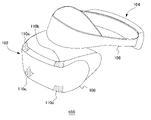
- FIG. 2 shows an example of the external shape of the HMD 100.
- the HMD 100 is composed of an output mechanism section 102 and a mounting mechanism section 104 .
- the mounting mechanism unit 104 includes a mounting band 106 that is worn by the user and wraps around the head to fix the HMD 100 to the head.
- the mounting band 106 has a material or structure whose length can be adjusted according to the circumference of the user's head.
- the output mechanism unit 102 includes a housing 108 shaped to cover the left and right eyes when the user wears the HMD 100, and has a display panel inside that faces the eyes when the HMD 100 is worn.
- the display panel may be a liquid crystal panel, an organic EL panel, or the like.
- the housing 108 further includes a pair of left and right optical lenses positioned between the display panel and the user's eyes to expand the viewing angle of the user.
- the HMD 100 may further include speakers and earphones at positions corresponding to the ears of the user, and may be configured to connect external headphones.
- a plurality of luminous markers 110a, 110b, 110c, and 110d are provided on the outer surface of the housing 108.
- the tracking LED constitutes the light-emitting marker 110, but it may be another type of marker. I wish I had.
- the number and arrangement of the light-emitting markers 110 are not particularly limited, but the number and arrangement must be such that the orientation of the HMD 100 can be detected.
- the luminous marker 110 may be provided on the side or rear portion of the wearing band 106 so that the user can take an image even when the back of the imaging device 14 is turned.
- FIG. 3 shows the functional blocks of the HMD 100.
- the control unit 120 is a main processor that processes and outputs various data such as image data, sound data, sensor data, and commands.
- Storage unit 122 temporarily stores data, instructions, and the like processed by control unit 120 .
- the orientation sensor 124 detects orientation information of the HMD 100 .
- the attitude sensor 124 includes at least a triaxial acceleration sensor and a triaxial gyro sensor.
- the communication control unit 128 transmits data output from the control unit 120 to the external information processing device 10 by wired or wireless communication via a network adapter or an antenna. Further, the communication control unit 128 receives data from the information processing device 10 by wired or wireless communication via a network adapter or an antenna, and outputs the data to the control unit 120 .
- the control unit 120 Upon receiving image data and sound data from the information processing apparatus 10, the control unit 120 supplies the data to the display panel 130 for display, and supplies the data to the sound output unit 132 for output.
- the display panel 130 includes a left-eye display panel 130a and a right-eye display panel 130b, and each display panel displays a pair of parallax images.
- the control unit 120 also causes the communication control unit 128 to transmit sensor data from the posture sensor 124 and audio data from the microphone 126 to the information processing apparatus 10 .
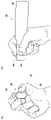
- FIG. 4 shows a state in which the user holds the operating device 20 of the embodiment.
- 4(a) shows the operating device 20 viewed from the front
- FIG. 4(b) shows the operating device 20 viewed from the side.
- the operating device 20 includes a base 30 that is held by a user's hand, and a movable portion 32 that is relatively movable with respect to the base 30 .
- the movable section 32 functions as a haptic presentation section that presents a haptic sensation to the user's hand, and is driven based on drive data transmitted from the information processing device 10 to provide haptic feedback to the user.
- the operating device 20 is a pen-shaped haptic device, and the substrate 30 has two side surfaces arranged substantially parallel. The user uses the operating device 20 with both sides of the base 30 held between the thumb and middle finger and the index finger placed on the movable portion 32 .
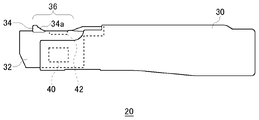
- FIG. 5 is a side view of the operating device 20.
- the side on which the movable portion 32 is provided is defined as the front end side, and the left side is called the front side and the right side is called the rear side in the side view shown in FIG.
- the movable portion 32 is at a position protruding forward most from the base 30, and this position is the "reference position" of the movable portion 32. As shown in FIG.
- a finger rest part 36 is provided on the upper surface of the movable part 32 for the user to place the tip of the index finger while gripping the base body 30 .
- a finger engaging portion 34 with which the tip of the finger is engaged is provided at the front end of the finger rest portion 36 .
- the finger engaging portion 34 is erected in a direction different from the direction of movement of the movable portion 32 (that is, the front-rear direction). ing.
- the finger engaging portion 34 has a curved surface 34a that is inclined along the pad of the finger and has a curvature.
- the curved surface 34a is inclined with respect to the upper surface of the movable part 32 and is concave in the direction in which the fingertip is brought into contact, the user can stably bring the tip of the index finger into contact with the curved surface 34a. can.
- a vibrating section 40 including a vibrator is provided in a portion on the tip side of the base 30, specifically, a portion where the thumb or middle finger is placed.
- the vibrating section 40 may be provided on both sides of the tip of the base 30 .
- the vibration unit 40 functions as a tactile sense presenting unit that presents a tactile sense to the user's hand, and is driven based on drive data transmitted from the information processing device 10 to provide tactile feedback to the user.
- the finger rest part 36 is provided with an operation button 42 that can be operated with the tip of the index finger.
- the operation button 42 is a push button, and the user pushes the operation button 42 to turn on a switch (not shown) having a contact structure.
- the operation button 42 is provided on the finger rest portion 36 on the rear side of the curved surface 34a. By providing the operation button 42 on the finger rest portion 36, the user can freely operate the operation button 42 with the index finger while holding the base 30 between the thumb and the middle finger.
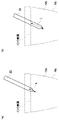
- FIG. 6(a) shows a state in which the finger is placed on the movable portion 32 at the reference position.
- the tip portion of the finger fits and contacts the curved surface 34a. Since the tip portion of the finger contacts the finger engaging portion 34 in this manner, the finger reliably moves together with the finger engaging portion 34 when the movable portion 32 moves in the direction in which the movable portion 32 is pulled into the base 30 .
- FIG. 6(b) shows a state in which the movable part 32 moves in the direction in which it is drawn into the base 30.
- the finger tip part moves in conjunction with the movable part 32 due to the frictional force acting between it and the finger rest part 36 .
- the tip of the finger is in contact with the finger engaging portion 34 erected in the direction perpendicular to the moving direction, so that the movement of the movable portion 32 is reliably interlocked.
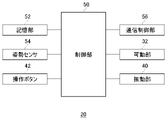
- the control unit 50 is a main processor that processes and outputs various data such as sensor data and drive data, and commands.
- the storage unit 52 temporarily stores data and commands processed by the control unit 50 .
- the orientation sensor 54 detects orientation information of the operating device 20 .
- the attitude sensor 54 includes at least a triaxial acceleration sensor and a triaxial gyro sensor.
- the communication control unit 56 transmits data output from the control unit 50 to the external information processing device 10 by wired or wireless communication via a network adapter or an antenna. Further, the communication control unit 50 receives data from the information processing device 10 by wired or wireless communication via a network adapter or an antenna, and outputs the data to the control unit 50 .
- the control section 50 drives the movable section 32 and/or the vibrating section 40 .
- the movable section 32 is a force sense presentation section that presents a sense of force to the user's hand
- the vibrating section 40 is a tactile sense presentation section that presents a sense of touch to the user's hand.
- the operating device 20 of the embodiment is used as a virtual device 22 that ejects ink in a drawing application that draws pictures and characters in a virtual three-dimensional space.
- Virtual device 22 is displayed on display panel 130 and output device 15 as a virtual pen including a pen tip.
- the tip of the operation device 20 corresponds to the pen tip of the virtual device 22, and when the user moves the operation device 20 in the real space, the virtual device 22 behaves in conjunction with the operation device 20 in the virtual space.
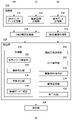
- FIG. 8 shows functional blocks of the information processing device 10 .
- the information processing apparatus 10 includes a receiving section 200 and a transmitting section 260 as an input/output interface with the outside.
- the information processing apparatus 10 further includes an HMD information acquisition section 210 , an operation information acquisition section 212 and a processing section 220 .
- each element described as a functional block that performs various processes can be configured by a circuit block, memory, and other LSI in terms of hardware, and is loaded in memory in terms of software. It is realized by a program or the like. Therefore, those skilled in the art will understand that these functional blocks can be realized in various forms by hardware only, software only, or a combination thereof, and are not limited to either one.
- the HMD sensor data receiving unit 202 receives sensor data from the orientation sensor 124 of the HMD 100 worn by the user at predetermined intervals, and supplies the sensor data to the HMD information acquiring unit 210 .
- the period at which the HMD 100 transmits sensor data may be set to 11.25 milliseconds.
- the captured image receiving unit 204 receives images captured by the HMD 100 at predetermined intervals from the imaging device 14 and supplies the images to the HMD information acquiring unit 210 .
- the imaging device 14 may capture an image of the forward space every (1/60) second, and the captured image receiving unit 204 may receive the captured image every (1/60) second.
- the operation data receiving unit 206 receives sensor data of the attitude sensor 56 of the operation device 20 held by the user and operation data of the operation button 42 at a predetermined cycle.
- the cycle in which the controller device 20 transmits sensor data and operation data may be set to 11.25 milliseconds.
- the operation data reception unit 206 supplies the sensor data of the orientation sensor 56 and the operation data of the operation button 42 to the operation information acquisition unit 212 .
- the HMD information acquisition unit 210 acquires orientation information indicating the orientation of the HMD 100 in real space and position information indicating the position of the HMD 100 from the sensor data of the HMD 100 and the photographing states of the plurality of light-emitting markers 110 included in the photographed image. .
- the HMD information acquisition unit 210 calculates the inclinations of the plurality of tracking luminous markers 110 included in the captured image, and acquires the attitude information of the HMD 100 using the calculated inclinations and the sensor data of the 3-axis gyro sensor. good.
- the HMD information acquiring section 210 may acquire the position information of the HMD 100 by calculating the amount of movement from the reference position using the sensor data of the triaxial acceleration sensor.
- the HMD information acquisition unit 210 supplies the orientation information and position information of the HMD 100 to the processing unit 220 .
- the operation information acquisition unit 212 acquires orientation information indicating the orientation of the operation device 20 in the real space and position information indicating the position of the operation device 20 from the sensor data of the operation device 20 .
- the operation information acquisition unit 212 mainly uses the sensor data of the 3-axis gyro sensor to calculate the orientation information of the operation device 20 and calculates the position information of the operation device 20 by using the sensor data of the 3-axis acceleration sensor.
- the posture information and position information of the controller device 20 are operation information indicating the movement of the controller device 20 .
- the operation information acquisition unit 212 supplies the orientation information and the position information of the operation device 20 to the processing unit 220 as operation information indicating the movement of the operation device 20 .
- the operation information acquisition unit 212 also supplies the operation data of the operation button 42 to the processing unit 220 .
- the processing unit 220 includes a control unit 230 , a line-of-sight direction determination unit 250 , a map holding unit 252 , a vibration waveform holding unit 254 , an image generation unit 256 and a sound generation unit 258 .
- the control unit 230 has a virtual device control unit 232 , a relationship identification unit 234 , an action determination unit 236 and a driving data generation unit 238 .
- the line-of-sight direction determining unit 250 determines the line-of-sight direction of the user according to the posture information of the HMD 100 .
- the line-of-sight direction determination unit 250 converts the posture information of the HMD 100 into the line-of-sight direction of the user, and supplies the converted line-of-sight direction to the image generation unit 256 .
- the image generation unit 256 uses the line-of-sight direction provided from the line-of-sight direction determination unit 250 as information for determining the line-of-sight direction of the player character in the virtual space.
- Image generation unit 256 determines the position and direction of the virtual camera based on the position information of HMD 100 acquired by HMD information acquisition unit 210 and the line-of-sight direction determined by line-of-sight direction determination unit 250, and generates an application image. may be generated.
- the virtual device control unit 232 controls movement of the virtual device 22 in the virtual space according to operation information indicating movement of the operation device 20 . Specifically, the virtual device control unit 232 periodically acquires the orientation information and the position information of the operation device 20 from the operation information acquisition unit 212, and controls the virtual device in the virtual space according to the orientation information and the position information of the operation device 20. 22 are determined, and the virtual device 22 in the virtual space is linked with the movement of the operating device 20 in the real space.
- the player character dips the pen tip of the virtual device 22 into the inkwell in the virtual space to determine the color of the line to be drawn.
- the user moves the operation device 20 while pressing the operation button 42, thereby drawing the trajectory of the tip of the operation device 20 in the virtual space.
- a line drawn in the virtual three-dimensional space serves as a shield that protects the player character, and can be used to protect the player character from flying virtual objects (cannonballs).
- the operation device 20 provides the user with haptic feedback and/or haptic feedback, so that the user can experience the effects of actions in the virtual space. The action of each scene in the application will be described below.
- FIG. 9 shows an example of an image displayed on the display panel 130 of the HMD 100.
- the display panel 130 displays a plurality of inkwells 70a, 70b, 70c filled with ink.
- a plurality of ink reservoirs 70a, 70b, and 70c are arranged at predetermined positions in the virtual space and filled with inks of different colors.
- the ink reservoir 70a is filled with red ink 72a
- the ink reservoir 70b is filled with blue ink 72b
- the ink reservoir 70c is filled with yellow ink 72c.
- the user moves the virtual device 22 over the inkwell 70 of the desired color and dips the pen tip into the ink.
- illustration of the player character holding the virtual device 22 is omitted.
- FIG. 10 shows how the virtual device 22 enters the blue ink 72b of the ink reservoir 70b.
- FIG. 10(a) shows the pen tip slightly below the ink surface
- FIG. 10(b) shows about half of the virtual device 22 entering the blue ink 72b.
- the virtual device control unit 232 controls movement of the virtual device 22 according to the orientation information and position information of the operating device 20 .
- the relationship identifying unit 234 identifies the relative relationship between the virtual device 22 and the blue ink 72b that is the virtual object. Determine the action on device 20 .
- the action determination unit 236 may determine the action of the contact between the two.
- the relationship identifying unit 234 identifies the positional relationship between the virtual device 22 and the blue ink 72b from the three-dimensional coordinates of the ink reservoir 70b placed at a predetermined position and the three-dimensional coordinates of the virtual device 22. In the embodiment, the relationship identifying unit 234 derives the length of the virtual device 22 that has entered the blue ink 72b (entrance length L) from the identified positional relationship.
- the action determining unit 236 determines to move the movable unit 32 as the force sense presenting unit in the direction to pull it toward the base 30 when the virtual device 22 enters the blue ink 72b. At this time, the action determination section 236 derives the amount of movement of the movable section 32, which is the haptic presentation section, based on the approach length L.
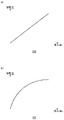
- FIG. 11(a) shows an example of a map that defines the relationship between the approach length L and the amount of movement of the movable portion 32.
- FIG. This relationship is held as a map in the map holding section 252, and the amount of movement indicates the amount of retraction of the movable section 32 from the reference position. Since the relationship shown in FIG. 11A is proportional to the length of entry and the amount of movement, the movable portion 32 is drawn into the base 30 in proportion to the length of the virtual device 22 entering the blue ink 72b.
- the action determination unit 236 When the action determination unit 236 receives the entry length L from the relationship identification unit 234 , the action determination unit 236 refers to the map held in the map holding unit 252 to acquire the movement amount corresponding to the entry length L, and passes it to the drive data generation unit 238 . .
- the drive data generator 238 generates first drive data for driving the movable part 32 based on the movement amount.
- the map holding unit 252 may hold a map defining the relationship between the approach length L and the amount of movement of the movable unit 32 for each virtual object.
- the map holding unit 252 may hold different maps for the red ink 72a, the blue ink 72b, and the yellow ink 72c.
- FIG. 11(b) shows another example of a map that defines the relationship between the approach length L and the amount of movement of the movable portion 32.
- FIG. 11B is a movement profile in which when the virtual device 22 begins to enter the ink, the movable portion 32 moves greatly, and after the virtual device 22 has entered the ink to some extent, the movable portion 32 gradually moves.
- the map holding unit 252 holds a map that defines the relationship between the approach length and the amount of movement for each virtual object (ink in this embodiment), so that the user can feel the virtual device through the haptic sensation presented by the movable unit 32. A resistance peculiar to the virtual object with which 22 is in contact can be felt.
- the relationship identifying unit 234 identifies the relative velocity between the virtual device 22 and the blue ink 72b that is the virtual object
- the action determining unit 236 identifies the relative speed identified by the relationship identifying unit 234. The action on the operating device 20 is determined based on the velocity.
- the relationship identifying unit 234 identifies the speed (moving speed) at which the virtual device 22 enters the blue ink 72b. Since the virtual object blue ink 72b is stationary, the moving speed of the virtual device 22 is equal to the relative speed between the virtual device 22 and the blue ink 72b.
- the action determination unit 236 derives the vibration profile of the vibration unit 40 as the tactile sense presentation unit based on the moving speed of the virtual device 22 .
- the vibration profile may be defined by the vibration waveform and the vibration amount.
- FIGS. 12(a) to (c) show examples of vibration waveforms.
- the horizontal axis indicates time.
- the vibration waveform holding unit 254 holds a vibration waveform, which is a pattern for vibrating the vibrating unit 40, for each virtual object.
- the vibration waveforms shown in FIGS. 12(a) and 12(b) are periodic, and the vibration waveform shown in FIG. 12(c) is aperiodic.
- the vibration waveform may be freely set for each virtual object.
- the vibration waveform is a normalized vibration pattern, and the vibration profile of the vibrating section 40 is derived by multiplying the vibration waveform by the vibration amount (amplitude) determined according to the moving speed.
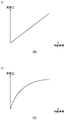
- FIG. 13(a) shows an example of a map that defines the relationship between the moving speed and the amount of vibration of the vibrating section 40.
- FIG. This relationship is held as a map in the map holding unit 252, and the vibration amount indicates the amplitude of the vibration waveform. Since the relationship shown in FIG. 13A is proportional to the moving speed and the vibration amount (amplitude), the vibration amplitude of the vibrating section 40 increases in proportion to the moving speed of the virtual device 22 .
- the action determining unit 236 refers to the map held in the map holding unit 252 to obtain the vibration amount corresponding to the moving speed, and obtains the vibration amount stored in the vibration waveform holding unit 254.
- the vibration profile is derived by multiplying the vibration waveform corresponding to the virtual object by the vibration amount.
- the action determination unit 236 passes the derived vibration profile to the drive data generation unit 238, and the drive data generation unit 238 generates second drive data for driving the vibration unit 40 based on the vibration profile.
- the map holding unit 252 may hold a map defining the relationship between the moving speed and the vibration amount of the vibrating unit 40 for each virtual object.
- the map holding unit 252 may hold different maps for the red ink 72a, the blue ink 72b, and the yellow ink 72c.
- FIG. 13(b) shows another example of a map that defines the relationship between the moving speed and the amount of vibration of the vibrating section 40.
- the map holding unit 252 holds a map that defines the relationship between the moving speed and the amount of vibration for each virtual object (ink in this embodiment), so that the user can operate the virtual device 22 with the tactile sensation presented by the vibrating unit 40. You can feel the peculiar properties of the virtual object that is in contact with.
- the transmission unit 260 transmits the first driving data and the second driving data generated by the driving data generating unit 238 to the operating device 20.
- the control section 50 drives the movable section 32 based on the first drive data, and drives the vibrating section 40 based on the second drive data. Therefore, the movable part 32 is pulled into the base 30 by a movement amount corresponding to the approach length of the virtual device 22 , and at the same time the vibrating part 40 vibrates with a vibration profile corresponding to the moving speed of the virtual device 22 .
- the information processing system 1 of the embodiment by simultaneously providing haptic feedback and tactile feedback in response to the operation of the operation device 20, the entertainment of the application can be improved.
- FIG. 14 shows an example of an image displayed on the display panel 130 of the HMD 100.
- the user presses the operation button 42 and moves the operating device 20 in the real space. drawn.
- the relationship identifying section 234 identifies the moving speed of the virtual device 22
- the action determining section 236 determines the action for the operating device 20 based on the moving speed identified by the relationship identifying section 234 .
- the relationship identifying unit 234 identifies the moving speed of the virtual device 22 from the moving speed of the operating device 20 whose operation button 42 is pressed.
- the action determination unit 236 derives the vibration profile of the vibration unit 40 as the tactile sense presentation unit based on the moving speed of the virtual device 22 .
- the vibration profile may be defined by the vibration waveform and the vibration amount.
- the drive data generation section 238 generates second drive data for driving the vibration section 40 based on the vibration profile.
- the vibration waveform holding section 254 may hold a vibration waveform, which is a pattern for vibrating the vibrating section 40, for each ink color. Further, the map holding section 252 may hold a map that defines the relationship between the movement speed and the vibration amount of the vibrating section 40 for each ink color.
- FIG. 15 shows an example of an image displayed on the display panel 130 of the HMD 100.
- lines drawn by the user are used as shields to maintain their shape and prevent flying virtual objects.
- a shield 24 is attached to the tip of the virtual device 22, and the user directs the shield 24 in the direction in which the virtual object (cannonball in this example) is flying to guard the player character from the virtual object.
- the relationship identifying unit 234 identifies the relative relationship between the virtual device 22 and the shield 24 and the artillery shell that is the virtual object, and the action determining unit 236 based on the relative relationship identified by the relationship identifying unit 234, It determines the action on the operating device 20 .
- the effect determination unit 236 may determine the effect of the contact between the two.
- the relationship identifying unit 234 determines the collision between the virtual object and the shield 24 from the three-dimensional coordinates of the virtual object, which is the cannonball, and the three-dimensional coordinates of the shield 24 .
- the action determining section 236 determines to drive the movable section 32 as the force sense presenting section.
- FIG. 16 shows an example of a map that defines the relationship between the elapsed time from the collision and the amount of movement of the movable part 32.
- FIG. This relationship is held as a map in the map holding section 252, and the amount of movement indicates the amount of retraction of the movable section 32 from the reference position.
- the map holding unit 252 may hold a map defining the relationship between the elapsed time from the collision and the amount of movement of the movable part 32 for each virtual object. For example, maps may be set according to the types and sizes of virtual objects.
- the relationship identifying unit 234 identifies the relative velocity between the virtual device 22 and the artillery shell that is the virtual object
- the action determining unit 236 determines the relative velocity identified by the relationship identifying unit 234.
- the action to the operation device 20 is determined.
- the action determination unit 236 derives the vibration profile of the vibration unit 40, which is the tactile sense presentation unit, based on the relative speed between the virtual device 22 and the virtual object.
- the vibration profile may be defined by the vibration waveform and the vibration amount.
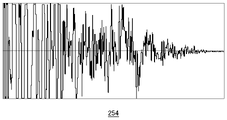
- FIG. 17 shows an example of vibration waveforms.
- the horizontal axis indicates the elapsed time from the collision.
- the vibration waveform holding unit 254 holds a vibration waveform, which is a pattern for vibrating the vibrating unit 40, for each colliding virtual object.
- the action determining unit 236 refers to the map held in the map holding unit 252 to obtain the vibration amount corresponding to the moving speed, and obtains the vibration amount stored in the vibration waveform holding unit 254.
- the vibration profile is derived by multiplying the vibration waveform corresponding to the virtual object by the vibration amount.
- the action determination unit 236 passes the derived vibration profile to the drive data generation unit 238, and the drive data generation unit 238 generates second drive data for driving the vibration unit 40 based on the vibration profile.
- the transmission unit 260 transmits the first driving data and the second driving data generated by the driving data generating unit 238 to the operating device 20.
- the control section 50 drives the movable section 32 based on the first drive data, and drives the vibrating section 40 based on the second drive data.
- the entertainment of the application can be improved.
- control unit 230 executes the VR application, but applications other than the VR application may be executed.
- the action determination unit 236 derives the vibration profile, and the drive data generation unit 238 generates the second drive data according to the vibration profile.
- action determiner 236 may apply the vibration profile derivation technique to sound effects, and sound generator 258 may generate sounds synchronized with haptic feedback.
- the present invention can be used for techniques that provide haptic feedback and/or haptic feedback to the user.
Landscapes
- Engineering & Computer Science (AREA)
- Multimedia (AREA)
- Human Computer Interaction (AREA)
- Theoretical Computer Science (AREA)
- General Engineering & Computer Science (AREA)
- Physics & Mathematics (AREA)
- General Physics & Mathematics (AREA)
- Software Systems (AREA)
- Computer Hardware Design (AREA)
- Computer Graphics (AREA)
- Architecture (AREA)
- Computer Networks & Wireless Communication (AREA)
- User Interface Of Digital Computer (AREA)
- Position Input By Displaying (AREA)
Priority Applications (4)
| Application Number | Priority Date | Filing Date | Title |
|---|---|---|---|
| PCT/JP2021/026415 WO2023286191A1 (ja) | 2021-07-14 | 2021-07-14 | 情報処理装置および駆動データ生成方法 |
| US18/577,883 US12528015B2 (en) | 2021-07-14 | 2022-07-12 | Information processing apparatus, information processing method, and driving data generation method |
| PCT/JP2022/027378 WO2023286761A1 (ja) | 2021-07-14 | 2022-07-12 | 情報処理装置、情報処理方法および駆動データ生成方法 |
| JP2023534811A JP7577218B2 (ja) | 2021-07-14 | 2022-07-12 | 情報処理装置、情報処理方法および駆動データ生成方法 |
Applications Claiming Priority (1)
| Application Number | Priority Date | Filing Date | Title |
|---|---|---|---|
| PCT/JP2021/026415 WO2023286191A1 (ja) | 2021-07-14 | 2021-07-14 | 情報処理装置および駆動データ生成方法 |
Publications (1)
| Publication Number | Publication Date |
|---|---|
| WO2023286191A1 true WO2023286191A1 (ja) | 2023-01-19 |
Family
ID=84919494
Family Applications (2)
| Application Number | Title | Priority Date | Filing Date |
|---|---|---|---|
| PCT/JP2021/026415 Ceased WO2023286191A1 (ja) | 2021-07-14 | 2021-07-14 | 情報処理装置および駆動データ生成方法 |
| PCT/JP2022/027378 Ceased WO2023286761A1 (ja) | 2021-07-14 | 2022-07-12 | 情報処理装置、情報処理方法および駆動データ生成方法 |
Family Applications After (1)
| Application Number | Title | Priority Date | Filing Date |
|---|---|---|---|
| PCT/JP2022/027378 Ceased WO2023286761A1 (ja) | 2021-07-14 | 2022-07-12 | 情報処理装置、情報処理方法および駆動データ生成方法 |
Country Status (3)
| Country | Link |
|---|---|
| US (1) | US12528015B2 (https=) |
| JP (1) | JP7577218B2 (https=) |
| WO (2) | WO2023286191A1 (https=) |
Families Citing this family (1)
| Publication number | Priority date | Publication date | Assignee | Title |
|---|---|---|---|---|
| JP7849823B2 (ja) * | 2023-09-06 | 2026-04-22 | 株式会社豊田中央研究所 | 触覚提示装置および触覚提示装置の制御方法 |
Citations (6)
| Publication number | Priority date | Publication date | Assignee | Title |
|---|---|---|---|---|
| JP2009294844A (ja) * | 2008-06-04 | 2009-12-17 | Saitama Univ | マウス及びマウスパッド |
| JP2010287221A (ja) * | 2009-05-11 | 2010-12-24 | Univ Of Tokyo | 力覚提示装置 |
| WO2018030266A1 (ja) * | 2016-08-09 | 2018-02-15 | 日本電産サンキョー株式会社 | ペン型触力覚提示デバイス |
| JP2019106102A (ja) * | 2017-12-14 | 2019-06-27 | 国立大学法人東京工業大学 | 硬さ感覚提示装置 |
| WO2019225170A1 (ja) * | 2018-05-21 | 2019-11-28 | 株式会社ワコム | 位置指示デバイス及び空間位置指示システム |
| JP2020194465A (ja) * | 2019-05-30 | 2020-12-03 | 学校法人立命館 | 触覚提示システム、触覚提示装置、コントローラ、及び仮想世界における触覚を実世界においてユーザに提示する方法 |
Family Cites Families (4)
| Publication number | Priority date | Publication date | Assignee | Title |
|---|---|---|---|---|
| JP2000200140A (ja) * | 1999-01-06 | 2000-07-18 | Nippon Telegr & Teleph Corp <Ntt> | 力覚提示方法及び力覚ペンタブレット |
| US8698736B2 (en) | 2009-03-24 | 2014-04-15 | Immersion Corporation | Handheld computer interface with haptic feedback |
| US10579207B2 (en) * | 2014-05-14 | 2020-03-03 | Purdue Research Foundation | Manipulating virtual environment using non-instrumented physical object |
| JP6571539B2 (ja) | 2016-01-07 | 2019-09-04 | アルプスアルパイン株式会社 | 触覚再現装置 |
-
2021
- 2021-07-14 WO PCT/JP2021/026415 patent/WO2023286191A1/ja not_active Ceased
-
2022
- 2022-07-12 JP JP2023534811A patent/JP7577218B2/ja active Active
- 2022-07-12 US US18/577,883 patent/US12528015B2/en active Active
- 2022-07-12 WO PCT/JP2022/027378 patent/WO2023286761A1/ja not_active Ceased
Patent Citations (6)
| Publication number | Priority date | Publication date | Assignee | Title |
|---|---|---|---|---|
| JP2009294844A (ja) * | 2008-06-04 | 2009-12-17 | Saitama Univ | マウス及びマウスパッド |
| JP2010287221A (ja) * | 2009-05-11 | 2010-12-24 | Univ Of Tokyo | 力覚提示装置 |
| WO2018030266A1 (ja) * | 2016-08-09 | 2018-02-15 | 日本電産サンキョー株式会社 | ペン型触力覚提示デバイス |
| JP2019106102A (ja) * | 2017-12-14 | 2019-06-27 | 国立大学法人東京工業大学 | 硬さ感覚提示装置 |
| WO2019225170A1 (ja) * | 2018-05-21 | 2019-11-28 | 株式会社ワコム | 位置指示デバイス及び空間位置指示システム |
| JP2020194465A (ja) * | 2019-05-30 | 2020-12-03 | 学校法人立命館 | 触覚提示システム、触覚提示装置、コントローラ、及び仮想世界における触覚を実世界においてユーザに提示する方法 |
Non-Patent Citations (1)
| Title |
|---|
| KONYO, MASASHI: "A Display Method of Artificial Tactile Sensation Using Amplitude Modulation of Ultrasonic Vibration", THE 24TH ANNUAL CONFERENCE OF THE ROBOTICS SOCIETY OF JAPAN PROCEEDINGS CD-ROM; SEPTEMBER 14 - 16, 2006, ROBOTICS SOCIETY OF JAPAN, JP, vol. 2K13, 14 September 2006 (2006-09-14) - 16 September 2006 (2006-09-16), JP, pages 1 - 4, XP009542610 * |
Also Published As
| Publication number | Publication date |
|---|---|
| US20240252924A1 (en) | 2024-08-01 |
| WO2023286761A1 (ja) | 2023-01-19 |
| US12528015B2 (en) | 2026-01-20 |
| JPWO2023286761A1 (https=) | 2023-01-19 |
| JP7577218B2 (ja) | 2024-11-01 |
Similar Documents
| Publication | Publication Date | Title |
|---|---|---|
| US10936149B2 (en) | Information processing method and apparatus for executing the information processing method | |
| JP6532393B2 (ja) | 表示制御装置及び表示制御方法 | |
| US10223064B2 (en) | Method for providing virtual space, program and apparatus therefor | |
| US20180357817A1 (en) | Information processing method, program, and computer | |
| US10564801B2 (en) | Method for communicating via virtual space and information processing apparatus for executing the method | |
| JP6518578B2 (ja) | 表示制御装置及び表示制御方法 | |
| US10515481B2 (en) | Method for assisting movement in virtual space and system executing the method | |
| JP6242473B1 (ja) | 仮想空間を提供するための方法、および当該方法をコンピュータに実行させるためのプログラム、および当該プログラムを実行するための情報処理装置 | |
| WO2015154627A1 (zh) | 一种虚拟现实组件系统 | |
| JP2016158794A (ja) | 表示制御プログラム、表示制御装置、及び表示制御方法 | |
| JP6470859B1 (ja) | ユーザの動きをアバタに反映するためのプログラム、当該プログラムを実行するための情報処理装置、およびアバタを含む映像を配信するための方法 | |
| JP7057829B2 (ja) | ゲーム装置、ゴルフゲームの制御方法 | |
| JP2019128721A (ja) | ユーザの動きをアバタに反映するためのプログラム、当該プログラムを実行するための情報処理装置、およびアバタを含む映像を配信するための方法 | |
| US20180299948A1 (en) | Method for communicating via virtual space and system for executing the method | |
| JP2019160295A (ja) | ユーザの動きをアバタに反映するためのプログラム、当該プログラムを実行するための情報処理装置、およびアバタを含む映像を配信するための方法 | |
| JP6518645B2 (ja) | 情報処理装置および画像生成方法 | |
| JP6820299B2 (ja) | プログラム、情報処理装置、および方法 | |
| WO2023286191A1 (ja) | 情報処理装置および駆動データ生成方法 | |
| JP7111848B2 (ja) | プログラム、情報処理装置、および方法 | |
| JP6623199B2 (ja) | ヘッドマウントデバイスを用いて仮想現実を提供するためにコンピュータで実行されるプログラムおよび情報処理装置 | |
| US11794095B2 (en) | Information processing apparatus and device information derivation method | |
| CN108014491A (zh) | 一种vr游戏系统 | |
| JP2018129692A (ja) | 頭部装着型表示装置及びシミュレーションシステム | |
| US10319346B2 (en) | Method for communicating via virtual space and system for executing the method | |
| JP7462591B2 (ja) | 表示制御装置及び表示制御方法 |
Legal Events
| Date | Code | Title | Description |
|---|---|---|---|
| 121 | Ep: the epo has been informed by wipo that ep was designated in this application |
Ref document number: 21950132 Country of ref document: EP Kind code of ref document: A1 |
|
| NENP | Non-entry into the national phase |
Ref country code: DE |
|
| 122 | Ep: pct application non-entry in european phase |
Ref document number: 21950132 Country of ref document: EP Kind code of ref document: A1 |
|
| NENP | Non-entry into the national phase |
Ref country code: JP |