WO2022201948A1 - 情報処理装置、情報処理方法、プログラム - Google Patents
情報処理装置、情報処理方法、プログラム Download PDFInfo
- Publication number
- WO2022201948A1 WO2022201948A1 PCT/JP2022/005341 JP2022005341W WO2022201948A1 WO 2022201948 A1 WO2022201948 A1 WO 2022201948A1 JP 2022005341 W JP2022005341 W JP 2022005341W WO 2022201948 A1 WO2022201948 A1 WO 2022201948A1
- Authority
- WO
- WIPO (PCT)
- Prior art keywords
- tactile
- control unit
- presentation control
- input information
- adjustment object
- Prior art date
- Legal status (The legal status is an assumption and is not a legal conclusion. Google has not performed a legal analysis and makes no representation as to the accuracy of the status listed.)
- Ceased
Links
Images






Classifications
-
- G—PHYSICS
- G06—COMPUTING OR CALCULATING; COUNTING
- G06F—ELECTRIC DIGITAL DATA PROCESSING
- G06F3/00—Input arrangements for transferring data to be processed into a form capable of being handled by the computer; Output arrangements for transferring data from processing unit to output unit, e.g. interface arrangements
- G06F3/01—Input arrangements or combined input and output arrangements for interaction between user and computer
- G06F3/048—Interaction techniques based on graphical user interfaces [GUI]
- G06F3/0484—Interaction techniques based on graphical user interfaces [GUI] for the control of specific functions or operations, e.g. selecting or manipulating an object, an image or a displayed text element, setting a parameter value or selecting a range
- G06F3/04847—Interaction techniques to control parameter settings, e.g. interaction with sliders or dials
-
- G—PHYSICS
- G03—PHOTOGRAPHY; CINEMATOGRAPHY; ANALOGOUS TECHNIQUES USING WAVES OTHER THAN OPTICAL WAVES; ELECTROGRAPHY; HOLOGRAPHY
- G03B—APPARATUS OR ARRANGEMENTS FOR TAKING PHOTOGRAPHS OR FOR PROJECTING OR VIEWING THEM; APPARATUS OR ARRANGEMENTS EMPLOYING ANALOGOUS TECHNIQUES USING WAVES OTHER THAN OPTICAL WAVES; ACCESSORIES THEREFOR
- G03B17/00—Details of cameras or camera bodies; Accessories therefor
- G03B17/18—Signals indicating condition of a camera member or suitability of light
-
- G—PHYSICS
- G06—COMPUTING OR CALCULATING; COUNTING
- G06F—ELECTRIC DIGITAL DATA PROCESSING
- G06F3/00—Input arrangements for transferring data to be processed into a form capable of being handled by the computer; Output arrangements for transferring data from processing unit to output unit, e.g. interface arrangements
- G06F3/01—Input arrangements or combined input and output arrangements for interaction between user and computer
- G06F3/016—Input arrangements with force or tactile feedback as computer generated output to the user
Definitions
- This technology relates to an information processing device, an information processing method, and a program, and particularly to technology for tactile presentation.
- the tactile sense stimulus refers to a physical phenomenon that causes the user to feel a sense of touch through vibration or the like.
- generating a tactile sense stimulus is called tactile sense presentation.
- a terminal device equipped with a touch panel such as a smartphone
- the touch panel or housing vibrates in response to a touch operation from the user, and by giving a tactile sensation to the user's finger, the touch feeling of the button etc. displayed on the touch panel is improved.
- a music listening device such as headphones
- VR Virtual Reality
- the controller etc. is vibrated to provide tactile stimulation. It is possible to improve the user's sense of immersion in content.
- tactile sense presentation device since tactile sense presentation corresponding to predetermined conditions is performed, there is a problem that the tactile sense presentation becomes uniform. Therefore, it is desired to improve the usability (feeling of use) of a device that presents a tactile sensation.
- this technology aims to improve usability.
- An information processing apparatus includes an input information acquisition unit that acquires input information input by a user's operation on an adjustment object, and a tactile presentation device that presents a tactile sensation according to the usage status of the adjustment object based on the input information. and a tactile sense presentation control unit that controls to perform. This allows the information processing apparatus to cause the tactile presentation device to present different tactile sensations according to the usage status of the adjustment object based on the input information.
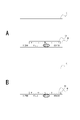
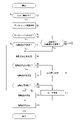
- FIG. 10 is a diagram for explaining a screen (GUI) displayed when changing the Ev value; 7 is a flowchart showing the flow of tactile presentation control processing; 4 is a diagram for explaining vibration waveforms in Example 1.
- FIG. 10 is a diagram for explaining vibration waveforms in Example 2; 10 is a flow chart showing the flow of processing in Example 2.
- FIG. FIG. 11 is a diagram for explaining vibration waveforms in Example 3; 14 is a flow chart showing the flow of database construction processing in Example 4.
- FIG. FIG. 11 is a diagram for explaining vibration waveforms in Example 6;
- FIG. 14 is a flow chart showing the flow of database construction processing in Example 6.
- FIG. FIG. 11 is a diagram for explaining vibration waveforms in Example 7; 20 is a flow chart showing the flow of database construction processing in Example 7.
- FIG. 10 is a diagram for explaining a screen (GUI) displayed when changing the Ev value; 7 is a flowchart showing the flow of tactile presentation control processing; 4 is a diagram for explaining vibration waveform
- Configuration of Imaging Device> 1 and 2 show the appearance of an imaging device 1 as an information processing device according to the present embodiment. In the following description, it is assumed that the subject side is the front side and the photographer side is the rear side.
- the image pickup apparatus 1 includes a camera housing 2 in which necessary parts are arranged inside and outside, and a lens mirror that is detachable from the camera housing 2 and attached to the front surface 2a.
- a cylinder 3 is provided.
- FIG. 2 shows the camera housing 2 with the lens barrel removed. It is an example that the lens barrel 3 is detachable as a so-called interchangeable lens, and the lens barrel may be a lens barrel that cannot be removed from the camera housing 2 .
- a rear monitor 4 is arranged on the rear surface portion 2 b of the camera housing 2 .
- the rear monitor 4 displays live view images, reproduced images of recorded images, and the like.
- the rear monitor 4 is configured by a display device such as a liquid crystal display (LCD) or an organic EL (Electro-Luminescence) display.
- the rear monitor 4 is rotatable with respect to the camera housing 2 .
- the lower end portion of the rear monitor 4 is rotatable so as to move rearward with the upper end portion of the rear monitor 4 as a rotation axis.
- the right end or left end of the rear monitor 4 may be used as the rotation axis.
- it may be rotatable in directions around a plurality of axes.
- the EVF 5 is arranged on the upper surface portion 2 c of the camera housing 2 .
- the EVF 5 includes an EVF monitor 5a and a frame-shaped enclosure 5b projecting rearward so as to surround the upper side and left and right sides of the EVF monitor 5a.
- the EVF monitor 5a is formed using an LCD, an organic EL display, or the like.
- An optical viewfinder (OVF) may be provided instead of the EVF monitor 5a.
- the operator 6 is, for example, a shutter button (release button), a playback menu start button, an enter button, a cross key, a cancel button, a zoom key, a slide key, and the like.
- manipulators 6 include various types of manipulators such as buttons, dials, pressable and rotatable composite manipulators.
- shutter operation, menu operation, reproduction operation, mode selection operation, focus operation, zoom operation, and parameter change operation can be performed by operating elements 6 of various modes.
- parameters include, for example, shutter speed, EV value, F value, and the like.
- a dial 6a is provided for changing parameters.
- the dial 6a is a rotary operator.
- the dial 6a outputs a signal (input information) each time a ball fits into a groove formed at every predetermined angle, for example, according to a user's rotation operation. That is, the dial 6a outputs a signal once each time it is rotated by a predetermined angle.
- An operation in which the dial 6a outputs a signal once is referred to as one notch.
- the user is given a tactile sensation (dial vibration) from the dial 6a for each notch. This allows the user to estimate from the tactile stimulus how much (how many steps) the parameter has been changed.
- the dial 6a can be rotated by the user to continuously output a signal a plurality of times. In other words, the user can continuously rotate the dial 6a to change the parameters in a plurality of steps.
- the dial 6a may have another structure such as a gear type, or may have a structure in which dial vibration does not occur for each notch.
- a shutter button 6b that can be pressed is provided.
- the shutter button 6b is a two-step switch, and outputs a signal (input information) corresponding to the first step or the second step with different strokes.
- the imaging device 1 performs autofocus control, and when the second stage signal is output, the imaging device 1 captures an image.
- a touch panel 6c is provided on the rear monitor 4.
- the touch panel 6c receives a user's touch operation and outputs input information such as the touched position.
- FIG. 3 shows the internal configuration of such an imaging device 1.
- the imaging device 1 light from a subject enters an imaging device section 12 via an imaging optical system 11 .
- the imaging optical system 11 is provided with various lenses such as a zoom lens, a focus lens, and a condenser lens, an aperture mechanism, a drive mechanism for the zoom lens, and a drive mechanism for the focus lens.
- a mechanical shutter eg a focal plane shutter may also be provided.
- the imaging element unit 12 is configured by having an image sensor such as a CMOS (Complementary Metal Oxide Semiconductor) type or a CCD (Charge Coupled Device) type, for example.
- the image sensor unit 12 performs, for example, CDS (Correlated Double Sampling) processing, AGC (Automatic Gain Control) processing, etc. on an electrical signal obtained by photoelectrically converting light received by the image sensor, and further A/D (Analog /Digital) Perform conversion processing. Then, the imaging device unit 12 outputs the imaging signal as digital data to the signal processing unit 13 .
- CDS Correlated Double Sampling
- AGC Automatic Gain Control
- A/D Analog /Digital
- the signal processing unit 13 is configured as an image processing processor such as a DSP (Digital Signal Processor).
- the signal processing unit 13 performs various kinds of signal processing on the input imaging signal. For example, the signal processing unit 13 performs preprocessing, synchronization processing, YC generation processing, resolution conversion processing, file formation processing, and the like.
- clamp processing for clamping the black levels of R, G, and B to a predetermined level and correction processing among the R, G, and B color channels are performed on the imaging signal from the imaging device unit 12. .
- each pixel undergoes a color separation process to generate image data having all of R, G, and B color components.
- demosaic processing is performed as color separation processing.
- YC generation process a luminance (Y) signal and a color (C) signal are generated (separated) from R, G, and B image data.
- resolution conversion processing resolution conversion processing is performed on image data that has been subjected to various signal processing.
- the image data that has been subjected to the various processes described above is subjected to compression encoding for recording or communication, formatting, generation or addition of metadata, etc. to generate a file for recording or communication.
- a file for recording or communication I do.
- an image file in a format such as JPEG (Joint Photographic Experts Group), TIFF (Tagged Image File Format), or GIF (Graphics Interchange Format) is generated as a still image file.
- JPEG Joint Photographic Experts Group
- TIFF Tagged Image File Format
- GIF Graphics Interchange Format
- the signal processing unit 13 includes information on processing parameters in the signal processing unit 13, various control parameters acquired from the control unit 17, information indicating the operating states of the imaging optical system 11 and the imaging element unit 12, mode It is generated as including information such as setting information, date and time, and location.
- the storage unit 14 is, for example, a non-volatile memory, and stores image files (image data) processed by the signal processing unit 13 .
- the storage unit 14 also stores a database, device information, and environment information, which will be described later in detail.
- the display unit 15 performs various displays for the photographer, and is, for example, the rear monitor 4 and the EVF monitor 5a arranged on the housing of the imaging apparatus 1 as shown in FIG.
- the display unit 15 executes various displays on the display screen based on instructions from the control unit 17 .
- the display unit 15 displays an image based on image data stored in the storage unit 14 .
- the display unit 15 displays various operation menus, icons, messages, etc., that is, as a GUI (Graphical User Interface), based on instructions from the control unit 17 .
- GUI Graphic User Interface
- the communication unit 16 performs wired or wireless data communication and network communication with external devices. For example, the communication unit 16 transmits and outputs an image file to an external information processing device, display device, recording device, playback device, or the like.
- the communication unit 16 performs various network communications such as the Internet, a home network, and a LAN (Local Area Network), and transmits and receives various data to and from servers, terminals, etc. on the network. can be done.
- the control unit 17 is composed of a microcomputer (arithmetic processing unit) equipped with a CPU (Central Processing Unit), ROM (Read Only Memory), and RAM (Random Access Memory).
- the control unit 17 is an imaging control device that controls the operation of the imaging device 1 .
- the RAM is used for temporary storage of data, programs, etc. as a work area for various data processing of the CPU.
- the ROM is used to store an OS (Operating System) for the CPU to control each part, application programs for various operations, firmware, various setting information, and the like.
- OS Operating System
- Various types of setting information include communication setting information, setting information related to imaging operation, setting information related to image processing, and the like.
- the setting information related to the imaging operation includes shutter speed, Ev value, F value, shutter speed setting of mechanical shutter or electronic shutter, mode setting, and the like.
- the control unit 17 has functions as an imaging control unit 31 , a display control unit 32 , an input information acquisition unit 33 and a tactile sense presentation control unit 34 .
- the imaging control unit 31 performs various controls when imaging an image.
- the imaging control unit 31 controls various signal processing instructions in the signal processing unit 13, imaging operations and recording operations according to user's operations, playback operations of recorded image files, and the like.
- the imaging control unit 31 controls the operation of the diaphragm mechanism, controls the shutter speed of the imaging device unit 12, controls autofocus control, manual focus operation, drive control of the focus lens and the zoom lens according to the zoom operation, and exposure timing. control, etc.
- the display control unit 32 performs display control of the display unit 15 (rear monitor 4, EVF monitor 5a). For example, the display control unit 32 causes the rear monitor 4 to display a captured image, or causes the rear monitor 4 to display a GUI for changing various settings.
- the input information acquisition unit 33 acquires input information for the manipulator 6 . Specifically, the input information acquisition unit 33 acquires, as input information, a signal output from the operator 6 when the operator 6 is operated by the user.
- the tactile sense presentation control unit 34 controls the tactile sense presentation device 22 to perform tactile sense presentation according to the usage status of the manipulator 6 based on the input information acquired by the input information acquisition unit 33 . Processing executed by the tactile sense presentation control unit 34 will be described later.
- a driver unit 18, an acceleration sensor 19, a pressure sensor 20, a line-of-sight detection sensor 21, a tactile presentation device 22, and an audio output device 23 are also connected to the control unit 17.
- the driver unit 18 is provided with, for example, a motor driver for a zoom lens driving motor, a motor driver for a focus lens driving motor, a motor driver for a diaphragm mechanism motor, and the like. These motor drivers apply drive currents to the corresponding drivers according to instructions from the imaging control unit 31 to move the focus lens and the zoom lens, open and close the diaphragm blades of the diaphragm mechanism, and the like.
- the acceleration sensor 19 detects rotational acceleration of the dial 6 a and outputs the detection result to the control section 17 .
- the pressure sensor 20 detects the pressure applied to the shutter button 6 b , that is, the user's pressing pressure on the shutter button 6 b, and outputs the detection result to the control unit 17 .
- the line-of-sight detection sensor 21 is provided on the rear surface portion 2 b of the camera housing 2 , detects the line-of-sight direction of the user, and outputs the detection result to the control section 17 .
- the tactile sense presentation device 22 is a device that gives the user a tactile sense stimulus (performs tactile sense presentation) by, for example, generating vibration.
- Examples of the tactile presentation device 22 include a piezoelectric element, an eccentric motor, a linear resonant actuator (LRA) and a voice coil motor (VCM).
- LRA linear resonant actuator
- VCM voice coil motor
- the audio output device 23 is a device that outputs audio, such as a speaker or a piezoelectric element.
- Parameter change As described above, in the imaging apparatus 1, parameters such as shutter speed, Ev value, and F value can be changed.
- FIG. 4 is a diagram explaining the screen (GUI) displayed when changing the Ev value.
- GUI screen
- the display control unit 32 displays a parameter bar 41 showing a plurality of parameters (here, shutter speed, F value, Ev value, ISO value) as shown in FIG. 4A. It is displayed on the rear monitor 4. At this time, among the plurality of parameters shown on the parameter bar 41, the parameter to be changed, such as the Ev value, is highlighted.
- the display control unit 32 displays a selection bar 42 above the parameter bar 41 that indicates possible values of the parameter highlighted in the parameter bar 41 .
- the EV values are -3, -2.7, -2.3, -2, -1.7, -1.3, -1, -0.7, -0.3, Any one of 0, +0.3, +0.7, +1, +1.3, +1.7, +2, +2.3, +2.7 and +3 can be selected. In this manner, a plurality of steps are provided for the selectable values of the parameters, and any one of the plurality of steps is set.
- the selection bar 42 displays integers -3, -2, -1, 0, +1, +2, +3 as they are, and decimals -2.7, - 2.3, -1.7, -1.3, -0.7, -0.3, +0.3, +0.7, +1.3, +1.7, +2.3, +2.7 omitted represented by a dot. Also, the current set value (here, 0) among the multiple values shown in the selection bar 42 is highlighted.
- the imaging control unit 31 changes the Ev value according to the input information. For example, when input information that is operated by one notch so as to increase the Ev value is obtained three times, the imaging control unit 31 increases the set value by three steps and changes it to +1. That is, the imaging control unit 31 sets +1 as the Ev value. At this time, as shown in FIG. 4B, the display control unit 32 highlights the setting value (+1) changed by the imaging control unit 31, thereby allowing the user to visually confirm the changed Ev value.
- the user operates the dial 6a while viewing the parameter bar 41 and the selection bar 42 to change the parameter value.
- the dial 6a may be operated while viewing the EVF monitor 5a, or the dial 6a may be operated while viewing the live view image displayed on the rear monitor 4. It is also conceivable to operate the dial 6a without looking at the .
- the tactile presentation control unit 34 improves usability by controlling the tactile presentation device 22 to perform tactile presentation according to the usage status of the manipulator 6 based on the input information.
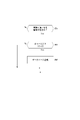
- FIG. 5 is a flowchart showing the flow of tactile presentation control processing. As shown in FIG. 5, when the tactile sense presentation control process is started, the tactile sense presentation control section 34 determines whether input information has been acquired by the input information acquisition section 33 in step S1. If the input information has not been acquired (No in step S1), the tactile presentation control unit 34 terminates the tactile presentation control process.
- step S2 the tactile presentation control unit 34 executes database construction processing for constructing a database regarding the usage status.
- the database may be provided for each imaging device 1, or may be provided for each user if the user using the imaging device 1 can be specified.
- the database stores not only setting information based on input information, but also environment information and device information.
- the setting information, the environment information, and the device information when the input information was acquired represent the status of use of the operator 6 that outputs the input information, and these are the usage status of the operator 6. I can say.
- the setting information includes the parameter selection frequency (number of times), the selection range, the moving speed of the manipulator 6, etc. set by the imaging control unit 31 based on the input information. calculated as
- the environmental information includes the imaging situation, subject, mode, etc. when the input information was acquired, and these are stored in the storage unit 14 .
- the device information includes information about the lens being used and the like, which are stored in the storage unit 14 . Note that the setting information, environment information, and device information listed here are examples, and may include information as described below, or may not include some of the information.
- the tactile presentation control unit 34 acquires the setting information, the environment information, and the device information when the input information is acquired, and stores them in association with the database. Further, when a vibration waveform is generated in a vibration waveform generation process (step S6), which will be described later, information on the vibration waveform is stored in association with setting information, environment information, and device information.
- the tactile presentation control unit 34 builds a database each time input information is acquired.
- step S3 the tactile presentation control unit 34 determines whether the database has been sufficiently constructed.
- determination is made based on whether the reliability (probability) of the database is equal to or higher than a preset threshold.
- the reliability is, for example, a value based on the number of samples of input information.
- step S4 the tactile sense presentation control unit 34 determines whether it is necessary to change the vibration waveform.
- the vibration waveform associated with the database corresponding to the obtained input information needs to be changed.
- the tactile sense presentation control unit 34 determines in step S5 whether it is necessary to suddenly change the vibration waveform.
- vibrations tilt sensations
- the tactile sense presentation control unit 34 determines in step S5 whether it is necessary to suddenly change the vibration waveform.
- step S4 if it is not necessary to change the vibration waveform (No in step S4) or if it is not necessary to suddenly change the vibration waveform (No in step S5), the tactile sense presentation control unit 34 proceeds to step S11. Transfer.
- step S6 the tactile presentation control unit 34 sets A vibration waveform generating process is executed to generate a vibration waveform corresponding to at least one of information, environmental information, and device information. Then, in step S7, the tactile sense presentation control section 34 determines whether or not the tactile sense presentation device 22 can output vibration based on the vibration waveform generated in step S6.
- the tactile sense presentation control unit 34 causes the display unit 15 to display, for example, that no vibration is given in step S8. , and output from the audio output device 23, etc., and the tactile sense presentation control process is terminated.
- the tactile presentation control unit 34 provisionally determines the vibration waveform generated in step S6 in step S9.
- step S10 the tactile sense presentation control unit 34 determines whether the vibration waveform is set to be automatically changeable.
- the imaging device 1 it is possible to set in advance whether the vibration waveform can be automatically changed.
- step S11 the tactile sense presentation control unit 34 determines (finally determines) the vibration waveform provisionally determined in step S9. Also, if there is no need to change the vibration waveform (No in step S4), the tactile presentation control unit 34 reads from the database and determines the vibration waveform associated with at least one of the setting information, the environment information, and the device information. . If it is not necessary to suddenly change the vibration waveform (No in step S5), the tactile presentation control unit 34 stores a default vibration waveform associated with at least one of setting information, environment information, and device information. It is read out from the unit 14 and determined.
- step S12 the tactile presentation control unit 34 causes the tactile presentation device 22 to output vibration based on the vibration waveform determined in step S11, and ends the tactile presentation control process.
- step S13 a user interface (UI) asking the user for permission to change the vibration waveform is displayed on the rear monitor 4, If permission is obtained from the user, the process proceeds to step S12. It should be noted that the tactile sense presentation control unit 34 terminates the tactile sense presentation processing when permission is not obtained from the user. However, the process of step S13 may be performed at another timing, not during the tactile sense presentation process.
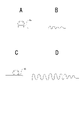
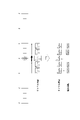
- FIG. 6 is a diagram for explaining vibration waveforms in Example 1.
- FIG. 6A is a diagram showing a vibration waveform output for each Ev value
- FIG. 6B is a diagram showing the setting frequency of the Ev value
- FIG. 6C is a diagram showing the vibration waveform.
- the first embodiment is an example in which setting values (setting ranges) of parameters frequently used by the user are learned, and tactile presentation is performed based on the learning result. Also, in the first embodiment, a case where the Ev value is changed as a parameter will be described.
- the Ev value can be set to any value in multiple stages within the range of -3 to +3.
- the Ev value is set only within the range of 0 to +3 (setting range), and the range of -0.3 to -3 is not set.
- the Ev value is frequently set to integers 0, +1, +2, +3 within the set range (0 to +3), and decimals 0.3, 0.7, 1.3, 1 .7, 2.3, and 2.7 are set less frequently.
- the Ev value is most frequently set to +2 within the setting range (0 to +3).
- step S3 Assume that such usage status (setting information) is registered in the database in step S3 above. That is, it is assumed that the tactile sense presentation control unit 34 has learned the setting range of the Ev value set via the dial 6a. In this case, the tactile sense presentation control unit 34, in the vibration waveform generation process of step S6, based on the learning result, that is, the database, as shown in FIGS. Any one of the vibration waveforms A to D is generated as the waveform.
- the tactile sense presentation control unit 34 generates the vibration waveform A for input information in which the Ev values at both ends of the set range are changed to 0 and +3. Further, the tactile sense presentation control unit 34 generates the vibration waveform B for the input information in which the Ev value with the highest setting frequency is changed to +2 within the setting range. Further, the tactile sense presentation control unit 34 generates the vibration waveform C for the input information in which the Ev value is an integer within the set range and the Ev value is changed to +1 where the vibration waveforms A and B are not generated. do. In addition, the vibration waveform D is generated for the input information in which the Ev value is not an integer (decimal) within the set range and is changed to an Ev value for which the vibration waveforms A to C are not generated.
- the vibration V(t) output from the tactile sense presentation device 22 can be expressed as follows, for example.
- V(t) Aexp(-Bt)sin(2 ⁇ ft) (1)
- A is the strength (amplitude) of vibration
- B is the frequency of vibration
- C is the damping rate of vibration.
- A, B, and C in the above equation (1) should be determined.
- the vibration represented by the formula (1) is an example, and vibrations of a plurality of frequency components may be combined.
- the vibration waveform A is stronger in strength than the other vibration waveforms B to D, has a higher frequency than the vibration waveform C, and has a longer output time than the vibration waveforms B to D, and The number of times of output is as many as 2 times. Therefore, the vibration waveform A can give a stronger vibration to the user than the other vibration waveforms BD.
- the vibration waveform B is not a vibration waveform like the one in the formula (1), but a rectangular vibration waveform.
- the vibration waveform C is weaker in strength than the vibration waveform A and has a shorter output time.
- the vibration waveform D is weaker in strength than the vibration waveforms A and C, has a higher frequency than the vibration waveform C, and has a shorter output time.
- the tactile sense presentation control unit 34 creates vibration waveforms A to D based on the database, and causes the tactile sense presentation device 22 to output vibrations corresponding to the vibration waveforms A to D. In other words, the tactile sense presentation control section 34 causes the tactile sense presentation to be performed based on the learning result.
- the tactile sense presentation control unit 34 when acquiring input information in which the Ev values at both ends of the setting range are set (changed) to 0 or +3, the tactile sense presentation control unit 34 repeatedly gives strong vibrations like vibration waveform A multiple times. . That is, the tactile presentation control unit 34 can remind the user that it is the end of the set range used by the user by performing the tactile presentation indicating the end of the set range. As a result, when the user receives the vibration based on the vibration waveform A, the user can easily prevent the Ev value from being changed to a range that he or she has never set by moving the dial 6a further in the same direction. can grasp.
- the tactile presentation control unit 34 performs different tactile presentations depending on whether the input information corresponding to +2, which has the highest setting frequency, is acquired or the input information corresponding to other values is acquired. Specifically, when the Ev value with the highest setting frequency within the setting range is set to +2, the tactile sense presentation control unit 34 causes the user to experience vibration based on the vibration waveform B that is different from other vibration waveforms. , it is possible to easily grasp that the Ev value has been changed to the one with the highest setting frequency.
- the tactile presentation control unit 34 performs different tactile presentations when input information corresponding to an integer Ev value is acquired and when input information corresponding to a non-integer Ev value is acquired.
- the tactile sense presentation control unit 34 gives a stronger vibration such as the vibration waveform C than when the Ev value is a decimal number. Makes it easier to see what has changed.
- the tactile sense presentation control unit 34 applies a weaker vibration than other vibrations such as the vibration waveform D, so that when the dial 6a is continuously operated, a plurality of It is possible to reduce the fact that the vibrations of are connected and recognized as one vibration.
- the tactile sense presentation control unit 34 gives different vibrations (vibration waveforms A to D) depending on the Ev value set within the set range, thereby allowing the user to easily determine which set value the operation corresponds to. can be grasped.
- vibration waveforms A to D described above are examples, and other vibration waveforms may be used.
- the tactile sense presentation control section 34 may generate the vibration waveform based on the environment information and the device information in addition to the setting information.
- the environment information and device information in the first embodiment include, for example, the weight and size of the imaging device 1, the imaging environment, the interval between setting values, the moving speed of the operator 6, the hardness of the operator 6, and the operator 6. They are acceleration at the time of operation, user's perceptual conditions, and the like. Moreover, the user's perceptual conditions include age, type of disease, sex, body type, and the like.
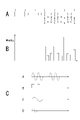
- FIG. 7 is a diagram for explaining vibration waveforms in Example 2.
- FIG. 7A is a diagram showing the order of vibration waveforms with respect to time
- FIG. 7B is a diagram showing the order of vibration waveforms with respect to time when the vibration waveforms are changed
- FIG. 7C is a diagram showing the order of vibration waveforms with respect to time when the vibration waveforms are thinned.
- FIG. 4 is a diagram showing the order of vibration waveforms with respect to time
- FIG. 8 is a flow chart showing the flow of processing in the second embodiment.
- the second embodiment is an example of learning the operation speed of the dial 6a by the user when there is a possibility that one or more vibrations may be connected to one when the user operates the dial 6a quickly.
- the tactile sense presentation device 22 When the dial 6a is rotated and input information is continuously output from the dial 6a, the tactile sense presentation device 22 generates vibration waveform C, vibration waveform B, vibration waveform C, and vibration waveform B as shown in FIG. 7A, for example. , . . . based on vibration waveform C and vibration waveform B are repeatedly output.
- the time (presentation interval) t1 from acquiring the input information corresponding to the vibration waveform C to acquiring the input information corresponding to the vibration waveform B is less than the perceptual limit time T for two-point discrimination. If it is (t1 ⁇ T), the tactile sense presentation control unit 34 thins out the vibration waveform (vibration) corresponding to the subsequent input information, or changes it to another vibration waveform.
- step S21 of FIG. 8 the tactile sense presentation control unit 34 determines whether the time t1 is less than (below) the perception limit time T. Note that step S21 is executed in step S4 in FIG. That is, here, it is determined whether the time t1 is less than the perception limit time T and the vibration waveform needs to be changed.
- step S22 the tactile sense presentation control unit 34 changes the vibration waveform from the vibration waveform B corresponding to the input information to the vibration waveform E, as shown in FIG. 7B. change.
- the tactile sense presentation control unit 34 changes the vibration waveform E from the vibration waveform B by increasing the intensity of the vibration, shortening the waveform exposure time, or changing the frequency to a frequency at which the user's hand has a high perception sensitivity. Generate.
- step S23 the tactile sense presentation control unit 34 determines whether there is a possibility that the previous vibration (vibration waveform C) will still be connected even if the vibration waveform generated in step S22 is changed. Then, if there is a possibility of connection (Yes in step S23), in step S24, the tactile presentation control unit 34 performs thinning processing so as not to apply vibration to the acquired input information, as shown in FIG. 7C. Specifically, the tactile sense presentation control unit 34 discards the vibration waveform E corresponding to the acquired input information, and prevents the tactile sense presentation device 22 from outputting vibration.
- steps S22 to S24 are executed in the vibration waveform generation process of step S6 described above.
- FIG. 9 is a diagram for explaining vibration waveforms in Example 3.
- FIG. 9A is a diagram showing a state in which the shutter button 6b is half-pressed
- FIG. 9B is a diagram showing an example of vibration waveforms when the shutter button 6b is half-pressed.
- FIG. 9C is a diagram showing a state in which the shutter button 6b is fully pressed
- FIG. 9D is a diagram showing an example of vibration waveforms when the shutter button 6b is fully pressed.
- the third embodiment is an example of generating a vibration waveform corresponding to the pressure when the user presses the shutter button 6b.
- the shutter button 6b when the shutter button 6b is half-pressed, it outputs a first-step signal (input information) indicating that it is half-pressed to the control unit 17 at predetermined intervals. At this time, the controller 17 acquires the pressure value from the pressure sensor 20 .
- the tactile sense presentation control unit 34 When the first stage signal is acquired, the tactile sense presentation control unit 34 generates a vibration waveform corresponding to the pressure measured by the pressure sensor as shown in FIG. 9B.
- the shutter button 6b outputs a second-level signal (input information) indicating that it is fully pressed to the control unit 17 at predetermined time intervals while it is fully pressed. At this time, the control unit 17 acquires the pressure value from the pressure sensor.
- the tactile sense presentation control unit 34 when the second stage signal is acquired, the tactile sense presentation control unit 34 generates a vibration waveform corresponding to the pressure measured by the pressure sensor as shown in FIG. 9D.
- the full press of the shutter button 6b is pressed with a higher pressure than the half press. Since the greater the pressure (pressure sensation), the more difficult it is for people to perceive vibrations, the strength of the full-press (high pressure) is higher than the half-press (low pressure). vibration waveform is generated.
- FIG. 10 is a flow chart showing the flow of database construction processing in the fourth embodiment.
- the fourth embodiment is an example of building a database by learning user error situations.
- step S31 the tactile presentation control unit 34 determines whether the line of sight has been moved to the selection bar 42 after the input information is input, based on the detection result from the line of sight detection sensor 21 . Then, when the line of sight is moved to the selection bar 42 after the input information is input (step S31), the tactile sense presentation control unit 34 adds 1 to the error score e1, and in step S32, the error score e1 becomes the error threshold value E1. Determine if higher. Note that the error threshold E1 is a preset value at which many errors are considered to occur.
- step S33 the tactile sense presentation control unit 34 indicates that an error has occurred in the operation of the dial 6a during parameter change. Register error information in the database. Steps S31 to S33 are executed in the database construction process of step S2. Then, if the error information is registered in the database, in step S6, the tactile sense presentation control unit 34 generates a predetermined vibration waveform corresponding to the vibration output when an operation to change the parameter is performed, and stores the information in the database. is stored in association with the error information.
- the tactile sense presentation control unit 34 can cause the tactile sense presentation device 22 to output vibration based on the vibration waveform associated with the error information when the input information corresponding to the operation for changing the parameter is acquired. Become. Therefore, the user can change the parameter by relying on the vibration, and can save the trouble of checking the selection bar 42 .
- the error score is the number of times an operation exceeding the set range is performed.
- a vibration waveform indicating that is generated, and vibration based on the vibration waveform may be output from the tactile sense presentation device 22 .
- the error score is the number of times the setting range is returned to after an operation exceeding the setting range is performed.
- a vibration waveform indicating that an operation has been performed may be generated, and vibration based on the vibration waveform may be output from the tactile presentation device 22 .
- the fifth embodiment is an example of learning the environmental situation and presenting the tactile sensation.
- the tactile sense presentation control unit 34 can generate a vibration waveform according to environmental information in addition to input information.
- the tactile sense presentation control unit 34 acquires the environment information indicating that the environment is dark and the shutter speed is changed as a parameter, the vibration for outputting in the range where the shutter speed is considered to be long Generate a waveform. Then, the tactile sense presentation control section 34 controls the tactile sense presentation device 22 to output vibration based on the vibration waveform when an operation to change the shutter speed is performed within that range.
- the tactile sense presentation control unit 34 acquires the environment information indicating that the subject is a moving object and changes the shutter speed as a parameter, the tactile sense presentation control unit 34 provides a range of short shutter speeds for output. Generate a vibration waveform. Then, the tactile sense presentation control section 34 controls the tactile sense presentation device 22 to output vibration based on the vibration waveform when an operation to change the shutter speed is performed within that range.
- the tactile sense presentation control unit 34 when the portrait mode is set and the F value is changed as a parameter, the tactile sense presentation control unit 34 generates a vibration waveform for output at the F value at which the background is blurred. Then, the tactile sense presentation control section 34 controls the tactile sense presentation device 22 to output vibration based on the vibration waveform when an operation is performed to change the F value to blur the background.
- the tactile sense presentation control unit 34 notifies the user of the optimum set value by generating a vibration waveform corresponding to the environmental information (usage environment) when the manipulator 6 is operated and applying vibration. becomes possible.
- the tactile sense presentation control unit 34 may perform control so as to generate a vibration waveform according to the user's history of camera use and shooting skill and provide tactile sense stimulation.
- the user's camera usage history may be calculated from the camera usage time.
- the shooting skill may be determined based on the deletion history of the shot images and the number of shots. In this case, for example, the skill may be determined using the image deletion rate as an evaluation value.
- the user's camera usage history and photography skill may be input by the user.
- FIG. 11 is a diagram for explaining vibration waveforms in Example 6.
- FIG. FIG. 12 is a flow chart showing the flow of database construction processing in the sixth embodiment.
- the sixth embodiment is an example of generating a vibration waveform when the dial vibration is weakened due to aged deterioration. Also, in a sixth embodiment, a case where the Ev value is changed as a parameter will be described.
- the dial 6a When the dial 6a is used for many years and deteriorates over time, the force required for the ball to come out of the groove provided on the dial 6a after being fitted into it decreases, and the speed at which the ball passes through the groove increases. . That is, with the dial 6a, the input speed at a predetermined point (position) increases due to deterioration over time.
- step S41 the tactile presentation control unit 34 determines whether there is a portion where the interval for acquiring input information is shorter than the interval for acquiring other input information. As a result, if there is a portion with a short interval for acquiring input information, the tactile sense presentation control unit 34 adds 1 to the error score e2, and in step S42 determines whether the error score e2 is higher than the error threshold value E2.
- the error threshold E2 is a preset value that indicates that there are many errors whose intervals have become shorter due to deterioration over time.
- step S43 the tactile sense presentation control unit 34 registers in the database so that the similar vibration is performed at the location where the error occurs.
- the similar vibration is an assistance that allows the user to experience the same vibration as the dial vibration at other locations by adding the similar vibration to the dial vibration at the location where the error occurs.
- vibration vibration waveform
- FIG. 13 is a diagram for explaining tactile presentation when dial vibration has increased due to aged deterioration.
- FIG. 14 is a flowchart showing the flow of database construction processing.
- the seventh embodiment is an example in which a tactile sensation is presented when dial vibration has increased due to aged deterioration. Also, in a seventh embodiment, a case where the Ev value is changed as a parameter will be described.
- the dial 6a When the dial 6a is used for many years and deteriorates over time, the force required for the ball to come out of the groove provided on the dial 6a after being fitted into it increases, and the speed at which the ball passes through the groove slows down. . That is, with the dial 6a, the input speed at a predetermined point (position) slows down due to deterioration over time.
- step S51 the tactile presentation control unit 34 determines whether there is a location where the interval for acquiring input information is longer than the interval for acquiring other input information. As a result, if there is a portion with a long interval for acquiring input information, the tactile sense presentation control unit 34 adds 1 to the error score e3, and in step S52 determines whether the error score e3 is higher than the error threshold value E3.
- the error threshold E3 is a preset value that indicates that there are many errors with long intervals due to deterioration over time.
- step S53 the tactile sense presentation control unit 34 registers in the database so that the similar vibration is performed at a location other than the location where the error occurs.
- the similar vibration here means vibration equivalent to the dial vibration at the location where the error occurs by adding the similar vibration to the dial vibration at the location where the error does not occur.
- auxiliary vibration vibration waveform
- steps S51 to S53 are executed in the database construction process of step S2.
- the tactile sense presentation control unit 34 generates a predetermined vibration waveform corresponding to the similar vibration to be output when an operation other than the location where the error occurs is performed. It is generated and stored in the database in association with the error information.
- the eighth embodiment is an example in which a tactile sensation is presented when the shutter button 6b has deteriorated over time.
- the shutter button 6b If the shutter button 6b is used for many years and deteriorates over time, the shutter button 6b will become weak, and even if the same pressure as when new is applied, a stroke different from that when new can be obtained. For example, even if the same pressure is applied, the stroke may decrease or increase compared to when the product was brand new.
- the tactile sense presentation control unit 34 determines whether aging deterioration has occurred from the detection result of the pressure sensor, the continuous operation time of the shutter button 6b, or an error.
- the error is determined based on whether the time from half-pressing to full-pressing is less than a predetermined length.
- the tactile sense presentation control unit 34 when it is determined that deterioration over time has occurred, the tactile sense presentation control unit 34 generates a vibration waveform in which the strength of the vibration is increased, the damping rate is increased, or the frequency is increased. Further, the tactile sense presentation control section 34 causes the tactile sense presentation device 22 to output vibration based on the vibration waveform when the shutter button 6b is operated.
- the tactile sense presentation control unit 34 causes the tactile sense to be presented when an input signal corresponding to the pressing operation is acquired.
- the tactile sense presentation control unit 34 can provide, for example, the operational feeling of half-pressing and full-pressing of the shutter button 6b when the product is new, by means of vibration.
- the embodiments are not limited to the examples described above, and various modifications can be made.
- the adjustment object is an object that can be operated by the user, it may be a display object such as a bar displayed on the display unit 15 as well as a physical operator. It may be an object in the virtual space to be displayed.
- imaging device 1 has been described as an example of the information processing device, various devices such as computers, game machines, and television receivers may be used as the information processing device.
- the manipulator 6, the control unit 17, and the tactile sense presentation device 22 are provided within the same camera housing 2.
- the manipulator 6, the controller 17, and the tactile presentation device 22 may be provided separately.
- the manipulator 6 and the haptic presentation device 22 may be provided on a remote controller, an external shutter button, a tripod, a handheld gimbal, a lens, a camera accessory, or the like.
- the vibration waveform is generated and the vibration waveform is thinned out.
- the tactile sense presentation control unit 34 may perform only either generation of the vibration waveform or thinning of the vibration waveform.
- the tactile sense presentation control section 34 may set in advance a vibration waveform that is less likely to cause vibration.
- the situations in which the dial 6a is continuously operated include, for example, a case where the object is small and rapidly zoomed in, or a case where the background is dark and the Ev value or shutter speed is rapidly increased. In such a case, the tactile sense presentation control unit 34 can reduce the chain of vibrations by preliminarily setting the vibration waveform when the zoom, Ev value, and shutter speed are operated.
- the information processing apparatus includes the input information acquisition unit 33 that acquires input information input by user operations on adjustment objects (dial 6a, shutter button 6b), and and a tactile sense presentation control unit 34 that controls the tactile sense presentation device 22 to perform tactile sense presentation according to the usage status of the adjustment object based on the adjustment object. Accordingly, the imaging apparatus 1 can cause the tactile sense presentation device 22 to present different tactile senses (vibrations based on vibration waveforms) according to the usage status of the adjustment object based on the input information. Therefore, the imaging device 1 can improve usability by performing tactile presentation according to the usage status of the adjustment object.
- the tactile sense presentation control unit 34 learns the setting range of the parameter set via the adjustment object, and performs tactile sense presentation based on the learning result.
- the imaging apparatus 1 can cause the tactile presentation device 22 to present tactile sensations (vibration based on vibration waveforms) by narrowing down the setting range of parameters set for each user. Therefore, the image capturing apparatus 1 can perform accurate tactile presentation within a required setting range, and can further improve usability.
- the tactile sense presentation control unit 34 may cause tactile presentation indicating the ends of the set range.
- the imaging device 1 can allow the user to easily grasp the setting range. Therefore, the imaging device 1 can reduce the possibility that the user changes the parameters beyond the set range.
- the tactile sense presentation control unit 34 acquires input information corresponding to a set value within the set range, it is conceivable to perform different tactile sense presentations according to the set value. As a result, the imaging device 1 allows the user to easily grasp periodic changes within the setting range.
- the tactile sense presentation control unit 34 can cause different tactile sense presentations to be performed depending on whether input information corresponding to an integer value is acquired or input information corresponding to a non-integer value within the set range is acquired. Conceivable. As a result, the imaging device 1 can allow the user to easily grasp integer values with good delimiters, for example.
- the tactile presentation control unit 34 performs different tactile presentations depending on whether the input information corresponding to the most frequently set value in the setting range is acquired or the input information corresponding to the other values is acquired. It is conceivable that As a result, the imaging device 1 can allow the user to easily grasp the value that is most frequently set.
- the tactile presentation control unit 34 may not perform one or more tactile presentations among the consecutive tactile presentations.
- the imaging device 1 can reduce situations in which a plurality of tactile presentations are connected and recognized as one tactile presentation. Therefore, the imaging device 1 can reduce misrecognition due to tactile presentation.
- the tactile presentation control unit may change one or more tactile presentations so that the tactile presentation does not fall below the perception limit time. be done.
- the imaging device 1 can reduce situations in which a plurality of tactile presentations are connected and recognized as one tactile presentation. Therefore, the imaging device 1 can reduce misrecognition due to tactile presentation.
- the adjustment object is the manipulator 6 that can be operated by the user, and the tactile sensation presentation control unit 34 may cause the tactile sensation to be presented according to the strength of the operation on the adjustment object.
- the imaging device 1 can give a constant tactile sense stimulus to the user regardless of the tactile sense sensitivity that varies depending on the strength of the operation.
- the tactile sense presentation control unit 34 performs tactile sense presentation when the input information is acquired in an error situation regarding the operation of the adjustment object.
- the imaging apparatus 1 can provide tactile presentation to assist in minimizing the occurrence of errors. Therefore, the imaging device 1 can reduce user errors.
- the tactile sense presentation control unit 34 performs tactile sense presentation according to the environmental information when the adjustment object is operated.
- the imaging device 1 can guide the setting of the parameters according to the use environment, for example.
- the adjustment object is the manipulator 6 that can be operated by the user, and if the adjustment object is recognized to have deteriorated over time, it is conceivable that the tactile sensation presentation control unit 34 performs tactile sensation presentation so as to compensate for the deterioration over time. As a result, the imaging apparatus 1 can reduce the sense of incompatibility caused by operating the manipulator 6 that has deteriorated over time.
- the tactile sensation presentation control unit 34 provides the tactile sensation so as to compensate for the deterioration over time when the input signal corresponding to the operation at the predetermined position is acquired. can be considered.
- the imaging apparatus 1 can reduce discomfort caused by operating the operation element 6 that has deteriorated over time, even if the operation input is quick and the vibration from the operation element is small.
- the tactile sense presentation control unit 34 when acquiring an input signal corresponding to an operation other than the predetermined position, adjusts the tactile sensation to compensate for the aged deterioration. It is conceivable to make a presentation. As a result, the imaging apparatus 1 can reduce discomfort caused by operating the operation element 6 that has deteriorated over time, even when the operation input is delayed and the vibration from the operation element increases.
- the adjustment object is the manipulator 6 that can be operated by the user, and if the adjustment object is recognized to have deteriorated over time, the tactile presentation control unit 34 performs tactile presentation when an input signal corresponding to a predetermined operation is acquired. It is conceivable that Thereby, the imaging device 1 can operate the operator 6 with a feeling similar to that before aging deterioration.
- the information processing method acquires input information input by a user operation on an adjustment object, and causes the tactile presentation device to perform tactile presentation according to the usage status of the adjustment object based on the input information. control.
- the program as the embodiment acquires the input information input by the user's operation on the adjustment object, and causes the tactile presentation device to present the tactile sensation according to the usage status of the adjustment object based on the input information. It causes a computer to execute the process to be controlled.
- Such an information processing method and program can also obtain the same effect as the information processing apparatus.
- Such a program can be recorded in advance in an HDD as a recording medium built in a device such as a personal computer, or in a ROM, flash memory, or the like in a microcomputer having a CPU.
- a program can be recorded in advance in an HDD as a recording medium built in a device such as a personal computer, or in a ROM, flash memory, or the like in a microcomputer having a CPU.
- removable recording media such as flexible discs, CD-ROMs (Compact Disc Read Only Memory), MO (Magnet optical) discs, DVDs, Blu-ray discs, magnetic discs, semiconductor memories, and memory cards. It can be stored (recorded).
- Such removable recording media can be provided as so-called package software.
- the program can also be downloaded from a download site via a network such as a LAN (Local Area Network) or the Internet.
- LAN Local Area Network
- the present technology can also adopt the following configuration.
- an input information acquisition unit that acquires input information input by a user's operation on the adjustment object; a tactile presentation control unit that controls a tactile presentation device to present a tactile presentation according to the usage status of the adjustment object based on the input information;
- Information processing device with (2) The tactile presentation control unit The information processing apparatus according to (1), wherein the setting range of the setting item set via the adjustment object is learned, and tactile presentation is performed based on the learning result.
- the tactile presentation control unit The information processing apparatus according to (1) or (2), wherein when input information corresponding to both ends of the setting range is acquired, tactile presentation indicating the ends of the setting range is performed.
- the tactile presentation control unit The information processing apparatus according to any one of (1) to (3), wherein when input information corresponding to a setting value within the setting range is acquired, a different tactile sensation is presented according to the setting value.
- the tactile presentation control unit any one of (1) to (4), in which different tactile sensations are presented depending on whether input information corresponding to an integer value is obtained or input information corresponding to a non-integer value within the set range is obtained;
- the information processing device according to .
- the information processing device according to any one of .
- the tactile presentation control unit The information processing apparatus according to any one of (1) to (6), wherein one or a plurality of consecutive tactile sensation presentations are not performed when the presentation interval of consecutive tactile sensation presentations is less than the perceptual limit time.
- the tactile presentation control unit The information processing according to any one of (1) to (7), wherein, when the presentation interval of consecutive tactile presentations falls below the perceptual threshold time, one or more tactile presentations are changed so that the tactile presentation does not fall below the perceptual threshold time.
- the adjustment object is an operator that can be operated by a user;
- the tactile presentation control unit The information processing apparatus according to any one of (1) to (8), wherein a tactile sensation is presented in accordance with the strength of operation on the adjustment object.
- the tactile presentation control unit The information processing apparatus according to any one of (1) to (9), wherein a tactile sensation is presented when input information is acquired in an error situation regarding operation of the adjustment object.
- the tactile presentation control unit The information processing apparatus according to any one of (1) to (10), wherein a tactile sensation is presented according to environmental information when the adjustment object is operated.
- the adjustment object is an operator that can be operated by a user;
- the tactile presentation control unit The information processing apparatus according to any one of (1) to (11), wherein, when the adjustment object is recognized as having deteriorated over time, a tactile sensation is presented so as to compensate for deterioration over time.
- the tactile presentation control unit (12) when an input signal corresponding to an operation at a predetermined position is acquired, a tactile sensation is presented so as to compensate for the deterioration over time when the adjustment object receives an input signal corresponding to the operation at the predetermined position in the case where the operation input is accelerated at the predetermined position due to deterioration over time. information processing equipment. (14) The tactile presentation control unit (12) or, when an input signal corresponding to an operation at a position other than the predetermined position is acquired, a tactile sensation is presented so as to compensate for the deterioration over time when the adjustment object receives an input signal corresponding to an operation at a position other than the predetermined position.
- the information processing device according to (13).
- the adjustment object is an operator that can be operated by a user;
- the tactile presentation control unit The information processing apparatus according to any one of (1) to (14), wherein, when the adjustment object is recognized to have deteriorated over time, tactile presentation is performed when an input signal corresponding to a predetermined operation is acquired.
- An information processing method comprising: controlling a tactile sense presentation device to present a tactile sense according to the usage status of the adjustment object based on the input information.
- Acquire input information entered by user operation on the adjustment object A program for causing a computer to execute a process of controlling a tactile sense presentation device to present a tactile sense according to the usage status of the adjustment object based on the input information.
Landscapes
- Engineering & Computer Science (AREA)
- General Engineering & Computer Science (AREA)
- Theoretical Computer Science (AREA)
- Physics & Mathematics (AREA)
- General Physics & Mathematics (AREA)
- Human Computer Interaction (AREA)
- User Interface Of Digital Computer (AREA)
Priority Applications (4)
| Application Number | Priority Date | Filing Date | Title |
|---|---|---|---|
| DE112022001787.2T DE112022001787T5 (de) | 2021-03-26 | 2022-02-10 | Informationsverarbeitungseinrichtung, informationsverarbeitungsverfahren und programm |
| JP2023508766A JPWO2022201948A1 (https=) | 2021-03-26 | 2022-02-10 | |
| CN202280022647.7A CN117015756A (zh) | 2021-03-26 | 2022-02-10 | 信息处理装置、信息处理方法和程序 |
| US18/550,988 US20240168560A1 (en) | 2021-03-26 | 2022-02-10 | Information processing apparatus, information processing method, and program |
Applications Claiming Priority (2)
| Application Number | Priority Date | Filing Date | Title |
|---|---|---|---|
| JP2021-054337 | 2021-03-26 | ||
| JP2021054337 | 2021-03-26 |
Publications (1)
| Publication Number | Publication Date |
|---|---|
| WO2022201948A1 true WO2022201948A1 (ja) | 2022-09-29 |
Family
ID=83395486
Family Applications (1)
| Application Number | Title | Priority Date | Filing Date |
|---|---|---|---|
| PCT/JP2022/005341 Ceased WO2022201948A1 (ja) | 2021-03-26 | 2022-02-10 | 情報処理装置、情報処理方法、プログラム |
Country Status (5)
| Country | Link |
|---|---|
| US (1) | US20240168560A1 (https=) |
| JP (1) | JPWO2022201948A1 (https=) |
| CN (1) | CN117015756A (https=) |
| DE (1) | DE112022001787T5 (https=) |
| WO (1) | WO2022201948A1 (https=) |
Cited By (1)
| Publication number | Priority date | Publication date | Assignee | Title |
|---|---|---|---|---|
| WO2025158911A1 (ja) * | 2024-01-24 | 2025-07-31 | ソニーグループ株式会社 | 撮像装置、撮像方法 |
Families Citing this family (2)
| Publication number | Priority date | Publication date | Assignee | Title |
|---|---|---|---|---|
| US20240338078A1 (en) * | 2021-09-09 | 2024-10-10 | Toyoda Gosei Co., Ltd. | Tactile presentation device |
| JP2025019521A (ja) * | 2023-07-28 | 2025-02-07 | キヤノン株式会社 | 情報処理装置、情報処理装置の制御方法、プログラム |
Citations (7)
| Publication number | Priority date | Publication date | Assignee | Title |
|---|---|---|---|---|
| JP2008241426A (ja) * | 2007-03-27 | 2008-10-09 | Xanavi Informatics Corp | ナビゲーションシステムおよび入力受付方法 |
| JP2011517810A (ja) * | 2008-03-12 | 2011-06-16 | イマージョン コーポレーション | 触覚的にイネーブルにされるユーザインタフェース |
| JP2014080097A (ja) * | 2012-10-16 | 2014-05-08 | Toyota Motor Corp | 電動パワーステアリング装置 |
| JP2015015027A (ja) * | 2013-07-02 | 2015-01-22 | イマージョン コーポレーションImmersion Corporation | 触覚効果の知覚正規化のためのシステム及び方法 |
| US20190196703A1 (en) * | 2017-12-26 | 2019-06-27 | Samsung Electronics Co., Ltd. | Electronic device for displaying slider track and slider and method of operating same |
| JP2019164485A (ja) * | 2018-03-19 | 2019-09-26 | ソニー株式会社 | 情報処理装置、情報処理方法及び記録媒体 |
| JP2019184896A (ja) * | 2018-04-13 | 2019-10-24 | キヤノン株式会社 | 振動フィードバック制御方法および制御装置 |
Family Cites Families (6)
| Publication number | Priority date | Publication date | Assignee | Title |
|---|---|---|---|---|
| US20110309918A1 (en) * | 2010-06-17 | 2011-12-22 | Immersion Corporation | System and Method for Compensating for Aging Haptic Actuators |
| WO2014104452A1 (ko) * | 2012-12-31 | 2014-07-03 | 엘지전자 주식회사 | 진동 발생 장치 및 방법 |
| US20140267076A1 (en) * | 2013-03-15 | 2014-09-18 | Immersion Corporation | Systems and Methods for Parameter Modification of Haptic Effects |
| KR20150118813A (ko) * | 2014-04-15 | 2015-10-23 | 삼성전자주식회사 | 햅틱 정보 운용 방법 및 이를 지원하는 전자 장치 |
| US10386940B2 (en) * | 2015-10-30 | 2019-08-20 | Microsoft Technology Licensing, Llc | Touch sensing of user input device |
| JP2018036841A (ja) | 2016-08-31 | 2018-03-08 | ソニー株式会社 | 信号処理装置、信号処理方法、プログラム、および電子機器 |
-
2022
- 2022-02-10 CN CN202280022647.7A patent/CN117015756A/zh not_active Withdrawn
- 2022-02-10 WO PCT/JP2022/005341 patent/WO2022201948A1/ja not_active Ceased
- 2022-02-10 US US18/550,988 patent/US20240168560A1/en not_active Abandoned
- 2022-02-10 JP JP2023508766A patent/JPWO2022201948A1/ja active Pending
- 2022-02-10 DE DE112022001787.2T patent/DE112022001787T5/de active Pending
Patent Citations (7)
| Publication number | Priority date | Publication date | Assignee | Title |
|---|---|---|---|---|
| JP2008241426A (ja) * | 2007-03-27 | 2008-10-09 | Xanavi Informatics Corp | ナビゲーションシステムおよび入力受付方法 |
| JP2011517810A (ja) * | 2008-03-12 | 2011-06-16 | イマージョン コーポレーション | 触覚的にイネーブルにされるユーザインタフェース |
| JP2014080097A (ja) * | 2012-10-16 | 2014-05-08 | Toyota Motor Corp | 電動パワーステアリング装置 |
| JP2015015027A (ja) * | 2013-07-02 | 2015-01-22 | イマージョン コーポレーションImmersion Corporation | 触覚効果の知覚正規化のためのシステム及び方法 |
| US20190196703A1 (en) * | 2017-12-26 | 2019-06-27 | Samsung Electronics Co., Ltd. | Electronic device for displaying slider track and slider and method of operating same |
| JP2019164485A (ja) * | 2018-03-19 | 2019-09-26 | ソニー株式会社 | 情報処理装置、情報処理方法及び記録媒体 |
| JP2019184896A (ja) * | 2018-04-13 | 2019-10-24 | キヤノン株式会社 | 振動フィードバック制御方法および制御装置 |
Cited By (1)
| Publication number | Priority date | Publication date | Assignee | Title |
|---|---|---|---|---|
| WO2025158911A1 (ja) * | 2024-01-24 | 2025-07-31 | ソニーグループ株式会社 | 撮像装置、撮像方法 |
Also Published As
| Publication number | Publication date |
|---|---|
| JPWO2022201948A1 (https=) | 2022-09-29 |
| CN117015756A (zh) | 2023-11-07 |
| DE112022001787T5 (de) | 2024-01-18 |
| US20240168560A1 (en) | 2024-05-23 |
Similar Documents
| Publication | Publication Date | Title |
|---|---|---|
| CN101790046B (zh) | 数字拍摄装置及其控制方法 | |
| JP4872797B2 (ja) | 撮像装置、撮像方法および撮像プログラム | |
| WO2022201948A1 (ja) | 情報処理装置、情報処理方法、プログラム | |
| JP4236986B2 (ja) | 撮影装置および方法並びにプログラム | |
| JP2014222801A (ja) | 撮像装置、撮像方法、プログラム | |
| TW200808044A (en) | Imaging apparatus and computer readable recording medium | |
| KR101739379B1 (ko) | 디지털 촬영 장치 및 이의 제어 방법 | |
| KR101737086B1 (ko) | 디지털 촬영 장치 및 이의 제어 방법 | |
| JP7380675B2 (ja) | 画像処理装置、画像処理方法、プログラム、撮像装置 | |
| JP2012095167A (ja) | 撮像装置 | |
| KR101626002B1 (ko) | 디지털 촬영 장치, 그 제어 방법, 및 컴퓨터 판독가능 저장매체 | |
| JP2010054730A (ja) | 合焦位置検出装置、撮像装置及び合焦位置検出方法 | |
| CN101998060B (zh) | 通过使用自动聚焦确定抖动图像的方法和设备 | |
| JP2017153063A (ja) | 撮像装置 | |
| JP7754091B2 (ja) | 撮像装置、撮像制御装置、撮像装置の制御方法、プログラム | |
| US10084956B2 (en) | Imaging apparatus, and imaging system | |
| US20100033582A1 (en) | Method and apparatus for controlling thumbnail display and digital photographing apparatus | |
| JP2023072581A (ja) | 撮像装置およびその制御方法、レンズ装置、像倍率補正用データ、画像処理装置および画像処理方法、ならびにアクセサリ装置 | |
| JP5013852B2 (ja) | 画角補正装置及び方法並びに撮像装置 | |
| US20170264819A1 (en) | Imaging device | |
| WO2020195198A1 (ja) | 画像処理装置、画像処理方法、プログラム、撮像装置 | |
| US20240080411A1 (en) | Imaging apparatus, imaging control method, and program | |
| KR101946574B1 (ko) | 영상 재생 장치, 방법, 및 컴퓨터 판독가능 저장매체 | |
| JP7772069B2 (ja) | 情報処理装置、情報処理方法、プログラム | |
| JP2006094200A (ja) | 撮像装置、合焦表示方法及びプログラム |
Legal Events
| Date | Code | Title | Description |
|---|---|---|---|
| 121 | Ep: the epo has been informed by wipo that ep was designated in this application |
Ref document number: 22774749 Country of ref document: EP Kind code of ref document: A1 |
|
| WWE | Wipo information: entry into national phase |
Ref document number: 2023508766 Country of ref document: JP |
|
| WWE | Wipo information: entry into national phase |
Ref document number: 18550988 Country of ref document: US |
|
| WWE | Wipo information: entry into national phase |
Ref document number: 202280022647.7 Country of ref document: CN |
|
| WWE | Wipo information: entry into national phase |
Ref document number: 112022001787 Country of ref document: DE |
|
| 122 | Ep: pct application non-entry in european phase |
Ref document number: 22774749 Country of ref document: EP Kind code of ref document: A1 |