WO2021230073A1 - 情報処理装置、情報処理方法、及び表示装置 - Google Patents
情報処理装置、情報処理方法、及び表示装置 Download PDFInfo
- Publication number
- WO2021230073A1 WO2021230073A1 PCT/JP2021/016797 JP2021016797W WO2021230073A1 WO 2021230073 A1 WO2021230073 A1 WO 2021230073A1 JP 2021016797 W JP2021016797 W JP 2021016797W WO 2021230073 A1 WO2021230073 A1 WO 2021230073A1
- Authority
- WO
- WIPO (PCT)
- Prior art keywords
- virtual camera
- information processing
- performer
- shooting
- target object
- Prior art date
- Legal status (The legal status is an assumption and is not a legal conclusion. Google has not performed a legal analysis and makes no representation as to the accuracy of the status listed.)
- Ceased
Links
Images





Classifications
-
- G—PHYSICS
- G06—COMPUTING OR CALCULATING; COUNTING
- G06T—IMAGE DATA PROCESSING OR GENERATION, IN GENERAL
- G06T17/00—Three-dimensional [3D] modelling for computer graphics
-
- G—PHYSICS
- G06—COMPUTING OR CALCULATING; COUNTING
- G06T—IMAGE DATA PROCESSING OR GENERATION, IN GENERAL
- G06T19/00—Manipulating three-dimensional [3D] models or images for computer graphics
- G06T19/003—Navigation within 3D models or images
-
- G—PHYSICS
- G06—COMPUTING OR CALCULATING; COUNTING
- G06F—ELECTRIC DIGITAL DATA PROCESSING
- G06F3/00—Input arrangements for transferring data to be processed into a form capable of being handled by the computer; Output arrangements for transferring data from processing unit to output unit, e.g. interface arrangements
- G06F3/14—Digital output to display device ; Cooperation and interconnection of the display device with other functional units
-
- G—PHYSICS
- G06—COMPUTING OR CALCULATING; COUNTING
- G06T—IMAGE DATA PROCESSING OR GENERATION, IN GENERAL
- G06T7/00—Image analysis
- G06T7/20—Analysis of motion
-
- G—PHYSICS
- G06—COMPUTING OR CALCULATING; COUNTING
- G06V—IMAGE OR VIDEO RECOGNITION OR UNDERSTANDING
- G06V10/00—Arrangements for image or video recognition or understanding
- G06V10/70—Arrangements for image or video recognition or understanding using pattern recognition or machine learning
- G06V10/74—Image or video pattern matching; Proximity measures in feature spaces
- G06V10/761—Proximity, similarity or dissimilarity measures
-
- H—ELECTRICITY
- H04—ELECTRIC COMMUNICATION TECHNIQUE
- H04N—PICTORIAL COMMUNICATION, e.g. TELEVISION
- H04N21/00—Selective content distribution, e.g. interactive television or video on demand [VOD]
- H04N21/20—Servers specifically adapted for the distribution of content, e.g. VOD servers; Operations thereof
- H04N21/21—Server components or server architectures
- H04N21/218—Source of audio or video content, e.g. local disk arrays
- H04N21/21805—Source of audio or video content, e.g. local disk arrays enabling multiple viewpoints, e.g. using a plurality of cameras
-
- H—ELECTRICITY
- H04—ELECTRIC COMMUNICATION TECHNIQUE
- H04N—PICTORIAL COMMUNICATION, e.g. TELEVISION
- H04N21/00—Selective content distribution, e.g. interactive television or video on demand [VOD]
- H04N21/20—Servers specifically adapted for the distribution of content, e.g. VOD servers; Operations thereof
- H04N21/21—Server components or server architectures
- H04N21/218—Source of audio or video content, e.g. local disk arrays
- H04N21/2187—Live feed
-
- H—ELECTRICITY
- H04—ELECTRIC COMMUNICATION TECHNIQUE
- H04N—PICTORIAL COMMUNICATION, e.g. TELEVISION
- H04N21/00—Selective content distribution, e.g. interactive television or video on demand [VOD]
- H04N21/60—Network structure or processes for video distribution between server and client or between remote clients; Control signalling between clients, server and network components; Transmission of management data between server and client, e.g. sending from server to client commands for recording incoming content stream; Communication details between server and client
- H04N21/65—Transmission of management data between client and server
- H04N21/658—Transmission by the client directed to the server
- H04N21/6587—Control parameters, e.g. trick play commands, viewpoint selection
-
- H—ELECTRICITY
- H04—ELECTRIC COMMUNICATION TECHNIQUE
- H04N—PICTORIAL COMMUNICATION, e.g. TELEVISION
- H04N21/00—Selective content distribution, e.g. interactive television or video on demand [VOD]
- H04N21/80—Generation or processing of content or additional data by content creator independently of the distribution process; Content per se
- H04N21/81—Monomedia components thereof
- H04N21/816—Monomedia components thereof involving special video data, e.g 3D video
-
- G—PHYSICS
- G06—COMPUTING OR CALCULATING; COUNTING
- G06T—IMAGE DATA PROCESSING OR GENERATION, IN GENERAL
- G06T2210/00—Indexing scheme for image generation or computer graphics
- G06T2210/21—Collision detection, intersection
Definitions
- This technology relates to an information processing device, an information processing method, and a display device applicable to image display in virtual space.
- Patent Document 1 describes a content distribution server that distributes live content using virtual characters.
- a virtual character that operates according to the movement of the distributor is arranged in the virtual space, and an image in the virtual space is shot from the viewpoint of the virtual camera.
- the shooting position of the virtual camera and the like are controlled according to the instructions of the viewers participating as cameramen.
- the video captured by the virtual camera is distributed to the viewer terminal as live content (paragraphs [0018] [0038] [0045] FIG. 1 of Patent Document 1 and the like).
- Technology for distributing live content using virtual space is expected to be applied in various fields such as entertainment and education, and technology for properly shooting an object in virtual space is required.
- an object of the present technology is to provide an information processing device, an information processing method, and a display device capable of appropriately photographing an object in a virtual space.
- the information processing apparatus includes a shooting control unit.
- the shooting control unit is for avoiding a collision of the virtual camera with the target object according to the positional relationship between the target object operating in the virtual space and the virtual camera that moves in the virtual space and shoots the target object. Execute collision avoidance processing
- collision avoidance processing is executed according to the positional relationship between the target object in the virtual space and the virtual camera that shoots the target object while moving in the virtual space. As a result, the collision between the target object and the virtual camera is avoided in advance, and the target can be properly photographed in the virtual space.
- the shooting control unit detects a close state between the target object and the virtual camera based on the positional relationship between the target object and the virtual camera, and when the close state is detected, the collision avoidance process. May be executed.
- the shooting control unit may detect a state in which the relative distance between the target object and the virtual camera is equal to or less than a predetermined threshold value as the proximity state.
- the relative distance may include a current value or a predicted value.
- the virtual camera may shoot the target object along a preset shooting path.
- the imaging control unit may change the imaging path as the collision avoidance process when the proximity state is detected.
- the shooting route may be a route set so that the virtual camera passes through a plurality of relay points in order.
- the shooting control unit may change the relay point that is the movement target of the virtual camera so that the collision between the target object and the virtual camera is avoided when the proximity state is detected.
- the shooting control unit may set the movement target of the virtual camera to the relay point having the closest order so as to avoid a collision between the target object and the virtual camera.
- the photographing control unit is at least a part of the route to the relay point which is the movement target of the virtual camera so that the collision between the target object and the virtual camera is avoided when the proximity state is detected. May be changed.
- the shooting control unit may move the virtual camera along a detour route that bypasses the target object from the point where the proximity state is detected.
- the detour route may be a route that keeps the relative distance between the target object and the virtual camera constant.
- the shooting route may be a route in which the passing time of the virtual camera is set for each of the plurality of relay points.
- the shooting control unit may adjust the moving speed of the virtual camera moving on the changed shooting path based on the passing time set at the relay point.
- the plurality of relay points may include at least one important relay point.
- the imaging control unit may adjust the moving speed of the virtual camera according to the passing time of the important relay point included in the imaging path after the change.
- the shooting control unit When the proximity state is detected, the shooting control unit performs a display image for displaying the target object from an image taken by the virtual camera to an image taken by another virtual camera as the collision avoidance process. You may switch to.
- the shooting control unit may move the virtual camera so that the relative distance between the target object and the virtual camera becomes constant as the collision avoidance process.
- the shooting control unit may delay the timing of the speed change of the virtual camera with respect to the timing of the speed change of the target object so that the relative distance falls within a predetermined range.
- the target object may include a three-dimensional live-action model of the performer.
- the shooting control unit may deliver the image taken by the virtual camera in real time.
- the information processing method is an information processing method executed by a computer system, in which a target object operating in a virtual space and a virtual camera that moves in the virtual space and shoots the target object are used. It includes executing a collision avoidance process for avoiding a collision of the virtual camera with the target object according to the positional relationship.
- the display device includes an image acquisition unit and a display unit.
- the image acquisition unit causes the virtual camera to collide with the target object, which is executed according to the positional relationship between the target object operating in the virtual space and the virtual camera that moves in the virtual space and shoots the target object.
- An image taken by the virtual camera that operates according to a collision avoidance process for avoidance is acquired.
- the display unit displays an image taken by the virtual camera.
- FIG. It is a schematic diagram which shows an example of the collision avoidance processing which changes a shooting path. It is a flowchart of the collision avoidance processing shown in FIG. It is a schematic diagram which shows another example of the collision avoidance processing which changes a shooting path. It is a flowchart of the collision avoidance processing shown in FIG. It is a schematic diagram which shows another example of the collision avoidance processing of a virtual camera. It is a flowchart of the collision avoidance processing shown in FIG. It is a schematic diagram which shows the example of a collision between a shooting target and a virtual camera.
- FIG. 1 is a schematic diagram showing a configuration example of a distribution system according to an embodiment of the present technology.
- the distribution system 100 is a system that distributes live contents using a virtual space in real time.
- the distribution system 100 includes a distribution server 10, a shooting system 11, and at least one client terminal 12.
- the distribution server 10 and each client terminal 12 are connected to each other so as to be able to communicate with each other via the Internet 13.
- the distribution server 10 and each client terminal 12 may be connected via a dedicated network line such as a private network.
- an outline of the distribution system 100 will be described by taking as an example a case where a live music or the like is performed in a virtual space.
- the distribution server 10 generates live content using the virtual space, and distributes the generated live content to each client terminal 12 via the Internet 13. That is, the distribution server 10 provides a live content distribution service.
- a virtual model operated by the performer 1 who plays the leading role of the live content a stage set, a background, and other CG (Computer Graphics) objects are arranged.
- the performer 1 can perform various performances such as singing, dancing, and playing a musical instrument in the virtual space.
- the distribution server 10 constitutes such a virtual space, and obtains images taken of the virtual space, audio of the virtual space, data related to virtual objects (virtual model of performer 1 and other objects, etc.) arranged in the virtual space, and the like. , Generate as live content.
- the image includes a still image and a moving image. In the following, moving images (videos) of virtual spaces are mainly used as live contents.
- the photographing system 11 is a system that photographs and senses the performer 1 and generates data necessary for generating a virtual model of the performer 1.
- a virtual model of the performer 1 is generated by the distribution server 10 based on the data generated by the photographing system 11 (see FIG. 5).
- the virtual model of the performer 1 is an example of a target object to be photographed by a virtual camera described later.
- the three-dimensional live-action model (volumetric model) of the performer 1 is used as the virtual model (target object) of the performer 1.
- the volumetric model is a virtual model that reproduces the performer 1 in the real space as it is as a three-dimensional CG.
- the volumetric model it is possible to reproduce the performance of the performer 1 in the real space as it is in the virtual space.
- the virtual model of the performer 1 may be generated as a stereo imager taken from different left and right viewpoints. This makes it possible to stereoscopically view the performer 1 in the real space.
- the client terminal 12 is a terminal device used by the viewer 2 who uses the live content distribution service.
- the client terminal 12 reproduces video, audio, and the like in the virtual space based on the live content distributed from the distribution server 10.
- a device provided with an HMD 14 Head Mounted Display
- HMD 14 Head Mounted Display
- a wearable AR glass Transmissive HMD
- a device provided with a stationary display a portable terminal device such as a tablet or a smartphone, or the like may be used.
- the client terminal 12 includes an input device such as a motion sensor that detects the operation of the viewer 2, a microphone that detects the voice of the viewer 2, and a keyboard that accepts character input by the viewer 2.
- the data input via the input device is transmitted to the distribution server 10.
- the distribution server 10 generates live content that reflects the operation, voice, character input, and the like of the viewer 2 based on the data transmitted from each client terminal 12. As a result, the viewer can participate in the live performance of the performer 1 held in the virtual space.
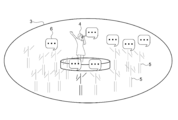
- FIG. 2 is a schematic diagram showing an example of a virtual space configured by the distribution system 100. It can be said that the virtual space 3 is a shared space shared by a plurality of viewers 2 during the virtual experience.
- a performer model 4, which is a virtual model of the performer 1, is arranged in the virtual space 3. As described above, the performer model 4 is a volumetric model that reproduces the performer 1 in the real space, and operates in the same manner as the movement of the performer 1.
- the performer model 4 arranged on the stage in the virtual space 3 is schematically illustrated.
- a viewer model 5 which is a virtual model of the viewer 2 is arranged.
- the viewer model 5 is, for example, a virtual avatar that operates according to the movement of the viewer 2 detected by the motion sensor included in the client terminal 12.
- a plurality of viewer models 5 arranged so as to surround the stage are schematically illustrated.
- the voices and comments of the performer 1 and the viewer 2 are shared.
- an icon 6 representing a voice or a comment is schematically illustrated.
- the icon 6 including the comment input by the performer 1 and the viewer 2 is arranged corresponding to the virtual model of the person so that the person who input the comment can be known.
- the icon 6 may be arranged so that the speaker can be identified.
- an image (visual field image) corresponding to the view of the viewer model 5 in the virtual space 3 is displayed.
- NS This makes it possible to provide a virtual experience with a sense of reality as if the viewer 2 himself is in the live venue of the virtual space 3.
- the distribution server 10 generates an image of the virtual space 3 taken from the viewpoint of the virtual camera and distributes it as live content.
- the image taken by the virtual camera (the image taken from the viewpoint of the virtual camera) will be referred to as a virtual camera image.
- the virtual camera image is an image different from the above-mentioned field of view image.
- FIG. 3 is a schematic diagram for explaining shooting by a virtual camera.
- FIG. 4 is a schematic diagram showing an example of a virtual camera image.
- the virtual camera 20 is a camera virtually configured to move in the virtual space 3 and take a picture of the virtual space 3.
- the shooting position and shooting direction of the virtual camera 20 can be freely set in the virtual space 3.
- FIG. 3 schematically shows a virtual camera 20 that captures the virtual space 3 and a photographing path 21 (dotted line in the figure) of the virtual camera 20.
- the object representing the virtual camera 20 and the shooting path 21 is not displayed.
- the shooting target of the virtual camera 20 is the performer model 4 that operates in the virtual space 3. That is, it can be said that the virtual camera 20 is a camera that moves in the virtual space 3 and shoots the performer model 4.
- the virtual camera 20 moves along a shooting path 21 that wraps around from the left rear of the performer model 4 to the front.
- the shooting direction and the shooting magnification of the virtual camera 20 are appropriately controlled so that the performer model 4 falls within the shooting range of the virtual camera 20.
- a virtual camera image 22 obtained by shooting the performer model 4 from the front is generated.
- the virtual camera image 22 is an image obtained by shooting the performer model 4 by changing the shooting position and shooting direction in the virtual space 3 with time.
- the image (virtual camera image 22) of the performer model 4 taken by the virtual camera 20 is distributed as live content. As a result, each viewer 2 can watch a live music or the like performed in the virtual space 3 in real time.
- the positional relationship between the performer model 4 and the virtual camera 20 is monitored. Then, a collision avoidance process for avoiding a collision of the virtual camera 20 with the performer model 4 is executed according to the positional relationship between the performer model 4 and the virtual camera 20.
- the collision avoidance process is typically a process of controlling the behavior of the virtual camera 20 to cause the virtual camera 20 to execute an action of avoiding a collision with the performer model 4 (collision avoidance action).
- collision avoidance action the situation where the virtual camera 20 collides with the performer model 4 is avoided in advance, and it is possible to properly shoot the performer model 4 without generating "immersion image” or "penetration image”. ..
- the collision avoidance process will be described in detail later.
- FIG. 5 is a block diagram showing a functional configuration example of the photographing system 11 and the distribution server 10.
- the shooting system 11 and the distribution server 10 are distribution-side systems used by the distributor to distribute live content in the distribution system 100.
- a performer 1 who appears in a live performance or a business operator who plans live contents is a distributor.
- the photographing system 11 generates the data necessary for generating the volumetric model of the performer 1.
- the photographing system 11 includes a photographing unit 30 and a photographing processing unit 31.
- the photographing unit 30 includes a group of devices for photographing and sensing the performer 1, and is used, for example, in a photographing studio for photographing the performer 1.
- the photographing unit 30 has a multi-viewpoint image photographing unit 32 and a body position sensing unit 33.
- FIG. 6 is a schematic diagram showing a configuration example of the photographing unit 30.
- the multi-viewpoint video shooting unit 32 is a multi-camera unit including a plurality of cameras.
- FIG. 6 schematically shows N cameras (Cam (1) to Cam (N)) constituting the multi-viewpoint video shooting unit 32.
- the cameras are arranged at different positions from each other so as to shoot the performer 1 from all directions, for example. This makes it possible to generate a volumetric model in which the whole body of the performer 1 is synthesized.
- the multi-viewpoint video shooting unit 32 is a multi-viewpoint camera for volumetric shooting.
- the body position sensing unit 33 includes a sensor (motion sensor) for detecting the position of each part of the body of the performer 1.
- a wearable position sensor 33a, a depth camera 33b, and an infrared camera 33c are used as the body position sensing unit 33.
- the type of sensor used as the body position sensing unit 33 is not limited, and other motion sensors may be used. Further, these sensors may be used alone or in combination of all or a part of the sensors.
- the wearable position sensor 33a is a sensor that the performer 1 wears on the body and uses, and detects the position of the worn portion.
- the wearable position sensor 33a is attached to the left and right wrists of the performer 1, respectively.
- the depth camera 33b is a camera that captures a depth image of a shooting target (performer 1).
- the depth image is an image in which the distance (depth) to the shooting target is detected for each pixel. By using the depth image, it is possible to detect the position of each part of the body of the performer 1.
- the infrared camera 33c is a camera that irradiates an imaged object with infrared rays and captures an infrared image.
- an infrared marker 34 that selectively reflects infrared rays is attached to the body of the performer 1, and an infrared image of the performer 1 is taken. It is possible to detect the position of the mounting portion from the state of the infrared marker 34 in the infrared image captured in this way.
- FIG. 7 is a schematic diagram showing an example of a photography studio.
- the shooting studio is, for example, a greenback studio that uses green members for the background and floor.
- a pole for fixing each camera of the multi-viewpoint video shooting unit 32 is installed.
- Cam (1) and Cam (2) are fixed to the upper and lower tiers of the left pole in the figure
- Cam (3) and Cam (4) are fixed to the upper and lower tiers of the right pole. Is fixed.
- an infrared camera 33c is arranged at the upper end of each pole.
- each pole is provided with a light 35 for lighting. A plurality of such poles are arranged so as to surround the performer 1, for example.
- a depth camera 33b is arranged in the shooting studio.
- the distance between the depth camera 33b and the performer 1 is set to a predetermined value (for example, about 0.5 m to 5.5 m) so that a depth image in a required range can be captured.
- the specific configuration of the shooting studio is not limited.
- a shooting device capable of performing shooting and sensing necessary for generating the performer model 4 may be appropriately used.
- the photographing processing unit 31 is a data processing device that integrates the outputs of the photographing unit 30 to generate data necessary for generating a volumetric model.
- a computer such as a PC (Personal Computer) is used.
- the shooting processing unit 31 may be configured by the distribution server 10 described later.
- the shooting processing unit 31 has a camera image generation unit 36, a multi-viewpoint video streaming processing unit 37, a body position information generation unit 38, and a 3D model position information generation unit 39 as functional blocks.
- the camera image generation unit 36 reads the output of the multi-viewpoint video shooting unit 32 and generates a camera image 26 shot for each camera.
- the camera image 26 is an image of the performer 1 taken at the same timing from a plurality of viewpoints.
- FIG. 5 schematically shows a camera image 26 taken by each camera (Cam (1) to Cam (N)).
- the multi-viewpoint video streaming processing unit 37 generates the multi-viewpoint video 27 of the performer 1 based on the plurality of camera images 26, and executes the streaming processing for the multi-viewpoint video 27.
- the multi-viewpoint video 27 is generated by synchronizing the shooting timings of the camera images 26 and arranging them along the time axis. Streaming processing such as compression / conversion is executed for the multi-viewpoint video 27.
- FIG. 5 schematically shows an example of the multi-viewpoint video 27 by a series of images along the time axis.
- the body position information generation unit 38 reads the output of the body position sensing unit 33 and generates body position information indicating the position of each part of the body of the performer 1. For example, the position information of the portion where the wearable position sensor 33a is attached, the depth image 28 of the performer 1 taken by the depth camera 33b, the infrared image of the performer 1 (infrared marker 34) taken by the infrared camera 33c, and the like are the body. Generated as position information.
- FIG. 5 schematically shows a depth image 28 of the performer 1 as an example of body position information.
- the 3D model position information generation unit 39 generates model position information representing the position of each part of the performer model 4 (here, the volumetric model of the performer 1) based on the above-mentioned body position information. Specifically, the bone estimation process is executed based on the body position information, and the bone data 29 that estimates the position and posture of the skeleton of the performer 1 is calculated. This bone data 29 is used as model position information of the performer model 4.
- FIG. 5 schematically shows an example of bone data 29.
- a method for sensing the body position of the performer 1 a method other than the above-mentioned bone estimation may be used.
- position estimation of each part of the body by image recognition, three-dimensional position estimation using machine learning, or the like may be used.
- a motion capture technique based on infrared detection using an infrared camera and an infrared marker may be used.
- the distribution server 10 includes a network transmission unit 40, a storage unit 41, and a server control unit 42.
- the network transmission unit 40 is a communication module that performs network communication with other devices via the Internet 13.
- the network transmission unit 40 has, for example, a data transmission function for transmitting data (live content or the like) generated by the distribution server 10 and a data reception function for receiving data transmitted from the client terminal 12 via the Internet 13. .
- the specific configuration of the network transmission unit 40 is not limited, and various communication modules compatible with wired LAN, wireless LAN, optical communication, and the like may be used.
- the storage unit 41 is a non-volatile storage device.
- a recording medium using a solid-state element such as an SSD (Solid State Drive) or a magnetic recording medium such as an HDD (Hard Disk Drive) is used.
- the type of recording medium used as the storage unit 41 is not limited, and for example, any recording medium for recording data non-temporarily may be used.
- the control program according to this embodiment is stored in the storage unit 41.
- the control program is, for example, a program that controls the operation of the entire distribution server 10.
- the information stored in the storage unit 41 is not limited.
- the server control unit 42 controls the operation of the distribution server 10.
- the server control unit 42 has a hardware configuration necessary for a computer such as a CPU and a memory (RAM, ROM). Various processes are executed by the CPU loading the control program stored in the storage unit 41 into the RAM and executing the control program.
- the server control unit 42 corresponds to the information processing device according to the present embodiment.
- server control unit 42 for example, a device such as a PLD (Programmable Logic Device) such as an FPGA (Field Programmable Gate Array) or another device such as an ASIC (Application Specific Integrated Circuit) may be used. Further, for example, a processor such as a GPU (Graphics Processing Unit) may be used as the server control unit 42.
- a PLD Programmable Logic Device
- FPGA Field Programmable Gate Array
- ASIC Application Specific Integrated Circuit
- a processor such as a GPU (Graphics Processing Unit) may be used as the server control unit 42.
- the CPU of the server control unit 42 executes the program (control program) according to the present embodiment, so that the content data generation unit 43 and the virtual camera control unit 44 are realized as functional blocks. Then, the information processing method according to the present embodiment is executed by these functional blocks.
- dedicated hardware such as an IC (integrated circuit) may be appropriately used.
- the content data generation unit 43 generates content data here.
- the content data is, for example, data necessary for constructing the virtual space 3.
- the content data includes data related to virtual objects (performer model 4, viewer model 5, stage set, etc.) arranged in the virtual space 3, audio data in the virtual space 3, comments by the performer / viewer, and the like.
- the content data generation unit 43 includes a performer model generation unit 45 and a viewer model generation unit 46.
- the performer model generation unit 45 generates a performer model 4 which is a virtual model of the performer 1. Specifically, the data of the volumetric model (performer model 4) of the performer 1 is generated based on the multi-viewpoint video 27 and the bone data 29 of the performer 1 output from the shooting system 11. For example, the shape data and texture data of the performer model 4 are generated from the multi-viewpoint video 27. Further, for example, the motion data of the performer model 4 is generated from the bone data 29. In addition, the performer model generation unit 45 calculates the placement position of the performer model 4 in the virtual space 3 according to the movement of the performer 1, the live performance, and the like.
- the viewer model generation unit 46 generates a viewer model 5 which is a virtual model of the viewer 2. Specifically, data representing the positions of each part of the body (head, hands, etc.) of the viewer 2 is acquired from each client terminal 12, and the data of the viewer model 5 (virtual avatar, etc.) is obtained based on these data. To generate.
- the design of the viewer model 5 or the like may be specified by the viewer 2, for example, or the default design may be used. Further, the viewer model generation unit 46 calculates the placement position of each viewer model 5 in the virtual space 3 according to the operation of the viewer 2 and the like.
- the content data generation unit 43 generates data of other virtual objects arranged in the virtual space 3, audio data of the performer 1 and the viewer 2, video performance data of music, and the like as content data.
- the specific content of the content data is not limited.
- the content data generated by the content data generation unit 43 is distributed to each client terminal 12 as live content.
- the virtual camera control unit 44 controls the virtual camera 20 to generate a virtual camera image 22 (see FIG. 4) in which the virtual space 3 is captured by the virtual camera 20.
- a performer model 4 and a viewer model 5 generated by the content data generation unit 43 are arranged on the virtual space 3, and a virtual live venue is reproduced.
- the virtual camera control unit 44 controls the behavior of the virtual camera 20 in the virtual space 3 configured in this way.
- the virtual camera control unit 44 relates to the performer model 4 according to the positional relationship between the performer model 4 operating in the virtual space 3 and the virtual camera 20 that moves in the virtual space 3 to shoot the performer model 4. A collision avoidance process for avoiding a collision of the virtual camera 20 is executed.
- the virtual camera control unit 44 corresponds to a shooting control unit.
- the positional relationship between the performer model 4 and the virtual camera 20 is typically expressed using the distance (relative distance) between the performer model 4 and the virtual camera 20.
- the distance between the performer model 4 and the virtual camera 20 may be a current value or a predicted value.
- the distance between the performer model 4 and the virtual camera 20 is monitored, and when the value satisfies a predetermined condition, the collision avoidance process is executed.
- a collision avoidance process a process of sequentially controlling the behavior of the virtual camera 20 is executed so that the distance between the performer model 4 and the virtual camera 20 satisfies a predetermined condition.
- the virtual camera control unit 44 generates a virtual camera image 22. For example, an image seen from a virtual camera 20 moving in the virtual space 3 during a live concert is generated at a predetermined frame rate. Based on these images, a virtual camera image 22 that captures the virtual space 3 during live performance is generated.
- the virtual camera image 22 is delivered to each client terminal 12 as live content. As described above, in the present embodiment, the image (virtual camera image 22) taken by the virtual camera 20 is delivered in real time.
- FIG. 8 is a block diagram showing a functional configuration example of the client terminal 12.
- the client terminal 12 has a network transmission unit 50, a storage unit 51, and a terminal control unit 52.
- the client terminal shown in FIG. 8 includes an HMD 14 and a hand controller 15.
- the client terminal 12 functions as a display device.
- the viewer 2 who uses the client terminal 12 is described as an experiencer, and the viewer 2 other than the experiencer is described as another viewer.
- the HMD 14 is a display device worn by the experiencer on the head.
- the HMD 14 has a display 53, a voice output unit 54, a voice input unit 55, and an HMD operation sensor 56.
- the display 53 is arranged so as to cover the field of view of the experiencer.
- As the display 53 for example, a liquid crystal display or an organic EL display is used.
- the audio output unit 54 is an element that reproduces audio from a speaker, headphones, or the like.
- the voice input unit 55 is an element that detects voice such as a microphone.
- the HMD operation sensor 56 is a sensor that detects the position and orientation of the HMD 14 main body, and includes, for example, an acceleration sensor, a gyro sensor, an orientation sensor, and the like.
- the display 53 corresponds to a display unit that displays an image taken by the virtual camera.
- the hand controller (HC) 15 is an operation device that accepts an input operation according to the movement of the hand of the experiencer.
- the hand controller 15 a grip-type device that is gripped and operated by the experiencer and a wearable device that is worn and used by the experiencer's hand are used.
- the hand controller 15 has a vibration generating unit 57 and an HC operation sensor 58.
- the vibration generation unit 57 is a device that generates vibration, and for example, a voice coil motor, an eccentric motor, or the like is used.
- the HC operation sensor 58 is a sensor that detects the position and orientation of the main body of the hand controller 15.
- the network transmission unit 50 is a communication module that performs network communication with other devices via the Internet 13.
- the network transmission unit 50 has, for example, a data reception function for receiving data generated by the distribution server 10 and a data transmission function for transmitting data generated by the client terminal 12.
- the storage unit 51 is a non-volatile storage device, and a recording medium such as an SSD or an HDD is used.
- the storage unit 51 stores a control program that controls the operation of the entire client terminal 12. In addition, the information stored in the storage unit 51 is not limited.
- the terminal control unit 52 controls the operation of the client terminal 12.
- the terminal control unit 52 has a hardware configuration necessary for a computer such as a CPU and a memory (RAM, ROM). Various processes are executed by the CPU loading the control program stored in the storage unit 51 into the RAM and executing the control program.
- the specific configuration of the terminal control unit 52 is not limited. In the present embodiment, various functional blocks are realized by the CPU of the terminal control unit 52 executing the control program stored in the storage unit 51.
- the terminal control unit 52 has a video acquisition unit 60, a performer data analysis unit 61, another viewer data analysis unit 62, timing synchronization units 63a to 63c, and experiencer data as functional blocks. It has an output unit 64, a 3D object control unit 65, a 3D object collision detection unit 66, and a display control unit 67. Further, in the area surrounded by the dotted line in FIG. 8, data (network communication data group) transmitted / received via the Internet 13 is schematically illustrated.
- the video acquisition unit 60 acquires the virtual camera image 22 captured by the virtual camera 20 via the network transmission unit 50 and outputs it to the display control unit 67.
- FIG. 8 schematically shows a virtual camera image 22 output to the display control unit 67.
- the image acquisition unit 60 acquires an image (virtual camera image 22) taken by the virtual camera 20 that operates according to such a collision avoidance process.
- the image acquisition unit 60 corresponds to an image acquisition unit.
- the performer data analysis unit 61 acquires data related to the performer 1 via the network transmission unit 50, analyzes the acquired data, and generates performer data (performer video data, performer audio stream, performer metadata).
- the performer video data is, for example, data representing the appearance (shape / texture) of the performer model 4.
- the performer voice stream is, for example, streaming data of the voice or music of the performer 1.
- the performer metadata is, for example, text data such as body position data (bone data 29) of the performer model 4 and comments of the performer 1.
- the body position data is, for example, data representing the position and posture of the head and both hands, and data representing each part in 6DoF (Degree of Freedom) or 3DoF is used.
- the performer data generated by the performer data analysis unit 61 is output to the timing synchronization unit 63a.
- the other viewer data analysis unit 62 acquires data related to other viewers other than the experiencer via the network transmission unit 50, analyzes the acquired data, and performs other viewer data (other viewer audio stream, other viewer). (Metadata) is generated.
- the other viewer audio stream is streaming data of the audio of another viewer.
- the other viewer metadata is, for example, data (bone data or the like) of a virtual avatar (viewer model 5) used by another viewer, or text data such as a comment of another viewer.
- the other viewer data generated by the other viewer data analysis unit 62 is output to the timing synchronization unit 63b.
- the timing synchronization unit 63a synchronizes the timing of the performer data (performer video data, performer audio stream, performer metadata) generated by the performer data analysis unit 61.
- FIG. 8 schematically illustrates performer data synchronized with the timing.
- graphic data performer video data, bone data 29, comments, etc.
- data related to audio is output to the audio output unit 54 of the HMD 14.
- the timing synchronization unit 63b synchronizes the timing of other viewer data (other viewer audio stream, other viewer metadata) generated by the other viewer data analysis unit 62.
- FIG. 8 schematically shows other viewer data synchronized with the timing.
- data related to graphics is output to the 3D object control unit 65.
- data related to audio is output to the audio output unit 54 of the HMD 14.
- the timing synchronization unit 63c generates the experiencer data (experiencer voice stream, experiencer metadata) regarding the experiencer who uses the client terminal 12 so that the timing is synchronized.
- the experience-based audio stream is streaming data of the experience-based audio, and is generated based on the output of the audio input unit 55 of the HMD 14.
- the experiencer metadata is, for example, data (bone data or the like) of a virtual avatar (viewer model 5) used by the experiencer.
- the virtual avatar data is generated based on the output of the HMD operation sensor 56 of the HMD 14 and the HC operation sensor 58 of the hand controller 15.
- text data such as the experiencer's comment may be generated based on character input, voice recognition, or the like.
- the experience data output unit 64 compresses and converts the experience data to generate experience data for transmission. This data is transmitted to the distribution server 10 via the network transmission unit 50. In the distribution server 10, for example, a viewer model 5 or the like corresponding to each viewer 2 is generated based on the experiencer data transmitted from each client terminal 12.
- the 3D object control unit 65 creates virtual objects (3D objects) such as the performer model 4 and the viewer model 5, and constitutes a virtual space 3 (see FIG. 2) in which the virtual objects are arranged.
- the performer model 4 (the volumetric model of the performer 1) is generated based on the output of the timing synchronization unit 63a.
- a viewer model 5 used by other viewers is generated based on the output of the timing synchronization unit 63b.
- the viewer model 5 (experiencer's virtual avatar) used by the experiencer is generated based on the outputs of the HMD motion sensor 56 and the HC motion sensor 58.
- icons and the like representing comments of the performer 1, other viewers, and the experiencer are arranged.
- the data related to the virtual space 3 configured by the 3D object control unit 65 is output to the 3D object collision detection unit 66 and the display control unit 67.
- the 3D object collision detection unit 66 detects a collision (contact) of a virtual model in the virtual space 3. Specifically, a collision between the viewer model 5 used by the experiencer and another virtual object (for example, the performer model 4 or another viewer model 5) is detected. Further, when the collision between the models is detected in the 3D object collision detection unit 66, a vibration signal corresponding to the collision is generated. The generated vibration signal is output to the vibration generation unit 57 of the hand controller 15.
- the display control unit 67 controls the display of the virtual space 3 on the client terminal 12 (here, the display 53 of the HMD 14). Specifically, an image output to the display 53 (hereinafter referred to as an output image) is appropriately generated.
- the display control unit 67 generates a visual field image showing the visual field of the viewer model 5 used by the viewer based on the data of the virtual space 3.
- the virtual camera image 22 taken by the virtual camera 20 is input to the display control unit 67.
- the field of view image and the virtual camera image 22 are switched and used as the output image. For example, the view image and the virtual camera image 22 are switched according to a predetermined switching operation or the like by the experiencer.
- the method of generating the output video is not limited.
- the client terminal 12 when the client terminal 12 is provided with a plurality of displays, the field of view image and the virtual camera image 22 may be output individually. Further, when the viewer model 5 or the like is not used, a configuration may be used in which only the virtual camera image 22 is output.
- the distribution server 10 is not limited to the case where the virtual camera image 22 is generated, and for example, the virtual camera image 22 may be generated by the client terminal 12. In this case, for example, the virtual space 3 configured by the client terminal 12 is photographed by the virtual camera 20. In this case, the client terminal 12 executes the collision avoidance process of the virtual camera 20 described below.
- the operation of the virtual camera control unit 44 of the distribution server 10 will be specifically described.
- the virtual camera control unit 44 monitors the positional relationship between the performer model 4 and the virtual camera 20 in the virtual space 3. Based on this monitoring result, a state in which a collision between the performer model 4 and the virtual camera 20 is likely to occur is detected in advance.
- the virtual camera control unit 44 detects the proximity state between the performer model 4 and the virtual camera 20 based on the positional relationship between the performer model 4 and the virtual camera 20. Then, when the proximity state is detected, the collision avoidance process is executed.
- the proximity state is a state in which a collision between the performer model 4 and the virtual camera 20 is likely to occur because, for example, the performer model 4 and the virtual camera 20 are in close proximity to each other. Therefore, when the proximity state is detected, the collision avoidance process is executed in order to avoid the collision of the virtual camera 20 with the performer model 4 in advance.
- FIG. 9 is a schematic diagram showing an example of a proximity state.
- the virtual camera control unit 44 detects a state in which the relative distance between the performer model 4 and the virtual camera 20 is equal to or less than a predetermined threshold value R as a proximity state.
- the relative distance between the performer model 4 and the virtual camera 20 is, for example, the distance between the reference point of the performer model 4 and the reference point of the virtual camera 20.
- the reference point of the virtual camera 20 is typically the viewpoint (shooting position) of the virtual camera 20.
- the reference point of the performer model 4 is set, for example, at the center of gravity of the performer model 4 (center position of the model).
- the relative distance can be easily calculated, and the calculation required for monitoring the relative distance (positional relationship). It is possible to suppress resources.
- a reference point may be set on the surface of the performer model 4. In this case, for example, the distance from the viewpoint of the virtual camera 20 to the surface of the nearest performer model 4 is calculated as a relative distance. This makes it possible to reliably detect the close state of the virtual camera 20 regardless of the shape, size, and the like of the performer model 4.
- the relative distance between the performer model 4 and the virtual camera 20 may be a current value or a predicted value.
- the current value of the relative distance is calculated based on, for example, the current position of each reference point of the performer model 4 and the virtual camera 20.
- the predicted value of the relative distance is calculated based on, for example, the predicted position of each reference point of the performer model 4 and the virtual camera 20.
- the predicted position of the reference point of the performer model 4 is estimated based on, for example, the movement prediction using the current moving direction and the moving speed of the performer model 4.
- the predicted position of the reference point of the virtual camera 20 is estimated based on the shooting path of the virtual camera 20. By using the predicted value, it is possible to surely avoid the collision between the performer model 4 and the virtual camera 20.
- the threshold value R is the minimum distance (permissible close-up photography) at which the virtual camera 20 can approach the performer model 4 and perform photography.
- the threshold value R is set to, for example, about 2 m on a life-sized scale. Not limited to this, the threshold value R may be appropriately set according to the performer model 4, the type of performance, and the like.
- FIG. 10 is a schematic diagram showing an example of a collision avoidance process for changing a shooting path.
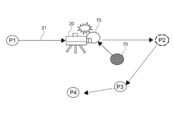
- FIG. 10 schematically shows a shooting path 21 of the virtual camera 20 set for shooting the performer model 4.
- the photographing path 21 includes a plurality of relay points.
- the virtual camera control unit 44 moves the virtual camera 20 so as to pass through these relay points in a preset order, and shoots the performer model 4.
- the shooting path 21 is a path set so that the virtual camera 20 passes through a plurality of relay points in order.
- the photographing path 21 is set so as to pass through the relay points P1, P2, P3, and P4 in this order.
- the virtual camera 20 moves, for example, along a straight line connecting each relay point.
- the route between the relay points may be set in a curved shape. This time.
- the shooting direction of the virtual camera 20 is appropriately adjusted so that the performer model 4 falls within the shooting range (angle of view).
- a passing time at which the virtual camera 20 should pass through the relay point is set at each relay point.
- the transit times T1, T2, T3, and T4 are set at the relay points P1, P2, P3, and P4, respectively. Therefore, the virtual camera 20 is moved so as to pass the relay point P1 at the time T1, the relay point P2 at the time T2, the relay point P3 at the time T3, and the relay point P4 at the time T4.
- the shooting path 21 is a path in which the passing time of the virtual camera 20 is set for each of the plurality of relay points.
- the shooting path 21 is appropriately set so that the performer model 4 and the virtual camera 20 do not collide with each other, assuming the position of the performer model 4.
- various camera works in detail according to the content of the performance performed by the performer model 4 (performer 1).
- a shooting path 21 is set according to a camera work schedule such as a time for shooting with the facial expression of the performer model 4 up and a time for shooting the entire image of the performer model 4. NS.
- the important relay point is, for example, a relay point for which shooting is to be performed reliably even in a live performance, and may be appropriately set by the designer (performer, creator, director, etc.) of the shooting path 21.
- a relay point for photographing a specific pose of the performer model 4 or the state of the performer model 4 in the rust portion of the music is set as an important relay point.
- the method of setting the shooting path 21 is not limited.
- the photographing path 21 may be automatically set.
- the designer sets a rough movement route for the virtual camera 20. Based on this rough movement route, the final shooting route (relay point and passing time) of the virtual camera 20 is automatically set according to the scale of the content and the movement of the performer 1.
- the position of the performer model 4 changes sequentially according to the movement of the performer 1, the live performance, and the like. Therefore, in the case of live distribution, the position of the performer model 4 may move larger than the assumed value when the shooting path 21 is set.
- the virtual camera control unit 44 becomes a movement target of the virtual camera 20 so that the collision between the performer model 4 and the virtual camera 20 is avoided when the proximity state is detected.
- Change the relay point That is, the relay point, which has been the movement target of the virtual camera 20 until then, is changed to another relay point at the timing when the proximity state is detected.
- the shooting path 21 of the virtual camera 20 is changed to a path toward the changed relay point.
- the process of changing the relay point is the collision avoidance process of changing the photographing path 21. This makes it possible to avoid a situation in which the virtual camera 20 collides with the performer model 4 in advance.
- the relay points are directed to the closest relay points in which collision does not occur.
- the shooting path 21 is changed. That is, when the proximity state is detected, a shortcut to the relay point at the shortest distance on the photographing path 21 where collision can be avoided is performed.
- This collision avoidance process includes the following processes.
- -A monitoring process for detecting the proximity state by monitoring the trajectory of the virtual camera 20 in real time according to the positional relationship between the performer model 4 and the virtual camera 20.
- -A route change process in which when a proximity state is detected, a relay point having the closest order in which a collision does not occur is selected, and the shooting route 21 is changed so that the route travels toward the relay point.
- -Speed adjustment processing for adjusting the moving speed of the virtual camera 20 by back calculation from the increase / decrease in the moving distance of the virtual camera 20 due to the change of the shooting path 21.
- the next moving target of the virtual camera 20 that has passed the relay point P1 at time T1 is set to the relay point P2. Then, the virtual camera 20 is moved from the relay point P1 toward the relay point P2 so as to reach the relay point P2 at the time T2.
- the relative distance between the performer model 4 and the moving virtual camera 20 is constantly calculated, and the presence or absence of a proximity state is monitored based on the relative distance. Specifically, it is determined whether or not the relative distance is equal to or less than the threshold value R. For example, it is assumed that the proximity state is detected because the performer model 4 has moved.
- the relative distance between the performer model 4 and the virtual camera 20 becomes equal to or less than the threshold value R, and the proximity state is detected.
- the route change process is executed.
- the closest relay points in which collision does not occur are selected.
- the relay points that the virtual camera 20 has not passed through are selected in the order of closeness, and it is determined whether or not a collision occurs when the route is changed toward each relay point. Then, the relay point for which it is first determined that no collision does not occur is selected as the next movement target of the virtual camera 20.
- the determination of whether or not a collision occurs is executed based on, for example, the current position and movement prediction of the performer model 4, the planned movement route (action schedule) of the performer model 4, and the like.
- the relay points P2, P3, and P4 are relay points that the virtual camera 20 has not passed through.
- the relay point P2 when the virtual camera 20 is moved toward the relay point P2, a collision with the performer model 4 may occur.
- the relay point P3 is set as the next movement target of the virtual camera 20 as the relay point having the closest order in which the collision does not occur.
- the movement target of the virtual camera 20 is set by the virtual camera control unit 44 to the nearest relay point capable of avoiding the collision between the performer model 4 and the virtual camera 20. ..
- the method of changing the relay point is not limited, and for example, a relay point having a short distance in the virtual space 3 may be selected instead of the order of the shooting paths 21. This makes it possible to quickly return to the original shooting path 21.
- the method of changing the relay point is not limited.
- a relay point may be newly added so that the virtual camera 20 does not collide with the performer model 4, and the virtual camera 20 may be moved toward the added relay point. That is, by increasing the number of relay points, the performer model 4 may be bypassed and the collision between the performer model 4 and the virtual camera 20 may be avoided.
- the virtual camera control unit 44 adjusts the moving speed of the virtual camera 20 that moves on the changed shooting path 21 based on the passing time set at the relay point. For example, by changing the relay point, the moving distance of the virtual camera 20 changes. Therefore, if the moving speed up to that point is maintained, the shooting (camera work) schedule may shift. The moving speed of the virtual camera 20 is changed with reference to the passing time of the relay point so that such a schedule shift does not occur. This makes it possible to prevent inconsistencies in the scale of the content video.
- the virtual camera control unit 44 adjusts the moving speed of the virtual camera according to the passing time of the important relay point included in the changed shooting path 21. Specifically, the moving speed of the virtual camera 20 is increased or decreased so that the important relay point can be passed at the passing time set for the important relay point.
- the moving speed of the virtual camera 20 is adjusted so that the virtual camera 20 passes through the relay point P3 at the passing time T3 set at the relay point P3.
- the moving speed is set to be small when the moving distance is reduced, and the moving speed is set to be large when the moving distance is increased.
- the moving speed of the virtual camera 20 is such that the virtual camera 20 passes through the relay point P4 at the passing time T4 set in the relay point P4. Is adjusted.
- the timing of passing through the relay point P3 does not necessarily have to be the time T3.
- the method of adjusting the moving speed of the virtual camera 20 is not limited.
- the moving speed may be adjusted according to the passing time of the changed relay point (relay point P3 in FIG. 10) without referring to the important relay point or the like.
- the passing time of the remaining relay points may be appropriately adjusted according to the total playing time and the like.
- the moving speed of the virtual camera 20 is set according to the adjusted passing time. This makes it possible to suppress an unnatural increase or decrease in the moving speed, for example.
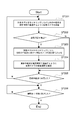
- FIG. 11 is a flowchart of the collision avoidance process shown in FIG.
- the virtual camera 20 is moved so as to pass the next relay point at a predetermined time (step 101). For example, the position of the performer model 4 is monitored, and the relative distance to the virtual camera 20 is calculated based on the monitoring result. At this time, the moving speed of the virtual camera 20 is set so as to reach the relay point at the passing time of the relay point set as the moving target.
- step 102 It is determined whether or not the positional relationship between the performer model 4 and the virtual camera 20 is in a close state (step 102).
- the determination of the proximity state is performed, for example, according to the method described with reference to FIG. If the proximity state is not detected (No in step 102), step 105, which will be described later, is executed.
- the shooting path of the virtual camera 20 is changed to the relay point closest to the order in which the collision does not occur (step 103). For example, when the route is changed to a relay point that the virtual camera 20 has not passed through, it is determined whether or not the collision can be avoided, and the relay point having the closest order in which the collision can be avoided is selected. Then, a shooting path 21 that moves toward the selected relay point is newly set.
- the moving speed of the virtual camera 20 is adjusted so as to pass through the important relay point at a predetermined time (step 104). For example, when the moving distance to the important relay point is reduced, the moving speed is set to be small, and when the moving distance is increased, the moving speed is set to be large. That is, the moving speed of the virtual camera 20 is set by back calculation from the changed moving distance.
- step 105 When the moving speed is adjusted, it is determined whether or not the virtual camera 20 has arrived at the final relay point (step 105).
- the final relay point is the last relay point set in the shooting path 21.
- the virtual camera 20 has not arrived at the final relay point (No in step 105)
- the shooting path 21 is changed, the relay point that is the movement target in step 101 is changed to the newly set relay point, and the virtual camera 20 moves at the movement speed set in step 104. Will be done.
- the shooting end time is a time when shooting by the virtual camera 20 ends.
- the shooting end time is appropriately set according to, for example, the performance schedule of the performer model 4 (performer). If the shooting end time has not been reached (No in step 106), shooting from the final relay point is continued. When the shooting end time is reached (Yes in step 106), the shooting by the virtual camera 20 ends, and the live broadcast is completed.
- FIG. 12 is a schematic diagram showing another example of the collision avoidance process for changing the photographing path.
- the virtual camera control unit 44 becomes a movement target of the virtual camera 20 so that the collision between the performer model 4 and the virtual camera 20 is avoided when the proximity state is detected.
- Change at least part of the route to the relay point That is, the virtual camera 20 is moved along a new route for reaching the relay point that was the movement target of the virtual camera 20.
- the shooting path 21 of the virtual camera 20 is changed from the previous route toward the next relay point (for example, the route going straight to the next relay point) to a new route.
- This new route may be a route that returns to the middle of the route to the next relay point, or may be a route that goes directly to the next relay point without passing through the previous route. good.
- the collision avoidance process for changing the route between the relay points is executed. This makes it possible to avoid a situation in which the virtual camera 20 collides with the performer model 4 in advance.
- the performer model 4 is bypassed while monitoring the performer model 4.
- the virtual camera 20 is moved along the detour route 23. That is, the virtual camera control unit 44 moves the virtual camera 20 along the detour route 23 that bypasses the performer model 4 from the point where the proximity state is detected.
- the detour route 23 is a route that changes according to the movement of the performer model 4.
- This collision avoidance process includes the following processes.
- -A monitoring process for detecting the proximity state by monitoring the trajectory of the virtual camera 20 in real time according to the positional relationship between the performer model 4 and the virtual camera 20.
- -A route change process that changes the shooting route 21 so that when a proximity state is detected, the performer model 4 is detoured while being monitored and the route travels toward the initial relay point.
- -Speed adjustment processing for adjusting the moving speed of the virtual camera 20 by back calculation from the increase / decrease in the moving distance of the virtual camera 20 due to the change of the shooting path 21.
- the monitoring process is executed in the same manner as the method described with reference to FIG. 10, for example.
- the virtual camera 20 heading from the relay point P1 to the relay point P2 reaches the point X at the time Tx, the relative distance between the performer model 4 and the virtual camera 20 becomes equal to or less than the threshold value R, and the proximity state is detected.
- NS the threshold value
- the route change process is executed.
- the movement of the virtual camera 20 is controlled so as to perform a detour to the initial relay point (relay point P2 in FIG. 12).
- the trajectory of the detour travel becomes the detour route 23.
- the virtual camera 20 is moved so as to bypass the performer model 4 and return to the original route to the relay point P2 from the detection point X where the proximity state is detected.
- the behavior of the virtual camera 20 is controlled so that the relative distance between the performer model 4 and the virtual camera 20 is kept constant. Therefore, it can be said that the detour route 23 is a route that keeps the relative distance between the performer model 4 and the virtual camera 20 constant.
- FIG. 12 schematically illustrates a detour running of the virtual camera 20 when the performer model 4 stays at a substantially constant position.
- the detour route 23 is an arc-shaped route that returns from the detection point X in the proximity state to the original route centering on the performer model 4.
- the detour route 23 does not always have an arc shape because the detour travel is performed according to the movement of the performer model 4.
- the virtual camera 20 during the detour travels away from the performer model 4 by a certain distance, and the collision between the performer model 4 and the virtual camera 20 is avoided. Further, the virtual camera 20 is moved so as to return to the original route. Therefore, it is possible to sufficiently suppress the deviation from the initially set camera work.
- the method of changing the route to the relay point that is the movement target is not limited.
- an arbitrary route that does not cause a collision connecting the point where the proximity state is detected and the relay point that is the movement target may be calculated and used as the detour route 23.
- a route in which a collision does not occur is appropriately calculated based on the current position of the performer model 4, movement prediction, action schedule, and the like.
- the speed adjustment process is executed.
- the speed adjustment process for example, the method described with reference to FIG. 10 can be applied.
- the moving speed of the virtual camera 20 that moves on the changed shooting route 21 (detour route 23) is adjusted based on the passing time set at the relay point.
- the moving speed of the virtual camera 20 is increased so that the virtual camera 20 reaches the relay point P2 by the passing time T2 of the relay point P2. This makes it possible to quickly return to the original shooting schedule.
- the moving speed of the virtual camera 20 is adjusted according to the passing time of the important relay point. For example, when the relay point P3 is an important relay point, the moving speed of the virtual camera 20 is increased so as to pass the relay point P3 at the time T3. In this case, the change in the moving speed is small as compared with the case where the speed is increased according to the passing time T2 of the relay point P2. This makes it possible to reliably shoot important scenes while avoiding unnatural speed increase and the like.
- FIG. 13 is a flowchart of the collision avoidance process shown in FIG.
- the virtual camera 20 is moved so as to pass the next relay point at a predetermined time (step 201).
- the performer model 4 is monitored, and the virtual camera 20 is detoured toward the initial relay point based on the monitoring result (step 203).
- the moving position of the virtual camera 20 is adjusted so that the relative distance between the performer model 4 and the virtual camera 20 is constant. Further, the moving direction of the virtual camera 20 is controlled so as to return to the original shooting path 21.
- any method that bypasses the performer model 4 may be used.
- the moving speed of the virtual camera 20 is adjusted so as to pass the important relay point at the specified time (step 204).
- the amount of increase / decrease in the moving distance of the virtual camera 20 is estimated according to the detour traveling method.
- the performer model 4 does not move
- the amount of increase / decrease in the movement distance when the virtual camera 20 is moved while keeping the relative distance to the performer model 4 constant is calculated.
- the moving speed required to pass the target relay point at a specified time is set by back calculation. Further, when the moving distance changes according to the movement of the performer model 4, the moving speed may be adjusted each time.
- step 205 it is determined whether or not the virtual camera 20 has arrived at the final relay point. If the virtual camera 20 has not arrived at the final relay point (No in step 205), the processes after step 201 are executed again.
- the virtual camera 20 arrives at the final relay point (Yes in step 205)
- the collision avoidance process mainly used when the virtual camera 20 moves along the preset shooting path 21 has been described. Even when such a shooting path 21 is not defined, it is possible to avoid a collision with the performer model 4 by appropriately controlling the behavior of the virtual camera 20.
- a method of controlling the virtual camera 20 that tracks and shoots the performer model 4 will be described.
- FIG. 14 is a schematic diagram showing another example of the collision avoidance processing of the virtual camera.
- FIG. 14 schematically shows a state of shooting by the virtual camera 20 that tracks the performer model 4 in accordance with the movement of the performer model 4 in the virtual space 3.
- a performer model 4 and a plurality of viewer models 5 are arranged in the virtual space 3.
- the performer model 4 can move freely in the virtual space 3.
- the viewer model 5 is arranged so as to surround the stage (rectangular area in the figure) provided in the virtual space 3.
- the virtual camera control unit 44 moves the virtual camera 20 so that the relative distance between the performer model 4 and the virtual camera 20 becomes constant as a collision avoidance process. That is, the movement of the virtual camera 20 is controlled so that the relative distance of the virtual camera 20 to the performer model 4 keeps a constant interval L (for example, 2 m or the like).
- This collision avoidance process includes the following processes.
- -A monitoring process that monitors the trajectory of the virtual camera 20 in real time and calculates the relative distance according to the positional relationship between the performer model 4 and the virtual camera 20.
- -A tracking process in which the virtual camera 20 is moved so that the relative distance becomes a constant interval L (shooting distance), and the performer model 4 is tracked and photographed.
- the relative distance between the performer model 4 and the virtual camera 20 is always calculated.
- the position of the performer model 4, which changes according to the movement of the performer 1, the production, and the like, and the position of the virtual camera 20 are read, and the relative distance is calculated.
- the position and direction in which the virtual camera 20 is moved are calculated so that the relative distance calculated in the monitoring process is the interval L, and the virtual camera 20 is moved according to the calculation result.
- the relative distance may temporarily become larger than the interval L due to the movement of the performer model 4.
- the virtual camera 20 is moved so as to approach the performer model 4 until the relative distance becomes the interval L.
- the virtual camera 20 is moved away from the performer model 4 until the relative distance reaches the interval L. That is, it can be said that the virtual camera control unit 44 performs feedback control that keeps the relative distance between the performer model 4 and the virtual camera 20 at the interval L with reference to the position of the performer model 4.
- the virtual camera 20 is moved so as to track the performer model 4 while maintaining a certain interval L with the performer model 4 without setting the relay point as the fixed shooting path 21. Then, the performer model 4 is photographed. As a result, the collision between the performer model 4 and the virtual camera 20 is avoided, and stable close-up photography can be continued.
- the direction in which the virtual camera 20 shoots the performer model 4 is not limited.
- the virtual camera 20 is moved according to the posture of the performer model 4 so as to shoot the performer model 4 from the front. Further, for example, the virtual camera 20 may be controlled so as to freely move around the performer model 4 within a range in which the relative distance is the interval L.
- the virtual camera 20 is allowed to "get into” or "pass through”. For example, for the viewer model 5 to which the virtual camera 20 comes into contact, the data constituting the model is removed so as not to be reflected in the shooting range of the virtual camera 20. That is, the viewer model 5 with which the virtual camera 20 comes into contact is treated as not being reflected by the virtual camera 20. This makes it possible to properly shoot the performer model 4. Further, since the moving range of the virtual camera 20 is not limited, it is possible to easily realize shooting or the like that is difficult in the real space. It is also possible to intentionally express "getting into” or "passing through” with respect to the viewer model 5 of the virtual camera 20 by using a silhouette or the like.
- the performer model 4 who was on the stage at time T1 moves away from the stage, and moves to the area where the viewer model 5 is arranged at time T2 and time T3.
- the virtual camera 20 is moved according to the performer model 4, and tracks and shoots the performer model 4 from a position separated by a certain interval L.
- the viewer model 5 that comes into contact with the virtual camera 20 is treated as not being reflected in the virtual camera 20. This makes it possible to take close-up shots properly even for performances (fan service, etc.) that are performed away from the stage.
- FIG. 15 is a flowchart of the collision avoidance process shown in FIG.
- the virtual camera 20 is moved so as to keep the relative distance at a constant interval L (step 301).
- the current positions of the performer model 4 and the virtual camera 20 are read, and the relative distance is calculated (monitoring process).
- the position and direction in which the virtual camera 20 moves are calculated so that the relative distance becomes the interval L, and the virtual camera 20 is moved based on the calculation result (tracking process).
- step 302 it is determined whether or not the shooting end time has been reached (step 302). If the shooting end time has not been reached (No in step 302), step 301 is executed again. When the shooting end time is reached (Yes in step 302), the shooting by the virtual camera 20 ends, and the live broadcast is completed. In this way, the tracking process (monitoring process) is continued until the shooting end time is reached.
- a control such as decelerating / stopping the virtual camera 20 for collision avoidance and tracking again after a certain distance may be executed may be executed.
- the virtual camera 20 is gradually decelerated and then stopped at a position where a collision does not occur.
- the relative distance between the performer model 4 and the virtual camera 20 may be smaller than the interval L.
- the virtual camera 20 waits for the relative distance between the virtual camera 20 and the performer model 4 to be separated by a certain distance (for example, the interval L), and then the tracking by the virtual camera 20. To start.
- this is a process of moving the virtual camera 20 by shifting the timing of changing the speed of the virtual camera 20 from the timing of changing the speed of the performer model 4. That is, the virtual camera control unit 44 delays the timing of the speed change of the virtual camera 20 with respect to the timing of the speed change of the performer model 4 so that the relative distance falls within a predetermined range.
- This makes it possible to realize camera work in which the shooting distance dynamically changes when the performer model 4 starts to move or stops. As a result, it becomes possible to convey the dynamic movement of the performer model 4 (performer 1).
- the method of tracking and shooting the performer model 4 is not limited, and any tracking method that can avoid a collision between the performer model 4 and the virtual camera 20 may be used.
- the collision avoidance process according to the positional relationship between the performer model 4 on the virtual space 3 and the virtual camera 20 that shoots the performer model 4 while moving in the virtual space 3 is performed. Will be executed. As a result, the collision between the performer model 4 and the virtual camera 20 is avoided in advance, and the performer model 4 can be properly photographed in the virtual space 3.
- FIG. 16 is a schematic diagram showing an example of a collision between a shooting target and a virtual camera.
- a shooting path 21 (P1 to P4) in which the virtual camera 20 approaches the shooting target 70 and performs close-up shooting is set.
- the shooting target 70 moves and overlaps with the shooting path 21, the virtual camera 20 may collide with the shooting target 70, and a immersive image or a penetrating image may be captured, resulting in a broadcasting accident. be.
- collision avoidance processing is executed according to the positional relationship between the performer model 4 to be photographed and the virtual camera 20.
- the collision avoidance process is, for example, a process of monitoring the position of the performer model 4 and controlling the movement of the virtual camera 20 so that the virtual camera 20 does not come too close to the performer model 4.
- the shooting path 21 of the virtual camera 20 when the shooting path 21 of the virtual camera 20 is preset, the proximity state between the performer model 4 and the virtual camera 20 is detected and the shooting path 21 is detected. Is changed. Further, as described with reference to FIG. 14 and the like, when the shooting path 21 and the like are not set, the virtual camera 20 is moved so as to track the performer model 4 at regular intervals L.
- FIGS. 10 and 12 a collision avoidance process for avoiding a collision with the performer model by changing the shooting path of the virtual camera has been mainly described.
- the present invention is not limited to this, and for example, a process of controlling the moving speed of the virtual camera to avoid a collision may be executed. For example, when a proximity state is detected, the speed is reduced or stopped without changing the path of the virtual camera. When the performer model moves and the proximity state is released, the virtual camera is accelerated according to the passing time of the relay point. It is also possible to change the shooting path when the performer model does not move and the proximity state continues for a certain period of time.
- the performer model may be photographed using a plurality of virtual cameras.
- each virtual camera is controlled to move in a different trajectory (shooting path).
- a display image for displaying the performer model is selected from the images (videos) taken by each virtual camera.
- the display image is, for example, an image finally displayed on each client terminal.
- a display image for displaying the performer model is displayed from the image taken by the virtual camera to another virtual camera. Is executed to switch to the captured image. For example, it is assumed that a proximity state is detected for a virtual camera that is taking a display image. In this case, the display image is switched to the image of another virtual camera that is not in the proximity state.
- the process of switching the virtual cameras so that the image at the moment of collision is not delivered is also included in the collision avoidance process in the present disclosure. This makes it possible to deliver natural live video without causing a broadcasting accident.
- the collision avoidance processing of the virtual camera has been described by taking as an example the case where the shooting target of the virtual camera is a live-action 3D model (volumetric model) of the performer.
- the shooting target of the virtual camera may be a CG3D model.
- a three-dimensional CG model virtual avatar that moves in conjunction with the movement of the performer is photographed by a virtual camera. Even in such a case, by using the above method, it is possible to sufficiently avoid the collision between the virtual camera and the CG model.
- this technology can also be applied to the distribution of entertainment content such as "sports live” and "variety programs".
- entertainment content such as "sports live” and "variety programs”.
- a sports venue is reproduced in a virtual space from data obtained by shooting sports performed in a real space. This enables free-viewpoint photography of sports venues with a virtual camera.
- the above-mentioned collision avoidance process is applied in order to avoid a collision between the player and the virtual camera.
- this technology may be applied when distributing contents in fields such as "distance education”, “distance lessons”, and “remote work support”.
- the work site is reproduced in the virtual space from the data obtained by photographing the work site where remote work is performed using a robot or the like.
- the virtual camera is moved so as to avoid a collision with the robot.
- the present technology is not limited to this, and can be applied to, for example, a case where content is generated based on data in which performance in a virtual space is recorded.
- a live video is generated after a live performance (for example, when the content production company and the company that shoots and edits the content are different)
- it has already been performed based on the data of the music live performed in the virtual space.
- the live music will be reproduced and shot with a virtual camera.
- this technique it is possible to easily generate a route of a virtual camera that avoids a collision between the performer model and the virtual camera.
- this technology functions as a path generation tool for a virtual camera or a shooting path design support tool.
- this technology can also adopt the following configurations.
- Collision avoidance for avoiding collision of the virtual camera with the target object according to the positional relationship between the target object operating in the virtual space and the virtual camera that moves in the virtual space and shoots the target object.
- the information processing apparatus according to (1) The shooting control unit detects a close state between the target object and the virtual camera based on the positional relationship between the target object and the virtual camera, and when the close state is detected, the collision avoidance process. Information processing device that executes.
- the shooting control unit is an information processing device that detects a state in which the relative distance between the target object and the virtual camera is equal to or less than a predetermined threshold value as the proximity state.
- the relative distance is an information processing device including a current value or a predicted value.
- the virtual camera shoots the target object along a preset shooting path, and the virtual camera shoots the target object.
- the imaging control unit is an information processing device that changes the imaging path as the collision avoidance process when the proximity state is detected.
- the shooting path is an information processing device that is a path set so that the virtual camera passes through a plurality of relay points in order.
- the information processing apparatus is an information processing device that changes a relay point that is a movement target of the virtual camera so that a collision between the target object and the virtual camera is avoided when the proximity state is detected.
- the information processing apparatus is an information processing device that sets a moving target of the virtual camera to a relay point having the closest order so as to avoid a collision between the target object and the virtual camera.
- the photographing control unit is at least a part of the route to the relay point which is the movement target of the virtual camera so that the collision between the target object and the virtual camera is avoided when the proximity state is detected. Information processing device to change.
- the shooting control unit is an information processing device that moves the virtual camera along a detour route that bypasses the target object from the point where the proximity state is detected.
- the detour route is an information processing device that keeps the relative distance between the target object and the virtual camera constant.
- the shooting route is a route in which the passing time of the virtual camera is set for each of the plurality of relay points.
- the shooting control unit is an information processing device that adjusts the moving speed of the virtual camera that moves the changed shooting path based on the passing time set at the relay point.
- the plurality of relay points include at least one important relay point.
- the shooting control unit is an information processing device that adjusts the moving speed of the virtual camera according to the passing time of the important relay point included in the shooting path after the change.
- the information processing apparatus according to any one of (2) to (13).
- the shooting control unit performs a display image for displaying the target object from an image taken by the virtual camera to an image taken by another virtual camera as the collision avoidance process.
- Information processing device to switch to.
- the information processing apparatus according to any one of (1) to (14).
- the shooting control unit is an information processing device that moves the virtual camera so that the relative distance between the target object and the virtual camera becomes constant as the collision avoidance process.
- the shooting control unit is an information processing device that delays the timing of the speed change of the virtual camera with respect to the timing of the speed change of the target object so that the relative distance falls within a predetermined range.
- the target object is an information processing device including a three-dimensional live-action model of the performer.
- the shooting control unit is an information processing device that delivers images shot by the virtual camera in real time. (19) Collision avoidance for avoiding collision of the virtual camera with the target object according to the positional relationship between the target object operating in the virtual space and the virtual camera that moves in the virtual space and shoots the target object.
- An image acquisition unit that acquires an image taken by the virtual camera that operates according to the collision avoidance process of A display device including a display unit for displaying an image taken by the virtual camera.
Landscapes
- Engineering & Computer Science (AREA)
- Theoretical Computer Science (AREA)
- Physics & Mathematics (AREA)
- Multimedia (AREA)
- General Physics & Mathematics (AREA)
- Software Systems (AREA)
- Signal Processing (AREA)
- Computer Vision & Pattern Recognition (AREA)
- Databases & Information Systems (AREA)
- General Engineering & Computer Science (AREA)
- Computer Graphics (AREA)
- Artificial Intelligence (AREA)
- Human Computer Interaction (AREA)
- Geometry (AREA)
- Health & Medical Sciences (AREA)
- Computing Systems (AREA)
- Evolutionary Computation (AREA)
- General Health & Medical Sciences (AREA)
- Medical Informatics (AREA)
- Radar, Positioning & Navigation (AREA)
- Remote Sensing (AREA)
- Computer Hardware Design (AREA)
- Processing Or Creating Images (AREA)
Priority Applications (4)
| Application Number | Priority Date | Filing Date | Title |
|---|---|---|---|
| US17/916,397 US12293453B2 (en) | 2020-05-13 | 2021-04-27 | Information processing apparatus, information processing method, and display apparatus for performing a collision avoidance process for avoiding a collision of a virtual camera against a target object |
| EP21803163.1A EP4152267A4 (en) | 2020-05-13 | 2021-04-27 | INFORMATION PROCESSING DEVICE, INFORMATION PROCESSING METHOD, AND DISPLAY DEVICE |
| CN202180033238.2A CN115516515A (zh) | 2020-05-13 | 2021-04-27 | 信息处理装置、信息处理方法和显示装置 |
| JP2022521822A JPWO2021230073A1 (https=) | 2020-05-13 | 2021-04-27 |
Applications Claiming Priority (2)
| Application Number | Priority Date | Filing Date | Title |
|---|---|---|---|
| JP2020084404 | 2020-05-13 | ||
| JP2020-084404 | 2020-05-13 |
Publications (1)
| Publication Number | Publication Date |
|---|---|
| WO2021230073A1 true WO2021230073A1 (ja) | 2021-11-18 |
Family
ID=78525865
Family Applications (1)
| Application Number | Title | Priority Date | Filing Date |
|---|---|---|---|
| PCT/JP2021/016797 Ceased WO2021230073A1 (ja) | 2020-05-13 | 2021-04-27 | 情報処理装置、情報処理方法、及び表示装置 |
Country Status (5)
| Country | Link |
|---|---|
| US (1) | US12293453B2 (https=) |
| EP (1) | EP4152267A4 (https=) |
| JP (1) | JPWO2021230073A1 (https=) |
| CN (1) | CN115516515A (https=) |
| WO (1) | WO2021230073A1 (https=) |
Cited By (3)
| Publication number | Priority date | Publication date | Assignee | Title |
|---|---|---|---|---|
| JPWO2022158255A1 (https=) * | 2021-01-21 | 2022-07-28 | ||
| JP7521039B1 (ja) | 2023-03-15 | 2024-07-23 | カバー株式会社 | 仮想空間コンテンツ配信システム、仮想空間コンテンツ配信プログラム、および仮想空間コンテンツ配信方法 |
| JP7521038B1 (ja) | 2023-03-15 | 2024-07-23 | カバー株式会社 | 仮想空間コンテンツ配信システム、仮想空間コンテンツ配信プログラム、および仮想空間コンテンツ配信方法 |
Families Citing this family (5)
| Publication number | Priority date | Publication date | Assignee | Title |
|---|---|---|---|---|
| WO2021246183A1 (ja) * | 2020-06-03 | 2021-12-09 | ソニーグループ株式会社 | 情報処理装置、情報処理方法、及び、プログラム |
| US12240181B2 (en) * | 2021-06-28 | 2025-03-04 | International Business Machines Corporation | 3D printing with virtual reality integration |
| KR20240126499A (ko) * | 2023-02-13 | 2024-08-21 | 한국전자통신연구원 | 공연 콘텐츠를 제공하기 위한 방법 및 장치 |
| US12366914B2 (en) * | 2023-05-31 | 2025-07-22 | Apple Inc. | Dynamic proximity boundary for detecting proximate objects |
| CN116764208A (zh) * | 2023-06-29 | 2023-09-19 | 不鸣科技(杭州)有限公司 | 一种虚拟场景中虚拟相机的控制方法、装置及电子设备 |
Citations (7)
| Publication number | Priority date | Publication date | Assignee | Title |
|---|---|---|---|---|
| JPH0256301B2 (https=) | 1982-12-23 | 1990-11-29 | Asahi Glass Co Ltd | |
| JP2004329463A (ja) * | 2003-05-06 | 2004-11-25 | Nintendo Co Ltd | ゲーム装置および仮想カメラの制御プログラム |
| JP2017211912A (ja) * | 2016-05-27 | 2017-11-30 | 株式会社コロプラ | 表示制御方法および当該表示制御方法をコンピュータに実行させるためのプログラム |
| JP6276882B1 (ja) * | 2017-05-19 | 2018-02-07 | 株式会社コロプラ | 情報処理方法、装置、および当該情報処理方法をコンピュータに実行させるためのプログラム |
| JP2018171309A (ja) * | 2017-03-31 | 2018-11-08 | 株式会社バンダイナムコエンターテインメント | シミュレーションシステム及びプログラム |
| JP6556301B1 (ja) * | 2018-07-25 | 2019-08-07 | 株式会社バーチャルキャスト | コンテンツ配信サーバ、仮想キャラクタ提供サーバ、コンテンツ配信システム、コンテンツ配信方法及びプログラム |
| JP2019160318A (ja) * | 2018-03-13 | 2019-09-19 | キヤノン株式会社 | 情報処理装置、情報処理方法、及びプログラム |
Family Cites Families (18)
| Publication number | Priority date | Publication date | Assignee | Title |
|---|---|---|---|---|
| US6226008B1 (en) * | 1997-09-04 | 2001-05-01 | Kabushiki Kaisha Sega Enterprises | Image processing device |
| JP2004537082A (ja) * | 2001-01-26 | 2004-12-09 | ザクセル システムズ インコーポレイテッド | 仮想現実環境における実時間バーチャル・ビューポイント |
| JP4671873B2 (ja) * | 2006-01-23 | 2011-04-20 | シャープ株式会社 | 合成映像生成システム |
| JP4459993B2 (ja) * | 2007-10-03 | 2010-04-28 | 株式会社スクウェア・エニックス | 画像生成装置、画像生成プログラム及び画像生成プログラム記録媒体 |
| GB0805924D0 (en) * | 2008-04-02 | 2008-05-07 | Hibbert Ralph Animation | Storyboard creation system |
| US8619080B2 (en) * | 2008-09-08 | 2013-12-31 | Disney Enterprises, Inc. | Physically present game camera |
| JP5614211B2 (ja) * | 2010-09-30 | 2014-10-29 | 株式会社セガ | 画像処理プログラム及びコンピュータ読み取り可能な記録媒体 |
| DE202011110906U1 (de) * | 2010-11-24 | 2017-02-27 | Google Inc. | Bahnplanung für die Navigation auf Strassenniveau in einer dreidimensionalen Umgebung und Anwendungen davon |
| US9786097B2 (en) * | 2012-06-22 | 2017-10-10 | Matterport, Inc. | Multi-modal method for interacting with 3D models |
| JP2014235596A (ja) * | 2013-06-03 | 2014-12-15 | 任天堂株式会社 | 情報処理プログラム、情報処理システム、情報処理装置、および情報処理方法 |
| JP6649742B2 (ja) * | 2015-10-27 | 2020-02-19 | 株式会社コーエーテクモゲームス | 情報処理装置、動作制御方法及び動作制御プログラム |
| JP6429829B2 (ja) * | 2016-05-25 | 2018-11-28 | キヤノン株式会社 | 画像処理システム、画像処理装置、制御方法、及び、プログラム |
| JP6681352B2 (ja) * | 2017-01-06 | 2020-04-15 | 任天堂株式会社 | 情報処理システム、情報処理プログラム、情報処理装置、情報処理方法、ゲームシステム、ゲームプログラム、ゲーム装置、及びゲーム方法 |
| CA3056269C (en) * | 2017-03-17 | 2021-07-13 | Unity IPR ApS | Method and system for automated camera collision and composition preservation |
| US10751621B2 (en) * | 2017-09-01 | 2020-08-25 | Square Enix Limited | Method and system for rendering video game images |
| JP7301507B2 (ja) * | 2018-08-08 | 2023-07-03 | キヤノン株式会社 | 情報処理装置、情報処理方法、及びプログラム |
| WO2020132784A1 (en) * | 2018-12-24 | 2020-07-02 | Intel Corporation | Methods and apparatus to detect collision of virtual camera with objects in three-dimensional volumetric model |
| US20220295034A1 (en) * | 2021-03-10 | 2022-09-15 | Qualcomm Incorporated | Camera control data for virtual camera in virtual interactive scene defined by streamed media data |
-
2021
- 2021-04-27 JP JP2022521822A patent/JPWO2021230073A1/ja active Pending
- 2021-04-27 EP EP21803163.1A patent/EP4152267A4/en not_active Withdrawn
- 2021-04-27 WO PCT/JP2021/016797 patent/WO2021230073A1/ja not_active Ceased
- 2021-04-27 US US17/916,397 patent/US12293453B2/en active Active
- 2021-04-27 CN CN202180033238.2A patent/CN115516515A/zh not_active Withdrawn
Patent Citations (7)
| Publication number | Priority date | Publication date | Assignee | Title |
|---|---|---|---|---|
| JPH0256301B2 (https=) | 1982-12-23 | 1990-11-29 | Asahi Glass Co Ltd | |
| JP2004329463A (ja) * | 2003-05-06 | 2004-11-25 | Nintendo Co Ltd | ゲーム装置および仮想カメラの制御プログラム |
| JP2017211912A (ja) * | 2016-05-27 | 2017-11-30 | 株式会社コロプラ | 表示制御方法および当該表示制御方法をコンピュータに実行させるためのプログラム |
| JP2018171309A (ja) * | 2017-03-31 | 2018-11-08 | 株式会社バンダイナムコエンターテインメント | シミュレーションシステム及びプログラム |
| JP6276882B1 (ja) * | 2017-05-19 | 2018-02-07 | 株式会社コロプラ | 情報処理方法、装置、および当該情報処理方法をコンピュータに実行させるためのプログラム |
| JP2019160318A (ja) * | 2018-03-13 | 2019-09-19 | キヤノン株式会社 | 情報処理装置、情報処理方法、及びプログラム |
| JP6556301B1 (ja) * | 2018-07-25 | 2019-08-07 | 株式会社バーチャルキャスト | コンテンツ配信サーバ、仮想キャラクタ提供サーバ、コンテンツ配信システム、コンテンツ配信方法及びプログラム |
Non-Patent Citations (2)
| Title |
|---|
| MILL YOSHIMURA: "Stop the camera! Put in a beep! Work-based indie game "Not for Broadcast" struggling to prevent the collapse of national live broadcasting as a switcher for news programs", 13 November 2019 (2019-11-13), XP055872875, Retrieved from the Internet <URL:https://www.famitsu.com/news/201911/13186835.html> [retrieved on 20210525] * |
| See also references of EP4152267A4 |
Cited By (9)
| Publication number | Priority date | Publication date | Assignee | Title |
|---|---|---|---|---|
| JPWO2022158255A1 (https=) * | 2021-01-21 | 2022-07-28 | ||
| WO2022158255A1 (ja) * | 2021-01-21 | 2022-07-28 | ソニーグループ株式会社 | 情報処理装置、および移動装置、並びに情報処理システム |
| JP7823590B2 (ja) | 2021-01-21 | 2026-03-04 | ソニーグループ株式会社 | 情報処理装置、および移動装置、並びに情報処理システム |
| JP7521039B1 (ja) | 2023-03-15 | 2024-07-23 | カバー株式会社 | 仮想空間コンテンツ配信システム、仮想空間コンテンツ配信プログラム、および仮想空間コンテンツ配信方法 |
| JP7521038B1 (ja) | 2023-03-15 | 2024-07-23 | カバー株式会社 | 仮想空間コンテンツ配信システム、仮想空間コンテンツ配信プログラム、および仮想空間コンテンツ配信方法 |
| WO2024190800A1 (ja) * | 2023-03-15 | 2024-09-19 | カバー株式会社 | 仮想空間コンテンツ配信システム、仮想空間コンテンツ配信プログラム、および仮想空間コンテンツ配信方法 |
| WO2024190801A1 (ja) * | 2023-03-15 | 2024-09-19 | カバー株式会社 | 仮想空間コンテンツ配信システム、仮想空間コンテンツ配信プログラム、および仮想空間コンテンツ配信方法 |
| JP2024131006A (ja) * | 2023-03-15 | 2024-09-30 | カバー株式会社 | 仮想空間コンテンツ配信システム、仮想空間コンテンツ配信プログラム、および仮想空間コンテンツ配信方法 |
| JP2024131005A (ja) * | 2023-03-15 | 2024-09-30 | カバー株式会社 | 仮想空間コンテンツ配信システム、仮想空間コンテンツ配信プログラム、および仮想空間コンテンツ配信方法 |
Also Published As
| Publication number | Publication date |
|---|---|
| US12293453B2 (en) | 2025-05-06 |
| US20230154106A1 (en) | 2023-05-18 |
| EP4152267A4 (en) | 2023-07-05 |
| CN115516515A (zh) | 2022-12-23 |
| JPWO2021230073A1 (https=) | 2021-11-18 |
| EP4152267A1 (en) | 2023-03-22 |
Similar Documents
| Publication | Publication Date | Title |
|---|---|---|
| WO2021230073A1 (ja) | 情報処理装置、情報処理方法、及び表示装置 | |
| US10582182B2 (en) | Video capture and rendering system control using multiple virtual cameras | |
| US10447899B2 (en) | System and method for 3D projection mapping with robotically controlled objects | |
| JP2004502321A (ja) | カメラのアレーを利用した操作可能な遠隔臨場方法およびシステム | |
| US20190130644A1 (en) | Provision of Virtual Reality Content | |
| JP7809684B2 (ja) | 情報処理装置、情報処理端末、情報処理方法、およびプログラム | |
| KR102500615B1 (ko) | 정보 처리장치, 정보 처리방법 및 프로그램 | |
| US20230179756A1 (en) | Information processing device, information processing method, and program | |
| US20240114181A1 (en) | Information processing device, information processing method, and program | |
| US20240338873A1 (en) | Information processing device, information processing method, information processing system, computer program, and recording medium | |
| JP2025018896A (ja) | 画像処理装置、画像処理方法、およびプログラム | |
| JP7521072B1 (ja) | 仮想空間コンテンツ配信システム、仮想空間コンテンツ配信プログラム、および仮想空間コンテンツ配信方法 | |
| JP2023183059A (ja) | 情報処理装置、情報処理方法及びコンピュータプログラム | |
| JP7521073B1 (ja) | 仮想空間コンテンツ配信システム、仮想空間コンテンツ配信プログラム、および仮想空間コンテンツ配信方法 | |
| JP7495558B1 (ja) | 仮想空間コンテンツ配信システム、仮想空間コンテンツ配信プログラム、および仮想空間コンテンツ配信方法 | |
| JP7521039B1 (ja) | 仮想空間コンテンツ配信システム、仮想空間コンテンツ配信プログラム、および仮想空間コンテンツ配信方法 | |
| TWI877952B (zh) | 用於虛擬與真實世界場景內容同步之系統、方法及電腦程式產品 | |
| JP7621542B2 (ja) | 仮想空間コンテンツ配信システム、仮想空間コンテンツ配信プログラム、および仮想空間コンテンツ配信方法 | |
| WO2024190800A1 (ja) | 仮想空間コンテンツ配信システム、仮想空間コンテンツ配信プログラム、および仮想空間コンテンツ配信方法 | |
| KR20240010336A (ko) | 공연장 현장 관점에서의 xr 기술 기반 공연장 영상 촬영 방법 및 그 장치와 시스템 |
Legal Events
| Date | Code | Title | Description |
|---|---|---|---|
| 121 | Ep: the epo has been informed by wipo that ep was designated in this application |
Ref document number: 21803163 Country of ref document: EP Kind code of ref document: A1 |
|
| WWE | Wipo information: entry into national phase |
Ref document number: 202217057809 Country of ref document: IN |
|
| ENP | Entry into the national phase |
Ref document number: 2022521822 Country of ref document: JP Kind code of ref document: A |
|
| NENP | Non-entry into the national phase |
Ref country code: DE |
|
| ENP | Entry into the national phase |
Ref document number: 2021803163 Country of ref document: EP Effective date: 20221213 |
|
| WWW | Wipo information: withdrawn in national office |
Ref document number: 2021803163 Country of ref document: EP |
|
| WWG | Wipo information: grant in national office |
Ref document number: 17916397 Country of ref document: US |