WO2021221098A1 - 入店管理装置、入店管理方法、およびプログラム - Google Patents
入店管理装置、入店管理方法、およびプログラム Download PDFInfo
- Publication number
- WO2021221098A1 WO2021221098A1 PCT/JP2021/016945 JP2021016945W WO2021221098A1 WO 2021221098 A1 WO2021221098 A1 WO 2021221098A1 JP 2021016945 W JP2021016945 W JP 2021016945W WO 2021221098 A1 WO2021221098 A1 WO 2021221098A1
- Authority
- WO
- WIPO (PCT)
- Prior art keywords
- guidance
- store
- entry management
- person
- motion sensor
- Prior art date
- Legal status (The legal status is an assumption and is not a legal conclusion. Google has not performed a legal analysis and makes no representation as to the accuracy of the status listed.)
- Ceased
Links
Images







Classifications
-
- G—PHYSICS
- G07—CHECKING-DEVICES
- G07C—TIME OR ATTENDANCE REGISTERS; REGISTERING OR INDICATING THE WORKING OF MACHINES; GENERATING RANDOM NUMBERS; VOTING OR LOTTERY APPARATUS; ARRANGEMENTS, SYSTEMS OR APPARATUS FOR CHECKING NOT PROVIDED FOR ELSEWHERE
- G07C9/00—Individual registration on entry or exit
- G07C9/10—Movable barriers with registering means
-
- G—PHYSICS
- G07—CHECKING-DEVICES
- G07C—TIME OR ATTENDANCE REGISTERS; REGISTERING OR INDICATING THE WORKING OF MACHINES; GENERATING RANDOM NUMBERS; VOTING OR LOTTERY APPARATUS; ARRANGEMENTS, SYSTEMS OR APPARATUS FOR CHECKING NOT PROVIDED FOR ELSEWHERE
- G07C9/00—Individual registration on entry or exit
- G07C9/30—Individual registration on entry or exit not involving the use of a pass
- G07C9/32—Individual registration on entry or exit not involving the use of a pass in combination with an identity check
- G07C9/37—Individual registration on entry or exit not involving the use of a pass in combination with an identity check using biometric data, e.g. fingerprints, iris scans or voice recognition
-
- G—PHYSICS
- G06—COMPUTING OR CALCULATING; COUNTING
- G06Q—INFORMATION AND COMMUNICATION TECHNOLOGY [ICT] SPECIALLY ADAPTED FOR ADMINISTRATIVE, COMMERCIAL, FINANCIAL, MANAGERIAL OR SUPERVISORY PURPOSES; SYSTEMS OR METHODS SPECIALLY ADAPTED FOR ADMINISTRATIVE, COMMERCIAL, FINANCIAL, MANAGERIAL OR SUPERVISORY PURPOSES, NOT OTHERWISE PROVIDED FOR
- G06Q30/00—Commerce
- G06Q30/06—Buying, selling or leasing transactions
-
- G—PHYSICS
- G06—COMPUTING OR CALCULATING; COUNTING
- G06V—IMAGE OR VIDEO RECOGNITION OR UNDERSTANDING
- G06V20/00—Scenes; Scene-specific elements
- G06V20/50—Context or environment of the image
- G06V20/52—Surveillance or monitoring of activities, e.g. for recognising suspicious objects
-
- G—PHYSICS
- G06—COMPUTING OR CALCULATING; COUNTING
- G06V—IMAGE OR VIDEO RECOGNITION OR UNDERSTANDING
- G06V40/00—Recognition of biometric, human-related or animal-related patterns in image or video data
- G06V40/10—Human or animal bodies, e.g. vehicle occupants or pedestrians; Body parts, e.g. hands
- G06V40/16—Human faces, e.g. facial parts, sketches or expressions
- G06V40/161—Detection; Localisation; Normalisation
-
- G—PHYSICS
- G06—COMPUTING OR CALCULATING; COUNTING
- G06V—IMAGE OR VIDEO RECOGNITION OR UNDERSTANDING
- G06V40/00—Recognition of biometric, human-related or animal-related patterns in image or video data
- G06V40/10—Human or animal bodies, e.g. vehicle occupants or pedestrians; Body parts, e.g. hands
- G06V40/16—Human faces, e.g. facial parts, sketches or expressions
- G06V40/172—Classification, e.g. identification
-
- G—PHYSICS
- G06—COMPUTING OR CALCULATING; COUNTING
- G06V—IMAGE OR VIDEO RECOGNITION OR UNDERSTANDING
- G06V40/00—Recognition of biometric, human-related or animal-related patterns in image or video data
- G06V40/60—Static or dynamic means for assisting the user to position a body part for biometric acquisition
- G06V40/67—Static or dynamic means for assisting the user to position a body part for biometric acquisition by interactive indications to the user
-
- G—PHYSICS
- G07—CHECKING-DEVICES
- G07C—TIME OR ATTENDANCE REGISTERS; REGISTERING OR INDICATING THE WORKING OF MACHINES; GENERATING RANDOM NUMBERS; VOTING OR LOTTERY APPARATUS; ARRANGEMENTS, SYSTEMS OR APPARATUS FOR CHECKING NOT PROVIDED FOR ELSEWHERE
- G07C9/00—Individual registration on entry or exit
- G07C9/00174—Electronically operated locks; Circuits therefor; Nonmechanical keys therefor, e.g. passive or active electrical keys or other data carriers without mechanical keys
- G07C9/00563—Electronically operated locks; Circuits therefor; Nonmechanical keys therefor, e.g. passive or active electrical keys or other data carriers without mechanical keys using personal physical data of the operator, e.g. finger prints, retinal images, voicepatterns
-
- G—PHYSICS
- G07—CHECKING-DEVICES
- G07C—TIME OR ATTENDANCE REGISTERS; REGISTERING OR INDICATING THE WORKING OF MACHINES; GENERATING RANDOM NUMBERS; VOTING OR LOTTERY APPARATUS; ARRANGEMENTS, SYSTEMS OR APPARATUS FOR CHECKING NOT PROVIDED FOR ELSEWHERE
- G07C9/00—Individual registration on entry or exit
- G07C9/00174—Electronically operated locks; Circuits therefor; Nonmechanical keys therefor, e.g. passive or active electrical keys or other data carriers without mechanical keys
- G07C9/00896—Electronically operated locks; Circuits therefor; Nonmechanical keys therefor, e.g. passive or active electrical keys or other data carriers without mechanical keys specially adapted for particular uses
Definitions
- the present invention relates to a store entry management device, a store entry management method, and a program.
- Patent Document 1 whether or not the customer is having trouble operating the customer device is analyzed based on the operation history of the customer, the degree of confusion of the customer with respect to the operation of the customer device is calculated, and the calculated degree of confusion is calculated. It is stated that the user terminal of the sales person may be notified including a follow-up instruction for the customer who is determined to require urgent follow-up.
- the customer's operation history includes the residence time in the operation menu, the number of times the same type of operation menu is displayed, the number of operation errors, the time required for the operation, and the like.
- Patent Document 2 describes that the user operation terminal device detects the degree of hesitation in the user's operation and provides an effective operation support guide. For example, instead of measuring the state in which the customer is lost in the operation by the time required for the operation, the state in which the line of sight is wandering by detecting the line of sight to the customer's operation screen and detecting the residence time of the line of sight. Is determined based on the criteria, and the customer's operation hesitation is detected. Then, it is described that the operation support guide corresponding to the place where the line of sight stays is output.
- the present invention has been made in view of the above circumstances, and an object of the present invention is to guide customers who come to the store to enter the store.
- the first aspect relates to the store entry management device.
- the store entry management device related to the first aspect is When the motion sensor installed at the entrance of the store detects a person, the output means provided at the entrance outputs the voice guidance of the entrance method, and the output control means.
- the output control means determines the necessity of the voice guidance by using the detection result of the motion sensor before acquiring the authentication information, and controls the output of the voice guidance.
- the second aspect relates to a store entry management method of a store entry management device executed by at least one computer.
- the store entry management method related to the second aspect is The store entry management device
- the output device installed at the entrance outputs voice guidance on how to enter the store.
- Another aspect of the present invention may be a program that causes at least one computer to execute the method of the second aspect, or a recording medium that can be read by a computer that records such a program. You may.
- This recording medium includes a non-temporary tangible medium.
- This computer program includes computer program code that causes the computer to perform its store entry management method on the store entry management device when executed by the computer.
- the various components of the present invention do not necessarily have to be independent of each other, and a plurality of components are formed as one member, and one component is formed of a plurality of members. It may be that a certain component is a part of another component, a part of a certain component overlaps with a part of another component, and the like.
- the order of description does not limit the order in which the plurality of procedures are executed. Therefore, when implementing the method and computer program of the present invention, the order of the plurality of procedures can be changed within a range that does not hinder the contents.
- the method of the present invention and the plurality of procedures of the computer program are not limited to being executed at different timings. Therefore, another procedure may occur during the execution of a certain procedure, a part or all of the execution timing of the certain procedure and the execution timing of the other procedure may overlap.
- FIG. 1 It is a figure which shows the structural example of the store entrance management system which concerns on embodiment of this invention. It is a block diagram which illustrates the hardware configuration of the computer of the operation terminal which realizes the store entrance management device of embodiment. It is a front view which looked at the entrance of a store from the outside of a store. It is an external view of the housing in which the operation terminal is provided. It is a functional block diagram which logically shows the structure of the store entrance management apparatus which concerns on embodiment of this invention. It is a flowchart which shows the operation example of the store entrance management apparatus of embodiment. It is a functional block diagram which logically shows the structural example of the store entrance management apparatus of embodiment. It is a flowchart which shows the operation example of the store entrance management apparatus of embodiment.
- acquisition means that the own device retrieves data or information stored in another device or storage medium (active acquisition), and is output to the own device from the other device. Includes at least one of entering data or information (passive acquisition).
- active acquisition include making a request or inquiry to another device and receiving the reply, and accessing and reading another device or storage medium.
- passive acquisition may be receiving information to be delivered (or transmitted, push notification, etc.).
- acquisition may be to select and acquire the received data or information, or to select and receive the delivered data or information.
- FIG. 1 is a diagram showing a configuration example of a store entry management system 1 according to an embodiment of the present invention.
- the store entry management system 1 includes an operation terminal 40 and a server 10.
- the operation terminal 40 is included in the housing 50 provided on the side of the automatic door 20 of the store, and receives the operation of the customer U who visits the store.
- the operation terminal 40 includes a computer 1000 that realizes the store entry management device 100 described later.
- the server 10 and the operation terminal 40 are connected via the communication network 3.
- the server 10 manages the operation terminal 40.
- the store entry management system 1 further includes a storage device 12.
- the storage device 12 stores and stores various information used by the server 10 (for example, authentication information described later, store visit record, etc.).
- the storage device 12 may be provided inside the server 10 or may be provided outside. That is, the storage device 12 may be hardware integrated with the server 10 or may be hardware separate from the server 10. Further, the storage device 12 may be connected to the server 10 via the communication network 3.
- FIG. 2 is a block diagram illustrating the hardware configuration of the computer 1000 of the operation terminal 40 that realizes the store entry management device 100 described later.
- the server 10 of FIG. 1 is also realized by the computer 1000. Further, the function of the store entry management device 100 may be shared by the operation terminal 40 and the server 10.
- the computer 1000 has a bus 1010, a processor 1020, a memory 1030, a storage device 1040, an input / output interface 1050, and a network interface 1060.
- the bus 1010 is a data transmission path for the processor 1020, the memory 1030, the storage device 1040, the input / output interface 1050, and the network interface 1060 to transmit and receive data to and from each other.
- the method of connecting the processors 1020 and the like to each other is not limited to the bus connection.
- the processor 1020 is a processor realized by a CPU (Central Processing Unit), a GPU (Graphics Processing Unit), or the like.
- the memory 1030 is a main storage device realized by a RAM (Random Access Memory) or the like.
- the storage device 1040 is an auxiliary storage device realized by an HDD (Hard Disk Drive), an SSD (Solid State Drive), a memory card, a ROM (Read Only Memory), or the like.
- the storage device 1040 stores a program module that realizes each function of the store entry management device 100 (for example, an output control unit 102, an acquisition unit 104, an open / close control unit 106, a determination unit 108, a notification unit 110, etc., which will be described later). ..
- the processor 1020 reads each of these program modules into the memory 1030 and executes them, each function corresponding to the program module is realized. Further, the storage device 1040 may also store each data of the storage device 12 of the server 10.
- the program module may be recorded on a recording medium.
- the recording medium on which the program module is recorded includes a medium that can be used by the non-temporary tangible computer 1000, and the program code that can be read by the computer 1000 (processor 1020) may be embedded in the medium.
- the input / output interface 1050 is an interface for connecting the computer 1000 and various input / output devices.
- the input / output interface 1050 also functions as a communication interface for short-range wireless communication such as Bluetooth (registered trademark) and NFC (Near Field Communication).
- the network interface 1060 is an interface for connecting the computer 1000 to the communication network.
- This communication network is, for example, LAN (Local Area Network) or WAN (Wide Area Network).
- the method of connecting the network interface 1060 to the communication network may be a wireless connection or a wired connection.
- the computer 1000 uses the input / output interface 1050 or the network interface 1060 to connect necessary devices (for example, a connection between the operation terminal 40 and the server 10, or a display 54, a code reader 56, and an image of the operation terminal 40 described later. It connects to an operation button such as a button 60, a camera 62, a speaker 66, a microphone 68, a keyboard (mouse), a speaker, a microphone, a printer, etc. of a server 10 (not shown).
- necessary devices for example, a connection between the operation terminal 40 and the server 10, or a display 54, a code reader 56, and an image of the operation terminal 40 described later. It connects to an operation button such as a button 60, a camera 62, a speaker 66, a microphone 68, a keyboard (mouse), a speaker, a microphone, a printer, etc. of a server 10 (not shown).
- FIG. 3 is a front view of the entrance of the store as viewed from the outside of the store.
- an automatic door 20 and a housing 50 including an operation terminal 40 are provided on the side of the automatic door 20 at the entrance of the store.
- the store entry management system 1 further includes a camera 5 and a sensor 30.
- the camera 5 is provided in the vicinity of the automatic door 20 and images a person approaching the front of the automatic door 20.
- the camera 5 includes an image sensor such as a lens and a CCD (Charge Coupled Device) image sensor.
- the image captured by the camera 5 is at least one of a moving image, a still image, and a frame image at predetermined intervals.
- the camera 5 may be a security surveillance camera provided at the entrance of the store.
- the sensor 30 is provided above the automatic door 20 and detects a person standing in front of the automatic door 20.
- the sensor 30 is, for example, an infrared sensor or the like.
- the means of communication between the camera 5 and / or the sensor 30 and the store entry management device 100 is not particularly limited, and either wired or wireless communication method can be used. good.
- FIG. 4 is an external view of the housing 50 in which the operation terminal 40 is provided.
- the computer 1000 of FIG. 2 that realizes the operation terminal 40 is included inside the housing 50.
- a display 54 of an operation terminal 40, a code reader 56, a shooting button 60, a camera 62, a speaker 66, and a microphone 68 are provided on the front surface 52 of the housing 50.
- the display 54 is a liquid crystal display or an organic EL (ElectroLuminescence) display, and may be a touch panel that accepts user operations.
- the code reader 56 reads a QR code (registered trademark), a barcode, or the like held over the reading surface.
- the camera 62 photographs the face of the customer U standing in front of the operation terminal 40.
- the shooting button 60 is an operation button for shooting the face of the customer U by the camera 62. However, the shooting button 60 may be a GUI (Graphical User Interface) such as an operation button displayed on the touch panel (display 54).
- the speaker 66 outputs voice guidance to the customer U and outputs a notification sound.
- the microphone 68 collects the utterance voice of the customer U and the environmental sound around the store.
- the operation terminal 40 is operated when the customer U enters the store when the store is unmanned.
- Customer U may or may not be a member who has registered in advance the use of the member service provided by the store.
- member identification information such as a membership number, and for example, even if a membership card or the like on which a barcode indicating the membership number or a QR code (registered trademark) is written is distributed. good.
- a barcode or QR code indicating the member number can be obtained. May be displayed on the display of the mobile terminal.
- a barcode or QR code indicating the membership number is displayed on the display of the mobile terminal. You may let me.
- the QR code used by the customer U to enter the store is also referred to as the entry QR code.
- the entry QR code includes information that can identify the member (for example, a member number). Further, the store entry QR code may have an expiration date and may include information on the expiration date.
- the code reader 56 may be an IC card reader.
- Information indicating the membership number may be recorded in the IC memory of the mobile terminal of the customer U, and the mobile terminal may be applied to the IC card reader so that the IC card reader can read the information indicating the membership number.
- the QR code for entering the store on the store side is read by the smartphone of the customer U, and the member number of the customer U is transmitted to the operation terminal 40 by operating the QR code according to the operation screen of the predetermined web page indicated by the QR code. You can also do it.
- the operation terminal 40 further has a short-range communication means (not shown) such as Bluetooth (registered trademark). Further, the QR code for entering the store is posted on the wall surface of the store entrance, the door, the front surface of the operation terminal 40, or is displayed on the display 54 of the operation terminal 40.
- a short-range communication means such as Bluetooth (registered trademark).
- the QR code for entering the store is posted on the wall surface of the store entrance, the door, the front surface of the operation terminal 40, or is displayed on the display 54 of the operation terminal 40.
- the membership number is transmitted to the operation terminal 40 using the short-range communication means of the smartphone (for example, Bluetooth (registered trademark)).
- the operation terminal 40 can receive the membership number from the smartphone of the customer U by using the short-range communication means.
- This membership number may be a temporary membership number for a visitor, or may be a membership number of a customer U specified by logging in to the membership page on a predetermined web page indicated by a QR code.
- the member number may be stored in the memory of the customer U's smartphone, or may be obtained by accessing the member-only web page with a QR code and logging in to obtain the member number and send it to the operation terminal 40. good.
- the customer U If the customer U has not registered as a member of the store, he / she can enter the store by capturing an image of the customer U's face with the camera 62 provided on the operation terminal 40. In the present embodiment, the customer U is made to press the shooting button 60 in order to obtain the consent of the customer U to shoot the face.
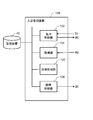
- FIG. 5 is a functional block diagram that logically shows the configuration of the store entry management device 100 according to the embodiment of the present invention.
- the store entry management device 100 includes an output control unit 102, an acquisition unit 104, and an open / close control unit 106.
- the output control unit 102 When the motion sensor 70 installed at the entrance of the store detects a person, the output control unit 102 outputs voice guidance on how to enter the store to the output unit 80 (speaker 66 in FIG. 4 or the like) provided at the entrance. Let me.
- the acquisition unit 104 acquires authentication information for authenticating a person from the operation terminal 40 provided at the entrance.
- the open / close control unit 106 unlocks the automatic door 20 at the entrance when the acquired authentication information satisfies the standard.
- the output control unit 102 determines the necessity of voice guidance by using the detection result of the motion sensor 70 before acquiring the authentication information, and controls the output of the voice guidance.
- the authentication information is, for example, a face image used for face recognition, a feature amount of the face image, or information that can identify a member such as a member number. However, it may be biometric information other than face recognition. Other biometric information includes, for example, at least one feature such as iris, vein, pinna, fingerprint, gait, profile (height, shoulder width, height, skeleton, etc.).
- the motion sensor 70 is at least one of an infrared sensor (sensor 30) installed near the automatic door 20 in FIG. 3 and an image sensor obtained by image analysis processing of the camera 5, but is not limited thereto.
- the output unit 80 is at least one of the speaker 66 and the display 54 of the operation terminal 40 of FIG. Alternatively, it may be a lighting unit such as another LED (Light Emitting Diode) provided on the operation terminal 40.
- the output control unit 102 controls lighting, blinking, extinguishing, and the like of the LED.
- the customer U is assumed to be a member of the store and a non-member. Alternatively, it is possible that even a member does not carry a membership card or the like to prove the code of the member.
- the operation for customer U to enter the store differs depending on whether the customer is a member or not (or even if he / she forgets his / her membership card).
- a member card or a mobile terminal (not shown) of the customer U can be displayed with a QR code for entering the store, and the member information can be read by holding the QR code over the code reader 56 to enter the store.
- the member is not a member, the image of the customer U's face is temporarily saved.
- Unlocking the automatic door 20 means unlocking the automatic door 20 that is locked during unmanned business and automatically opening it. Further, when the sensor 30 detects the entry of the customer U, it is preferable that the automatic door 20 is automatically locked again so that no one other than the customer U can enter the store from outside the store. However, from the inside of the store, the automatic door 20 is unlocked by a predetermined operation (for example, person detection or authentication by the motion sensor 70 (face recognition or presentation of a membership card or a QR code for entering the store)), and the customer U is outside. It shall be possible to appear in.
- a predetermined operation for example, person detection or authentication by the motion sensor 70 (face recognition or presentation of a membership card or a QR code for entering the store)
- unmanned sales includes a business form in which a clerk is absent from the store or a clerk is in the store but cannot respond to customers, for example, a so-called one-operation state.
- FIG. 6 is a flowchart showing an operation example of the store entry management device 100 of the present embodiment.
- the motion sensor 70 detection by the image analysis of the sensor 30 or the camera 5
- the output control unit 102 before acquiring the authentication information.
- the necessity of voice guidance is determined by using the detection result of the motion sensor 70 (step S103).
- the output control unit 102 stands by until the motion sensor 70 detects a person (NO in step S101).
- the output control unit 102 When it is necessary to output the voice guidance (essential of step S103), the output control unit 102 outputs the voice guidance of the store entry method from the speaker 66 provided at the entrance (step S105). For example, when the sensor 30 on the automatic door 20 detects the presence of the customer U in front of the automatic door 20, "Please proceed in front of the operation panel on the left side of the automatic door.” The voice guidance for notifying the customer U of the existence is output from the speaker 66 of the operation terminal 40.
- step S103 when the output of the voice guidance is unnecessary (whether or not step S103 is performed), the output control unit 102 proceeds to step S107 without outputting the voice guidance, bypassing step S105.
- step S107 This is the case, for example, when it is detected that the customer U is in front of the operation terminal 40 based on the analysis result of the image of the camera 5.
- the acquisition unit 104 acquires the authentication information for authenticating the person from the operation terminal 40 provided at the entrance (step S107). Specifically, for example, when the customer U holds the entry QR code displayed on the mobile terminal of the customer U over the code reader 56 of the operation terminal 40, the member information of the customer U is read, and the acquisition unit 104 reads the member information. Obtained as authentication information. Alternatively, when the customer U is not a member, the camera 62 takes a picture of the face of the customer U by pressing the shooting button 60 of the operation terminal 40. The acquisition unit 104 acquires the face image of the customer U captured by the camera 62 as authentication information.
- step S109 When the acquired authentication information meets the criteria (YES in step S109), the open / close control unit 106 unlocks the automatic door 20 at the entrance (step S111). On the other hand, when the authentication information does not satisfy the standard (NO in step S109), step S111 bypasses and the automatic door 20 ends without unlocking.
- the authentication information for example, the authentication information (member information) read from the store entry QR code is collated with the member information of the store registered in the storage device 12 of the server 10, and the member of the store can be identified. Meet the criteria if identified. If there is no match for the member information of the store, the standard is not met.
- the voice guidance is output when necessary after determining the necessity of the voice guidance, so that the voice guidance is not unnecessarily played outside the store.
- the existence of the operation terminal 40 required for entering the store which is beside the automatic door 20 of the store, can be notified to the customer U by voice guidance as necessary.
- guidance on how to enter an unmanned store can be efficiently output, and customer U can be guided to enter the store.
- FIG. 7 is a functional block diagram that logically shows a configuration example of the store entry management device 100 of the present embodiment.
- the store entry management device 100 of this embodiment is the same as that of the above embodiment except that the authentication information is an image of a human face.
- the store entry management device 100 of the present embodiment includes an image processing unit 120 in addition to the configuration of the store entry management device 100 of the above embodiment of FIG.
- the image processing unit 120 may be included inside the operation terminal 40 or may be outside the operation terminal 40. That is, the image processing unit 120 may be hardware that is separate from the operation terminal 40.
- the image processing unit 120 may be connected to the operation terminal 40 via the communication network 3.
- the image processing unit 120 may be included in the server 10.
- the authentication information is an image of a human face
- the open / close control unit 106 unlocks the entrance door when the analysis result of the face included in the image meets the criteria.
- a shooting button 60, a camera 62, and a shooting target person explanation unit 64 are provided on the front surface 52 of the housing 50 of the operation terminal 40.
- the shooting target person explanation unit 64 an explanation indicating that a person who does not have the entrance QR code is a shooting target person is described.
- the shooting icon display unit 65 has an arrow indicating the position of a button to be pressed when shooting a face and a camera icon.
- a code reader 56 a reading explanation unit 58, and a reading icon display unit 59 are provided on the front surface 52 of the housing 50 of the operation terminal 40.
- the reading explanation unit 58 describes that a person who has a QR code for entering the store reads the code with the code reader 56.
- the reading icon display unit 59 has an icon schematically showing a QR code and an arrow indicating the position of the code reader 56.
- the output control unit 102 when the output control unit 102 does not have the store entry QR code, the output control unit 102 prompts the customer U to press the shooting button 60 in order to shoot the face image (for example, "operation". The face is photographed by the panel camera, so press the photograph button. ”, Etc.) is output from the output unit 80 (speech 66 of the operation terminal 40 in FIG. 4).
- the output control unit 102 issues voice guidance to the customer U to hold the store entrance QR code over the code reader 56 (of the operation terminal 40 of FIG. 4). It is output from the speaker 66).
- the image processing unit 120 analyzes the face image acquired by the acquisition unit 104, and determines, for example, whether or not an image having an image quality capable of extracting a predetermined feature amount necessary for performing the authentication process is obtained. Alternatively, it is determined whether the feature amount extracted from the face image has a feature amount that can be distinguished from others, that is, whether it is equal to or more than the reference value.
- the image processing unit 120 may store at least one of the face image and the feature amount extracted from the face image in the storage device 12 as a store visit record in association with the date and time information.
- the output control unit 102 further says, "The face could not be recognized. Turn the face to the front with respect to the camera and press the shooting button again to shoot the face. You may output voice guidance to encourage you to shoot again, including advice such as "Please” to obtain a highly accurate image.
- the operation of the store entry management device 100 of this embodiment is the same as that of FIG. 6 of the above embodiment, but the customer whose authentication information acquired by the acquisition unit 104 in step S107 is imaged by the camera 62 of the operation terminal 40. It is a face image of U, and in step S109, the open / close control unit 106 determines that the authentication information satisfies the reference when the feature amount extracted from the face image is equal to or more than the reference value (YES in step S109). Other than these processes, the same as in FIG.
- the face of the customer U is photographed in front of the operation terminal 40 when the pressing of the shooting button 60 of the operation terminal 40 is received, and the photographed face image of the customer U is used as the authentication information.
- the front surface 52 of the housing 50 is provided with a shooting target person explanation unit 64 and a shooting icon display unit 65. Therefore, the customer U sees these explanations and shoots a face image. It can be performed.
- the advice may be output to the customer U by voice guidance so that the face image satisfies the standard. In that case, the image with good image quality is acquired as the authentication information. can do.
- the store entry management device 100 of the present embodiment is any of the above embodiments except that the store entry management device 100 has a configuration in which a first guidance is output when the motion sensor 70 detects a person before starting the authentication information acquisition process. Is similar to.
- the store entry management device 100 of the present embodiment will be described as having the same configuration as the store entry management device 100 of the second embodiment of FIG. 7, but is the same as the store entry management device 100 of the first embodiment of FIG. It may be configured.
- the operation terminal 40 is installed next to the automatic door 20. Then, when the motion sensor 70 detects a person before the operation terminal 40 starts the authentication information acquisition process, the output control unit 102 causes the output unit 80 to output the first guidance.
- the first guidance is for guiding the customer U to the operation terminal 40, for example, and includes voice guidance such as "Please proceed in front of the operation panel on the left side of the automatic door.” Further, the first guidance outputs a notification sound from the speaker 66, displays an image on the display 54 of the operation terminal 40, and outputs a voice together with a message image such as "The operation panel is here.” By doing so, the customer U may be notified of the existence of the operation terminal 40.
- the first guidance is "Our store is open unmanned. You can enter the store by performing the necessary operations on the operation panel on the left of the automatic door.” Or “Enter the store on the operation panel on the left of the automatic door.” You can enter the store by holding the QR code or taking a picture of your face. " May be good.
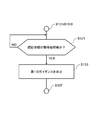
- FIG. 8 is a flowchart showing an operation example of the store entry management device 100 of the present embodiment.
- the flowchart of the present embodiment is executed in place of steps S103 and S105 of FIG. 6 after the motion sensor 70 at the entrance of the store detects a person in the determination of step S101 of FIG. 6 (YES in step S101).
- NS is a flowchart showing an operation example of the store entry management device 100 of the present embodiment. The flowchart of the present embodiment is executed in place of steps S103 and S105 of FIG. 6 after the motion sensor 70 at the entrance of the store detects a person in the determination of step S101 of FIG. 6 (YES in step S101).
- the acquisition unit 104 determines whether or not the authentication information has not been acquired (step S121). Before the start of the authentication process (YES in step S121), the output control unit 102 outputs the first guidance from the output unit 80 (step S123).
- the motion sensor 70 of the automatic door 20 detects that a person stands in front of the automatic door 20 and automatically opens the automatic door 20.
- the automatic door 20 since the automatic door 20 is locked in an unmanned store, the automatic door 20 does not open even if the user stands in front of the automatic door 20.
- the automatic door 20 is unlocked and the store can be entered by performing an authentication operation for entering the store with the operation terminal 40 installed on the side of the automatic door 20.
- people who are not accustomed to unmanned stores, or who do not know or are unaware that they are in unmanned business go straight to the automatic door 20 when they try to enter the store. Therefore, if the door does not open even though it stands in front of the automatic door 20, many people think that the door is out of order or not open and go home as it is.
- the operation terminal 40 installed on the side of the automatic door 20 outputs the first guidance to the customer U who has come to the store to the customer U. It is possible to notify the existence of the operation terminal 40.
- the position of the operation terminal 40 can be notified to the customer U by illuminating the display 54 or displaying a message such as "The operation panel is here". ..
- the store entry management device 100 of the present embodiment is configured to output another second guidance when it is detected that the customer who has visited the store cannot enter the store even after outputting the first guidance. It is the same as the third embodiment except that it has.
- the store entry management device 100 of the present embodiment will be described as having the same configuration as the store entry management device 100 of the second embodiment and the third embodiment of FIG. 7, but the store entry of the first embodiment of FIG. 5 will be described. It may have the same configuration as the management device 100.
- the output control unit 102 outputs a second guidance different from the first guidance.
- the volume of the second guidance is lower than the volume of the first guidance.
- the second guidance may include, for example, a content of giving a lecture to the customer on how to enter the store using the operation terminal 40.
- the second guidance is, for example, using images, images, and characters on the display 54 of the operation terminal 40 to explain how to enter the store with and without the QR code for entering the store. There may be.
- the second guidance is based on the premise that a person is standing in front of the operation terminal 40, the volume is lower than that of the first guidance for attracting a person to the operation terminal 40 from the front of the automatic door 20. good.
- the output control unit 102 may display the explanation of the store entry method on the display 54 with an image or characters without outputting the voice.
- Whether or not the detection of a person by the motion sensor 70 is continuously determined is that the same person is in the store by continuously inputting a signal indicating the detection state from the sensor 30 or by analyzing the image captured by the camera 5. It can be determined by detecting that the automatic door 20 or the operation terminal 40 continues to exist in the vicinity of the automatic door 20 or the operation terminal 40.
- FIG. 9 is a flowchart showing an operation example of the store entry management device 100 of the present embodiment.
- the flowchart of this embodiment is executed after step S123 of FIG.
- the motion sensor 70 continues to detect a person after the first guidance is output by the output control unit 102 (step S123) (YES in step S131)
- the output control unit 102 is different from the first guidance.
- a different second guidance is output to the output unit 80 (step S133).
- a second guidance for giving a lecture on how to enter the store is provided. Can be output.
- the volume of the second guidance lower than that of the first guidance for attracting people to the operation terminal 40 from the front of the automatic door 20 at the store entrance, or by setting the volume to no voice, noise countermeasures to the vicinity of the store can be taken. Become.
- FIG. 16 is a diagram showing the arrangement of the motion sensor in this modified mode.
- the two motion sensors 70 and 72 have different detection ranges, and the first motion sensor 70 has a wider detection range 74 than the second motion sensor 72.
- the second motion sensor 72 has a detection range 76 in the vicinity of the operation terminal 40 or the automatic door 20, and the first motion sensor 70 includes a range away from the automatic door 20 in the detection range.
- the first motion sensor 70 first detects a person within the first detection range 74 and outputs the first guidance, and then the second motion sensor 72 outputs the first guidance.
- the output control unit 102 may output a second guidance different from the first guidance.
- the volume of the second guidance may be lower than the volume of the first guidance.
- the first guidance may be output again.
- FIG. 17 is a flowchart showing an example of the operation of the store entry management device 100 in this modified mode.
- step S205 When the person P is not detected by the second motion sensor 72 (NO in step S205), the process returns to step S203, and the output control unit 102 causes the output unit 80 to output the first guidance again (step S203).
- This example shows that the person P stays at a place slightly away from the store (within the detection range 74), and the person P does not enter the detection range 76 of the second motion sensor 72.
- the fact that the person P stays within the detection range 74 means that the person P is not close to the operation terminal 40. In other words, there is a high possibility that you are in trouble because you do not know the location of the operation terminal 40, or that you are asking from a remote location whether the store is doing it or not. Therefore, the output control unit 102 causes the output unit 80 to output the first guidance again.
- the first guidance is "Please go to the front of the operation panel on the left side of the automatic door.”, "The operation panel is here.”, "Our shop is open unmanned. The left side of the automatic door. You can enter the store by performing the necessary operations to enter the store on the operation panel of ".” And “You can enter the store by holding the entrance QR code on the operation panel on the left of the automatic door or taking a picture of your face.” ..
- the output control unit 102 outputs the second guidance (step S207).
- the second guidance may include, for example, a lecture to the customer on how to enter the store using the operation terminal 40. Further, the volume of the second guidance may be lower than the volume of the first guidance.
- step S205 the second motion sensor 72 continues to monitor whether or not a person is detected for several seconds to 10 seconds. That is, it is preferable to continue monitoring for the time required for the person P to enter the detection range 76 from the detection range 74.
- the presence position of a person is detected in two stages using two motion sensors 70, and two types of guidance are used, but the presence of a person is detected by dividing the detection range in a plurality of stages. If possible, the number of sensors may be any number. Further, the presence of a person may be detected by dividing into three or more detection ranges, and three or more types of guidance may be selected and output according to the detection range.
- the output control unit 102 may output different guidance according to the detection result of a person in a plurality of different detection ranges. In other words, the output control unit 102 may output different guidance depending on the position of a person. For example, the output control unit 102 may detect a person at a position away from the store, a person may be detected in front of the automatic door 20, or a person may be detected in front of the operation terminal 40. , Different guidance may be output at different volumes.
- the above-mentioned first guidance is output at the volume of the first stage, and then the person is detected in front of the automatic door 20.
- the first guidance may be output at a volume of the second stage smaller than that of the first stage.
- the above-mentioned second guidance may be output at a volume of a third stage smaller than that of the second stage.
- the output control unit 102 By analyzing the captured image using the camera 5 instead of the motion sensor, the position where the person P exists is detected, and the output control unit 102 gives different guidance according to the position where the person P is detected. It may be output.
- the store entry management device 100 of the present embodiment is the same as any of the above embodiments except that it has a configuration of controlling the volume of the voice guidance based on the detection result of the volume detection unit installed in the store. be.
- the output control unit 102 controls the volume of the voice guidance based on the detection result of the volume detection unit (not shown) installed in the store.
- the volume detection unit may be, for example, the microphone 68 of the operation terminal 40, or another microphone provided outside the store.
- the microphone 68 collects the environmental sounds around the store and measures the volume.
- the volume of the voice guidance is set to three levels of the first, second, and third volumes in descending order of volume.
- the output control unit 102 sets the volume of the voice guidance as the first volume.
- the output control unit 102 sets the volume of the voice guidance as the second volume.
- the output control unit 102 sets the volume of the voice guidance to the third volume.
- the same effect as that of the above embodiment is obtained, and the volume of the voice guidance is controlled according to the level of the environmental sound around the store, so that noise countermeasures to the neighborhood can be taken.
- the volume can be controlled to make it easier to hear.
- the store entry management device 100 of the present embodiment is the same as any of the above embodiments except that it has a configuration of outputting voice guidance when the authentication information acquisition process is not started even after a certain period of time has elapsed.
- it is described as having the same configuration as the store entry management device 100 of the first embodiment of FIG. 5, but the configuration of this embodiment may be combined with other embodiments.
- the output control unit 102 sends voice guidance to the output unit 80 when the operation terminal 40 does not execute the authentication information acquisition process even after the first reference time elapses after the motion sensor 70 detects a person. Output.
- the first reference time is, for example, several tens of seconds.
- the output control unit 102 causes the output unit 80 to output guidance of the content of giving a lecture on a method for presenting the authentication information necessary for entering the store to the customer.
- the voice guidance output at this time is "If you have a QR code to enter the store, please hold the QR code.” And "If you do not have a QR code to enter the store, take a picture of your face.
- the content explains that there are multiple ways to enter the store, such as "Please press the shooting button.”, Or "You need to show the QR code or take a picture of your face to enter the store.”, And “Face”. If you don't mind taking a picture, please press the picture button. ”Includes explanations of the operations required to obtain consent to take a picture of the face.
- the authentication information acquisition process is determined when the acquisition unit 104 detects that the code reader 56 reads the store entry QR code or presses the shooting button 60.
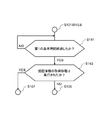
- FIG. 10 is a flowchart showing an operation example of the store entry management device 100 of the present embodiment.
- the flowchart of the present embodiment is executed in place of step S103 of FIG. 6 after the motion sensor 70 at the entrance of the store detects a person in the determination of step S101 of FIG. 6 (YES in step S101).
- the output control unit 102 monitors whether or not the first reference time has elapsed (step S141).
- the first reference time has elapsed (YES in step S141)
- whether or not the authentication information acquisition process has been executed for example, whether or not the shooting button 60 has been pressed, or whether or not the code reader 56 has read the store entry QR code. It is determined whether or not it has been done (step S143).
- the output control unit 102 continues to monitor the passage of time until the first reference time elapses (NO in step S141).
- step S105 in FIG. 6 is bypassed and the process proceeds to step S107 in FIG.
- the acquisition unit 104 performs the authentication information acquisition process.
- the process proceeds to step S105 in FIG. That is, the output control unit 102 causes the output unit 80 to output the voice guidance.
- the voice guidance can be output.
- the output control unit 102 causes the output unit 80 to output voice guidance for giving a lecture to the customer on how to enter the store, so that it is possible to help the customer who was thinking of giving up entering the store and returning home. It is possible to prevent a decrease in the utilization rate of.
- the second aspect of FIG. 7 is that the store entry management device 100 of the present embodiment has a configuration of outputting voice guidance when a face image satisfying the standard is not acquired even after a certain period of time has passed since the person was detected. It has the same configuration as the store entry management device 100 of the embodiment. However, the configuration of another embodiment described later may be combined with the configuration having the image processing unit 120 of this embodiment.
- the output control unit 102 outputs voice guidance when a face image satisfying the reference is not obtained even after the second reference time elapses after the motion sensor 70 detects a person.
- a face image satisfying the standard is an image having an image quality capable of extracting a predetermined feature amount required for performing face recognition processing.
- a face image satisfying the criteria is an image in which the feature amount extracted from the face image has a feature amount that can be distinguished from another person.
- the second reference time is, for example, several seconds to several tens of seconds.
- the customer is trying to take a picture of the face, but for example, the face is not facing the camera 62 or the face is faced. It is conceivable that the camera is moved, is too far from the camera 62, or is too close to the camera 62.
- the voice guidance is "Please turn your face to the front of the camera.”, "Because you are shooting, please turn to the camera without moving your head.”, “Please move away from the camera.” , And at least one such as "Get closer to the camera.”
- a video, an image, or a character that lectures on the shooting method may be displayed as guidance on the display 54 of the operation terminal 40.
- FIG. 11 is a flowchart showing an operation example of the store entry management device 100 of the present embodiment.
- the flowchart of the present embodiment is executed in place of step S103 of FIG. 6 after the motion sensor 70 at the entrance of the store detects a person in the determination of step S101 of FIG. 6 (YES in step S101).
- the output control unit 102 monitors whether or not the second reference time has elapsed (step S151).
- the second reference time has elapsed (YES in step S151)
- the output control unit 102 asks the image processing unit 120 whether or not a face image satisfying the standard has been obtained.
- the output control unit 102 continues to monitor the passage of time until the second reference time elapses (NO in step S151).
- step S105 in FIG. 6 is bypassed and the process proceeds to step S107 in FIG.
- the acquisition unit 104 performs the authentication information acquisition process.
- the process proceeds to step S105 in FIG. That is, the output control unit 102 causes the output unit 80 to output the voice guidance.
- the authentication information that meets the criteria is not obtained even after standing for a few seconds to a few tens of seconds after the person is detected, there is a possibility that the customer is moving or the camera 62 is not properly faced. be. Therefore, by outputting the voice guidance indicating the standing position instruction to the customer and the explanation of how to take a picture, it is possible to succeed in taking the face image satisfying the standard. Even if it takes time because the authentication information does not meet the standard, if the customer does not understand the reason, he / she thinks that the device is out of order or the store is closed and gives up. There is also the possibility of returning home. In the present embodiment, the time required for photographing the face for authentication can be shortened, so that it is possible to prevent the customer from giving up and returning home due to the time required.
- FIG. 12 is a functional block diagram that logically shows a configuration example of the store entry management device 100 of the present embodiment.
- the store entry management device 100 of the present embodiment is the same as any of the other embodiments described above, except that the store entry management device 100 has a configuration in which the guidance content and the notification method are determined according to the situation of the visitor.
- the store entry management device 100 of the present embodiment will be described with the configuration combined with the second embodiment of FIG. 7, but may be combined with other embodiments.
- the store entry management device 100 of the present embodiment has the same configuration as the store entry management device 100 of FIG. 7, and further has a determination unit 108.
- the determination unit 108 acquires the detection results of the motion sensor 70 repeatedly, and determines at least one of the content of the guidance and the notification method by using the analysis results of the images included in the plurality of detection results.
- the output control unit 102 causes the output unit 80 to output guidance according to the determined content.
- the motion sensor 70 is, for example, a camera 5 provided above the automatic door 20 and having a person in an area in front of the automatic door 20 and an area in front of the operation terminal 40 as an imaging range.
- image analysis processing By performing image analysis processing using the image of the camera 5 or a plurality of frame images, a person near the entrance of the store is detected.
- the results of the analysis are associated with at least one of the guidance content and the notification method corresponding to at least one of the positions, movements, and behaviors of the person.
- the position, movement, and behavioral state of a person at the entrance of the store may be assumed in advance, and may be associated with at least one of the guidance content and the notification method suitable for those states. Further, the analysis result of the image by the camera 5 may be associated with the assumed state of the position, movement, and behavior of the person. That is, the analysis result may be stored in a table, for example, in association with at least one of the content of the guidance and the notification method. As a result, the determination unit 108 can determine the content of the guidance corresponding to the analysis result and the notification method by referring to the table.
- the content of the guidance and the notification method are exemplified below, but are not limited thereto.
- a voice guidance indicating that the store is open unmanned is output from the speaker 66 of the operation terminal 40.
- a voice guidance telling that the operation on the operation terminal 40 is necessary for entering the store is output from the speaker 66 of the operation terminal 40.
- Voice guidance and a notification sound for notifying the location of the operation terminal 40 are output from the speaker 66.
- a video or an image is displayed on the display 54 of the operation terminal 40.
- the LED of the operation terminal 40 is turned on or blinks.
- the display 54 of the operation terminal 40 is made to output a video explaining the method of entering the store.
- Guidance for specifically explaining the operation method when the store entrance QR code is held is output as at least one of voice, image, and video.
- Guidance for notifying the existence of the code reader 56 of the operation terminal 40 is output by at least one of voice, image, and video.
- a guidance for giving a lecture to hold the entrance QR code over the code reader 56 is output as at least one of voice, image, and video.
- Output guidance that specifically explains the operation method when the store entry QR code is not available, in at least one of voice, image, and video.
- At least audio, image, and video guidance that tells you that you need to shoot a face and that you need to operate the shooting button 60 to get consent to shoot a face or to shoot. Output with either one.
- Guidance for teaching the positions of the shooting button 60 and the camera 62 is output by at least one of voice, image, and video.
- a guidance for giving a lecture on how to take a picture so that the face image meets the standard is output as at least one of voice, image, and video.
- (12) Notify the operator of the center in a remote location that there is a person who is having trouble entering the store, and ask the customer to ask a question from the operator. The operator and the customer can have a conversation using the speaker 66 and the microphone 68. Further, the operator's face may be projected on the display 54.
- the determination unit 108 selects at least one of the above guidance contents (1) to (3) and the notification method. decide.
- the determination unit 108 determines at least one of the guidance contents and the notification method of (1) to (5).
- the determination unit 108 determines the guidance of (5) to (13). Determine at least one of the content and notification method.
- FIG. 13 is a flowchart showing an operation example of the store entry management device 100 of the present embodiment.
- the flowchart of the present embodiment is executed in parallel with the process of FIG. 6 after the motion sensor 70 at the entrance of the store detects a person in the determination of step S101 of FIG. 6 (YES in step S101). That is, while the process of FIG. 13 is being executed, the authentication information acquisition process of the flow acquisition unit 104 of FIG. 6 and the unlocking process of the automatic door 20 by the open / close control unit 106 are executed.
- step S101 After the motion sensor 70 at the entrance of the store detects a person (YES in step S101), it is determined whether or not the motion sensor 70 continuously detects a person for the third reference time (step S161). When the motion sensor 70 continuously detects a person for the third reference time (YES in step S161), the output control unit 102 causes the output unit 80 to output the third guidance (step S163).
- the third guidance is, for example, (1) to (3) described above.
- the output control unit 102 waits and continues monitoring until the motion sensor 70 continuously detects a person for the third reference time (NO in step S161).
- step S163 the output control unit 102 determines whether or not the automatic door 20 has been unlocked (step S165). Then, when it is determined that the automatic door 20 has been unlocked (YES in step S165), this process ends.
- step S165 when it is determined that the automatic door 20 is not unlocked (NO in step S165), the output control unit 102 determines whether or not the fourth reference time has elapsed (step S167). When the fourth reference time has elapsed (YES in step S167), the output control unit 102 causes the output unit 80 to output the fourth guidance (step S169). Then, the process returns to step S165. On the other hand, the process returns to step S165 until the fourth reference time elapses (NO in step S167).
- the fourth guidance is, for example, at least one of (4) to (11) described above.
- the store entry management device 100 of the present embodiment may further include a notification unit 110 in the configuration of FIG.
- the notification unit 110 notifies the operation center at a remote location when the fifth reference time elapses after the fourth guidance is given.
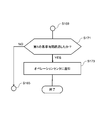
- FIG. 15 is a flowchart showing an operation example of the store entry management device 100 of the present embodiment.
- the determination unit 108 further determines whether or not the fifth reference time has elapsed (step S171). Then, until the fifth reference time elapses (NO in step S171), the process returns to step S165 in FIG.
- the determination unit 108 causes the notification unit 110 to notify the operator of the center in the remote location (step S173). Then, upon receiving the notification, the operator explains to the customer how to enter the store using the speaker 66 and the microphone 68 of the operation terminal 40.
- the notification unit 110 may connect to AI (Artificial Intelligence), for example, and let AI respond to the customer.
- AI Artificial Intelligence
- At least one of the content of the guidance and the notification method is determined by using the result obtained by analyzing the captured image of the camera 5 installed on the side of the automatic door 20. Appropriate guidance can be output according to the appropriate notification method. As a result, customers can enter the store efficiently.
- the output means When the motion sensor installed at the entrance of the store detects a person, the output means provided at the entrance outputs the voice guidance of the entrance method, and the output control means.
- An acquisition means for acquiring authentication information for authenticating a person from a terminal provided at the entrance, and It is provided with an opening / closing control means for unlocking the entrance door when the acquired authentication information meets the standard.
- the output control means is a store entry management device that controls the output of the voice guidance by determining the necessity of the voice guidance by using the detection result of the motion sensor before acquiring the authentication information.
- 2. 1. In the store entry management device described in The authentication information is an image obtained by capturing the face of the person.
- the opening / closing control means is a store entry management device that unlocks the entrance door when the analysis result of the face included in the image meets the criteria.
- the output control means is a store entry management device that outputs a first guidance when the motion sensor detects a person before the terminal starts the authentication information acquisition process. 4. 3. 3. In the store entry management device described in When the motion sensor continues to detect a person even after the output of the first guidance, the output control means outputs a second guidance different from the first guidance.
- the store entry management device in which the volume of the second guidance is lower than the volume of the first guidance. 5. 3. 3. Or 4.
- the store entry management device described in It has a second detection range narrower than the first detection range of the motion sensor, and further includes a second motion sensor that detects a person near the door.
- the second motion sensor performs the second detection range.
- a second guidance different from the first guidance is output.
- the output control means is a store entry management device that controls the volume of the voice guidance based on the detection result of the volume detection means installed in the store. 7. 1. 1. From 6.
- the output control means outputs the voice guidance when the authentication information acquisition process is not executed in the terminal even after the first reference time elapses after the motion sensor detects the person.
- In the store entry management device described in any one of The output control means outputs the voice guidance when the image of the face satisfying the reference is not obtained even after the second reference time elapses after the motion sensor detects the person.
- a determination means for repeatedly acquiring the detection results of the motion sensor and using the analysis results of the images included in the plurality of detection results to determine at least one of the guidance content and the notification method.
- the output control means is a store entry management device that outputs the guidance according to the determined content. 10. 9. In the store entry management device described in The output control means When the motion sensor detects a person continuously for the third reference time, the third guidance is output. After that, when the fourth reference time elapses without unlocking the door, the store entry management device outputs the fourth guidance. 11. 10. In the store entry management device described in A store entry management device further comprising a notification means for notifying the operation center when the fifth reference time has elapsed after the fourth guidance is given.
- the store entry management device When the motion sensor installed at the entrance of the store detects a person, the output device installed at the entrance outputs voice guidance on how to enter the store. Obtain authentication information for authenticating a person from the terminal provided at the entrance, When the acquired authentication information meets the criteria, the entrance door is unlocked and the door is unlocked. A store entry management method for controlling the output of the voice guidance by determining the necessity of the voice guidance by using the detection result of the motion sensor before acquiring the authentication information. 13. 12. In the store entry management method described in The authentication information is an image obtained by capturing the face of the person. The store entry management device A store entry management method for unlocking the entrance door when the analysis result of the face included in the image meets the criteria. 14. 12. Or 13.
- the store entry management device A store entry management method for outputting a first guidance when the motion sensor detects a person before the terminal starts the authentication information acquisition process. 15. 14.
- the store entry management method described in The store entry management device If the motion sensor continues to detect a person even after the output of the first guidance, a second guidance different from the first guidance is output.
- the store entry management method in which the volume of the second guidance is smaller than the volume of the first guidance. 16. 14. Or 15.
- the motion sensor has a second detection range narrower than the first detection range of the motion sensor, and the motion sensor uses the second motion sensor to detect a person near the door.
- the first After detecting the presence of a person within the detection range of and outputting the first guidance, if the second motion sensor detects the presence of the person within the second detection range, the first Output a second guidance that is different from the guidance, The store entry management method in which the volume of the second guidance is smaller than the volume of the first guidance. 17. 12. From 16. In the store entry management method described in any one of The store entry management device A store entry management method that controls the volume of the voice guidance based on the detection result of the volume detecting means installed in the store. 18. 12. From 17. In the store entry management method described in any one of The store entry management device A store entry management method for outputting the voice guidance when the authentication information acquisition process is not executed on the terminal even after the first reference time has elapsed after the motion sensor detects the person.
- the detection results of the motion sensor are repeatedly acquired, and at least one of the guidance content and the notification method is determined using the analysis results of the images included in the plurality of detection results.
- the third guidance is output.
- a fourth guidance is output, which is a store entry management method. 22. 21.
- the store entry management device further A store entry management method for notifying the operation center when the fifth reference time has elapsed after the fourth guidance is given.
- the output device installed at the entrance outputs voice guidance on how to enter the store.
- Procedure for acquiring authentication information for authenticating a person from a terminal provided at the entrance When the acquired authentication information meets the criteria, the procedure of unlocking the entrance door is executed. In order to execute the procedure of determining the necessity of the voice guidance and controlling the output of the voice guidance by using the detection result of the motion sensor before acquiring the authentication information in the output procedure.
- the authentication information is an image obtained by capturing the face of the person.
- the program described in On the computer If the motion sensor continues to detect a person even after the output of the first guidance, a procedure for outputting a second guidance that is lower than the volume of the first guidance and different from the first guidance.
- the motion sensor has a second detection range narrower than the first detection range of the motion sensor, and the motion sensor uses the second motion sensor to detect a person near the door.
- the program described in any one of On the computer A program for executing a procedure for controlling the volume of the voice guidance based on the detection result of the volume detecting means installed in the store. 29. 23. From 28.
- the procedure for outputting the voice guidance is executed. program. 30. 24.
Landscapes
- Engineering & Computer Science (AREA)
- Physics & Mathematics (AREA)
- General Physics & Mathematics (AREA)
- Human Computer Interaction (AREA)
- Theoretical Computer Science (AREA)
- Multimedia (AREA)
- Business, Economics & Management (AREA)
- Health & Medical Sciences (AREA)
- Oral & Maxillofacial Surgery (AREA)
- General Health & Medical Sciences (AREA)
- Accounting & Taxation (AREA)
- Finance (AREA)
- Development Economics (AREA)
- Economics (AREA)
- Marketing (AREA)
- Strategic Management (AREA)
- General Business, Economics & Management (AREA)
- Time Recorders, Dirve Recorders, Access Control (AREA)
- Lock And Its Accessories (AREA)
Priority Applications (2)
| Application Number | Priority Date | Filing Date | Title |
|---|---|---|---|
| JP2022518112A JP7605206B2 (ja) | 2020-04-30 | 2021-04-28 | 入店管理装置、入店管理方法、およびプログラム |
| US17/920,841 US12198490B2 (en) | 2020-04-30 | 2021-04-28 | Store-entry management apparatus, store-entry management method, and non-transitory computer-readable storage medium |
Applications Claiming Priority (2)
| Application Number | Priority Date | Filing Date | Title |
|---|---|---|---|
| JP2020080075 | 2020-04-30 | ||
| JP2020-080075 | 2020-04-30 |
Publications (1)
| Publication Number | Publication Date |
|---|---|
| WO2021221098A1 true WO2021221098A1 (ja) | 2021-11-04 |
Family
ID=78331987
Family Applications (1)
| Application Number | Title | Priority Date | Filing Date |
|---|---|---|---|
| PCT/JP2021/016945 Ceased WO2021221098A1 (ja) | 2020-04-30 | 2021-04-28 | 入店管理装置、入店管理方法、およびプログラム |
Country Status (3)
| Country | Link |
|---|---|
| US (1) | US12198490B2 (https=) |
| JP (1) | JP7605206B2 (https=) |
| WO (1) | WO2021221098A1 (https=) |
Cited By (1)
| Publication number | Priority date | Publication date | Assignee | Title |
|---|---|---|---|---|
| JP2023158365A (ja) * | 2022-04-18 | 2023-10-30 | キヤノン株式会社 | 対象物識別装置、電子機器、対象物識別方法、及びコンピュータプログラム |
Citations (3)
| Publication number | Priority date | Publication date | Assignee | Title |
|---|---|---|---|---|
| JP2009098814A (ja) * | 2007-10-15 | 2009-05-07 | Nippon Jimuki Co Ltd | 入退場管理方法および顔画像認識セキュリティシステム |
| JP2017210749A (ja) * | 2016-05-24 | 2017-11-30 | 三菱電機エンジニアリング株式会社 | セキュリティドアシステム |
| WO2019186880A1 (ja) * | 2018-03-29 | 2019-10-03 | サンエナジー株式会社 | 紫外線照射装置、紫外線照射方法、照明装置および紫外線照射システム |
Family Cites Families (7)
| Publication number | Priority date | Publication date | Assignee | Title |
|---|---|---|---|---|
| KR101155949B1 (ko) * | 2010-07-27 | 2012-06-18 | 한국과학기술연구원 | 병원안내시스템 및 병원안내서비스 제공방법 |
| JP6007758B2 (ja) | 2012-12-03 | 2016-10-12 | 富士通株式会社 | ユーザ操作端末装置、ユーザ操作端末プログラム |
| JP6359935B2 (ja) * | 2014-09-30 | 2018-07-18 | 株式会社Nttドコモ | 対話装置および対話方法 |
| US9692380B2 (en) * | 2015-04-08 | 2017-06-27 | Google Inc. | Dynamic volume adjustment |
| JP6199349B2 (ja) | 2015-08-17 | 2017-09-20 | 株式会社リクルートホールディングス | 営業支援用コンピュータプログラム、営業支援用アプリケーションプログラム、営業支援システム及びその制御方法 |
| CN108846969A (zh) * | 2018-04-08 | 2018-11-20 | 中山市微大网络科技有限公司 | 一种应用于无人值守商店的智能多媒体播放系统 |
| JP7396375B2 (ja) * | 2020-02-06 | 2023-12-12 | 日本電気株式会社 | ゲートシステム、ゲート装置、その制御方法、およびプログラム |
-
2021
- 2021-04-28 JP JP2022518112A patent/JP7605206B2/ja active Active
- 2021-04-28 WO PCT/JP2021/016945 patent/WO2021221098A1/ja not_active Ceased
- 2021-04-28 US US17/920,841 patent/US12198490B2/en active Active
Patent Citations (3)
| Publication number | Priority date | Publication date | Assignee | Title |
|---|---|---|---|---|
| JP2009098814A (ja) * | 2007-10-15 | 2009-05-07 | Nippon Jimuki Co Ltd | 入退場管理方法および顔画像認識セキュリティシステム |
| JP2017210749A (ja) * | 2016-05-24 | 2017-11-30 | 三菱電機エンジニアリング株式会社 | セキュリティドアシステム |
| WO2019186880A1 (ja) * | 2018-03-29 | 2019-10-03 | サンエナジー株式会社 | 紫外線照射装置、紫外線照射方法、照明装置および紫外線照射システム |
Cited By (2)
| Publication number | Priority date | Publication date | Assignee | Title |
|---|---|---|---|---|
| JP2023158365A (ja) * | 2022-04-18 | 2023-10-30 | キヤノン株式会社 | 対象物識別装置、電子機器、対象物識別方法、及びコンピュータプログラム |
| US12586411B2 (en) | 2022-04-18 | 2026-03-24 | Canon Kabushiki Kaisha | Target identification device, electronic device, target identification method, and storage medium |
Also Published As
| Publication number | Publication date |
|---|---|
| JP7605206B2 (ja) | 2024-12-24 |
| US12198490B2 (en) | 2025-01-14 |
| US20230206712A1 (en) | 2023-06-29 |
| JPWO2021221098A1 (https=) | 2021-11-04 |
Similar Documents
| Publication | Publication Date | Title |
|---|---|---|
| KR101838858B1 (ko) | 생체인식 기능을 이용한 출입통제 시스템 및 이를 이용한 출입구 제어방법 | |
| US11367285B2 (en) | Automated store system and server | |
| KR101988253B1 (ko) | 하이패스 방식 자동 근태관리 시스템 및 방법 | |
| JP7196932B2 (ja) | 情報処理装置、情報処理方法、およびプログラム | |
| US20180068177A1 (en) | Method, device, and non-transitory computer-readable recording medium | |
| US20220036678A1 (en) | Systems, devices and methods of collecting information via touchless technology to control access to physical spaces | |
| US20150098631A1 (en) | Apparatus and method for recording evidence of a person's situation | |
| KR20180050968A (ko) | 온라인 시험 관리 방법 | |
| US20180068321A1 (en) | Reception supporting method and device | |
| JP2020187479A (ja) | 顔認識システム、顔認識方法及び顔認識プログラム | |
| US20210209929A1 (en) | Methods of and devices for filtering out false alarms to the call centers using a non-gui based user interface for a user to input a control command | |
| US20220084343A1 (en) | Multifunction smart door lock | |
| US12536833B2 (en) | Store management system, store management method, computer program and recording medium | |
| KR102949844B1 (ko) | 사용자 피드백에 기초한 도어벨 카메라 시스템에 의한 이벤트 생성 | |
| WO2021221098A1 (ja) | 入店管理装置、入店管理方法、およびプログラム | |
| JP2021111201A (ja) | 顔認証システムおよび顔認証方法 | |
| US20230196299A1 (en) | Attendance recording terminal | |
| CN115397758A (zh) | 指示系统和用于生成指示的方法 | |
| JP2020130441A (ja) | 処理システム及び処理方法 | |
| WO2023145059A1 (ja) | 入場管理装置、入場管理方法およびプログラム記憶媒体 | |
| US20210049393A1 (en) | Method of enrolling a new member to a facial image database | |
| JP2005182398A (ja) | 自動取引システム | |
| CN208077174U (zh) | 用于身份认证的识别装置 | |
| KR20220049633A (ko) | 출입 제어 장치, 서버 및 출입 제어 방법 | |
| US20250124774A1 (en) | Systems and methods for providing personalized and contextualized environment security information |
Legal Events
| Date | Code | Title | Description |
|---|---|---|---|
| 121 | Ep: the epo has been informed by wipo that ep was designated in this application |
Ref document number: 21795808 Country of ref document: EP Kind code of ref document: A1 |
|
| ENP | Entry into the national phase |
Ref document number: 2022518112 Country of ref document: JP Kind code of ref document: A |
|
| NENP | Non-entry into the national phase |
Ref country code: DE |
|
| 122 | Ep: pct application non-entry in european phase |
Ref document number: 21795808 Country of ref document: EP Kind code of ref document: A1 |