WO2021010069A1 - 画面遷移情報生成装置、画面遷移情報生成方法、画面遷移情報生成用プログラム、画面遷移情報生成システム - Google Patents
画面遷移情報生成装置、画面遷移情報生成方法、画面遷移情報生成用プログラム、画面遷移情報生成システム Download PDFInfo
- Publication number
- WO2021010069A1 WO2021010069A1 PCT/JP2020/023239 JP2020023239W WO2021010069A1 WO 2021010069 A1 WO2021010069 A1 WO 2021010069A1 JP 2020023239 W JP2020023239 W JP 2020023239W WO 2021010069 A1 WO2021010069 A1 WO 2021010069A1
- Authority
- WO
- WIPO (PCT)
- Prior art keywords
- screen
- button
- transition
- screen transition
- image data
- Prior art date
- Legal status (The legal status is an assumption and is not a legal conclusion. Google has not performed a legal analysis and makes no representation as to the accuracy of the status listed.)
- Ceased
Links
Images





Classifications
-
- B—PERFORMING OPERATIONS; TRANSPORTING
- B25—HAND TOOLS; PORTABLE POWER-DRIVEN TOOLS; MANIPULATORS
- B25J—MANIPULATORS; CHAMBERS PROVIDED WITH MANIPULATION DEVICES
- B25J9/00—Program-controlled manipulators
- B25J9/16—Program controls
- B25J9/1694—Program controls characterised by use of sensors other than normal servo-feedback from position, speed or acceleration sensors, perception control, multi-sensor controlled systems, sensor fusion
- B25J9/1697—Vision controlled systems
-
- G—PHYSICS
- G06—COMPUTING OR CALCULATING; COUNTING
- G06F—ELECTRIC DIGITAL DATA PROCESSING
- G06F3/00—Input arrangements for transferring data to be processed into a form capable of being handled by the computer; Output arrangements for transferring data from processing unit to output unit, e.g. interface arrangements
- G06F3/01—Input arrangements or combined input and output arrangements for interaction between user and computer
- G06F3/048—Interaction techniques based on graphical user interfaces [GUI]
-
- B—PERFORMING OPERATIONS; TRANSPORTING
- B25—HAND TOOLS; PORTABLE POWER-DRIVEN TOOLS; MANIPULATORS
- B25J—MANIPULATORS; CHAMBERS PROVIDED WITH MANIPULATION DEVICES
- B25J13/00—Controls for manipulators
- B25J13/08—Controls for manipulators by means of sensing devices, e.g. viewing or touching devices
-
- B—PERFORMING OPERATIONS; TRANSPORTING
- B25—HAND TOOLS; PORTABLE POWER-DRIVEN TOOLS; MANIPULATORS
- B25J—MANIPULATORS; CHAMBERS PROVIDED WITH MANIPULATION DEVICES
- B25J9/00—Program-controlled manipulators
- B25J9/16—Program controls
- B25J9/1656—Program controls characterised by programming, planning systems for manipulators
- B25J9/1664—Program controls characterised by programming, planning systems for manipulators characterised by motion, path, trajectory planning
-
- G—PHYSICS
- G06—COMPUTING OR CALCULATING; COUNTING
- G06F—ELECTRIC DIGITAL DATA PROCESSING
- G06F11/00—Error detection; Error correction; Monitoring
- G06F11/36—Prevention of errors by analysis, debugging or testing of software
-
- G—PHYSICS
- G06—COMPUTING OR CALCULATING; COUNTING
- G06F—ELECTRIC DIGITAL DATA PROCESSING
- G06F3/00—Input arrangements for transferring data to be processed into a form capable of being handled by the computer; Output arrangements for transferring data from processing unit to output unit, e.g. interface arrangements
- G06F3/01—Input arrangements or combined input and output arrangements for interaction between user and computer
- G06F3/048—Interaction techniques based on graphical user interfaces [GUI]
- G06F3/0481—Interaction techniques based on graphical user interfaces [GUI] based on specific properties of the displayed interaction object or a metaphor-based environment, e.g. interaction with desktop elements like windows or icons, or assisted by a cursor's changing behaviour or appearance
- G06F3/04817—Interaction techniques based on graphical user interfaces [GUI] based on specific properties of the displayed interaction object or a metaphor-based environment, e.g. interaction with desktop elements like windows or icons, or assisted by a cursor's changing behaviour or appearance using icons
-
- G—PHYSICS
- G06—COMPUTING OR CALCULATING; COUNTING
- G06F—ELECTRIC DIGITAL DATA PROCESSING
- G06F3/00—Input arrangements for transferring data to be processed into a form capable of being handled by the computer; Output arrangements for transferring data from processing unit to output unit, e.g. interface arrangements
- G06F3/01—Input arrangements or combined input and output arrangements for interaction between user and computer
- G06F3/048—Interaction techniques based on graphical user interfaces [GUI]
- G06F3/0481—Interaction techniques based on graphical user interfaces [GUI] based on specific properties of the displayed interaction object or a metaphor-based environment, e.g. interaction with desktop elements like windows or icons, or assisted by a cursor's changing behaviour or appearance
- G06F3/0482—Interaction with lists of selectable items, e.g. menus
-
- G—PHYSICS
- G06—COMPUTING OR CALCULATING; COUNTING
- G06F—ELECTRIC DIGITAL DATA PROCESSING
- G06F3/00—Input arrangements for transferring data to be processed into a form capable of being handled by the computer; Output arrangements for transferring data from processing unit to output unit, e.g. interface arrangements
- G06F3/01—Input arrangements or combined input and output arrangements for interaction between user and computer
- G06F3/048—Interaction techniques based on graphical user interfaces [GUI]
- G06F3/0484—Interaction techniques based on graphical user interfaces [GUI] for the control of specific functions or operations, e.g. selecting or manipulating an object, an image or a displayed text element, setting a parameter value or selecting a range
-
- B—PERFORMING OPERATIONS; TRANSPORTING
- B25—HAND TOOLS; PORTABLE POWER-DRIVEN TOOLS; MANIPULATORS
- B25J—MANIPULATORS; CHAMBERS PROVIDED WITH MANIPULATION DEVICES
- B25J9/00—Program-controlled manipulators
- B25J9/16—Program controls
- B25J9/1679—Program controls characterised by the tasks executed
Definitions
- the present invention relates to a technique for generating data for verifying a screen transition when an operation target element such as a button or an icon on the screen displayed on a display is operated.
- Patent Document 1 describes a system that generates a screen transition diagram by further analyzing a computer system program with an analysis program.
- One of the specific aspects of the present invention is to provide a technique capable of obtaining information for verifying screen transitions without human intervention.
- the screen transition information generation device of one aspect (a) generates information related to a screen transition generated by operating a button which is an operation target element on the screen displayed on the display of the target device.
- a screen data acquisition unit for acquiring image data of the screen displayed on the display of the target device, and (c) the screen acquired by the screen data acquisition unit.
- the operation target is from the screen transition button extraction unit that analyzes the image data of the above screen and extracts one or more of the buttons included in the screen, and (d) the button extracted by the screen transition button extraction unit.
- An operation target button selection unit that selects a button to be selected, (e) a button operation unit that generates a signal when the button selected by the operation target button selection unit is operated, and (f) the target.
- a screen transition recording unit that records image data of the screen before and after the screen transition generated by the operation of the button of the device and screen transition data including data related to the button operated at the time of the screen transition on a recording medium.
- a screen transition information generation device including a screen transition diagram generation unit that generates a screen transition diagram using the screen transition data.
- the target is a third step of selecting the button to be operated from the buttons, and (e) a signal when the control device operates the button selected in the third step.
- the fourth step generated in the device, (f) the image data of the screen before and after the screen transition generated by the button operation of the target device, and the data related to the button operated at the time of the screen transition.
- a screen transition information generation method including a fifth step of recording screen transition data including the above on a recording medium, and (g) a sixth step of (g) the control device generating a screen transition diagram using the screen transition data. Is.
- the screen transition information generation program of one aspect (a) provides information on screen transitions generated by operating a button which is an operation target element on the screen displayed on the display of the target device. It is a program to be generated by a computer system, and is obtained in (b) a first step of acquiring image data of the screen displayed on the display of the target device, and (c) in the first step. The second step of analyzing the image data of the screen to extract one or more buttons included in the screen, and (d) the operation target from the buttons extracted in the second step. The third step of selecting a button to be performed, (e) the fourth step of generating a signal when the button selected in the third step is operated in the target device, and (f) the button of the target device.
- the screen transition information generation system of one aspect according to the present invention (a) generates information related to the screen transition generated by operating a button which is an operation target element on the screen displayed on the display of the target device.
- This is a screen transition information generation system including (e), and (e) the screen transition information generation device according to the above [1] is used as the control device.
- the image (image) displayed on the display is defined as a "screen”, and the operation target elements such as buttons, icons, and character strings included on the screen are collectively referred to. And define it as a "button”.
- the image data of the screen currently displayed on the display is analyzed to extract the button which is the operation target element, and the button to be operated is selected from the buttons to be operated. You can verify the screen transition without having to.
- FIG. 1 is a diagram showing an overall configuration of the screen transition information generation system 1 of one embodiment.
- FIG. 2 is a diagram showing an example of a computer system for configuring a control device.
- FIG. 3 is a schematic view of the robot 20.
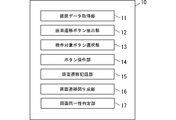
- FIG. 4 is a block diagram showing a functional configuration of the control device 10.
- FIG. 5 is a diagram showing an example of the structure of screen transition data recorded by the screen transition recording unit 15.
- FIG. 6A is a diagram showing an example of a screen transition diagram.
- FIG. 6B is a diagram showing an example of a button included in the screen transition diagram.
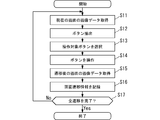
- FIG. 7 is a flowchart for explaining the operation of the screen transition verification process performed by the screen transition information generation system 1.
- FIG. 8 is a flowchart for explaining the procedure of the operation target button selection process in step S13 shown in FIG. 7.
- FIG. 1 is a diagram showing the overall configuration of the screen transition information generation system 1 of one embodiment.
- the screen transition information generation system 1 generates data for verifying transition states of various screens displayed on the display of the target device 2, which is a target for generating screen transition information, and is a control device (
- the screen transition information generator) 10 includes a robot 20 for performing operations such as tapping on the display of the target device 2, and a camera 30 for photographing the screen displayed on the display of the target device 2. Has been done.
- the target device 2 in the present embodiment can be operated via a touch panel provided on the display, such as a smartphone, a tablet terminal, or a car navigation device, and can be operated on the display in response to the operation.
- a device that displays various screens For example, in the case of a smartphone, it is possible to operate pre-installed application software (so-called application) to execute various information processing (for example, sending and receiving mail) by inputting operations via a touch panel. At that time, the screen displayed on the display is switched at any time by the application software. Further, for example, in the case of a car navigation device, it is possible to operate pre-installed software to execute information processing such as route search by inputting operations via a touch panel, and at that time, application software can be used. The screen displayed on the display is switched at any time.
- the control device 10 is configured by using a computer system including, for example, a CPU, RAM, ROM, a large-capacity storage device, a communication interface, and the like.
- FIG. 2 shows an example of a computer system for configuring a control device.
- the computer system shown is a CPU (central processing unit) 101, ROM (read-only memory) 102, RAM (temporary storage memory) 103, HDD (hard disk drive) 104, external IF (interface) 105, keyboard 106, mouse 107, It is configured to include an LCD (Liquid Crystal Display) 108.
- These CPUs 101 and the like are connected to each other by a bus.
- the CPU 101 processes information by executing a program.
- the ROM 102 stores a basic control program and the like necessary for the operation of the CPU 101.
- the RAM 103 temporarily stores data necessary for information processing of the CPU 101.
- the control device 10 described above is configured by these.
- the HDD 104 is a large-capacity storage device for storing data, and stores application programs, data, and the like for realizing each function of the control device 10 described above.
- the robot 20 can operate an arm in response to an operation command from the control device 10 to operate an operation target element such as a button or an icon on the screen displayed on the display of the target device 2. is there.
- an operation target element such as a button or an icon on the screen displayed on the display of the target device 2.
- the present embodiment will be described on the premise of tapping, which is an operation of touching the display as an “operation”.
- the robot 20 of the present embodiment is configured to have a pressing portion 21 that can freely move in at least three axial directions, and the pressing portion 21 is used to form a target device. You can tap any place on the display 2a of 2.
- a robot 20 is known as an industrial robot or the like, and for example, a robot published on a website accessible by the following URL can be used. https://www.jnovel.co.jp/service/qc/
- the camera 30 captures the screen displayed on the display 2a of the target device 2 and outputs the image data to the control device 10.
- the camera 30 may be integrally configured with the robot 20.
- FIG. 4 is a block diagram showing a functional configuration of the control device 10. These functions are realized by the CPU 101 of the control device 10 reading the program stored in the HDD 104 and executing the program.
- the control device 10 includes a screen data acquisition unit 11, a screen transition button extraction unit 12, an operation target button selection unit 13, a button operation unit 14, a screen transition recording unit 15, a screen transition diagram generation unit 16, and the same screen. It is configured to include a sex determination unit 17.
- the screen data acquisition unit 11 acquires the image data of the screen currently displayed on the display 2a of the target device 2 from the camera 30.
- the screen transition button extraction unit 12 analyzes the image data acquired by the screen data acquisition unit 11 by a known image recognition process, and extracts operation target elements such as buttons, icons, and character strings that are display elements on the screen. To do.
- the operation target element extracted here is an image element that is expected to cause a screen transition when it is operated.
- operation target elements such as buttons, icons, and character strings are collectively defined as "buttons”.
- the screen transition button extraction unit 12 displays a button that is expected to cause a screen transition when the area surrounded by a circle or rectangular frame, an area having a different color or pattern from the surrounding area, or the like is operated. It is recognized as a region, and the image data of the region and its position coordinates (for example, the coordinates of the center point of the image) are extracted.
- the operation target button selection unit 13 selects a button to be operated by the robot 20 from one or more buttons extracted by the screen transition button extraction unit 12.
- the button operation unit 14 controls the robot 20 to operate the button to be operated this time, which is selected by the operation target button selection unit 13. Specifically, the button operation unit 14 transmits an operation command including the position coordinates on the screen of the button to be operated to the robot 20.
- the robot 20 receives this operation command from the button operation unit 14 of the control device 10, it is represented by the position coordinates included in the operation command among the buttons on the screen displayed on the display 2a of the target device 2. Tap the button displayed at the position.
- the screen transition recording unit 15 records the screen transition data representing the result of the screen transition by the operation of the button operation unit 14 in the HDD 104 of the control device 10. Specifically, the screen transition recording unit 15 transmits, for example, image data of the screen before and after the transition, image data and position coordinates of the button extracted from the screen, image data and position coordinates of the button selected as the operation target, and the like to the HDD 104. Record.
- FIG. 5 is a diagram showing an example of the structure of screen transition data recorded by the screen transition recording unit 15.
- the folder A is a folder in which data related to the screen A is accumulated, and in the folder, the image data of the screen A, the image data and the position coordinates of the button extracted from the screen A, and the operation target are selected. Transition information data indicating the association between the button image data and the position coordinates is recorded. The same applies to other folders.
- folders B, D, and E are associated with the folder A as subfolders, and the transition route is represented by this.
- the operation of a predetermined button on the screen A transitions to each of the screens B, D, and E, and the operation of the predetermined button on the screen B transitions to the screen C.
- the transition to the screen F is performed by operating a predetermined button on the screen E.
- the screen transition diagram generation unit 16 generates a screen transition diagram based on the screen transition data recorded by the screen transition recording unit 15.
- the generated screen transition diagram is recorded on the HDD 104 and displayed on the LCD 108 as appropriate.
- the screen identity determination unit 17 has so far displayed a screen that is considered to be the same as the screen currently displayed on the display 2a of the target device 2. Determine if it is already displayed in the transition route that has been followed. Any known technique can be used as a method for determining whether or not the screens are the same. For example, the pixels of the image data are compared with each other, and when the pixels of a predetermined ratio (for example, 90%) or more match, it can be determined that the screens are the same. The screens before and after the transition may not completely match due to changes in some elements (for example, time display). Therefore, in the present embodiment, both screens are regarded as the same if they are similar to a certain standard or more. ing.
- a predetermined ratio for example, 90%
- FIG. 6A is a diagram showing an example of a screen transition diagram.
- This screen transition diagram is generated using the data accumulated up to that point when all the operations of the buttons on the transition route from the home screen screen A are completed.
- the user can verify the content of the overall screen transition. Further, a screen transition diagram may be displayed in the middle of the operation so that it can be confirmed how far the operation has been completed.
- FIG. 6B is a diagram showing an example of a button included in the screen transition diagram.
- the screen transition diagram includes various operation target elements such as an application software icon 40a, a graphic button 40b indicating some function, a symbol button 40c indicating some function, and a character string 40d indicating some function. As described above, these are collectively referred to as "buttons" in the present specification.
- arrow images indicating the transition direction are arranged between the images showing each screen.
- the image of the button that triggered the transition is arranged between each screen. For example, an image of the button a1 that triggers a transition between the images of the screen A and the screen B is shown. In this way, by showing the button image together with the arrow image indicating the transition direction between the images of each screen, it becomes easier to grasp the screen transition state.
- FIG. 7 is a flowchart for explaining the operation of the screen transition verification process performed by the screen transition information generation system 1.
- the order thereof may be appropriately changed as long as the information processing results are not inconsistent, and other processing may be further added.
- the position coordinates of the home button hm that is commonly displayed on all screens are manually set, and the transition destination when this home button hm is pressed is set in advance. It is assumed that the screen A is set as the home screen and is recorded in the HDD 104.
- a hardware button or a specific operation may be considered. In such cases, the position of the hardware button may be set in advance, or a specific operation may be set in advance.
- the screen data acquisition unit 11 of the control device 10 acquires the image data of the screen currently displayed on the display 2a of the target device 2 (step S11).
- the screen transition button extraction unit 12 analyzes the image data acquired by the screen data acquisition unit 11, and one or more of the buttons on the screen are expected to cause a screen transition when operated. Extract the button (step S12).
- the operation target button selection unit 13 selects a button to be operated this time from each button extracted by the screen transition button extraction unit 12 (step S13), and issues an operation command instructing the operation of the button to the robot. Send to 20.
- the robot 20 receives the operation command from the control device 10
- the robot 20 taps the button instructed by the operation command among the buttons on the screen displayed on the display 2a of the target device 2 (step S14).
- the screen data acquisition unit 11 of the control device 10 acquires the image data of the screen after the transition from the target device 2 (step S15).
- the screen transition recording unit 15 records screen transition data representing the result of the screen transition, such as image data before and after the screen transition, image data of the operation target button, and position coordinates, in the HDD 104 (step S16).
- the screen data acquisition unit 11 determines whether or not the recording of the transition of the full screen is completed (step S17), and if the recording of the transition of the full screen is not completed (No in step S17), step S11. Return to.
- the control device 10 completes a series of processes. Specifically, in step S17, for example, the screen after the transition is the home screen screen A, all the buttons on the transition route have already been operated, and all the buttons on the screen A have already been operated. If so, it can be determined that the recording of the transition of the full screen is completed.
- FIG. 8 is a flowchart for explaining the procedure of the operation target button selection process in step S13 shown in FIG. 7.
- the order thereof may be appropriately changed as long as the information processing results are not inconsistent, and other processing may be further added.
- the screen identity determination unit 17 displays a screen (already displayed screen) that has already been displayed in the transition route that the screen currently displayed on the display 2a of the target device 2 has been followed. ) Is the same as (step S131).
- step S131 When it is determined that the current screen is the same as the already displayed screen (Yes in step S131), the operation target button selection unit 13 is placed on the screen of the lower transition route that transitions from the already operated button on the screen. , It is determined whether or not there is an unoperated button (step S132).
- step S132 If it is determined that there is an unoperated button (Yes in step S132), in order to display the screen corresponding to this unoperated button again, the previously operated already operated button on the already displayed screen is operated this time. It is selected again as a target (step S133).
- step S132 determines whether or not there is (step S134), and if it is determined that the unoperated button exists (Yes in step S135), the operation target button selection unit 13 selects one of the unoperated buttons this time. Is selected as the operation target of (step S135).
- step S134 determines whether there is no unoperated button (No in step S134). If it is determined in step S134 that there is no unoperated button (No in step S134), the operation to return to the home screen returns to the home screen (step S136). Specifically, as described above, the pre-registered home button hm is operated to return to the home screen screen A.
- the screen A is a home screen, and as shown in FIG. 6 (A), operating the button a1 on the screen A transitions to the screen B, operating the button a2 transitions to the screen D, and the button a3 is pressed. It is assumed that the screen E is displayed when the operation is performed. Further, the screen B is a screen that transitions from the screen A, and it is assumed that operating the button b1 on the screen B transitions to the screen A, and operating the button b2 transitions to the screen C.
- the screen C is a screen that transitions from the screen B, and it is assumed that the transition to the screen B is performed when the button c1 on the screen C is operated.
- the screen D is a screen that transitions from the screen A, and it is assumed that the transition to the screen A is performed when the button d1 on the screen D is operated.
- the screen E is a screen that transitions from the screen A, and it is assumed that the transition to the screen F is performed when the button e1 on the screen E is operated.
- the screen F is a screen that transitions from the screen E, and it is assumed that the transition to the screen A is performed when the button f1 on the screen F is operated.
- the screen A which is the home screen, is displayed on the display 2a of the target device 2.
- the screen data acquisition unit 11 acquires the image data of the screen A currently displayed on the display 2a of the target device 2.
- the screen transition button extraction unit 12 analyzes the image data of the screen A, and the buttons a1, a2, as buttons that are expected to cause a screen transition when operated (hereinafter referred to as "buttons that are candidates for operation"), The position coordinates and the image of a3 are extracted. Since the button a1 has not been operated yet at this point, the operation target button selection unit 13 selects the button a1 as the operation target button, and the button operation unit 14 transmits an operation command including the position coordinates of the button a1 to the robot 20. .. As a result, the robot 20 taps the button a1 on the screen A displayed on the target device 2.
- the screen transition button extraction unit 12 analyzes the screen B and extracts the position coordinates and images of the buttons b1 and b2 as buttons that are candidates for operation. Since the button b1 has not been operated yet, the operation target button selection unit 13 selects the button b1 as the operation target button, and the robot 20 taps the button b1 on the screen B.
- the screen transition button extraction unit 12 analyzes the image data of the screen A and extracts the position coordinates and the image of the buttons a1, a2, and a3 as operation target candidate buttons.
- the screen identity determination unit 17 refers to the screen transition data recorded by the screen transition recording unit 15, and the screen A currently displayed on the display 2a of the target device 2 is the transition route that has been traced up to now. It is determined that the screen is the same as the screen A.
- the operation target button selection unit 13 reselects the button a1 as the operation target button in order to display the screen B again. To do.
- the robot 20 taps the button a1 on the screen A.
- the screen transition button extraction unit 12 analyzes the image data of the screen B and extracts the position coordinates and the image of the buttons b1 and b2 as the buttons to be the operation target candidates. At this point, since the button b2 has not been operated yet, the button b2 is selected as the operation target coordinates, and the robot 20 taps the button b2 on the screen B.
- the screen transition button extraction unit 12 analyzes the image data of the screen C and extracts the position coordinates and the image of the button c1 as a button to be an operation target candidate. At this point, since the button c1 has not been operated yet, the button c1 is selected as the operation target button, and the robot 20 taps the button c1 on the screen C.
- the screen transition button extraction unit 12 analyzes the image data of the screen B and extracts the position coordinates and the image of the buttons b1 and b2 as buttons that are candidates for operation.
- the screen identity determination unit 17 determines that the screen B currently displayed on the display of the target device 2 is the same screen as the screen B already displayed in the transition route that has been followed so far. Further, since the buttons b1 and b2 on the screen B and the buttons c1 on the screen C on the transition route after that are all operated, the home screen can be obtained by returning to the home screen (operation of the home button hm). Return to screen A.
- the screen transition button extraction unit 12 analyzes the image data of the screen A and extracts the position coordinates and the image of the buttons a1, a2, and a3 as operation target candidate buttons. At this point, since the button a2 has not been operated yet, the button a2 is selected as the operation target button, and the robot 20 taps the button a2 on the screen A.
- the screen transition button extraction unit 12 analyzes the image data of the screen D and extracts the position coordinates and the image of the button d1 as the operation target candidate button.
- the operation target button selection unit 13 selects the button d1 as the operation target button.
- the robot 20 taps the button d1 on the screen D.
- the screen transition button extraction unit 12 analyzes the screen A and extracts the position coordinates and images of the buttons a1, a2, and a3 as operation target candidate buttons.
- the screen identity determination unit 17 determines that this screen A is the same screen as the screen A already displayed on the transition route that has been followed so far. Further, since all the buttons on the transition route are operated for the buttons a1 and a2 that have already been the operation targets, the operation target button selection unit 13 selects the button a3 as the operation target button this time. The robot 20 taps the button a3 on the screen A.
- the screen transition button extraction unit 12 analyzes the screen E and extracts the position coordinates and the image of the button e1 as the operation target candidate button.
- the operation target button selection unit 13 selects the button e1 as the operation target button.
- the robot 20 taps the button e1 on the screen E.
- the screen transition button extraction unit 12 analyzes the screen F and extracts the position coordinates and the image of the button f1 as the operation target candidate button.
- the operation target button selection unit 13 selects the button f1 as the operation target button.
- the robot 20 taps the button f1 on the screen F.
- the screen transition button extraction unit 12 analyzes the screen A and extracts the position coordinates and images of the buttons a1, a2, and a3 as operation target candidate buttons.
- the screen identity determination unit 17 determines that this screen A is the same screen as the screen A already displayed in the transition route that has been followed so far. Since all the buttons on the transition route have been tapped and all the buttons on the screen A have been tapped, the recording of all transitions is completed.
- the screen transition diagram generation unit 16 When the processing is completed, the screen transition diagram generation unit 16 generates a screen transition diagram as shown in FIG. 6 (A) using the data recorded in the HDD 104 by the screen transition recording unit 15, and this screen transition.
- the data shown in the figure is recorded on the HDD 104 and displayed on the LCD 108.
- the screen transition information generation system 1 analyzes the image data of the screen currently displayed on the display of the target device 2, extracts the operation target candidate buttons, and selects the operation target button from them. Since the operation command is transmitted to the robot 20 and the robot 20 operates the button on the screen, it is not necessary to manually operate the button, and labor and labor can be reduced. Moreover, since it is not necessary to create an operation scenario in advance, it is possible to reduce the labor and labor for creating an operation scenario. Further, since the data representing the screen transition result can be accumulated, the screen transition diagram can be generated based on the data, and the screen transition diagram can be displayed or printed out, the contents of the screen transition can be easily verified.
- the above-described embodiment is only an example, and various modifications can be made within the scope of the gist of the present invention.
- the device configuration and data configuration of the screen transition information generation system 1 described in the above-described embodiment are merely examples.
- the screen transition data representing the result of the screen transition is not limited to the folder structure as described above, and various data structures such as simply accumulating the data in time series can be considered.
- the image data of the screen of the target device 2 is captured by the camera 30 and taken into the control device 10, but the control device 10 and the target device 2 are mutually connected by a signal cable (or wireless communication means).
- the screen data acquisition unit 11 of the control device 10 may be configured so as to be connected and directly capture the image data obtained by capturing the screen of the display 2a by the control device 10.
- the operation of the target device 2 to the display 2a is performed by the robot 20, but the control device 10 and the target device 2 are connected to each other by a signal cable (or wireless communication means) to the display 2a.
- the target device 2 may be made to generate a signal corresponding to the operation of.
- the button operation unit of the control unit 10 transmits a signal directly (internally) from the control device 10 to the target device 2 and generates a signal corresponding to the operation of the button on the display 2a. 14 may be configured.
- Screen transition information generation system 2 Target device, 2a: Display, 10: Control device, 11: Screen data acquisition unit, 12: Screen transition button extraction unit, 13: Operation target button selection unit, 14: Button operation unit , 15: Screen transition recording unit, 16: Screen transition diagram generation unit, 17: Screen identity determination unit, 20: Robot, 30: Camera
Landscapes
- Engineering & Computer Science (AREA)
- Theoretical Computer Science (AREA)
- General Engineering & Computer Science (AREA)
- Human Computer Interaction (AREA)
- Physics & Mathematics (AREA)
- General Physics & Mathematics (AREA)
- Robotics (AREA)
- Mechanical Engineering (AREA)
- Computer Hardware Design (AREA)
- Quality & Reliability (AREA)
- User Interface Of Digital Computer (AREA)
- Manipulator (AREA)
- Debugging And Monitoring (AREA)
Priority Applications (2)
| Application Number | Priority Date | Filing Date | Title |
|---|---|---|---|
| CN202080050612.5A CN114144287B (zh) | 2019-07-12 | 2020-06-12 | 画面转换信息生成装置、画面转换信息生成方法、画面转换信息生成用程序以及画面转换信息生成系统 |
| US17/626,491 US12049015B2 (en) | 2019-07-12 | 2020-06-12 | Screen image transition information generation device, screen image transition information generation method, screen image transition information generation program, and screen image transition information generation system |
Applications Claiming Priority (2)
| Application Number | Priority Date | Filing Date | Title |
|---|---|---|---|
| JP2019-130016 | 2019-07-12 | ||
| JP2019130016A JP7202571B2 (ja) | 2019-07-12 | 2019-07-12 | 画面遷移情報生成装置、画面遷移情報生成方法、画面遷移情報生成用プログラム、画面遷移情報生成システム |
Publications (1)
| Publication Number | Publication Date |
|---|---|
| WO2021010069A1 true WO2021010069A1 (ja) | 2021-01-21 |
Family
ID=74210602
Family Applications (1)
| Application Number | Title | Priority Date | Filing Date |
|---|---|---|---|
| PCT/JP2020/023239 Ceased WO2021010069A1 (ja) | 2019-07-12 | 2020-06-12 | 画面遷移情報生成装置、画面遷移情報生成方法、画面遷移情報生成用プログラム、画面遷移情報生成システム |
Country Status (4)
| Country | Link |
|---|---|
| US (1) | US12049015B2 (https=) |
| JP (1) | JP7202571B2 (https=) |
| CN (1) | CN114144287B (https=) |
| WO (1) | WO2021010069A1 (https=) |
Cited By (1)
| Publication number | Priority date | Publication date | Assignee | Title |
|---|---|---|---|---|
| US12049015B2 (en) | 2019-07-12 | 2024-07-30 | Japan Novel Corporation | Screen image transition information generation device, screen image transition information generation method, screen image transition information generation program, and screen image transition information generation system |
Families Citing this family (3)
| Publication number | Priority date | Publication date | Assignee | Title |
|---|---|---|---|---|
| US12231802B2 (en) * | 2021-08-04 | 2025-02-18 | Theia Scientific, LLC | System and method for multi-modal microscopy |
| JP7503669B1 (ja) | 2023-01-25 | 2024-06-20 | 株式会社 ミックウェア | プログラム、情報処理方法、及びモデル生成方法 |
| JP2025073906A (ja) * | 2023-10-27 | 2025-05-13 | 株式会社 ミックウェア | プログラム、情報処理装置 |
Citations (6)
| Publication number | Priority date | Publication date | Assignee | Title |
|---|---|---|---|---|
| JPH10198586A (ja) * | 1997-01-08 | 1998-07-31 | Nec Corp | Guiシステム自動操作装置および操作マクロ実行装置 |
| JP2002182914A (ja) * | 2000-12-18 | 2002-06-28 | Canon Inc | 画面遷移表示装置、画面遷移表示方法および記憶媒体 |
| JP2010079342A (ja) * | 2008-09-24 | 2010-04-08 | Hitachi Software Eng Co Ltd | Webアプリケーションの操作手順書生成システム |
| JP2012248097A (ja) * | 2011-05-30 | 2012-12-13 | Nippon Telegr & Teleph Corp <Ntt> | 画面遷移グラフの自動生成方法およびその装置 |
| JP2014235699A (ja) * | 2013-06-05 | 2014-12-15 | 株式会社日立システムズ | 情報処理装置、機器設定システム、機器設定装置、機器設定方法、およびプログラム |
| JP2016048471A (ja) * | 2014-08-27 | 2016-04-07 | 日本電気株式会社 | アプリケーション開発支援装置、そのデータ処理方法、およびプログラム |
Family Cites Families (11)
| Publication number | Priority date | Publication date | Assignee | Title |
|---|---|---|---|---|
| CN100498100C (zh) * | 2007-09-30 | 2009-06-10 | 魏华 | 一种中央空调台数控制盘触摸屏的主控画面的设计方法 |
| JP2008140408A (ja) | 2007-12-28 | 2008-06-19 | Fujitsu Ltd | 仕様書生成プログラムおよびその記録媒体、仕様書生成装置ならびに仕様書生成方法 |
| US9652077B2 (en) * | 2010-12-09 | 2017-05-16 | T-Mobile Usa, Inc. | Touch screen testing platform having components for providing conductivity to a tip |
| JP5516473B2 (ja) * | 2011-03-24 | 2014-06-11 | コニカミノルタ株式会社 | 画像形成装置、表示方法および表示プログラム |
| JP2012248094A (ja) | 2011-05-30 | 2012-12-13 | Denso Corp | 電子機器 |
| US9665252B2 (en) * | 2012-04-18 | 2017-05-30 | Sony Corporation | Information processing apparatus and program |
| CN102935288B (zh) | 2012-10-31 | 2015-04-22 | 深圳市德力信科技有限公司 | 一种人机互动游戏实现装置及方法 |
| JP2019004221A (ja) * | 2017-06-12 | 2019-01-10 | 三菱電機株式会社 | 制御装置及びプログラム |
| JP2019032719A (ja) * | 2017-08-08 | 2019-02-28 | 株式会社エス・エム・エス・データテック | 情報処理システム、情報処理方法及びプログラム |
| US10994411B2 (en) * | 2018-10-10 | 2021-05-04 | Aipps, Llc. | Mobile phone robot |
| JP7202571B2 (ja) | 2019-07-12 | 2023-01-12 | 日本ノーベル株式会社 | 画面遷移情報生成装置、画面遷移情報生成方法、画面遷移情報生成用プログラム、画面遷移情報生成システム |
-
2019
- 2019-07-12 JP JP2019130016A patent/JP7202571B2/ja active Active
-
2020
- 2020-06-12 WO PCT/JP2020/023239 patent/WO2021010069A1/ja not_active Ceased
- 2020-06-12 US US17/626,491 patent/US12049015B2/en active Active
- 2020-06-12 CN CN202080050612.5A patent/CN114144287B/zh active Active
Patent Citations (6)
| Publication number | Priority date | Publication date | Assignee | Title |
|---|---|---|---|---|
| JPH10198586A (ja) * | 1997-01-08 | 1998-07-31 | Nec Corp | Guiシステム自動操作装置および操作マクロ実行装置 |
| JP2002182914A (ja) * | 2000-12-18 | 2002-06-28 | Canon Inc | 画面遷移表示装置、画面遷移表示方法および記憶媒体 |
| JP2010079342A (ja) * | 2008-09-24 | 2010-04-08 | Hitachi Software Eng Co Ltd | Webアプリケーションの操作手順書生成システム |
| JP2012248097A (ja) * | 2011-05-30 | 2012-12-13 | Nippon Telegr & Teleph Corp <Ntt> | 画面遷移グラフの自動生成方法およびその装置 |
| JP2014235699A (ja) * | 2013-06-05 | 2014-12-15 | 株式会社日立システムズ | 情報処理装置、機器設定システム、機器設定装置、機器設定方法、およびプログラム |
| JP2016048471A (ja) * | 2014-08-27 | 2016-04-07 | 日本電気株式会社 | アプリケーション開発支援装置、そのデータ処理方法、およびプログラム |
Cited By (1)
| Publication number | Priority date | Publication date | Assignee | Title |
|---|---|---|---|---|
| US12049015B2 (en) | 2019-07-12 | 2024-07-30 | Japan Novel Corporation | Screen image transition information generation device, screen image transition information generation method, screen image transition information generation program, and screen image transition information generation system |
Also Published As
| Publication number | Publication date |
|---|---|
| US20220281115A1 (en) | 2022-09-08 |
| CN114144287A (zh) | 2022-03-04 |
| CN114144287B (zh) | 2024-07-23 |
| JP7202571B2 (ja) | 2023-01-12 |
| JP2021015476A (ja) | 2021-02-12 |
| US12049015B2 (en) | 2024-07-30 |
Similar Documents
| Publication | Publication Date | Title |
|---|---|---|
| WO2021010069A1 (ja) | 画面遷移情報生成装置、画面遷移情報生成方法、画面遷移情報生成用プログラム、画面遷移情報生成システム | |
| US8542199B2 (en) | Image processing apparatus, image processing method, and program | |
| JP2007304669A (ja) | 電子機器の制御方法およびプログラム | |
| US10282143B2 (en) | Information processing apparatus and control method of information processing apparatus | |
| JP2013235450A (ja) | 情報処理装置、情報処理装置の制御方法、およびプログラム | |
| JP2022137608A (ja) | 情報処理装置、情報処理方法およびプログラム | |
| CN101477432A (zh) | 电子装置及其打开应用程序方法与功能图像显示方法 | |
| JP5875262B2 (ja) | 表示制御装置 | |
| JP2021015476A5 (https=) | ||
| JP2022011034A (ja) | データ入力支援装置、データ入力支援方法及びプログラム | |
| JP5991538B2 (ja) | データ処理装置、データ処理システム及びプログラム | |
| US10114518B2 (en) | Information processing system, information processing device, and screen display method | |
| US11240384B2 (en) | Information processing apparatus, method for information processing, and storage medium | |
| JP6183940B2 (ja) | 情報処理装置及び入力支援方法 | |
| JP5831312B2 (ja) | 漢字表示装置およびプログラム | |
| JP6423933B2 (ja) | 情報処理装置、帳票管理システム、帳票管理サーバ、情報処理方法、及びそのプログラム | |
| JP2016091092A (ja) | ブラウザ、ブラウザの制御方法およびプログラム | |
| JP5746300B2 (ja) | ユーザ操作自動化装置 | |
| JP2014197256A (ja) | 編集装置、編集方法、及びプログラム | |
| JP2002149296A (ja) | 情報端末装置及び連続実行プログラムを記録した記録媒体 | |
| JP2021026434A (ja) | フローチャート表示システム及びフローチャート表示プログラム | |
| JP2009169548A (ja) | 情報処理装置、そのマルチウィンドウ表示方法及びプログラム | |
| TWI411952B (zh) | 文件檔案內容之縮放顯示系統及其方法 | |
| JP6203613B2 (ja) | 情報処理装置、帳票管理システム、帳票管理装置、情報処理方法、及びそのプログラム | |
| JP2019139432A (ja) | 作業端末、運用システム、作業管理サーバ、作業方法、運用管理方法、およびプログラム |
Legal Events
| Date | Code | Title | Description |
|---|---|---|---|
| 121 | Ep: the epo has been informed by wipo that ep was designated in this application |
Ref document number: 20840863 Country of ref document: EP Kind code of ref document: A1 |
|
| NENP | Non-entry into the national phase |
Ref country code: DE |
|
| 122 | Ep: pct application non-entry in european phase |
Ref document number: 20840863 Country of ref document: EP Kind code of ref document: A1 |
|
| WWG | Wipo information: grant in national office |
Ref document number: 202217001049 Country of ref document: IN |