WO2016147988A1 - 情報処理システム、情報処理装置および遠隔操作支援方法 - Google Patents
情報処理システム、情報処理装置および遠隔操作支援方法 Download PDFInfo
- Publication number
- WO2016147988A1 WO2016147988A1 PCT/JP2016/057433 JP2016057433W WO2016147988A1 WO 2016147988 A1 WO2016147988 A1 WO 2016147988A1 JP 2016057433 W JP2016057433 W JP 2016057433W WO 2016147988 A1 WO2016147988 A1 WO 2016147988A1
- Authority
- WO
- WIPO (PCT)
- Prior art keywords
- remote control
- screen
- information processing
- processing apparatus
- image
- Prior art date
- Legal status (The legal status is an assumption and is not a legal conclusion. Google has not performed a legal analysis and makes no representation as to the accuracy of the status listed.)
- Ceased
Links
Images


Classifications
-
- G—PHYSICS
- G06—COMPUTING OR CALCULATING; COUNTING
- G06F—ELECTRIC DIGITAL DATA PROCESSING
- G06F3/00—Input arrangements for transferring data to be processed into a form capable of being handled by the computer; Output arrangements for transferring data from processing unit to output unit, e.g. interface arrangements
- G06F3/01—Input arrangements or combined input and output arrangements for interaction between user and computer
- G06F3/048—Interaction techniques based on graphical user interfaces [GUI]
- G06F3/0481—Interaction techniques based on graphical user interfaces [GUI] based on specific properties of the displayed interaction object or a metaphor-based environment, e.g. interaction with desktop elements like windows or icons, or assisted by a cursor's changing behaviour or appearance
-
- G—PHYSICS
- G06—COMPUTING OR CALCULATING; COUNTING
- G06F—ELECTRIC DIGITAL DATA PROCESSING
- G06F3/00—Input arrangements for transferring data to be processed into a form capable of being handled by the computer; Output arrangements for transferring data from processing unit to output unit, e.g. interface arrangements
- G06F3/01—Input arrangements or combined input and output arrangements for interaction between user and computer
- G06F3/048—Interaction techniques based on graphical user interfaces [GUI]
- G06F3/0487—Interaction techniques based on graphical user interfaces [GUI] using specific features provided by the input device, e.g. functions controlled by the rotation of a mouse with dual sensing arrangements, or of the nature of the input device, e.g. tap gestures based on pressure sensed by a digitiser
- G06F3/0488—Interaction techniques based on graphical user interfaces [GUI] using specific features provided by the input device, e.g. functions controlled by the rotation of a mouse with dual sensing arrangements, or of the nature of the input device, e.g. tap gestures based on pressure sensed by a digitiser using a touch-screen or digitiser, e.g. input of commands through traced gestures
-
- H—ELECTRICITY
- H04—ELECTRIC COMMUNICATION TECHNIQUE
- H04N—PICTORIAL COMMUNICATION, e.g. TELEVISION
- H04N21/00—Selective content distribution, e.g. interactive television or video on demand [VOD]
- H04N21/40—Client devices specifically adapted for the reception of or interaction with content, e.g. set-top-box [STB]; Operations thereof
- H04N21/43—Processing of content or additional data, e.g. demultiplexing additional data from a digital video stream; Elementary client operations, e.g. monitoring of home network or synchronising decoder's clock; Client middleware
- H04N21/436—Interfacing a local distribution network, e.g. communicating with another STB or one or more peripheral devices inside the home
-
- H—ELECTRICITY
- H04—ELECTRIC COMMUNICATION TECHNIQUE
- H04N—PICTORIAL COMMUNICATION, e.g. TELEVISION
- H04N21/00—Selective content distribution, e.g. interactive television or video on demand [VOD]
- H04N21/40—Client devices specifically adapted for the reception of or interaction with content, e.g. set-top-box [STB]; Operations thereof
- H04N21/47—End-user applications
- H04N21/472—End-user interface for requesting content, additional data or services; End-user interface for interacting with content, e.g. for content reservation or setting reminders, for requesting event notification, for manipulating displayed content
-
- H—ELECTRICITY
- H04—ELECTRIC COMMUNICATION TECHNIQUE
- H04Q—SELECTING
- H04Q9/00—Arrangements in telecontrol or telemetry systems for selectively calling a substation from a main station, in which substation desired apparatus is selected for applying a control signal thereto or for obtaining measured values therefrom
Definitions
- the present invention relates to data processing technology, and more particularly to an information processing system, an information processing apparatus, and a remote operation support method.
- Patent Document 1 The applicant has proposed a technique for supporting viewing of electronic content (see, for example, Patent Document 1).
- smartphones have become widespread, and a technique for using a smartphone as a TV remote control has been proposed (see, for example, Patent Document 2).
- buttons or the like for operating the device to be controlled may be displayed as an image on the display of the mobile terminal.
- the present inventor has considered that it is not easy for the user to grasp the display position of the image to be operated, the user needs to check the hand frequently, and the convenience for the user is not necessarily high.
- the present invention has been made on the basis of the above-mentioned recognition of the present inventor, and a main object thereof is to provide a technique for improving user convenience when using a mobile terminal as a remote control.
- an information processing system includes a first information processing device and a second information processing device.
- the first information processing apparatus displays an operation screen display unit for displaying an operation screen for allowing a user to input an operation on the second information processing apparatus, and information indicating the operation input on the operation screen as the second information processing
- An operation notification unit for notifying the apparatus.
- the second information processing apparatus displays a predetermined content and corresponds to a content display unit that updates display content in response to an operation notified from the first information processing apparatus, and an operation screen of the first information processing apparatus
- a remote control image display unit that displays a remote control image to be displayed together with a content screen and displays an operation position image indicating a position where the user inputs an operation on the operation screen on the remote control image.
- the apparatus includes an operation information acquisition unit that acquires information about an operation input on an operation screen notified from another information processing apparatus that displays an operation screen for allowing a user to input an operation on the apparatus, and a predetermined content And display a content display unit that updates display content in response to an operation notified from another information processing apparatus, and a remote control image corresponding to the operation screen of the other information processing apparatus together with the content screen.
- a remote control image display unit that displays an operation position image indicating a position where the user inputs an operation on the remote control image.
- Still another aspect of the present invention is also an information processing apparatus.
- This apparatus includes an operation screen display unit that displays an operation screen for allowing a user to input an operation to another information processing apparatus that displays predetermined content, and information indicating an operation input on the operation screen. By notifying the device, the remote control image corresponding to the operation screen is displayed together with the content screen on another information processing device, and the operation position image indicating the position where the user inputs the operation on the operation screen is displayed on the remote control image.
- An operation notification unit is also notifying the device.
- Still another aspect of the present invention is a remote operation support method.
- the information processing apparatus acquires information indicating an operation input on an operation screen notified from another information processing apparatus that displays an operation screen for allowing a user to input an operation on the apparatus; Displaying predetermined content, updating the display content in response to an operation notified from another information processing apparatus, and displaying a remote control image corresponding to the operation screen of the other information processing apparatus together with the content screen, And displaying an operation position image indicating a position where the user inputs an operation on the screen on the remote control image.
- FIG. 1 It is a figure which shows the structure of the entertainment system of embodiment. It is a block diagram which shows the structure of the mobile terminal of FIG. It is a figure which shows a remote control screen. It is a block diagram which shows the structure of the stationary game machine of FIG. It is a figure which shows the example of a display of a remote control image. It is a figure which shows the example of a display of a remote control image. It is a figure which shows the example of a display of the remote control image in a 3rd modification.
- the user can easily input a desired operation such as channel selection while minimizing the confirmation at hand.
- a desired operation such as channel selection
- the mobile terminal is used as a remote control
- a remote operation support method for improving user convenience in remote control operation using a mobile terminal is proposed. Specifically, an image corresponding to the remote control screen on the mobile terminal side is displayed on the device on the control target side, and information indicating the operation input by the user on the remote control screen is displayed on the image. This makes it easier for the user to grasp the operation content on the remote control screen without frequently checking the screen of the mobile terminal. That is, according to the remote operation support method of the embodiment, the convenience of the user when using the mobile terminal as a remote control and the efficiency of the remote control operation can be improved.
- the tap operation is an operation of pressing one point on the screen and then releasing the finger from the screen (also referred to as “release”).
- the tap operation is as follows: 1) One finger presses the effective area of the tap operation provided on the operation target (image, etc.) once. 2) The position of the pressed finger is effective on the operation target. It is a series of operations of staying in the area and 3) releasing the finger.
- the drag operation is an operation for moving the operation target following the finger.
- the drag operation includes 1) pressing the operation target with a finger, 2) moving the finger over a predetermined distance threshold determined as a tap operation (for example, outside the effective area of the tap operation) while pressing the operation target. )
- the flick operation is an operation of moving the operation target while pushing it with a finger and releasing the finger at a certain speed or higher. For example, in the flick operation, 1) the operation target is pushed with one finger, 2) the finger is moved more than a predetermined distance threshold determined as the tap operation while pushing the operation target, and 3) a predetermined unit time. This is a series of operations of releasing a finger at a speed equal to or higher than a predetermined distance.
- FIG. 1 shows a configuration of an entertainment system 10 according to the embodiment.
- the entertainment system 10 is an information processing system built at a user's home, and includes a mobile terminal 12, a stationary game machine 14, and a recording device 20.
- Each of these devices is connected via a home network (in other words, a home LAN), and more specifically, is connected to a router 22 such as a Wi-Fi (registered trademark) router wirelessly or by wire.
- a home network in other words, a home LAN
- a router 22 such as a Wi-Fi (registered trademark) router wirelessly or by wire.
- the mobile terminal 12, the stationary game machine 14, and the recording device 20 may directly communicate with each other using a known P2P communication technique.
- the stationary game machine 14 is connected to the controller 16 and the display 18.
- the controller 16 is a controller dedicated to the stationary game machine 14 and is connected to the stationary game machine 14 by Bluetooth (registered trademark).
- the display 18 may be a home-use television receiver, and is connected to the stationary game machine 14 via HDMI (registered trademark).
- the entertainment system 10 may be configured to include another stationary information processing apparatus such as a desktop PC or a smart TV instead of the stationary game machine 14.
- the mobile terminal 12 may be a smartphone, a tablet terminal, or a portable game machine.
- a TV viewing application (hereinafter also referred to as “TV viewing App”) is installed in the mobile terminal 12 and the stationary game machine 14.
- the TV viewing App cooperates with the recording device to display a program being broadcast, for example, and to execute a recording reservation.
- the recording device 20 is a video recording / reproducing device that is connected to an antenna (not shown), and that includes a tuner and a hard disk.
- the recording device 20 communicates with the mobile terminal 12 and the stationary game machine 14, and executes a recording process for the program designated by the user's recording reservation operation on the mobile terminal 12 or the stationary game machine 14.
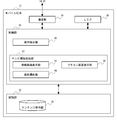
- FIG. 2 is a block diagram showing the configuration of the mobile terminal 12 of FIG.
- Each block of the present specification can be realized by hardware, an element such as a CPU and memory of a computer, an electronic circuit, and a mechanical device, and is realized by software by a computer program or the like.
- the functional block realized by those cooperation is drawn. Therefore, those skilled in the art will understand that these functional blocks can be realized in various forms by a combination of hardware and software.
- the mobile terminal 12 includes a control unit 30, a storage unit 32, a communication unit 34, and an LCD 36.
- the control unit 30 executes various data processes and controls the operation of the mobile terminal 12.
- the storage unit 32 is a storage area that stores data that is referred to or updated by the control unit 30.
- the control unit 30 may be realized by the CPU of the mobile terminal 12 executing a computer program, and the storage unit 32 may be realized by the storage or memory of the mobile terminal 12.
- the communication unit 34 communicates with an external device via a communication network according to various communication protocols.
- the control unit 30 transmits / receives data to / from the stationary game machine 14 and the recording device 20 via the communication unit 34.
- the LCD 36 is a liquid crystal display (monitor) that is integrated with the main body of the mobile terminal 12 and serves as a user interface of the mobile terminal 12.
- the LCD 36 also has a touch panel function. It goes without saying that the mobile terminal 12 may include other types of display devices such as an organic EL display instead of the LCD 36.
- the storage unit 32 includes a content holding unit 38.
- the content holding unit 38 holds data of various contents to be displayed by the TV viewing App. For example, data relating to a program guide or broadcast program, data relating to a recording reservation target program or recorded program, ranking data, questionnaire data, and the like are held. These data may be provided from the recording device 20 and stored in the content holding unit 38.
- the control unit 30 includes an operation detection unit 40 and a television viewing processing unit 42.
- the operation detection unit 40 detects an operation input by the user to the LCD 36.
- the operation detection unit 40 detects an operation input position (such as the coordinates of the screen of the LCD 35) and an operation type (such as a tap operation or a drag operation).
- the television viewing processing unit 42 is realized by a television viewing App installed in the mobile terminal 12.
- the TV viewing App is stored and distributed in a predetermined recording medium such as an SD memory card, or downloaded from an application site server or the like and installed in the mobile terminal 12.
- the mobile terminal 12 exhibits the function of the TV viewing processing unit 42 when the CPU or GPU of the mobile terminal 12 executes the TV viewing App program stored in the storage of the mobile terminal 12.
- the television viewing processing unit 42 includes an information screen display unit 44, a remote control screen display unit 46, and an operation notification unit 48. These may be implemented as program modules for TV viewing App.
- the information screen display unit 44 generates data of various screens for TV viewing App, and displays the generated screen data on the LCD 36.
- the information screen display unit 44 generates screen data including content data (program information and the like) stored in the content holding unit 38.
- the remote control screen display unit 46 generates a remote control screen that is an operation screen for allowing the user to input a remote operation for the TV viewing App of the stationary game machine 14 and displays it on the LCD 36. Typically, a remote control screen is displayed over the entire surface of the LCD 36.
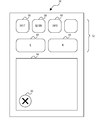
- Fig. 3 shows the remote control screen.
- the remote control screen 50 includes a button operation area 52 and a drag operation area 54.
- the button operation area 52 is an area where a selection operation for a virtual button (in other words, a button image), in the embodiment, a tap operation is input.
- an end button 56, a program guide button 58, and a notification button 60 are arranged as button images corresponding to each menu of the TV viewing App.
- an L button 62 and an R button 64 are arranged as button images corresponding to the buttons of the controller 16 of the stationary game machine 14.
- the drag operation area 54 is an area in which an operation in an arbitrary mode on the touch panel is input.
- the operation on the drag operation area 54 corresponds to a button input operation on the controller 16 of the stationary game machine 14.
- a part of the drag operation area 54 is a button operation area 52.
- a cancel button 66 is arranged.
- the remote control screen display unit 46 is an image of each button image or drag operation area 54 shown in FIG. 3, that is, holds a plurality of element data of the remote control screen 50.
- the remote control screen display unit 46 of the embodiment holds element data corresponding to the display size of a specific tablet terminal.
- the remote control screen display unit 46 enlarges or reduces each element data according to the width of the LCD 36 that displays the remote control screen 50 and arranges it on the remote control screen. Therefore, the remote control screen display unit 46 displays the remote control screen 50 larger as the size of the LCD 36 is larger, and displays each element data larger.
- the remote control screen display unit 46 arranges a plurality of element data within the screen of the remote control screen 50 in a downward alignment.
- the operation detection unit 40 detects the user operation input to the remote control screen 50, and detects the type of operation and the operation position.
- the types of operations to be detected include flick operations, drag operations, tap operations, double tap operations (short-time continuous tap operations), and hold operations (long press operations).
- the operation position may be detected as vertical and horizontal two-dimensional coordinates with a predetermined position (such as the lower left corner) on the remote control screen 50 as the origin. For the flick operation and the tap operation, an operation position including the flick direction and the tap direction may be further detected.
- the operation notification unit 48 transmits operation information indicating the operation to the stationary game machine 14.
- the operation information includes an operation type and an operation position input to the remote control screen 50.
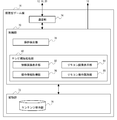
- FIG. 4 is a block diagram showing the configuration of the stationary game machine 14 of FIG.
- the stationary game machine 14 includes a control unit 70, a storage unit 72, and a communication unit 74.
- the control unit 70 executes various data processes and controls the operation of the stationary game machine 14.
- the storage unit 72 is a storage area that stores data that is referred to or updated by the control unit 70.
- the control unit 70 may be realized by the CPU of the stationary game machine 14 executing a computer program, and the storage unit 72 may be realized by the storage or memory of the stationary game machine 14.
- the communication unit 74 communicates with an external device via a communication network according to various communication protocols.
- the control unit 70 transmits / receives data to / from the mobile terminal 12, the controller 16, and the recording device 20 via the communication unit 74.
- the control unit 30 transmits display target image data to the display 18 via a display driver (not shown), and displays the image data.
- the storage unit 72 includes a content holding unit 76. Similar to the content holding unit 38 of the mobile terminal 12, the content holding unit 76 holds data of various contents to be displayed by the TV viewing App. For example, data relating to a program guide or broadcast program, data relating to a recording reservation target program or recorded program, ranking data, questionnaire data, and the like are held.
- the control unit 70 includes an operation detection unit 78 and a television viewing processing unit 80.
- the operation detection unit 78 detects an operation input by the user to the controller 16.
- the operation detection unit 78 detects types of keys (up / down / left / right direction keys, etc.) and buttons ( ⁇ button, x button, etc.) operated by the user in the controller 16.
- the television viewing processing unit 80 is realized by a television viewing App installed in the stationary game machine 14.
- the TV viewing App is stored and distributed in a predetermined recording medium such as a DVD and installed in the stationary game machine 14. Then, when the CPU or GPU of the stationary game machine 14 executes the TV viewing App program stored in the storage of the stationary game machine 14, the stationary game machine 14 exhibits the function of the television viewing processing unit 80. .
- the TV viewing processing unit 80 includes an information screen display unit 82, a remote control image display unit 84, an operation information acquisition unit 86, and a remote control operation identification unit 88. These may be implemented as program modules for TV viewing App.
- the information screen display unit 82 generates data of various screens for TV viewing App and causes the display 18 to display the generated screen data.
- the information screen display unit 82 generates screen data including content data (program information and the like) stored in the content holding unit 76.
- the TV viewing processing unit 80 can also be said to be a content display unit.
- the TV viewing App screen is referred to as an “App screen”.
- the App screen includes a top screen for TV viewing App, a program guide screen and a search result screen, a viewing screen for programs and recorded programs being broadcast, a screen for ranking information and questionnaire information, and the like.
- the information screen display unit 82 updates the display content of the App screen according to the operation. For example, the top screen of TV viewing App is switched to the program guide screen, and the program selection cursor is moved on the program guide screen.
- the remote control image display unit 84 displays a remote control image that is an image corresponding to the remote control screen 50 on the display 18 together with the App screen. Specifically, a remote control image imitating the appearance of the remote control screen 50 is displayed on the App screen in a translucent manner. The transparency of the remote control image may be determined based on the knowledge and experiment of the developer while taking into account the visibility of the App screen and the remote control image.
- the operation information acquisition unit 86 is information indicating the user's operation content on the remote control screen 50, and acquires the operation information transmitted from the mobile terminal 12 via the communication unit 74. As described above, the operation information includes the operation type and operation position input to the remote control screen 50.
- the remote control image display unit 84 displays on the remote control image an operation position image that is an image showing a position where the user inputs an operation on the remote control screen 50.
- Remote control image display unit 84 changes the display position of the operation position image on the remote control image when the operation input position on remote control screen 50 changes. In other words, the remote control image display unit 84 follows the movement of the operation input position on the remote control screen 50 and moves the display position of the operation position image on the remote control image.
- the remote control image display unit 84 holds the correspondence between the coordinates of the remote control screen 50 and the coordinates of the remote control image.
- the remote control image display unit 84 identifies the coordinate value of the remote control image corresponding to the coordinate value of the operation position on the remote control screen 50, and displays the operation position image at the position on the remote control image specified by the identified coordinate value.
- the operation information acquisition unit 86 acquires new operation information
- the remote control image display unit 84 identifies a new position of the operation position image according to the operation position indicated by the new operation information. Then, the operation position image is switched to be displayed at the new position.
- the remote control image display unit 84 maintains the display of the operation position image on the remote control image until a predetermined time elapses after the user's operation input to the remote control screen 50 of the mobile terminal 12 is completed. Specifically, the remote control image display unit 84 displays the operation position image based on the last operation information until the operation information acquisition unit 86 does not receive operation information until the state continues for a predetermined time or longer. To maintain. Then, when the state in which the operation information is not received continues for a predetermined time or longer, the display of the operation position image is ended, in other words, the operation position image displayed so far is not displayed.
- This predetermined time may be several hundred milliseconds to several seconds, and an appropriate value may be determined based on the knowledge and experiment of the developer.
- the remote control operation identifying unit 88 holds the correspondence between the operation type indicated by the operation information and the operation type in the TV viewing App, and holds the correspondence between the operation type indicated by the operation information and the operation type in the controller 16. To do. When the operation information is acquired, the remote control operation identification unit 88 determines that the operation of the TV viewing App or the controller 16 associated with the operation type indicated by the operation information is input. Note that when the operation type is a flick operation or a drag operation, the remote control operation identification unit 88 may further identify the direction of these operations according to the transition of coordinates indicated by the operation position.
- the remote control operation identifying unit 88 identifies a flick operation in the drag operation area 54 of the remote control screen 50 as a single press operation on a direction key that matches the flick direction. Also, the drag operation is identified as a long press operation on a direction key that matches the drag direction. Further, the tap operation, the hold operation, and the double tap operation are identified as the pressing operation of the ⁇ button, the ⁇ button, and the ⁇ button, respectively.
- the remote control operation identification unit 88 holds the correspondence between the coordinates of the remote control screen 50 and the buttons on the remote control screen 50. When the coordinates indicated by the operation position of the operation information correspond to a specific button, the remote control operation identification unit 88 determines that the operation is for the specific button.
- the remote control operation identifying unit 88 identifies the request to display the program guide screen of the TV viewing App.
- the operation information indicates a tap operation on the notification button 60 on the remote control screen 50
- the operation information is identified as a request to display a notification screen for TV viewing App.
- the operation information indicates a tap operation on the L button 62, the R button 64, and the cancel button 66 on the remote control screen 50
- the pressing operation of the L button, the R button, and the x button of the controller 16 is identified.
- the remote control operation identification unit 88 notifies the information screen display unit 44 of the operation content identified based on the operation information notified from the mobile terminal 12.
- the information screen display unit 44 updates the display content of the App screen according to the operation content identified by the remote control operation identification unit 88. That is, the information screen display unit 44 handles the operation content identified by the remote control operation identifying unit 88 as a key operation or button operation in the controller 16.
- the television viewing App has been activated in the stationary game machine 14, and the App screen is displayed on the display 18.
- the user remotely operates the TV viewing App of the stationary game machine 14 using the mobile terminal 12 from a remote location where the controller 16 cannot communicate with the stationary game machine 14 or in a situation where the controller 16 is not held.
- the user starts TV viewing App of the mobile terminal 12.
- the information screen display unit 44 of the mobile terminal 12 displays the top screen of TV viewing App on the LCD 36, and the user selects a remote control icon in the top screen.
- the remote control screen display unit 46 of the mobile terminal 12 displays the remote control screen 50 shown in FIG.
- the operation notification unit 48 of the mobile terminal 12 transmits remote control start information for starting remote control operation to the stationary game machine 14.
- the remote control image display unit 84 of the stationary game machine 14 displays a remote control image on the display 18 when receiving the remote control start information.
- FIG. 5 shows a display example of the remote control image.
- This figure shows a state in which a remote control image 94 is displayed when a program guide screen 90 as an App screen is being displayed on the display 18 of the stationary game machine 14.
- the remote control image 94 imitates the appearance of the remote control screen 50 and includes a button image 96 corresponding to the button operation area 52 of the remote control screen 50 and a drag area image 98 corresponding to the drag operation area 54 of the remote control screen 50.
- the user moves the cursor 92 by the operation of the direction key to select a desired program, and presses the ⁇ button to display the recording reservation window.
- the operation notification unit 48 defers operation information indicating the flick operation or drag operation.
- the information screen display unit 82 of the stationary game machine 14 moves the cursor 92 on the program guide screen 90 in the flick direction or the drag direction, similarly to the direction operation on the controller 16.
- the cursor 92 is moved by one unit (for example, one square), and in the case of a drag operation, the cursor 92 is continuously moved.
- the operation notification unit 48 sets operation information indicating the tap operation to the stationary game machine 14.
- the remote control operation identifying unit 88 of the stationary game machine 14 detects the tap operation indicated by the operation information as a ⁇ button pressing operation of the controller 16.
- the information screen display unit 82 of the stationary game machine 14 displays a recording reservation window for the focused program by the cursor 92 in the same manner as when the O button is operated on the controller 16. The same operation is performed during remote operation of another App screen of the stationary game machine 14.
- the user taps the end button 56 on the remote control screen 50.
- the remote control screen display unit 46 of the mobile terminal 12 ends the display of the remote control screen 50 on the LCD 36, and the operation notification unit 48 transmits remote control end information indicating that the remote control screen operation is ended to the stationary game machine 14.
- the remote control image display unit 84 of the stationary game machine 14 ends the display of the remote control image when the remote control end information is received.
- the remote control screen display unit 46 of the stationary game machine 14 displays the operation position image 100 at the position of the remote control image 94 corresponding to the operation input position on the remote control screen 50.
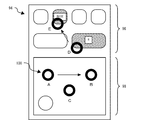
- FIG. 6 shows a display example of the remote control image 94.
- the remote control image 94 shown in the figure is actually displayed superimposed on a specific App screen displayed on the display 18 of the stationary game machine 14.
- the remote control image display unit 84 of the stationary game machine 14 moves the operation position image 100 from A to B, and the information screen display unit 82 simultaneously moves the cursor on the App screen from left to right. 6 corresponds to the drag operation start position on the remote control screen 50, and the position B corresponds to the drag operation end position.
- the remote control image display unit 84 of the stationary game machine 14 displays the operation position image 100 at the position C corresponding to the input position of the tap operation.
- the information screen display unit 82 executes the same App screen update process as when the controller 16 is operated.
- the remote control image display unit 84 of the stationary game machine 14 When the user touches the R button 64 on the remote control screen 50 of the mobile terminal 12, the remote control image display unit 84 of the stationary game machine 14 operates to the position D of the remote control image 94 corresponding to the touch position on the remote control screen 50. The position image 100 is displayed. Since the touch position matches the position of the R button 64, the remote control image display unit 84 displays the button image 96 corresponding to the R button 64 in an emphasizing manner that suggests that the button has been selected. For example, it is highlighted with a conspicuous color such as red, and the name (here, “R”) is displayed in the button image 96.
- the remote control image display unit 84 of the stationary game machine 14 moves the operation position image 100 from D to E. Further, the remote control image display unit 84 ends the highlight display of the button image 96 (“R”) corresponding to the R button 64 and highlights the button image 96 (“GUIDE”) corresponding to the program guide button 58. .
- the remote control image display unit 84 maintains the display of the operation position image 100 at the position E, and the button image 96 corresponding to the program guide button 58. (“GUIDE”) is highlighted.
- the information screen display unit 82 of the stationary game machine 14 makes a transition from a previous App screen (for example, a top screen, a search screen, a ranking screen, etc.) to a program guide screen.
- the remote control image display unit 84 displays the operation position image 100 at the position E and the button image 96 ( The highlight display of “GUIDE”) is maintained. Thereby, it becomes easy for the user to grasp the operation position immediately before the remote control screen 50, and it is possible to assist in appropriately determining the next operation input position.
- the remote control image 94 imitating the remote control screen 50 of the operation-side mobile terminal 12 is displayed together with the App screen of the stationary game machine 14 on the operation side. Then, the operation position image 100 indicating the operation input position on the remote control screen 50 is displayed on the remote control image 94. Further, the position of the operation position image 100 on the remote control image 94 is changed following the change in the operation input position on the remote control screen 50. This makes it easier for the user to grasp the operation content for the remote control screen 50 while viewing the App screen without checking the remote control screen 50. This improves the convenience of the user when using the mobile terminal as a remote control and the efficiency of the remote control operation.
- a first modification will be described.
- a tap operation is input to a button arranged in the button operation area 52 of the remote control screen 50
- a selection operation pressing operation
- a second modification will be described.
- a drag operation outside the drag operation area 54 typically from the drag operation area 54 to the button operation area 52
- the button arranged in the button operation area 52 is displayed.
- the operation may be disabled.
- the operation notification unit 48 of the mobile terminal 12 sends an operation on the button arranged in the button operation area 52 to the stationary game machine 14. Notification may be suppressed.
- the information screen display unit 82 of the stationary game machine 14 responds to the operation on the button arranged in the button operation area 52. You may suppress the update of an App screen.
- a similar process is executed when an outward flick operation from the drag operation area 54 is detected. According to this aspect, it is possible to prevent a button operation unintended by the user from being detected by the user's drag operation or flick operation and executing a TV viewing App process unintended by the user. For example, it is possible to prevent the update of the App screen that is not intended by the user.
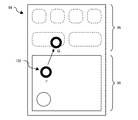
- FIG. 7 shows a display example of the remote control image 94 in the third modification.
- the operation position image 100 on the remote control image 94 is moved from the position F to the position G in accordance with the user's drag operation on the remote control screen 50.
- the remote control image display unit 84 of the stationary game machine 14 detects that the operation input position on the remote control screen 50 has changed from the drag operation area 54 to the button operation area 52, a plurality of button images arranged in the remote control image 94 are displayed. 96 is not displayed. According to this aspect, it is shown to the user that the button operation in the button operation area 52 of the remote control screen 50 is invalid, and the user's remote control operation can be supported.
- the button operation area 52 of the remote control screen 50 after invalidating the button operation in the button operation area 52 of the remote control screen 50, when a predetermined time (for example, about several hundred milliseconds to several seconds) elapses after the user's finger leaves the remote control screen 50, the button operation area 52 The button operation may be re-enabled.
- the remote control image display unit 84 of the stationary game machine 14 may display the button image 96 once hidden on the remote control image 94 again.
- the remote control operation identification unit 88 (or the mobile terminal 12 as will be described later) of the stationary game machine 14 performs an effective drag operation when a drag operation on the remote control screen 50 of the mobile terminal 12 is started in the drag operation area 54. May be determined.
- the remote control image display unit 84 of the stationary game machine 14 may move the operation position image 100 on the remote control image 94 regardless of whether or not it is an effective drag operation.
- the display content including the cursor may be updated according to the drag operation.
- the remote control operation identifying unit 88 of the stationary game machine 14 continues outside the drag operation area 54 (for example, the button operation area 52). In this case, it may be determined that the drag operation is effective. In this case, the button operation area 52 is handled as the drag operation area 54. For this reason, the remote control image display unit 84 of the stationary game machine 14 may switch the plurality of button images 96 in the remote control image 94 to non-display when the touch position of the drag operation is outside the drag operation area 54. Good.
- the remote control image display unit 84 of the stationary game machine 14 highlights the button image touched during the drag.
- the remote control image display unit 84 may switch the drag region image 98 of the remote control image 94 to non-display while the drag operation is continued.
- the remote control screen display unit 46 of the mobile terminal 12 also has a remote control screen 50 as with the remote control image 94 of the stationary game machine 14. The drag region image 98 or the button image at may be switched to non-display.
- a fifth modified example related to the fourth modified example will be described.
- a zoom-in operation also referred to as an enlargement operation or a pinch-out operation
- a zoom-out operation also referred to as a reduction operation or a pinch-in operation
- a rotation operation May be input.
- the remote control operation identification unit 88 (or the mobile terminal 12 as will be described later) of the stationary game machine 14 may detect a zoom-in operation or a zoom-out operation based on a change in the distance between fingers.
- a rotation operation is detected when the relationship between two touch coordinates changes while two fingers touch the operation target, or when the two touch coordinates change along a predetermined trajectory that draws an arc. May be.
- the remote control image display unit 84 of the stationary game machine 14 may display two operation position images 100 indicating two touch positions on the remote control image 94.
- gesture operations such as zoom-in operation, zoom-out operation, and rotation operation should be performed in the drag operation area 54 of the remote control screen 50.
- the first touch coordinate ahead in time is within the drag operation area 54 of the remote control screen 50
- the second touch coordinate later in time is outside the drag operation area 54 (for example, the button operation area 52).
- the remote control operation identification unit 88 (or the mobile terminal 12 as will be described later) of the stationary game machine 14 may be recognized as an effective gesture operation.
- the stationary game machine 14 includes a remote control operation identification unit 88 that detects an operation on the remote control screen 50 as an operation on the TV viewing App or the controller 16.
- the mobile terminal 12 may include the remote control operation identification unit 88.
- the operation notification unit 48 of the mobile terminal 12 may transmit operation information indicating the TV viewing App detected by the remote control operation identification unit 88 of the own terminal or the operation content of the controller 16 to the stationary game machine 14.
- the mobile terminal 12 is a main body that receives a user's touch operation on the remote control screen 50, that is, a main body that acquires touch coordinates indicating the input position of the touch operation. Then, in order to display the operation position image 100 on the remote control image 94 displayed on the display 18 of the stationary game machine 14, the mobile terminal 12 transmits the touch coordinates to the stationary game machine 14. As described in the embodiment and the sixth modification, it may be determined by the mobile terminal 12 or the stationary game machine 14 which operation is input based on the touch coordinates.
- the mobile terminal 12 determines whether a specific button on the remote control screen 50 has been pressed (for example, tapped) and displays information indicating that the specific button has been pressed as a stationary game machine. 14 may be transmitted.
- a tap operation for pressing the button feedback indicating whether the user's finger is effectively touching the region of the button image on the remote control screen 50, in other words, feedback that the button operation is performed when the finger is released as it is is displayed on the remote control image on the display 18.
- the information indicating that a specific button is pressed may be transmitted from the mobile terminal 12 to the stationary game machine 14 in order to be displayed on the screen 94.
- the determination as to whether or not a specific button on the remote control screen 50 has been pressed may be executed by the stationary game machine 14 without being executed by the mobile terminal 12.
- the stationary game machine 14 may transmit to the mobile terminal 12 information indicating its own determination result and indicating that a specific button has been pressed.
- the mobile terminal 12 may display an image of a specific button on the remote control screen 50 indicated by the information in a mode indicating that the button is pressed (for example, a color different from that).
- a seventh modification will be described.
- the remote control image display unit 84 of the stationary game machine 14 may display feedback different from that when the drag operation is input on the remote control image 94. This is because the flick operation is an operation that is completed in a very short time, and the necessity of feeding back the situation during the operation to the user is low.
- the flick operation may be applied to, for example, a + ⁇ operation for switching the channel of the display 18.
- the remote control image display unit 84 of the stationary game machine 14 may display on the remote control image 94 feedback indicating in which direction the flick operation has been performed when a flick operation on the remote control screen 50 is detected.
- feedback indicating in which direction the flick operation has been performed when a flick operation on the remote control screen 50 is detected may be displayed on the remote control image 94 feedback indicating in which direction the flick operation has been performed when a flick operation on the remote control screen 50 is detected.
- an arrow image indicating the direction of the flick operation may be displayed starting from the start position of the flick operation.
- feedback indicating that the channel has been changed by a flick operation may be displayed on the remote control image 94.
- the feedback of the flick operation may be displayed on the remote control screen 50 of the mobile terminal 12.
- the main body that determines that the flick operation is input to the remote control screen 50 may be the stationary game machine 14 or the mobile terminal 12 as described above.
- the determination subject of the flick operation may notify the other of the information that the flick operation has been input.
- the mobile terminal 12 may determine that the flick operation is completed in a relatively short time, while the mobile game device 12 may determine that the drag operation is relatively long.
- a plurality of mobile terminals 12 may perform a remote control operation on one stationary game machine 14.
- the remote control image display unit 84 of the stationary game machine 14 may display a plurality of remote control images 94 corresponding to each of the remote control screens 50 displayed on the plurality of mobile terminals 12 on the display 18.
- the remote control image display unit 84 of the stationary game machine 14 has one remote control image 94. May be displayed.
- the remote control image display unit 84 of the stationary game machine 14 displays a plurality of operation position images 100 corresponding to each of the remote control screens 50 displayed on the plurality of mobile terminals 12 on one remote control image 94. Also good.
- the plurality of operation position images 100 may be displayed in a manner in which at least one of the shape, pattern, and color is different from each other.
- This invention can be applied to an information processing apparatus.
Landscapes
- Engineering & Computer Science (AREA)
- General Engineering & Computer Science (AREA)
- Theoretical Computer Science (AREA)
- Human Computer Interaction (AREA)
- Physics & Mathematics (AREA)
- Signal Processing (AREA)
- Multimedia (AREA)
- General Physics & Mathematics (AREA)
- Databases & Information Systems (AREA)
- Computer Networks & Wireless Communication (AREA)
- User Interface Of Digital Computer (AREA)
- Two-Way Televisions, Distribution Of Moving Picture Or The Like (AREA)
- Selective Calling Equipment (AREA)
Abstract
モバイル端末12は、据置型ゲーム機14に対する操作をユーザに入力させるための操作画面を表示させ、操作画面に入力された操作を示す情報を据置型ゲーム機14へ通知する。据置型ゲーム機14は、ディスプレイ18に所定のコンテンツを表示させ、モバイル端末12から通知された操作に応じて表示コンテンツを更新する。据置型ゲーム機14は、モバイル端末12の操作画面に対応するリモコン画像をコンテンツの画面とともに表示させ、操作画面においてユーザが操作を入力した位置を示す操作位置画像をリモコン画像上に表示させる。
Description
この発明は、データ処理技術に関し、特に情報処理システム、情報処理装置および遠隔操作支援方法に関する。
本出願人は、電子コンテンツの視聴を支援する技術を提案している(例えば特許文献1参照)。また近年、スマートフォンが広く普及しており、スマートフォンをテレビのリモコンとして使用する技術も提案されている(例えば特許文献2参照)。
スマートフォンやタブレット端末等のモバイル端末をリモコンとして使用する場合に、制御対象機器を操作するためのボタン等は、画像としてモバイル端末のディスプレイに表示されることがある。この場合、操作すべき画像の表示位置をユーザが把握することは容易でなく、ユーザは頻繁に手元を確認する必要があり、ユーザの利便性は必ずしも高くなかったと本発明者は考えた。
本発明は、本発明者の上記認識にもとづきなされたものであり、主たる目的は、モバイル端末をリモコンとして使用する場合のユーザの利便性を向上させる技術を提供することである。
上記課題を解決するために、本発明のある態様の情報処理システムは、第1の情報処理装置と第2の情報処理装置とを備える。第1の情報処理装置は、第2の情報処理装置に対する操作をユーザに入力させるための操作画面を表示させる操作画面表示部と、操作画面に入力された操作を示す情報を第2の情報処理装置へ通知する操作通知部と、を含む。第2の情報処理装置は、所定のコンテンツを表示させ、第1の情報処理装置から通知された操作に応じて表示コンテンツを更新するコンテンツ表示部と、第1の情報処理装置の操作画面に対応するリモコン画像をコンテンツの画面とともに表示させ、操作画面においてユーザが操作を入力した位置を示す操作位置画像をリモコン画像上に表示させるリモコン画像表示部と、を含む。
本発明の別の態様は、情報処理装置である。この装置は、本装置に対する操作をユーザに入力させるための操作画面を表示する他の情報処理装置から通知された操作画面に入力された操作に関する情報を取得する操作情報取得部と、所定のコンテンツを表示させ、他の情報処理装置から通知された操作に応じて表示コンテンツを更新するコンテンツ表示部と、他の情報処理装置の操作画面に対応するリモコン画像をコンテンツの画面とともに表示させ、操作画面においてユーザが操作を入力した位置を示す操作位置画像をリモコン画像上に表示させるリモコン画像表示部と、を備える。
本発明のさらに別の態様もまた、情報処理装置である。この装置は、所定のコンテンツを表示する他の情報処理装置に対する操作をユーザに入力させるための操作画面を表示させる操作画面表示部と、操作画面に入力された操作を示す情報を他の情報処理装置へ通知することにより、他の情報処理装置に、操作画面に対応するリモコン画像をコンテンツの画面とともに表示させ、操作画面においてユーザが操作を入力した位置を示す操作位置画像をリモコン画像上に表示させる操作通知部と、を備える。
本発明のさらに別の態様は、遠隔操作支援方法である。この方法は、情報処理装置が、本装置に対する操作をユーザに入力させるための操作画面を表示する他の情報処理装置から通知された操作画面に入力された操作を示す情報を取得するステップと、所定のコンテンツを表示させ、他の情報処理装置から通知された操作に応じて表示コンテンツを更新するステップと、他の情報処理装置の操作画面に対応するリモコン画像をコンテンツの画面とともに表示させ、操作画面においてユーザが操作を入力した位置を示す操作位置画像をリモコン画像上に表示させるステップと、を実行する。
なお、以上の構成要素の任意の組合せ、本発明の表現を、プログラム、プログラムを格納した記録媒体などの間で変換したものもまた、本発明の態様として有効である。
本発明によれば、モバイル端末をリモコンとして使用する場合のユーザの利便性を向上させることができる。
まず概要を説明する。機器を操作するための物理的なボタンを備える通常のリモコンを使用する場合、ユーザは、手元の確認を最小限にしつつチャンネル選択等の所望の操作を入力しやすい。しかし、モバイル端末をリモコンとして使用する場合、典型的には物理的なボタンは設けられず、ボタン画像を含むリモコンの画面がモバイル端末のディスプレイに表示される。ディスプレイ上のボタン画像の表示位置を感覚的に把握することは難しく、ユーザは頻繁に手元を確認する必要があった。そのため、モバイル端末を用いたリモコン操作は、ユーザの利便性が必ずしも高くなく、また非効率になることがあった。
実施の形態では、モバイル端末を用いたリモコン操作における、ユーザの利便性を改善する遠隔操作支援方法を提案する。具体的には、モバイル端末側のリモコン画面に対応する画像を制御対象側の機器に表示させ、ユーザがリモコン画面に入力した操作を示す情報をその画像上に表示させる。これにより、ユーザは、モバイル端末の画面を頻繁に確認しなくてもリモコン画面に対する操作内容を把握し易くなる。すなわち実施の形態の遠隔操作支援方法によると、モバイル端末をリモコンとして使用する場合のユーザの利便性と、リモコン操作の効率を向上させることができる。
ここでタッチパネルに対するユーザの操作であるタップ操作、ドラッグ操作、フリック操作について説明する。タップ操作は、画面上の1点を押し、その後、画面から指を離す(「リリース」とも呼ぶ。)操作である。例えばタップ操作は、1)1本の指で操作対象(画像等)に設けられたタップ操作の有効領域を1回押す、2)押下中の指の位置が、操作対象上でタップ操作の有効領域内に留まる、3)指をリリースする、という一連の操作である。
ドラッグ操作は、操作対象を指に追従して移動させる操作である。例えばドラッグ操作は、1)操作対象を指で押す、2)操作対象を押しながら、タップ操作として判定される所定の距離閾値以上(例えば上記のタップ操作の有効領域外へ)指を動かす、3)指をリリースする、という一連の操作である。フリック操作は、操作対象を指で押しながら動かし、ある速度以上で指をリリースする操作である。例えばフリック操作は、1)1本の指で操作対象を押す、2)操作対象を押しながら、タップ操作として判定される所定の距離閾値以上、指を移動させる、3)予め定められた単位時間あたり予め定められた距離以上の速度で指をリリースする、という一連の操作である。
図1は、実施の形態のエンタテインメントシステム10の構成を示す。エンタテインメントシステム10は、ユーザ宅に構築された情報処理システムであり、モバイル端末12、据置型ゲーム機14、録画装置20を備える。これらの各装置は、ホームネットワーク(言い換えれば家庭内LAN)を介して接続され、具体的にはWi-Fi(登録商標)ルータ等のルータ22と無線または有線で接続される。なお、公知のP2P通信技術を使用して、モバイル端末12、据置型ゲーム機14、録画装置20が直接通信する構成としてもよいことはもちろんである。
据置型ゲーム機14は、コントローラ16およびディスプレイ18と接続される。コントローラ16は、据置型ゲーム機14専用のコントローラであり、Bluetooth(登録商標)により据置型ゲーム機14と接続される。ディスプレイ18は、家庭用のテレビ受像器であってもよく、HDMI(登録商標)を介して据置型ゲーム機14と接続される。エンタテインメントシステム10は、据置型ゲーム機14に代えて、デスクトップPCやスマートテレビ等、他の据置型の情報処理装置を備える構成であってもよい。
モバイル端末12は、スマートフォンやタブレット端末、携帯型ゲーム機であってもよい。モバイル端末12と据置型ゲーム機14には、テレビ視聴アプリケーション(以下「テレビ視聴App」とも呼ぶ。)がインストールされる。テレビ視聴Appは、録画装置と連携して、例えば放送中の番組を表示し、また録画予約を実行する。
録画装置20は、不図示のアンテナと接続され、またチューナやハードディスクを内蔵した映像録画再生機である。録画装置20は、モバイル端末12および据置型ゲーム機14と通信し、モバイル端末12または据置型ゲーム機14に対するユーザの録画予約操作で指定された番組の録画処理を実行する。
図2は、図1のモバイル端末12の構成を示すブロック図である。本明細書の各ブロックは、ハードウェア的には、コンピュータのCPUやメモリをはじめとする素子や電子回路、機械装置で実現でき、ソフトウェア的にはコンピュータプログラム等によって実現されるが、ここでは、それらの連携によって実現される機能ブロックを描いている。したがって、これらの機能ブロックはハードウェア、ソフトウェアの組合せによっていろいろなかたちで実現できることは、当業者には理解されるところである。
モバイル端末12は、制御部30、記憶部32、通信部34、LCD36を備える。制御部30は、各種のデータ処理を実行し、モバイル端末12の動作を制御する。記憶部32は、制御部30により参照または更新されるデータを記憶する記憶領域である。制御部30は、モバイル端末12のCPUがコンピュータプログラムを実行することにより実現され、記憶部32は、モバイル端末12のストレージやメモリにより実現されてもよい。
通信部34は、様々な通信プロトコルにしたがって、通信網を介して外部装置と通信する。制御部30は、通信部34を介して据置型ゲーム機14および録画装置20とデータを送受する。LCD36は、モバイル端末12の本体と一体化され、モバイル端末12のユーザインタフェースとなる液晶ディスプレイ(モニタ)である。LCD36はタッチパネルの機能も備える。モバイル端末12は、LCD36に代えて、有機ELディスプレイ等、他の種類の表示装置を備えてもよいことはもちろんである。
記憶部32はコンテンツ保持部38を含む。コンテンツ保持部38は、テレビ視聴Appが表示対象とする様々なコンテンツのデータを保持する。例えば、番組表や放送番組に関するデータ、録画予約対象番組や録画済番組に関するデータ、ランキングデータ、アンケートデータ等を保持する。これらのデータは、録画装置20から提供され、コンテンツ保持部38に格納されてよい。
制御部30は、操作検出部40とテレビ視聴処理部42を含む。操作検出部40は、ユーザがLCD36に対して入力した操作を検出する。例えば、操作検出部40は、操作入力位置(LCD35の画面の座標等)と、操作種別(タップ操作やドラッグ操作等)を検出する。
テレビ視聴処理部42は、モバイル端末12にインストールされたテレビ視聴Appにより実現される。例えば、テレビ視聴Appは、SDメモリカード等の所定の記録媒体に格納されて流通され、またはアプリサイトのサーバ等からダウンロードされてモバイル端末12にインストールされる。そして、モバイル端末12のストレージに格納されたテレビ視聴Appのプログラムをモバイル端末12のCPUやGPUが実行することにより、モバイル端末12はテレビ視聴処理部42の機能を発揮する。
テレビ視聴処理部42は、情報画面表示部44、リモコン画面表示部46、操作通知部48を含む。これらはテレビ視聴Appのプログラムモジュールとして実装されてもよい。情報画面表示部44は、テレビ視聴Appの各種画面のデータを生成し、生成した画面データをLCD36に表示させる。情報画面表示部44は、コンテンツ保持部38に格納されたコンテンツデータ(番組情報等)を含む画面データを生成する。
リモコン画面表示部46は、据置型ゲーム機14のテレビ視聴Appに対する遠隔操作をユーザに入力させるための操作画面であるリモコン画面を生成し、LCD36に表示させる。典型的には、LCD36の全面に亘ってリモコン画面を表示させる。
図3はリモコン画面を示す。リモコン画面50は、ボタン操作領域52とドラッグ操作領域54を含む。ボタン操作領域52は、仮想的なボタン(言い換えればボタン画像)に対する選択操作、実施の形態ではタップ操作が入力される領域である。ボタン操作領域52は、テレビ視聴Appの各メニューに対応するボタン画像として、終了ボタン56、番組表ボタン58、お知らせボタン60が配置される。また、据置型ゲーム機14のコントローラ16のボタンに対応するボタン画像として、Lボタン62とRボタン64が配置される。
ドラッグ操作領域54は、タッチパネルに対する任意の態様の操作が入力される領域である。ドラッグ操作領域54に対する操作は、据置型ゲーム機14のコントローラ16におけるボタン入力操作に対応する。なおドラッグ操作領域54の一部はボタン操作領域52となっており、具体的にはキャンセルボタン66が配置される。
リモコン画面表示部46は、図3に示す各ボタン画像やドラッグ操作領域54の画像であり、すなわちリモコン画面50の複数の要素データを保持する。テレビ視聴Appがインストールされるモバイル端末12のディスプレイサイズは様々であるが、実施の形態のリモコン画面表示部46は、特定のタブレット端末のディスプレイサイズに対応する要素データを保持する。リモコン画面表示部46は、リモコン画面50を表示するLCD36の横幅に応じて、各要素データを拡大もしくは縮小してリモコン画面に配置する。したがって、リモコン画面表示部46は、LCD36のサイズが大きいほど、リモコン画面50を大きく表示させ、各要素データも大きく表示させる。リモコン画面表示部46は、複数の要素データをリモコン画面50画面内に下寄せで配置する。
図2に戻り、操作検出部40は、リモコン画面50に対して入力されたユーザ操作を検出し、操作の種類と操作位置を検出する。検出対象となる操作の種類は、フリック操作、ドラッグ操作、タップ操作、ダブルタップ操作(短時間の連続したタップ操作)、ホールド操作(長押し操作)を含む。操作位置は、リモコン画面50の所定位置(左下端等)を原点とする縦横2次元の座標として検出されてもよい。フリック操作とタップ操作については、フリック方向とタップ方向を含む操作位置をさらに検出してもよい。
操作通知部48は、リモコン画面50の表示中に、LCD36に対する操作が操作検出部40により検出された場合、その操作を示す操作情報を据置型ゲーム機14へ送信する。操作情報は、リモコン画面50に対して入力された操作種類と操作位置を含む。
図4は、図1の据置型ゲーム機14の構成を示すブロック図である。据置型ゲーム機14は、制御部70、記憶部72、通信部74を備える。制御部70は、各種のデータ処理を実行し、据置型ゲーム機14の動作を制御する。記憶部72は、制御部70により参照または更新されるデータを記憶する記憶領域である。制御部70は、据置型ゲーム機14のCPUがコンピュータプログラムを実行することにより実現され、記憶部72は、据置型ゲーム機14のストレージやメモリにより実現されてもよい。
通信部74は、様々な通信プロトコルにしたがって、通信網を介して外部装置と通信する。制御部70は、通信部74を介してモバイル端末12、コントローラ16、録画装置20とデータを送受する。制御部30は、不図示のディスプレイドライバを介して、表示対象の画像データをディスプレイ18へ送信し、表示させる。
記憶部72はコンテンツ保持部76を含む。コンテンツ保持部76は、モバイル端末12のコンテンツ保持部38と同様に、テレビ視聴Appが表示対象とする様々なコンテンツのデータを保持する。例えば、番組表や放送番組に関するデータ、録画予約対象番組や録画済番組に関するデータ、ランキングデータ、アンケートデータ等を保持する。
制御部70は、操作検出部78とテレビ視聴処理部80を含む。操作検出部78は、ユーザがコントローラ16に対して入力した操作を検出する。例えば、操作検出部78は、コントローラ16においてユーザにより操作されたキー(上下左右の方向キー等)や、ボタン(○ボタン、×ボタン等)の種類を検出する。
テレビ視聴処理部80は、据置型ゲーム機14にインストールされたテレビ視聴Appにより実現される。例えば、テレビ視聴Appは、DVD等の所定の記録媒体に格納されて流通され、据置型ゲーム機14にインストールされる。そして、据置型ゲーム機14のストレージに格納されたテレビ視聴Appのプログラムを据置型ゲーム機14のCPUやGPUが実行することにより、据置型ゲーム機14はテレビ視聴処理部80の機能を発揮する。
テレビ視聴処理部80は、情報画面表示部82、リモコン画像表示部84、操作情報取得部86、リモコン操作識別部88を含む。これらはテレビ視聴Appのプログラムモジュールとして実装されてもよい。情報画面表示部82は、テレビ視聴Appの各種画面のデータを生成し、生成した画面データをディスプレイ18に表示させる。情報画面表示部82は、コンテンツ保持部76に格納されたコンテンツデータ(番組情報等)を含む画面データを生成する。テレビ視聴処理部80はコンテンツ表示部とも言える。
以下、テレビ視聴Appの画面を「App画面」と呼ぶ。App画面は、テレビ視聴Appのトップ画面、番組表画面や検索結果画面、放送中の番組や録画番組の視聴画面、ランキング情報やアンケート情報の画面等を含む。情報画面表示部82は、コントローラ16におけるキー操作やボタン操作が操作検出部78で検出されると、その操作に応じてApp画面の表示内容を更新する。例えば、テレビ視聴Appのトップ画面から番組表画面へ切り替え、また番組表画面において番組選択用のカーソルを移動させる。
リモコン画像表示部84は、モバイル端末12でリモコン画面50が表示される場合に、リモコン画面50に対応する画像であるリモコン画像をApp画面とともにディスプレイ18に表示させる。具体的には、リモコン画面50の外観を模したリモコン画像をApp画面上に半透明で表示させる。リモコン画像の透過度は、App画面やリモコン画像の視認性等を勘案しつつ、開発者の知見や実験に基づいて決定されてよい。
操作情報取得部86は、リモコン画面50に対するユーザの操作内容を示す情報であり、モバイル端末12から送信された操作情報を通信部74を介して取得する。既述したように操作情報は、リモコン画面50に対して入力された操作種類と操作位置を含む。
リモコン画像表示部84は、リモコン画面50においてユーザが操作を入力した位置を示す画像である操作位置画像をリモコン画像上に表示させる。リモコン画像表示部84は、リモコン画面50における操作入力位置が変化した場合、リモコン画像上での操作位置画像の表示位置を変化させる。言い換えれば、リモコン画像表示部84は、リモコン画面50における操作入力位置の移動に追従して、リモコン画像上での操作位置画像の表示位置を移動させる。
具体的には、リモコン画像表示部84は、リモコン画面50の座標と、リモコン画像の座標との対応関係を保持する。リモコン画像表示部84は、リモコン画面50における操作位置の座標値に対応するリモコン画像の座標値を識別し、識別した座標値により特定されるリモコン画像上の位置に操作位置画像を表示させる。操作情報取得部86が新たな操作情報を取得すると、リモコン画像表示部84は新たな操作情報が示す操作位置にしたがって操作位置画像の新たな位置を識別する。そして、その新たな位置で操作位置画像を表示させるよう切り替える。
リモコン画像表示部84は、モバイル端末12のリモコン画面50に対するユーザの操作入力が終了してから所定時間が経過するまでは、リモコン画像上の操作位置画像の表示を維持する。具体的には、リモコン画像表示部84は、操作情報取得部86において操作情報を受信しない状態になってからその状態が所定時間以上継続するまでは、最後の操作情報に基づく操作位置画像の表示を維持する。そして、操作情報を受信しない状態が所定時間以上継続した場合に操作位置画像の表示を終了し、言い換えれば、それまで表示させた操作位置画像を非表示とする。この所定時間は、数百ミリ秒~数秒程度であってもよく、開発者の知見や実験により適切な値が決定されてよい。
リモコン操作識別部88は、操作情報が示す操作種類と、テレビ視聴Appにおける操作種類との対応関係を保持し、また、操作情報が示す操作種類と、コントローラ16における操作種類との対応関係を保持する。リモコン操作識別部88は、操作情報が取得されると、その操作情報が示す操作種類に対応付けられたテレビ視聴Appまたはコントローラ16の操作が入力されたものと判定する。なおリモコン操作識別部88は、操作種類がフリック操作およびドラッグ操作の場合、操作位置が示す座標の推移にしたがって、これらの操作の方向をさらに識別してもよい。
リモコン操作識別部88は、リモコン画面50のドラッグ操作領域54におけるフリック操作を、フリック方向に一致する方向キーに対する1回の押下操作と識別する。また、ドラッグ操作を、ドラッグ方向に一致する方向キーに対する長押し操作と識別する。また、タップ操作、ホールド操作、ダブルタップ操作をそれぞれ○ボタン、△ボタン、□ボタンの押下操作と識別する。
またリモコン操作識別部88は、リモコン画面50の座標と、リモコン画面50上のボタンとの対応関係を保持する。リモコン操作識別部88は、操作情報の操作位置が示す座標が特定のボタンに対応する場合、その特定のボタンに対する操作であると判定する。
例えば、リモコン操作識別部88は、操作情報がリモコン画面50の番組表ボタン58に対するタップ操作を示す場合、テレビ視聴Appの番組表画面の表示要求と識別する。また操作情報が、リモコン画面50のお知らせボタン60に対するタップ操作を示す場合、テレビ視聴Appのお知らせ画面の表示要求と識別する。また操作情報が、リモコン画面50のLボタン62、Rボタン64、キャンセルボタン66に対するタップ操作を示す場合、コントローラ16のLボタン、Rボタン、×ボタンの押下操作を識別する。
リモコン操作識別部88は、モバイル端末12から通知された操作情報に基づき識別した操作内容を情報画面表示部44へ通知する。情報画面表示部44は、リモコン操作識別部88により識別された操作内容にしたがってApp画面の表示内容を更新する。すなわち情報画面表示部44は、リモコン操作識別部88により識別された操作内容を、コントローラ16におけるキー操作またはボタン操作として取り扱う。
以上の構成によるエンタテインメントシステム10の動作を説明する。
ここでは据置型ゲーム機14においてテレビ視聴Appが起動済であり、そのApp画面がディスプレイ18に表示されている。ユーザは、コントローラ16が据置型ゲーム機14と通信できない離れた場所から、もしくはコントローラ16を保持しない状況で、モバイル端末12を使用して据置型ゲーム機14のテレビ視聴Appを遠隔操作する。
ここでは据置型ゲーム機14においてテレビ視聴Appが起動済であり、そのApp画面がディスプレイ18に表示されている。ユーザは、コントローラ16が据置型ゲーム機14と通信できない離れた場所から、もしくはコントローラ16を保持しない状況で、モバイル端末12を使用して据置型ゲーム機14のテレビ視聴Appを遠隔操作する。
ユーザは、モバイル端末12のテレビ視聴Appを起動する。モバイル端末12の情報画面表示部44はテレビ視聴Appのトップ画面をLCD36に表示させ、ユーザはトップ画面内のリモコンアイコンを選択する。モバイル端末12のリモコン画面表示部46は、図3に示したリモコン画面50をLCD36に表示させる。モバイル端末12の操作通知部48は、リモコン操作を開始する旨のリモコン開始情報を据置型ゲーム機14へ送信する。据置型ゲーム機14のリモコン画像表示部84は、リモコン開始情報を受信したことを契機としてリモコン画像をディスプレイ18に表示させる。
図5はリモコン画像の表示例を示す。同図は、据置型ゲーム機14のディスプレイ18にApp画面としての番組表画面90が表示中であるときに、リモコン画像94を表示した状態を示している。リモコン画像94は、リモコン画面50の外観を模しており、リモコン画面50のボタン操作領域52に対応するボタン画像96と、リモコン画面50のドラッグ操作領域54に対応するドラッグ領域画像98を含む。通常のコントローラ16による操作では、ユーザは、方向キーの操作でカーソル92を移動させて所望の番組を選択した状態にし、○ボタンを押下して録画予約ウィンドウを表示させる。
モバイル端末12によるリモコン操作の場合、ユーザが、リモコン画面50のドラッグ操作領域54に対してフリック操作またはドラッグ操作を入力すると、操作通知部48は、そのフリック操作またはドラッグ操作を示す操作情報を据置型ゲーム機14へ送信する。据置型ゲーム機14の情報画面表示部82は、コントローラ16での方向操作時と同様に、番組表画面90のカーソル92をフリック方向またはドラッグ方向へ移動させる。なお、フリック操作の場合は、カーソル92を1単位(例えば1マス分)移動させ、ドラッグ操作の場合はカーソル92を連続移動させる。
所望の番組をカーソル92で選択した後、ユーザが、リモコン画面50のドラッグ操作領域54に対してタップ操作を入力すると、操作通知部48は、そのタップ操作を示す操作情報を据置型ゲーム機14へ送信する。据置型ゲーム機14のリモコン操作識別部88は、操作情報が示すタップ操作をコントローラ16の○ボタン押下操作として検出する。据置型ゲーム機14の情報画面表示部82は、コントローラ16での○ボタン操作時と同様に、カーソル92によるフォーカス番組の録画予約ウィンドウを表示させる。据置型ゲーム機14の他のApp画面に対する遠隔操作時も同様の動作になる。
リモコン操作を終了する場合、ユーザは、リモコン画面50の終了ボタン56をタップする。モバイル端末12のリモコン画面表示部46は、LCD36におけるリモコン画面50の表示を終了し、操作通知部48は、リモコン画面操作を終了する旨のリモコン終了情報を据置型ゲーム機14へ送信する。据置型ゲーム機14のリモコン画像表示部84は、リモコン終了情報を受信したことを契機としてリモコン画像の表示を終了する。
次に、リモコン画像94における操作位置画像100の表示処理について説明する。据置型ゲーム機14のリモコン画面表示部46は、リモコン画面50の操作入力位置に対応するリモコン画像94の位置に操作位置画像100を表示させる。図6はリモコン画像94の表示例を示す。同図のリモコン画像94は、実際には、据置型ゲーム機14のディスプレイ18に表示された特定のApp画面に重畳して表示される。
モバイル端末12のリモコン画面50のドラッグ操作領域54に対してユーザが右方向へのドラッグ操作を入力したとする。この場合、据置型ゲーム機14のリモコン画像表示部84は、操作位置画像100をAからBへ移動させ、これとともに情報画面表示部82は、App画面のカーソルを左から右へ連続移動させる。図6の位置Aはリモコン画面50におけるドラッグ操作開始位置に対応し、位置Bはドラッグ操作終了位置に対応する。
モバイル端末12のリモコン画面50のドラッグ操作領域54に対してユーザがタップ操作を入力したとする。この場合、据置型ゲーム機14のリモコン画像表示部84は、タップ操作の入力位置に対応する位置Cに操作位置画像100を表示させる。これとともに情報画面表示部82は、コントローラ16の○ボタン操作時と同様のApp画面更新処理を実行する。
モバイル端末12のリモコン画面50のRボタン64に対してユーザがタッチした場合、据置型ゲーム機14のリモコン画像表示部84は、リモコン画面50のタッチ位置に対応するリモコン画像94の位置Dに操作位置画像100を表示させる。またタッチ位置がRボタン64の位置に整合するため、リモコン画像表示部84は、Rボタン64に対応するボタン画像96を、選択されたことを示唆する強調態様で表示させる。例えば、赤色等の目立つ色でハイライト表示し、ボタン画像96の中にその名称(ここでは「R」)を表示させる。
その後ユーザが、リモコン画面50においてRボタン64から番組表ボタン58の方向へドラッグ操作を入力したとする。据置型ゲーム機14のリモコン画像表示部84は、操作位置画像100をDからEへ移動させる。さらにリモコン画像表示部84は、Rボタン64に対応するボタン画像96(「R」)のハイライト表示を終了し、番組表ボタン58に対応するボタン画像96(「GUIDE」)をハイライト表示させる。
ユーザがリモコン画面50の番組表ボタン58に対してタップ操作を入力すると、リモコン画像表示部84は、位置Eでの操作位置画像100の表示を維持し、番組表ボタン58に対応するボタン画像96(「GUIDE」)をハイライト表示させる。据置型ゲーム機14の情報画面表示部82は、それまでのApp画面(例えばトップ画面や検索画面、ランキング画面等)から番組表画面へ遷移させる。
ユーザがリモコン画面50の番組表ボタン58から指を離してから所定時間は、リモコン画像表示部84は、位置Eでの操作位置画像100の表示と、番組表ボタン58に対応するボタン画像96(「GUIDE」)のハイライト表示を維持する。これにより、リモコン画面50に対する直前の操作位置をユーザに把握させやすくなり、次の操作入力位置を適切に判断することを支援できる。
実施の形態のエンタテインメントシステム10によると、操作側のモバイル端末12のリモコン画面50を模したリモコン画像94を、被操作側の据置型ゲーム機14のApp画面とともに表示させる。そして、リモコン画面50での操作入力位置を示す操作位置画像100をリモコン画像94上に表示させる。また、リモコン画面50における操作入力位置の変化に追従させて、リモコン画像94上の操作位置画像100の位置を変化させる。これにより、ユーザは、リモコン画面50を確認しなくても、App画面を見ながらリモコン画面50に対する操作内容を把握しやすくなる。これにより、モバイル端末をリモコンとして使用する場合のユーザの利便性と、リモコン操作の効率を向上させる。
以上、本発明を実施の形態をもとに説明した。この実施の形態は例示であり、それらの各構成要素や各処理プロセスの組合せにいろいろな変形例が可能なこと、またそうした変形例も本発明の範囲にあることは当業者に理解されるところである。
第1変形例を説明する。上記実施の形態では、リモコン画面50のボタン操作領域52に配置されたボタンに対してタップ操作が入力された場合に、ボタンに対する選択操作(押下操作)が入力されたと判定した。変形例として、リモコン画面50のボタン操作領域52に配置されたボタンに対して長押し後、リリースされた(指を離した)場合もボタンに対する選択操作が入力されたと判定してもよい。
第2変形例を説明する。モバイル端末12のリモコン画面50においてドラッグ操作領域54の中から外、典型的にはドラッグ操作領域54からボタン操作領域52に亘るドラッグ操作が検出された場合、ボタン操作領域52に配置されたボタンへの操作を無効にしてもよい。具体的な構成として、ドラッグ操作領域54からボタン操作領域52に亘るドラッグ操作検出後、モバイル端末12の操作通知部48は、ボタン操作領域52に配置されたボタンに対する操作を据置型ゲーム機14へ通知することを抑制してもよい。
異なる構成として、ドラッグ操作領域54からボタン操作領域52に亘るドラッグ操作が検出された場合、据置型ゲーム機14の情報画面表示部82は、ボタン操作領域52に配置されたボタンに対する操作に応じたApp画面の更新を抑制してもよい。ドラッグ操作領域54の中から外へのフリック操作が検出された場合も同様の処理を実行する。この態様によると、ユーザのドラッグ操作またはフリック操作によってユーザが意図しないボタン操作が検出され、ユーザが意図しないテレビ視聴Appの処理が実行されることを防止できる。例えばユーザが意図しないApp画面の更新を防止できる。
第2変形例に関連する第3変形例を説明する。モバイル端末12のリモコン画面50においてドラッグ操作領域54からボタン操作領域52に亘るドラッグ操作が検出された場合、据置型ゲーム機14のリモコン画像表示部84は、リモコン画像94のボタン画像96を非表示にする。図7は、第3変形例におけるリモコン画像94の表示例を示す。ここでは、リモコン画面50におけるユーザのドラッグ操作に応じて、リモコン画像94上の操作位置画像100を位置Fから位置Gへ移動する。
据置型ゲーム機14のリモコン画像表示部84は、リモコン画面50における操作入力位置がドラッグ操作領域54内からボタン操作領域52内に変化したことを検出すると、リモコン画像94に配置した複数のボタン画像96を非表示とする。この態様によると、リモコン画面50のボタン操作領域52におけるボタン操作が無効であることをユーザに示し、ユーザのリモコン操作を支援できる。
なお、リモコン画面50のボタン操作領域52におけるボタン操作を無効にした後、ユーザの指がリモコン画面50から離れて所定時間(例えば数百ミリ秒から数秒程度)経過した場合、ボタン操作領域52におけるボタン操作を再度有効にしてもよい。それとともに据置型ゲーム機14のリモコン画像表示部84は、一旦非表示にしたボタン画像96をリモコン画像94上に再度表示させてもよい。
上記の第2変形例、第3変形に関連する第4変形例を説明する。据置型ゲーム機14のリモコン操作識別部88(もしくは後述するようにモバイル端末12)は、モバイル端末12のリモコン画面50に対するドラッグ操作がドラッグ操作領域54内で開始された場合に、有効なドラッグ操作と判定してもよい。据置型ゲーム機14のリモコン画像表示部84は、有効なドラッグ操作であるか否かに関わらず、操作位置画像100をリモコン画像94上で移動させてもよい。その一方、据置型ゲーム機14の情報画面表示部82は、有効なドラッグ操作である場合に、そのドラッグ操作に応じてカーソルを含む表示コンテンツを更新してもよい。
据置型ゲーム機14のリモコン操作識別部88は、リモコン画面50に対するドラッグ操作がドラッグ操作領域54内で開始されれば、そのドラッグ操作がドラッグ操作領域54外(例えばボタン操作領域52)で継続する場合も、有効なドラッグ操作と判定してもよい。この場合、ボタン操作領域52をドラッグ操作領域54として扱うことになる。そのため、据置型ゲーム機14のリモコン画像表示部84は、ドラッグ操作のタッチ位置がドラッグ操作領域54外になったことを契機として、リモコン画像94における複数のボタン画像96を非表示に切り替えてもよい。
逆に、リモコン画面50のボタン操作領域52からドラッグ操作が開始された場合、据置型ゲーム機14のリモコン画像表示部84は、ドラッグ中にタッチされたボタン画像をハイライト表示する。ただし、リモコン操作識別部88は有効なドラッグ操作と認定しないため、リモコン画像表示部84は、そのドラッグ操作の継続中、リモコン画像94のドラッグ領域画像98を非表示に切り替えてもよい。後述するように、据置型ゲーム機14からモバイル端末12へ操作内容がフィードバックされる場合、モバイル端末12のリモコン画面表示部46も、据置型ゲーム機14のリモコン画像94と同様に、リモコン画面50におけるドラッグ領域画像98もしくはボタン画像を非表示に切り替えてもよい。
第4変形例に関連する第5変形例を説明する。モバイル端末12のリモコン画面50に対する操作として、2本の指によるジェスチャ操作であるズームイン操作(拡大操作、ピンチアウト操作とも言える)と、ズームアウト操作(縮小操作、ピンチイン操作とも言える)と、回転操作が入力されてもよい。据置型ゲーム機14のリモコン操作識別部88(もしくは後述するようにモバイル端末12)は、指間の距離の変化に基づいてズームイン操作またはズームアウト操作を検出してもよい。また、2本の指が操作対象にタッチした状態で2つのタッチ座標の関係が変わった場合や、弧を描くような所定の軌跡で2つのタッチ座標が変化する場合に、回転操作を検出してもよい。この場合、据置型ゲーム機14のリモコン画像表示部84は、2つのタッチ位置を示す2つの操作位置画像100をリモコン画像94上に表示させてもよい。
本来、ズームイン操作、ズームアウト操作、回転操作等のジェスチャ操作は、リモコン画面50のドラッグ操作領域54で行われるべきものである。しかし、時間的に先の1つ目のタッチ座標がリモコン画面50のドラッグ操作領域54内であれば、時間的に後の2つ目のタッチ座標がドラッグ操作領域54外(例えばボタン操作領域52内)であっても、据置型ゲーム機14のリモコン操作識別部88(もしくは後述するようにモバイル端末12)は、有効なジェスチャ操作として認定してもよい。
第6変形例を説明する。実施の形態のエンタテインメントシステム10では、リモコン画面50における操作を、テレビ視聴Appまたはコントローラ16における操作として検出するリモコン操作識別部88を据置型ゲーム機14が備える構成とした。変形例として、リモコン操作識別部88をモバイル端末12が備える構成としてもよい。この場合、モバイル端末12の操作通知部48は、自端末のリモコン操作識別部88が検出したテレビ視聴Appまたはコントローラ16の操作内容を示す操作情報を据置型ゲーム機14へ送信してもよい。
実施の形態および第6変形例における操作内容の識別について補足する。リモコン画面50に対するユーザのタッチ操作を受け付ける主体、すなわちタッチ操作の入力位置を示すタッチ座標を取得する主体はモバイル端末12である。そして据置型ゲーム機14のディスプレイ18に表示されるリモコン画像94上に操作位置画像100を表示させるために、モバイル端末12はタッチ座標を据置型ゲーム機14へ送信する。実施の形態および第6変形例で説明したように、タッチ座標に基づいてどのような操作が入力されたかの判定は、モバイル端末12と据置型ゲーム機14のいずれが実行してもよい。
第1の構成例として、モバイル端末12は、リモコン画面50上の特定のボタンが押されたか(例えばタップされたか)を判定し、特定のボタンが押されたことを示す情報を据置型ゲーム機14へ送信してもよい。ボタンを押すタップ操作として、ユーザの指がリモコン画面50上のボタン画像の領域に有効に触れているかどうかのフィードバック、言い換えれば、このまま指を離せばボタン操作になるというフィードバックをディスプレイ18のリモコン画像94に表示させるために、特定のボタンが押されていることを示す情報をモバイル端末12から据置型ゲーム機14へ送信してもよい。
第2の構成例として、リモコン画面50上の特定のボタンが押されたか否かの判定は、モバイル端末12は実行せず、据置型ゲーム機14が実行してもよい。このとき、どのボタンが押されたかのフィードバックをモバイル端末12のリモコン画面50に表示させてもよい。そのために据置型ゲーム機14は、自身の判定結果であり、特定のボタンが押されたことを示す情報をモバイル端末12へ送信してもよい。モバイル端末12は、その情報が示すリモコン画面50上の特定のボタンの画像を、押されたことを示す態様(例えばそれまでとは異なる色彩)で表示させてもよい。
第7変形例を説明する。モバイル端末12のリモコン画面50においてフリック操作が入力された場合、据置型ゲーム機14のリモコン画像表示部84は、ドラッグ操作入力時とは異なるフィードバックをリモコン画像94に表示させてもよい。フリック操作はごく短い時間で終了する操作であり、操作途中の状況をユーザにフィードバックする必要性が低いからである。フリック操作は、例えば、ディスプレイ18のチャンネルを切り替える+-操作に適用されてもよい。
据置型ゲーム機14のリモコン画像表示部84は、リモコン画面50に対するフリック操作が検出された場合に、どの方向へのフリック操作が行われたかを示すフィードバックをリモコン画像94上に表示させてもよい。例えば、フリック操作の開始位置を始点とし、フリック操作の方向を示す矢印画像を表示させてもよい。また、フリック操作によりチャンネルが変更されたことのフィードバック(変更前後のチャンネル番号や放送局等)をリモコン画像94に表示させてもよい。また、モバイル端末12のリモコン画面50においてもフリック操作の上記フィードバックを表示させてもよい。
リモコン画面50に対してフリック操作が入力されたことを判定する主体は、既述したように、据置型ゲーム機14でもよく、モバイル端末12でもよい。双方でUIへのフィードバックを行う場合は、フリック操作の判定主体は、フリック操作が入力された旨の情報を他方へ通知すればよい。なお、フリック操作は相対的に短時間で終了するためモバイル端末12が判定し、その一方、ドラッグ操作は相対的に長時間に亘るため据置型ゲーム機14が判定する構成としてもよい。
第8変形例を説明する。1台の据置型ゲーム機14に対して、複数のモバイル端末12がリモコン操作を実行してもよい。この場合、据置型ゲーム機14のリモコン画像表示部84は、複数のモバイル端末12に表示されたリモコン画面50のそれぞれに対応する複数のリモコン画像94をディスプレイ18に表示させてもよい。
別の構成として、リモコン操作を実行するモバイル端末12が複数存在しても、言い換えれば、モバイル端末12の台数に関わらず、据置型ゲーム機14のリモコン画像表示部84は、1つのリモコン画像94を表示させてもよい。この場合、据置型ゲーム機14のリモコン画像表示部84は、複数のモバイル端末12に表示されたリモコン画面50のそれぞれに対応する複数の操作位置画像100を1つのリモコン画像94上に表示させてもよい。そして、複数の操作位置画像100を互いに形状、模様、色彩のうち少なくとも1つが異なる態様で表示させてもよい。
上述した実施の形態および変形例の任意の組み合わせもまた本発明の実施の形態として有用である。組み合わせによって生じる新たな実施の形態は、組み合わされる実施の形態および変形例それぞれの効果をあわせもつ。また、請求項に記載の各構成要件が果たすべき機能は、実施の形態および変形例において示された各構成要素の単体もしくはそれらの連携によって実現されることも当業者には理解されるところである。
10 エンタテインメントシステム、 12 モバイル端末、 14 据置型ゲーム機、 46 リモコン画面表示部、 48 操作通知部、 82 情報画面表示部、 84 リモコン画像表示部、 86 操作情報取得部、 88 リモコン操作識別部。
この発明は、情報処理装置に適用することができる。
Claims (10)
- 本装置に対する操作をユーザに入力させるための操作画面を表示する他の情報処理装置から通知された前記操作画面に入力された操作に関する情報を取得する操作情報取得部と、
所定のコンテンツを表示させ、前記他の情報処理装置から通知された操作に応じて表示コンテンツを更新するコンテンツ表示部と、
前記他の情報処理装置の前記操作画面に対応するリモコン画像を前記コンテンツの画面とともに表示させ、前記操作画面においてユーザが操作を入力した位置を示す操作位置画像を前記リモコン画像上に表示させるリモコン画像表示部と、
を備えることを特徴とする情報処理装置。 - 前記リモコン画像表示部は、前記他の情報処理装置の前記操作画面における操作入力位置が変化した場合、前記リモコン画像上の前記操作位置画像の位置を変化させることを特徴とする請求項1に記載の情報処理装置。
- 前記リモコン画像表示部は、前記他の情報処理装置の前記操作画面に対するユーザの操作入力が終了してから所定時間が経過するまでは、前記リモコン画像上の前記操作位置画像の表示を維持することを特徴とする請求項1または2に記載の情報処理装置。
- 前記他の情報処理装置は、ドラッグ操作領域とボタン操作領域を含む操作画面を表示させるものであり、
前記ドラッグ操作領域からボタン操作領域へのドラッグ操作が検出された場合、前記ボタン操作領域に配置されたボタンへの操作を無効にすることを特徴とする請求項1から3のいずれかに記載の情報処理装置。 - 前記リモコン画像表示部は、前記ドラッグ操作領域とボタン操作領域を示す画像を前記リモコン画像上に表示させ、前記ドラッグ操作領域からボタン操作領域へのドラッグ操作が検出された場合、前記ボタン操作領域を示す画像を非表示とすることを特徴とする請求項4に記載の情報処理装置。
- 所定のコンテンツを表示する他の情報処理装置に対する操作をユーザに入力させるための操作画面を表示させる操作画面表示部と、
前記操作画面に入力された操作を示す情報を前記他の情報処理装置へ通知することにより、前記他の情報処理装置に、前記操作画面に対応するリモコン画像を前記コンテンツの画面とともに表示させ、前記操作画面においてユーザが操作を入力した位置を示す操作位置画像を前記リモコン画像上に表示させる操作通知部と、
を備えることを特徴とする情報処理装置。 - 第1の情報処理装置と第2の情報処理装置とを備え、
前記第1の情報処理装置は、
前記第2の情報処理装置に対する操作をユーザに入力させるための操作画面を表示させる操作画面表示部と、
前記操作画面に入力された操作を示す情報を前記第2の情報処理装置へ通知する操作通知部と、を含み、
前記第2の情報処理装置は、
所定のコンテンツを表示させ、前記第1の情報処理装置から通知された操作に応じて表示コンテンツを更新するコンテンツ表示部と、
前記第1の情報処理装置の前記操作画面に対応するリモコン画像を前記コンテンツの画面とともに表示させ、前記操作画面においてユーザが操作を入力した位置を示す操作位置画像を前記リモコン画像上に表示させるリモコン画像表示部と、を含むことを特徴とする情報処理システム。 - 情報処理装置が、
本装置に対する操作をユーザに入力させるための操作画面を表示する他の情報処理装置から通知された前記操作画面に入力された操作を示す情報を取得するステップと、
所定のコンテンツを表示させ、前記他の情報処理装置から通知された操作に応じて表示コンテンツを更新するステップと、
前記他の情報処理装置の前記操作画面に対応するリモコン画像を前記コンテンツの画面とともに表示させ、前記操作画面においてユーザが操作を入力した位置を示す操作位置画像を前記リモコン画像上に表示させるステップと、
を実行することを特徴とする遠隔操作支援方法。 - 情報処理装置に、
本装置に対する操作をユーザに入力させるための操作画面を表示する他の情報処理装置から通知された前記操作画面に入力された操作を示す情報を取得する機能と、
所定のコンテンツを表示させ、前記他の情報処理装置から通知された操作に応じて表示コンテンツを更新する機能と、
前記他の情報処理装置の前記操作画面に対応するリモコン画像を前記コンテンツの画面とともに表示させ、前記操作画面においてユーザが操作を入力した位置を示す操作位置画像を前記リモコン画像上に表示させる機能と、
を実現させるためのコンピュータプログラム。 - 情報処理装置に、
所定のコンテンツを表示する他の情報処理装置に対する操作をユーザに入力させるための操作画面を表示させる機能と、
前記操作画面に入力された操作を示す情報を前記他の情報処理装置へ通知することにより、前記他の情報処理装置に、前記操作画面に対応するリモコン画像を前記コンテンツの画面とともに表示させ、前記操作画面においてユーザが操作を入力した位置を示す操作位置画像を前記リモコン画像上に表示させる機能と、
を実現させるためのコンピュータプログラム。
Applications Claiming Priority (2)
| Application Number | Priority Date | Filing Date | Title |
|---|---|---|---|
| JP2015-052613 | 2015-03-16 | ||
| JP2015052613A JP6368263B2 (ja) | 2015-03-16 | 2015-03-16 | 情報処理システム、情報処理装置および遠隔操作支援方法 |
Publications (1)
| Publication Number | Publication Date |
|---|---|
| WO2016147988A1 true WO2016147988A1 (ja) | 2016-09-22 |
Family
ID=56918773
Family Applications (1)
| Application Number | Title | Priority Date | Filing Date |
|---|---|---|---|
| PCT/JP2016/057433 Ceased WO2016147988A1 (ja) | 2015-03-16 | 2016-03-09 | 情報処理システム、情報処理装置および遠隔操作支援方法 |
Country Status (2)
| Country | Link |
|---|---|
| JP (1) | JP6368263B2 (ja) |
| WO (1) | WO2016147988A1 (ja) |
Citations (7)
| Publication number | Priority date | Publication date | Assignee | Title |
|---|---|---|---|---|
| JPH04306722A (ja) * | 1991-04-03 | 1992-10-29 | Matsushita Electric Ind Co Ltd | マウスカーソル機能付き計測器 |
| JPH05165597A (ja) * | 1991-12-18 | 1993-07-02 | Matsushita Electric Ind Co Ltd | パネル制御方法およびその装置 |
| JPH09305305A (ja) * | 1996-03-15 | 1997-11-28 | Matsushita Electric Ind Co Ltd | 画像表示装置およびその遠隔制御方法 |
| JP2011170538A (ja) * | 2010-02-17 | 2011-09-01 | Sony Corp | 情報処理装置、情報処理方法およびプログラム |
| US20130127754A1 (en) * | 2011-11-17 | 2013-05-23 | Samsung Electronics Co., Ltd. | Display apparatus and control method thereof |
| JP2013143142A (ja) * | 2012-01-09 | 2013-07-22 | Samsung Electronics Co Ltd | ディスプレイ装置、ユーザ入力装置およびその制御方法 |
| JP2013210802A (ja) * | 2012-03-30 | 2013-10-10 | Sumitomo Electric Ind Ltd | 端末装置及びコンピュータプログラム |
Family Cites Families (3)
| Publication number | Priority date | Publication date | Assignee | Title |
|---|---|---|---|---|
| JP4380018B2 (ja) * | 2000-04-27 | 2009-12-09 | ソニー株式会社 | 表示制御装置および表示制御方法、並びに記録媒体 |
| US8132105B1 (en) * | 2000-10-10 | 2012-03-06 | Koninklijke Philips Electronics, N.V. | Control codes for programmable remote supplied in XML format |
| JP2014064048A (ja) * | 2011-01-27 | 2014-04-10 | Panasonic Corp | ネットワーク制御システム、ネットワーク制御機器、ネットワーク被制御機器及び機器制御方法 |
-
2015
- 2015-03-16 JP JP2015052613A patent/JP6368263B2/ja not_active Expired - Fee Related
-
2016
- 2016-03-09 WO PCT/JP2016/057433 patent/WO2016147988A1/ja not_active Ceased
Patent Citations (7)
| Publication number | Priority date | Publication date | Assignee | Title |
|---|---|---|---|---|
| JPH04306722A (ja) * | 1991-04-03 | 1992-10-29 | Matsushita Electric Ind Co Ltd | マウスカーソル機能付き計測器 |
| JPH05165597A (ja) * | 1991-12-18 | 1993-07-02 | Matsushita Electric Ind Co Ltd | パネル制御方法およびその装置 |
| JPH09305305A (ja) * | 1996-03-15 | 1997-11-28 | Matsushita Electric Ind Co Ltd | 画像表示装置およびその遠隔制御方法 |
| JP2011170538A (ja) * | 2010-02-17 | 2011-09-01 | Sony Corp | 情報処理装置、情報処理方法およびプログラム |
| US20130127754A1 (en) * | 2011-11-17 | 2013-05-23 | Samsung Electronics Co., Ltd. | Display apparatus and control method thereof |
| JP2013143142A (ja) * | 2012-01-09 | 2013-07-22 | Samsung Electronics Co Ltd | ディスプレイ装置、ユーザ入力装置およびその制御方法 |
| JP2013210802A (ja) * | 2012-03-30 | 2013-10-10 | Sumitomo Electric Ind Ltd | 端末装置及びコンピュータプログラム |
Also Published As
| Publication number | Publication date |
|---|---|
| JP2016174248A (ja) | 2016-09-29 |
| JP6368263B2 (ja) | 2018-08-01 |
Similar Documents
| Publication | Publication Date | Title |
|---|---|---|
| JP5495813B2 (ja) | 表示制御装置、表示制御方法、及びプログラム、並びに記憶媒体 | |
| KR100980741B1 (ko) | 디스플레이 장치를 제어하기 위한 원격 제어 장치 및 원격 제어 방법 | |
| US20160170703A1 (en) | System and method for linking and controlling terminals | |
| JP6105822B1 (ja) | タッチスクリーンの制御方法及び装置 | |
| JP2015127871A (ja) | 制御装置、制御方法、及び、プログラム | |
| KR20150134674A (ko) | 사용자 단말 및 이의 제어 방법, 그리고 멀티미디어 시스템 | |
| WO2014036974A1 (zh) | 一种终端设备、同屏显示方法和系统 | |
| CN106020473A (zh) | 界面操作方法及系统 | |
| CN103218149A (zh) | 遥控器、利用该遥控器的系统和方法 | |
| KR20150031986A (ko) | 디스플레이장치 및 그 제어방법 | |
| GB2561220A (en) | A device, computer program and method | |
| KR20110134810A (ko) | 디스플레이 장치를 제어하기 위한 원격 제어 장치 및 원격 제어 방법 | |
| JP6412778B2 (ja) | 映像装置、方法、およびプログラム | |
| KR101686495B1 (ko) | 표시 제어 장치, 씬 클라이언트 시스템, 표시 제어 방법 및 기록매체 | |
| CN103037253B (zh) | 遥控控制系统和遥控控制方法 | |
| JP2015135611A (ja) | 情報処理装置 | |
| JP2015525927A (ja) | 表示装置を制御するための方法及び装置 | |
| JP6015183B2 (ja) | 情報処理装置およびプログラム | |
| US20160170596A1 (en) | Image display apparatus, image display method, and image-display program product | |
| JP2013210802A (ja) | 端末装置及びコンピュータプログラム | |
| JP6368263B2 (ja) | 情報処理システム、情報処理装置および遠隔操作支援方法 | |
| JP2016038619A (ja) | 携帯端末装置及びその操作方法 | |
| US10137373B2 (en) | Recording medium, information processing device and information processing method | |
| JP2012203489A5 (ja) | ||
| JP5795113B1 (ja) | ゲーム制御プログラム、ゲーム制御方法及びゲーム制御装置 |
Legal Events
| Date | Code | Title | Description |
|---|---|---|---|
| 121 | Ep: the epo has been informed by wipo that ep was designated in this application |
Ref document number: 16764818 Country of ref document: EP Kind code of ref document: A1 |
|
| NENP | Non-entry into the national phase |
Ref country code: DE |
|
| 122 | Ep: pct application non-entry in european phase |
Ref document number: 16764818 Country of ref document: EP Kind code of ref document: A1 |