WO2016135962A1 - 情報処理装置、情報処理方法、プログラム、記憶媒体 - Google Patents
情報処理装置、情報処理方法、プログラム、記憶媒体 Download PDFInfo
- Publication number
- WO2016135962A1 WO2016135962A1 PCT/JP2015/055917 JP2015055917W WO2016135962A1 WO 2016135962 A1 WO2016135962 A1 WO 2016135962A1 JP 2015055917 W JP2015055917 W JP 2015055917W WO 2016135962 A1 WO2016135962 A1 WO 2016135962A1
- Authority
- WO
- WIPO (PCT)
- Prior art keywords
- video
- list
- moving image
- product
- operation information
- Prior art date
- Legal status (The legal status is an assumption and is not a legal conclusion. Google has not performed a legal analysis and makes no representation as to the accuracy of the status listed.)
- Ceased
Links
Images









Classifications
-
- G—PHYSICS
- G06—COMPUTING OR CALCULATING; COUNTING
- G06Q—INFORMATION AND COMMUNICATION TECHNOLOGY [ICT] SPECIALLY ADAPTED FOR ADMINISTRATIVE, COMMERCIAL, FINANCIAL, MANAGERIAL OR SUPERVISORY PURPOSES; SYSTEMS OR METHODS SPECIALLY ADAPTED FOR ADMINISTRATIVE, COMMERCIAL, FINANCIAL, MANAGERIAL OR SUPERVISORY PURPOSES, NOT OTHERWISE PROVIDED FOR
- G06Q30/00—Commerce
- G06Q30/02—Marketing; Price estimation or determination; Fundraising
-
- H—ELECTRICITY
- H04—ELECTRIC COMMUNICATION TECHNIQUE
- H04N—PICTORIAL COMMUNICATION, e.g. TELEVISION
- H04N21/00—Selective content distribution, e.g. interactive television or video on demand [VOD]
- H04N21/20—Servers specifically adapted for the distribution of content, e.g. VOD servers; Operations thereof
- H04N21/25—Management operations performed by the server for facilitating the content distribution or administrating data related to end-users or client devices, e.g. end-user or client device authentication, learning user preferences for recommending movies
- H04N21/266—Channel or content management, e.g. generation and management of keys and entitlement messages in a conditional access system, merging a VOD unicast channel into a multicast channel
Definitions
- the present invention relates to an information processing apparatus, an information processing method, a program, and a storage medium, and more particularly to a technique for displaying product moving image content on an external terminal.
- Japanese Patent Application Laid-Open No. 2004-228561 discloses a technique that enables a user to view an advertisement video or the like about a product or service that the user is interested in, for example, in the field of online shopping.
- An object of the present invention is to realize an environment in which a user can search for a product that the user is interested in from the moving image itself, and the content of the moving image can be viewed in detail for the product that the user is interested in.
- the information processing apparatus generates, for each of a plurality of product moving image contents, list moving image data to be displayed in a divided region with a uniform reproduction time length, and the generated plurality of lists
- a list moving image processing unit that performs processing for displaying a list moving image of product moving image content based on the moving image data on the external terminal, and an operation information acquiring unit that acquires predetermined operation information by the external terminal on which the list moving image is displayed .
- the operation information acquisition unit acquires highlight operation information for instructing highlight display of specific product video content in a list video
- the list video processing unit displays a video in which the product video content to be highlighted is highlighted. A process is performed so that the emphasized operation information is displayed on the external terminal that is the transmission source.
- users of external terminals By displaying a list of videos that are divided into multiple product video contents to be presented at the same time on an external terminal, users of external terminals, for example, users who use online shopping, can view a large number of videos at the same time. You can search for products that interest you. Then, when interested in a certain product, by performing an emphasis operation on the moving image, the moving image is emphasized (for example, enlarged) and displayed, and the moving image of the focused product can be viewed in detail.
- the list video processing unit highlights the product video content It is conceivable to perform a process of displaying the list moving image for which the release is performed on the external terminal that is the transmission source of the release operation information. That is, when the user of the external terminal performs a canceling operation on the video once emphasized by the emphasis operation, the display is returned to the display of the list video without the emphasis display.
- the list video processing unit when the operation information acquisition unit acquires unnecessary operation information that does not require display of specific product video content in the list video, the list video processing unit performs the product video that is an unnecessary operation target. It is conceivable to perform processing for displaying the list moving image whose content display has been stopped on the external terminal that is the transmission source of the unnecessary operation information. Of the list videos that are played back simultaneously with a plurality of product video contents, the display of the videos that the user does not need to operate is stopped so that the videos of products that the user is interested in can be narrowed down.
- the list video in which the display of the product video content of the unnecessary operation target is stopped is a list video in which the area where the product video content of the unnecessary operation target is displayed is in a video non-display state
- the list moving image processing unit performs processing so that the list moving image in which the area division mode is changed according to the number of areas in the list moving image that are not displayed in the moving image is displayed on the external terminal. Display the video being played in a wider area by changing the mode of area division in response to the number of videos being played on the list video being reduced according to unnecessary operations. It becomes possible.
- the list video when the operation information acquisition unit acquires return operation information instructing to return the playback position of the specific product video content in the list video to the current playback position, the list video The processing unit displays a list video in which the playback progress position of the product video content to be returned is changed and the product video content other than the return operation is in a playback pause state on the external terminal that is the transmission source of the return operation information It is conceivable to perform a process to make it happen. Since each moving image displayed in the list moving image has a uniform reproduction time, when the reproduction position of a specific moving image is returned, it cannot be ended at the same time. Therefore, when returning the playback progress position of a specific moving image, other moving images are set in a pause state.
- the list moving image processing unit is configured such that the reproduction progress position of the product video content that is the return operation target reaches the playback progress position where the playback of the product video content other than the return operation target is paused. It is desirable to perform a process for displaying the list moving image in a state where the reproduction of the product moving image content other than the return operation target is resumed.
- the playback position of the moving image to be returned reaches the pause position of another video, the playback of the other videos is resumed so that the videos displayed in the list video can be stopped simultaneously.
- the list moving image processing unit sets a moving image in which the product moving image content to be emphasized is highlighted as a moving image in which the product moving image content to be emphasized is reproduced at a single speed.
- the moving image on which the user performs the highlighting operation is a moving image of a product that the user is interested in.
- This moving picture may be played back at a slower or higher speed than the original playback speed on the list moving picture due to the processing for equalizing the playback time. Therefore, when a certain moving image is highlighted, the moving image is reproduced at the original reproduction speed (single speed) so that the user can view the original moving image.
- the video that highlights the product video content to be emphasized is a list video in which the product video content to be emphasized is displayed in a larger size than the other product video content in the list video. It is possible to do.
- the moving image data in which the product moving image content to be emphasized is highlighted for example, it may be a moving image of only the product moving image content to be emphasized instead of the list, but the list state may be maintained.
- the video data that highlights the product video content to be highlighted is displayed in a list format together with the other product video content in the list video while the product video content to be emphasized is emphasized over other product video content. It is good also as the list animation expanded partially displayed.
- a moving image data for a list for generating a divided display region and simultaneously displaying the same is generated after the reproduction time length is made uniform, and the generated plurality of lists
- the operation information acquisition step when highlight operation information for instructing highlight display of specific product video content in the list video is acquired, the video in which the product video content to be highlighted is highlighted is the transmission source of the highlight operation information
- the information processing device executes an enhanced video processing step for performing processing to be displayed on the external terminal It is a method.
- a program according to the present invention is a program that causes an information processing apparatus to execute the processing of each step as the information processing method.
- a storage medium according to the present invention is a storage medium storing the above program. The above information processing apparatus is realized by these programs and storage media.
- the present invention by providing a list video with a uniform reproduction time length as a video of a plurality of product video content, it is possible to view a plurality of high-quality videos for a viewing user, and a plurality of videos depending on the video.
- An environment where products can be introduced can be provided. Further, it is possible to provide an environment in which the user can pay attention to a specific moving image according to the user's emphasis operation. As a result, it is possible to improve the efficiency and ease of selecting a product that is of interest to the user and grasping the content of the product, thereby further activating online shopping.
- the commodity moving image server 2 is realized by one or a plurality of information processing devices, and therefore the information processing device according to the present invention is realized by one information processing device or a plurality of information processing devices in cooperation with each other. .
- main terms used in the embodiments have the following meanings.
- User A user who browses or purchases products using an electronic commerce system.
- Product Product that is the subject of commercial transactions on the electronic commerce system. This includes not only products as physical items but also products as various services.
- Product video content Video content created for product introduction and promotion. For the sake of explanation, it is also simply referred to as “moving image”.
- FIG. 1 shows a configuration example of a network system that functions as an EC (electronic commerce) system that realizes a virtual shopping street in which a plurality of stores open.
- the EC system includes a product video server 2, an electronic commerce server (hereinafter referred to as “EC server”) 3, a plurality of store terminals 4, a plurality of user terminals 5, and a content server 8.
- EC server electronic commerce server
- the EC server 3 can access the electronic commerce database 6
- the product moving image server 2 can access the moving image database 7.
- database is referred to as “DB”.
- the configuration of the network 1 is assumed.
- the Internet, intranet, extranet, LAN (Local Area Network), CATV (Community Antenna TeleVision) communication network, virtual private network, telephone line network, mobile communication network, satellite communication network, etc. are assumed.
- the Various examples of transmission media that constitute all or part of the network 1 are also assumed.
- IEEE Institute of Electrical and Electronics Engineers 1394, USB (Universal Serial Bus), power line carrier, telephone line etc. wired, infrared such as IrDA (Infrared Data Association), Bluetooth (registered trademark), 802.11 wireless It can also be used by radio such as a mobile phone network, satellite line, and digital terrestrial network.
- the EC server 3 is a virtual shopping mall server that functions as a portal for a virtual shopping mall, for example.
- the EC server 3 executes processing based on the processing request received from the store terminal 4 or the user terminal 5. For example, providing search pages for products and services to users, providing store pages for each store, searching for products and services according to user searches, displaying a list of search results, advertising on each page, and recommended products for users Etc., processing related to product purchase, store management, user management, etc.
- the store terminal 4 is shown as an information processing device used at a store opening a store in a virtual shopping mall.
- the store terminal 4 is used for registering information on products sold in the virtual shopping mall in the electronic commerce DB 6 via the EC server 3.
- a dedicated screen provided from the EC server 3 is displayed on the display unit of the store terminal 4.
- the person in charge of the store registers product information and the like in the electronic commerce DB 6 via this dedicated screen.
- the user terminal 5 is shown as an information processing apparatus operated by a user who purchases goods and services using a virtual shopping mall.
- the user terminal 5 is realized by an information processing apparatus such as a personal computer, a mobile phone, or a portable information terminal.
- the EC server 3 starts an HTTP (Hypertext Transfer Protocol) daemon.
- the store terminal 4 or the user terminal 5 starts a browser, and the store terminal 4 or the user terminal 5 transmits a processing request (HTTP request) to the EC server 3 via the browser.
- HTTP request a processing request
- HTTP response a processing result corresponding to the processing request is transmitted to the store terminal 4 or the user terminal 5.
- page data described in a web page description language is transmitted to the store terminal 4 or the user terminal 5.
- the web page (screen) based on a processing result is displayed on the display part of the shop terminal 4 or the user terminal 5.
- the EC server 3 provides a web page as a virtual shopping mall to the user terminal 5 by such an operation, and performs product search, product presentation, advertisement presentation, settlement processing, etc. in response to a request from the user terminal 5.
- the EC server 3 performs the same operation on the store terminal 4 as well, providing a product registration page, registering a product in response to a request from the store terminal 4, and the like.
- Information necessary for the EC server 3 to perform these processes is stored in the electronic commerce DB 6.
- a user DB 6a, a store DB 6b, a product DB 6c, and an advertisement DB 6d are shown as DB examples.
- DB examples there are various other DBs necessary for functioning as a portal of a virtual shopping mall.
- data related to users who use the virtual shopping mall is registered. For example, for each registered user, a user ID (identification) which is user identification information, a login password, an address, a name, attribute information such as sex and age, payment information, an e-mail address, and the like are registered.
- data relating to the history of transactions performed in the virtual shopping mall is registered as the purchase history of each user. For example, for each user ID, the product ID of the purchased product, information about the product, the purchase store, the purchase date and time, the purchase price, and the like are registered. Furthermore, browsing history of each user, favorite registration information, and the like are also stored.
- the store DB 6b data related to stores that open in the virtual shopping mall is registered. For example, for each store, store ID, name, address, telephone number as store identification information, link information (URL (Uniform Resource Locator)) to a web page (store page) related to the store, and the like are registered. Data related to products handled in the virtual shopping mall is registered in the product DB 6c. For example, in the product table 6b, for each product (including services), a product ID as product identification information, a store ID of a store selling the product, a product category, a name, a price, a stock, a web page (product) Link information (URL) to (page) is registered.
- Advertisement information registered by the store is registered in the advertisement DB 6d.
- Each advertisement information is associated with an advertisement image such as a product or a store photo or logo, text information as an advertisement text, a keyword for selecting an advertisement, a URL link, performance information, and advertisement unit price information.
- the performance information includes the display count (impression), click count, CTR (Click Through Rate), access count, conversion count, CVR (Conversion Rate), merchandise sales value, and the like.
- the EC server 3 can display the advertisement image and text selected from the advertisement DB 6d on various web pages.
- the product moving image server 2 is a server that provides an introduction of products sold in a virtual shopping mall provided by the EC server 3 and video content as an advertisement so that the user terminal 5 can view the content.
- the product video server 2 performs a process of displaying a list video on which a plurality of product video content is simultaneously displayed on the user terminal 5. Further, the product moving image server 2 detects a user operation on the list moving image displayed on the user terminal 5 and performs various processes according to the operation.
- the moving image DB 7 stores product moving image content for various products.
- the product video server 2 displays the list video about the plurality of product video contents stored in the video DB 7 on the user terminal 5.
- the content server 8 is a server that provides the product moving image content produced for various products to the product moving image server 2.
- the product moving image server 2 stores the product moving image content provided from the content server 8 in the moving image DB 7 sequentially.
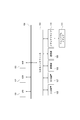
- FIG. 2 shows the hardware configuration of the information processing apparatus that constitutes the product moving image server 2, the EC server 3, the store terminal 4, the user terminal 5, and the content server 8 shown in FIG.
- Each device shown as the product moving image server 2, the EC server 3, the store terminal 4, the user terminal 5, and the content server 8 can be realized as a computer device as shown in FIG. 2 capable of information processing and information communication.
- a CPU (Central Processing Unit) 101 of a computer apparatus performs various processes according to a program stored in a ROM (Read Only Memory) 102 or a program loaded from a storage unit 108 to a RAM (Random Access Memory) 103. Execute the process.
- the RAM 103 also appropriately stores data necessary for the CPU 101 to execute various processes.
- the CPU 101, ROM 102, and RAM 103 are connected to each other via a bus 104.
- An input / output interface 105 is also connected to the bus 104.
- the input / output interface 105 includes an input unit 106 including a keyboard, a mouse, and a touch panel, a display including an LCD (Liquid Crystal Display), a CRT (Cathode Ray Tube) and an organic EL (Electroluminescence) panel, and an output including a speaker.
- a storage unit 108 configured by a unit 107, an HDD (Hard Disk Drive), a flash memory device, and the like, and a communication unit 109 that performs communication processing and inter-device communication via the network 1 are connected.
- a media drive 110 is also connected to the input / output interface 105 as necessary, and a removable medium 111 such as a magnetic disk, an optical disk, a magneto-optical disk, or a semiconductor memory is appropriately mounted, and information can be written to the removable medium 111. Reading is performed.
- a removable medium 111 such as a magnetic disk, an optical disk, a magneto-optical disk, or a semiconductor memory is appropriately mounted, and information can be written to the removable medium 111. Reading is performed.
- data and programs can be uploaded and downloaded through communication by the communication unit 109, and data and programs can be transferred via the removable medium 111.
- the CPU 101 performs processing operations based on various programs, necessary information processing and communication as the product moving image server 2, the EC server 3, the store terminal 4, the user terminal 5, and the content server 8 are executed.
- the information processing apparatus which comprises the goods animation server 2, the EC server 3, the store terminal 4, the user terminal 5, and the content server 8 is not limited to a single computer apparatus as shown in FIG.
- the computer apparatus may be configured as a system.
- the plurality of computer devices may be systemized by a LAN or the like, or may be arranged at a remote place by a VPN using the Internet or the like.
- FIG. 3 shows a functional configuration as the product moving image server 2 configured by one or a plurality of information processing apparatuses.
- Each function as the product moving image server 2 is a function realized by processing executed by the CPU 101 in accordance with the program in the information processing apparatus. However, all or a part of the processing described below may be realized by hardware. Further, when each function is realized by software, each function need not be realized by an independent program. Processing of a plurality of functions may be executed by one program, or one function may be realized by cooperation of a plurality of program modules.
- the EC server 3 includes a network interface (hereinafter “network I / F”) 2a, a list moving image processing unit 2b, an operation information acquisition unit 2c, and a DB access unit 2d.
- network I / F network interface
- the network I / F 2a performs various communications with the user terminal 5, the EC server 3, or another information processing apparatus via the network 1. For example, transmission of moving image data to the user terminal 5 and reception of operation information from the user terminal 5 are performed.
- the merchandise moving image server 2 may provide moving image data to the EC server 3 via the network I / F 2a, and a web page including the moving image data may be transmitted to the user terminal 5 via the EC server 3.
- the list moving image processing unit 2b simultaneously divides the area for each of a plurality of product moving image contents to be displayed in the list from among the moving image moving image contents stored in the moving image DB 7 after equalizing the reproduction time length. Generate list video data to be displayed. The equalization of the reproduction time length will be described later.
- the list moving image processing unit 2 b performs processing for displaying a list moving image of product moving image content based on the generated plurality of list moving image data on the user terminal 5.
- the list moving image processing unit 2 b generates a single moving image data by combining a plurality of moving image data for a list generated for a plurality of product moving image contents, and transmits the moving image data to the user terminal 5.
- a list moving image based on the moving image data is displayed on a predetermined web page.
- the list moving image processing unit 2b transmits a plurality of list moving image data respectively generated for a plurality of product moving image contents to the user terminal 5, and a moving image based on each list moving image data is displayed on the web page on the user terminal 5 side.
- the list moving image may be displayed on the web page by being displayed in a predetermined area.
- Methods 1 As described above, as a process of displaying a list video of product video content based on a plurality of list video data on the user terminal 5, that is, a process of providing a list video to the user terminal 5, specifically, (Method 1) After creating one synthesized video data obtained by previously synthesizing a plurality of video data for listing, the user terminal 5 as video data to be displayed in a predetermined area on the web page being browsed on the user terminal 5 Send to. (Method 2) By transmitting a plurality of list moving image data to the user terminal 5 as moving image data to be displayed in a predetermined area on the web page, the list moving image is displayed on the web page being browsed on the user terminal 5. So that Such a process can be considered.
- the synthesized video data for providing the list video and the individual video data for listing to the user terminal 5 may be transmitted directly to the user terminal 5 via the network I / F 2a, or It may be transmitted to the EC server 3 via the network I / F 2a and transmitted to the user terminal 5 as a moving image in a predetermined web page by the EC server 3.
- the synthesized moving image data and the individual list moving image data are transmitted to the user terminal 5 by, for example, a streaming method in which a file as moving image data is simultaneously downloaded while being downloaded to the user terminal 5.
- a progressive download method in which a file as moving image data is reproduced while being downloaded to the user terminal 5 using the HTTP protocol may be considered.
- the operation information acquisition unit 2c performs processing for acquiring predetermined operation information from the external terminal (user terminal 5) that provided the list moving image via the network I / F 2a. Although details will be described later, when operation information such as an emphasis operation, a release operation, an unnecessary operation, a return operation, and an advance operation is transmitted as an operation that is performed on the user terminal 5 by the user who is browsing the list video, the operation information The acquisition unit 2c acquires and recognizes these, and notifies the list moving image processing unit 2b.
- the list moving image processing unit 2b performs various moving image providing processes according to the operation information notified from the operation information acquiring unit 2c.
- the list video processing unit 2b displays a video in which the product video content to be emphasized is highlighted. A process of providing data to the external terminal (user terminal 5) that is the transmission source of the emphasis operation information is performed.
- the DB access unit 2d performs writing / searching / reading with respect to the moving image DB 7. Specifically, the DB access unit 2d performs a process of storing the product moving image content transmitted from the content server 8 in the moving image DB 7. Further, when the list moving image processing unit 2b generates the list moving image data, the DB access unit 2d performs a process of reading the product moving image content stored in the moving image DB 7.
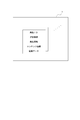
- FIG. 1 An example of product moving image content information stored in the moving image DB 7 is shown in FIG.
- One product moving image content is usually produced for the introduction or advertisement of one product.
- the product video content transmitted from the content server 8 is added with product ID, store information, product information, content information, and the like together with video data as video content, for example, and these are registered in the video DB 7.
- the product ID is information indicating a corresponding product, that is, one or a plurality of products introduced by a moving image.
- a product ID registered in the product DB 6c is used.
- the ID may be generated using a product manufacturer name or model number.
- the store information is information indicating one or a plurality of stores that handle the product.
- store information registered in the store DB 6b and link information to the store page is included in the store information.
- the merchandise information is various attribute information of the merchandise such as the merchandise genre, sub-genre, manufacturer, and price of the merchandise.
- the content information is video data information. For example, playback time, number of scenes, number of cuts, resolution, editing information, and the like are included.
- the moving image DB 7 may be a storage unit that stores product moving image content, and may be provided as a part of the electronic commerce DB 6.
- FIGS. 5, 6, 8, 10, 11, and 12 are moving images unless otherwise specified.
- n (nine in the following example) video (product video content) MV1 to MV9 are divided into regions.
- a list animation 22 to be displayed at the same time is displayed.
- the list moving image 22 is an example in which nine moving images are combined, and the list moving image 22 may be a combination of at least two or more product moving image contents divided into regions.
- the videos MV1 to MV9 are introduction videos of different products.
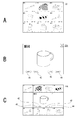
- FIG. 5A shows, for example, a state before the start of moving image reproduction, and the images of the respective moving images MV1 to MV9 are still image states of the first frame or representative frame image in the moving image data. In this state, a thumbnail image of the product moving image content may be used as each image to be displayed.
- a playback button 23, a progress bar 24, a full screen button 25, and a voice button 26 that can be used by the user as operators related to the entire list video 22 are displayed near (for example, below) the list video 22. .
- the playback button 23 When the user operates the playback button 23, the playback of all the moving images MV1 to MV9 of the list moving image 22 is started. During reproduction, a stop button 27 is displayed instead of the reproduction button 23 as shown in FIG. 5C. When the user operates the stop button 27, the reproduction of all the moving images MV1 to MV9 of the list moving image 22 is stopped. When stopped, the playback button 23 is displayed again as shown in FIG. 5A. The reproduction of the list video 22 is automatically started without any user operation in a state where a predetermined web page 20 is browsed on the user terminal 5 as shown in FIG. 5A or a region of the list video 22 is browsed. It is good also as what is done. In that case, the playback button 23 becomes an operation member for restarting after playback is stopped.
- the playback progress position (current playback point on the time axis) is displayed on the progress bar 24.
- the user can perform reproduction by designating an arbitrary reproduction progress position by performing operations such as clicking and tapping on the progress bar 24.
- the moving images MV1 to MV9 of the list moving image 22 are subjected to a uniform process so that the reproduction time lengths are all uniform. For this reason, the reproduction progress position of the list animation 22 can be expressed by one progress bar 24.
- the list moving image 22 can be brought into a full screen state on the screen of the user terminal 5.
- the audio button 26 it is possible to perform volume setting and mute instruction during reproduction of the list moving image 22. Note that during reproduction of the list moving image 22 as shown in FIG. 5C, the sound may be automatically muted regardless of the user operation setting by the sound button 26. This is because it is not appropriate for the user to feel annoyed when the voices of a large number of moving images MV1 to MV9 are output simultaneously. Alternatively, a specific moving image among the moving images MV1 to MV9 may be automatically selected and the sound of the moving image may be output.
- the sound of a moving image in which the pointer is positioned as a mouse over or a moving image specified by a touch operation may be output.
- sound may be output in order for each moving image for a predetermined time.
- it is preferable to output the sound of the emphasized moving image.
- FIG. 5B shows an enlarged view of one moving image MV7 in the list moving image 22.
- an operator for that individual moving image is displayed.
- an emphasis button 41 for example, an emphasis button 41, a return button 42, a transition button 44, and an unnecessary button 47.
- the highlight button 41 is an operator for the highlight operation.
- the user can view a moving image (FIG. 8B, FIG. 8C, etc., which will be described later) in which the moving image is emphasized by operating the highlight button 41 for the moving image of the item of interest in the list moving image 22.
- the return button 42 is an operator for a return operation. By operating the return button 42 for a moving image of a certain product, the user can view the moving image from a state where the moving image is returned to an arbitrary reproduction progress position. This can be used when, for example, it is desired to review a scene of interest for a certain moving image in the list.
- an advance button may be displayed for each of the moving images MV1 to MV9 so that the user can individually perform an advance operation to advance the reproduction progress position to an arbitrary position.
- the return button 42 since the user can return / advance the entire list moving image 22 by operating the progress bar 24, it is not necessary to provide the return button 42 or the advance button corresponding to each moving image.
- the reason why the return button 42 is illustrated here is to describe processing according to a return operation for an individual moving image in the present embodiment.
- the transition button 44 is an operator for a page transition operation. By operating the transition button 44 for a moving image of a certain product, the user can make a page transition to a web page for purchasing a product introduced in the moving image, a web page of a store handling the product, or the like. This makes it easy to check the detailed explanations, prices, services, etc. of the products you are interested in from the video, and to actually carry out the purchase procedure.
- Unnecessary button 47 is an operator for unnecessary operations. The user can stop the reproduction of the moving image in the list moving image 22 by operating the unnecessary button 47 for the moving image of a certain product.
- buttons are not displayed for each of the moving images MV1 to MV9, and a predetermined operation on the moving image as a cursor (pointer) or a touch operation may be assigned to each of the above operations. For example, a click operation or a tap operation on a moving image is set as an emphasis operation.
- the left drag operation or flick operation is a return operation
- the right drag operation or flick operation is an advance operation
- a double click operation or a double tap operation is a page transition operation.
- a downward drag operation or flick operation is an unnecessary operation.
- a scroll bar 21 is displayed.
- the user can scroll the page screen by operating the scroll bar 21.
- an example of the entire web page 20 is shown in FIG.
- a plurality of list videos 22 are displayed as shown in the list videos 22-1, 22-2, and 22-3.
- a playback button 23, a progress bar 24, a full screen button 25, and a voice button 26 are displayed corresponding to each of the list videos 22-1 to 22-3.
- the user can display and watch an arbitrary list video 22 on the screen of the user terminal 5 by performing a scroll operation.
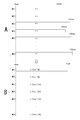
- FIG. 7A shows an example of the normal playback time length of the moving images MV1 to MV9 as the original product moving image contents stored in the moving image DB 7, that is, the time length from the start to the end of playback at 1 ⁇ speed playback ( ⁇ 1 playback). Is shown. For example, assume that the playback time length is 90 seconds for moving images MV1 and MV2, 115 seconds for moving image MV3, 120 seconds for moving image MV9, and the like.
- the product video server 2 (list video processing unit 2b) acquires such product video content MV1 to MV9 from the video DB 7, and generates list video data for displaying the list video 22 as shown in FIG.
- the list moving image data is moving image data in which the reproduction time length is uniformized for each of the moving images MV1 to MV9 in the list moving image 22.
- the time length is expanded or compressed so as to have a certain reproduction time length, and the moving images for listing are displayed by dividing the area on one screen.
- Generate data For example, as shown in FIG. 7B, the reference time Tref is set for the moving images MV1 to MV9.
- the reference time Tref may be an average value of the original reproduction time length of the moving images MV1 to MV9, or may be a fixed value that is a time length of a standard product moving image content such as 100 seconds.
- any one playback time length of the moving images MV1 to MV9 may be selected as the reference time Tref.
- the playback time length of each of the moving images MV1 to MV9 is made to match the reference time Tref.
- “matching” does not require complete matching in units of hours, minutes, seconds, and frames. For example, after each video is started to be played back at the same time, the range of the playback time length that the viewer feels at the same time may be “matched”, and an error of about 1 to 2 seconds may be allowed. In this sense, it can be said that “substantially match”.
- moving images MV1, MV2, and MV4 extend the reproduction time length
- moving images MV3, MV5, and MV9 compress the reproduction time length.
- frames may be regularly inserted according to the rate of expansion to the reference time Tref. For example, in order to increase the reproduction time length by 1.2 times with a moving image of 30 frames per second, one frame is inserted every five frames.
- the frame content may be inserted intensively in a scene with little movement in the screen content (a section where the frame difference is small before and after), a title scene, an ending scene, and the like.
- frame thinning is performed. For example, in order to increase the playback time length by 0.8 times with a moving image of 30 frames per second, one frame should be regularly thinned out from 5 frames.
- frame thinning may be performed by concentrating on scenes with little movement in the screen content (sections where the frame difference is small before and after), title scenes, and ending scenes.
- a method of deleting a frame section that is gathered to some extent is also conceivable.
- Time equalization is performed for each of the moving images MV1 to MV9 by such methods as frame interpolation and frame thinning.
- all the moving images MV1 to MV9 have the reproduction time length as the reference time Tref as shown in FIG. 7B.
- Each moving image data of the moving images MV1 to MV9 in FIG. 7B is set as list moving image data.
- the moving images MV1 and MV2 are expanded by (Tref / 90) times the reproduction time length. In terms of playback speed, this is equivalent to (90 / Tref) double speed slow playback.
- the moving image MV3 is compressed to have a reproduction time length of (Tref / 115) times. In terms of playback speed, this is equivalent to (115 / Tref) times faster playback.
- the list moving image processing unit 2b generates the moving images MV1 to MV9 as the list moving image data in which the reproduction time lengths are made uniform in this way.
- these list video data are not simply equalized playback time lengths, but are displayed by dividing the area within a single screen, so the resolution for making the image size suitable for each area Conversion is also performed. For example, when the area is divided into nine as shown in FIG. 5, resolution conversion is performed so that the number of pixels becomes 1/9.
- the list image is provided to the user terminal 5 by (Method 1) or (Method 2) described above based on the moving image data for list generated by performing the reproduction time length equalization process and the resolution conversion in this way. .
- the reproduction time length of the list moving image 22 displayed as shown in FIG. 5 is the reference time Tref, and each of the moving images MV1 to MV9 ends at the same time (or substantially simultaneously) when the reference time Tref has elapsed after the start of reproduction. It will be.
- the product video server 2 selects n (9 in the example in the figure) product video content MV1 to MV9 to be included in the list video 22 in response to a request for the web page 20 from the user terminal 5, and from the video DB7.
- n (9 in the example in the figure) product video content MV1 to MV9 to be included in the list video 22 in response to a request for the web page 20 from the user terminal 5, and from the video DB7.
- Generating moving image data that has been read out, uniformed, and resolution-converted for these is a heavy processing load and is expected to take time. Therefore, the product video server 2 pre-selects n (9 in the example) product video content MV1 to MV9 to be displayed as the list video 22 on the web page 20 and makes the playback time length uniform. It is also conceivable to create in advance list moving image data that has undergone resolution conversion.
- n product video contents included in the list video 22-1 at each update timing n product moving image contents included in the list moving image 22-2 and the n product moving image contents included in the list moving image 22-3 are respectively set.
- the product video content is selected as the list video 22-1 as the new product video, the list video 22-2 as the best-selling product video, and the like. Therefore, each time a moving image included in each list moving image 22 is selected by updating the page contents, the moving image MV1 to MV9 selected for the list moving image 22 is generated with the moving image for list having undergone equalization processing and resolution conversion. To leave.
- synthesized moving image data itself obtained by combining moving images MV1 to MV9 may be generated in advance.
- the list moving image 22 can be provided without an excessive processing load at the time of access from the actual user terminal 5.
- synthesized moving image data obtained by combining the moving image data for each list may be created in advance and stored in the moving image DB.
- the user can view the video images of a large number of products at a time, but the user may want to watch in detail the products that he / she is interested in. is assumed. In this case, the user may perform an operation (emphasis operation) such as the above-described highlight button 41 or click / tap on the moving image in the list moving image 22.
- an operation emphasis operation
- the operation information acquisition unit 2c detects the emphasis operation, and accordingly, the list video processing unit 2b With this function, processing is performed so that the moving image in which the highlighted product moving image content is highlighted is displayed on the user terminal 5 that is the transmission source of the highlighted operation information.
- a display state that highlights the operation target moving image is a list of a plurality of moving images. It is possible to do.
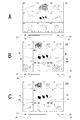
- the highlight operation is performed on the moving image MV4 when the list moving image 22 is displayed as shown in FIG. 8A.
- switching to the single moving image 22A of the moving image MV4 as shown in FIG. 8B can be considered.
- the highlighted display as shown in FIG. 8C, a partially expanded list moving image 22B in which only the moving image MV4 is conspicuously enlarged although it is a list of moving images MV1 to MV9 may be considered.
- the return button 45 is an operator for canceling emphasis. By operating the return button 45, the user can return from the state of the single moving image 22A or the partially enlarged list moving image 22B to the original state of the list moving image 22 of FIG. 8A.
- the return button 42 and the advance button 43 are operators for returning and moving the emphasized moving image.
- the return button 42 and the advance button 43 for the highlighted product moving image By operating the return button 42 and the advance button 43 for the highlighted product moving image, the user can return the moving image to an arbitrary reproduction progress position and view the moving image.
- the transition button 44 for the video of the highlighted product the page transitions to a web page for purchasing the product introduced in the video, a web page of a store handling the product, or the like. be able to.
- a click operation / tap operation on the highlighted video may be a return operation
- a left-right drag operation or a flick operation may be returned / advanced
- a double-click operation or double-tap operation may be a page transition operation.
- the playback time length is uniform for each of the videos MV1 to MV9.
- the specific moving image such as the moving image MV4 is emphasized and the display of FIGS. 8B and 8C is performed
- the specific moving image such as the moving image MV is in the 1 ⁇ speed reproduction state, that is, the original reproduction speed state. It is desirable to be displayed. This is because the emphasis operation is performed on the video that the user has selected to view in detail.
- FIG. 9A illustrates the original playback time length of the moving images (product moving image contents) MV1 to MV9, as in FIG. 7A.
- the reference time Tref is set as the reproduction time length (105 seconds) of the moving image MV4.
- the other moving images MV1 to MV3 and MV5 to MV9 are subjected to a uniform reproduction time length process and resolution adjustment.
- the process of equalizing the reproduction time length is not performed, and only the resolution adjustment is performed from the original moving image data.
- the playback time lengths of all the moving images MV1 to MV9 are all set to the moving image MV4.
- the playback time length of the moving images MV1 and MV2 is expanded to (105/90) times. In terms of playback speed, this is equivalent to (90/105) -times slow playback.
- the moving image MV3 is compressed with a reproduction time length of (105/115) times. In terms of playback speed, this is equivalent to (115/105) times faster playback.
- the list moving image data subjected to the above processing is generated, and based on the moving image data for list, a partially enlarged list is added to the user terminal 5 by the above (Method 1) or (Method 2).
- An image 22B is provided.
- the combined video data as the partially enlarged list video 22B when the video MV1 is highlighted is displayed as the partially enlarged list video 22B when the video MV9 is highlighted.
- the synthesized moving image data may be generated.
- these list moving image data and synthesized moving image data may be stored in the moving image DB 7.
- the moving image reproduction may be paused to be in a still image state.
- those images are not troublesome, and it becomes easy for the user to pay attention to an enlarged moving image to be noticed.
- the process for equalizing the playback time length according to the moving image to be emphasized as described above is not necessary.
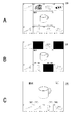
- the list video 22 is displayed, so that the user can view video images of a large number of products at once, but some products may not be interested in at all. obtain. Then, it may be bothersome for the user that a moving image of an uninteresting product is included. Therefore, the user performs an unnecessary operation so that a video that is considered unnecessary to be viewed can be canceled. That is, when the operation information acquisition unit 2c acquires unnecessary operation information that does not require display of a specific video in the list video 22, the product video server 2b displays the video of the unnecessary operation target. Processing to display the canceled list moving image 22 on the user terminal 5 that is the transmission source of unnecessary operation information is performed.
- the product moving image server 2 provides the user terminal 5 with the list moving image 22 in which the display of the area of the moving image MV3 is stopped.
- the display area of the moving image MV3 is a non-image (solid image with a predetermined color / luminance).
- a list image 22 as shown in FIG. 10B is obtained.
- a mark or text indicating that the moving image is canceled may be displayed in the display area of the moving image MV3.
- the list image 22 as shown in FIG. In this way, the moving images in the display state are reduced in accordance with unnecessary operations by the user.
- the area dividing mode is also changed.
- the initial division mode of the list moving image 22 is nine divisions of vertical 3 divisions ⁇ horizontal 3 divisions.
- the division mode is changed to 6 divisions as shown in FIG. 10D.
- the division mode is changed to four divisions as shown in FIG. 10E.
- the division mode is changed to two divisions as shown in FIG. 10F. Furthermore, when an unnecessary operation is performed on the moving image MV9, the only effective moving image is the moving image MV2, so that the single moving image 22A is used as shown in FIG. In this way, by changing the area division mode according to the number of moving images whose display has been stopped, it is possible to make the list screen easier to see and to effectively use the display area to increase the size of individual moving images.
- FIG. 11B illustrates a state after unnecessary operations are performed on the moving images MV2, MV5, and MV8 in a state where the partially enlarged list moving image 22B is displayed as illustrated in FIG. 11A.
- an unnecessary operation is further performed on the moving image MV3, and when the four moving images are stopped, the area division mode is changed as shown in FIG. 11C.
- the highlighting effect can be enhanced by changing the region dividing mode in such a way as to enlarge the moving image MV4 to be highlighted.
- a return operation may be performed on the video.
- the list video processing unit 2b changes the playback progress position of the video to be returned, And the process which displays on the user terminal 5 the list animation 22 which made the reproduction
- the sound of the specific moving image that is the target of the return operation is output.
- the display operation according to the return operation described here is the same as that shown in FIG. 8C in the same way as when the product video server 2 performs an emphasis operation on the video in response to the return operation on a video. It is assumed that the display operation is applied to the case where the part enlarged list moving image 22B is displayed.
- each video displayed in the list video 22 has the same playback time length as described above, if the playback position is returned only for a specific video, the playback progress position is shifted from other videos, and at the same time It cannot be terminated.
- the return / advance operation by the progress bar 24 changes the playback point of all moving images, and does not change the playback progress position of only a specific image.
- the moving target moving image is an image that the user wants to watch. Therefore, a return operation for an individual moving image is enabled, and the product moving image server 2 obtains the display state shown in FIG. 12B on the user terminal 5 in accordance with the return operation.
- the return operation of the moving image MV5 is performed while the list moving image 22 of FIG. 12A is displayed.
- a partially enlarged list moving image 22B targeting the moving image MV5 is displayed as shown in FIG. 12B.
- the reproduction progress position of the moving image MV5 is changed to a position corresponding to the return operation amount of the user.
- the other moving images (MV1 to MV4, MV6 to MV9) are paused at the playback progress position at the time when the return operation is performed.
- the hatched image indicates a state where the moving image is stopped.
- the entire progress bar 24 indicates the playback progress position as a pause point of other images, while the movie MV5 is displayed with a separate progress bar 46 and is being played back occasionally. It is advisable to indicate the playback progress position.
- the return button 42 and the advance button 43 are used (or by another operation method) to allow further return operation and advance operation for the movie MV5.
- the advance operation in this state is limited to the pause point of another moving image.
- the list video 22 of FIG. Return to the state. That is, in this case, the enlargement of the moving image MV5 is finished, and at the same time, the reproduction of other moving images is resumed.
- the return button 45 is displayed in the state of FIG.
- the state returns to the state of the list moving image 22 in FIG. 12A even during the return reproduction. As described above, it is possible for the user to easily review only the moving image that is of interest in the list moving image 22.
- the playback of the movie MV5 in the state of FIG. 12B reaches the playback progress position immediately before the first return operation, that is, the pause point of another movie (MV1 to MV4, MV6 to MV9), as shown in FIG. 12C.
- the partially enlarged list video 22B may be continued.
- playback of other moving images is resumed. That is, the fact that the user has performed a moving image return operation is presumed to be the moving image of the product of interest, and therefore the state is the same as the state of FIG. 8C.
- the display of the progress bar 46 only for the specific video shown in FIG. 12B may be terminated in response to the playback progress position of the video MV5 being the same as the other video.
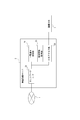
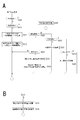
- FIG. 13 shows processing for providing a list moving image by the product moving image server 2.
- the commodity moving image server 2 monitors steps S100, S110, S120, and S130, and performs necessary processing according to the monitoring result.
- the product video server 2 monitors access to the web page 20 for product introduction by the user terminal 5 in step S100.
- the product moving image server 2 When access to the web page 20 is detected, the product moving image server 2 generates list moving image data in step S101, and in step S102, transmits page data including the list moving image 22 to the user terminal 5. I do.
- the product moving image server 2 may transmit web page data including image data (still image data) of the list moving image 22 before the start of reproduction as shown in FIG. 5A.
- the page access in step S100 is an image request according to instruction information (for example, an HTML tag) on the web page 20 provided from the EC server 3.
- the product moving image server 2 may transmit the image data (still image data) of the list moving image 22 before the reproduction is started, for example, in step S202.
- step S101 The list moving image data generation in step S101 is performed as shown in FIG. 14A, for example.
- step S200 of FIG. 14A the product video server 2 confirms whether or not the list video data of the n product video content for the list video 22 displayed on the web page 20 has already been generated. .
- step S201 the product video server 2 selects n (eg, 9) product video content MV1 to MV (n) to be included in the list video 22, and reads and acquires these from the video DB 7 To do. Then, the processing described in FIG. 7 is performed.
- step S202 the product moving image server 2 sets a reference time Tref.
- step S201-1 to step S201-n the product video server 2 sequentially adjusts the playback time length to the reference time Tref and generates resolution-converted video data for the product video content MV1 to MV (n). I will do it. That is, the process described with reference to FIG. The list moving image data generation in step S101 in FIG. 13 is thus completed.
- the list moving image data corresponding to the web page 20 may be generated in advance. That is, the product moving image server 2 executes the processing of steps S201 to S203-n in FIG. 14A in advance, and stores the generated moving image data for list in the moving image DB 7. If this processing has been performed, it is assumed that the moving image data for the list of n product moving image contents has already been generated in step S200 of FIG. 14A. In this case, the product moving image server 2 may acquire the list moving image data for the product moving image contents MV1 to MV (n) from the moving image DB 7 in step S204.
- the web page 20 is displayed on the user terminal 5 including the list moving image 22 before the start of reproduction as shown in FIG. 5A.
- the merchandise moving image server 2 monitors the operation of starting the reproduction of the list moving image 22 from the user terminal 5 on which the web page 20 is displayed in step S110, that is, the operation of the reproduction button 23.
- the product moving image server 2 performs a process for providing the list moving image 22 in step S111. That is, by using the list moving image data of the product moving image contents MV1 to MV (n) prepared in step S101, the reproduction state list moving image 22 is provided to the user terminal 5 by the above (method 1) or (method 2). .
- a reproduction list video 22 is displayed as shown in FIG. 5C.
- the product video server 2 proceeds from step S110 to S111. , Provide a list of playback status videos. In that case, it is preferable to provide the reproduction list video 22 from the reproduction progress position at the time of the previous operation of the stop button 27.
- the video playback may be automatically started.
- the commodity moving image server 2 may execute step S111 after step S102.
- step S120 the product video server 2 monitors operation information related to the list video 22 from the user terminal 5 on which the list video 22 is reproduced.
- the above-described emphasis operation, release operation, unnecessary operation, return operation, advance operation, or overall operation is monitored.
- the overall operation is an operation related to the entire list moving image 22 such as an operation of the stop button 27 and the progress bar 24 shown in FIG. Further, when the display area of the list moving image 22 does not appear on the screen by the scroll bar 21, it may be recognized in the same manner as the operation of the stop button 22.
- step S301 the commodity moving image server 2 determines whether or not the detected operation is the entire operation. If the detected operation is the entire operation, the process proceeds to step S302 and performs processing corresponding to the entire operation. For example, in the case of a stop operation, the product moving image server 2 stores the reproduction progress position at that time and then stops providing the list moving image 22. In addition, when an instruction to change the playback progress position (advance / return) is given by the operation of the progress bar 24, the list moving image 22 is provided from the designated playback progress position.
- the product video server 2 confirms the operation content in steps S310, S320, S330, S340, and S350.
- step S310 When it is detected that the emphasis operation information designating a certain moving image MV (x) is transmitted from the user terminal 5, in order to cause the user terminal 5 to perform the emphasis display of the moving image MV (x), the product moving image server The process of 2 proceeds from step S310 to S311.
- MV (x) refers to a moving image that the user has set as an operation target among “MV1” to “MV (n)”.
- FIG. 15A shows an example in which highlighting is performed using a partially enlarged list moving image 22B as shown in FIG. 8C.
- the process of step S311 is shown in FIG. 14B.
- step S250 of FIG. 14B the product video server 2 acquires and stores information on the current playback progress position of the list video 22 in the user terminal 5 that is the transmission source of the highlight operation. Note that the information on the reproduction progress position may be transmitted from the user terminal 5 together with the emphasis operation.
- step S251 the product moving image server 2 confirms whether or not the list moving image data of the n product moving image contents has already been generated for the partially expanded list moving image 22B obtained by expanding the moving image MV (x). .
- step S252 the commodity moving image server 2 sets the original reproduction time length of the moving image MV (x) to be emphasized as the reference time Tref.
- the original reproduction time length is not the reproduction time length in the state converted into the list moving image data but the reproduction time length in the state created as the product moving image content.
- step S253-1 to step S253-n the product video server 2 sequentially adjusts the playback time length to the reference time Tref (that is, the playback time length of the video MV (x)) for the product video content MV1 to MV (n). Then, the moving image data for the list whose resolution is converted is generated. That is, the process described with reference to FIG.
- the original moving image data is subjected to resolution conversion in accordance with a relatively wide divided area, and for each moving image other than the moving image MV (x), the reproduction time length is made uniform and relatively Resolution conversion is performed in accordance with a small divided area.
- the list moving image data generation for the partially enlarged list moving image 22B in step S311 of FIG. 15A is thus completed.
- the list moving image data for the partially enlarged list moving image 22B may be generated in advance. That is, the merchandise moving image server 2 executes the processing of steps S252 to S253-n in FIG. 14B in advance for emphasizing each of the moving images MV1 to MV (n), and the generated moving image data for the list in each case is stored in the moving image DB7.
- the merchandise moving image server 2 executes the processing of steps S252 to S253-n in FIG. 14B in advance for emphasizing each of the moving images MV1 to MV (n), and the generated moving image data for the list in each case is stored in the moving image DB7.
- the product moving image server 2 may acquire the list moving image data for the product moving image contents MV1 to MV (n) when emphasizing the moving image MV (x) from the moving image DB 7 in step S254.
- step S312 of FIG. 15A the provision processing of the partially enlarged list movie 22B from the reproduction progress position previously stored in step S250 is performed using the list movie data prepared in step S311 as described above (method 1) or (Method 2).
- Method 1 the list movie data prepared in step S311 as described above
- Method 2 the list movie data prepared in step S311 as described above
- Method 2 the partially enlarged list moving image 22B from the subsequent reproduction progress position is displayed.
- FIG. 15B shows a process in the case where the single moving image 22A of the moving image MV (x) is displayed as shown in FIG. 8B in correspondence with the emphasis operation for the moving image MV (x).
- the commodity video server 2 proceeds from step S310 to step S314 in response to the detection of the highlight operation, and acquires and stores information on the current reproduction progress position of the list video 22 in the user terminal 5 that is the source of the highlight operation.
- step S315 the moving image MV (x) to be emphasized from the stored reproduction progress position is provided.
- the original moving image data as the product moving image content MV (x) may be transmitted as it is from the reproduction progress position stored in step S314.
- the single moving image 22A as shown in FIG. 8B is displayed on the user terminal 5.
- the product moving image server 2 monitors the release operation in step S320 of FIG. 15A.
- the commodity moving image server 2 proceeds from step S320 to step S321 in FIG. 15A.
- step S321 it is confirmed whether or not highlighting is currently being performed (single video 22A or partial enlarged list video 22B is being provided). If the highlighting is not in progress, the process is terminated because the release operation is invalid. If it is highlighted, the product video server 2 proceeds to step S322, and acquires and stores the current playback progress position as the single video 22A or the partially enlarged list video 22B.
- step S323 the commodity moving image server 2 performs a process of displaying the normal list moving image 22 on the user terminal 5 from the stored reproduction progress position. That is, by using the list moving image data for the normal list moving image 22 used before the start of highlighting, the list moving image 22 is provided from the reproduction progress position stored in step S322 (method 1) or (method). 2). As a result, the display on the user terminal 5 returns from the state shown in FIG. 8B or FIG.
- the product moving image server 2 monitors unnecessary operations in step S330 of FIG. 15A. When it is detected that unnecessary operation information for the specific moving image MV (x) is transmitted from the user terminal 5 by the unnecessary button 47 or the like, the commodity moving image server 2 proceeds from step S330 to S331.
- the process of step S331 is shown in FIG. First, in step S401 in FIG. 16, the product moving image server 2 acquires and stores the reproduction progress position of the current list moving image 22. In step S402, the product moving image server 2 determines whether or not the number of moving images to be displayed in the list moving image 22 is a number for changing the region dividing mode in the process according to the unnecessary operation this time. For example, in the example described with reference to FIG.
- each case where the number of moving images to be displayed is “6”, “4”, “2”, “1” is a number for changing the area division mode. Become. This is, for example, a number that can expand the area of each moving image while allocating the list moving image display area on the web page 20 to each moving image without waste.
- the commodity moving image server 2 proceeds to step S403, replaces the region of the target moving image MV (x) with the stop image, and provides the list moving image 22 I do.
- the moving image for list of moving images MV (x) to be canceled is replaced with moving images of non-image data.
- the synthesized moving image data obtained by combining the non-image data and the list moving image data other than the moving image MV (x) is generated and transmitted to the user terminal 5 from the reproduction progress position stored in step S401.
- the list moving image data of the moving image MV (x) to be canceled is replaced with a moving image of non-image data. Then, the list moving image data other than the non-image data and the moving image MV (x) is transmitted to the user terminal 5 from the reproduction progress position stored in step S401.
- the area of the moving image MV (x) is designated as the display area for the non-image data.
- step S402 determines whether the number of moving images to be displayed is, for example, “6”, “4”, “2”, or “1”, which is the number for changing the area division mode.
- the commodity moving image server 2 proceeds to step S410. Proceeding first, identify the video to be displayed. For example, in the case of transition from the state shown in FIG. 10C to the state shown in FIG. 10D, moving images MV2, MV4, MV5, MV6, MV8, and MV9 that have not been operated unnecessary are displayed as moving images to be displayed.
- step S411 the commodity moving image server 2 generates moving image data for a list whose resolution is adjusted according to the number of moving images to be displayed. For example, when shifting from the state shown in FIG.
- each of the moving images MV1 to MV9 has been used for each moving image MV1 to MV9 using the moving image data for the list corresponding to the 1/9 size of the area of the moving image list 22.
- the list moving image data is generated by converting the moving image data for each of the moving images MV2, MV4, MV5, MV6, MV8, and MV9 to a resolution corresponding to 1/6 size of the area of the moving image list 22, respectively.
- the commodity moving image server 2 performs a process of providing the list moving image 22 in which the area division mode is changed using the generated moving image data for list.
- synthesized moving image data obtained by synthesizing the list moving image data generated for the moving image to be displayed is generated and transmitted to the user terminal 5 from the reproduction progress position stored in step S401.
- the list moving image data generated for the moving image to be displayed is transmitted to the user terminal 5 from the reproduction progress position stored in step S401.
- the product moving image server 2 Although the resolution conversion in step S411 is performed, the product moving image server 2 generates list moving image data in which the resolution is converted in advance according to various area division modes for the respective moving images MV1 to MV (n). For example, you may memorize
- the processing in step S411 is processing for obtaining, from the moving image DB 7, list moving image data whose resolution is converted in accordance with the region division mode for each moving image to be displayed.
- the merchandise moving image server 2 monitors the return operation in step S340 of FIG. 15A.
- the commodity moving image server 2 proceeds from step S340 in FIG. 15A to S341.
- the process of step S341 is shown in FIG. First, in step S501 in FIG. 17, the product moving image server 2 acquires and stores the reproduction progress position of the current list moving image 22.
- the commodity moving image server 2 checks whether or not the list moving image data corresponding to the return operation has already been generated for the current moving image MV (x) to be returned.
- the list moving image data corresponding to the return operation is, for example, moving image data of 1 ⁇ speed reproduction of the moving image MV (x), and moving image data having a resolution when enlarged and displayed as a partially enlarged list moving image 22B. Accordingly, when a partially enlarged list movie 22B has been displayed in the past by an emphasis operation on the movie MV (x), or list movie data for highlighting the movie MV (x) has been prepared in advance. At this point, the creation of the list moving image data is not necessary. Therefore, if the list moving image data corresponding to the return operation has already been generated for the return operation target video MV (x), the merchandise video server 2 acquires it from the video DB 7 in step S504, for example.
- the product video server 2 If the return operation target video MV (x) has not been generated, the product video server 2 generates the list moving image data corresponding to the return operation in step S503.
- the resolution conversion may be performed on the moving image data at the single speed of the moving image MV (x), that is, the moving image data as the original product moving image content.
- step S505 the product video server 2 prepares a pause image for each video other than the return operation target. Specifically, a frame at the current reproduction progress position is extracted for each moving image, and the resolution may be adjusted according to the display size.
- step S ⁇ b> 505 the product moving image server 2 performs a process of providing the user terminal 5 with the list moving image 22 that is a moving image from the state in which the target moving image MV (x) is returned to the reproduction progress position according to the operation.
- the product moving image server 2 performs a process of providing the user terminal 5 with the list moving image 22 that is a moving image from the state in which the target moving image MV (x) is returned to the reproduction progress position according to the operation.
- synthesized moving image data obtained by combining the moving image data for the list corresponding to the returning operation prepared for the moving image to be returned and the still image data of the other moving images is generated and specified by the returning operation. It transmits to the user terminal 5 from the playback progress position.
- the list moving image data corresponding to the returning operation prepared for the moving operation target moving image is transmitted to the user terminal 5 from the reproduction progress position designated by the returning operation, and still images of other moving images are also transmitted. Data is transmitted to the user terminal 5.
- the list moving image 22 corresponding to the return operation as shown in FIG. 12B is displayed on the user terminal 5.
- the commodity moving image server 2 performs the monitoring process of steps S510 to S513.
- the product movie server 2 proceeds from step S510 to S515, and the normal list movie 22 from the reproduction progress position stored in step S501 is displayed.
- Resume offering That is, returning to the state shown in FIG. 12A, each of the moving images MV1 to MV (n) is set to the reproduction state.
- step S501 when the product moving image server 2 detects that the replay of the moving image MV (x) has progressed and has reached the reproduction progress position stored in step S501, the process proceeds to step S515, and the list from the reproduction progress position is displayed. The provision of the video 22 is resumed.
- the merchandise video server 2 further detects a return operation during the return playback of the video MV (x)
- the product video server 2 proceeds from step S512 to S505, and the video MV (x) from the playback progress position specified by the return operation. Execute the display.
- the merchandise video server 2 proceeds to the middle of the backward reproduction of the video MV (x) and detects an operation
- the product video server 2 proceeds from step S513 to S514, and the video MV (x) from the reproduction progress position designated by the advance operation.
- the advance operation in this case is limited to the reproduction progress position stored in step S501. If transition to the reproduction progress position is instructed by the advance operation, the processing of the product moving image server 2 proceeds immediately from step S511 to S515, and the provision of the normal list moving image 22 is resumed.
- FIG. 17 the example is shown in which the reverse reproduction is performed in the form of the partially enlarged list moving image 22B as illustrated in FIG. 12B. It is also conceivable to perform the reverse playback by displaying. In that case, the moving image data from the reproduction progress position may be transmitted to the user terminal 5 in accordance with the operation using the original moving image data of the moving image MV1. Further, during reverse playback, the same processing as in steps S510 to S515 may be performed.
- the commodity moving image server 2 monitors the page transition operation and the end state by the transition button 44 in step S ⁇ b> 130.
- link destination information set for the moving image MV (x) is provided to the EC server 3 in step S131, and page transition is executed.
- the store page of the product and the transition of the product page are performed.
- the end process is performed in step S131.
- the product video server 2 simultaneously divides each of a plurality of product video content (videos MV1 to MV (n)) into regions after the playback time length is uniformized.
- the list moving image data to be displayed is generated (see FIG. 7B).
- a list moving image processing unit 2b that performs processing (S111) for displaying the list moving image 22 (see FIG. 5) of the product moving image content based on the plurality of generated moving image data for listing on the user terminal 5 (external terminal) is provided.
- the product video server 2 also includes an operation information acquisition unit 2c that acquires predetermined operation information from the user terminal 5 on which the list video 22 is displayed.
- the list moving image processing unit 2b Processing (S310, S311, and S312) is performed so that the moving image in which the moving image content is highlighted (see FIG. 8B and FIG. 8C) is displayed on the user terminal 5 that is the transmission source of the emphasized operation information. .
- the user of the user terminal 5 can simultaneously view a number of product introduction videos and is interested in the videos. You can search for products efficiently.
- the moving image MV (x) is highlighted to display the moving image as a single moving image 22A or a partially enlarged list moving image 22B. . For this reason, it is possible for the user to provide an environment in which the user can watch the moving image in detail for the item of interest.
- the respective moving images MV1 to MV (n) of the list moving image 22 are started to be reproduced at the same time. It is terminated at the same time. It does not cause a situation where some videos end in the middle, or some finished videos are repeated from the beginning. Therefore, the list moving image itself looks good. Furthermore, only the videos of products with a long playback time length of the original product video content are not played to the end, and the list video can introduce each product fairly.
- the introduction video may take time and may take less time, and the playback time length of the product video content will vary, but on the list it will end at the same time, producing an unnecessarily long product video content It is also conceivable that this can be suppressed.
- making the playback time length uniform as the video data for the list does not mean that the playback time length of the product video content to be produced is restricted to a fixed value for convenience of list display. And can.
- creation of moving image content can be promoted with a certain amount of playback time length for each product.
- the uniform reproduction time length means that each moving image is substantially matched with the reference time Tref. Therefore, “uniformization” does not require perfect matching in units of hours, minutes, seconds, and frames.
- the uniformization within the range of the reproduction time length that the viewer feels to have ended at the same time is called “uniformization”. The Therefore, even if there is an error of about 1 to 2 seconds in each of the moving images MV1 to MV (n), it can be said that it is made uniform.
- the product video server 2b when the operation information acquisition unit 2c acquires the release operation information for canceling the highlighting of the specific video MV (x) in the list video 22, the product video server 2b according to the embodiment Processing is performed so that the list moving image 22 for which the highlighting is canceled is displayed on the user terminal 5 that is the transmission source of the cancellation operation information (S320 to S323). That is, in response to the user performing a canceling operation on the video that has been once emphasized by the emphasis operation, the display is returned to the list of moving images without the emphasis display. Thereby, the user can view and select the emphasized moving image and the normal list moving image easily, and the product selection can be facilitated.
- the product video server 2b of the embodiment Processing is performed so that the list moving image 22 (see FIGS. 10 and 11) in which the display of the unnecessary operation target moving image MV (x) is stopped is displayed on the user terminal 5 that is the transmission source of the unnecessary operation information. (S331, S401 to S412).
- the user can watch the list video 22 that leaves only the products of interest or make it easy to see by stopping the reproduction of the videos of products that are not of interest. Thereby, a user's product selection can be facilitated.
- the list video 22 in which the display of the unnecessary operation target video MV (x) is stopped is the list video 22 in which the area where the product video content of the unnecessary operation target is displayed is in the video non-display state.
- the list moving image processing unit 2b displays on the user terminal 5 the list moving image 22 (see FIG. 10D, FIG. 10E, etc.) in which the area division mode is changed in accordance with the number of areas in the list moving image 22 that are not displayed. (S410 to S412).
- the moving image being displayed is displayed in a wider area by changing the mode of area division according to the number of moving images being reproduced on the list moving image 22 in accordance with unnecessary operations. It becomes possible. Therefore, it is possible to provide the user with a state in which it is easy to view the moving image of the product that has not been subjected to unnecessary operations.
- the product video server 2 acquires return operation information instructing the operation information acquisition unit 2c to return the playback position of the specific video MV (x) in the list video 22 to the previous playback position.
- the list video processing unit 2b changes the playback progress position of the video MV (x) that is the return operation target, and the list video 22 that has the video other than the return operation target in the playback pause state transmits the return operation information. It is displayed on the original user terminal 5 (S341, S501 to S505). Since each moving image displayed in the list moving image 22 has a uniform reproduction time, when the reproduction position of a specific moving image is returned, it cannot be completed at the same time.
- the moving operation target moving image is a moving image that the user particularly wants to review. Therefore, when reviewing from the return position, by stopping other moving images, it is possible to bring the user into a state where the moving image being played back can be watched.
- the video MV (x) that the user has performed a return operation is estimated to be a video that the user is interested in. Therefore, when the moving image MV (x) to be returned is reproduced from the reproduction progress position returned according to the operation, it is desirable to highlight the moving image. In the embodiment, the moving image being played back is highlighted as the partially enlarged list moving image 22B (see FIG. 12B). This makes it easy for the user to check the content of the moving image.
- the list moving image processing unit 2b includes the list moving image 22 after the reproduction progress position of the moving image MV (x) to be returned reaches the reproduction progress position where the moving image other than the returning operation is paused.
- the list moving image 22 in a state where the reproduction of the product moving image content other than the return operation target is resumed is displayed (S511, S515).
- the playback position of the video MV (x) to be returned reaches the pause position of another video, by restarting the playback of the other video, the videos displayed in the list video 22 are simultaneously played back.
- the reproduction progress position of each of the moving images MV1 to MV (n) can be prevented from being shifted on the list moving image 22 due to the influence of the return operation.
- the list video may be returned to the normal list video 22 as shown in FIG. 12A, but the partially enlarged list video 22B may be maintained as shown in FIG. 12C. Since the moving image MV (x) that the user has performed a return operation is estimated to be a moving image in which the user is interested, it is considered appropriate to continue the highlighting.
- the list video processing unit 2b selects a video (single video 22A or partially enlarged list video 22B) in which the video MV (x) to be emphasized is highlighted as the video to be highlighted.
- the product moving image content is a moving image that is reproduced at a single speed (S252 to S253-n, S254).
- the moving image MV (x) on which the user performs an emphasis operation is a moving image of a product that the user is interested in. This moving image may be played back at a slower or higher speed than the original playback speed on the list moving image 22 by the process of equalizing the playback time length.
- the moving image is reproduced at the original reproduction speed (single speed) so that the user can view the original moving image.
- the original reproduction speed single speed
- a moving image in which the highlight operation target moving image MV (x) is highlighted is a partial enlargement in which the highlight operation target moving image MV (x) is displayed in a size larger than the other moving images in the list moving image.
- An example of the list animation 22B is shown.
- the highlight display is not a list but a single movie 22A, but the list state may be maintained as a partially enlarged list movie 22B. Thereby, it is possible to maintain a state in which the user can pay attention to other moving images.
- the single moving image 22A is preferable. It is also conceivable that the user can arbitrarily select whether to use the partially enlarged list moving image 22B or the single moving image 22A during the emphasis operation.
- the configuration and processing of the present invention are not limited to the embodiments described above, and various modifications can be considered.
- the highlight display a part other than the partially enlarged list moving picture 22B and the single moving picture 22A is assumed.
- the highlight operation target movie is highlighted, displayed with high luminance, and color, and other movies are displayed with low luminance.
- a monochrome display can also be considered.
- a display with a frame around the moving image to be emphasized can be considered. In other words, any mode may be used as long as a specific moving image is more conspicuous than other moving images.
- the advance operation for the specific moving image MV (x) may be enabled. However, at that time, when the list moving image 22 or the partially enlarged list moving image 22B is used, it is desirable that the moving image advancement position of the moving images other than the specific moving image MV (x) is advanced similarly to the moving image MV (x). In this sense, the advance operation for a specific moving image MV (x) is assumed to advance the reproduction progress position of all the moving images in the same manner as the advance operation using the progress bar 24.
- the playback progress position of each of the moving images MV1 to MV (n) is advanced while the normal list moving image 22 without highlighting is being displayed
- the difference is such that the playback progress position of each movie MV1 to MV (n) is advanced in a state where the movie MV (x) is emphasized as a partially enlarged list movie 22B. It is possible to have it.
- the list moving image of the present invention is targeted for product moving image content as an introduction or advertisement for products (including services), but can also be applied to other types of moving image content.
- the product video content has a relatively short playback time length and there is no extreme difference in playback time length between the videos, the list video realized by the present invention is easy to see each video. It is easy to become a list.
- the program according to the embodiment is a program that causes an information processing device (CPU or the like) to execute processing of the list moving image processing unit 2b and the operation information acquisition unit 2c in the product moving image server 2.
- the program according to the embodiment generates list video data for each of a plurality of product video contents to be displayed simultaneously with the playback time length uniform and divided into regions, and the generated plurality of list videos
- the highlight operation information for instructing the highlight display of the specific product video content MV (x) in the list video 22 is acquired, the product video content to be highlighted is highlighted. So that the video (single video 22A, partially enlarged list video 22B, etc.) is displayed on the user terminal 5 that is the transmission source of the emphasis operation information. And enhancement video processing procedure for performing that process, a program to be executed by the information processing apparatus.
- Such a program can be stored in advance in an HDD as a storage medium built in a device such as a computer device, a ROM in a microcomputer having a CPU, or the like. Alternatively, it can be stored (stored) temporarily or permanently in a removable storage medium such as a semiconductor memory, memory card, optical disk, magneto-optical disk, or magnetic disk. Such a removable storage medium can be provided as so-called package software. Further, such a program can be installed from a removable storage medium to a personal computer or the like, or can be downloaded from a download site via a network such as a LAN or the Internet.
Landscapes
- Engineering & Computer Science (AREA)
- Business, Economics & Management (AREA)
- Strategic Management (AREA)
- Development Economics (AREA)
- Finance (AREA)
- Accounting & Taxation (AREA)
- Economics (AREA)
- Physics & Mathematics (AREA)
- Multimedia (AREA)
- Game Theory and Decision Science (AREA)
- Databases & Information Systems (AREA)
- Signal Processing (AREA)
- Marketing (AREA)
- Entrepreneurship & Innovation (AREA)
- General Business, Economics & Management (AREA)
- General Physics & Mathematics (AREA)
- Theoretical Computer Science (AREA)
- Management, Administration, Business Operations System, And Electronic Commerce (AREA)
- User Interface Of Digital Computer (AREA)
- Two-Way Televisions, Distribution Of Moving Picture Or The Like (AREA)
- Processing Or Creating Images (AREA)
Abstract
商品紹介のための多数の商品動画コンテンツを効率よくユーザに提供する。このために複数の商品動画コンテンツのそれぞれについて、再生時間が均一化されたうえで領域分割して同時表示させるための一覧用動画データを生成し、生成した複数の一覧用動画データに基づく商品動画コンテンツの一覧動画を外部端末において表示させる処理を行う。また外部端末においてユーザによって操作された所定の操作情報を取得する。一覧動画内の特定の商品動画コンテンツの強調表示を指示する強調操作情報を取得した場合、強調操作対象の商品動画コンテンツが強調表示される動画を、強調操作情報の送信元の外部端末において表示されるようにする処理を行う。
Description
本発明は情報処理装置、情報処理方法、プログラム、記憶媒体に関し、特に商品動画コンテンツを外部端末において表示させる技術に関する。
インターネット等の通信ネットワークを利用した電子商取引システムでは、商品を消費者にわかりやすく提示することが商取引の促進に有効である。いわゆるウェブショップなどの仮想店舗や仮想マーケットなどでは、多くの場合、商品の紹介に静止画像やテキストを用いているが、近年では、商品の紹介や広告のために動画を用いることも増えている。
上記特許文献1には、例えばオンラインショッピングなどの分野で、ユーザが自己が興味をもつ商品・サービスについての広告動画等を視聴できるようにした技術が開示されている。
上記特許文献1には、例えばオンラインショッピングなどの分野で、ユーザが自己が興味をもつ商品・サービスについての広告動画等を視聴できるようにした技術が開示されている。
通常、商品を動画で紹介する場合、ユーザが興味を持った商品について動画視聴ページのリンクを設定しておき、ユーザがクリック等の操作を行うことで、動画視聴ページに遷移して動画再生が開始される形態である。この場合、ユーザが興味を持った商品についての動画が視聴されるものとなるが、換言すればユーザが興味を持たない動画は再生されない。このため動画を契機としてユーザに個々の商品に注目してもらうということは行われていない。
本発明では、動画自体からユーザが興味のある商品を探し、かつ興味を持った商品については動画内容を詳細に視聴できる環境を実現することを目的とする。
本発明では、動画自体からユーザが興味のある商品を探し、かつ興味を持った商品については動画内容を詳細に視聴できる環境を実現することを目的とする。
本発明に係る情報処理装置は、複数の商品動画コンテンツのそれぞれについて、再生時間長が均一化されたうえで領域分割して同時表示させるための一覧用動画データを生成し、生成した複数の一覧用動画データに基づく商品動画コンテンツの一覧動画を外部端末において表示させる処理を行う一覧動画処理部と、一覧動画が表示されている外部端末による所定の操作情報を取得する操作情報取得部とを備える。前記操作情報取得部が一覧動画内の特定の商品動画コンテンツの強調表示を指示する強調操作情報を取得した場合、前記一覧動画処理部は、強調操作対象の商品動画コンテンツが強調表示された動画が前記強調操作情報の送信元の外部端末において表示されるようにする処理を行う。
複数の商品動画コンテンツを領域分割して同時に提示する一覧動画を外部端末で表示させることで、外部端末の使用者、例えばオンラインショッピングを利用するユーザ等は、多数の動画を同時に閲覧でき、動画ベースで興味のある商品を探すことができる。そして或る商品に興味を持った場合、その動画に対して強調操作を行うことで、当該動画が強調(例えば拡大)されて表示され、注目した商品の動画を詳しく視聴できる。
複数の商品動画コンテンツを領域分割して同時に提示する一覧動画を外部端末で表示させることで、外部端末の使用者、例えばオンラインショッピングを利用するユーザ等は、多数の動画を同時に閲覧でき、動画ベースで興味のある商品を探すことができる。そして或る商品に興味を持った場合、その動画に対して強調操作を行うことで、当該動画が強調(例えば拡大)されて表示され、注目した商品の動画を詳しく視聴できる。
上記した情報処理装置においては、前記操作情報取得部が一覧動画内の特定の商品動画コンテンツの強調表示を解除する解除操作情報を取得した場合、前記一覧動画処理部は、商品動画コンテンツの強調表示を解除した一覧動画が前記解除操作情報の送信元の外部端末において表示されるようにする処理を行うことが考えられる。
即ち外部端末のユーザが強調操作により一旦強調させた動画について解除操作を行うことに応じて、強調表示がない状態の一覧動画の表示に戻す。
即ち外部端末のユーザが強調操作により一旦強調させた動画について解除操作を行うことに応じて、強調表示がない状態の一覧動画の表示に戻す。
上記した情報処理装置においては、前記操作情報取得部が一覧動画内の特定の商品動画コンテンツの表示を不要とする不要操作情報を取得した場合、前記一覧動画処理部は、不要操作対象の商品動画コンテンツの表示を中止した一覧動画が前記不要操作情報の送信元の外部端末において表示されるようにする処理を行うことが考えられる。
複数の商品動画コンテンツを同時再生する一覧動画のうちで、ユーザが不要操作したものについては表示を中止することで、ユーザが興味をもつ商品の動画を絞り込んでいくことができるようにする。
複数の商品動画コンテンツを同時再生する一覧動画のうちで、ユーザが不要操作したものについては表示を中止することで、ユーザが興味をもつ商品の動画を絞り込んでいくことができるようにする。
上記した情報処理装置においては、不要操作対象の商品動画コンテンツの表示を中止した一覧動画とは、不要操作対象の商品動画コンテンツを表示していた領域を動画非表示状態にした一覧動画であり、前記一覧動画処理部は、一覧動画内で動画非表示状態とされた領域の数に応じて領域分割態様を変更した一覧動画が外部端末において表示されるようにする処理を行うことが望ましい。
不要操作に応じて一覧動画上で再生している動画の数が少なくなっていくことに応じて、領域分割の態様を変化させていくことで、再生中の動画をより広い領域で表示することなどが可能となる。
不要操作に応じて一覧動画上で再生している動画の数が少なくなっていくことに応じて、領域分割の態様を変化させていくことで、再生中の動画をより広い領域で表示することなどが可能となる。
上記した情報処理装置においては、前記操作情報取得部が一覧動画内の特定の商品動画コンテンツの再生位置を現在の再生位置より前に戻すことを指示する戻し操作情報を取得した場合、前記一覧動画処理部は、戻し操作対象の商品動画コンテンツの再生進行位置を変更し、かつ戻し操作対象以外の商品動画コンテンツを再生一時停止状態とした一覧動画が前記戻し操作情報の送信元の外部端末において表示されるようにする処理を行うことが考えられる。
一覧動画で表示される各動画は再生時間が均一化されているため、特定の動画の再生位置が戻される場合、同時に終了できなくなる。そこで特定の動画の再生進行位置を戻す場合には、他の動画を一時停止状態としておく。
一覧動画で表示される各動画は再生時間が均一化されているため、特定の動画の再生位置が戻される場合、同時に終了できなくなる。そこで特定の動画の再生進行位置を戻す場合には、他の動画を一時停止状態としておく。
上記した情報処理装置においては、前記一覧動画処理部は、戻し操作対象の商品動画コンテンツの再生進行位置が、戻し操作対象以外の商品動画コンテンツを再生一時停止されている再生進行位置に達した以降の一覧動画としては、戻し操作対象以外の商品動画コンテンツの再生が再開された状態の一覧動画が表示されるようにする処理を行うことが望ましい。
戻し操作対象の動画の再生位置が、他の動画の一時停止位置に到達した場合、他の動画の再生を再開させることで、一覧動画で表示される各動画が同時に再生終了できるようにする。
戻し操作対象の動画の再生位置が、他の動画の一時停止位置に到達した場合、他の動画の再生を再開させることで、一覧動画で表示される各動画が同時に再生終了できるようにする。
上記した情報処理装置においては、前記一覧動画処理部は、強調操作対象の商品動画コンテンツが強調表示される動画を、強調操作対象の商品動画コンテンツが1倍速再生される動画とすることが望ましい。
ユーザが強調操作を行った動画は、ユーザが興味を持った商品の動画である。この動画は再生時間の均一化処理により、一覧動画上では本来の再生速度よりスロー又は高速で再生されている場合がある。そこで或る動画を強調表示させる場合は、その動画の本来の再生速度(1倍速)で再生させるようにし、ユーザに本来の動画が視聴されるようにする。
ユーザが強調操作を行った動画は、ユーザが興味を持った商品の動画である。この動画は再生時間の均一化処理により、一覧動画上では本来の再生速度よりスロー又は高速で再生されている場合がある。そこで或る動画を強調表示させる場合は、その動画の本来の再生速度(1倍速)で再生させるようにし、ユーザに本来の動画が視聴されるようにする。
上記した情報処理装置においては、強調操作対象の商品動画コンテンツを強調表示する動画とは、強調操作対象の商品動画コンテンツが一覧動画内の他の商品動画コンテンツより大きいサイズで表示される一覧動画とすることが考えられる。
強調操作対象の商品動画コンテンツを強調表示される動画データとしては、例えば一覧ではなく、強調操作対象の商品動画コンテンツのみの動画とすることが考えられるが、一覧状態を維持しても良い。即ち強調操作対象の商品動画コンテンツを強調表示される動画データとは、強調操作対象の商品動画コンテンツが一覧動画内の他の商品動画コンテンツとともに一覧形式で表示されつつ、他の商品動画コンテンツより強調表示される一部拡大した一覧動画としてもよい。
強調操作対象の商品動画コンテンツを強調表示される動画データとしては、例えば一覧ではなく、強調操作対象の商品動画コンテンツのみの動画とすることが考えられるが、一覧状態を維持しても良い。即ち強調操作対象の商品動画コンテンツを強調表示される動画データとは、強調操作対象の商品動画コンテンツが一覧動画内の他の商品動画コンテンツとともに一覧形式で表示されつつ、他の商品動画コンテンツより強調表示される一部拡大した一覧動画としてもよい。
本発明にかかる情報処理方法は、複数の商品動画コンテンツのそれぞれについて、再生時間長が均一化されたうえで領域分割して同時表示させるための一覧用動画データを生成し、生成した複数の一覧用動画データに基づく商品動画コンテンツの一覧動画を外部端末において表示させる処理を行う一覧動画処理ステップと、一覧動画が表示されている外部端末による所定の操作情報を取得する操作情報取得ステップと、前記操作情報取得ステップで一覧動画内の特定の商品動画コンテンツの強調表示を指示する強調操作情報を取得した場合に、強調操作対象の商品動画コンテンツが強調表示された動画が前記強調操作情報の送信元の外部端末において表示されるようにする処理を行う強調動画処理ステップとを情報処理装置が実行する情報処理方法である。
この情報処理方法を実行することで、複数の商品動画コンテンツを領域分割して表示させる一覧動画を外部端末に提供すること、及び強調操作がされることに応じてた強調操作対象の動画を強調(例えば拡大)表示される情報処理装置を実現できる。
本発明に係るプログラムは、上記の情報処理方法としての各ステップの処理を情報処理装置に実行させるプログラムである。
本発明に係る記憶媒体は、上記のプログラムを記憶した記憶媒体である。これらのプログラムや記憶媒体により上記の情報処理装置を実現する。
この情報処理方法を実行することで、複数の商品動画コンテンツを領域分割して表示させる一覧動画を外部端末に提供すること、及び強調操作がされることに応じてた強調操作対象の動画を強調(例えば拡大)表示される情報処理装置を実現できる。
本発明に係るプログラムは、上記の情報処理方法としての各ステップの処理を情報処理装置に実行させるプログラムである。
本発明に係る記憶媒体は、上記のプログラムを記憶した記憶媒体である。これらのプログラムや記憶媒体により上記の情報処理装置を実現する。
本発明によれば、複数の商品動画コンテンツの動画として再生時間長が均一化された一覧動画を提供することで、視聴ユーザに対し、見栄えの良い複数動画を視聴可能とし、かつ動画によって複数の商品を紹介できる環境を提供できる。またユーザの強調操作に応じてユーザが特定の動画に注目できる環境を提供できる。これによりユーザにとって興味或る商品の選択や、商品内容の把握を効率化、容易化でき、オンラインショッピングをより活性化できる。
以下、実施の形態を次の順序で説明する。
<1.全体構成>
<2.商品動画サーバ及び動画データベース>
<3.一覧動画例>
<4.商品動画サーバの処理例>
<5.まとめ及び変形例>
<6.プログラム及び記憶媒体>
なお実施の形態では、本発明請求項にいう情報処理装置の例として、図1等に示す商品動画サーバ2を挙げる。商品動画サーバ2は1又は複数の情報処理装置によって実現されるものであり、従って本発明請求項にいう情報処理装置は、1つの情報処理装置或いは複数の情報処理装置が連携して実現される。
また実施の形態で用いる主な語句については、以下の意味となる。
・ユーザ:電子商取引システムを利用して商品の閲覧、購入等を行うユーザ。
・商品:電子商取引システム上で商取引の対象とされている商品である。物理的な品物としての商品だけでなく各種サービスとしての商品も含む。
・商品動画コンテンツ:商品の紹介・宣伝等のために制作された動画コンテンツ。説明上、単に「動画」ともいう。
<1.全体構成>
<2.商品動画サーバ及び動画データベース>
<3.一覧動画例>
<4.商品動画サーバの処理例>
<5.まとめ及び変形例>
<6.プログラム及び記憶媒体>
なお実施の形態では、本発明請求項にいう情報処理装置の例として、図1等に示す商品動画サーバ2を挙げる。商品動画サーバ2は1又は複数の情報処理装置によって実現されるものであり、従って本発明請求項にいう情報処理装置は、1つの情報処理装置或いは複数の情報処理装置が連携して実現される。
また実施の形態で用いる主な語句については、以下の意味となる。
・ユーザ:電子商取引システムを利用して商品の閲覧、購入等を行うユーザ。
・商品:電子商取引システム上で商取引の対象とされている商品である。物理的な品物としての商品だけでなく各種サービスとしての商品も含む。
・商品動画コンテンツ:商品の紹介・宣伝等のために制作された動画コンテンツ。説明上、単に「動画」ともいう。
<1.全体構成>
図1に複数の店舗が出店する仮想的な商店街を実現するEC(electronic commerce:電子商取引)システムとして機能するネットワークシステムの構成例を示している。
図1に示すように、本実施の形態に係るECシステムは、商品動画サーバ2、電子商取引サーバ(以下「ECサーバ」という)3、複数の店舗端末4、複数のユーザ端末5、コンテンツサーバ8がネットワーク1により相互に通信可能に接続されている。またECサーバ3は電子商取引データベース6にアクセス可能とされ、商品動画サーバ2は動画データベース7にアクセス可能とされている。
なお、以下では「データベース」を「DB」と表記する。
図1に複数の店舗が出店する仮想的な商店街を実現するEC(electronic commerce:電子商取引)システムとして機能するネットワークシステムの構成例を示している。
図1に示すように、本実施の形態に係るECシステムは、商品動画サーバ2、電子商取引サーバ(以下「ECサーバ」という)3、複数の店舗端末4、複数のユーザ端末5、コンテンツサーバ8がネットワーク1により相互に通信可能に接続されている。またECサーバ3は電子商取引データベース6にアクセス可能とされ、商品動画サーバ2は動画データベース7にアクセス可能とされている。
なお、以下では「データベース」を「DB」と表記する。
ネットワーク1の構成は多様な例が想定される。例えば、インターネット、イントラネット、エキストラネット、LAN(Local Area Network)、CATV(Community Antenna TeleVision)通信網、仮想専用網(Virtual Private Network)、電話回線網、移動体通信網、衛星通信網等が想定される。
またネットワーク1の全部又は一部を構成する伝送媒体についても多様な例が想定される。例えばIEEE(Institute of Electrical and Electronics Engineers)1394、USB(Universal Serial Bus)、電力線搬送、電話線等の有線でも、IrDA(Infrared Data Association)のような赤外線、ブルートゥース(登録商標)、802.11無線、携帯電話網、衛星回線、地上波デジタル網等の無線でも利用可能である。
またネットワーク1の全部又は一部を構成する伝送媒体についても多様な例が想定される。例えばIEEE(Institute of Electrical and Electronics Engineers)1394、USB(Universal Serial Bus)、電力線搬送、電話線等の有線でも、IrDA(Infrared Data Association)のような赤外線、ブルートゥース(登録商標)、802.11無線、携帯電話網、衛星回線、地上波デジタル網等の無線でも利用可能である。
ECサーバ3は、例えば仮想商店街のポータルとして機能する仮想商店街サーバである。ECサーバ3は、店舗端末4やユーザ端末5から受信した処理要求に基づく処理を実行する。例えばユーザへの商品やサービスの検索ページの提供、各店舗に対する店舗ページの提供、ユーザの検索に応じた商品やサービスの検索、検索結果一覧表示、各ページでの広告やユーザへのお勧め商品等の表示、商品購入に関する処理、店舗管理、ユーザ管理などを行う。
店舗端末4は、仮想商店街に出店する店舗側で使用される情報処理装置として示している。店舗端末4は仮想商店街で販売する商品の情報等をECサーバ3を介して電子商取引DB6に登録することなどに用いられる。例えば、ECサーバ3から提供される専用画面が店舗端末4の表示部に表示される。店舗の担当者はこの専用画面を介して商品の情報等を電子商取引DB6に登録する。
ユーザ端末5は、仮想商店街を利用して商品やサービスの購入を行うユーザによって操作される情報処理装置として示している。ユーザ端末5は例えばパーソナルコンピュータ、携帯電話機、又は携帯情報端末等の情報処理装置により実現される。
本実施形態の場合、例えば、ECサーバ3ではHTTP(Hypertext Transfer Protocol)デーモンが起動される。また店舗端末4又はユーザ端末5ではブラウザが起動され、店舗端末4又はユーザ端末5からは、ブラウザを介して処理要求(HTTPリクエスト)がECサーバ3に送信される。ECサーバ3からは、上記の処理要求に対応する処理結果(HTTPレスポンス)が店舗端末4又はユーザ端末5に送信される。例えば、ウェブページ記述言語で記述されたページデータが店舗端末4又はユーザ端末5に送信される。そして、このページデータに基づいて、処理結果に基づくウェブページ(画面)が店舗端末4又はユーザ端末5の表示部に表示される。
ECサーバ3はこのような動作によりユーザ端末5に仮想商店街としてのウェブページを提供し、またユーザ端末5からの要求に応じた商品検索、商品提示、広告提示、決済処理等を行う。またECサーバ3は店舗端末4に対しても同様の動作で、商品登録ページの提供や、店舗端末4からの要求に応じた商品登録などを行う。
ECサーバ3はこのような動作によりユーザ端末5に仮想商店街としてのウェブページを提供し、またユーザ端末5からの要求に応じた商品検索、商品提示、広告提示、決済処理等を行う。またECサーバ3は店舗端末4に対しても同様の動作で、商品登録ページの提供や、店舗端末4からの要求に応じた商品登録などを行う。
ECサーバ3がこれらの処理を行うために電子商取引DB6に必要な情報が格納される。図ではDBの例として、ユーザDB6a、店舗DB6b、商品DB6c、広告DB6dを示している。もちろんこれ以外にも仮想商店街のポータルとして機能するために必要なDBが各種存在する。
ユーザDB6aには、仮想商店街を利用するユーザに関するデータが登録される。例えば登録されたユーザ毎に、ユーザ識別情報であるユーザID(identification)、ログインのパスワード、住所、氏名、性別や年齢等の属性情報、決済情報、電子メールアドレスなどが登録される。また各ユーザの購入履歴として、仮想商店街で行われた取引の履歴に関するデータが登録される。例えばユーザID毎に、購入商品の商品ID及び商品に関する情報、購入店舗、購入日時、購入価格等が登録される。さらに各ユーザの閲覧履歴、お気に入り登録情報なども記憶される。
店舗DB6bには、仮想商店街に出店している店舗に関するデータが登録される。例えば各店舗について、店舗識別情報としての店舗ID、名称、住所、電話番号、及び店舗に関するウェブページ(店舗ページ)へのリンク情報(URL(Uniform Resource Locator))などが登録される。
商品DB6cには、仮想商店街で取り扱っている商品に関するデータが登録される。例えば商品テーブル6bには、各商品(サービスも含む)について、商品識別情報としての商品ID、当該商品を販売する店舗の店舗ID、商品のカテゴリー、名称、価格、在庫、商品に関するウェブページ(商品ページ)へのリンク情報(URL)などが登録される。
商品DB6cには、仮想商店街で取り扱っている商品に関するデータが登録される。例えば商品テーブル6bには、各商品(サービスも含む)について、商品識別情報としての商品ID、当該商品を販売する店舗の店舗ID、商品のカテゴリー、名称、価格、在庫、商品に関するウェブページ(商品ページ)へのリンク情報(URL)などが登録される。
広告DB6dには、店舗によって登録された広告情報が登録されている。各広告情報としては、商品や店舗の写真やロゴなどの広告画像、広告文としてのテキスト情報、広告を選択するためのキーワード、URLリンク、実績情報、広告単価情報などが紐づけられている。実績情報とは、表示回数(インプレッション)、クリック回数、CTR(Click Through Rate)、アクセス数、コンバージョン数、CVR(Conversion Rate)、商品売上値などである。
ECサーバ3は、広告DB6dから選択した広告画像やテキストを各種ウェブページ上で表示させることができる。
ECサーバ3は、広告DB6dから選択した広告画像やテキストを各種ウェブページ上で表示させることができる。
商品動画サーバ2はECサーバ3が提供する仮想商店街において販売される商品の紹介や広告としての動画コンテンツをユーザ端末5等で視聴可能に提供するサーバである。
詳しくは後述するが本実施の形態では、商品動画サーバ2は、複数の商品動画コンテンツが同時に表示される一覧動画をユーザ端末5において表示させる処理を行う。
また商品動画サーバ2は、ユーザ端末5で表示された一覧動画に対するユーザ操作を検知し、操作に応じた各種処理を行う。
動画DB7には、各種商品についての商品動画コンテンツが記憶されている。商品動画サーバ2は動画DB7に記憶されている複数の商品動画コンテンツについての一覧動画をユーザ端末5で表示させることになる。
詳しくは後述するが本実施の形態では、商品動画サーバ2は、複数の商品動画コンテンツが同時に表示される一覧動画をユーザ端末5において表示させる処理を行う。
また商品動画サーバ2は、ユーザ端末5で表示された一覧動画に対するユーザ操作を検知し、操作に応じた各種処理を行う。
動画DB7には、各種商品についての商品動画コンテンツが記憶されている。商品動画サーバ2は動画DB7に記憶されている複数の商品動画コンテンツについての一覧動画をユーザ端末5で表示させることになる。
コンテンツサーバ8は、各種商品について制作された商品動画コンテンツを商品動画サーバ2に提供するサーバを示している。例えば映像コンテンツ制作組織が運営するサーバである。商品動画サーバ2はコンテンツサーバ8から提供される商品動画コンテンツを逐次動画DB7に格納する。
続いて図1に示した商品動画サーバ2、ECサーバ3、店舗端末4、ユーザ端末5、コンテンツサーバ8を構成する情報処理装置のハードウエア構成を図2に示す。商品動画サーバ2、ECサーバ3、店舗端末4、ユーザ端末5、コンテンツサーバ8として示した各装置は、情報処理および情報通信が可能な図2に示すようなコンピュータ装置として実現できる。
図2において、コンピュータ装置のCPU(Central Processing Unit)101は、ROM( Read Only Memory)102に記憶されているプログラム、または記憶部108からRAM( Random Access Memory )103にロードされたプログラムに従って各種の処理を実行する。RAM103にはまた、CPU101が各種の処理を実行する上において必要なデータなども適宜記憶される。
CPU101、ROM102、およびRAM103は、バス104を介して相互に接続されている。このバス104には、入出力インターフェース105も接続されている。
入出力インターフェース105には、キーボード、マウス、タッチパネルなどよりなる入力部106、LCD(Liquid Crystal Display)、CRT(Cathode Ray Tube)、有機EL(Electroluminescence)パネルなどよりなるディスプレイ、並びにスピーカなどよりなる出力部107、HDD(Hard Disk Drive)やフラッシュメモリ装置などより構成される記憶部108、ネットワーク1を介しての通信処理や機器間通信を行う通信部109が接続されている。
入出力インターフェース105にはまた、必要に応じてメディアドライブ110が接続され、磁気ディスク、光ディスク、光磁気ディスク、或いは半導体メモリなどのリムーバブルメディア111が適宜装着され、リムーバブルメディア111に対する情報の書込や読出が行われる。
CPU101、ROM102、およびRAM103は、バス104を介して相互に接続されている。このバス104には、入出力インターフェース105も接続されている。
入出力インターフェース105には、キーボード、マウス、タッチパネルなどよりなる入力部106、LCD(Liquid Crystal Display)、CRT(Cathode Ray Tube)、有機EL(Electroluminescence)パネルなどよりなるディスプレイ、並びにスピーカなどよりなる出力部107、HDD(Hard Disk Drive)やフラッシュメモリ装置などより構成される記憶部108、ネットワーク1を介しての通信処理や機器間通信を行う通信部109が接続されている。
入出力インターフェース105にはまた、必要に応じてメディアドライブ110が接続され、磁気ディスク、光ディスク、光磁気ディスク、或いは半導体メモリなどのリムーバブルメディア111が適宜装着され、リムーバブルメディア111に対する情報の書込や読出が行われる。
このようなコンピュータ装置では、通信部109による通信によりデータやプログラムのアップロード、ダウンロードが行われたり、リムーバブルメディア111を介したデータやプログラムの受け渡しが可能である。
CPU101が各種のプログラムに基づいて処理動作を行うことで、商品動画サーバ2、ECサーバ3、店舗端末4、ユーザ端末5、コンテンツサーバ8としての必要な情報処理や通信が実行される。
なお、商品動画サーバ2、ECサーバ3、店舗端末4、ユーザ端末5、コンテンツサーバ8を構成する情報処理装置は、図2のようなコンピュータ装置が単一で構成されることに限らず、複数のコンピュータ装置がシステム化されて構成されてもよい。複数のコンピュータ装置は、LAN等によりシステム化されていてもよいし、インターネット等を利用したVPN等により遠隔地に配置されたものでもよい。
CPU101が各種のプログラムに基づいて処理動作を行うことで、商品動画サーバ2、ECサーバ3、店舗端末4、ユーザ端末5、コンテンツサーバ8としての必要な情報処理や通信が実行される。
なお、商品動画サーバ2、ECサーバ3、店舗端末4、ユーザ端末5、コンテンツサーバ8を構成する情報処理装置は、図2のようなコンピュータ装置が単一で構成されることに限らず、複数のコンピュータ装置がシステム化されて構成されてもよい。複数のコンピュータ装置は、LAN等によりシステム化されていてもよいし、インターネット等を利用したVPN等により遠隔地に配置されたものでもよい。
<2.商品動画サーバ及び動画データベース>
図3に1又は複数の情報処理装置で構成される商品動画サーバ2としての機能構成を示す。商品動画サーバ2としての各機能は、情報処理装置においてCPU101でプログラムに応じて実行される処理により実現される機能である。但し以下説明する全部又は一部の各構成の処理をハードウエアにより実現してもよい。
また各機能をソフトウエアで実現する場合に、各機能がそれぞれ独立したプログラムで実現される必要はない。1つのプログラムにより複数の機能の処理が実行されてもよいし、1つの機能が複数のプログラムモジュールの連携で実現されてもよい。
ECサーバ3は、ネットワークインターフェース(以下「ネットワークI/F」)2a、一覧動画処理部2b、操作情報取得部2c、DBアクセス部2dを有する。
図3に1又は複数の情報処理装置で構成される商品動画サーバ2としての機能構成を示す。商品動画サーバ2としての各機能は、情報処理装置においてCPU101でプログラムに応じて実行される処理により実現される機能である。但し以下説明する全部又は一部の各構成の処理をハードウエアにより実現してもよい。
また各機能をソフトウエアで実現する場合に、各機能がそれぞれ独立したプログラムで実現される必要はない。1つのプログラムにより複数の機能の処理が実行されてもよいし、1つの機能が複数のプログラムモジュールの連携で実現されてもよい。
ECサーバ3は、ネットワークインターフェース(以下「ネットワークI/F」)2a、一覧動画処理部2b、操作情報取得部2c、DBアクセス部2dを有する。
ネットワークI/F2aは、ネットワーク1を介してのユーザ端末5やECサーバ3、或いは他の情報処理装置との各種通信を行う。例えばユーザ端末5に対する動画データの送信やユーザ端末5からの操作情報の受信などを行う。
なお商品動画サーバ2は、ネットワークI/F2aを介してECサーバ3に動画データを提供し、ECサーバ3を介して動画データが含まれるウェブページがユーザ端末5に送信される形態でも良い。
なお商品動画サーバ2は、ネットワークI/F2aを介してECサーバ3に動画データを提供し、ECサーバ3を介して動画データが含まれるウェブページがユーザ端末5に送信される形態でも良い。
一覧動画処理部2bは、動画DB7に記憶された商品動画コンテンツのうちで、一覧表示の対象とする複数の商品動画コンテンツのそれぞれについて、再生時間長が均一化されたうえで領域分割して同時表示させるための一覧用動画データを生成する。再生時間長の均一化については後述する。
また一覧動画処理部2bは、生成した複数の一覧用動画データに基づく商品動画コンテンツの一覧動画をユーザ端末5において表示させる処理を行う。
また一覧動画処理部2bは、生成した複数の一覧用動画データに基づく商品動画コンテンツの一覧動画をユーザ端末5において表示させる処理を行う。
例えば一覧動画処理部2bは、複数の商品動画コンテンツについて生成した複数の一覧用動画データを合成して1つの動画データを生成し、その動画データをユーザ端末5に送信する。そして当該動画データによる一覧動画が所定のウェブページ上で表示されるようにする。
或いは一覧動画処理部2bは、複数の商品動画コンテンツについてそれぞれ生成した複数の一覧用動画データを、それぞれユーザ端末5に送信し、ユーザ端末5側で各一覧用動画データによる動画がウェブページ上の所定の領域に表示されるようにすることで、ウェブページ上に一覧動画が表示されるようにしてもよい。
或いは一覧動画処理部2bは、複数の商品動画コンテンツについてそれぞれ生成した複数の一覧用動画データを、それぞれユーザ端末5に送信し、ユーザ端末5側で各一覧用動画データによる動画がウェブページ上の所定の領域に表示されるようにすることで、ウェブページ上に一覧動画が表示されるようにしてもよい。
このように、複数の一覧用動画データに基づく商品動画コンテンツの一覧動画をユーザ端末5において表示させる処理、つまり一覧動画をユーザ端末5に提供する処理としては、具体的には、
(手法1) 複数の一覧用動画データを予め合成した1つの合成済動画データを作成したうえで、これをユーザ端末5で閲覧中のウェブページ上の所定領域に表示させる動画データとしてユーザ端末5に送信する。
(手法2) 複数の一覧用動画データを、それぞれウェブページ上の所定領域に表示させる動画データとしてユーザ端末5に送信することで、ユーザ端末5で閲覧中のウェブページ上で一覧動画が表示されるようにする。
といった処理が考えられる。
(手法1) 複数の一覧用動画データを予め合成した1つの合成済動画データを作成したうえで、これをユーザ端末5で閲覧中のウェブページ上の所定領域に表示させる動画データとしてユーザ端末5に送信する。
(手法2) 複数の一覧用動画データを、それぞれウェブページ上の所定領域に表示させる動画データとしてユーザ端末5に送信することで、ユーザ端末5で閲覧中のウェブページ上で一覧動画が表示されるようにする。
といった処理が考えられる。
なおこれら一覧動画の提供のための合成済動画データや、個々の一覧用動画データのユーザ端末5への送信は、ネットワークI/F2aを介してユーザ端末5に直接送信してもよいし、或いはネットワークI/F2aを介してECサーバ3に送信し、ECサーバ3による所定のウェブページ内の動画としてユーザ端末5に送信されるようにしてもよい。
また合成済動画データや、個々の一覧用動画データのユーザ端末5への送信は、例えば動画データとしてのファイルをユーザ端末5へダウンロードさせながら同時に再生させるストリーミング方式により行うことが考えられる。
或いは、例えばHTTPプロトコルを用いて、動画データとしてのファイルをユーザ端末5へダウンロードさせながら再生させるプログレッシブダウンロード方式を用いることも考えられる。
或いは、例えばHTTPプロトコルを用いて、動画データとしてのファイルをユーザ端末5へダウンロードさせながら再生させるプログレッシブダウンロード方式を用いることも考えられる。
操作情報取得部2cは、一覧動画を提供した先の外部端末(ユーザ端末5)による所定の操作情報をネットワークI/F2aを介して取得する処理を行う。
詳しくは後述するが、一覧動画閲覧中のユーザがユーザ端末5において操作する操作として、強調操作、解除操作、不要操作、戻し操作、進み操作などの操作情報を送信されてくる場合に、操作情報取得部2cはこれらを取得・認識し、一覧動画処理部2bに通知する。
一覧動画処理部2bは、操作情報取得部2cから通知された操作情報に応じて各種の動画提供処理を行う。
例えば操作情報取得部2cが一覧動画内の特定の商品動画コンテンツの強調表示を指定する強調操作情報を取得した場合、一覧動画処理部2bは、強調操作対象の商品動画コンテンツが強調表示される動画データを強調操作情報の送信元の外部端末(ユーザ端末5)に提供する処理を行う。
詳しくは後述するが、一覧動画閲覧中のユーザがユーザ端末5において操作する操作として、強調操作、解除操作、不要操作、戻し操作、進み操作などの操作情報を送信されてくる場合に、操作情報取得部2cはこれらを取得・認識し、一覧動画処理部2bに通知する。
一覧動画処理部2bは、操作情報取得部2cから通知された操作情報に応じて各種の動画提供処理を行う。
例えば操作情報取得部2cが一覧動画内の特定の商品動画コンテンツの強調表示を指定する強調操作情報を取得した場合、一覧動画処理部2bは、強調操作対象の商品動画コンテンツが強調表示される動画データを強調操作情報の送信元の外部端末(ユーザ端末5)に提供する処理を行う。
DBアクセス部2dは、動画DB7に対する書込/検索/読出を行う。
具体的にDBアクセス部2dは、コンテンツサーバ8から送信されてきた商品動画コンテンツを動画DB7に記憶する処理を行う。
また一覧動画処理部2bが一覧用動画データを生成する際に、DBアクセス部2dは動画DB7に格納されている商品動画コンテンツを読み出す処理を行う。
具体的にDBアクセス部2dは、コンテンツサーバ8から送信されてきた商品動画コンテンツを動画DB7に記憶する処理を行う。
また一覧動画処理部2bが一覧用動画データを生成する際に、DBアクセス部2dは動画DB7に格納されている商品動画コンテンツを読み出す処理を行う。
動画DB7に記憶される商品動画コンテンツの情報例を図4に示す。
1つの商品動画コンテンツは、通常、或る1つの商品の紹介や広告宣伝のために制作される。なおシリーズ商品など複数の商品を対象とした商品動画コンテンツもあり得る。
そしてコンテンツサーバ8から送信されてくる商品動画コンテンツは、例えば動画コンテンツとしての動画データとともに、商品ID、店舗情報、商品情報、コンテンツ情報等が付加されており、これらが動画DB7に登録される。
1つの商品動画コンテンツは、通常、或る1つの商品の紹介や広告宣伝のために制作される。なおシリーズ商品など複数の商品を対象とした商品動画コンテンツもあり得る。
そしてコンテンツサーバ8から送信されてくる商品動画コンテンツは、例えば動画コンテンツとしての動画データとともに、商品ID、店舗情報、商品情報、コンテンツ情報等が付加されており、これらが動画DB7に登録される。
商品IDは、対応する商品、つまり動画によって紹介する1又は複数の商品を示す情報であり、例えば商品DB6cに登録された商品IDが用いられる。或いは例えば商品のメーカー名や型番などを用いて生成したIDとされてもよい。
店舗情報は、当該商品を扱う1又は複数の店舗を示す情報である。例えば店舗DB6bに登録される店舗IDや店舗ページへのリンク情報が店舗情報に含まれる。
商品情報は、当該商品の商品ジャンル、サブジャンル、メーカー、価格など商品の各種属性情報である。
コンテンツ情報は、動画データの情報である。例えば再生時間、シーン数、カット数、解像度、編集情報などが含まれる。
店舗情報は、当該商品を扱う1又は複数の店舗を示す情報である。例えば店舗DB6bに登録される店舗IDや店舗ページへのリンク情報が店舗情報に含まれる。
商品情報は、当該商品の商品ジャンル、サブジャンル、メーカー、価格など商品の各種属性情報である。
コンテンツ情報は、動画データの情報である。例えば再生時間、シーン数、カット数、解像度、編集情報などが含まれる。
なお説明上、商品動画サーバ2はECサーバ3とは別体の構成としているが、商品動画サーバ2はECサーバ3の一部の機能として設けられても良い。
また動画DB7はあくまでも商品動画コンテンツを格納する記憶部であればよく、電子商取引DB6の一部として設けられても良い。
また動画DB7はあくまでも商品動画コンテンツを格納する記憶部であればよく、電子商取引DB6の一部として設けられても良い。
<3.一覧動画例>
商品動画サーバ2によって提供される一覧動画の例を説明する。
図5A、図5Cは、商品紹介のためのウェブページ20上で表示される一覧動画22の例を示している。ユーザがユーザ端末5においてブラウザを起動し、所定のウェブページ20にアクセスすることで、図のような一覧動画22を閲覧することができる。
図5Aは再生開始前、図5Cは再生中を示す。図5Bは、一覧動画22中の1つの動画を抽出したものである。
なお、図5、図6、図8、図10、図11、図12に示す画像は、特に断らない限りは動画であると理解されたい。ただし説明において各商品動画コンテンツと動画の対応関係を明確にするため、各図では1つの商品動画コンテンツに関しては同じ絵を用いている。表示される商品動画コンテンツのそれぞれに「MV1」~「MV9」の符号を付すが、これは説明上で個々の動画を区別するためのもので、実際に画像として現れる文字ではない。
商品動画サーバ2によって提供される一覧動画の例を説明する。
図5A、図5Cは、商品紹介のためのウェブページ20上で表示される一覧動画22の例を示している。ユーザがユーザ端末5においてブラウザを起動し、所定のウェブページ20にアクセスすることで、図のような一覧動画22を閲覧することができる。
図5Aは再生開始前、図5Cは再生中を示す。図5Bは、一覧動画22中の1つの動画を抽出したものである。
なお、図5、図6、図8、図10、図11、図12に示す画像は、特に断らない限りは動画であると理解されたい。ただし説明において各商品動画コンテンツと動画の対応関係を明確にするため、各図では1つの商品動画コンテンツに関しては同じ絵を用いている。表示される商品動画コンテンツのそれぞれに「MV1」~「MV9」の符号を付すが、これは説明上で個々の動画を区別するためのもので、実際に画像として現れる文字ではない。
図5Aに示すようにECサーバ3又は商品動画サーバ2が提供するウェブページ20においては、n個(以下の例では9個とする)の動画(商品動画コンテンツ)MV1~MV9を領域分割して同時に表示する一覧動画22が表示される。
なお一覧動画22が9個の動画を合成したものであることは一例であり、一覧動画22としては少なくとも2以上の商品動画コンテンツを領域分割して合成したものであれば良い。
各動画MV1~MV9は、それぞれ異なる商品の紹介動画である。図5Aは、例えば動画再生開始前の状態としており、各動画MV1~MV9の画像は動画データ内の先頭フレームや代表フレームの画像などによる静止画状態である。この状態では、表示する各画像として商品動画コンテンツのサムネイル画像を用いても良い。
なお一覧動画22が9個の動画を合成したものであることは一例であり、一覧動画22としては少なくとも2以上の商品動画コンテンツを領域分割して合成したものであれば良い。
各動画MV1~MV9は、それぞれ異なる商品の紹介動画である。図5Aは、例えば動画再生開始前の状態としており、各動画MV1~MV9の画像は動画データ内の先頭フレームや代表フレームの画像などによる静止画状態である。この状態では、表示する各画像として商品動画コンテンツのサムネイル画像を用いても良い。
この状態で、一覧動画22の近く(例えば下方)に、一覧動画22の全体に関する操作子としてユーザが用いることのできる再生ボタン23、進行バー24、フルスクリーンボタン25、音声ボタン26が表示される。
ユーザが再生ボタン23を操作することで、一覧動画22の全動画MV1~MV9の再生が開始される。
再生中は図5Cのように再生ボタン23に代わって、停止ボタン27が表示される。ユーザが停止ボタン27を操作することで、一覧動画22の全動画MV1~MV9の再生が停止される。停止された際には図5Aのように再生ボタン23が再び表示される。
なお一覧動画22の再生は、ユーザ端末5において図5Aのように所定のウェブページ20が閲覧された状態、或いは一覧動画22の領域が閲覧された状態で、ユーザ操作がなくとも自動的に開始されるものとしてもよい。その場合、再生ボタン23は、再生停止後の再開のための操作子となる。
再生中は図5Cのように再生ボタン23に代わって、停止ボタン27が表示される。ユーザが停止ボタン27を操作することで、一覧動画22の全動画MV1~MV9の再生が停止される。停止された際には図5Aのように再生ボタン23が再び表示される。
なお一覧動画22の再生は、ユーザ端末5において図5Aのように所定のウェブページ20が閲覧された状態、或いは一覧動画22の領域が閲覧された状態で、ユーザ操作がなくとも自動的に開始されるものとしてもよい。その場合、再生ボタン23は、再生停止後の再開のための操作子となる。
一覧動画22の再生中は、進行バー24に再生進行位置(時間軸上の現在の再生ポイント)が表示される。ユーザは、進行バー24に対してクリック、タップ等の操作を行うことで、任意の再生進行位置を指定して再生させることができる。
なお後述のように、一覧動画22の各動画MV1~MV9は、再生時間長が全て均一となるように均一化処理されている。このため1つの進行バー24により、一覧動画22の再生進行位置を表現することができる。
なお後述のように、一覧動画22の各動画MV1~MV9は、再生時間長が全て均一となるように均一化処理されている。このため1つの進行バー24により、一覧動画22の再生進行位置を表現することができる。
ユーザがフルスクリーンボタン25を操作することで、一覧動画22をユーザ端末5の画面上でフルスクリーン状態とすることができる。
ユーザが音声ボタン26を操作することで、一覧動画22の再生中の音量設定やミュート指示を行うことができる。
なお、図5Cのような一覧動画22の再生中には、音声ボタン26によるユーザ操作設定に関わらず、音声が自動的にミュートされるようにしてもよい。多数の動画MV1~MV9の音声が同時出力されることはユーザに煩わしさを感じさせ適切でないためである。
或いは、動画MV1~MV9のうちの特定の動画が自動選択されて、その動画の音声が出力されるようにしてもよい。また或いは、マウスオーバーなどとしてポインタが位置する動画や、タッチ操作で指定した動画(ユーザが選択する動画)の音声が出力されるものとしてもよい。
或いは各動画について所定時間ずつ順番に音声が出力されるようにしてもよい。
但しいずれの場合でも、後述のようにユーザが或る動画を指定して強調操作を行った場合は、その強調される動画の音声が出力される用にすることが好適である。
ユーザが音声ボタン26を操作することで、一覧動画22の再生中の音量設定やミュート指示を行うことができる。
なお、図5Cのような一覧動画22の再生中には、音声ボタン26によるユーザ操作設定に関わらず、音声が自動的にミュートされるようにしてもよい。多数の動画MV1~MV9の音声が同時出力されることはユーザに煩わしさを感じさせ適切でないためである。
或いは、動画MV1~MV9のうちの特定の動画が自動選択されて、その動画の音声が出力されるようにしてもよい。また或いは、マウスオーバーなどとしてポインタが位置する動画や、タッチ操作で指定した動画(ユーザが選択する動画)の音声が出力されるものとしてもよい。
或いは各動画について所定時間ずつ順番に音声が出力されるようにしてもよい。
但しいずれの場合でも、後述のようにユーザが或る動画を指定して強調操作を行った場合は、その強調される動画の音声が出力される用にすることが好適である。
図5Bに、一覧動画22中の1つの動画MV7を拡大して示しているが、例えば各動画MV1~MV9については、その個別の動画に対する操作子が表示される。
例えば強調ボタン41、戻しボタン42、遷移ボタン44、不要ボタン47である。
強調ボタン41は強調操作の操作子である。ユーザは一覧動画22中で気になる商品の動画について強調ボタン41を操作することで、その動画を強調した動画(後述の図8B、図8C等)を見ることができる。
例えば強調ボタン41、戻しボタン42、遷移ボタン44、不要ボタン47である。
強調ボタン41は強調操作の操作子である。ユーザは一覧動画22中で気になる商品の動画について強調ボタン41を操作することで、その動画を強調した動画(後述の図8B、図8C等)を見ることができる。
戻しボタン42は戻し操作の操作子である。ユーザは或る商品の動画について戻しボタン42を操作することで、その動画について任意の再生進行位置まで戻した状態からの動画を視聴することができる。一覧中の或る動画について気になったシーンを見直したい場合などに用いることができる。
なお、ここでは図示していないが、各動画MV1~MV9について進みボタンを表示させて、ユーザが個別に、再生進行位置を任意の位置に進める進み操作をできるようにしてもよい。
但しユーザは進行バー24の操作で、一覧動画22の全体の戻し/進みが可能であるため、個別の動画に対応して戻しボタン42や進みボタンを設けなくても良い。
ここで戻しボタン42を例示しているのは、本実施の形態では、個別の動画に対する戻し操作に応じた処理を後述するためである。
なお、ここでは図示していないが、各動画MV1~MV9について進みボタンを表示させて、ユーザが個別に、再生進行位置を任意の位置に進める進み操作をできるようにしてもよい。
但しユーザは進行バー24の操作で、一覧動画22の全体の戻し/進みが可能であるため、個別の動画に対応して戻しボタン42や進みボタンを設けなくても良い。
ここで戻しボタン42を例示しているのは、本実施の形態では、個別の動画に対する戻し操作に応じた処理を後述するためである。
遷移ボタン44はページ遷移操作の操作子である。ユーザは或る商品の動画について遷移ボタン44を操作することで、その動画で紹介される商品の購入のためのウェブページや、商品を扱う店舗のウェブページなどにページ遷移することができる。
これにより動画をみて気になった商品の詳しい説明や価格・サービス等を確認したり、実際に購入手続きを行うことが容易になるようにしている。
これにより動画をみて気になった商品の詳しい説明や価格・サービス等を確認したり、実際に購入手続きを行うことが容易になるようにしている。
不要ボタン47は不要操作の操作子である。ユーザは或る商品の動画について不要ボタン47を操作することで、一覧動画22内でのその動画の再生を中止させることができる。
なおこの例では強調ボタン41、戻しボタン42、遷移ボタン44、不要ボタン47を表示することを示したが、これらの表示を行わない例も考えられる。特に一覧動画22においては1つの動画は本来のサイズより縮小された状態で表示されるため、各ボタン41,42,44,47を表示しても視認性が悪く、また操作もしにくいことが想定される。
そこで、各動画MV1~MV9についてはボタン表示を行わず、カーソル(ポインタ)やタッチ操作としての動画に対する所定の操作を、上記の各操作に割り当てても良い。
例えば動画に対するクリック操作やタップ操作を強調操作とする。また左へのドラッグ操作やフリック操作を戻し操作、右へのドラッグ操作やフリック操作を進み操作とする。またダブルクリック操作やダブルタップ操作をページ遷移操作とする。また下方へのドラッグ操作やフリック操作を不要操作とする。もちろん以上は一例に過ぎない。
そこで、各動画MV1~MV9についてはボタン表示を行わず、カーソル(ポインタ)やタッチ操作としての動画に対する所定の操作を、上記の各操作に割り当てても良い。
例えば動画に対するクリック操作やタップ操作を強調操作とする。また左へのドラッグ操作やフリック操作を戻し操作、右へのドラッグ操作やフリック操作を進み操作とする。またダブルクリック操作やダブルタップ操作をページ遷移操作とする。また下方へのドラッグ操作やフリック操作を不要操作とする。もちろん以上は一例に過ぎない。
またウェブページ20の表示の際にはスクロールバー21が表示される。ユーザはスクロールバー21の操作によりページ画面をスクロールさせることができる。
例えばウェブページ20の全体の例を図6に示す。商品紹介ページとして多数の商品動画コンテンツを提供するウェブページ20では、図示の一覧動画22-1、22-2、22-3というように、複数の一覧動画22を表示するようにしている。また各一覧動画22-1~22-3に対応して再生ボタン23、進行バー24、フルスクリーンボタン25、音声ボタン26が表示される。
ユーザはスクロール操作を行うことで、任意の一覧動画22をユーザ端末5の画面上に表示させ視聴することができる。
例えばウェブページ20の全体の例を図6に示す。商品紹介ページとして多数の商品動画コンテンツを提供するウェブページ20では、図示の一覧動画22-1、22-2、22-3というように、複数の一覧動画22を表示するようにしている。また各一覧動画22-1~22-3に対応して再生ボタン23、進行バー24、フルスクリーンボタン25、音声ボタン26が表示される。
ユーザはスクロール操作を行うことで、任意の一覧動画22をユーザ端末5の画面上に表示させ視聴することができる。
ここで一覧動画22の各動画(商品動画コンテンツ)MV1~MV9についての、再生時間長の均一化について説明する。
図7Aは動画DB7に格納された状態の元々の商品動画コンテンツとしての動画MV1~MV9の通常の再生時間長、つまり1倍速再生(×1再生)での再生開始から終了までの時間長の例を示している。例えば再生時間長が、動画MV1、MV2は90秒、動画MV3は115秒、・・・動画MV9は120秒などであったとする。
商品動画サーバ2(一覧動画処理部2b)は、このような商品動画コンテンツMV1~MV9を動画DB7から取得して、図5のように一覧動画22を表示させるための一覧用動画データを生成するが、その一覧用動画データは、一覧動画22内で各動画MV1~MV9について再生時間長が均一化された動画データである。
図7Aは動画DB7に格納された状態の元々の商品動画コンテンツとしての動画MV1~MV9の通常の再生時間長、つまり1倍速再生(×1再生)での再生開始から終了までの時間長の例を示している。例えば再生時間長が、動画MV1、MV2は90秒、動画MV3は115秒、・・・動画MV9は120秒などであったとする。
商品動画サーバ2(一覧動画処理部2b)は、このような商品動画コンテンツMV1~MV9を動画DB7から取得して、図5のように一覧動画22を表示させるための一覧用動画データを生成するが、その一覧用動画データは、一覧動画22内で各動画MV1~MV9について再生時間長が均一化された動画データである。
具体的には各動画MV1~MV9について、時間長が伸張又は圧縮されるようにして或る均一の再生時間長となるようにし、それらが一画面上で領域分割して表示される一覧用動画データを生成する。
例えば図7Bのように、動画MV1~MV9について基準タイムTrefを設定する。この基準タイムTrefは、動画MV1~MV9の元々の再生時間長の平均値でも良いし、100秒など標準的な商品動画コンテンツの時間長とした固定値でもよい。或いは、動画MV1~MV9のいずれか1つの再生時間長を選択して基準タイムTrefとしてもよい。
何らかの手法で基準タイムTrefを設定したら、各動画MV1~MV9の再生時間長が、それぞれ基準タイムTrefに一致させるようにする。
但し、ここでの「一致」とは、時・分・秒・フレームの単位で完全一致を必要とするものではない。例えば各動画が同時に再生開始された後、視聴者にとって同時に終了されたと感じられる再生時間長の範囲内を「一致」とすればよく、1~2秒程度の誤差は許容してもよい。その意味で「略一致」させるとも言える。
例えば図7Bのように、動画MV1~MV9について基準タイムTrefを設定する。この基準タイムTrefは、動画MV1~MV9の元々の再生時間長の平均値でも良いし、100秒など標準的な商品動画コンテンツの時間長とした固定値でもよい。或いは、動画MV1~MV9のいずれか1つの再生時間長を選択して基準タイムTrefとしてもよい。
何らかの手法で基準タイムTrefを設定したら、各動画MV1~MV9の再生時間長が、それぞれ基準タイムTrefに一致させるようにする。
但し、ここでの「一致」とは、時・分・秒・フレームの単位で完全一致を必要とするものではない。例えば各動画が同時に再生開始された後、視聴者にとって同時に終了されたと感じられる再生時間長の範囲内を「一致」とすればよく、1~2秒程度の誤差は許容してもよい。その意味で「略一致」させるとも言える。
例えば図7Aに示す動画の場合、動画MV1,MV2,MV4は再生時間長を伸張し、動画MV3,MV5,MV9は再生時間長を圧縮する。
再生時間長を伸張する場合はフレーム補間を行うことが考えられる。この場合基準タイムTrefにまで伸張する割合に応じて、規則的にフレームを挿入してもよい。例えば1秒を30フレームの動画として、再生時間長を1.2倍にするには、5フレーム毎に1フレーム挿入する。もちろん動画内容への影響を極力避けるため、画面内容に動きが少ないシーン(前後でフレーム差分が小さい区間)、タイトルシーン、エンディングシーンなどに集中してフレーム挿入するなどとしてもよい。
再生時間長を圧縮する場合はフレーム間引きを行う。例えば1秒を30フレームの動画として、再生時間長を0.8倍にするには、規則的に5フレームに対して1フレームを間引けばよい。或いはこの場合も動画内容への影響を極力避けるため、画面内容に動きが少ないシーン(前後でフレーム差分が小さい区間)、タイトルシーン、エンディングシーンなどに集中してフレーム間引きを行っても良い。さらに或いは、再生時間長の圧縮の場合、ある程度まとまったフレーム区間を削除するなどの手法も考えられる。
再生時間長を伸張する場合はフレーム補間を行うことが考えられる。この場合基準タイムTrefにまで伸張する割合に応じて、規則的にフレームを挿入してもよい。例えば1秒を30フレームの動画として、再生時間長を1.2倍にするには、5フレーム毎に1フレーム挿入する。もちろん動画内容への影響を極力避けるため、画面内容に動きが少ないシーン(前後でフレーム差分が小さい区間)、タイトルシーン、エンディングシーンなどに集中してフレーム挿入するなどとしてもよい。
再生時間長を圧縮する場合はフレーム間引きを行う。例えば1秒を30フレームの動画として、再生時間長を0.8倍にするには、規則的に5フレームに対して1フレームを間引けばよい。或いはこの場合も動画内容への影響を極力避けるため、画面内容に動きが少ないシーン(前後でフレーム差分が小さい区間)、タイトルシーン、エンディングシーンなどに集中してフレーム間引きを行っても良い。さらに或いは、再生時間長の圧縮の場合、ある程度まとまったフレーム区間を削除するなどの手法も考えられる。
このようなフレーム補間、フレーム間引きなどの手法で各動画MV1~MV9について時間均一化を行う。これにより各動画MV1~MV9は図7Bに示すように、全て再生時間長が基準タイムTrefとされる。この図7Bの動画MV1~MV9の各動画データを一覧用動画データとする。
一覧用動画データとされた段階では、例えば動画MV1、MV2は再生時間長が(Tref/90)倍に伸張される。再生速度でいえば、(90/Tref)倍速のスロー再生と同等となる。
また動画MV3は再生時間長が(Tref/115)倍に圧縮される。再生速度でいえば(115/Tref)倍の高速再生と同等となる。
一覧用動画データとされた段階では、例えば動画MV1、MV2は再生時間長が(Tref/90)倍に伸張される。再生速度でいえば、(90/Tref)倍速のスロー再生と同等となる。
また動画MV3は再生時間長が(Tref/115)倍に圧縮される。再生速度でいえば(115/Tref)倍の高速再生と同等となる。
一覧動画処理部2bは、このように再生時間長の均一化を行った一覧用動画データとしての動画MV1~MV9を生成する。
なおこれらの一覧用動画データは、単に再生時間長の均一化を行ったものではなく、一画面内で領域分割して表示させるものであるため、各領域に合った画像サイズとするための解像度変換も行われる。例えば図5のように領域分割を9分割とする場合、画素数が1/9となる解像度変換も行われる。
そして、このように再生時間長の均一化処理及び解像度変換を行って生成した各一覧用動画データに基づいて、上述した(手法1)又は(手法2)によりユーザ端末5に一覧画像を提供する。
従って図5のように表示される一覧動画22の再生時間長は基準タイムTrefとなり、各動画MV1~MV9は、再生開始後、基準タイムTrefを経過した時点で同時(又は略同時)に終了することになる。
なおこれらの一覧用動画データは、単に再生時間長の均一化を行ったものではなく、一画面内で領域分割して表示させるものであるため、各領域に合った画像サイズとするための解像度変換も行われる。例えば図5のように領域分割を9分割とする場合、画素数が1/9となる解像度変換も行われる。
そして、このように再生時間長の均一化処理及び解像度変換を行って生成した各一覧用動画データに基づいて、上述した(手法1)又は(手法2)によりユーザ端末5に一覧画像を提供する。
従って図5のように表示される一覧動画22の再生時間長は基準タイムTrefとなり、各動画MV1~MV9は、再生開始後、基準タイムTrefを経過した時点で同時(又は略同時)に終了することになる。
なお、以上のような再生時間長の均一化処理や解像度変換は、ユーザがウェブページ20へのアクセスした際にリアルタイムで行うことは困難な場合も考えられる。例えば商品動画サーバ2が、ユーザ端末5からのウェブページ20の要求に応じて、一覧動画22に含めるn個(図の例では9個)の商品動画コンテンツMV1~MV9を選択して動画DB7から読み出し、これらについて均一化及び解像度変換を行った動画データを生成することは処理負担が大きいし、時間がかかることも想定される。
そこで、商品動画サーバ2は、ウェブページ20において一覧動画22として表示させるn個(図の例では9個)の商品動画コンテンツMV1~MV9を、予め選択し、しかもそれらについて再生時間長の均一化及び解像度変換を行った一覧用動画データを予め作成しておくことが考えられる。
そこで、商品動画サーバ2は、ウェブページ20において一覧動画22として表示させるn個(図の例では9個)の商品動画コンテンツMV1~MV9を、予め選択し、しかもそれらについて再生時間長の均一化及び解像度変換を行った一覧用動画データを予め作成しておくことが考えられる。
例えば図6のような商品紹介のウェブページ20において、定期的に内容(商品動画)が更新されるものとすると、更新のタイミング毎に、一覧動画22-1に含むn個の商品動画コンテンツ、一覧動画22-2に含むn個の商品動画コンテンツ、一覧動画22-3に含むn個の商品動画コンテンツが、それぞれ設定されることになる。
例えば一覧動画22-1は新着商品動画、一覧動画22-2は売れ筋商品動画などとして商品動画コンテンツが選択される。
そこでページ内容更新によって各一覧動画22に含まれる動画が選択される毎に、その一覧動画22用に選択された動画MV1~MV9について均一化処理及び解像度変換済みの一覧用動画データを生成しておくようにする。さらには、動画MV1~MV9を合成した合成済動画データ自体を予め生成しておいても良い。
このようにすれば、実際のユーザ端末5からのアクセス時に過大な処理負荷がなく一覧動画22の提供を行うことができる。
もちろん予め生成した、各商品動画コンテンツについての均一化処理や解像度変更済みの一覧用動画データを、動画DB7に記憶しておくようにしてもよい。さらに上記(手法1)を採用する場合は、各一覧用動画データを合成した合成済動画データも予め作成し、動画DBに記憶しておくようにしてもよい。
例えば一覧動画22-1は新着商品動画、一覧動画22-2は売れ筋商品動画などとして商品動画コンテンツが選択される。
そこでページ内容更新によって各一覧動画22に含まれる動画が選択される毎に、その一覧動画22用に選択された動画MV1~MV9について均一化処理及び解像度変換済みの一覧用動画データを生成しておくようにする。さらには、動画MV1~MV9を合成した合成済動画データ自体を予め生成しておいても良い。
このようにすれば、実際のユーザ端末5からのアクセス時に過大な処理負荷がなく一覧動画22の提供を行うことができる。
もちろん予め生成した、各商品動画コンテンツについての均一化処理や解像度変更済みの一覧用動画データを、動画DB7に記憶しておくようにしてもよい。さらに上記(手法1)を採用する場合は、各一覧用動画データを合成した合成済動画データも予め作成し、動画DBに記憶しておくようにしてもよい。
次に、一覧動画22から特定の動画を強調表示させることについて説明する。
図5のように一覧動画22が表示されることで、ユーザは多数の商品の動画映像を一度に見ることができるが、ユーザはその中で気になった商品について詳しく視聴したいと考えることが想定される。
その場合にユーザは、一覧動画22中の気になる動画に対して上記の強調ボタン41やクリック/タップなどの操作(強調操作)を行えば良い。或るユーザ端末5において一覧動画22中の或る動画について強調操作が行われた場合、商品動画サーバ2では、操作情報取得部2cがその強調操作を検知し、それに応じて一覧動画処理部2bの機能により、強調操作対象の商品動画コンテンツが強調表示された動画が、その強調操作情報の送信元のユーザ端末5において表示されるようにする処理を行う。
図5のように一覧動画22が表示されることで、ユーザは多数の商品の動画映像を一度に見ることができるが、ユーザはその中で気になった商品について詳しく視聴したいと考えることが想定される。
その場合にユーザは、一覧動画22中の気になる動画に対して上記の強調ボタン41やクリック/タップなどの操作(強調操作)を行えば良い。或るユーザ端末5において一覧動画22中の或る動画について強調操作が行われた場合、商品動画サーバ2では、操作情報取得部2cがその強調操作を検知し、それに応じて一覧動画処理部2bの機能により、強調操作対象の商品動画コンテンツが強調表示された動画が、その強調操作情報の送信元のユーザ端末5において表示されるようにする処理を行う。
強調操作対象の商品動画コンテンツの強調表示としては、例えば当該操作対象の動画のみを単独で表示させる状態とすることや、或いは複数動画の一覧ではあるが当該操作対象の動画を際立たせる表示状態とすることが考えられる。
例えば図8Aのように一覧動画22が表示されている際に、動画MV4について強調操作がされたとする。
この場合の強調表示としては、図8Bのように動画MV4の単独動画22Aに切り替えることが考えられる。例えばウェブページ20内での一覧動画22の表示範囲で、一覧動画22に代わって1つの動画MV4のみが大きく表示された状態とする。
或いは強調表示としては、図8Cのように、動画MV1~MV9の一覧ではあるが動画MV4のみが際立って拡大されたような一部拡大一覧動画22Bとすることも考えられる。
例えば図8Aのように一覧動画22が表示されている際に、動画MV4について強調操作がされたとする。
この場合の強調表示としては、図8Bのように動画MV4の単独動画22Aに切り替えることが考えられる。例えばウェブページ20内での一覧動画22の表示範囲で、一覧動画22に代わって1つの動画MV4のみが大きく表示された状態とする。
或いは強調表示としては、図8Cのように、動画MV1~MV9の一覧ではあるが動画MV4のみが際立って拡大されたような一部拡大一覧動画22Bとすることも考えられる。
強調表示として、図8Bのような単独動画22Aや図8Cのような一部拡大一覧動画22Bなどを表示させることで、ユーザにとっては、一覧動画22中で気になった動画を注視できる状態となる。
なお音声については、単独動画22Aや一部拡大一覧動画22Bの表示中は、その強調表示対象の特定の動画の音声を出力させる。
なお音声については、単独動画22Aや一部拡大一覧動画22Bの表示中は、その強調表示対象の特定の動画の音声を出力させる。
また強調操作後の単独動画22Aや一部拡大一覧動画22Bでは、リターンボタン45、戻しボタン42、進みボタン43,遷移ボタン44を表示させることが考えられる。
リターンボタン45は強調解除の操作子である。ユーザはリターンボタン45を操作することで、単独動画22Aや一部拡大一覧動画22Bの状態から、元の図8Aの一覧動画22の状態に戻すことができる。
リターンボタン45は強調解除の操作子である。ユーザはリターンボタン45を操作することで、単独動画22Aや一部拡大一覧動画22Bの状態から、元の図8Aの一覧動画22の状態に戻すことができる。
戻しボタン42、進みボタン43は強調された動画の戻し操作や進み操作のための操作子である。ユーザは強調表示された商品の動画について戻しボタン42や進みボタン43を操作することで、その動画について任意の再生進行位置まで戻したり進めたりして動画をみることができる。
またユーザは、強調表示している商品の動画について遷移ボタン44を操作することで、その動画で紹介される商品の購入のためのウェブページや、商品を扱う店舗のウェブページなどにページ遷移することができる。
またユーザは、強調表示している商品の動画について遷移ボタン44を操作することで、その動画で紹介される商品の購入のためのウェブページや、商品を扱う店舗のウェブページなどにページ遷移することができる。
なおこの強調表示状態においても、リターンボタン45、戻しボタン42、進みボタン43,遷移ボタン44等を表示させず、クリックやタッチ操作に応じて各操作が行われるようにしてもよい。例えば強調表示動画に対するクリック操作/タップ操作をリターン操作、左右方向へのドラッグ操作やフリック操作を戻し操作/進み操作、ダブルクリック操作やダブルタップ操作をページ遷移操作などとしてもよい。
ところで一覧動画22では、各動画MV1~MV9については再生時間長が均一化されていることを先に述べた。ここで例えば動画MV4など特定の動画に対して強調操作されて図8B、図8Cの表示を行う場合は、その動画MVなどの特定の動画は、1倍速再生状態、つまり本来の再生速度状態で表示されるようにすることが望ましい。強調操作はユーザが詳しく見たいとして選んだ動画に行われるものだからである。
そこで図8Bのように単独動画22Aを表示させる場合は、均一化処理や解像度調整を行う前の元の商品動画コンテンツとしての動画データをユーザ端末5に送信することが適切である。
図8Cのように一部拡大一覧動画22Bを表示させる場合は、商品動画サーバ2(一覧動画処理部2b)は、強調操作対象の動画に合わせて、再度均一化処理や解像度調整を行うった一覧用動画データを生成することが考えられる。
例えば図9Aは先の図7Aと同様に、動画(商品動画コンテンツ)MV1~MV9の元々の再生時間長を例示している。ここで動画MV4が強調操作対象となった場合、基準タイムTrefを動画MV4の再生時間長(105秒)とする。そして他の動画MV1~MV3,MV5~MV9について再生時間長の均一化処理及び解像度調整を行う。動画MV4については、再生時間長の均一化処理は行わず、元の動画データから解像度調整のみを行う。
これにより再生時間長としては図7Bのように、各動画MV1~MV9は全て再生時間長が動画MV4に合わせられた状態となる。
例えば動画MV1、MV2は再生時間長が(105/90)倍に伸張される。再生速度でいえば、(90/105)倍速のスロー再生と同等となる。
また動画MV3は再生時間長が(105/115)倍に圧縮される。再生速度でいえば(115/105)倍の高速再生と同等となる。
そして動画MV1~MV9について、以上の処理を施した一覧用動画データを生成し、この一覧用動画データに基づいて、上述した(手法1)又は(手法2)によりユーザ端末5に一部拡大一覧画像22Bを提供する。
例えば図9Aは先の図7Aと同様に、動画(商品動画コンテンツ)MV1~MV9の元々の再生時間長を例示している。ここで動画MV4が強調操作対象となった場合、基準タイムTrefを動画MV4の再生時間長(105秒)とする。そして他の動画MV1~MV3,MV5~MV9について再生時間長の均一化処理及び解像度調整を行う。動画MV4については、再生時間長の均一化処理は行わず、元の動画データから解像度調整のみを行う。
これにより再生時間長としては図7Bのように、各動画MV1~MV9は全て再生時間長が動画MV4に合わせられた状態となる。
例えば動画MV1、MV2は再生時間長が(105/90)倍に伸張される。再生速度でいえば、(90/105)倍速のスロー再生と同等となる。
また動画MV3は再生時間長が(105/115)倍に圧縮される。再生速度でいえば(115/105)倍の高速再生と同等となる。
そして動画MV1~MV9について、以上の処理を施した一覧用動画データを生成し、この一覧用動画データに基づいて、上述した(手法1)又は(手法2)によりユーザ端末5に一部拡大一覧画像22Bを提供する。
なお、ユーザの強調操作に応じてリアルタイムで、以上のような均一化処理や解像度変換を行って一部拡大一覧動画22Bのための一覧用画像データを生成することは処理負担が大きい。そこで、各動画MV1~MV9のそれぞれが強調操作されることを想定して、各動画MV1~MV9のそれぞれに再生時間長を合わせ込み、かつ解像度変換した一覧用動画データを予め生成しておくことが好適である。
例えば動画MV1の強調表示の際に用いる動画MV1~MV9の各一覧用動画データ、動画MV2の強調表示の際に用いる動画MV1~MV9の各一覧用動画データ、・・・動画MV9の強調表示の際に用いる動画MV1~MV9の各一覧用動画データをそれぞれ用意しておく。
或いは上記(手法1)の場合はさらに、動画MV1の強調表示の際の一部拡大一覧動画22Bとしての合成済動画データ、・・・動画MV9の強調表示の際の一部拡大一覧動画22Bとしての合成済動画データを生成しておいてもよい。
もちろんこれらの一覧用動画データや合成済動画データを動画DB7に格納しておいてもよい。
例えば動画MV1の強調表示の際に用いる動画MV1~MV9の各一覧用動画データ、動画MV2の強調表示の際に用いる動画MV1~MV9の各一覧用動画データ、・・・動画MV9の強調表示の際に用いる動画MV1~MV9の各一覧用動画データをそれぞれ用意しておく。
或いは上記(手法1)の場合はさらに、動画MV1の強調表示の際の一部拡大一覧動画22Bとしての合成済動画データ、・・・動画MV9の強調表示の際の一部拡大一覧動画22Bとしての合成済動画データを生成しておいてもよい。
もちろんこれらの一覧用動画データや合成済動画データを動画DB7に格納しておいてもよい。
ところで、図8Cのような一部拡大一覧動画22Bでは、強調対象以外の動画(MV1~MV3、MV5~MV9)については、動画再生を一時停止させ、静止画状態としてもよい。特に他の商品動画コンテンツは一時停止させることで、それらの画像が煩わしくなく、ユーザにとっては注目したい拡大された動画を注視しやすいものとなる。
またその場合、上記のような強調対象の動画に合わせた再生時間長の均一化処理は不要となる。
またその場合、上記のような強調対象の動画に合わせた再生時間長の均一化処理は不要となる。
次に、不要操作に応じて一覧動画22から特定の動画の表示を中止させることについて説明する。
例えば図10Aのように一覧動画22が表示されることで、ユーザは多数の商品の動画映像を一度に見ることができるが、中には全く興味を感じない商品が含まれている場合もあり得る。すると、興味の無い商品の動画が含まれていることが、ユーザにとって逆に煩わしく感じることもあり得る。
そこでユーザが不要操作を行うことで、視聴不要と思った動画を中止させることができるようにしている。即ち商品動画サーバ2は、操作情報取得部2cが一覧動画22内の特定の動画の表示を不要とする不要操作情報を取得した場合、一覧動画処理部2bは、不要操作対象の動画の表示を中止した一覧動画22を、不要操作情報の送信元のユーザ端末5において表示させる処理を行う。
例えば図10Aのように一覧動画22が表示されることで、ユーザは多数の商品の動画映像を一度に見ることができるが、中には全く興味を感じない商品が含まれている場合もあり得る。すると、興味の無い商品の動画が含まれていることが、ユーザにとって逆に煩わしく感じることもあり得る。
そこでユーザが不要操作を行うことで、視聴不要と思った動画を中止させることができるようにしている。即ち商品動画サーバ2は、操作情報取得部2cが一覧動画22内の特定の動画の表示を不要とする不要操作情報を取得した場合、一覧動画処理部2bは、不要操作対象の動画の表示を中止した一覧動画22を、不要操作情報の送信元のユーザ端末5において表示させる処理を行う。
具体的には図10に示すようにする。図10Aの一覧動画22中で、動画MV3に対して不要操作が行われたとする。この場合、商品動画サーバ2は、動画MV3の領域の表示を中止した一覧動画22をユーザ端末5に提供する。例えば動画MV3の表示領域を無画像(所定カラー/輝度のベタ画像)とする。これにより図10Bのような一覧画像22とする。或いは動画MV3の表示領域に動画中止の旨を提示するマークやテキストを表示させてもよい。
さらにユーザが動画MV7について不要操作を行った場合、図10Cのような一覧画像22とする。このように、ユーザの不要操作に応じて表示状態の動画を減らしていく。
さらにユーザが動画MV7について不要操作を行った場合、図10Cのような一覧画像22とする。このように、ユーザの不要操作に応じて表示状態の動画を減らしていく。
ここで一覧動画22中の動画数が減っていくことに応じて、領域分割態様も変更していくようにする。例えば図10A~図10Cのように、一覧動画22の当初の分割態様が、縦3分割×横3分割の9分割であったとする。この場合に3つの画像MV3、MV7、MV1について不要操作が行われた時点で、表示する動画数は6個となるため、分割態様を図10Dのように6分割に変更する。
またその後、動画MV4、MV6について不要操作が行われた時点で、表示する動画数は4個となるため、分割態様を図10Eのように4分割に変更する。
さらに動画MV5、MV8について不要操作が行われた時点で、表示する動画数は2個となるため、分割態様を図10Fのように2分割に変更する。
さらに動画MV9について不要操作が行われた場合、有効な動画は動画MV2のみとなるため、図10Gのように単独動画22Aとする。
このように、表示を中止した動画の数に応じて領域分割態様を変更していくことで、一覧画面を見やすくし、また表示領域を有効利用して個別の動画のサイズを拡大できる。
またその後、動画MV4、MV6について不要操作が行われた時点で、表示する動画数は4個となるため、分割態様を図10Eのように4分割に変更する。
さらに動画MV5、MV8について不要操作が行われた時点で、表示する動画数は2個となるため、分割態様を図10Fのように2分割に変更する。
さらに動画MV9について不要操作が行われた場合、有効な動画は動画MV2のみとなるため、図10Gのように単独動画22Aとする。
このように、表示を中止した動画の数に応じて領域分割態様を変更していくことで、一覧画面を見やすくし、また表示領域を有効利用して個別の動画のサイズを拡大できる。
このような表示を中止した動画の数に応じて領域分割態様を変更していくことは、図8Cのように一部拡大一覧動画22Bとして強調表示を行っている際にも適用できる。
例えば図11Aのように一部拡大一覧動画22Bを表示している状態で、動画MV2,MV5,MV8について不要操作が行われた後の状態を図11Bとする。
ここでさらに動画MV3について不要操作が行われ、4つの動画が中止される時点で、図11Cのように領域分割態様を変更する。特に強調表示する動画MV4をより拡大する方向などに領域分割態様を変更することで、強調表示効果を高めることができる。
例えば図11Aのように一部拡大一覧動画22Bを表示している状態で、動画MV2,MV5,MV8について不要操作が行われた後の状態を図11Bとする。
ここでさらに動画MV3について不要操作が行われ、4つの動画が中止される時点で、図11Cのように領域分割態様を変更する。特に強調表示する動画MV4をより拡大する方向などに領域分割態様を変更することで、強調表示効果を高めることができる。
次に、戻し操作に応じた表示状態について説明する。
例えば図12Aのように一覧動画22が表示されている状態で、ユーザが特定の動画について、見直したいと思った場合、その動画について戻し操作を行えば良い。
商品動画サーバ2では、操作情報取得部2cが一覧動画22内の特定の動画についての戻し操作情報を取得した場合、一覧動画処理部2bは、戻し操作対象の動画の再生進行位置を変更し、かつ戻し操作対象以外の動画を再生一時停止状態とした一覧動画22をユーザ端末5において表示させる処理を行う。
またこのような戻し操作に応じた再生中では、その戻し操作の対象となった特定の動画の音声を出力させる。
例えば図12Aのように一覧動画22が表示されている状態で、ユーザが特定の動画について、見直したいと思った場合、その動画について戻し操作を行えば良い。
商品動画サーバ2では、操作情報取得部2cが一覧動画22内の特定の動画についての戻し操作情報を取得した場合、一覧動画処理部2bは、戻し操作対象の動画の再生進行位置を変更し、かつ戻し操作対象以外の動画を再生一時停止状態とした一覧動画22をユーザ端末5において表示させる処理を行う。
またこのような戻し操作に応じた再生中では、その戻し操作の対象となった特定の動画の音声を出力させる。
なお、ここで説明する戻し操作に応じた表示動作は、商品動画サーバ2が、或る動画に対する戻し操作に応じて、その動画について強調操作があった際と同様に、図8Cのような一部拡大一覧動画22Bを表示させる場合について適用される表示動作であるとする。
一覧動画22で表示される各動画は上述のように再生時間長が均一化されているため、特定の動画のみについて再生位置が戻されるようにすると、他の動画と再生進行位置がずれ、同時に終了できなくなる。
なお、進行バー24による戻し/進み操作は、全動画の再生ポイントを変更するもので、特定の画像のみの再生進行位置を変更するものではない。
一方でユーザサイドから考えれば、一覧動画22のうちで気になった動画のみを見直したい場合があるため、個別の動画に対して戻し操作を可能にすることは有用である。また戻し操作対象の動画は、ユーザが注視したい画像ともいえる。
そこで個別の動画に対する戻し操作を可能とし、商品動画サーバ2は戻し操作に応じて図12Bに示す表示状態がユーザ端末5上で得られるようにする。
なお、進行バー24による戻し/進み操作は、全動画の再生ポイントを変更するもので、特定の画像のみの再生進行位置を変更するものではない。
一方でユーザサイドから考えれば、一覧動画22のうちで気になった動画のみを見直したい場合があるため、個別の動画に対して戻し操作を可能にすることは有用である。また戻し操作対象の動画は、ユーザが注視したい画像ともいえる。
そこで個別の動画に対する戻し操作を可能とし、商品動画サーバ2は戻し操作に応じて図12Bに示す表示状態がユーザ端末5上で得られるようにする。
例えば図12Aの一覧動画22の表示中に動画MV5の戻し操作が行われたとする。この際に、動画MV5が強調操作された場合と同様に、図12Bのように、動画MV5を対象とした一部拡大一覧動画22Bを表示させる。その上で、動画MV5の再生進行位置を、ユーザの戻し操作量に応じた位置に変更する。
ここで、他の動画(MV1~MV4,MV6~MV9)については、戻し操作が行われた時点の再生進行位置で一時停止状態とする。図12Bでは斜線を付した画像は、動画が停止されている状態を示している。つまり戻し操作対象の動画MV5のみが、戻された再生進行位置から動画として再生されているのみとする。
ユーザにとっては、見直したい動画が拡大され、かつ他の画像が停止されていることで、注目したい商品の動画が見やすいものとなる。
なお、図12Bの状態では全体の進行バー24は、他の画像の一時停止ポイントとしての再生進行位置を示し、一方、動画MV5については別に進行バー46を表示させて、時際に再生中の再生進行位置を示すようにするとよい。
ここで、他の動画(MV1~MV4,MV6~MV9)については、戻し操作が行われた時点の再生進行位置で一時停止状態とする。図12Bでは斜線を付した画像は、動画が停止されている状態を示している。つまり戻し操作対象の動画MV5のみが、戻された再生進行位置から動画として再生されているのみとする。
ユーザにとっては、見直したい動画が拡大され、かつ他の画像が停止されていることで、注目したい商品の動画が見やすいものとなる。
なお、図12Bの状態では全体の進行バー24は、他の画像の一時停止ポイントとしての再生進行位置を示し、一方、動画MV5については別に進行バー46を表示させて、時際に再生中の再生進行位置を示すようにするとよい。
また図12Bの一部拡大一覧動画22B上でも、戻しボタン42や進みボタン43を利用して(もしくは他の操作手法で)、動画MV5についてのさらなる戻し操作や進み操作を可能とする。但し、この状態での進み操作は、他の動画の一時停止ポイントまでとする。
例えば図12Bの状態での動画MV5の再生が、最初の戻し操作直前の再生進行位置、つまり他の動画(MV1~MV4,MV6~MV9)の一時停止ポイントに達したら、図12Aの一覧動画22の状態に戻る。即ちこの場合、動画MV5の拡大を終了し、同時に他の動画の再生も再開させる。
また図12Bの状態でリターンボタン45を表示させて解除操作を可能とする。リターンボタン45、或いは他の操作手法で解除操作が行われた場合、戻し再生の途中であっても、図12Aの一覧動画22の状態に戻る。
以上により、ユーザは一覧動画22内で気になった動画のみを見直すということが容易に可能となる。
また図12Bの状態でリターンボタン45を表示させて解除操作を可能とする。リターンボタン45、或いは他の操作手法で解除操作が行われた場合、戻し再生の途中であっても、図12Aの一覧動画22の状態に戻る。
以上により、ユーザは一覧動画22内で気になった動画のみを見直すということが容易に可能となる。
或いは、図12Bの状態での動画MV5の再生が、最初の戻し操作直前の再生進行位置、つまり他の動画(MV1~MV4,MV6~MV9)の一時停止ポイントに達したら、図12Cのように一部拡大一覧動画22Bを継続しても良い。このとき他の動画の再生も再開させる。即ち、ユーザが動画の戻し操作を行ったということは、注目している商品の動画と推定されるため、図8Cの状態と同様の状態とする。
なお、動画MV5の再生進行位置が他の動画と同じになったことに応じて、図12Bに示した特定の動画についてのみの進行バー46の表示は終了させればよい。
なお、動画MV5の再生進行位置が他の動画と同じになったことに応じて、図12Bに示した特定の動画についてのみの進行バー46の表示は終了させればよい。
<4.商品動画サーバの処理例>
以上のように一覧動画22等をユーザ端末5において表示させる商品動画サーバ2の処理例を説明する。図13~図17で説明する処理は、商品動画サーバ2において主に一覧動画処理部2b、操作情報取得部2cとしての機能により実行される処理である。
以上のように一覧動画22等をユーザ端末5において表示させる商品動画サーバ2の処理例を説明する。図13~図17で説明する処理は、商品動画サーバ2において主に一覧動画処理部2b、操作情報取得部2cとしての機能により実行される処理である。
図13は商品動画サーバ2による一覧動画提供のための処理を示している。
商品動画サーバ2はステップS100、S110,S120,S130の監視を行い、監視結果に応じて必要な処理を行う。
商品動画サーバ2はステップS100、S110,S120,S130の監視を行い、監視結果に応じて必要な処理を行う。
商品動画サーバ2はステップS100でユーザ端末5による商品紹介のためのウェブページ20へのアクセスを監視している。ウェブページ20へのアクセスが検知された場合、商品動画サーバ2はステップS101で一覧用動画データの生成処理を行い、またステップS102では、一覧動画22を含むページデータをユーザ端末5に送信する処理を行う。
この段階では商品動画サーバ2は図5Aのような再生開始前の一覧動画22の画像データ(静止画データ)を含むウェブページデータを送信すればよい。
なお、ウェブページ20をECサーバ3が提供する場合、ステップS100でのページアクセスは、ECサーバ3から提供されるウェブページ20上の指示情報(例えばHTMLタグ)に応じた画像要求となる。その場合、ステップS202では商品動画サーバ2は、例えば再生開始前の一覧動画22の画像データ(静止画データ)を送信すればよい。
この段階では商品動画サーバ2は図5Aのような再生開始前の一覧動画22の画像データ(静止画データ)を含むウェブページデータを送信すればよい。
なお、ウェブページ20をECサーバ3が提供する場合、ステップS100でのページアクセスは、ECサーバ3から提供されるウェブページ20上の指示情報(例えばHTMLタグ)に応じた画像要求となる。その場合、ステップS202では商品動画サーバ2は、例えば再生開始前の一覧動画22の画像データ(静止画データ)を送信すればよい。
ステップS101での一覧用動画データ生成は、例えば図14Aのように行われる。
商品動画サーバ2は図14AのステップS200で、当該ウェブページ20に表示される一覧動画22のための、n個の商品動画コンテンツの一覧用動画データが既に生成済であるか否かを確認する。
商品動画サーバ2は図14AのステップS200で、当該ウェブページ20に表示される一覧動画22のための、n個の商品動画コンテンツの一覧用動画データが既に生成済であるか否かを確認する。
生成済でなければステップS201に進み、商品動画サーバ2は、一覧動画22に含めるn個(例えば9個)の商品動画コンテンツMV1~MV(n)を選択し、これらを動画DB7から読み出して取得する。そして図7で説明した処理を行う。
まずステップS202で商品動画サーバ2は、基準タイムTrefを設定する。
そしてステップS201-1からステップS201-nにおいて商品動画サーバ2は、商品動画コンテンツMV1~MV(n)について順次、再生時間長を基準タイムTrefに調整し、かつ解像度変換した一覧用動画データを生成していく。即ち図7で説明した処理である。以上で図13のステップS101の一覧用動画データ生成を終える。
まずステップS202で商品動画サーバ2は、基準タイムTrefを設定する。
そしてステップS201-1からステップS201-nにおいて商品動画サーバ2は、商品動画コンテンツMV1~MV(n)について順次、再生時間長を基準タイムTrefに調整し、かつ解像度変換した一覧用動画データを生成していく。即ち図7で説明した処理である。以上で図13のステップS101の一覧用動画データ生成を終える。
なお、先述したように、ウェブページ20に対応した一覧用動画データは予め生成しておくとよい。即ち商品動画サーバ2は、図14AのステップS201~S203-nの処理を予め実行し、生成した一覧用動画データを動画DB7に記憶させておく。
この処理を行っていた場合、図14AのステップS200でn個の商品動画コンテンツの一覧用動画データが既に生成済であるとされる。この場合商品動画サーバ2はステップS204で、動画DB7から商品動画コンテンツMV1~MV(n)についての一覧用動画データを取得すればよい。
この処理を行っていた場合、図14AのステップS200でn個の商品動画コンテンツの一覧用動画データが既に生成済であるとされる。この場合商品動画サーバ2はステップS204で、動画DB7から商品動画コンテンツMV1~MV(n)についての一覧用動画データを取得すればよい。
図13のステップS101,S102の処理により、ユーザ端末5では図5Aのようにウェブページ20が再生開始前の一覧動画22を含んで表示された状態となる。
商品動画サーバ2はステップS110でウェブページ20が表示されたユーザ端末5からの一覧動画22の再生開始の操作、即ち再生ボタン23の操作を監視している。再生開始操作が検知された場合、商品動画サーバ2はステップS111で、一覧動画22の提供のための処理を行う。
即ちステップS101で用意した商品動画コンテンツMV1~MV(n)の一覧用動画データを用いて、上述の(手法1)又は(手法2)により、再生状態の一覧動画22をユーザ端末5に提供する。ユーザ端末5では図5Cのように再生状態の一覧動画22が表示される。
即ちステップS101で用意した商品動画コンテンツMV1~MV(n)の一覧用動画データを用いて、上述の(手法1)又は(手法2)により、再生状態の一覧動画22をユーザ端末5に提供する。ユーザ端末5では図5Cのように再生状態の一覧動画22が表示される。
なお、一覧動画22が再生開始された後、図5Cの停止ボタン27が操作され、さらにその後に図5Aの再生ボタン23の操作が行われる場合も、商品動画サーバ2はステップS110からS111に進み、再生状態の一覧動画提供を行う。その場合、前回の停止ボタン27の操作時の再生進行位置から、再生状態の一覧動画22を提供するとよい。
ところで、ユーザ端末5上でウェブページ20における一覧動画22の領域が表示されると自動的に動画再生が開始されるようにしてもよいと先に述べた。そのようにする場合、商品動画サーバ2は、ステップS102の後にステップS111を実行するようにすればよい。
商品動画サーバ2はステップS120で、一覧動画22が再生されているユーザ端末5からの一覧動画22に関する操作情報を監視している。ここでは上述の強調操作、解除操作、不要操作、戻し操作、進み操作、或いは全体操作を監視する。全体操作とは、例えば図5C等に示した停止ボタン27、進行バー24の操作など、一覧動画22の全体に関する操作である。またスクロールバー21により一覧動画22の表示領域が画面に現れなくなった場合には、それを停止ボタン22の操作と同様に認識すれば良い。
上記のいずれかの操作情報を検知した場合、商品動画サーバ2はステップS121に進み操作対応処理を行う。操作対応処理の詳細を図15Aに示す。
ステップS301で商品動画サーバ2は、検知された操作が全体操作であるか否かを判定し、全体操作であった場合は、ステップS302に進んで全体操作に対応した処理を行う。
例えば停止操作であった場合、商品動画サーバ2は、その時点での再生進行位置を記憶した上で、一覧動画22の提供処理を停止させる。
また進行バー24の操作により、再生進行位置の変更(進み/戻し)が指示された場合は、指示された再生進行位置からの一覧動画22の提供処理を行う。
ステップS301で商品動画サーバ2は、検知された操作が全体操作であるか否かを判定し、全体操作であった場合は、ステップS302に進んで全体操作に対応した処理を行う。
例えば停止操作であった場合、商品動画サーバ2は、その時点での再生進行位置を記憶した上で、一覧動画22の提供処理を停止させる。
また進行バー24の操作により、再生進行位置の変更(進み/戻し)が指示された場合は、指示された再生進行位置からの一覧動画22の提供処理を行う。
検知した操作が全体操作ではない場合、つまり一覧動画22内の個別の動画に関する操作であった場合、商品動画サーバ2はステップS310、S320、S330、S340、S350で操作内容を確認する。
ユーザ端末5から或る動画MV(x)を指定した強調操作情報が送信されてきたことを検知した場合、そのユーザ端末5で動画MV(x)の強調表示を実行させるために、商品動画サーバ2の処理はステップS310からS311に進む。なお“MV(x)”とは、“MV1”~“MV(n)”のうちでユーザが操作対象とした動画を指す。
なお、この図15Aでは、図8Cのような一部拡大一覧動画22Bにより強調表示を行う例を示している。ステップS311の処理を図14Bに示す。
なお、この図15Aでは、図8Cのような一部拡大一覧動画22Bにより強調表示を行う例を示している。ステップS311の処理を図14Bに示す。
商品動画サーバ2は図14BのステップS250で、強調操作の送信元のユーザ端末5における一覧動画22の現在の再生進行位置の情報を取得し、記憶する。なお再生進行位置の情報は、強調操作とともにユーザ端末5から送信されてくるものとすれば良い。
商品動画サーバ2はステップS251で、動画MV(x)を拡大した一部拡大一覧動画22Bのための、n個の商品動画コンテンツの一覧用動画データが既に生成済であるか否かを確認する。
生成済でなければステップS252に進み、商品動画サーバ2は、強調対象の動画MV(x)の元々の再生時間長を基準タイムTrefとして設定する。元々の再生時間長とは、一覧用動画データに変換された状態の再生時間長ではなく、商品動画コンテンツとして作成された状態の再生時間長のことである。
そしてステップS253-1からステップS253-nにおいて商品動画サーバ2は、商品動画コンテンツMV1~MV(n)について順次、再生時間長を基準タイムTref(つまり動画MV(x)の再生時間長)に調整し、かつ解像度変換した一覧用動画データを生成していく。即ち図9で説明した処理である。
なお、この場合、動画MV(x)については元の動画データについて比較的広い分割領域に合わせた解像度変換を行い、動画MV(x)以外の各動画については再生時間長の均一化と比較的小さい分割領域に合わせた解像度変換を行うことになる。
以上で図15AのステップS311の一部拡大一覧動画22Bのための一覧用動画データ生成を終える。
そしてステップS253-1からステップS253-nにおいて商品動画サーバ2は、商品動画コンテンツMV1~MV(n)について順次、再生時間長を基準タイムTref(つまり動画MV(x)の再生時間長)に調整し、かつ解像度変換した一覧用動画データを生成していく。即ち図9で説明した処理である。
なお、この場合、動画MV(x)については元の動画データについて比較的広い分割領域に合わせた解像度変換を行い、動画MV(x)以外の各動画については再生時間長の均一化と比較的小さい分割領域に合わせた解像度変換を行うことになる。
以上で図15AのステップS311の一部拡大一覧動画22Bのための一覧用動画データ生成を終える。
なお、先述したように、一部拡大一覧動画22Bのための一覧用動画データも予め生成しておくとよい。即ち商品動画サーバ2は、動画MV1~MV(n)のそれぞれを強調する場合について、図14BのステップS252~S253-nの処理を予め実行し、生成した各場合の一覧用動画データを動画DB7に記憶させておく。
この処理を行っていた場合、図14BのステップS251で、動画MV(x)を強調する場合のn個の商品動画コンテンツの一覧用動画データが既に生成済であるとされる。この場合商品動画サーバ2はステップS254で、動画DB7から動画MV(x)を強調する際の、商品動画コンテンツMV1~MV(n)についての一覧用動画データを取得すればよい。
この処理を行っていた場合、図14BのステップS251で、動画MV(x)を強調する場合のn個の商品動画コンテンツの一覧用動画データが既に生成済であるとされる。この場合商品動画サーバ2はステップS254で、動画DB7から動画MV(x)を強調する際の、商品動画コンテンツMV1~MV(n)についての一覧用動画データを取得すればよい。
続いて図15AのステップS312では、ステップS311で用意した一覧用動画データを用いて、先にステップS250で記憶した再生進行位置から一部拡大一覧動画22Bの提供処理を上述の(手法1)又は(手法2)により行う。これによりユーザ端末5では図8Cのように、引き続きの再生進行位置からの一部拡大一覧動画22Bが表示される。
なお、動画MV(x)についての強調操作に対応して図8Bのように動画MV(x)の単独動画22Aを表示させる場合の処理を図15Bに示している。この場合は、商品動画サーバ2は強調操作の検知に応じてステップS310からS314に進み、強調操作の送信元のユーザ端末5における一覧動画22の現在の再生進行位置の情報を取得し、記憶する。そしてステップS315では、記憶した再生進行位置からの強調操作対象の動画MV(x)の動画提供を行う。この場合、商品動画コンテンツMV(x)としての元の動画データを、そのままステップS314で記憶した再生進行位置から送信するようにすればよい。これにより図8Bのような単独動画22Aがユーザ端末5において表示される。
商品動画サーバ2は図15AのステップS320では解除操作を監視している。
ユーザ端末5からリターンボタン45等による強調状態を解除する解除操作情報が送信されてきたことを検知した場合、商品動画サーバ2は図15AのステップS320からS321に進む。まずステップS321では、現在強調表示中(単独動画22A又は一部拡大一覧動画22Bの提供中)であるか否かを確認する。強調表示中でなければ、解除操作は無効であるとして処理を終える。
強調表示中であれば、商品動画サーバ2はステップS322に進み、単独動画22A又は一部拡大一覧動画22Bとしての現在の再生進行位置を取得し、記憶する。そしてステップS323で商品動画サーバ2は、通常の一覧動画22を、記憶した再生進行位置からユーザ端末5において表示させる処理を行う。即ち強調表示の開始前に使用していた通常の一覧動画22のための一覧用動画データを用いて、ステップS322で記憶した再生進行位置からの一覧動画22の提供を(手法1)又は(手法2)により行う。
これによりユーザ端末5上の表示が、例えば図8bまたは図8Cの状態から図8Aの一覧動画22の再生中の状態に戻る。
ユーザ端末5からリターンボタン45等による強調状態を解除する解除操作情報が送信されてきたことを検知した場合、商品動画サーバ2は図15AのステップS320からS321に進む。まずステップS321では、現在強調表示中(単独動画22A又は一部拡大一覧動画22Bの提供中)であるか否かを確認する。強調表示中でなければ、解除操作は無効であるとして処理を終える。
強調表示中であれば、商品動画サーバ2はステップS322に進み、単独動画22A又は一部拡大一覧動画22Bとしての現在の再生進行位置を取得し、記憶する。そしてステップS323で商品動画サーバ2は、通常の一覧動画22を、記憶した再生進行位置からユーザ端末5において表示させる処理を行う。即ち強調表示の開始前に使用していた通常の一覧動画22のための一覧用動画データを用いて、ステップS322で記憶した再生進行位置からの一覧動画22の提供を(手法1)又は(手法2)により行う。
これによりユーザ端末5上の表示が、例えば図8bまたは図8Cの状態から図8Aの一覧動画22の再生中の状態に戻る。
商品動画サーバ2は図15AのステップS330では不要操作を監視している。
ユーザ端末5から不要ボタン47等による、特定の動画MV(x)を対象とした不要操作情報が送信されてきたことを検知した場合、商品動画サーバ2はステップS330からS331に進む。ステップS331の処理を図16に示している。
まず図16のステップS401で商品動画サーバ2は、現在の一覧動画22の再生進行位置を取得し、記憶する。
ステップS402で、商品動画サーバ2は今回の不要操作に応じた処理で、一覧動画22において表示する動画数が領域分割態様を変更する数になるか否かを判断する。例えば図10で説明した例でいえば、表示する動画の数が“6”“4”“2”“1”となる各場合が、領域分割態様を変更する数となる場合と判断することになる。これは、例えばウェブページ20での一覧動画表示領域を無駄なく各動画に割り当てつつ、各動画の領域を広げられる数である。
ユーザ端末5から不要ボタン47等による、特定の動画MV(x)を対象とした不要操作情報が送信されてきたことを検知した場合、商品動画サーバ2はステップS330からS331に進む。ステップS331の処理を図16に示している。
まず図16のステップS401で商品動画サーバ2は、現在の一覧動画22の再生進行位置を取得し、記憶する。
ステップS402で、商品動画サーバ2は今回の不要操作に応じた処理で、一覧動画22において表示する動画数が領域分割態様を変更する数になるか否かを判断する。例えば図10で説明した例でいえば、表示する動画の数が“6”“4”“2”“1”となる各場合が、領域分割態様を変更する数となる場合と判断することになる。これは、例えばウェブページ20での一覧動画表示領域を無駄なく各動画に割り当てつつ、各動画の領域を広げられる数である。
表示動画数が領域分割態様を変更する数となる場合でなければ、商品動画サーバ2はステップS403に進み、対象の動画MV(x)の領域を中止画像に置き換えて、一覧動画22の提供処理を行う。
例えば上記(手法1)の場合、中止対象の動画MV(x)の一覧用動画データを無画像データの動画に置き換える。そして無画像データと、動画MV(x)以外の一覧用動画データを合成した合成済動画データを生成し、ステップS401で記憶した再生進行位置からユーザ端末5に送信する。
また上記(手法2)の場合、中止対象の動画MV(x)の一覧用動画データを無画像データの動画に置き換える。そして無画像データと、動画MV(x)以外の一覧用動画データについて、それぞれステップS401で記憶した再生進行位置からユーザ端末5に送信する。無画像データの表示領域としては動画MV(x)の領域を指定する。
この処理により、ユーザ端末5での表示状態は、例えば図10Aの状態から図10Bの状態となる。
例えば上記(手法1)の場合、中止対象の動画MV(x)の一覧用動画データを無画像データの動画に置き換える。そして無画像データと、動画MV(x)以外の一覧用動画データを合成した合成済動画データを生成し、ステップS401で記憶した再生進行位置からユーザ端末5に送信する。
また上記(手法2)の場合、中止対象の動画MV(x)の一覧用動画データを無画像データの動画に置き換える。そして無画像データと、動画MV(x)以外の一覧用動画データについて、それぞれステップS401で記憶した再生進行位置からユーザ端末5に送信する。無画像データの表示領域としては動画MV(x)の領域を指定する。
この処理により、ユーザ端末5での表示状態は、例えば図10Aの状態から図10Bの状態となる。
一方、ステップS402で表示動画数が領域分割態様を変更する数である例えば“6”“4”“2”“1”のいずれかとなる場合と判断したときは、商品動画サーバ2はステップS410に進み、まず表示対象の動画を特定する。例えば図10Cの状態から図10Dの状態に移行する場合であれば、表示対象の動画として、未だ不要操作されていない動画MV2,MV4,MV5,MV6,MV8,MV9を表示対象とする。
そしてステップS411で商品動画サーバ2は、表示対象の各動画について、その数に応じて解像度を調整した一覧用動画データを生成する。例えば図10Cから図10Dの状態に移行する場合、それまでは各動画MV1~MV9のそれぞれを一覧動画22の領域の1/9サイズに応じた解像度の一覧用動画データを使用していたところ、動画MV2,MV4,MV5,MV6,MV8,MV9の各一覧用動画データを、それぞれ一覧動画22の領域の1/6サイズに応じた解像度に変換した一覧用動画データを生成する。
そしてステップS412で商品動画サーバ2は、生成した一覧用動画データを用いて領域分割態様を変更した一覧動画22を提供する処理を行う。
例えば上記(手法1)の場合、表示対象の動画について生成した一覧用動画データを合成した合成済動画データを生成し、ステップS401で記憶した再生進行位置からユーザ端末5に送信する。
また上記(手法2)の場合、表示対象の動画について生成した一覧用動画データについて、それぞれステップS401で記憶した再生進行位置からユーザ端末5に送信する。
この処理により、ユーザ端末5での一覧動画22は領域分割態様が変更された状態となる。
そしてステップS411で商品動画サーバ2は、表示対象の各動画について、その数に応じて解像度を調整した一覧用動画データを生成する。例えば図10Cから図10Dの状態に移行する場合、それまでは各動画MV1~MV9のそれぞれを一覧動画22の領域の1/9サイズに応じた解像度の一覧用動画データを使用していたところ、動画MV2,MV4,MV5,MV6,MV8,MV9の各一覧用動画データを、それぞれ一覧動画22の領域の1/6サイズに応じた解像度に変換した一覧用動画データを生成する。
そしてステップS412で商品動画サーバ2は、生成した一覧用動画データを用いて領域分割態様を変更した一覧動画22を提供する処理を行う。
例えば上記(手法1)の場合、表示対象の動画について生成した一覧用動画データを合成した合成済動画データを生成し、ステップS401で記憶した再生進行位置からユーザ端末5に送信する。
また上記(手法2)の場合、表示対象の動画について生成した一覧用動画データについて、それぞれステップS401で記憶した再生進行位置からユーザ端末5に送信する。
この処理により、ユーザ端末5での一覧動画22は領域分割態様が変更された状態となる。
なお、ステップS411での解像度変換を行うこととしたが、商品動画サーバ2は、予め各動画MV1~MV(n)についての各種の領域分割態様にあわせて解像度変換した一覧用動画データを生成し、例えば動画DB7に記憶しておいてもよい。
その場合、ステップS411の処理は、表示対象の各動画について、領域分割態様に合わせて解像度変換した一覧用動画データを動画DB7から取得する処理となる。
その場合、ステップS411の処理は、表示対象の各動画について、領域分割態様に合わせて解像度変換した一覧用動画データを動画DB7から取得する処理となる。
商品動画サーバ2は図15AのステップS340では戻し操作を監視している。
ユーザ端末5から動画MV(x)を対象とした戻し操作情報が送信されてきたことを検知した場合、商品動画サーバ2は図15AのステップS340からS341に進む。ステップS341の処理を図17に示している。
まず図17のステップS501で商品動画サーバ2は、現在の一覧動画22の再生進行位置を取得し、記憶する。
ステップS502で、商品動画サーバ2は今回の戻し操作対象の動画MV(x)について、戻し操作対応の一覧用動画データが既に生成されているか否かを確認する。戻し操作対応の一覧用動画データとは、例えば動画MV(x)についての1倍速再生の動画データであって、かつ一部拡大一覧動画22Bとして拡大表示された際の解像度の動画データとする。従って、過去に動画MV(x)についての強調操作により一部拡大一覧動画22Bの表示が行われたか、或いは動画MV(x)の強調表示のための一覧用動画データが予め用意されていた場合、この時点で一覧用動画データの作成は不要である。
そこで、商品動画サーバ2は戻し操作対象の動画MV(x)について、戻し操作対応の一覧用動画データが既に生成されていればステップS504で例えば動画DB7から取得する。
戻し操作対象の動画MV(x)が生成済でなければ、商品動画サーバ2はステップS503で戻し操作対応の一覧用動画データを生成する。この場合、動画MV(x)の1倍速の動画データ、つまり元の商品動画コンテンツとしての動画データについて解像度変換を行えば良い。
ユーザ端末5から動画MV(x)を対象とした戻し操作情報が送信されてきたことを検知した場合、商品動画サーバ2は図15AのステップS340からS341に進む。ステップS341の処理を図17に示している。
まず図17のステップS501で商品動画サーバ2は、現在の一覧動画22の再生進行位置を取得し、記憶する。
ステップS502で、商品動画サーバ2は今回の戻し操作対象の動画MV(x)について、戻し操作対応の一覧用動画データが既に生成されているか否かを確認する。戻し操作対応の一覧用動画データとは、例えば動画MV(x)についての1倍速再生の動画データであって、かつ一部拡大一覧動画22Bとして拡大表示された際の解像度の動画データとする。従って、過去に動画MV(x)についての強調操作により一部拡大一覧動画22Bの表示が行われたか、或いは動画MV(x)の強調表示のための一覧用動画データが予め用意されていた場合、この時点で一覧用動画データの作成は不要である。
そこで、商品動画サーバ2は戻し操作対象の動画MV(x)について、戻し操作対応の一覧用動画データが既に生成されていればステップS504で例えば動画DB7から取得する。
戻し操作対象の動画MV(x)が生成済でなければ、商品動画サーバ2はステップS503で戻し操作対応の一覧用動画データを生成する。この場合、動画MV(x)の1倍速の動画データ、つまり元の商品動画コンテンツとしての動画データについて解像度変換を行えば良い。
続いて商品動画サーバ2はステップS505で、戻し操作対象以外の各動画について一時停止画像を用意する。具体的には各動画について現在の再生進行位置におけるフレームを抽出し、表示サイズに合わせて解像度を調整すればよい。
ステップS505で商品動画サーバ2は、対象の動画MV(x)を操作に応じた再生進行位置に戻した状態から動画とした一覧動画22をユーザ端末5に提供する処理を行う。
例えば上記(手法1)の場合、戻し操作対象の動画について用意した戻し操作対応の一覧用動画データと、他の動画の静止画像データを合成した合成済動画データを生成し、戻し操作で指定された再生進行位置からユーザ端末5に送信する。
また上記(手法2)の場合、戻し操作対象の動画について用意した戻し操作対応の一覧用動画データを戻し操作で指定された再生進行位置からユーザ端末5に送信するとともに、他の動画の静止画像データをユーザ端末5に送信する。
この処理により、例えば図12Bのような戻し操作に対応した一覧動画22の表示がユーザ端末5において行われる。
例えば上記(手法1)の場合、戻し操作対象の動画について用意した戻し操作対応の一覧用動画データと、他の動画の静止画像データを合成した合成済動画データを生成し、戻し操作で指定された再生進行位置からユーザ端末5に送信する。
また上記(手法2)の場合、戻し操作対象の動画について用意した戻し操作対応の一覧用動画データを戻し操作で指定された再生進行位置からユーザ端末5に送信するとともに、他の動画の静止画像データをユーザ端末5に送信する。
この処理により、例えば図12Bのような戻し操作に対応した一覧動画22の表示がユーザ端末5において行われる。
戻し操作に応じて動画MV(x)を再生している期間は、商品動画サーバ2はステップS510~S513の監視処理を行う。
図12Bのような戻し再生の途中でリターンボタン45等による解除操作を検知した場合、商品動画サーバ2はステップS510からS515に進み、ステップS501で記憶した再生進行位置からの通常の一覧動画22の提供を再開する。つまり図12Aの状態に戻して各動画MV1~MV(n)を再生状態とする。
図12Bのような戻し再生の途中でリターンボタン45等による解除操作を検知した場合、商品動画サーバ2はステップS510からS515に進み、ステップS501で記憶した再生進行位置からの通常の一覧動画22の提供を再開する。つまり図12Aの状態に戻して各動画MV1~MV(n)を再生状態とする。
また商品動画サーバ2は、動画MV(x)の戻し再生が進行して、ステップS501で記憶した再生進行位置に達したことを検知した場合も、ステップS515に進み、当該再生進行位置からの一覧動画22の提供を再開する。
また商品動画サーバ2は、動画MV(x)の戻し再生の途中でさらに戻し操作を検知した場合、ステップS512からS505に進み、その戻し操作で指定された再生進行位置からの動画MV(x)の表示を実行させる。
また商品動画サーバ2は、動画MV(x)の戻し再生の途中に進み操作を検知した場合、ステップS513からS514に進み、その進み操作で指定された再生進行位置からの動画MV(x)の表示を実行させる。但し、この場合の進み操作はステップS501で記憶した再生進行位置を限度とする。もし進み操作で再生進行位置までの移行が指示された場合、商品動画サーバ2の処理は直後にステップS511からS515に進むことになり、通常の一覧動画22の提供を再開する。
また商品動画サーバ2は、動画MV(x)の戻し再生の途中に進み操作を検知した場合、ステップS513からS514に進み、その進み操作で指定された再生進行位置からの動画MV(x)の表示を実行させる。但し、この場合の進み操作はステップS501で記憶した再生進行位置を限度とする。もし進み操作で再生進行位置までの移行が指示された場合、商品動画サーバ2の処理は直後にステップS511からS515に進むことになり、通常の一覧動画22の提供を再開する。
なお図17では、図12Bのような一部拡大一覧動画22Bの形式で戻し再生が行われる例としたが、動画MV(x)の戻し操作に応じて、動画MV(x)の単独動画22Aを表示させて戻し再生を実行させることも考えられる。
その場合は、動画MV1の元々の動画データを用いて、操作に応じて再生進行位置からの動画データをユーザ端末5に送信すれば良い。また戻し再生中には、ステップS510~S515と同様の処理が行われれば良い。
その場合は、動画MV1の元々の動画データを用いて、操作に応じて再生進行位置からの動画データをユーザ端末5に送信すれば良い。また戻し再生中には、ステップS510~S515と同様の処理が行われれば良い。
図13に戻って、商品動画サーバ2はステップS130で遷移ボタン44によるページ遷移操作や終了状態を監視している。
遷移ボタン44の操作を検知した場合、ステップS131でその動画MV(x)について設定されているリンク先情報をECサーバ3に提供して、ページ遷移を実行させる。ユーザ端末5では商品の店舗ページや商品ページの遷移が行われる。
一覧動画22の表示終了状態、例えばウェブページ20の終了やブラウザの終了等を検知した場合は、ステップS131で終了処理を行う。
遷移ボタン44の操作を検知した場合、ステップS131でその動画MV(x)について設定されているリンク先情報をECサーバ3に提供して、ページ遷移を実行させる。ユーザ端末5では商品の店舗ページや商品ページの遷移が行われる。
一覧動画22の表示終了状態、例えばウェブページ20の終了やブラウザの終了等を検知した場合は、ステップS131で終了処理を行う。
<5.まとめ及び変形例>
以上説明してきたように本実施の形態の商品動画サーバ2は、複数の商品動画コンテンツ(動画MV1~MV(n))のそれぞれについて、再生時間長が均一化されたうえで領域分割して同時表示させるための一覧用動画データを生成する(図7B参照)。そして生成した複数の一覧用動画データに基づく商品動画コンテンツの一覧動画22(図5参照)をユーザ端末5(外部端末)において表示させる処理(S111)を行う一覧動画処理部2bを備える。また商品動画サーバ2は、一覧動画22が表示されているユーザ端末5による所定の操作情報を取得する操作情報取得部2cを備える。そして操作情報取得部2cが一覧動画22内の特定の商品動画コンテンツ(動画MV(x))の強調表示を指示する強調操作情報を取得した場合、一覧動画処理部2bは、強調操作対象の商品動画コンテンツが強調表示された動画(図8(b)、図8(c)参照)が強調操作情報の送信元のユーザ端末5において表示されるようにする処理(S310、S311,S312)を行う。
以上説明してきたように本実施の形態の商品動画サーバ2は、複数の商品動画コンテンツ(動画MV1~MV(n))のそれぞれについて、再生時間長が均一化されたうえで領域分割して同時表示させるための一覧用動画データを生成する(図7B参照)。そして生成した複数の一覧用動画データに基づく商品動画コンテンツの一覧動画22(図5参照)をユーザ端末5(外部端末)において表示させる処理(S111)を行う一覧動画処理部2bを備える。また商品動画サーバ2は、一覧動画22が表示されているユーザ端末5による所定の操作情報を取得する操作情報取得部2cを備える。そして操作情報取得部2cが一覧動画22内の特定の商品動画コンテンツ(動画MV(x))の強調表示を指示する強調操作情報を取得した場合、一覧動画処理部2bは、強調操作対象の商品動画コンテンツが強調表示された動画(図8(b)、図8(c)参照)が強調操作情報の送信元のユーザ端末5において表示されるようにする処理(S310、S311,S312)を行う。
まず、複数の商品動画コンテンツを領域分割して同時に提示する一覧動画22をユーザ端末5で表示させることで、ユーザ端末5のユーザは多数の商品紹介の動画を同時に閲覧でき、動画によって興味のある商品を効率よく探すことができる。
そして、ユーザが或る商品に興味を持った場合、その動画MV(x)に対して強調操作を行うことで、当該動画が単独動画22A又は一部拡大一覧動画22Bとして強調して表示される。このためユーザにとっては、気になる商品については動画を詳しく視聴できる環境を提供できる。
従って以上により、視聴ユーザに対し、見栄えの良い複数動画を視聴可能とし、かつ動画によって効率よく複数の商品を紹介できつつ、ユーザが気に留めた商品については詳しく視聴できる環境を提供できる。これによりユーザにとって興味或る商品の選択や、商品内容の把握を効率化、容易化でき、電子商取引をより活性化できる。
そして、ユーザが或る商品に興味を持った場合、その動画MV(x)に対して強調操作を行うことで、当該動画が単独動画22A又は一部拡大一覧動画22Bとして強調して表示される。このためユーザにとっては、気になる商品については動画を詳しく視聴できる環境を提供できる。
従って以上により、視聴ユーザに対し、見栄えの良い複数動画を視聴可能とし、かつ動画によって効率よく複数の商品を紹介できつつ、ユーザが気に留めた商品については詳しく視聴できる環境を提供できる。これによりユーザにとって興味或る商品の選択や、商品内容の把握を効率化、容易化でき、電子商取引をより活性化できる。
また、再生時間長が均一化された一覧用動画データを用いて一覧動画22が表示されるように処理するため、一覧動画22の各動画MV1~MV(n)は、同時に再生開始され、略同時に終了される。途中で一部の動画が終了してしまったり、終了した一部の動画を最初から繰り返したりするなどの状況を生じさせない。従って一覧動画自体としても見栄えがよいものとなる。
さらに元々の商品動画コンテンツの再生時間長が長い商品の動画のみが最後まで再生されるような状態にならず、各商品を公平に紹介できる一覧動画となる。商品によっては紹介動画に時間を要するもの、短い時間で済むものがあり、商品動画コンテンツの再生時間長は多様となるが、一覧上ではあくまで同時に終了することで、むやみに長い商品動画コンテンツの制作を抑制できることも考えられる。
さらにいえば、一覧用動画データとして再生時間長の均一化を行うことは、制作される商品動画コンテンツの再生時間長を、一覧表示の都合で固定値に規制する、ということをしないでよいものとできる。これにより商品毎にある程度自由な再生時間長で動画コンテンツ作成を促すこともできる。
さらに元々の商品動画コンテンツの再生時間長が長い商品の動画のみが最後まで再生されるような状態にならず、各商品を公平に紹介できる一覧動画となる。商品によっては紹介動画に時間を要するもの、短い時間で済むものがあり、商品動画コンテンツの再生時間長は多様となるが、一覧上ではあくまで同時に終了することで、むやみに長い商品動画コンテンツの制作を抑制できることも考えられる。
さらにいえば、一覧用動画データとして再生時間長の均一化を行うことは、制作される商品動画コンテンツの再生時間長を、一覧表示の都合で固定値に規制する、ということをしないでよいものとできる。これにより商品毎にある程度自由な再生時間長で動画コンテンツ作成を促すこともできる。
なお、再生時間長の均一化とは、実施の形態では、各動画を基準タイムTrefに略一致させることをいう。従って“均一化”とは、時・分・秒・フレームの単位で完全一致を必要とするものではない。各動画MV1~MV(n)が一覧動画22上で同時に再生開始された後、視聴者にとって同時に終了されたと感じられる再生時間長の範囲内とする略均一化のことを“均一化”といっている。従って各動画MV1~MV(n)に1~2秒程度の誤差があったとしても、それは均一化されたものといえる。
なお、再生時間長の均一化によって一覧動画22上では、一部の動画は高速再生状態、一部の動画は低速再生状態とはなるが、あくまで商品紹介動画であり、しかもそれが一覧されるものであるため、それぞれの再生速度が多少異なることは、特に問題とはならない。
また商品紹介動画を対象とするため、一覧動画22上で若干の再生速度が変化していても、ユーザに不都合を感じさせるものでもない。
なお、再生時間長の均一化によって一覧動画22上では、一部の動画は高速再生状態、一部の動画は低速再生状態とはなるが、あくまで商品紹介動画であり、しかもそれが一覧されるものであるため、それぞれの再生速度が多少異なることは、特に問題とはならない。
また商品紹介動画を対象とするため、一覧動画22上で若干の再生速度が変化していても、ユーザに不都合を感じさせるものでもない。
また実施の形態の商品動画サーバ2は、操作情報取得部2cが一覧動画22内の特定の動画MV(x)の強調表示を解除する解除操作情報を取得した場合、一覧動画処理部2bは、強調表示を解除した一覧動画22が解除操作情報の送信元のユーザ端末5において表示されるようにする処理を行うようにしている(S320~S323)
即ちユーザが強調操作により一旦強調させた動画について解除操作を行うことに応じて、強調表示がない状態の一覧動画の表示に戻す。これによって、ユーザは強調動画と通常の一覧動画を容易に選択しながら視聴することができ、商品選択を容易化できる。
即ちユーザが強調操作により一旦強調させた動画について解除操作を行うことに応じて、強調表示がない状態の一覧動画の表示に戻す。これによって、ユーザは強調動画と通常の一覧動画を容易に選択しながら視聴することができ、商品選択を容易化できる。
また実施の形態の商品動画サーバ2は、操作情報取得部2cが一覧動画22内の特定の動画MV(x)の表示を不要とする不要操作情報を取得した場合、一覧動画処理部2bは、不要操作対象の動画MV(x)の表示を中止した一覧動画22(図10,図11参照)が不要操作情報の送信元のユーザ端末5において表示されるようにする処理を行うようにしている(S331、S401~S412)。
一覧動画22のうちで、ユーザが不要操作したものについては表示を中止することで、ユーザが興味をもつ商品の動画を絞り込んでいくことができる。つまりユーザは興味のない商品の動画の再生を中止させていくことで、気になる商品のみを残した一覧動画22を視聴したり、それらを見やすい状態にすることができる。これによりユーザの商品選択を容易化できる。
一覧動画22のうちで、ユーザが不要操作したものについては表示を中止することで、ユーザが興味をもつ商品の動画を絞り込んでいくことができる。つまりユーザは興味のない商品の動画の再生を中止させていくことで、気になる商品のみを残した一覧動画22を視聴したり、それらを見やすい状態にすることができる。これによりユーザの商品選択を容易化できる。
またこの場合に、不要操作対象の動画MV(x)の表示を中止した一覧動画22とは、不要操作対象の商品動画コンテンツを表示していた領域を動画非表示状態にした一覧動画22とする(図10B、図10C等参照)。例えば無画像としたり、特定の再生中止のマーク・テキスト等のみの画像とするなどである。
そして一覧動画処理部2bは、一覧動画22内で動画非表示状態とされた領域の数に応じて領域分割態様を変更した一覧動画22(図10D、図10E等参照)がユーザ端末5において表示されるようにしている(S410~S412)。
不要操作に応じて一覧動画22上で再生している動画の数が少なくなっていくことに応じて、領域分割の態様を変化させていくことで、再生中の動画をより広い領域で表示することなどが可能となる。従ってユーザに、不要操作をしていない商品の動画を見やすくした状態を提供できる。
そして一覧動画処理部2bは、一覧動画22内で動画非表示状態とされた領域の数に応じて領域分割態様を変更した一覧動画22(図10D、図10E等参照)がユーザ端末5において表示されるようにしている(S410~S412)。
不要操作に応じて一覧動画22上で再生している動画の数が少なくなっていくことに応じて、領域分割の態様を変化させていくことで、再生中の動画をより広い領域で表示することなどが可能となる。従ってユーザに、不要操作をしていない商品の動画を見やすくした状態を提供できる。
また実施の形態の商品動画サーバ2は、操作情報取得部2cが一覧動画22内の特定の動画MV(x)の再生位置を現在の再生位置より前に戻すことを指示する戻し操作情報を取得した場合、一覧動画処理部2bは、戻し操作対象の動画MV(x)の再生進行位置を変更し、かつ戻し操作対象以外の動画を再生一時停止状態とした一覧動画22が戻し操作情報の送信元のユーザ端末5において表示されるようにしている(S341、S501~S505)。
一覧動画22で表示される各動画は再生時間が均一化されているため、特定の動画の再生位置が戻される場合、同時に終了できなくなる。そこで特定の動画の再生進行位置を戻す場合には、他の動画を一時停止状態としておくことで、再生進行位置が動画毎にばらつくことを解消し、見栄えの良い一覧動画22を維持できる。
また、戻し操作対象の動画は、ユーザが見直したいと特に思った動画である。従って戻し位置から見直している場合には、他の動画を停止させておくことで、ユーザに、戻し再生中の動画を注視できる状態とすることができる。
なお、ユーザが戻し操作を行った動画MV(x)は、ユーザが興味を持った動画と推定される。そこで戻し操作対象の動画MV(x)を操作に応じて戻した再生進行位置から再生させる場合、その動画を強調表示することが望ましい。実施の形態では、一部拡大一覧動画22B(図12B参照)として戻し再生中の動画を強調表示している。これによりユーザにとって、動画内容を確認しやすくできる。
一覧動画22で表示される各動画は再生時間が均一化されているため、特定の動画の再生位置が戻される場合、同時に終了できなくなる。そこで特定の動画の再生進行位置を戻す場合には、他の動画を一時停止状態としておくことで、再生進行位置が動画毎にばらつくことを解消し、見栄えの良い一覧動画22を維持できる。
また、戻し操作対象の動画は、ユーザが見直したいと特に思った動画である。従って戻し位置から見直している場合には、他の動画を停止させておくことで、ユーザに、戻し再生中の動画を注視できる状態とすることができる。
なお、ユーザが戻し操作を行った動画MV(x)は、ユーザが興味を持った動画と推定される。そこで戻し操作対象の動画MV(x)を操作に応じて戻した再生進行位置から再生させる場合、その動画を強調表示することが望ましい。実施の形態では、一部拡大一覧動画22B(図12B参照)として戻し再生中の動画を強調表示している。これによりユーザにとって、動画内容を確認しやすくできる。
また一覧動画処理部2bは、戻し操作対象の動画MV(x)の再生進行位置が、戻し操作対象以外の動画を再生一時停止されている再生進行位置に達した以降の一覧動画22としては、戻し操作対象以外の商品動画コンテンツの再生が再開された状態の一覧動画22が表示されるようにしている(S511,S515)。
戻し操作対象の動画MV(x)の再生位置が、他の動画の一時停止位置に到達した場合、他の動画の再生を再開させることで、一覧動画22で表示される各動画が同時に再生終了できるようにでき、戻し操作の影響によって各動画MV1~MV(n)の再生進行位置が一覧動画22上でずれないようにすることができる。
なお、この場合、図12Aのように通常の一覧動画22に戻しても良いが、図12Cのように一部拡大一覧動画22Bを維持させてもよい。ユーザが戻し操作を行った動画MV(x)はユーザが興味を持った動画と推定されるため、強調表示を継続することも適切と考えられる。
戻し操作対象の動画MV(x)の再生位置が、他の動画の一時停止位置に到達した場合、他の動画の再生を再開させることで、一覧動画22で表示される各動画が同時に再生終了できるようにでき、戻し操作の影響によって各動画MV1~MV(n)の再生進行位置が一覧動画22上でずれないようにすることができる。
なお、この場合、図12Aのように通常の一覧動画22に戻しても良いが、図12Cのように一部拡大一覧動画22Bを維持させてもよい。ユーザが戻し操作を行った動画MV(x)はユーザが興味を持った動画と推定されるため、強調表示を継続することも適切と考えられる。
実施の形態の商品動画サーバ2では、一覧動画処理部2bは、強調操作対象の動画MV(x)が強調表示される動画(単独動画22A又は一部拡大一覧動画22B)を、強調操作対象の商品動画コンテンツが1倍速再生される動画としている(S252~S253-n,S254)。
ユーザが強調操作を行った動画MV(x)は、ユーザが興味を持った商品の動画である。この動画は再生時間長の均一化処理により、一覧動画22上では本来の再生速度よりスロー又は高速で再生されている場合がある。そこで強調表示させる場合は、その動画の本来の再生速度(1倍速)で再生させるようにし、ユーザに本来の動画が視聴されるようにする。これによってユーザに商品内容を最も適切な再生状態で紹介する動画を提供できる。
ユーザが強調操作を行った動画MV(x)は、ユーザが興味を持った商品の動画である。この動画は再生時間長の均一化処理により、一覧動画22上では本来の再生速度よりスロー又は高速で再生されている場合がある。そこで強調表示させる場合は、その動画の本来の再生速度(1倍速)で再生させるようにし、ユーザに本来の動画が視聴されるようにする。これによってユーザに商品内容を最も適切な再生状態で紹介する動画を提供できる。
また実施の形態では、強調操作対象の動画MV(x)を強調表示する動画とは、強調操作対象の動画MV(x)が一覧動画内の他の動画より大きいサイズで表示される一部拡大一覧動画22Bとする例を示した。
強調表示としては、例えば一覧ではなく、単独動画22Aとすることが考えられるが、一部拡大一覧動画22Bとして一覧状態を維持しても良い。これによりユーザが他の動画についても注意を払える状態を維持できる。
一方、強調操作の動画を注視させたいことを考慮すれば、単独動画22Aとすることが好適である。
強調操作の際に、一部拡大一覧動画22Bとするか、単独動画22Aとするかを、ユーザが任意に選択できるようにすることも考えられる。
強調表示としては、例えば一覧ではなく、単独動画22Aとすることが考えられるが、一部拡大一覧動画22Bとして一覧状態を維持しても良い。これによりユーザが他の動画についても注意を払える状態を維持できる。
一方、強調操作の動画を注視させたいことを考慮すれば、単独動画22Aとすることが好適である。
強調操作の際に、一部拡大一覧動画22Bとするか、単独動画22Aとするかを、ユーザが任意に選択できるようにすることも考えられる。
本発明の構成や処理は実施の形態の例に限られず多様な変形例が考えられる。
強調表示の例としては、一部拡大一覧動画22B、単独動画22A以外も想定される。例えば領域分割を変更せず、例えば通常の一覧動画22と同じ9分割の状態のままで、強調操作対象の動画をハイライト表示、高輝度表示、カラー表示とし、他の動画を低輝度表示、モノクロ表示などとすることも考えられる。また強調操作対象の動画の周囲に枠を付加した表示も考えられる。即ち、特定の動画が他の動画よりも目立つようにする態様であればよい。
強調表示の例としては、一部拡大一覧動画22B、単独動画22A以外も想定される。例えば領域分割を変更せず、例えば通常の一覧動画22と同じ9分割の状態のままで、強調操作対象の動画をハイライト表示、高輝度表示、カラー表示とし、他の動画を低輝度表示、モノクロ表示などとすることも考えられる。また強調操作対象の動画の周囲に枠を付加した表示も考えられる。即ち、特定の動画が他の動画よりも目立つようにする態様であればよい。
特定の動画MV(x)に対する進み操作を可能としても良い。但しその際に、一覧動画22又は一部拡大一覧動画22Bとする場合は、特定の動画MV(x)以外の動画も、動画MV(x)と同様に再生進行位置を進ませることが望ましい。その意味で、特定の動画MV(x)に対する進み操作は、進行バー24を用いた進み操作と同じように、全動画の再生進行位置を進めるものとする。
但し、進行バー24を用いた全体の進み操作の場合は、例えば、強調表示を行わない通常の一覧動画22のままで各動画MV1~MV(n)の再生進行位置を進め、一方、特定の動画MV(x)の進み操作の場合は、動画MV(x)を強調した一部拡大一覧動画22Bとした状態で、各動画MV1~MV(n)の再生進行位置を進めるというように違いを持たせることも考えられる。
但し、進行バー24を用いた全体の進み操作の場合は、例えば、強調表示を行わない通常の一覧動画22のままで各動画MV1~MV(n)の再生進行位置を進め、一方、特定の動画MV(x)の進み操作の場合は、動画MV(x)を強調した一部拡大一覧動画22Bとした状態で、各動画MV1~MV(n)の再生進行位置を進めるというように違いを持たせることも考えられる。
また本発明の一覧動画については、商品(サービスも含む)についての紹介や広告としての商品動画コンテンツを対象としたが、他の種類の動画コンテンツにも適用可能である。
但し、商品動画コンテンツは、再生時間長が比較的短く、また、各動画間に極端な再生時間長の差がないことが想定されるため、本発明で実現する一覧動画が、各動画が見やすい一覧となりやすい。
但し、商品動画コンテンツは、再生時間長が比較的短く、また、各動画間に極端な再生時間長の差がないことが想定されるため、本発明で実現する一覧動画が、各動画が見やすい一覧となりやすい。
<6.プログラム及び記憶媒体>
実施の形態のプログラムは、商品動画サーバ2における一覧動画処理部2bや操作情報取得部2cの処理を情報処理装置(CPU等)に実行させるプログラムである。
実施の形態のプログラムは、複数の商品動画コンテンツのそれぞれについて、再生時間長が均一化されたうえで領域分割して同時表示させるための一覧用動画データを生成し、生成した複数の一覧用動画データに基づく商品動画コンテンツの一覧動画22をユーザ端末5(外部端末)において表示させる処理を行う一覧動画処理手順と、一覧動画22が表示されているユーザ端末5による所定の操作情報を取得する操作情報取得手順と、操作情報取得手順で一覧動画22内の特定の商品動画コンテンツMV(x)の強調表示を指示する強調操作情報を取得した場合に、強調操作対象の商品動画コンテンツが強調表示された動画(単独動画22A、一部拡大一覧動画22B等)が強調操作情報の送信元のユーザ端末5において表示されるようにする処理を行う強調動画処理手順と、を情報処理装置に実行させるプログラムである。
実施の形態のプログラムは、商品動画サーバ2における一覧動画処理部2bや操作情報取得部2cの処理を情報処理装置(CPU等)に実行させるプログラムである。
実施の形態のプログラムは、複数の商品動画コンテンツのそれぞれについて、再生時間長が均一化されたうえで領域分割して同時表示させるための一覧用動画データを生成し、生成した複数の一覧用動画データに基づく商品動画コンテンツの一覧動画22をユーザ端末5(外部端末)において表示させる処理を行う一覧動画処理手順と、一覧動画22が表示されているユーザ端末5による所定の操作情報を取得する操作情報取得手順と、操作情報取得手順で一覧動画22内の特定の商品動画コンテンツMV(x)の強調表示を指示する強調操作情報を取得した場合に、強調操作対象の商品動画コンテンツが強調表示された動画(単独動画22A、一部拡大一覧動画22B等)が強調操作情報の送信元のユーザ端末5において表示されるようにする処理を行う強調動画処理手順と、を情報処理装置に実行させるプログラムである。
このようなプログラムにより、上述した商品動画サーバ2としての情報処理装置を実現できる。
そしてこのようなプログラムはコンピュータ装置等の機器に内蔵されている記憶媒体としてのHDDや、CPUを有するマイクロコンピュータ内のROM等に予め記憶しておくことができる。あるいはまた、半導体メモリ、メモリカード、光ディスク、光磁気ディスク、磁気ディスクなどのリムーバブル記憶媒体に、一時的あるいは永続的に格納(記憶)しておくことができる。またこのようなリムーバブル記憶媒体は、いわゆるパッケージソフトウェアとして提供することができる。
また、このようなプログラムは、リムーバブル記憶媒体からパーソナルコンピュータ等にインストールする他、ダウンロードサイトから、LAN、インターネットなどのネットワークを介してダウンロードすることもできる。
そしてこのようなプログラムはコンピュータ装置等の機器に内蔵されている記憶媒体としてのHDDや、CPUを有するマイクロコンピュータ内のROM等に予め記憶しておくことができる。あるいはまた、半導体メモリ、メモリカード、光ディスク、光磁気ディスク、磁気ディスクなどのリムーバブル記憶媒体に、一時的あるいは永続的に格納(記憶)しておくことができる。またこのようなリムーバブル記憶媒体は、いわゆるパッケージソフトウェアとして提供することができる。
また、このようなプログラムは、リムーバブル記憶媒体からパーソナルコンピュータ等にインストールする他、ダウンロードサイトから、LAN、インターネットなどのネットワークを介してダウンロードすることもできる。
1 ネットワーク、2 商品動画サーバ、2b 一覧動画処理部、2c 操作情報取得部、3 ECサーバ、5 ユーザ端末、7 動画DB、22 一覧動画、22A 単独動画、22B 一部拡大一覧動画
Claims (11)
- 複数の商品動画コンテンツのそれぞれについて、再生時間長が均一化されたうえで領域分割して同時表示させるための一覧用動画データを生成し、生成した複数の一覧用動画データに基づく商品動画コンテンツの一覧動画を外部端末において表示させる処理を行う一覧動画処理部と、
一覧動画が表示されている外部端末による所定の操作情報を取得する操作情報取得部と、
を備え、
前記操作情報取得部が一覧動画内の特定の商品動画コンテンツの強調表示を指示する強調操作情報を取得した場合、前記一覧動画処理部は、強調操作対象の商品動画コンテンツが強調表示された動画が前記強調操作情報の送信元の外部端末において表示されるようにする処理を行う
情報処理装置。 - 前記操作情報取得部が一覧動画内の特定の商品動画コンテンツの強調表示を解除する解除操作情報を取得した場合、前記一覧動画処理部は、商品動画コンテンツの強調表示を解除した一覧動画が前記解除操作情報の送信元の外部端末において表示されるようにする処理を行う
請求項1に記載の情報処理装置。 - 前記操作情報取得部が一覧動画内の特定の商品動画コンテンツの表示を不要とする不要操作情報を取得した場合、前記一覧動画処理部は、不要操作対象の商品動画コンテンツの表示を中止した一覧動画が前記不要操作情報の送信元の外部端末において表示されるようにする処理を行う
請求項1又は請求項2に記載の情報処理装置。 - 不要操作対象の商品動画コンテンツの表示を中止した一覧動画とは、不要操作対象の商品動画コンテンツを表示していた領域を動画非表示状態にした一覧動画であり、
前記一覧動画処理部は、一覧動画内で動画非表示状態とされた領域の数に応じて領域分割態様を変更した一覧動画が外部端末において表示されるようにする処理を行う
請求項3に記載の情報処理装置。 - 前記操作情報取得部が一覧動画内の特定の商品動画コンテンツの再生位置を現在の再生位置より前に戻すことを指示する戻し操作情報を取得した場合、前記一覧動画処理部は、戻し操作対象の商品動画コンテンツの再生進行位置を変更し、かつ戻し操作対象以外の商品動画コンテンツを再生一時停止状態とした一覧動画が前記戻し操作情報の送信元の外部端末において表示されるようにする処理を行う
請求項1乃至請求項4のいずれかに記載の情報処理装置。 - 前記一覧動画処理部は、戻し操作対象の商品動画コンテンツの再生進行位置が、戻し操作対象以外の商品動画コンテンツを再生一時停止されている再生進行位置に達した以降の一覧動画としては、戻し操作対象以外の商品動画コンテンツの再生が再開された状態の一覧動画が表示されるようにする処理を行う
請求項5に記載の情報処理装置。 - 前記一覧動画処理部は、強調操作対象の商品動画コンテンツが強調表示される動画を、強調操作対象の商品動画コンテンツが1倍速再生される動画とする
請求項1に記載の情報処理装置。 - 強調操作対象の商品動画コンテンツを強調表示する動画とは、強調操作対象の商品動画コンテンツが一覧動画内の他の商品動画コンテンツより大きいサイズで表示される一覧動画である
請求項1又は請求項7に記載の情報処理装置。 - 情報処理装置が実行する情報処理方法として、
複数の商品動画コンテンツのそれぞれについて、再生時間長が均一化されたうえで領域分割して同時表示させるための一覧用動画データを生成し、生成した複数の一覧用動画データに基づく商品動画コンテンツの一覧動画を外部端末において表示させる処理を行う一覧動画処理ステップと、
一覧動画が表示されている外部端末による所定の操作情報を取得する操作情報取得ステップと、
前記操作情報取得ステップで一覧動画内の特定の商品動画コンテンツの強調表示を指示する強調操作情報を取得した場合に、強調操作対象の商品動画コンテンツが強調表示された動画が前記強調操作情報の送信元の外部端末において表示されるようにする処理を行う強調動画処理ステップと、
を有する情報処理方法。 - 複数の商品動画コンテンツのそれぞれについて、再生時間長が均一化されたうえで領域分割して同時表示させるための一覧用動画データを生成し、生成した複数の一覧用動画データに基づく商品動画コンテンツの一覧動画を外部端末において表示させる処理を行う一覧動画処理手順と、
一覧動画が表示されている外部端末による所定の操作情報を取得する操作情報取得手順と、
前記操作情報取得手順で一覧動画内の特定の商品動画コンテンツの強調表示を指示する強調操作情報を取得した場合に、強調操作対象の商品動画コンテンツが強調表示された動画が前記強調操作情報の送信元の外部端末において表示されるようにする処理を行う強調動画処理手順と、
を情報処理装置に実行させるプログラム。 - 複数の商品動画コンテンツのそれぞれについて、再生時間長が均一化されたうえで領域分割して同時表示させるための一覧用動画データを生成し、生成した複数の一覧用動画データに基づく商品動画コンテンツの一覧動画を外部端末において表示させる処理を行う一覧動画処理手順と、
一覧動画が表示されている外部端末による所定の操作情報を取得する操作情報取得手順と、
前記操作情報取得手順で一覧動画内の特定の商品動画コンテンツの強調表示を指示する強調操作情報を取得した場合に、強調操作対象の商品動画コンテンツが強調表示された動画が前記強調操作情報の送信元の外部端末において表示されるようにする処理を行う強調動画処理手順と、
を情報処理装置に実行させるプログラムを記憶した記憶媒体。
Priority Applications (3)
| Application Number | Priority Date | Filing Date | Title |
|---|---|---|---|
| PCT/JP2015/055917 WO2016135962A1 (ja) | 2015-02-27 | 2015-02-27 | 情報処理装置、情報処理方法、プログラム、記憶媒体 |
| JP2015527605A JP5785351B1 (ja) | 2015-02-27 | 2015-02-27 | 情報処理装置、情報処理方法、プログラム、記憶媒体 |
| TW105105959A TWI559243B (zh) | 2015-02-27 | 2016-02-26 | Information processing device, information processing method, memory media |
Applications Claiming Priority (1)
| Application Number | Priority Date | Filing Date | Title |
|---|---|---|---|
| PCT/JP2015/055917 WO2016135962A1 (ja) | 2015-02-27 | 2015-02-27 | 情報処理装置、情報処理方法、プログラム、記憶媒体 |
Publications (1)
| Publication Number | Publication Date |
|---|---|
| WO2016135962A1 true WO2016135962A1 (ja) | 2016-09-01 |
Family
ID=54207129
Family Applications (1)
| Application Number | Title | Priority Date | Filing Date |
|---|---|---|---|
| PCT/JP2015/055917 Ceased WO2016135962A1 (ja) | 2015-02-27 | 2015-02-27 | 情報処理装置、情報処理方法、プログラム、記憶媒体 |
Country Status (3)
| Country | Link |
|---|---|
| JP (1) | JP5785351B1 (ja) |
| TW (1) | TWI559243B (ja) |
| WO (1) | WO2016135962A1 (ja) |
Cited By (3)
| Publication number | Priority date | Publication date | Assignee | Title |
|---|---|---|---|---|
| JP2022039211A (ja) * | 2020-08-28 | 2022-03-10 | Kddi株式会社 | ユーザ端末、動画表示方法及びプログラム |
| JP2024149219A (ja) * | 2023-04-07 | 2024-10-18 | 東芝テック株式会社 | サーバ装置及び店舗端末 |
| JP7760202B1 (ja) * | 2024-10-31 | 2025-10-27 | Mil株式会社 | 情報処理システム、情報処理方法及びプログラム |
Families Citing this family (1)
| Publication number | Priority date | Publication date | Assignee | Title |
|---|---|---|---|---|
| WO2017149746A1 (ja) * | 2016-03-04 | 2017-09-08 | 楽天株式会社 | 情報処理装置、情報処理方法、プログラム、記憶媒体 |
Citations (3)
| Publication number | Priority date | Publication date | Assignee | Title |
|---|---|---|---|---|
| JP2003169315A (ja) * | 2001-11-29 | 2003-06-13 | Ias Sogo Kenkyusho:Kk | インタラクtv配信システム |
| JP2003168051A (ja) * | 2001-11-30 | 2003-06-13 | Ricoh Co Ltd | 電子カタログ提供システム、電子カタログ提供方法、そのプログラム、及びそのプログラムを記録した記録媒体 |
| WO2015020069A1 (ja) * | 2013-08-08 | 2015-02-12 | 国立大学法人電気通信大学 | データ処理装置、データ処理方法、プログラム、記録媒体及びデータ処理システム |
Family Cites Families (4)
| Publication number | Priority date | Publication date | Assignee | Title |
|---|---|---|---|---|
| JP2003168315A (ja) * | 2001-12-03 | 2003-06-13 | Matsushita Electric Works Ltd | 照明器具 |
| JP4370085B2 (ja) * | 2002-05-20 | 2009-11-25 | 淳一 棚橋 | 動画配信技術を用いたショッピングシステム |
| KR20100078700A (ko) * | 2008-12-30 | 2010-07-08 | 삼성전자주식회사 | 파일 전송 방법 및 그를 수행하는 단말기 |
| TW201209739A (en) * | 2010-08-17 | 2012-03-01 | Hon Hai Prec Ind Co Ltd | System and method for displaying advertisements in a video |
-
2015
- 2015-02-27 JP JP2015527605A patent/JP5785351B1/ja active Active
- 2015-02-27 WO PCT/JP2015/055917 patent/WO2016135962A1/ja not_active Ceased
-
2016
- 2016-02-26 TW TW105105959A patent/TWI559243B/zh active
Patent Citations (3)
| Publication number | Priority date | Publication date | Assignee | Title |
|---|---|---|---|---|
| JP2003169315A (ja) * | 2001-11-29 | 2003-06-13 | Ias Sogo Kenkyusho:Kk | インタラクtv配信システム |
| JP2003168051A (ja) * | 2001-11-30 | 2003-06-13 | Ricoh Co Ltd | 電子カタログ提供システム、電子カタログ提供方法、そのプログラム、及びそのプログラムを記録した記録媒体 |
| WO2015020069A1 (ja) * | 2013-08-08 | 2015-02-12 | 国立大学法人電気通信大学 | データ処理装置、データ処理方法、プログラム、記録媒体及びデータ処理システム |
Cited By (3)
| Publication number | Priority date | Publication date | Assignee | Title |
|---|---|---|---|---|
| JP2022039211A (ja) * | 2020-08-28 | 2022-03-10 | Kddi株式会社 | ユーザ端末、動画表示方法及びプログラム |
| JP2024149219A (ja) * | 2023-04-07 | 2024-10-18 | 東芝テック株式会社 | サーバ装置及び店舗端末 |
| JP7760202B1 (ja) * | 2024-10-31 | 2025-10-27 | Mil株式会社 | 情報処理システム、情報処理方法及びプログラム |
Also Published As
| Publication number | Publication date |
|---|---|
| TW201635215A (zh) | 2016-10-01 |
| JPWO2016135962A1 (ja) | 2017-04-27 |
| TWI559243B (zh) | 2016-11-21 |
| JP5785351B1 (ja) | 2015-09-30 |
Similar Documents
| Publication | Publication Date | Title |
|---|---|---|
| US12039776B2 (en) | Systems and methods for presenting supplemental content in augmented reality | |
| JP3540721B2 (ja) | オブジェクト情報提供方法及びシステム | |
| CN110337815B (zh) | 电子设备及其操作方法 | |
| US20120059696A1 (en) | Systems and methods for providing advertisements to user devices using an advertisement gateway | |
| JP2018198066A (ja) | ユーザ機器デバイスをコンテンツ消費材料で自動構成するためのシステムおよび方法 | |
| WO2020029525A1 (zh) | 视频封面生成方法、装置、电子设备及存储介质 | |
| WO2017166517A1 (zh) | 一种在直播中进行交互的方法及装置 | |
| WO2017190596A1 (zh) | 视频分享实现方法以及系统 | |
| US20160227283A1 (en) | Systems and methods for providing a recommendation to a user based on a user profile and social chatter | |
| US20130054319A1 (en) | Methods and systems for presenting a three-dimensional media guidance application | |
| JP6115987B2 (ja) | 映像表示装置、映像表示方法、およびプログラム | |
| WO2023072296A1 (zh) | 多媒体信息处理方法、装置、电子设备和存储介质 | |
| JP5785351B1 (ja) | 情報処理装置、情報処理方法、プログラム、記憶媒体 | |
| CN107529082A (zh) | 使用共用和个人装置的个性化用户功能的协作式提供 | |
| JP6074551B1 (ja) | 情報処理装置、情報処理方法、プログラム、記憶媒体 | |
| US20260065319A1 (en) | Systems and methods for monitoring product feature usage to recommend instructions | |
| US11722726B2 (en) | Television apparatus and display method | |
| JP6186540B1 (ja) | 情報処理装置、情報処理方法、プログラム、記憶媒体 | |
| JP6568293B1 (ja) | 提供装置、提供方法、提供プログラム、情報表示プログラム、情報表示装置および情報表示方法 | |
| KR101308930B1 (ko) | 인터랙티브 방송 서비스 방법 및 시스템 | |
| WO2021155698A1 (zh) | 信息联动系统、兴趣信息管理服务器、商品销售管理服务器、计费服务器及信息处理装置 | |
| JP2003189286A (ja) | 画像提供装置及び画像受信装置並びに商品情報提供システム | |
| JP2011004138A (ja) | コンテンツ再生装置、プログラム、および記録媒体 | |
| JP2003304464A (ja) | テレビスクリーンに広告を表示する方法及びその装置 | |
| KR20140083451A (ko) | 위젯 데이터를 생성하는 서버 및 방법, 그리고 위젯 데이터를 표시하는 디바이스 및 방법 |
Legal Events
| Date | Code | Title | Description |
|---|---|---|---|
| ENP | Entry into the national phase |
Ref document number: 2015527605 Country of ref document: JP Kind code of ref document: A |
|
| 121 | Ep: the epo has been informed by wipo that ep was designated in this application |
Ref document number: 15883256 Country of ref document: EP Kind code of ref document: A1 |
|
| NENP | Non-entry into the national phase |
Ref country code: DE |
|
| 122 | Ep: pct application non-entry in european phase |
Ref document number: 15883256 Country of ref document: EP Kind code of ref document: A1 |