WO2016088414A1 - 情報処理装置および情報処理方法 - Google Patents
情報処理装置および情報処理方法 Download PDFInfo
- Publication number
- WO2016088414A1 WO2016088414A1 PCT/JP2015/074009 JP2015074009W WO2016088414A1 WO 2016088414 A1 WO2016088414 A1 WO 2016088414A1 JP 2015074009 W JP2015074009 W JP 2015074009W WO 2016088414 A1 WO2016088414 A1 WO 2016088414A1
- Authority
- WO
- WIPO (PCT)
- Prior art keywords
- information processing
- processing apparatus
- subsystem
- task
- main system
- Prior art date
- Legal status (The legal status is an assumption and is not a legal conclusion. Google has not performed a legal analysis and makes no representation as to the accuracy of the status listed.)
- Ceased
Links
Images



Classifications
-
- G—PHYSICS
- G06—COMPUTING OR CALCULATING; COUNTING
- G06F—ELECTRIC DIGITAL DATA PROCESSING
- G06F9/00—Arrangements for program control, e.g. control units
- G06F9/06—Arrangements for program control, e.g. control units using stored programs, i.e. using an internal store of processing equipment to receive or retain programs
- G06F9/46—Multiprogramming arrangements
- G06F9/48—Program initiating; Program switching, e.g. by interrupt
-
- G—PHYSICS
- G06—COMPUTING OR CALCULATING; COUNTING
- G06F—ELECTRIC DIGITAL DATA PROCESSING
- G06F21/00—Security arrangements for protecting computers, components thereof, programs or data against unauthorised activity
- G06F21/60—Protecting data
- G06F21/62—Protecting access to data via a platform, e.g. using keys or access control rules
-
- G—PHYSICS
- G06—COMPUTING OR CALCULATING; COUNTING
- G06F—ELECTRIC DIGITAL DATA PROCESSING
- G06F9/00—Arrangements for program control, e.g. control units
- G06F9/06—Arrangements for program control, e.g. control units using stored programs, i.e. using an internal store of processing equipment to receive or retain programs
- G06F9/46—Multiprogramming arrangements
- G06F9/50—Allocation of resources, e.g. of the central processing unit [CPU]
Definitions
- the present invention relates to an information processing apparatus and an information processing method, and more particularly, to an information processing apparatus including two information processing mechanisms, a main system and a subsystem, and an information processing method executed by the information processing apparatus.
- the inventor of the present application has come to recognize the usefulness of enabling such a subsystem to operate independently of the main system in an information processing apparatus including a subsystem having a certain degree of processing performance.
- the present invention has been made in view of these problems, and an object thereof is to provide a technique for effectively using a subsystem of an information processing apparatus having a main system and a subsystem.
- an information processing apparatus includes a main system and a subsystem that can execute a task independently of the main system.
- the main system sets, in the subsystem, an independent task that is executed independently by the subsystem.
- Another aspect of the present invention is an information processing method.
- an information processing apparatus including a main system and a subsystem capable of executing a task independently of the main system, a step of setting the independent task executed independently by the subsystem in the subsystem. Run by the processor.
- Still another aspect of the present invention is a program for causing a computer to implement each step of the above method.
- This program may be provided as part of firmware incorporated in a device in order to perform basic control of hardware resources such as video, audio, and game devices.
- This firmware is stored in a semiconductor memory such as a ROM (Read Only Memory) or a flash memory in the device.
- a computer-readable recording medium storing the program may be provided, and the program may be transmitted through a communication line.
- FIG. 1 is a diagram schematically illustrating an example of an information processing system 1 according to an embodiment.
- An information processing system 1 includes an information processing apparatus 100 and one or more external devices 200. Although details will be described later, the information processing apparatus 100 includes a main system 110 and a subsystem 120. Although not limited, as an example, the information processing apparatus 100 is a stationary game machine, a PC, a Blu-ray / DVD recorder, a television, or the like.
- FIG. 1 illustrates four external devices: a first external device 200a, a second external device 200b, a third external device 200c, and a fourth external device 200d.
- the number of external devices is not limited to four, and may be more or less than four.
- the first external device 200a, the second external device 200b, the third external device 200c, and the fourth external device 200d are collectively referred to as “external device 200”.
- the external device 200 is a device different from the information processing apparatus 100.
- the external device is a portable game machine, a smartphone, a tablet, a fablet, a portable electronic dictionary, a portable TV, or various wearable computers such as glasses or watches.
- the information processing apparatus 100 is connected to a server 400 via a network 300.
- the network 300 is, for example, a WAN (Wide Area Network) such as the Internet.
- the first external device 200a, the second external device 200b, and the third external device 200c are connected to the information processing apparatus 100 via a short-range wireless communication network such as Wi-Fi (registered trademark) or Bluetooth (registered trademark).
- the fourth external device 200 d is connected to the information processing apparatus 100 via the network 300.
- the information processing apparatus 100 includes a main processor and a storage device, which will be described later, and executes various application software.
- the information processing apparatus 100 can be connected to various peripheral devices.
- the information processing apparatus 100 includes an optical disk drive, and can read information stored in an optical disk such as a CD (Compact Disc), a DVD (Digital Versatile Disc), or a Blu-ray (registered trademark) disc.
- the information processing apparatus 100 also includes a USB (UniversalUniversSerial ⁇ Bus) port, and can be connected to a camera, a keyboard, etc. (not shown) via the USB.
- the information processing apparatus 100 further includes a short-range wireless communication module such as Wi-Fi or Bluetooth (not shown), and can communicate with corresponding peripheral devices wirelessly.
- the information processing apparatus can exchange information by connecting to the network 300 via a LAN (Local Area Network) port (not shown) or wirelessly via the wireless communication module described above. Further, the information processing apparatus 100 may be connected to a peripheral device via an IEEE 1394 terminal, a MIDI (Musical Instrument Digital Interface) terminal, or the like.
- LAN Local Area Network
- MIDI Musical Instrument Digital Interface
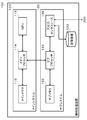
- FIG. 2 is a diagram schematically illustrating an internal configuration of the information processing apparatus 100 according to the embodiment.
- the information processing apparatus 100 according to the embodiment includes at least a main system 110, a subsystem 120, and a storage device 130.
- FIG. 2 shows a configuration for realizing the information processing apparatus 100 according to the embodiment, and other configurations are omitted.
- peripheral device refers to, for example, hardware that is different from the information processing apparatus 100 and is used by being connected to the information processing apparatus 100.
- peripheral devices of the information processing apparatus 100 For example, a display device, a controller, a keyboard, an optical disk drive, a camera, a pointing device such as a mouse, a network device, a storage device, a memory card, a printer, a speaker, etc. can give.
- the storage device 130 is one of peripheral devices, and stores an OS for comprehensively controlling the information processing apparatus 100 including the main system 110 and the subsystem 120, and other application programs and data.
- the storage device 130 is realized by using a known mass storage device such as an HDD (Hard Disk Drive) or an SSD (Solid State Drive).
- the main system 110 includes a main memory 112, a main processor 114, and a GPU (GraphicsGraphProcessing Unit) 116.
- the subsystem 120 is connected to the main system 110.
- the subsystem 120 includes a sub memory 122, a sub processor 124, and an input / output interface 126.
- the main processor 114 is realized by a CPU, executes a program stored on the main memory 112, and processes various data.
- the main memory 112 is realized by DRAM or SRAM and functions as a main storage device of the main system 110.
- the GPU is a processor specialized in image processing among information executed and processed by the CPU.
- the main processor 114 executes a program for a game application, for example, the GPU 116 is in charge of the game background, polygon rendering, and the like.
- the main system 110 has a high calculation capability and can be executed even by an application program that requires a large amount of calculation. On the other hand, the main system 110 tends to consume much power and generate large amounts of heat.
- the sub processor 124 is connected to the main processor 114, and the sub processor 124 and the main processor 114 can perform data communication. Similarly to the main processor 114, the sub processor 124 is also realized by a CPU. Therefore, the sub processor 124 can execute a program stored on the sub memory 122 and process various data.
- execution a task it is described as “execute a task” that the main processor 114 of the main system 110 of the information processing apparatus 100 or the sub processor 124 of the subsystem 120 executes an application program to perform data processing. There are things to do. Further, an object to be processed by these processors may be described as a “task”.
- the subsystem 120 can operate in cooperation with the main system 110 to assist the main system 110.
- the subsystem 120 since the subsystem 120 includes the input / output interface 126, it functions as an input / output controller that controls the flow of data between various peripheral devices instead of the main system 110.
- the input / output interface 126 includes a network interface (not shown), and can exchange data with the network 300 via a router or the like.
- the input / output interface 126 also includes an interface such as SATA (Serial (ATA) (not shown), and can exchange data with the storage device 130 which is a mass storage device.
- SATA Serial
- storage device 130 which is a mass storage device.
- the subsystem 120 can also execute tasks independently of the main system 110.
- a task executed by the subsystem 120 independently of the main system may be referred to as an “independent task”.
- the subsystem 120 can execute a task of downloading data from the network 300 and writing data to and from the storage device 130 independently of the main system 110.
- This independent task can also be executed as “background processing” invisible to the user who is using the information processing apparatus 100.
- the subsystem 120 can execute an independent task independently of the main system 110, but the setting of the independent task is under the control of the main system 110. Specifically, the independent task executed by the subsystem 120 is prohibited from being set in the subsystem 120 by the main system 110 and being set independently by the subsystem 120. As a result, while maintaining the independence of the task processing of the main system 110 and the task processing of the subsystem 120, the management of tasks can be centrally managed by the main system 110. Task management is alleviated and security can be improved.
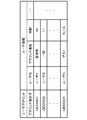
- FIG. 3 is a diagram schematically showing a data structure of a user management table for managing user accounts and user information.
- the user management table illustrated in FIG. 3 is stored in the storage device 130, for example.
- the main system 110 of the information processing apparatus 100 executes an OS for comprehensively controlling the operation of the information processing apparatus 100.
- This OS manages a user account of a user who uses the information processing apparatus 100.
- Each user account of the information processing apparatus 100 is assigned an account identifier that is associated with each user account on a one-to-one basis.
- each user account is associated with user information of the user account.
- “user information” is information indicating the attributes of the user of the user account.
- the user information includes a user name, account authority, and age, but is not limited thereto.
- Account authority which is one of user information, is information that defines what operations the user can perform on the information processing apparatus 100.
- the account authority includes, for example, an “administrator” authority that allows all operations on the information processing apparatus 100, a “general” authority that prohibits setting changes of the information processing apparatus 100, and many operations on the information processing apparatus 100.
- an “administrator” authority that allows all operations on the information processing apparatus 100
- a “general” authority that prohibits setting changes of the information processing apparatus 100
- many operations on the information processing apparatus 100 For example, there is a “guest” authority that is prohibited and only allowed to execute some programs, but is not limited thereto.
- the account authority of the user 1 identified by the account identifier UID0001 is “administrator”
- the account authority of the user 2 identified by the account identifier UID0002 is “general”.
- the main system 110 when setting the independent task, sets the execution authority of the user account in association with the independent task.
- a certain independent task is a task that the subsystem 120 starts and executes with a timer at night when the main system 110 is idle.
- the subsystem 120 executes the task within the scope of the execution authority set for the independent task.
- access to the network 300 via the input / output interface 126 is permitted for the administrator authority but not for the general authority.
- the execution authority set for the independent task is the general authority, the subsystem 120 cannot execute the independent task that needs to access the network 300.
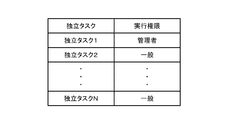
- FIG. 4 is a diagram schematically showing the data structure of the independent task management table for managing the independent task and its authority.
- the independent task management table is stored in the storage device 130, for example.
- an independent task when a user logs in to the information processing apparatus 100 using a user account, an independent task can be set or an already set independent task setting can be changed. It becomes like this.
- the main system 110 adds the independent task to the independent task management table.
- the independent task management table may be stored in an area where writing other than the read instruction issued by the main processor 114 is prohibited in the storage area of the storage device 130. As a result, it can be ensured that independent task settings and setting changes are permitted only to the main system 110 and are not permitted to the subsystem 120.
- execution authority is set to determine whether or not the task can be executed.
- This execution authority is linked to the user account of the user who has logged into the information processing apparatus 100. That is, the main system 110 sets the execution authority of the user account in the independent task for the independent task.
- the administrator authority is associated with the independent task 1 set by the user 1 having the administrator authority.
- the general authority is linked to the independent task 2 set by the user 2 having the general authority.
- the information processing apparatus 100 can be connected to one or more external devices 200 different from the information processing apparatus 100 via short-range communication or the network 300.
- the information processing apparatus 100 can accept a remote operation from the external device 200.
- the OS executed by the main system 110 also manages remote accounts associated with the external devices 200.
- each external device 200 includes a user account that is requested from the user when logging in.
- the main system 110 manages the user account of the external device 200 and the correspondence table (not shown) of the account identifier described above with reference to FIG.
- the user account of the external device 200 in this correspondence table is a remote account managed by the main system 110.
- the main system 110 When the main system 110 is accessed from the external device 200 via the near field communication or the network 300, the main system 110 acquires a user account of a user who operates the external device 200 as a remote account. The main system 110 sets the execution authority of the user account associated with the remote account as the execution authority of the remote account. Based on the independent task execution authority associated with the remote account, the main system 110 sets the independent task execution authority that the external device 200 remotely connects to and executes the subsystem 120.
- remote play refers to remotely using content (for example, content such as a game, movie, music, etc.) included in the information processing apparatus 100 from an external device 200 different from the information processing apparatus 100.
- content for example, content such as a game, movie, music, etc.
- the main processor 114 or the GPU 116 processes game progress and drawing processing.
- the sub processor 124 transmits the processing result of the main system 110 to the external device 200 via the input / output interface 126.
- the external device 200 displays the processing result acquired from the information processing apparatus 100 and transmits user operation information (for example, information on pressing of the controller) to the information processing apparatus 100.
- the main processor 114 advances the game based on the acquired operation information.
- the main processor 114 and the GPU 116 cannot operate.
- the external device 200 does not communicate with the main system 110 but communicates with the sub processor 124 of the subsystem 120 to execute remote play.
- the GPU 116 in the main system 110 creates an application execution screen to be displayed by the external device 200. For this reason, the GPU (not shown) of the external device 200 simply displays an image generated by the GPU 116. On the other hand, when the main system 110 is dormant, an execution screen of an application to be displayed by the external device 200 is created by the GPU 116 in the external device 200 itself.
- the external device 200 executes a drawing process with a large load. For this reason, for example, when the external device 200 is operated by a battery, the battery consumption of the external device 200 can be accelerated. For this reason, some users may desire to cause the GPU 116 in the main system 110 to execute a heavy drawing process.
- the sub-processor 124 of the sub-system 120 may be configured to be able to wake up the main system 110 that is not in operation in response to a request from the external device 200. Thereby, a process with a heavy load can be performed by the main system 110 at the time of remote play, and the power consumption of the external device 200 can be suppressed. Further, when the processing load during remote play is large with respect to the resources of the external device 200, the subsystem 120 may put the main system 110 in an operating state regardless of whether there is a request from the external device 200. Thereby, a more comfortable processing environment can be provided to a user who executes remote play using the external device 200.
- the content stored in the information processing apparatus 100 can be executed from the external device 200 by the sub processor 124. Can do.
- the resources (main system 110 and subsystem 120) of the information processing apparatus 100 are substantially occupied by the external device 200.
- the information processing apparatus 100 cannot provide remote play to two or more different external devices 200 at the same time.
- another user cannot use the information processing apparatus 100 locally.
- the reverse is also true, and when a user uses the information processing apparatus 100 locally, other users cannot perform remote play from the external device 200. Therefore, when two or more users or external devices 200 request use of one information processing device 100, there is a guideline for determining which external device 200 should use the information processing device 100. It is convenient if there is.
- the information processing apparatus 100 has a reservation function of the information processing apparatus 100.
- This reservation function is realized as an independent task of the subsystem 120.
- the various independent tasks executed by the subsystem 120 include a reservation task for reserving use of the main system 110 by a specific user in a predetermined reservation time zone.
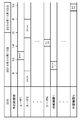
- FIG. 5 is a diagram schematically showing the data structure of a reservation management time table for managing the reservation status of the main system 110.
- the reservation management time table is stored in the storage device 130.
- the reservation task executed by the subsystem 120 associates the user of the information processing device 100 and the external device 200 capable of remote play with the information processing device 100 with the date and time of the remote play and the reservation management time. Store in a table.
- the subsystem 120 prohibits use of the information processing apparatus 100 by a user other than the user who made the reservation or the external device 200 or the external device 200 in the reservation time zone set by the reservation task.
- each task reserved in FIG. 5 is associated with the execution authority described above.
- a user having an execution authority stronger than the execution authority associated with the reserved task can change and cancel the reserved task.
- a user who has administrator authority that is stronger than general authority can change and cancel a task reserved by a general user.
- a user with an authority equivalent to or lower than the execution authority associated with the reserved task cannot change or cancel the reservation.
- the task management of the information processing apparatus 100 using the reservation management time table has been described above. In other words, this is a process for determining whether to execute a task based on time. In addition to this, whether or not the task can be executed can be determined based on the user information associated with the user account. This case will be described below.
- the subsystem 120 has a function of controlling permission of execution of independent tasks, restriction of execution, or prohibition of execution based on user information associated with the user account.
- a user having administrator authority in the information processing apparatus 100 can set a “parental level” for each user account.
- the “parental level” is information that defines a time during which a user with management authority can execute the information processing apparatus 100 by a user with a low authority level.
- a specific example of the parental level is user age information.
- parental information in which the age of the user is associated with the upper limit value of the time during which the information processing apparatus 100 can be executed in one day is stored in the storage device 130.
- the subsystem 120 reads the parental information, and prohibits the execution when a certain user uses the information processing apparatus 100 exceeding the parental level. In addition, when a certain user tries to reserve a time exceeding the parental level, the subsystem 120 limits the reservation time so that it falls within the parental level range. As a result, the information processing apparatus 100 can realize parental control in terms of usage time of the information processing apparatus.
- the parental control described above by the subsystem 120 is also executed as one of independent tasks.
- remote play and reservation management have been described as independent tasks executed by the subsystem 120 according to the embodiment.
- another use scene of the independent task will be described with reference to a specific example.
- independent tasks are examples of tasks provided to a user account of the information processing apparatus 100 or a user having a remote account.
- the resources of the subsystem 120 may be provided via the network 300 to others who do not have an account in the information processing apparatus 100 as independent tasks.
- web radio and “small multiplayer server” will be described.
- Web radio refers to a service that packetizes audio information of a radio program and provides the radio program via the Internet.
- the information processing apparatus 100 that has received the packet can reproduce or record a radio program by extracting audio information from the packet. This process is light compared to the execution of game content and the like, and even the subsystem 120 can perform the process with a margin.
- the information processing apparatus 100 can accept a request for a web radio recording task from another information processing apparatus 100 via the Internet.
- the information processing apparatus 100 that has received the recording task records the web radio on behalf of another information processing apparatus 100 when the resources of the subsystem 120 are sufficient.
- another information processing apparatus 100 can request the same recording task from a plurality of different information processing apparatuses 100.
- the other information processing apparatus 100 can make one recording task redundant. Even if one information processing apparatus 100 fails to process the recording task or is interrupted in the middle, if another information processing apparatus 100 is processing the same recording task, the recording task as a whole Can be completed. As a result, the information processing apparatus 100 can more reliably execute the recording task.
- the server task is a task for realizing a small-scale multiplayer server function.
- the small-scale multiplayer server function is a function that provides a game in which a small number of people (for example, about 10 people) collaborate or play online.
- the information processing apparatus 100 permits the subsystem 120 to execute a server task when the subsystem 120 has sufficient resources. Thereby, free resources of the subsystem 120 can be provided to others.
- the subsystem 120 can execute a proxy task, which is a task for the other information processing apparatus 100, in response to a request from the other information processing apparatus 100.
- the proxy task is a kind of independent task, and the independent task executed by the subsystem 120 is under the management of the main system 110. That is, the main system 110 sets a proxy task in the subsystem 120, modifies a proxy task that has already been set, or displays the set proxy task on a display device and presents it to the user.
- GUI Independent task setting GUI
- the information processing apparatus 100 provides a GUI (Graphical User Interface) for setting whether or not to provide free resources of the subsystem 120 to be provided to others.
- This GUI can be realized using the computational resources of the GPU 116 under the control of the OS executed by the main processor 114.
- FIG. 6 is a diagram illustrating an example of a GUI for setting whether to provide free resources of the subsystem 120 to be provided to others.
- the user of the information processing apparatus 100 can set for each task whether or not to provide the resources of the subsystem 120 to others. Accordingly, for example, when the user himself / herself plans to use the information processing apparatus 100, the provision of the resources of the subsystem 120 to others can be stopped at any time.
- the GUI shows the calculation power (resource) required for the subsystem 120 for each task provided to another person.
- the user can grasp
- FIG. 7 is a diagram showing another example of a GUI for setting whether to provide free resources of the subsystem 120 to be provided to others.
- the user of the information processing apparatus 100 first sets the resources of the information processing apparatus 100 that are permitted to be used by others.
- a list of services that can be provided using the set resource is displayed on the GUI. The user selects a service permitted to be provided to other users from the displayed list of services.
- the storage capacity of the storage device 130 that is the hard disk of the information processing apparatus 100 is low, only services that do not use the hard disk can be provided to other users.
- the usability of the user of the information processing apparatus 100 can be improved in that a task to be provided to another person can be selected according to the resource status of the information processing apparatus 100.
- the main purpose of the subsystem 120 is to assist the operation of the main system 110, it is considered that there are many cases where the computing resources of the subsystem 120 have a margin.
- the subsystem 120 can be used effectively. Since many information processing apparatuses 100 connected to the network 300 mutually provide free computing resources of the subsystem 120, the certainty of task execution can be improved.
- the “parental level” has been described for the case where the user having the management authority is information that defines the time during which the information processing apparatus 100 can be executed by a user with a low authority level.
- the information indicated by the “parental level” is not limited to information that defines the executable time, but may include information that defines whether or not the content itself can be executed.
- Some content such as games and movies, has a target age for viewing. This is called “rating” of content, and it is common for a third party to rate the target age for each content. Therefore, the subsystem 120 permits execution of the content in the information processing apparatus 100, restricts execution, or prohibits execution based on “user age” which is one of user information associated with the user account. May be controlled.
- FIG. 8 is a diagram schematically showing a data structure of a rating management table for managing contents and their ratings.
- the rating management table is stored in the storage device 130.
- an application identifier that identifies the application is assigned.
- the rating management table stores an application identifier and a rating of content executed by the application in association with each other.
- “rating A” means content that targets all ages
- “rating Z” means content that targets 18 years of age or older. In this way, a rating is determined for each target age of content.
- the subsystem 120 reads the rating management table and the user information of the user from the storage device 130 before the user executes the content. If the user's age does not reach the content rating, execution of the content may be prohibited. Further, whether or not to prohibit execution of content when the user's age has not reached the content rating may be freely set by a user having administrator authority of the information processing apparatus 100. Thereby, the information processing apparatus 100 according to the embodiment can realize parental control based on the content rating.
- Information processing system 100 Information processing device, 110 Main system, 112 Main memory, 114 Main processor, 116 GPU, 120 Sub system, 122 Sub memory, 124 Sub processor, 126 Input / output interface, 130 Storage device, 200 External device, 300 networks, 400 servers.
Landscapes
- Engineering & Computer Science (AREA)
- Theoretical Computer Science (AREA)
- Software Systems (AREA)
- Physics & Mathematics (AREA)
- General Engineering & Computer Science (AREA)
- General Physics & Mathematics (AREA)
- Health & Medical Sciences (AREA)
- Bioethics (AREA)
- General Health & Medical Sciences (AREA)
- Computer Hardware Design (AREA)
- Computer Security & Cryptography (AREA)
- Storage Device Security (AREA)
Applications Claiming Priority (2)
| Application Number | Priority Date | Filing Date | Title |
|---|---|---|---|
| JP2014-246557 | 2014-12-05 | ||
| JP2014246557A JP6285853B2 (ja) | 2014-12-05 | 2014-12-05 | 情報処理装置および情報処理方法 |
Publications (1)
| Publication Number | Publication Date |
|---|---|
| WO2016088414A1 true WO2016088414A1 (ja) | 2016-06-09 |
Family
ID=56091372
Family Applications (1)
| Application Number | Title | Priority Date | Filing Date |
|---|---|---|---|
| PCT/JP2015/074009 Ceased WO2016088414A1 (ja) | 2014-12-05 | 2015-08-26 | 情報処理装置および情報処理方法 |
Country Status (2)
| Country | Link |
|---|---|
| JP (1) | JP6285853B2 (https=) |
| WO (1) | WO2016088414A1 (https=) |
Cited By (1)
| Publication number | Priority date | Publication date | Assignee | Title |
|---|---|---|---|---|
| CN112288198A (zh) * | 2019-07-22 | 2021-01-29 | 北京车和家信息技术有限公司 | 任务处理系统及方法 |
Citations (6)
| Publication number | Priority date | Publication date | Assignee | Title |
|---|---|---|---|---|
| JP2002517853A (ja) * | 1998-06-12 | 2002-06-18 | マイクロソフト コーポレイション | 制限付きトークンを介した最小権限 |
| JP2006039824A (ja) * | 2004-07-26 | 2006-02-09 | Canon Inc | マルチプロセッサ搭載システムlsiの制御方法 |
| JP2008158844A (ja) * | 2006-12-25 | 2008-07-10 | Nippon Telegr & Teleph Corp <Ntt> | 資源管理装置および方法 |
| JP2009217503A (ja) * | 2008-03-10 | 2009-09-24 | Hitachi Ltd | 計算機システム、計算機制御方法及び計算機制御プログラム |
| JP2010146117A (ja) * | 2008-12-16 | 2010-07-01 | Fujitsu Ltd | 情報処理装置、情報処理方法および情報処理プログラム |
| JP2011095871A (ja) * | 2009-10-28 | 2011-05-12 | Hitachi Ltd | プログラム配布方法及び運用管理装置 |
Family Cites Families (2)
| Publication number | Priority date | Publication date | Assignee | Title |
|---|---|---|---|---|
| JP2005258616A (ja) * | 2004-03-10 | 2005-09-22 | Fuji Xerox Co Ltd | 通信システム、通信方法、通信プログラム及びクライアント装置 |
| GB2491915A (en) * | 2011-06-08 | 2012-12-19 | Inst Information Industry | Super operating system for a heterogeneous computer system |
-
2014
- 2014-12-05 JP JP2014246557A patent/JP6285853B2/ja active Active
-
2015
- 2015-08-26 WO PCT/JP2015/074009 patent/WO2016088414A1/ja not_active Ceased
Patent Citations (6)
| Publication number | Priority date | Publication date | Assignee | Title |
|---|---|---|---|---|
| JP2002517853A (ja) * | 1998-06-12 | 2002-06-18 | マイクロソフト コーポレイション | 制限付きトークンを介した最小権限 |
| JP2006039824A (ja) * | 2004-07-26 | 2006-02-09 | Canon Inc | マルチプロセッサ搭載システムlsiの制御方法 |
| JP2008158844A (ja) * | 2006-12-25 | 2008-07-10 | Nippon Telegr & Teleph Corp <Ntt> | 資源管理装置および方法 |
| JP2009217503A (ja) * | 2008-03-10 | 2009-09-24 | Hitachi Ltd | 計算機システム、計算機制御方法及び計算機制御プログラム |
| JP2010146117A (ja) * | 2008-12-16 | 2010-07-01 | Fujitsu Ltd | 情報処理装置、情報処理方法および情報処理プログラム |
| JP2011095871A (ja) * | 2009-10-28 | 2011-05-12 | Hitachi Ltd | プログラム配布方法及び運用管理装置 |
Cited By (1)
| Publication number | Priority date | Publication date | Assignee | Title |
|---|---|---|---|---|
| CN112288198A (zh) * | 2019-07-22 | 2021-01-29 | 北京车和家信息技术有限公司 | 任务处理系统及方法 |
Also Published As
| Publication number | Publication date |
|---|---|
| JP2016110356A (ja) | 2016-06-20 |
| JP6285853B2 (ja) | 2018-02-28 |
Similar Documents
| Publication | Publication Date | Title |
|---|---|---|
| KR102349131B1 (ko) | 타겟 장치 리소스를 호스트 장치의 컴퓨팅 환경에 대여하는 방법 | |
| CN110178136B (zh) | 现场可编程门阵列程序的签名验证的方法和设备 | |
| JP6189738B2 (ja) | クラウドベースのゲームスライス生成および即時再生との無摩擦ソーシャルシェアリング | |
| KR101672227B1 (ko) | 멀티모드 컴퓨팅 디바이스 | |
| US20160078520A1 (en) | Modified matrix factorization of content-based model for recommendation system | |
| US10462008B2 (en) | Cart mode provisioning of shared computing devices | |
| JP5904519B2 (ja) | 複数のコンピューティングデバイスのためのアプリケーション認証ポリシー | |
| JP5969567B2 (ja) | 権利および機能包括のコンテンツ選択および配信 | |
| CN115221479B (zh) | 使用Envoy实现多租户/共享Redis集群的方法 | |
| CN107835984A (zh) | 热减轻用户体验 | |
| CN105393215A (zh) | 视像配置和激活 | |
| US20180314821A1 (en) | Transferring Containers | |
| US20220334884A1 (en) | Method to implement multi-tenant/shared redis cluster using envoy | |
| US10565158B2 (en) | Multi-device synchronization for immersive experiences | |
| US20180114034A1 (en) | Container Based Device Usage Sessions | |
| JP6285853B2 (ja) | 情報処理装置および情報処理方法 | |
| US10452222B2 (en) | Coordination of system readiness tasks | |
| CN105474591A (zh) | 使用社交关系的内容分布 | |
| CN104468761B (zh) | 控制播放机挂载共享文件的方法和移动终端 | |
| TW202125272A (zh) | 線上服務存取控制裝置及方法 | |
| US20150347967A1 (en) | Support System, Support Method, and Recording Medium for Promoting Usage | |
| CN120547057A (zh) | 信息处理方法、装置、电子设备、存储介质及程序产品 | |
| JP6367855B2 (ja) | 複数のコンピューティングデバイスのためのアプリケーション認証ポリシー | |
| Dixon et al. | Streaming Your Media Collection from Windows Devices | |
| KR20150096588A (ko) | 다른 사용자 단말기에 대해 게임 플레이를 위임하는 서비스를 제공하기 위한 시스템, 서버, 사용자 단말기 및 이를 이용한 서비스 방법 |
Legal Events
| Date | Code | Title | Description |
|---|---|---|---|
| 121 | Ep: the epo has been informed by wipo that ep was designated in this application |
Ref document number: 15866216 Country of ref document: EP Kind code of ref document: A1 |
|
| NENP | Non-entry into the national phase |
Ref country code: DE |
|
| 122 | Ep: pct application non-entry in european phase |
Ref document number: 15866216 Country of ref document: EP Kind code of ref document: A1 |