WO2013157349A1 - 表示装置、表示装置の制御方法、テレビジョン受像機、制御プログラム、および記録媒体 - Google Patents
表示装置、表示装置の制御方法、テレビジョン受像機、制御プログラム、および記録媒体 Download PDFInfo
- Publication number
- WO2013157349A1 WO2013157349A1 PCT/JP2013/058339 JP2013058339W WO2013157349A1 WO 2013157349 A1 WO2013157349 A1 WO 2013157349A1 JP 2013058339 W JP2013058339 W JP 2013058339W WO 2013157349 A1 WO2013157349 A1 WO 2013157349A1
- Authority
- WO
- WIPO (PCT)
- Prior art keywords
- content
- television
- broadcast
- display
- broadcast wave
- Prior art date
- Legal status (The legal status is an assumption and is not a legal conclusion. Google has not performed a legal analysis and makes no representation as to the accuracy of the status listed.)
- Ceased
Links
Images



Classifications
-
- H—ELECTRICITY
- H04—ELECTRIC COMMUNICATION TECHNIQUE
- H04N—PICTORIAL COMMUNICATION, e.g. TELEVISION
- H04N21/00—Selective content distribution, e.g. interactive television or video on demand [VOD]
- H04N21/40—Client devices specifically adapted for the reception of or interaction with content, e.g. set-top-box [STB]; Operations thereof
- H04N21/47—End-user applications
- H04N21/482—End-user interface for programme selection
-
- H—ELECTRICITY
- H04—ELECTRIC COMMUNICATION TECHNIQUE
- H04N—PICTORIAL COMMUNICATION, e.g. TELEVISION
- H04N21/00—Selective content distribution, e.g. interactive television or video on demand [VOD]
- H04N21/40—Client devices specifically adapted for the reception of or interaction with content, e.g. set-top-box [STB]; Operations thereof
- H04N21/43—Processing of content or additional data, e.g. demultiplexing additional data from a digital video stream; Elementary client operations, e.g. monitoring of home network or synchronising decoder's clock; Client middleware
- H04N21/431—Generation of visual interfaces for content selection or interaction; Content or additional data rendering
- H04N21/4312—Generation of visual interfaces for content selection or interaction; Content or additional data rendering involving specific graphical features, e.g. screen layout, special fonts or colors, blinking icons, highlights or animations
- H04N21/4314—Generation of visual interfaces for content selection or interaction; Content or additional data rendering involving specific graphical features, e.g. screen layout, special fonts or colors, blinking icons, highlights or animations for fitting data in a restricted space on the screen, e.g. EPG data in a rectangular grid
-
- H—ELECTRICITY
- H04—ELECTRIC COMMUNICATION TECHNIQUE
- H04N—PICTORIAL COMMUNICATION, e.g. TELEVISION
- H04N21/00—Selective content distribution, e.g. interactive television or video on demand [VOD]
- H04N21/20—Servers specifically adapted for the distribution of content, e.g. VOD servers; Operations thereof
- H04N21/25—Management operations performed by the server for facilitating the content distribution or administrating data related to end-users or client devices, e.g. end-user or client device authentication, learning user preferences for recommending movies
- H04N21/251—Learning process for intelligent management, e.g. learning user preferences for recommending movies
-
- H—ELECTRICITY
- H04—ELECTRIC COMMUNICATION TECHNIQUE
- H04N—PICTORIAL COMMUNICATION, e.g. TELEVISION
- H04N21/00—Selective content distribution, e.g. interactive television or video on demand [VOD]
- H04N21/40—Client devices specifically adapted for the reception of or interaction with content, e.g. set-top-box [STB]; Operations thereof
- H04N21/45—Management operations performed by the client for facilitating the reception of or the interaction with the content or administrating data related to the end-user or to the client device itself, e.g. learning user preferences for recommending movies, resolving scheduling conflicts
- H04N21/4508—Management of client data or end-user data
- H04N21/4516—Management of client data or end-user data involving client characteristics, e.g. Set-Top-Box type, software version or amount of memory available
-
- H—ELECTRICITY
- H04—ELECTRIC COMMUNICATION TECHNIQUE
- H04N—PICTORIAL COMMUNICATION, e.g. TELEVISION
- H04N21/00—Selective content distribution, e.g. interactive television or video on demand [VOD]
- H04N21/40—Client devices specifically adapted for the reception of or interaction with content, e.g. set-top-box [STB]; Operations thereof
- H04N21/45—Management operations performed by the client for facilitating the reception of or the interaction with the content or administrating data related to the end-user or to the client device itself, e.g. learning user preferences for recommending movies, resolving scheduling conflicts
- H04N21/4508—Management of client data or end-user data
- H04N21/4524—Management of client data or end-user data involving the geographical location of the client
-
- H—ELECTRICITY
- H04—ELECTRIC COMMUNICATION TECHNIQUE
- H04N—PICTORIAL COMMUNICATION, e.g. TELEVISION
- H04N21/00—Selective content distribution, e.g. interactive television or video on demand [VOD]
- H04N21/40—Client devices specifically adapted for the reception of or interaction with content, e.g. set-top-box [STB]; Operations thereof
- H04N21/45—Management operations performed by the client for facilitating the reception of or the interaction with the content or administrating data related to the end-user or to the client device itself, e.g. learning user preferences for recommending movies, resolving scheduling conflicts
- H04N21/4508—Management of client data or end-user data
- H04N21/4532—Management of client data or end-user data involving end-user characteristics, e.g. viewer profile, preferences
-
- H—ELECTRICITY
- H04—ELECTRIC COMMUNICATION TECHNIQUE
- H04N—PICTORIAL COMMUNICATION, e.g. TELEVISION
- H04N21/00—Selective content distribution, e.g. interactive television or video on demand [VOD]
- H04N21/40—Client devices specifically adapted for the reception of or interaction with content, e.g. set-top-box [STB]; Operations thereof
- H04N21/47—End-user applications
- H04N21/482—End-user interface for programme selection
- H04N21/4826—End-user interface for programme selection using recommendation lists, e.g. of programmes or channels sorted out according to their score
-
- H—ELECTRICITY
- H04—ELECTRIC COMMUNICATION TECHNIQUE
- H04N—PICTORIAL COMMUNICATION, e.g. TELEVISION
- H04N21/00—Selective content distribution, e.g. interactive television or video on demand [VOD]
- H04N21/40—Client devices specifically adapted for the reception of or interaction with content, e.g. set-top-box [STB]; Operations thereof
- H04N21/47—End-user applications
- H04N21/482—End-user interface for programme selection
- H04N21/4828—End-user interface for programme selection for searching programme descriptors
Definitions
- the present invention relates to a display device or the like capable of displaying content carried by a broadcast wave broadcasted from an external broadcast station.
- An electronic program guide is a system that displays information about the content on a device (such as a television receiver) that outputs the content received from the outside to a display unit. Since this information is conveyed superimposed on the digital broadcast waves of each broadcasting station, the device can deliver the information to the user in real time.
- Patent Document 1 discloses a display processing apparatus capable of easily confirming and selecting programs of a plurality of channels that the user likes.
- Patent Document 2 discloses a television receiver for displaying a back program guide with a thumbnail image extracted from the face of a back program being broadcasted.
- Japanese patent publication Japanese Patent Laid-Open No. 2008-288731 (published on November 27, 2008)
- Japanese Patent Publication Japanese Patent Application Laid-Open No. 2010-098452 (Apr. 30, 2010)
- the first problem is that it takes time to obtain a thumbnail of a television program from a broadcast wave. That is, since it usually takes about 10 seconds per one broadcasting station, in order to acquire an image from all the broadcasting stations (it is assumed that there are 20-40 stations) which a television receiver can receive, You need to spend a few minutes to a few tens of minutes.
- the conventional television receiver it takes a long time to display the back program guide including the thumbnail after being instructed by the user to display the back program guide.
- the back program guide since it is not preferable from the viewpoint of usability that the user waits for a long time, for example, it is conceivable to display the back program guide not including the thumbnail first and to sequentially display the thumbnails acquired next.
- the measure is not an essential solution, and can not meet the user's need to immediately confirm the back program thumbnail in the back program list.
- the second problem is that the content of the back program represented by the thumbnail acquired over time may not be synchronized with the content of the back program currently being broadcast. That is, when the broadcast of the program is ended while broadcasting of a different program is started while taking time to acquire thumbnails, the content of the program represented by the acquired thumbnail and the content of the program newly broadcasted are started. And do not match. In this case, by displaying the back program guide, the user may lose the function originally intended to be able to list the contents of the back program currently being broadcast.
- the present invention has been made in view of the above problems, and an object thereof is a display device or the like which can preferentially acquire an image which is estimated to have a large influence on usability, and can improve user's convenience. It is to provide.
- the display concerning one mode of the present invention is: (1) A display device comprising: first receiving means for receiving a broadcast wave broadcasted from an external broadcast station, wherein the contents carried by the broadcast wave received by the first receiving means are displayed in a listable manner There, (2) With respect to the content carried by the broadcast wave, other broadcasts carrying other content listed at a position nearer than the broadcast wave carrying content listed at a position not near to the content carried by the broadcast wave Second receiving means for receiving waves preferentially; (3) An acquisition unit configured to acquire an image representing the other content from the other broadcast wave received by the second reception unit.
- the control method of the display concerning one mode of the present invention is: (1) A display device including a first receiving step of receiving a broadcast wave broadcasted from an external broadcast station, and displaying the contents carried by the broadcast wave received in the first receiving step in a listable manner Control method, and (2) With respect to the content carried by the broadcast wave, other broadcasts carrying other content listed at a position nearer than the broadcast wave carrying content listed at a position not near to the content carried by the broadcast wave A second receiving step of preferentially receiving the waves; (3) obtaining an image representing the other content from the other broadcast wave received in the second receiving step.
- the display device and the control method of the device can obtain an image which is estimated to have a large influence on usability, and can obtain it preferentially.
- the display device and the like have an effect that the convenience of the user can be improved.
- the same member numbers may be additionally given a or b to indicate the members.
- “broadcast wave 2a”, “broadcast wave 2b” and the like are shown.
- a and b further added to the member number of the said member may be abbreviate
- the broadcast wave 2a and the broadcast wave 2b may be generically referred to as "broadcast wave 2".
- members having different member names may be given the same member numbers, and may be further given a or b to indicate the members. For example, “thumbnail 5a”, “program information 5b” and the like are shown.
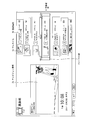
- FIG. 1 is a screen configuration diagram showing a configuration example of a menu screen 100 displayed on the display by the television 1.
- the television 1 displays the menu screen 100.
- the menu screen 100 includes an info zone 110, a function / recommend zone 120, and a net service zone 130.
- the info zone 110 is an area where the television 1 displays various information, and can be reworded as an information display area.
- the information zone 110 includes a user name display area 111, a notification list button 112a, a login button 112b, a setting button 112c, a time display area 113, a weather display area 114, a live video display area 115, banners 116a to 116c, and a banner detail display area 116d. , And an information display area 117.
- the user name display area 111 is an area where the television 1 displays a user name.
- the television 1 has a function of logging in to a specific server (hereinafter, referred to as “maker server”) provided by the maker or the like.
- maker server a specific server
- the user name displayed at the time of login is displayed in the user name display area 111.
- the television 1 displays a character string ("Welcome guest" in FIG. 1) indicating that the user is in the logout state in the user name display area 111.
- the notification list button 112a is a button for calling a notification list screen.
- the decision button of the remote control is pressed in a state where the notice list button 112a is in focus, the television 1 changes the screen displayed on the display from the menu screen 100 to the notice list screen.
- the notification list button 112 a can be focused only when the television 1 is connected to the network.
- the login button 112 b is a button for calling a login screen.
- the television 1 changes the screen displayed on the display from the menu screen 100 to the login screen.
- the login button 112 b can be focused only when the television 1 is connected to the network.
- the setting button 112 c is a button for calling a setting screen.
- the television 1 changes the screen displayed on the display from the menu screen 100 to the setting screen.
- the setting button 112c can be focused regardless of whether the television 1 is connected to the network.
- the time display area 113 is an area where the television 1 displays the current time.
- the display format of the current time in the time display area 113 is arbitrary, in the present embodiment, as shown in FIG. 1, “Am **: ** /****** * A display format of "day of the week" (/ represents a line feed) is adopted.
- the television 1 may acquire the current time displayed in the time display area 113 from, for example, a clock incorporated in the television, or may acquire the time from SI information of the broadcast wave, or the television It may be acquired from an NTP server connected to
- the weather display area 114 is an area where the weather information of the area where the television 1 is installed is displayed by the television.
- the display format of the weather information in the weather display area 114 is arbitrary, in the present embodiment, the weather icon (in the example of FIG. 1, the icon after sunny and then cloudy), the area name (in the example of FIG. And a comment (in the example of FIG. 1, “the northern part of the Kanto area is expected to have a large pollen scattering amount”).
- the television 1 may acquire weather information to be displayed in the weather display area 114 from the maker server or the like, or may extract it from data broadcasting.
- the live video display area 115 is an area in which the television 1 reduces and displays the video (moving image or still image) displayed on the full screen immediately before the transition to the menu screen 100. For example, when the broadcast program immediately before transitioning to the menu screen 100 is displayed on the full screen, the broadcast program is continuously reduced and displayed in the live video display area 115. In addition, when the web page immediately before the transition to the menu screen 100 is displayed on the full screen, the web page is continuously displayed in the live video display area 115.
- the live video display area 115 can be focused regardless of whether the television 1 is connected to the network.
- the television 1 ends the display of the menu screen 100 and resumes the full screen display of the live video.
- the banners 116a to 116c are banners provided by the maker server, for example, banner advertisements provided by the maker server.
- the banners 116a to 116c can be focused regardless of whether the television 1 is connected to the network, and the banner detail display area 116d displays detailed information corresponding to the banner being focused.
- the detailed information corresponding to each of the banners 116a to 116c and the banners 116a to 116c is downloaded from the maker server when the television 1 is connected to the network and accumulated in the television 1.
- the information display area 117 is an area in which the television 1 displays an arbitrary character string provided by the maker server.
- the character string displayed in the information display area 117 flows from the right end to the left end of the information display area 117.
- the last character is framed out from the left end of the information display area 117
- the first character is framed in from the right end of the information display area 117.
- the UI elements that can be focused among the UI (User Interface) elements constituting the info zone 110 are generically referred to as “menu items”.
- the notification list button 112a, the login button 112b, the setting button 112c, the live video display area 115, and the banners 116a to 116c correspond to menu items.
- the function / recommendation zone 120 includes a panel (hereinafter referred to as “function panel”) 121 corresponding to various functions and a panel (hereinafter referred to as “recommended content panel”) 122 corresponding to various recommended contents, and the television 1. It is an area to be displayed, and can be paraphrased as a panel display area.
- the function panel 121 and the recommended content panel 122 are arranged in a row in the function / recommendation zone 120.
- the function panel 121 is a panel corresponding to each of the plurality of functions of the television 1.
- the television 1 displays the screen displayed on the display from the menu screen 100 to a screen for using the function corresponding to the function panel 121 Make a transition.
- a back program panel, a smart search panel, a recording list panel, an input switching panel, a program guide panel, and a calendar panel are prepared as the function panel 121.
- the television 1 displays the screen displayed on the display from the menu screen 100 to the back program list 8 display screen ("back program selection screen" (See also FIG. 3).
- the television 1 changes the screen displayed on the display from the menu screen 100 to the smart search screen.
- the recommended content panel 122 is a panel corresponding to each of a plurality of recommended content (back program, unaired program, recorded program, or web page) selected by the television 1. If the user presses the ENTER button on the remote control while certain recommended content panel 122 is in focus, whether the television 1 starts full screen display of the corresponding recommended content (the recommended content is a back program, a recorded program, or a web page) Or the full screen display of the recording reservation screen for performing recording reservation of the corresponding recommended content (when the recommended content is a non-broadcast program).
- UI elements constituting the function / recommendation zone 120 UI elements that can be focused are generically referred to as "menu items”.
- the function panel 121 and the recommended content panel 122 correspond to menu items.
- the net service zone 130 is an area in which the television 1 displays the icons 131 corresponding to various net services.
- the television 1 changes the screen displayed on the display from the menu screen 100 to a screen for using the net service corresponding to the icon 131
- an IPTV icon, a photo magazine icon, a shopping icon, a search / TV portal icon, a net video icon, a communication icon, a living support icon, a service list icon, and a bookmark icon are prepared as the icon 131. .
- the icons 131 corresponding to various net services are displayed only when the television 1 is connected to the network. If the television 1 is not connected to the network, a message indicating that the network 1 is not connected, a button for calling video content encouraging network connection, a button for calling a network setting screen, etc. Display at 130.
- UI elements constituting the net service zone 130
- UI elements that can be focused are generically referred to as "menu items”.
- the icon 131 corresponds to the menu item.
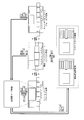
- FIG. 2 is a screen transition diagram showing screen transition of the television 1.
- the television 1 displays the live video on the screen (full screen display) To the menu screen 100).
- the states of the menu screen 100 are roughly classified into an info zone focus state, a function / recommend zone focus state, and a net service zone focus state.
- the infozone focus state is a state in which any one of the menu items included in the infozone 110 is in focus.
- the function / recommendation zone focus state is a state in which any one of the menu items included in the function / recommendation zone 120 is in focus
- the net service zone focus state is a state of the menu item included in the net service zone 130. One of them is in focus. In any state, the menu item being focused can be distinguished from other menu items by the focus frame surrounding the menu item.
- the television 1 When the user presses the right button of the remote control in the info zone focus state, the television 1 changes the menu item to be focused to a menu item disposed immediately to the right of the menu item currently being focused. Similarly, when the user presses the left button of the remote control in the info zone focus state, the television 1 changes the menu item to be focused to a menu item disposed immediately to the left of the menu item currently being focused. Note that the focus movement in the info zone focus state is realized by moving the position of the focus frame instead of moving the position of the menu item.
- the television 1 shifts the state of the menu screen 100 from the info zone focus state to the function / recommend zone focus state, as shown in FIG. Conversely, when the user presses the upper button of the remote control in the function / recommendation zone focus state, the television 1 changes the state of the menu screen 100 from the function / recommendation zone focus state to the infozone focus state.
- the television 1 changes the menu item to be focused to a menu item disposed immediately to the right of the menu item currently being focused.
- the television 1 changes the menu item to be focused to a menu item disposed immediately to the left of the menu item currently being focused.
- the focus movement in the function / recommendation zone focus state is realized not by moving the position of the focus frame but by moving the position of the menu item.
- the television 1 shifts the state of the menu screen 100 from the function / recommendation zone focus state to the net service zone focus state as shown in FIG. .
- the television 1 changes the state of the menu screen 100 from the net service zone focus state to the function / recommend zone focus state.
- the television 1 When the user presses the right button of the remote control in the network service zone focus state, the television 1 changes the menu item to be focused to the menu item arranged immediately to the right of the menu item currently being focused. Similarly, when the user presses the left button of the remote control in the net service zone focus state, the television 1 changes the menu item to be focused to a menu item disposed immediately to the left of the menu item currently being focused. Focus movement in the net service zone focus state is realized by moving the position of the focus frame rather than moving the position of the menu item.
- the television 1 ends the display of the menu screen 100 and the full screen display of the live video Resume.
- the television 1 uses the screen displayed on the display from the menu screen 100 to use the function corresponding to the functional panel 121 Transition to the screen of.
- the television 1 changes the screen displayed on the display from the menu screen 100 to the display screen of the back program guide 8. Also, when the user presses the ENTER button on the remote control while the smart search panel is in focus, the television 1 changes the screen displayed on the display from the menu screen 100 to the smart search screen.
- the television 1 changes the screen displayed on the display from these screens to the menu screen 100. Also, when the back program selection screen or the smart search screen is displayed, when the user presses the back button of the remote control, the television 1 ends the display of these screens and resumes the full screen display of the live video .
- the focus frame displayed around the menu item being focused is blinked.
- the blinking period of the focus frame may be set to, for example, 0.5 Hz. This makes it easy for the user to grasp which menu item is in focus even if the menu item is colorful.
- the focus frame is in a dark state when the focus movement occurs, it is difficult for the user to be notified that the focus movement has occurred. Therefore, in the present embodiment, a configuration is employed in which the state of the focus frame is reset to the bright state whenever focus movement occurs, and such a problem is avoided. Further, although the color of the focus frame is arbitrary, in the present embodiment, yellow is used, and it is devised to enhance the visibility when the background color is black.
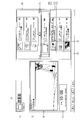
- FIG. 3 is a screen configuration diagram showing a configuration example of a screen of the back program guide 8 that the television 1 displays on the display.
- the television 1 displays the back program guide 8 in the form shown in FIG.
- the television 1 displays the television program 3a currently viewed by the user on the left side of the screen.
- the television 1 is a thumbnail image of the program information 5b of another television program (other content) 3b (so-called “back program”, see FIG. 4) which is broadcast on the right side of the screen at the same time as the television program 3a.
- 5a is displayed as a back program guide 8 according to a predetermined format.
- predetermined format is, for example, a list format in which the thumbnail 5a and the program information 5b of the television program 3b are arranged in a row in ascending (or descending) order according to the channel number of the broadcasting station or the service identification (ServiceID). Is considered.
- the “predetermined format” associates, for example, the thumbnail 5a and the program information 5b with the value of the first item (such as broadcast time) and the value of the second item (such as a broadcasting station).
- a table format may be considered in which the positions of the intersections of the row indicating the item value and the column indicating the second item value are arranged.
- the television 1 can display broadcast stations (nearby broadcast stations) with similar channel numbers or similar service identifications in close proximity to each other.
- the list display according to the list format or the table format is merely an example, and the “predetermined format” may be any format as long as the content is displayed in a listable manner.
- thumbnail (image) 5a is an image representing the contents of the television program 3b that can be acquired from the other broadcast wave 2b received by the tuner unit 21b.
- the program information (content identification information) 5b is information including information capable of identifying content.
- the program information 5b includes, for example, an electronic program guide (EPG; Electronic Program Guide), various data acquired via the Internet or the like.
- EPG Electronic Program Guide
- the television 1 can display a back program guide 8 including thumbnails 5a of each of the television programs 3b.
- the television 1 starts to display the back program guide in a state where the cursor is placed on a broadcasting station that is broadcasting the television program 3a being viewed by the user (in a state where it can be selected first).
- the above "cursor” refers to a rectangle that clearly indicates that a broadcast station is selected.
- the area around the cursor superimposed on the program information 5b is referred to as a "focus unit").
- the television 1 changes the screen displayed on the display from the menu screen 100 to the display screen of the back program guide 8 2 (see FIG. 2), immediately after transitioning to the back program guide 8 display screen, with the cursor on the broadcasting station that is broadcasting the television program 3a being viewed by the user (in a focused state) , TV 1 displays the back program guide 8.
- the television 1 displays the back program table 8 in order to preferentially obtain the thumbnails 5a representing the television programs 3b displayed in a list near the television program 3a the user is watching. Even immediately after transition to the screen, the television 1 can properly display the thumbnail 5a.
- the television 1 preferentially acquires the thumbnails 5a representing the television programs 3b listed in the vicinity of the television program 3 carried by the broadcast wave broadcasted by the selected broadcasting station.
- the thumbnail 5a can be displayed following the change of the focusing unit.
- the conventional television receiver is instructed by the user to display the back program list, and then the back program list including the thumbnail is displayed. It took a long time to display.
- the conventional television receiver Since it is not preferable from the viewpoint of usability that the user waits for a long time, the conventional television receiver first displays the back program guide not including the thumbnails, and then sequentially displays them from the acquired thumbnails, etc. Was doing. However, the conventional measures can not meet the user's need to immediately confirm the thumbnails of other television programs (back programs) in the back program guide.
- the television 1 preferentially acquires the thumbnail 5a of the television program 3b broadcast from a nearby broadcast station of the broadcast station that broadcasts the television program 3a being viewed by the user.
- the television 1 can acquire the thumbnails in order from the thumbnail 5a (an image that is estimated to have a large effect on usability) which is estimated to be highly necessary to display the back program guide 8.
- the television 1 immediately after transition to the display screen of the back program guide 8, the television 1 according to the present embodiment moves the cursor to the broadcast station that is broadcasting the television program 3a being viewed by the user, and the back program is performed. Display Table 8. Thereby, the television 1 can display the back program guide 8 including the thumbnail 5 a in a short time, when the user instructs to display the back program guide 8.
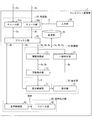
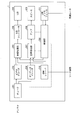
- FIG. 4 is a block diagram showing the main configuration of the television 1.
- parts not directly related to the present embodiment are omitted from the description of the configuration and the block diagram.
- the television 1 may include the omitted configuration.
- the television (display device, television receiver) 1 includes a tuner 2a for receiving a broadcast wave 2a broadcasted from an external broadcast station, and the television program 3 carried by the broadcast wave 2a received by the tuner 2a is It is a device that displays a list.
- the television 1 receives a television program (content, other content) 3 broadcasted from a broadcast station (including both the main channel and the subchannel) as the “content”.
- content is, for example, all video, images, music, voice, sentences, characters, formulas, numbers, symbols, etc. provided from cable television, CS broadcasting, radio broadcasting, DVD (Digital Versatile Disk), Internet etc. May be included.
- the television 1 includes a receiver 20 (tuner 21 a and a tuner 21 b), a demax 40, a controller 10 (an information acquisition unit 11, an information display 12, a match determination unit 13), and a display. It includes a unit 70 (display control unit 71, display surface 72), an audio output unit 60 (audio control unit 61, speaker unit 62), a storage unit 30, and an input unit 50.
- a receiver 20 tuner 21 a and a tuner 21 b
- a demax 40 a controller 10 (an information acquisition unit 11, an information display 12, a match determination unit 13), and a display.
- It includes a unit 70 (display control unit 71, display surface 72), an audio output unit 60 (audio control unit 61, speaker unit 62), a storage unit 30, and an input unit 50.
- the receiving unit 20 converts the broadcast wave 2 received from an external broadcast station into a signal (television program 3) representing content.
- the receiving unit 20 for example, an RF unit that converts a signal received by the tuner unit 21 into an analog baseband signal, an ADC unit that converts the analog baseband signal into a digital baseband signal, and demodulates an MPEG2 stream from the digital baseband signal.
- a demodulator and a decoder for decoding the video signal from the MPEG2 stream may be included (not shown).
- the receiving unit 20 includes a tuner unit 21a and a tuner unit 21b.
- the receiving unit 20 acquires a broadcast station to receive a broadcast wave next among all broadcast stations capable of receiving a broadcast wave, and tunes the tuner unit 21b to the frequency of the broadcast station.
- the receiving unit 20 displays a list of television programs 3a carried by the broadcast wave 2a being received by the tuner unit 21a among all the broadcast stations capable of receiving the broadcast wave.
- the broadcast stations of the broadcast wave 2b carrying the television program 3b are listed up.
- the receiving unit 20 tunes the tuner unit 21b to the frequencies of the broadcast stations listed in the list.
- the receiving unit 20 is a television program broadcasted by the broadcast station selected in the back program guide 8 (broadcast station in the focusing unit in FIG. 3) among all the broadcast stations capable of receiving broadcast waves.
- the broadcast stations of the airwaves 2b carrying the television programs 3b listed in the vicinity are listed.
- the receiving unit 20 tunes the tuner unit 21b to the frequencies of the broadcast stations listed in the list.
- the tuner unit (first receiving unit) 21a and the tuner unit (second receiving unit) 21b are tuners that respectively receive the broadcast wave 2a and the broadcast wave 2b broadcast from the broadcast station.
- the tuner unit 21 a and the tuner unit 21 b respectively output the television program 3 a and the television program 3 b converted by the receiving unit 20 to the demax unit 40.
- the tuner unit 21b is more effective than the broadcast wave carrying the television program listed at a position not near the television program 3a. It should be noted that the broadcast waves 2b carrying the television programs 3b listed in the vicinity are preferentially received.
- the tuner unit 21b includes a broadcast station that broadcasts the television program 3a.
- the broadcast waves of the broadcast stations displayed as “four stations before and after” (four stations in the vicinity) may be received.
- the tuner unit 21b uses the tuner unit 21a.
- Another broadcast wave 2b broadcasted at a frequency included in a predetermined range may be preferentially received, including the frequency at which the received broadcast wave 2a is broadcasted.
- the “predetermined range” is a range defined in advance in units of frequency, and may be, for example, a range of several tens of Hz above and below the frequency at which the broadcast wave 2 a is broadcasted.
- the tuner unit 21b displays a list of television programs carried by a broadcast wave broadcast by the selected broadcast station at a position not near the television program.
- the broadcast wave 2b carrying the television program 3b listed in the vicinity is preferentially received over the broadcast wave carrying the television program.
- the demax unit 40 includes the television program 3a and the television program 3b input from the tuner unit 21a and the tuner unit 21b, the video signal 4a, the audio signal 4b, and other signals (the program information 5b, the thumbnail 5a, and the restriction information 6a). , And outputs these signals to the display control unit 71, the voice control unit 61, and the information acquisition unit 11, respectively.
- Control unit 10 integrally controls various functions of the television 1.
- Control unit 10 includes an information acquisition unit 11, an information display unit 12, and a match determination unit 13.
- the control unit 10 determines whether the user is set to acquire the program guide in the background. Further, the control unit 10 determines whether it is necessary to acquire the thumbnail 5 a of the television program 3 b by the user setting that the television 1 displays the thumbnail 5 a on the back program guide 8. .
- control unit 10 deletes the broadcast station for which the acquisition of the thumbnail 5a has been completed from the list listed by the reception unit 20, and whether or not the broadcast station for which the thumbnail 5a has not been acquired remains in the list. And it is determined whether the display of the back program guide 8 is continued (whether the television 1 is still in the "back program guide" state).
- control unit 10 determines whether the selected broadcasting station has changed. The control unit 10 also determines whether or not there is information (reason for not being acquired) indicating the reason why the viewing was impossible.
- control unit 10 reads out from the storage unit 30 the program information 5b at the current time (EventID recorded in the program guide data at the current time). Further, the control unit 10 reads out from the storage unit 30 a pair of the thumbnail 5 a and the program information 5 b (Event ID) or information (reason for not being acquired) indicating the reason why the viewing is not possible.
- the information acquisition unit (acquisition unit) 11 acquires, from the other broadcast wave 2b received by the tuner unit 21b, a thumbnail 5a representing another television program 3b carried by the other broadcast wave.
- the information acquisition unit 11 further acquires program information 5b capable of identifying another television program 3b carried by the other broadcast wave from the other broadcast wave 2b received by the tuner unit 21b.
- the information acquisition unit 11 sets a decoder and a section filter so as to acquire the thumbnail 5a and the program information 5b (for example, EIT [sch] of EPG information), and acquires the thumbnail 5a and the program information 5b. Wait for to complete.
- the information acquisition unit 11 may store the acquired thumbnail 5 a and the program information 5 b in the storage unit 30.
- the information acquisition unit 11 further acquires the restriction information 6a indicating whether or not the other television program 3b can be viewed, and the restriction information indicates that the other television program 3b is not viewable, Do not acquire thumbnails 5a of other television programs. In this case, the information acquisition unit 11 may acquire information indicating the reason why viewing is impossible, instead of acquiring the thumbnail 5a.
- the information acquisition unit 11 sets a section filter so as to acquire the restriction information 6a (also referred to as contract information), and stands by until the acquisition of the restriction information 6a is completed. Then, the information acquisition unit 11 determines the availability of acquisition of the thumbnail 5 a by determining the availability of viewing of the television program 3 b based on the restriction information 6 a. When it is determined that the thumbnail 5a can not be acquired because the viewing is not possible, the information acquisition unit 11 acquires information indicating the reason why the viewing is not possible, and the information is stored in the storage unit 30 as thumbnail data. Store.
- the restriction information 6a also referred to as contract information
- the restriction information 6a is information indicating that viewing of the content is restricted, such as information on a viewing contract of the content, information indicating the presence or absence of scrambling, information on viewing age restriction, or information on occurrence of reception failure. .
- the restriction information 6a can be obtained, for example, by PMT, EIT [p], or B-CAS card response of ECM.
- the information indicating the reason why viewing is impossible is information indicating the reason why viewing is restricted by the restriction information 6a, and is indicated by which of the above-described information the restriction information 6a is.
- the information display unit (display means) 12 follows a predetermined format such that the broadcast station broadcasting the broadcast wave 2a received by the tuner unit 21a or the broadcast station selected by the operation of the user can be selected first.
- the thumbnail 5a and the program information 5b acquired by the information acquisition unit 11 are displayed.
- the information display unit 12 generates the back program guide 8 based on the thumbnail 5 a and the program information 5 b input from the information acquisition unit 11, and outputs the back program guide to the display control unit 71.
- the information display unit 12 determines that the match determination unit 13 does not match (when the determination information 6 b indicating the determination result that does not match is input from the match determination unit 13)
- the determined thumbnail 5 a is displayed. Do not show.
- the back program guide 8 displays either the thumbnail 5a, an icon indicating the reason why viewing is impossible, or an icon indicating that the thumbnail 5a does not exist.
- the information display unit 12 may display the information indicating the reason and the program information 5b according to a predetermined format.
- the coincidence determination unit (determination unit) 13 determines whether the thumbnail 5a acquired by the information acquisition unit 11 matches the content of another television program 3b carried by another broadcast wave 2b received by the tuner unit 21b. It is determined whether or not.
- the match determination unit 13 determines whether or not the EventID of the current program matches the EventID of the thumbnail 5a.
- the match determination unit 13 outputs, to the information display unit 12, determination information 6b indicating the result of the above determination.
- the display unit 70 displays, to the user, information (back program guide 8) as a result processed inside the control unit 10 and the video signal 4a input from the demax unit 40.
- the display unit 70 includes a display control unit 71 and a display surface 72.
- the display control unit 71 combines the video signal 4a input from the demax unit 40 and the back program guide 8 input from the information display unit 12, and displays the back program guide 8 in the final form shown in FIG. Display data 7 that enables display on the surface 72 is output to the display surface 72.
- the display data 7 is data including all information to be displayed on the display surface 72 by the television 1 finally.
- the display data 7 may be, for example, an image in a bitmap format, an image according to another format, or any other data format suitable for display.
- the display surface 72 is a device that displays the display data 7 input from the display control unit 71.
- a liquid crystal display LCD
- the type of hardware is not limited as long as it is a device having a display function (in particular, a flat panel display).
- a device including a display element such as a plasma display (Plasma Display Panel; PDP) or an EL (Electroluminescence) display, and a driver circuit for driving the display element based on display data 7 input from the display control unit 71.
- the display surface 72 can be configured with
- the audio output unit 60 outputs the audio included in the television program 3a to the outside.
- the audio output unit 60 includes an audio control unit 61 and a speaker unit 62.
- the voice control unit 61 converts the voice signal 4 b input from the demax unit 40 into a voice and outputs the voice to the speaker unit 62.
- the voice control unit 61 can be configured by, for example, a voice output processing circuit such as an amplifier.
- the speaker unit 62 is a speaker that outputs the sound input from the sound control unit 61 to the outside.
- the storage unit 30 is a storage device capable of storing the program information 5b, the thumbnails 5a, and the restriction information 6a.
- the storage unit 30 may be configured by, for example, a hard disk, a semiconductor memory, a DVD, or the like, but is particularly preferably a RAM (Random Access Memory).
- the storage unit 30 is shown in FIG. 1 as a device incorporated in the television 1, but may be a storage device communicably connected to the outside of the television 1.
- the input unit 50 receives the user's operation, and outputs the input information (user input 9) to the receiving unit 20. Thus, the user can select a broadcast station to view.
- the input unit 50 may be any interface as long as it receives an input from the user, and a device that receives an input signal from a general input interface, such as a remote control, a button provided on the television 1, a keyboard, or a mouse, can be considered.
- the interface used by the user for input may not be a hardware interface provided with a physical button.
- the remote control may have a liquid crystal screen provided with a touch panel, and the user may give the television 1 an operation of the user by pressing a software key displayed on the liquid crystal screen.
- FIG. 5 is a block diagram showing each part of the screen configuration of the back program guide 8 in detail.
- each unit indicated by the numbers (1) to (13) in FIG. 5 represents the following.
- the television 1 displays the respective broadcasting stations in each row of the seven broadcasting station list. Also, when the user long-presses a predetermined key for changing the broadcast station to be displayed superimposed on the cursor, the television 1 rotates and displays the back program list while applying an effect of adding depth to the back program list 8
- the television 1 When the television 1 is connected to the network, when the user presses the left and right keys of the remote control, the television 1 displays "IPTV”, “terrestrial digital”, and "BS broadcast” in the display of the type of broadcast wave in (7) above. , And cyclically display four types of "CS broadcast”.
- the television 1 When the television 1 is not connected to the network, when the user presses the left and right keys of the remote control, the television 1 displays "terrestrial digital", "BS broadcast”, and “CS” in the display of the type of broadcast wave in (7) above. "Broadcast” is displayed in circulation.
- the order displayed cyclically can be designed arbitrarily. Further, even when the user directly presses a predetermined key of the remote control for switching the broadcast wave, the type of the broadcast wave can be switched.
- the television 1 has the following three operating states. That is, (1) State of "viewing”: The operation state of the television 1 when the user is viewing the television program 3a broadcast from a predetermined broadcasting station on a steady basis. (2) The state of "after channel selection”: The operating state of the television 1 immediately after the broadcast wave 2a received by the tuner unit 21a is changed by the user switching the designation of the broadcast station. (3) State of "back program guide”: The operation state of the television 1 when the television 1 is displaying the back program guide 8 (see FIG. 3).
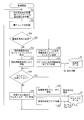
- FIG. 6 is a flowchart showing an example of processing executed by the television 1 in the “viewing” state.
- the receiving unit 20 acquires a broadcast station (station selection destination) that should receive the next broadcast wave among all the broadcast stations capable of receiving the broadcast wave (step 1: abbreviated as S1), and the broadcast Tuner section 21b (back tuner) is tuned to the frequency of the station (S2).
- the control unit 10 determines whether acquisition of a program guide is necessary (S3). That is, when the television 1 is in the state of "viewing", the control unit 10 determines whether or not the user is set to acquire the program guide in the background.
- the information acquisition unit 11 sets a section filter so as to acquire the program information 5b (for example, EIT [sch] of the EPG information) (S4). It waits until the acquisition is completed (S5). The information acquisition unit 11 stores the acquired program information 5b in the storage unit 30.
- the program information 5b for example, EIT [sch] of the EPG information
- control unit 10 determines whether acquisition of a thumbnail is necessary (S6). That is, since the television 1 is set by the user to display the thumbnail 5a on the back program guide 8, the control unit 10 determines whether it is necessary to acquire the thumbnail 5a of the television program 3b. .
- the information acquiring unit 11 sets a decoder so as to acquire the thumbnail 5a (S7), and waits until the acquisition of the thumbnail 5a is completed (S8).
- the information acquisition unit 11 stores the acquired thumbnail 5 a in the storage unit 30.
- the information acquisition unit 11 acquires a signal (for example, EventID etc.) capable of identifying the television program 3 simultaneously with the thumbnail 5 a as a part of the program information 5 b and stores the same in the storage unit 30.
- a signal for example, EventID etc.
- the television 1 in the “viewing” state executes the above-described processes of S1 to S8 for all the broadcast stations capable of receiving the broadcast wave. That is, the television 1 alternately performs acquisition of the program information 5b and acquisition of the thumbnails 5a in a predetermined order for all the broadcast stations.
- the television 1 includes two receivers for the broadcast wave 2 (the tuner unit 21a and the tuner unit 21b), and one of them is used to receive the television program 3a being viewed by the user.
- the thumbnail 5a and the program information 5b must be received only on the other side. Therefore, the television 1 alternately acquires the thumbnails 5a and the program information 5b as described in the above S3 to S8.
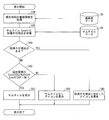
- FIG. 7 is a flowchart showing an example of processing executed by the television 1 in the “after channel selection” state.
- “-step” in parentheses represents each step of the control method (the same applies to the other drawings).
- the receiving unit 20 generates a thumbnail acquisition list (S9). Specifically, the receiving unit 20 displays a list at a position near the television program 3a carried by the broadcast wave 2a received by the tuner unit 21a among all the broadcast stations capable of receiving the broadcast wave. The broadcast stations of the airwaves 2b carrying the television program 3b are listed. Then, the receiving unit 20 tunes the tuner unit 21b to the frequencies of the broadcast stations listed in the list (S10).
- the tuner unit 21b receives the broadcast wave 2b (S11, second receiving step).
- the information acquisition unit 11 sets a decoder so as to acquire the thumbnail 5a (S12), and waits until the acquisition of the thumbnail 5a is completed (S13, acquisition step).
- the information acquisition unit 11 stores the acquired thumbnail 5 a in the storage unit 30.
- the information acquisition unit 11 may also acquire the program information 5b (Event ID) of the acquired thumbnail 5a and store them in the storage unit 30 in association with each other.
- the control unit 10 deletes from the list the broadcast stations for which the acquisition of the thumbnails 5a has been completed (S14), and determines whether there are broadcast stations whose thumbnails 5a have not been acquired yet in the list (S15). If it remains (YES in S15), the control unit 10 executes the processing of S10 to S14 again, and if it does not remain (NO in S15), the control unit 10 sets the state of the television 1 to "viewing".
- FIG. 8 is a flowchart showing an example of processing executed by the television 1 in the “back program guide” state.
- the receiving unit 20 generates a thumbnail acquisition list based on the selected broadcasting station (S16). Specifically, the receiving unit 20 is a television broadcasted by the broadcast station selected in the back program guide 8 (the broadcast station in the focusing unit in FIG. 3) among all the broadcast stations capable of receiving broadcast waves. For the program 3a, the broadcast stations of the airwaves 2b carrying the television program 3b listed in the vicinity are listed. Then, the receiving unit 20 tunes the tuner unit 21b to the frequencies of the broadcast stations listed in the list (S17).
- the tuner unit 21b receives the broadcast wave 2b (S18, second receiving step). Next, the information acquisition unit 11 sets a decoder so as to acquire the thumbnail 5a (S19), and stands by until the acquisition of the thumbnail 5a is completed (S20, acquisition step). As described above, at this time, the information acquisition unit 11 stores the acquired thumbnail 5a and EventID in the storage unit 30.
- the control unit 10 deletes from the list the broadcast station for which the acquisition of the thumbnail 5a has been completed (S21), and whether or not the display of the back program guide 8 is continued (the television 1 is still in the "back program guide” state). (S22). When not continuing (NO in S22), the control unit 10 sets the state of the television 1 to "viewing".
- control unit 10 determines whether the selected broadcasting station has changed (S23). If it has changed (YES in S23), control unit 10 executes the processing in S16 to S22 again, and if it does not change (NO in S23), control unit 10 has not acquired thumbnail 5a in the above list. It is determined whether a broadcasting station remains (S24).
- control unit 10 executes the processing of S17 to S24 again.
- the receiving unit 20 acquires, from all the broadcast stations that can receive the broadcast wave, the broadcast station (the channel selection destination) that should receive the broadcast wave next (S25) ), Tune the tuner unit 21b to the frequency of the broadcasting station (S26), and execute the processing of S19 to S24 again.
- FIG. 9 is a flowchart showing an example of processing executed by the television 1 in the above case.
- the receiving unit 20 acquires, from all the broadcast stations capable of receiving broadcast waves, a broadcast station (station selection destination) that should receive broadcast waves next (S27), and sets the tuner unit 21b to the frequency of the broadcast station. Synchronize (S28). Next, the control unit 10 determines whether it is necessary to obtain a program guide (S29, see S3 in FIG. 6).
- the information acquisition unit 11 sets a section filter so that the program information 5b (for example, EIT [sch] of EPG information) and contract information (restriction information 6a) can be acquired. (S30) The process waits until the acquisition of the program information 5b and the contract information is completed (S31). The information acquisition unit 11 stores the acquired program information 5b in the storage unit 30.
- the program information 5b for example, EIT [sch] of EPG information
- contract information contract information
- the information acquisition unit 11 sets a section filter so as to acquire contract information (restriction information 6a) (S32), and completes acquisition of contract information. It waits (S33).
- the information acquisition unit 11 determines the availability of acquisition of the thumbnail 5a by determining the availability of viewing the television program 3b based on the contract information (restriction information 6a) (S34). When it is determined that the thumbnail 5a can not be acquired because the viewing is not possible (NO in S34), the information acquiring unit 11 acquires information indicating the reason why the viewing is not possible, and the information is displayed as thumbnail data And stored in the storage unit 30 (S35).
- the information acquiring unit 11 sets a decoder so as to acquire the thumbnail 5a (S36), and waits until the acquisition of the thumbnail 5a is completed (S37) .
- the information acquisition unit 11 stores the acquired thumbnail 5 a in the storage unit 30.
- the information acquisition unit 11 acquires a signal (for example, EventID etc.) capable of identifying the television program 3 simultaneously with the thumbnail 5 a as a part of the program information 5 b and stores the same in the storage unit 30.
- a signal for example, EventID etc.
- FIG. 10 is a flowchart showing an example of processing executed by the television 1 in the above case.
- the control unit 10 reads out from the storage unit 30 the program information 5b at the current time (EventID recorded in the program guide data at the current time) (S38). Further, the control unit 10 reads out from the storage unit 30 a pair of the thumbnail 5a and the program information 5b (Event ID) or information (reason for not being acquired) indicating the reason why the viewing is not possible (S39).
- the control unit 10 determines whether or not there is a reason why the acquisition is not possible (S40). If it is determined that there is (YES in S40), the information display unit 12 displays an icon indicating the reason instead of the thumbnail 5a. It is displayed on the back program guide 8. On the other hand, when it is determined that it is not (NO in S40), the match determination unit 13 determines whether the EventID of the current program and the EventID of the thumbnail 5a match (S42, determination step).
- the information display unit 12 displays the thumbnail on the back program guide 8 (S43). On the other hand, when it is determined that they do not match (NO in S42), the information display unit 12 displays an icon indicating that the thumbnail 5a does not exist on the back program guide 8 instead of the thumbnail 5a (S44).
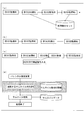
- FIG. (A) to (d) of FIG. 11 are schematic views showing an example of processing executed by the television 1 in the above case.
- the information acquiring unit 11 obtains parental information (restriction information, adverse effect on the user) about each television program 3 b before acquiring the thumbnail 5 a representing the television program 3 b. Information indicating whether or not the guardian of the user restricts the use of the content is acquired as the content that is likely to be exerted). Then, the information acquisition unit 11 determines whether or not the thumbnail 5a can be acquired by determining whether or not parental is set for the television program 3b. If it is determined that the television program 3b can not be acquired, the information acquisition unit 11 stores the program information 5b capable of identifying the television program 3b in the storage unit 30.
- parental information restriction information, adverse effect on the user
- the information acquisition unit 11 skips acquisition of the thumbnail 5a representing the television program.
- the television 1 can solve the problem that the time for acquiring the thumbnails 5a is extended by setting the parental (the thumbnails 5a can be acquired at high speed), and thus the convenience of the user can be further improved.
- the above-mentioned processing shown in (a) and (b) of FIG. 11 may be performed as follows. That is, when the acquisition of the thumbnail 5a takes a long time or the thumbnail 5a can not be acquired because the parental is set to the television program 3b broadcasted from the broadcasting station, the information acquiring unit 11 performs the acquisition.
- the storage unit 30 stores the program information 5b capable of identifying the time-consuming television program 3b or the program information 5b capable of identifying the television program 3b which can not be acquired.
- the information acquisition unit 11 skips the acquisition of the thumbnail 5a representing the television program.
- the process is performed in this manner, it is not necessary to obtain parental information prior to obtaining the thumbnail 5a. Therefore, since the television 1 can solve the problem that the time for acquiring the thumbnail 5a is extended by setting the parental more easily (the thumbnail 5a can be acquired more easily and quickly), the convenience of the user can be improved. Can be further improved.
- the information acquiring unit 11 cancels the setting.
- a thumbnail 5a representing the detected and canceled television program 3b is obtained.
- the information acquiring unit 11 deletes all the thumbnails 5a stored in the storage unit 30. Then, the information acquisition unit 11 acquires the thumbnail 5a again from the broadcast wave of the nearby broadcast station including the broadcast station that broadcasts the television program 3a currently being viewed. As a result, when the setting of the parental change is made, the television 1 can immediately and reliably reflect the change, thereby further improving the convenience of the user.
- FIG. 12 is a block diagram showing the hardware configuration of the television 1.
- the television 1 includes a tuner 201, a video decoder 202, a video processing unit 203, an LCD controller 204, an LCD 205, an audio decoder 206, an audio processing unit 207, an amplifier 208, a speaker 209, and HDMI (registered trademark).
- the receiver 210, the LAN interface 211, and the control unit 220 are provided.
- the tuner 201 demodulates an encoded video signal and an encoded audio signal from broadcast waves of terrestrial digital broadcast, BS broadcast, or CS broadcast.
- the video decoder 202 decodes the encoded video signal demodulated by the tuner 201.
- the video signal decoded by the video decoder 202 is supplied to the LCD controller 204 via the video processing unit 203.
- the LCD controller 204 controls the LCD 205 to display a video represented by the video signal processed by the video processing unit 203.
- the audio decoder 206 decodes the encoded speech signal demodulated by the tuner 201.
- the audio signal decoded by the audio decoder 206 is supplied to the amplifier 208 via the audio processing unit 207.
- the amplifier 208 drives the speaker 209 to output the sound represented by the audio signal processed by the audio processing unit 207.
- the HDMI receiver 210 receives the video signal and the audio signal supplied from the source device.
- the video signal and the audio signal received by the HDMI receiver 210 are respectively supplied to the video processing unit 203 and the audio processing unit 207, and are output from the LCD 205 and the speaker 209 in the same manner as the video signal and the audio signal demodulated by the tuner 201. Ru.
- the LAN interface 211 acquires WEB content and VOD content from the WEB server and VOD server, respectively. All of these network contents are decoded in software by the control unit 220.
- the video signal and the audio signal representing the network content decoded by the control unit 220 are respectively supplied to the video processing unit 203 and the audio processing unit 207, and similar to the video signal and the audio signal demodulated by the tuner 201, the LCD 205 and the audio signal. It is outputted from the speaker 209.
- the control unit 220 has a function of generating a video signal representing the menu screen 100 shown in FIG. 1 in addition to the functions described above.
- the video signal representing the menu screen 100 generated by the control unit 220 is supplied to the video processing unit 203, and is output from the LCD 205 in the same manner as the video signal demodulated by the tuner 201.
- the control unit 220 can acquire various information necessary for generating a video signal representing the menu screen 100 from the maker server via the LAN interface 211.
- the control unit 220 includes a CPU, a ROM, a RAM, and the like, and implements the above-described functions by the CPU executing programs stored in the ROM, the RAM, and the like. Also, the control unit 220 is essentially the same as the control unit 10 shown in FIG. 4 and controls the various functions of the television 1 in an integrated manner.
- the tuner 201 is a double tuner capable of receiving at least two or more terrestrial digital broadcasts, like the tuner unit 21a and the tuner unit 21b shown in FIG.
- the television 1 can quickly obtain the thumbnails 5 a that are estimated to have a large impact on usability, so that the first problem can be solved. In addition, since the acquisition time of the thumbnails 5a is shortened, it is easy to keep the thumbnails in the latest state, the television 1 can also solve the second problem.
- the television 1 according to the present embodiment can improve the convenience of the user.
- each block of the television 1 may be realized in hardware by a logic circuit formed on an integrated circuit (IC chip) or realized in software by using a CPU (Central Processing Unit). It is also good.
- IC chip integrated circuit
- CPU Central Processing Unit
- the television 1 is a CPU that executes instructions of a program for realizing each function, a ROM (Read Only Memory) storing the program, a RAM (Random Access Memory) expanding the program, the program and various data
- a storage device such as a memory for storing the
- the object of the present invention is to provide a recording medium on which a program code (an executable program, an intermediate code program, a source program) of a control program of the television 1 which is software that realizes the functions described above is recorded in a computer readable manner. This can also be achieved by supplying the program code 1 and reading and executing the program code recorded on the recording medium by the computer (or CPU or MPU).
- Examples of the recording medium include tapes such as magnetic tapes and cassette tapes, disks including magnetic disks such as floppy (registered trademark) disks / hard disks, and optical disks such as CD-ROM / MO / MD / DVD / CD-R. , Cards such as IC cards (including memory cards) / optical cards, semiconductor memories such as mask ROM / EPROM / EEPROM (registered trademark) / flash ROM, or PLD (programmable logic device) or FPGA (field programmable gate array) And the like can be used.
- the television 1 may be configured to be connectable to a communication network, and the program code may be supplied via the communication network.
- This communication network is not particularly limited as long as the program code can be transmitted.
- the Internet intranet, extranet, LAN, ISDN, VAN, CATV communication network, Virtual Private Network, telephone network, mobile communication network, satellite communication network, etc. can be used.
- the transmission medium that constitutes this communication network may be any medium that can transmit the program code, and is not limited to a specific configuration or type.
- the present invention can also be realized in the form of a computer data signal embedded in a carrier wave, in which the program code is embodied by electronic transmission.
- means do not necessarily mean physical means, and also include cases where the functions of the means are realized by software. Also, the function of one means may be realized by two or more physical means, or the function of two or more means may be realized by one physical means.
- the display device (television receiver 1) is (1) A first receiving means (tuner unit 21a) for receiving a broadcast wave (broadcast wave 2a) broadcasted from an external broadcast station, and carried by the broadcast wave received by the first receiving means It is a display device for displaying contents (television program 3a) in a listable manner, (2) With respect to the content carried by the broadcast wave, another content (television program 3b) displayed in a list at a position nearer than the broadcast wave carrying the content listed at a position not near the content.
- a second receiving unit for preferentially receiving another broadcast wave (broadcast wave 2b) carrying (3)
- An acquisition unit for acquiring an image (thumbnail 5a) representing the other content from the other broadcast wave received by the second reception unit.
- a control method of a display device (1) A display device including a first receiving step of receiving a broadcast wave broadcasted from an external broadcast station, and displaying the contents carried by the broadcast wave received in the first receiving step in a listable manner Control method, and (2) With respect to the content carried by the broadcast wave, other broadcasts carrying other content listed at a position nearer than the broadcast wave carrying content listed at a position not near to the content carried by the broadcast wave A second receiving step (S11, S18) for preferentially receiving waves; (3) An acquisition step (S13, S20) of acquiring an image representing the other content from the other broadcast wave received in the second reception step.
- the display device and the control method of the device according to aspect 1 of the present invention the content displayed as a list at a position not near the content being viewed by the user
- the other broadcast wave carrying other content listed at a nearby position is preferentially received over the broadcast wave carrying.
- the display device or the like acquires an image representing the other content from the other broadcast wave.
- a display device such as a television receiver displays contents in a listable manner by displaying a contents front (for example, a back program front)
- the contents are displayed in a list near the content being viewed by the user.
- Content images are often needed first. This is because it is common for the content list to list the content so that the user can select the content currently being viewed first.
- the display device or the like preferentially acquires an image representing the content to be displayed in a list at the position of the vicinity as the one having the highest necessity.
- the display device or the like can quickly acquire an image which is estimated to have a large influence on usability, and hence the first problem can be solved.
- the image acquisition time can be shortened, it is easy to keep the image up-to-date, the display device and the like can solve the second problem.
- the display device according to aspect 1 of the present invention and the control method of the device can improve the convenience of the user.
- the second reception means displays a list at a position not near the content carried by the broadcast wave broadcast by the selected broadcast station
- Other broadcast waves carrying other content listed at a nearby position may be preferentially received over broadcast waves carrying the content.
- the display device when the broadcast station is selected by the user's operation, the display device is not located near the content carried by the broadcast wave broadcast by the selected broadcast station. Rather than the broadcast wave carrying the contents listed in the list, other broadcast waves carrying other contents listed in the vicinity are preferentially received.
- the display device can preferentially obtain an image which is estimated to have a large influence on usability following the selection.
- the display device according to aspect 2 of the present invention can further improve the convenience of the user.
- the display device can first select a broadcast station that broadcasts a broadcast wave carrying a content being viewed by the user, or a broadcast station selected by the operation of the user
- the acquired image is displayed according to a predetermined format.
- the display stations can receive receivable broadcast stations in a predetermined order. Images are displayed according to a list format arranged in a line.
- the display device can initially display an image acquired quickly, and can further improve the user's convenience.
- the acquisition means is a content identification information capable of identifying contents from at least one of a broadcast wave received by the first reception means and another broadcast wave received by the second reception means Get more information 5b), (2)
- the display means may further display the content identification information acquired by the acquisition means.
- the display device acquires not only the image but also content identification information capable of identifying the content from the broadcast wave. Then, the display device further displays the acquired content identification information. Therefore, the display device according to aspect 4 of the present invention can further improve the convenience of the user.
- the display device determines whether the image acquired from the broadcast wave matches the content of the content carried by the broadcast wave, and determines that the images do not match. Does not display the image.
- the content of the content represented by the acquired image matches the content of the content for which the broadcast is newly started. There is a risk of failure.
- the display device determines whether the two match or not, and does not display the image when it is determined that the two do not match, which can avoid the possibility of the occurrence of the above-mentioned problems. Therefore, the display device according to aspect 5 of the present invention can further improve the convenience of the user.
- the acquisition means further acquires restriction information indicating whether or not the other content can be viewed, and the restriction information indicates that the other content can not be viewed, the acquisition unit You do not have to acquire an image.
- the display device restricts viewing of the content, such as information on a viewing contract of the content, information indicating presence / absence of scrambling, information on viewing age restriction, or information on occurrence of reception failure. It is possible to obtain information that indicates the presence of
- the display device does not acquire an image. Thereby, the display device according to aspect 6 of the present invention can omit in advance unnecessary processing that does not need to be performed.
- the acquisition means further acquires restriction information indicating whether or not the other content can be viewed, and the restriction information indicates that the other content can not be viewed
- the acquisition unit Instead of images, obtain information that indicates why viewing was impossible
- the display means may display the information indicating the reason acquired by the acquisition means and the content identification information according to a predetermined format.
- the display device when the display device can determine that the access to the content is restricted by the restriction information, the reason is that the access is restricted instead of acquiring the image. Get information about Therefore, the display device according to aspect 7 of the present invention can present the user the reason why the access is restricted.
- the acquisition unit may receive another broadcast received by the second reception unit. From the waves, an image representing the other content may be obtained.
- the display device when the setting of the restriction information is changed, the display device can immediately and reliably reflect the change, so that the convenience of the user can be further improved.
- the acquisition means deletes the image representing the other content which has been acquired so far, and is received by the second reception means An image representing the other content may be acquired again from the other broadcast wave.
- the display device when the setting of the restriction information is changed, the display device can immediately and reliably reflect the change, so that the convenience of the user can be further improved.
- a television receiver according to aspect 10 of the present invention is (1) The display device according to any one of the above aspect 1 to aspect 9 may be provided.
- the television receiver of the present invention exhibits the same effects as the above display device.
- the display device may be realized by a computer.
- a control program for realizing the display device by the computer by operating the computer as each means of the display device, and a computer readable recording medium recording the same also fall within the scope of the present invention.
- the present invention is applicable to a television receiver.
- the present invention can be widely applied to electronic devices such as personal computers, tablet information terminals, and smartphones that can display content carried by broadcast waves broadcasted from an external broadcast station.
Landscapes
- Engineering & Computer Science (AREA)
- Multimedia (AREA)
- Signal Processing (AREA)
- Databases & Information Systems (AREA)
- Human Computer Interaction (AREA)
- Software Systems (AREA)
- Computing Systems (AREA)
- Two-Way Televisions, Distribution Of Moving Picture Or The Like (AREA)
- User Interface Of Digital Computer (AREA)
Abstract
放送波(2a)によって搬送されたテレビジョン番組(3a)に対して、近傍にない位置に一覧表示されるテレビジョン番組を搬送する放送波よりも、近傍の位置に一覧表示されるテレビジョン番組(3b)を搬送する放送波(2b)を優先的に受信するチューナ(21b)と、チューナ(21b)によって受信された放送波(2b)から、テレビジョン番組(3b)を表すサムネイル(5a)を取得する情報取得部(11)とを備えた。
Description
本発明は、外部の放送局から放送された放送波で搬送されるコンテンツを表示可能な表示装置等に関するものである。
電子番組ガイド(EPG;Electronic Program Guide)は、外部から受信したコンテンツを表示部に出力する装置(テレビジョン受像器など)に、当該コンテンツに関する情報を表示するシステムである。この情報は各放送局のデジタル放送波に重畳して搬送されるため、当該装置は当該情報をリアルタイムにユーザに届けられる。
近年では、EPGを利用して生成されるコンテンツ表(特にコンテンツがテレビジョン番組の場合、いわゆる「裏番組表」をいう)からユーザに所望のコンテンツを選択させることで、当該コンテンツの表示や記録指示を可能にするテレビやレコーダーなどが一般に普及している。したがって、上記コンテンツ表を閲覧しやすく表示することは、ユーザビリティを改善する観点から重要である。
上記重要性を踏まえて、上記コンテンツ表の表示を工夫する試みが広く行われている。例えば、下記の特許文献1には、ユーザが気に入った複数のチャンネルの番組を容易に確認し、選択できる表示処理装置が開示されている。また、下記の特許文献2には、放送中の裏番組について顔抽出されたサムネイル画像付きの裏番組表を表示させるテレビ受信装置が開示されている。
例えば、テレビジョン受像機が上記EPGを利用して裏番組表を表示させる場合、それぞれの裏番組の内容を表すサムネイル(画像)を当該裏番組の情報とあわせて表示できれば、ユーザビリティは大きく改善されると考えられる。
しかし、サムネイルを取得することには、次の2つの問題が存在する。第1の問題は、テレビジョン番組のサムネイルを放送波から取得するには時間を要することである。すなわち、1つの放送局あたり約10秒程度を要することが通常であるため、テレビジョン受像機が受信可能なすべての放送局(20~40局あると仮定する)から画像を取得するためには、数分~数10分の時間を費やす必要がある。
これにより、従来のテレビジョン受像機によれば、ユーザによって裏番組表の表示を指示されてからサムネイルを含む裏番組表を表示するまでには長い時間がかかる。一方で、ユーザを長時間待機させることはユーザビリティの観点から好ましくないため、例えば最初にサムネイルを含まない裏番組表を表示し、次に取得できたサムネイルから順次表示するという対策が考えられる。しかし、当該対策は、本質的な解決策ではなく、裏番組表で裏番組のサムネイルをすぐに確認したいというユーザのニーズを満たし得ない。
第2の問題は、時間をかけて取得したサムネイルが表す裏番組の内容と、現在放送されている裏番組の内容とが同期しない場合があることである。すなわち、サムネイルの取得に時間をかけている間に当該番組の放送が終了し、異なる番組の放送が開始された場合、取得したサムネイルが表す番組の内容と新たに放送が開始された番組の内容とが一致しない。これでは、裏番組表を表示するだけで、ユーザは現在放送されている裏番組の内容を一覧できるという本来目的とした機能を損ないかねない。
なお、上記の特許文献1または2に記載の従来技術では、上記いずれの問題も解決できない。いずれも画像を迅速に取得することに関するものではないからである。
本発明は、上記の問題点に鑑みてなされたものであり、その目的は、ユーザビリティへの影響が大きいと推測される画像を優先して取得でき、ユーザの利便性を改善できる表示装置等を提供することである。
上記の課題を解決するために、本発明の一態様に係る表示装置は、
(1)外部の放送局から放送された放送波を受信する第1の受信手段を備え、前記第1の受信手段によって受信される放送波によって搬送されたコンテンツを一覧可能に表示する表示装置であって、
(2)前記放送波によって搬送されたコンテンツに対して、近傍にない位置に一覧表示されるコンテンツを搬送する放送波よりも、近傍の位置に一覧表示される他のコンテンツを搬送する他の放送波を優先的に受信する第2の受信手段と、
(3)前記第2の受信手段によって受信された他の放送波から、前記他のコンテンツを表す画像を取得する取得手段とを備えた。
(1)外部の放送局から放送された放送波を受信する第1の受信手段を備え、前記第1の受信手段によって受信される放送波によって搬送されたコンテンツを一覧可能に表示する表示装置であって、
(2)前記放送波によって搬送されたコンテンツに対して、近傍にない位置に一覧表示されるコンテンツを搬送する放送波よりも、近傍の位置に一覧表示される他のコンテンツを搬送する他の放送波を優先的に受信する第2の受信手段と、
(3)前記第2の受信手段によって受信された他の放送波から、前記他のコンテンツを表す画像を取得する取得手段とを備えた。
また、上記の課題を解決するために、本発明の一態様に係る表示装置の制御方法は、
(1)外部の放送局から放送された放送波を受信する第1の受信ステップを含み、前記第1の受信ステップにおいて受信される放送波によって搬送されたコンテンツを一覧可能に表示する表示装置の制御方法であって、
(2)前記放送波によって搬送されたコンテンツに対して、近傍にない位置に一覧表示されるコンテンツを搬送する放送波よりも、近傍の位置に一覧表示される他のコンテンツを搬送する他の放送波を優先的に受信する第2の受信ステップと、
(3)前記第2の受信ステップにおいて受信された他の放送波から、前記他のコンテンツを表す画像を取得する取得ステップとを含んだ。
(1)外部の放送局から放送された放送波を受信する第1の受信ステップを含み、前記第1の受信ステップにおいて受信される放送波によって搬送されたコンテンツを一覧可能に表示する表示装置の制御方法であって、
(2)前記放送波によって搬送されたコンテンツに対して、近傍にない位置に一覧表示されるコンテンツを搬送する放送波よりも、近傍の位置に一覧表示される他のコンテンツを搬送する他の放送波を優先的に受信する第2の受信ステップと、
(3)前記第2の受信ステップにおいて受信された他の放送波から、前記他のコンテンツを表す画像を取得する取得ステップとを含んだ。
本発明の一態様によれば、表示装置および当該装置の制御方法は、ユーザビリティへの影響が大きいと推測される画像を優先して取得できる。これにより、上記表示装置等は、ユーザの利便性を改善することができるという効果を奏する。
図1~図12に基づいて、本発明の実施の形態を詳細に説明する。
以下では、ある部材が複数存在することを明示するために、同一の部材番号にaまたはbをさらに付して当該部材を示すことがある。例えば、「放送波2a」、「放送波2b」などと示す。また、当該部材の部材番号にさらに付されたaおよびbを省略し、当該部材を総称することがある。例えば、放送波2aおよび放送波2bを、「放送波2」と総称することがある。
さらに、ある部材が互いに関連していることを明示するために、異なる部材名を有する部材に同一の部材番号を付し、aまたはbをさらに付して当該部材を示すことがある。例えば「サムネイル5a」、「番組情報5b」などと示す。
〔メニュー画面〕
図1に基づいて、テレビジョン受像機(以下、単に「テレビ」と略記する)1がディスプレイ(表示面72、図4参照)に表示するメニュー画面100を説明する。図1は、テレビ1がディスプレイに表示するメニュー画面100の構成例を示す画面構成図である。
図1に基づいて、テレビジョン受像機(以下、単に「テレビ」と略記する)1がディスプレイ(表示面72、図4参照)に表示するメニュー画面100を説明する。図1は、テレビ1がディスプレイに表示するメニュー画面100の構成例を示す画面構成図である。
リモートコントローラ(以下、単に「リモコン」と略記する)に設けられた特定のボタン(以下、「ホームボタン」と称する)をユーザが押下した場合、テレビ1はメニュー画面100を表示する。図1に示されるように、メニュー画面100は、インフォゾーン110と、機能・レコメンドゾーン120と、ネットサービスゾーン130とを含む。
以下、インフォゾーン110、機能・レコメンドゾーン120、ネットサービスゾーン130の順序でそれぞれを説明する。
(インフォゾーン)
インフォゾーン110は、テレビ1が各種情報を表示する領域であり、情報表示領域と言い換えることもできる。インフォゾーン110は、ユーザネーム表示領域111、お知らせ一覧ボタン112a、ログインボタン112b、設定ボタン112c、時間表示領域113、天気表示領域114、ライブ映像表示領域115、バナー116a~116c、バナー詳細表示領域116d、およびインフォメーション表示領域117を含む。
インフォゾーン110は、テレビ1が各種情報を表示する領域であり、情報表示領域と言い換えることもできる。インフォゾーン110は、ユーザネーム表示領域111、お知らせ一覧ボタン112a、ログインボタン112b、設定ボタン112c、時間表示領域113、天気表示領域114、ライブ映像表示領域115、バナー116a~116c、バナー詳細表示領域116d、およびインフォメーション表示領域117を含む。
ユーザネーム表示領域111は、テレビ1がユーザネームを表示する領域である。テレビ1は、そのメーカー等が提供する特定のサーバ(以下、「メーカーサーバ」と称する)にログインする機能を有している。テレビ1はメーカーサーバへのログインを完了すると、ログインの際に使用したユーザネームをユーザネーム表示領域111に表示する。なお、ログインを完了するまでの間、テレビ1はログアウト状態であることを示す文字列(図1では「ようこそゲストさん」)をユーザネーム表示領域111に表示する。
お知らせ一覧ボタン112aは、お知らせ一覧画面を呼び出すためのボタンである。お知らせ一覧ボタン112aがフォーカスされている状態でリモコンの決定ボタンが押下されると、テレビ1は、ディスプレイに表示する画面を、メニュー画面100からお知らせ一覧画面へ遷移させる。なお、お知らせ一覧ボタン112aは、テレビ1がネットワークに接続されている場合にのみフォーカス可能となる。
ログインボタン112bは、ログイン画面を呼び出すためのボタンである。ログインボタン112bがフォーカスされている状態でユーザがリモコンの決定ボタンを押下すると、テレビ1はディスプレイに表示する画面を、メニュー画面100からログイン画面へ遷移させる。なお、ログインボタン112bは、テレビ1がネットワークに接続されている場合にのみフォーカス可能である。
設定ボタン112cは、設定画面を呼び出すためのボタンである。設定ボタン112cがフォーカスされている状態でユーザがリモコンの決定ボタンを押下すると、テレビ1はディスプレイに表示する画面を、メニュー画面100から設定画面へ遷移させる。なお、設定ボタン112cは、テレビ1がネットワークに接続されているか否かによらずフォーカス可能である。
時間表示領域113は、テレビ1が現在時刻を表示する領域である。時間表示領域113における現在時刻の表示形式は任意であるが、本実施の形態においては、図1に示されるように、「午前**:**/****年**月**日*曜日」(/は改行を表す)という表示形式を採用している。なお、テレビ1は、時間表示領域113に表示する現在時刻を、例えば当該テレビに内蔵された時計から取得してもよいし、放送波のSI情報から時刻を取得してもよいし、当該テレビに接続されたNTPサーバから取得してもよい。
天気表示領域114は、テレビ1が設置されている地域の天候情報を、当該テレビが表示する領域である。天気表示領域114における天候情報の表示形式は任意であるが、本実施の形態においては、天気アイコン(図1の例では晴れのち曇りのアイコン)、地域名(図1の例では「矢板市」)、およびコメント(図1の例では「関東北部は花粉飛散量大の見込み」)を含む表示形式を採用している。なお、テレビ1は天気表示領域114に表示する天候情報をメーカーサーバ等から取得してもよいし、データ放送から抽出してもよい。
ライブ映像表示領域115は、メニュー画面100に遷移する直前に全画面表示していた映像(動画像又は静止画像)を、テレビ1が縮小表示する領域である。例えば、メニュー画面100に遷移する直前にある放送番組が全画面表示されていた場合、ライブ映像表示領域115には、その放送番組が引き続き縮小表示されることになる。また、メニュー画面100に遷移する直前にあるウェブページが全画面表示されていた場合、ライブ映像表示領域115には、そのウェブページが引き続き表示されることになる。
なお、ライブ映像表示領域115は、テレビ1がネットワークに接続されているか否かによらずフォーカス可能である。ライブ映像表示領域115がフォーカスされている状態でユーザがリモコンの決定ボタンを押下すると、テレビ1はメニュー画面100の表示を終了するとともに、ライブ映像の全画面表示を再開する。
バナー116a~116cは、メーカーサーバから提供されたバナーであり、例えばメーカーサーバから提供されたバナー広告である。バナー116a~116cは、テレビ1がネットワークに接続されるか否かによらずフォーカス可能であり、バナー詳細表示領域116dには、フォーカスされているバナーに対応する詳細情報が表示される。バナー116a~116c、およびバナー116a~116cのそれぞれに対応する詳細情報は、テレビ1がネットワークに接続されているときにメーカーサーバからダウンロードされ、テレビ1に蓄積される。
インフォメーション表示領域117は、テレビ1がメーカーサーバから提供された任意の文字列を表示する領域である。インフォメーション表示領域117に表示される文字列は、インフォメーション表示領域117の右端から左端へと流れる。そして、最後の文字がインフォメーション表示領域117の左端からフレームアウトすると、最初の文字がインフォメーション表示領域117の右端からフレームインする。
なお、以下の説明において、インフォゾーン110を構成するUI(User Interface)要素のうち、フォーカス可能なUI要素のことを「メニュー項目」と総称する。具体的には、お知らせ一覧ボタン112a、ログインボタン112b、設定ボタン112c、ライブ映像表示領域115、およびバナー116a~116cがメニュー項目に該当する。
(機能・レコメンドゾーン)
機能・レコメンドゾーン120は、各種機能に対応するパネル(以下、「機能パネル」と称する)121と各種推薦コンテンツに対応するパネル(以下、「推薦コンテンツパネル」と称する)122とを、テレビ1が表示する領域であり、パネル表示領域と言い換えることもできる。機能パネル121および推薦コンテンツパネル122は、機能・レコメンドゾーン120内に横一列に並べられる。
機能・レコメンドゾーン120は、各種機能に対応するパネル(以下、「機能パネル」と称する)121と各種推薦コンテンツに対応するパネル(以下、「推薦コンテンツパネル」と称する)122とを、テレビ1が表示する領域であり、パネル表示領域と言い換えることもできる。機能パネル121および推薦コンテンツパネル122は、機能・レコメンドゾーン120内に横一列に並べられる。
機能パネル121は、テレビ1が有する複数の機能の各々に対応するパネルである。ある機能パネル121がフォーカスされている状態でユーザがリモコンの決定ボタンを押下すると、テレビ1はディスプレイに表示する画面を、メニュー画面100からその機能パネル121に対応する機能を利用するための画面へ遷移させる。
本実施の形態においては、機能パネル121として、裏番組パネル、スマートサーチパネル、録画リストパネル、入力切替パネル、番組表パネル、およびカレンダーパネルが用意される。例えば、裏番組パネルがフォーカスされている状態でユーザがリモコンの決定ボタンを押下すると、テレビ1はディスプレイに表示する画面を、メニュー画面100から裏番組表8の表示画面(「裏番組選択画面」ともいう、図3参照)へ遷移させる。また、スマートサーチパネルがフォーカスされている状態でユーザがリモコンの決定ボタンを押下すると、テレビ1はディスプレイに表示する画面を、メニュー画面100からスマートサーチ画面へ遷移させる。
推薦コンテンツパネル122は、テレビ1が選択した複数の推薦コンテンツ(裏番組、未放送番組、録画番組、またはウェブページ)のそれぞれに対応するパネルである。ある推薦コンテンツパネル122がフォーカスされている状態でユーザがリモコンの決定ボタンを押下すると、テレビ1は対応する推薦コンテンツの全画面表示を開始するか(推薦コンテンツが裏番組、録画番組、またはウェブページの場合)、または対応する推薦コンテンツの録画予約を行うための録画予約画面の全画面表示を開始する(推薦コンテンツが未放送番組の場合)。
なお、以下の説明において、機能・レコメンドゾーン120を構成するUI要素のうち、フォーカス可能なUI要素のことを「メニュー項目」と総称する。具体的には、機能パネル121および推薦コンテンツパネル122がメニュー項目に該当する。
(ネットサービスゾーン)
ネットサービスゾーン130は、テレビ1が各種ネットサービスに対応するアイコン131を表示する領域である。あるアイコンがフォーカスされている状態でユーザがリモコンの決定ボタンを押下すると、テレビ1はディスプレイに表示する画面を、メニュー画面100から、そのアイコン131に対応するネットサービスを利用するための画面へ遷移させる。
ネットサービスゾーン130は、テレビ1が各種ネットサービスに対応するアイコン131を表示する領域である。あるアイコンがフォーカスされている状態でユーザがリモコンの決定ボタンを押下すると、テレビ1はディスプレイに表示する画面を、メニュー画面100から、そのアイコン131に対応するネットサービスを利用するための画面へ遷移させる。
本実施の形態においては、アイコン131として、IPTVアイコン、写真・マガジンアイコン、ショッピングアイコン、検索・TVポータルアイコン、ネット動画アイコン、コミュニケーションアイコン、暮らしサポートアイコン、サービス一覧アイコン、およびブックマークアイコンが用意される。
なお、各種ネットサービスに対応するアイコン131は、テレビ1がネットワークに接続されているときに限って表示される。テレビ1がネットワークに接続されていない場合には、ネットワークに接続されていない旨を示すメッセージ、ネットワーク接続を奨励する動画コンテンツを呼び出すためのボタン、ネットワーク設定画面を呼び出すためのボタンなどをネットサービスゾーン130に表示するとよい。
なお、以下の説明において、ネットサービスゾーン130を構成するUI要素のうち、フォーカス可能なUI要素のことを「メニュー項目」と総称する。具体的には、アイコン131がメニュー項目に該当する。
〔画面遷移〕
図2に基づいて、テレビ1の画面遷移を説明する。図2は、テレビ1の画面遷移を示す画面遷移図である。
図2に基づいて、テレビ1の画面遷移を説明する。図2は、テレビ1の画面遷移を示す画面遷移図である。
放送番組等のライブ映像が全画面表示されているときに、ユーザがリモコンのホームボタンを押下すると、図2に示されるように、テレビ1はディスプレイに表示する画面を、ライブ映像(全画面表示)からメニュー画面100へ遷移させる。
メニュー画面100の状態は、インフォゾーンフォーカス状態、機能・レコメンドゾーンフォーカス状態、およびネットサービスゾーンフォーカス状態に大別される。ここで、インフォゾーンフォーカス状態は、インフォゾーン110に含まれるメニュー項目のいずれか1つがフォーカスされている状態である。また、機能・レコメンドゾーンフォーカス状態は、機能・レコメンドゾーン120に含まれるメニュー項目のいずれか1つがフォーカスされている状態であり、ネットサービスゾーンフォーカス状態は、ネットサービスゾーン130に含まれるメニュー項目のいずれか1つがフォーカスされている状態である。いずれの状態においても、フォーカスされているメニュー項目は、そのメニュー項目を取り囲むフォーカス枠によって他のメニュー項目と識別可能になっている。
インフォゾーンフォーカス状態でユーザがリモコンの右ボタンを押下すると、テレビ1はフォーカスするメニュー項目を、現在フォーカスされているメニュー項目のすぐ右側に配置されたメニュー項目に変更する。同様に、インフォゾーンフォーカス状態でユーザがリモコンの左ボタンを押下すると、テレビ1はフォーカスするメニュー項目を、現在フォーカスされているメニュー項目のすぐ左側に配置されたメニュー項目に変更する。なお、インフォゾーンフォーカス状態におけるフォーカス移動は、メニュー項目の位置を移動するのではなく、フォーカス枠の位置を移動することによって実現される。
インフォゾーンフォーカス状態でユーザがリモコンの下ボタンを押下すると、図2に示されるように、テレビ1はメニュー画面100の状態を、インフォゾーンフォーカス状態から機能・レコメンドゾーンフォーカス状態へ遷移させる。逆に、機能・レコメンドゾーンフォーカス状態でユーザがリモコンの上ボタンを押下すると、テレビ1はメニュー画面100の状態を、機能・レコメンドゾーンフォーカス状態からインフォゾーンフォーカス状態へ遷移させる。
機能・レコメンドゾーンフォーカス状態でユーザがリモコンの右ボタンを押下すると、テレビ1はフォーカスするメニュー項目を、現在フォーカスされているメニュー項目のすぐ右側に配置されたメニュー項目に変更する。同様に、機能・レコメンドゾーンフォーカス状態でユーザがリモコンの左ボタンを押下すると、テレビ1はフォーカスするメニュー項目を、現在フォーカスされているメニュー項目のすぐ左側に配置されたメニュー項目に変更する。なお、機能・レコメンドゾーンフォーカス状態におけるフォーカス移動は、フォーカス枠の位置を移動するのではなく、メニュー項目の位置を移動することによって実現される。
機能・レコメンドゾーンフォーカス状態でユーザがリモコンの下ボタンを押下すると、図2に示されるように、テレビ1はメニュー画面100の状態を、機能・レコメンドゾーンフォーカス状態からネットサービスゾーンフォーカス状態へ遷移させる。逆に、ネットサービスゾーンフォーカス状態でユーザがリモコンの上ボタンを押下すると、テレビ1はメニュー画面100の状態を、ネットサービスゾーンフォーカス状態から機能・レコメンドゾーンフォーカス状態へ遷移させる。
ネットサービスゾーンフォーカス状態でユーザがリモコンの右ボタンを押下すると、テレビ1はフォーカスするメニュー項目を、現在フォーカスされているメニュー項目のすぐ右側に配置されたメニュー項目に変更する。同様に、ネットサービスゾーンフォーカス状態でユーザがリモコンの左ボタンを押下すると、テレビ1はフォーカスするメニュー項目を、現在フォーカスされているメニュー項目のすぐ左側に配置されたメニュー項目に変更する。ネットサービスゾーンフォーカス状態におけるフォーカス移動は、メニュー項目の位置を移動するのではなく、フォーカス枠の位置を移動することによって実現される。
なお、メニュー画面100が表示されているときに、ユーザがリモコンの戻るボタン、ホームボタン、または終了ボタンを押下すると、テレビ1はメニュー画面100の表示を終了するとともに、ライブ映像の全画面表示を再開する。
いずれかの機能パネル121がフォーカスされている状態でユーザがリモコンの決定ボタンを押下すると、テレビ1はディスプレイに表示する画面を、メニュー画面100から、その機能パネル121に対応する機能を利用するための画面へ遷移させる。
例えば、裏番組パネルがフォーカスされている状態でユーザがリモコンの決定ボタンを押下すると、テレビ1はディスプレイに表示する画面を、メニュー画面100から裏番組表8の表示画面へ遷移させる。また、スマートサーチパネルがフォーカスされている状態でユーザがリモコンの決定ボタンを押下すると、テレビ1はディスプレイに表示する画面を、メニュー画面100からスマートサーチ画面へ遷移させる。
裏番組選択画面やスマートサーチ画面などが表示されるときに、ユーザがリモコンの戻るボタンを押下すると、テレビ1はディスプレイに表示する画面を、これらの画面からメニュー画面100へ遷移させる。また、裏番組選択画面やスマートサーチ画面などが表示されるときに、ユーザがリモコンの戻るボタンを押下すると、テレビ1はこれらの画面の表示を終了するとともに、ライブ映像の全画面表示を再開する。
なお、フォーカスされているメニュー項目の周囲に表示されるフォーカス枠は明滅させることが好ましい。フォーカス枠の明滅周期は、例えば、0.5Hzに設定すればよい。これにより、メニュー項目がカラフルな場合であっても、どのメニュー項目がフォーカスされているかをユーザが把握しやすくなる。
ただし、フォーカス移動が生じたときにフォーカス枠が暗状態にあると、フォーカス移動が生じたことがユーザに伝わり難くなる。そこで、本実施の形態においては、フォーカス移動が生じるたびにフォーカス枠の状態を明状態にリセットする構成を採用し、このような問題を回避している。また、フォーカス枠の色は任意であるが、本実施の形態においては黄色を用い、背景色が黒の場合にその視認性を高めるように工夫している。
〔裏番組表の表示画面の概要〕
図3に基づいて、テレビ1が表示する裏番組表8の表示画面を概説する。図3は、テレビ1がディスプレイに表示する裏番組表8の画面の構成例を示す画面構成図である。図3に示す形態で、テレビ1は裏番組表8を表示する。
図3に基づいて、テレビ1が表示する裏番組表8の表示画面を概説する。図3は、テレビ1がディスプレイに表示する裏番組表8の画面の構成例を示す画面構成図である。図3に示す形態で、テレビ1は裏番組表8を表示する。
テレビ1は、画面の左側にユーザが現在視聴中のテレビジョン番組3aを表示する。また、テレビ1は、画面の右側にテレビジョン番組3aと同じ時間に放送されている他のテレビジョン番組(他のコンテンツ)3b(いわゆる「裏番組」、図4参照)の番組情報5bとサムネイル5aとを、裏番組表8として所定の形式にしたがって表示する。
なお、上記「所定の形式」は、例えばテレビジョン番組3bのサムネイル5aおよび番組情報5bを、放送局のチャンネル番号、またはサービス識別(ServiceID)にしたがって昇順(または降順)で一列に配置したリスト形式が考えられる。または、上記「所定の形式」は、例えばサムネイル5aと番組情報5bとを第一の項目(放送時間など)の値と第二の項目(放送局など)の値とに対応付け、第一の項目の値を示す行と第二の項目の値を示す列との交点位置に配置したテーブル形式が考えられる。
これにより、テレビ1は、チャンネル番号、またはサービス識別が近似する放送局(近傍の放送局)を互いに近接させて表示することができる。ただし、上記リスト形式やテーブル形式にしたがう一覧表示はあくまでも例示に過ぎず、上記「所定の形式」は、コンテンツを一覧可能に表示する形式であれば、どのような形式であってもよい。
ここで、サムネイル(画像)5aは、チューナ部21bによって受信された他の放送波2bから取得可能なテレビジョン番組3bの内容を表す画像である。
また、番組情報(コンテンツ識別情報)5bは、コンテンツを識別可能な情報を含む情報である。番組情報5bには、例えば電子番組ガイド(EPG;Electronic Program Guide)や、インターネット等を介して取得される各種データなどが含まれる。
図3に示されるように、テレビ1はテレビジョン番組の3bのそれぞれのサムネイル5aを含む裏番組表8を表示できる。ここで、ユーザが視聴中のテレビジョン番組3aを放送している放送局にカーソルをあてた状態(最初に選択可能とする状態)で、テレビ1は当該裏番組表の表示を開始することに注意する(なお、上記「カーソル」は、放送局が選択されていることを明示する矩形をいう。また、番組情報5bに重畳表示されたカーソル周辺を「フォーカス部」という)。
すなわち、前述したように、裏番組パネルがフォーカスされている状態でユーザがリモコンの決定ボタンを押下すると、テレビ1はディスプレイに表示する画面を、メニュー画面100から裏番組表8の表示画面へ遷移させるところ(図2参照)、裏番組表8の表示画面に遷移した直後は、ユーザが視聴中のテレビジョン番組3aを放送している放送局にカーソルをあてた状態で(フォーカスした状態で)、テレビ1は裏番組表8を表示する。
テレビ1は、ユーザが視聴中のテレビジョン番組3aに対して、近傍の位置に一覧表示されるテレビジョン番組3bを表すサムネイル5aを優先的に取得するため、テレビ1が裏番組表8の表示画面へ遷移させた直後であっても、テレビ1はサムネイル5aを適切に表示できる。
また、ユーザがリモコンを操作してフォーカス部を変更する(カーソルに重畳表示される放送局を変更する)ことにより所望の放送局を指定した場合(ユーザの操作により放送局が選択された場合)、テレビ1は当該選択された放送局が放送する放送波によって搬送されたテレビジョン番組3に対して、近傍の位置に一覧表示されたテレビジョン番組3bを表すサムネイル5aを優先的に取得するため、フォーカス部の変更に追従してサムネイル5aを表示できる。
前述したように、テレビジョン番組のサムネイルを放送波から取得するには時間を要するため、従来のテレビジョン受像機は、ユーザによって裏番組表の表示を指示されてからサムネイルを含む裏番組表を表示するまでに、長時間を必要とした。
ユーザを長時間待機させることはユーザビリティの観点から好ましくないため、従来のテレビジョン受像機は、最初にサムネイルを含まない裏番組表を表示し、次に取得できたサムネイルから順次表示する等の対策を行っていた。しかし、当該従来の対策では、裏番組表で他のテレビジョン番組(裏番組)のサムネイルをすぐに確認したいというユーザのニーズを満たすことができない。
そこで、本実施の形態に係るテレビ1は、ユーザが視聴中のテレビジョン番組3aを放送する放送局の、近傍の放送局から放送されるテレビジョン番組3bのサムネイル5aを優先的に取得する。これにより、裏番組表8を表示するために必要性が高いと推測されるサムネイル5a(ユーザビリティへの影響が大きいと推測される画像)から順番に、テレビ1は当該サムネイルを取得できる。
また、本実施の形態に係るテレビ1は、裏番組表8の表示画面に遷移した直後は、ユーザが視聴中のテレビジョン番組3aを放送している放送局にカーソルをあてた状態で裏番組表8を表示する。これにより、テレビ1は、ユーザによって裏番組表8の表示を指示されると、サムネイル5aを含む裏番組表8を短時間で表示できる。
〔テレビの構成〕
図4に基づいて、テレビ1の構成を説明する。図4は、テレビ1の要部構成を示すブロック図である。なお、記載の簡潔性を担保する観点から、本実施の形態に直接関係のない部分は構成の説明およびブロック図から省略した。ただし、実施の実情に則して、テレビ1は当該省略した構成を含んでもよい。
図4に基づいて、テレビ1の構成を説明する。図4は、テレビ1の要部構成を示すブロック図である。なお、記載の簡潔性を担保する観点から、本実施の形態に直接関係のない部分は構成の説明およびブロック図から省略した。ただし、実施の実情に則して、テレビ1は当該省略した構成を含んでもよい。
テレビ(表示装置、テレビジョン受像機)1は、外部の放送局から放送された放送波2aを受信するチューナ2aを備え、チューナ2aによって受信される放送波2aによって搬送されたテレビジョン番組3を一覧可能に表示する装置である。
テレビ1は、放送局(メインチャンネルおよびサブチャンネルの双方を含む)から放送されるテレビジョン番組(コンテンツ、他のコンテンツ)3を、上記「コンテンツ」として受信する。しかし「コンテンツ」は、例えばケーブルテレビ、CS放送、ラジオ放送、DVD(Digital Versatile Disk)、インターネットなどから提供されるすべての映像、画像、音楽、音声、文章、文字、数式、数字、記号などを含んでよい。
図4に示されるように、テレビ1は、受信部20(チューナ部21a、チューナ部21b)、デマックス部40、制御部10(情報取得部11、情報表示部12、一致判定部13)、表示部70(表示制御部71、表示面72)、音声出力部60(音声制御部61、スピーカ部62)、記憶部30、および入力部50を含む。以下、上記記載の順序で各構成の機能を説明する。
受信部20は、外部の放送局から受信した放送波2を、コンテンツを表す信号(テレビジョン番組3)に変換する。受信部20は、例えばチューナ部21が受信した信号をアナログベースバンド信号に変換するRF部、当該アナログベースバンド信号をデジタルベースバンド信号に変換するADC部、デジタルベースバンド信号からMPEG2ストリームを復調する復調部、およびMPEG2ストリームから映像信号を復号する復号部を含んでよい(図示せず)。受信部20は、チューナ部21aおよびチューナ部21bを含む。
また、受信部20は、放送波を受信可能なすべての放送局のうち、次に放送波を受信すべき放送局を取得し、当該放送局の周波数にチューナ部21bを同調させる。
同様に、受信部20は、放送波を受信可能なすべての放送局のうち、チューナ部21aが受信している放送波2aによって搬送されたテレビジョン番組3aの、近傍の位置に一覧表示されたテレビジョン番組3bを搬送する放送波2bの放送局をリストアップする。そして、受信部20は、当該リストにあげられた放送局の周波数にチューナ部21bを同調させる。
さらに同様に、受信部20は、放送波を受信可能なすべての放送局のうち、裏番組表8において選択されている放送局(図3においてフォーカス部にある放送局)が放送するテレビジョン番組3aに対して、近傍の位置に一覧表示されたテレビジョン番組3bを搬送する放送波2bの放送局をリストアップする。そして、受信部20は当該リストにあげられた放送局の周波数にチューナ部21bを同調させる。
チューナ部(第1の受信手段)21aおよびチューナ部(第2の受信手段)21bは、放送局から放送される放送波2aおよび放送波2bをそれぞれ受信するチューナである。チューナ部21aおよびチューナ部21bは、受信部20によって変換されたテレビジョン番組3aおよびテレビジョン番組3bを、それぞれデマックス部40に出力する。
ここで、チューナ部21bは、チューナ部21aによって受信された放送波2aによって搬送されたテレビジョン番組3aに対して、近傍にない位置に一覧表示されたテレビジョン番組を搬送する放送波よりも、近傍の位置に一覧表示されたテレビジョン番組3bを搬送する放送波2bを優先的に受信することに注意する。
テレビ1(情報表示部12、後述)が所定の基準にしたがって放送局をソートしたリスト形式に基づいて裏番組表8を表示する場合、チューナ部21bはテレビジョン番組3aを放送する放送局を含む「前後4局」(近傍の4局)として表示される放送局の放送波を受信してもよい。
さらに、上記所定の基準が放送局の放送周波数であり、テレビ1は当該放送周波数で放送局をソートしたリスト形式に基づいて裏番組表8を表示する場合、チューナ部21bは、チューナ部21aによって受信された放送波2aが放送される周波数を含む、所定の範囲に含まれる周波数で放送された他の放送波2bを優先的に受信してもよい。
なお、上記「所定の範囲」は、周波数単位であらかじめ規定される範囲であり、例えば放送波2aが放送される周波数を中心として上下数10Hzの範囲であってよい。
また、チューナ部21bは、ユーザの操作により放送局が選択された場合、当該選択された放送局が放送する放送波によって搬送されたテレビジョン番組に対して、近傍にない位置に一覧表示されたテレビジョン番組を搬送する放送波よりも、近傍の位置に一覧表示されたテレビジョン番組3bを搬送する放送波2bを優先的に受信する。
デマックス部40は、チューナ部21aおよびチューナ部21bからそれぞれ入力されたテレビジョン番組3aおよびテレビジョン番組3bを、映像信号4a、音声信号4b、その他の信号(番組情報5b、サムネイル5a、制限情報6a)に分割し、これらの信号を表示制御部71、音声制御部61、および情報取得部11にそれぞれ出力する。
制御部10は、テレビ1の各種機能を統括的に制御するものである。制御部10は、情報取得部11、情報表示部12、および一致判定部13を含む。
制御部10は、テレビ1が「視聴中」の状態(後述)にある場合、バックグラウンドで番組表を取得するようにユーザによって設定されているか否かを判定する。また、制御部10は、テレビ1が裏番組表8にサムネイル5aを表示するようにユーザによって設定されていることにより、テレビジョン番組3bのサムネイル5aを取得する必要があるか否かを判定する。
また、制御部10は、サムネイル5aの取得が完了した放送局を、受信部20によってリストアップされたリストから削除し、当該リスト中にサムネイル5aを未取得の放送局が残っているか否か、および裏番組表8の表示が継続しているか否か(テレビ1が依然として「裏番組表」の状態にあるか否か)を判定する。
さらに、制御部10は選択中の放送局が変化したか否かを判定する。また、制御部10は、視聴が不可能であった理由を示す情報(取得不可理由)があるか否かも判定する。
さらに、制御部10は、現在時刻の番組情報5b(現在時刻の番組表データに記録されているEventID)を、記憶部30から読み出す。また、制御部10は、サムネイル5aおよび番組情報5b(EventID)のペア、または上記視聴が不可能であった理由を示す情報(取得不可理由)を、記憶部30から読み出す。
情報取得部(取得手段)11は、チューナ部21bによって受信された他の放送波2bから、当該他の放送波で搬送される他のテレビジョン番組3bを表すサムネイル5aを取得する。また、情報取得部11は、チューナ部21bによって受信された他の放送波2bから、当該他の放送波で搬送される他のテレビジョン番組3bを識別可能な番組情報5bをさらに取得する。
より具体的には、情報取得部11はサムネイル5aおよび番組情報5b(例えば、EPG情報のEIT[sch])を取得できるように、デコーダおよびセクションフィルタを設定し、サムネイル5aおよび番組情報5bの取得を完了するまで待機する。なお、情報取得部11は、取得したサムネイル5aおよび番組情報5bを記憶部30に格納してもよい。
情報取得部11は、他のテレビジョン番組3bの視聴の可否を示す制限情報6aをさらに取得し、当該他のテレビジョン番組3bの視聴は不可能であることを当該制限情報が示す場合、当該他のテレビジョン番組のサムネイル5aを取得しない。この場合、情報取得部11は、サムネイル5aを取得する代わりに、視聴が不可能であった理由を示す情報を取得してもよい。
より具体的には、情報取得部11は制限情報6a(契約情報ともいう)を取得できるようセクションフィルタを設定し、制限情報6aの取得を完了するまで待機する。そして、情報取得部11は、制限情報6aに基づきテレビジョン番組3bの視聴の可否を判定することにより、サムネイル5aの取得の可否を判定する。視聴が不可能であることにより、サムネイル5aが取得できないと判定される場合、情報取得部11は視聴が不可能であった理由を示す情報を取得し、当該情報をサムネイルデータとして記憶部30に格納する。
なお、制限情報6aは、コンテンツの視聴契約に関する情報、スクランブルの有無を示す情報、視聴年齢制限の情報、または受信障害発生に関する情報など、当該コンテンツの視聴が制限されていることを示す情報である。制限情報6aは、例えばPMT、EIT[p]、ECMのB-CASカード応答によって取得できる。
また、視聴が不可能であった理由を示す情報は、制限情報6aによって視聴が制限されている理由を示す情報であり、制限情報6aが上記例示した情報のいずれであるかにより示される。
情報表示部(表示手段)12は、チューナ部21aによって受信された放送波2aを放送する放送局またはユーザの操作により選択された放送局を最初に選択可能となるような所定の形式にしたがって、情報取得部11によって取得されたサムネイル5aおよび番組情報5bを表示する。
具体的には、情報表示部12は、情報取得部11から入力されたサムネイル5aと番組情報5bとに基づいて裏番組表8を生成し、当該裏番組表を表示制御部71に出力する。ただし、情報表示部12は、一致判定部13によって一致しないと判定された場合(一致しないという判定結果を示す判定情報6bが一致判定部13から入力された場合)、当該判定されたサムネイル5aを表示しない。または、サムネイル5a、視聴が不可能であった理由を示すアイコン、またはサムネイル5aが存在しないことを示すアイコンのいずれかを裏番組表8に表示する。
視聴が不可能であった理由を示す情報を情報取得部11が取得した場合、情報表示部12は、当該理由を示す情報と番組情報5bとを所定の形式にしたがって表示してもよい。
一致判定部(判定手段)13は、情報取得部11によって取得されたサムネイル5aが、チューナ部21bによって受信された他の放送波2bで搬送される他のテレビジョン番組3bの内容と一致するか否かを判定する。
より具体的には、一致判定部13は、現在番組のEventIDとサムネイル5aのEventIDとが一致するか否かを判定する。一致判定部13は、上記の判定を行った結果を示す判定情報6bを、情報表示部12に出力する。
表示部70は、制御部10の内部で処理された結果の情報(裏番組表8)およびデマックス部40から入力された映像信号4aを、ユーザに対して表示する。表示部70は、表示制御部71と表示面72とを含む。
表示制御部71は、デマックス部40から入力された映像信号4aと、情報表示部12から入力された裏番組表8とを合成し、図3に示す最終的な形態で裏番組表8を表示面72に表示することを可能にする表示用データ7を、表示面72へ出力する。
ここで、表示用データ7は、テレビ1が最終的に表示面72に表示させる情報をすべて含むデータである。表示用データ7は、例えばビットマップ形式の画像であってよいし、他の形式に従う画像、またはその他表示に適したデータ形式であってもよい。
表示面72は、表示制御部71から入力される表示用データ7を表示する装置である。本実施の形態では主に液晶ディスプレイ(Liquid Crystal Display;LCD)を想定しているが、表示機能を有する装置(特に、フラットパネルディスプレイ)でありさえすればハードウェアの種類は限定されない。例えば、プラズマディスプレイ(Plasma Display Panel;PDP)やEL(Electroluminescence)ディスプレイなどの表示素子と、表示制御部71から入力された表示用データ7に基づいて、表示素子を駆動するドライバ回路とを備える装置等で、表示面72を構成できる。
音声出力部60は、テレビジョン番組3aに含まれる音声を外部へ出力する。音声出力部60は、音声制御部61とスピーカ部62とを含む。
音声制御部61は、デマックス部40から入力された音声信号4bを、音声に変換してスピーカ部62へ出力する。音声制御部61は、例えば、アンプなどの音声出力処理回路で構成できる。
スピーカ部62は、音声制御部61から入力された音声を、外部へ出力するスピーカである。
記憶部30は、番組情報5b、サムネイル5a、および制限情報6aを格納可能な記憶機器である。記憶部30は、例えばハードディスク、半導体メモリ、DVD等でも構成できるが、特にRAM(Random Access Memory)であることが好ましい。なお、本実施の形態では、記憶部30はテレビ1に内蔵される機器として図1に示しているが、テレビ1の外部に通信可能に接続された記憶装置であってもよい。
入力部50は、ユーザの操作を受け付け、入力された情報(ユーザ入力9)を受信部20に出力する。これにより、ユーザは視聴する放送局を選択できる。入力部50は、ユーザからの入力を受け付けるインタフェースであれば何でもよく、例えばリモコン、テレビ1に備えたボタン、キーボード、マウスなど、一般的な入力インタフェースからの入力信号を受信する機器が考えられる。
なお、ユーザが入力に使用するインタフェースは、物理的なボタンを備えたハードウェアインタフェースでなくともよい。例えば、リモコンがタッチパネルを備えた液晶画面を有し、ユーザはこの液晶画面に表示されたソフトウェアキーを押下することで、テレビ1にユーザの操作を与えてもよい。
〔裏番組表の詳細〕
図5に基づいて、裏番組表8の表示画面の詳細を説明する。図5は、裏番組表8の画面構成の各部を詳細に示す構成図である。以下、図5の(1)~(13)の番号で示される各部は、それぞれ以下を表す。
図5に基づいて、裏番組表8の表示画面の詳細を説明する。図5は、裏番組表8の画面構成の各部を詳細に示す構成図である。以下、図5の(1)~(13)の番号で示される各部は、それぞれ以下を表す。
すなわち、(1)裏番組表8の表示画面を表すロゴ、(2)裏番組表8の表示画面であることを明示する文字列、(3)ユーザが視聴中のテレビジョン番組3aの概要(放送局の名称等)、(4)ユーザが視聴中のテレビジョン番組3a、(5)時刻および年月日の表示、(6)裏番組表8、(7)放送波の種類の表示、(8)サムネイル5a、(9)ダイレクト選局表示、(10)テレビジョン番組3bの終了時刻、(11)放送局の名称、(12)放送局のロゴ、(13)テレビジョン番組3bのタイトルを表す。
上記(6)の裏番組表8において、図5に示されるように、テレビ1は7つの放送局リストの各行にそれぞれの放送局を表示する。また、カーソルに重畳表示される放送局を変更するための所定のキーをユーザが長押しした場合、テレビ1は裏番組表8に奥行きを付加するエフェクトをかけながら、当該裏番組表を回転表示させる。
テレビ1がネットワークに接続している場合、ユーザがリモコンの左右キーを押下すると、テレビ1は上記(7)の放送波の種類の表示において、「IPTV」、「地上デジタル」、「BS放送」、および「CS放送」の4種類を循環して表示する。
テレビ1がネットワークに接続していない場合、ユーザがリモコンの左右キーを押下すると、テレビ1は上記(7)の放送波の種類の表示において、「地上デジタル」、「BS放送」、および「CS放送」の3種類を循環して表示する。
なお、循環して表示する順序は任意に設計可能である。また、放送波を切り替えるためのリモコンの所定のキーをユーザが直接押下した場合でも、上記放送波の種類を切り替えることができる。
〔テレビが有する動作状態〕
テレビ1は、次の3つの動作状態を有する。すなわち、
(1)「視聴中」の状態:所定の放送局から放送されるテレビジョン番組3aを、ユーザが定常的に視聴している場合の、テレビ1の動作状態をいう。
(2)「選局後」の状態:ユーザが放送局の指定を切り替えることによって、チューナ部21aが受信する放送波2aが変更された直後の、テレビ1の動作状態をいう。
(3)「裏番組表」の状態:テレビ1が裏番組表8(図3参照)を表示させている場合の、テレビ1の動作状態をいう。
テレビ1は、次の3つの動作状態を有する。すなわち、
(1)「視聴中」の状態:所定の放送局から放送されるテレビジョン番組3aを、ユーザが定常的に視聴している場合の、テレビ1の動作状態をいう。
(2)「選局後」の状態:ユーザが放送局の指定を切り替えることによって、チューナ部21aが受信する放送波2aが変更された直後の、テレビ1の動作状態をいう。
(3)「裏番組表」の状態:テレビ1が裏番組表8(図3参照)を表示させている場合の、テレビ1の動作状態をいう。
〔テレビが実行する処理〕
以下、「視聴中」の状態における処理、「選局後」の状態における処理、「裏番組表」の状態における処理、年齢制限・非契約を考慮してサムネイルを取得する場合の処理、およびテレビジョン番組の切り替わりを考慮して裏番組表を表示する場合の処理の順序で、各フローで実行される具体的な処理の内容を説明する。
以下、「視聴中」の状態における処理、「選局後」の状態における処理、「裏番組表」の状態における処理、年齢制限・非契約を考慮してサムネイルを取得する場合の処理、およびテレビジョン番組の切り替わりを考慮して裏番組表を表示する場合の処理の順序で、各フローで実行される具体的な処理の内容を説明する。
(「視聴中」の状態における処理)
図6に基づいて、上記「視聴中」の状態にあるテレビ1が実行する処理の流れを説明する。図6は、「視聴中」の状態にあるテレビ1が実行する処理の一例を示すフローチャートである。
図6に基づいて、上記「視聴中」の状態にあるテレビ1が実行する処理の流れを説明する。図6は、「視聴中」の状態にあるテレビ1が実行する処理の一例を示すフローチャートである。
受信部20は、放送波を受信可能なすべての放送局のうち、次に放送波を受信すべき放送局(選局先)を取得し(ステップ1:S1のように略記する)、当該放送局の周波数にチューナ部21b(裏チューナ)を同調させる(S2)。次に、制御部10は、番組表の取得が必要か否かを判定する(S3)。すなわち、テレビ1が「視聴中」の状態にある場合、バックグラウンドで番組表を取得するように、ユーザによって設定されているか否かを、制御部10は判定する。
取得が必要と判定される場合(S3においてYES)、情報取得部11は番組情報5b(例えば、EPG情報のEIT[sch])を取得できるようセクションフィルタを設定し(S4)、番組情報5bの取得を完了するまで待機する(S5)。なお、情報取得部11は、取得した番組情報5bを記憶部30に格納する。
次に、制御部10は、サムネイルの取得が必要か否かを判定する(S6)。すなわち、テレビ1が裏番組表8にサムネイル5aを表示するようにユーザによって設定されていることにより、テレビジョン番組3bのサムネイル5aを取得する必要があるか否かを、制御部10は判定する。
取得が必要と判定される場合(S6においてYES)、情報取得部11はサムネイル5aを取得できるようデコーダを設定し(S7)、サムネイル5aの取得を完了するまで待機する(S8)。なお、情報取得部11は、取得したサムネイル5aを記憶部30に格納する。また、このとき情報取得部11は、テレビジョン番組3を識別可能な信号(例えば、EventIDなど)を番組情報5bの一部としてサムネイル5aと同時に取得し、同様に記憶部30に格納する。
「視聴中」の状態にあるテレビ1は、上記S1~S8の処理を、放送波を受信可能なすべての放送局に対して実行する。すなわち、テレビ1は、すべての放送局に対して、番組情報5bの取得とサムネイル5aの取得とを、所定の順番で交互に行う。
すなわち、テレビ1は放送波2の受信装置を2つ搭載しており(チューナ部21aおよびチューナ部21b)、一方はユーザが視聴中のテレビジョン番組3aを受信するために使用されているため、他方のみでサムネイル5aと番組情報5bとを受信しなければならない。そこで、テレビ1は、上記S3~S8に記載したように、サムネイル5aと番組情報5bとを交互に取得する。
(「選局後」の状態における処理)
図7に基づいて、上記「選局後」の状態にあるテレビ1が実行する処理の流れを説明する。図7は、「選局後」の状態にあるテレビ1が実行する処理の一例を示すフローチャートである。なお、以下の説明において、カッコ書きの「~ステップ」は制御方法の各ステップを表す(他の図面においても同様である)。
図7に基づいて、上記「選局後」の状態にあるテレビ1が実行する処理の流れを説明する。図7は、「選局後」の状態にあるテレビ1が実行する処理の一例を示すフローチャートである。なお、以下の説明において、カッコ書きの「~ステップ」は制御方法の各ステップを表す(他の図面においても同様である)。
受信部20は、サムネイル取得リストを生成する(S9)。具体的には、受信部20は、放送波を受信可能なすべての放送局のうち、チューナ部21aが受信している放送波2aによって搬送されたテレビジョン番組3aの、近傍の位置に一覧表示されたテレビジョン番組3bを搬送する放送波2bの放送局をリストアップする。そして、受信部20は、当該リストにあげられた放送局の周波数にチューナ部21bを同調させる(S10)。
チューナ部21bは、放送波2bを受信する(S11、第2の受信ステップ)。次に、情報取得部11はサムネイル5aを取得できるようデコーダを設定し(S12)、サムネイル5aの取得を完了するまで待機する(S13、取得ステップ)。前述したように、このとき情報取得部11は、取得したサムネイル5aを記憶部30に格納する。また、情報取得部11は、取得したサムネイル5aの番組情報5b(EventID)もあわせて取得し、これらを対応付けて記憶部30に格納してよい。
制御部10は、サムネイル5aの取得が完了した放送局を上記リストから削除し(S14)、当該リスト中にサムネイル5aを未取得の放送局が残っているか否かを判定する(S15)。残っている場合(S15においてYES)、制御部10はS10~S14の処理を再度実行し、残っていない場合(S15においてNO)、制御部10はテレビ1の状態を「視聴中」にする。
(「裏番組表」の状態における処理)
図8に基づいて、上記「裏番組表」の状態にあるテレビ1が実行する処理の流れを説明する。図8は、「裏番組表」の状態にあるテレビ1が実行する処理の一例を示すフローチャートである。
図8に基づいて、上記「裏番組表」の状態にあるテレビ1が実行する処理の流れを説明する。図8は、「裏番組表」の状態にあるテレビ1が実行する処理の一例を示すフローチャートである。
受信部20は、選択中の放送局を基準にサムネイル取得リストを生成する(S16)。具体的には、受信部20は、放送波を受信可能なすべての放送局のうち、裏番組表8において選択されている放送局(図3においてフォーカス部にある放送局)が放送するテレビジョン番組3aに対して、近傍の位置に一覧表示されたテレビジョン番組3bを搬送する放送波2bの放送局をリストアップする。そして、受信部20は当該リストにあげられた放送局の周波数にチューナ部21bを同調させる(S17)。
チューナ部21bは、放送波2bを受信する(S18、第2の受信ステップ)。次に、情報取得部11はサムネイル5aを取得できるようデコーダを設定し(S19)、サムネイル5aの取得を完了するまで待機する(S20、取得ステップ)。前述したように、このとき情報取得部11は、取得したサムネイル5aおよびEventIDを記憶部30に格納する。
制御部10は、サムネイル5aの取得が完了した放送局を上記リストから削除し(S21)、裏番組表8の表示が継続しているか否か(テレビ1が依然として「裏番組表」の状態にあるか否か)を判定する(S22)。継続していない場合(S22においてNO)、制御部10はテレビ1の状態を「視聴中」にする。
一方、継続している場合(S22においてYES)、制御部10は選択中の放送局が変化したか否かを判定する(S23)。変化している場合(S23においてYES)、制御部10はS16~S22の処理を再度実行し、変化していない場合(S23においてNO)、制御部10は上記リスト中にサムネイル5aを未取得の放送局が残っているか否かを判定する(S24)。
残っている場合(S24においてYES)、制御部10はS17~S24の処理を再度実行する。一方、残っていない場合(S24においてNO)、受信部20は、放送波を受信可能なすべての放送局のうち、次に放送波を受信すべき放送局(選局先)を取得し(S25)、当該放送局の周波数にチューナ部21bを同調させ(S26)、そしてS19~S24の処理を再度実行する。
(年齢制限・非契約を考慮してサムネイルを取得する場合の処理)
図9に基づいて、上記「視聴中」の状態にあるテレビ1が年齢制限・非契約を考慮してサムネイルを取得した場合に、当該テレビが実行する処理の流れを説明する。図9は、上記場合にテレビ1が実行する処理の一例を示すフローチャートである。
図9に基づいて、上記「視聴中」の状態にあるテレビ1が年齢制限・非契約を考慮してサムネイルを取得した場合に、当該テレビが実行する処理の流れを説明する。図9は、上記場合にテレビ1が実行する処理の一例を示すフローチャートである。
受信部20は、放送波を受信可能なすべての放送局のうち、次に放送波を受信すべき放送局(選局先)を取得し(S27)、当該放送局の周波数にチューナ部21bを同調させる(S28)。次に、制御部10は、番組表の取得が必要か否かを判定する(S29、図6のS3参照)。
取得が必要と判定される場合(S29においてYES)、情報取得部11は番組情報5b(例えば、EPG情報のEIT[sch])と契約情報(制限情報6a)を取得できるようセクションフィルタを設定し(S30)、番組情報5bおよび契約情報の取得を完了するまで待機する(S31)。なお、情報取得部11は、取得した番組情報5bを記憶部30に格納する。
一方、取得は必要ないと判定される場合(S29においてNO)、情報取得部11は契約情報(制限情報6a)を取得できるようセクションフィルタを設定し(S32)、契約情報の取得を完了するまで待機する(S33)。
情報取得部11は、契約情報(制限情報6a)に基づいてテレビジョン番組3bの視聴の可否を判定することにより、サムネイル5aの取得の可否を判定する(S34)。視聴が不可能であることにより、サムネイル5aが取得できないと判定される場合(S34においてNO)、情報取得部11は視聴が不可能であった理由を示す情報を取得し、当該情報をサムネイルデータとして記憶部30に格納する(S35)。
一方、サムネイル5aが取得できると判定される場合(S34においてYES)、情報取得部11はサムネイル5aを取得できるようデコーダを設定し(S36)、サムネイル5aの取得を完了するまで待機する(S37)。なお、前述したように、情報取得部11は、取得したサムネイル5aを記憶部30に格納する。また、このとき情報取得部11は、テレビジョン番組3を識別可能な信号(例えば、EventIDなど)を番組情報5bの一部としてサムネイル5aと同時に取得し、同様に記憶部30に格納する。
(テレビジョン番組の切り替わりを考慮して裏番組表を表示する場合の処理)
図10に基づいて、テレビジョン番組の切り替わりを考慮して裏番組表を表示する場合に、テレビ1が実行する処理の流れを説明する。図10は、上記場合にテレビ1が実行する処理の一例を示すフローチャートである。
図10に基づいて、テレビジョン番組の切り替わりを考慮して裏番組表を表示する場合に、テレビ1が実行する処理の流れを説明する。図10は、上記場合にテレビ1が実行する処理の一例を示すフローチャートである。
制御部10は、現在時刻の番組情報5b(現在時刻の番組表データに記録されているEventID)を、記憶部30から読み出す(S38)。また、制御部10は、サムネイル5aおよび番組情報5b(EventID)のペア、または上記視聴が不可能であった理由を示す情報(取得不可理由)を、記憶部30から読み出す(S39)。
制御部10は、上記取得不可理由があるか否かを判定し(S40)、あると判定される場合(S40においてYES)、情報表示部12はサムネイル5aの代わりに、当該理由を示すアイコンを裏番組表8に表示する。一方、ないと判定される場合(S40においてNO)、一致判定部13は、現在番組のEventIDとサムネイル5aのEventIDとが一致するか否かを判定する(S42、判定ステップ)。
一致すると判定する場合(S42においてYES)、情報表示部12は当該サムネイルを裏番組表8に表示する(S43)。一方、一致しないと判定する場合(S42においてNO)、情報表示部12はサムネイル5aの代わりに、サムネイル5aが存在しないことを示すアイコンを裏番組表8に表示する(S44)。
(パレンタル設定を考慮して裏番組表を表示する場合の処理)
図11に基づいて、パレンタル設定を考慮して裏番組表を表示する場合に、テレビ1が実行する処理の流れを説明する。図11の(a)~(d)は、上記場合にテレビ1が実行する処理の一例を示す模式図である。
図11に基づいて、パレンタル設定を考慮して裏番組表を表示する場合に、テレビ1が実行する処理の流れを説明する。図11の(a)~(d)は、上記場合にテレビ1が実行する処理の一例を示す模式図である。
図11の(a)に示されるように、情報取得部11は、テレビジョン番組3bを表すサムネイル5aを取得する前に、それぞれのテレビジョン番組3bに関するパレンタル情報(制限情報、ユーザに悪影響を及ぼすおそれのあるコンテンツとして、当該ユーザの保護者が当該コンテンツの利用を制限しているか否かを示す情報をいう)を取得する。そして、情報取得部11は、テレビジョン番組3bにパレンタルが設定されているか否かを判定することによって、サムネイル5aを取得できるか否かを判定する。取得できないと判定される場合、情報取得部11は、当該テレビジョン番組3bを識別可能な番組情報5bを、記憶部30に格納する。
図11の(b)に示されるように、上記番組情報が記憶部30に格納されている場合、情報取得部11は、上記テレビジョン番組を表すサムネイル5aの取得をスキップする。これにより、テレビ1は、パレンタルが設定されていることにより、サムネイル5aを取得する時間が延びるという問題を解決できる(サムネイル5aを高速に取得できる)ため、ユーザの利便性を一層改善できる。
なお、図11の(a)および(b)に示される上記処理は、次のように行ってもよい。すなわち、放送局から放送されるテレビジョン番組3bにパレンタルが設定されていることによって、サムネイル5aの取得に時間がかかる場合、またはサムネイル5aを取得できない場合、情報取得部11は、当該取得に時間がかかったテレビジョン番組3bを識別可能な番組情報5bまたは当該取得できなかったテレビジョン番組3bを識別可能な番組情報5bを、記憶部30に格納する。上記番組情報が記憶部30に格納されている場合、情報取得部11は、上記テレビジョン番組を表すサムネイル5aの取得をスキップする。このように処理が行われる場合、サムネイル5aの取得に先立ってパレンタル情報を取得しておく必要がない。したがって、テレビ1は、パレンタルが設定されていることにより、サムネイル5aを取得する時間が延びるという問題をより簡単に解決できる(サムネイル5aをより簡単に高速に取得できる)ため、ユーザの利便性を一層改善できる。
図11の(c)に示されるように、パレンタルの設定が解除された場合(このとき、暗証番号を入力するなどの所定の解除操作が伴う)、情報取得部11は当該設定の解除を検知し、解除されたテレビジョン番組3bを表すサムネイル5aを取得する。これにより、テレビ1は、パレンタルの設定が変更される(上記の場合は解除される)と、当該変更を即時かつ確実に反映することができるため、ユーザの利便性を一層改善できる。
図11の(d)に示されるように、ユーザによってパレンタルの設定が変更された場合、情報取得部11は、記憶部30に格納されたサムネイル5aをすべて削除する。そして、情報取得部11は、現在視聴中のテレビジョン番組3aを放送する放送局を含む近傍の放送局の放送波から、サムネイル5aを再度取得する。これにより、テレビ1は、パレンタルの設定が変更されると、当該変更を即時かつ確実に反映することができるため、ユーザの利便性を一層改善できる。
〔テレビのハードウェア構成〕
図12に基づいて、いわゆる「テレビジョン受像機」としての機能部分に係るテレビ1のハードウェア構成を説明する。図12は、テレビ1のハードウェア構成を示すブロック図である。
図12に基づいて、いわゆる「テレビジョン受像機」としての機能部分に係るテレビ1のハードウェア構成を説明する。図12は、テレビ1のハードウェア構成を示すブロック図である。
図12に示されるように、テレビ1は、チューナ201、ビデオデコーダ202、映像処理部203、LCDコントローラ204、LCD205、オーディオデコーダ206、音声処理部207、アンプ208、スピーカ209、HDMI(登録商標)レシーバ210、LANインタフェース211、および制御部220を備えている。
チューナ201は、地上波デジタル放送、BS放送、又はCS放送の放送波から符号化映像信号と符号化音声信号とを復調する。ビデオデコーダ202は、チューナ201にて復調された符号化映像信号を復号する。ビデオデコーダ202にて復号された映像信号は、映像処理部203を介してLCDコントローラ204に供給される。LCDコントローラ204は、映像処理部203により処理された映像信号が表す映像を表示するべく、LCD205を制御する。オーディオデコーダ206は、チューナ201にて復調された符号化音声信号を復号する。オーディオデコーダ206にて復号された音声信号は、音声処理部207を介してアンプ208に供給される。アンプ208は、音声処理部207により処理された音声信号が表す音声を出力すべく、スピーカ209を駆動する。
HDMIレシーバ210は、ソース機器から供給された映像信号および音声信号を受信する。HDMIレシーバ210により受信された映像信号および音声信号は、それぞれ、映像処理部203および音声処理部207に供給され、チューナ201により復調された映像信号および音声信号と同様、LCD205およびスピーカ209から出力される。
また、LANインタフェース211は、WEBサーバおよびVODサーバから、それぞれ、WEBコンテンツおよびVODコンテンツを取得する。これらのネットワークコンテンツは、いずれも、制御部220にてソフトウェア的にデコードされる。制御部220にてデコードされたネットワークコンテンツを表す映像信号および音声信号は、それぞれ、映像処理部203および音声処理部207に供給され、チューナ201により復調された映像信号および音声信号と同様、LCD205およびスピーカ209から出力される。
制御部220は、上述した機能に加えて、図1に示すメニュー画面100を表す映像信号を生成する機能を有している。制御部220にて生成されたメニュー画面100を表す映像信号は、映像処理部203に供給され、チューナ201により復調された映像信号と同様、LCD205から出力される。なお、制御部220は、メニュー画面100を表す映像信号を生成するために必要となる各種情報を、LANインタフェース211を介してメーカーサーバから取得することができる。
なお、制御部220は、CPU、ROM、RAM等を備えて構成されており、ROM、RAM等に記録されているプログラムをCPUが実行することにより、上述した各機能を実現する。また、制御部220は、図4に示した制御部10と本質的に同じものであり、テレビ1の各種機能を統括的に制御する。
また、チューナ201は、図4に示したチューナ部21aおよびチューナ部21bのように、地上波デジタル放送を少なくとも2局以上受信可能なダブルチューナである。
〔テレビが奏する効果〕
テレビ1は、ユーザビリティへの影響が大きいと推測されるサムネイル5aを迅速に取得できるため、上記第1の問題を解決できる。また、サムネイル5aの取得時間が短縮されることにより、当該サムネイルを最新の状態に保ちやすくなるため、テレビ1は上記第2の問題も解決できる。
テレビ1は、ユーザビリティへの影響が大きいと推測されるサムネイル5aを迅速に取得できるため、上記第1の問題を解決できる。また、サムネイル5aの取得時間が短縮されることにより、当該サムネイルを最新の状態に保ちやすくなるため、テレビ1は上記第2の問題も解決できる。
したがって、本実施の形態に係るテレビ1は、ユーザの利便性を改善できる。
〔各実施の形態に含まれる構成(技術的手段)の組み合わせについて〕
上述した実施の形態に含まれる構成は、適宜組み合わせられることに注意する。すなわち、上記の実施の形態で説明した構成の全部または一部を組み合わせて得られる実施の形態も、本発明の技術的範囲に含まれる。
上述した実施の形態に含まれる構成は、適宜組み合わせられることに注意する。すなわち、上記の実施の形態で説明した構成の全部または一部を組み合わせて得られる実施の形態も、本発明の技術的範囲に含まれる。
〔ソフトウェアによる実現例〕
最後に、テレビ1の各ブロックは、集積回路(ICチップ)上に形成された論理回路によってハードウェア的に実現してもよいし、CPU(Central Processing Unit)を用いてソフトウェア的に実現してもよい。
最後に、テレビ1の各ブロックは、集積回路(ICチップ)上に形成された論理回路によってハードウェア的に実現してもよいし、CPU(Central Processing Unit)を用いてソフトウェア的に実現してもよい。
後者の場合、テレビ1は、各機能を実現するプログラムの命令を実行するCPU、上記プログラムを格納したROM(Read Only Memory)、上記プログラムを展開するRAM(Random Access Memory)、上記プログラムおよび各種データを格納するメモリ等の記憶装置(記録媒体)などを備えている。そして、本発明の目的は、上述した機能を実現するソフトウェアであるテレビ1の制御プログラムのプログラムコード(実行形式プログラム、中間コードプログラム、ソースプログラム)をコンピュータで読み取り可能に記録した記録媒体を、テレビ1に供給し、そのコンピュータ(またはCPUやMPU)が記録媒体に記録されているプログラムコードを読み出し実行することによっても、達成可能である。
上記記録媒体としては、例えば磁気テープやカセットテープ等のテープ類、フロッピー(登録商標)ディスク/ハードディスク等の磁気ディスクやCD-ROM/MO/MD/DVD/CD-R等の光ディスクを含むディスク類、ICカード(メモリカードを含む)/光カード等のカード類、マスクROM/EPROM/EEPROM(登録商標)/フラッシュROM等の半導体メモリ類、あるいはPLD(Programmable logic device)やFPGA(Field Programmable Gate Array)等の論理回路類などを用いることができる。
また、テレビ1を通信ネットワークと接続可能に構成し、上記プログラムコードを通信ネットワークを介して供給してもよい。この通信ネットワークは、プログラムコードを伝送可能であればよく、特に限定されない。例えば、インターネット、イントラネット、エキストラネット、LAN、ISDN、VAN、CATV通信網、仮想専用網(Virtual Private Network)、電話回線網、移動体通信網、衛星通信網等が利用可能である。また、この通信ネットワークを構成する伝送媒体も、プログラムコードを伝送可能な媒体であればよく、特定の構成または種類のものに限定されない。例えば、IEEE1394、USB、電力線搬送、ケーブルTV回線、電話線、ADSL(Asymmetric Digital Subscriber Line)回線等の有線でも、IrDAやリモコンのような赤外線、Bluetooth(登録商標)、IEEE802.11無線、HDR(High Data Rate)、NFC(Near Field Communication)、DLNA(Digital Living Network Alliance)、携帯電話網、衛星回線、地上波デジタル網等の無線でも利用可能である。なお、本発明は、上記プログラムコードが電子的な伝送で具現化された、搬送波に埋め込まれたコンピュータデータ信号の形態でも実現され得る。
このように、本明細書においては、手段とは必ずしも物理的手段を意味せず、各手段の機能がソフトウェアによって実現される場合も含む。また、1つの手段の機能が2つ以上の物理的手段により実現されてもよいし、2つ以上の手段の機能が1つの物理的手段により実現されてもよい。
〔まとめ〕
本発明の態様1に係る表示装置(テレビジョン受像機1)は、
(1)外部の放送局から放送された放送波(放送波2a)を受信する第1の受信手段(チューナ部21a)を備え、前記第1の受信手段によって受信される放送波によって搬送されたコンテンツ(テレビジョン番組3a)を一覧可能に表示する表示装置であって、
(2)前記放送波によって搬送されたコンテンツに対して、近傍にない位置に一覧表示されるコンテンツを搬送する放送波よりも、近傍の位置に一覧表示される他のコンテンツ(テレビジョン番組3b)を搬送する他の放送波(放送波2b)を優先的に受信する第2の受信手段(チューナ部21b)と、
(3)前記第2の受信手段によって受信された他の放送波から、前記他のコンテンツを表す画像(サムネイル5a)を取得する取得手段(情報取得部11)とを備えた。
本発明の態様1に係る表示装置(テレビジョン受像機1)は、
(1)外部の放送局から放送された放送波(放送波2a)を受信する第1の受信手段(チューナ部21a)を備え、前記第1の受信手段によって受信される放送波によって搬送されたコンテンツ(テレビジョン番組3a)を一覧可能に表示する表示装置であって、
(2)前記放送波によって搬送されたコンテンツに対して、近傍にない位置に一覧表示されるコンテンツを搬送する放送波よりも、近傍の位置に一覧表示される他のコンテンツ(テレビジョン番組3b)を搬送する他の放送波(放送波2b)を優先的に受信する第2の受信手段(チューナ部21b)と、
(3)前記第2の受信手段によって受信された他の放送波から、前記他のコンテンツを表す画像(サムネイル5a)を取得する取得手段(情報取得部11)とを備えた。
また、本発明の態様1に係る表示装置の制御方法は、
(1)外部の放送局から放送された放送波を受信する第1の受信ステップを含み、前記第1の受信ステップにおいて受信される放送波によって搬送されたコンテンツを一覧可能に表示する表示装置の制御方法であって、
(2)前記放送波によって搬送されたコンテンツに対して、近傍にない位置に一覧表示されるコンテンツを搬送する放送波よりも、近傍の位置に一覧表示される他のコンテンツを搬送する他の放送波を優先的に受信する第2の受信ステップ(S11、S18)と、
(3)前記第2の受信ステップにおいて受信された他の放送波から、前記他のコンテンツを表す画像を取得する取得ステップ(S13、S20)とを含んだ。
(1)外部の放送局から放送された放送波を受信する第1の受信ステップを含み、前記第1の受信ステップにおいて受信される放送波によって搬送されたコンテンツを一覧可能に表示する表示装置の制御方法であって、
(2)前記放送波によって搬送されたコンテンツに対して、近傍にない位置に一覧表示されるコンテンツを搬送する放送波よりも、近傍の位置に一覧表示される他のコンテンツを搬送する他の放送波を優先的に受信する第2の受信ステップ(S11、S18)と、
(3)前記第2の受信ステップにおいて受信された他の放送波から、前記他のコンテンツを表す画像を取得する取得ステップ(S13、S20)とを含んだ。
前述したように、コンテンツを表す画像を放送波から取得するには時間を要する(第1の問題)。したがって、受信可能なすべての放送局から順次画像を取得するという単純な方法によれば、例えばユーザによってコンテンツ表(例えば裏番組表)の表示を指示されてから画像を含むコンテンツ表を表示するまでには長い時間がかかる。
また、画像の取得時間が長くなることにより、当該画像をコンテンツと同期させることが困難になる(第2の問題)。したがって、例えばユーザがコンテンツ表を表示させた場合であっても、ユーザは現在放送されているコンテンツの内容を適切に一覧できないという不都合が起こり得る。
上記構成(1)~(3)によれば、本発明の態様1に係る表示装置および当該装置の制御方法は、ユーザが視聴中のコンテンツに対して、近傍にない位置に一覧表示されるコンテンツを搬送する放送波よりも、近傍の位置に一覧表示される他のコンテンツを搬送する他の放送波を優先的に受信する。そして、上記表示装置等は、当該他の放送波から当該他のコンテンツを表す画像を取得する。
すなわち、例えばテレビジョン受像機等の表示装置がコンテンツ表(例えば裏番組表)を表示することによってコンテンツを一覧可能に表示する場合、ユーザが視聴中のコンテンツに対して近傍の位置に一覧表示されるコンテンツの画像が、最初に必要となることが多い。当該コンテンツ表は、ユーザが視聴中のコンテンツを最初に選択可能となるように、当該コンテンツを一覧表示することが一般的だからである。
そこで、上記表示装置等は、上記近傍の位置に一覧表示されるコンテンツを表す画像を、最も必要性が高いものとして優先して取得する。これにより、上記表示装置等は、ユーザビリティへの影響が大きいと推測される画像を迅速に取得できるため、上記第1の問題を解決できる。また、画像の取得時間が短縮されることにより、当該画像を最新の状態に保ちやすくなるため、上記表示装置等は上記第2の問題も解決できる。
したがって、本発明の態様1に係る表示装置および当該装置の制御方法は、ユーザの利便性を改善できる。
また、本発明の態様2に係る表示装置は、上記態様1において、
(1)前記第2の受信手段は、ユーザの操作により放送局が選択された場合、当該選択された放送局が放送する放送波によって搬送されたコンテンツに対して、近傍にない位置に一覧表示されたコンテンツを搬送する放送波よりも、近傍の位置に一覧表示された他のコンテンツを搬送する他の放送波を優先的に受信してよい。
(1)前記第2の受信手段は、ユーザの操作により放送局が選択された場合、当該選択された放送局が放送する放送波によって搬送されたコンテンツに対して、近傍にない位置に一覧表示されたコンテンツを搬送する放送波よりも、近傍の位置に一覧表示された他のコンテンツを搬送する他の放送波を優先的に受信してよい。
上記構成(1)によれば、上記表示装置は、ユーザの操作により放送局が選択された場合、当該選択された放送局が放送する放送波によって搬送されたコンテンツに対して、近傍にない位置に一覧表示されたコンテンツを搬送する放送波よりも、近傍の位置に一覧表示された他のコンテンツを搬送する他の放送波を優先的に受信する。
すなわち、ユーザが視聴中のコンテンツを放送する放送局を固定したまま、所定のユーザインタフェースを介して他の放送局を選択する場合が考えられる。上記表示装置は、上記のような場合であっても、当該選択に追随してユーザビリティへの影響が大きいと推測される画像を優先して取得できる。
したがって、本発明の態様2に係る表示装置は、ユーザの利便性をさらに改善できる。
また、本発明の態様3に係る表示装置は、上記態様1または態様2において、
(1)前記第1の受信手段によって受信された放送波を放送する放送局またはユーザの操作により選択された放送局を最初に選択可能となるような所定の形式にしたがって、前記取得手段によって取得された画像を表示する表示手段(情報表示部12)をさらに備えてよい。
(1)前記第1の受信手段によって受信された放送波を放送する放送局またはユーザの操作により選択された放送局を最初に選択可能となるような所定の形式にしたがって、前記取得手段によって取得された画像を表示する表示手段(情報表示部12)をさらに備えてよい。
上記構成(1)によれば、上記表示装置は、ユーザが視聴中のコンテンツを搬送する放送波を放送する放送局、またはユーザの操作により選択された放送局を、最初に選択可能となるような所定の形式にしたがって、取得した画像を表示する。
すなわち、上記表示装置は、例えばユーザが視聴中のテレビジョン番組を放送している放送局にカーソルをあてた状態(最初に選択可能とする状態)で、受信可能な放送局を所定の順序で一列に配置したリスト形式にしたがって、画像を表示する。
したがって、本発明の態様3に係る表示装置は、迅速に取得した画像を最初に表示することができ、ユーザの利便性をさらに改善できる。
また、本発明の態様4に係る表示装置は、上記態様3において、
(1)前記取得手段は、前記第1の受信手段によって受信された放送波および前記第2の受信手段によって受信された他の放送波の少なくとも一方から、コンテンツを識別可能なコンテンツ識別情報(番組情報5b)をさらに取得し、
(2)前記表示手段は、前記取得手段によって取得されたコンテンツ識別情報をさらに表示してよい。
(1)前記取得手段は、前記第1の受信手段によって受信された放送波および前記第2の受信手段によって受信された他の放送波の少なくとも一方から、コンテンツを識別可能なコンテンツ識別情報(番組情報5b)をさらに取得し、
(2)前記表示手段は、前記取得手段によって取得されたコンテンツ識別情報をさらに表示してよい。
上記構成(1)~(2)によれば、上記表示装置は、画像だけでなく、コンテンツを識別可能なコンテンツ識別情報も放送波から取得する。そして、上記表示装置は、取得したコンテンツ識別情報をさらに表示する。したがって、本発明の態様4に係る表示装置は、ユーザの利便性をさらに改善できる。
また、本発明の態様5に係る表示装置は、上記態様3または態様4において、
(1)前記取得手段によって取得された画像が、前記第2の受信手段によって受信された他の放送波で搬送される他のコンテンツの内容と一致するか否かを判定する判定手段(一致判定部13)をさらに備え、
(2)前記表示手段は、前記判定手段によって一致しないと判定された場合、当該判定された前記画像を表示しなくてよい。
(1)前記取得手段によって取得された画像が、前記第2の受信手段によって受信された他の放送波で搬送される他のコンテンツの内容と一致するか否かを判定する判定手段(一致判定部13)をさらに備え、
(2)前記表示手段は、前記判定手段によって一致しないと判定された場合、当該判定された前記画像を表示しなくてよい。
上記構成(1)~(2)によれば、上記表示装置は、放送波から取得した画像と当該放送波で搬送されるコンテンツの内容とが一致するか否かを判定し、一致しないと判定される場合、当該画像を表示しない。
すなわち、上記表示装置が画像を取得した後にコンテンツの放送が終了し、異なる番組の放送が開始された場合、取得した画像が表すコンテンツの内容と新たに放送が開始されたコンテンツの内容とが一致しないおそれが考えられる。
上記表示装置は、両者の一致・不一致を判定し、一致しないと判定される場合は当該画像を表示しないため、上記のような不具合が発生するおそれを回避できる。したがって、本発明の態様5に係る表示装置は、ユーザの利便性をさらに改善することができる。
また、本発明の態様6に係る表示装置は、上記態様3から態様5のいずれか1つの態様において、
(1)前記取得手段は、前記他のコンテンツの視聴の可否を示す制限情報をさらに取得し、当該他のコンテンツの視聴は不可能であることを当該制限情報が示す場合、当該他のコンテンツの画像を取得しなくてよい。
(1)前記取得手段は、前記他のコンテンツの視聴の可否を示す制限情報をさらに取得し、当該他のコンテンツの視聴は不可能であることを当該制限情報が示す場合、当該他のコンテンツの画像を取得しなくてよい。
上記構成(1)によれば、上記表示装置は、コンテンツの視聴契約に関する情報、スクランブルの有無を示す情報、視聴年齢制限の情報、または受信障害発生に関する情報など、当該コンテンツの視聴が制限されていることを示す情報を取得できる。
そして、当該制限情報によってコンテンツへのアクセスが制限されていると判定できる場合、上記表示装置は画像の取得を行わない。これにより、本発明の態様6に係る表示装置は、実行する必要のない無駄な処理を事前に省略することができる。
また、本発明の態様7に係る表示装置は、上記態様3から態様6のいずれか1つの態様において、
(1)前記取得手段は、前記他のコンテンツの視聴の可否を示す制限情報をさらに取得し、当該他のコンテンツの視聴は不可能であることを当該制限情報が示す場合、当該他のコンテンツの画像に代えて、視聴が不可能であった理由を示す情報を取得し、
(2)前記表示手段は、前記取得手段によって取得された前記理由を示す情報とコンテンツ識別情報とを、所定の形式にしたがって表示してよい。
(1)前記取得手段は、前記他のコンテンツの視聴の可否を示す制限情報をさらに取得し、当該他のコンテンツの視聴は不可能であることを当該制限情報が示す場合、当該他のコンテンツの画像に代えて、視聴が不可能であった理由を示す情報を取得し、
(2)前記表示手段は、前記取得手段によって取得された前記理由を示す情報とコンテンツ識別情報とを、所定の形式にしたがって表示してよい。
上記構成(1)~(2)によれば、上記表示装置は、上記制限情報によってコンテンツへのアクセスが制限されていると判定できる場合、画像を取得する代わりに、上記アクセスが制限される理由に関する情報を取得する。したがって、本発明の態様7に係る表示装置は、上記アクセスが制限される理由をユーザに提示できる。
また、本発明の態様8に係る表示装置は、上記態様6または7の態様において、
(1)前記取得手段は、前記制限情報の設定が、前記他のコンテンツの視聴を可能にするように変更されたことが検知された場合、前記第2の受信手段によって受信された他の放送波から、当該他のコンテンツを表す画像を取得してよい。
(1)前記取得手段は、前記制限情報の設定が、前記他のコンテンツの視聴を可能にするように変更されたことが検知された場合、前記第2の受信手段によって受信された他の放送波から、当該他のコンテンツを表す画像を取得してよい。
上記構成(1)によれば、上記表示装置は、上記制限情報の設定が変更されると、当該変更を即時かつ確実に反映することができるため、ユーザの利便性を一層改善できる。
また、本発明の態様9に係る表示装置は、上記態様6から態様8のいずれか1つの態様において、
(1)前記取得手段は、前記制限情報の設定が変更されたことが検知された場合、これまでに取得していた前記他のコンテンツを表す画像を削除し、前記第2の受信手段によって受信された他の放送波から、当該他のコンテンツを表す画像を再度取得してよい。
(1)前記取得手段は、前記制限情報の設定が変更されたことが検知された場合、これまでに取得していた前記他のコンテンツを表す画像を削除し、前記第2の受信手段によって受信された他の放送波から、当該他のコンテンツを表す画像を再度取得してよい。
上記構成(1)によれば、上記表示装置は、上記制限情報の設定が変更されると、当該変更を即時かつ確実に反映することができるため、ユーザの利便性を一層改善できる。
また、本発明の態様10に係るテレビジョン受像機は、
(1)上記態様1から態様9のいずれか1つの態様に係る表示装置を備えてよい。
(1)上記態様1から態様9のいずれか1つの態様に係る表示装置を備えてよい。
したがって、本発明のテレビジョン受像機は、上記表示装置と同様の効果を奏する。
なお、前記表示装置はコンピュータによって実現してもよい。この場合には、コンピュータを前記表示装置の各手段として動作させることにより、前記表示装置をコンピュータで実現させる制御プログラム、およびこれを記録したコンピュータ読み取り可能な記録媒体も本発明の範疇に入る。
本発明は、テレビジョン受像機に適用できる。また、本発明は、例えばパーソナルコンピュータ、タブレット型情報端末、スマートフォンなど、外部の放送局から放送された放送波で搬送されるコンテンツを表示可能な電子機器に広く適用できる。
1 テレビジョン受像機(表示装置、テレビジョン受像機)
2a 放送波(放送波)
2b 放送波(他の放送波)
3a テレビジョン番組(コンテンツ)
3b テレビジョン番組(他のコンテンツ)
5a サムネイル(画像)
5b 番組情報(コンテンツ識別情報)
6a 制限情報(制限情報)
11 情報取得部(取得手段)
12 情報表示部(表示手段)
13 一致判定部(判定手段)
21a チューナ部(第1の受信手段)
21b チューナ部(第2の受信手段)
2a 放送波(放送波)
2b 放送波(他の放送波)
3a テレビジョン番組(コンテンツ)
3b テレビジョン番組(他のコンテンツ)
5a サムネイル(画像)
5b 番組情報(コンテンツ識別情報)
6a 制限情報(制限情報)
11 情報取得部(取得手段)
12 情報表示部(表示手段)
13 一致判定部(判定手段)
21a チューナ部(第1の受信手段)
21b チューナ部(第2の受信手段)
Claims (13)
- 外部の放送局から放送された放送波を受信する第1の受信手段を備え、前記第1の受信手段によって受信される放送波によって搬送されたコンテンツを一覧可能に表示する表示装置であって、
前記放送波によって搬送されたコンテンツに対して、近傍にない位置に一覧表示されるコンテンツを搬送する放送波よりも、近傍の位置に一覧表示される他のコンテンツを搬送する他の放送波を優先的に受信する第2の受信手段と、
前記第2の受信手段によって受信された他の放送波から、前記他のコンテンツを表す画像を取得する取得手段とを備えたことを特徴とする表示装置。 - 前記第2の受信手段は、ユーザの操作により放送局が選択された場合、当該選択された放送局が放送する放送波によって搬送されたコンテンツに対して、近傍にない位置に一覧表示されるコンテンツを搬送する放送波よりも、近傍の位置に一覧表示される他のコンテンツを搬送する他の放送波を優先的に受信することを特徴とする請求項1に記載の表示装置。
- 前記第1の受信手段によって受信された放送波を放送する放送局またはユーザの操作により選択された放送局を最初に選択可能となるような所定の形式にしたがって、前記取得手段によって取得された画像を表示する表示手段をさらに備えたことを特徴とする請求項1または2に記載の表示装置。
- 前記取得手段は、前記第1の受信手段によって受信された放送波および前記第2の受信手段によって受信された他の放送波の少なくとも一方から、コンテンツを識別可能なコンテンツ識別情報をさらに取得し、
前記表示手段は、前記取得手段によって取得されたコンテンツ識別情報をさらに表示することを特徴とする請求項3に記載の表示装置。 - 前記取得手段によって取得された画像が、前記第2の受信手段によって受信された他の放送波で搬送される他のコンテンツの内容と一致するか否かを判定する判定手段をさらに備え、
前記表示手段は、前記判定手段によって一致しないと判定された場合、当該判定された前記画像を表示しないことを特徴とする請求項3または4に記載の表示装置。 - 前記取得手段は、前記他のコンテンツの視聴の可否を示す制限情報をさらに取得し、当該他のコンテンツの視聴は不可能であることを当該制限情報が示す場合、当該他のコンテンツの画像を取得しないことを特徴とする請求項3から5のいずれか1項に記載の表示装置。
- 前記取得手段は、前記他のコンテンツの視聴の可否を示す制限情報をさらに取得し、当該他のコンテンツの視聴は不可能であることを当該制限情報が示す場合、当該他のコンテンツの画像に代えて、視聴が不可能であった理由を示す情報を取得し、
前記表示手段は、前記取得手段によって取得された前記理由を示す情報とコンテンツ識別情報とを、所定の形式にしたがって表示することを特徴とする請求項3から6のいずれか1項に記載の表示装置。 - 前記取得手段は、前記制限情報の設定が、前記他のコンテンツの視聴を可能にするように変更されたことが検知された場合、前記第2の受信手段によって受信された他の放送波から、当該他のコンテンツを表す画像を取得することを特徴とする請求項6または7に記載の表示装置。
- 前記取得手段は、前記制限情報の設定が変更されたことが検知された場合、これまでに取得していた前記他のコンテンツを表す画像を削除し、前記第2の受信手段によって受信された他の放送波から、当該他のコンテンツを表す画像を再度取得することを特徴とする請求項6から8のいずれか1項に記載の表示装置。
- 請求項1から9のいずれか1項に記載の表示装置を備えたことを特徴とするテレビジョン受像機。
- 外部の放送局から放送された放送波を受信する第1の受信ステップを含み、前記第1の受信ステップにおいて受信される放送波によって搬送されたコンテンツを一覧可能に表示する表示装置の制御方法であって、
前記放送波によって搬送されたコンテンツに対して、近傍にない位置に一覧表示されるコンテンツを搬送する放送波よりも、近傍の位置に一覧表示される他のコンテンツを搬送する他の放送波を優先的に受信する第2の受信ステップと、
前記第2の受信ステップにおいて受信された他の放送波から、前記他のコンテンツを表す画像を取得する取得ステップとを含むことを特徴とする表示装置の制御方法。 - 請求項1から9のいずれか1項に記載の表示装置を動作させるための制御プログラムであって、コンピュータを前記各手段として機能させるための制御プログラム。
- 請求項12に記載の制御プログラムを記録したコンピュータ読み取り可能な記録媒体。
Priority Applications (2)
| Application Number | Priority Date | Filing Date | Title |
|---|---|---|---|
| CN201380020349.5A CN104272754B (zh) | 2012-04-17 | 2013-03-22 | 显示装置、显示装置的控制方法、电视接收机及记录介质 |
| US14/394,515 US9374622B2 (en) | 2012-04-17 | 2013-03-22 | Display device and method for controlling display device to selectively display images with content |
Applications Claiming Priority (4)
| Application Number | Priority Date | Filing Date | Title |
|---|---|---|---|
| JP2012094254 | 2012-04-17 | ||
| JP2012-094254 | 2012-04-17 | ||
| JP2013-059158 | 2013-03-21 | ||
| JP2013059158A JP5337920B1 (ja) | 2012-04-17 | 2013-03-21 | 表示装置、表示装置の制御方法、テレビジョン受像機、制御プログラム、および記録媒体 |
Publications (1)
| Publication Number | Publication Date |
|---|---|
| WO2013157349A1 true WO2013157349A1 (ja) | 2013-10-24 |
Family
ID=49383316
Family Applications (1)
| Application Number | Title | Priority Date | Filing Date |
|---|---|---|---|
| PCT/JP2013/058339 Ceased WO2013157349A1 (ja) | 2012-04-17 | 2013-03-22 | 表示装置、表示装置の制御方法、テレビジョン受像機、制御プログラム、および記録媒体 |
Country Status (4)
| Country | Link |
|---|---|
| US (1) | US9374622B2 (ja) |
| JP (1) | JP5337920B1 (ja) |
| CN (1) | CN104272754B (ja) |
| WO (1) | WO2013157349A1 (ja) |
Families Citing this family (16)
| Publication number | Priority date | Publication date | Assignee | Title |
|---|---|---|---|---|
| US10291597B2 (en) | 2014-08-14 | 2019-05-14 | Cisco Technology, Inc. | Sharing resources across multiple devices in online meetings |
| US10034038B2 (en) * | 2014-09-10 | 2018-07-24 | Cisco Technology, Inc. | Video channel selection |
| US10542126B2 (en) | 2014-12-22 | 2020-01-21 | Cisco Technology, Inc. | Offline virtual participation in an online conference meeting |
| CN104581418B (zh) * | 2015-01-28 | 2018-02-09 | 广州三人行壹佰教育科技有限公司 | 一种内容直播方法及相关设备 |
| US9948786B2 (en) | 2015-04-17 | 2018-04-17 | Cisco Technology, Inc. | Handling conferences using highly-distributed agents |
| CN108353207A (zh) * | 2015-09-23 | 2018-07-31 | 乐威指南公司 | 在来自多频道的节目中检测事件的系统和方法 |
| US10592867B2 (en) | 2016-11-11 | 2020-03-17 | Cisco Technology, Inc. | In-meeting graphical user interface display using calendar information and system |
| US10516707B2 (en) | 2016-12-15 | 2019-12-24 | Cisco Technology, Inc. | Initiating a conferencing meeting using a conference room device |
| US10440073B2 (en) | 2017-04-11 | 2019-10-08 | Cisco Technology, Inc. | User interface for proximity based teleconference transfer |
| US10375125B2 (en) | 2017-04-27 | 2019-08-06 | Cisco Technology, Inc. | Automatically joining devices to a video conference |
| US10375474B2 (en) | 2017-06-12 | 2019-08-06 | Cisco Technology, Inc. | Hybrid horn microphone |
| US10477148B2 (en) | 2017-06-23 | 2019-11-12 | Cisco Technology, Inc. | Speaker anticipation |
| US10516709B2 (en) | 2017-06-29 | 2019-12-24 | Cisco Technology, Inc. | Files automatically shared at conference initiation |
| US10706391B2 (en) | 2017-07-13 | 2020-07-07 | Cisco Technology, Inc. | Protecting scheduled meeting in physical room |
| US10091348B1 (en) | 2017-07-25 | 2018-10-02 | Cisco Technology, Inc. | Predictive model for voice/video over IP calls |
| KR102771482B1 (ko) * | 2018-11-02 | 2025-02-25 | 소니그룹주식회사 | 표시 제어 장치, 표시 제어 방법 및 프로그램 |
Citations (3)
| Publication number | Priority date | Publication date | Assignee | Title |
|---|---|---|---|---|
| JP2005101859A (ja) * | 2003-09-24 | 2005-04-14 | Sony Corp | テレビジョン受像機、番組表提示プログラムおよび番組表提示方法 |
| JP2010098452A (ja) * | 2008-10-15 | 2010-04-30 | Canon Inc | テレビ受信装置及びその制御方法 |
| JP2012023633A (ja) * | 2010-07-15 | 2012-02-02 | Toshiba Corp | デジタル放送受信機及び番組表表示方法 |
Family Cites Families (22)
| Publication number | Priority date | Publication date | Assignee | Title |
|---|---|---|---|---|
| US20120167136A1 (en) * | 1994-08-31 | 2012-06-28 | Gemstar Development Corporation | Method and apparatus for displaying television programs and related text |
| KR970007893B1 (ko) * | 1994-12-31 | 1997-05-17 | 삼정전자 주식회사 | 선호채널 자동설정장치 |
| JP3447207B2 (ja) * | 1997-12-05 | 2003-09-16 | 松下電器産業株式会社 | 番組情報作成伝送装置及び方法 |
| US6754905B2 (en) * | 1998-07-23 | 2004-06-22 | Diva Systems Corporation | Data structure and methods for providing an interactive program guide |
| US7765569B2 (en) * | 2004-07-02 | 2010-07-27 | Sony Corporation | Navigation aids for television user interface |
| BRPI0609491A2 (pt) * | 2005-03-28 | 2010-04-13 | Directv Group Inc | canal de vìdeo de matriz interativo e canal de vìdeo interativo exibidos em um monitor |
| US8640166B1 (en) * | 2005-05-06 | 2014-01-28 | Rovi Guides, Inc. | Systems and methods for content surfing |
| JP4982065B2 (ja) * | 2005-09-26 | 2012-07-25 | 株式会社東芝 | 映像コンテンツ表示システム、映像コンテンツ表示方法及びそのプログラム |
| EP1994746A1 (en) * | 2006-02-02 | 2008-11-26 | The DIRECTV Group, Inc. | Interactive mosaic channel video stream with additional programming sources |
| WO2007098067A1 (en) * | 2006-02-17 | 2007-08-30 | The Directv Group, Inc. | Dynamic viewership rating system |
| KR100793736B1 (ko) * | 2006-02-23 | 2008-01-10 | 삼성전자주식회사 | 다채널의 영상을 동시에 출력하는 디지털 방송 수신 장치 |
| MX2008011585A (es) * | 2006-03-10 | 2008-11-28 | Directv Group Inc | Determinacion dinamica de presentacion de multiples celulas de video en un despliegue en pantalla. |
| US8799954B1 (en) * | 2006-07-31 | 2014-08-05 | Rovi Guides, Inc. | Systems and methods for providing custom media content flipping |
| WO2008129879A1 (ja) * | 2007-04-18 | 2008-10-30 | Panasonic Corporation | デジタル放送受信装置およびデジタル放送受信方法 |
| JP5058675B2 (ja) | 2007-05-15 | 2012-10-24 | シャープ株式会社 | 表示処理装置、該表示処理装置を備えた表示装置、該表示処理装置と対応したリモコン装置、表示処理装置の制御方法、表示処理装置の制御プログラムおよび表示システム |
| CN101123717B (zh) * | 2007-09-25 | 2012-07-04 | 中兴通讯股份有限公司 | 一种实现频道快速切换的装置和方法 |
| JP5253376B2 (ja) * | 2007-10-16 | 2013-07-31 | パナソニック株式会社 | 放送受信装置、放送受信方法およびプログラム |
| US8151215B2 (en) * | 2008-02-07 | 2012-04-03 | Sony Corporation | Favorite GUI for TV |
| JP5403975B2 (ja) * | 2008-09-09 | 2014-01-29 | キヤノン株式会社 | 放送受信装置及び放送受信装置の制御方法 |
| US20100083316A1 (en) * | 2008-09-29 | 2010-04-01 | Kabushiki Kaisha Toshiba | Electronic Apparatus and Electronic Program Guide Display Method |
| KR101624157B1 (ko) * | 2009-06-09 | 2016-05-26 | 삼성전자주식회사 | 컨텐츠 탐색을 위한 gui 제공방법 및 이를 적용한 디바이스 |
| US8621514B2 (en) * | 2010-06-23 | 2013-12-31 | Echostar Broadcasting Corporation | Apparatus, systems and methods for a video thumbnail electronic program guide |
-
2013
- 2013-03-21 JP JP2013059158A patent/JP5337920B1/ja active Active
- 2013-03-22 CN CN201380020349.5A patent/CN104272754B/zh active Active
- 2013-03-22 WO PCT/JP2013/058339 patent/WO2013157349A1/ja not_active Ceased
- 2013-03-22 US US14/394,515 patent/US9374622B2/en active Active
Patent Citations (3)
| Publication number | Priority date | Publication date | Assignee | Title |
|---|---|---|---|---|
| JP2005101859A (ja) * | 2003-09-24 | 2005-04-14 | Sony Corp | テレビジョン受像機、番組表提示プログラムおよび番組表提示方法 |
| JP2010098452A (ja) * | 2008-10-15 | 2010-04-30 | Canon Inc | テレビ受信装置及びその制御方法 |
| JP2012023633A (ja) * | 2010-07-15 | 2012-02-02 | Toshiba Corp | デジタル放送受信機及び番組表表示方法 |
Also Published As
| Publication number | Publication date |
|---|---|
| CN104272754A (zh) | 2015-01-07 |
| US20150082350A1 (en) | 2015-03-19 |
| JP2013240041A (ja) | 2013-11-28 |
| US9374622B2 (en) | 2016-06-21 |
| CN104272754B (zh) | 2018-03-30 |
| JP5337920B1 (ja) | 2013-11-06 |
Similar Documents
| Publication | Publication Date | Title |
|---|---|---|
| JP5337920B1 (ja) | 表示装置、表示装置の制御方法、テレビジョン受像機、制御プログラム、および記録媒体 | |
| JP5367191B2 (ja) | メニュー表示装置、メニュー表示方法、メニュー表示プログラム、メニュー表示装置を備えたテレビジョン受像機、及び、記録媒体 | |
| US9351049B2 (en) | Display device, television, search method and recording medium for searching based on keyword and search system | |
| CN102469373A (zh) | 图像显示装置及其操作方法 | |
| US20120284752A1 (en) | Apparatus and method for controlling display of information on a television | |
| KR101913255B1 (ko) | 서비스 처리 장치 및 서비스 처리 방법 | |
| JP5095857B2 (ja) | 番組情報通知装置、テレビジョン受像機、番組情報通知方法、番組情報通知プログラム、および記録媒体 | |
| CN101647272B (zh) | 用于接收广播信号的设备及使用该设备处理广播信号的方法 | |
| US20100205633A1 (en) | Display apparatus, display method, and display program | |
| US20160100213A1 (en) | Display apparatus and control method thereof | |
| JP5913688B2 (ja) | 表示装置、表示方法、表示プログラム、表示装置を備えたテレビジョン受像機、及び、記録媒体 | |
| US20150189383A1 (en) | Display Apparatus, Method, and Storage Medium | |
| JP2012189979A (ja) | 表示装置 | |
| JP2012080258A (ja) | 録画予約支援システム、録画予約支援装置及びそれを備えた録画装置、テレビジョン受信装置 | |
| KR20120084457A (ko) | 영상표시기기의 실시간 검색 채널 목록 제공 방법 및 그에 따른 영상표시기기 | |
| JP2014011506A (ja) | 放送受信装置 | |
| CN101682703B (zh) | 观看数据广播的方法以及实现该方法的接收装置 | |
| KR20160126483A (ko) | 디스플레이 장치 및 그의 디스플레이 방법 | |
| JP2010147813A (ja) | 画像処理装置及び画像処理方法 | |
| JP5373146B2 (ja) | 番組情報通知装置、テレビジョン受像機、番組情報通知方法、番組情報通知プログラム、および記録媒体 | |
| CN201150092Y (zh) | 一种具有节目搜寻功能的显示器的控制电路 | |
| US20120090006A1 (en) | Television and generating method of electronic program guide menu thereof | |
| KR101600922B1 (ko) | 방송수신장치 및 그 제어방법 | |
| KR20090074640A (ko) | 전자 프로그램 가이드 제공 방법 | |
| KR20090075264A (ko) | 디지털 텔레비전의 시청 이력 표시 방법 |
Legal Events
| Date | Code | Title | Description |
|---|---|---|---|
| 121 | Ep: the epo has been informed by wipo that ep was designated in this application |
Ref document number: 13778418 Country of ref document: EP Kind code of ref document: A1 |
|
| WWE | Wipo information: entry into national phase |
Ref document number: 14394515 Country of ref document: US |
|
| NENP | Non-entry into the national phase |
Ref country code: DE |
|
| 122 | Ep: pct application non-entry in european phase |
Ref document number: 13778418 Country of ref document: EP Kind code of ref document: A1 |