WO2012102159A1 - 文字入力装置および文字入力方法 - Google Patents
文字入力装置および文字入力方法 Download PDFInfo
- Publication number
- WO2012102159A1 WO2012102159A1 PCT/JP2012/051036 JP2012051036W WO2012102159A1 WO 2012102159 A1 WO2012102159 A1 WO 2012102159A1 JP 2012051036 W JP2012051036 W JP 2012051036W WO 2012102159 A1 WO2012102159 A1 WO 2012102159A1
- Authority
- WO
- WIPO (PCT)
- Prior art keywords
- character
- character input
- finger
- touched
- touch panel
- Prior art date
- Legal status (The legal status is an assumption and is not a legal conclusion. Google has not performed a legal analysis and makes no representation as to the accuracy of the status listed.)
- Ceased
Links
Images




Classifications
-
- G—PHYSICS
- G06—COMPUTING OR CALCULATING; COUNTING
- G06F—ELECTRIC DIGITAL DATA PROCESSING
- G06F3/00—Input arrangements for transferring data to be processed into a form capable of being handled by the computer; Output arrangements for transferring data from processing unit to output unit, e.g. interface arrangements
- G06F3/01—Input arrangements or combined input and output arrangements for interaction between user and computer
- G06F3/03—Arrangements for converting the position or the displacement of a member into a coded form
- G06F3/041—Digitisers, e.g. for touch screens or touch pads, characterised by the transducing means
- G06F3/0416—Control or interface arrangements specially adapted for digitisers
- G06F3/0418—Control or interface arrangements specially adapted for digitisers for error correction or compensation, e.g. based on parallax, calibration or alignment
- G06F3/04186—Touch location disambiguation
-
- G—PHYSICS
- G06—COMPUTING OR CALCULATING; COUNTING
- G06F—ELECTRIC DIGITAL DATA PROCESSING
- G06F3/00—Input arrangements for transferring data to be processed into a form capable of being handled by the computer; Output arrangements for transferring data from processing unit to output unit, e.g. interface arrangements
- G06F3/01—Input arrangements or combined input and output arrangements for interaction between user and computer
- G06F3/02—Input arrangements using manually operated switches, e.g. using keyboards or dials
- G06F3/023—Arrangements for converting discrete items of information into a coded form, e.g. arrangements for interpreting keyboard generated codes as alphanumeric codes, operand codes or instruction codes
- G06F3/0233—Character input methods
- G06F3/0237—Character input methods using prediction or retrieval techniques
-
- G—PHYSICS
- G06—COMPUTING OR CALCULATING; COUNTING
- G06F—ELECTRIC DIGITAL DATA PROCESSING
- G06F3/00—Input arrangements for transferring data to be processed into a form capable of being handled by the computer; Output arrangements for transferring data from processing unit to output unit, e.g. interface arrangements
- G06F3/01—Input arrangements or combined input and output arrangements for interaction between user and computer
- G06F3/03—Arrangements for converting the position or the displacement of a member into a coded form
- G06F3/041—Digitisers, e.g. for touch screens or touch pads, characterised by the transducing means
-
- G—PHYSICS
- G06—COMPUTING OR CALCULATING; COUNTING
- G06F—ELECTRIC DIGITAL DATA PROCESSING
- G06F3/00—Input arrangements for transferring data to be processed into a form capable of being handled by the computer; Output arrangements for transferring data from processing unit to output unit, e.g. interface arrangements
- G06F3/01—Input arrangements or combined input and output arrangements for interaction between user and computer
- G06F3/048—Interaction techniques based on graphical user interfaces [GUI]
- G06F3/0487—Interaction techniques based on graphical user interfaces [GUI] using specific features provided by the input device, e.g. functions controlled by the rotation of a mouse with dual sensing arrangements, or of the nature of the input device, e.g. tap gestures based on pressure sensed by a digitiser
- G06F3/0488—Interaction techniques based on graphical user interfaces [GUI] using specific features provided by the input device, e.g. functions controlled by the rotation of a mouse with dual sensing arrangements, or of the nature of the input device, e.g. tap gestures based on pressure sensed by a digitiser using a touch-screen or digitiser, e.g. input of commands through traced gestures
- G06F3/04886—Interaction techniques based on graphical user interfaces [GUI] using specific features provided by the input device, e.g. functions controlled by the rotation of a mouse with dual sensing arrangements, or of the nature of the input device, e.g. tap gestures based on pressure sensed by a digitiser using a touch-screen or digitiser, e.g. input of commands through traced gestures by partitioning the display area of the touch-screen or the surface of the digitising tablet into independently controllable areas, e.g. virtual keyboards or menus
Definitions
- the present invention relates to a character input device and a character input method for executing a character input process.
- Patent Document 1 a virtual keyboard in which keys are arranged in a honeycomb shape is displayed on a screen so that a user can easily input various types of characters using a limited area, and the user can touch the touchpad.
- a technique is disclosed in which a key in a selected state on a virtual keyboard moves when a finger is slid on it. In this technique, it is determined that the key that was selected when the user lifted the finger from the touchpad is the key that was pressed.
- the present invention provides a character input device and a character input method that allow a user to input characters efficiently even if the area for arranging keys is narrow and the individual key sizes are small.
- the purpose is to do.
- a first technical means of the present invention includes a display unit that displays a virtual keyboard including a plurality of character input keys corresponding to each character in a character input device that performs character input processing.
- a touch panel for detecting a position touched by a finger on the virtual keyboard displayed by the display unit, and a movement direction detection for detecting a movement direction in which the finger moves without leaving the touch panel after the touch panel is touched
- an adjacent character input key arranged adjacent to the character input key in association with information on the direction of movement of the finger when the finger moves without touching the touch panel after the character input key is touched
- a storage unit that stores adjacent character information in which information of characters of the character is registered, a position where the touch panel is touched with a finger, and a detection by the moving direction detection unit The character corresponding to the character input key touched by the finger and the adjacent character input key arranged adjacent to the character input key based on the moved direction and the adjacent character information stored in the storage unit
- An input character setting unit that extracts one character from the characters
- the adjacent character information stored in the storage unit is the virtual keyboard displayed before the touch is performed on the touch panel by the finger. It is set based on the key arrangement.
- the movement direction detection unit includes a first movement distance of the finger on the first coordinate axis in the orthogonal coordinate system, and the first coordinate axis.
- a second movement distance of a finger on a second coordinate axis orthogonal to the character input key, and the storage unit is a character input key touched by the finger or an adjacent character arranged adjacent to the character input key
- the first moving distance and a predetermined condition to be satisfied by the second moving distance are stored, and the input character setting is stored.
- the section sets the character corresponding to the character input key touched by the finger as the input character when the first moving distance and the second moving distance satisfy the predetermined condition.
- the movement direction detection unit detects the movement direction of the finger based on the first movement distance and the second movement distance. It is characterized by.
- the movement direction detection unit includes an area in which a portion of a locus in which a finger moves without moving away from the touch panel is most included. The direction corresponding to is detected as the moving direction.
- the display unit displays the virtual keyboard and one of the plurality of character input keys is touched.
- the input character determining unit is configured such that when the finger moves without moving away from the touch panel, the touch panel is touched by the finger, Based on the movement direction detected by the movement direction detection unit and the adjacent character information stored in the storage unit, the character corresponding to the character input key touched by the finger and the character input key are arranged adjacent to the character input key.
- One character is selected from the characters corresponding to the adjacent character input key, and the display unit displays the key layout information highlighting the character selected by the input character determination unit.
- the display unit is set as the input character by the input character determining unit when a finger is separated from the touch panel. It is characterized by performing pop-up display of the selected characters.
- the virtual keyboard includes character input keys corresponding to at least 26 different alphabets, numbers, and symbols. It is characterized by that.
- the movement direction detecting unit moves the finger in the past when the finger moves without moving away from the touch panel.
- the moving direction determination condition is changed based on the movement history, and the moving direction is detected based on the changed determination condition.
- the adjacent character information in which the character information of the adjacent character input key arranged adjacent to the character input key is registered in association with the information on the finger moving direction when moving without leaving the touch panel is read from the storage unit.
- a reading step a position where the touch panel detected in the position detecting step is touched with a finger, and the transfer. Based on the moving direction detected in the direction detecting step and the adjacent character information read in the reading step, the character corresponding to the character input key touched by the finger and the character input key are arranged adjacent to the character input key.
- An input character setting step of extracting one character from the characters corresponding to the adjacent character input key and setting the extracted character as an input character.
- a virtual keyboard including a plurality of character input keys corresponding to each character is displayed, a position where the touch panel is touched with a finger is detected, and the finger does not leave the touch panel after being touched.
- Adjacent characters placed adjacent to the character input key in association with the information of the finger movement direction when the moving direction is detected and the finger moves without touching the touch panel after the character input key is touched Reads the adjacent character information that registered the character information of the input key from the storage unit, and inputs the character touched by the finger based on the position where the touch panel is touched by the finger, the moving direction, and the read adjacent character information
- One character is extracted from the characters corresponding to either the character corresponding to the key or the adjacent character input key arranged adjacent to the character input key, Since it was decided to set the out characters in the input character, even narrow area for placing the key, even if the individual key size has become smaller, the user can efficiently character input.
- the area other than the area where the virtual keyboard is displayed on the touch panel can be widened, and other information can be displayed in that area. Even if the user cannot touch the desired character input key, the input character can be quickly corrected by moving the finger in a predetermined direction.
- FIG. 1 It is a figure which shows an example of a structure of the character input device which concerns on embodiment of this invention. It is a figure which shows the comparison of the character input screen between the conventional character input device and the character input device which concerns on this embodiment. It is a figure which shows an example of adjacent character information. It is a figure which shows an example of the virtual keyboard displayed on a display part. It is a figure explaining movement distance condition information. It is a figure explaining the detection process of the moving direction based on the area
- FIG. 1 is a diagram illustrating an example of a configuration of a character input device 10 according to an embodiment of the present invention.
- the character input device 10 includes a display unit 11, a touch panel 12, a storage unit 13, and a control unit 14.
- the display unit 11 is a display device such as a liquid crystal display that displays information such as characters and figures.
- the touch panel 12 is a touch panel that is provided on the surface of the display unit 11 and detects a position touched by the user.
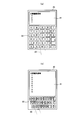
- FIG. 2 is a diagram showing a comparison of the character input screen 20 between the conventional character input device and the character input device 10 according to the present embodiment.
- FIG. 2A shows a character input screen 20 of a conventional character input device
- FIG. 2B shows a character input screen 20 according to the present embodiment.
- the conventional character input screen 20 shown in FIG. 2A when the user touches the character input key 22 with the finger 23, the character at the position touched with the finger 23 is set as the input character.
- an input character is set from information on a position touched by the user and information on a moving direction in which the finger 23 moves without leaving the touch panel 12. Therefore, as shown in FIG. 2B, the size of the character input key 22 can be reduced. Thereby, the text display area 21 which displays the text created by character input can be made larger than before.
- the storage unit 13 is a storage device such as a memory or a hard disk device.
- the storage unit 13 stores adjacent character information 13a, finger locus information 13b, finger movement direction information 13c, movement distance condition information 13d, and direction definition information 13e.
- the adjacent character information 13a is a character arranged adjacent to the character input key 22 in association with the moving direction of the finger 23 when the finger 23 moves without leaving the touch panel 12 after the character input key 22 is touched. This is information in which characters of the input key 22 are registered. Characters registered in association with the moving direction of the finger 23 in the adjacent character information 13 a are set in advance based on the arrangement of the character input keys 22 displayed on the display unit 11.
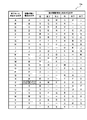
- FIG. 3 is a diagram illustrating an example of the adjacent character information 13a.
- character information 13 a As shown in FIG. 3, information on “characters corresponding to pressed keys”, “characters when there is no movement”, and “characters corresponding to the moving direction of the finger” are registered in the adjacent character information 13 a.
- “Character corresponding to the pressed key” is information on the character assigned to the character input key 22 touched by the user.
- “Character when there is no movement” is information of a character set as an input character when it is determined that the finger 23 does not move after the user touches the character input key 22.
- “Character corresponding to the moving direction of the finger” refers to an input character corresponding to the moving direction of the finger 23 when the finger 23 moves without leaving the touch panel 12 after the user touches the character input key 22. This is the character information to be set.
- “characters corresponding to finger movement directions” are associated with movement directions of left, upper left, upper right, right, lower right, and lower left. , Characters are registered.
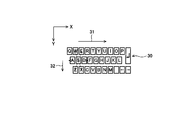
- FIG. 4 is a diagram illustrating an example of the virtual keyboard 30 displayed on the display unit 11.
- a virtual keyboard 30 shown in FIG. 4 is a QWERTY keyboard including character input keys 22 corresponding to at least 26 different alphabets, numbers, and symbols.
- the adjacent character information 13a illustrated in FIG. 3 is set based on the key arrangement of the virtual keyboard 30 displayed before the touch panel 12 is touched with a finger. Therefore, each character input key 22 is displayed on the virtual keyboard 30 so as to match the adjacent character information 13a shown in FIG.
- the character “A” is on the left of the character “S”
- the character “W” is on the upper left
- the character “E” is on the upper right
- the character “D” is on the right
- the lower right The letter “X” is displayed in the lower left
- the letter “Z” is displayed in the lower left.
- an XY orthogonal coordinate system is set for the display of the virtual keyboard 30.
- the movement direction of the finger 23 is detected from the movement distance 31 of the finger 23 in the X-axis direction and the movement distance 32 of the finger 23 in the Y-axis direction.
- the display unit 11 displays the virtual keyboard 30 including the character input keys 22 corresponding to at least 26 alphabets, numbers, and symbols different from each other, thereby inputting 12 characters in the conventional mobile phone.
- the user does not need to press the character input key a plurality of times in order to input a target character, and the character can be input with one touch.
- the virtual keyboard 30 is a QWERTY keyboard, but the layout of the character input keys 22 is not limited to this.
- the adjacent character information 13a shown in FIG. 3 is appropriately modified according to the array used.
- the finger locus information 13 b is information on a locus on which the finger 23 has moved on the touch panel 12. Specifically, the position where the user touched the touch panel 12 and the coordinate value of the locus where the finger 23 moved after that are registered in the finger locus information 13b. The finger locus information 13b is registered by the touch panel 12.
- the finger movement direction information 13c is information on the direction in which the finger 23 has moved after the user touches the touch panel 12.
- the finger movement direction information 13c is information registered by a movement direction detection unit 14a described later.
- the moving distance condition information 13d includes the character input key 22 touched by the finger 23 or the character input key 22 touched by the finger 23 among the character input keys 22 arranged adjacent to the character input key 22.
- 32 is Lx and Ly
- a condition of Lx 2 / a 2 + Ly 2 / b 2 ⁇ 1 is stored as the movement distance condition information 13c.
- a and b are positive constants.
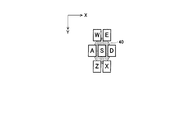
- FIG. 5 is a diagram for explaining the movement distance condition information 13d.
- FIG. 5 shows a case where the center of the character input key 22 of “S” is touched by the user.
- the condition that Lx 2 / a 2 + Ly 2 / b 2 ⁇ 1 is a condition that when the user releases the finger 23 from the touch panel 12 after moving the finger 23, the position where the finger 23 is released is inside the ellipse 40. It corresponds to.
- the character “S” of the character input key 22 first touched by the user is set as the input character.
- the user sets the movement distance condition information 13d, whichever of the character input key 22 touched first by the user or the character input key 22 arranged adjacent to the character input key 22 is selected.
- the user can adjust the criterion for determining whether the character is selected, so that the operability of the character input device 10 can be improved and erroneous input can be prevented.
- the direction definition information 13e is definition information for each moving direction of right, upper right, upper left, left, lower left, and lower right in the adjacent character information 13a. For example, if the angle of the position on the straight line extending rightward from the center point of the character input key 22 is 0 ° and the angle increases counterclockwise, the range of ⁇ 45 ° ⁇ ⁇ 45 °.
- the control unit 14 includes a CPU (Central Processing Unit) and the like, and is a control unit that controls the character input device 10 as a whole.
- the control unit 14 includes a moving direction detection unit 14a, an input character setting unit 14b, and a display control unit 14c.
- the moving direction detection unit 14a is a processing unit that detects the moving direction of the finger 23 when the finger 23 moves without leaving the touch panel 12 after the touch panel 12 is touched with the finger 23 by the user.
- the range of arctan ( ⁇ Ly / Lx) is set to ⁇ 90 ° ⁇ ⁇ 90 ° when the finger 23 moves in the positive direction of the X axis, and the finger 23 moves in the negative direction of the X axis. In this case, 90 ° ⁇ ⁇ 270 ° is set.
- ⁇ is set. It is set to 90 °.
- the movement direction detection unit 14a determines that the movement direction is right when, for example, ⁇ 45 ° ⁇ ⁇ 45 °, and determines that the movement direction is upper right when 45 ° ⁇ ⁇ 90 °.
- ⁇ ⁇ 135 ° the moving direction is determined to be upper left
- 135 ° ⁇ ⁇ 225 ° the moving direction is determined to be left
- 225 ° ⁇ ⁇ 270 ° the moving direction is determined to be lower left.
- the moving direction is determined to be lower right.
- the movement direction detection unit 14a detects the movement direction of the finger 23 from the X axis direction of the touch position of the finger 23 and the movement distances Lx and Ly in the Y axis direction.
- the direction corresponding to the region including the most part of the locus that moves without leaving the touch panel 12 may be detected as the movement direction.
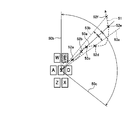
- FIG. 6 is a diagram for explaining the movement direction detection process based on the region including the locus of the finger 23.
- boundary lines 50a to 50c are provided for each character input key 22, and the areas on the touch panel 12 are divided into six areas corresponding to the right, upper right, upper left, left, lower left, and lower right directions. Divided.
- the movement direction detection unit 14 a reads the finger trajectory information 13 b stored in the storage unit 13 and acquires information on the trajectory 51 that the finger 23 has moved without leaving the touch panel 12.
- the trajectory 51 crosses the boundary line 50 a twice, and a part of the trajectory 51 is included in the area corresponding to the character input key 22 of “D”, but the trajectory 51 is the character input key of “E”. Therefore, the movement direction detector 14 a detects the upper right direction corresponding to the area of the character input key 22 of “E” as the movement direction of the finger 23.
- the movement direction detection unit 14a changes the determination condition of the movement direction based on the movement history in which the finger 23 has moved in the past, and based on the changed determination condition. Thus, the moving direction of the finger 23 may be detected.
- FIG. 7 is a diagram for explaining the moving direction determination condition changing process.
- the boundary lines 50a to 50c are provided for each character input key 22, and the area on the touch panel 12 is divided into areas corresponding to the right, upper right, upper left, left, lower left, and lower right directions.
- the movement direction of the finger 23 is determined by detecting which region 23 belongs to. In the example of FIG. 7, when the finger 23 moves to the area of the character input key 22 of “E” sandwiched between the boundary line 50 a and the boundary line 50 b, the movement direction of the finger 23 is determined to be upper right.
- the movement direction detection unit 14a sets the boundary lines 50a to 50c that define the first area and the second area to the second area. Is rotated by a predetermined angle toward the region side.
- the moving direction detection unit 14a changes the determination condition of the upper right movement direction by rotating the boundary line 50a by ⁇ ° toward the area of the character input key 22 of “D” and correcting the boundary line 50a to the boundary line 53a.
- the movement direction detection unit 14a indicates that the movement direction of the finger 23 is the right direction corresponding to the character input key 22 of “D”. Without detection, the upper right direction corresponding to the character input key 22 of “E” is detected.
- the movement direction detection unit 14a detects that the movement direction of the finger 23 is the right direction corresponding to the character input key 22 of “D”.
- the movement direction detection unit 14a When the finger 23 crosses the boundary line 50a at the points 52b and 52e and moves from the area of the character input key 22 of “D” to the area of the character input key 22 of “E”, the movement direction detection unit 14a The boundary line 50a is rotated by ⁇ ° toward the area of the character input key 22 of “E”, and the boundary line 50a is corrected to the boundary line 53b, thereby changing the determination condition for the right movement direction.
- the movement direction detection unit 14a when the finger 23 crosses the boundary line 50a at the points 52b and 52e, the movement direction detection unit 14a is in the upper right direction corresponding to the character input key 22 in which the movement direction of the finger 23 is “E”. Without detection, the right direction corresponding to the character input key 22 of “D” is detected. When the finger 23 exceeds the boundary line 53b at the point 52f, the movement direction detection unit 14a detects that the movement direction of the finger 23 is the upper right direction corresponding to the character input key 22 of “E”.
- the moving direction determination condition is changed based on the movement history of the finger 23 moved in the past, and hysteresis characteristics are introduced into the moving direction determination.
- the influence of the recognition error of the touch panel 12 and the shake of the user's finger 23 can be suppressed, and the user can appropriately select the target character. Can be selected.
- the input character setting unit 14 b is based on the position detected by the touch panel 12, the movement direction detected by the movement direction detection unit 14 a, and the adjacent character information 13 a stored in the storage unit 13.
- a processing unit that sets one character specified by the movement direction detected by the movement direction detection unit 14a as an input character.
- the touch panel 12 changes the “S”. It is detected that the character input key 22 has been touched, and the movement direction detection unit 14a detects that the movement direction is upper right. Then, the input character setting unit 14b reads the adjacent character information 13a from the storage unit 13, and from the adjacent character information 13a, the “character corresponding to the pressed key” is “S” and “in the finger movement direction”. In the “corresponding character” field, the character “E” whose movement direction is the upper right is set as the input character.
- the movement distances Lx and Ly of the finger 23 in the X-axis direction and the Y-axis direction when the user moves the finger 23 without releasing the touch panel 12 after touching a certain character input key 22 are the movement distances. If the condition that the condition information Lx 2 / a 2 + Ly 2 / b 2 configured as 13d ⁇ 1, the input character setting unit 14b, the input character letter "S" of the character input keys 22 is touched by the user Set.
- the display control unit 14 c is a processing unit that controls display of information on the display unit 11. For example, the display control unit 14c transmits a control signal to the display unit 11 and causes the display unit 11 to display the character input screen 20 as illustrated in FIG. Further, the display control unit 14c transmits a control signal to the display unit 11, and when one of the character input keys 22 on the virtual keyboard 30 is touched by the user, the touched character input is performed separately from the virtual keyboard 30.
- the key layout information including the key 22 and the character input key 22 arranged adjacent to the touched character input key 22 is displayed on the display unit 11 at a position not overlapping the virtual keyboard 30.
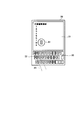
- FIG. 8 is a diagram showing an example of the key layout information 60.
- the display control unit 14 c displays the character input key 22 of “S” and “S Key layout information 60 including character input keys 22 of “D”, “E”, “W”, “A”, “Z”, and “X” arranged at positions adjacent to the character input key 22 of “”.
- the display unit 11 is displayed at a position that does not overlap the virtual keyboard 30.
- the display unit 11 displays the key layout information 60 in a different area from the virtual keyboard 30, the character input key 22 at the touched position and the character input key 22 are arranged adjacent to each other. Since the character input keys 22 are not hidden by the finger 23, the user can easily check the character input keys 22 and can quickly select the target character input keys 22.
- the moving direction detection unit 14a detects the moving direction of the finger 23 and inputs it.
- the character setting unit 14b selects a character corresponding to the moving direction as an input character candidate.
- the display control unit 14c transmits a control signal to the display unit 11, and changes the display color of the character input key 22 selected at that time to a display color different from that of the other character input keys 22.
- the character input key 22 selected at that time is highlighted on the display unit 11.
- FIG. 9 is a diagram showing an example of highlighting processing of the character input key 22.
- the character input key 22 of “S” on the virtual keyboard 30 is touched by the user with the finger 23, and then the finger 23 moves to the right without leaving the touch panel 12 and the character “D” is displayed.
- the display control unit 14 c transmits a control signal to the display unit 11 so that the display color of the character input key 22 for “D” is different from that of the other character input keys 22.
- “D” character input key 22 is highlighted on the display unit 11.
- the display unit 11 highlights the character input key 22 selected at that time, so that the user can easily confirm which character input key 22 is selected at that time.
- the target character input key 22 can be quickly selected.
- the character input key 22 touched first by the user or the character corresponding to the character input key 22 arranged adjacent to the character input key 22 is It is set as an input character by the input character setting unit 14b.
- the input character is not the character displayed at the position where the finger 23 is separated when the user's finger 23 is separated from the touch panel 12, but is described above in that case.
- Character selected based on method For example, in the case shown in FIGS. 8 and 9, the user first touches the character input key 22 of “S” with the finger 23, and then moves the finger 23 to the right without leaving the touch panel 12 to input the character “D”. Even if the finger passes the key and the finger 23 moves away from the touch panel 12 at the position of the character input key “F”, “F” is not set as the input character, but based on the adjacent character information 13a and the information on the moving direction. Thus, “D” is set as an input character.
- the character 23 corresponding to the character input key 22 that is first touched by the user when the user's finger 23 is separated from the touch panel 12 or the character input key 22 arranged adjacent to the character input key 22 is used.
- the display control unit 14c transmits a control signal to the display unit 11 to cause the display unit 11 to perform pop-up display of the character set as the input character. .
- FIG. 10 is a diagram illustrating an example of a character pop-up display process.
- the finger 23 moves without leaving the touch panel 12, and the “D” character input key 22 is selected.
- Display controller 14c transmits a control signal to display unit 11 to cause display unit 11 to execute pop-up display 61 of character “D” corresponding to the selected character input key 22. .
- the display unit 11 performs pop-up display of the character set as the input character, so that the user can easily confirm whether or not the target character is set as the input character. Keep in mind that you can enter subsequent characters.
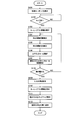
- FIG. 11 is a flowchart illustrating an example of a processing procedure of the character input method according to the present embodiment.
- the display unit 11 of the character input device 10 displays the virtual keyboard 30 (step S101).
- the touch panel 12 detects whether or not the user has touched the character input key 22 on the virtual keyboard 30 (step S102).
- step S102 If the character input key 22 is not touched (NO in step S102), the process proceeds to step S102, and the touch panel 12 continues to detect whether or not the character input key 22 on the virtual keyboard 30 is touched by the user. To do.
- the display unit 11 displays key layout information 60 for the touched character input key 22 as shown in FIG. 8 (step S102). S103).
- the movement direction detection unit 14a detects the movement distances Lx and Ly in the X axis direction and the Y axis direction of the touch position of the finger 23 (step S104). Then, the movement direction detection unit 14a detects the movement direction of the finger 23 from the movement distances Lx and Ly (step S105).
- the input character setting unit 14 b uses the character input key 22 touched first, the detected moving direction, and the adjacent character information 13 a stored in the storage unit 13 to input the character touched first.
- the key 22 and the character input key 22 arranged adjacent to the character input key 22 one character input specified by the character input key 22 touched first and the detected moving direction The key 22 is selected (step S106).
- the display unit 11 highlights the selected character input key 22 with a display color different from that of the other character input keys 22 included in the key layout information 60 as shown in FIG. 9 (step S107). ). Thereafter, the input character setting unit 14b determines whether or not the user's finger 23 has been released from the touch panel 12 (step S108). When the user's finger 23 is not separated from the touch panel 12 (NO in step S108), the process proceeds to step S104, and the movement distances Lx and Ly of the touch position of the finger 23 in the X-axis direction and the Y-axis direction are set. The detection process is executed again, and the subsequent processes are continued.
- step S108 input character setting unit 14b changes the character corresponding to character input key 22 selected in step S106 to the input character input by the user. Setting is made (step S109). Then, the display unit 11 deletes the key layout information 60 (Step S110).
- the display unit 11 performs a pop-up display of the character set as the input character in step S109 (step S111). Then, the input character setting unit 14b adds the character set as the input character to the sentence being edited (step S112), and ends this character input process.
- the present invention is not limited to these embodiments, and a computer program for realizing the functions of the character input device.
- the present invention may be implemented in the form of a computer-readable recording medium in which the computer program is recorded.
- a recording medium for example, a disk system (for example, magnetic disk, optical disk, etc.), a card system (for example, memory card, optical card, etc.), a semiconductor memory system (for example, ROM, nonvolatile memory, etc.), a tape system (for example, various forms such as a magnetic tape and a cassette tape can be employed.
- a disk system for example, magnetic disk, optical disk, etc.
- a card system for example, memory card, optical card, etc.
- a semiconductor memory system for example, ROM, nonvolatile memory, etc.
- a tape system for example, various forms such as a magnetic tape and a cassette tape can be employed.
- the cost can be reduced, and the portability and general purpose can be reduced. Can be improved.
- the above-mentioned recording medium is mounted on the computer, the computer program recorded on the recording medium is read out by the computer and stored in the memory, and the processor (CPU: Central Processing Unit, MPU: Micro Processing Unit) included in the computer is the computer program. Is read from the memory and executed, the function of the character input device according to the present embodiment can be realized and the character input method can be executed.
- CPU Central Processing Unit
- MPU Micro Processing Unit
Landscapes
- Engineering & Computer Science (AREA)
- General Engineering & Computer Science (AREA)
- Theoretical Computer Science (AREA)
- Human Computer Interaction (AREA)
- Physics & Mathematics (AREA)
- General Physics & Mathematics (AREA)
- User Interface Of Digital Computer (AREA)
- Input From Keyboards Or The Like (AREA)
- Position Input By Displaying (AREA)
Abstract
Description
Claims (11)
- 文字の入力処理を実行する文字入力装置において、
各文字に対応する複数の文字入力キーを含む仮想キーボードを表示する表示部と、
前記表示部により表示された仮想キーボード上で指によりタッチされた位置を検出するタッチパネルと、
前記タッチパネルがタッチされた後、指が前記タッチパネルから離れずに移動する移動方向を検出する移動方向検出部と、
前記文字入力キーがタッチされた後に指が前記タッチパネルから離れずに移動する場合の指の移動方向の情報に対応付けて、前記文字入力キーに隣接して配置される隣接文字入力キーの文字の情報を登録した隣接文字情報を記憶する記憶部と、
前記タッチパネルが指によりタッチされた位置、前記移動方向検出部により検出された移動方向、および、前記記憶部に記憶された隣接文字情報に基づいて、前記指によりタッチされた文字入力キーに対応する文字と該文字入力キーに隣接して配置された隣接文字入力キーに対応する文字の中から、1つの文字を抽出し、該抽出した文字を入力文字に設定する入力文字設定部と、
を備えることを特徴とする文字入力装置。 - 前記記憶部に記憶される前記隣接文字情報は、前記指により前記タッチパネルに前記タッチが行われる前に表示される前記仮想キーボードのキー配列に基づいて設定されていることを特徴とする請求項1に記載の文字入力装置。
- 前記移動方向検出部は、直交座標系における第1の座標軸における指の第1の移動距離と、該第1の座標軸に直交する第2の座標軸における指の第2の移動距離とを検出し、前記記憶部は、前記指によりタッチされた文字入力キー、または、該文字入力キーに隣接して配置される隣接文字入力キーのうち、前記指によりタッチされた文字入力キーが選択されるために、前記第1の移動距離、および、前記第2の移動距離が満たすべき所定の条件を記憶し、前記入力文字設定部は、前記第1の移動距離、および、前記第2の移動距離が前記所定の条件を満たす場合に、前記指によりタッチされた文字入力キーに対応する文字を前記入力文字に設定することを特徴とする請求項1または2に記載の文字入力装置。
- 前記移動方向検出部は、前記第1の移動距離および前記第2の移動距離に基づいて、前記指の移動方向を検出することを特徴とする請求項3に記載の文字入力装置。
- 前記移動方向検出部は、指が前記タッチパネルから離れずに移動した軌跡の部分が最も多く含まれる領域に対応する方向を前記移動方向として検出することを特徴とする請求項1~3のいずれか1項に記載の文字入力装置。
- 前記表示部は、前記仮想キーボードを表示するとともに、該複数の文字入力キーのうちの1つがタッチされた場合に、前記仮想キーボートの表示領域とは別の領域に、該タッチされた文字入力キー、および、該タッチされた文字入力キーに隣接して配置される隣接文字入力キーを含むキーレイアウト情報を表示することを特徴とする請求項1~5のいずれか1項に記載の文字入力装置。
- 前記入力文字決定部は、指が前記タッチパネルから離れずに移動している場合に、前記タッチパネルが指によりタッチされた位置、前記移動方向検出部により検出された移動方向、および、前記記憶部に記憶された隣接文字情報に基づいて、前記指によりタッチされた文字入力キーに対応する文字と該文字入力キーに隣接して配置された隣接文字入力キーに対応する文字の中から、1つの文字を選択し、前記表示部は、前記入力文字決定部により選択された文字を強調表示した前記キーレイアウト情報を表示することを特徴とする請求項6に記載の文字入力装置。
- 前記表示部は、指が前記タッチパネルから離れた場合に、前記入力文字決定部により前記入力文字として設定された文字のポップアップ表示を行うことを特徴とする請求項1~7のいずれか1項に記載の文字入力装置。
- 前記仮想キーボードは、少なくとも互いに異なる26文字のアルファベット、数字、および、記号に対応する文字入力キーを含むことを特徴とする請求項1~8のいずれか1項に記載の文字入力装置。
- 前記移動方向検出部は、指が前記タッチパネルから離れずに移動した場合に、過去に指が移動した移動履歴に基づいて移動方向の判定条件を変更し、変更した判定条件に基づいて前記移動方向を検出することを特徴とする請求項1~9のいずれか1項に記載の文字入力装置。
- 文字の入力処理を実行する文字入力方法において、
各文字に対応する複数の文字入力キーを含む仮想キーボードを表示する表示ステップと、
指によりタッチパネルがタッチされた位置を検出する位置検出ステップと、
前記タッチパネルがタッチされた後、指が前記タッチパネルから離れずに移動する移動方向を検出する移動方向検出ステップと、
前記文字入力キーがタッチされた後に指が前記タッチパネルから離れずに移動する場合の指の移動方向の情報に対応付けて、前記文字入力キーに隣接して配置される隣接文字入力キーの文字の情報を登録した隣接文字情報を記憶部から読み出す読み出しステップと、
前記位置検出ステップにおいて検出された前記タッチパネルが指によりタッチされた位置、前記移動方向検出ステップにおいて検出された移動方向、および、前記読み出しステップにおいて読み出された隣接文字情報に基づいて、前記指によりタッチされた文字入力キーに対応する文字と該文字入力キーに隣接して配置された隣接文字入力キーに対応する文字の中から、1つの文字を抽出し、該抽出した文字を入力文字に設定する入力文字設定ステップと、
を含むことを特徴とする文字入力方法。
Priority Applications (3)
| Application Number | Priority Date | Filing Date | Title |
|---|---|---|---|
| JP2012554745A JPWO2012102159A1 (ja) | 2011-01-27 | 2012-01-19 | 文字入力装置および文字入力方法 |
| CN2012800065950A CN103329071A (zh) | 2011-01-27 | 2012-01-19 | 字符输入装置及字符输入方法 |
| US13/976,107 US20130271379A1 (en) | 2011-01-27 | 2012-01-19 | Character input device and character input method |
Applications Claiming Priority (2)
| Application Number | Priority Date | Filing Date | Title |
|---|---|---|---|
| JP2011014718 | 2011-01-27 | ||
| JP2011-014718 | 2011-01-27 |
Publications (1)
| Publication Number | Publication Date |
|---|---|
| WO2012102159A1 true WO2012102159A1 (ja) | 2012-08-02 |
Family
ID=46580731
Family Applications (1)
| Application Number | Title | Priority Date | Filing Date |
|---|---|---|---|
| PCT/JP2012/051036 Ceased WO2012102159A1 (ja) | 2011-01-27 | 2012-01-19 | 文字入力装置および文字入力方法 |
Country Status (4)
| Country | Link |
|---|---|
| US (1) | US20130271379A1 (ja) |
| JP (1) | JPWO2012102159A1 (ja) |
| CN (1) | CN103329071A (ja) |
| WO (1) | WO2012102159A1 (ja) |
Cited By (7)
| Publication number | Priority date | Publication date | Assignee | Title |
|---|---|---|---|---|
| CN103995638A (zh) * | 2013-02-20 | 2014-08-20 | 富士施乐株式会社 | 数据处理设备、数据处理系统以及数据处理方法 |
| JP2015002389A (ja) * | 2013-06-13 | 2015-01-05 | 富士通株式会社 | 携帯電子機器及び文字入力支援プログラム |
| JP2015041845A (ja) * | 2013-08-21 | 2015-03-02 | カシオ計算機株式会社 | 文字入力装置及びプログラム |
| JP2015167012A (ja) * | 2014-02-12 | 2015-09-24 | ソフトバンク株式会社 | 文字入力装置、文字入力プログラム、表示制御装置、表示制御方法、及び表示制御プログラム |
| JP2016154037A (ja) * | 2014-02-12 | 2016-08-25 | ソフトバンク株式会社 | 表示制御装置、表示制御方法、及び表示制御プログラム |
| JP2017041255A (ja) * | 2012-12-26 | 2017-02-23 | グリー株式会社 | 表示処理方法、表示処理プログラム及び表示処理システム |
| CN113867545A (zh) * | 2020-06-30 | 2021-12-31 | Oppo广东移动通信有限公司 | 字符输入方法、装置、电子设备和计算机可读存储介质 |
Families Citing this family (5)
| Publication number | Priority date | Publication date | Assignee | Title |
|---|---|---|---|---|
| KR20120033918A (ko) * | 2010-09-30 | 2012-04-09 | 삼성전자주식회사 | 터치스크린을 구비한 휴대용 단말기의 입력 방법 및 장치 |
| TWI476702B (zh) * | 2012-03-16 | 2015-03-11 | Pixart Imaging Inc | 使用者辨識系統及辨識使用者的方法 |
| CN103425412A (zh) * | 2012-05-17 | 2013-12-04 | 联发科技(新加坡)私人有限公司 | 输入纠错方法及装置、自动纠错方法及装置和移动终端 |
| CN104898889A (zh) * | 2015-06-26 | 2015-09-09 | 小米科技有限责任公司 | 字符确定方法及装置 |
| WO2022246334A1 (en) * | 2021-06-02 | 2022-11-24 | Innopeak Technology, Inc. | Text input method for augmented reality devices |
Citations (2)
| Publication number | Priority date | Publication date | Assignee | Title |
|---|---|---|---|---|
| JP2000029630A (ja) * | 1998-05-12 | 2000-01-28 | Samsung Electron Co Ltd | タッチスクリ―ンに接触された尖筆の痕跡を用いたソフトウェアキ―ボ―ドシステム及びそれによるキ―コ―ド認識方法 |
| JP2006520024A (ja) * | 2002-11-29 | 2006-08-31 | コーニンクレッカ フィリップス エレクトロニクス エヌ ヴィ | 接触エリアの移動させられた表現を用いたユーザインタフェース |
Family Cites Families (9)
| Publication number | Priority date | Publication date | Assignee | Title |
|---|---|---|---|---|
| US5689667A (en) * | 1995-06-06 | 1997-11-18 | Silicon Graphics, Inc. | Methods and system of controlling menus with radial and linear portions |
| GB0112870D0 (en) * | 2001-05-25 | 2001-07-18 | Koninkl Philips Electronics Nv | Text entry method and device therefore |
| JP2003157144A (ja) * | 2001-11-20 | 2003-05-30 | Sony Corp | 文字入力装置、文字入力方法、文字入力プログラム格納媒体及び文字入力プログラム |
| US8164573B2 (en) * | 2003-11-26 | 2012-04-24 | Immersion Corporation | Systems and methods for adaptive interpretation of input from a touch-sensitive input device |
| KR100770936B1 (ko) * | 2006-10-20 | 2007-10-26 | 삼성전자주식회사 | 문자 입력 방법 및 이를 위한 이동통신단말기 |
| CN101836365B (zh) * | 2007-10-12 | 2013-09-04 | 吴谊镇 | 字符输入装置 |
| US8949743B2 (en) * | 2008-04-22 | 2015-02-03 | Apple Inc. | Language input interface on a device |
| US20100020033A1 (en) * | 2008-07-23 | 2010-01-28 | Obinna Ihenacho Alozie Nwosu | System, method and computer program product for a virtual keyboard |
| US8745518B2 (en) * | 2009-06-30 | 2014-06-03 | Oracle America, Inc. | Touch screen input recognition and character selection |
-
2012
- 2012-01-19 WO PCT/JP2012/051036 patent/WO2012102159A1/ja not_active Ceased
- 2012-01-19 CN CN2012800065950A patent/CN103329071A/zh active Pending
- 2012-01-19 JP JP2012554745A patent/JPWO2012102159A1/ja active Pending
- 2012-01-19 US US13/976,107 patent/US20130271379A1/en not_active Abandoned
Patent Citations (2)
| Publication number | Priority date | Publication date | Assignee | Title |
|---|---|---|---|---|
| JP2000029630A (ja) * | 1998-05-12 | 2000-01-28 | Samsung Electron Co Ltd | タッチスクリ―ンに接触された尖筆の痕跡を用いたソフトウェアキ―ボ―ドシステム及びそれによるキ―コ―ド認識方法 |
| JP2006520024A (ja) * | 2002-11-29 | 2006-08-31 | コーニンクレッカ フィリップス エレクトロニクス エヌ ヴィ | 接触エリアの移動させられた表現を用いたユーザインタフェース |
Cited By (8)
| Publication number | Priority date | Publication date | Assignee | Title |
|---|---|---|---|---|
| JP2017041255A (ja) * | 2012-12-26 | 2017-02-23 | グリー株式会社 | 表示処理方法、表示処理プログラム及び表示処理システム |
| CN103995638A (zh) * | 2013-02-20 | 2014-08-20 | 富士施乐株式会社 | 数据处理设备、数据处理系统以及数据处理方法 |
| JP2015002389A (ja) * | 2013-06-13 | 2015-01-05 | 富士通株式会社 | 携帯電子機器及び文字入力支援プログラム |
| JP2015041845A (ja) * | 2013-08-21 | 2015-03-02 | カシオ計算機株式会社 | 文字入力装置及びプログラム |
| CN104423625A (zh) * | 2013-08-21 | 2015-03-18 | 卡西欧计算机株式会社 | 字符输入装置及字符输入方法 |
| JP2015167012A (ja) * | 2014-02-12 | 2015-09-24 | ソフトバンク株式会社 | 文字入力装置、文字入力プログラム、表示制御装置、表示制御方法、及び表示制御プログラム |
| JP2016154037A (ja) * | 2014-02-12 | 2016-08-25 | ソフトバンク株式会社 | 表示制御装置、表示制御方法、及び表示制御プログラム |
| CN113867545A (zh) * | 2020-06-30 | 2021-12-31 | Oppo广东移动通信有限公司 | 字符输入方法、装置、电子设备和计算机可读存储介质 |
Also Published As
| Publication number | Publication date |
|---|---|
| JPWO2012102159A1 (ja) | 2014-06-30 |
| CN103329071A (zh) | 2013-09-25 |
| US20130271379A1 (en) | 2013-10-17 |
Similar Documents
| Publication | Publication Date | Title |
|---|---|---|
| WO2012102159A1 (ja) | 文字入力装置および文字入力方法 | |
| US10444989B2 (en) | Information processing apparatus, and input control method and program of information processing apparatus | |
| US8911165B2 (en) | Overloaded typing apparatuses, and related devices, systems, and methods | |
| US20110122080A1 (en) | Electronic device, display control method, and recording medium | |
| US20140123049A1 (en) | Keyboard with gesture-redundant keys removed | |
| US20110032200A1 (en) | Method and apparatus for inputting a character in a portable terminal having a touch screen | |
| WO2014058934A2 (en) | Arced or slanted soft input panels | |
| WO2010035585A1 (ja) | 携帯端末、ソフトウェアキーボード表示方法、及び記録媒体 | |
| WO2012161223A1 (ja) | 入力装置、入力方法およびプログラム | |
| US20140317564A1 (en) | Navigation and language input using multi-function key | |
| CN104461336A (zh) | 电子装置及其解锁方法 | |
| JP5997921B2 (ja) | 文字入力方法及び文字入力装置 | |
| CN104898969B (zh) | 字符输入装置以及信息处理装置 | |
| CN113126868A (zh) | 未读消息标识清除方法、装置及电子设备 | |
| JP6085529B2 (ja) | 文字入力装置 | |
| JP2014045387A (ja) | 入力装置、入力装置の制御方法、制御プログラム、および記録媒体 | |
| CN103713840B (zh) | 可携式装置及其按键点击范围调整方法 | |
| KR20100069089A (ko) | 터치 스크린을 사용하는 디바이스에서 문자 입력 장치 및 방법 | |
| KR101482867B1 (ko) | 테두리 터치를 이용하는 입력 및 포인팅을 위한 방법 및 장치 | |
| JP6029628B2 (ja) | 表示制御装置、表示制御方法、及び表示制御プログラム | |
| JP7238054B2 (ja) | 入力情報修正方法及び情報端末 | |
| JP2015049837A (ja) | 携帯端末装置 | |
| US20190073117A1 (en) | Virtual keyboard key selections based on continuous slide gestures | |
| WO2012116497A1 (en) | Inputting chinese characters in pinyin mode | |
| JP6217467B2 (ja) | 文字入力システム用のプログラムおよび文字入力装置 |
Legal Events
| Date | Code | Title | Description |
|---|---|---|---|
| 121 | Ep: the epo has been informed by wipo that ep was designated in this application |
Ref document number: 12739543 Country of ref document: EP Kind code of ref document: A1 |
|
| ENP | Entry into the national phase |
Ref document number: 2012554745 Country of ref document: JP Kind code of ref document: A |
|
| WWE | Wipo information: entry into national phase |
Ref document number: 13976107 Country of ref document: US |
|
| NENP | Non-entry into the national phase |
Ref country code: DE |
|
| 122 | Ep: pct application non-entry in european phase |
Ref document number: 12739543 Country of ref document: EP Kind code of ref document: A1 |