WO2011092986A1 - 表示装置、及び、表示制御プログラム - Google Patents
表示装置、及び、表示制御プログラム Download PDFInfo
- Publication number
- WO2011092986A1 WO2011092986A1 PCT/JP2010/073312 JP2010073312W WO2011092986A1 WO 2011092986 A1 WO2011092986 A1 WO 2011092986A1 JP 2010073312 W JP2010073312 W JP 2010073312W WO 2011092986 A1 WO2011092986 A1 WO 2011092986A1
- Authority
- WO
- WIPO (PCT)
- Prior art keywords
- display
- thumbnail
- display data
- list
- data
- Prior art date
- Legal status (The legal status is an assumption and is not a legal conclusion. Google has not performed a legal analysis and makes no representation as to the accuracy of the status listed.)
- Ceased
Links
Images





Classifications
-
- G—PHYSICS
- G06—COMPUTING OR CALCULATING; COUNTING
- G06F—ELECTRIC DIGITAL DATA PROCESSING
- G06F3/00—Input arrangements for transferring data to be processed into a form capable of being handled by the computer; Output arrangements for transferring data from processing unit to output unit, e.g. interface arrangements
- G06F3/01—Input arrangements or combined input and output arrangements for interaction between user and computer
- G06F3/048—Interaction techniques based on graphical user interfaces [GUI]
- G06F3/0487—Interaction techniques based on graphical user interfaces [GUI] using specific features provided by the input device, e.g. functions controlled by the rotation of a mouse with dual sensing arrangements, or of the nature of the input device, e.g. tap gestures based on pressure sensed by a digitiser
- G06F3/0489—Interaction techniques based on graphical user interfaces [GUI] using specific features provided by the input device, e.g. functions controlled by the rotation of a mouse with dual sensing arrangements, or of the nature of the input device, e.g. tap gestures based on pressure sensed by a digitiser using dedicated keyboard keys or combinations thereof
-
- G—PHYSICS
- G06—COMPUTING OR CALCULATING; COUNTING
- G06F—ELECTRIC DIGITAL DATA PROCESSING
- G06F3/00—Input arrangements for transferring data to be processed into a form capable of being handled by the computer; Output arrangements for transferring data from processing unit to output unit, e.g. interface arrangements
- G06F3/01—Input arrangements or combined input and output arrangements for interaction between user and computer
- G06F3/048—Interaction techniques based on graphical user interfaces [GUI]
- G06F3/0484—Interaction techniques based on graphical user interfaces [GUI] for the control of specific functions or operations, e.g. selecting or manipulating an object, an image or a displayed text element, setting a parameter value or selecting a range
- G06F3/04842—Selection of displayed objects or displayed text elements
Definitions
- the present invention relates to a display device, and more particularly, to a display device capable of displaying a list image that allows a user to select an image based on display data, and a display control program.
- a display device such as an electronic book for displaying an image based on display data stored in a storage means.
- a display device is provided with a display means, and can usually display a list image for allowing the user to select display data on the display means.
- thumbnails are often included in the list image as display data information.
- an electronic book device including an electronic book data decoding unit, a bookmark position designation control unit, a bookmark information management unit, and a bookmark list display control unit has been proposed (for example, see Patent Document 1). reference).
- a desired page of the electronic book data is decoded by the electronic book data decoding unit, and a bookmark is given to an arbitrary position of the decoded page by the bookmark position designation control unit.
- the bookmark information management unit manages a part of the desired page as bookmark information based on the position where the bookmark is given, and the bookmark list display control unit selects a thumbnail from the bookmark information managed by the bookmark information management unit. Create and display a list on the screen.
- the electronic book device is a portable terminal that can be wirelessly connected to the Internet or the like
- the bookmark is again displayed. It takes time to display the list screen. This is not easy to use and may cause stress to the user.
- the present invention sets the number of display data for performing thumbnail display to a predetermined number or less that is smaller than a predetermined number of display data for displaying specific information as a list, and provides a list property on a list screen and a selection operation of display data to be displayed.
- An object of the present invention is to provide a display device and a display control program with improved operability.
- the invention according to claim 1 is directed to obtaining information for identifying display data and a thumbnail of the display data, and a list image for allowing a user to select display data to be displayed.
- Display means for displaying the display information, a display data determining means for determining a predetermined number of display data for displaying the specific information as a list on the display means, and a predetermined number of data determined by the display data determining means.
- thumbnail display determining means for determining display data for thumbnail display by a number equal to or less than a predetermined number less than the predetermined number, and a list of specific information of the predetermined number of display data determined by the display data determining means
- a list of thumbnails of display data equal to or less than the predetermined number determined by the thumbnail display determining means Characterized in that it comprises a display control means for displaying on the display means.
- the invention according to claim 2 is the display device according to claim 1, further comprising selection keys respectively corresponding to positions of specific information of each display data displayed as a list on the display means,
- the display control means displays on the display means an image based on display data in which specific information is displayed at a position corresponding to the operated selection key.
- the display control unit displays a display position of the specific information of the display data in a display area of the display unit, and a thumbnail of the display data.
- the display key is located closer to the selection key corresponding to the display data than the display position.
- the thumbnail display determining unit changes display data for performing thumbnail display on the display unit based on a predetermined condition. To do.
- the display control means includes a thumbnail display mode for displaying the list image including a list of thumbnails of display data on the display means, and a display.
- the invention according to claim 6 is the display device according to claim 4 or 5, wherein the acquisition means acquires thumbnail display setting information for determining display data for performing thumbnail display, and the display control means. Is characterized in that display data for performing thumbnail display on the display means is changed based on the thumbnail display setting information.
- the present invention according to claim 7 is the display device according to claim 6, wherein the thumbnail display setting information includes display frequency information of display data for performing thumbnail display,
- the display control means changes display data for performing thumbnail display on the display means in accordance with the display frequency information.
- the present invention according to claim 8 is the display device according to claim 1, wherein the display control means changes a size of a thumbnail displayed on the display means based on a predetermined condition.
- the present invention according to claim 9 is the display device according to claim 1, wherein the display control unit uses a thumbnail of display data for performing the thumbnail display as the list image, and specific information of the display data.
- a list image including the associated images is displayed on the display means.
- the display control means displays on the display means an image in which the thumbnail of the display data and the specific information are connected by a line. It is characterized by.
- the present invention according to claim 11 is the display device according to claim 9, wherein the display control means displays an image in which a thumbnail of the display data and specific information are surrounded by a frame on the display means. It is characterized by.
- the thumbnail of the display data and the specific information are displayed according to the color or gradation of the image including the thumbnail of the display data and the specific information.
- the association is performed.
- a display control program for acquiring specific information for specifying display data and a thumbnail of the display data, and a predetermined number of displays for displaying the specific information as a list on a display means.
- a step of determining data a step of determining display data for performing thumbnail display of the predetermined number of display data by a number equal to or less than a predetermined number less than the predetermined number, and a list of specific information of the predetermined number of display data And displaying a list image including a list of thumbnails of display data of a predetermined number or less on the display means.
- a list image having a list of specific information of a predetermined number of display data and a list of thumbnails of display data equal to or less than a predetermined number less than the predetermined number is displayed on the display means. . Therefore, it is possible to improve the discriminating power of the display data by thumbnails and improve the listability in the list image, and to reduce the selection of thumbnails by mistake as much as possible and improve the operability of the selection operation. Become.
- wrist screen which is an example of a screen display. It is an external view of the display apparatus which concerns on this embodiment. It is a block diagram which shows the electric constitution of this display apparatus. It is explanatory drawing which shows the data structure of a document list. It is explanatory drawing which shows the data structure of bookmark information. It is explanatory drawing which shows the flow of the basic operation processing of the display apparatus which concerns on this embodiment. It is explanatory drawing which shows the flow of a content list display process. It is explanatory drawing which shows the flow of a bookmark list display process.
- FIG. 1 is a functional block diagram of the display device according to the present embodiment
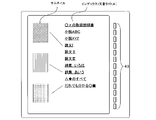
- FIG. 2 is an explanatory diagram showing a content list screen as an example of a screen display
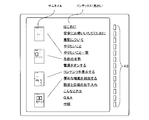
- FIG. 3 is an explanatory diagram showing a bookmark list screen as an example of the screen display. is there.
- the display device according to this embodiment can be used as a so-called “electronic book”.
- the display device includes a display unit 2, an operation unit 4, a card reader 6 that reads information from a memory card or the like, and a control unit 30 that controls the entire display device. ing.
- the display unit 2 functions as a display unit and can display an image corresponding to display data in units of pages.
- display data refers to, for example, data files themselves such as image files and document files, or data of individual pages of individual data files (hereinafter simply referred to as “pages”).
- a document file will be described as an example of a data file, but image data or other types of data may be used.
- the document file can include not only character data but also image data.
- the display device can display a list image including a list of specific information of a predetermined number of display data and a list of thumbnails of display data that is set to a predetermined number less than the predetermined number on the display unit 2.
- thumbnail images can be limitedly displayed and a list image that allows the user to select display data to be displayed can be displayed on the display unit 2.
- List images include, for example, a “content list screen” (FIG. 2) that can list information of a plurality of document files stored in a memory card, or “bookmark” among a plurality of pages that constitute one document file.
- a “bookmark list screen” (FIG. 3) in which information on the attached pages can be listed.
- the list image is not necessarily limited to these. For example, it may be a screen showing a table of contents or menu set in each document file regardless of bookmarks. In any case, the thumbnail of the display data is displayed less than the specific information of the display data.
- the specific information for specifying the display data is information for specifying the document file or its page.
- Specific information for specifying display data is, for example, a document file title (hereinafter referred to as “document title”), a heading or an index for making it easy to search a desired page from the document file, and so-called index.
- the thumbnail is a reduced image that allows the user to intuitively understand the contents of the document file and its individual pages.
- the operation unit 4 includes a plurality of operation switch groups 40 including a selection key 43 (see FIGS. 2 and 3) that allows the user to select information of display data displayed in a list on the display unit 2.
- the control unit 30 can control the display operation on the display unit 2 according to the operation signal from the operation unit 4 and can control the operation of the entire display device.
- the control unit 30 is configured by a computer including a CPU 10, a ROM 11, and a RAM 12 described later (see FIG. 5). Further, the control unit 30 reads a document file or a document list described later from a memory card or the like via the card reader 6.
- the control unit 30 has a function as display data determining means for determining a predetermined number of pages for displaying a list of indexes for specifying pages on the display unit 2. Yes.
- the control unit 30 also has a function as a thumbnail display determining unit that determines a number of thumbnails to be displayed, out of a predetermined number of pages determined as the display data determining unit, by a number equal to or less than a predetermined number less than the predetermined number.
- the control unit 30 also functions as an acquisition unit that acquires the data and heading of the page of the document file from a memory card or the like, and acquires the thumbnail of the page of the document file by performing image processing on the data of the page.
- control unit 30 includes a list of indexes serving as headings for the predetermined number of pages determined as the display data determining unit, and a list of thumbnails equal to or less than the predetermined number determined as the thumbnail display determining unit. It also functions as display control means for displaying the list image on the display unit 2.
- the display data to be displayed in a list may be a document file itself instead of the above page.
- the document title indicating the document file is displayed as the index.
- the thumbnail of the document file is a thumbnail of a predetermined page (for example, the first page) of the document file.
- the ROM 11 of the control unit 30 stores a display control program.
- the CPU 10 executes at least the following three steps. (1) A step of obtaining an index for specifying display data (the document file itself or a page of the document file) and a thumbnail of the display data.
- this display device displays a bookmark list screen (list image) on the display unit 2 having a list of indexes and a list of thumbnails equal to or less than a predetermined number less than the number of indexes.
- an index (document title) and thumbnails are displayed in a list, and ten indexes are set as a predetermined number, whereas thumbnails are set as a predetermined number. Three are set. An image obtained by connecting the thumbnail and the index with a line is displayed to clarify the relationship between the thumbnail and the index.
- thumbnail list screen When the “bookmark list screen” is displayed (see FIG. 3), a list of indexes and thumbnails is displayed, but 13 indexes are set as a predetermined number, whereas thumbnails are default. Four numbers are set. An image obtained by connecting the thumbnail and the index with a line is displayed to clarify the relationship between the thumbnail and the index.
- control unit 30 functioning as a display control unit displays, as a list image, a “content list screen” in which thumbnails of document files to be displayed as thumbnails are associated with an index that is a document title that identifies the document file. 2 is displayed.
- a “bookmark list screen” in which thumbnails of pages of a document file to be displayed as thumbnails are associated with an index that is a headline for specifying the page can be displayed on the display unit 2 as a list image.
- the control unit 30 changes the size of the thumbnail displayed on the display unit 2 based on a predetermined condition. For example, when the default number of thumbnails to be displayed is “4” as shown in FIG. 3, the thumbnail size is displayed larger when the number is smaller than the default number as shown in FIG. On the other hand, if the number of thumbnails to be displayed in a list is, for example, “5” or more and is larger than the default number (for example, “4”), the thumbnail size is made smaller than the default.
- control unit 30 functions as a thumbnail display determining unit
- display data for displaying thumbnails on the display unit 2 is changed based on a predetermined condition.
- control unit 30 acquires thumbnail display setting information for determining display data for performing thumbnail display, and changes display data for performing thumbnail display on the display unit 2 based on the thumbnail display setting information.
- the thumbnail display setting information includes display frequency information of display data for performing thumbnail display
- the control unit 30 changes display data for performing thumbnail display on the display unit 2 according to the display frequency information. It is.
- the display frequency information for example, display rank information distributed according to the display frequency can be used as the thumbnail display setting information.
- the display frequency information can be set as independent thumbnail display setting information, and display rank information indicating the priority of thumbnail display can be set in the thumbnail display setting information using a parameter different from this.
- the control unit 30 can switch display data for displaying thumbnails on the display unit 2 in accordance with the thumbnail display setting information.
- the document file has a header area including the document title and other attributes in addition to the main body data area displayed on the display means as display data.
- the header area includes thumbnail display setting information and the like. .
- the control unit 30 acquires thumbnail display setting information from the header area of the document file.
- the control unit 30 updates the display frequency information included in the thumbnail display setting information every time the document file page is displayed on the display unit 2.
- the memory card 60 stores a document list relating to a plurality of document files stored in the memory card 60.
- This document list includes thumbnail display setting information and the like.
- the control unit 30 acquires thumbnail display setting information from the memory card 60 via the card reader 6.
- the control unit 30 updates the display frequency information included in the thumbnail display setting information every time the document file is displayed on the display unit 2.
- the information of the display frequency information regarding the document file may be updated.
- control unit 30 displays a thumbnail image including a list of display data thumbnails on the display unit 2 and a thumbnail non-display for displaying a list image not including the display data thumbnail list on the display unit 2.
- the mode can be selectively executed.
- the operation unit 4 may be provided with a mode switching button 41 for selecting either the thumbnail display mode or the thumbnail non-display mode.
- thumbnail display switching button (not shown) is provided in the operation unit 4 and display data for performing thumbnail display on the display unit 2 is not performed by acquiring thumbnail display setting information as described above. It can also be changed by a button operation by the user. For example, as shown in FIG. 2, when displaying 10 indexes, it is set to perform thumbnail display for the five indexes above the index, and a thumbnail rewrite instruction is input by operating the display switching button. Then, it is possible to switch to display thumbnails for the lower five indexes instead of the upper five.
- the display frequency of the display data can be added to the display condition. For example, when ten indexes are displayed, by default, the thumbnail display is performed for three indexes belonging to a rank with a high display frequency. In this state, if the button is operated once, thumbnails are displayed with respect to, for example, five indexes including the index whose display frequency belongs to the next rank, and further button operation further belongs to the next rank. Thumbnail display is performed for seven indexes including the index.
- the thumbnail size to be displayed can be changed according to the number of displays. For example, when the number of displays is 3, it is changed to the largest L size, when it is 5, it is changed to a smaller M size, and when it is 7, it is changed to the smallest S size.
- FIG. 4 is an external view of the display device according to the present embodiment.
- the display device is a display unit having a size of approximately A4 provided on the upper surface of a casing formed in a thin plan view shape. 2 is provided.
- an image based on a document file can be displayed on the display unit 2 in units of pages.
- the display unit 2 can display a list of document files and indexes or thumbnails for specifying each page of the document file on the bookmark list screen (see FIGS. 2 and 3).
- the display unit 2 uses a microcapsule type electrophoretic display module (EPD: Electrophoretic Display) using electronic ink technology that performs variable display using particles that can be electrically reversed black and white. This is characterized in that the display screen does not disappear even when power is not supplied.
- the display unit 2 may be a liquid crystal panel (LCD) instead of the EPD.
- an operation unit 4 is arranged on the right side of the display unit 2, and an operation switch group 40 including LEDs 42 indicating various states of the display device and various push-down switches is arranged on the operation unit 4. It is installed.
- the operation switch group 40 includes a mode switching button 41, a plurality of selection keys 43, a power button 44, a menu button 45, a document file close button 46, an enlarge button 47, and page feed buttons 48 and 49.
- the plurality of selection keys 43 will be described in detail later.
- the user of the display device operates the operation switch group 40 of the operation unit 4 to select a document file to be displayed on the display unit 2, and can display the selected document file in units of pages.
- the user can register a desired page of the document file with “bookmark”, and can immediately display the page with “bookmark”.
- the page with “bookmark” can be displayed immediately.
- a card reader 6 having a slot 61 for inserting a memory card 60 is provided at the lower right side of the display device.
- the memory card 60 stores document lists including document files of various categories and titles (document titles) of these document files.
- a “bookmark information table” that is information related to a page with “bookmark” can be written and registered in the header area and stored as a “bookmark list”.
- the control unit 30 reads each document file and document list via the card reader 6 and displays them on the display unit 2.
- FIG. 6 is an explanatory diagram of a document list and is stored in the memory card 60.
- Information set in the document list corresponds to an example of thumbnail display setting information.
- the document list includes a title field, a link destination field, a thumbnail field, and a display rank field as a set of data structures.
- the number attached to the left end of the table indicates the file number.
- the title column is set with a title (index) such as “Ox instruction manual”, and the document file can be specified.
- index such as “Ox instruction manual”
- the address information of the document file with the title is set. This address information is an address of the storage area of the memory card 60, and is simply expressed as addresses A to G in the drawing.
- identification information indicating whether to display thumbnails is set. For example, since “non-display” is set for the document files corresponding to the file numbers 0 to 2, 4, and 5, the thumbnail is not displayed and only the title is displayed. Therefore, the number of thumbnails displayed is smaller than the number of document files displayed.
- the priority for displaying thumbnails is ranked.
- the rank decreases in the order of A to C.
- the thumbnail set in the document list is composed of reduced images of the document file.
- the display rank in this embodiment is, for example, a default range in which the display frequency of the document file includes a predetermined number of times is rank B, rank A is in a range greater than this, rank C is in a range less than this, and rank C It is said.
- thumbnails can be displayed in order from the highest display frequency of the document file. Therefore, when the default number of document files that can display thumbnails is small, thumbnails of document files having a high priority according to the display rank are displayed preferentially.
- the display rank is not necessarily limited to the display frequency, and may be determined according to an appropriate parameter.
- FIG. 7 is an explanatory diagram of the bookmark information table, which is stored in the header area of the document file stored in the memory card 60.
- the information set in the bookmark information table corresponds to an example of thumbnail display setting information.
- a title column, a link destination column, a thumbnail column, and a display rank column are configured as a set of data structures.
- This set of data structures constitutes a so-called “bookmark”.
- the numbers attached to the left end of the table indicate bookmark numbers.
- the title column is set with a heading (index) such as “Introduction”, and the page can be specified.
- index such as “Introduction”
- address information of the page with the heading is set, and the page is directly specified.
- identification information indicating whether to display thumbnails is set. For example, since “non-display” is set for pages corresponding to bookmark numbers 0 to 3 (page 2, page 5, page 13, page 14), even if a user attaches a bookmark to these pages. The thumbnail is not displayed and only the headline is displayed. Therefore, the number of displayed thumbnails is smaller than the number of displayed headings.
- the priority for displaying thumbnails is ranked.
- the rank decreases in the order of A to C.
- the thumbnail set in the bookmark information table is composed of reduced images of the corresponding page.
- the display rank in the present embodiment is, for example, a case where the default range in which the display frequency of each page of the document file includes a predetermined number of times is rank B, and rank A is greater than this, and rank A is less. Is rank C. That is, thumbnails can be displayed in order from the highest page display frequency. Therefore, when the predetermined number of pages on which thumbnails can be displayed is small, thumbnails of pages with high priority according to the display rank are displayed with priority.
- the display rank is not necessarily limited to the display frequency, and may be determined according to an appropriate parameter.
- the 13 selection keys 43 (A, B, 1 to 9, 0, Z) arranged in the operation unit 4 are provided in a line along the right vertical edge of the display unit 2. Then, as shown in FIG. 4, the display area of the display unit 2 is assigned in a one-to-one correspondence with each of the divided areas (here, 13 divided areas) formed by dividing the display area into a plurality of areas in the vertical direction. It has been. As will be described in detail later, the display unit 2 has a “content list screen” for listing document titles as shown in FIG. 2 and a “bookmark” in a document file as shown in FIG. It is possible to display a “bookmark list screen” for listing the headings of the selected pages. The headings displayed as a list at that time are arranged side by side in the vertical direction so as to correspond to the selection keys 43 on a one-to-one basis.
- the control unit 30 changes the selection key 43 that has been operated to A specified page of the document file in which the document title is displayed at the corresponding position (for example, the first page or the first page with “bookmark”) is displayed on the display unit 2.
- the control unit 30 corresponds to the selection key 43 that has been operated.
- the image of the page of the document file in which the heading is displayed at the position is displayed on the display unit 2.
- “Ox instruction manual”, “Novel ABC”, “Novel XYZ” are listed in order from the top as an index that can specify the document file.
- “Paper I”, “Paper II”, “Paper III”, “Poetry Collection Iroha”, “Poetry Collection Awa”, “All of ⁇ ⁇ ”, “Everyone Knows ⁇ ⁇ ” are arranged.
- the control unit 30 displays the display position of the index of each display data (document file and its page data) in the display area of the display unit 2. As shown in the figure, the display control is performed so that the selection key 43 side corresponding to the display data is closer to the display position than the thumbnail display position of the display data.
- the control unit 30 displays a thumbnail on the left side of the display area of the display unit 2 and an index on the right side.
- the index for specifying the document file or page is adjacent to the left side of the selection key 43. Therefore, when the user tries to select the display of the document file or page, the index for specifying the document file or page can be easily associated with the selection key 43, and the operability is improved.
- control unit 30 determines a predetermined number (for example, 13) of pages to be displayed on the bookmark list screen, and at the same time, the number of pages to be displayed as thumbnails is a predetermined number (13) smaller than the previously determined predetermined number (13). 4). Then, an image obtained by connecting the thumbnail and the index with a line is displayed, so that it is obvious at a glance which page of the document file the displayed thumbnail indicates.
- a predetermined number for example, 13
- the number of thumbnails displayed on the display unit 2 does not become unnecessarily large and it becomes difficult to see, and the page identification power by the thumbnails is improved and the listability in the table of contents image can be improved. In addition, it is possible to prevent a thumbnail from being selected by mistake.
- control unit 30 displays a list image in which the thumbnails of the document file or page (display data) to be displayed in thumbnail are associated with the index (specific information) for specifying the document file or page on the display unit 2. be able to.
- FIG. 5 is a block diagram showing the electrical configuration of the display device.
- the display device includes a display unit 2, an LED 42, an operation switch group 40, a battery 7, a power supply control unit 15, a card reader 6, a communication interface (I / F) 17, a memory card 60, and a control unit 30. It has been.
- the control unit 30 includes a CPU 10, a ROM 11, and a RAM 12.
- the operation switch group 40 includes a mode switching button 41, a plurality of selection keys 43, a power button 44, a menu button 45, a document close button 46, an enlarge button 47, and page feed buttons 48 and 49.
- the ROM 11 stores various information and programs for operating the display device, including the display control program described above.
- the CPU 10 executes various control processes by reading these programs from the ROM 11 and executing them.
- the control unit 30 operates as the above-described display data determination unit, thumbnail display determination unit, and display control unit, and controls the entire display device.
- various programs may not be stored in the ROM 11 in advance, but may be read from a storage medium such as the memory card 60 via the card reader 6 and stored in the ROM 11.
- the RAM 12 is a memory that temporarily stores various data, and is used during control processing by the CPU 10.
- the RAM 12 temporarily stores a document file read from the memory card 60, a document list, a bookmark information table, and the like.
- the display device is driven by the power of the battery 7 when it is not supplied with power from an external power source (not shown).
- the power control unit 15 controls charging of the battery 7 from an external power source.
- PC personal computer
- Each document file can be stored in the memory card 60 using a PC, or can be stored in the memory card 60 via the communication I / F 17 from the Internet.
- FIG. 8 is an explanatory diagram illustrating an example of basic operation processing of the display device according to the present embodiment
- FIG. 9 is an explanatory diagram illustrating a flow of content list display processing
- FIG. 10 is an explanatory diagram illustrating a flow of bookmark list display processing
- 11 is an explanatory diagram showing the flow of bookmark selection processing
- FIG. 12 is an explanatory diagram showing the flow of thumbnail display switching processing.
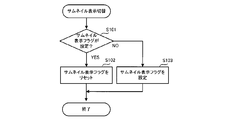
- Step S101 when the mode switching button 41 is operated, as shown in FIG. 12, the CPU 10 determines whether or not the current mode is the thumbnail non-display mode. That is, it is determined whether a thumbnail display flag is set.
- step S101 When the thumbnail display flag is set (step S101: YES), the CPU 10 resets the thumbnail display flag and switches to the thumbnail non-display mode (step S102).
- step S101: NO when the thumbnail display flag is not set (step S101: NO), the CPU 10 sets the thumbnail display flag and switches to the thumbnail display mode (step S103).
- a content list mode there are a content list mode and a bookmark list mode, and the user can select one of the modes by operating the menu button 45 (see FIG. 4).
- a content list screen is displayed, and a document title indicating a document file and a thumbnail are associated with each other and displayed as a list (see FIG. 2).
- a bookmark list screen is displayed, and a headline that can specify a page of the document file and a thumbnail are associated with each other and displayed as a list (see FIG. 3).
- description will be made assuming that the data shown in FIG. 6 is included as the document list and the data shown in FIG. 7 is included as the bookmark information table.
- the CPU 10 first performs an initial setting as shown in FIG. 8 (step S11).
- the CPU 10 sets the display mode for the display unit 2 to the content list mode.
- the content list mode is a mode in which all document files stored in the memory card 60 are displayed as a list.
- step S12 the CPU 10 performs a content list display process according to the set content list mode (step S12), and moves the process to step S13.
- the CPU 10 acquires a document list from the memory card 60 (step S121).
- the document list displays information related to the document file stored in the memory card 60, that is, whether to display a document title, address information (information on the storage position of the document file in the memory card 60), and a thumbnail.
- the thumbnail display information is data in which, for example, the display count of the document file is associated with each other (see FIG. 6).
- the CPU 10 expands the document list stored in the memory card 60 in the RAM 12.
- the CPU 10 determines whether or not document file information that is a display candidate exists in the acquired document list (step S122), and if the document file that is a display candidate does not exist in the document list (step S122). : NO), the process is returned to step S13 of FIG.
- step S122 if a document file that is a display candidate exists in the document list (step S122: YES), the CPU 10 acquires the document title existing in the document list from the memory card 60 and stores it in the RAM (step S123). . Then, the CPU 10 performs a process for displaying the document title on the display unit 2 (step S124).
- the CPU 10 determines whether the frequency with which the document file corresponding to the document title to be displayed has been displayed on the display unit 2 so far is within the top 10% of all the document files stored in the memory card 60. It is determined whether or not (step S125). That is, referring to the document list, if the display frequency is within the top 10% of all document files (step S125: YES), the CPU 10 moves the process to step S126, and the document corresponding to the document title to be displayed. A file is acquired from the memory card 60, and image processing is performed on predetermined page data of the document file to acquire thumbnail data. On the other hand, if the display frequency is less than the top 10% in all document files (step S125: NO), the CPU 10 moves the process to step S128.
- step S126 thumbnail data is acquired. That is, the thumbnail data stored in the memory card 60 is stored in the RAM 12.
- the CPU 10 displays the thumbnails obtained from the data in a state where they are associated with each other by connecting them with a document title (index) (step S127).
- thumbnail display stipulated in the switching standard set in the process described later is performed. For example, in the case of an index having a hierarchy such as a main heading and a sub heading, only the main heading is displayed as a thumbnail or even a sub heading is displayed as a thumbnail.
- thumbnails are displayed based on predetermined display conditions, such as reducing the size when the number of displays is large and increasing the size when the number of displays is small.
- the CPU 10 updates the display position. Specifically, the CPU 10 stores the position of the displayed document title in the RAM 12 (step S128). Thereby, the relationship between the document title and the selection key 43 is set in the RAM 12.
- step S129 determines whether or not there is a space where the thumbnail and the document title can be further displayed in the display area of the display unit 2 (step S129). If the CPU 10 determines that no more display is possible (step S129: NO), the CPU 10 ends the content list display process and returns the process to step S13. On the other hand, when it is determined that the thumbnail and the document title can be further displayed in the display area of the display unit 2 (step S129: YES), the CPU 10 returns the process to step S123.
- the CPU 10 displays a predetermined number (for example, 10) of indexes in the display area of the display unit 2 until a predetermined number (for example, 3) of thumbnails smaller than the predetermined number are displayed.
- a predetermined number for example, 10
- a predetermined number for example, 3
- the CPU 10 returns to the basic operation process of FIG. 8 and executes the input reception process from the user in step S13. That is, it is possible to accept input from the user via the operation switch group 40 of the operation unit 4.
- step S14 determines whether or not the “content list display mode” is set. If the “content list display mode” is not set (step S14: NO), the process proceeds to step S21. Transfer. On the other hand, when the “content list display mode” is set (step S14: YES), the CPU 10 determines whether or not a document display instruction is input from the user (step S15).
- step S15 it is determined whether or not the selection key 43 arranged to correspond to each document title on the right side of the document title displayed on the display unit 2 has been operated. If it is determined that the user has input “document file display instruction” (step S15: YES), the CPU 10 reads out the document file for which the display instruction has been issued from the memory card 60 and displays it on the display unit 2 ( Step S16).
- step S15 determines whether there is an input of “page movement instruction” from the user (step S17). That is, it is a so-called page turning request, and when the display of the document file is instructed in step S15 and the image based on the document file is displayed, any of the page feed buttons 48 and 49 shown in FIG. It is determined whether or not an operation has been performed.
- step S17: NO When there is no input of “page movement instruction” (step S17: NO), the CPU 10 moves the process to step S19, while when there is an input of “page movement instruction” (step S17: YES), the operated page The corresponding document file page is displayed according to the feed buttons 48 and 49 (step S18).
- step S19 which is a process when there is no “page movement instruction” input, it is determined whether or not a display instruction input for the “bookmark list screen” (see FIG. 3) has been made. If there is no display instruction input for the “bookmark list screen” (step S19: NO), the CPU 10 returns the process to step S13. On the other hand, when a display instruction input for the “bookmark list screen” is received (step S19: YES), the CPU 10 changes the display mode for the display unit 2 to “bookmark list mode” and further sets a bookmark display instruction flag ( Step S20) After that, the process returns to Step S14.
- step S21 which is a process performed when it is determined that the “content list display mode” is not set in the process of the previous step S14, the CPU 10 determines whether or not the display mode is set to “bookmark list mode”. judge.
- step S21: NO When the display mode is not set to “bookmark list mode” (step S21: NO), the CPU 10 moves the process to step S14, while when the display mode is set to “bookmark list mode” (step S21). S21: YES), the CPU 10 determines whether or not the bookmark setting flag is set (step S22).
- step S22 When the bookmark setting flag is set (step S22: YES), after resetting the bookmark setting flag, the CPU 10 executes the bookmark list display in step S23 to display the “bookmark list screen” shown in FIG. On the other hand, when it is determined that the bookmark setting flag is not set (step S22: NO), the CPU 10 shifts the processing to step S24.
- bookmark list display process will be described with reference to FIG.
- the result of the bookmark display switching process in step S28 which is a post-process, is reflected.
- FIG. 3 "Introduction”, “For Safe Use”, “Notation” ... “Troubleshooting”, “Q & A”, “Appendix”, etc.
- a case will be described where a bookmark list screen is displayed when a bookmark is assigned to a page with an index (heading).
- the CPU 10 first acquires a bookmark information table from the header area of the document file stored in the memory card 60 and displaying the page on the display unit 2, and stores the data of each bookmark in the RAM 12. Expand (step S231).
- CPU10 determines whether the bookmark which should be displayed on the display part 2 remains in RAM12 (step S232), and when it does not remain (step S232: NO), a process is returned to step S13 of FIG.
- step S232 when the bookmark to be displayed on the display unit 2 remains (step S232: YES), the CPU 10 acquires the next bookmark (step S233), and then displays the bookmark name on the display unit 2 (step S234). ). Next, the CPU 10 determines whether or not the display mode is the thumbnail display mode (step S235).
- step S235: NO If it is not the thumbnail mode display (step S235: NO), the CPU 10 returns the process to step S232, while if it is the thumbnail display (step S235: YES), the CPU 10 moves the process to step S236.
- step S236 the CPU 10 determines whether or not the thumbnail display standard is “high” as the page display frequency. That is, here, the display number and size of thumbnails are determined depending on whether the page display frequency is “large” or “small”.
- step S236 When the thumbnail display criterion is “high” as the page display frequency (step S236: YES), the CPU 10 sets the specified number of thumbnails to be displayed as the number corresponding to the bookmark with the top 10% of bookmark selection times. . On the other hand, when the thumbnail display standard is “small” as the page display frequency (step S236: NO), the CPU 10 sets the specified number of thumbnails to be displayed as the number corresponding to the bookmark with the top 50% of bookmark selections. . Note that the number of bookmark selections will be described in the bookmark selection process in step S25, which will be described later.
- the CPU 10 displays the thumbnails in the predetermined number range determined in step S237 or step S238 on the display unit 2 in order from the highest priority. That is, for example, thumbnails to be displayed are sequentially selected based on the display rank of “bookmark information” shown in FIG.
- the acquisition of thumbnails is the same as in step S126, and is performed when the CPU 10 reads out data of pages to be displayed as thumbnails from the memory card 60 and performs image processing.
- a predetermined number (four in this case) of thumbnails is displayed while a predetermined number (13 in this case) of indexes is displayed.
- step S240 the CPU 10 displays an image in which the thumbnail and the index are connected by, for example, a line in accordance with an application for visually associating the thumbnail and the index from the ROM 11.
- the CPU 10 repeats the processing from step S232 to step S240 until all the predetermined number of bookmarks are displayed, and returns the processing to step S13 in FIG.
- the bookmark list screen is displayed on the display unit 2 in the manner shown in FIG.
- step S22 when it is determined in step S22 that the bookmark setting flag is not set (step S22: NO), the CPU 10 determines whether or not there is a bookmark selection instruction input.
- step S24 it is determined whether or not the selection key 43 arranged to correspond to each index on the right side of the index (heading) displayed on the display unit 2 is operated. .
- step S24: YES the CPU 10 executes a bookmark selection process (step S25).
- step S24: NO the CPU 10 shifts the processing to step S27.
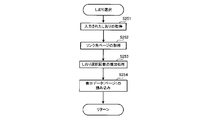
- FIG. 11 is an explanatory diagram showing the flow of bookmark selection processing.
- the CPU 10 reads the bookmark information table (see FIG. 7) from the memory card 60, refers to this, and associates it with the index input by the operation of the selection key 43 by the user.
- the obtained “bookmark” is acquired (step S251).
- the CPU 10 acquires a page as a link destination from the acquired bookmark (step S252).
- the CPU 10 performs an increase process for incrementing the acquired number of page selections. That is, the control unit 30 has a counter function that counts the number of display data display times, and stores the cumulative display number of count results in a predetermined area of the ROM 11.
- the control unit 30 uses the total number of display times as display frequency information to be referred to when changing a document file to be displayed as a thumbnail on the display unit 2 or a page of the document file.
- step S254 the CPU 10 reads the data of the corresponding page as display data (step S254), and moves the process to step S26.
- step S26 the read page is displayed on the display unit 2, and then the process proceeds to step S14.
- step S27 the CPU 10 determines whether or not a bookmark switching instruction has been input. For example, the selection of “bookmark switching” can be performed using the menu button 45, and when the user performs the selection, the CPU 10 executes the bookmark switching process in step S28. That is, the thumbnail display switching mode is changed, and the thumbnail display mode when the bookmark list screen is displayed in the process of step S23 is changed.
- FIG. 13 shows the flow of the bookmark display switching process executed in step S28.
- the execution standard of thumbnail display is a case where it is possible to switch whether the display frequency of the page corresponding to the thumbnail is “large” or “small”.
- the CPU 10 first determines whether or not the display standard of the thumbnail displayed on the bookmark list screen (see FIG. 3) is such that the display frequency of the page corresponding to the thumbnail is large (step). S281). If the display frequency is “large” (step S281: YES), the CPU 10 changes the thumbnail display standard to “small” (step S282), and if the display frequency is “small” (step S281: NO). The thumbnail display reference is changed to “large” (step S283).
- thumbnail display is performed when the page display frequency is “Large”, the page to be displayed frequently can be identified intuitively, and the selection speed is further improved.
- thumbnail display is performed when the display frequency is “Small”, it is usually a page that is not displayed, so the contents may not be immediately recalled, but the displayed thumbnail is not displayed on the page. Since it is a reduced version, viewing this makes it possible to remember the page contents and reduce the selection speed.
- the display standard of thumbnails is the number of displays or the display size. That is, in the bookmark list display process in step S23 (FIG. 10), when the page display frequency is “large”, the number of thumbnails is selected within the top 10% and the “small” bookmark is selected within the top 50%. It was defined as within.
- the number of pages is smaller when the display frequency is “large” than when it is “small”, the headings (indexes) are also reduced. Therefore, the number of thumbnails set to a predetermined number smaller than the number of indexes is naturally smaller than “small” when the page display frequency is “large”.
- the thumbnail display number is set to be small in the limited display area of the display unit 2, and if the thumbnail size is small, the thumbnail display number is set to be large.
- step S281 when the display standard of the thumbnail displayed on the bookmark list screen is “large” on the page display frequency, the size of the thumbnail is “large” and the display number is “small”. , Change the thumbnail size to “Small” and the display count to “Many”, and conversely, if the display standard of the thumbnail is “Small”, the thumbnail size is set to “Large” The number of displays is changed to “small”.
- FIG. 14 shows a flow of basic operation processing of a display device according to another embodiment.
- step S24: NO when the determination in step S24 is NO (step S24: NO), the process is moved to step S27. In the embodiment, since the thumbnail display standard is fixed, when the determination in step S24 is NO (step S24: NO), the CPU 10 returns the process to step S13. Other processes are the same as those in the previous embodiment, and a description thereof is omitted here.
- the thumbnail and the index are connected by a line as shown in FIGS. 2 and 3, but the thumbnail and the index may be surrounded by a frame as shown in FIG. Even in such a display mode, the discriminating power of display data displayed as thumbnails can be improved. At this time, the line type, thickness, and color of the frame may be set as appropriate.
- the thumbnail and the index can be associated by changing the color and gradation of the area surrounded by the frame so that it can be distinguished from other areas. That is, the document file or page thumbnail is associated with the index information such as the document title or heading by the color or gradation of the image including the document file or page thumbnail and the index information such as the document title or heading.
- the discrimination power of the display data displayed as thumbnails is improved.
- the screen for displaying thumbnails has been described as a “table of contents page” such as a content list screen or a bookmark list screen. It can also be applied to screens that display pages.
- a setting button or the like may be provided in the operation unit 4 so that the size can be sequentially changed by the user's button operation.
- a predetermined number of thumbnails to be displayed may be determined according to the determined size.
- the display data has been described as a document such as an image file or a document file, or an individual page to which “bookmark” of each document is added, but a folder including a plurality of documents may be used.
- the acquisition of the thumbnail is generated by performing image processing on the page data of the document data
- the thumbnail data may be included in advance in the document list or bookmark information table. In this way, the control unit 30 can quickly acquire thumbnails.
- the following display device can be realized by the embodiment described above.
- Acquisition means for example, card reader 6, etc.
- specific information for example, index information
- display data for example, a document or folder such as an image file or a document file
- display means for example, display unit 2 for displaying a list image (for example, a content list screen or a bookmark list screen: see FIGS. 2, 3 and 15) that allows the user to select display data to be displayed.
- Display data determining means for example, the control unit 30 for determining a predetermined number of display data for displaying the specific information on the display means as a list, and the predetermined number of display data determined by the display data determining means
- Thumbnail display determining means for example, determining the display data for performing thumbnail display by a number equal to or less than a predetermined number less than the predetermined number
- a control unit 30 a list of specific information of the predetermined number of display data determined by the display data determining means, and a list of thumbnails of the display data of the predetermined number or less determined by the thumbnail display determining means.
- a display control unit for example, the control unit 30 that displays a list image including the display image on the display unit.
- the discriminating power of the display data by the thumbnail becomes good, and the listability in the list image can be improved. Moreover, since it is possible to reduce the selection of a thumbnail by mistake as much as possible, the operability of the selection operation can be improved.
- Such a display device allows intuitive operation and improves operability.
- the display control means (for example, the control unit 30) is configured to display the display data (for example, an image file or a document file) in the display area of the display means (for example, the display unit 2).
- a display device in which the display position of specific information (for example, index information) of the document or folder is set to the selection key 43 side corresponding to the display data rather than the display position of the thumbnail of the display data.
- the thumbnail display determining means displays display data (for example, displaying thumbnails on the display means (for example, the display unit 2)).
- a display device that changes a document or a folder such as an image file or a document file based on a predetermined condition.
- thumbnails can be automatically displayed on the display unit 2 in an optimal state.
- the display control means displays a list of thumbnails of display data (for example, documents and folders such as image files and document files).
- a thumbnail display mode for displaying the list image for example, content list screen or bookmark list screen: see FIGS. 2, 3 and 15
- a display device that selectively executes a thumbnail non-display mode in which the list image not including the image is displayed on the display means (for example, thumbnail display switching processing using the mode switching button 41: FIG. 11).
- the user can select not to execute the thumbnail display.
- the control load on the display device can be reduced.
- the acquisition means for example, the card reader 6 and the control unit 30 displays display data (for example, a document or a folder such as an image file or a document file) for thumbnail display.
- Thumbnail display setting information for determination for example, information set in the document list: see FIG. 6, information set in the bookmark information table: see FIG. 7) is acquired, and the display control means (for example, control unit) 30)
- a display device for changing display data for performing thumbnail display on the display means for example, the display unit 2) based on the thumbnail display setting information.
- display data for performing thumbnail display can be easily changed.
- thumbnail display is performed on the thumbnail display setting information (for example, information set in the document list: FIG. 6, information set in the bookmark information table: see FIG. 7).
- Display frequency information of display data is included, and the display control unit (for example, the control unit 30) performs display of thumbnails on the display unit (for example, the display unit 2) according to the display frequency information. Display device to change.
- the display control unit for example, the control unit 30
- the size of the thumbnail displayed on the display unit for example, the display unit 2
- Display device to change.
- thumbnails from becoming difficult to see in given display conditions, such as a small size when the number of displays is large and a large size when the number of displays is small. It becomes possible.
- the display control means (for example, the control unit 30) is configured to display the list image (for example, a content list screen or a bookmark list screen: FIG. 2, FIG. 3 and FIG. 15), a list image including images in which thumbnails of display data (for example, documents and folders such as image files and document files) for thumbnail display are associated with specific information (for example, index information) of the display data. Is displayed on the display means.
- the list image for example, a content list screen or a bookmark list screen: FIG. 2, FIG. 3 and FIG. 15
- thumbnails of display data for example, documents and folders such as image files and document files
- specific information for example, index information
- the relationship between the thumbnail and the index becomes clear, and as a result, the relationship between the thumbnail and the display data can be clarified at a glance, thereby improving the listability of the list image.
- the display control means for example, the control unit 30
- the thumbnail of the display data for example, a document or folder such as an image file or a document file
- specific information for example, index information
- a display device that displays an image connected with a line on display means for example, the display unit 2).
- the relationship between the thumbnail and the index becomes clear, and the effect (9) is further enhanced.
- the display control means for example, the control unit 30
- the thumbnail of the display data for example, a document or folder such as an image file or a document file
- specific information for example, index information
- the relationship between the thumbnail and the index becomes clear, and the effect (9) is further enhanced.
- an image color including a thumbnail of the display data for example, a document or folder such as an image file or a document file
- specific information for example, index information
- the relation between the thumbnail and the index becomes visually clearer, the relation between the thumbnail and the display data can be made clear at a glance, and the list property of the list image is improved.
- the display control program acquires specific information (for example, index information) for specifying display data (for example, a document or folder such as an image file or a document file) and a thumbnail of the display data. Determining a predetermined number of display data for displaying the specific information in a list on the display means (for example, the display unit 2); and displaying the display data for performing thumbnail display among the predetermined number of display data.
- a list image (for example, a content list screen) including a step of determining a number equal to or less than a predetermined number, a list of specific information of the predetermined number of display data, and a list of thumbnails of the display data equal to or less than the predetermined number Displaying a bookmark list screen (see FIGS. 2, 3 and 15) on the display means. Characterized in that to the row.
- the discriminating power of the display data by the thumbnail becomes good, and the listability in the list image can be improved. Moreover, since it is possible to reduce the selection of a thumbnail by mistake as much as possible, the operability of the selection operation can be improved.
Landscapes
- Engineering & Computer Science (AREA)
- General Engineering & Computer Science (AREA)
- Theoretical Computer Science (AREA)
- Human Computer Interaction (AREA)
- Physics & Mathematics (AREA)
- General Physics & Mathematics (AREA)
- User Interface Of Digital Computer (AREA)
- Controls And Circuits For Display Device (AREA)
- Information Retrieval, Db Structures And Fs Structures Therefor (AREA)
Abstract
サムネイルを含む一覧画面における一覧性と、表示させる表示データの選択操作の操作性とを向上させた表示装置を提供すること。表示データを特定する特定情報と、前記表示データのサムネイルとを取得する取得手段と、表示させる表示データを利用者に選択させる一覧画像を表示する表示手段とを備えた表示装置において、前記特定情報を前記表示手段に一覧表示する所定数の表示データを決定する表示データ決定手段と、前記表示データ決定手段により決定した所定数の表示データのうちサムネイル表示を行う表示データを、前記所定数より少ない既定数以下の数だけ決定するサムネイル表示決定手段と、前記表示データ決定手段により決定した前記所定数の表示データの特定情報の一覧と、前記サムネイル表示決定手段により決定した前記既定数以下の数の表示データのサムネイルの一覧とを含む一覧画像を前記表示手段に表示する表示制御手段とを備える。
Description
本発明は、表示装置に関し、詳しくは、表示データに基づく画像を利用者に選択させる一覧画像を表示可能とした表示装置、及び、表示制御プログラムに関する。
従来、記憶手段に記憶されている表示データに基づく画像を表示させる電子ブック等の表示装置が知られている。このような表示装置は、表示手段を備えており、通常、表示データを利用者に選択させる一覧画像をこの表示手段に表示することができる。
また、前記一覧画像に含まれる情報としては、表示データのタイトルや見出しなどのインデックスに代表されるように、表示データを特定する特定情報が表示されることが一般的である。また、表示データの情報として、サムネイルについても前記一覧画像に含まれることが多い。
特に、インデックスだけでは表示データから生成される画像の内容が判別しにくいような場合、表示される画像の内容を直感的に把握することができる縮小画像であるサムネイルの存在は利便性を高めるためである。
そこで、表示装置の一例として、電子書籍データデコード部と、しおり位置指定制御部と、しおり情報管理部と、しおり一覧表示制御部とを備える電子書籍装置が提案された(例えば、特許文献1を参照)。
この表示装置では、電子書籍データの所望ページが電子書籍データデコード部によりデコードされ、このデコードされたページの任意の位置にしおり位置指定制御部によってしおりが付与される。しおり情報管理部は、しおりを付与した位置に基づいて前記所望ページの一部をしおり情報として管理しており、しおり一覧表示制御部は、しおり情報管理部により管理されているしおり情報からサムネイルを作成して画面上に一覧表示する。
しかし、上記した従来技術は、利用者がしおりを設定したときに、そのしおりを付与したページの一部をサムネイル化して表示するもので、しおりが増えればその分サムネイルも増えていく。したがって、例えばしおり一覧画面上に表示されるサムネイルが増えてしまうと、その識別が困難になってしまい、一覧性を損なってしまう。
また、上記電子書籍装置の形態がインターネットなどに無線接続可能な携帯端末であった場合、しおり一覧画面においてしおりを間違って選択し、そのしおりに対応するページが一旦表示されてしまうと、再度しおり一覧画面を表示するには時間がかかる。これでは使い勝手が良好とは言えず、利用者にストレスを与えてしまうおそれがある。
本発明は、サムネイル表示を行う表示データの数を、特定情報を一覧表示する所定数の表示データよりも少ない既定数以下に設定して、一覧画面における一覧性と、表示させる表示データの選択操作の操作性とを向上させた表示装置、および、表示制御プログラムを提供することを目的とする。
上記目的を達成するために、請求項1に係る発明は、表示データを特定する特定情報と、前記表示データのサムネイルとを取得する取得手段と、表示させる表示データを利用者に選択させる一覧画像を表示する表示手段と、を備えた表示装置において、前記特定情報を前記表示手段に一覧表示する所定数の表示データを決定する表示データ決定手段と、前記表示データ決定手段により決定した所定数の表示データのうちサムネイル表示を行う表示データを、前記所定数より少ない既定数以下の数だけ決定するサムネイル表示決定手段と、前記表示データ決定手段により決定した前記所定数の表示データの特定情報の一覧と、前記サムネイル表示決定手段により決定した前記既定数以下の数の表示データのサムネイルの一覧とを含む一覧画像を前記表示手段に表示する表示制御手段と、を備えることを特徴とする。
また、請求項2に係る発明は、請求項1に記載の表示装置において、前記表示手段に一覧表示された各前記表示データの特定情報の位置にそれぞれ対応した選択キーを有しており、前記表示制御手段は、操作があった前記選択キーに対応する位置に特定情報が表示されている表示データに基づく画像を、前記表示手段に表示することを特徴とする。
また、請求項3に係る発明は、請求項2に記載の表示装置において、前記表示制御手段は、前記表示手段の表示領域のうち前記表示データの特定情報の表示位置を、当該表示データのサムネイルの表示位置よりも、当該表示データに対応する選択キー側にすることを特徴とする。
また、請求項4に係る発明は、請求項1に記載の表示装置において、前記サムネイル表示決定手段は、前記表示手段にサムネイル表示を行う表示データを、所定条件に基づいて変更することを特徴とする。
また、請求項5に係る発明は、請求項1に記載の表示装置において、前記表示制御手段は、表示データのサムネイルの一覧を含む前記一覧画像を前記表示手段に表示するサムネイル表示モードと、表示データのサムネイルの一覧を含まない前記一覧画像を前記表示手段に表示するサムネイル非表示モードとを選択的に実行することを特徴とする。
また、請求項6に係る発明は、請求項4又は5に記載の表示装置において、前記取得手段は、サムネイル表示を行う表示データを決定するためのサムネイル表示設定情報を取得し、前記表示制御手段は、前記サムネイル表示設定情報に基づいて、前記表示手段にサムネイル表示を行う表示データを変更することを特徴とする。
また、請求項7に係る本発明は、請求項6に記載の表示装置において、前記サムネイル表示設定情報には、サムネイル表示を行う表示データの表示頻度情報が含まれており、
前記表示制御手段は、前記表示頻度情報に応じて、前記表示手段にサムネイル表示を行う表示データを変更することを特徴とする。
前記表示制御手段は、前記表示頻度情報に応じて、前記表示手段にサムネイル表示を行う表示データを変更することを特徴とする。
また、請求項8に係る本発明は、請求項1に記載の表示装置において、前記表示制御手段は、所定条件に基づき、前記表示手段に表示するサムネイルのサイズを変更することを特徴とする。
また、請求項9に係る本発明は、請求項1に記載の表示装置において、前記表示制御手段は、前記一覧画像として、前記サムネイル表示を行う表示データのサムネイルを、当該表示データの特定情報と関連づけた画像を含む一覧画像を前記表示手段に表示することを特徴とする。
また、請求項10に係る本発明は、請求項9に記載の表示装置において、前記表示制御手段は、前記表示データのサムネイルと特定情報とが線で結ばれた画像を表示手段に表示することを特徴とする。
また、請求項11に係る本発明は、請求項9に記載の表示装置において、前記表示制御手段は、前記表示データのサムネイルと特定情報とが枠で囲まれた画像を表示手段に表示することを特徴とする。
また、請求項12に係る本発明は、請求項1に記載の表示装置において、前記表示データのサムネイルと特定情報とを含む画像の色または階調によって、前記表示データのサムネイルと特定情報との関連付けが行われることを特徴とする。
また、請求項13に係る本発明の表示制御プログラムは、表示データを特定する特定情報と、前記表示データのサムネイルとを取得するステップと、前記特定情報を表示手段に一覧表示する所定数の表示データを決定するステップと、前記所定数の表示データのうちサムネイル表示を行う表示データを、前記所定数より少ない既定数以下の数だけ決定するステップと、前記所定数の表示データの特定情報の一覧と、前記既定数以下の数の表示データのサムネイルの一覧とを含む一覧画像を前記表示手段に表示するステップと、をコンピュータに実行させることを特徴とする。
本発明によれば、所定数の表示データの特定情報の一覧と、前記所定数より少ない既定数以下の数の表示データのサムネイルの一覧とを有する一覧画像を表示手段に表示するようにしている。そのため、サムネイルによる表示データの識別力が良好となって一覧画像における一覧性を向上させるとともに、サムネイルを間違って選択することを可及的に減じ、選択操作の操作性を向上させることが可能となる。
以下、本発明の一実施形態を、以下の順序で図面を参照して説明する。
1.表示装置の概要
2.表示装置の具体的構成
3.表示装置の具体的動作
4.表示装置の他の実施形態
1.表示装置の概要
2.表示装置の具体的構成
3.表示装置の具体的動作
4.表示装置の他の実施形態
[1.表示装置の概要]
先ず、図1~図3を参照して、本実施形態の表示装置の概要について説明する。図1は本実施形態に係る表示装置の機能ブロック図、図2は画面表示の一例であるコンテンツ一覧画面を示す説明図、図3は同じく画面表示の一例であるしおり一覧画面を示す説明図である。なお、本実施形態に係る表示装置は、所謂「電子ブック」として使用することができる。
先ず、図1~図3を参照して、本実施形態の表示装置の概要について説明する。図1は本実施形態に係る表示装置の機能ブロック図、図2は画面表示の一例であるコンテンツ一覧画面を示す説明図、図3は同じく画面表示の一例であるしおり一覧画面を示す説明図である。なお、本実施形態に係る表示装置は、所謂「電子ブック」として使用することができる。
本実施形態に係る表示装置は、図1に示すように、表示部2と、操作部4と、メモリカードなどから情報を読み込むカードリーダ6と、表示装置全体を制御する制御部30とを備えている。表示部2は表示手段として機能し、表示データに応じた画像をページ単位で表示することができる。なお、「表示データ」とは、例えば、画像ファイルや文書ファイルなどのデータファイル自体、あるいは個々のデータファイルの個々のページのデータ(以下、単に「ページ」という場合がある)を指す。以下においては、データファイルとして文書ファイルを例に挙げて説明するが、画像データやその他の形式のデータであってもよい。なお、文書ファイルには、文字データだけでなく画像データを含むことができる。
また、表示装置は、所定数の表示データの特定情報の一覧と、前記所定数よりも少なく既定されている表示データのサムネイルの一覧とを含む一覧画像を表示部2に表示することができる。
すなわち、図2及び図3に示すように、サムネイルを限定して表示するとともに、表示させる表示データを利用者に選択させる一覧画像を表示部2に表示することができる。一覧画像としては、例えば、メモリカードに記憶された複数の文書ファイルの情報を一覧できる「コンテンツ一覧画面」(図2)や、一つの文書ファイルを構成する複数のページのうち、「しおり」が付されたページの情報を一覧できる「しおり一覧画面」(図3)がある。なお、一覧画像としては、必ずしもこれらに限定するものではない。例えば、しおりとは関係なく各文書ファイルに設定されている目次やメニューを示す画面などであってもよい。いずれにしても、表示データの特定情報よりも表示データのサムネイルの方を少なく表示する。
ここで、表示データを特定する特定情報とは、文書ファイルやそのページを特定するための情報である。表示データを特定する特定情報は、例えば、文書ファイルのタイトル(以下、「文書タイトル」という)や、文書ファイルから所望のページを検索しやすくするための見出しや索引などであり、所謂インデックスを指す。サムネイルは、文書ファイルやその個々のページの内容を直感的に把握することができる縮小画像である。
操作部4は、表示部2に一覧表示された表示データの情報を利用者が選択できる選択キー43(図2及び図3参照)を含む複数の操作スイッチ群40を備えている。
制御部30は、操作部4からの操作信号に応じて表示部2への表示動作を制御するとともに、表示装置全体の動作を制御することができる。この制御部30は、後述するCPU10やROM11及びRAM12を備えたコンピュータにより構成されている(図5を参照)。また、制御部30は、文書ファイルや後述する文書リストをメモリカードなどからカードリーダ6を介して読み込む。
表示データを、例えば文書ファイルの個々のページとした場合、制御部30は、ページを特定するインデックスを表示部2に一覧表示する所定数のページを決定する表示データ決定手段としての機能を担っている。また、制御部30は、前記表示データ決定手段として決定した所定数のページのうちサムネイル表示を行うページを、前記所定数より少ない既定数以下の数だけ決定するサムネイル表示決定手段としての機能も担っている。さらに、制御部30は、メモリカードなどから文書ファイルのページのデータや見出しを取得し、文書ファイルのページのサムネイルをこのページのデータに画像処理を施すことによって取得する取得手段としても機能する。また、制御部30は、前記表示データ決定手段として決定した前記所定数のページの見出しとなるインデックスの一覧と、前記サムネイル表示決定手段として決定した前記既定数以下の数のサムネイルの一覧とを含む一覧画像を表示部2に表示する表示制御手段としての機能をも担っている。勿論、一覧表示する表示データは、上記のページに代えて文書ファイルそのものであっても構わない。その場合、インデックスとしては文書ファイルを示す文書タイトルが表示されることになる。また、文書ファイルのサムネイルは、文書ファイルの所定ページ(例えば、先頭ページ)のサムネイルである。
制御部30のROM11には、表示制御プログラムを格納している。このプログラムにしたがって、CPU10は、少なくとも以下の3つのステップを実行する。
(1)表示データ(文書ファイル自体、あるいは文書ファイルのページ)を特定するインデックスと、当該表示データのサムネイルとを取得するステップ。
(2)前記インデックスを表示部2に一覧表示する所定数の表示データ(文書ファイルあるいは文書ファイルのページ)を決定するステップと、前記所定数の表示データのうち、サムネイル表示を行う表示データを、前記所定数より少ない既定数以下の数だけ決定するステップ。
(3)前記所定数の表示データ(文書ファイルあるいは文書ファイルのページ)のインデックスの一覧と、前記既定数以下の数の表示データのサムネイルの一覧とを含む目次画像を表示部2に表示するステップ。
(1)表示データ(文書ファイル自体、あるいは文書ファイルのページ)を特定するインデックスと、当該表示データのサムネイルとを取得するステップ。
(2)前記インデックスを表示部2に一覧表示する所定数の表示データ(文書ファイルあるいは文書ファイルのページ)を決定するステップと、前記所定数の表示データのうち、サムネイル表示を行う表示データを、前記所定数より少ない既定数以下の数だけ決定するステップ。
(3)前記所定数の表示データ(文書ファイルあるいは文書ファイルのページ)のインデックスの一覧と、前記既定数以下の数の表示データのサムネイルの一覧とを含む目次画像を表示部2に表示するステップ。
上述してきた表示装置において、例えば、「しおり」を付したページを確認する場合、通常であれば、全ての文書ファイルのページに対してサムネイルを表示できれば利便性が高くなると考えられる。しかし、表示するサムネイルが増えてしまうと、その識別がかえって困難になり、識別性や一覧性を損なってしまい、誤選択するおそれがある。
そこで、本表示装置は、インデックスの一覧と、インデックスの数より少ない既定数以下の数のサムネイルの一覧とを有するしおり一覧画面(一覧画像)を表示部2に表示するようにしている。
例えば、図2に示した「コンテンツ一覧画面」においては、インデックス(文書タイトル)とサムネイルとが一覧表示されるが、インデックスが所定数として10個設定されているのに対し、サムネイルは既定数として3個設定されている。そして、サムネイルとインデックスとを線で結んだ画像を表示して、サムネイルとインデックスとの関係を明確にしている。
また、「しおり一覧画面」が表示された場合は(図3を参照)、インデックスとサムネイルとが一覧表示されているが、インデックスが所定数として13個設定されているのに対し、サムネイルは既定数として4個設定されている。そして、サムネイルとインデックスとを線で結んだ画像を表示して、サムネイルとインデックスとの関係を明確にしている。
このように、表示制御手段として機能する制御部30は、サムネイル表示を行う文書ファイルのサムネイルを、当該文書ファイルを特定する文書タイトルであるインデックスと関連づけた「コンテンツ一覧画面」を一覧画像として表示部2に表示するようにしている。また、同様に、サムネイル表示を行う文書ファイルのページのサムネイルを、当該ページを特定する見出しであるインデックスと関連づけた「しおり一覧画面」を一覧画像として表示部2に表示することができる。
また、図2及び図3から分かるように、制御部30は、所定条件に基づき、表示部2に表示するサムネイルのサイズを変更するようにしている。例えば、一覧表示するサムネイルの数のデフォルトを図3で示したように「4」とした場合、図2で示すようにデフォルトの数よりも少ない場合はサムネイルのサイズを大きく表示する。一方、一覧表示するサムネイルの数が例えば「5」以上などであってデフォルトの数(例えば「4」)よりも多い場合はサムネイルのサイズをデフォルトよりも小さくする。
このように、本表示装置では、一覧表示されるサムネイルがいたずらに増加してしまうことを回避でき、サムネイルによる表示データの識別力が良好となって一覧性を向上させることができる。さらに、サムネイルを間違って選択することを可及的に減じることができるため、使い勝手を向上させることができる。
また、制御部30がサムネイル表示決定手段として機能する場合、表示部2にサムネイル表示を行う表示データを、所定条件に基づいて変更するようにしている。
すなわち、制御部30は、サムネイル表示を行う表示データを決定するためのサムネイル表示設定情報を取得し、前記サムネイル表示設定情報に基づいて表示部2にサムネイル表示を行う表示データを変更するのである。
例えば、サムネイル表示設定情報には、サムネイル表示を行う表示データの表示頻度情報が含まれており、制御部30は、表示頻度情報に応じて、表示部2にサムネイル表示を行う表示データを変更するのである。
表示頻度情報としては、例えば、表示頻度に応じて振り分けた表示ランク情報をサムネイル表示設定情報とすることができる。あるいは、表示頻度情報を独立したサムネイル表示設定情報とするとともに、これとは別のパラメータを用いてサムネイル表示の優先度を示す表示ランク情報をサムネイル表示設定情報に設定することもできる。こうして、制御部30は、サムネイル表示設定情報に応じて表示部2にサムネイルの表示を行う表示データを切り替えることができる。
文書ファイルには、表示データとして表示手段に表示する本体データ領域以外に、その文書タイトルやその他の属性などが含まれるヘッダ領域を有しており、このヘッダ領域にサムネイル表示設定情報などが含まれる。文書ファイルのページのサムネイル表示を行うときには、制御部30は、文書ファイルのヘッダ領域からサムネイル表示設定情報を取得する。なお、制御部30は、サムネイル表示設定情報に含まれる表示頻度情報を、文書ファイルのページを表示部2に表示する毎に更新する。
また、メモリカード60(図4及び図5参照)には、メモリカード60内に記憶されている複数の文書ファイルに関する文書リストが記憶されている。この文書リストには、サムネイル表示設定情報などが含まれている。文書ファイルのサムネイル表示を行うときには、制御部30は、カードリーダ6を介してメモリカード60からサムネイル表示設定情報を取得する。また、制御部30は、サムネイル表示設定情報に含まれる表示頻度情報を、文書ファイルを表示部2に表示する毎に更新する。なお、同一文書ファイルのページを表示部2に表示する毎に、文書ファイルに関する表示頻度情報の情報を更新するようにしてもよい。
ところで、制御部30は、表示データのサムネイルの一覧を含む一覧画像を表示部2に表示するサムネイル表示モードと、表示データのサムネイルの一覧を含まない一覧画像を表示部2に表示するサムネイル非表示モードとを選択的に実行するように構成することもできる。
この場合、図1に示すように、操作部4に、サムネイル表示モードとサムネイル非表示モードとの何れかを選択するモード切替ボタン41などを設けておくとよい。
また、操作部4に、サムネイル表示切替ボタン(図示せず)を設けておき、表示部2にサムネイル表示を行う表示データを、上述したようにサムネイル表示設定情報を取得して行うのではなく、ユーザによるボタン操作で変更することもできる。例えば、図2に示すように、10個のインデックスを表示する場合、インデックスの上側の5個のインデックスについてサムネイル表示を実行するように設定しておき、表示切替ボタンの操作によるサムネイル書き換え指示が入力されると、上側の5個ではなく、下側の5個のインデックスについてサムネイル表示をするように切り換えることもできる。
また、このサムネイル表示切替ボタンの操作にしても、表示データの表示頻度を表示条件に加えることができる。例えば、10個のインデックスが表示されているときに、デフォルトでは表示頻度の高いランクに属する3個のインデックスについてサムネイル表示がなされように設定しておく。そして、この状態で1回ボタン操作すると、表示頻度の高さが次のランクに属するインデックスが含まれる、例えば5個のインデックスについてサムネイル表示し、さらにボタン操作を行うと、さらに次のランクに属するインデックスが含まれる7個のインデックスについてサムネイル表示するのである。
なお、この場合、表示するサムネイルのサイズを、表示数に応じて変更することができる。例えば、表示数が3個の場合は最も大きいLサイズ、5個の場合はそれよりも小さいMサイズ、7個の場合は最も小さいSサイズに変更するのである。
[2.表示装置の具体的構成]
図2~図7を参照しながら表示装置の具体的構成について説明する。図4は本実施形態に係る表示装置の外観図であり、図示するように、表示装置は薄型の平面視方形状に形成されたケーシングの上面に設けられた略A4サイズの大きさの表示部2を備えている。表示部2には、例えば、文書ファイルに基づく画像をページ単位で表示することが可能である。さらに、表示部2では文書ファイルや当該文書ファイルの各ページを特定するインデックスやサムネイルをしおり一覧画面に一覧表示することができる(図2及び図3参照)。
図2~図7を参照しながら表示装置の具体的構成について説明する。図4は本実施形態に係る表示装置の外観図であり、図示するように、表示装置は薄型の平面視方形状に形成されたケーシングの上面に設けられた略A4サイズの大きさの表示部2を備えている。表示部2には、例えば、文書ファイルに基づく画像をページ単位で表示することが可能である。さらに、表示部2では文書ファイルや当該文書ファイルの各ページを特定するインデックスやサムネイルをしおり一覧画面に一覧表示することができる(図2及び図3参照)。
本実施形態係る表示部2は、電気的に白黒を反転できる粒子を用いて可変表示を行う電子インク技術を用いたマイクロカプセル型電気泳動ディスプレイモジュール(EPD: Electrophoretic Display)を用いている。これは、表示画面は電源が供給されなくても消えることがないという特徴を備えている。なお、表示部2には、EPDに代えて液晶パネル(LCD)を用いることもできる。
図4に示すように、表示部2の右側には操作部4が配置されており、操作部4には、表示装置の状態を示すLED42や各種の押下式スイッチを有する操作スイッチ群40が配設されている。操作スイッチ群40は、モード切替ボタン41、複数の選択キー43、電源ボタン44、メニューボタン45、ドキュメントファイル閉じるボタン46、拡大ボタン47、ページ送りボタン48,49を備えている。なお、複数の選択キー43については後に詳述する。
表示装置の利用者は、操作部4の操作スイッチ群40を操作して表示部2に表示する文書ファイルの選択を行うとともに、選択した文書ファイルをページ単位で表示することができる。また、利用者は文書ファイルの所望するページに「しおり」を付して登録することもでき、「しおり」を付したページを即座に表示することもできる。なお、所定のページに予め「しおり」を付された文書ファイルの場合にも、同様に、「しおり」を付したページを即座に表示することができる。
また、表示装置の右側面下部には、メモリカード60を挿入するためのスロット61を有するカードリーダ6が設けられている。このメモリカード60には様々なカテゴリーの文書ファイルやこれら文書ファイルのタイトル(文書タイトル)などを含む文書リストが記憶されている。また、文書ファイルには「しおり」が付されたページに関する情報である「しおり情報テーブル」をヘッダ領域に書き込んで登録することができ、「しおりリスト」として格納される。そして、制御部30は、カードリーダ6を介して各文書ファイルや文書リストを読み込んで表示部2に表示させている。
ここで、文書リストについて説明する。図6は文書リストの説明図であり、メモリカード60に記憶されている。この文書リストに設定されている情報がサムネイル表示設定情報の一例に相当する。
図示するように、文書リストには、タイトル欄と、リンク先欄と、サムネイル欄と、表示ランク欄とが1組のデータ構造として構成されている。図中、テーブルの左端に付された数字はファイル番号を示している。
タイトル欄は「○×の取扱説明書」などのタイトル(インデックス)が設定されており、文書ファイルを特定することができる。リンク先欄は当該タイトルが付されている文書ファイルのアドレス情報が設定されている。このアドレス情報は、メモリカード60の記憶領域のアドレスであり、図では簡易的にアドレスA~G等で表している。
また、サムネイル欄はサムネイル(図2参照)を表示するか否かの識別情報が設定されている。例えば、ファイル番号号0~2,4,5に対応した文書ファイルには「非表示」が設定されているため、サムネイルは表示されず、タイトルのみが表示されることになる。したがって、表示される文書ファイルの個数に対し、表示されるサムネイルの個数は少なくなる。
また、表示ランク欄は、サムネイルを表示する優先度がランク付けされている。ここでは、A~Cの順にランクが低くなる。なお、この文書リストに設定されているサムネイルは該当文書ファイルの縮小画像から構成されている。
また、本実施形態における表示ランクは、例えば、文書ファイルの表示頻度が所定回数を含むデフォルトの範囲をランクBとし、これよりも多い範囲にある場合をランクA、少ない範囲にある場合をランクCとしている。すなわち、文書ファイルの表示頻度が高い順からサムネイルを表示することができる。したがって、サムネイルを表示することのできる文書ファイルの既定数が少ない場合、表示ランクによる優先度の高い文書ファイルのサムネイルが優先的に表示されることになる。勿論、表示ランクは、必ずしも表示頻度に限らず、適宜のパラメータに応じて決定されるものであっても構わない。
次に、しおり情報テーブルについて説明する。図7はしおり情報テーブルの説明図であり、メモリカード60に記憶された文書ファイルのヘッダ領域に格納されている。このしおり情報テーブルに設定されている情報がサムネイル表示設定情報の一例に相当する。
図示するように、しおり情報テーブルには、タイトル欄と、リンク先欄と、サムネイル欄と、表示ランク欄とが1組のデータ構造として構成されている。この1組のデータ構造が所謂「しおり」を構成している。図中、テーブルの左端に付された数字はしおり番号を示している。
タイトル欄は「はじめに」などの見出し(インデックス)が設定されており、ページを特定することができる。リンク先欄は当該見出しが付されているページのアドレス情報が設定されており、ページを直接的に特定している。
また、サムネイル欄はサムネイル(図3参照)を表示するか否かの識別情報が設定されている。例えば、しおり番号0~3に対応したページ(2ページ、5ページ、13ページ、14ページ)には「非表示」が設定されているため、これらのページに利用者がしおりを付してもサムネイルは表示されず、見出しのみが表示されることになる。したがって、表示される見出しの個数に対し、表示されるサムネイルの個数は少なくなる。
また、表示ランク欄は、サムネイルを表示する優先度がランク付けされている。ここでは、A~Cの順にランクが低くなる。なお、このしおり情報テーブルに設定されているサムネイルは該当ページの縮小画像から構成されている。
また、本実施形態における表示ランクは、例えば、文書ファイルの各ページの表示頻度が所定回数を含むデフォルトの範囲をランクBとし、これよりも多い範囲にある場合をランクA、少ない範囲にある場合をランクCとしている。すなわち、ページの表示頻度が高い順からサムネイルを表示することができる。したがって、サムネイルを表示することのできるページの既定数が少ない場合、表示ランクによる優先度の高いページのサムネイルが優先的に表示されることになる。勿論、表示ランクは、必ずしも表示頻度に限らず、適宜のパラメータに応じて決定されるものであっても構わない。
ところで、操作部4に配設された13個の選択キー43(A,B,1~9,0、Z)は、表示部2の右側縦縁に沿って列状に設けられている。そして、図4に示すように、表示部2の表示領域を縦方向に複数の領域に分割して形成された分割領域(ここでは13の分割領域)のそれぞれに1対1で対応して割付けられている。詳しくは後述するが、表示部2には、図2に示したように、文書タイトルを一覧するための「コンテンツ一覧画面」や、図3に示したように、文書ファイルで「しおり」が付されたページの見出しを一覧するための「しおり一覧画面」を表示することができる。そのときに一覧表示される見出しは、選択キー43とそれぞれ1対1で対応するように縦方向に並んで配置される。
また、図2に示すように、「コンテンツ一覧画面」が表示部2に表示されているときに選択キー43のいずれかが操作されると、制御部30は、操作があった選択キー43に対応する位置に文書タイトルが表示されている文書ファイルの規定ページ(例えば、先頭ページや「しおり」が付された最初ページ)を表示部2に表示する。また、図3に示すように、しおり一覧画面が表示部2に表示されているときに選択キー43のいずれかが操作されると、制御部30は、操作があった選択キー43に対応する位置に見出しが表示されている文書ファイルのページの画像を表示部2に表示する。
なお、本実施形態に係る「コンテンツ一覧画面」では、図2に示すように、文書ファイルを特定できるインデックスとして、上から順に「○×の取扱説明書」、「小説ABC」、「小説XYZ」、「論文I」、「論文II」、「論文III」、「詩集いろは」、「詩集あいう」、「△◆のすべて」、「だれでも分かる○■」の文書タイトルが配列されている。
一方、「しおり一覧画面」には、図3に示すように、ページを特定できるインデックスとして、上から順に「はじめに」、「安全にお使いいただくために」、「表記について」、「やりたいこと」、「やりたいこと一覧」、「各部の名称」、「電源をオンにする」、「コンテンツを表示する」、「便利な機能を利用する」、「設定と日頃のお手入れ」、「こんなときは」、「Q&A」、「付録」の見出しが配列されている。
さらに、「コンテンツ一覧画面」や「しおり一覧画面」を表示する際に、制御部30は、表示部2の表示領域のうち、各表示データ(文書ファイルやそのページデータ)のインデックスの表示位置を、図示するように、当該表示データのサムネイルの表示位置よりも、当該表示データに対応する選択キー43側となるように表示制御している。
つまり、制御部30は、表示部2の表示領域を仮に左右に区画した場合、表示部2の表示領域の左側にサムネイルを、右側にインデックスを表示するのである。このように表示することで、文書ファイルやページを特定するインデックスは、選択キー43の左側に隣接することになる。したがって、利用者が文書ファイルやページの表示を選択しようとするときに、文書ファイルやページを特定するインデックスと選択キー43との対応付けが容易となって操作性が良好となる。
しかも、制御部30は、しおり一覧画面に表示するページを所定数(例えば13個)に決定すると同時に、サムネイル表示を行うページは、先に決定した所定数(13個)よりも少ない既定数(4個)に決定するようにしている。そして、サムネイルとインデックスとを線で結んだ画像を表示して、表示されたサムネイルが文書ファイルのどのページを示すのかを一目瞭然にしている。
したがって、表示部2に表示されるサムネイルがいたずらに増えてしまって見難くなることがなく、サムネイルによるページ識別力が良好となって目次画像における一覧性を向上させることができる。しかも、サムネイルを間違って選択することを未然に防止することも可能となる。
このように、制御部30は、サムネイル表示を行う文書ファイルやページ(表示データ)のサムネイルを、当該文書ファイルやページを特定するインデックス(特定情報)と関連づけた一覧画像を表示部2に表示することができる。
図5は表示装置の電気的構成を示すブロック図である。図示するように、表示装置は、表示部2、LED42、操作スイッチ群40、バッテリ7、電源制御部15、カードリーダ6、通信インターフェース(I/F)17、メモリカード60、制御部30が設けられている。そして、制御部30は、CPU10、ROM11及びRAM12を備えている。また、操作スイッチ群40には、モード切替ボタン41、複数の選択キー43、電源ボタン44、メニューボタン45、ドキュメント閉じるボタン46、拡大ボタン47、ページ送りボタン48,49を含む。
ROM11には、前述した表示制御プログラムをはじめ、各種情報及び表示装置を動作させるプログラムが記憶されている。CPU10は、これらのプログラムをROM11から読み出して実行することにより、各種の制御処理を実行する。このようにして、制御部30は、前述した表示データ決定手段、サムネイル表示決定手段、及び表示制御手段として動作するとともに、表示装置の全体の制御を司ることになる。
なお、各種プログラムはROM11に予め記憶させておくのではなく、カードリーダ6を介してメモリカード60などの記憶媒体から読み出してROM11に記憶するようにしてもよい。
RAM12は各種のデータを一時的に記憶するメモリであり、CPU10による制御処理時に用いられる。例えば、RAM12は、メモリカード60から読み出した文書ファイル、文書リスト、しおり情報テーブルなどを一時的に記憶する。
また、表示装置は、図示しない外部電源から電力供給を受けていない場合には、バッテリ7の電力で駆動される。電源制御部15は外部電源からバッテリ7への充電を制御している。
なお、メモリカード60には、図示しないパーソナルコンピュータ(以下、「PC」という)にインストールされた専用ソフトウェアなどによって、各種の情報が書き込まれている。CPU10は、カードリーダ6を介してメモリカード60から情報の読み取り、書き込みを制御することができる。
なお、各文書ファイルは、PCを利用してメモリカード60に記憶したり、インターネットから通信I/F17を介してメモリカード60に記憶したりすることもできる。
[3.表示装置の具体的動作]
ここで、表示部2の動作について、図面を参照しながら具体的に説明する。図8は本実施形態に係る表示装置の基本動作処理の一例を示す説明図、図9はコンテンツ一覧表示処理の流れを示す説明図、図10はしおり一覧表示処理の流れを示す説明図、図11はしおり選択処理の流れ示す説明図、図12はサムネイル表示切替処理の流れを示す説明図である。
ここで、表示部2の動作について、図面を参照しながら具体的に説明する。図8は本実施形態に係る表示装置の基本動作処理の一例を示す説明図、図9はコンテンツ一覧表示処理の流れを示す説明図、図10はしおり一覧表示処理の流れを示す説明図、図11はしおり選択処理の流れ示す説明図、図12はサムネイル表示切替処理の流れを示す説明図である。
なお、ここでは、図4に示すモード切替ボタン41によってサムネイル表示モードが選択されている状態とするが、モード切替ボタン41によるモード切替処理は割り込み処理によっていつでも受け付けられる。
すなわち、モード切替ボタン41が操作されると、図12に示すように、CPU10は、現在のモードがサムネイル非表示モードか否かを判定する。つまり、サムネイル表示フラグが設定されているか否かを判定する。(ステップS101)。サムネイル表示フラグが設定されている場合(ステップS101:YES)、CPU10は、サムネイル表示フラグをリセットしてサムネイル非表示モードに切り替える(ステップS102)。他方、サムネイル表示フラグが設定されていない場合(ステップS101:NO)、CPU10は、サムネイル表示フラグを設定してサムネイル表示モードに切り替える(ステップS103)。
また、本実施形態における基本動作処理では、コンテンツ一覧モードとしおり一覧モードとがあり、利用者は、メニューボタン45(図4参照)を操作することによっていずれかのモードを選択することができる。コンテンツ一覧モードにおいてはコンテンツ一覧画面が表示され、文書ファイルを示す文書タイトルとサムネイルとが関連付けられて一覧表示される(図2参照)。また、しおり一覧モードにおいてはしおり一覧画面が表示され、文書ファイルのページを特定することができる見出しとサムネイルとが関連付けられて一覧表示される(図3参照)。本実施形態では、文書リストとして、図6に示すデータが含まれ、しおり情報テーブルとして図7に示すデータが含まれているものとして説明する。
基本動作処理において、CPU10は、図8に示すように、先ず、初期設定を行う(ステップS11)。この初期設定では、CPU10は、表示部2に対する表示モードをコンテンツ一覧モードに設定する。コンテンツ一覧モードとは、メモリカード60に格納された全ての文書ファイルを一覧表示するモードである。
そして、CPU10は、設定したコンテンツ一覧モードに応じてコンテンツ一覧表示処理を行い(ステップS12)、処理をステップS13に移す。
ここで、ステップS12のコンテンツ一覧表示処理について、図9を参照しながら説明する。CPU10は、先ず、メモリカード60から文書リストを取得する(ステップS121)。この文書リストは、上述したように、メモリカード60に記憶された文書ファイルに関する情報、すなわち、文書タイトル、アドレス情報(メモリカード60における文書ファイルの記憶位置の情報)、サムネイルを表示する否かのサムネイル表示情報、さらには、例えば当該文書ファイルの表示回数などが互いに関連付けられたデータである(図6参照)。CPU10は、メモリカード60に格納されている文書リストをRAM12に展開する。
次いで、CPU10は、取得した文書リスト内に表示候補となる文書ファイルの情報が存在するか否かを判定し(ステップS122)、表示候補となる文書ファイルが文書リスト内に存在しない場合(ステップS122:NO)、図8のステップS13に処理を戻す。
他方、表示候補となる文書ファイルが文書リスト内に存在する場合(ステップS122:YES)、CPU10は、文書リスト内に存在する文書タイトルをメモリカード60から取得し、RAMに記憶する(ステップS123)。そして、CPU10は、文書タイトルを表示部2に表示させる処理を行う(ステップS124)。
また、CPU10は、表示させる文書タイトルに対応する文書ファイルがこれまでに表示部2に表示された頻度が、メモリカード60に記憶されている全ての文書ファイル中の上位1割以内に存在するか否かを判定する(ステップS125)。すなわち、CPU10は、文書リストを参照して、表示頻度が全文書ファイル中の上位1割以内である場合は(ステップS125:YES)、処理をステップS126に移し、表示させる文書タイトルに対応する文書ファイルをメモリカード60から取得し、この文書ファイルの所定ページのデータに画像処理を施してサムネイルのデータを取得する。一方、表示頻度が全文書ファイル中の上位1割未満の場合(ステップS125:NO)、CPU10は処理をステップS128に移す。
このように、文書タイトルに対応する文書ファイルがこれまでに表示部2に表示された頻度が、メモリカード60に記憶されている全ての文書ファイル中の上位1割以内に存在する場合、CPU10はステップS126においてサムネイルのデータを取得する。つまり、メモリカード60に格納されているサムネイルのデータをRAM12に記憶させる。
その後、CPU10は、図2に示すように、データを取得したサムネイルを文書タイトル(インデックス)と線で結ぶなどして両者を関連付けた状態で表示する(ステップS127)。また、この処理において、後に説明する処理(図8のステップS28)で設定される切替基準に規定されたサムネイル表示がなされる。例えば、大見出し、小見出しなどの階層を有するインデックスであれば、大見出しだけをサムネイル表示したり、あるいは小見出しまでもサムネイル表示したりするのである。また、サムネイルのサイズについて言えば、表示個数が多いい場合はサイズを小さくし、表示個数が少ない場合はサイズを大きくするなど、既定された表示条件に基づいてサムネイル表示がなされる。
次いで、CPU10は、表示位置の更新を行う。具体的には、CPU10は、表示した文書タイトルの位置をRAM12に記憶する(ステップS128)。これにより、文書タイトルと選択キー43との関係がRAM12に設定されることにある。
次いで、CPU10は、表示部2の表示領域中にサムネイルと文書タイトルがさらに表示可能なスペースがあるか否かを判定する(ステップS129)。そして、CPU10は、これ以上は表示不可(ステップS129:NO)であると判定すれば、本コンテンツ一覧表示処理を終了して処理をステップS13に戻す。一方、表示部2の表示領域中にサムネイルと文書タイトルとをさらに表示できると判定した場合(ステップS129:YES)、CPU10は、処理をステップS123に戻す。
すなわち、CPU10は、表示部2の表示領域に所定数(例えば10個)のインデックスが表示され、当該所定数よりも少ない既定数(例えば3個)のサムネイルが表示されるまで、ステップS123~ステップS129の処理を繰り返すことになる。
コンテンツ一覧表示処理が終了すると、CPU10は、図8の基本動作処理に戻り、ステップS13の利用者からの入力受付処理を実行する。すなわち、操作部4の操作スイッチ群40を介しての利用者からの入力を受け付け可能とする。
次いで、CPU10は、「コンテンツ一覧表示モード」に設定されているか否かを判定し(ステップS14)、「コンテンツ一覧表示モード」に設定されていない場合(ステップS14:NO)は処理をステップS21に移す。一方、「コンテンツ一覧表示モード」に設定されている場合(ステップS14:YES)、CPU10は、利用者からドキュメント表示指示の入力があったか否かを判定する(ステップS15)。
すなわち、図2において、表示部2に表示されている文書タイトルの直右側に、各文書タイトルと1対1で対応するように配置されている選択キー43が操作されたか否かを判定する。そして、利用者から「文書ファイル表示指示」の入力があったと判定した場合(ステップS15:YES)、CPU10は、表示指示のあった文書ファイルをメモリカード60から読み出して表示部2に表示する(ステップS16)。
一方、「文書ファイル表示指示」の入力はないと判定した場合(ステップS15:NO)、CPU10は、利用者から「ページ移動指示」の入力があったか否かを判定する(ステップS17)。すなわち、所謂ページめくりの要求であり、ステップS15において文書ファイルの表示指示を行って文書ファイルに基づく画像の表示を行っている状態であるときに、図4に示すページ送りボタン48,49の何れかが操作されたか否かを判定する。
「ページ移動指示」の入力がない場合(ステップS17:NO)、CPU10は、処理をステップS19に移す一方、「ページ移動指示」の入力があった場合(ステップS17:YES)、操作されたページ送りボタン48,49にしたがって該当する文書ファイルのページを表示する(ステップS18)。
「ページ移動指示」の入力がない場合の処理であるステップS19では、「しおり一覧画面」(図3参照)の表示指示入力があったか否かを判定する。そして、「しおり一覧画面」の表示指示入力がない場合(ステップS19:NO)、CPU10は、処理をステップS13に戻す。一方、「しおり一覧画面」の表示指示入力があった場合(ステップS19:YES)、CPU10は、表示部2に対する表示モードを「しおり一覧モード」に変更し、さらにしおり表示指示フラグを設定する(ステップS20)、その後、処理をステップS14に戻す。
先のステップS14の処理において、「コンテンツ一覧表示モード」に設定されていないと判定した場合の処理であるステップS21では、CPU10は、表示モードが「しおり一覧モード」に設定されているか否かを判定する。
そして、表示モードが「しおり一覧モード」に設定されていない場合(ステップS21:NO)、CPU10は、処理をステップS14に移す一方、表示モードが「しおり一覧モード」に設定されている場合(ステップS21:YES)、CPU10は、しおり設定フラグが設定されているか否かを判定する(ステップS22)。
しおり設定フラグが設定されている場合(ステップS22:YES)、CPU10は、しおり設定フラグをリセットした後、ステップS23でしおり一覧表示を実行して図3に示す「しおり一覧画面」を表示する。一方、しおり設定フラグが設定されてないと判定された場合(ステップS22:NO)、CPU10は、処理をステップS24に移す。
ここで、図10を参照しながら「しおり一覧表示処理」について説明する。なお、このしおり一覧表示処理では、後処理であるステップS28によるしおり表示切替処理の結果が反映されることになる。また、ここでは、例えば、図3に示すように、「はじめに」、「安全にお使いいただくために」、「表記について」・・・「こんなときは」、「Q&A」、「付録」などのインデックス(見出し)があるページにしおりが付与されている場合のしおり一覧画面が表示される場合として説明する。
図10に示すように、CPU10は、先ず、メモリカード60に記憶され、表示部2にそのページが表示されている文書ファイルのヘッダ領域からしおり情報テーブルを取得し、各しおりのデータをRAM12に展開する(ステップS231)。
CPU10は、RAM12に表示部2に表示すべきしおりが残っているか否かを判定し(ステップS232)、残っていない場合(ステップS232:NO)は処理を図8のステップS13に戻す。
他方、表示部2に表示すべきしおりが残っている場合(ステップS232:YES)、CPU10は、次のしおりを取得し(ステップS233)、次いで、しおり名を表示部2に表示する(ステップS234)。次いで、CPU10は、表示モードがサムネイル表示モードであるか否かを判定する(ステップS235)。
サムネイルモード表示でない場合(ステップS235:NO)、CPU10は処理をステップS232に戻す一方、サムネイル表示である場合(ステップS235:YES)、CPU10は処理をステップS236に移す。
ステップS236では、CPU10は、サムネイル表示の基準がページの表示頻度が「大」であるか否かを判定する。すなわち、ここでは、ページの表示頻度が「大」の場合と、「小」の場合とで、サムネイルの表示数やサイズが決定されることになる。
そして、サムネイル表示の基準がページの表示頻度が「大」の場合(ステップS236:YES)、CPU10は、表示するサムネイルの規定数を、しおり選択回数が上位10%のしおりに対応する数とする。一方、サムネイル表示の基準がページの表示頻度が「小」の場合(ステップS236:NO)、CPU10は、表示するサムネイルの規定数を、しおり選択回数が上位50%のしおりに対応する数とする。なお、しおり選択回数については、後述する後処理であるステップS25のしおり選択処理で説明する。
そして、CPU10は、ステップS237又はステップS238で決定した既定数の範囲の中にあるサムネイルを、優先度の高い方から順次、表示部2に表示する。すなわち、例えば、図7に示した「しおり情報」の表示ランクに基づいて、表示すべきサムネイルが順次優先的に選択されることになる。なお、サムネイルの取得は、ステップS126と同様であり、サムネイル表示するページのデータをCPU10がメモリカード60から読み出し、画像処理を施すことによって行われる。
こうして、例えば図3に示すように、サムネイルの数が所定数(ここでは13個)のインデックスが表示されるのに対し、13個よりも少ない既定数(ここでは4個)のサムネイルが表示される。
そして、ステップS240において、CPU10は、ROM11からサムネイルとインデックスとを視覚的に関連付けるためのアプリケーションにしたがって、サムネイルとインデックスとを、例えば線で結んだ画像を表示する。
こうして、CPU10は、既定数のしおりが全て表示されるまで、ステップS232~ステップS240の処理を繰り返し、処理を図8のステップS13に戻す。その結果、表示部2には、図3に示すような態様でしおり一覧画面が表示されることになる。
ステップS22において、しおり設定フラグが設定されていないと判定された場合(ステップS22:NO)に実行されるステップS24では、CPU10は、しおり選択指示入力が有ったか否かを判定する。
すなわち、図3において、表示部2に表示されているインデックス(見出し)の直右側に、各インデックスと1対1で対応するように配置されている選択キー43が操作されたか否かを判定する。利用者から「しおり表示指示」の入力があったと判定した場合(ステップS24:YES)、CPU10は、しおり選択処理を実行する(ステップS25)。一方、しおり選択指示入力がなかったと判定すると(ステップS24:NO)、CPU10は、処理をステップS27に移す。
図11はしおり選択処理の流れ示す説明図である。ステップS25で実行されるしおり選択処理では、CPU10は、メモリカード60からしおり情報テーブル(図7参照)を読み出し、これを参照して、利用者による選択キー43の操作により入力されたインデックスに関連付けられた「しおり」を取得する(ステップS251)。
次いで、CPU10は、取得したしおりからリンク先となるページを取得する(ステップS252)。また、CPU10は、取得したページの選択回数をインクリメントする増加処理を行う。すなわち、制御部30は、表示データの表示回数をカウントするカウンタ機能を備えており、カウント結果の累計表示回数をROM11の所定領域に格納している。また、制御部30は、この表示回数の累計を、表示部2にサムネイル表示を行う文書ファイルや当該文書ファイルのページを変更する際に参照する表示頻度情報として用いている。
次いで、CPU10は、該当するページのデータを表示データとして読み込み(ステップS254)、処理をステップS26に移す。そして、ステップS26において、読み出したページを表示部2に表示し、その後、処理をステップS14に移す。
ステップS27において、CPU10は、しおり切替指示が入力されたか否かを判定する。例えば、「しおり切替え」という選択を、メニューボタン45を用いて行えるようにしておき、利用者がその選択を行うと、CPU10は、ステップS28のしおり切替処理を実行する。すなわち、サムネイル表示の切替基準を変更して、ステップS23の処理でしおり一覧画面を表示する際のサムネイルの表示態様が変更される。
ステップS28で実行されるしおり表示切替処理の流れを図13に示す。ここでは、サムネイル表示の実行基準を、サムネイルに対応するページの表示頻度を「大」の場合とするか、あるいは「小」の場合とするかを切替可能とした場合とする。
図示するように、CPU10は、先ず、しおり一覧画面(図3参照)に表示されるサムネイルの表示基準がそのサムネイルに対応するページの表示頻度が大のものであるか否かを判定する(ステップS281)。そして、表示頻度が「大」であれば(ステップS281:YES)、CPU10はサムネイル表示基準を「小」に変更し(ステップS282)、表示頻度が「小」であれば(ステップS281:NO)、サムネイル表示基準を「大」に変更する(ステップS283)。
ページの表示頻度が「大」の場合にサムネイル表示を行うようにすれば、よく表示させるページを直感的に識別できるようになるため、選択スピードがより向上する。他方、表示頻度が「小」の場合にサムネイル表示を行うようにすれば、通常、表示されていないページであるため、内容を即座には思い出せない場合があるが、表示されたサムネイルがページの縮小版となっているので、これを見ることにより、ページ内容を思い出すことが可能となり、選択スピードの短縮を図ることができる。
また、サムネイルの表示基準を、表示数にするか表示サイズにするかを併せて変更することもできる。すなわち、ステップS23のしおり一覧表示処理(図10)において、ページの表示頻度の「大」の場合、サムネイルの数をしおり選択回数が上位10%以内、「小」をしおり選択回数が上位50%以内と規定した。
したがって、表示頻度の「大」の場合の方が「小」の場合よりもページの数は少なくなるため、その見出し(インデックス)も少なくなる。よって、インデックスの数よりも少ない既定数に設定されているサムネイルの数も、ページの表示頻度の「大」の場合は「小」よりも少なくなるのは当然である。
一方、サムネイルのサイズが大きければ、表示部2の限られた表示領域の中ではサムネイル表示数は少なく設定され、サムネイルのサイズが小さければ、サムネイル表示数は多く設定されている。
そこで、ステップS281では、しおり一覧画面に表示するサムネイルの表示基準がページの表示頻度が「大」の場合は、そのサムネイルのサイズが「大」で、表示数は「少」となっているものを、サムネイルサイズを「小」に、表示数を「多」にそれぞれ変更し、逆に、サムネイルの表示基準がページの表示頻度が「小」であった場合はサムネイルサイズを「大」に、表示数を「小」にそれぞれ変更するのである。
[4.表示装置の他の実施形態]
先の実施形態では、利用者操作によって、サムネイル表示基準を変更する「しおり表示切替」ができるようにしていたが、サムネイル表示は固定であっても構わない。常に、予め定められた態様で表示するようにしてもよい。図14に他の実施形態に係る表示装置の基本動作処理の流れを示す。
先の実施形態では、利用者操作によって、サムネイル表示基準を変更する「しおり表示切替」ができるようにしていたが、サムネイル表示は固定であっても構わない。常に、予め定められた態様で表示するようにしてもよい。図14に他の実施形態に係る表示装置の基本動作処理の流れを示す。
この処理が先の実施形態(図8参照)と異なる点は、先の実施形態ではステップS24にける判定がNOの場合(ステップS24:NO)、処理をステップS27に移していたが、本実施形態では、サムネイル表示基準が固定なので、ステップS24にける判定がNOの場合(ステップS24:NO)、CPU10は処理をステップS13に戻すようにした点にある。なお、他の処理は先の実施形態と同様であり、ここでの説明は省略する。
以上、本発明の実施形態を図面に基づいて詳細に説明したが、これらは例示であり、当業者の知識に基づいて種々の変形、改良を施した他の形態で本発明を実施することが可能である。表示部2のサイズや、表示領域をいくつに分割するかなどは適宜設計変更することができる。また、着脱可能なメモリカード60に文書ファイルやしおり情報テーブルのデータなどを格納した例としたが、表示装置内に十分な容量の不揮発性メモリを搭載し、この不揮発性メモリに文書ファイルやしおり情報テーブルのデータなどを記憶するようにしてもよい。
また、例えば、しおり一覧画面では、図2や図3に示すように、サムネイルとインデックスとを線で結んで表示したが、図15に示すように、サムネイルとインデックスとを枠で囲んでもよい。かかる表示態様であっても、サムネイル表示されている表示データの識別力を向上させることができる。なお、このとき、枠の線種や太さ、色なとは適宜設定して構わない。
また、例えば、枠内で囲まれる領域の色や階調を他の領域と区別できるように変えることにより、サムネイルとインデックスとを関連付けることができる。すなわち、文書ファイルやページのサムネイルと、文書タイトルや見出しなどのインデックス情報とを含む画像の色または階調によって、前記文書ファイルやページのサムネイルと文書タイトルや見出しなどのインデックス情報との関連づけを行い、サムネイル表示されている表示データの識別力を向上させるのである。
また、上述してきた実施形態では、サムネイルを表示する画面を、コンテンツ一覧画面やしおり一覧画面のように「目次ページ」のような画面として説明したが、閲覧履歴の表示画面など、文書ファイルやそのページなどを表示する画面に適用することもできる。
また、サムネイルのサイズなどについて、例えば、操作部4に設定ボタンなどを設けておき、利用者のボタン操作によりサイズを順次変更可能な構成とすることもできる。そして、決定したサイズに応じて表示するサムネイルの既定数を決定するようにしてもよい。
また、表示データとして、画像ファイルや文書ファイルなどのドキュメントや、個々のドキュメントの「しおり」が付与された個々のページとして説明したが、ドキュメントを複数含んだフォルダであっても構わない。
また、サムネイルの取得を文書データのページのデータに画像処理を施すことによって生成することとしたが、文書リストやしおり情報テーブルなどに予めサムネイルのデータを含ませるようにしてもよい。このようにすることで前記制御部30によるサムネイルの取得を迅速に行うことができる。
上述してきた実施形態により、以下のような表示装置が実現できる。
(1)表示データ(例えば、画像ファイルや文書ファイルなどのドキュメントやフォルダ)を特定する特定情報(例えば、インデックス情報)と、前記表示データのサムネイルとを取得する取得手段(例えば、カードリーダ6、制御部30)と、表示させる表示データを利用者に選択させる一覧画像(例えば、コンテンツ一覧画面やしおり一覧画面:図2、図3及び図15参照)を表示する表示手段(例えば、表示部2)と、前記特定情報を前記表示手段に一覧表示する所定数の表示データを決定する表示データ決定手段(例えば、制御部30)と、前記表示データ決定手段により決定した所定数の表示データのうちサムネイル表示を行う表示データを、前記所定数より少ない既定数以下の数だけ決定するサムネイル表示決定手段(例えば、制御部30)と、前記表示データ決定手段により決定した前記所定数の表示データの特定情報の一覧と、前記サムネイル表示決定手段により決定した前記既定数以下の数の表示データのサムネイルの一覧とを含む一覧画像を前記表示手段に表示する表示制御手段(例えば、制御部30)と、を備えた表示装置。
このような表示装置によれば、サムネイルによる表示データの識別力が良好となって一覧画像における一覧性を向上させることができる。また、サムネイルを間違って選択することを可及的に減じることができるため、選択操作の操作性を向上させることが可能となる。
(2)また、上記(1)において、前記表示手段(例えば、表示部2)に一覧表示された各前記表示データ(例えば、画像ファイルや文書ファイルなどのドキュメントやフォルダ)の特定情報(例えば、インデックス情報)の位置にそれぞれ対応した選択キー43を有しており、前記表示制御手段(例えば、制御部30)は、操作があった選択キー43に対応する位置に特定情報が表示されている表示データに基づく画像を、前記表示手段に表示する表示装置。
このような表示装置によれば、直感的な操作が可能となり、操作性が向上する。
(3)上記(2)において、前記表示制御手段(例えば、制御部30)は、前記表示手段(例えば、表示部2)の表示領域のうち前記表示データ(例えば、画像ファイルや文書ファイルなどのドキュメントやフォルダ)の特定情報(例えば、インデックス情報)の表示位置を、当該表示データのサムネイルの表示位置よりも、当該表示データに対応する選択キー43側にする表示装置。
このような表示装置によれば、選択キー43と1対1で対応付けられる特定情報とが互いに近接しているため、視認性が良くなって操作性をさらに向上させることができる。
(4)上記(1)~(3)のいずれかにおいて、前記サムネイル表示決定手段(例えば、制御部30)は、前記表示手段(例えば、表示部2)にサムネイル表示を行う表示データ(例えば、画像ファイルや文書ファイルなどのドキュメントやフォルダ)を、所定条件に基づいて変更する表示装置。
このような表示装置によれば、サムネイルを、表示部2に最適な状態で自動的に表示することが可能となる。
(5)上記(1)~(4)のいずれかにおいて、前記表示制御手段(例えば、制御部30)は、表示データ(例えば、画像ファイルや文書ファイルなどのドキュメントやフォルダ)のサムネイルの一覧を含む前記一覧画像(例えば、コンテンツ一覧画面やしおり一覧画面:図2、図3及び図15参照)を前記表示手段(例えば、表示部2)に表示するサムネイル表示モードと、表示データのサムネイルの一覧を含まない前記一覧画像を前記表示手段に表示するサムネイル非表示モードとを選択的に実行する(例えば、モード切替ボタン41を用いたサムネイル表示切替処理:図11)表示装置。
このような表示装置によれば、サムネイル表示の実行するしないを利用者が選択することができ、サムネイル表示を行わない場合、表示装置の制御負荷を軽減することが可能となる。
(6)上記(4)又は(5)において、前記取得手段(例えば、カードリーダ6、制御部30)は、サムネイル表示を行う表示データ(例えば、画像ファイルや文書ファイルなどのドキュメントやフォルダ)を決定するためのサムネイル表示設定情報(例えば、文書リストに設定されている情報:図6、しおり情報テーブルに設定されている情報:図7参照)を取得し、前記表示制御手段(例えば、制御部30)は、前記サムネイル表示設定情報に基づいて、前記表示手段(例えば、表示部2)にサムネイル表示を行う表示データを変更する表示装置。
このような表示装置によれば、サムネイル表示を行う表示データを簡単に変更することが可能となる。
(7)上記(6)において、前記サムネイル表示設定情報(例えば、文書リストに設定されている情報:図6、しおり情報テーブルに設定されている情報:図7参照)には、サムネイル表示を行う表示データの表示頻度情報が含まれており、前記表示制御手段(例えば、制御部30)は、前記表示頻度情報に応じて、前記表示手段(例えば、表示部2)にサムネイル表示を行う表示データを変更する表示装置。
このような表示装置によれば、表示データがサムネイル表示されるかどうかが、当該表示データを利用者が選択した頻度に応じて自動的に変化するため、利用者による表示装置の使用傾向に応じたサムネイル表示が可能となる。
(8)上記(1)~(7)のいずれかにおいて、前記表示制御手段(例えば、制御部30)は、所定条件に基づき、前記表示手段(例えば、表示部2)に表示するサムネイルのサイズを変更する表示装置。
このような表示装置によれば、例えば、表示数が多ければ小さいサイズに、表示数が少なければ大きなサイズにするなど、与えられた表示条件の中でサムネイルが見難くなることを防止することが可能となる。
(9)上記(1)~(8)のいずれかにおいて、前記表示制御手段(例えば、制御部30)は、前記一覧画像(例えば、コンテンツ一覧画面やしおり一覧画面:図2、図3及び図15参照)として、前記サムネイル表示を行う表示データ(例えば、画像ファイルや文書ファイルなどのドキュメントやフォルダ)のサムネイルを、当該表示データの特定情報(例えば、インデックス情報)と関連づけた画像を含む一覧画像を前記表示手段に表示する表示装置。
このような表示装置によれば、サムネイルとインデックスとの関連が明瞭になり、ひいてはサムネイルと表示データとの関連まで一目瞭然となすことができ、一覧画像の一覧性が向上する。
(10)上記(9)において、前記表示制御手段(例えば、制御部30)は、前記表示データ(例えば、画像ファイルや文書ファイルなどのドキュメントやフォルダ)のサムネイルと特定情報(例えば、インデックス情報)とが線で結ばれた画像を表示手段(例えば、表示部2)に表示する表示装置。
このような表示装置によれば、サムネイルとインデックスとの関連が明瞭になり、上記(9)の効果がより高まる。
(11)上記(9)において、前記表示制御手段(例えば、制御部30)は、前記表示データ(例えば、画像ファイルや文書ファイルなどのドキュメントやフォルダ)のサムネイルと特定情報(例えば、インデックス情報)とが枠で囲まれた画像を表示手段(例えば、表示部2)に表示する表示装置。
このような表示装置によれば、サムネイルとインデックスとの関連が明瞭になり、上記(9)の効果がより高まる。
(12)上記(1)~(11)のいずれかにおいて、前記表示データ(例えば、画像ファイルや文書ファイルなどのドキュメントやフォルダ)のサムネイルと特定情報(例えば、インデックス情報)とを含む画像の色または階調によって、前記表示データのサムネイルと特定情報との関連付けが行われる表示装置。
このような表示装置によれば、サムネイルとインデックスとの関連が視覚的により明瞭になり、サムネイルと表示データとの関連までも一目瞭然となすことができ、一覧画像の一覧性が向上する。
(13)本発明に係る表示制御プログラムは、表示データ(例えば、画像ファイルや文書ファイルなどのドキュメントやフォルダ)を特定する特定情報(例えば、インデックス情報)と、前記表示データのサムネイルとを取得するステップと、前記特定情報を表示手段(例えば、表示部2)に一覧表示する所定数の表示データを決定するステップと、前記所定数の表示データのうちサムネイル表示を行う表示データを、前記所定数より少ない既定数以下の数だけ決定するステップと、前記所定数の表示データの特定情報の一覧と、前記既定数以下の数の表示データのサムネイルの一覧とを含む一覧画像(例えば、コンテンツ一覧画面やしおり一覧画面:図2、図3及び図15参照)を前記表示手段に表示するステップと、をコンピュータに実行させることを特徴とする。
このような表示制御プログラムによれば、サムネイルによる表示データの識別力が良好となって一覧画像における一覧性を向上させることができる。また、サムネイルを間違って選択することを可及的に減じることができるため、選択操作の操作性を向上させることが可能となる。
2 表示部
4 操作部
6 カードリーダ
10 CPU
30 制御部
41 モード切替ボタン
43 選択キー
60 メモリカード
4 操作部
6 カードリーダ
10 CPU
30 制御部
41 モード切替ボタン
43 選択キー
60 メモリカード
Claims (13)
- 表示データを特定する特定情報と、前記表示データのサムネイルとを取得する取得手段と、
表示させる表示データを利用者に選択させる一覧画像を表示する表示手段と、
を備えた表示装置において、
前記特定情報を前記表示手段に一覧表示する所定数の表示データを決定する表示データ決定手段と、
前記表示データ決定手段により決定した所定数の表示データのうちサムネイル表示を行う表示データを、前記所定数より少ない既定数以下の数だけ決定するサムネイル表示決定手段と、
前記表示データ決定手段により決定した前記所定数の表示データの特定情報の一覧と、前記サムネイル表示決定手段により決定した前記既定数以下の数の表示データのサムネイルの一覧とを含む一覧画像を前記表示手段に表示する表示制御手段と、
を備えることを特徴とする表示装置。 - 前記表示手段に一覧表示された各前記表示データの特定情報の位置にそれぞれ対応した選択キーを有しており、
前記表示制御手段は、操作があった前記選択キーに対応する位置に特定情報が表示されている表示データに基づく画像を、前記表示手段に表示する
ことを特徴とする請求項1に記載の表示装置。 - 前記表示制御手段は、前記表示手段の表示領域のうち前記表示データの特定情報の表示位置を、当該表示データのサムネイルの表示位置よりも、当該表示データに対応する選択キー側にする
ことを特徴とする請求項2に記載の表示装置。 - 前記サムネイル表示決定手段は、前記表示手段にサムネイル表示を行う表示データを、所定条件に基づいて変更する
ことを特徴とする請求項1に記載の表示装置。 - 前記表示制御手段は、表示データのサムネイルの一覧を含む前記一覧画像を前記表示手段に表示するサムネイル表示モードと、表示データのサムネイルの一覧を含まない前記一覧画像を前記表示手段に表示するサムネイル非表示モードとを選択的に実行する
ことを特徴とする請求項1に記載の表示装置。 - 前記取得手段は、サムネイル表示を行う表示データを決定するためのサムネイル表示設定情報を取得し、
前記表示制御手段は、前記サムネイル表示設定情報に基づいて、前記表示手段にサムネイル表示を行う表示データを変更する
ことを特徴とする請求項4又は5に記載の表示装置。 - 前記サムネイル表示設定情報には、サムネイル表示を行う表示データの表示頻度情報が含まれており、
前記表示制御手段は、前記表示頻度情報に応じて、前記表示手段にサムネイル表示を行う表示データを変更する
ことを特徴とする請求項6に記載の表示装置。 - 前記表示制御手段は、所定条件に基づき、前記表示手段に表示するサムネイルのサイズを変更する
ことを特徴とする請求項1に記載の表示装置。 - 前記表示制御手段は、前記一覧画像として、前記サムネイル表示を行う表示データのサムネイルを、当該表示データの特定情報と関連づけた画像を含む一覧画像を前記表示手段に表示する
ことを特徴とする請求項1に記載の表示装置。 - 前記表示制御手段は、前記表示データのサムネイルと特定情報とが線で結ばれた画像を表示手段に表示する
ことを特徴とする請求項9に記載の表示装置。 - 前記表示制御手段は、前記表示データのサムネイルと特定情報とが枠で囲まれた画像を表示手段に表示する
ことを特徴とする請求項9に記載の表示装置。 - 前記表示データのサムネイルと特定情報とを含む画像の色または階調によって、前記表示データのサムネイルと特定情報との関連付けが行われる
ことを特徴とする請求項1に記載の表示装置。 - 表示データを特定する特定情報と、前記表示データのサムネイルとを取得するステップと、
前記特定情報を表示手段に一覧表示する所定数の表示データを決定するステップと、
前記所定数の表示データのうちサムネイル表示を行う表示データを、前記所定数より少ない既定数以下の数だけ決定するステップと、
前記所定数の表示データの特定情報の一覧と、前記既定数以下の数の表示データのサムネイルの一覧とを含む一覧画像を前記表示手段に表示するステップと、
をコンピュータに実行させることを特徴とする表示制御プログラム。
Applications Claiming Priority (2)
| Application Number | Priority Date | Filing Date | Title |
|---|---|---|---|
| JP2010-018813 | 2010-01-29 | ||
| JP2010018813A JP2011159021A (ja) | 2010-01-29 | 2010-01-29 | 表示装置 |
Publications (1)
| Publication Number | Publication Date |
|---|---|
| WO2011092986A1 true WO2011092986A1 (ja) | 2011-08-04 |
Family
ID=44318985
Family Applications (1)
| Application Number | Title | Priority Date | Filing Date |
|---|---|---|---|
| PCT/JP2010/073312 Ceased WO2011092986A1 (ja) | 2010-01-29 | 2010-12-24 | 表示装置、及び、表示制御プログラム |
Country Status (2)
| Country | Link |
|---|---|
| JP (1) | JP2011159021A (ja) |
| WO (1) | WO2011092986A1 (ja) |
Families Citing this family (1)
| Publication number | Priority date | Publication date | Assignee | Title |
|---|---|---|---|---|
| JP6712486B2 (ja) * | 2016-04-14 | 2020-06-24 | 株式会社南江堂 | 電子書籍表示装置、電子書籍生成装置及びプログラム |
Citations (5)
| Publication number | Priority date | Publication date | Assignee | Title |
|---|---|---|---|---|
| JP2004038927A (ja) * | 2002-03-16 | 2004-02-05 | Hewlett Packard Co <Hp> | ディスプレイ及びタッチスクリーン |
| JP2006065768A (ja) * | 2004-08-30 | 2006-03-09 | Casio Comput Co Ltd | 入力式入力制御装置及びプログラム |
| JP2006173985A (ja) * | 2004-12-15 | 2006-06-29 | Nikon Corp | 画像再生装置および画像再生システム |
| JP2006268295A (ja) * | 2005-03-23 | 2006-10-05 | Sharp Corp | ユーザインターフェース表示装置及びその操作方法 |
| JP2007058794A (ja) * | 2005-08-26 | 2007-03-08 | Fujifilm Holdings Corp | 画像処理装置、画像処理方法及び画像処理プログラム |
-
2010
- 2010-01-29 JP JP2010018813A patent/JP2011159021A/ja not_active Withdrawn
- 2010-12-24 WO PCT/JP2010/073312 patent/WO2011092986A1/ja not_active Ceased
Patent Citations (5)
| Publication number | Priority date | Publication date | Assignee | Title |
|---|---|---|---|---|
| JP2004038927A (ja) * | 2002-03-16 | 2004-02-05 | Hewlett Packard Co <Hp> | ディスプレイ及びタッチスクリーン |
| JP2006065768A (ja) * | 2004-08-30 | 2006-03-09 | Casio Comput Co Ltd | 入力式入力制御装置及びプログラム |
| JP2006173985A (ja) * | 2004-12-15 | 2006-06-29 | Nikon Corp | 画像再生装置および画像再生システム |
| JP2006268295A (ja) * | 2005-03-23 | 2006-10-05 | Sharp Corp | ユーザインターフェース表示装置及びその操作方法 |
| JP2007058794A (ja) * | 2005-08-26 | 2007-03-08 | Fujifilm Holdings Corp | 画像処理装置、画像処理方法及び画像処理プログラム |
Also Published As
| Publication number | Publication date |
|---|---|
| JP2011159021A (ja) | 2011-08-18 |
Similar Documents
| Publication | Publication Date | Title |
|---|---|---|
| CN104717382B (zh) | 处理装置和处理方法 | |
| JP5262321B2 (ja) | 画像形成装置、表示処理装置、表示処理方法および表示処理プログラム | |
| CN109254512B (zh) | 处理装置、显示装置和处理方法 | |
| JPWO2002056284A1 (ja) | 電子ペーパファイル及び目印設定システム | |
| JP2009260903A (ja) | 画像処理装置、画像処理方法および画像処理プログラム | |
| CN109388325B (zh) | 图像形成设备 | |
| US9285741B2 (en) | Information input device, control method thereof and image forming apparatus | |
| JP2015087911A (ja) | 電子機器、方法及びプログラム | |
| CN109246327B9 (zh) | 接受滚动操作的图像形成装置 | |
| JP7694229B2 (ja) | 表示方法、及び、表示装置 | |
| US9530385B2 (en) | Display device, display device control method, and recording medium | |
| JP5862610B2 (ja) | 画像表示装置及び表示制御プログラム並びに表示制御方法 | |
| JP5966711B2 (ja) | 複合機およびコンピュータープログラム | |
| JP5505551B1 (ja) | 処理装置、表示装置およびプログラム | |
| CN103916558A (zh) | 电子机器及显示方法 | |
| JP2011159021A (ja) | 表示装置 | |
| JP4356703B2 (ja) | 設定処理実行装置及び設定処理実行プログラム | |
| JP6281529B2 (ja) | 画像生成装置 | |
| WO2011122093A1 (ja) | 表示装置及び表示制御プログラム | |
| JP2014038499A (ja) | 情報編集システム、データ送信装置、情報編集端末およびプログラム | |
| JP2000075981A (ja) | ジョブ状態表示装置 | |
| US8199169B2 (en) | Document information managing apparatus and computer readable medium | |
| JP6372116B2 (ja) | 表示処理装置、画面表示方法およびコンピュータープログラム | |
| JP2015011647A (ja) | 操作装置およびその操作装置を含む画像形成装置、操作装置の制御方法 | |
| JP6086095B2 (ja) | 画像送信装置およびプログラム |
Legal Events
| Date | Code | Title | Description |
|---|---|---|---|
| 121 | Ep: the epo has been informed by wipo that ep was designated in this application |
Ref document number: 10844740 Country of ref document: EP Kind code of ref document: A1 |
|
| NENP | Non-entry into the national phase |
Ref country code: DE |
|
| 122 | Ep: pct application non-entry in european phase |
Ref document number: 10844740 Country of ref document: EP Kind code of ref document: A1 |