WO2010082295A1 - 情報処理装置、入力モード適正化方法および入力モード適正化プログラム - Google Patents
情報処理装置、入力モード適正化方法および入力モード適正化プログラム Download PDFInfo
- Publication number
- WO2010082295A1 WO2010082295A1 PCT/JP2009/050309 JP2009050309W WO2010082295A1 WO 2010082295 A1 WO2010082295 A1 WO 2010082295A1 JP 2009050309 W JP2009050309 W JP 2009050309W WO 2010082295 A1 WO2010082295 A1 WO 2010082295A1
- Authority
- WO
- WIPO (PCT)
- Prior art keywords
- key
- input mode
- information
- character
- information processing
- Prior art date
- Legal status (The legal status is an assumption and is not a legal conclusion. Google has not performed a legal analysis and makes no representation as to the accuracy of the status listed.)
- Ceased
Links
Images








Classifications
-
- G—PHYSICS
- G06—COMPUTING OR CALCULATING; COUNTING
- G06F—ELECTRIC DIGITAL DATA PROCESSING
- G06F3/00—Input arrangements for transferring data to be processed into a form capable of being handled by the computer; Output arrangements for transferring data from processing unit to output unit, e.g. interface arrangements
- G06F3/01—Input arrangements or combined input and output arrangements for interaction between user and computer
- G06F3/02—Input arrangements using manually operated switches, e.g. using keyboards or dials
- G06F3/023—Arrangements for converting discrete items of information into a coded form, e.g. arrangements for interpreting keyboard generated codes as alphanumeric codes, operand codes or instruction codes
- G06F3/0233—Character input methods
-
- G—PHYSICS
- G06—COMPUTING OR CALCULATING; COUNTING
- G06F—ELECTRIC DIGITAL DATA PROCESSING
- G06F3/00—Input arrangements for transferring data to be processed into a form capable of being handled by the computer; Output arrangements for transferring data from processing unit to output unit, e.g. interface arrangements
- G06F3/01—Input arrangements or combined input and output arrangements for interaction between user and computer
- G06F3/02—Input arrangements using manually operated switches, e.g. using keyboards or dials
- G06F3/023—Arrangements for converting discrete items of information into a coded form, e.g. arrangements for interpreting keyboard generated codes as alphanumeric codes, operand codes or instruction codes
- G06F3/0233—Character input methods
- G06F3/0237—Character input methods using prediction or retrieval techniques
Definitions
- the present invention relates to an information processing apparatus, an input mode optimization method, and an input mode optimization program.
- a keyboard for operating an information processing apparatus such as a personal computer has a key for inputting information (characters) and a key for switching information to be assigned to the key (hereinafter referred to as “control key”).
- control key a key for inputting information (characters) and a key for switching information to be assigned to the key (hereinafter referred to as “control key”).
- control keys include “NumLock key”, “CapsLock key”, “half-width / full-width Kanji key”, “Katakana Hiragana Roman character key”, and the like.
- an input mode For example, there are two types of input modes that are switched by pressing the NumLock key: NumLock “ON” and “OFF”.
- a keyboard that does not have a numeric keypad such as a notebook personal computer (also referred to as a “laptop personal computer”)
- a keyboard that does not have a numeric keypad
- a notebook personal computer also referred to as a “laptop personal computer”
- a function equivalent to that of a keyboard having a numeric keypad is realized.
- the conventional information processing apparatus described above has a problem that information intended by the user may not be input.
- the user may accidentally operate the control key while operating the information processing apparatus.
- the user cannot input intended information even when a predetermined key is pressed.
- a predetermined key For example, in a notebook computer, when the NumLock key is pressed and the NumLock input mode is turned on, the information “1” is input without inputting the information “J” even if the key “J” is pressed.
- control keys such as the “NumLock key” and “CapsLock key” are generally used less frequently, so even a user who is used to operating an information processing apparatus can detect the presence of such control keys. In some cases, the operation method is not known. Therefore, even a user who is slightly accustomed to the operation of the information processing apparatus has a high possibility of falling into a situation where information intended by the user cannot be input.
- the disclosed technology has been made to solve the above-described problems caused by the prior art, and is an information processing apparatus, an input mode optimization method, and an input mode optimization program that allow a user to input intended information.
- the purpose is to provide.
- an information processing device disclosed in the present application includes a key for inputting a first character or a second character, and information assigned to the key.
- An input unit including a control key for switching to either a character or the second character, and information assigned to the key when the control key is operated is switched to the second character
- the input mode can be optimized to a state desired by the user.
- FIG. 1 is an external view of the information processing apparatus according to the first embodiment.
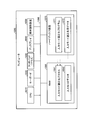
- FIG. 2 is a diagram illustrating the configuration of the information processing apparatus according to the first embodiment.
- FIG. 3A is a diagram illustrating an example of input information when NumLock is OFF.
- FIG. 3B is a diagram illustrating an example of input information when NumLock is ON.
- FIG. 4 is a diagram illustrating an example of a screen for notifying that the input mode has been changed.
- FIG. 5 is a flowchart illustrating the input mode optimization processing procedure performed by the information processing apparatus according to the first embodiment.
- FIG. 6 is a diagram illustrating the configuration of the information processing apparatus according to the second embodiment.
- FIG. 7 is a diagram illustrating an example of a screen for confirming whether or not to change the input mode.
- FIG. 8 is a flowchart illustrating the input mode optimization processing procedure performed by the information processing apparatus according to the second embodiment.
- FIG. 9A is a diagram illustrating an example of input information when CapsLock is OFF.
- FIG. 9B is a diagram illustrating an example of input information when CapsLock is ON.
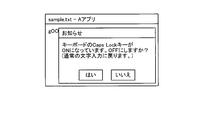
- FIG. 10 is a diagram illustrating an example of a screen for notifying that the input mode has been changed.
- FIG. 11 is a diagram illustrating an example of a screen for confirming whether or not to change the input mode.
- FIG. 12 is a flowchart illustrating the CapsLock input mode optimization processing procedure performed by the information processing apparatus according to the third embodiment.
- FIG. 9A is a diagram illustrating an example of input information when CapsLock is OFF.
- FIG. 9B is a diagram illustrating an example of input information when CapsLock is ON.
- FIG. 10 is a diagram illustrating an example of a screen for notifying that the input mode has been changed.
- FIG. 13 is a flowchart illustrating the half-width / full-width input mode optimization processing procedure performed by the information processing apparatus according to the third embodiment.
- FIG. 14 is a flowchart illustrating the kana input mode optimization processing procedure performed by the information processing apparatus according to the third embodiment.
- FIG. 15 is a flowchart illustrating the katakana input mode optimization processing procedure performed by the information processing apparatus according to the third embodiment.
- FIG. 16 is a diagram illustrating a computer that executes an input mode optimization program.
- Information processing apparatus 100, 200, 300 Information processing apparatus 110 Display unit 120 Operation unit 120a Key group 120b Control key 120c Touch pad 130 Storage unit 140, 240 Control unit 141 Determination unit 142, 242 Change unit 241 Confirmation unit 1000 Computer 1010 CPU 1020 Keyboard 1030 Touchpad 1040 Display 1050 Medium reader 1060 RAM 1061 Input mode optimization process 1062 Input mode data 1070 Hard disk device 1071 Input mode optimization program 1072 Input mode optimization data 1080 Bus
- an information processing apparatus an input mode optimization method, and an input mode optimization program disclosed in the present application will be described in detail with reference to the drawings.
- the information processing apparatus, the input mode optimization method, and the input mode optimization program disclosed in the present application are not limited to the embodiment.
- a case where the information processing apparatus disclosed in the present application is applied to a notebook computer will be described as an example.
- the information processing apparatus disclosed in the present application may be a desktop personal computer other than a notebook personal computer, It can also be applied to other information processing apparatuses such as information terminals.
- an information processing apparatus 100 that optimizes an input mode (NumLock “ON” or “OFF”) that is switched by pressing a NumLock key will be described. It is assumed that the information processing apparatus 100 according to the first embodiment is a notebook computer provided with a keyboard that does not have a numeric keypad. That is, in the case of Numlock “ON”, the information processing apparatus 100 assigns information “1” to the key “J” or assigns information “2” to the key “K” as described above.
- the information processing apparatus 100 inputs information using a key to which information such as a number is assigned in the state of NumLock “ON”, and deletes the input information (hereinafter, “deletion operation”). ”) Is received, the deleted information is stored. Then, the information processing apparatus 100 determines that the state in which NumLock is “ON” is an input mode not desired by the user when the same information is continuously deleted a predetermined number of times or more.
- the “predetermined number of times” referred to here is a predetermined threshold value determined in advance by the manufacturer or user of the information processing apparatus 100. Hereinafter, such a predetermined threshold is referred to as a “deletion operation threshold”.
- the information processing apparatus 100 determines that NumLock “ON” is an input mode that is not desired by the user, the information processing apparatus 100 changes the input mode to NumLock “OFF” and changes information assigned to each key. .
- the information processing apparatus 100 determines whether or not the number of repeated deletion operations is greater than the deletion operation threshold. Then, the information processing apparatus 100 changes the input mode to NumLock “OFF” when the number of deletion operations is larger than the deletion operation threshold.
- the first operation is as follows. When a user erroneously presses a key other than a key for inputting information to be input, undesired information is input and the input information is deleted. Thereafter, when the user erroneously inputs the same information as the information deleted in the above, the user deletes the information again. Such an operation corresponds to an operation in which the same information is continuously deleted.
- the second operation is as follows. The user presses a key for inputting information to be input, but the desired information is not input because NumLock is “ON”, and thus the input information is deleted. Thereafter, when the user does not notice that NumLock is “ON” and inputs the same information as the information deleted in the above, the user deletes the information again. Such an operation also corresponds to an operation in which the same information is continuously deleted.
- the information processing apparatus 100 determines that the NumLock “ON” is an input mode not desired by the user when the same information is continuously deleted.
- the information processing apparatus 100 changes to NumLock “OFF” when the deletion operation is repeatedly performed on the same information in a state where the NumLock is “ON”.
- the mode can be optimized to the state desired by the user. That is, the user who uses the information processing apparatus 100 can input desired information even when the user operates the Numlock key by mistake without knowing the operation method of the NumLock key.
- FIG. 1 is an external view of an information processing apparatus 100 according to the first embodiment.
- the information processing apparatus 100 is a notebook computer, and includes a display unit 110 and an operation unit 120.
- the display unit 110 is a display device that displays various types of information, for example, a liquid crystal display.
- the operation unit 120 is an input device for inputting various information and operation instructions, and includes a key group 120a, a control key 120b, and a touch pad 120c.
- the key group 120a is formed by one or more keys for inputting various information, and one or a plurality of information is assigned to each key. Each key in the key group 120a is pressed to input information assigned to it to the information processing apparatus 100.
- the control key 120b is a key for switching information to be assigned to the key group 120a, such as “NumLock key”, “CapsLock key”, “half-width / full-width Kanji key”, “Katakana Hiragana Roman character key”, and the like.
- the key group 120a and the control key 120b are generally called a keyboard.
- the touch pad 120c is a pointing device for operating a pointer or an icon displayed on the display unit 110.
- the touch pad 120c corresponds to a mouse in a desktop personal computer.
- FIG. 2 is a diagram illustrating the configuration of the information processing apparatus 100 according to the first embodiment.
- the information processing apparatus 100 includes a display unit 110, an operation unit 120, a storage unit 130, and a control unit 140.
- the display unit 110 and the operation unit 120 correspond to the display unit 110 and the operation unit 120 shown in FIG.
- an example in which various applications in the information processing apparatus 100 are operated using the operation unit 120 will be described.
- the user activates word processing software, spreadsheet software, a browser, etc. by operating the operation unit 120.
- word processor software, spreadsheet software, a browser, and the like corresponding to the activated application are displayed on the display unit 110.
- the user inputs information such as a character string by operating the key group 120a in the operation unit 120 in a state where word processing software or the like is displayed on the display unit 110.
- the user may input information such as a character string after switching the input mode by operating the control key 120b in the operation unit 120.
- a user using a notebook computer that does not have a numeric keypad such as the information processing apparatus 100 according to the first embodiment, operates the NumLock key to display information “1” or “K” on the key “J” or the key “K”. “2” or the like may be assigned. In such a case, the user uses such keys “J” and “K” as the numeric keys.
- the storage unit 130 is a storage device that stores various types of information, such as a RAM (Random Access Memory) or a hard disk device.
- the storage unit 130 according to the first embodiment stores information on “input mode”, which is information currently assigned to the key group 120a, information on a deletion operation threshold, deleted characters, and the like.
- the storage unit 130 stores, as the input mode, whether the current NumLock is “ON” or “OFF”.
- the storage unit 130 stores “3” as the deletion operation threshold. Note that the user can change the delete operation threshold stored in the storage unit 130.
- the control unit 140 manages various processes by the information processing apparatus 100, and includes a determination unit 141 and a change unit 142 as those related to the information processing apparatus 100 according to the first embodiment. In FIG. 2, only the processing unit related to the input mode optimization processing by the information processing apparatus 100 is shown.
- the determination unit 141 determines that the NumLock “ON” is not the input mode desired by the user when the deletion operation is continuously performed on the same information in a state where the NumLock is “ON”. To do.
- the determination unit 141 performs a deletion operation on the input information after the information is input using a key to which information such as a number is assigned by the user. Monitor whether or not Then, the determination unit 141 determines whether the number of deletion operations is larger than the deletion operation threshold stored in the storage unit 130 when the deletion operation is continuously performed on the same information. judge. When the number of deletion operations is larger than the deletion operation threshold, the determination unit 141 determines that the state in which NumLock is “ON” is an input mode not desired by the user.
- the determination unit 141 may determine that the deletion operation has been continuously performed on “same information” when a part of the continuously deleted information matches. For example, it is assumed that character strings are successively deleted in the following order.
- the determination unit 141 may determine that the deletion operation has been continuously performed on “same information”. This is because the timing at which the user notices an input error is not always constant. To explain using the above example, the user may notice an input error when inputting up to “6 is y64”, or may notice an input error when inputting up to “6”. That is, even if the same character string is erroneously input many times, the same character string is not always input.
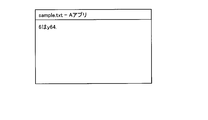
- FIG. 3A is a diagram illustrating an example of input information when NumLock is OFF.
- FIG. 3B is a diagram illustrating an example of input information when NumLock is ON.
- the deletion operation threshold is “3”. It is also assumed that NumLock is “ON”.
- the user deletes the character string “6 is y64.”.
- a user who is accustomed to the operation of the information processing apparatus 100 can input “Good morning” again after operating the NumLock key to change the input mode to NumLock “OFF”.
- a user who does not know the operation method of the NumLock key again inputs the character string “6 is y64.” Or a part of the character string “6 is y64.” Without operating the NumLock key. Then, it is conceivable to repeat the operation of deleting such input information.
- the determination unit 141 stores the deleted character string “6 is y64.” In the storage unit 130. Then, when the character string “6 is y64.” Or a part of the character string “6 is y64.” Is deleted again, the determination unit 141 stores the deleted character string in the storage unit 130 again. deep. In this way, the determination unit 141 continuously deletes the character string “6 is y64.” Or a part of the character string “6 is y64.” In the storage unit 130 four times in succession. Since the number of times “4” is larger than the deletion operation threshold “3”, it is determined that the state where NumLock is “ON” is an input mode not desired by the user.
- the changing unit 142 changes the input mode when the determining unit 141 determines that the input mode is not desired by the user. Specifically, the changing unit 142 changes the input mode to NumLock “OFF” when the determining unit 141 determines that the NumLock “ON” state is an input mode not desired by the user. To do.
- the change unit 142 may notify the user that the input mode has been changed when the input mode is changed.
- the changing unit 142 may display a predetermined screen on the display unit 110 or output a predetermined sound in order to notify that the input mode has been changed.
- FIG. 4 shows an example of a screen for notifying that the input mode has been changed.
- the change unit 142 may control the display unit 110 to display a pop-up screen including a message as illustrated in FIG. 4 when the input mode is changed. Thereby, the change part 142 can make a user recognize that the input mode was changed.
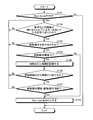
- FIG. 5 is a flowchart illustrating the input mode optimization processing procedure performed by the information processing apparatus 100 according to the first embodiment.
- the determination unit 141 of the information processing apparatus 100 has a key (for example, a key “K” or the like) to which information such as a number is assigned in a state where NumLock is “ON” (Yes in Step S101). ) Is input (Yes at step S102), it is monitored whether or not a deletion operation has been performed.
- a key for example, a key “K” or the like
- the determination unit 141 ends the process. In addition, even when NumLock is “ON” (Yes at Step S101), the determination unit 141 does not input information using a key to which information such as a number is assigned (No at Step S102). If the delete operation is not accepted (No at Step S103), the process returns to Step S102. That is, the determination unit 141 again monitors whether or not a deletion operation has been performed when information is input using a key to which information such as numbers is assigned (Yes in step S102).
- the determination unit 141 deletes the deleted information (character or character Column) and the like are stored in the storage unit 130 (step S105).
- the determination unit 141 If the deleted information does not match the previously deleted information (No at Step S106), the determination unit 141 returns to the process at Step S102 described above. Specifically, when information is input using a key to which information such as a number is assigned (Yes in step S102), the determination unit 141 monitors whether a deletion operation has been performed.
- the determination unit 141 determines whether the number of times of deletion operation is continuously performed on the information is larger than the deletion operation threshold value. Determine whether or not.
- the determination unit 141 determines that NumLock “ON” is not the input mode desired by the user. Subsequently, the changing unit 142 changes the input mode to NumLock “OFF” (step S108). At this time, the changing unit 142 may display the screen as shown in FIG. 4 on the display unit 110 or output a predetermined sound in order to notify that the input mode has been changed.
- the determination unit 141 returns to the process at Step S102 described above, and information is obtained using a key to which information such as numbers is assigned. When it is input (Yes at Step S102), it is monitored whether or not a deletion operation has been performed.
- the determination unit 141 performs the processing at Steps S105 to S107 and sets the NumLock “ON” to the user. To determine that the input mode is not desired. Then, the changing unit 142 changes the input mode to NumLock “OFF” (step S108).
- the information processing apparatus 100 changes NumLock to “OFF” when a deletion operation is repeatedly performed on the same information in a state where NumLock is “ON”. To do. Thereby, the information processing apparatus 100 can optimize the input mode to a state desired by the user. As a result, the information processing apparatus 100 can cause the user to input intended information.
- the information processing apparatus sets the input mode to the user. After confirming whether or not to change, the input mode may be optimized. Therefore, in the second embodiment, an example of an information processing apparatus that changes NumLock to “OFF” after confirming whether or not to change the input mode to the user will be described.
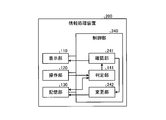
- FIG. 6 is a diagram illustrating the configuration of the information processing apparatus 200 according to the second embodiment.
- the information processing apparatus 200 includes a control unit 240 instead of the control unit 140 as compared with the information processing apparatus 100 illustrated in FIG. 2.
- the control unit 240 newly includes a confirmation unit 241 as compared with the control unit 140 illustrated in FIG. Further, the control unit 240 includes a changing unit 242 instead of the changing unit 142 as compared with the control unit 140.
- the confirmation unit 241 confirms whether or not to change the input mode to the user when the determination unit 141 determines that the NumLock “ON” state is an input mode not desired by the user. .
- the confirmation unit 241 controls the display unit 110 to display a screen for confirming whether or not to change the input mode (hereinafter referred to as “confirmation screen”), and sets NumLock to “OFF”. Check if it is good. Then, the confirmation unit 241 determines that the input mode may be changed when an operation for changing the input mode is received on the confirmation screen. On the other hand, the confirmation unit 241 determines that the input mode should not be changed when an operation for not changing the input mode is received on the confirmation screen.
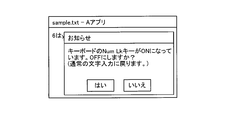
- FIG. 7 shows an example of a screen for confirming whether or not to change the input mode.
- the confirmation unit 241 controls the display unit 110 to display a pop-up screen including a message for confirming whether or not to change the input mode. For example, when “Yes” is pressed on the screen illustrated in FIG. 7, the confirmation unit 241 determines that the input mode may be changed. On the other hand, the confirmation unit 241 determines that the input mode should not be changed when “No” is pressed on the screen illustrated in FIG. 7.
- the changing unit 242 changes the NumLock input mode to “OFF”. Referring to the example illustrated in FIG. 7, when “Yes” is pressed on the screen illustrated in FIG. 7, the changing unit 242 changes the NumLock input mode to “OFF”. On the other hand, when “No” is pressed on the screen illustrated in FIG. 7, the changing unit 242 does not change the NumLock input mode and remains “ON”.
- FIG. 8 is a flowchart illustrating the input mode optimization processing procedure performed by the information processing apparatus 200 according to the second embodiment.
- the description of the processing procedure (steps S201 to S206) similar to the processing procedure shown in FIG. 5 is omitted.
- the confirmation unit 241 of the information processing device 200 determines that the number of deletion operations performed by the determination unit 141 is greater than the deletion operation threshold (Yes in step S207), or the deletion operation threshold is If it is “0” or less (No at Step S204), the display unit 110 is controlled to display a confirmation screen for confirming whether or not to change the input mode (Step S208).
- the changing unit 242 changes the NumLock input mode to “OFF” (Step S210).
- the changing unit 242 keeps the NumLock input mode unchanged and remains “ON”. Then, the determination unit 141 returns to the process in step S202, and when information is input again using a key to which information such as a number is assigned (Yes in step S202), whether or not a deletion operation has been performed. To monitor.
- the information processing apparatus 200 allows the user to enter the input mode when the NumLock is “ON” and the deletion operation is repeatedly performed on the same information. Confirm whether or not to change.
- the information processing apparatus 200 receives an operation for changing the input mode from the user, the information processing apparatus 200 changes NumLock to “OFF”.
- the information processing apparatus 200 according to the second embodiment can optimize the input mode to a state desired by the user when the user wants to change the input mode.
- the NumLock key has been described as an example of the control key.
- the information processing apparatus can optimize the input mode controlled by a control key other than the NumLock key.
- the information processing apparatus can optimize the input mode controlled by control keys such as “CapsLock key”, “half-width / full-width Kanji key”, and “Katakana Hiragana / Romaji key”. Therefore, in the third embodiment, an example of the information processing apparatus 300 that optimizes the input mode controlled by a control key other than the NumLock key will be described.
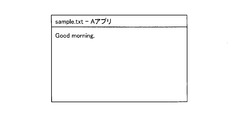
- FIG. 9A is a diagram illustrating an example of input information when CapsLock is OFF.
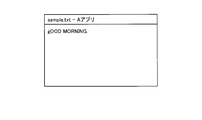
- FIG. 9B is a diagram illustrating an example of input information when CapsLock is ON.
- FIG. 9A it is assumed that the user wants to input a character string “Good morning.” Into a predetermined word processing software or the like. However, when CapsLock is “ON”, the user can select the keys “G”, “O”, “O”,..., “I”, “N”, “G”, “. “Good morning.” Cannot be entered even if "" is pressed.
- a character string “gOOD MORNING.” Is input to the word processing software.
- the information processing apparatus 300 changes CapsLock to “OFF” when a deletion operation is repeatedly performed on the same information in a state where CapsLock is “ON”.
- the information processing apparatus 300 performs the deletion operation when the deletion operation is repeatedly performed on the input information after predetermined information is input. It is determined whether or not the number of times is larger than a deletion operation threshold. Then, when the number of deletion operations is greater than the deletion operation threshold, the information processing apparatus 300 changes CapsLock to “OFF”.
- the information processing apparatus 300 controls the display unit 110 to display a screen for notifying that the input mode has been changed after CapsLock is set to “OFF”. Or you may.
- the information processing apparatus 300 may display and control a pop-up screen including a message as illustrated in FIG.
- the information processing apparatus 300 controls the display of the confirmation screen on the display unit 110 and confirms whether or not to change the input mode to the user, and then CapsLock. May be changed to “OFF”.
- the information processing apparatus 300 controls the display unit 110 to display a confirmation screen as illustrated in FIG. 11 and confirms whether or not to change the input mode to the user. Then, the information processing apparatus 300 changes CapsLock to “OFF” when “Yes” is pressed on the confirmation screen.
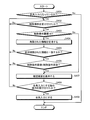
- FIG. 12 is a flowchart illustrating the CapsLock input mode optimization processing procedure performed by the information processing apparatus 300 according to the third embodiment. Note that the information processing apparatus 300 in FIG. 12 changes the input mode after confirming with the user whether or not to change the input mode, like the information processing apparatus 200 according to the second embodiment.
- the determination unit 141 of the information processing device 300 monitors whether or not a deletion operation has been performed on input information in a state where CapsLock is “ON” (Yes in step S301). .
- the processing procedures in steps S302 to S306 are the same as the processing procedures in steps S203 to S207 shown in FIG. 8, respectively.
- the confirmation unit 241 of the information processing device 300 controls display of the confirmation screen on the display unit 110 ( Step S307).
- the changing unit 242 changes the CapsLock input mode to “OFF” (Step S309).
- the information processing apparatus 300 according to the third embodiment changes CapsLock to “OFF” when a deletion operation is performed in a state where CapsLock is “ON”. Thereby, the information processing apparatus 300 according to the third embodiment can optimize the CapsLock input mode to a state desired by the user.
- the information processing apparatus can be controlled by a control key such as a “half-width / full-width Kanji key” or a “Katakana Hiragana Roman character key”.
- the input mode to be controlled can also be optimized.
- FIG. 13 is a flowchart illustrating the half-width / full-width input mode optimization processing procedure performed by the information processing apparatus 300 according to the third embodiment.
- the half-width full-width input mode is controlled by half-width / full-width Kanji keys.
- the determination unit 141 of the information processing device 300 has performed a deletion operation on the input information in a state where the input mode of half-width and full-width is “half-width input” (Yes in step S401). Monitor whether or not.
- the processing procedures in steps S402 to S407 are the same as the processing procedures in steps S302 to S307 shown in FIG. 12, respectively.
- the changing unit 242 of the information processing device 300 changes the input mode of half-width and full-width to “full-width input” (step S409).
- FIG. 14 is a flowchart illustrating the kana input mode optimization processing procedure performed by the information processing apparatus 300 according to the third embodiment.
- the kana input mode is controlled by the Katakana Hiragana Roman key. For example, the user changes the input mode to either “Kana input” or “Romaji input” by pressing the Katakana Hiragana Roman character key while pressing the Alt key.
- the determination unit 141 of the information processing device 300 determines whether a deletion operation has been performed on the input information in a state where the input mode is “kana input” (Yes in step S501). Monitor.
- the processing procedures in steps S502 to S507 are the same as the processing procedures in steps S302 to S307 shown in FIG. 12, respectively.
- the changing unit 242 of the information processing apparatus 300 changes the input mode of the kana to “Romaji input” (Step S509).
- FIG. 15 is a flowchart illustrating the katakana input mode optimization processing procedure performed by the information processing apparatus 300 according to the third embodiment.
- the Katakana input mode is controlled by the Katakana Hiragana Roman key. For example, when the input mode is “Kana input”, the user changes the input mode to “Hiragana” or “Katakana” by pressing the Katakana Hiragana Roman character key while pressing the Shift key. To do.
- the determination unit 141 of the information processing device 300 monitors whether or not a deletion operation has been performed on the input information in a state where the input mode is “katakana” (Yes in step S601). To do.
- the processing procedures in steps S602 to S607 are the same as the processing procedures in steps S302 to S307 shown in FIG. 12, respectively.
- Step S608 when an operation for changing the input mode is received on the confirmation screen (Yes at Step S608), the changing unit 242 of the information processing apparatus 300 changes the input mode of the kana to “Hiragana” (Step S609).
- the information processing apparatus 300 can also optimize the input mode controlled by the control keys such as “half-width / full-width Kanji key”, “Katakana Hiragana Roman key”, and the like. Note that the above is an example, and the information processing apparatus 300 can optimize the input mode controlled by another control key such as a “Scroll Lock key”, for example.
- the information processing apparatus 300 in FIGS. 12 to 15 changes the input mode without confirming whether or not to change the input mode, as in the information processing apparatus 100 according to the first embodiment. Also good.
- the information processing apparatuses 100, 200, and 300 described in the first to third embodiments may be implemented in various different forms other than the first to third embodiments.
- the fourth embodiment another embodiment included in the information processing apparatus 100 disclosed in the present application will be described.
- the information processing apparatus 100 or the like uses the deletion operation threshold stored in the storage unit 130 to determine whether or not the input mode is desired by the user. .
- the information processing apparatus 100 or the like may update the deletion operation threshold stored in the storage unit 130.
- the information processing apparatus 100 or the like may update the deletion operation threshold to a small value when the input mode optimization processing is performed many times within a predetermined period. More specifically, for example, it is assumed that the deletion operation threshold “5” is stored in the storage unit 130. In this state, within a predetermined period (for example, one day), the user erroneously presses the control key many times, and the information processing apparatus 100 performs the input mode optimization processing a predetermined number of times (for example, 5). Times). In such a case, the information processing apparatus 100 may update the deletion operation threshold to a value smaller than “5” (for example, “3”) and perform the input mode optimization process at an earlier timing.
- a predetermined period for example, one day
- the information processing apparatus 100 may update the deletion operation threshold to a value smaller than “5” (for example, “3”) and perform the input mode optimization process at an earlier timing.
- the information processing apparatus 100 and the like can optimize the input mode at an earlier timing when used by a user who does not know the control key operation method and the like.
- the information processing apparatus 200 or the like may not display the confirmation screen when an operation for changing the input mode is continuously received from the user a predetermined number of times or more on the confirmation screen. This is because a user who performs an operation to change the input mode on the confirmation screen every time is considered not to be familiar with the control key operation method and the like. That is, for such a user, the input mode optimization process may be performed without confirming that the input mode is to be changed on the confirmation screen. Thereby, the information processing apparatus 200 or the like can optimize the input mode without causing the user to perform confirmation work.
- the information processing apparatuses 100, 200, and 300 that optimize the input mode controlled by the control key have been described using specific examples of the control key.
- one information processing apparatus may have the functions of the information processing apparatuses 100, 200, and 300 described above.
- the storage unit 130 of the information processing apparatus may store a deletion operation threshold value for each control key.
- FIG. 16 is a diagram illustrating a computer 1000 that executes an input mode optimization program.
- the computer 1000 includes a CPU (Central Processing Unit) 1010 that executes various arithmetic processes, a keyboard 1020 and a touch pad 1030 that receive input of information from the user, and a display 1040 that displays various information.
- a medium reader 1050 for reading a program from a recording medium, a RAM 1060 for temporarily storing various information, and a hard disk device 1070 are connected by a bus 1080.
- the hard disk device 1070 stores an input mode optimization program 1071 having the same function as the control unit 140 or 240 shown in FIG. 2 or FIG.
- the hard disk device 1070 stores input mode optimization data 1072 corresponding to various data stored in the storage unit 130 illustrated in FIG. 2 or FIG. Note that the input mode optimization data 1072 can be appropriately distributed and stored in another computer connected via a network.
- the RAM 1060 stores input mode data 1062 that is information related to the “input mode” that is information that is actually assigned to the keyboard 1020.
- the CPU 1010 reads out the input mode optimization program 1071 from the hard disk device 1070 and develops it in the RAM 1060, whereby the input mode optimization program 1071 functions as the input mode optimization process 1061. Then, the input mode optimization process 1061 appropriately expands information read from the input mode optimization data 1072 in an area allocated to itself on the RAM 1060, and based on the expanded data, the input mode data 1062, and the like. Various data processing is executed.
- the input mode optimization program 1071 does not necessarily need to be stored in the hard disk device 1070.
- the computer 1000 reads out and executes this program stored in a storage medium such as a CD-ROM. Also good.
- the computer 1000 stores the program in another computer (or server) connected to the computer 1000 via a public line, the Internet, a LAN (Local Area Network), a WAN (Wide Area Network), or the like. You may make it read and run a program from these.
Landscapes
- Engineering & Computer Science (AREA)
- General Engineering & Computer Science (AREA)
- Theoretical Computer Science (AREA)
- Human Computer Interaction (AREA)
- Physics & Mathematics (AREA)
- General Physics & Mathematics (AREA)
- Input From Keyboards Or The Like (AREA)
Abstract
Description
110 表示部
120 操作部
120a キー群
120b 制御キー
120c タッチパッド
130 記憶部
140、240 制御部
141 判定部
142、242 変更部
241 確認部
1000 コンピュータ
1010 CPU
1020 キーボード
1030 タッチパッド
1040 ディスプレイ
1050 媒体読取装置
1060 RAM
1061 入力モード適正化プロセス
1062 入力モードデータ
1070 ハードディスク装置
1071 入力モード適正化プログラム
1072 入力モード適正化用データ
1080 バス
「6は」
「6はy」
「6」
上記実施例1~3では、情報処理装置100等が、記憶部130に記憶されている削除操作閾値を用いて、利用者が所望する入力モードになっているか否かを判定する例を示した。ここで、情報処理装置100等は、記憶部130に記憶されている削除操作閾値を更新してもよい。
上記実施例2および3では、入力モードを変更するか否かを確認するための確認画面を表示部110に表示制御する例を示した。ここで、情報処理装置200等は、確認画面において、利用者から入力モードを変更する旨の操作を所定の回数以上連続して受けた場合には、確認画面を表示しないようにしてもよい。これは、確認画面において入力モードを変更する旨の操作を毎回行う利用者は、制御キーの操作手法等を熟知していないと考えられるからである。すなわち、このような利用者に対しては、確認画面において入力モードを変更する旨の確認をするまでもなく入力モード適正化処理を行ってもよいと考えられる。これにより、情報処理装置200等は、利用者に確認作業を行わせることなく入力モードを適正化することができる。
上記実施例1~3では、制御キーの具体例を挙げて、かかる制御キーによって制御される入力モードを適正化する情報処理装置100、200および300について説明した。しかし、1個の情報処理装置が、上述した情報処理装置100、200および300が有する機能を有してもよい。かかる場合、情報処理装置の記憶部130は、制御キー毎に削除操作閾値を記憶してもよい。
上記実施例1~3で説明した各種の処理は、あらかじめ用意されたプログラムをパーソナルコンピュータやワークステーションなどのコンピュータで実行することによって実現することができる。そこで、以下では、図16を用いて、上記実施例1~3と同様の機能を有する入力モード適正化プログラムを実行するコンピュータの一例を説明する。図16は、入力モード適正化プログラムを実行するコンピュータ1000を示す図である。
Claims (7)
- 第一の文字または第二の文字を入力するためのキーと、前記キーに割り当てる情報を前記第一の文字または前記第二の文字のいずれかに切り替えるための制御キーとを含む入力部と、
前記制御キーが操作されたことによって前記キーに割り当てる情報が前記第二の文字に切り替えられている状態において、前記キーが操作されたことによって入力された文字を削除する操作である削除操作を受け付けた場合に、前記キーに割り当てられている情報が誤りであると判定する判定手段と、
前記判定手段によって前記キーに割り当てられている情報が誤りであると判定された場合に、前記キーに割り当てる情報を前記第一の文字に変更する変更手段と
を備えたことを特徴とする情報処理装置。 - 前記判定手段は、前記削除操作を受け付けた回数が所定の閾値以上である場合に、前記キーに割り当てられている情報が誤りであると判定することを特徴とする請求項1に記載の情報処理装置。
- 前記判定手段によって前記キーに割り当てられている情報が誤りであると判定された場合に、前記キーに割り当てる情報を前記第一の文字に変更するか否かを利用者に対して確認する確認手段をさらに備え、
前記変更手段は、前記確認手段によって前記キーに割り当てる情報を前記第一の文字に変更することが確認された場合に、前記キーに割り当てる情報を前記第一の文字に変更することを特徴とする請求項1または2に記載の情報処理装置。 - 前記変更手段は、前記キーに割り当てる情報を前記第一の文字に変更する処理を、所定の期間内に所定の回数以上行った場合に、前記所定の閾値を小さくすることを特徴とする請求項2に記載の情報処理装置。
- 前記制御キーは、NumLockキーまたはCapsLockキーのいずれかであることを特徴とする請求項1に記載の情報処理装置。
- 第一の文字または第二の文字を入力するためのキーと、前記キーに割り当てる情報を前記第一の文字または前記第二の文字のいずれかに切り替えるための制御キーとを含む入力部を有する情報処理装置による入力モード適正化方法であって、
前記情報処理装置が、
前記制御キーが操作されたことによって前記キーに割り当てる情報が前記第二の文字に切り替えられている状態において、前記キーが操作されたことによって入力された文字を削除する操作である削除操作を受け付けた場合に、前記キーに割り当てられている情報が誤りであると判定する判定工程と、
前記判定工程によって前記キーに割り当てられている情報が誤りであると判定された場合に、前記キーに割り当てる情報を前記第一の文字に変更する変更工程と
を含んだことを特徴とする入力モード適正化方法。 - 第一の文字または第二の文字を入力するためのキーと、前記キーに割り当てる情報を前記第一の文字または前記第二の文字のいずれかに切り替えるための制御キーとを含む入力部を有する情報処理装置に実行させる入力モード適正化プログラムであって、
前記制御キーが操作されたことによって前記キーに割り当てる情報が前記第二の文字に切り替えられている状態において、前記キーが操作されたことによって入力された文字を削除する操作である削除操作を受け付けた場合に、前記キーに割り当てられている情報が誤りであると判定する判定手順と、
前記判定手順によって前記キーに割り当てられている情報が誤りであると判定された場合に、前記キーに割り当てる情報を前記第一の文字に変更する変更手順と
を有することを特徴とする入力モード適正化プログラム。
Priority Applications (4)
| Application Number | Priority Date | Filing Date | Title |
|---|---|---|---|
| CN200980154507.XA CN102282526B (zh) | 2009-01-13 | 2009-01-13 | 信息处理装置、输入模式适宜化方法 |
| JP2010546480A JP5212483B2 (ja) | 2009-01-13 | 2009-01-13 | 情報処理装置、入力モード適正化方法および入力モード適正化プログラム |
| PCT/JP2009/050309 WO2010082295A1 (ja) | 2009-01-13 | 2009-01-13 | 情報処理装置、入力モード適正化方法および入力モード適正化プログラム |
| US13/067,512 US9019132B2 (en) | 2009-01-13 | 2011-06-06 | Information processing apparatus and input-mode adjustment method |
Applications Claiming Priority (1)
| Application Number | Priority Date | Filing Date | Title |
|---|---|---|---|
| PCT/JP2009/050309 WO2010082295A1 (ja) | 2009-01-13 | 2009-01-13 | 情報処理装置、入力モード適正化方法および入力モード適正化プログラム |
Related Child Applications (1)
| Application Number | Title | Priority Date | Filing Date |
|---|---|---|---|
| US13/067,512 Continuation US9019132B2 (en) | 2009-01-13 | 2011-06-06 | Information processing apparatus and input-mode adjustment method |
Publications (1)
| Publication Number | Publication Date |
|---|---|
| WO2010082295A1 true WO2010082295A1 (ja) | 2010-07-22 |
Family
ID=42339564
Family Applications (1)
| Application Number | Title | Priority Date | Filing Date |
|---|---|---|---|
| PCT/JP2009/050309 Ceased WO2010082295A1 (ja) | 2009-01-13 | 2009-01-13 | 情報処理装置、入力モード適正化方法および入力モード適正化プログラム |
Country Status (4)
| Country | Link |
|---|---|
| US (1) | US9019132B2 (ja) |
| JP (1) | JP5212483B2 (ja) |
| CN (1) | CN102282526B (ja) |
| WO (1) | WO2010082295A1 (ja) |
Families Citing this family (5)
| Publication number | Priority date | Publication date | Assignee | Title |
|---|---|---|---|---|
| CN103019398A (zh) * | 2011-09-20 | 2013-04-03 | 腾讯科技(深圳)有限公司 | 一种文字输入方法及文字输入装置 |
| CN105607805B (zh) * | 2015-12-18 | 2019-05-07 | 小米科技有限责任公司 | 应用图标的角标处理方法及装置 |
| CN107479720B (zh) * | 2016-06-08 | 2022-02-22 | 阿尔派株式会社 | 输入装置、输入方法及输入系统 |
| US10466891B2 (en) * | 2016-09-12 | 2019-11-05 | Apple Inc. | Special lock mode user interface |
| JP7224553B2 (ja) * | 2020-08-05 | 2023-02-17 | 三菱電機株式会社 | 情報処理装置及び情報処理方法 |
Citations (1)
| Publication number | Priority date | Publication date | Assignee | Title |
|---|---|---|---|---|
| JPS584426A (ja) * | 1981-07-01 | 1983-01-11 | Nec Corp | キ−ボ−ドのモ−ド遷移方法 |
Family Cites Families (8)
| Publication number | Priority date | Publication date | Assignee | Title |
|---|---|---|---|---|
| JPS598044A (ja) | 1982-07-05 | 1984-01-17 | Casio Comput Co Ltd | 文字入力装置 |
| JPS61243519A (ja) | 1985-04-22 | 1986-10-29 | Toshiba Corp | 入力装置 |
| CN1032559C (zh) * | 1992-11-07 | 1996-08-14 | 王璐 | 文字输入加速方法 |
| JPH08263179A (ja) * | 1995-03-28 | 1996-10-11 | Fujitsu Ltd | 電源制御方法並びに電子機器 |
| JP2000231439A (ja) | 1999-02-10 | 2000-08-22 | Hitachi Ltd | 情報入力装置 |
| US6907580B2 (en) * | 2000-12-14 | 2005-06-14 | Microsoft Corporation | Selection paradigm for displayed user interface |
| JP4313002B2 (ja) * | 2002-07-08 | 2009-08-12 | シャープ株式会社 | 入力制御装置 |
| US8232901B2 (en) * | 2007-06-29 | 2012-07-31 | International Business Machines Corporation | Determining an alternative character string |
-
2009
- 2009-01-13 CN CN200980154507.XA patent/CN102282526B/zh not_active Expired - Fee Related
- 2009-01-13 JP JP2010546480A patent/JP5212483B2/ja not_active Expired - Fee Related
- 2009-01-13 WO PCT/JP2009/050309 patent/WO2010082295A1/ja not_active Ceased
-
2011
- 2011-06-06 US US13/067,512 patent/US9019132B2/en not_active Expired - Fee Related
Patent Citations (1)
| Publication number | Priority date | Publication date | Assignee | Title |
|---|---|---|---|---|
| JPS584426A (ja) * | 1981-07-01 | 1983-01-11 | Nec Corp | キ−ボ−ドのモ−ド遷移方法 |
Also Published As
| Publication number | Publication date |
|---|---|
| US20110234428A1 (en) | 2011-09-29 |
| JP5212483B2 (ja) | 2013-06-19 |
| JPWO2010082295A1 (ja) | 2012-06-28 |
| CN102282526B (zh) | 2015-06-24 |
| CN102282526A (zh) | 2011-12-14 |
| US9019132B2 (en) | 2015-04-28 |
Similar Documents
| Publication | Publication Date | Title |
|---|---|---|
| KR101366723B1 (ko) | 다중 접점 문자 입력 방법 및 시스템 | |
| KR101085655B1 (ko) | 단말의 문자 입력 장치 및 방법 | |
| US8997013B2 (en) | Multiple graphical keyboards for continuous gesture input | |
| JP2010061656A (ja) | スクリーン仮想キーボードシステム | |
| US8866746B2 (en) | Handheld electronic device and associated method providing disambiguation of an ambiguous object during editing and selectively providing prediction of future characters | |
| JP5212483B2 (ja) | 情報処理装置、入力モード適正化方法および入力モード適正化プログラム | |
| US8190421B2 (en) | Handheld electronic device including toggle of a selected data source, and associated method | |
| CN104461258A (zh) | 用于操作计算机的方法和系统 | |
| US20090015556A1 (en) | Method and apparatus for interacting with an application | |
| US20040125152A1 (en) | User customizable, locale dependent, variant character entry method and apparatus | |
| CN102681752A (zh) | 电子装置及其控制方法 | |
| JP2003177854A (ja) | 習熟度別画面表示プログラム、習熟度別画面表示装置 | |
| JP2005228180A (ja) | データ処理装置、データ入力方法及びプログラム | |
| JP6233064B2 (ja) | 入力装置、入力方法、および入力プログラム | |
| JP2005235168A (ja) | 文字入力装置 | |
| Lehikoinen et al. | An empirical and theoretical evaluation of binscroll: A rapid selection technique for alphanumeric lists | |
| JP2004110410A (ja) | 表の表示方法、表示システム、およびコンピュータプログラム | |
| CA2541580C (en) | Handheld electronic device including toggle of a selected data source, and associated method | |
| JP2003288155A (ja) | 文字列入力プログラム | |
| KR102869440B1 (ko) | 소프트웨어로 구현 가능한 문자 입력 장치 | |
| CN111788776B (zh) | 键盘输入电子设备的输入方法 | |
| JP6380085B2 (ja) | 情報処理装置及びプログラム | |
| US20110105188A1 (en) | System and method for facilitating character capitalization in handheld electronic device | |
| KR20000054630A (ko) | 웹브라우저 내의 명령 입력창 표시 방법 | |
| JP2013196598A (ja) | 情報処理装置、方法、およびプログラム |
Legal Events
| Date | Code | Title | Description |
|---|---|---|---|
| WWE | Wipo information: entry into national phase |
Ref document number: 200980154507.X Country of ref document: CN |
|
| 121 | Ep: the epo has been informed by wipo that ep was designated in this application |
Ref document number: 09838265 Country of ref document: EP Kind code of ref document: A1 |
|
| WWE | Wipo information: entry into national phase |
Ref document number: 2010546480 Country of ref document: JP |
|
| NENP | Non-entry into the national phase |
Ref country code: DE |
|
| 122 | Ep: pct application non-entry in european phase |
Ref document number: 09838265 Country of ref document: EP Kind code of ref document: A1 |