EP4044037A1 - Sammeln und verschlüsseln eines debug logs einer nativen softwareanwendung in einer bildverarbeitungsvorrichtung und übertragung an ein rechnerfernes gerät - Google Patents
Sammeln und verschlüsseln eines debug logs einer nativen softwareanwendung in einer bildverarbeitungsvorrichtung und übertragung an ein rechnerfernes gerät Download PDFInfo
- Publication number
- EP4044037A1 EP4044037A1 EP22156084.0A EP22156084A EP4044037A1 EP 4044037 A1 EP4044037 A1 EP 4044037A1 EP 22156084 A EP22156084 A EP 22156084A EP 4044037 A1 EP4044037 A1 EP 4044037A1
- Authority
- EP
- European Patent Office
- Prior art keywords
- built
- application
- encryption key
- debug log
- image processing
- Prior art date
- Legal status (The legal status is an assumption and is not a legal conclusion. Google has not performed a legal analysis and makes no representation as to the accuracy of the status listed.)
- Pending
Links
Images



Classifications
-
- G—PHYSICS
- G06—COMPUTING OR CALCULATING; COUNTING
- G06F—ELECTRIC DIGITAL DATA PROCESSING
- G06F11/00—Error detection; Error correction; Monitoring
- G06F11/36—Prevention of errors by analysis, debugging or testing of software
- G06F11/362—Debugging of software
- G06F11/3636—Debugging of software by tracing the execution of the program
-
- G—PHYSICS
- G06—COMPUTING OR CALCULATING; COUNTING
- G06F—ELECTRIC DIGITAL DATA PROCESSING
- G06F21/00—Security arrangements for protecting computers, components thereof, programs or data against unauthorised activity
- G06F21/60—Protecting data
- G06F21/62—Protecting access to data via a platform, e.g. using keys or access control rules
- G06F21/6209—Protecting access to data via a platform, e.g. using keys or access control rules to a single file or object, e.g. in a secure envelope, encrypted and accessed using a key, or with access control rules appended to the object itself
-
- H—ELECTRICITY
- H04—ELECTRIC COMMUNICATION TECHNIQUE
- H04N—PICTORIAL COMMUNICATION, e.g. TELEVISION
- H04N1/00—Scanning, transmission or reproduction of documents or the like, e.g. facsimile transmission; Details thereof
- H04N1/00912—Arrangements for controlling a still picture apparatus or components thereof not otherwise provided for
- H04N1/00938—Software related arrangements, e.g. loading applications
-
- G—PHYSICS
- G06—COMPUTING OR CALCULATING; COUNTING
- G06F—ELECTRIC DIGITAL DATA PROCESSING
- G06F11/00—Error detection; Error correction; Monitoring
- G06F11/36—Prevention of errors by analysis, debugging or testing of software
- G06F11/362—Debugging of software
-
- G—PHYSICS
- G06—COMPUTING OR CALCULATING; COUNTING
- G06F—ELECTRIC DIGITAL DATA PROCESSING
- G06F11/00—Error detection; Error correction; Monitoring
- G06F11/36—Prevention of errors by analysis, debugging or testing of software
- G06F11/3668—Testing of software
- G06F11/3672—Test management
- G06F11/3692—Test management for test results analysis
-
- G—PHYSICS
- G06—COMPUTING OR CALCULATING; COUNTING
- G06F—ELECTRIC DIGITAL DATA PROCESSING
- G06F11/00—Error detection; Error correction; Monitoring
- G06F11/36—Prevention of errors by analysis, debugging or testing of software
- G06F11/3698—Environments for analysis, debugging or testing of software
-
- G—PHYSICS
- G06—COMPUTING OR CALCULATING; COUNTING
- G06F—ELECTRIC DIGITAL DATA PROCESSING
- G06F21/00—Security arrangements for protecting computers, components thereof, programs or data against unauthorised activity
- G06F21/60—Protecting data
- G06F21/602—Providing cryptographic facilities or services
-
- H—ELECTRICITY
- H04—ELECTRIC COMMUNICATION TECHNIQUE
- H04N—PICTORIAL COMMUNICATION, e.g. TELEVISION
- H04N1/00—Scanning, transmission or reproduction of documents or the like, e.g. facsimile transmission; Details thereof
- H04N1/00127—Connection or combination of a still picture apparatus with another apparatus, e.g. for storage, processing or transmission of still picture signals or of information associated with a still picture
- H04N1/00204—Connection or combination of a still picture apparatus with another apparatus, e.g. for storage, processing or transmission of still picture signals or of information associated with a still picture with a digital computer or a digital computer system, e.g. an internet server
- H04N1/00206—Transmitting or receiving computer data via an image communication device, e.g. a facsimile transceiver
-
- H—ELECTRICITY
- H04—ELECTRIC COMMUNICATION TECHNIQUE
- H04N—PICTORIAL COMMUNICATION, e.g. TELEVISION
- H04N1/00—Scanning, transmission or reproduction of documents or the like, e.g. facsimile transmission; Details thereof
- H04N1/32—Circuits or arrangements for control or supervision between transmitter and receiver or between image input and image output device, e.g. between a still-image camera and its memory or between a still-image camera and a printer device
- H04N1/32101—Display, printing, storage or transmission of additional information, e.g. ID code, date and time or title
- H04N1/32144—Display, printing, storage or transmission of additional information, e.g. ID code, date and time or title embedded in the image data, i.e. enclosed or integrated in the image, e.g. watermark, super-imposed logo or stamp
- H04N1/32149—Methods relating to embedding, encoding, decoding, detection or retrieval operations
- H04N1/32267—Methods relating to embedding, encoding, decoding, detection or retrieval operations combined with processing of the image
- H04N1/32272—Encryption or ciphering
-
- H—ELECTRICITY
- H04—ELECTRIC COMMUNICATION TECHNIQUE
- H04N—PICTORIAL COMMUNICATION, e.g. TELEVISION
- H04N1/00—Scanning, transmission or reproduction of documents or the like, e.g. facsimile transmission; Details thereof
- H04N1/32—Circuits or arrangements for control or supervision between transmitter and receiver or between image input and image output device, e.g. between a still-image camera and its memory or between a still-image camera and a printer device
- H04N1/32358—Circuits or arrangements for control or supervision between transmitter and receiver or between image input and image output device, e.g. between a still-image camera and its memory or between a still-image camera and a printer device using picture signal storage, e.g. at transmitter
-
- H—ELECTRICITY
- H04—ELECTRIC COMMUNICATION TECHNIQUE
- H04N—PICTORIAL COMMUNICATION, e.g. TELEVISION
- H04N2201/00—Indexing scheme relating to scanning, transmission or reproduction of documents or the like, and to details thereof
- H04N2201/32—Circuits or arrangements for control or supervision between transmitter and receiver or between image input and image output device, e.g. between a still-image camera and its memory or between a still-image camera and a printer device
- H04N2201/3201—Display, printing, storage or transmission of additional information, e.g. ID code, date and time or title
- H04N2201/328—Processing of the additional information
- H04N2201/3281—Encryption; Ciphering
-
- H—ELECTRICITY
- H04—ELECTRIC COMMUNICATION TECHNIQUE
- H04N—PICTORIAL COMMUNICATION, e.g. TELEVISION
- H04N2201/00—Indexing scheme relating to scanning, transmission or reproduction of documents or the like, and to details thereof
- H04N2201/32—Circuits or arrangements for control or supervision between transmitter and receiver or between image input and image output device, e.g. between a still-image camera and its memory or between a still-image camera and a printer device
- H04N2201/3201—Display, printing, storage or transmission of additional information, e.g. ID code, date and time or title
- H04N2201/328—Processing of the additional information
- H04N2201/3284—Processing of the additional information for error correction
Definitions
- Embodiments described herein relate generally to an image processing device, an image processing method, and a diagnostic system for the image processing device.
- the debug log obtained from the image processing device is not limited to the debug log of the built-in application in which the malfunction occurs, and also includes a debug log of controller software installed in the image processing device.
- the debug log is encrypted, the debug log of the built-in application in which the malfunction occurs cannot be extracted without decrypting all debug logs acquired from the image processing device. Therefore, a mechanism of collecting a debug log of a desired built-in application with a simple operation is demanded.
- One of the objects of the present invention is to improve prior art techniques and overcome at least some of the prior art problems as for instance above illustrated.
- an image processing device comprising a memory for storing an encryption key in correlation with a built-in application during installation of the built-in application; an encryption component for encrypting a debug log relating to the built-in application with the encryption key in correlation with the corresponding built-in application; and an output component for outputting the debug log encrypted by the encryption component.
- the output component transmits the debug log to a transmission destination set in advance.
- the image processing device further provides a reception component for receiving instruction of whether to set the encryption key if there is no the encryption key in correlation with the built-in application.
- the memory stores the encryption key uploaded from outside of the image processing device.
- the output component if an instruction not to set the encryption key is received by the reception component, the output component outputs the debug log relating to the built-in application without encryption.
- the built-in application comprises built-in application data record includes at least two of program data of the built-in application, metadata of the built-in application, the encryption key, a folder name of the debug log, an acquisition timing of the debug log, and a transmission destination of the debug log.
- the encryption key is a unique key set for each built-in application in order to encrypt the debug log of the built-in application.
- an image processing method comprising storing an encryption key in correlation with a built-in application during installation of the built-in application; encrypting a debug log relating to the built-in application with the encryption key in correlation with the corresponding built-in application; and outputting the encrypted debug log.
- the image processing method according to the second aspect of the invention further comprises if a malfunction of the built-in application occurs, switching an operation mode from a normal mode to a maintenance mode.
- the image processing method according to the second aspect of the invention further comprises transmitting the debug log to a transmission destination set in advance.
- the image processing method according to the second aspect of the invention further comprises a reception component for receiving instruction of whether to set the encryption key if there is no the encryption key in correlation with the built-in application.
- the image processing method according to the second aspect of the invention further comprises if an instruction to set the encryption key is received, storing the encryption key uploaded from outside of the image processing device.
- the image processing method according to the second aspect of the invention further comprises, wherein, if an instruction not to set the encryption key is received, outputting the debug log relating to the built-in application without encryption.
- a diagnostic system for an image processing device comprising a memory for storing an encryption key in correlation with a built-in application during installation of the built-in application; an encryption component for encrypting a debug log relating to the built-in application with the encryption key in correlation with the corresponding built-in application; and an output component for outputting the debug log encrypted by the encryption component.
- the output component transmits the debug log to a transmission destination set in advance.
- the diagnostic system further comprises a reception component for receiving instruction of whether to set the encryption key if there is no the encryption key in correlation with the built-in application.
- the memory stores the encryption key uploaded from outside of the image processing device.
- the output component outputs the debug log relating to the built-in application without encryption.
- the built-in application comprises built-in application data record includes at least two of program data of the built-in application, metadata of the built-in application, the encryption key, a folder name of the debug log, an acquisition timing of the debug log, and a transmission destination of the debug log.
- the encryption key is a unique key set for each built-in application in order to encrypt the debug log of the built-in application.
- An object to be achieved by embodiments is to provide an image processing device and an image processing method capable of collecting a debug log of a desired built-in application with a simple operation.
- an image processing device includes storage means, encryption means, and output means.
- the storage means stores an encryption key in correlation with a built-in application during installation of the built-in application.
- the encryption means encrypts a debug log relating to the built-in application with the encryption key in correlation with the corresponding built-in application.
- the output means outputs the debug log encrypted by the encryption means.
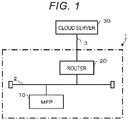
- FIG. 1 is a block diagram illustrating a schematic configuration of an image processing system 1.
- the image processing system 1 includes an MFP 10 and a router 20.
- the MFP 10 is an example of the image processing device.
- the router 20 is connected to a cloud server 30 via a dedicated communication network 3.
- the dedicated communication network 3 is typically a dedicated digital line, an Integrated Services Digital Network (ISDN) line, or the like.
- the router 20 is a network device that relays data communication between each device connected to a communication network 2 and the cloud server 30.
- the cloud server 30 is a server device for cloud computing.
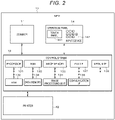
- FIG. 2 is a block diagram illustrating a schematic configuration of the MFP 10.
- the MFP 10 includes a scanner 11, a printer 12, a control system 13, and an operation panel 14.
- the scanner 11, the printer 12, and the operation panel 14 are connected to the control system 13.
- the scanner 11 is a device that optically reads an image of a document according to an operation instruction from the control system 13 and converts the image into image information.
- the scanner 11 outputs the image information of the read document to the control system 13.
- the printer 12 prints an image based on the image information supplied from the control system 13 on paper in various printing conditions designated from the control system 13.
- printers of various image forming methods can be applied.
- the printer 12 may be a printer in an electrophotographic method, and may be a printer in an inkjet method or a thermal transfer method.
- the control system 13 collectively controls an operation of each unit such as the scanner 11, the printer 12, and the operation panel 14. In addition, the control system 13 performs various processes such as image processing.
- the control system 13 includes a processor 131, a random-access memory (RAM) 132, a read-only memory (ROM) 133, a data memory 134, an image memory 135, an image processing unit 136, a facsimile (FAX) interface (I/F) 137, a communication interface (I/F) 138, and a medium interface (I/F) 139.
- the processor 131 performs processes such as calculation and control according to programs.
- the processor 131 is, for example, a central processing unit (CPU).
- the processor 131 realizes various processing functions by executing programs stored in the ROM 133 or the data memory 134.
- the RAM 132 is a volatile memory.
- the RAM 132 functions, for example, as a working memory.
- the ROM 133 is a non-volatile memory.
- the ROM 133 functions, for example, as a program memory.
- the data memory 134 stores control data, a control program, setting information, and the like.
- the data memory 134 is, for example, a rewritable non-volatile memory.
- the image memory 135 stores image information.
- the image processing unit 136 performs image processing with respect to image information.
- the FAX interface 137 is an interface for performing FAX communication.
- the communication interface 138 is an interface for performing data communication with an external device via a network such as the communication network 2.
- the medium interface 139 is an interface for performing data communication with a storage medium such as a memory card or a universal serial bus (USB) memory.
- the operation panel 14 is a user interface.
- the operation panel 14 includes a touch panel 141 and an input device 142.
- the touch panel 141 is obtained, for example, by stacking a display such as a liquid crystal display or an organic electro-luminescence (EL) display and a sensing device that detects touch input.
- the input device 142 is, for example, a button, keyboard, a keypad, or a touchpad.
- the MFP 10 includes a built-in application database 40 in the data memory 134.
- the built-in application is referred to as a built-in app.
- the built-in app database 40 is an assembly of built-in app data records 401 (see FIG. 3 ) generated for each MFP 10.
- FIG. 3 is a schematic diagram illustrating a main data structure of the built-in app data record 401.
- the built-in app data record 401 includes program data of the built-in app, metadata of the built-in app, an encryption key, a folder name of a debug log, an acquisition timing of the debug log, a transmission destination of the debug log, and the like.
- the built-in app is installed on the MFP 10 in the form of the package software.
- the package software includes program data of the built-in app, metadata of the built-in app, and an encryption key.
- the program data of the built-in app is data in which a program for executing the built-in app is written.
- the metadata of the built-in app is a built-in app ID, a name, and the vender information for generating the built-in app, and the like.
- the encryption key is a unique key set for each built-in app in order to encrypt the debug log of the built-in app.
- the folder name of the debug log is a name of a folder that is a storage destination for storing the debug log relating to the malfunction occurring during the execution of the built-in app.
- the folder of the debug log is generated for each built-in app if the package software is installed. After the package software is installed, a debug log setting screen 100 (see FIG. 4 ) is displayed on the touch panel 141.
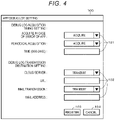
- FIG. 4 is a schematic diagram illustrating an example of the debug log setting screen 100.
- the debug log setting screen 100 includes an item field 101 that sets a timing for acquiring a debug log of the built-in app and an item field 102 that sets the transmission destination of the debug log. For example, whether to acquire the debug log in case of an error of the built-in app, whether to periodically acquire the debug log, or designated time in case where the debug log is to be periodically acquired are set in the item field 101. For example, whether to transmit the acquired debug log to the transmission destination and an address of the transmission destination in case of the transmission are set in the item field 102.
- the transmission destination is, for example, the cloud server 30, an administrator, a maintenance person.
- a uniform resource locator (URL) is input as the address of the transmission destination.
- the URL is a unique address allocated to the cloud server 30.
- the administrator or the maintenance person the mail address of the administrator or the maintenance person is input.
- the debug log setting screen 100 includes a registration button 103 for instructing setting confirmation of the item field 101 and the item field 102 and a cancel button 104 for instructing setting cancellation of the item field 101 and the item field 102.
- the content of the text data displayed in FIG. 4 is an example.
- the acquisition timing of the debug log and the transmission destination of the debug log are set on the debug log setting screen 100 in advance by the administrator. If the acquisition timing of the debug log and the transmission destination of the debug log are set, the setting is stored in the built-in app data record 401.
- the MFP 10 stores an app table 1341 (see FIG. 5 ) in the data memory 134.
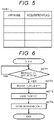
- FIG. 5 is a schematic diagram illustrating an example of the app table 1341.
- the app table 1341 is a data table configured in the app name, the acquisition flag, and the like.
- the app name is the name of the built-in app.
- the acquisition flag is set to "1" if the acquisition timing of the debug log is set on the debug log setting screen 100.
- the initial state of the acquisition flag is "0".
- the app table 1341 is not limited to the items of FIG. 5 .
- FIG. 6 is a flowchart illustrating the procedure of the information processes performed by the processor 131 of the MFP 10 if the administrator installs the built-in app in the MFP 10.
- the operation of the MFP 10 is described with reference to this flowchart.
- the procedure of the operations described below and the contents thereof are examples. The procedure and the contents are not limited as long as the same result can be obtained.
- the processor 131 of the MFP 10 waits for the instruction of the installation of the built-in app in ACT 1. If the installation of the built-in app is instructed, the processor 131 determines YES in ACT 1 and proceeds to ACT 2. The processor 131 installs the built-in app from the storage medium via the medium interface 139 in ACT 2.
- the processor 131 loads the package software in ACT 3.
- the package software the entire package software may be encrypted. In such a case, the entire package software is decrypted, and the electronic signature is confirmed.
- the processor 131 stores the program data of the built-in app, the metadata, and the encryption key included in the package software loaded in the process of ACT 3 in the built-in app data record 401 in ACT 4.
- the processor 131 stores the folder name of the folder of the debug log generated if the package software is installed in the built-in app data record 401. With the above, the processor 131 ends the information process of the procedure illustrated in the flowchart of FIG. 6 .
- FIG. 7 is a flowchart illustrating the procedure of the information process performed by the processor 131 of the MFP 10 if the user who uses the MFP 10 executes the built-in app.
- the operation of the MFP 10 is described with reference to this flowchart.
- the procedure of the operations and the contents thereof explained below are examples. The procedure and the contents are not limited as long as the same result can be obtained.
- the processor 131 of the MFP 10 waits for the instruction of executing the built-in app in ACT 11. If the execution of the built-in app is instructed, the processor 131 determines YES in ACT 11 and proceeds to ACT 12. The processor 131 executes the built-in app in ACT 12.
- the processor 131 confirms whether the acquisition flag of the app table 1341 is "1" in ACT 13. If the acquisition flag is not "1", that is, the acquisition flag is "0", the processor 131 determines NO in ACT 13 and proceeds to ACT 14.
- the processor 131 confirms whether built-in app ends in ACT 14. If the built-in app ends, the processor 131 determines YES in ACT 14, and the processor 131 ends the information processes of the procedure illustrated in the flowchart of FIG. 7 .
- the processor 131 determines YES in ACT 13 and proceeds to ACT 15.
- the processor 131 confirms whether the acquisition timing of the debug log is stored in the built-in app data record 401 in ACT 15. If the acquisition timing of the debug log is not stored, the processor 131 determines NO in ACT 15 and proceeds to ACT 17 described below.
- the processor 131 determines YES in ACT 15 and proceeds to ACT 16.
- the processor 131 extracts the folder of the folder name of the debug log stored in the built-in app data record 401 and stores the debug log of the built-in app in the folder in ACT 16.
- the processor 131 confirms whether the built-in app ends in ACT 17. If the built-in app does not end, the processor 131 determines NO in ACT 17 and returns to ACT 15. That is, the processor 131 repeatedly performs the processes of ACTS 15 to 17 until the built-in app ends.
- the processor 131 determines YES in ACT 17, and the processor 131 ends the information processes of the procedure illustrated in the flowchart of FIG. 7 .
- FIG. 8 is a flowchart illustrating the procedure of the information processes performed by the processor 131 of the MFP 10 if the administrator acquires the debug log of the built-in app.
- the operation of the MFP 10 is described with reference to this flowchart.
- the procedure of the operations and the contents thereof explained below are examples. The procedure and the contents are not limited as long as the same result can be obtained.
- the administrator switches the operation mode of the MFP 10 from the normal mode to the maintenance mode.
- the administrator designates the built-in app in which the malfunction occurs from the screen of the maintenance mode displayed on the touch panel 141 and inputs an acquisition button for acquiring the debug log of the corresponding built-in app.
- the processor 131 of the MFP 10 waits for the instruction of the acquisition of the debug log in ACT 21. If the acquisition of the debug log is instructed, the processor 131 determines YES in ACT 21 and proceeds to ACT 22.
- the processor 131 confirms whether the acquisition flag of the app table 1341 is "1" in ACT 22. If the acquisition flag is not "1", that is, the acquisition flag is "0", the processor 131 determines NO in ACT 22 and ends the information process of the procedure illustrated in the flowchart of FIG. 8 .
- the processor 131 determines YES in ACT 22 and proceeds to ACT 23.
- the processor 131 extracts the folder of the debug log of the corresponding built-in app and confirms whether the debug log is acquired in ACT 23. If the debug log is not acquired, the processor 131 determines NO in ACT 23 and ends the information process of the procedure illustrated in the flowchart of FIG. 8 .
- the processor 131 determines YES in ACT 23 and proceeds to ACT 24.
- the processor 131 acquires an encryption key corresponding to the corresponding built-in app stored in the built-in app data record 401 in ACT 24.
- the processor 131 encrypts the debug log by using the encryption key in ACT 25.
- the processor 131 stores the debug log encrypted in the RAM 132 in ACT 26.
- the processor 131 confirms whether the transmission destination of the debug log is stored in the built-in app data record 401 in ACT 27. If the transmission destination of the debug log is not stored, the processor 131 determines NO in ACT 27 and proceeds to ACT 28.
- the processor 131 outputs the encrypted debug log of the built-in app to the storage medium via the medium interface 139 in ACT 28. With the above, the processor 131 ends the information process of the procedure illustrated in the flowchart of FIG. 8 .
- the processor 131 determines YES in ACT 27 and proceeds to ACT 29.
- the processor 131 transmits the encrypted debug log of the built-in app to the stored transmission destination in ACT 29. With the above, the processor 131 ends the information process of the procedure illustrated in the flowchart of FIG. 8 .
- the processor 131 of the MFP 10 that is an example of the image processing device configures storage means by performing the processes of ACTS 1 to 4 of FIG. 6 . That is, the MFP 10 stores the encryption key in correlation with the built-in application if the built-in application is installed.
- the processor 131 of the MFP 10 configures encryption means by performing the processes of ACTS 21 to 25 of FIG. 8 . That is, the MFP 10 encrypts the debug log according to the built-in application with the encryption key in correlation with the corresponding built-in application.
- the processor 131 of the MFP 10 configures output means by performing the processes of ACTS 26 to 28 of FIG. 8 . That is, the MFP 10 outputs the debug log encrypted by the encryption means.
- the package software is loaded.
- the program data of the built-in app, the metadata of the built-in app, and the encryption key included in the package software are stored in the built-in app data record 401.
- the folder of the debug log generated during the installation is stored in the built-in app data record 401.
- the debug log is stored in the folder of the corresponding built-in app. Further, if the administrator acquires the debug log, the encryption key corresponding to the built-in app stored in the built-in app data record 401 is acquired. Also, the debug log encrypted by using the encryption key is stored in the RAM 132. If the transmission destination of the debug log is not stored in the built-in app data record 401, the encrypted debug log of the built-in app is automatically output to the storage medium. Therefore, the debug log of the desired built-in application can be collected by a simple operation.
- the debug log can be transmitted to the transmission destination such as the administrator and the cloud server 30 by a simple operation.
- the encryption key of the built-in app is described on the assumption of being included in the package software.
- FIG. 9 is a flowchart illustrating the procedure of the information process executed by the processor 131 of the MFP 10 if the administrator installs the built-in app in the MFP 10.
- the operation of the MFP 10 is described with reference to this flowchart.
- the procedure of the operations and the contents thereof explained below are examples. The procedure and the contents are not limited as long as the same result can be obtained.
- the processor 131 of the MFP 10 waits for the instruction of the installation of the built-in app in ACT 31. If the installation of the built-in app is instructed, the processor 131 determines YES in ACT 31 and proceeds to ACT 32. The processor 131 installs the built-in app from the storage medium via the medium interface 139 in ACT 32.
- the processor 131 loads the package software in ACT 33.
- the processor 131 confirms whether the encryption key is included in the package software loaded in the process of ACT 33 in ACT 34. If the encryption key is included, the processor 131 determines YES in ACT 34 and proceeds to ACT 35.
- the processor 131 stores the program data of the built-in app, the metadata, and the encryption key in the built-in app data record 401 in ACT 35.
- the processor 131 stores the folder name of the folder of the debug log generated during the installation of the package software in the built-in app data record 401. With the above, the processor 131 ends the information process of the procedure illustrated in the flowchart of FIG. 9 .
- the processor 131 determines NO in ACT 34 and proceeds to ACT 36.
- the processor 131 displays the encryption key selection screen 200 (see FIG. 10 ) for selecting whether to upload the encryption key to the touch panel 141 in ACT 36.
- FIG. 10 is a schematic diagram illustrating an example of the encryption key selection screen 200 according to the second embodiment.
- an encryption key selection screen 200 includes a built-in app name field 201 and a debug log acquisition check field 202.
- the built-in app installed in the MFP 10 in advance is displayed on the built-in app name field 201.
- An image of a button 203 that enables to select any one of "no encryption key” or "upload” is displayed on the debug log acquisition check field 202. If the output without encrypting the debug log of the built-in app is desired, the administrator inputs "no encryption key". If the upload of the encryption key from the cloud server 30 to the MFP 10 is desired, the administrator inputs "upload”.
- the encryption key selection screen 200 is not limited to the item of FIG. 10 .
- the processor 131 confirms whether the "upload” is input to the encryption key selection screen 200 in ACT 37. If the "upload” is not input, that is, "no encryption key” is input, the processor 131 determines NO in ACT 37 and proceeds to ACT 38.
- the processor 131 stores the program data and the metadata of the built-in app in the built-in app data record 401 in ACT 38.
- the processor 131 stores the folder name of the folder of the debug log generated during the installation of the package software in the built-in app data record 401. With the above, the processor 131 ends the information process of the procedure illustrated in the flowchart of FIG. 9 .
- the processor 131 determines YES in ACT 37 and proceeds to ACT 39.
- the processor 131 displays an encryption key setting screen 300 (see FIG. 11 ) in ACT 39.
- FIG. 11 is a schematic diagram illustrating an example of the encryption key setting screen 300 according to the second embodiment.
- the encryption key setting screen 300 includes an image of an upload button 301, an image of a cancel button 302, and a file path input field 303.
- the administrator inputs the file path to the file path input field 303 and inputs the upload button 301.
- the encryption key uploaded from the cloud server 30 is stored in the storage location designated by the file path.
- the cancel button 302 is input.
- the displayed content of the text data in FIG. 11 is an example.
- the processor 131 acquires the encryption key stored in the storage location designated in the file path in ACT 40.
- the processor 131 stores the program data and the metadata of the built-in app together with the encryption key acquired in the process of ACT 39 in the built-in app data record 401 in ACT 41.
- the processor 131 stores the folder name of the folder of the debug log generated during the installation of the package software in the built-in app data record 401. With the above, the processor 131 ends the information process of the procedure illustrated in the flowchart of FIG. 9 .
- the process of ACT 24 in FIG. 8 is different from that in the first embodiment. That is, the processor 131 confirms whether there is an encryption key in ACT 24. If there is an encryption key, the processor 131 determines YES in ACT 24 and proceeds to ACT 25. If there is not an encryption key, the processor 131 determines NO in ACT 24 and proceeds to ACT 27.
- the processor 131 of the MFP 10 that is an example of the image processing device performs the processes of ACTS 34, 36, and 37 of FIG. 9 to configure reception means. That is, if there is not an encryption key in correlation with the built-in application, the MFP 10 receives the instruction whether to set an encryption key. If the instruction to set the encryption key is received by the reception means, the storage means stores the encryption key uploaded from the outside. If the instruction not to set the encryption key is received by the reception means, the output means outputs the debug log relating to the built-in application without encryption.
- the image processing device is the MFP 10
- the image processing device is not limited to the MFP 10.
- the image processing device may be a copying machine or a printer.
- the built-in app database 40 may be a storage device built in the MFP 10 or may be a storage device attached outside the MFP 10.
- the debug log may be acquired if the usage rate of the processor 131 is higher than the reference value, and the debug log may be acquired if the usage amount of the ROM 133 or the data memory 134 is larger than the reference value.
- the transmission destination of the debug log is the cloud server 30, the administrator, the maintenance person, and the like is described.
- the debug log may be stored in the storage medium via the medium interface 139.
- the encryption key is uploaded from the cloud server 30 to the MFP 10 is described.
- an encryption key stored in a storage medium different from the storage medium for installing the built-in app may be uploaded to the MFP 10 via the medium interface 139.
Landscapes
- Engineering & Computer Science (AREA)
- Theoretical Computer Science (AREA)
- General Engineering & Computer Science (AREA)
- Computer Hardware Design (AREA)
- Physics & Mathematics (AREA)
- General Physics & Mathematics (AREA)
- Quality & Reliability (AREA)
- Multimedia (AREA)
- Signal Processing (AREA)
- Software Systems (AREA)
- General Health & Medical Sciences (AREA)
- Computer Security & Cryptography (AREA)
- Bioethics (AREA)
- Health & Medical Sciences (AREA)
- Computing Systems (AREA)
- Facsimiles In General (AREA)
- Debugging And Monitoring (AREA)
- Accessory Devices And Overall Control Thereof (AREA)
Applications Claiming Priority (1)
| Application Number | Priority Date | Filing Date | Title |
|---|---|---|---|
| JP2021020516A JP2022123293A (ja) | 2021-02-12 | 2021-02-12 | 画像処理装置及び画像処理方法 |
Publications (1)
| Publication Number | Publication Date |
|---|---|
| EP4044037A1 true EP4044037A1 (de) | 2022-08-17 |
Family
ID=80682852
Family Applications (1)
| Application Number | Title | Priority Date | Filing Date |
|---|---|---|---|
| EP22156084.0A Pending EP4044037A1 (de) | 2021-02-12 | 2022-02-10 | Sammeln und verschlüsseln eines debug logs einer nativen softwareanwendung in einer bildverarbeitungsvorrichtung und übertragung an ein rechnerfernes gerät |
Country Status (4)
| Country | Link |
|---|---|
| US (1) | US12443730B2 (de) |
| EP (1) | EP4044037A1 (de) |
| JP (1) | JP2022123293A (de) |
| CN (1) | CN114928679A (de) |
Families Citing this family (1)
| Publication number | Priority date | Publication date | Assignee | Title |
|---|---|---|---|---|
| US20240110975A1 (en) * | 2022-09-30 | 2024-04-04 | Intel Corporation | Secure Remote Debugging |
Citations (3)
| Publication number | Priority date | Publication date | Assignee | Title |
|---|---|---|---|---|
| US6175934B1 (en) * | 1997-12-15 | 2001-01-16 | General Electric Company | Method and apparatus for enhanced service quality through remote diagnostics |
| US20170337114A1 (en) * | 2016-05-20 | 2017-11-23 | VeriSilicon Holdings Co., Ltd | System and method for communication between a debugger and a target processor |
| US20190227908A1 (en) * | 2016-08-03 | 2019-07-25 | Intel Corporation | Remote debugging and management |
Family Cites Families (24)
| Publication number | Priority date | Publication date | Assignee | Title |
|---|---|---|---|---|
| JP3119555B2 (ja) * | 1994-03-15 | 2000-12-25 | 京セラミタ株式会社 | ファクシミリ装置 |
| JP4260984B2 (ja) * | 1999-06-04 | 2009-04-30 | 株式会社東芝 | 情報処理装置および情報処理方法 |
| US7143443B2 (en) * | 2001-10-01 | 2006-11-28 | Ntt Docomo, Inc. | Secure sharing of personal devices among different users |
| KR100555381B1 (ko) * | 2002-12-19 | 2006-02-24 | 멜코 인코포레이티드 | 암호키 설정시스템 및 암호키 설정방법 |
| JP4587688B2 (ja) * | 2004-03-26 | 2010-11-24 | 東芝Itサービス株式会社 | 暗号鍵管理サーバ、暗号鍵管理プログラム、暗号鍵取得端末、暗号鍵取得プログラム、暗号鍵管理システム及び暗号鍵管理方法 |
| JP4872493B2 (ja) | 2006-07-04 | 2012-02-08 | 富士ゼロックス株式会社 | 情報処理装置および情報処理装置におけるログ収集方法 |
| JP2008021066A (ja) * | 2006-07-12 | 2008-01-31 | Kyocera Mita Corp | 画像形成装置用トレース機能付加方法及びプログラム並びにこのプログラムがインストールされた画像形成装置 |
| US20080250385A1 (en) * | 2007-04-09 | 2008-10-09 | Sanchez Elton R | Automating the deployment of applications |
| JP2009053901A (ja) * | 2007-08-27 | 2009-03-12 | Seiko Epson Corp | プリンタ |
| US8731519B2 (en) * | 2008-09-08 | 2014-05-20 | At&T Mobility Ii Llc | Mobile handset extension to a device |
| JP2010287108A (ja) | 2009-06-12 | 2010-12-24 | Canon Inc | 画像処理装置 |
| US8983870B2 (en) * | 2010-08-18 | 2015-03-17 | Snap-On Incorporated | Apparatus and method for managing software applications using partitioned data storage devices |
| JP5806970B2 (ja) * | 2012-04-23 | 2015-11-10 | 京セラドキュメントソリューションズ株式会社 | 画像形成装置 |
| US8988713B2 (en) * | 2012-06-28 | 2015-03-24 | Google Inc. | Secure printing in a cloud-based print system |
| JP5943861B2 (ja) | 2013-02-28 | 2016-07-05 | 京セラドキュメントソリューションズ株式会社 | リモートデバッグシステム |
| JP2015169996A (ja) * | 2014-03-05 | 2015-09-28 | 三菱電機株式会社 | データ登録装置、データ検索装置、データ登録プログラムおよびデータ検索プログラム |
| US10043021B2 (en) * | 2016-04-07 | 2018-08-07 | Blackberry Limited | Controlling access to application data |
| JP6920954B2 (ja) * | 2017-10-06 | 2021-08-18 | 東芝テック株式会社 | データ通信システム及びデータ通信方法 |
| JP2019114028A (ja) * | 2017-12-22 | 2019-07-11 | 株式会社東芝 | アプリ開発用環境プログラムおよび装置 |
| CN110474945B (zh) * | 2018-05-11 | 2021-08-03 | 华为技术有限公司 | 一种数据下载、管理的方法和终端 |
| JP7317603B2 (ja) | 2019-07-09 | 2023-07-31 | キヤノン株式会社 | 画像処理装置、システム、サーバー、制御方法及びプログラム |
| US11822641B2 (en) * | 2020-04-29 | 2023-11-21 | Red Hat, Inc. | Establishing controlled remote access to debug logs |
| US11847037B2 (en) * | 2020-09-16 | 2023-12-19 | Kioxia Corporation | Device and method for high performance memory debug record generation and management |
| US11693759B2 (en) * | 2021-05-14 | 2023-07-04 | International Business Machines Corporation | Providing for multi-process log debug without running on a production environment |
-
2021
- 2021-02-12 JP JP2021020516A patent/JP2022123293A/ja active Pending
- 2021-11-15 CN CN202111347341.2A patent/CN114928679A/zh active Pending
- 2021-11-24 US US17/534,616 patent/US12443730B2/en active Active
-
2022
- 2022-02-10 EP EP22156084.0A patent/EP4044037A1/de active Pending
Patent Citations (3)
| Publication number | Priority date | Publication date | Assignee | Title |
|---|---|---|---|---|
| US6175934B1 (en) * | 1997-12-15 | 2001-01-16 | General Electric Company | Method and apparatus for enhanced service quality through remote diagnostics |
| US20170337114A1 (en) * | 2016-05-20 | 2017-11-23 | VeriSilicon Holdings Co., Ltd | System and method for communication between a debugger and a target processor |
| US20190227908A1 (en) * | 2016-08-03 | 2019-07-25 | Intel Corporation | Remote debugging and management |
Also Published As
| Publication number | Publication date |
|---|---|
| JP2022123293A (ja) | 2022-08-24 |
| US20220261488A1 (en) | 2022-08-18 |
| CN114928679A (zh) | 2022-08-19 |
| US12443730B2 (en) | 2025-10-14 |
Similar Documents
| Publication | Publication Date | Title |
|---|---|---|
| US9116651B2 (en) | Image processing apparatus, control method, and recording medium storing computer program for image processing | |
| US8850529B2 (en) | Communication apparatus, communication apparatus system, and method controlling relay apparatus | |
| US9025172B2 (en) | Printing setting apparatus, computer readable recording medium, and image forming system for generating printing setting information described in one data format included in plural types of data formats and submitting a printing job to an image forming apparatus capable of executing a printing job based on printing setting information described in the plural types of data formats | |
| US9110617B2 (en) | Cooperative image processing system, cooperative image processing method, portable information apparatus, image processing apparatus, and recording medium | |
| US20100332624A1 (en) | Information processing apparatus for managing address book data, control method therefor, and storage medium storing control program therefor | |
| US8488160B2 (en) | Image forming apparatus and computer readable medium storing program | |
| JP6525705B2 (ja) | 画像データ管理システム、画像データ管理方法、及びプログラム | |
| JP2016175187A (ja) | 画像形成装置、該装置の制御方法、情報処理装置、該装置の制御方法、及びプログラム | |
| JP6171725B2 (ja) | 中継装置、プログラムおよび中継装置の制御方法 | |
| US8531694B2 (en) | Appending restriction information to a job before transmission | |
| US12443730B2 (en) | Image processing device and image processing method | |
| JP6478783B2 (ja) | Fax機能を備えた装置、その制御方法及びプログラム | |
| EP3657334A1 (de) | Bilderzeugungsvorrichtung und protokollinformationserfassungssystem | |
| US10627986B2 (en) | Information processing apparatus, method for controlling information processing apparatus, and program | |
| US20120019862A1 (en) | Image processing apparatus, control method of image processing apparatus, and program | |
| US8705103B2 (en) | Image processing system, image processing server, image forming apparatus, image processing method, and recording medium | |
| US11902478B2 (en) | System, user device and method that enables the user to be effectively notified of a failure circumstance | |
| JP5640573B2 (ja) | 画像処理装置、画像処理システム、設定制御方法、設定制御プログラム及び記録媒体 | |
| JP4531729B2 (ja) | 課金データ保持システムおよび課金データ保持方法 | |
| JP2023059462A (ja) | サーバ、サーバを含むシステム、制御方法、並びにプログラム | |
| JP4787123B2 (ja) | 情報出力装置およびそれを備えた情報出力システム | |
| JP4499074B2 (ja) | 動的文書作成システム | |
| JP2019062476A (ja) | 画像処理装置、画像処理装置の制御方法、プログラムおよび記憶媒体 | |
| JP6116382B2 (ja) | サーバ装置、サーバ装置の制御方法、及びプログラム | |
| JP6503695B2 (ja) | 記録システム、画像記録装置、情報処理装置、及びプログラム |
Legal Events
| Date | Code | Title | Description |
|---|---|---|---|
| PUAI | Public reference made under article 153(3) epc to a published international application that has entered the european phase |
Free format text: ORIGINAL CODE: 0009012 |
|
| STAA | Information on the status of an ep patent application or granted ep patent |
Free format text: STATUS: THE APPLICATION HAS BEEN PUBLISHED |
|
| AK | Designated contracting states |
Kind code of ref document: A1 Designated state(s): AL AT BE BG CH CY CZ DE DK EE ES FI FR GB GR HR HU IE IS IT LI LT LU LV MC MK MT NL NO PL PT RO RS SE SI SK SM TR |
|
| STAA | Information on the status of an ep patent application or granted ep patent |
Free format text: STATUS: REQUEST FOR EXAMINATION WAS MADE |
|
| 17P | Request for examination filed |
Effective date: 20230215 |
|
| RBV | Designated contracting states (corrected) |
Designated state(s): AL AT BE BG CH CY CZ DE DK EE ES FI FR GB GR HR HU IE IS IT LI LT LU LV MC MK MT NL NO PL PT RO RS SE SI SK SM TR |
|
| STAA | Information on the status of an ep patent application or granted ep patent |
Free format text: STATUS: EXAMINATION IS IN PROGRESS |
|
| 17Q | First examination report despatched |
Effective date: 20241016 |