EP3825837B1 - Image forming apparatus, method for controlling image forming apparatus, and program - Google Patents
Image forming apparatus, method for controlling image forming apparatus, and program Download PDFInfo
- Publication number
- EP3825837B1 EP3825837B1 EP20208909.0A EP20208909A EP3825837B1 EP 3825837 B1 EP3825837 B1 EP 3825837B1 EP 20208909 A EP20208909 A EP 20208909A EP 3825837 B1 EP3825837 B1 EP 3825837B1
- Authority
- EP
- European Patent Office
- Prior art keywords
- server system
- information
- service
- cloud
- Prior art date
- Legal status (The legal status is an assumption and is not a legal conclusion. Google has not performed a legal analysis and makes no representation as to the accuracy of the status listed.)
- Active
Links
Images



Classifications
-
- G—PHYSICS
- G06—COMPUTING OR CALCULATING; COUNTING
- G06F—ELECTRIC DIGITAL DATA PROCESSING
- G06F3/00—Input arrangements for transferring data to be processed into a form capable of being handled by the computer; Output arrangements for transferring data from processing unit to output unit, e.g. interface arrangements
- G06F3/12—Digital output to print unit, e.g. line printer, chain printer
-
- G—PHYSICS
- G06—COMPUTING OR CALCULATING; COUNTING
- G06F—ELECTRIC DIGITAL DATA PROCESSING
- G06F3/00—Input arrangements for transferring data to be processed into a form capable of being handled by the computer; Output arrangements for transferring data from processing unit to output unit, e.g. interface arrangements
- G06F3/12—Digital output to print unit, e.g. line printer, chain printer
- G06F3/1201—Dedicated interfaces to print systems
- G06F3/1202—Dedicated interfaces to print systems specifically adapted to achieve a particular effect
- G06F3/1203—Improving or facilitating administration, e.g. print management
-
- G—PHYSICS
- G06—COMPUTING OR CALCULATING; COUNTING
- G06F—ELECTRIC DIGITAL DATA PROCESSING
- G06F3/00—Input arrangements for transferring data to be processed into a form capable of being handled by the computer; Output arrangements for transferring data from processing unit to output unit, e.g. interface arrangements
- G06F3/12—Digital output to print unit, e.g. line printer, chain printer
- G06F3/1201—Dedicated interfaces to print systems
- G06F3/1202—Dedicated interfaces to print systems specifically adapted to achieve a particular effect
- G06F3/1222—Increasing security of the print job
-
- G—PHYSICS
- G06—COMPUTING OR CALCULATING; COUNTING
- G06F—ELECTRIC DIGITAL DATA PROCESSING
- G06F21/00—Security arrangements for protecting computers, components thereof, programs or data against unauthorised activity
- G06F21/60—Protecting data
- G06F21/606—Protecting data by securing the transmission between two devices or processes
- G06F21/608—Secure printing
-
- G—PHYSICS
- G06—COMPUTING OR CALCULATING; COUNTING
- G06F—ELECTRIC DIGITAL DATA PROCESSING
- G06F3/00—Input arrangements for transferring data to be processed into a form capable of being handled by the computer; Output arrangements for transferring data from processing unit to output unit, e.g. interface arrangements
- G06F3/12—Digital output to print unit, e.g. line printer, chain printer
- G06F3/1201—Dedicated interfaces to print systems
- G06F3/1202—Dedicated interfaces to print systems specifically adapted to achieve a particular effect
- G06F3/1203—Improving or facilitating administration, e.g. print management
- G06F3/1204—Improving or facilitating administration, e.g. print management resulting in reduced user or operator actions, e.g. presetting, automatic actions, using hardware token storing data
-
- G—PHYSICS
- G06—COMPUTING OR CALCULATING; COUNTING
- G06F—ELECTRIC DIGITAL DATA PROCESSING
- G06F3/00—Input arrangements for transferring data to be processed into a form capable of being handled by the computer; Output arrangements for transferring data from processing unit to output unit, e.g. interface arrangements
- G06F3/12—Digital output to print unit, e.g. line printer, chain printer
- G06F3/1201—Dedicated interfaces to print systems
- G06F3/1223—Dedicated interfaces to print systems specifically adapted to use a particular technique
- G06F3/1237—Print job management
-
- G—PHYSICS
- G06—COMPUTING OR CALCULATING; COUNTING
- G06F—ELECTRIC DIGITAL DATA PROCESSING
- G06F3/00—Input arrangements for transferring data to be processed into a form capable of being handled by the computer; Output arrangements for transferring data from processing unit to output unit, e.g. interface arrangements
- G06F3/12—Digital output to print unit, e.g. line printer, chain printer
- G06F3/1201—Dedicated interfaces to print systems
- G06F3/1223—Dedicated interfaces to print systems specifically adapted to use a particular technique
- G06F3/1237—Print job management
- G06F3/1238—Secure printing, e.g. user identification, user rights for device usage, unallowed content, blanking portions or fields of a page, releasing held jobs
-
- G—PHYSICS
- G06—COMPUTING OR CALCULATING; COUNTING
- G06F—ELECTRIC DIGITAL DATA PROCESSING
- G06F3/00—Input arrangements for transferring data to be processed into a form capable of being handled by the computer; Output arrangements for transferring data from processing unit to output unit, e.g. interface arrangements
- G06F3/12—Digital output to print unit, e.g. line printer, chain printer
- G06F3/1201—Dedicated interfaces to print systems
- G06F3/1223—Dedicated interfaces to print systems specifically adapted to use a particular technique
- G06F3/1237—Print job management
- G06F3/1265—Printing by reference, e.g. retrieving document/image data for a job from a source mentioned in the job
-
- G—PHYSICS
- G06—COMPUTING OR CALCULATING; COUNTING
- G06F—ELECTRIC DIGITAL DATA PROCESSING
- G06F3/00—Input arrangements for transferring data to be processed into a form capable of being handled by the computer; Output arrangements for transferring data from processing unit to output unit, e.g. interface arrangements
- G06F3/12—Digital output to print unit, e.g. line printer, chain printer
- G06F3/1201—Dedicated interfaces to print systems
- G06F3/1223—Dedicated interfaces to print systems specifically adapted to use a particular technique
- G06F3/1237—Print job management
- G06F3/1268—Job submission, e.g. submitting print job order or request not the print data itself
- G06F3/1272—Digital storefront, e.g. e-ordering, web2print, submitting a job from a remote submission screen
-
- G—PHYSICS
- G06—COMPUTING OR CALCULATING; COUNTING
- G06F—ELECTRIC DIGITAL DATA PROCESSING
- G06F3/00—Input arrangements for transferring data to be processed into a form capable of being handled by the computer; Output arrangements for transferring data from processing unit to output unit, e.g. interface arrangements
- G06F3/12—Digital output to print unit, e.g. line printer, chain printer
- G06F3/1201—Dedicated interfaces to print systems
- G06F3/1278—Dedicated interfaces to print systems specifically adapted to adopt a particular infrastructure
- G06F3/1285—Remote printer device, e.g. being remote from client or server
-
- G—PHYSICS
- G06—COMPUTING OR CALCULATING; COUNTING
- G06F—ELECTRIC DIGITAL DATA PROCESSING
- G06F3/00—Input arrangements for transferring data to be processed into a form capable of being handled by the computer; Output arrangements for transferring data from processing unit to output unit, e.g. interface arrangements
- G06F3/12—Digital output to print unit, e.g. line printer, chain printer
- G06F3/1201—Dedicated interfaces to print systems
- G06F3/1278—Dedicated interfaces to print systems specifically adapted to adopt a particular infrastructure
- G06F3/1285—Remote printer device, e.g. being remote from client or server
- G06F3/1287—Remote printer device, e.g. being remote from client or server via internet
-
- G—PHYSICS
- G06—COMPUTING OR CALCULATING; COUNTING
- G06F—ELECTRIC DIGITAL DATA PROCESSING
- G06F3/00—Input arrangements for transferring data to be processed into a form capable of being handled by the computer; Output arrangements for transferring data from processing unit to output unit, e.g. interface arrangements
- G06F3/12—Digital output to print unit, e.g. line printer, chain printer
- G06F3/1201—Dedicated interfaces to print systems
- G06F3/1278—Dedicated interfaces to print systems specifically adapted to adopt a particular infrastructure
- G06F3/1285—Remote printer device, e.g. being remote from client or server
- G06F3/1288—Remote printer device, e.g. being remote from client or server in client-server-printer device configuration
Definitions
- the present invention relates to a server system, a method for controlling a server system, and a program.
- the user permitted to use the image forming apparatus based on the setting configured by the administrator submits a print job from a client terminal to the cloud print service. Then, the cloud print service stores and manages the received print job. Then, the image forming apparatus displays print jobs managed by the cloud print service, and acquires the print job selected by the user from the cloud print service and outputs it.
- cloud print services include, for example, Google Cloud Print ® , Microsoft Hybrid Cloud Print ® , and uniFLOW Online ® .
- One possible case is that a single user uses a plurality of cloud print services, and can submit a print job from any of the cloud print services.
- the user wants to select the print job to print on the image forming apparatus, the user needs to log in to the cloud print service used to print, and select the print job to print from among the print jobs registered in the cloud print service.
- the user accidentally logs in to a cloud print service different from the cloud print service in which the print job that the user intends to print is registered, the user has to log in again, i.e. to the correct cloud print service.
- US2013/014112 discloses an information processing apparatus connected to data accumulation devices configured to accumulate job data in a predetermined memory area and electronic devices configured to execute the accumulated job data through a predetermined data transmission line, wherein the data accumulation devices execute a deletion process based on a deletion control value included in management information and manage the accumulated job data
- the apparatus includes a control unit configured to control a communication process of the job data performed between the electronic devices and the data accumulation devices, and wherein the control unit is configured to transmit a control value for extending an accumulation period of the accumulated job data to at least one of the data accumulation devices, and to update the deletion control value of the management information retained in the predetermined memory area in the at least one of the data accumulation devices.
- a server system as defined in claim 1, a method as defined in claim 12, and a program as defined in claim 13.
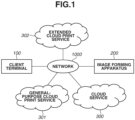
- a system according to the present exemplary embodiment includes a client terminal 100, an image forming apparatus 200, a cloud service 300, a general-purpose cloud print service 301, and an extended cloud print service 302.
- the client terminal 100, the image forming apparatus 200, the cloud service 300, the general-purpose cloud print service 301, and the extended cloud print service 302 are connected to one another via a network 1000.
- the client terminal 100 is a mobile terminal, such as a personal computer (PC), a mobile phone, a personal digital assistant (PDA), a multi-functional mobile phone (hereinafter referred to as a smart-phone), and a tablet held by a user.
- a mobile terminal such as a personal computer (PC), a mobile phone, a personal digital assistant (PDA), a multi-functional mobile phone (hereinafter referred to as a smart-phone), and a tablet held by a user.
- PC personal computer
- PDA personal digital assistant
- smart-phone multi-functional mobile phone
- the image forming apparatus 200 is a multi-functional peripheral having various functions such as scan, fax, print, and copy functions, or a printer having only the print function.
- the cloud service 300 is a cloud service that allows, for example, document data to be generated, and a document to be shared and edited in collaboration among a plurality of users. Besides that, the cloud service 300 may be a cloud service used by the plurality of users to communicate with each other.
- the cloud service 300 has a function of being remotely accessed from the client terminal 100 and storing data into an online storage, and has a function of allowing the data to be printed by collaborating with each of cloud print services, which will be described below.
- the general-purpose cloud print service 301 has a function of managing received data as a print job.
- Print data contains print settings in addition to image data required for printing.
- the print settings that can be specified on the cloud print service 301 are limited to basic settings such as N-on-1 printing, specifying a print page range, the two-sided layout, and specifying the number of copies.
- the extended cloud print service 302 includes a cloud print service that allows the user to specify advanced settings in which the device characteristic of the image forming apparatus 200 is reflected. For example, a finishing setting corresponding to a finisher connected to the image forming apparatus 200, a profile setting to which an installed color profile is applied, and a setting of font substitution based on an installed font can be specified as print functions of the advanced settings.
- the user remotely accesses the cloud service 300 from the client terminal 100 and uses various kinds of cloud services such as a document generation service and a communication service.
- cloud services such as a document generation service and a communication service.
- the user selects either the basic function printing of the general-purpose cloud print service 301 or the advanced setting printing of the extended cloud print service 302 to print the document data.
- the user should have account information corresponding to each cloud print service, and is asked to input the account information at the time of printing.
- the print job is transmitted to the image forming apparatus 200 and is output.
- FIG. 2 a hardware configuration of the client terminal 100 illustrated in FIG. 1 will be described with reference to FIG. 2 . It is apparent that the present invention can be applied to any of a single function apparatus, a system including a plurality of apparatuses, and a system in which processing is performed with a connection established via a network as long as the functions of the present invention can be fulfilled, unless otherwise noted specifically.
- FIG. 2 is a block diagram illustrating an example of the hardware configuration of a controller unit of the client terminal 100 illustrated in FIG. 1 .
- a central processing unit (CPU) 101 controls the entire apparatus based on a program stored in a read only memory (ROM) 1021 or a random access memory (RAM) 1022 in a main storage device 102 or an auxiliary storage device 105.
- ROM read only memory
- RAM random access memory
- the RAM 1022 is also used as a work area when the CPU 101 performs various kinds of processing.
- the auxiliary storage device 105 records an operating system (OS) 1053 and an application 1051 therein.
- OS operating system
- the main storage device 102 and the auxiliary storage device 105 will be collectively referred to as a storage device.
- An input device such as a pointing device 109 represented by a mouse and a touch panel, and a keyboard 108 is a device connected via an input interface (I/F) 103 and used by the user to issue various kinds of instructions to the computer.
- I/F input interface
- An output I/F 104 is an interface for outputting data to outside, and outputs the data to an output device such as a monitor 110.
- a common data system bus 107 allows data to be exchanged between an I/F and a module.
- the CPU 101 performs processing based on the program stored in the storage device, whereby processing in steps illustrated in sequence diagrams that will be described below is implemented.
- a communication I/F 106 is an interface used to connect the client terminal 100 to a network.
- the client terminal 100 is connected to the network 1000 via the communication I/F 106.
- FIG. 3 is a block diagram illustrating an example of the hardware configuration of a controller unit of the image forming apparatus 200 illustrated in FIG. 1 .
- a controller unit 216 is connected to a scanner 214, which functions as an image input device, and a printer 212, which functions as an image output device. Then, the controller unit 216 inputs and outputs image data and image forming apparatus information by connecting to the network 1000 or a public circuit such as a wide area network (WAN) (for example, the Public Switched Telephone Network (PSTN) or the Integrated Services Digital Network (ISDN)).
- WAN wide area network
- PSTN Public Switched Telephone Network
- ISDN Integrated Services Digital Network
- a RAM 202 is a system work memory used to operate the CPU 201, and is also a program memory for recording a program and an image memory for temporarily recording image data.
- a ROM 203 stores a boot program of the system and various kinds of control programs therein.
- a hard disk drive (HDD) 204 stores various kinds of programs for controlling the system, image data, and the like therein.
- An operation unit I/F 207 is an interface unit with an operation unit (user interface (UI)) 208, and outputs image data to be displayed on the operation unit 208 to the operation unit 208.
- the operation unit I/F 207 plays a role of transmitting information (for example, the account information) input via the operation unit 208 by the user of the present system to the CPU 201.
- the operation unit 208 includes a display unit having a touch panel, and the user can issue various kinds of instructions by pressing a button displayed on the display unit (touching it with his/her finger or the like).
- a network I/F 205 connects to a network and inputs and outputs data.
- a modem 206 connects to the public circuit and is in charge of an input and output of data such as facsimile (FAX) transmission and reception.
- An external I/F 218 is an I/F unit that receives an external input, such as a Universal Serial Bus (USB) port, an Institute of Electrical and Electronics Engineers (IEEE) 1394 port, and a printer port.
- USB Universal Serial Bus
- IEEE 1394 Institute of Electrical and Electronics Engineers
- a card reader 219 for a readout from an integrated circuit (IC) card which is required for authentication in the present exemplary embodiment, is connected to the external I/F 218. Then, the CPU 201 can control the readout of information from the IC card by the card reader 219 via the external I/F 218 and acquire the information read out from the IC card.
- the image forming apparatus configured in this manner is disposed on a system bus 209.
- An image bus I/F 220 is a bus bridge that connects between the system bus 209 and an image bus 215, which transfers image data at a high speed, and converts a data structure.
- the image bus 215 is constructed using a Peripheral Component Interconnect (PCI) bus or IEEE 1394 bus.
- PCI Peripheral Component Interconnect
- a raster image processor (RIP) 210 rasterizes vector data such as a page description language (PDL) code into a bitmap image.
- a printer I/F 211 connects the printer 212 to the controller unit 216 and converts image data synchronously or asynchronously.
- a scanner I/F 213 connects the scanner 214 to the controller unit 216, and converts image data synchronously or asynchronously.
- An image processing unit 217 corrects, processes, and/or edits input image data, and adds a correction by the printer and/or converts the resolution with respect to print output image data.
- the user of the apparatus issues an instruction to start reading of the original via the operation unit 208, which causes the CPU 201 to issue an instruction to the scanner 214, and the feeder feeds one original sheet at a time and performs a reading operation of the image on the original sheet.
- the printer 212 is a portion that converts the raster image data into an image on a sheet. Examples of the print method include an electrophotographic method using a photosensitive drum or a photosensitive belt, and an inkjet method that directly prints the image onto the sheet by ejecting ink from a minute nozzle array, and the printer 212 may employ any of the methods. Actuation of the print operation is started in response to an instruction from the CPU 201.
- the stop key of the operation unit 208 functions to stop an ongoing operation.
- the ID key of the operation unit 208 is used when a user ID of the user is input.
- the reset key is used when the settings configured via the operation unit 208 are initialized.
- the card reader 219 reads out the information stored in the IC card (for example, Felicity Card (Felica) ® of Sony Corporation) under the control of the CPU 201 and notifies the CPU 201 of the read information via the external I/F 218.
- the image forming apparatus 200 has a function of transmitting the image data read using the scanner 214 to a local area network (LAN) and a function of transmitting print data received from the LAN to the printer 212 to print and output it.
- LAN local area network
- FIG. 4 is a diagram illustrating the software module configuration of the general-purpose cloud print service 301 illustrated in FIG. 1 .
- the general-purpose cloud print service 301 is a server system including one or a plurality of information processing apparatuses having a similar hardware configuration to the client apparatus illustrated in FIG. 2 .
- the CPU(s) 101 of the one or plurality of information processing apparatuses execute(s) the program stored in the ROM 1021 or the auxiliary storage device 105 to implement the following software blocks.
- a transmission and reception unit 401 transmits and receives the print job via a network to which the general-purpose cloud print service 301 is connected.
- a setting change screen control unit 402 controls a screen on which the print settings are configured in a case where document data in the cloud service is printed.
- the print settings that can be specified on the print setting screen are limited to the basic settings such as N-on-1 printing, specifying a print page range, the two-sided layout, and specifying the number of copies.
- the print job may be controlled using the print queue for which the extended cloud print service 302 is specified as the destination. Further, the print job management unit 403 has a function of creating a list of managed print jobs.
- An account management unit 404 manages the account information of the user using the general-purpose cloud print service 301.
- the account information is necessary to use the general-purpose cloud print service 301, and a system administrator manages an output of the printing by managing the account information of the user.
- a control unit 405 performs the overall control of various kinds of processing including the account management, the transmission and reception of the print data, the control of the screen for the print settings, the management of the print setting information, the generation of the print job, and the control of the print queue in the present exemplary embodiment.
- FIG. 5 is a diagram illustrating the software module configuration of the extended cloud print service 302 illustrated in FIG. 1 .
- a transmission and reception unit 501 transmits and receives the print job via a network to which the extended cloud print service 302 is connected.
- An advanced setting change screen control unit 502 controls a screen on which the print settings are configured in a case where document data in the cloud service is printed.
- Settings such as the finishing setting corresponding to the finisher connected to the image forming apparatus 200, the profile setting to which the installed color profile is applied, and the setting of the font substitution based on the installed font are controlled as the print settings that can be set on the advanced setting change screen.
- the advanced setting change screen control unit 502 of the extended cloud print service 302 can set setting items that cannot be set on the print setting change screens displayed by the cloud service 300 and the general-purpose cloud print service 301.
- the above-described finishing setting, color profile setting, font substitution setting, and the like are the setting items that cannot be set on the setting change screens but can be set on the advanced setting change screen.
- An account management unit 504 manages the account information of the user using the extended cloud print service 302.
- the account information is necessary to use the extended cloud print service 302, and the system administrator manages an output of the printing by managing the account information of the user.
- a control unit 505 performs the overall control of various kinds of processing including the account management, the transmission and reception of the print data, the control of the screen for the print settings, the management of the advanced print setting information, the generation of the print job, and the control of the print queue in the present exemplary embodiment.
- the registration method will be described here referring to an example at the time of printing document data generated by the user using a document generation application in the cloud printing.
- the user issues an instruction to print a document on the document generation application.
- the user selects a cloud service to use for the printing.
- the user selects one of the cloud service 300, the general-purpose cloud print service 301, and the extended cloud print service 302 and registers the intended printing as the print job.
- FIG. 6A is a sequence diagram illustrating the method for registering the print job on the cloud service 300.
- the cloud service 300 has a function of generating document data or sharing document data and an online storage function of maintaining and managing the document data. The method for registering the document data as the print job will be described below.
- step S100 the client terminal 100 transmits a request to display the setting change screen to the cloud service 300.
- step S101 the cloud service 300 causes the client terminal 100 to display the setting change screen thereon.
- the user configures the print settings by operating the setting change screen. After that, the user selects an "execute printing" button to issue an instruction to execute the printing.
- step S102 the client terminal 100 transmits an instruction to register the print job to the cloud service 300.
- step S102 the client terminal 100 instructs the cloud service 300 to register the print job of the document data specified by the user.
- step S103 the cloud service 300 registers the instructed document data in the online storage held by the cloud service 300 as the print job in reaction to the instruction to register the print job.
- the present processing is performed to indicate that the document data generated by the user is explicitly handled as the print job.
- the instruction to register the print job does not have to be issued.
- FIG. 6B is a sequence diagram illustrating the method for registering the print job on the general-purpose cloud print service 301.
- a sequence for carrying out the printing from the above-described cloud service 300 using the general-purpose cloud print service 301 will be described with reference to FIG. 6B .
- step S200 the client terminal 100 issues a request to display the setting change screen to the cloud service 300.
- the user selects the use of the general-purpose cloud print service 301 capable of carrying out the basic function printing, and inputs the account information corresponding to the general-purpose cloud print service 301.
- step S201 the cloud service 300 logs in to the general-purpose cloud print service 301 based on the account information received from the client terminal 100.
- step S202 the general-purpose cloud print service 301 transmits a request to display the setting change screen provided by the setting change screen control unit 402 to the cloud service 300.
- step S203 the cloud service 300 causes the client terminal 100 to display the setting change screen thereon.
- the user can select the "execute printing" button after changing the print settings by operating the setting change screen.
- step S204 the client terminal 100 instructs the cloud service 300 to register the document data specified by the user as the print job.
- step S205 the cloud service 300 transmits the document data to print and the print settings, addressing them to the account of the user authenticated by the general-purpose cloud print service 301.
- step S206 the general-purpose cloud print service 301 registers the received document data and print settings as the print job.
- FIG. 6C is a sequence diagram illustrating the method for registering the print job on the extended cloud print service 302.
- a sequence for carrying out the printing from the above-described cloud service 300 using the extended cloud print service 302 will be described with reference to FIG. 6C .
- step S300 the client terminal 100 transmits a request to display the advanced setting change screen in reaction to selection of the extended cloud print service 302 as the destination to which the print job is submitted.
- the user inputs the account information corresponding to the extended cloud print service 302.
- step S301 the cloud service 300 transmits the account information input by the user to the extended cloud print service 302.
- step S302 the extended cloud print service 302 transmits a request to display the advanced setting change screen to the cloud service 300 after authenticating the account.
- step S303 the cloud service 300 causes the client terminal 100 to display the advanced setting change screen thereon.
- the advanced setting change screen displayed at this time is the advanced setting change screen provided by the advanced setting change screen control unit 502 of the extended cloud print service 302.
- step S304 the client terminal 100 instructs the cloud service 300 to register the document data specified by the user as the print job.
- step S305 the cloud service 300 transmits the document data and the print settings to the extended cloud print service 302.
- step S306 the extended cloud print service 302 registers the received document data and print settings as the print job.
- the user selects a cloud service to which the print job corresponding to the data to print has been submitted on a screen for selecting a function to use (home screen).
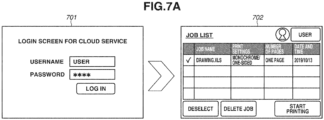
- a screen 701 is a login screen for logging in to the cloud service 300 and is displayed in a case where the user wants to print the job submitted to the cloud service 300.
- a screen 703 is a login screen for logging in to the general-purpose cloud print service 301 and is displayed in a case where the user wants to print the job submitted to the general-purpose cloud print service 301.
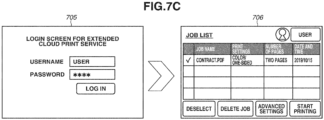
- a screen 705 is a login screen for logging in to the extended cloud print service 302 and is displayed in a case where the user wants to print the job submitted to the extended cloud print service 302.
- the user inputs the account information on the login screen 701, 703, or 705 individually.
- the user accesses the cloud service 300, the general-purpose cloud print service 301, or the extended cloud print service 302 on the image forming apparatus 200.
- the cloud service that has received the login from the image forming apparatus 200 creates a list of print jobs registered therein. Then, the cloud service transmits the print job list to the image forming apparatus 200 and causes it to be displayed on the operation unit 208 of the image forming apparatus 200.
- Information 702 lists the print jobs stored in the online storage of the cloud service 300.
- the print jobs submitted to the general-purpose cloud print service 301 and the extended cloud print service 302 are not displayed in this list.
- Information 704 lists the print jobs stored in the general-purpose cloud print service 301.
- the print jobs submitted to the cloud service 300 and the extended cloud print service 302 are not displayed in this list.
- Information 706 lists the print jobs stored in the extended cloud print service 302.
- the print jobs submitted to the cloud service 300 and the general-purpose cloud print service 301 are not displayed in this list.
- the information 706, which is the print job list of the extended cloud print service 302 having the function of changing the advanced settings a function of the advanced settings not supported by the other cloud services can be provided.
- the server system described herein creates an integrated print job list in which the respective print job lists of the cloud services are merged, and causes the image forming apparatus 200 to display it. Presenting such a display allows the user to select the print job to carry out the printing without being conscious of which service the print job has been submitted to.
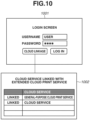
- FIGS. 10 and 11 illustrate screens that the extended cloud print service 302, which is the server system according to the present exemplary embodiment, provides to the image forming apparatus 200.
- the user selects the extended cloud print service 302 on the screen for selecting a function to use (home screen). Then, a login screen indicated by 1001 in FIG. 10 is displayed. The user logs in to the extended cloud print service 302 by inputting the username and the password corresponding to the extended cloud print service 302 on the login screen 1001.
- a "cloud linkage” button is a button to display a screen for confirming or adding a cloud service with which the extended cloud print service 302 is linked. If the user selects the "cloud linkage” button, a screen indicated by 1002 is displayed. The already linked cloud service 300 and general-purpose cloud print service 301 are displayed on the screen 1002. Further, the user can register a cloud service in which the extended cloud print service 302 will be newly linked on the screen 1002. If the user selects a not-illustrated "register” button, a screen for registering the new cloud service is displayed.
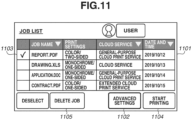
- FIG. 11 illustrates a list of print jobs displayed when the user selects a "log in” button on the login screen 1001 illustrated in FIG. 10 .
- the information about the print jobs stored in the cloud service 300 and the information about the print jobs stored in the general-purpose cloud print service 301 are displayed in the list of print jobs in addition to the information about the print jobs stored in the extended cloud print service 302.
- An item "job name” is a filename of a file to print.
- a part of the print settings set to the print data is displayed in an item “print settings”.
- the name of the cloud service specified by the user as the submission destination is displayed in an item “cloud service”.
- the date and time of submission of the print job is indicated in an item “date and time”. Only the date is displayed in FIG. 11 , but the list may be configured to also display the submission time.
- the print jobs can be displayed after being sorted by the job name, the type of the cloud service, or the date and time of submission of the print job in the list of print jobs illustrated in FIG. 11 .
- the pieces of information about the print job are displayed in the order of "contract.pdf", “application.doc”, “drawing.xls”, and "report.pdf”. In this manner, the pieces of information about the print job in the list can be sorted regardless of the type of the cloud service that is the destination to which the print job has been submitted on the screen illustrated in FIG. 11 .
- the print job is selected as indicated by 1103.
- the user can also select a plurality of print jobs. If the user selects a "start printing" button 1104, the printing of the selected print job is carried out. If the user selects a "delete job” button while the information about the print job is selected, the extended cloud print service 302 deletes the selected information about the print job. Further, the extended cloud print service 302 transmits a request to delete the print job to the cloud service in which the selected print job is stored. If the user selects a "deselect" button 1105, the selected print job is deselected.
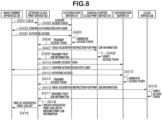
- FIG. 8 a sequence diagram for creating the integrated print job list by the extended cloud print service 302 will be described with reference to a sequence diagram illustrated in FIG. 8 .
- the Open Authorization (OAuth) authorization system using an authorization server is used to implement authorization.
- the sequence illustrated in FIG. 8 is started in reaction to the user's logging in to the extended cloud print service 302 by operating the image forming apparatus 200.
- step S401 the image forming apparatus 200 receives the input of the account information from the user, and logs in to the extended cloud print service 302 using the account information.
- step S402 the extended cloud print service 302 transmits an acquisition request for an access token to an authorization server 310 of the general-purpose cloud print service 301 specified as the linkage destination.
- the authorization server 310 causes the image forming apparatus 200 to display the screen for inputting the username and the password corresponding to the general-purpose cloud print service 301, and carries out the user authentication based on the input information. Further, the authorization server 310 confirms authorization regarding whether the extended cloud print service 302 is permitted to access the general-purpose cloud print service 301 with the user via the operation unit 208 of the image forming apparatus 200.
- step S404 the image forming apparatus 200 transmits, to the authorization server 310, information indicating permission for the access using the information about the authorization input by the user.
- step S405 the authorization server 310 generates an access token required to access the general-purpose cloud print service 301.
- step S406 the authorization server 310 transmits the generated access token to the extended cloud print service 302.
- step S407 the extended cloud print service 302 issues an acquisition instruction for the print job information to the general-purpose cloud print service 301 using the acquired access token.
- step S408 the general-purpose cloud print service 301 verifies the received access token, and verifies whether the access is access authorized by the authorization server 310.
- the general-purpose cloud print service 301 confirms that there is no problem with the access authority as a result of the verification, and transmits the information about the print job to the extended cloud print service 302.
- the information about the print job here means bibliographic information such as the print settings of basic functions, the job name, and the date and time of submission of the print job.
- the information about the print job may be information contained in the print job or may be information stored in association with the print job in another server system.
- the extended cloud print service 302 performs processing similar to the processing performed with respect to the general-purpose cloud print service 301 in steps S402 to S409, targeting at the cloud service 300.
- step S410 the extended cloud print service 302 transmits an acquisition request for an access token to an authorization server 311 of the cloud service 300 specified as the linkage destination.
- step S411 the authorization server 311 causes the image forming apparatus 200 to display the screen for inputting the username and the password corresponding to the cloud service 300, and carries out the user authentication based on the input information. Further, the authorization server 311 confirms authorization regarding whether the extended cloud print service 302 is permitted to access the cloud service 300 with the user via the operation unit 208 of the image forming apparatus 200.
- step S412 the image forming apparatus 200 transmits, to the authorization server 311, information indicating permission for the access using the information about the authorization input by the user.
- step S413 the authorization server 311 generates an access token required to access the cloud service 300.
- step S414 the authorization server 311 transmits the generated access token to the extended cloud print service 302.
- step S415 the extended cloud print service 302 issues an acquisition instruction for the print job information to the cloud service 300 using the acquired access token.
- step S416 the cloud service 300 verifies the received access token, and verifies whether the access is access authorized by the authorization server 311.
- step S417 the cloud service 300 confirms that there is no problem with the access authority as a result of the verification, and transmits the information about the print job to the extended cloud print service 302.
- the information about the print job here means bibliographic information such as the print settings of basic functions, the job name, and the date.
- step S4108 the extended cloud print service 302 creates the integrated print job list by merging the pieces of print job information acquired in steps S409 and S417.
- step S4108 the extended cloud print service 302 generates data in the Hyper Text Markup Language (HTML) format that constructs the screen illustrated in FIG. 11 on which the list of print jobs is displayed.
- HTML Hyper Text Markup Language
- step S419 the extended cloud print service 302 instructs the image forming apparatus 200 to display the created integrated print job list.
- the image forming apparatus 200 Upon receiving the integrated print job list, the image forming apparatus 200 displays the received integrated print job list on the operation unit 208 using, for example, a web browser function.
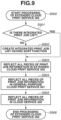
- FIG. 9 is a flowchart in which the extended cloud print service 302 creates the integrated print job list by merging the information acquired from each of the cloud services.
- the CPU(s) of one or a plurality of information processing apparatuses forming the extended cloud print service 302 execute(s) the program stored in the ROM or the auxiliary storage device to implement the processing illustrated in FIG. 9 .
- step S900 the extended cloud print service 302 starts the processing thereof after acquiring the job information from each of the cloud services.
- step S901 the print job management unit 503 of the extended cloud print service 302 determines whether there is the integrated print job list.
- One integrated print job list is prepared for one account on the extended cloud print service 302. Thus, if there is the previously created integrated print job list (YES in step S901), the print job management unit 503 advances the processing to step S903. If the integrated print job list has not been created (NO in step S901), the print job management unit 503 advances the processing to step S902.
- the extended cloud print service 302 creates a frame of the integrated print job list having the sort function.
- the information about each print job is not reflected yet at this point.
- the sort function refers to a mechanism capable of sorting the print jobs according to the content of the print job information, and refers to, for example, sorting the print jobs by the job name, sorting the print jobs by the date, and sorting the print jobs by the cloud service name. Sorting the print jobs by the job name means sorting the pieces of information about the print jobs in the order of the Japanese syllabary or in the alphabetical order.
- Sorting the print jobs by the date means sorting the pieces of information about the print jobs in the order of the date of submission of the print job from the earliest to the latest or from the latest to the earliest.
- Sorting the print jobs by the cloud service name means sorting the pieces of information about the print jobs by the type of the cloud service.
- step S903 the print job management unit 503 of the extended cloud print service 302 reflects the print job information stored in the extended cloud print service 302 into the integrated print job list. If the integrated print job list is determined as having been already prepared in step S901 (YES in step S901), the print job management unit 503 of the extended cloud print service 302 updates the information about the print jobs stored in the extended cloud print service 302 that is contained in the integrated print job list.
- step S904 the print job management unit 503 of the extended cloud print service 302 reflects the print job information acquired from the general-purpose cloud print service 301 into the integrated print job list. If the integrated print job list is determined as having been already prepared in step S901 (YES in step S901), the print job management unit 503 of the extended cloud print service 302 updates the information about the jobs stored in the general-purpose cloud print service 301 that is contained in the integrated print job list with the information acquired in step S409.
- step S905 the print job management unit 503 of the extended cloud print service 302 reflects the print job information acquired from the cloud service 300 into the integrated print job list. If the integrated print job list is determined as having been already prepared in step S901 (YES in step S901), the print job management unit 503 of the extended cloud print service 302 updates the information about the jobs stored in the cloud service 300 that is contained in the integrated print job list with the information acquired in step S417.
- step S906 the processing for creating the integrated print job list is ended.
- the integrated print job list is created with the pieces of print job information of the linked cloud services reflected therein.
- Performing the above-described processing allows the login screen on the image forming apparatus 200 to be integrated (login screen 1001) as illustrated in FIG. 10 .
- the user can confirm the print jobs of each of the linked cloud services (screen 1002) simply by logging in using the account information corresponding to the extended cloud print service 302.
- the user can expand the linked cloud services by inputting account information corresponding to an intended cloud service on the screen.
- the present configuration also allows the extended cloud print service 302 to prompt the user to link to a highly convenient cloud service that is an unlinked cloud service and different especially in function from the extended cloud print service 302.
- the pieces of job information are merged on the extended cloud print service 302, but there is no problem if the pieces of job information are merged on the image forming apparatus 200 side. Further, even in a case where the integrated print job list is created, the image forming apparatus 200 can still keep using the screen for login to each of the cloud services as in FIGS. 7A and 7B .
- FIG. 11 illustrates the example of the display of the integrated print job list created by the extended cloud print service 302 that is displayed on the image forming apparatus 200 (display 1101) as described above.
- the print jobs of each of the cloud services can be viewed in a list.
- the display has the function of allowing the print jobs to be sorted by the item of the job name, the cloud service that indicates where the registered print job is located, the date, or the like to improve visibility as described above.
- the print jobs are displayed while being grouped by the cloud service.
- the print jobs are displayed in the order of the date and time of submission from the latest to the earliest or from the earliest to the latest.
- FIG. 11 illustrates the example of the display of the integrated print job list created by the extended cloud print service 302 that is displayed on the image forming apparatus 200 (display 1101) as described above.
- the print jobs of each of the cloud services can be viewed in a list.
- the display has the function of allowing the print jobs to be sorted by the item of the job name
- the print jobs are displayed in the order of the date and time of submission of the print job from the earliest to the latest. As illustrated in FIG. 11 , the print jobs are displayed in the list form while being sorted independently of the cloud service specified as the submission destination by the user in the present exemplary embodiment. Presenting such a display allows the user to select the print job to print without being conscious of which service the job has been submitted to.
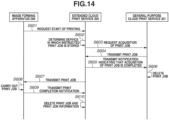
- FIG. 14 is a sequence diagram illustrating processing when the user selects the print job registered in the general-purpose cloud print service 301 from the integrated print job list and selects the "start printing" button 1104.
- step S601 the image forming apparatus 200 transmits a request to start the printing of the print job selected by the user to the extended cloud print service 302.
- step S602 the extended cloud print service 302 determines which service stores the print job that the extended cloud print service 302 is instructed to print.
- the selected print job is a print job stored in the general-purpose cloud print service 301.
- step S603 the extended cloud print service 302 transmits an acquisition request for the print job that the extended cloud print service 302 is instructed to print using the access token for accessing the general-purpose cloud print service 301.
- step S604 the general-purpose cloud print service 301 verifies the access token received from the extended cloud print service 302. If the request is issued from the extended cloud print service 302 permitted to access the general-purpose cloud print service 301, the general-purpose cloud print service 301 transmits the requested print job to the extended cloud print service 302.
- the processing described in steps S403 to S406 illustrated in FIG. 8 may be performed if the verification of the access token is not successful.
- step S605 the extended cloud print service 302 transmits a notification indicating that the acquisition of the print job is completed to the general-purpose cloud print service 301.
- step S606 the general-purpose cloud print service 301 deletes the print job, the notification about which has been transmitted from the extended cloud print service 302, from the general-purpose cloud print service 301.
- step S607 the extended cloud print service 302 transmits the print job to the image forming apparatus 200.
- step S608 the image forming apparatus 200 analyzes the print job received from the extended cloud print service 302 and carries out the printing.
- step S609 upon completing the printing, the image forming apparatus 200 transmits a print completion notification to the extended cloud print service 302.
- step S610 the extended cloud print service 302 deletes the print job, the print completion notification about which has been transmitted from the image forming apparatus 200, and the information about the print job stored in the table for managing the bibliographic information.
- FIG. 14 has been described referring to the example when the image forming apparatus 200 carries out the print job submitted to the general-purpose cloud print service 301.
- the general-purpose cloud print service 301 illustrated in FIG. 14 is replaced with the cloud service 300.
- the processing in steps S603 to S606 is omitted, and the processing in step S607 and the subsequent steps is performed after step S602.
- the sequence illustrated in FIG. 14 allows the user to carry out the print job submitted to the general-purpose cloud print service 301 or the cloud service 300 from the list of print jobs displayed by the extended cloud print service 302.
- the user can change the print settings by selecting the print job in the integrated print job list illustrated in FIG. 11 and selecting an "advanced settings" button 1102.
- the print jobs registered in the general-purpose cloud print service 301 are limited to the basic functions, and thus a part of the setting items settable on the extended cloud print service 302 cannot be reflected therein.
- the extended cloud print service 302 acquires the print job from the other cloud service. Then, the extended cloud print service 302 performs processing for reregistering the print job registered in the other cloud service with the extended cloud print service 302, thereby allowing the user to configure the advanced settings.
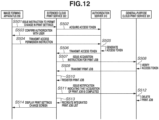
- the present processing will be described with reference to a sequence diagram regarding processing between the individual cloud services illustrated in FIG. 12 .
- FIG. 12 is a sequence diagram for reregistering the print job in the extended cloud print service 302 from the general-purpose cloud print service 301 to allow the user to change the advanced print settings.
- step S501 the image forming apparatus 200 receives an input to change the print settings from the user, and instructs the extended cloud print service 302 to permit the change in the print settings of the selected print job.
- the processing described in step S501 is performed.
- step S502 the extended cloud print service 302 transmits an acquisition request for the access token to the authorization server 310 of the general-purpose cloud print service 301.
- step S503 the authorization server 310 transmits a request for user confirmation to the image forming apparatus 200.
- the image forming apparatus 200 displays the ID and password screen for logging in to the general-purpose cloud print service 301.
- the authorization server 310 carries out the authentication for logging in to the general-purpose cloud print service 301 based on the input ID and password.
- the authorization server 310 causes the image forming apparatus 200 to display a screen for inquiring of the user whether the extended cloud print service 302 is permitted to access the general-purpose cloud print service 301.
- step S504 the image forming apparatus 200 transmits an access permission instruction to the authorization server 310.
- step S505 the authorization server 310 generates an access token for allowing the extended cloud print service 302 to access the general-purpose cloud print service 301.
- step S506 the authorization server 310 transmits the generated access token to the extended cloud print service 302.
- steps S502 to S506 between the extended cloud print service 302, the authorization server 310, and the image forming apparatus 200 may be omitted if the extended cloud print service 302 has already held the access token for accessing the general-purpose cloud print service 301.
- step S507 the extended cloud print service 302 issues an acquisition instruction for the print job targeted for the change in the print settings specified on the image forming apparatus 200 to the general-purpose cloud print service 301 using the access token.
- step S508 the general-purpose cloud print service 301 verifies the received access token, and verifies whether the access is access authorized by the authorization server 310.
- step S509 the general-purpose cloud print service 301 transmits the print job targeted for the change in the print settings specified on the image forming apparatus 200.
- step S510 the extended cloud print service 302 registers the acquired print job in the extended cloud print service 302.
- the extended cloud print service 302 Upon completing the registration of the received print job, in step S511, the extended cloud print service 302 notifies the general-purpose cloud print service 301 of a notification indicating that the acquisition of the print job is completed.
- step S512 the general-purpose cloud print service 301 receives the notification indicating that the acquisition of the print job is completed from the extended cloud print service 302, and deletes the print job.
- step S513 the extended cloud print service 302 recreates the integrated print job list including the newly acquired print job.
- the extended cloud print service 302 registers the print job of which the extended cloud print service 302 is instructed to change the print settings with the integrated print job list as the print job registered in the extended cloud print service 302.
- the extended cloud print service 302 displays the not-illustrated print setting change screen on the image forming apparatus 200.
- the print setting change screen is a screen on which the user can set print settings that cannot be set using the print functions of the general-purpose cloud print service 301 and the cloud service 300.
- the print settings that cannot be set on the general-purpose cloud print service 301 and the cloud service 300 include the finishing setting corresponding to the finisher, the profile setting to which the installed color profile is applied, the setting of the font substitution based on the installed font, and the like.
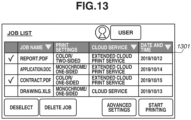
- FIG. 13 illustrates an example of the integrated print job list recreated in step S513 illustrated in FIG. 12 .
- the print job with the general-purpose cloud print service displayed in the item of the cloud service in FIG. 11 is listed with the extended cloud print service displayed in the item in a recreated integrated print job list 1301. Performing such processing causes the print job to be stored in the extended cloud print service 302, thereby allowing the user to change the print settings.
- FIGS. 12 and 13 have been described using the example of changing the print settings of the print job registered in the general-purpose cloud print service 301.
- a similar method may be performed in a case where the print settings of the print job registered in the cloud service 300 are to be changed.
- the authorization server 310 illustrated in FIG. 12 is replaced with the authorization server 311 corresponding to the cloud service 300
- the general-purpose cloud print service 301 is replaced with the cloud service 300.
- the user can confirm the print data that can be processed on the image forming apparatus 200 without being conscious of the cloud print service to which the print job has been submitted.
- the server system can improve the convenience of the user by being linked with the plurality of cloud services and, further, can provide an advanced print setting method suitable for the image forming apparatus 200 to the user in the cloud printing using the cloud print service.
- the user can confirm the print data that can be processed by the image forming apparatus without being conscious of the cloud print service to which the print job has been submitted.
- Embodiment(s) of the present invention can also be realized by a computer of a system or apparatus that reads out and executes computer executable instructions (e.g., one or more programs) recorded on a storage medium (which may also be referred to more fully as a 'non-transitory computer-readable storage medium') to perform the functions of one or more of the above-described embodiment(s) and/or that includes one or more circuits (e.g., application specific integrated circuit (ASIC)) for performing the functions of one or more of the above-described embodiment(s), and by a method performed by the computer of the system or apparatus by, for example, reading out and executing the computer executable instructions from the storage medium to perform the functions of one or more of the above-described embodiment(s) and/or controlling the one or more circuits to perform the functions of one or more of the above-described embodiment(s).
- computer executable instructions e.g., one or more programs
- a storage medium which may also be referred to more fully as
- the computer may comprise one or more processors (e.g., central processing unit (CPU), micro processing unit (MPU)) and may include a network of separate computers or separate processors to read out and execute the computer executable instructions.
- the computer executable instructions may be provided to the computer, for example, from a network or the storage medium.
- the storage medium may include, for example, one or more of a hard disk, a random-access memory (RAM), a read only memory (ROM), a storage of distributed computing systems, an optical disk (such as a compact disc (CD), digital versatile disc (DVD), or Blu-ray Disc (BD) TM ), a flash memory device, a memory card, and the like.
Landscapes
- Engineering & Computer Science (AREA)
- Theoretical Computer Science (AREA)
- Physics & Mathematics (AREA)
- General Engineering & Computer Science (AREA)
- General Physics & Mathematics (AREA)
- Human Computer Interaction (AREA)
- Computer Security & Cryptography (AREA)
- Health & Medical Sciences (AREA)
- General Health & Medical Sciences (AREA)
- Computer Hardware Design (AREA)
- Bioethics (AREA)
- Software Systems (AREA)
- Accessory Devices And Overall Control Thereof (AREA)
- Facsimiles In General (AREA)
Applications Claiming Priority (1)
| Application Number | Priority Date | Filing Date | Title |
|---|---|---|---|
| JP2019212298A JP7433856B2 (ja) | 2019-11-25 | 2019-11-25 | サーバシステム |
Publications (2)
| Publication Number | Publication Date |
|---|---|
| EP3825837A1 EP3825837A1 (en) | 2021-05-26 |
| EP3825837B1 true EP3825837B1 (en) | 2025-03-19 |
Family
ID=73543113
Family Applications (1)
| Application Number | Title | Priority Date | Filing Date |
|---|---|---|---|
| EP20208909.0A Active EP3825837B1 (en) | 2019-11-25 | 2020-11-20 | Image forming apparatus, method for controlling image forming apparatus, and program |
Country Status (6)
| Country | Link |
|---|---|
| US (1) | US11537346B2 (enExample) |
| EP (1) | EP3825837B1 (enExample) |
| JP (2) | JP7433856B2 (enExample) |
| KR (1) | KR102776835B1 (enExample) |
| CN (1) | CN112835540B (enExample) |
| BR (1) | BR102020023216A2 (enExample) |
Families Citing this family (3)
| Publication number | Priority date | Publication date | Assignee | Title |
|---|---|---|---|---|
| JP2023034481A (ja) * | 2021-08-31 | 2023-03-13 | キヤノン株式会社 | システム、および、制御方法 |
| JP7807900B2 (ja) * | 2021-11-26 | 2026-01-28 | キヤノン株式会社 | サーバシステム、印刷制御方法とプログラム及び印刷システム |
| JP7532446B2 (ja) | 2022-06-13 | 2024-08-13 | キヤノン株式会社 | クラウドシステム、クラウド連携システム、画像形成装置、制御方法、および、プログラム |
Family Cites Families (9)
| Publication number | Priority date | Publication date | Assignee | Title |
|---|---|---|---|---|
| JP2012133489A (ja) | 2010-12-20 | 2012-07-12 | Canon Inc | 印刷システム、プリントサービス装置、サービス提供装置、制御方法、及びプログラム |
| JP5862240B2 (ja) * | 2011-03-11 | 2016-02-16 | 株式会社リコー | 情報処理装置、制御システム、制御方法、制御プログラム、及びそのプログラムを記録した記録媒体 |
| JP5834550B2 (ja) | 2011-07-05 | 2015-12-24 | 株式会社リコー | 情報処理装置、データ管理システム、及びデータ管理プログラム |
| JP2014115895A (ja) * | 2012-12-11 | 2014-06-26 | Canon Inc | 情報処理装置及びその制御方法、並びにプログラム |
| JP6167879B2 (ja) * | 2013-12-04 | 2017-07-26 | 富士ゼロックス株式会社 | 印刷システム、情報処理装置、プログラム |
| JP6167890B2 (ja) * | 2013-12-18 | 2017-07-26 | 富士ゼロックス株式会社 | 印刷システム、情報処理装置、プリントサービスシステム、及びプログラム |
| JP2015191651A (ja) * | 2014-03-31 | 2015-11-02 | 株式会社リコー | ジョブ処理装置、情報表示装置、情報処理システム、ジョブ一覧表示方法及びプログラム |
| JP2018022409A (ja) * | 2016-08-05 | 2018-02-08 | キヤノン株式会社 | 印刷システム、印刷システムの制御方法、及びプログラム |
| JP6926736B2 (ja) | 2017-07-03 | 2021-08-25 | 株式会社リコー | サーバ装置、情報処理システムおよびプログラム |
-
2019
- 2019-11-25 JP JP2019212298A patent/JP7433856B2/ja active Active
-
2020
- 2020-11-13 BR BR102020023216-9A patent/BR102020023216A2/pt unknown
- 2020-11-17 US US16/950,483 patent/US11537346B2/en active Active
- 2020-11-19 KR KR1020200155118A patent/KR102776835B1/ko active Active
- 2020-11-19 CN CN202011300432.6A patent/CN112835540B/zh active Active
- 2020-11-20 EP EP20208909.0A patent/EP3825837B1/en active Active
-
2024
- 2024-01-25 JP JP2024009513A patent/JP7612903B2/ja active Active
Also Published As
| Publication number | Publication date |
|---|---|
| US11537346B2 (en) | 2022-12-27 |
| EP3825837A1 (en) | 2021-05-26 |
| JP2021086187A (ja) | 2021-06-03 |
| JP2024050690A (ja) | 2024-04-10 |
| CN112835540B (zh) | 2024-05-14 |
| KR102776835B1 (ko) | 2025-03-10 |
| KR20210064069A (ko) | 2021-06-02 |
| BR102020023216A2 (pt) | 2021-06-08 |
| CN112835540A (zh) | 2021-05-25 |
| US20210157539A1 (en) | 2021-05-27 |
| JP7433856B2 (ja) | 2024-02-20 |
| JP7612903B2 (ja) | 2025-01-14 |
Similar Documents
| Publication | Publication Date | Title |
|---|---|---|
| US8437024B2 (en) | Print controlling system having usage restrictions for print data stored in a print managing server, print controlling method, and program | |
| US10750051B2 (en) | Image forming apparatus and controlling method of printing based on selection of an object associated with user name and network domain name obtained from print data | |
| JP7829787B2 (ja) | システム、読取装置、方法およびプログラム | |
| US8339624B2 (en) | Image processing apparatus, and method of displaying messages in plural languages | |
| JP7612903B2 (ja) | サーバシステム | |
| CN112346670A (zh) | 打印装置和打印系统 | |
| KR102271119B1 (ko) | 화상형성장치, 표시 방법, 프로그램, 및 프로그램을 기억하는 컴퓨터 판독가능한 기억매체 | |
| JP5983818B2 (ja) | 画像処理装置、画像処理システムと、その処理方法、およびそのプログラム | |
| JP5445095B2 (ja) | 画像処理システム、管理サーバと、その画像処理方法、およびそのプログラム | |
| CN114520852B (zh) | 信息处理系统和存储介质 | |
| JP2018069546A (ja) | 画像形成装置、システム、制御方法、及びプログラム | |
| CN107046613A (zh) | 图像形成系统、图像形成装置以及图像形成方法 | |
| US11533403B2 (en) | Process executing system, information processing system, information processing method, and recording medium for detecting duplicate image data from a same output material | |
| US10165147B2 (en) | Cloud data storing of property and setting data of image data | |
| JP5943055B2 (ja) | 画像形成装置、画像処理システム、管理サーバ、とその処理方法およびそのプログラム | |
| JP5765412B2 (ja) | 画像処理システム、管理サーバと、その処理方法、およびそのプログラム | |
| JP6094188B2 (ja) | 管理サーバ、画像処理システム、とその処理方法及びプログラム | |
| JP2023057293A (ja) | 画像処理装置、画像処理装置の制御方法、及びプログラム | |
| JP2016112717A (ja) | 画像形成装置、画像形成システム、その制御方法及びプログラム | |
| JP2012137873A (ja) | 情報処理装置、その制御方法及びプログラム、並びに情報処理システム | |
| JP2013239046A (ja) | 画像形成装置、画像形成システム、その制御方法及びプログラム | |
| JP2014109860A (ja) | 印刷管理装置、印刷管理システム、その制御方法及びプログラム |
Legal Events
| Date | Code | Title | Description |
|---|---|---|---|
| PUAI | Public reference made under article 153(3) epc to a published international application that has entered the european phase |
Free format text: ORIGINAL CODE: 0009012 |
|
| STAA | Information on the status of an ep patent application or granted ep patent |
Free format text: STATUS: THE APPLICATION HAS BEEN PUBLISHED |
|
| AK | Designated contracting states |
Kind code of ref document: A1 Designated state(s): AL AT BE BG CH CY CZ DE DK EE ES FI FR GB GR HR HU IE IS IT LI LT LU LV MC MK MT NL NO PL PT RO RS SE SI SK SM TR |
|
| STAA | Information on the status of an ep patent application or granted ep patent |
Free format text: STATUS: REQUEST FOR EXAMINATION WAS MADE |
|
| 17P | Request for examination filed |
Effective date: 20211126 |
|
| RBV | Designated contracting states (corrected) |
Designated state(s): AL AT BE BG CH CY CZ DE DK EE ES FI FR GB GR HR HU IE IS IT LI LT LU LV MC MK MT NL NO PL PT RO RS SE SI SK SM TR |
|
| STAA | Information on the status of an ep patent application or granted ep patent |
Free format text: STATUS: EXAMINATION IS IN PROGRESS |
|
| 17Q | First examination report despatched |
Effective date: 20221202 |
|
| GRAP | Despatch of communication of intention to grant a patent |
Free format text: ORIGINAL CODE: EPIDOSNIGR1 |
|
| STAA | Information on the status of an ep patent application or granted ep patent |
Free format text: STATUS: GRANT OF PATENT IS INTENDED |
|
| INTG | Intention to grant announced |
Effective date: 20241014 |
|
| GRAS | Grant fee paid |
Free format text: ORIGINAL CODE: EPIDOSNIGR3 |
|
| GRAA | (expected) grant |
Free format text: ORIGINAL CODE: 0009210 |
|
| STAA | Information on the status of an ep patent application or granted ep patent |
Free format text: STATUS: THE PATENT HAS BEEN GRANTED |
|
| AK | Designated contracting states |
Kind code of ref document: B1 Designated state(s): AL AT BE BG CH CY CZ DE DK EE ES FI FR GB GR HR HU IE IS IT LI LT LU LV MC MK MT NL NO PL PT RO RS SE SI SK SM TR |
|
| REG | Reference to a national code |
Ref country code: GB Ref legal event code: FG4D |
|
| REG | Reference to a national code |
Ref country code: CH Ref legal event code: EP |
|
| REG | Reference to a national code |
Ref country code: DE Ref legal event code: R096 Ref document number: 602020047861 Country of ref document: DE |
|
| REG | Reference to a national code |
Ref country code: IE Ref legal event code: FG4D |
|
| PG25 | Lapsed in a contracting state [announced via postgrant information from national office to epo] |
Ref country code: RS Free format text: LAPSE BECAUSE OF FAILURE TO SUBMIT A TRANSLATION OF THE DESCRIPTION OR TO PAY THE FEE WITHIN THE PRESCRIBED TIME-LIMIT Effective date: 20250619 |
|
| PG25 | Lapsed in a contracting state [announced via postgrant information from national office to epo] |
Ref country code: FI Free format text: LAPSE BECAUSE OF FAILURE TO SUBMIT A TRANSLATION OF THE DESCRIPTION OR TO PAY THE FEE WITHIN THE PRESCRIBED TIME-LIMIT Effective date: 20250319 |
|
| REG | Reference to a national code |
Ref country code: LT Ref legal event code: MG9D |
|
| PG25 | Lapsed in a contracting state [announced via postgrant information from national office to epo] |
Ref country code: NO Free format text: LAPSE BECAUSE OF FAILURE TO SUBMIT A TRANSLATION OF THE DESCRIPTION OR TO PAY THE FEE WITHIN THE PRESCRIBED TIME-LIMIT Effective date: 20250619 |
|
| PG25 | Lapsed in a contracting state [announced via postgrant information from national office to epo] |
Ref country code: HR Free format text: LAPSE BECAUSE OF FAILURE TO SUBMIT A TRANSLATION OF THE DESCRIPTION OR TO PAY THE FEE WITHIN THE PRESCRIBED TIME-LIMIT Effective date: 20250319 |
|
| PG25 | Lapsed in a contracting state [announced via postgrant information from national office to epo] |
Ref country code: LV Free format text: LAPSE BECAUSE OF FAILURE TO SUBMIT A TRANSLATION OF THE DESCRIPTION OR TO PAY THE FEE WITHIN THE PRESCRIBED TIME-LIMIT Effective date: 20250319 |
|
| PG25 | Lapsed in a contracting state [announced via postgrant information from national office to epo] |
Ref country code: GR Free format text: LAPSE BECAUSE OF FAILURE TO SUBMIT A TRANSLATION OF THE DESCRIPTION OR TO PAY THE FEE WITHIN THE PRESCRIBED TIME-LIMIT Effective date: 20250620 Ref country code: BG Free format text: LAPSE BECAUSE OF FAILURE TO SUBMIT A TRANSLATION OF THE DESCRIPTION OR TO PAY THE FEE WITHIN THE PRESCRIBED TIME-LIMIT Effective date: 20250319 |
|
| REG | Reference to a national code |
Ref country code: NL Ref legal event code: MP Effective date: 20250319 |
|
| REG | Reference to a national code |
Ref country code: AT Ref legal event code: MK05 Ref document number: 1777485 Country of ref document: AT Kind code of ref document: T Effective date: 20250319 |
|
| PG25 | Lapsed in a contracting state [announced via postgrant information from national office to epo] |
Ref country code: NL Free format text: LAPSE BECAUSE OF FAILURE TO SUBMIT A TRANSLATION OF THE DESCRIPTION OR TO PAY THE FEE WITHIN THE PRESCRIBED TIME-LIMIT Effective date: 20250319 |
|
| PG25 | Lapsed in a contracting state [announced via postgrant information from national office to epo] |
Ref country code: SE Free format text: LAPSE BECAUSE OF FAILURE TO SUBMIT A TRANSLATION OF THE DESCRIPTION OR TO PAY THE FEE WITHIN THE PRESCRIBED TIME-LIMIT Effective date: 20250319 |
|
| PG25 | Lapsed in a contracting state [announced via postgrant information from national office to epo] |
Ref country code: SM Free format text: LAPSE BECAUSE OF FAILURE TO SUBMIT A TRANSLATION OF THE DESCRIPTION OR TO PAY THE FEE WITHIN THE PRESCRIBED TIME-LIMIT Effective date: 20250319 |
|
| PG25 | Lapsed in a contracting state [announced via postgrant information from national office to epo] |
Ref country code: ES Free format text: LAPSE BECAUSE OF FAILURE TO SUBMIT A TRANSLATION OF THE DESCRIPTION OR TO PAY THE FEE WITHIN THE PRESCRIBED TIME-LIMIT Effective date: 20250319 Ref country code: PT Free format text: LAPSE BECAUSE OF FAILURE TO SUBMIT A TRANSLATION OF THE DESCRIPTION OR TO PAY THE FEE WITHIN THE PRESCRIBED TIME-LIMIT Effective date: 20250721 |
|
| PG25 | Lapsed in a contracting state [announced via postgrant information from national office to epo] |
Ref country code: PL Free format text: LAPSE BECAUSE OF FAILURE TO SUBMIT A TRANSLATION OF THE DESCRIPTION OR TO PAY THE FEE WITHIN THE PRESCRIBED TIME-LIMIT Effective date: 20250319 Ref country code: IT Free format text: LAPSE BECAUSE OF FAILURE TO SUBMIT A TRANSLATION OF THE DESCRIPTION OR TO PAY THE FEE WITHIN THE PRESCRIBED TIME-LIMIT Effective date: 20250319 |
|
| PG25 | Lapsed in a contracting state [announced via postgrant information from national office to epo] |
Ref country code: AT Free format text: LAPSE BECAUSE OF FAILURE TO SUBMIT A TRANSLATION OF THE DESCRIPTION OR TO PAY THE FEE WITHIN THE PRESCRIBED TIME-LIMIT Effective date: 20250319 |
|
| PG25 | Lapsed in a contracting state [announced via postgrant information from national office to epo] |
Ref country code: CZ Free format text: LAPSE BECAUSE OF FAILURE TO SUBMIT A TRANSLATION OF THE DESCRIPTION OR TO PAY THE FEE WITHIN THE PRESCRIBED TIME-LIMIT Effective date: 20250319 Ref country code: EE Free format text: LAPSE BECAUSE OF FAILURE TO SUBMIT A TRANSLATION OF THE DESCRIPTION OR TO PAY THE FEE WITHIN THE PRESCRIBED TIME-LIMIT Effective date: 20250319 |
|
| PG25 | Lapsed in a contracting state [announced via postgrant information from national office to epo] |
Ref country code: RO Free format text: LAPSE BECAUSE OF FAILURE TO SUBMIT A TRANSLATION OF THE DESCRIPTION OR TO PAY THE FEE WITHIN THE PRESCRIBED TIME-LIMIT Effective date: 20250319 |
|
| PG25 | Lapsed in a contracting state [announced via postgrant information from national office to epo] |
Ref country code: SK Free format text: LAPSE BECAUSE OF FAILURE TO SUBMIT A TRANSLATION OF THE DESCRIPTION OR TO PAY THE FEE WITHIN THE PRESCRIBED TIME-LIMIT Effective date: 20250319 |
|
| PG25 | Lapsed in a contracting state [announced via postgrant information from national office to epo] |
Ref country code: IS Free format text: LAPSE BECAUSE OF FAILURE TO SUBMIT A TRANSLATION OF THE DESCRIPTION OR TO PAY THE FEE WITHIN THE PRESCRIBED TIME-LIMIT Effective date: 20250719 |
|
| REG | Reference to a national code |
Ref country code: DE Ref legal event code: R097 Ref document number: 602020047861 Country of ref document: DE |
|
| PGFP | Annual fee paid to national office [announced via postgrant information from national office to epo] |
Ref country code: DE Payment date: 20251022 Year of fee payment: 6 |
|
| PG25 | Lapsed in a contracting state [announced via postgrant information from national office to epo] |
Ref country code: DK Free format text: LAPSE BECAUSE OF FAILURE TO SUBMIT A TRANSLATION OF THE DESCRIPTION OR TO PAY THE FEE WITHIN THE PRESCRIBED TIME-LIMIT Effective date: 20250319 |
|
| PLBE | No opposition filed within time limit |
Free format text: ORIGINAL CODE: 0009261 |
|
| STAA | Information on the status of an ep patent application or granted ep patent |
Free format text: STATUS: NO OPPOSITION FILED WITHIN TIME LIMIT |
|
| REG | Reference to a national code |
Ref country code: CH Ref legal event code: L10 Free format text: ST27 STATUS EVENT CODE: U-0-0-L10-L00 (AS PROVIDED BY THE NATIONAL OFFICE) Effective date: 20260128 |
|
| 26N | No opposition filed |
Effective date: 20251222 |
|
| REG | Reference to a national code |
Ref country code: CH Ref legal event code: H13 Free format text: ST27 STATUS EVENT CODE: U-0-0-H10-H13 (AS PROVIDED BY THE NATIONAL OFFICE) Effective date: 20260623 |
|
| PG25 | Lapsed in a contracting state [announced via postgrant information from national office to epo] |
Ref country code: LT Free format text: LAPSE BECAUSE OF FAILURE TO SUBMIT A TRANSLATION OF THE DESCRIPTION OR TO PAY THE FEE WITHIN THE PRESCRIBED TIME-LIMIT Effective date: 20250319 |
|
| PG25 | Lapsed in a contracting state [announced via postgrant information from national office to epo] |
Ref country code: MC Free format text: LAPSE BECAUSE OF FAILURE TO SUBMIT A TRANSLATION OF THE DESCRIPTION OR TO PAY THE FEE WITHIN THE PRESCRIBED TIME-LIMIT Effective date: 20250319 |
|
| PG25 | Lapsed in a contracting state [announced via postgrant information from national office to epo] |
Ref country code: CH Free format text: LAPSE BECAUSE OF NON-PAYMENT OF DUE FEES Effective date: 20251130 Ref country code: LU Free format text: LAPSE BECAUSE OF NON-PAYMENT OF DUE FEES Effective date: 20251120 |