EP3786772B1 - Elektronische vorrichtung und betriebsverfahren dafür - Google Patents
Elektronische vorrichtung und betriebsverfahren dafür Download PDFInfo
- Publication number
- EP3786772B1 EP3786772B1 EP20188959.9A EP20188959A EP3786772B1 EP 3786772 B1 EP3786772 B1 EP 3786772B1 EP 20188959 A EP20188959 A EP 20188959A EP 3786772 B1 EP3786772 B1 EP 3786772B1
- Authority
- EP
- European Patent Office
- Prior art keywords
- area
- touch input
- writing
- predefined
- electronic device
- Prior art date
- Legal status (The legal status is an assumption and is not a legal conclusion. Google has not performed a legal analysis and makes no representation as to the accuracy of the status listed.)
- Active
Links
Images










Classifications
-
- G—PHYSICS
- G06—COMPUTING OR CALCULATING; COUNTING
- G06F—ELECTRIC DIGITAL DATA PROCESSING
- G06F3/00—Input arrangements for transferring data to be processed into a form capable of being handled by the computer; Output arrangements for transferring data from processing unit to output unit, e.g. interface arrangements
- G06F3/01—Input arrangements or combined input and output arrangements for interaction between user and computer
- G06F3/048—Interaction techniques based on graphical user interfaces [GUI]
- G06F3/0487—Interaction techniques based on graphical user interfaces [GUI] using specific features provided by the input device, e.g. functions controlled by the rotation of a mouse with dual sensing arrangements, or of the nature of the input device, e.g. tap gestures based on pressure sensed by a digitiser
- G06F3/0488—Interaction techniques based on graphical user interfaces [GUI] using specific features provided by the input device, e.g. functions controlled by the rotation of a mouse with dual sensing arrangements, or of the nature of the input device, e.g. tap gestures based on pressure sensed by a digitiser using a touch-screen or digitiser, e.g. input of commands through traced gestures
- G06F3/04883—Interaction techniques based on graphical user interfaces [GUI] using specific features provided by the input device, e.g. functions controlled by the rotation of a mouse with dual sensing arrangements, or of the nature of the input device, e.g. tap gestures based on pressure sensed by a digitiser using a touch-screen or digitiser, e.g. input of commands through traced gestures for inputting data by handwriting, e.g. gesture or text
-
- G—PHYSICS
- G06—COMPUTING OR CALCULATING; COUNTING
- G06F—ELECTRIC DIGITAL DATA PROCESSING
- G06F3/00—Input arrangements for transferring data to be processed into a form capable of being handled by the computer; Output arrangements for transferring data from processing unit to output unit, e.g. interface arrangements
- G06F3/01—Input arrangements or combined input and output arrangements for interaction between user and computer
- G06F3/048—Interaction techniques based on graphical user interfaces [GUI]
- G06F3/0487—Interaction techniques based on graphical user interfaces [GUI] using specific features provided by the input device, e.g. functions controlled by the rotation of a mouse with dual sensing arrangements, or of the nature of the input device, e.g. tap gestures based on pressure sensed by a digitiser
- G06F3/0488—Interaction techniques based on graphical user interfaces [GUI] using specific features provided by the input device, e.g. functions controlled by the rotation of a mouse with dual sensing arrangements, or of the nature of the input device, e.g. tap gestures based on pressure sensed by a digitiser using a touch-screen or digitiser, e.g. input of commands through traced gestures
-
- G—PHYSICS
- G06—COMPUTING OR CALCULATING; COUNTING
- G06F—ELECTRIC DIGITAL DATA PROCESSING
- G06F3/00—Input arrangements for transferring data to be processed into a form capable of being handled by the computer; Output arrangements for transferring data from processing unit to output unit, e.g. interface arrangements
- G06F3/01—Input arrangements or combined input and output arrangements for interaction between user and computer
- G06F3/03—Arrangements for converting the position or the displacement of a member into a coded form
- G06F3/041—Digitisers, e.g. for touch screens or touch pads, characterised by the transducing means
- G06F3/0416—Control or interface arrangements specially adapted for digitisers
-
- G—PHYSICS
- G06—COMPUTING OR CALCULATING; COUNTING
- G06F—ELECTRIC DIGITAL DATA PROCESSING
- G06F3/00—Input arrangements for transferring data to be processed into a form capable of being handled by the computer; Output arrangements for transferring data from processing unit to output unit, e.g. interface arrangements
- G06F3/01—Input arrangements or combined input and output arrangements for interaction between user and computer
- G06F3/048—Interaction techniques based on graphical user interfaces [GUI]
- G06F3/0481—Interaction techniques based on graphical user interfaces [GUI] based on specific properties of the displayed interaction object or a metaphor-based environment, e.g. interaction with desktop elements like windows or icons, or assisted by a cursor's changing behaviour or appearance
- G06F3/0483—Interaction with page-structured environments, e.g. book metaphor
-
- G—PHYSICS
- G06—COMPUTING OR CALCULATING; COUNTING
- G06F—ELECTRIC DIGITAL DATA PROCESSING
- G06F3/00—Input arrangements for transferring data to be processed into a form capable of being handled by the computer; Output arrangements for transferring data from processing unit to output unit, e.g. interface arrangements
- G06F3/01—Input arrangements or combined input and output arrangements for interaction between user and computer
- G06F3/048—Interaction techniques based on graphical user interfaces [GUI]
- G06F3/0484—Interaction techniques based on graphical user interfaces [GUI] for the control of specific functions or operations, e.g. selecting or manipulating an object, an image or a displayed text element, setting a parameter value or selecting a range
-
- G—PHYSICS
- G06—COMPUTING OR CALCULATING; COUNTING
- G06F—ELECTRIC DIGITAL DATA PROCESSING
- G06F3/00—Input arrangements for transferring data to be processed into a form capable of being handled by the computer; Output arrangements for transferring data from processing unit to output unit, e.g. interface arrangements
- G06F3/01—Input arrangements or combined input and output arrangements for interaction between user and computer
- G06F3/048—Interaction techniques based on graphical user interfaces [GUI]
- G06F3/0484—Interaction techniques based on graphical user interfaces [GUI] for the control of specific functions or operations, e.g. selecting or manipulating an object, an image or a displayed text element, setting a parameter value or selecting a range
- G06F3/04842—Selection of displayed objects or displayed text elements
-
- G—PHYSICS
- G06—COMPUTING OR CALCULATING; COUNTING
- G06F—ELECTRIC DIGITAL DATA PROCESSING
- G06F3/00—Input arrangements for transferring data to be processed into a form capable of being handled by the computer; Output arrangements for transferring data from processing unit to output unit, e.g. interface arrangements
- G06F3/01—Input arrangements or combined input and output arrangements for interaction between user and computer
- G06F3/048—Interaction techniques based on graphical user interfaces [GUI]
- G06F3/0484—Interaction techniques based on graphical user interfaces [GUI] for the control of specific functions or operations, e.g. selecting or manipulating an object, an image or a displayed text element, setting a parameter value or selecting a range
- G06F3/04845—Interaction techniques based on graphical user interfaces [GUI] for the control of specific functions or operations, e.g. selecting or manipulating an object, an image or a displayed text element, setting a parameter value or selecting a range for image manipulation, e.g. dragging, rotation, expansion or change of colour
-
- G—PHYSICS
- G06—COMPUTING OR CALCULATING; COUNTING
- G06F—ELECTRIC DIGITAL DATA PROCESSING
- G06F3/00—Input arrangements for transferring data to be processed into a form capable of being handled by the computer; Output arrangements for transferring data from processing unit to output unit, e.g. interface arrangements
- G06F3/01—Input arrangements or combined input and output arrangements for interaction between user and computer
- G06F3/048—Interaction techniques based on graphical user interfaces [GUI]
- G06F3/0487—Interaction techniques based on graphical user interfaces [GUI] using specific features provided by the input device, e.g. functions controlled by the rotation of a mouse with dual sensing arrangements, or of the nature of the input device, e.g. tap gestures based on pressure sensed by a digitiser
- G06F3/0488—Interaction techniques based on graphical user interfaces [GUI] using specific features provided by the input device, e.g. functions controlled by the rotation of a mouse with dual sensing arrangements, or of the nature of the input device, e.g. tap gestures based on pressure sensed by a digitiser using a touch-screen or digitiser, e.g. input of commands through traced gestures
- G06F3/04886—Interaction techniques based on graphical user interfaces [GUI] using specific features provided by the input device, e.g. functions controlled by the rotation of a mouse with dual sensing arrangements, or of the nature of the input device, e.g. tap gestures based on pressure sensed by a digitiser using a touch-screen or digitiser, e.g. input of commands through traced gestures by partitioning the display area of the touch-screen or the surface of the digitising tablet into independently controllable areas, e.g. virtual keyboards or menus
-
- G—PHYSICS
- G06—COMPUTING OR CALCULATING; COUNTING
- G06F—ELECTRIC DIGITAL DATA PROCESSING
- G06F40/00—Handling natural language data
- G06F40/10—Text processing
- G06F40/103—Formatting, i.e. changing of presentation of documents
- G06F40/114—Pagination
-
- G—PHYSICS
- G06—COMPUTING OR CALCULATING; COUNTING
- G06F—ELECTRIC DIGITAL DATA PROCESSING
- G06F40/00—Handling natural language data
- G06F40/10—Text processing
- G06F40/12—Use of codes for handling textual entities
- G06F40/163—Handling of whitespace
-
- G—PHYSICS
- G06—COMPUTING OR CALCULATING; COUNTING
- G06F—ELECTRIC DIGITAL DATA PROCESSING
- G06F40/00—Handling natural language data
- G06F40/10—Text processing
- G06F40/166—Editing, e.g. inserting or deleting
- G06F40/171—Editing, e.g. inserting or deleting by use of digital ink
-
- G—PHYSICS
- G06—COMPUTING OR CALCULATING; COUNTING
- G06F—ELECTRIC DIGITAL DATA PROCESSING
- G06F2203/00—Indexing scheme relating to G06F3/00 - G06F3/048
- G06F2203/048—Indexing scheme relating to G06F3/048
- G06F2203/04806—Zoom, i.e. interaction techniques or interactors for controlling the zooming operation
Definitions
- Embodiments of the disclosure relate to an electronic device and an operation method thereof, and more particularly, to an electronic device having an electronic board function and an operation method thereof.
- EP 2 685 365 A2 , US 2019/220133 A1 , CN 102 446 055 A , and US 2019/114022 A1 describe examples of the related art.
- an electronic board device having a handwriting input function in addition to a content display function in the display devices, is widely used.
- the electronic board device is generally shared by many people. For example, a user may give a presentation to other users by using the electronic board device. Also, due to properties of the electronic board device, a size of a document (for example, a page), which is a target of a writing input, may be fixed. However, when the space of a page becomes insufficient as the user writes using the electronic board device, the user cannot expand the fixed size of the page due to the properties of the electronic board device and may be inconvenient for the user.
- a document for example, a page
- Various embodiments of the disclosure provide an electronic device having an electronic board function and facilitate expansion of a writing input interface (area), and an operation method of the electronic device.
- an electronic device including: a display; a touch input interface; a memory storing at least one instruction; and a processor configured to execute the at least one instruction stored in the memory to: display a writing area in a display area of the display; detect a predefined touch input in the writing area; and based on detecting the predefined touch input, reduce the writing area, display the reduced writing area in at least first part of the display area and provide an extended area in at least second part of the display area, the extended area being configured to receive a writing input continuing from the reduced writing area.
- the processor may be further configured to execute the at least one instruction to: provide a user interface for confirming whether the extended area is to be provided in the display area in response to the detection of the predefined touch input; and based on receiving a user input in the user interface, provide the extended area.
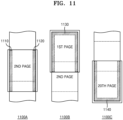
- the processor may be further configured to execute the at least one instruction to: based on the detection of the predefined touch input, reduce the writing area included in a current page among a plurality of pages in a document, the current page being an execution target of a current touch input, and provide the extended area by applying the extended area to the current page.
- an operation method of an electronic device including: displaying a writing area in a display area of a display of the electronic device; detecting a predefined touch input in the writing area; and based on detecting the predefined touch input, reducing the writing area, displaying the reduced writing area in at least first part of the display area and providing an extended area in at least second part of the display area, the extended area being configured to receive a writing input continuing from the reduced writing area.
- the operation method may further include: based on the detection of the predefined touch input, reducing the writing area in each page among a plurality of pages included in a document, wherein a first page among the plurality of pages is an execution target of a current touch input, and providing the extended area by applying the extended area to the plurality of pages in the document.
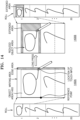
- FIG. 1 is a reference view illustrating an electronic device having an electronic board function according to an embodiment.
- a document file which is a target of a writing input in the electronic device 100 may be referred to as a roll.
- the roll may be a file including a plurality of connected pages.
- a roll may include, for example, 1 to 20 pages. The number of pages of a roll may depend on a system status.
- a roll may be used in two modes, such as a horizontal mode and a vertical mode.
- a roll may be used in the vertical mode.
- pages are connected vertically in a direction of their longer sides. Accordingly, a user may use new pages by scrolling pages down.
- the user may want to continuously write in the horizontal direction. In this case, the user may not be able to continue writing in the horizontal direction because horizontal and vertical lengths of each page have fixed sizes.
- a roll When the electronic device 100 is positioned to show a horizontal screen, a roll may be used in the horizontal mode.
- pages are connected horizontally in such a way to follow one after another at their shorter sides. Accordingly, a user may use new pages by scrolling pages to the left or right.
- the user may want to continuously write in the vertical direction. In this case, the user may not be able to continue writing in the vertical direction because horizontal and vertical lengths of each page have fixed sizes.
- the user may not find a space to make a writing input on a screen of the electronic device 100.
- the user may make a predefined touch input 60 in an edge area 50.
- the electronic device 100 may determine the predefined touch input 60 as the user's intention for extending an area for a writing input, reduce the writing area 40, and provide an extended area 70.
- writing context included in the writing area 40 is "SAMSUNG FliP”
- the electronic device 100 may reduce the writing area 40 including the writing content "SAMSUNG Flip,” and provide the extended area 70 in a space generated when the writing area 40 is reduced.
- the user may make an additional writing input following the writing input by using the extended area 70.
- the electronic device 100 may easily provide the user with an additional space for a writing input without requiring the user's menu control or button control, and provide the user with an experience of making a writing input without interruption regardless of a space of a writing area.
- the electronic device 100 may recognize the predefined touch input as a trigger for providing the extended area 70.
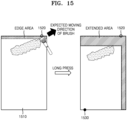
- the predefined touch input may be one of various types of touch inputs. For example, when a touch input continues for a predefined time or more within the edge area 50, when a touch input is made two times in a predefined time within the edge area 50, or when pressure of a touch input exceeds a threshold value within the edge area 50, the electronic device 100 may detect the touch input as the predefined touch input.
- the above-mentioned touch inputs are only examples, and the electronic device 100 may use other types of touch inputs.
- the edge area 50 as a location in the writing area 40 from which the predefined touch input is detected may be an example, and the predefined touch input may be detected from any other location in the writing area 40.
- the electronic device 100 may automatically provide a user interface for confirming the user's intention with respect to the extended area 70 before providing the extended area 70, and then provide the extended area 70 in response to the user's input to the user interface. For example, when the electronic device 100 detects the predefined touch input, the electronic device 100 may output a pop-up window for inquiring the user about whether he/she wants the extended area 70, and provide the extended area 70 after receiving the user's confirmation to the pop-up window. As such, by inquiring the user's intention before providing an extended area, the electronic device 100 may be prevented from providing an extended area unintended by the user.
- the electronic device 100 may reduce a writing area in response to a detection of the predefined touch input, and provide an extended area by using a space generated when the writing area is reduced.
- a range of the reduced writing area may be determined according to a setting of the electronic device 100 or a user's setting.
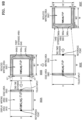
- the reduced writing area may be a writing area corresponding to the entirety of a document which is an execution target of a current touch input, and in this case, the extended area may be applied to the entire document and provided.
- the reduced writing area may be a writing area included in a current page displayed on a display in a document which is an execution target of a current touch input, and in this case, the extended area may be applied to the current page and provided.
- the reduced writing area may be an object area related to a location of a touch input, and in this case, the extended area may be applied to the object area and provided.
- the electronic device 100 is configured to determine a size of the extended area according to a parameter value corresponding to the detected touch input.
- the parameter value corresponding to the touch input may include at least one of a duration time of the touch input, pressure corresponding to the touch input, or the number of touch input.
- the electronic device 100 may determine the size of the extended area in proportion to the duration time of the touch input.
- the electronic device 100 may increase the size of the extended area based on the number of touch inputs being received within a predetermined time frame.
- the electronic device 100 may determine the size of the extended area in proportion to pressure of the touch input.
- the electronic device 100 may enable a user to conveniently adjust the size of the extended area without having to navigate through a control menu or press additional buttons.
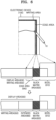
- the electronic device 100 may identify a location of a detected touch input, define a reference point that is relative to the determined location of the touch input, reduce a writing area based on the reference point, and provide an extended area in a space generated in a display area when the writing area is reduced.
- the predefined touch input 60 may be made on a right edge area (e.g., edge area 50 of FIG. 1 ), and a reference point that is relative to the predefined touch input 60 may be at a location corresponding to a left edge area. Because the writing area 40 is reduced based on the reference point, the writing area 40 may move to the left, and thus a space may be generated to the right of the writing area 40.
- the extended area 70 may be provided to the right of the writing area 40 as shown in FIG. 1 .
- the edge area 50 may be positioned on at least one of a right edge, a left edge, an upper edge, or a lower edge of the writing area 40.
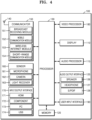
- FIG. 3 is a block diagram of an electronic device according to an embodiment.
- the electronic device 100 may include a display 110, a memory 120, a processor 130, and a user input interface 190.
- the electronic device 100 is not limited thereto, and may be implemented with more or less components than the components shown in FIG. 3 .
- the display 110 may display data that is processed in the electronic device 100.
- the display 110 may be used as an input device, as well as an output device.
- the display 110 may include at least one of a liquid crystal display (LCD), a thin film transistor-liquid crystal display (TFT-LCD), an organic light-emitting diode (OLED) display, a flexible display, a 3Dimensional (3D) display, or an electrophoretic display.
- LCD liquid crystal display
- TFT-LCD thin film transistor-liquid crystal display
- OLED organic light-emitting diode
- flexible display a flexible display
- 3Dimensional (3D) display or an electrophoretic display.
- the user input interface 190 which is an interface for receiving a user input, may receive a touch input by using a touch sensitive device.
- the user input may include a touch input made by a user's finger, a touch input made by a user's palm, an input made by an electronic pen, etc.
- the user input may include an input made by a general brush. In this case, the user may have an experience as though he/she draws a picture with a brush on a canvas.
- the user input interface 190 may include a touch sensitive device for measuring pressure of a detected touch input.
- the memory 120 may store programs for processing and controlling of the processor 130.
- the memory 120 may store data input to the electronic device 100 and data that is to be output from the electronic device 100.
- the memory 120 may include at least one type of storage medium of a flash memory type, a hard disk type, a multimedia card micro type, card type memory (for example, secure digital (SD) memory or extreme digital (XD) memory), random access memory (RAM), static random access memory (SRAM), read-only memory (ROM), electrically erasable programmable read-only memory (EEPROM), programmable read-only memory (PROM), magnetic memory, a magnetic disk, or an optical disk.
- SD secure digital
- XD extreme digital
- RAM random access memory
- SRAM static random access memory
- ROM read-only memory
- EEPROM electrically erasable programmable read-only memory
- PROM programmable read-only memory
- magnetic memory a magnetic disk, or an optical disk.
- the memory 120 may include at least one instruction for performing an extended area providing at least one function disclosed herein.
- the processor 130 may control overall operations of the electronic device 100.
- the processor 130 may execute at least one instruction stored in the memory 120 to control the display 110 and perform functions of the electronic device 100 shown in FIGS. 1 to 16 .
- the processor 130 may execute at least one instruction stored in the memory 120 to detect a predefined touch input in a writing area displayed on a pre-defined display area, reduce the writing area in response to the detection of the predefined touch input, and provide an extended area for a writing input.
- the predefined touch input may include at least one of a touch input maintained for a predefined time or more within the writing area, a touch input corresponding to a double tap made within the writing area, or a touch input of which pressure exceeds a threshold value in the writing area.
- the processor 130 may execute at least one instruction stored in the memory 120 to provide a user interface for confirming a user's intention with respect to an extended area in response to a detection of a predefined touch input, and provide the extended area in response to the user's input reacting to the user interface.
- the processor 130 may execute at least one instruction stored in the memory 120 to reduce the entirety of a document which is an execution target of a current touch input in response to a detection of a predefined touch input, apply an extended area to the entire document, and provide the extended area.
- the processor 130 may execute at least one instruction stored in the memory 120 to reduce a writing area included in a current page displayed on the display 110 in a document which is an execution target of a current touch input, in response to a detection of a predefined touch input, apply an extended area to the current page, and provide the extended area.
- the processor 130 may execute at least one instruction stored in the memory 120 to reduce an object area related to a location of a touch input, in response to a detection of a predefined touch input, apply an extended area to the object area, and provide the extended area.
Landscapes
- Engineering & Computer Science (AREA)
- Theoretical Computer Science (AREA)
- General Engineering & Computer Science (AREA)
- Physics & Mathematics (AREA)
- General Physics & Mathematics (AREA)
- Human Computer Interaction (AREA)
- Health & Medical Sciences (AREA)
- Artificial Intelligence (AREA)
- Audiology, Speech & Language Pathology (AREA)
- Computational Linguistics (AREA)
- General Health & Medical Sciences (AREA)
- User Interface Of Digital Computer (AREA)
Claims (12)
- Elektronische Vorrichtung (100), umfassend:eine Anzeige (110);eine Berührungseingabeschnittstelle;einen Speicher (120), der Anweisungen speichert; undeinen Prozessor (130), der konfiguriert ist, um die Anweisungen, die in dem Speicher gespeichert sind, zu Folgendem auszuführen:Anzeigen eines Schreibbereichs (40) in einem Anzeigebereich (630) der Anzeige (110);Erfassen einer vordefinierten Berührungseingabe in dem Schreibbereich (40); undbasierend auf dem Erfassen der vordefinierten Berührungseingabe, Reduzieren des Schreibbereichs (40),Anzeigen des reduzierten Schreibbereichs (40) in zumindest einem ersten Teil des Anzeigebereichs (630) und Bereitstellen eines erweiterten Bereichs (70) in zumindest einem zweiten Teil des Anzeigebereichs (630),wobei der erweiterte Bereich (70) konfiguriert ist, um eine Schreibeingabe zu empfangen, die sich von dem reduzierten Schreibbereich (40) fortsetzt;wobei:die vordefinierte Berührungseingabe zumindest eines von einer Berührungseingabe für eine erste vordefinierte Zeit oder mehr in dem Schreibbereich (40), einer Berührungseingabe, die wiederholt gemacht wird, für eine zweite vordefinierte Zeit in dem Schreibbereich (40) oder einer Berührungseingabe, deren Druck einen Schwellenwert in dem Schreibbereich (40) überschreitet, umfasst, undwobei der Prozessor (130) ferner konfiguriert ist, um die Anweisungen zu Folgendem auszuführen:Identifizieren eines Parameterwertes, welcher der vordefinierten Berührungseingabe entspricht, wobei der Parameterwert zumindest eines von einer Dauerzeit der vordefinierten Berührungseingabe, Druck, welcher der vordefinierten Berührungseingabe entspricht, oder einer Anzahl an Malen der vordefinierten Berührungseingabe beinhaltet; undBestimmen einer Größe des erweiterten Bereichs (70) gemäß dem Parameterwert.
- Elektronische Vorrichtung (100) nach Anspruch 1, wobei der Prozessor (130) ferner konfiguriert ist, um die Anweisungen zu Folgendem auszuführen:Bereitstellen einer Benutzerschnittstelle zum Bestätigen, ob der erweiterte Bereich (70) in dem Anzeigebereich (630) bereitzustellen ist, als Reaktion auf die Erfassung der vordefinierten Berührungseingabe; undbasierend auf dem Empfangen einer Benutzereingabe in der Benutzerschnittstelle, Bereitstellen des erweiterten Bereichs (70).
- Elektronische Vorrichtung (100) nach Anspruch 1, wobei der Prozessor (130) ferner konfiguriert ist, um die Anweisungen zu Folgendem auszuführen:basierend auf der Erfassung der vordefinierten Berührungseingabe, Reduzieren des Schreibbereichs (40) in jeder Seite unter einer Vielzahl von Seiten, die in einem Dokument enthalten sind, wobei eine erste Seite unter der Vielzahl von Seiten ein Ausführungsziel einer aktuellen Berührungseingabe ist, undBereitstellen des erweiterten Bereichs (70) durch Anwenden des erweiterten Bereichs (70) auf die Vielzahl von Seiten in dem Dokument.
- Elektronische Vorrichtung (100) nach Anspruch 1, wobei der Prozessor (130) ferner konfiguriert ist, um die Anweisungen zu Folgendem auszuführen:basierend auf der Erfassung der vordefinierten Berührungseingabe, Reduzieren des Schreibbereichs (40), der in einer aktuellen Seite enthalten ist, unter einer Vielzahl von Seiten in einem Dokument, wobei die aktuelle Seite ein Ausführungsziel einer aktuellen Berührungseingabe ist, undBereitstellen des erweiterten Bereichs (70) durch Anwenden des erweiterten Bereichs (70) auf die aktuelle Seite.
- Elektronische Vorrichtung (100) nach Anspruch 1, wobei der Prozessor (130) ferner konfiguriert ist, um die Anweisungen auszuführen, um, basierend auf der Erfassung der vordefinierten Berührungseingabe, einen Objektbereich zu reduzieren, der sich auf eine Stelle der vordefinierten Berührungseingabe in dem Schreibbereich bezieht, und den erweiterten Bereich (70) bereitzustellen, indem der erweiterte Bereich (70) auf den Objektbereich (1400) angewendet wird,
wobei der Objektbereich (1400) eines von einem Bereich ist, der ein Objekt beinhaltet, das sich auf die vordefinierte Berührungseingabe bezieht, mit der vordefinierten Berührungseingabe durch Handschrift verbunden ist oder innerhalb eines bestimmten Abstands von der vordefinierten Berührungseingabe ist. - Elektronische Vorrichtung (100) nach Anspruch 1, wobei der Prozessor (130) ferner konfiguriert ist, um die Anweisungen zu Folgendem auszuführen:Identifizieren einer Stelle der vordefinierten Berührungseingabe;Bestimmen eines Bezugspunktes (1030) in Bezug auf die Stelle der vordefinierten Berührungseingabe; undReduzieren des Schreibbereichs (40) basierend auf dem Bezugspunkt (1030) und Bereitstellen des erweiterten Bereichs (70) an einer Stelle, an der ein Raum in dem Anzeigebereich (630) erzeugt wird.
- Elektronische Vorrichtung (100) nach Anspruch 1, wobei der Prozessor (130) ferner konfiguriert ist, um die Anweisungen auszuführen, um die vordefinierte Berührungseingabe in einem Randbereich (50) des Schreibbereichs (40) zu erfassen,
wobei der Randbereich (50) an zumindest einem von einem rechten Rand, einem linken Rand, einem oberen Rand oder einem unteren Rand des Schreibbereichs (40) positioniert ist. - Betriebsverfahren einer elektronischen Vorrichtung (100), wobei das Betriebsverfahren Folgendes umfasst:Anzeigen eines Schreibbereichs (40) in einem Anzeigebereich (630) einer Anzeige (110) der elektronischen Vorrichtung (100);Erfassen einer vordefinierten Berührungseingabe in dem Schreibbereich (40); undbasierend auf dem Erfassen der vordefinierten Berührungseingabe, Reduzieren des Schreibbereichs (40), Anzeigen des reduzierten Schreibbereichs (40) in zumindest einem ersten Teil des Anzeigebereichs (630) und Bereitstellen eines erweiterten Bereichs (70) in zumindest einem zweiten Teil des Anzeigebereichs (630),wobei der erweiterte Bereich (70) konfiguriert ist, um eine Schreibeingabe zu empfangen, die sich von dem reduzierten Schreibbereich (40) fortsetzt;wobei:die vordefinierte Berührungseingabe zumindest eines von einer Berührungseingabe für eine erste vordefinierte Zeit oder mehr in dem Schreibbereich (40), einer Berührungseingabe, die wiederholt gemacht wird, für eine zweite vordefinierte Zeit in dem Schreibbereich (40) odereiner Berührungseingabe, deren Druck einen Schwellenwert in dem Schreibbereich (40) überschreitet, umfasst, und wobei das Betriebsverfahren ferner Folgendes umfasst:Identifizieren eines Parameterwertes, welcher der vordefinierten Berührungseingabe entspricht, wobei der Parameterwert zumindest eines von einer Dauerzeit der vordefinierten Berührungseingabe, einem Druck, welcher der vordefinierten Berührungseingabe entspricht, oder einer Anzahl an Malen der vordefinierten Berührungseingabe beinhaltet; undBestimmen einer Größe des erweiterten Bereichs (70) gemäß dem Parameterwert.
- Betriebsverfahren nach Anspruch 8, ferner umfassend:Bereitstellen einer Benutzerschnittstelle zum Bestätigen, ob der erweiterte Bereich (70) in dem Anzeigebereich (630) bereitzustellen ist, als Reaktion auf die Erfassung der vordefinierten Berührungseingabe; undbasierend auf dem Empfangen einer Benutzereingabe in der Benutzerschnittstelle, Bereitstellen des erweiterten Bereichs (70).
- Betriebsverfahren nach Anspruch 8, ferner umfassend:basierend auf der Erfassung der vordefinierten Berührungseingabe, Reduzieren des Schreibbereichs (40) in jeder Seite unter einer Vielzahl von Seiten, die in einem Dokument enthalten sind, wobei eine erste Seite unter der Vielzahl von Seiten ein Ausführungsziel einer aktuellen Berührungseingabe ist, undBereitstellen des erweiterten Bereichs (70) durch Anwenden des erweiterten Bereichs (70) auf die Vielzahl von Seiten in dem Dokument.
- Betriebsverfahren nach Anspruch 8, ferner umfassend:basierend auf der Erfassung der vordefinierten Berührungseingabe, Reduzieren des Schreibbereichs (40), der in einer aktuellen Seite enthalten ist, unter einer Vielzahl von Seiten in einem Dokument, wobei die aktuelle Seite ein Ausführungsziel einer aktuellen Berührungseingabe ist, undBereitstellen des erweiterten Bereichs (70) durch Anwenden des erweiterten Bereichs (70) auf die aktuelle Seite.
- Nichtflüchtiges computerlesbares Aufzeichnungsmedium, das ein Programm speichert, wobei das Programm Anweisungen umfasst, die, wenn durch den Prozessor (130) der elektronischen Vorrichtung (100) nach Anspruch 1 ausgeführt, ein Betriebsverfahren durchführen, umfassend:Anzeigen eines Schreibbereichs (40) in einem Anzeigebereich (630) einer Anzeige (110) der elektronischen Vorrichtung (100);Erfassen einer vordefinierten Berührungseingabe in dem Schreibbereich (40); undbasierend auf dem Erfassen der vordefinierten Berührungseingabe, Reduzieren des Schreibbereichs (40), Anzeigen des reduzierten Schreibbereichs (40) in zumindest einem ersten Teil des Anzeigebereichs (630) und Bereitstellen eines erweiterten Bereichs (70) in zumindest einem zweiten Teil des Anzeigebereichs (630), wobei der erweiterte Bereich (70) konfiguriert ist, um eine Schreibeingabe zu empfangen, die sich von dem reduzierten Schreibbereich (40) fortsetzt,wobei das Betriebsverfahren ferner Folgendes umfasst:Identifizieren eines Parameterwertes, welcher der vordefinierten Berührungseingabe entspricht, wobei der Parameterwert zumindest eines von einer Dauerzeit der vordefinierten Berührungseingabe, einem Druck, welcher der vordefinierten Berührungseingabe entspricht, oder einer Anzahl an Malen der vordefinierten Berührungseingabe beinhaltet; undBestimmen einer Größe des erweiterten Bereichs (70) gemäß dem Parameterwert.
Applications Claiming Priority (1)
| Application Number | Priority Date | Filing Date | Title |
|---|---|---|---|
| KR1020190106646A KR102729029B1 (ko) | 2019-08-29 | 2019-08-29 | 전자 장치 및 그 동작 방법 |
Publications (2)
| Publication Number | Publication Date |
|---|---|
| EP3786772A1 EP3786772A1 (de) | 2021-03-03 |
| EP3786772B1 true EP3786772B1 (de) | 2025-04-02 |
Family
ID=71899618
Family Applications (1)
| Application Number | Title | Priority Date | Filing Date |
|---|---|---|---|
| EP20188959.9A Active EP3786772B1 (de) | 2019-08-29 | 2020-07-31 | Elektronische vorrichtung und betriebsverfahren dafür |
Country Status (3)
| Country | Link |
|---|---|
| US (1) | US11360665B2 (de) |
| EP (1) | EP3786772B1 (de) |
| KR (1) | KR102729029B1 (de) |
Families Citing this family (7)
| Publication number | Priority date | Publication date | Assignee | Title |
|---|---|---|---|---|
| CN116348840B (zh) * | 2021-10-26 | 2026-01-09 | 京东方科技集团股份有限公司 | 内容显示方法、内容显示装置、存储介质及电子设备 |
| WO2023182685A1 (ko) | 2022-03-22 | 2023-09-28 | 삼성전자 주식회사 | 확장 가능한 디스플레이를 포함하는 전자 장치 및 사용자 인터페이스 제공 방법 |
| TWI817666B (zh) * | 2022-08-19 | 2023-10-01 | 大陸商北京集創北方科技股份有限公司 | 感測數據之雜訊濾除方法、感測驅動晶片及資訊處理裝置 |
| KR102525273B1 (ko) * | 2023-02-02 | 2023-04-25 | 주식회사 와이드테크 | 전자칠판 기능이 탑재된 인터넷 텔레비전 및 이의 제어 방법 |
| KR102639472B1 (ko) * | 2023-09-21 | 2024-02-22 | (주) 아하 | Chat GPT를 활용하여 출력 정책을 실시간으로 수립하는 전자 칠판 및 이의 제어 방법 |
| KR102745320B1 (ko) * | 2024-07-11 | 2024-12-23 | 이솔정보통신(주) | 스트리밍 데이터의 용량을 최소화하면서 스트리밍기능을 제공하는 인터랙티브 화이트보드 |
| KR20260059137A (ko) * | 2024-10-23 | 2026-04-30 | 삼성전자주식회사 | 디스플레이 장치 및 그의 제어 방법 |
Citations (1)
| Publication number | Priority date | Publication date | Assignee | Title |
|---|---|---|---|---|
| US20190114022A1 (en) * | 2016-03-24 | 2019-04-18 | Hideep Inc. | Mobile terminal capable of easily capturing image and image capturing method |
Family Cites Families (10)
| Publication number | Priority date | Publication date | Assignee | Title |
|---|---|---|---|---|
| KR101719268B1 (ko) * | 2010-09-02 | 2017-03-23 | 삼성전자주식회사 | 검색창과 영상 표시창이 상호전환되는 검색 서비스 제공방법 및 이를 적용한 디스플레이 장치 |
| CN102446055B (zh) * | 2010-09-30 | 2016-05-04 | 阿尔派株式会社 | 手写文字输入方法及装置 |
| JP2012146017A (ja) | 2011-01-07 | 2012-08-02 | Sharp Corp | 電子黒板システム、電子黒板システムの制御方法、プログラムおよびその記録媒体 |
| JP5301593B2 (ja) | 2011-03-09 | 2013-09-25 | レノボ・シンガポール・プライベート・リミテッド | 情報処理装置及びコンピュータが実行可能なプログラム |
| KR101710547B1 (ko) * | 2012-01-10 | 2017-02-27 | 엘지전자 주식회사 | 이동 단말기 및 이동 단말기의 제어 방법 |
| KR101976177B1 (ko) * | 2012-07-09 | 2019-05-08 | 엘지전자 주식회사 | 이동 단말기 및 이동 단말기의 제어 방법 |
| KR20160083723A (ko) * | 2015-01-02 | 2016-07-12 | 삼성전자주식회사 | 디스플레이 장치 및 이의 디스플레이 방법 |
| KR20190035341A (ko) | 2017-09-26 | 2019-04-03 | 삼성전자주식회사 | 전자칠판 및 그 제어방법 |
| KR20170130331A (ko) * | 2017-11-20 | 2017-11-28 | 주식회사 하이딥 | 화면 캡처가 용이한 모바일 단말 및 화면 캡처 방법 |
| KR102464527B1 (ko) * | 2018-01-15 | 2022-11-09 | 삼성전자주식회사 | 디스플레이 장치 및 그 터치 인터페이스 방법 |
-
2019
- 2019-08-29 KR KR1020190106646A patent/KR102729029B1/ko active Active
-
2020
- 2020-07-31 EP EP20188959.9A patent/EP3786772B1/de active Active
- 2020-08-14 US US16/993,649 patent/US11360665B2/en active Active
Patent Citations (1)
| Publication number | Priority date | Publication date | Assignee | Title |
|---|---|---|---|---|
| US20190114022A1 (en) * | 2016-03-24 | 2019-04-18 | Hideep Inc. | Mobile terminal capable of easily capturing image and image capturing method |
Also Published As
| Publication number | Publication date |
|---|---|
| US11360665B2 (en) | 2022-06-14 |
| KR20210026194A (ko) | 2021-03-10 |
| EP3786772A1 (de) | 2021-03-03 |
| KR102729029B1 (ko) | 2024-11-13 |
| US20210064233A1 (en) | 2021-03-04 |
Similar Documents
| Publication | Publication Date | Title |
|---|---|---|
| EP3786772A1 (de) | Elektronische vorrichtung und betriebsverfahren dafür | |
| US10379698B2 (en) | Image display device and method of operating the same | |
| CN105872683B (zh) | 图像显示设备和方法 | |
| EP3416053B1 (de) | Bildanzeigevorrichtung und verfahren zum betrieb davon | |
| KR102414806B1 (ko) | 영상 표시 장치 및 영상 표시 방법 | |
| US10534509B2 (en) | Electronic device having touchscreen and input processing method thereof | |
| KR102329124B1 (ko) | 영상 표시 장치 및 영상 표시 방법 | |
| KR20150014119A (ko) | 터치스크린을 가지는 전자 장치의 윈도우 운용 방법 및 장치 | |
| CN108028960B (zh) | 电子装置及其控制方法 | |
| KR20210074877A (ko) | 디스플레이 장치 및 그 동작방법 | |
| KR102185367B1 (ko) | 영상 표시 장치 및 영상 표시 방법 | |
| EP2871572A1 (de) | Inhaltsanzeigeverfahren und elektronische Vorrichtung zur Implementierung davon | |
| EP3680767A1 (de) | Elektronische vorrichtung und betriebsverfahren dafür | |
| KR20160098842A (ko) | 디스플레이 장치 및 디스플레이 방법 | |
| KR102157078B1 (ko) | 휴대 단말기에서 전자문서 작성 방법 및 장치 | |
| KR20160097868A (ko) | 디스플레이 장치 및 디스플레이 방법 | |
| KR102906631B1 (ko) | 전자 장치 및 그 동작 방법 | |
| US20260006278A1 (en) | Electronic device and control method therefor |
Legal Events
| Date | Code | Title | Description |
|---|---|---|---|
| PUAI | Public reference made under article 153(3) epc to a published international application that has entered the european phase |
Free format text: ORIGINAL CODE: 0009012 |
|
| STAA | Information on the status of an ep patent application or granted ep patent |
Free format text: STATUS: THE APPLICATION HAS BEEN PUBLISHED |
|
| AK | Designated contracting states |
Kind code of ref document: A1 Designated state(s): AL AT BE BG CH CY CZ DE DK EE ES FI FR GB GR HR HU IE IS IT LI LT LU LV MC MK MT NL NO PL PT RO RS SE SI SK SM TR |
|
| AX | Request for extension of the european patent |
Extension state: BA ME |
|
| STAA | Information on the status of an ep patent application or granted ep patent |
Free format text: STATUS: REQUEST FOR EXAMINATION WAS MADE |
|
| 17P | Request for examination filed |
Effective date: 20210528 |
|
| RBV | Designated contracting states (corrected) |
Designated state(s): AL AT BE BG CH CY CZ DE DK EE ES FI FR GB GR HR HU IE IS IT LI LT LU LV MC MK MT NL NO PL PT RO RS SE SI SK SM TR |
|
| STAA | Information on the status of an ep patent application or granted ep patent |
Free format text: STATUS: EXAMINATION IS IN PROGRESS |
|
| 17Q | First examination report despatched |
Effective date: 20221025 |
|
| GRAP | Despatch of communication of intention to grant a patent |
Free format text: ORIGINAL CODE: EPIDOSNIGR1 |
|
| STAA | Information on the status of an ep patent application or granted ep patent |
Free format text: STATUS: GRANT OF PATENT IS INTENDED |
|
| INTG | Intention to grant announced |
Effective date: 20241108 |
|
| GRAS | Grant fee paid |
Free format text: ORIGINAL CODE: EPIDOSNIGR3 |
|
| GRAA | (expected) grant |
Free format text: ORIGINAL CODE: 0009210 |
|
| STAA | Information on the status of an ep patent application or granted ep patent |
Free format text: STATUS: THE PATENT HAS BEEN GRANTED |
|
| AK | Designated contracting states |
Kind code of ref document: B1 Designated state(s): AL AT BE BG CH CY CZ DE DK EE ES FI FR GB GR HR HU IE IS IT LI LT LU LV MC MK MT NL NO PL PT RO RS SE SI SK SM TR |
|
| REG | Reference to a national code |
Ref country code: GB Ref legal event code: FG4D |
|
| REG | Reference to a national code |
Ref country code: CH Ref legal event code: EP |
|
| REG | Reference to a national code |
Ref country code: IE Ref legal event code: FG4D |
|
| REG | Reference to a national code |
Ref country code: DE Ref legal event code: R096 Ref document number: 602020048619 Country of ref document: DE |
|
| REG | Reference to a national code |
Ref country code: NL Ref legal event code: MP Effective date: 20250402 |
|
| PG25 | Lapsed in a contracting state [announced via postgrant information from national office to epo] |
Ref country code: NL Free format text: LAPSE BECAUSE OF FAILURE TO SUBMIT A TRANSLATION OF THE DESCRIPTION OR TO PAY THE FEE WITHIN THE PRESCRIBED TIME-LIMIT Effective date: 20250402 |
|
| REG | Reference to a national code |
Ref country code: AT Ref legal event code: MK05 Ref document number: 1781906 Country of ref document: AT Kind code of ref document: T Effective date: 20250402 |
|
| PG25 | Lapsed in a contracting state [announced via postgrant information from national office to epo] |
Ref country code: FI Free format text: LAPSE BECAUSE OF FAILURE TO SUBMIT A TRANSLATION OF THE DESCRIPTION OR TO PAY THE FEE WITHIN THE PRESCRIBED TIME-LIMIT Effective date: 20250402 Ref country code: PT Free format text: LAPSE BECAUSE OF FAILURE TO SUBMIT A TRANSLATION OF THE DESCRIPTION OR TO PAY THE FEE WITHIN THE PRESCRIBED TIME-LIMIT Effective date: 20250804 Ref country code: ES Free format text: LAPSE BECAUSE OF FAILURE TO SUBMIT A TRANSLATION OF THE DESCRIPTION OR TO PAY THE FEE WITHIN THE PRESCRIBED TIME-LIMIT Effective date: 20250402 |
|
| PGFP | Annual fee paid to national office [announced via postgrant information from national office to epo] |
Ref country code: DE Payment date: 20250624 Year of fee payment: 6 |
|
| REG | Reference to a national code |
Ref country code: LT Ref legal event code: MG9D |
|
| PG25 | Lapsed in a contracting state [announced via postgrant information from national office to epo] |
Ref country code: GR Free format text: LAPSE BECAUSE OF FAILURE TO SUBMIT A TRANSLATION OF THE DESCRIPTION OR TO PAY THE FEE WITHIN THE PRESCRIBED TIME-LIMIT Effective date: 20250703 Ref country code: NO Free format text: LAPSE BECAUSE OF FAILURE TO SUBMIT A TRANSLATION OF THE DESCRIPTION OR TO PAY THE FEE WITHIN THE PRESCRIBED TIME-LIMIT Effective date: 20250702 |
|
| PG25 | Lapsed in a contracting state [announced via postgrant information from national office to epo] |
Ref country code: PL Free format text: LAPSE BECAUSE OF FAILURE TO SUBMIT A TRANSLATION OF THE DESCRIPTION OR TO PAY THE FEE WITHIN THE PRESCRIBED TIME-LIMIT Effective date: 20250402 |
|
| PG25 | Lapsed in a contracting state [announced via postgrant information from national office to epo] |
Ref country code: BG Free format text: LAPSE BECAUSE OF FAILURE TO SUBMIT A TRANSLATION OF THE DESCRIPTION OR TO PAY THE FEE WITHIN THE PRESCRIBED TIME-LIMIT Effective date: 20250402 |
|
| PG25 | Lapsed in a contracting state [announced via postgrant information from national office to epo] |
Ref country code: HR Free format text: LAPSE BECAUSE OF FAILURE TO SUBMIT A TRANSLATION OF THE DESCRIPTION OR TO PAY THE FEE WITHIN THE PRESCRIBED TIME-LIMIT Effective date: 20250402 |
|
| PG25 | Lapsed in a contracting state [announced via postgrant information from national office to epo] |
Ref country code: AT Free format text: LAPSE BECAUSE OF FAILURE TO SUBMIT A TRANSLATION OF THE DESCRIPTION OR TO PAY THE FEE WITHIN THE PRESCRIBED TIME-LIMIT Effective date: 20250402 |
|
| PG25 | Lapsed in a contracting state [announced via postgrant information from national office to epo] |
Ref country code: RS Free format text: LAPSE BECAUSE OF FAILURE TO SUBMIT A TRANSLATION OF THE DESCRIPTION OR TO PAY THE FEE WITHIN THE PRESCRIBED TIME-LIMIT Effective date: 20250702 |
|
| PG25 | Lapsed in a contracting state [announced via postgrant information from national office to epo] |
Ref country code: IS Free format text: LAPSE BECAUSE OF FAILURE TO SUBMIT A TRANSLATION OF THE DESCRIPTION OR TO PAY THE FEE WITHIN THE PRESCRIBED TIME-LIMIT Effective date: 20250802 |
|
| PG25 | Lapsed in a contracting state [announced via postgrant information from national office to epo] |
Ref country code: LV Free format text: LAPSE BECAUSE OF FAILURE TO SUBMIT A TRANSLATION OF THE DESCRIPTION OR TO PAY THE FEE WITHIN THE PRESCRIBED TIME-LIMIT Effective date: 20250402 |
|
| REG | Reference to a national code |
Ref country code: DE Ref legal event code: R097 Ref document number: 602020048619 Country of ref document: DE |
|
| PG25 | Lapsed in a contracting state [announced via postgrant information from national office to epo] |
Ref country code: DK Free format text: LAPSE BECAUSE OF FAILURE TO SUBMIT A TRANSLATION OF THE DESCRIPTION OR TO PAY THE FEE WITHIN THE PRESCRIBED TIME-LIMIT Effective date: 20250402 Ref country code: SM Free format text: LAPSE BECAUSE OF FAILURE TO SUBMIT A TRANSLATION OF THE DESCRIPTION OR TO PAY THE FEE WITHIN THE PRESCRIBED TIME-LIMIT Effective date: 20250402 |
|
| PG25 | Lapsed in a contracting state [announced via postgrant information from national office to epo] |
Ref country code: CZ Free format text: LAPSE BECAUSE OF FAILURE TO SUBMIT A TRANSLATION OF THE DESCRIPTION OR TO PAY THE FEE WITHIN THE PRESCRIBED TIME-LIMIT Effective date: 20250402 |
|
| PG25 | Lapsed in a contracting state [announced via postgrant information from national office to epo] |
Ref country code: EE Free format text: LAPSE BECAUSE OF FAILURE TO SUBMIT A TRANSLATION OF THE DESCRIPTION OR TO PAY THE FEE WITHIN THE PRESCRIBED TIME-LIMIT Effective date: 20250402 |
|
| PG25 | Lapsed in a contracting state [announced via postgrant information from national office to epo] |
Ref country code: RO Free format text: LAPSE BECAUSE OF FAILURE TO SUBMIT A TRANSLATION OF THE DESCRIPTION OR TO PAY THE FEE WITHIN THE PRESCRIBED TIME-LIMIT Effective date: 20250402 Ref country code: SK Free format text: LAPSE BECAUSE OF FAILURE TO SUBMIT A TRANSLATION OF THE DESCRIPTION OR TO PAY THE FEE WITHIN THE PRESCRIBED TIME-LIMIT Effective date: 20250402 |
|
| PG25 | Lapsed in a contracting state [announced via postgrant information from national office to epo] |
Ref country code: IT Free format text: LAPSE BECAUSE OF FAILURE TO SUBMIT A TRANSLATION OF THE DESCRIPTION OR TO PAY THE FEE WITHIN THE PRESCRIBED TIME-LIMIT Effective date: 20250402 |
|
| PLBE | No opposition filed within time limit |
Free format text: ORIGINAL CODE: 0009261 |
|
| STAA | Information on the status of an ep patent application or granted ep patent |
Free format text: STATUS: NO OPPOSITION FILED WITHIN TIME LIMIT |
|
| REG | Reference to a national code |
Ref country code: CH Ref legal event code: L10 Free format text: ST27 STATUS EVENT CODE: U-0-0-L10-L00 (AS PROVIDED BY THE NATIONAL OFFICE) Effective date: 20260211 |
|
| REG | Reference to a national code |
Ref country code: CH Ref legal event code: H13 Free format text: ST27 STATUS EVENT CODE: U-0-0-H10-H13 (AS PROVIDED BY THE NATIONAL OFFICE) Effective date: 20260224 |
|
| 26N | No opposition filed |
Effective date: 20260105 |
|
| PG25 | Lapsed in a contracting state [announced via postgrant information from national office to epo] |
Ref country code: LU Free format text: LAPSE BECAUSE OF NON-PAYMENT OF DUE FEES Effective date: 20250731 |
|
| GBPC | Gb: european patent ceased through non-payment of renewal fee |
Effective date: 20250731 |
|
| REG | Reference to a national code |
Ref country code: BE Ref legal event code: MM Effective date: 20250731 |
|
| PG25 | Lapsed in a contracting state [announced via postgrant information from national office to epo] |
Ref country code: GB Free format text: LAPSE BECAUSE OF NON-PAYMENT OF DUE FEES Effective date: 20250731 |
|
| PG25 | Lapsed in a contracting state [announced via postgrant information from national office to epo] |
Ref country code: BE Free format text: LAPSE BECAUSE OF NON-PAYMENT OF DUE FEES Effective date: 20250731 |
|
| PG25 | Lapsed in a contracting state [announced via postgrant information from national office to epo] |
Ref country code: FR Free format text: LAPSE BECAUSE OF NON-PAYMENT OF DUE FEES Effective date: 20250731 |
|
| PG25 | Lapsed in a contracting state [announced via postgrant information from national office to epo] |
Ref country code: CH Free format text: LAPSE BECAUSE OF NON-PAYMENT OF DUE FEES Effective date: 20250731 |