EP3594801A1 - Information processing apparatus processing print setting, control method, and control program - Google Patents
Information processing apparatus processing print setting, control method, and control program Download PDFInfo
- Publication number
- EP3594801A1 EP3594801A1 EP19180944.1A EP19180944A EP3594801A1 EP 3594801 A1 EP3594801 A1 EP 3594801A1 EP 19180944 A EP19180944 A EP 19180944A EP 3594801 A1 EP3594801 A1 EP 3594801A1
- Authority
- EP
- European Patent Office
- Prior art keywords
- application
- conflict
- print setting
- resolving
- Prior art date
- Legal status (The legal status is an assumption and is not a legal conclusion. Google has not performed a legal analysis and makes no representation as to the accuracy of the status listed.)
- Pending
Links
Images





Classifications
-
- G—PHYSICS
- G06—COMPUTING OR CALCULATING; COUNTING
- G06F—ELECTRIC DIGITAL DATA PROCESSING
- G06F3/00—Input arrangements for transferring data to be processed into a form capable of being handled by the computer; Output arrangements for transferring data from processing unit to output unit, e.g. interface arrangements
- G06F3/12—Digital output to print unit, e.g. line printer, chain printer
- G06F3/1201—Dedicated interfaces to print systems
- G06F3/1223—Dedicated interfaces to print systems specifically adapted to use a particular technique
- G06F3/1229—Printer resources management or printer maintenance, e.g. device status, power levels
- G06F3/1234—Errors handling and recovery, e.g. reprinting
-
- G—PHYSICS
- G06—COMPUTING OR CALCULATING; COUNTING
- G06F—ELECTRIC DIGITAL DATA PROCESSING
- G06F3/00—Input arrangements for transferring data to be processed into a form capable of being handled by the computer; Output arrangements for transferring data from processing unit to output unit, e.g. interface arrangements
- G06F3/12—Digital output to print unit, e.g. line printer, chain printer
- G06F3/1201—Dedicated interfaces to print systems
- G06F3/1202—Dedicated interfaces to print systems specifically adapted to achieve a particular effect
- G06F3/1203—Improving or facilitating administration, e.g. print management
- G06F3/1205—Improving or facilitating administration, e.g. print management resulting in increased flexibility in print job configuration, e.g. job settings, print requirements, job tickets
-
- G—PHYSICS
- G06—COMPUTING OR CALCULATING; COUNTING
- G06F—ELECTRIC DIGITAL DATA PROCESSING
- G06F3/00—Input arrangements for transferring data to be processed into a form capable of being handled by the computer; Output arrangements for transferring data from processing unit to output unit, e.g. interface arrangements
- G06F3/12—Digital output to print unit, e.g. line printer, chain printer
- G06F3/1201—Dedicated interfaces to print systems
- G06F3/1202—Dedicated interfaces to print systems specifically adapted to achieve a particular effect
- G06F3/121—Facilitating exception or error detection and recovery, e.g. fault, media or consumables depleted
-
- G—PHYSICS
- G06—COMPUTING OR CALCULATING; COUNTING
- G06F—ELECTRIC DIGITAL DATA PROCESSING
- G06F3/00—Input arrangements for transferring data to be processed into a form capable of being handled by the computer; Output arrangements for transferring data from processing unit to output unit, e.g. interface arrangements
- G06F3/12—Digital output to print unit, e.g. line printer, chain printer
- G06F3/1201—Dedicated interfaces to print systems
- G06F3/1223—Dedicated interfaces to print systems specifically adapted to use a particular technique
- G06F3/1224—Client or server resources management
- G06F3/1228—Printing driverless or using generic drivers
-
- G—PHYSICS
- G06—COMPUTING OR CALCULATING; COUNTING
- G06F—ELECTRIC DIGITAL DATA PROCESSING
- G06F3/00—Input arrangements for transferring data to be processed into a form capable of being handled by the computer; Output arrangements for transferring data from processing unit to output unit, e.g. interface arrangements
- G06F3/12—Digital output to print unit, e.g. line printer, chain printer
- G06F3/1201—Dedicated interfaces to print systems
- G06F3/1223—Dedicated interfaces to print systems specifically adapted to use a particular technique
- G06F3/1237—Print job management
- G06F3/1253—Configuration of print job parameters, e.g. using UI at the client
- G06F3/1255—Settings incompatibility, e.g. constraints, user requirements vs. device capabilities
-
- G—PHYSICS
- G06—COMPUTING OR CALCULATING; COUNTING
- G06F—ELECTRIC DIGITAL DATA PROCESSING
- G06F3/00—Input arrangements for transferring data to be processed into a form capable of being handled by the computer; Output arrangements for transferring data from processing unit to output unit, e.g. interface arrangements
- G06F3/12—Digital output to print unit, e.g. line printer, chain printer
- G06F3/1201—Dedicated interfaces to print systems
- G06F3/1278—Dedicated interfaces to print systems specifically adapted to adopt a particular infrastructure
- G06F3/1285—Remote printer device, e.g. being remote from client or server
-
- G—PHYSICS
- G06—COMPUTING OR CALCULATING; COUNTING
- G06F—ELECTRIC DIGITAL DATA PROCESSING
- G06F3/00—Input arrangements for transferring data to be processed into a form capable of being handled by the computer; Output arrangements for transferring data from processing unit to output unit, e.g. interface arrangements
- G06F3/12—Digital output to print unit, e.g. line printer, chain printer
- G06F3/1201—Dedicated interfaces to print systems
- G06F3/1223—Dedicated interfaces to print systems specifically adapted to use a particular technique
- G06F3/1229—Printer resources management or printer maintenance, e.g. device status, power levels
- G06F3/1232—Transmitting printer device capabilities, e.g. upon request or periodically
Definitions
- the present invention relates to an information processing apparatus, a method for controlling the information processing apparatus, and a control program.
- the present invention relates to a system which processes a print setting, for example.
- Software for controlling an image forming apparatus may be configured such that a printing instruction is sent to an image forming apparatus connected to a host computer using a printer driver installed in the host computer.
- An operating system (OS) which is basic software, is installed in the host computer, and the printer driver is configured in accordance with a specification, specified by the OS.
- Venders which provide such an image forming apparatus may create a unit which issues a print instruction to the image forming apparatus by providing a printer driver tailored to the specification of the OS.
- OSs exist which provide a general printer driver so as to provide a unit which issues a print instruction using an industry-standard protocol.
- prohibition information may be incorporated into the printer driver only if the printer driver is provided by a printer vender.
- Fig. 1 is a diagram schematically illustrating a system configuration according to this embodiment.
- the system of this embodiment includes a client computer 101, a server 104, and a printer 102.
- the client computer 101 is an example of an information processing apparatus.
- the server 104 delivers data to the client computer 101.
- the printer 102 receives print data of a page description language (PDL) format and performs printing.
- the apparatuses may communicate with one another through a network 103 including a wide area network (WAN).
- the printer 102 may be a single function printer only including a print function or a multifunction printer including a print function, a scan function, and a copy function.
- only a single client computer 101 or a plurality of client computers 101 may be connected to the network 103.
- Fig. 2 is a block diagram illustrating a hardware configuration of the client computer 101 of Fig. 1 .
- a central processing unit (CPU) 201 controls various devices connected to a system bus in accordance with programs stored in a random access memory (RAM) 202.
- the client computer 101 includes at least one CPU 201.
- the CPU 201 executes processes based on programs stored in an external memory 209, a software configuration of the client computer 101 and processes of steps in flowcharts described below are realized.
- the RAM 202 functions as a main memory, a work area, and the like of the CPU 201.
- a read only memory (ROM) 203 includes various programs, such as a boot program and a basic input/output system (BIOS) written therein.
- BIOS basic input/output system
- An operation input device interface (I/F) 204 controls an operation input device 205 including a keyboard, a pointing device (a mouse), or a touch user interface (UI).
- the operation input device 205 functions as a reception unit which receives a user operation.
- a display I/F 206 controls screen display on a display 207.
- the display 207 functions as a display unit which displays information for a user.
- An external memory I/F 208 controls access to the external memory 209, such as a hard disk (HD) or a solid state disc (SSD).
- the external memory 209 stores, in addition to an operating system program (OS) 210, an application execution environment 213, various applications 212 for a touch panel and a desktop, various files, and the like.
- OS operating system program
- the external memory 209 functions as a storage medium which is readable by the client computer 101.
- a network I/F 215 is connected to the printer 102 through the network 103 and performs a communication control process.
- the server 104 also has the same hardware configuration as the client computer 101 and similarly operates.
- the various applications 212 illustrated in Fig. 2 at least includes an extended print application 300, a desktop application 302, and a touch application 301 illustrated in Fig. 3 .
- a printer driver 211 includes a general printer driver 320. Commands of the plurality of programs are read to the RAM 202 and executed under control of the CPU 201. Then processes of the flowcharts described below illustrated with reference to the drawings are executed.
- Fig. 3 is a block diagram illustrating a print system according to this embodiment.
- the user executes a print process using the desktop application 302 or the touch application 301.
- three processes including selection of a printer, generation of a print setting, and conversion of rendering data are executed in this order.
- the OS 210 may include a print manager 331, an I/O monitor 332, an XPS spool file 330, and a registry 323.
- a general print management unit 321 manages control of various modules in a general print driver described below and transmission and reception of data.
- the general print management unit 321 further performs generation and a change of print setting information.
- the registry 323 is a region including a setting group of the OS 210 described therein.
- the print manager 331 manages schedule of the print process.
- the I/O monitor 332 communicates with the printer 102.
- a general print setting UI 322 performs a setting and a change of print associated with a general printer driver.
- a GDI to XPS conversion processing unit 328 converts rendering data to be printed by the desktop application 302 into an XPS so as to generate the XPS spool file 330 to be supplied to a spooler included in the OS 210.
- a rendering processing unit 329 renders the XPS spool file 330 and converts the XPS spool file 330 into PDL.
- the touch application 301 is selected by the user through an application delivery system disclosed on the Internet and installed in the client computer 101.
- the extended print application 300 which is a type of the touch application 301 is obtained by the OS 210 through the Internet using the application delivery system and is installed in the client computer 101.
- An application data region 307 stores data to be uniquely used for each application. Note that the application data region 307 may be accessed only by a corresponding application.
- a prohibition information presence/absence determination module 344 determines whether prohibition information 340 of the printer 102 associated with the extended print application 300 has been stored in the application data region 307.
- a prohibition information storing module 341 stores the prohibition information 340 of the printer 102 associated with the extended print application 300 in the application data region 307. Different types of the printer 102 may be connected as illustrated in Fig. 3 , and in this case, the prohibition information 340 is stored in the application data region 307 for each printer.
- a tile application unit 303 displays a UI of a tile form in response to a user operation for activating the extended print application 300.
- An extended print setting UI unit 306 displays a UI for an extended print setting in response to a reception of an extended print setting event issued by the OS 210.
- the extended print setting UI unit 306 generates a UI for an extended print setting based on print setting information supplied from the OS 210 and print functionality information uniquely obtained through communication with the printer 102.
- the extended print setting UI unit 306 returns the print setting information to the OS 210 after changing a value of the print setting information in accordance with a user input.
- a print-time activated application 304 provides a function of executing a process associated with print, which is referred to as a workflow (WF), in response to a predetermined user operation or the like.
- WF workflow
- the print-time activated application 304 is a background task for activating an edit/preview function unit 305 which is a foreground task when a print event is issued by the OS 210.
- the print-time activated application 304 issues a request for activating the edit/preview function unit 305 to the OS 210.
- the print-time activated application 304 performs transmission and reception of the print setting information with the edit/preview function unit 305 through the application data region 307.
- the edit/preview function unit 305 obtains the print setting information and changes a setting.
- the edit/preview function unit 305 also performs obtainment and storage of the prohibition information 340 and a prohibition determination process.
- Fig. 12 is a diagram illustrating a text file including a definition of a print function and invalid combination of functions described therein.
- the text file is an example of the prohibition information 340.
- a prohibition information obtaining module 342 obtains print functionality information, the prohibition information 340, and the like from the target printer 102 or a cloud server 105 through a device connection module 308 and a cloud connection module 309.
- the device connection module 308 communicates with the printer 102.
- the cloud connection module 309 communicates with the predetermined cloud server 105.
- a prohibition determination module 343 determines whether conflict occurs in the print setting using the prohibition information 340 relative to an input of the print setting.
- the CPU 201 is an example of a storage control unit.
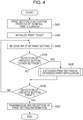
- a flow of Fig. 4 is started when a print setting request event is generated by a predetermined application.
- the predetermined application include a spreadsheet, a document editing application, and a paint application, but the application is not limited to these.
- the predetermined application may be included in the applications 212 of Fig. 2 .
- the application which causes the print setting request event may be the touch application 301 or the desktop application 302.
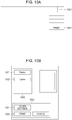
- Fig. 10A is a diagram schematically illustrating the touch application 301 which has been activated.
- the touch application 301 displays a list of options in a menu when a menu icon button 1000 is tapped. Subsequently, when a print item 1001 which is one of the options in the menu is selected by a user operation, the touch application 301 transmits a request for displaying a UI of the general printer driver to the OS 210 and displays the general print setting UI 322.
- Fig. 10B is a diagram illustrating the general print setting UI 322 of the general printer driver 320 which is generated by the OS 210.
- the general print setting UI 322 includes a print setting section 1020 and an event generation section 1030.
- a simple list of print settings is displayed in the print setting section 1020.
- An item 1021 is a name of a print queue which is being selected, and an item 1022 is an example of a print setting which has been set.
- the general print setting UI 322 accepts a user operation after the display. This process corresponds to step S403.
- a print button 1032 of the event generation section 1030 is pressed (S406). In this way, a print event is generated.
- the print event causes a process in step S407.
- the process will be described in detail with reference to the flow.
- the flow of Fig. 4 is started when the general printer driver 320 receives a user's instruction through an application, for example. Specifically, the process in step S401 is started when the print item 1001 which is one of the options in the menu is selected, for example.
- the flow of Fig. 4 may be controlled by the general printer driver 320.
- the user's instruction may be input through the OS 210 to the general print setting UI 322.
- the general print setting UI 322 is activated in step S401.
- the general print management unit 321 of the general printer driver 320 initializes print setting information.
- the general printer driver 320 receives an input of a print setting performed by the user through the general print setting UI 322 of the general printer driver 320.
- the extended print application 300 executes the extended print setting process in step S405. This process fulfills an important role and will be described hereinafter with reference to Fig. 5 .
- step S406 After the extended print setting UI unit 306 of the extended print application 300 returns to the general print setting UI 322 of the general printer driver 320, the process proceeds to step S406.
- the general printer driver 320 detects a press of a "print" button in step S406, the print setting information is supplied to the OS 210 and the print setting request process is terminated in step S407.
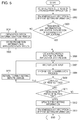
- step S501 is started when the user presses the button 1031 indicating "other settings" and the general printer driver 320 issues a request for activating the extended print setting UI unit 306 of the extended print application 300 to the OS 210.
- the flow of Fig. 5 may be caused under control of the extended print application 300.
- the extended print application 300 is an example of a control program.
- step S501 the extended print setting UI unit 306 of the extended print application 300 is activated by the OS 210.
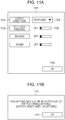
- An example of the extended print setting UI unit 306 will be described with reference to Figs. 11A and 11B .
- a reference numeral 1101 indicates an example of the extended print setting UI unit 306, reference numerals 1102 and 1103 indicate various print functions, and options and ON or OFF are selected by toggling portions 1104 and 1105.
- a button "OK" 1106 is used to return from the extended print setting UI unit 306 to the general print setting UI 322.
- the extended print application 300 receives the print setting information set by the general printer driver 320 from the OS 210.
- step S503 the extended print setting UI unit 306 of the extended print application 300 determines whether the application data region 307 includes the prohibition information 340 using the prohibition information presence/absence determination module 344. When the determination is negative, the device connection module 308 of the extended print application 300 obtains the prohibition information 340 from the printer 102 in step S504. In step S505, the prohibition information storing module 341 of the extended print application 300 stores the prohibition information 340 obtained through the prohibition information obtaining module 342 in the application data region 307. In step S506, the extended print setting UI unit 306 of the extended print application 300 obtains the prohibition information 340 stored in the application data region 307. In step S507, an input of a print setting performed by the user is received through the extended print setting UI unit 306.
- step S508 the extended print setting UI unit 306 performs a prohibition determination process on the input of the print setting through the prohibition determination module 343 using the prohibition information 340.
- step S509 the extended print setting UI unit 306 branches the process in accordance with a result of the prohibition determination process.
- the extended print setting UI unit 306 returns the print setting to the print setting before the change in step S510.
- the extended print application 300 receives an input of a print setting performed by the user through the extended print setting UI unit 306 again in step S507.
- the extended print application 300 receives an input of a print setting performed by the user through the extended print setting UI unit 306 again in step S507.
- the extended print setting UI unit 306 performs the prohibition determination process using the prohibition determination module 343.
- the extended print setting UI unit 306 returns the setting of the both-sided print to OFF which is the setting before the change, displays an alert screen 1110, and returns to the UI for receiving an input of the print setting after an input of an OK button 1111 performed by the user is received.
- the process proceeds to step S511.
- step S511 the extended print setting UI unit 306 determines whether the "OK" button 1106 has been pressed.
- the print setting information is updated in step S512.
- step S513 the extended print application 300 transmits the print setting information to the OS 210, terminates the extended print setting process, and returns to the general print setting UI 322.
- the user executes a print process using an application.
- rendering data is supplied to the GDI to XPS conversion processing unit 328 and the XPS spool file 330 is generated.
- the GDI to XPS conversion processing unit 328 calls the general print management unit 321 so that a format of the print setting information which is unique to the OS 210 is converted into a format of general print (for example, a DEVMODE structure is converted into PrintTicket).
- a method for generating an XPS file by the touch application 301 or a method for generating an XPS file by the OS 210 in accordance with an instruction issued by the touch application 301 is employed. In both of the methods, the XPS spool file 330 is generated.
- step S601 is started when a print event is started by pressing the print button 1032 as an instruction issued by the user so that the XPS spool file 330 is generated.
- step S602 the OS 210 determines whether activation of the print-time activated application 304 has been set in the registry 323. When the determination is negative, the OS 210 passes the process to the general printer driver 320. Thereafter, a rendering process in a next state is started in step S604. When the determination is affirmative, an edit/preview process of the extended print application 300 is started in step S603. Note that the process in step S603 will be described in detail hereinafter with reference to Fig. 7 . The process in step S603 is performed by the extended print application 300.
- step S604 the OS 210 passes the process to the general printer driver 320.
- a process of the rendering processing unit 329 is started.
- the rendering processing unit 329 renders the XPS spool file 330 so as to convert the XPS spool file 330 into PDL.
- print setting data is also converted from the print setting information of the OS-unique format into print setting information of industry standard.
- step S605 the process is passed to the OS 210 again.
- the OS 210 reads the setting in the registry 323.
- step S606 the OS 210 determines whether activation of the print-time activated application 304 has been set in the registry 323.
- step S608 the general print management unit 321 transmits the PDL data to the print manager 331 which performs schedule management of the print process, and print jobs are successively registered in a queue.
- the PDL data is transmitted through the I/O monitor 332 in order of PDL data registered in the queue.
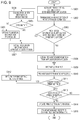
- step S701 is started when the OS 210 issues an instruction for activating the extended print application 300.
- the OS 210 determines whether activation is to be performed in accordance with information in the registry 323. When the determination is affirmative, the OS 210 issues an activation instruction.
- step S701 the print-time activated application 304 of the extended print application 300 is activated by the OS 210.
- the print-time activated application 304 receives the print setting information from the OS 210.
- step S703 the print-time activated application 304 activates the edit/preview function unit 305 and transmits the print setting information to the edit/preview function unit 305.
- step S704 the edit/preview function unit 305 determines whether the application data region 307 includes the prohibition information 340 through the prohibition information presence/absence determination module 344. When the determination is negative, the prohibition information obtaining module 342 of the extended print application 300 obtains the prohibition information 340 from the printer 102 in step S705.
- step S706 the prohibition information storing module 341 stores the obtained prohibition information 340 in the application data region 307.
- step S707 the extended print application 300 obtains the prohibition information 340 stored in the application data region 307.
- step S708 an input of a print setting performed by the user is received through a UI of the edit/preview function unit 305.
- step S709 the extended print application 300 performs the prohibition determination process on the input of the print setting through the prohibition determination module 343 using the prohibition information 340.
- step S710 the extended print application 300 branches the process in accordance with a result of the prohibition determination process.
- step S708 When conflict has occurred in the print setting, the edit/preview function unit 305 of the extended print application 300 returns the print setting to the print setting before the change in step S711. Then, in step S708, an input of a print setting performed by the user is received again through the UI of the edit/preview function unit 305.
- step S712 the extended print application 300 determines whether the "OK" button 1106 has been pressed.
- step S713 the extended print application 300 transmits the print setting information to the OS 210, terminates the edit/preview function, and returns to the processing flow of Fig. 6 .
- the extended print application 300 performs a determination as to whether the prohibition information exists at the following timings. For example, the determination is performed at a timing when the extended print setting UI unit 306 is activated in the print setting request process. Alternatively, the determination is performed at a timing when the edit/preview function unit 305 is activated in the print request process. The determination as to whether the prohibition information 340 is included in the application data region 307 is made at these timings. When the prohibition information 340 is not included, the prohibition information 340 is obtained from the printer 102 and stored in the application data region 307. Then the prohibition determination process is performed using the obtained prohibition information 340. Therefore, even in printing using the general printer driver 320, a prohibition process unique to a printer vender or a printer may be performed.
- the mechanism of a determination as to whether the prohibition information 340 is included and an obtainment of the prohibition information 340 which are performed at a time of activation of the extended print setting UI unit 306 of the extended print application 300 and at a time of activation of the edit/preview function unit 305 of the extended print application 300 in the print setting process and the print process has been described.
- step S801 is started when a user directly activates the extended print application 300.
- a tile application unit 303 of the extended print application 300 is activated.
- the tile application unit 303 of the extended print application 300 determines whether an application data region 307 includes the prohibition information 340 through a prohibition information presence/absence determination module 344.
- a prohibition information obtaining module 342 of the extended print application 300 obtains the prohibition information 340 from the printer 102 in step S803.
- a prohibition information storing module 341 of the extended print application 300 stores the obtained prohibition information 340 in the application data region 307.
- the extended print application 300 may determine whether the application data region 307 includes the prohibition information 340 and obtain the prohibition information 340 from the printer 102 also in the case where the tile application unit 303 is used. Therefore, in a case where the tile application unit 303 is used, a burdensome operation of separately obtaining the prohibition information 340 from the printer 102 when the print setting process or the print process is performed may be omitted.
- the process of Fig. 8 may update or add the prohibition information 340 by activating the extended print application 300 asynchronous to or independently from processes other than the process in Fig. 8 according to this embodiment.
- a mechanism of an obtainment of prohibition information 340 from a location other than a printer body will be described.
- portions different from the foregoing embodiment will be mainly described.
- FIG. 9 A process according to this embodiment will be described in detail with reference to Fig. 9 .
- applications and modules are stored in an external memory 209, loaded to a RAM 202 where appropriate, and executed by a CPU 201 included in a client computer 101.
- detailed descriptions of components having reference numerals which have been described are omitted.
- an extended print setting UI unit 306 and an edit/preview function unit 305 are illustrated in this embodiment, the same mechanism may be attained when a tile application unit 303 is employed as illustrated in the second embodiment.
- a process performed by a general printer driver 320 before and after an extended print setting is performed by an extended print application 300 is the same as the process from step S401 to step S407 of Fig.
- step S901 is started when a user presses a button 1031 indicating "other settings" and the general printer driver 320 issues a request for activating an extended print setting UI unit 306 of the extended print application 300 to the OS 210.
- step S901 the extended print setting UI unit 306 of the extended print application 300 is activated by the OS 210.
- a print-time activated application 304 receives print setting information from the OS 210.
- step S903 the extended print setting UI unit 306 of the extended print application 300 determines whether an application data region 307 includes the prohibition information 340 through a prohibition information presence/absence determination module 344. When the determination is negative, a prohibition information obtaining module 342 of the extended print application 300 obtains the prohibition information 340 from the printer 102 in step S904.
- step S905 a prohibition information storing module 341 of the extended print application 300 determines whether the prohibition information 340 has been successfully obtained from the printer 102.
- a prohibition information obtaining module 342 of the extended print application 300 obtains the prohibition information 340 corresponding to the printer 102 from a predetermined cloud server in step S906. Thereafter, in step S907, the prohibition information storing module 341 of the extended print application 300 stores the obtained prohibition information 340 in an application data region 307. In step S908, the extended print application 300 obtains the prohibition information 340 stored in the application data region 307. Note that the process from step S909 to step S915 is the same as that from step S507 to step S513 of Fig. 5 , and therefore, a detailed description thereof is omitted.
- the extended print application 300 may obtain the prohibition information 340 also from a location other than a printer body. Therefore, even in a case where the prohibition information 340 is not stored in the printer body, such as a case where the date of production of the printer is old or a case of a low-priced printer, the extended print application 300 may obtain the prohibition information 340 and perform a prohibition process.
- the information processing apparatus generates print data by executing a printer driver based on an instruction issued by an application operating in an operating system.
- An example of the information processing apparatus is the client computer 101.
- An example of the application which processes a print setting is the extended print application 300.
- conflict or inconsistency of a print setting is resolved based on the prohibition information 340 for resolving conflict of a setting to be input to a printer driver under control of the touch application 301.
- An example of conflict resolving information is the prohibition information 340.
- the print setting obtained after conflict is resolved is input to the printer driver from the extended print application 300.
- An example of the printer driver is the general printer driver 320.
- the determination as to whether the conflict resolving information is included in the application data region 307 is made.
- An example of an image forming apparatus is the printer 102.
- the device connection module 308 obtains the conflict resolving information from the printer 102.
- the CPU 201 stores the conflict resolving information obtained by the device connection module 308 in the application data region 307.
- the extended print application 300 resolves conflict of the print setting using the prohibition information 340 stored in the application data region 307.
- the extended print application 300 is executed at the following timings, for example. Specifically, the extended print application 300 is executed at a timing when the tile application unit 303 is activated or at a timing when a user interface program for an extended print setting is activated. Alternatively, the extended print application 300 is executed at a timing when the edit/preview function unit 305 is activated.
- conflict resolving information may be obtained from a predetermined external information processing apparatus.
- An example of the external information processing apparatus is the cloud server 105.
- An example of the operating system is the OS 210.
- print data may be generated by executing the general printer driver based on an instruction issued by the document editing application operating in the OS 210.
- the extended print application 300 receives a predetermined event caused by the general printer driver 320.
- the extended print application 300 performs the following process after the receiving unit receives a predetermined event caused by the general printer driver 320.
- the extended print application 300 is executed by the CPU 201.
- conflict or inconsistency of a print setting is resolved based on the conflict resolving information for resolving conflict of a setting to be input to a printer driver under control of the extended print application 300.
- the extended print application 300 is an example of an application which processes the predetermined extended print setting.
- the print setting obtained after the conflict is resolved is input to the printer driver from the extended print application 300.
- this embodiment discusses the following solutions.
- a platform environment which is compatible with mobile devices including smartphones and tablets.
- this problem may be solved.
- this problem may be solved.
- a mechanism for removing the process which depends on specifications of peripherals from the general OS or the general device driver may be provided.
- a mechanism associated with a platform environment which is compatible with mobile devices including smartphones and tablets, for example, may be provided.
- Embodiment(s) of the present invention can also be realized by a computer of a system or apparatus that reads out and executes computer executable instructions (e.g., one or more programs) recorded on a storage medium (which may also be referred to more fully as a 'non-transitory computer-readable storage medium') to perform the functions of one or more of the above-described embodiment(s) and/or that includes one or more circuits (e.g., application specific integrated circuit (ASIC)) for performing the functions of one or more of the above-described embodiment(s), and by a method performed by the computer of the system or apparatus by, for example, reading out and executing the computer executable instructions from the storage medium to perform the functions of one or more of the above-described embodiment(s) and/or controlling the one or more circuits to perform the functions of one or more of the above-described embodiment(s).
- computer executable instructions e.g., one or more programs
- a storage medium which may also be referred to more fully as
- the computer may comprise one or more processors (e.g., central processing unit (CPU), micro processing unit (MPU)) and may include a network of separate computers or separate processors to read out and execute the computer executable instructions.
- the computer executable instructions may be provided to the computer, for example, from a network or the storage medium.
- the storage medium may include, for example, one or more of a hard disk, a random-access memory (RAM), a read only memory (ROM), a storage of distributed computing systems, an optical disk (such as a compact disc (CD), digital versatile disc (DVD), or Blu-ray Disc (BD)TM), a flash memory device, a memory card, and the like.
Landscapes
- Engineering & Computer Science (AREA)
- Theoretical Computer Science (AREA)
- Human Computer Interaction (AREA)
- Physics & Mathematics (AREA)
- General Engineering & Computer Science (AREA)
- General Physics & Mathematics (AREA)
- Accessory Devices And Overall Control Thereof (AREA)
Applications Claiming Priority (2)
| Application Number | Priority Date | Filing Date | Title |
|---|---|---|---|
| JP2018125176 | 2018-06-29 | ||
| JP2019093739A JP7508202B2 (ja) | 2018-06-29 | 2019-05-17 | 情報処理装置および制御方法、制御プログラム |
Publications (1)
| Publication Number | Publication Date |
|---|---|
| EP3594801A1 true EP3594801A1 (en) | 2020-01-15 |
Family
ID=66998180
Family Applications (1)
| Application Number | Title | Priority Date | Filing Date |
|---|---|---|---|
| EP19180944.1A Pending EP3594801A1 (en) | 2018-06-29 | 2019-06-18 | Information processing apparatus processing print setting, control method, and control program |
Country Status (4)
| Country | Link |
|---|---|
| US (4) | US11275540B2 (enExample) |
| EP (1) | EP3594801A1 (enExample) |
| JP (2) | JP7711265B2 (enExample) |
| CN (2) | CN118363547A (enExample) |
Families Citing this family (6)
| Publication number | Priority date | Publication date | Assignee | Title |
|---|---|---|---|---|
| EP3594801A1 (en) * | 2018-06-29 | 2020-01-15 | Canon Kabushiki Kaisha | Information processing apparatus processing print setting, control method, and control program |
| JP7171272B2 (ja) * | 2018-07-05 | 2022-11-15 | キヤノン株式会社 | 情報処理装置及びプログラム |
| JP7230387B2 (ja) * | 2018-09-19 | 2023-03-01 | 富士フイルムビジネスイノベーション株式会社 | 情報処理装置及び情報処理プログラム |
| JP7259477B2 (ja) | 2019-03-27 | 2023-04-18 | ブラザー工業株式会社 | サポートプログラム、情報処理装置、および印刷方法 |
| JP7487580B2 (ja) * | 2020-06-24 | 2024-05-21 | セイコーエプソン株式会社 | 印刷装置およびプログラム |
| CN112799614B (zh) * | 2021-01-25 | 2024-05-10 | 珠海奔图电子有限公司 | 基于cups系统的打印控制方法及打印控制装置 |
Citations (1)
| Publication number | Priority date | Publication date | Assignee | Title |
|---|---|---|---|---|
| US20160266855A1 (en) * | 2015-03-09 | 2016-09-15 | Canon Kabushiki Kaisha | Information processing apparatus, information processing method, and recording medium |
Family Cites Families (16)
| Publication number | Priority date | Publication date | Assignee | Title |
|---|---|---|---|---|
| JP4951392B2 (ja) | 2007-04-18 | 2012-06-13 | 株式会社リコー | 情報処理装置、プログラムおよび記録媒体 |
| JP4974909B2 (ja) * | 2008-01-10 | 2012-07-11 | キヤノン株式会社 | 情報処理装置、印刷設定方法、記憶媒体、プログラム |
| JP5094627B2 (ja) * | 2008-08-08 | 2012-12-12 | キヤノン株式会社 | 情報処理装置、方法、制御プログラム |
| JP2012181694A (ja) * | 2011-03-01 | 2012-09-20 | Canon Inc | 情報処理装置、プリントシステム、制御方法、及び、プログラム |
| JP6007494B2 (ja) | 2011-03-02 | 2016-10-12 | 株式会社リコー | 印刷ジョブ編集プログラム、印刷ジョブ編集装置、印刷ジョブ編集方法及び印刷システム |
| JP5791311B2 (ja) * | 2011-03-02 | 2015-10-07 | キヤノン株式会社 | 情報処理装置、印刷設定方法、及びコンピュータプログラム |
| JP6330361B2 (ja) * | 2013-03-27 | 2018-05-30 | 株式会社リコー | 印刷制御プログラム、情報処理装置及び印刷システム |
| JP6362423B2 (ja) * | 2014-05-28 | 2018-07-25 | キヤノン株式会社 | リアルタイムコンフリクト処理システム |
| JP6552189B2 (ja) | 2014-12-09 | 2019-07-31 | キヤノン株式会社 | 情報処理装置、制御方法およびドライバーインストールプログラム |
| JP6578851B2 (ja) * | 2015-09-28 | 2019-09-25 | 富士ゼロックス株式会社 | 情報処理装置およびプログラム |
| JP6604834B2 (ja) * | 2015-12-04 | 2019-11-13 | キヤノン株式会社 | 情報処理装置及びその制御方法、プログラム |
| JP2017194766A (ja) | 2016-04-19 | 2017-10-26 | キヤノン株式会社 | 情報処理装置、情報処理装置の制御方法、及びプログラム |
| JP6827738B2 (ja) | 2016-08-30 | 2021-02-10 | キヤノン株式会社 | 制御方法、プログラム及び情報処理装置 |
| JP6834823B2 (ja) | 2016-09-08 | 2021-02-24 | 株式会社リコー | プリンタドライバ、情報処理装置および画像処理システム |
| JP2019120997A (ja) * | 2017-12-28 | 2019-07-22 | コニカミノルタ株式会社 | 情報処理装置、画像形成装置およびプログラム |
| EP3594801A1 (en) * | 2018-06-29 | 2020-01-15 | Canon Kabushiki Kaisha | Information processing apparatus processing print setting, control method, and control program |
-
2019
- 2019-06-18 EP EP19180944.1A patent/EP3594801A1/en active Pending
- 2019-06-24 US US16/450,747 patent/US11275540B2/en active Active
- 2019-06-28 CN CN202410539374.4A patent/CN118363547A/zh active Pending
- 2019-06-28 CN CN201910571309.9A patent/CN110659003B/zh active Active
-
2022
- 2022-01-10 US US17/571,779 patent/US11782656B2/en active Active
-
2023
- 2023-06-29 US US18/344,682 patent/US12248716B2/en active Active
-
2024
- 2024-06-10 JP JP2024093618A patent/JP7711265B2/ja active Active
-
2025
- 2025-01-03 US US19/009,115 patent/US20250138759A1/en active Pending
- 2025-07-07 JP JP2025114720A patent/JP2025129401A/ja active Pending
Patent Citations (1)
| Publication number | Priority date | Publication date | Assignee | Title |
|---|---|---|---|---|
| US20160266855A1 (en) * | 2015-03-09 | 2016-09-15 | Canon Kabushiki Kaisha | Information processing apparatus, information processing method, and recording medium |
Also Published As
| Publication number | Publication date |
|---|---|
| US11275540B2 (en) | 2022-03-15 |
| CN110659003B (zh) | 2024-05-14 |
| US20220129218A1 (en) | 2022-04-28 |
| CN110659003A (zh) | 2020-01-07 |
| US20200004478A1 (en) | 2020-01-02 |
| JP7711265B2 (ja) | 2025-07-22 |
| JP2025129401A (ja) | 2025-09-04 |
| US12248716B2 (en) | 2025-03-11 |
| JP2024111008A (ja) | 2024-08-16 |
| US11782656B2 (en) | 2023-10-10 |
| US20230359413A1 (en) | 2023-11-09 |
| CN118363547A (zh) | 2024-07-19 |
| US20250138759A1 (en) | 2025-05-01 |
Similar Documents
| Publication | Publication Date | Title |
|---|---|---|
| US11782656B2 (en) | Information processing apparatus processing print setting, control method, and control program | |
| CN112352218B (zh) | 信息处理装置、控制方法及存储介质 | |
| US9563386B2 (en) | Information processing apparatus, control method, and storage medium | |
| US9830544B2 (en) | Image processing apparatus, control method, and storage medium for executing print processing using a password including selecting a personal identification code type that indicates a purpose for using the password | |
| US9164714B2 (en) | Information processing apparatus, method, and program for controlling a user interface | |
| US10846032B2 (en) | Information processing apparatus and method of controlling information processing apparatus, with display control for displaying print setting screens as data become available | |
| US12061828B2 (en) | Information processing apparatus, control method, and storage medium | |
| US20250370675A1 (en) | Recording medium, control method and information processing apparatus having print setting that selectively requires a password | |
| JP7508202B2 (ja) | 情報処理装置および制御方法、制御プログラム | |
| US20150160894A1 (en) | Information processing apparatus, recording medium, and control method | |
| US20180253561A1 (en) | Information processing apparatus, storage medium, and control method therefor | |
| JP2017033052A (ja) | 画像形成装置における制御装置およびプログラム | |
| JP2018005835A (ja) | 情報処理装置、プログラム及び制御方法 | |
| JP2020184241A (ja) | 情報処理装置、情報処理装置の制御方法、及び印刷拡張アプリケーション | |
| EP3070923A1 (en) | Printing system capable of printing in any one of plural image forming apparatuses over network, image forming apparatus, and printing method | |
| JP7242203B2 (ja) | 情報処理装置、アプリケーションおよび制御方法 | |
| US11216228B2 (en) | Information processing device, information processing method, and storage medium | |
| JP2019197250A (ja) | 情報処理装置、その制御方法およびプログラム | |
| JP2018180690A (ja) | 印刷管理プログラム、印刷管理方法、印刷管理装置及び印刷管理システム | |
| JP6440573B2 (ja) | 情報処理装置および情報処理方法 | |
| JP2015225480A (ja) | リアルタイムコンフリクト処理システム | |
| JP2009145976A (ja) | 印刷ジョブトラッキングを実行するプログラム |
Legal Events
| Date | Code | Title | Description |
|---|---|---|---|
| PUAI | Public reference made under article 153(3) epc to a published international application that has entered the european phase |
Free format text: ORIGINAL CODE: 0009012 |
|
| STAA | Information on the status of an ep patent application or granted ep patent |
Free format text: STATUS: THE APPLICATION HAS BEEN PUBLISHED |
|
| AK | Designated contracting states |
Kind code of ref document: A1 Designated state(s): AL AT BE BG CH CY CZ DE DK EE ES FI FR GB GR HR HU IE IS IT LI LT LU LV MC MK MT NL NO PL PT RO RS SE SI SK SM TR |
|
| AX | Request for extension of the european patent |
Extension state: BA ME |
|
| STAA | Information on the status of an ep patent application or granted ep patent |
Free format text: STATUS: REQUEST FOR EXAMINATION WAS MADE |
|
| 17P | Request for examination filed |
Effective date: 20200715 |
|
| RBV | Designated contracting states (corrected) |
Designated state(s): AL AT BE BG CH CY CZ DE DK EE ES FI FR GB GR HR HU IE IS IT LI LT LU LV MC MK MT NL NO PL PT RO RS SE SI SK SM TR |
|
| STAA | Information on the status of an ep patent application or granted ep patent |
Free format text: STATUS: EXAMINATION IS IN PROGRESS |
|
| 17Q | First examination report despatched |
Effective date: 20211222 |