EP3483706A1 - Verfahren und vorrichtung zum verhindern von fehlberührungen auf einem berührungsbildschirm, einem mobilen endgerät und einem speichermedium - Google Patents
Verfahren und vorrichtung zum verhindern von fehlberührungen auf einem berührungsbildschirm, einem mobilen endgerät und einem speichermedium Download PDFInfo
- Publication number
- EP3483706A1 EP3483706A1 EP17880669.1A EP17880669A EP3483706A1 EP 3483706 A1 EP3483706 A1 EP 3483706A1 EP 17880669 A EP17880669 A EP 17880669A EP 3483706 A1 EP3483706 A1 EP 3483706A1
- Authority
- EP
- European Patent Office
- Prior art keywords
- touch
- region
- event
- preset
- area
- Prior art date
- Legal status (The legal status is an assumption and is not a legal conclusion. Google has not performed a legal analysis and makes no representation as to the accuracy of the status listed.)
- Ceased
Links
Images


Classifications
-
- G—PHYSICS
- G06—COMPUTING OR CALCULATING; COUNTING
- G06F—ELECTRIC DIGITAL DATA PROCESSING
- G06F3/00—Input arrangements for transferring data to be processed into a form capable of being handled by the computer; Output arrangements for transferring data from processing unit to output unit, e.g. interface arrangements
- G06F3/01—Input arrangements or combined input and output arrangements for interaction between user and computer
- G06F3/03—Arrangements for converting the position or the displacement of a member into a coded form
- G06F3/041—Digitisers, e.g. for touch screens or touch pads, characterised by the transducing means
- G06F3/0416—Control or interface arrangements specially adapted for digitisers
- G06F3/0418—Control or interface arrangements specially adapted for digitisers for error correction or compensation, e.g. based on parallax, calibration or alignment
-
- G—PHYSICS
- G06—COMPUTING OR CALCULATING; COUNTING
- G06F—ELECTRIC DIGITAL DATA PROCESSING
- G06F3/00—Input arrangements for transferring data to be processed into a form capable of being handled by the computer; Output arrangements for transferring data from processing unit to output unit, e.g. interface arrangements
- G06F3/01—Input arrangements or combined input and output arrangements for interaction between user and computer
- G06F3/048—Interaction techniques based on graphical user interfaces [GUI]
- G06F3/0481—Interaction techniques based on graphical user interfaces [GUI] based on specific properties of the displayed interaction object or a metaphor-based environment, e.g. interaction with desktop elements like windows or icons, or assisted by a cursor's changing behaviour or appearance
-
- G—PHYSICS
- G06—COMPUTING OR CALCULATING; COUNTING
- G06F—ELECTRIC DIGITAL DATA PROCESSING
- G06F3/00—Input arrangements for transferring data to be processed into a form capable of being handled by the computer; Output arrangements for transferring data from processing unit to output unit, e.g. interface arrangements
- G06F3/01—Input arrangements or combined input and output arrangements for interaction between user and computer
- G06F3/048—Interaction techniques based on graphical user interfaces [GUI]
- G06F3/0487—Interaction techniques based on graphical user interfaces [GUI] using specific features provided by the input device, e.g. functions controlled by the rotation of a mouse with dual sensing arrangements, or of the nature of the input device, e.g. tap gestures based on pressure sensed by a digitiser
- G06F3/0488—Interaction techniques based on graphical user interfaces [GUI] using specific features provided by the input device, e.g. functions controlled by the rotation of a mouse with dual sensing arrangements, or of the nature of the input device, e.g. tap gestures based on pressure sensed by a digitiser using a touch-screen or digitiser, e.g. input of commands through traced gestures
-
- G—PHYSICS
- G06—COMPUTING OR CALCULATING; COUNTING
- G06F—ELECTRIC DIGITAL DATA PROCESSING
- G06F2203/00—Indexing scheme relating to G06F3/00 - G06F3/048
- G06F2203/048—Indexing scheme relating to G06F3/048
- G06F2203/04808—Several contacts: gestures triggering a specific function, e.g. scrolling, zooming, right-click, when the user establishes several contacts with the surface simultaneously; e.g. using several fingers or a combination of fingers and pen
-
- G—PHYSICS
- G06—COMPUTING OR CALCULATING; COUNTING
- G06F—ELECTRIC DIGITAL DATA PROCESSING
- G06F3/00—Input arrangements for transferring data to be processed into a form capable of being handled by the computer; Output arrangements for transferring data from processing unit to output unit, e.g. interface arrangements
- G06F3/01—Input arrangements or combined input and output arrangements for interaction between user and computer
- G06F3/03—Arrangements for converting the position or the displacement of a member into a coded form
- G06F3/041—Digitisers, e.g. for touch screens or touch pads, characterised by the transducing means
-
- G—PHYSICS
- G06—COMPUTING OR CALCULATING; COUNTING
- G06F—ELECTRIC DIGITAL DATA PROCESSING
- G06F3/00—Input arrangements for transferring data to be processed into a form capable of being handled by the computer; Output arrangements for transferring data from processing unit to output unit, e.g. interface arrangements
- G06F3/01—Input arrangements or combined input and output arrangements for interaction between user and computer
- G06F3/03—Arrangements for converting the position or the displacement of a member into a coded form
- G06F3/041—Digitisers, e.g. for touch screens or touch pads, characterised by the transducing means
- G06F3/0416—Control or interface arrangements specially adapted for digitisers
-
- G—PHYSICS
- G06—COMPUTING OR CALCULATING; COUNTING
- G06F—ELECTRIC DIGITAL DATA PROCESSING
- G06F3/00—Input arrangements for transferring data to be processed into a form capable of being handled by the computer; Output arrangements for transferring data from processing unit to output unit, e.g. interface arrangements
- G06F3/01—Input arrangements or combined input and output arrangements for interaction between user and computer
- G06F3/03—Arrangements for converting the position or the displacement of a member into a coded form
- G06F3/041—Digitisers, e.g. for touch screens or touch pads, characterised by the transducing means
- G06F3/044—Digitisers, e.g. for touch screens or touch pads, characterised by the transducing means by capacitive means
-
- G—PHYSICS
- G06—COMPUTING OR CALCULATING; COUNTING
- G06F—ELECTRIC DIGITAL DATA PROCESSING
- G06F3/00—Input arrangements for transferring data to be processed into a form capable of being handled by the computer; Output arrangements for transferring data from processing unit to output unit, e.g. interface arrangements
- G06F3/01—Input arrangements or combined input and output arrangements for interaction between user and computer
- G06F3/048—Interaction techniques based on graphical user interfaces [GUI]
- G06F3/0487—Interaction techniques based on graphical user interfaces [GUI] using specific features provided by the input device, e.g. functions controlled by the rotation of a mouse with dual sensing arrangements, or of the nature of the input device, e.g. tap gestures based on pressure sensed by a digitiser
- G06F3/0488—Interaction techniques based on graphical user interfaces [GUI] using specific features provided by the input device, e.g. functions controlled by the rotation of a mouse with dual sensing arrangements, or of the nature of the input device, e.g. tap gestures based on pressure sensed by a digitiser using a touch-screen or digitiser, e.g. input of commands through traced gestures
- G06F3/04883—Interaction techniques based on graphical user interfaces [GUI] using specific features provided by the input device, e.g. functions controlled by the rotation of a mouse with dual sensing arrangements, or of the nature of the input device, e.g. tap gestures based on pressure sensed by a digitiser using a touch-screen or digitiser, e.g. input of commands through traced gestures for inputting data by handwriting, e.g. gesture or text
Definitions
- the present disclosure relates to a touch control technical field, and particularly to a method and a device for preventing a false-touch on a touch screen, a mobile terminal and a storage medium.
- mobile terminals can be used for communication and entertainment.
- a size of a touch screen of the mobile terminal is increasing, and the mobile terminal mobile terminal develops in a narrow border or no border.
- the user's holding posture and operating habits may cause a false touch on an edge region of the touch screen when the user operates the mobile terminal with one hand.
- a false touch For example, when holding a mobile phone in the right hand, when an application (APP) in the upper left corner is clicked with the right thumb, the palm of the right hand is likely to false touch the lower right edge region of the touch screen.
- the related method is to set a region on an edge of the touch screen, and mark the region as an preventing false-touch region.
- the finger information on the preventing false touch region will be released, that is, the location coordinates in the preventing false-touch region are not reported, and the location coordinates in the other regions are reported. Thereby, the touch in other regions of the touch screen is responded, to prevent the false touch on the edge region of the touch screen.
- the palm touches the touch screen over a large region, and most of the touch region is in the left corner or right corner of the touch screen. That is, a large part of the touch region is located in a region of the touch buttons (such as a menu button, a HOME button, and a back button and so on).
- the touch button region often includes blank regions, the blank regions have no touch electrode, and the touch on the blank regions cannot be sensed. Therefore, the touch region detected may be smaller than an actual touch region, and the palm touch may be mistakenly determined as a normal finger contact, thereby causing preventing false-touch on the edge region is invalid.
- the present disclosure provides a method and a device for preventing a false-touch on a touch screen, a mobile terminal and a storage medium.
- the embodiment of the present disclosure provides a method for preventing a false-touch on a touch screen.
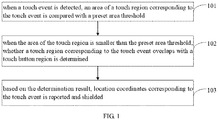
- the method may include comparing an area of a touch region corresponding to the touch event with a preset area threshold, when the touch event in response to receiving a touch input is detected; determining whether the touch region corresponding to the touch event overlaps with a touch button region, when the area of the touch region is smaller than a preset area threshold; and reporting or shielding location coordinates corresponding to the touch event, based on the determination result.
- the embodiments of the disclosure further provide a device for preventing a false-touch on a touch screen.
- the device may include an area comparison module configured to compare an area of a touch region corresponding to a touch event with a preset area threshold, when the touch event is detected; an region determination module configured to determine whether the touch region corresponding to the touch event overlaps with a touch button region, when the area of the touch region is smaller than the preset area threshold; and a reporting module configured to report or shield location coordinates corresponding to the touch event based on the determination result.
- the embodiments of the disclosure further provide a mobile terminal.
- the mobile terminal may include a memory, a processor, and a computer program stored on the memory and operable on the processor.
- the processor implements the following blocks when executing the computer program: comparing an area of a touch region corresponding to the touch event with a preset area threshold, when the touch event in response to receiving a touch input is detected; determining whether the touch region corresponding to the touch event overlaps with a touch button region, when the area of the touch region is smaller than a preset area threshold; and reporting or shielding location coordinates corresponding to the touch event, based on the determination result.
- the embodiments of the disclosure further provide a storage medium.
- the storage medium stores program code, wherein when the program code is executed by a processor, the processor performs the following blocks: comparing an area of a touch region corresponding to the touch event with a preset area threshold, when the touch event in response to receiving a touch input is detected; determining whether the touch region corresponding to the touch event overlaps with a touch button region, when the area of the touch region is smaller than a preset area threshold; and reporting or shielding location coordinates corresponding to the touch event, based on the determination result.
- the area of the touch region corresponding to the touch event is compared with a preset area threshold.
- the area of the touch region is smaller than the preset area threshold, whether the touch region corresponding to the touch event overlaps with the touch button region is determined.
- a reporting operation or a shielding operation of the location coordinates corresponding to the touch event will be performed, based on the determination result, so as to implement the preventing a false-touch function in the touch button region and the preset region.
- the embodiments of the disclosure solve the problem that the function for preventing false-touch on the edge of the screen is invalided, due to the touch operation on the touch button region of the touch screen cannot be accurately detected.
- the accuracy of a touch event reporting is improved in the multi-touch operation, and the effect of improving the processing accuracy of the touch event of the mobile terminal is achieved.
- FIG. 1 is a flowchart of a method for preventing a false touch on a touch screen according to an embodiment of the present disclosure.
- the method may be implemented by a device for preventing a false touch.
- the device may be implemented by software and/or hardware, and may be integrated into a mobile terminal. As illustrated in FIG. 1 , the method may include the following blocks.
- the touch events may include various operations in touch with the touch screen, such as clicking, long press, sliding and so on.
- the palm can easily touch the edge of the touch screen, thereby causing a false touch on the screen. Therefore, the region of the screen that is easily false touched can be set as a preset region.
- the preset region can be determined by many ways. For example, a manner and posture of holding the mobile terminal may be investigated. The region of the screen that is easily false touched may be set as the preset region based on the manner and the posture, and the setting can be a factory setting. For another example, before using the mobile terminal, the manner and posture can be recorded in the mobile terminal. Data for holding the mobile terminal can be collected by the mobile terminal. A region that is easily false touched may be determined by analyzing the collected data, and the region can be set as the preset region. In the embodiment, the number of the preset region is not limited. The shape and/or size of the preset region can also be adjusted by the user.
- the mobile terminal may be a device integrated with a touch screen such as a smart phone or a tablet computer, and the mobile terminal may have a narrow frame of have no frame.
- a function for preventing false-touch on the edge of the screen can be added to the mobile terminal, and a system of the mobile terminal may automatically turn on the function based on an actual situation. The user can turn on the function based on individual needs.
- the preset region is a region with a shape and/or a size at the edge of the touch screen. When other regions of the touch screen are clicked while the preset region is pressed, the finger information on the preset region will be released, and the click on other regions of the touch screen is responded.
- the system can detect the posture of the mobile terminal, and automatically turn on the function when the mobile terminal is in a vertical screen state.
- the function can be turned off when the mobile terminal is in a horizontal screen state.
- the system can detect the manner of holding the mobile terminal. When the holding manner is a one-handed manner, the function is turned on, and when the holding manner is a two-handed manner, the function is turned off. In this embodiment, it is assumed that the function is turned on.
- the touch screen of the mobile terminal may include a resistive touch screen, a capacitive touch screen, a piezoelectric touch screen and so on.
- the touch screen can detect a touch information, and identify the touch event.
- the touch screen can sense the change of the capacitance.
- the touch screen may sense the change of the capacitance and identify a touch information.
- the touch information may include a x coordinate, a y coordinate, and a size of the touch region (including the length and width, etc) and the number of fingers touching the touch screen.
- the coordinate information may be reported to an upper layer through an input system, and the touch input on the touch screen can be detected by the touch information.
- FIG. 2a is a schematic view of the touch screen of the mobile terminal according to an embodiment of the present disclosure.
- the left side of the touch screen 201 includes a first preset region 202
- the left side of the touch screen 201 includes a second preset region 203.
- a position 204 is located in the second preset region 203, and when the position 204 is touched, a touch input may be detected on the preset region of the touch screen.
- the preset region may also have other shapes or sizes, and FIG. 2a is only for illustrative purposes.
- the shape of the preset region may be a rectangle, and the length is the same as the length of display region of the touch screen.
- the shape of the preset region may also be a semi-ellipse or other irregular shape, and the size may also be set based on actual scene.
- a position of the preset region can also be adjusted, for example, the preset region may be positioned at the bottom left corner and/or bottom right corner of the edge of the touch screen.
- a preset area threshold may be configured to distinguish whether the touch event is a normal touch or a false touch, and may be the same as a minimum area value that enables the touch event to be performed.
- the preset area threshold may be a fixed area value preset or a variable area value that is dynamically adjusted based on a preset rule.
- Many ways may be configured to determine the preset area threshold. For example, an area of the touch input detected by mobile terminals may be investigated when the screen is normally touched by user groups. The area of the touch input investigated may be analyzed to determine the preset area threshold.
- the preset area threshold may be factory set by the mobile terminal. For another example, before using the mobile terminal, the user can also calibrate the area of the touch.
- the mobile terminal can collect relevant area data when the mobile is normally operated, and obtain the preset area threshold corresponding to the normal operation by analyzing the collected data.
- the area data of the touch input may be collected in real time, and the preset area threshold may be updated and adjusted.
- the preset area threshold may also be related to the properties of the touch input, and the properties may include touch position, touch time, user's average finger width and so on.
- the touch information of the touch event may be identified, thereby determining touch area based on the size of the touch region and the number of fingers touching the touch screen.
- the touch event when the area of the touch region is smaller than the preset area threshold, the touch event may be identified as the normal touch.
- the touch button region may include a touch button, a blank portion between the touch buttons and the frame of the mobile terminal. Due to the touch electrode is not distributed in the blank portion, the touch region cannot be identified. Therefore, most of the touch region corresponding to the false touch may not be identified.
- the touch region of the false touch being detected is smaller than the preset area threshold, so that the false touch may be mistaken for the normal touch to respond, thereby affecting the normal use of the users.
- the distribution of the touch buttons varies based on the type of the mobile terminal, and may generally include at least one of a return button, a HOME button, and a menu button.
- a position of the touch button and a surrounding region thereof may be referred to.
- the size of the surrounding region can be determined by the accuracy of a sensor.
- There may be multiple ways to determine whether the touch region overlaps with the touch button region for example, determining whether the touch region overlaps with the touch button region, based on the location coordinates of the touch point corresponding to the touch event.
- the overlap may include partial overlap or fully overlap.
- the determination result may include that the touch region corresponding to the touch event completely inside or overlaps with the touch button region, partially overlaps with the touch button region or does not overlap with the touch button region.
- the touch region corresponding to the touch event may completely inside or overlap with the touch button region, and due to the touch input acting on the blank portion of the touch button region cannot be detected, the touch area detected is smaller than the preset area threshold.
- the function for preventing a false-touch on the edge of the screen may be turned on, in order to report or shield the location coordinates corresponding to the touch event.
- the touch region corresponding to the touch event may partially overlap with the touch button region, and when the overlapping area is large, the touch area being detected may be smaller than the preset area threshold.
- the function for preventing false-touch on the edge of the screen may be turned on.
- the touch region corresponding to the touch event does not overlap with the touch button region, the touch area corresponding to the touch input is considered to be an actual touch event.
- the function for preventing-false touch on the edge of the screen may be turned on.
- the touch event is considered to be the normal operation, and the function for preventing false-touch on the edge of the screen may be turned off to response the touch event.
- the location coordinates corresponding to the touch event can be reported or shielded based on a determination result.
- the touch input on the screen may be detected by the touch event, and the system can respond to the touch input.
- the location coordinates are shielded, the touch event is determined to be a false touch, and the touch information corresponding to the touch event is released, and the preventing of the false-touch is implemented.
- the area of the touch region corresponding to the touch event is compared with a preset area threshold.
- the area of the touch region is smaller than the preset area threshold, whether the touch region corresponding to the touch event overlaps with the touch button region is determined.
- the embodiment of the disclosure solves the problem that the touch input in the touch button region cannot be accurately detected, which causes the touch screen edge to prevent false touch failure, improves the accuracy of the multi-touch input and improves the effect of the processing accuracy of touch events of the mobile terminal.
- FIG. 3 is another flowchart of the method for preventing a false-touch on a touch screen according to an embodiment of the present disclosure.
- the present embodiment is based on the foregoing embodiment.
- the method may further include determining whether at least one location coordinate of the touch input is inside the preset region, based on the location coordinates of the touch input corresponding to the touch event. When the touch input is inside the preset region, the area of the touch region is compared with the preset area threshold.
- the method of this embodiment may include the following blocks.
- the location coordinates corresponding to the touch event may be obtained when the touch event is detected.
- a region non-overlapping with the preset region may be marked as a normal operation region.
- the setting of the normal operation region is similar to the setting of the preset region, which can be set by the user, or can be set by the system based on the user's usage rules, or the region non-overlapping with the preset region is set as the normal operation region.
- vertexes (x1, y1), (x1, y2), (x2, y1), and (x2, y2) may be respectively determined at the upper left corner, the bottom left corner, the upper right corner, and the bottom right corner of the touch screen.
- the four vertexes are connected in order, and a region defined by the four vertexes is the normal operation region 210.
- the parts of the touch screen except the normal operation region are preset region.
- the coordinates of the boundary point of the normal operation region may be referenced to determine whether the touch input corresponding to the touch events outside the preset region. For example, when the mobile terminal is in the vertical state, the bottom left corner of the mobile terminal is taken as an origin of the coordinates, a direction of horizontal right is the positive direction of the x-axis, and a direction of vertical up is the positive direction of the y-axis.
- the touch input corresponding to the touch point 211 can be determined to act outside the preset region.
- the y coordinate is between y2 and y1, and the x coordinate is smaller than x1, the touch input corresponding to the touch point 212 can be determined to act inside the preset region.
- the touch area corresponding to the touch event is compared with the preset area threshold.
- the comparison between the touch area and the preset area threshold is performed.
- the comparison is the same as that in the above embodiment, and details are not described herein again.
- location coordinates corresponding to the touch event may be reported or shielded, based on a determination result.
- location coordinates corresponding to the touch event can be reported based on the determination result.
- the touch input when the touch input corresponding to the touch event is detected outside the preset region, the touch input can be determined to the normal touch input, and the location coordinates of the touch input can be reported.
- whether the touch input corresponding to the touch event is outside the preset region is determined, based on the location coordinates corresponding to the touch event.
- the position of the touch input is initially determined and the touch point directly acting on the normal operation region is filtered.
- the touch point directly acting on the normal operation region may not be processed, the workload is reduced, time is saved, and efficiency is improved.
- FIG. 4 is another flowchart of the method for preventing the false-touch on the touch screen according to an embodiment of the present disclosure.
- the present embodiment is based on the foregoing embodiment.
- the block "comparing an touch area corresponding to the touch event with a preset area threshold" may include calculating a sum of area of touch points of the touch input corresponding to the touch event, and comparing the sum with the preset area threshold.
- the embodiment may include the following blocks.
- the sum of area of touch points of the touch input corresponding to the touch event may be calculated when the touch event is detected, and the sum may be compared with the preset area threshold.
- the multi-touch screen is widely used in the mobile terminal. Different from the traditional single-touch screen, the multi-touch screen may be operated with two hands, multiple fingers, or even multiple people at the same time, and is convenient and user-friendly.
- the touch event corresponds to the plurality of touch points
- the area of touch regions of the plurality of touch points can be accumulated, and the sum accumulated may be compared with the preset area threshold to determine whether to turn on the function for preventing false-touch on the edge of the screen, thereby determining whether to report the location coordinates of the touch input.
- the location coordinates corresponding to the touch event may be reported or shielded based on the determination result.
- the sum of the area of the touch points corresponding to the touch event may be determined, and the sum may be compared with the preset area threshold. Considering the multi-touch situation, the area comparison result is more accurate.
- FIG. 5 is another flowchart of the method for preventing the false-touch on the touch screen according to an embodiment of the present disclosure.
- the present embodiment is based on the foregoing embodiment.
- the block "whether the touch region corresponding to the touch event overlaps with a touch button region may be determined" is further optimized, and optimized as determining the touch region based on touch points corresponding to the touch event, comparing the touch region with the touch button region, and determining the touch region overlaps with the touch button region, when at least one of the touch point is inside the touch button region.
- the method of this embodiment includes the following blocks.
- the area of the touch region corresponding to the touch event is compared with a preset area threshold when the touch event is detected.
- the touch region is determined based on the touch point corresponding to the touch event.
- the touch region means a region covered by the touch input, and the touch region may be determined by the coordinates of the touch point corresponding to the touch event.
- the touch region is compared with the touch button region.
- the touch button region is the same as that in the above embodiment, and details are not described here again.
- the touch region overlaps with the touch button region.
- One is that the touch region does not completely overlap with the touch button region, but an overlapping region is included.
- the other is that the touch region completely overlaps with the touch button region, that is, the touch region is completely in the touch button region.
- the touch region and the touch button region overlap, that is at least a part of the touch region is included in the touch button region.
- the touch region and the touch button region have no overlapping region.
- location coordinates corresponding to the touch event is reported or shielded based on the determination result.
- the method for preventing the false-touch on the touch screen may determine whether the touch region overlaps with the touch button region by determining whether the touch point corresponding to the touch event is positioned in the touch button region. Whether the touch event is located in the touch button region and its vicinity can be more quickly identified, and an effect for preventing the false-touch is better.
- FIG. 6 illustrated a flowchart of another method for preventing the false-touch on the touch screen according to an embodiment of the present disclosure.
- the present embodiment is optimized based on the foregoing embodiment.
- the block "reporting or shielding location coordinates corresponding to the touch event based on a determination result" may be refined.
- the method of this embodiment may include the following blocks.
- the area of the touch region corresponding to the touch event may be compared with a preset area threshold when the touch event is detected.
- a touch point corresponding to the touch event and located in the touch button region is marked as an invalid touch point, when the touch region partially overlaps with the touch button region.
- the overlapping between the touch region corresponding to the touch event and the touch button region means that the touch region and the touch button region have overlapping regions, but the touch region and the touch button region do not completely overlap.
- the function for preventing false-touch on the edge of the screen may be turned on, and the touch point located in the touch button region may be marked as the invalid touch point.
- the touch event corresponding to the invalid touch point and the touch event corresponding to the touch point located in the preset region belong to the false touch input, and is reported.
- the location coordinates of the invalid touch point and the touch point in a preset region is shielded, the system does not need to respond to the touch input corresponding to the location coordinates, and the system report the coordinates of the remaining touch points, so that the system responds normally and performs the corresponding function.
- the method for preventing the false-touch on the touch screen may shield the location coordinates of the touch point located in the touch button region and the location coordinates of the touch point in the preset region, to prevent the false touch, and without affecting the responding of other touch events corresponding to the normal operation.
- FIG. 7 is a structural block view of a device for preventing the false-touch on the touch screen according to an embodiment of the present disclosure.
- the device may be implemented by software and/or hardware, may be integrated into a mobile terminal, and may control the mobile terminal by performing the method for preventing the false-touch on the touch screen.
- the device may include an area comparison module 701, an region determination module 702, and a reporting module 703.
- the area comparison module 701 is configured to compare an area of a touch region corresponding to a touch event with a preset area threshold, when the touch event is detected.
- the area determining module 702 is configured to determine whether a touch region corresponding to the touch event overlaps with a touch button region, when the area of the touch region is smaller than the preset area threshold.
- the reporting module 703 is configured to report or shield location coordinates corresponding to the touch event based on a determination result.
- the device for preventing the false-touch on the touch screen solves the problem that the function for preventing false-touch on the edge of the screen is invalided, due to the touch input on the touch button region of the touch screen cannot be accurately detected.
- the accuracy of a touch input reporting is improved in the multi-touch operation, and the effect of improving the processing accuracy of the touch event of the mobile terminal is achieved.
- the device further includes the following modules.
- a position determination module may be configured to determine whether the touch input corresponding to the touch event acts inside a preset region, based on the location coordinates corresponding to the touch event, before comparing the area of the touch region corresponding to the touch event with a preset area threshold. If so, the area comparison module 701 is configured to perform the comparison operation.
- the area comparison module 701 is specifically configured to determine the sum of area of touch points corresponding to the touch event, and compare the sum with the preset area threshold.
- the region determination module specifically 702 is configured to determine the touch region based on a touch point corresponding to the touch event, compare the touch region with the touch button region and determine the touch region overlaps with the touch button region when at least one of the touch point corresponding to the touch event in the touch button region.
- the reporting module 703 is specifically configured to mark a touch point corresponding to the touch event and located in the touch button region as an invalid touch point, when the touch region partially overlaps with the touch button region, the location coordinates of the invalid touch point and location coordinates of a touch point in a preset region are shielded, and the location coordinates of remaining touch points are reported.
- FIG. 8 is a structural view of the mobile terminal according to the embodiment of the present disclosure.
- the mobile terminal may include a housing (not shown in the drawing), a memory 801, a central processing unit 802 (CPU, also referred to as a processor, hereinafter referred to as a CPU), and a circuit board (not shown in the drawing), a touch screen 812 and a power circuit (not shown).
- the touch screen 812 is configured to convert a user's operation into an electrical signal, input the electrical signal to the processor, and display a visual output signal.
- the circuit board is disposed inside the space defined by the touch screen 812 and the housing.
- the CPU 802 and the memory 801 are disposed on the circuit board.
- the power circuit is configured to supply power to each circuit or component of the mobile terminal.
- the memory 801 is configured to store a computer program.
- the CPU 802 is configured to read and execute the computer program stored in the memory 801.
- the CPU 802 when executing the computer program, implements the following blocks: comparing an area of a touch corresponding to a touch event with a preset area threshold, when the touch event is detected; determining whether a touch region corresponding to the touch event overlaps with a touch button region, when the area of the touch is smaller than the preset area threshold; and reporting or shielding location coordinates corresponding to the touch event based on a determination result.
- the mobile terminal may further include a peripheral interface 803, an RF (Radio Frequency) circuit 805, an audio circuit 806, a speaker 811, a power management chip 808, an input/output (I/O) subsystem 809, other input/control equipment 810 and external port 804, these components communicate via one or more communication buses or signal lines 807.
- RF Radio Frequency
- I/O input/output
- the illustrated mobile terminal 800 is merely one example of mobile terminals, and the mobile terminal 800 may have more or fewer components than those shown in the figures, two or more components may be combined, or the mobile terminal may have different component configurations.
- the various components shown in the figures can be implemented in a hardware, a software, or a combination of the hardware and the software including one or more signal processing circuits and/or application-specific integrated circuits.
- the mobile terminal integrated with the device for preventing the false-touch on the touch screen provided in this embodiment is described in detail below.
- the mobile terminal takes a mobile phone as an example.
- the memory 801 can be accessed by the CPU 802, the peripheral interface 803, etc., and the memory 801 can include a high speed random access memory, and can also include a nonvolatile memory, such as one or more magnetic disk storage devices, flash memory devices or other volatile solid-state storage devices.
- a nonvolatile memory such as one or more magnetic disk storage devices, flash memory devices or other volatile solid-state storage devices.
- the peripheral interface 803 can connect the input peripherals and output peripherals of the terminal to the CPU 802 and the memory 801.
- the I/O subsystem 809 can connect the input peripherals and output peripherals on the terminal, such as the touch screen 812 and other input/control equipment 810, to peripheral interface 803.
- the I/O subsystem 809 can include a display controller 8091 and one or more input controllers 8092 for controlling other input/control equipment 810. Wherein, one or more input controllers 8092 receive electrical signals from other input/control equipment 810 or transmit electrical signals to other input/control equipment 810.
- Other input/control equipment 810 may include physical buttons (press buttons, rocker buttons, etc.), dial, slide switch, joystick, and click wheel.
- the input controller 8092 can be connected to any of the following: a keyboard, an infrared port, a USB interface, and a pointing device such as a mouse.
- the touch screen 812 is an input interface and an output interface between the mobile terminal and the user, and displays the visual output to the user.
- the visual output may include graphics, text, icons, videos, and the like.
- the display controller 8091 in the I/O subsystem 809 may receive an electrical signal from the touch screen 812 or transmit an electrical signal to the touch screen 812.
- the touch screen 812 is configured to detect the touch on the touch screen, and the display controller 8091 converts the touch detected into an interaction with the user interface object displayed on the touch screen 812, that is, implement human-computer interaction.
- the user interface object displayed on the touch screen 812 may be the icon of a game, the icon of networking to a corresponding network, and the like.
- the terminal may also include a light mouse, which is a touch sensitive surface that does not display a visual output, or an extension of a touch sensitive surface formed by the touch screen.
- the RF circuit 805 is mainly used for establishing communication between the mobile phone and the wireless network (that is the network side), and realizing data reception and transmission between the mobile phone and the wireless network. For example, sending or receiving messages, emails, and the like.
- the RF circuit 805 is configured to receive and transmit an RF signal, which is also referred to as an electromagnetic signal.
- the RF circuit 805 converts the electrical signal into an electromagnetic signal or converts the electromagnetic signal into the electrical signal, and communicates with a communication network or other equipment through the electromagnetic signal.
- the RF circuitry 805 may include known circuitry for performing these functions including but not limited to an antenna system, an RF transceiver, one or more amplifiers, a tuner, one or more oscillators, a digital signal processor, a CODEC (COder-DECoder) chipset, Subscriber Identity Module (SIM), etc.
- an antenna system an RF transceiver, one or more amplifiers, a tuner, one or more oscillators, a digital signal processor, a CODEC (COder-DECoder) chipset, Subscriber Identity Module (SIM), etc.
- CODEC COder-DECoder
- SIM Subscriber Identity Module
- the audio circuit 806 is mainly configured to receive audio data from the peripheral interface 803, convert the audio data into an electrical signal, and transmit the electrical signal to the speaker 811.
- the speaker 811 is configured to restore the voice signal received by the mobile phone from the wireless network through the RF circuit 805 to sound and play the sound to the user.
- the power management chip 808 is configured to provide power and power management of the hardware connected to the CPU 802, the I/O subsystem and the peripheral interface.
- the device for preventing the false-touch on the touch screen and the terminal provided in the above embodiments can perform the method for prevent the false-touch on the touch screen provided by any embodiment of the present disclosure, and have the corresponding functional modules and beneficial effects of performing the method.
- the method for prevent the false-touch on the touch screen provided by any embodiment of the present disclosure can perform the method for prevent the false-touch on the touch screen provided by any embodiment of the present disclosure, and have the corresponding functional modules and beneficial effects of performing the method.
- a storage medium configured to store program code, and when the program code is executed by the processor, the processor performs the following steps:
- the method before the comparing an area of a touch region corresponding to a touch event with a preset area threshold, the method further includes:
- the step of comparing an area of a touch region corresponding to a touch event with a preset area threshold includes determining: a sum of area of touch spots corresponding to the touch event, comparing the sum with the preset area threshold.
- the step of determining whether a touch region corresponding to the touch event overlaps with a touch button region includes:
- the step of reporting or shielding location coordinates corresponding to the touch event based on a determination result includes:
Landscapes
- Engineering & Computer Science (AREA)
- General Engineering & Computer Science (AREA)
- Theoretical Computer Science (AREA)
- Human Computer Interaction (AREA)
- Physics & Mathematics (AREA)
- General Physics & Mathematics (AREA)
- User Interface Of Digital Computer (AREA)
Applications Claiming Priority (2)
| Application Number | Priority Date | Filing Date | Title |
|---|---|---|---|
| CN201611168040.2A CN106775084B (zh) | 2016-12-16 | 2016-12-16 | 一种触摸屏的防误触方法、装置及移动终端 |
| PCT/CN2017/107537 WO2018107900A1 (zh) | 2016-12-16 | 2017-10-24 | 一种触摸屏的防误触方法、装置、移动终端及存储介质 |
Publications (2)
| Publication Number | Publication Date |
|---|---|
| EP3483706A1 true EP3483706A1 (de) | 2019-05-15 |
| EP3483706A4 EP3483706A4 (de) | 2019-05-29 |
Family
ID=58892225
Family Applications (1)
| Application Number | Title | Priority Date | Filing Date |
|---|---|---|---|
| EP17880669.1A Ceased EP3483706A4 (de) | 2016-12-16 | 2017-10-24 | Verfahren und vorrichtung zum verhindern von fehlberührungen auf einem berührungsbildschirm, einem mobilen endgerät und einem speichermedium |
Country Status (4)
| Country | Link |
|---|---|
| US (2) | US10747368B2 (de) |
| EP (1) | EP3483706A4 (de) |
| CN (1) | CN106775084B (de) |
| WO (1) | WO2018107900A1 (de) |
Families Citing this family (37)
| Publication number | Priority date | Publication date | Assignee | Title |
|---|---|---|---|---|
| CN106775084B (zh) | 2016-12-16 | 2019-04-16 | Oppo广东移动通信有限公司 | 一种触摸屏的防误触方法、装置及移动终端 |
| TWI630506B (zh) * | 2017-06-23 | 2018-07-21 | 群邁通訊股份有限公司 | 電子設備、防誤觸方法及系統 |
| CN107357458B (zh) * | 2017-07-04 | 2021-05-04 | Oppo广东移动通信有限公司 | 触摸按键的响应方法、装置、存储介质及移动终端 |
| CN107451086B (zh) * | 2017-07-12 | 2020-04-10 | 广州视源电子科技股份有限公司 | 一种一体机 |
| CN107357464A (zh) * | 2017-07-25 | 2017-11-17 | 珠海市魅族科技有限公司 | 一种信息处理方法、电子设备、计算机装置及存储介质 |
| CN109388262B (zh) * | 2017-08-04 | 2022-03-18 | 荷兰移动驱动器公司 | 电子设备及防误触方法 |
| CN107506092B (zh) * | 2017-09-30 | 2021-02-19 | 联想(北京)有限公司 | 一种输入控制方法和终端 |
| WO2019113725A1 (zh) * | 2017-12-11 | 2019-06-20 | 深圳市汇顶科技股份有限公司 | 触摸控制器、装置、终端及触控方法 |
| CN108055398B (zh) * | 2017-12-19 | 2020-09-04 | 广东小天才科技有限公司 | 一种护眼提醒的控制方法及电子设备 |
| CN108319386A (zh) * | 2018-01-08 | 2018-07-24 | 维沃移动通信有限公司 | 一种显示屏防误触方法及移动终端 |
| CN108803940B (zh) * | 2018-08-02 | 2021-11-19 | 深圳市德明利技术股份有限公司 | 一种触控识别方法、装置及触控显示装置 |
| CN111104001B (zh) * | 2018-10-26 | 2022-05-20 | 北京小米移动软件有限公司 | 一种屏幕防误触的方法、装置、移动终端和存储介质 |
| CN109521906A (zh) * | 2018-10-31 | 2019-03-26 | 上海与德通讯技术有限公司 | 防误触的方法及装置、设备、可读存储介质 |
| CN109901753B (zh) * | 2019-03-26 | 2022-07-05 | 云谷(固安)科技有限公司 | 显示装置及触控控制方法 |
| CN110658950B (zh) * | 2019-08-30 | 2023-06-09 | 惠州市德赛西威汽车电子股份有限公司 | 一种触控面板的防误触方法 |
| WO2021046735A1 (zh) * | 2019-09-11 | 2021-03-18 | 深圳市大疆创新科技有限公司 | 屏幕的控制方法和终端 |
| CN110727372B (zh) * | 2019-09-29 | 2023-04-07 | RealMe重庆移动通信有限公司 | 防误触方法、终端及存储介质 |
| CN110851014B (zh) * | 2019-10-29 | 2023-08-18 | Tcl移动通信科技(宁波)有限公司 | 触摸识别方法、装置、存储介质及终端设备 |
| CN110955568B (zh) * | 2019-11-06 | 2023-09-01 | Oppo(重庆)智能科技有限公司 | 触摸屏问题的定位方法及装置、设备、存储介质 |
| CN111309179A (zh) * | 2020-02-10 | 2020-06-19 | 北京小米移动软件有限公司 | 触控屏控制方法及装置、终端及存储介质 |
| CN111190506A (zh) * | 2020-03-20 | 2020-05-22 | 廖武佐 | 触摸屏防误触方法、触摸屏、计算设备及介质 |
| CN113934313B (zh) * | 2020-06-29 | 2025-05-02 | 北京小米移动软件有限公司 | 触控屏控制方法及装置、终端及存储介质 |
| US11385741B2 (en) * | 2020-08-31 | 2022-07-12 | Microsoft Technology Licensing, Llc | Method to reduce blanking area for palm rejection in low cost in-cell displays |
| CN112130706B (zh) * | 2020-09-16 | 2022-09-27 | 海速芯(杭州)科技有限公司 | 一种滑动式防水触摸装置 |
| CN113157195B (zh) * | 2021-03-19 | 2023-11-28 | 北京车和家信息技术有限公司 | 控制触摸屏的方法、装置、存储介质及电子设备 |
| CN115904104B (zh) * | 2021-08-10 | 2025-09-09 | 荣耀终端股份有限公司 | 防误触的方法和装置 |
| CN114082172A (zh) * | 2021-09-13 | 2022-02-25 | 网易(杭州)网络有限公司 | 防误触的方法、装置和电子设备 |
| US11823481B2 (en) * | 2021-12-29 | 2023-11-21 | Qualcomm Incorporated | Adaptive activation of fingerprint sensor areas |
| CN116540862B (zh) * | 2022-01-26 | 2023-12-01 | 荣耀终端有限公司 | 触控操作响应方法和电子设备 |
| CN114740991A (zh) * | 2022-03-15 | 2022-07-12 | 北京小米移动软件有限公司 | 报点抑制方法、装置及存储介质 |
| JP2023158947A (ja) * | 2022-04-19 | 2023-10-31 | 株式会社ワコム | 位置検出回路、位置検出方法、及び位置検出システム |
| CN114911383B (zh) * | 2022-06-02 | 2024-10-11 | 亿咖通(湖北)技术有限公司 | 窗口显示方法和车载终端 |
| CN115079867A (zh) * | 2022-06-17 | 2022-09-20 | 东莞市泰宇达光电科技有限公司 | 一种电容式触摸屏输入准确度检测校正方法 |
| CN115220638B (zh) * | 2022-06-29 | 2025-02-21 | 长沙朗源电子科技有限公司 | 一种电子白板的手笔分离方法、装置、设备及存储介质 |
| CN115291750A (zh) * | 2022-08-01 | 2022-11-04 | 联想(北京)有限公司 | 数据处理方法、装置及电子设备 |
| US12223141B1 (en) * | 2023-08-08 | 2025-02-11 | Stmicroelectronics International N.V. | Touch panel mistouch recognition |
| CN118732885B (zh) * | 2024-09-02 | 2024-11-08 | 上海汇博精工电子科技有限公司 | 智能汽车方向盘开关按键检测数据处理方法及系统 |
Family Cites Families (42)
| Publication number | Priority date | Publication date | Assignee | Title |
|---|---|---|---|---|
| US7254775B2 (en) * | 2001-10-03 | 2007-08-07 | 3M Innovative Properties Company | Touch panel system and method for distinguishing multiple touch inputs |
| JP2006192246A (ja) * | 2004-12-13 | 2006-07-27 | Nintendo Co Ltd | ゲーム装置およびゲームプログラム |
| JP5243115B2 (ja) * | 2008-06-27 | 2013-07-24 | 京セラ株式会社 | 携帯端末および携帯端末制御プログラム |
| KR101593574B1 (ko) * | 2008-08-07 | 2016-02-18 | 랩트 아이피 리미티드 | 광학 터치 감응 장치에서 멀티터치 이벤트를 감지하는 방법 및 기구 |
| US8074181B2 (en) * | 2008-09-15 | 2011-12-06 | Microsoft Corporation | Screen magnifier panning model with dynamically resizable panning regions |
| US9063614B2 (en) * | 2009-02-15 | 2015-06-23 | Neonode Inc. | Optical touch screens |
| US8390583B2 (en) * | 2009-08-31 | 2013-03-05 | Qualcomm Incorporated | Pressure sensitive user interface for mobile devices |
| US8325160B2 (en) * | 2009-09-11 | 2012-12-04 | 3M Innovative Properties Company | Contact sensitive device for detecting temporally overlapping traces |
| JP5556423B2 (ja) * | 2010-01-29 | 2014-07-23 | ブラザー工業株式会社 | 入力装置および入力制御プログラム |
| CN102722297B (zh) * | 2011-03-30 | 2016-01-13 | 中兴通讯股份有限公司 | 一种触摸屏设备及其实现接近感应的方法 |
| US20120319959A1 (en) * | 2011-06-14 | 2012-12-20 | Microsoft Corporation | Device interaction through barrier |
| US9417754B2 (en) * | 2011-08-05 | 2016-08-16 | P4tents1, LLC | User interface system, method, and computer program product |
| CN102289321B (zh) * | 2011-08-22 | 2015-04-29 | 惠州Tcl移动通信有限公司 | 手持设备及其触摸屏的误触摸处理方法 |
| JP5957834B2 (ja) * | 2011-09-26 | 2016-07-27 | 日本電気株式会社 | 携帯情報端末、タッチ操作制御方法、及びプログラム |
| CN103064548A (zh) * | 2011-10-24 | 2013-04-24 | 联咏科技股份有限公司 | 可滤除误触面板的手势判断方法 |
| US10082950B2 (en) * | 2011-11-09 | 2018-09-25 | Joseph T. LAPP | Finger-mapped character entry systems |
| TWI447630B (zh) * | 2011-11-25 | 2014-08-01 | Wistron Corp | 觸控信號之處理方法及其計算機裝置 |
| KR101403025B1 (ko) * | 2012-02-29 | 2014-06-11 | 주식회사 팬택 | 터치 디스플레이를 구비한 디바이스 및 터치 오동작 방지 방법 |
| US11209961B2 (en) * | 2012-05-18 | 2021-12-28 | Apple Inc. | Device, method, and graphical user interface for manipulating user interfaces based on fingerprint sensor inputs |
| US9939963B2 (en) * | 2012-08-14 | 2018-04-10 | Christopher V. Beckman | Techniques improving displays |
| US9785264B2 (en) * | 2012-08-14 | 2017-10-10 | Stmicroelectronics Asia Pacific Pte Ltd | Touch filtering through virtual areas on a touch screen |
| TWI478034B (zh) * | 2012-10-17 | 2015-03-21 | Sentelic Technology Co Ltd | 按鍵觸發方法 |
| WO2014100949A1 (en) * | 2012-12-24 | 2014-07-03 | Nokia Corporation | Apparatus for user interface and associated methods |
| CN103176653A (zh) * | 2013-03-13 | 2013-06-26 | 向运明 | 手持式装置触控显示屏防误触方法 |
| CN104423661B (zh) * | 2013-08-29 | 2019-09-13 | 上海斐讯数据通信技术有限公司 | 一种移动终端及防止触摸屏误触摸的方法 |
| JP5958974B2 (ja) * | 2014-01-27 | 2016-08-02 | アルプス電気株式会社 | タッチパッド入力装置およびタッチパッド制御プログラム |
| CN104020878A (zh) * | 2014-05-22 | 2014-09-03 | 小米科技有限责任公司 | 触摸输入控制方法及装置 |
| CN110764683B (zh) * | 2014-12-03 | 2023-08-22 | 华为技术有限公司 | 一种处理操作方法及终端 |
| CN104571709B (zh) * | 2015-01-07 | 2017-10-13 | 小米科技有限责任公司 | 移动终端及虚拟按键的处理方法 |
| CN104714692B (zh) | 2015-01-30 | 2016-08-24 | 努比亚技术有限公司 | 移动终端防误触控方法及装置 |
| CN104714691B (zh) * | 2015-01-30 | 2017-02-15 | 努比亚技术有限公司 | 移动终端防误触控方法及装置 |
| CN104635985B (zh) * | 2015-01-30 | 2017-02-15 | 努比亚技术有限公司 | 移动终端防误触控方法及装置 |
| CN104731498B (zh) | 2015-01-30 | 2016-07-13 | 努比亚技术有限公司 | 移动终端防误触控方法及装置 |
| CN205121529U (zh) * | 2015-07-28 | 2016-03-30 | 李睿 | 一种带有触控屏的电脑终端用防误触装置 |
| CN105404463A (zh) * | 2015-10-30 | 2016-03-16 | 上海创功通讯技术有限公司 | 一种触屏移动终端及其防误触方法 |
| CN106126099B (zh) * | 2016-06-22 | 2019-09-20 | 北京小鸟听听科技有限公司 | 信息处理方法及电子设备 |
| JP6919174B2 (ja) * | 2016-10-26 | 2021-08-18 | セイコーエプソン株式会社 | タッチパネル装置およびタッチパネル制御プログラム |
| CN106404463A (zh) | 2016-12-01 | 2017-02-15 | 暨南大学 | 采水器及采水方法 |
| CN106775084B (zh) * | 2016-12-16 | 2019-04-16 | Oppo广东移动通信有限公司 | 一种触摸屏的防误触方法、装置及移动终端 |
| US20180349346A1 (en) * | 2017-06-02 | 2018-12-06 | Apple Inc. | Lattice-based techniques for providing spelling corrections |
| KR102771451B1 (ko) * | 2017-08-15 | 2025-02-25 | 애플 인크. | 자가 커패시턴스 및 상호 커패시턴스 하이브리드 터치 센서 패널 아키텍처 |
| US11144153B2 (en) * | 2017-12-07 | 2021-10-12 | Elliptic Laboratories As | User interface with acoustic proximity and position sensing arrangements |
-
2016
- 2016-12-16 CN CN201611168040.2A patent/CN106775084B/zh not_active Expired - Fee Related
-
2017
- 2017-10-24 EP EP17880669.1A patent/EP3483706A4/de not_active Ceased
- 2017-10-24 WO PCT/CN2017/107537 patent/WO2018107900A1/zh not_active Ceased
-
2018
- 2018-12-10 US US16/215,370 patent/US10747368B2/en not_active Expired - Fee Related
-
2019
- 2019-06-11 US US16/438,048 patent/US10969903B2/en not_active Expired - Fee Related
Also Published As
| Publication number | Publication date |
|---|---|
| EP3483706A4 (de) | 2019-05-29 |
| WO2018107900A1 (zh) | 2018-06-21 |
| US20190294296A1 (en) | 2019-09-26 |
| US20190179485A1 (en) | 2019-06-13 |
| US10747368B2 (en) | 2020-08-18 |
| US10969903B2 (en) | 2021-04-06 |
| CN106775084A (zh) | 2017-05-31 |
| CN106775084B (zh) | 2019-04-16 |
Similar Documents
| Publication | Publication Date | Title |
|---|---|---|
| US10969903B2 (en) | Method, device and mobile terminal for preventing false-touch on touch screen | |
| CN106527818B (zh) | 一种移动终端上触摸操作的控制方法、装置及移动终端 | |
| CN106681638B (zh) | 一种触摸屏控制方法、装置及移动终端 | |
| CN106598335B (zh) | 一种移动终端的触摸屏控制方法、装置及移动终端 | |
| CN106855782B (zh) | 一种防止误触的方法、装置及终端 | |
| CN110045878B (zh) | 触摸屏的响应控制方法、装置、存储介质及终端 | |
| CN106681635B (zh) | 一种分屏防误触方法、装置及移动终端 | |
| CN106681554B (zh) | 一种移动终端触摸屏的控制方法、装置及移动终端 | |
| CN106855783A (zh) | 一种防误触的方法、装置及移动终端 | |
| WO2018107903A1 (zh) | 移动终端的触摸屏控制方法、装置、移动终端及存储介质 | |
| CN106681555A (zh) | 一种移动终端的触摸屏控制方法、装置及移动终端 | |
| CN106775405A (zh) | 一种移动终端的触摸屏防误触方法、装置及移动终端 | |
| CN106406633A (zh) | 一种触摸屏边缘的防误触方法、装置及移动终端 | |
| CN106775407A (zh) | 一种移动终端的触摸屏控制方法、装置及移动终端 | |
| CN107357458B (zh) | 触摸按键的响应方法、装置、存储介质及移动终端 | |
| CN106775086A (zh) | 一种移动终端的触摸屏控制方法、装置及移动终端 | |
| CN106598249A (zh) | 一种触摸按键的防误触方法、装置及移动终端 | |
| CN106681636B (zh) | 一种防误触的方法、装置及移动终端 | |
| CN106775404A (zh) | 一种显示界面的防误触方法、装置及移动终端 | |
| CN106775085A (zh) | 一种屏幕边缘防误触的方法、装置及移动终端 | |
| CN106708520A (zh) | 一种移动终端的触摸屏控制方法、装置及移动终端 | |
| CN106502470A (zh) | 防止触摸按键误触发的方法、装置及终端 | |
| CN106775406A (zh) | 一种移动终端触摸屏的防误触控制方法、装置及移动终端 | |
| CN106598461B (zh) | 一种移动终端的触摸响应方法、装置及移动终端 | |
| CN110658976A (zh) | 一种触控轨迹显示方法及电子设备 |
Legal Events
| Date | Code | Title | Description |
|---|---|---|---|
| STAA | Information on the status of an ep patent application or granted ep patent |
Free format text: STATUS: THE INTERNATIONAL PUBLICATION HAS BEEN MADE |
|
| PUAI | Public reference made under article 153(3) epc to a published international application that has entered the european phase |
Free format text: ORIGINAL CODE: 0009012 |
|
| STAA | Information on the status of an ep patent application or granted ep patent |
Free format text: STATUS: REQUEST FOR EXAMINATION WAS MADE |
|
| 17P | Request for examination filed |
Effective date: 20190207 |
|
| AK | Designated contracting states |
Kind code of ref document: A1 Designated state(s): AL AT BE BG CH CY CZ DE DK EE ES FI FR GB GR HR HU IE IS IT LI LT LU LV MC MK MT NL NO PL PT RO RS SE SI SK SM TR |
|
| AX | Request for extension of the european patent |
Extension state: BA ME |
|
| RAP1 | Party data changed (applicant data changed or rights of an application transferred) |
Owner name: GUANGDONG OPPO MOBILE TELECOMMUNICATIONS CORP., LT |
|
| A4 | Supplementary search report drawn up and despatched |
Effective date: 20190502 |
|
| RIC1 | Information provided on ipc code assigned before grant |
Ipc: G06F 3/041 20060101AFI20190425BHEP Ipc: G06F 3/0488 20130101ALI20190425BHEP |
|
| RAP1 | Party data changed (applicant data changed or rights of an application transferred) |
Owner name: GUANGDONG OPPO MOBILE TELECOMMUNICATIONS CORP., LT |
|
| DAV | Request for validation of the european patent (deleted) | ||
| DAX | Request for extension of the european patent (deleted) | ||
| STAA | Information on the status of an ep patent application or granted ep patent |
Free format text: STATUS: EXAMINATION IS IN PROGRESS |
|
| 17Q | First examination report despatched |
Effective date: 20200624 |
|
| REG | Reference to a national code |
Ref country code: DE Ref legal event code: R003 |
|
| STAA | Information on the status of an ep patent application or granted ep patent |
Free format text: STATUS: THE APPLICATION HAS BEEN REFUSED |
|
| 18R | Application refused |
Effective date: 20230930 |