EP2810190B1 - Benutzerschnittstelle für den zugriff auf dokumente aus einer computervorrichtung - Google Patents
Benutzerschnittstelle für den zugriff auf dokumente aus einer computervorrichtung Download PDFInfo
- Publication number
- EP2810190B1 EP2810190B1 EP13704859.1A EP13704859A EP2810190B1 EP 2810190 B1 EP2810190 B1 EP 2810190B1 EP 13704859 A EP13704859 A EP 13704859A EP 2810190 B1 EP2810190 B1 EP 2810190B1
- Authority
- EP
- European Patent Office
- Prior art keywords
- file
- application
- displaying
- user interface
- interface element
- Prior art date
- Legal status (The legal status is an assumption and is not a legal conclusion. Google has not performed a legal analysis and makes no representation as to the accuracy of the status listed.)
- Active
Links
Images




Classifications
-
- G—PHYSICS
- G06—COMPUTING OR CALCULATING; COUNTING
- G06F—ELECTRIC DIGITAL DATA PROCESSING
- G06F16/00—Information retrieval; Database structures therefor; File system structures therefor
- G06F16/10—File systems; File servers
- G06F16/16—File or folder operations, e.g. details of user interfaces specifically adapted to file systems
- G06F16/168—Details of user interfaces specifically adapted to file systems, e.g. browsing and visualisation, 2d or 3d GUIs
Definitions
- the present disclosure is directed to the storage and retrieval of documents in a computing system, and more particularly to a user interface that provides a user with access to the documents.
- a user's computing experiences were typically focused upon a particular device within a given environment.
- the user might interact with a desktop computer in the work environment, to store and access work-related documents, and might also have a home computer for storing and accessing personal documents.
- the user might employ a portable computer, e.g., a laptop computer, for use in both the work and home environments.
- the documents that the user created, edited, or otherwise interacted with were typically stored on the user's computing device, or accessed via a network to which the computing device was connected.
- the user When the user desired to access a document, the user might employ a user interface element, such as a browser, to view and locate all of the documents stored in the file system associated with the computing device. Alternatively, the user might employ a search tool to locate a document having a particular title, content or other attribute.
- the file system of the computing device might typically store a variety of documents associated with different types of application programs. For instance, the file system might contain text files associated with a word processing application, spreadsheet files, presentation files, photographs, video files, music files, and the like. Each of these different types of files has an associated format that can be interpreted and displayed by a given application program.
- documents associated with all of the different application programs will generally be displayed.
- documents associated with different application programs that meet the search criteria will be presented to the user.
- a search for documents having the name "sheet” might return a word processing file entitled “Specifications Sheet,” a spreadsheet file entitled “Fiscal Year Spreadsheet” and a graphics file entitled “Color Sheet.”
- the storage of documents, and presentation of information to a user about the stored documents comprehensively encompassed the entire file system associated with the computing device, without regard to the particular application programs with which the documents were affiliated.
- the user's experience has not been limited to a single device for a given environment. Rather, the user might employ a number of different computing devices, such as a laptop or desktop computer, a tablet computer, a smart phone, and the like. At any given time, the user might view, and otherwise interact with, a particular document on any one of these different devices. To enable the user to access and interact with documents via any one of these different devices, the documents are stored both locally on the devices, and on a remote server that functions to synchronize the stored documents on all of the various computing devices. Thus, regardless of which computing device the user employs to access a document, the same version of the document will be present on each device. This type of computing experience is sometimes referred to as "cloud computing.”
- file-system based approaches to accessing documents may not be conducive to an easy comprehension of the shared documents.
- the libraries of documents stored on the remote server for a given user are not viewable through a file-system based browser or search tool.
- the present disclosure describes a user interface that facilitates easy understanding of which documents that are shared amongst multiple devices, and access to the documents.
- Ted Landau "File Sharing with an iPad: Ugh! discloses methods for transferring files between laptop computers and tablet computers.
- An application-centric model is employed for the storage, searching and retrieval of documents.
- a user interface element such as a window or panel, displays documents stored on the computing device that are associated with that application. For example, clicking on an icon for a spreadsheet program causes a panel to open that displays the spreadsheet documents stored on the computing device, for access by the user.
- a user interface is described in the context of its implementation in a so-called "cloud computing" environment, in which documents are stored on a remote server and can be accessed from a variety of different computing devices.
- the server functions to synchronize copies of the documents that are stored on each on each of a number of authorized devices.
- the user interface described herein is not limited to this particular implementation. Rather, the principles that underlie the functionality of the user interface can be employed in a variety of different environments in which application-centric access to documents is beneficial.
- Figure 1 illustrates a schematic view of a cloud computing environment in which the user interface of the present invention can be implemented.
- the user may have three different computing devices that are used to access, and otherwise interact with, documents, namely a laptop computer 10, a tablet computer 12 and a smart phone 14.
- the cloud computing environment enables the user to create or download a document on one of the computing devices, and then subsequently view, and interact with, the document on any of the other two devices.
- a copy of each document that is to be shared amongst the computing devices is stored on a server 16.
- the operating system of that device causes the document to be uploaded to the server 16.
- the server performs a synchronization operation, to replicate a copy of the document on each of the other devices.
- a copy of the document is stored on each of the three computing devices 10, 12 and 14, as well as on the server 16.
- three computing devices are depicted in the illustrated example, it will be appreciated that any number of devices can be configured, and authorized, to share documents among one another.
- more than one server can be employed to support the storage and synchronization of the shared documents.
- FIG. 2 illustrates an example of a folder hierarchy that may exist in the memory of each of the computing devices.
- Each device includes a home folder 18, which may function as the root directory for all files stored on the computing device.
- a mobile applications folder 20 is contained within the home folder 18.
- the mobile applications folder 20 may reside at the next layer of the folder hierarchy below the home folder, as shown in the figure, or there may be intervening layers of the hierarchy between the home folder and the mobile applications folder (not shown).
- the mobile applications folder contains a number of individual folders 22 respectively associated with different application programs that are installed on the computing device. In the illustrated example, four application folders are respectively associated with a word processing application, a spreadsheet application, a video application program and a music organizer and playback program.
- the folders 18-22 depicted in Figure 2 represent logical file storage units that can be employed to group and/or associate related files and folders with one another. It will be appreciated that other forms of logical file storage units can be employed, e.g., directories, linked lists, memory partitions, etc., to provide such grouping and identification of related files.
- the computing device When a new document is created on, or imported into, the computing device, it might be initially stored in a location where it is only locally accessible from that computing device. For instance, the document might be stored in the home folder 18. If the user desires to access that document from any of the other computing devices, the user can move the document from local memory storage into the mobile applications folder 20.
- the operating system of the computing device examines the document to determine the application program with which it is associated. For example, this association might be determined from an extension on the name of the file, or any other attribute of the file that identifies the format of the data.
- the operating system moves the document from the mobile applications folder 20 into the folder 22 associated with that application program. Thus, for example, if the document was created with a word processing program, it is moved into the word processing application folder.
- the operating system uploads a copy of the document to the server 16.
- the server similarly examines the document to determine its associated application program, and places the document in an appropriate application folder.
- An exemplary folder hierarchy for the server 16 is illustrated in Figure 3 . Since the server provides synchronization services to a number of different users, its memory contains a separate folder 24 for each registered user. Within each user's folder, application folders 26 corresponding to that user's preferences are stored. Each user can designate the types of documents that are to be shared and synchronized among that user's computing devices.
- the server places that document in the appropriate application folder 26 of the user to whom the computing device is registered. In conjunction with doing so, the server also sends a copy of the document to each of the other computing devices associated with that user.
- the identification of all the computing devices associated with a particular user may be stored in the user's folder 24 on the server, or in a separate database on the server.
- the user may designate different subsets of documents to be synchronized on the user's different computing devices. For instance, the user may indicate that word processing documents are to be shared amongst the laptop computer and the tablet computer, whereas music files are only shared between the tablet computer and the smart phone. These designations can also be stored in the user's folder 24 on the server 16, or in a database, so that the server only sends copies of documents to be shared to the appropriate computing devices.
- Figure 4 illustrates an example of a browser window 30 that may be employed as one type of user interface element to view documents that are locally stored on a computing device, and/or accessible via networked storage media.
- the browser includes a side bar menu 32 that enables the user to select a particular storage device, whose files are to be viewed, as well as a directory or subdirectory of the files.
- the window also contains a pane 34 illustrating the documents stored in the selected storage medium and/or directory.
- a menu bar 36 At the top of the window is a menu bar 36 that enables the user to select different viewing modes for the files.
- the files are presented in a list view.
- the browser window 30 also contains a search box 38 via which the user can enter a query to search for documents stored on memory accessible to the computing device. As can be seen, documents in a variety of different formats, respectively associated with different application programs, are displayed.
- FIG. 5 illustrates an alternative type of user interface element 40 that may be displayed to view and access documents when application-centric storage of the documents is employed, such as in a cloud computing environment.
- the user interface element comprises an application-based window or panel, hereinafter referred to as an application panel.
- an application panel may be launched through a variety of different actions.
- a bar, or dock, 42 is displayed at the bottom of the viewing screen 44.
- This dock contains a number of icons that are respectively associated with different applications that have been installed on the computing device. By performing an action directed to one of these icons, the user can cause an application panel associated with that application to open.
- Such an action might be, for example, clicking on the icon while a cursor is positioned over it, or touching the icon on a computing device that includes a touch I/O display screen.
- the user has clicked on the icon 46 associated with a word processing application, which causes an application panel 40 associated with that application to open.
- Alternative actions for launching the application panel may be to pull down a "File" menu from an open window of the application, and select an "Open” command, or click on an icon for a document whose type is associated with the application.
- the title bar 48 of the panel contains the name of the application program. Within the viewing pane 50 of the panel, only those documents that are associated with that application are displayed. Referring to the folder diagram of Figure 2 , therefore, the documents that are stored within the word processing application folder 22 are the ones that appear in the viewing pane of the application panel depicted in Figure 5 .
- a number of different functions can be performed with respect to documents that are displayed in the application panel.
- a document can be opened within the associated application program, for example by double-clicking on the document, or by selecting the document and clicking an "Open" button 52.
- When one or more documents are selected they can be shared with other users by clicking a "Forward” button 54.
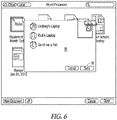
- a pop up window 56 illustrated in Figure 6 , can migrate onto the application panel. From this window, the user can select one or more computing devices to which to send the selected document(s). Once the recipients have been selected, clicking on a "Send” button 58 causes the document(s) to be transmitted to the devices.
- Another approach to sharing the selected documents can be to create a new email message, with the documents as attachments, in response to activation of the "Forward" button.
- a drop down menu 60 appears, to provide additional functions that can be performed on a selected document. These functions include the ability to rename a document, move it to another location, e.g., back to the desktop for local storage only, and duplicate, or copy, the document.
- the application panel also provides the user with the ability to move a document from local storage to the synchronizing server 18, so that it is shared amongst multiple computing devices.
- This functionality can be implemented by dragging the document from the desktop or other locally accessible storage location, into the application panel. Since the panel is associated with a particular application program, the operating system of the computing device examines the document being dragged into the panel, to determine whether it is compatible with the given application. Thus, if the document was created with the same application, in this case a word processing application, the operating system permits it to be dropped onto the panel. In addition, the operating system moves the document into the appropriate application folder 22, to enable it to be replicated on other computing devices, via the cloud server 18.
- the operating system may cause the file to return to its original location, and/or may display a warning to the user that it cannot be placed on the panel.
- the user may also drag a file that is created by a different application, but that is compatible with the application associated with the panel.
- a text document may be in a first format that is associated with a text editing application program. If the text document is dropped onto the panel for the word processing application, the word processing application converts the document into its own format, and opens the document in the converted format.
- an application panel When an application panel is open, it may be the case that a particular application document of interest to the user does not appear in the panel. For example, the user may not have designated that document to be shared among multiple devices via the cloud computing system, for instance by dragging or sending it to the mobile applications folder 20. If the user is not able to locate the desired document within the application panel, a "Local" button 64 can be actuated, to switch from the application panel view of Figure 5 to the browser view of Figure 4 , and thereby provide a view of the files accessible via the local file system of the computing device.
- the application panel 40 preferably has a different appearance from the browser 30.
- a comparison of Figures 4 and 5 reveals that the side bar 32 in the browser 30 is not present in the application panel 50.
- the browser 30 has a different motif from the application panel.
- the documents are displayed in different viewing formats. Specifically, in the browser of Figure 4 , the documents are presented in a list view, whereas in the application panel of Figure 5 , the documents are presented in a thumbnail view. This change in viewing format reinforces the impression that a switch has been made between the sets of documents that are being viewed. In an alternative embodiment, it may be preferable to maintain a consistent viewing format when the switch is made from the application panel 50 to the browser 30, or vice versa. Thus, if the documents are presented with a thumbnail view in the application panel 50, upon actuating the Local button 64 to switch to the browser 30, the displayed files can be presented in the thumbnail view as well.
- Another mechanism that can be employed, to notify the user of the switch, is to display an animation as the transition is made from one user interface element to the other.
- the application panel 40 might appear as a page that is flipping over, with the browser 30 on the reverse side of the page.
- the behavior of the application panel is non-modal.
- the user can switch to any of the other open windows, and interact with them, without the need to close the application panel.
- the user could open the text document "Spec Sheet” and edit it while the application panel 50 remains open on the display.
- the documents appearing in an application panel are synchronized among multiple computing devices, when a change is made to a document on one of the computing devices, that change can appear, in real time, on the other computing devices with which the document is shared.
- the user may have a word processing document open on one computing device, and the application panel for the word processing application may be open on another one of the synchronized devices.
- the viewing mode in the application panel is the thumbnail view, as depicted in Figure 5 , as changes are made to the document on the first computing device, those changes will appear in the thumbnail view on the application panel of the other computing device.
- the speed with which the change appears in the application panel will be dependent upon the rate at which the server 18 synchronizes the documents among the various computing devices.
- a suitable indicator such as an arrow, can be displayed on, or adjacent, the thumbnail view of the document in the application panel.
- all of the documents associated with a given application may be stored in the application folder 22 for that application at the same hierarchical level.
- each of the documents that are bound to the word processing application is individually displayed in the viewing pane 50.
- the ability to display documents within folders on the application panel can be made application specific. Thus, if a particular application does not permit hierarchical storage, the operating system does not allow folders to be created within the associated application folder, or be displayed in the application panel.
- the open document may replace the display of the application panel.
- the application icon e.g., the word processing icon 46
- the application panel can again be actuated to cause the application panel to reappear.
- a second document is opened from that panel, it likewise replaces the display of the open panel.
- the user can actuate the "Cancel" button on the application panel, to thereby remove the application panel from the display and quit the application.
- the panel can be closed, but the application remains running until the user explicitly exits the application, e.g. via a command on a menu, or the like.
- each application program has an associated application folder 22, in which documents created by, or otherwise associated with, that program are stored.
- the application panel is launched, only the documents stored in the associated application's folder 22 are displayed in the panel.
- Figure 9 illustrates an example of a virtual folder 70 that is based upon the word processing application folder 22a and the spreadsheet application folder 22b.
- an open panel 72 is launched, and displays the documents contained in both the word processing application folder 22a and the spreadsheet application folder 22b.
- an application panel appears, and the same two sets of documents are displayed in that panel.
- FIG. 10 is a block diagram illustrating one example of hardware and software components of a computing device on which the user interface can be implemented.
- a computing device 100 can be any type of computer, such as, for example, a desktop computer, a workstation, a laptop computer, a tablet computer, a smart phone or personal digital assistant, or any other type of processor-based device that can support a GUI environment.
- Computer 100 includes a central processing unit (CPU) 120.
- CPU 120 can be any form of processor, such as, for example, a microprocessor.
- Computing device 100 also includes one or more forms of non-transitory, computer-readable memory 125.
- Memory 125 can include a suitable form of working memory, such as, for example, random access memory (RAM), or any other form of computer memory.
- RAM random access memory
- Software components of computer 100 can be stored in non-volatile electronic storage media, such as, for example, a magnetic hard disk, an optical disk, and/or semiconductor memory, e.g., flash memory. From there, the software is loaded into the working memory for execution by CPU 120. Other data, including the documents associated with the application programs, can also be stored in the non-volatile memory media.
- non-volatile electronic storage media such as, for example, a magnetic hard disk, an optical disk, and/or semiconductor memory, e.g., flash memory.
- Other data including the documents associated with the application programs, can also be stored in the non-volatile memory media.
- Display 145 can be any type of display, such as, for example, a computer monitor, an LCD screen, a plasma display, a touch I/O screen, or any other form of display on which graphical and/or textual data can be presented to a user.
- Each display 145 is connected to, and controlled by, a video card 135 that operates in accordance with video driver software 140.
- An operating system 115 running on CPU 120 can include a window manager 110.
- Operating system 115 can be any type of computer operating system that supports a GUI environment.
- Window manager 110 manages graphical windows, including the browser 30 and applications panel 40 described previously, as well as other graphical and/or textual control elements displayed on display 145.
- Window manager 110 can keep track of the location, size and status of each graphical window displayed on display 145.
- Window manager 110 can be any type of window manager or any other type of application that can manage graphical windows through which documents and any other form of graphical and/or textual information can be displayed to a user on a display device (e.g., display 145).
- Operating system 115 can also include a display manager 130 that provides communication between window manager 110 and the display devices (e.g., display 145) via the display devices' associated video driver software 140 and video card 135.
- Display manager 130 can be a software component that is either separate from or an integrated component of the operating system 115.
- At least one software program such as application program 105, generates information to be displayed on the display devices (e.g., display 145). Examples of such information include text, windows and other graphical objects, and control structures, such as, for example, menus and dialog boxes. This information is presented to display manager 130 through window manager 110 for eventual display to a user on display 145.
Landscapes
- Engineering & Computer Science (AREA)
- Theoretical Computer Science (AREA)
- Human Computer Interaction (AREA)
- Data Mining & Analysis (AREA)
- Databases & Information Systems (AREA)
- Physics & Mathematics (AREA)
- General Engineering & Computer Science (AREA)
- General Physics & Mathematics (AREA)
- Information Retrieval, Db Structures And Fs Structures Therefor (AREA)
- User Interface Of Digital Computer (AREA)
Claims (15)
- Verfahren umfassend:
bei einem Computersystem (100), das einen oder mehrere Prozessoren (120) und Speicher (125) beinhaltet:Anzeigen eines ersten Benutzerschnittstellenelementes (40) auf einer Anzeige (145) einer Computervorrichtung, wobei das erste Benutzerschnittstellenelement einen logischen Dateispeicherort darstellt, der mit einer Anwendung assoziiert ist, wobei das Anzeigen des ersten Benutzerschnittstellelements ein Anzeigen von Darstellungen von jeweiligen Dateien, die an dem logischen Dateispeicherort gespeichert sind, beinhaltet;während dem Anzeigen des ersten Benutzerschnittstellenelements, Erkennen einer Eingabe, die einem Ablegen einer Darstellung einer Datei auf dem ersten Benutzerschnittstellenelement entspricht;in Antwort auf das Erkennen der Eingabe, die dem Ablegen der Darstellung der Datei auf dem ersten Benutzerschnittstellenelement entspricht:Bestimmen, ob die Datei mit der Anwendung kompatibel ist und in Übereinstimmung mit einer Bestimmung, dass die Datei mit der Anwendung kompatibel ist, Speichern von Inhalt, der der Datei entspricht, an dem logischen Dateispeicherort, der mit der Anwendung assoziiert ist, und Anzeigen der Darstellung der Datei auf der Anzeige, gleichzeitig mit dem Anzeigen der Darstellungen der jeweiligen Dateien, die an dem logischen Dateispeicherort vor dem Erkennen der Eingabe gespeichert wurden; undin Übereinstimmung mit einer Bestimmung, dass die Datei mit der Anwendung nicht kompatibel ist, auf ein Speichern von Inhalt, der der Datei an dem logischen Dateispeicherort, der mit der Anwendung verknüpft ist, Verzichten und Anzeigen einer Warnung auf der Anzeige, die anzeigt, dass die Datei mit der Anwendung nicht kompatibel ist. - Verfahren nach Anspruch 1, wobei das Verfahren in Übereinstimmung mit einer Bestimmung, dass die Datei mit der Anwendung kompatibel ist, ein Umwandeln der Datei in ein Format der Anwendung beinhaltet, wobei das Umwandeln durch die Anwendung vorgenommen wird.
- Verfahren nach Anspruch 1, wobei das Bestimmen, ob die Datei mit der Anwendung kompatibel ist ein Bestimmen beinhaltet, dass die Datei ein inkompatibles Dateiformat aufweist, das durch die Anwendung nicht geöffnet werden kann.
- Verfahren nach Anspruch 1, wobei des Verfahren ferner in Übereinstimmung mit der Bestimmung, dass die Datei mit der Anwendung kompatibel ist, ein automatisches Veranlassen beinhaltet, dass der Inhalt, der der Datei entspricht, auf einem entfernten Server gespeichert werden soll, zur Synchronisation mit anderen Computervorrichtungen, welche die Anwendung beinhalten.
- Verfahren nach Anspruch 4, wobei der Inhalt, der der Datei entspricht, auf dem entfernten Server zur Synchronisierung mit anderen Computervorrichtungen gespeichert wird, die mit einem gleichen Benutzerkonto der Computervorrichtung assoziiert sind.
- Verfahren nach Anspruch 1, wobei des Verfahren ferner ein Erkennen einer Benutzerhandlung umfasst, die hin zu einer Dockingstation gerichtet ist; und wobei das Anzeigen des ersten Benutzerschnittstellenelements in Antwort auf das Erkennen der Benutzerhandlung, die hin zu der Dockingstation gerichtet ist, auftritt.
- Verfahren nach Anspruch 6, wobei die Benutzerhandlung, die hin zu der Dockingstation gerichtet ist, eine Benutzerhandlung umfasst, die hin zu einem Symbol, das in Dockingstation enthalten ist, gerichtet ist, wobei des Symbol mit der Anwendung assoziiert ist.
- Vorrichtung umfassend:einen Speicher (125);eine Anzeigevorrichtung (145); undeinen oder mehrere Prozessoren (120), die konfiguriert sind, um Operationen durchzuführen, die umfassen:Anzeigen eines ersten Benutzerschnittstellenelements (40) auf der Anzeigevorrichtung, wobei das erste Benutzerschnittstellenelement einen logischen Dateispeicherort darstellt, der mit einer Anwendung assoziiert ist, wobei das Anzeigen des ersten Benutzerschnittstellenelements ein Anzeigen von Darstellungen von jeweiligen Dateien beinhaltet, die an dem logischen Dateispeicherort gespeichert sind;während dem Anzeigen des ersten Benutzerschnittstellenelements, Erkennen eine Eingabe, die einem Ablegen einer Darstellung einer Datei auf dem ersten Benutzerschnittstellenelement entspricht;in Antwort auf das Erkennen der Eingabe, die dem Ablegen der Darstellung der Datei auf dem ersten Benutzerschnittstellenelement entspricht:Bestimmen, ob die Datei mit der Anwendung kompatibel ist und in Übereinstimmung mit einer Bestimmung, dass die Datei mit der Anwendung kompatibel ist, Speichern von Inhalt, der der Datei entspricht, an dem logischen Dateispeicherort, der mit der Anwendung assoziiert ist, und Anzeigen der Darstellung der Datei auf der Anzeige, gleichzeitig mit dem Anzeigen der Darstellungen der jeweiligen Dateien, die an dem logischen Dateispeicherort vor dem Erkennen der Eingabe gespeichert wurden; undin Übereinstimmung mit einer Bestimmung, dass die Datei mit der Anwendung nicht kompatibel ist, auf ein Speichern von Inhalt, der der Datei an dem logischen Dateispeicherort, der mit der Anwendung verknüpft ist, Verzichten und Anzeigen einer Warnung auf der Anzeige, die anzeigt, dass die Datei mit der Anwendung nicht kompatibel ist.
- Vorrichtung nach Anspruch 8, wobei die Operationen ferner umfassen:
in Übereinstimmung mit einer Bestimmung, dass die Datei mit der Anwendung kompatibel ist, Umwandeln der Datei in ein Format der Anwendung, wobei das Umwandeln durch die Anwendung vorgenommen wird. - Vorrichtung nach Anspruch 8, wobei die Bestimmung, ob die Datei mit der Anwendung kompatibel ist ein Bestimmen beinhaltet, dass die Datei ein inkompatibles Dateiformat aufweist, das durch die Anwendung nicht geöffnet werden kann.
- Vorrichtung nach Anspruch 8, wobei die Operationen ferner umfassen:
in Übereinstimmung mit der Bestimmung, dass die Datei mit der Anwendung kompatibel ist, automatisches Veranlassen, dass der Inhalt, der der Datei entspricht, auf einem entfernten Server gespeichert werden soll, zur Synchronisation mit anderen Computervorrichtungen, welche die Anwendung beinhalten. - Vorrichtung nach Anspruch 11, wobei der Inhalt, der der Datei entspricht, auf dem entfernten Server zur Synchronisierung mit anderen Computervorrichtungen gespeichert wird, die mit einem gleichen Benutzerkonto der Computervorrichtung assoziiert sind.
- Vorrichtung nach Anspruch 8, wobei die Operationen ferner ein Erkennen einer Benutzerhandlung umfassen, die hin zu einer Dockingstation gerichtet ist; und wobei das Anzeigen des ersten Benutzerschnittstellenelements in Antwort auf das Erkennen der Benutzerhandlung, die hin zu der Dockingstation gerichtet ist, auftritt.
- Vorrichtung nach Anspruch 13, wobei die Benutzerhandlung, die hin zu der Dockingstation gerichtet ist, eine Benutzerhandlung umfasst, die hin zu einem Symbol, das in der Dockingstation enthalten ist, gerichtet ist, wobei des Symbol mit der Anwendung assoziiert ist.
- Nichtflüchtiges computerlesbares Medium, das Programmanweisungen enthält, die, wenn sie durch einen Prozessor ausgeführt werden, den Prozessor dazu veranlassen Operationen durchzuführen, die umfassen:Anzeigen eines ersten Benutzerschnittstellenelementes auf einer Anzeigevorrichtung (145), wobei das erste Benutzerschnittstellenelement einen logischen Dateispeicherort darstellt, der mit einer Anwendung assoziiert ist, wobei das Anzeigen des ersten Benutzerschnittstellenelements ein Anzeigen von Darstellungen von jeweiligen Dateien, die an dem logischen Dateispeicherort gespeichert sind, beinhaltet;während dem Anzeigen des ersten Benutzerschnittstellenelements, Erkennen einer Eingabe, die einem Ablegen einer Darstellung einer Datei auf dem ersten Benutzerschnittstellenelement entspricht;in Antwort auf das Erkennen der Eingabe, die dem Ablegen der Darstellung der Datei auf dem ersten Benutzerschnittstellenelement entspricht:Bestimmen, ob die Datei mit der Anwendung kompatibel ist und in Übereinstimmung mit einer Bestimmung, dass die Datei mit der Anwendung kompatibel ist, Speichern von Inhalt, der der Datei entspricht, an dem logischen Dateispeicherort, der mit der Anwendung assoziiert ist, und Anzeigen der Darstellung der Datei auf der Anzeige gleichzeitig mit dem Anzeigen der Darstellungen der jeweiligen Dateien, die an dem logischen Dateispeicherort vor dem Erkennen der Eingabe gespeichert wurden; undin Übereinstimmung mit einer Bestimmung, dass die Datei mit der Anwendung nicht kompatibel ist, auf ein Speichern von Inhalt, der der Datei an dem logischen Dateispeicherort, der mit der Anwendung verknüpft ist, Verzichten und Anzeigen einer Warnung, die anzeigt, dass die Datei mit der Anwendung nicht kompatibel ist.
Applications Claiming Priority (2)
| Application Number | Priority Date | Filing Date | Title |
|---|---|---|---|
| US13/366,071 US10055419B2 (en) | 2012-02-03 | 2012-02-03 | User interface for accessing documents from a computing device |
| PCT/US2013/024289 WO2013116604A1 (en) | 2012-02-03 | 2013-02-01 | User interface for accessing documents from a computing device |
Publications (2)
| Publication Number | Publication Date |
|---|---|
| EP2810190A1 EP2810190A1 (de) | 2014-12-10 |
| EP2810190B1 true EP2810190B1 (de) | 2018-06-27 |
Family
ID=47722558
Family Applications (1)
| Application Number | Title | Priority Date | Filing Date |
|---|---|---|---|
| EP13704859.1A Active EP2810190B1 (de) | 2012-02-03 | 2013-02-01 | Benutzerschnittstelle für den zugriff auf dokumente aus einer computervorrichtung |
Country Status (7)
| Country | Link |
|---|---|
| US (1) | US10055419B2 (de) |
| EP (1) | EP2810190B1 (de) |
| JP (2) | JP5982014B2 (de) |
| KR (1) | KR101624446B1 (de) |
| CN (1) | CN104081395B (de) |
| AU (2) | AU2013214946A1 (de) |
| WO (1) | WO2013116604A1 (de) |
Families Citing this family (29)
| Publication number | Priority date | Publication date | Assignee | Title |
|---|---|---|---|---|
| US20060101064A1 (en) | 2004-11-08 | 2006-05-11 | Sharpcast, Inc. | Method and apparatus for a file sharing and synchronization system |
| US10055419B2 (en) | 2012-02-03 | 2018-08-21 | Apple Inc. | User interface for accessing documents from a computing device |
| US20130304697A1 (en) * | 2012-05-09 | 2013-11-14 | Salesforce.Com, Inc. | System and method for cross-platform synchronization of data objects in a multi-tenant environment |
| JP2014010465A (ja) * | 2012-06-27 | 2014-01-20 | International Business Maschines Corporation | 複数のストレージ・クラウドから実体ファイルを格納するためのストレージ・クラウドを選択する方法、並びにそのコンピュータ及びコンピュータ・プログラム |
| US9633125B1 (en) * | 2012-08-10 | 2017-04-25 | Dropbox, Inc. | System, method, and computer program for enabling a user to synchronize, manage, and share folders across a plurality of client devices and a synchronization server |
| US10057318B1 (en) | 2012-08-10 | 2018-08-21 | Dropbox, Inc. | System, method, and computer program for enabling a user to access and edit via a virtual drive objects synchronized to a plurality of synchronization clients |
| US9870422B2 (en) * | 2013-04-19 | 2018-01-16 | Dropbox, Inc. | Natural language search |
| US20150012831A1 (en) * | 2013-07-08 | 2015-01-08 | Jacoh, Llc | Systems and methods for sharing graphical user interfaces between multiple computers |
| US20150095458A1 (en) * | 2013-09-27 | 2015-04-02 | Xerox Corporation | Methods and systems for providing a seamless transition of documents between client types |
| US9298355B1 (en) | 2015-03-23 | 2016-03-29 | Dropbox, Inc. | Content item templates |
| US10291701B2 (en) * | 2016-06-20 | 2019-05-14 | Wyse Technology L.L.C. | Virtualizing a shortcut to a file in a cloud desktop |
| US11599383B2 (en) * | 2016-08-30 | 2023-03-07 | Microsoft Technology Licensing, Llc | Concurrent execution of task instances relating to a plurality of applications |
| CN106469094A (zh) * | 2016-09-05 | 2017-03-01 | 维沃移动通信有限公司 | 一种文字信息分享方法及移动终端 |
| US10970656B2 (en) | 2016-12-29 | 2021-04-06 | Dropbox, Inc. | Automatically suggesting project affiliations |
| US10719807B2 (en) | 2016-12-29 | 2020-07-21 | Dropbox, Inc. | Managing projects using references |
| US10402786B2 (en) | 2016-12-30 | 2019-09-03 | Dropbox, Inc. | Managing projects in a content management system |
| CN110191818B (zh) | 2017-01-24 | 2020-06-30 | 日产自动车株式会社 | 电动车辆的控制方法以及电动车辆的控制装置 |
| GB201710831D0 (en) * | 2017-07-05 | 2017-08-16 | Jones Maria Francisca | Method and apparatus to transfer data from a first computer state to a different computer state |
| US10826985B2 (en) | 2017-08-04 | 2020-11-03 | Oracle International Corporation | System and method for content tethering in an enterprise content management system |
| CN107729160B (zh) * | 2017-09-29 | 2021-08-03 | 努比亚技术有限公司 | 应用控制方法、移动终端和计算机可读存储介质 |
| US11226939B2 (en) | 2017-12-29 | 2022-01-18 | Dropbox, Inc. | Synchronizing changes within a collaborative content management system |
| JP6550485B2 (ja) * | 2018-02-07 | 2019-07-24 | シャープ株式会社 | 表示装置、制御プログラムおよび制御方法 |
| US11334596B2 (en) | 2018-04-27 | 2022-05-17 | Dropbox, Inc. | Selectively identifying and recommending digital content items for synchronization |
| CN117492611A (zh) * | 2019-12-24 | 2024-02-02 | 华为技术有限公司 | 一种文件处理方法、电子设备、系统和存储介质 |
| US11200205B2 (en) * | 2020-01-31 | 2021-12-14 | EMC IP Holding Company LLC | Displaying an alert and options when deleting a file that is associated with a sequence of files |
| US11199948B2 (en) | 2020-01-31 | 2021-12-14 | EMC IP Holding Company LLC | Displaying a sequence and files associated with the sequence having a missing file |
| US11947772B2 (en) | 2021-09-07 | 2024-04-02 | Samsung Electronics Co., Ltd. | Electronic device for displaying source information of file and operation method of same |
| WO2023038232A1 (ko) * | 2021-09-07 | 2023-03-16 | 삼성전자 주식회사 | 파일의 출처 정보를 표시하는 전자 장치와 이의 동작 방법 |
| CN114461585A (zh) * | 2021-10-21 | 2022-05-10 | 统信软件技术有限公司 | 一种文件分类方法、计算设备及可读存储介质 |
Family Cites Families (42)
| Publication number | Priority date | Publication date | Assignee | Title |
|---|---|---|---|---|
| US5666530A (en) * | 1992-12-02 | 1997-09-09 | Compaq Computer Corporation | System for automatic synchronization of common file between portable computer and host computer via communication channel selected from a plurality of usable channels there between |
| WO1994027229A1 (en) * | 1993-05-10 | 1994-11-24 | Apple Computer, Inc. | Computer-human interface system which manipulates parts between a desktop and a document |
| US6260043B1 (en) * | 1998-11-06 | 2001-07-10 | Microsoft Corporation | Automatic file format converter |
| US7062532B1 (en) * | 1999-03-25 | 2006-06-13 | Autodesk, Inc. | Method and apparatus for drawing collaboration on a network |
| US6351776B1 (en) | 1999-11-04 | 2002-02-26 | Xdrive, Inc. | Shared internet storage resource, user interface system, and method |
| US7434177B1 (en) | 1999-12-20 | 2008-10-07 | Apple Inc. | User interface for providing consolidation and access |
| JP2001357010A (ja) * | 2000-04-10 | 2001-12-26 | Mitsubishi Corp | インターネット上のWebサーバにおいてファイルを受託管理する方法およびこの方法に用いるファイル受託管理装置 |
| US6590568B1 (en) * | 2000-11-20 | 2003-07-08 | Nokia Corporation | Touch screen drag and drop input technique |
| US20030182139A1 (en) * | 2002-03-22 | 2003-09-25 | Microsoft Corporation | Storage, retrieval, and display of contextual art with digital media files |
| US20040095390A1 (en) * | 2002-11-19 | 2004-05-20 | International Business Machines Corporaton | Method of performing a drag-drop operation |
| JP2004227170A (ja) | 2003-01-21 | 2004-08-12 | Toshiba Microelectronics Corp | ソフトウェアライセンス使用許可装置、ソフトウェアライセンス使用許可方法及びソフトウェアライセンス使用許可プログラム |
| US7769794B2 (en) * | 2003-03-24 | 2010-08-03 | Microsoft Corporation | User interface for a file system shell |
| EP1478158A1 (de) * | 2003-05-14 | 2004-11-17 | Hewlett-Packard Development Company, L.P. | Light-weight System zur Dienstvermittlung |
| JP4366120B2 (ja) * | 2003-06-03 | 2009-11-18 | キヤノン株式会社 | 記録装置 |
| JP2004362091A (ja) * | 2003-06-03 | 2004-12-24 | Toshiba Corp | データ変換装置、データ変換システム及びデータ格納制御プログラム |
| AU2003285383A1 (en) * | 2003-12-11 | 2005-06-29 | Nokia Corporation | Internet terminal, www-browser located in the terminal and a method for setting a display mode of the terminal |
| JP2005267559A (ja) | 2004-03-22 | 2005-09-29 | Sony Corp | 記録再生装置、情報転送管理方法および記録媒体 |
| JP2005322135A (ja) | 2004-05-11 | 2005-11-17 | Casio Comput Co Ltd | 電子機器、表示管理プログラム |
| JP4212539B2 (ja) | 2004-09-27 | 2009-01-21 | 株式会社日立情報システムズ | ファイル格納位置情報管理システムと方法およびそのプログラム |
| JP4192136B2 (ja) * | 2004-09-30 | 2008-12-03 | 株式会社小松製作所 | 画像表示システムおよび画像表示プログラム |
| US7747685B2 (en) * | 2005-01-20 | 2010-06-29 | International Business Machines Corporation | Method for automatic detection of display sharing and alert generation in instant messaging |
| US7636888B2 (en) * | 2005-03-15 | 2009-12-22 | Microsoft Corporation | Verifying compatibility between document features and server capabilities |
| US10026140B2 (en) * | 2005-06-10 | 2018-07-17 | Nvidia Corporation | Using a scalable graphics system to enable a general-purpose multi-user computer system |
| US7765229B2 (en) | 2005-07-12 | 2010-07-27 | Microsoft Corporation | Single view of data in a networked computer system with distributed storage |
| US7757185B2 (en) * | 2006-01-06 | 2010-07-13 | Apple Inc. | Enabling and disabling hotkeys |
| US7987432B1 (en) * | 2006-04-25 | 2011-07-26 | Parallels Holdings, Ltd. | Seamless integration and installation of non-native application into native operating system |
| CN101101592A (zh) * | 2006-07-04 | 2008-01-09 | 联想(北京)有限公司 | 一种文件格式自动转换方法及装置 |
| JP4137144B2 (ja) * | 2006-07-07 | 2008-08-20 | キヤノン株式会社 | データ処理装置およびその制御方法 |
| US8127249B2 (en) * | 2006-09-06 | 2012-02-28 | Sap Ag | Method and apparatus providing configurable pop-ups |
| JP4247694B2 (ja) * | 2007-02-01 | 2009-04-02 | ソニー株式会社 | 表示制御装置および方法、並びにプログラム |
| US9612847B2 (en) * | 2008-02-05 | 2017-04-04 | Microsoft Technology Licensing, Llc | Destination list associated with an application launcher |
| US8689115B2 (en) * | 2008-09-19 | 2014-04-01 | Net Power And Light, Inc. | Method and system for distributed computing interface |
| US8285787B2 (en) * | 2008-11-26 | 2012-10-09 | Red Hat, Inc. | Systems and methods for managing a collaboration space having application hosting capabilities |
| US8886714B2 (en) * | 2011-08-08 | 2014-11-11 | Ctera Networks Ltd. | Remote access service for cloud-enabled network devices |
| US8090744B1 (en) * | 2009-08-26 | 2012-01-03 | Symantec Operating Corporation | Method and apparatus for determining compatibility between a virtualized application and a base environment |
| US8561055B2 (en) * | 2009-10-15 | 2013-10-15 | Blackberry Limited | Method, system and apparatus for management of push content |
| WO2011062689A1 (en) | 2009-11-20 | 2011-05-26 | Rovi Technologies Corporation | Managing different formats for media files and media playback devices |
| US8335991B2 (en) * | 2010-06-11 | 2012-12-18 | Microsoft Corporation | Secure application interoperation via user interface gestures |
| US8620296B2 (en) * | 2010-09-10 | 2013-12-31 | Cox Communications, Inc. | Integration of contact information across multiple communication devices |
| EP3450920B1 (de) * | 2010-12-30 | 2023-05-24 | TomTom Navigation B.V. | Verfahren und systeme zur bereitstellung von informationen unter verwendung einer navigationsvorrichtung |
| CN102075546A (zh) * | 2011-02-18 | 2011-05-25 | 北京积木恒硕科技有限公司 | 一种基于云计算的在线操作系统 |
| US10055419B2 (en) | 2012-02-03 | 2018-08-21 | Apple Inc. | User interface for accessing documents from a computing device |
-
2012
- 2012-02-03 US US13/366,071 patent/US10055419B2/en active Active
-
2013
- 2013-02-01 WO PCT/US2013/024289 patent/WO2013116604A1/en not_active Ceased
- 2013-02-01 EP EP13704859.1A patent/EP2810190B1/de active Active
- 2013-02-01 CN CN201380007683.7A patent/CN104081395B/zh active Active
- 2013-02-01 KR KR1020147024761A patent/KR101624446B1/ko active Active
- 2013-02-01 AU AU2013214946A patent/AU2013214946A1/en not_active Abandoned
- 2013-02-01 JP JP2014555735A patent/JP5982014B2/ja active Active
-
2016
- 2016-04-14 AU AU2016202337A patent/AU2016202337B2/en active Active
- 2016-07-29 JP JP2016149632A patent/JP6488265B2/ja active Active
Non-Patent Citations (1)
| Title |
|---|
| None * |
Also Published As
| Publication number | Publication date |
|---|---|
| JP5982014B2 (ja) | 2016-08-31 |
| WO2013116604A1 (en) | 2013-08-08 |
| JP6488265B2 (ja) | 2019-03-20 |
| JP2015508920A (ja) | 2015-03-23 |
| US20130205251A1 (en) | 2013-08-08 |
| AU2013214946A1 (en) | 2014-07-31 |
| US10055419B2 (en) | 2018-08-21 |
| CN104081395B (zh) | 2018-06-12 |
| JP2017010568A (ja) | 2017-01-12 |
| CN104081395A (zh) | 2014-10-01 |
| KR20140123988A (ko) | 2014-10-23 |
| AU2016202337B2 (en) | 2017-11-09 |
| EP2810190A1 (de) | 2014-12-10 |
| AU2016202337A1 (en) | 2016-05-05 |
| KR101624446B1 (ko) | 2016-05-25 |
Similar Documents
| Publication | Publication Date | Title |
|---|---|---|
| AU2016202337B2 (en) | User interface for accessing documents from a computing device | |
| US20230143275A1 (en) | Software clipboard | |
| US10248305B2 (en) | Manipulating documents in touch screen file management applications | |
| US10394429B2 (en) | Sharing of user interface objects via a shared space | |
| US10242045B2 (en) | Filtering content using synchronization data | |
| JP6692418B2 (ja) | ネイティブアプリケーションのコラボレーション | |
| US10282056B2 (en) | Sharing content items from a collection | |
| CN101223496B (zh) | 丰富的拖放用户界面 | |
| US20160140139A1 (en) | Local representation of shared files in disparate locations | |
| CN101263479A (zh) | 电子文件系统中的嵌套视图 | |
| WO2007008524A2 (en) | Rich drag drop user interface | |
| EP1761869A1 (de) | Media-paket und system und verfahren zur verwaltung eines media-pakets | |
| WO2014189632A1 (en) | Providing enhanced user interfaces | |
| CN107092657A (zh) | 文件管理用户界面 | |
| US10606924B2 (en) | Contextual file manager | |
| US20090228826A1 (en) | Group filtering of items in a view | |
| US20150143243A1 (en) | Hierarchical presentation editor | |
| EP3791250B1 (de) | Verfahren und elektronische vorrichtung zum auswählen von dateien in einem dateisystem | |
| AU2024203202A1 (en) | Systems and methods for performing bulk design edits | |
| AU2011308901B2 (en) | Content preview | |
| Padova | Changing Object Views with Multi-State Objects | |
| Ray | My IMac (covers OS X Mavericks) | |
| AU2011308901A1 (en) | Content preview |
Legal Events
| Date | Code | Title | Description |
|---|---|---|---|
| PUAI | Public reference made under article 153(3) epc to a published international application that has entered the european phase |
Free format text: ORIGINAL CODE: 0009012 |
|
| 17P | Request for examination filed |
Effective date: 20140714 |
|
| AK | Designated contracting states |
Kind code of ref document: A1 Designated state(s): AL AT BE BG CH CY CZ DE DK EE ES FI FR GB GR HR HU IE IS IT LI LT LU LV MC MK MT NL NO PL PT RO RS SE SI SK SM TR |
|
| AX | Request for extension of the european patent |
Extension state: BA ME |
|
| DAX | Request for extension of the european patent (deleted) | ||
| STAA | Information on the status of an ep patent application or granted ep patent |
Free format text: STATUS: EXAMINATION IS IN PROGRESS |
|
| 17Q | First examination report despatched |
Effective date: 20170512 |
|
| GRAP | Despatch of communication of intention to grant a patent |
Free format text: ORIGINAL CODE: EPIDOSNIGR1 |
|
| STAA | Information on the status of an ep patent application or granted ep patent |
Free format text: STATUS: GRANT OF PATENT IS INTENDED |
|
| INTG | Intention to grant announced |
Effective date: 20180118 |
|
| GRAS | Grant fee paid |
Free format text: ORIGINAL CODE: EPIDOSNIGR3 |
|
| GRAA | (expected) grant |
Free format text: ORIGINAL CODE: 0009210 |
|
| STAA | Information on the status of an ep patent application or granted ep patent |
Free format text: STATUS: THE PATENT HAS BEEN GRANTED |
|
| AK | Designated contracting states |
Kind code of ref document: B1 Designated state(s): AL AT BE BG CH CY CZ DE DK EE ES FI FR GB GR HR HU IE IS IT LI LT LU LV MC MK MT NL NO PL PT RO RS SE SI SK SM TR |
|
| REG | Reference to a national code |
Ref country code: GB Ref legal event code: FG4D |
|
| REG | Reference to a national code |
Ref country code: AT Ref legal event code: REF Ref document number: 1012934 Country of ref document: AT Kind code of ref document: T Effective date: 20180715 |
|
| REG | Reference to a national code |
Ref country code: IE Ref legal event code: FG4D |
|
| REG | Reference to a national code |
Ref country code: DE Ref legal event code: R096 Ref document number: 602013039376 Country of ref document: DE |
|
| RAP2 | Party data changed (patent owner data changed or rights of a patent transferred) |
Owner name: APPLE INC. |
|
| PG25 | Lapsed in a contracting state [announced via postgrant information from national office to epo] |
Ref country code: SE Free format text: LAPSE BECAUSE OF FAILURE TO SUBMIT A TRANSLATION OF THE DESCRIPTION OR TO PAY THE FEE WITHIN THE PRESCRIBED TIME-LIMIT Effective date: 20180627 Ref country code: LT Free format text: LAPSE BECAUSE OF FAILURE TO SUBMIT A TRANSLATION OF THE DESCRIPTION OR TO PAY THE FEE WITHIN THE PRESCRIBED TIME-LIMIT Effective date: 20180627 Ref country code: NO Free format text: LAPSE BECAUSE OF FAILURE TO SUBMIT A TRANSLATION OF THE DESCRIPTION OR TO PAY THE FEE WITHIN THE PRESCRIBED TIME-LIMIT Effective date: 20180927 Ref country code: BG Free format text: LAPSE BECAUSE OF FAILURE TO SUBMIT A TRANSLATION OF THE DESCRIPTION OR TO PAY THE FEE WITHIN THE PRESCRIBED TIME-LIMIT Effective date: 20180927 Ref country code: FI Free format text: LAPSE BECAUSE OF FAILURE TO SUBMIT A TRANSLATION OF THE DESCRIPTION OR TO PAY THE FEE WITHIN THE PRESCRIBED TIME-LIMIT Effective date: 20180627 |
|
| REG | Reference to a national code |
Ref country code: NL Ref legal event code: MP Effective date: 20180627 |
|
| REG | Reference to a national code |
Ref country code: LT Ref legal event code: MG4D |
|
| REG | Reference to a national code |
Ref country code: DE Ref legal event code: R079 Ref document number: 602013039376 Country of ref document: DE Free format text: PREVIOUS MAIN CLASS: G06F0017300000 Ipc: G06F0016000000 |
|
| PG25 | Lapsed in a contracting state [announced via postgrant information from national office to epo] |
Ref country code: GR Free format text: LAPSE BECAUSE OF FAILURE TO SUBMIT A TRANSLATION OF THE DESCRIPTION OR TO PAY THE FEE WITHIN THE PRESCRIBED TIME-LIMIT Effective date: 20180928 Ref country code: RS Free format text: LAPSE BECAUSE OF FAILURE TO SUBMIT A TRANSLATION OF THE DESCRIPTION OR TO PAY THE FEE WITHIN THE PRESCRIBED TIME-LIMIT Effective date: 20180627 Ref country code: LV Free format text: LAPSE BECAUSE OF FAILURE TO SUBMIT A TRANSLATION OF THE DESCRIPTION OR TO PAY THE FEE WITHIN THE PRESCRIBED TIME-LIMIT Effective date: 20180627 Ref country code: HR Free format text: LAPSE BECAUSE OF FAILURE TO SUBMIT A TRANSLATION OF THE DESCRIPTION OR TO PAY THE FEE WITHIN THE PRESCRIBED TIME-LIMIT Effective date: 20180627 |
|
| REG | Reference to a national code |
Ref country code: AT Ref legal event code: MK05 Ref document number: 1012934 Country of ref document: AT Kind code of ref document: T Effective date: 20180627 |
|
| PG25 | Lapsed in a contracting state [announced via postgrant information from national office to epo] |
Ref country code: NL Free format text: LAPSE BECAUSE OF FAILURE TO SUBMIT A TRANSLATION OF THE DESCRIPTION OR TO PAY THE FEE WITHIN THE PRESCRIBED TIME-LIMIT Effective date: 20180627 |
|
| PG25 | Lapsed in a contracting state [announced via postgrant information from national office to epo] |
Ref country code: CZ Free format text: LAPSE BECAUSE OF FAILURE TO SUBMIT A TRANSLATION OF THE DESCRIPTION OR TO PAY THE FEE WITHIN THE PRESCRIBED TIME-LIMIT Effective date: 20180627 Ref country code: SK Free format text: LAPSE BECAUSE OF FAILURE TO SUBMIT A TRANSLATION OF THE DESCRIPTION OR TO PAY THE FEE WITHIN THE PRESCRIBED TIME-LIMIT Effective date: 20180627 Ref country code: EE Free format text: LAPSE BECAUSE OF FAILURE TO SUBMIT A TRANSLATION OF THE DESCRIPTION OR TO PAY THE FEE WITHIN THE PRESCRIBED TIME-LIMIT Effective date: 20180627 Ref country code: IS Free format text: LAPSE BECAUSE OF FAILURE TO SUBMIT A TRANSLATION OF THE DESCRIPTION OR TO PAY THE FEE WITHIN THE PRESCRIBED TIME-LIMIT Effective date: 20181027 Ref country code: PL Free format text: LAPSE BECAUSE OF FAILURE TO SUBMIT A TRANSLATION OF THE DESCRIPTION OR TO PAY THE FEE WITHIN THE PRESCRIBED TIME-LIMIT Effective date: 20180627 Ref country code: RO Free format text: LAPSE BECAUSE OF FAILURE TO SUBMIT A TRANSLATION OF THE DESCRIPTION OR TO PAY THE FEE WITHIN THE PRESCRIBED TIME-LIMIT Effective date: 20180627 Ref country code: AT Free format text: LAPSE BECAUSE OF FAILURE TO SUBMIT A TRANSLATION OF THE DESCRIPTION OR TO PAY THE FEE WITHIN THE PRESCRIBED TIME-LIMIT Effective date: 20180627 |
|
| PG25 | Lapsed in a contracting state [announced via postgrant information from national office to epo] |
Ref country code: ES Free format text: LAPSE BECAUSE OF FAILURE TO SUBMIT A TRANSLATION OF THE DESCRIPTION OR TO PAY THE FEE WITHIN THE PRESCRIBED TIME-LIMIT Effective date: 20180627 Ref country code: SM Free format text: LAPSE BECAUSE OF FAILURE TO SUBMIT A TRANSLATION OF THE DESCRIPTION OR TO PAY THE FEE WITHIN THE PRESCRIBED TIME-LIMIT Effective date: 20180627 Ref country code: IT Free format text: LAPSE BECAUSE OF FAILURE TO SUBMIT A TRANSLATION OF THE DESCRIPTION OR TO PAY THE FEE WITHIN THE PRESCRIBED TIME-LIMIT Effective date: 20180627 |
|
| REG | Reference to a national code |
Ref country code: DE Ref legal event code: R097 Ref document number: 602013039376 Country of ref document: DE |
|
| PLBE | No opposition filed within time limit |
Free format text: ORIGINAL CODE: 0009261 |
|
| STAA | Information on the status of an ep patent application or granted ep patent |
Free format text: STATUS: NO OPPOSITION FILED WITHIN TIME LIMIT |
|
| PG25 | Lapsed in a contracting state [announced via postgrant information from national office to epo] |
Ref country code: DK Free format text: LAPSE BECAUSE OF FAILURE TO SUBMIT A TRANSLATION OF THE DESCRIPTION OR TO PAY THE FEE WITHIN THE PRESCRIBED TIME-LIMIT Effective date: 20180627 |
|
| 26N | No opposition filed |
Effective date: 20190328 |
|
| PG25 | Lapsed in a contracting state [announced via postgrant information from national office to epo] |
Ref country code: SI Free format text: LAPSE BECAUSE OF FAILURE TO SUBMIT A TRANSLATION OF THE DESCRIPTION OR TO PAY THE FEE WITHIN THE PRESCRIBED TIME-LIMIT Effective date: 20180627 |
|
| REG | Reference to a national code |
Ref country code: CH Ref legal event code: PL |
|
| GBPC | Gb: european patent ceased through non-payment of renewal fee |
Effective date: 20190201 |
|
| PG25 | Lapsed in a contracting state [announced via postgrant information from national office to epo] |
Ref country code: MC Free format text: LAPSE BECAUSE OF FAILURE TO SUBMIT A TRANSLATION OF THE DESCRIPTION OR TO PAY THE FEE WITHIN THE PRESCRIBED TIME-LIMIT Effective date: 20180627 Ref country code: LU Free format text: LAPSE BECAUSE OF NON-PAYMENT OF DUE FEES Effective date: 20190201 |
|
| REG | Reference to a national code |
Ref country code: BE Ref legal event code: MM Effective date: 20190228 |
|
| REG | Reference to a national code |
Ref country code: IE Ref legal event code: MM4A |
|
| PG25 | Lapsed in a contracting state [announced via postgrant information from national office to epo] |
Ref country code: AL Free format text: LAPSE BECAUSE OF FAILURE TO SUBMIT A TRANSLATION OF THE DESCRIPTION OR TO PAY THE FEE WITHIN THE PRESCRIBED TIME-LIMIT Effective date: 20180627 |
|
| PG25 | Lapsed in a contracting state [announced via postgrant information from national office to epo] |
Ref country code: LI Free format text: LAPSE BECAUSE OF NON-PAYMENT OF DUE FEES Effective date: 20190228 Ref country code: CH Free format text: LAPSE BECAUSE OF NON-PAYMENT OF DUE FEES Effective date: 20190228 |
|
| PG25 | Lapsed in a contracting state [announced via postgrant information from national office to epo] |
Ref country code: IE Free format text: LAPSE BECAUSE OF NON-PAYMENT OF DUE FEES Effective date: 20190201 Ref country code: GB Free format text: LAPSE BECAUSE OF NON-PAYMENT OF DUE FEES Effective date: 20190201 |
|
| PG25 | Lapsed in a contracting state [announced via postgrant information from national office to epo] |
Ref country code: BE Free format text: LAPSE BECAUSE OF NON-PAYMENT OF DUE FEES Effective date: 20190228 Ref country code: FR Free format text: LAPSE BECAUSE OF NON-PAYMENT OF DUE FEES Effective date: 20190228 |
|
| PG25 | Lapsed in a contracting state [announced via postgrant information from national office to epo] |
Ref country code: TR Free format text: LAPSE BECAUSE OF FAILURE TO SUBMIT A TRANSLATION OF THE DESCRIPTION OR TO PAY THE FEE WITHIN THE PRESCRIBED TIME-LIMIT Effective date: 20180627 |
|
| PG25 | Lapsed in a contracting state [announced via postgrant information from national office to epo] |
Ref country code: PT Free format text: LAPSE BECAUSE OF FAILURE TO SUBMIT A TRANSLATION OF THE DESCRIPTION OR TO PAY THE FEE WITHIN THE PRESCRIBED TIME-LIMIT Effective date: 20181029 Ref country code: MT Free format text: LAPSE BECAUSE OF NON-PAYMENT OF DUE FEES Effective date: 20190201 |
|
| PG25 | Lapsed in a contracting state [announced via postgrant information from national office to epo] |
Ref country code: CY Free format text: LAPSE BECAUSE OF FAILURE TO SUBMIT A TRANSLATION OF THE DESCRIPTION OR TO PAY THE FEE WITHIN THE PRESCRIBED TIME-LIMIT Effective date: 20180627 |
|
| PG25 | Lapsed in a contracting state [announced via postgrant information from national office to epo] |
Ref country code: HU Free format text: LAPSE BECAUSE OF FAILURE TO SUBMIT A TRANSLATION OF THE DESCRIPTION OR TO PAY THE FEE WITHIN THE PRESCRIBED TIME-LIMIT; INVALID AB INITIO Effective date: 20130201 |
|
| PG25 | Lapsed in a contracting state [announced via postgrant information from national office to epo] |
Ref country code: MK Free format text: LAPSE BECAUSE OF FAILURE TO SUBMIT A TRANSLATION OF THE DESCRIPTION OR TO PAY THE FEE WITHIN THE PRESCRIBED TIME-LIMIT Effective date: 20180627 |
|
| P01 | Opt-out of the competence of the unified patent court (upc) registered |
Effective date: 20230526 |
|
| PGFP | Annual fee paid to national office [announced via postgrant information from national office to epo] |
Ref country code: DE Payment date: 20251210 Year of fee payment: 14 |