EP2597590A2 - Verfahren zur Authentifizierung von Passwörtern und tragbare Vorrichtung davon - Google Patents
Verfahren zur Authentifizierung von Passwörtern und tragbare Vorrichtung davon Download PDFInfo
- Publication number
- EP2597590A2 EP2597590A2 EP12193975.5A EP12193975A EP2597590A2 EP 2597590 A2 EP2597590 A2 EP 2597590A2 EP 12193975 A EP12193975 A EP 12193975A EP 2597590 A2 EP2597590 A2 EP 2597590A2
- Authority
- EP
- European Patent Office
- Prior art keywords
- input keyboard
- objects
- touched
- controller
- password
- Prior art date
- Legal status (The legal status is an assumption and is not a legal conclusion. Google has not performed a legal analysis and makes no representation as to the accuracy of the status listed.)
- Withdrawn
Links
Images










Classifications
-
- G—PHYSICS
- G06—COMPUTING OR CALCULATING; COUNTING
- G06F—ELECTRIC DIGITAL DATA PROCESSING
- G06F21/00—Security arrangements for protecting computers, components thereof, programs or data against unauthorised activity
- G06F21/30—Authentication, i.e. establishing the identity or authorisation of security principals
- G06F21/31—User authentication
- G06F21/36—User authentication by graphic or iconic representation
-
- G—PHYSICS
- G06—COMPUTING OR CALCULATING; COUNTING
- G06F—ELECTRIC DIGITAL DATA PROCESSING
- G06F3/00—Input arrangements for transferring data to be processed into a form capable of being handled by the computer; Output arrangements for transferring data from processing unit to output unit, e.g. interface arrangements
- G06F3/01—Input arrangements or combined input and output arrangements for interaction between user and computer
- G06F3/03—Arrangements for converting the position or the displacement of a member into a coded form
- G06F3/033—Pointing devices displaced or positioned by the user, e.g. mice, trackballs, pens or joysticks; Accessories therefor
- G06F3/0346—Pointing devices displaced or positioned by the user, e.g. mice, trackballs, pens or joysticks; Accessories therefor with detection of the device orientation or free movement in a three-dimensional [3D] space, e.g. 3D mice, 6-DOF [six degrees of freedom] pointers using gyroscopes, accelerometers or tilt-sensors
-
- G—PHYSICS
- G06—COMPUTING OR CALCULATING; COUNTING
- G06F—ELECTRIC DIGITAL DATA PROCESSING
- G06F3/00—Input arrangements for transferring data to be processed into a form capable of being handled by the computer; Output arrangements for transferring data from processing unit to output unit, e.g. interface arrangements
- G06F3/01—Input arrangements or combined input and output arrangements for interaction between user and computer
- G06F3/048—Interaction techniques based on graphical user interfaces [GUI]
- G06F3/0487—Interaction techniques based on graphical user interfaces [GUI] using specific features provided by the input device, e.g. functions controlled by the rotation of a mouse with dual sensing arrangements, or of the nature of the input device, e.g. tap gestures based on pressure sensed by a digitiser
- G06F3/0488—Interaction techniques based on graphical user interfaces [GUI] using specific features provided by the input device, e.g. functions controlled by the rotation of a mouse with dual sensing arrangements, or of the nature of the input device, e.g. tap gestures based on pressure sensed by a digitiser using a touch-screen or digitiser, e.g. input of commands through traced gestures
- G06F3/04883—Interaction techniques based on graphical user interfaces [GUI] using specific features provided by the input device, e.g. functions controlled by the rotation of a mouse with dual sensing arrangements, or of the nature of the input device, e.g. tap gestures based on pressure sensed by a digitiser using a touch-screen or digitiser, e.g. input of commands through traced gestures for inputting data by handwriting, e.g. gesture or text
Definitions
- the present invention relates to a method of authenticating a password and a device thereof, and more particularly, to a method of authenticating a password of a device including a screen which may be a touch screen and the portable device thereof.
- the method may be applicable particularly to a portable device.
- known approaches to authenticating a user include inputting preset numbers, or drawing a figure in a preset pattern.
- these known approaches i.e., the use of an ordered sequence of numbers or the use of an input pattern
- these known approaches are susceptible to compromise by malefactors who may, unbeknownst to the user, covertly observe how the user inputs the password; that is, by "shoulder-surfing", another might view the pattern entered by the user, or the position of the user's fingers when completing authentication, even without necessarily being able to observe the user's display.
- shoulder-surfing another might view the pattern entered by the user, or the position of the user's fingers when completing authentication, even without necessarily being able to observe the user's display.
- button arrangements are fixed, and so another person can estimate and often reproduce the manner in which the user entered an authentication sequence or pattern. This fact may result in exposure or compromise of the user's authentication sequence or pattern, thereby jeopardizing the safety of the user's personal information.
- Touch screens which are especially prolific in modern personal portable devices, also offer the risk that oils or other matter may be left behind when a user enters an authentication sequence or pattern.
- touch screens are susceptible to compromise through traces left behind from the user's fingertips. Such trace information may enable another person to estimate or reproduce the user's authentication sequence or pattern.
- One or more exemplary embodiments may overcome the above disadvantages and other disadvantages not described above. However, it is understood that one or more exemplary embodiment are not required to overcome the disadvantages described above, and may not overcome any of the problems described above.
- One or more exemplary embodiments provide a method of authenticating a password, by which a complexity of a password can be increased to further reinforce a protection of personal information, and a portable device thereof.
- a method of authenticating a password of a device comprising a touch screen.
- the method may include: displaying an input keyboard on which a plurality of objects are arranged; changing arrangements of at least some of the plurality of objects or changing at least one of the plurality of objects to another one according to a manipulation of a user; and if a pattern formed by an object arranged in a designated position of the input keyboard corresponds to a preset password pattern, authenticating the user.
- the change of the arrangements of the at least some of the plurality of objects or the change of the at least one of the plurality of objects to the another one may include: if a first object arranged on the input keyboard is touched to be dragged into a position in which a second object of the input keyboard is displayed, changing positions of the first and second objects with each other.
- the change of the arrangements of the at least some of the plurality of objects or the change of the at least one of the plurality of objects to the another one may include: if a first object arranged on the input keyboard is touched, and a second object arranged on the input keyboard is touched, changing positions of the first and second objects with each other.
- the input keyboard may be displayed in a matrix.
- the change of the arrangements of the at least some of the plurality of objects or the change of the at least one of the plurality of objects to the another one may include: if a first object arranged on the input keyboard is touched, and upward and downward motions of the device are sensed, scrolling and changing a column comprising the first object; and if the first object is touched, and left and right motions of the device are sensed, scrolling and changing a line comprising the first object.
- the input keyboard may be displayed in a matrix.
- the change of the arrangements of at least some of the plurality of objects or the change of the at least one of the plurality of objects to the another one may include: if a first object arranged on the input keyboard is touched to be dragged upwards and downwards, scrolling and changing a column comprising the first object; and if the first object is touched to be dragged in left and right directions, scrolling and changing a line comprising the first object.
- the objects displayed on the input keyboard may be numbers.
- the change of the arrangements of the at least some of the plurality of objects or the change of the at least one of the plurality of objects to the another one may include: touching and selecting a first number arranged on the input keyboard; if the device is inclined, selecting one of four fundamental operations corresponding to a preset direction in which the device is inclined; touching and selecting a second number arranged on the input keyboard; and calculating the first and second numbers by using one of the four fundamental operations corresponding to the preset direction to change the first number according to the calculation result.
- the first number may be changed to a one-digit number of the calculation result.
- the objects arranged on the input keyboard are numbers
- the plurality of numbers may be randomly arranged and displayed on the input keyboard.
- the designated position may be displayed to be distinguished from undesignated positions of the input keyboard
- a device for authenticating a password may include: a touch screen which displays an input keyboard on which a plurality of objects are arranged; and a controller which changes arrangements of at least some of the plurality of objects arranged on the input keyboard or changing at least one of the plurality of objects to another one according to a manipulation of a user, and if a pattern formed by an object arranged in a designated position of the input keyboard corresponds to a preset password pattern, authenticates the user
- the controller may change positions of the first and second objects with each other.
- the controller may change positions of the first and second objects.
- the touch screen may display the input keyboard in a matrix. If a first object arranged on the input keyboard, and upward and downward motions of the device are sensed, the controller may scroll and change a column including the first object, and if left and right motions of the device are sensed, the controller may scroll and change a line including the first object.
- the touch screen may display the input keyboard in a matrix. If a first object arranged on the input keyboard is touched to be dragged upwards and downwards, the controller may scroll and change a column including the first object, and if the first object is touched to be dragged in left and right directions, the controller may scroll and change a line including the first object.
- the objects arranged on the input keyboard may be numbers.
- the controller may touch and select a first number arranged on the input keyboard, select one of four fundamental operations corresponding to a preset direction in which the device is inclined, touch and select a second number arranged on the input keyboard, and calculate the first and second numbers by using one of the four fundamental operations corresponding to the preset direction to change the first number according to the calculation result.
- the controller may change the first number to a one-digit number of the calculation result.
- the touch screen may randomly arrange and display the plurality of numbers on the input keyboard.
- the designated position may be displayed to be distinguished from undesignated positions of the input keyboard.
- the device may further include: a communicator which communicates with an external server.
- the controller may control the communicator to transmit information about an object pattern arranged in the designated position to the external server.
- a method of authenticating a password of a device comprising a touch screen.
- the method may include: displaying an input keyboard on which a plurality of objects are arranged; and if at least one of the plurality of objects is touched to be dragged, comparing the touched object and a dragged direction of the touched object with a preset password to authenticate a user.
- the preset password may include a type of a selected object and a dragged direction of the corresponding object.
- a device for authenticating a password may include: a touch screen which displays an input keyboard on which a plurality of objects are arranged; and a controller which, if at least one of the plurality of objects is touched to be dragged, compares the touched object and the dragged direction of the touched object with a preset password to authenticate a user.
- the preset password may include a type of a selected object and a dragged direction of the corresponding object.
- a method of authenticating a password of a device comprising a touch screen.
- the method may include: displaying an object and a timer on the touch screen; if the object is touched, counting a time taken until the touch of the object is released and displaying the counted time on the timer; and if the object is touched a preset number of times, combining times counted at all touches and comparing the combination result with a preset password to authenticate a user.
- the input keyboard on which a plurality of numbers are arranged may be displayed on the touch screen. If one of the plurality of numbers is selected, the counting may start from a time corresponding to the selected number to display the counted time on the timer.
- the method may further include: vibrating the device at each preset time when the object is being touched to count the time.
- a speed of the counting may be accelerated.
- a device for authenticating a password may include: a touch screen which displays an object and a timer; and a controller which, if the object is touched, counts a time taken until the touch of the object is released to display the counted time on the timer, if the object is touched a preset number of times, combines times counted at all touches, and compares the combination result with a preset password to authenticate a user.
- the touch screen may display the input keyboard on which a plurality of numbers are arranged. If one of the plurality of numbers is selected, the controller may start the counting from a time corresponding to the selected number to display the counted time on the timer.
- the device may further include: a vibration motor which vibrates the device.
- the controller may control the vibration motor to vibrate the device at each preset time when the object is being touched to count the time.
- the controller may accelerate a speed of the counting.
- a method of authenticating a password of a device comprising a touch screen.
- the method may include: displaying an input keyboard on which a plurality of objects are arranged and a digital compass; sensing a direction of the device; displaying the sensed direction of the device on the digital compass; and if at least one object is touched on the input keyboard, and the touched object and a direction of the device correspond to a preset password, authenticating a user.
- a device for authenticating a password may include: a sensor which senses a direction of the device; a touch screen which displays an input keyboard on which a plurality of objects are arranged and a digital compass; and a controller which displays the direction of the device sensed by the sensor on the digital compass, and if at least one object is touched on the input keyboard, and the touched object and the direction of the device correspond to a preset password, authenticates a user.
- a method of authenticating a password of a device comprising a touch screen.
- the method may include: displaying an input keyboard on which a plurality of objects are arranged; and if a touch of at least one of the plurality of objects and a motion of the device at a touch time of the at least one object are sensed, and the touched object and the motion of the device at the touch time of the at least one object correspond to a preset password, authenticating a user.
- a device for authenticating a password may include: a sensor which senses a motion of the device; a touch screen which displays an input keyboard on which a plurality of objects are arranged; and a controller which, if a touch of at least one of the plurality of objects and a motion of the device at a touch time of the at least one object are sensed, and the touched object and the motion of the device at the touch time of the at least one object correspond to a preset password, authenticates a user.
- an authentication method for a device which includes, on a display of the device, displaying a plurality of authentication interaction symbols in an arrangement; in response to an input signal, modifying the arrangement of the symbols to display a subsequent arrangement of the symbols; when the subsequent arrangement of the symbols matches a previously set authentication arrangement, determining the device to have an authenticated state.
- the input signal may be generated in response to a movement of one of the symbols from one position to another position.
- the movement may be indicated by a dragging operation.
- the input signal may be generated in response to a selection of two of the symbols.
- the input signal may be generated in response to a selection of one of the symbols and a physical motion of the device.
- the physical motion may indicate a direction of movement for a selected one of the plurality of authentication interaction symbols.
- the symbols may include numbers; and the physical motion may indicate a mathematical operation to be performed with respect to the number for the selected one of the symbols; the calculation result of the mathematical operation may be used in the modifying of the arrangement of the symbols to display the subsequent arrangement of the symbols.
- the calculation result may be based also on the number for a second selected one of the symbols.
- an authentication method for a device includes, on a display of the device, displaying a plurality of authentication interaction symbols in a random arrangement; detecting one or more input signals, with respect to one or more selected ones of the plurality of authentication interaction symbols, and also respective direction information for the one or more input signals, to obtain a sequence of selected symbol indications with respective direction information; and when the sequence of selected symbol indications with respective direction information matches a previously set authentication sequence, determining the device to have an authenticated state.
- the plurality of authentication interaction symbols may be rearranged in a subsequent random arrangement after the detection of one of the one or more input signals.
- the respective direction information for the one or more input signals may indicate a stroke direction at the time of symbol selection.
- the respective direction information for the one or more input signals may indicate a physical orientation of the device at the time of symbol selection.
- the respective direction information for the one or more input signals may indicate a physical motion of the device at the time of symbol selection.
- an authentication method for a device includes, on a display of the device, displaying one or more authentication interaction symbols; detecting one or more input signals, with respect to the one or more authentication interaction symbols, and also a respective timing of input for the one or more input signals, to obtain a sequence of signal input timing values; when the sequence of signal input timing values matches a previously set authentication sequence, determining the device to have an authenticated state.
- FIG. 1 is a block diagram illustrating a structure of a portable device 100 according to an exemplary embodiment.
- the portable device 100 includes a touch screen 110, a sensor 120, a communicator 130, a vibration motor 140, and a controller 150.
- the portable device 100 may be realized as a device, such as a cellular phone, a personal digital assistant (PDA), a tablet personal computer (PC), a television (TV) remote controller, a portable medical device, etc., but is not limited thereto.
- PDA personal digital assistant
- PC tablet personal computer
- TV television
- the touch screen 110 displays an image under control of the controller 150.
- the touch screen 110 displays an input keyboard on which a plurality of different objects for inputting a password are displayed.
- the objects may be realized as numbers, letters, symbols, figures, characters, or combinations thereof but are not limited thereto.
- the objects may be thought of as a plurality of authentication interaction symbols, displayed in an arrangement.
- the touch screen 110 may randomly arrange a plurality of numbers to display the plurality of numbers on the input keyboard. That is to say, the plurality of authentication interaction symbols may be implemented by user interface objects that bear numerals, and the initial arrangement of the plurality of authentication interaction symbols may be a random arrangement. In one example, the arrangement of the plurality of authentication interaction symbols may be changed to another random arrangement of the symbols by shaking the device. In other words, if a shake of the touch screen 110 is sensed, the plurality of numbers displayed on the input keyboard of the touch screen 110 may be changed.
- the plurality of authentication interaction symbols may include a timer or a digital compass displayed on the touch screen 110.
- the touch screen 110 senses a touch input of a user.
- a touch method of the touch screen 110 may be one of a resistive touch method, a capacitive touch method, an infrared (IR) touch method, and an ultrasonic touch method but is not limited thereto.
- the sensor 120 senses a direction, a motion, etc. of the portable device 100.
- the sensor 120 may use a terrestrial magnetism sensor to sense the direction of the portable device and may use a gyro sensor, an acceleration sensor, etc. to sense the motion of the portable device 100.
- Some exemplary embodiments use the communicator 130, which may communicate with an external server 1500 (see Fig. 15 ).
- the communicator 130 may transmit a sequence of information that reflects inputs provided by a user, as a password, to the external server 1500. Therefore, in some exemplary embodiments, a determination, as to whether the device should be deemed to have been placed into an authenticated state, is carried out by an external server for transactions such as such as e-commerce, etc.
- the vibration motor 140 which is used in some exemplary embodiments, generates vibrations of the portable device 100.
- the vibration motor 140 may generate the vibrations under control of the controller 150 whenever a time of a timer is counted.
- the controller 150 receives a manipulation of a user to control an overall operation of the portable device 100.
- the controller 150 may authenticate the password through a manipulation of the user using the input keyboard which is displayed on the touch screen 110 of the portable device 100. That is to say, the controller is provided with input signals that reflect user manipulations of the device, and the controller responds to the input signals by carrying out various actions in various exemplary embodiments.
- the controller 150 responds to input signals by modifying the arrangement of the objects arranged on the input keyboard.
- the controller authenticates the user. That is, the controller determines the device to have been placed into an authenticated state.
- a plurality of authentication interaction symbols in an arrangement.
- the initial arrangement is generated so as to appear to be out of sequence or in a random arrangement.
- Reference numeral 205 refers to a subset of the plurality of authentication interaction symbols that are relevant to a previously set authentication arrangement.
- the designated position 205 of the input keyboard may optionally be displayed to be distinguished from the other positions of the input keyboard as shown in FIG. 2A by a line surrounding certain ones of the authentication interaction symbols.
- the controller 150 may change positions of the first and second objects with each other. That is to say, in response to an input signal (i.e., the dragging of one object over another, in this example), the controller modifies the arrangement of the symbols to display a subsequent arrangement of the symbols.
- the plurality of authentication interaction symbols are the numerals 1-9 which are arranged in a random sequence of 9, 7, 6, 2, 1, 5, 3, 4, and 8 on first through ninth keys of the touch screen 110.
- an authentication arrangement of the symbols, previously set is to have 9, 1, and 5 arranged on a first line (in corresponding positions 210, 220, and 230) and, 1, 7, and 4 arranged on a second column (in corresponding positions 220, 250, and 280).
- This authentication arrangement may be understood to be the "password" in this embodiment.
- the controller 150 changes the numerals of the fifth and second keys 250 and 220 with each other. That is, in response to an input signal (i.e., dragging the 1 onto the 7 in Fig. 2A ), the controller modifies the arrangement of symbols to display a subsequent arrangement of the symbols as shown in Fig. 2B . Therefore, as shown in FIG. 2B , on the touch screen 110, 7 is positioned on the fifth key 250, and 1 is positioned on the second key 220.
- the controller 150 changes numbers of the sixth and third keys 260 and 230.
- the controller in response to the input signal (here, the dragging of the 5 onto the 6), again modifies the arrangement of the symbols and displays another subsequent arrangement of the symbols as shown in Fig. 2C . Therefore, as shown in FIG. 2C , on the touch screen 110, 6 is positioned on the sixth key 260, and 5 is positioned on the third key 230.
- the controller 150 may authenticate the password. To put it another way, since the subsequent arrangement of the authentication interaction symbols matches the previously set authentication arrangement, the controller determines the device to have been placed into an authenticated state.
- the objects displayed on the display may be thought of, in a more general sense, as authentication interaction symbols.
- the authentication interaction symbols may be understood to have, at any given time, a particular arrangement.
- the user interactions with the objects on the display may be provided to the controller 150 as input signals.
- the controller modifies the arrangement of the symbols displayed on the display to provide a subsequent arrangement of the symbols.
- the user By manipulating the plurality of authentication interaction symbols one or more times, the user causes the generation of one or more subsequent arrangements of the symbols.
- the device is determined by the controller to have been placed into an authenticated state, and operations previously prohibited are now enabled.
- the first arrangement was shown in Fig. 2A .
- the user manipulations on the touch screen, as shown in Fig. 2B resulted in input signals being provided to the controller, which modified the arrangement of the symbols.
- the subsequent arrangement of the symbols was shown in Fig. 2C .
- the previously set authentication arrangement of the plurality of authentication interaction symbols was any arrangement in which the top row included the sequence 9, 1, 5 and the center column included the sequence 1, 7, 4 in the positions shown.
- the input signals that result in the re-arrangement of the authentication interaction symbols are input signals that reflect the dragging of one symbol onto or toward another. Since an object may be moved from one position to another by processes that are different from dragging, but have a similar effect, it may be more generally said that the input signals reflect the movement of one of the authentication interaction symbols from one position to another position.
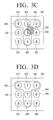
- Figs. 3A-3D show another example along these lines, but the input signals that result in the re-arrangement of the authentication interaction symbols are input signals that reflect the selection of two of the authentication interaction symbols. If the first object arranged on the input keyboard is touched, and the second object arranged on the input keyboard is touched, the controller 150 may change positions of the first and second objects with each other.
- first through ninth keys 310 through 390 of the touch screen 110 are sequentially arranged on first through ninth keys 310 through 390 of the touch screen 110.
- 9, 1, and 5 are arranged on a first line (310, 320, and 330), and 1, 7, and 4 are arranged on a second column (320, 350, and 380).
- the controller 150 displays the fifth key 350 to distinguish the fifth key 350 from the other keys as shown in FIG. 3B .
- the controller 150 changes numbers of the fifth and second keys 350 and 320 as shown in FIG. 3D . Therefore, as shown in FIG. 3D , on the touch screen 110,1 is positioned on the second key 320, and 7 is positioned on the fifth key 350. In other words, in response to an input signal (here, the sequential selection of the symbol in position 350 and then the symbol in position 320), the initial arrangement shown in Fig. 3A is modified so as to display a subsequent arrangement of the symbols as shown in Fig. 3D .
- the controller 150 may authenticate the password. That is to say, the device may be determined to have been placed into an authenticated state.
- the plurality of authentication interaction symbols are again user interface objects that include numerals, but as mentioned earlier in this discussion numerals are not the only possible implementation.
- the preceding example discussed the selection of two symbols at different times, but it is also possible to select the two symbols at the same time, depending on the hardware implementation.
- the user could modify the arrangement of the symbols to display a subsequent arrangement of the symbols by exchanging the respective positions pairs of symbols. Once any subsequent arrangement matched the previously set authentication arrangement (i.e., the first row and the second column matched the 9, 1, 5 and 1, 7, 4 pattern), the device was determined by the controller to have been placed into an authenticated state.
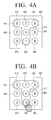
- the input signal is generated in response to a selection of a symbol in connection with a physical motion of the device. For example, if the first object arranged on the input keyboard is touched, and upward and downward motions of the portable device 100 are sensed, the controller 150 scrolls and changes a column including the first object. If the first object is touched, and left and right motions of the portable device 100 are sensed, the controller 150 scrolls and changes a line including the first object.
- first through ninth keys 410 through 490 of the touch screen 110 are sequentially arranged on first through ninth keys 410 through 490 of the touch screen 110.
- 9, 1, and 5 are arranged on a first line (410, 420, and 430), and 1, 7, and 4 are arranged on a second column (420, 450, and 480).
- the controller 150 displays the eighth key 480 as shown in Fig. 4B so as to distinguish the eighth key 480 from the other keys.
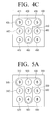
- the controller 150 scrolls down positions of keys of the second column including the selected eighth key 480, one by one, to change the positions (i.e., to modify the arrangement of the symbols to display a subsequent arrangement of the symbols). Therefore, as shown in FIG. 4C , the controller 150 positions 7 of the second key 420 onto the fifth key 450, 4 of the fifth key 450 onto the eighth key 480, and 1 of the eighth key 480 into the second key 420.
- the controller 150 scrolls the arrangement of the symbols downwards to display a subsequent arrangement of the symbols.
- this is only an exemplary embodiment. If an upward motion of the portable device 100 is sensed two times, for example, the controller 150 may arrange 1, 7, and 4 on the second column (420, 450, and 480).
- upward and downward physical motions of the portable device 100 are sensed to scroll numbers in a columnar direction.
- left and right motions of the portable device 100 may be sensed to scroll numbers in a linear direction, but this is only an exemplary embodiment. If a selected key is dragged in left and right directions in order to scroll numbers in a linear direction, the controller 150 may scroll the numbers in the linear direction.
- the input signals were received by the controller to modify the arrangement of the plurality of authentication interaction symbols, so as to achieve one or more subsequent arrangements of the symbols.
- the input signals were generated in response to a selection of one of the symbols, and also in response to a physical motion of the device.
- the input signals are generated in response to a selection of one of the plurality of authentication interaction symbols, and also in response to a physical motion of the device.
- the physical motion of the device indicated a direction of movement for the selected symbol. In this example, however, the physical motion of the device indicates a mathematical operation to be performed upon the selected one of the symbols.
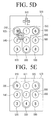
- the controller 150 may calculate the first and second numbers through one of the four fundamental arithmetic operations corresponding to the preset direction to change the first number according to the calculation result.
- first through ninth keys 510 through 590 of the touch screen 110 are sequentially arranged on first through ninth keys 510 through 590 of the touch screen 110.
- 9, 1, and 5 are arranged on a first line (410, 420, and 430), and 1, 7, and 4 are arranged on a second column (420, 450, and 480).
- the controller 150 displays the third key 530 to distinguish the third key 530 from the other keys as shown in FIG. 5C .
- the sensor 120 senses the inclination of the portable device 100. If the portable device 100 is inclined to the left, the controller 150 displays an addition sign 515 on an upper part of the touch screen 110 as shown in FIG. 5C , wherein the addition sign 515 is one of the four fundamental arithmetic operations corresponding to the left inclination of the portable device 100.
- the controller 150 adds numbers of selected two keys to display the addition result on the third key 530 which is first selected. In this case, if the addition result is greater than or equal to 10, the controller 150 may display only a one-digit number of the addition result. Therefore, as shown in FIG. 5E , the controller 150 displays only one-digit number 5 from 15 on the third key 530, wherein 15 is a value obtained by adding numbers of the third and first keys 530 and 510.
- the controller 150 determines that this subsequent arrangement of the authentication interaction symbols matches the previously set authentication arrangement, and determines the device to have been placed into an authenticated state. This may also be thought of as authenticating the password.
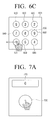
- Figs. 6A-6C Another exemplary embodiment is illustrated in Figs. 6A-6C .
- the plurality of authentication interaction symbols is displayed in a random arrangement on the display.
- the input signals that are generated based on user manipulations include an indication of a selected symbol, and also an indication of a respective direction.
- the input signals and the direction information are collected, resulting in a sequence of selected symbol indications with respective direction information.
- the device is determined to have been placed into an authenticated state.
- the previously set authentication sequence may be thought of as the password, in this example.
- the controller 150 compares the touched object and the dragged direction with the preset password to authenticate a user.
- the password may include a type of the selected object and the dragged direction of the corresponding object.
- first through ninth keys 610 through 690 of the touch screen 110 are sequentially arranged on first through ninth keys 610 through 690 of the touch screen 110.
- 9 is dragged to the top right, and 1 is dragged to the left.
- the controller 150 senses that 9 has been dragged to the top right.
- the selection of the 9 symbol and the direction information of top right are accumulated so as to form part of a sequence of selected symbol indications with respective direction information.
- the controller 150 randomly rearranges keys of an input keyboard 600 as shown in FIG. 6C . Therefore, 6, 3, 2, 7, 8, 9, 1, 5, and 4 are sequentially arranged on the first through ninth keys 610 through 690 of the touch screen 110.
- the controller 150 senses that 1 has been dragged to the left.
- the controller 150 senses that 9 has been dragged to the top right, and 1 has been dragged to the left and thus authenticates the password.
- a password is authenticated.
- a plurality of numbers may be touched and respectively moved in preset directions.
- the plurality of authentication interaction symbols were displayed in an initial random arrangement as shown in Fig. 6A .
- the user selected one of the plurality of authentication interaction symbols, namely, the object bearing numeral 9.
- an input signal is sent to the controller with respect to the selected symbol.
- the direction of the user's finger swipe (or stylus stroke) is also provided to the controller as a respective direction for the input signal.
- the controller is provided with an input signal, that the controller can determine relates to the icon 610, and also a respective direction that the controller can determine has a top right direction.
- a sequence of selected symbol indications with respective direction information is accumulated.
- the controller determines that the device may have been placed into an authenticated state.
- the controller may, in an exemplary embodiment, regenerate the display to show the plurality of authentication interaction symbols in a subsequent random arrangement.
- Another exemplary embodiment is discussed now with respect to Figs. 7A-7D . If an object of the input keyboard is touched, the controller 150 may count a time taken until the touch of the object is released and display the counted time on a timer. If the object is touched a preset number of times, the controller 150 may combine times counted at all touches of the object and compare the combined time with a preset password to authenticate a user.
- the touch screen 110 may display an object 720 (an object will be referred to as an icon in the descriptions of 7A through 7D) and a timer 710.
- an object 720 an object will be referred to as an icon in the descriptions of 7A through 7D
- a timer 710 a preset password is 4 and 2.
- the controller 150 starts counting the timer 710.
- the controller 150 counts numbers of the timer 710.
- the controller 150 drives the vibration motor 140 to generate vibrations whenever numbers are counted, so that the user further easily recognizes the vibrations. Also, if the touch of the icon 720 continues for a preset threshold time or more, the controller 150 may accelerate a counting speed. For example, the controller 150 may count from 1 to 3 for 3 seconds but counts from 1 to 9 for 6 seconds.
- the controller 150 senses 4 displayed on the timer 710.
- the controller 150 initializes counting as shown in FIG. 7C .
- the controller 150 starts re-counting the timer 710.
- the controller 150 senses 2 displayed on the timer 710. Accordingly, since 4 and 2 are sensed as the preset password, the controller 150 authenticates the password.
- the controller detected, as input signals, the user's pressing and releasing of the object 720.
- the controller also detected a respective timing of the input for each of the one or more input signals. By recording this information, the controller obtained a sequence of signal input timing values.
- the signal input timing values that reflected the sensing of 4 and 2 were matched with the previously set authentication sequence of 4 and 2, and this match is what permitted the controller then to determine the device to have been placed into an authenticated state.
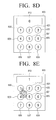
- the touch screen 110 may display input keys 820 through 828 on which a plurality of numbers are arranged, instead of the icon 720.
- 1, 2, 3, 4, 5, 6, 7, 8, and 9 are sequentially arranged on first through ninth keys 820 through 828 of the touch screen 110 as shown in FIG. 8A .
- a preset password is 9 and 1.
- the controller 150 displays number 5 corresponding to the fifth key 825 on a timer 810 as shown in FIG. 8B .
- the controller 150 counts the number of the timer 810.
- the controller 150 senses the number 9.
- the controller 150 initializes the timer 810.
- the controller 150 displays number 1 corresponding to the first key 820 on the timer 810 as shown in FIG. 8E .
- the controller 150 senses the number 1.
- the controller 150 authenticates the preset password.
- the controller detected one or more input signals, with respect to the one or more authentication interaction symbols, and also a respective timing of input for the one or more input signals, to obtain a sequence of signal input timing values.
- the controller determined the device to have been placed into an authenticated state.
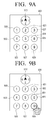
- FIGs. 9A-9D Another embodiment is illustrated in Figs. 9A-9D .
- This exemplary embodiment is similar in some ways to the exemplary embodiment shown in Figs. 6A-6C .
- the Figs. 6A-6C were used to describe an exemplary embodiment in which the respective direction information indicated a stroke direction at the time of symbol selection, in the example now discussed with respect to Figs. 9A-9C , the respective direction information indicates a physical orientation of the device at the time of symbol selection.
- the controller 150 may display a direction of the portable device 100 sensed through the sensor 120 on a digital compass of the touch screen 110. Also, if at least one object is touched on the input keyboard, the controller 150 may compare the touched object and the direction of the portable device 100 with a preset password or authentication sequence. If the touched object and the direction of the portable device 100 correspond to the preset password, the controller 150 may authenticate the user.
- the touch screen 110 displays first and ninth keys 920 through 928 and a digital compass 910 as shown in FIG. 9A in order to authenticate a password.
- a preset password is 9, 1, and a northeast (NE) direction.
- the controller 150 senses number 9 corresponding to the ninth key 928.
- the controller 150 controls the digital compass 910 to point to the NE direction as shown in FIG. 9C .
- the controller 150 senses number 1 corresponding to the first key 920.
- the controller 150 may authenticate the preset password.
- the plurality of authentication interaction symbols were displayed in an initial arrangement as shown in Fig. 9A , together with a compass.
- the user selected one of the plurality of authentication interaction symbols, namely, the object bearing numeral 9.
- an input signal was sent to the controller with respect to the selected symbol.
- the controller was provided with an input signal that the controller could determine relates to the icon 928.
- the user oriented the device in a NE direction.
- the controller was provided with an input signal that the controller could determine relates to the icon 920, and also the direction information for the device orientation (NE in this example) was provided to the controller as a respective direction information for the input signal.
- the respective direction at the time of symbol selection of the 1 symbol indicated a physical orientation of the device.
- the respective direction for the input signal corresponding to the numeral 1 was the NE direction which indicated a physical orientation of the device at the time of symbol selection.
- the controller determines that the device may have been placed into an authenticated state.
- the password is sensed in orders of 9 - > NE direction -> 1, but this is only an exemplary embodiment. If the numbers 9 and 1, and the NE direction are sensed regardless of the orders, the controller 150 may authenticate the password.
- the controller 150 may compare the touched object and the motion of the portable device at the touch time with a preset password. If the touched object and the motion of the portable device correspond to the preset password, the controller 150 may authenticate a user.
- the direction information for the one or more input signals indicated a physical orientation of the device at the time of symbol selection.
- the direction information indicates a physical motion of the device at the time of symbol selection.
- a shake motion (a motion of shaking a portable device) is sensed because the user shakes the device while selecting the number 9.
- a shake motion is sensed because the user again shakes the device while selecting the number 1.
- the controller 150 may authenticate a password.
- a shake motion is exemplified as a motion of a portable device.
- other motions e.g., a rotation motion, etc.
- the plurality of authentication interaction symbols were displayed in an initial arrangement.
- the user selected one of the plurality of authentication interaction symbols, namely, the object bearing numeral 9.
- an input signal was sent to the controller with respect to the selected symbol.
- the controller was provided with an input signal that the controller could determine relates to the 9 object.
- the user shook the device.
- the shaking of the device was, for example, detected by the occurrence of multiple rapid changes in direction of movement of the device. That is, the controller was provided not only with the input signal that indicated a selected one of the plurality of authentication interaction symbols, but also with a respective direction for the input signal (in this instance, multiple instances of direction information defining a shake motion of the device).
- the user selected the 1 symbol at the time of shaking the device.
- the selection of the 1 symbol by the user resulted in the detection of an input signal by the controller, and the shaking of the device by the user resulted in the detection of respective direction information for the input signal (here, again, multiple instances of direction information defining a shake motion).
- the respective direction information, at the time of symbol selection of the 1 symbol thus indicates a physical movement or motion of the device.
- the respective direction information for the input signal, corresponding to the numeral 1 indicates that the device at the time of symbol selection was a shaking motion.
- the controller determines that the device may have been placed into an authenticated state.
- the direction information for the one or more input signals may define motions other than shake motions (e.g., a rotation motion may be detected based on appropriate direction information).
- the device may have used a motion sensor, accelerometer, or the like to provide the direction information.
- a motion sensor if a motion of a user recognized by a camera (not shown) of the portable device 100 is sensed, and the sensed motion of the user corresponds to a preset motion, the controller 150 may authenticate a password.
- the direction information may be obtained using a camera of the device.
- the portable device 100 may improve security for authenticating a password in order to further reinforce a protection of personal information.
- FIG. 10 is a flowchart illustrating a method of determining whether an object pattern in a designated position of the touch screen 110 corresponds to a password object pattern to authenticate a password, according to an exemplary embodiment.
- Fig. 10 illustrates how an authentication method may be performed so as to detect when an arrangement of the authentication interaction symbols matches a previously set authentication arrangement.
- the portable device 100 displays an input keyboard on which a plurality of different objects are arranged (i.e., displays a plurality of authentication interaction symbols in an arrangement).
- the plurality of different objects may be randomly arranged on the input keyboard.
- a designated position in which a password object pattern is to be arranged may be displayed to be distinguished from the other portions as shown in FIG. 2A .
- the portable device 100 changes the positions of the objects of the input keyboard according to a manipulation of a user. That is, in response to in input signal, the arrangement of the symbols is modified so as to display a subsequent arrangement of the symbols.
- a number of exemplary ways of modifying the arrangement of the symbols have been discussed already, above.
- the portable device 100 may change positions of the first and second objects with each other. Also, if the first object arranged on the input keyboard is touched, and the second object arranged on the input keyboard is touched, the portable device 100 may change the positions of the first and second objects with each other If the first object arranged on the input keyboard is touched, and upward and downward motions of the portable device 100 are sensed, the portable device 100 scrolls and changes a column including the first object. If the first object touched, and left and right motions of the portable device 100 are sensed, the portable device 100 scrolls and changes a line including the first object.
- the portable device 100 may calculate the first and second numbers by using one of the four fundamental operations corresponding to the preset direction to change the first number according to the calculation result.
- the portable device 100 determines whether an object pattern arranged in a designated position corresponds to a password object pattern (i.e., whether the subsequent arrangement of the symbols matches the previously set authentication arrangement).
- the portable device 100 authenticates a user in operation S1040 (i.e., the device is determined to have been placed into an authenticated state).
- FIG. 11 is a flowchart illustrating an authentication method for a device, in which a sequence of selected symbol indications with respective direction information is matched to a previously set authentication sequence. That is to say, the authentication method uses a touched object and a dragged direction of the touched object, according to an exemplary embodiment.
- the portable device 100 displays an input keyboard on which a plurality of different objects are arranged (i.e., displays a plurality of authentication interaction symbols).
- the plurality of different objects may be randomly arranged on the input keyboard.
- the portable device 100 senses whether at least one of the plurality of different objects has been dragged in a preset direction.
- the controller in response to user manipulations, is provided with one or more input signals, with respect to one or more selected ones of the plurality of authentication interaction symbols, and also respective direction information for the one or more input signals, to obtain a sequence of selected symbol indications with respective direction information.
- the portable device 100 determines whether a touched object and a dragged direction of the touched object correspond to a preset password.
- the preset password includes an object and a dragged direction of the object. For example, number 1 of the preset password may be dragged to the right, and number 3 of the preset password may be dragged in an upward direction. This sequence of selected symbol indications with respective direction information is compared with a previously set authentication sequence.
- the portable device 100 authenticates a user in operation 81140. In other words, when the sequence of selected symbol indications with respective direction information matches the previously set authentication sequence, the device is determined to have been placed into an authenticated state.
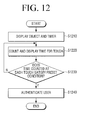
- FIG. 12 is a flowchart illustrating a method of authentication for a device, in which a sequence of signal input timing values is compared to a previously set authentication sequence. That is, a touch time is counted so as to authenticate a password according to an exemplary embodiment.
- the portable device 100 displays at least one object and a timer for starting counting a touch time.
- the object for starting counting the touch time may be a particular icon or a number key. If the object is the particular icon, and the particular icon is touched, the portable device 100 starts counting the touch time. If the object is the number key, and the number key is touched, the portable device 100 starts counting from a time corresponding to the touched number key.
- the portable device 100 counts the touch time and displays the counted touch time on a timer.
- the portable device 100 determines whether the time counted at each touch has satisfied a preset condition.
- the preset condition is a condition for authenticating a password.
- a time counted for a first touch may be 3, and a time counted for a second time may be 4.
- the time counted at each touch is remembered as a sequence of signal input timing values.
- the portable device 100 authenticates a user in operation S1240. That is, the sequence of signal input timing values is compared with the previously set authentication sequence, and when there is a match, the device is determined to have been placed into an authenticated state.
- FIG. 13 is a flowchart illustrating a method of authenticating a password by using a touched object and a direction of a portable device according to an exemplary embodiment.
- the authentication method uses the physical orientation of the device at the time of symbol selection to provide the direction information in a sequence of selected symbol indications with respective direction information, and this is compared to a previously set authentication sequence.
- the portable device 100 displays an input keyboard on which a plurality of different objects are arranged, together with a digital compass.
- the plurality of different objects may be sequentially or randomly arranged on the input keyboard.
- the portable device 100 senses a direction thereof by using the sensor 120.
- the portable device 100 displays the sensed direction on the digital compass in operation S1330.
- the portable device 100 determines whether at least one touched object and the direction of the portable device 100 satisfies a preset condition.
- the preset condition is a condition for authenticating a password.
- keys corresponding to numbers 9 and 1 may be touched, and the direction of the portable device 100 may be north (N).
- the portable device 100 authenticates a user in operation S1350.
- a plurality of authentication interaction symbols are displayed in an arrangement which may be random, in S1310.
- one or more input signals are detected, with respect to the displayed authentication interaction symbols, and respective direction information is also detected, to obtain a sequence of selected symbol indications with respective direction information.
- the sequence of selected symbol indications with respective direction information is compared with the previously set authentication sequence. If there is a match, processing continues with S1350, in which the device is determined to have been placed into an authenticated state.
- FIG. 14 is a flowchart illustrating a method of authenticating a password by using a touched object and a motion of a portable device according to an exemplary embodiment. This may also be referred to as using a sequence of selected symbol indications with respective direction information, where the direction information indicates a physical motion of the device, such as a shake or a rotation motion, at the time of symbol selection.
- the portable device 1410 displays an input keyboard on which a plurality of different objects are arranged.
- the plurality of different objects may be sequentially or randomly arranged on the input keyboard.
- the portable device 100 senses a touch of at least one object.
- the portable device 100 senses a motion thereof with respect to the at least one object touched, by using the sensor 120.
- the portable device 100 determines whether the at least one touched object and the motion of the portable device 100 at the time of the touch applied to the at least one object satisfy a preset condition.
- the preset condition is a condition for authenticating a password. For example, when a key corresponding to number 3 is touched, a shake motion may be sensed. When a key corresponding to number 1 is touched, a rotation motion may be sensed.
- the portable device 100 authenticates a user in operation S1450.
- the sequence of selected symbol indications with respective direction information, that indicates a physical motion of device at the time of symbol selection matches the previously set authentication sequence, the device is determined to have been placed into an authenticated state.
- a password that grants access to functions within the portable device 100 may have been given, and the device may be deemed to be in an authenticated state with respect to the user.
- the user may be required to authenticate himself to the server before processes that are available on the server are made available to the user (i.e., processes such as once related to electronic banking or electronic commerce).
- the portable device 100 may request the external server 1500 to authenticate a password thereof in order to perform e-commerce, e-Banking, etc.
- the portable device 100 may encrypt input information (e.g., touched object information, direction information of the portable device 100, motion information of the portable device 100, etc.) of a user as described with reference to FIGS. 2A through 9D and transmit the encrypted input information to the external server 1500 through the communicator 140.
- the external server 1500 may analyze the input information of the user transmitted from the portable device 100 to authenticate the password of the user that must be presented to carry out the functions on the server 1500.
- Figs. 2A through 9D may also be applied to a TV remote controller.
- a TV remote controller 100 may request a TV 1600 to authenticate a password thereof in order to control the TV 1600 or carry out other functions via the TV.
- the TV remote controller 100 may encrypt user input information (e.g., touched object information, direction information of the TV remote controller 100, motion information of the TV remote controller 100, etc.) and transmit the encrypted user input information to the TV 1600 through the communicator 140.
- the TV 1600 may analyze the user input information transmitted from the TV remote controller 100 to authenticate the password.
- a password of the TV remote controller 100 may also be authenticated to operate the TV remote controller 100.
- a program code for executing password authenticating methods may be stored on various types of recording media.
- the program code may be stored on various types of computer-readable recording media, including a random-access memory (RAM), a flash memory, a read-only memory (ROM), an Erasable Programmable ROM (EPROM), an Electronically Erasable and Programmable ROM (EEPROM), a register, a hard disk, a removable disk, a memory card, a universal serial bus (USB) memory, a CD-ROM, etc. the foregoing may be understood to be examples of non-transitory computer readable media.
Landscapes
- Engineering & Computer Science (AREA)
- Theoretical Computer Science (AREA)
- General Engineering & Computer Science (AREA)
- Physics & Mathematics (AREA)
- General Physics & Mathematics (AREA)
- Human Computer Interaction (AREA)
- Computer Security & Cryptography (AREA)
- Computer Hardware Design (AREA)
- Software Systems (AREA)
- User Interface Of Digital Computer (AREA)
- Input From Keyboards Or The Like (AREA)
Applications Claiming Priority (1)
| Application Number | Priority Date | Filing Date | Title |
|---|---|---|---|
| KR1020110125425A KR101841039B1 (ko) | 2011-11-28 | 2011-11-28 | 패스워드 인증 방법 및 이를 이용한 휴대기기 |
Publications (2)
| Publication Number | Publication Date |
|---|---|
| EP2597590A2 true EP2597590A2 (de) | 2013-05-29 |
| EP2597590A3 EP2597590A3 (de) | 2013-11-27 |
Family
ID=47522276
Family Applications (1)
| Application Number | Title | Priority Date | Filing Date |
|---|---|---|---|
| EP12193975.5A Withdrawn EP2597590A3 (de) | 2011-11-28 | 2012-11-23 | Verfahren zur Authentifizierung von Passwörtern und tragbare Vorrichtung davon |
Country Status (4)
| Country | Link |
|---|---|
| US (1) | US9165132B2 (de) |
| EP (1) | EP2597590A3 (de) |
| KR (1) | KR101841039B1 (de) |
| CN (1) | CN103135925A (de) |
Cited By (6)
| Publication number | Priority date | Publication date | Assignee | Title |
|---|---|---|---|---|
| EP2908225A1 (de) * | 2014-02-17 | 2015-08-19 | Noodoe Corporation | Verfahren und Systeme zur Verbindung einer prozessbasierten Bewegungserkennung |
| WO2016091645A1 (en) | 2014-12-08 | 2016-06-16 | Koninklijke Philips N.V. | Method, apparatus and system for processing a user input |
| EP3079092A1 (de) * | 2015-04-07 | 2016-10-12 | BlackBerry Limited | Authentifizierung unter verwendung einer berührungsempfindlichen tastatur |
| US9569606B2 (en) | 2015-06-08 | 2017-02-14 | International Business Machines Corporation | Verification of a pattern based passcode |
| CZ309308B6 (cs) * | 2013-07-12 | 2022-08-17 | Aducid S.R.O. | Způsob zadávání tajné informace do elektronických digitálních zařízení |
| EP4418154A1 (de) | 2023-02-16 | 2024-08-21 | Thales Dis France Sas | Verfahren und vorrichtung zur sicheren eingabe eines codes in ein gerät |
Families Citing this family (66)
| Publication number | Priority date | Publication date | Assignee | Title |
|---|---|---|---|---|
| US10685355B2 (en) * | 2016-12-04 | 2020-06-16 | Biocatch Ltd. | Method, device, and system of detecting mule accounts and accounts used for money laundering |
| US20250016199A1 (en) * | 2010-11-29 | 2025-01-09 | Biocatch Ltd. | Device, System, and Method of Detecting Vishing Attacks |
| US20190158535A1 (en) * | 2017-11-21 | 2019-05-23 | Biocatch Ltd. | Device, System, and Method of Detecting Vishing Attacks |
| US10069837B2 (en) * | 2015-07-09 | 2018-09-04 | Biocatch Ltd. | Detection of proxy server |
| US10262324B2 (en) | 2010-11-29 | 2019-04-16 | Biocatch Ltd. | System, device, and method of differentiating among users based on user-specific page navigation sequence |
| US10949514B2 (en) | 2010-11-29 | 2021-03-16 | Biocatch Ltd. | Device, system, and method of differentiating among users based on detection of hardware components |
| US10897482B2 (en) | 2010-11-29 | 2021-01-19 | Biocatch Ltd. | Method, device, and system of back-coloring, forward-coloring, and fraud detection |
| US11223619B2 (en) * | 2010-11-29 | 2022-01-11 | Biocatch Ltd. | Device, system, and method of user authentication based on user-specific characteristics of task performance |
| US10474815B2 (en) | 2010-11-29 | 2019-11-12 | Biocatch Ltd. | System, device, and method of detecting malicious automatic script and code injection |
| US10949757B2 (en) | 2010-11-29 | 2021-03-16 | Biocatch Ltd. | System, device, and method of detecting user identity based on motor-control loop model |
| US10970394B2 (en) | 2017-11-21 | 2021-04-06 | Biocatch Ltd. | System, device, and method of detecting vishing attacks |
| US10728761B2 (en) | 2010-11-29 | 2020-07-28 | Biocatch Ltd. | Method, device, and system of detecting a lie of a user who inputs data |
| US10834590B2 (en) | 2010-11-29 | 2020-11-10 | Biocatch Ltd. | Method, device, and system of differentiating between a cyber-attacker and a legitimate user |
| US10621585B2 (en) | 2010-11-29 | 2020-04-14 | Biocatch Ltd. | Contextual mapping of web-pages, and generation of fraud-relatedness score-values |
| US10404729B2 (en) | 2010-11-29 | 2019-09-03 | Biocatch Ltd. | Device, method, and system of generating fraud-alerts for cyber-attacks |
| US11269977B2 (en) | 2010-11-29 | 2022-03-08 | Biocatch Ltd. | System, apparatus, and method of collecting and processing data in electronic devices |
| US10032010B2 (en) * | 2010-11-29 | 2018-07-24 | Biocatch Ltd. | System, device, and method of visual login and stochastic cryptography |
| US10747305B2 (en) | 2010-11-29 | 2020-08-18 | Biocatch Ltd. | Method, system, and device of authenticating identity of a user of an electronic device |
| US10298614B2 (en) * | 2010-11-29 | 2019-05-21 | Biocatch Ltd. | System, device, and method of generating and managing behavioral biometric cookies |
| US11210674B2 (en) | 2010-11-29 | 2021-12-28 | Biocatch Ltd. | Method, device, and system of detecting mule accounts and accounts used for money laundering |
| US12101354B2 (en) * | 2010-11-29 | 2024-09-24 | Biocatch Ltd. | Device, system, and method of detecting vishing attacks |
| US10586036B2 (en) | 2010-11-29 | 2020-03-10 | Biocatch Ltd. | System, device, and method of recovery and resetting of user authentication factor |
| US10776476B2 (en) | 2010-11-29 | 2020-09-15 | Biocatch Ltd. | System, device, and method of visual login |
| US10917431B2 (en) | 2010-11-29 | 2021-02-09 | Biocatch Ltd. | System, method, and device of authenticating a user based on selfie image or selfie video |
| US8850603B2 (en) * | 2012-08-08 | 2014-09-30 | MetroPCS Wireless Inc. | System and method for enhancing device passcode security |
| CN103731265B (zh) * | 2012-10-10 | 2018-04-06 | 阿里巴巴集团控股有限公司 | 口令校验方法、客户端和服务器端、终端口令系统 |
| US10373149B1 (en) | 2012-11-12 | 2019-08-06 | Square, Inc. | Secure data entry using a card reader with minimal display and input capabilities having a display |
| US9304655B2 (en) * | 2013-02-01 | 2016-04-05 | Sap Se | Graphical user interface (GUI) that receives directional input to change face for receiving passcode |
| JP5796725B2 (ja) * | 2013-03-22 | 2015-10-21 | カシオ計算機株式会社 | 認証処理装置、認証処理方法及びプログラム |
| AU2014203047B2 (en) * | 2013-06-04 | 2019-01-24 | Nowww.Us Pty Ltd | A Login Process for Mobile Phones, Tablets and Other Types of Touch Screen Devices or Computers |
| US20140366127A1 (en) * | 2013-06-06 | 2014-12-11 | International Business Machines Corporation | Touchscreen security user input interface |
| JP5816655B2 (ja) * | 2013-06-25 | 2015-11-18 | 京セラドキュメントソリューションズ株式会社 | 入力装置、画像読取装置および画像形成装置 |
| JP5860443B2 (ja) * | 2013-08-30 | 2016-02-16 | 京セラドキュメントソリューションズ株式会社 | 認証プログラムおよび認証装置 |
| CN103685231B (zh) * | 2013-11-06 | 2018-05-01 | 百度在线网络技术(北京)有限公司 | 基于位置的操作验证方法及服务器、客户端 |
| KR101577937B1 (ko) * | 2013-11-29 | 2015-12-22 | 주식회사 하이딥 | 터치 압력에 따른 잠금 해제가 가능한 터치 스크린을 포함하는 장치 |
| CN104700265B (zh) * | 2013-12-06 | 2021-05-07 | 上海掌门科技有限公司 | 移动手持终端 |
| US9613353B1 (en) * | 2013-12-26 | 2017-04-04 | Square, Inc. | Passcode entry through motion sensing |
| CN105095738B (zh) * | 2014-04-25 | 2019-01-08 | 阿里巴巴集团控股有限公司 | 一种防偷窥的密码输入方法和设备 |
| CN104156652B (zh) * | 2014-05-28 | 2018-01-05 | 东莞盛世科技电子实业有限公司 | 模糊化校验密码的方法及密码校验设备 |
| US10440001B2 (en) * | 2014-06-18 | 2019-10-08 | Dell Products, Lp | Method to securely authenticate management server over un-encrypted remote console connection |
| KR102196818B1 (ko) * | 2014-06-25 | 2020-12-31 | 아주대학교산학협력단 | 모션 인식을 통한 정보 노출 탐지 방법 |
| TWI515595B (zh) * | 2014-12-22 | 2016-01-01 | 緯創資通股份有限公司 | 手持式電子裝置及其密碼輸入方法 |
| US20160210452A1 (en) * | 2015-01-19 | 2016-07-21 | Microsoft Technology Licensing, Llc | Multi-gesture security code entry |
| US20160241556A1 (en) * | 2015-02-17 | 2016-08-18 | Qualcomm Incorporated | Mutual authentication with integrated user muscle memory |
| JP6387887B2 (ja) * | 2015-04-08 | 2018-09-12 | 京セラドキュメントソリューションズ株式会社 | 認証装置、認証プログラム、及び認証システム |
| US9401914B1 (en) | 2015-06-05 | 2016-07-26 | International Business Machines Corporation | Utilization of multiple keypads for password inputs |
| US9990127B2 (en) * | 2015-06-17 | 2018-06-05 | Ca, Inc. | Secure user input mode for electronic devices using randomized mathematical operators and operands |
| GB2539705B (en) | 2015-06-25 | 2017-10-25 | Aimbrain Solutions Ltd | Conditional behavioural biometrics |
| US9596231B1 (en) * | 2015-08-21 | 2017-03-14 | Ca, Inc. | Grid-based authentication on touch-aware devices |
| CN107340960A (zh) * | 2016-04-29 | 2017-11-10 | 南宁富桂精密工业有限公司 | 用户界面控制方法及系统 |
| GB2552032B (en) | 2016-07-08 | 2019-05-22 | Aimbrain Solutions Ltd | Step-up authentication |
| US10235532B2 (en) * | 2016-09-23 | 2019-03-19 | Harman International Industries, Incorporated | Device access control |
| US9852287B1 (en) | 2016-10-04 | 2017-12-26 | International Business Machines Corporation | Cognitive password pattern checker to enforce stronger, unrepeatable passwords |
| US10579784B2 (en) | 2016-11-02 | 2020-03-03 | Biocatch Ltd. | System, device, and method of secure utilization of fingerprints for user authentication |
| US10248784B2 (en) * | 2016-12-01 | 2019-04-02 | International Business Machines Corporation | Sequential object set passwords |
| US10614206B2 (en) | 2016-12-01 | 2020-04-07 | International Business Machines Corporation | Sequential object set passwords |
| SG10201703299TA (en) * | 2017-04-21 | 2018-11-29 | Mastercard Asia Pacific Pte Ltd | A system and method for carrying out two factor authentication using augmented/virtual reality |
| US10339334B2 (en) * | 2017-05-25 | 2019-07-02 | Ca, Inc. | Augmented reality captcha |
| US10397262B2 (en) | 2017-07-20 | 2019-08-27 | Biocatch Ltd. | Device, system, and method of detecting overlay malware |
| CN108052817A (zh) * | 2017-12-25 | 2018-05-18 | 仲杏英 | 安全型密码输入系统 |
| CN107908936A (zh) * | 2017-12-25 | 2018-04-13 | 朱小菊 | 电子密码输入系统 |
| KR102063678B1 (ko) * | 2018-08-20 | 2020-01-09 | 주식회사 이와이엘 | 모바일기기의 스머지 및 훔쳐보기 공격 방지를 위한 시스템 및 사용자 패턴 인증 방법 |
| FR3087911B1 (fr) * | 2018-10-24 | 2021-11-12 | Amadeus Sas | Authentification par pointage et cliquage |
| KR102176321B1 (ko) * | 2018-12-28 | 2020-11-09 | 주식회사 팀제파 | 스마트 밴드 및 이를 이용한 사용자 관리 방법 |
| US11606353B2 (en) | 2021-07-22 | 2023-03-14 | Biocatch Ltd. | System, device, and method of generating and utilizing one-time passwords |
| US20250348181A1 (en) * | 2024-05-07 | 2025-11-13 | Rockwell Collins, Inc. | Avionics graphical touch countdown timer |
Family Cites Families (37)
| Publication number | Priority date | Publication date | Assignee | Title |
|---|---|---|---|---|
| FR2708358B1 (fr) * | 1993-07-01 | 1995-09-01 | Bull Cp8 | Procédé de saisie d'une information confidentielle, terminal et système de vérification associés. |
| US5764770A (en) * | 1995-11-07 | 1998-06-09 | Trimble Navigation Limited | Image authentication patterning |
| ES2264203T3 (es) * | 1997-05-13 | 2006-12-16 | Passlogix, Inc. | Sistema generalizado de identificacion y autenticacion de usuario. |
| US6721738B2 (en) | 2000-02-01 | 2004-04-13 | Gaveo Technology, Llc. | Motion password control system |
| JP2003067341A (ja) | 2001-08-29 | 2003-03-07 | Fujitsu Frontech Ltd | 端末装置 |
| FR2832825B1 (fr) * | 2001-11-28 | 2004-04-02 | Bouygues Telecom Sa | Procede de securisation d'un acces a une ressource numerique |
| US20030177349A1 (en) * | 2002-03-15 | 2003-09-18 | Kevin Hersh | Systems and methods for authenticating a user for a computing device |
| KR20020077838A (ko) * | 2002-08-09 | 2002-10-14 | 박승배 | 타인의 관찰에 의한 패스워드의 노출 문제를 해결한 패스워드 시스템 |
| JP2005202527A (ja) * | 2004-01-14 | 2005-07-28 | Fujitsu Component Ltd | 入力装置およびユーザー認証方法 |
| KR100594443B1 (ko) | 2004-06-17 | 2006-06-30 | 엘지전자 주식회사 | 안전한 비밀번호 입력방법 |
| NO20044073D0 (no) | 2004-09-27 | 2004-09-27 | Isak Engquist | Informasjonsbehandlingssystem og fremgangsmate |
| KR20060031506A (ko) | 2004-10-08 | 2006-04-12 | 엘지전자 주식회사 | 이동 통신 단말기의 나침반을 이용한 잠금 장치 및 방법 |
| JP2006221546A (ja) * | 2005-02-14 | 2006-08-24 | Alps Electric Co Ltd | 情報処理装置 |
| US7720829B2 (en) * | 2005-07-14 | 2010-05-18 | International Business Machines Corporation | Middleware sign-on |
| BRPI0506238A (pt) | 2005-09-27 | 2007-07-03 | Banco Bradesco S A | sistema de identificação de senha de acesso eletrÈnico de um usuário a uma instituição |
| KR20070044916A (ko) | 2005-10-26 | 2007-05-02 | 엘지전자 주식회사 | 이동통신 단말기의 비밀번호 입력 방법 |
| US7644868B2 (en) * | 2006-01-05 | 2010-01-12 | Hare William D | User identity security system for computer-based account access |
| WO2007086420A1 (ja) | 2006-01-30 | 2007-08-02 | Sanyo Electric Co., Ltd. | 暗証番号等を入力する為の入力装置およびその入力装置を備えた携帯電話装置 |
| US8117458B2 (en) * | 2006-05-24 | 2012-02-14 | Vidoop Llc | Methods and systems for graphical image authentication |
| US7992005B2 (en) * | 2006-12-06 | 2011-08-02 | International Business Machines Corporation | Providing pattern based user password access |
| KR20080062604A (ko) | 2006-12-29 | 2008-07-03 | 노틸러스효성 주식회사 | 위치이동이 가능한 비밀번호 입력 버튼을 출력하는금융자동화기기 |
| US20090037742A1 (en) * | 2007-07-31 | 2009-02-05 | International Business Machines Corporation | Biometric authentication device, system and method of biometric authentication |
| US20090038006A1 (en) | 2007-08-02 | 2009-02-05 | Traenkenschuh John L | User authentication with image password |
| KR20250099420A (ko) * | 2007-09-24 | 2025-07-01 | 애플 인크. | 전자 장치 내의 내장형 인증 시스템들 |
| WO2009043661A1 (en) * | 2007-10-04 | 2009-04-09 | International Business Machines Corporation | Authentication method and system |
| CN101770326B (zh) * | 2008-12-31 | 2012-07-25 | 北京联想软件有限公司 | 触摸屏上移动对象的实现方法及计算设备 |
| KR101015633B1 (ko) | 2009-03-10 | 2011-02-17 | 인하대학교 산학협력단 | 안전한 데이터 입력 방법 및 컴퓨터로 읽을 수 있는 기록매체 |
| GB0910545D0 (en) * | 2009-06-18 | 2009-07-29 | Therefore Ltd | Picturesafe |
| KR101133544B1 (ko) | 2009-07-03 | 2012-04-05 | 한국인터넷진흥원 | 알파-뉴메릭 매트릭스를 이용한 패스워드 입력 시스템 및 방법 |
| JP2011035855A (ja) * | 2009-08-06 | 2011-02-17 | Panasonic Corp | 端末認証方法および装置 |
| TW201113754A (en) * | 2009-10-15 | 2011-04-16 | Acer Inc | Multi-directional input method and electronic system thereof |
| DE102009052174B3 (de) | 2009-11-06 | 2010-10-21 | Christoph Althammer | Verfahren zur Authentifizierung eines Benutzers an einer Rechnereinheit |
| US9146669B2 (en) * | 2009-12-29 | 2015-09-29 | Bizmodeline Co., Ltd. | Password processing method and apparatus |
| KR101120868B1 (ko) | 2009-12-29 | 2012-02-27 | 노틸러스효성 주식회사 | 금융자동화기기용 입력 장치 및 금융자동화기기용 입력 장치 동작 방법 |
| CN102207809A (zh) * | 2010-03-30 | 2011-10-05 | 国基电子(上海)有限公司 | 手持装置及其解锁方法 |
| US20110316888A1 (en) * | 2010-06-28 | 2011-12-29 | Invensense, Inc. | Mobile device user interface combining input from motion sensors and other controls |
| KR101045257B1 (ko) | 2010-10-01 | 2011-06-29 | 이재덕 | 비밀번호 노출방지용 금융자동화기기 시스템 및 이를 이용한 비밀번호 인증 방법 |
-
2011
- 2011-11-28 KR KR1020110125425A patent/KR101841039B1/ko not_active Expired - Fee Related
-
2012
- 2012-11-19 US US13/680,242 patent/US9165132B2/en not_active Expired - Fee Related
- 2012-11-23 EP EP12193975.5A patent/EP2597590A3/de not_active Withdrawn
- 2012-11-28 CN CN2012104952353A patent/CN103135925A/zh active Pending
Non-Patent Citations (1)
| Title |
|---|
| None |
Cited By (9)
| Publication number | Priority date | Publication date | Assignee | Title |
|---|---|---|---|---|
| CZ309308B6 (cs) * | 2013-07-12 | 2022-08-17 | Aducid S.R.O. | Způsob zadávání tajné informace do elektronických digitálních zařízení |
| EP2908225A1 (de) * | 2014-02-17 | 2015-08-19 | Noodoe Corporation | Verfahren und Systeme zur Verbindung einer prozessbasierten Bewegungserkennung |
| US9557820B2 (en) | 2014-02-17 | 2017-01-31 | Noodoe Corporation | Methods and systems for commencing a process based on motion detection |
| WO2016091645A1 (en) | 2014-12-08 | 2016-06-16 | Koninklijke Philips N.V. | Method, apparatus and system for processing a user input |
| EP3079092A1 (de) * | 2015-04-07 | 2016-10-12 | BlackBerry Limited | Authentifizierung unter verwendung einer berührungsempfindlichen tastatur |
| US9569606B2 (en) | 2015-06-08 | 2017-02-14 | International Business Machines Corporation | Verification of a pattern based passcode |
| US9715583B2 (en) | 2015-06-08 | 2017-07-25 | International Business Machines Corporation | Verification of a pattern based passcode |
| EP4418154A1 (de) | 2023-02-16 | 2024-08-21 | Thales Dis France Sas | Verfahren und vorrichtung zur sicheren eingabe eines codes in ein gerät |
| WO2024170188A1 (en) | 2023-02-16 | 2024-08-22 | Thales Dis France Sas | Method and device for secure entry of a code in a device |
Also Published As
| Publication number | Publication date |
|---|---|
| KR20130059217A (ko) | 2013-06-05 |
| US9165132B2 (en) | 2015-10-20 |
| US20130139248A1 (en) | 2013-05-30 |
| CN103135925A (zh) | 2013-06-05 |
| EP2597590A3 (de) | 2013-11-27 |
| KR101841039B1 (ko) | 2018-03-28 |
Similar Documents
| Publication | Publication Date | Title |
|---|---|---|
| US9165132B2 (en) | Method of authenticating password and portable device thereof | |
| US9262603B2 (en) | Advanced authentication technology for computing devices | |
| EP3482345B1 (de) | Durchführung der biometrischen authentifizierung mit erfassung und anzeige einer fehlermeldung | |
| TWI474263B (zh) | 利用偵測生物特徵執行軟體功能的方法和相關電子裝置 | |
| US20130171971A1 (en) | Portable terminal, authentication method, and computer program product | |
| JP5969012B2 (ja) | 画像ジェスチャー認証 | |
| CN103634107B (zh) | 电子装置的认证方法及密码设定方法及认证系统 | |
| CN102804195B (zh) | 图形认证 | |
| CN102067150B (zh) | 用于图形通关码安全性的方法和系统 | |
| US20170270289A1 (en) | User-authentication gestures | |
| Saravanan et al. | Latentgesture: Active user authentication through background touch analysis | |
| TWI581122B (zh) | 電子設備及其密碼輸入方法 | |
| KR101556599B1 (ko) | 패턴 입력 장치 및 방법과 이를 이용한 기록 매체 | |
| JP5728629B2 (ja) | 情報処理装置、情報処理装置の制御方法、プログラム、及び情報記憶媒体 | |
| US20160210452A1 (en) | Multi-gesture security code entry | |
| CN105825092B (zh) | 手持式电子装置及其密码输入方法 | |
| CN103019553B (zh) | 一种屏幕解锁的方法及装置 | |
| CN103258161A (zh) | 改变采样速率以对涉及分析硬件传感器输出的攻击进行阻止 | |
| US9310929B2 (en) | Unlocking touch screen devices | |
| CN106557683B (zh) | 对触摸屏设备进行解锁 | |
| JP2016164726A (ja) | 電子機器 | |
| CN103258162B (zh) | 对涉及分析硬件传感器输出的攻击进行阻止 | |
| JP2014154040A (ja) | 認証処理装置、認証処理方法及びプログラム | |
| JP2015011675A (ja) | 端末及びそれが備えるタッチパネル上の入力ボタン表示方法 | |
| JP2015207130A (ja) | 方向操作による装置の操作制限状態の解除の為の認証プログラムおよび認証方法 |
Legal Events
| Date | Code | Title | Description |
|---|---|---|---|
| PUAI | Public reference made under article 153(3) epc to a published international application that has entered the european phase |
Free format text: ORIGINAL CODE: 0009012 |
|
| AK | Designated contracting states |
Kind code of ref document: A2 Designated state(s): AL AT BE BG CH CY CZ DE DK EE ES FI FR GB GR HR HU IE IS IT LI LT LU LV MC MK MT NL NO PL PT RO RS SE SI SK SM TR |
|
| AX | Request for extension of the european patent |
Extension state: BA ME |
|
| PUAL | Search report despatched |
Free format text: ORIGINAL CODE: 0009013 |
|
| AK | Designated contracting states |
Kind code of ref document: A3 Designated state(s): AL AT BE BG CH CY CZ DE DK EE ES FI FR GB GR HR HU IE IS IT LI LT LU LV MC MK MT NL NO PL PT RO RS SE SI SK SM TR |
|
| AX | Request for extension of the european patent |
Extension state: BA ME |
|
| RIC1 | Information provided on ipc code assigned before grant |
Ipc: G06F 21/36 20130101AFI20131022BHEP Ipc: G06F 3/0488 20130101ALI20131022BHEP Ipc: G06F 3/0346 20130101ALI20131022BHEP |
|
| 17P | Request for examination filed |
Effective date: 20140331 |
|
| RBV | Designated contracting states (corrected) |
Designated state(s): AL AT BE BG CH CY CZ DE DK EE ES FI FR GB GR HR HU IE IS IT LI LT LU LV MC MK MT NL NO PL PT RO RS SE SI SK SM TR |
|
| 17Q | First examination report despatched |
Effective date: 20160113 |
|
| STAA | Information on the status of an ep patent application or granted ep patent |
Free format text: STATUS: EXAMINATION IS IN PROGRESS |
|
| STAA | Information on the status of an ep patent application or granted ep patent |
Free format text: STATUS: THE APPLICATION IS DEEMED TO BE WITHDRAWN |
|
| 18D | Application deemed to be withdrawn |
Effective date: 20180602 |