EP2575372A2 - Verfahren zum Verwalten von Inhalten und Bildanzeigevorrichtung damit - Google Patents
Verfahren zum Verwalten von Inhalten und Bildanzeigevorrichtung damit Download PDFInfo
- Publication number
- EP2575372A2 EP2575372A2 EP12183758A EP12183758A EP2575372A2 EP 2575372 A2 EP2575372 A2 EP 2575372A2 EP 12183758 A EP12183758 A EP 12183758A EP 12183758 A EP12183758 A EP 12183758A EP 2575372 A2 EP2575372 A2 EP 2575372A2
- Authority
- EP
- European Patent Office
- Prior art keywords
- contents
- information
- image display
- list
- display device
- Prior art date
- Legal status (The legal status is an assumption and is not a legal conclusion. Google has not performed a legal analysis and makes no representation as to the accuracy of the status listed.)
- Ceased
Links
Images







Classifications
-
- H—ELECTRICITY
- H04—ELECTRIC COMMUNICATION TECHNIQUE
- H04N—PICTORIAL COMMUNICATION, e.g. TELEVISION
- H04N21/00—Selective content distribution, e.g. interactive television or video on demand [VOD]
- H04N21/40—Client devices specifically adapted for the reception of or interaction with content, e.g. set-top-box [STB]; Operations thereof
- H04N21/43—Processing of content or additional data, e.g. demultiplexing additional data from a digital video stream; Elementary client operations, e.g. monitoring of home network or synchronising decoder's clock; Client middleware
- H04N21/436—Interfacing a local distribution network, e.g. communicating with another STB or one or more peripheral devices inside the home
- H04N21/43615—Interfacing a Home Network, e.g. for connecting the client to a plurality of peripherals
-
- H—ELECTRICITY
- H04—ELECTRIC COMMUNICATION TECHNIQUE
- H04N—PICTORIAL COMMUNICATION, e.g. TELEVISION
- H04N21/00—Selective content distribution, e.g. interactive television or video on demand [VOD]
- H04N21/40—Client devices specifically adapted for the reception of or interaction with content, e.g. set-top-box [STB]; Operations thereof
- H04N21/43—Processing of content or additional data, e.g. demultiplexing additional data from a digital video stream; Elementary client operations, e.g. monitoring of home network or synchronising decoder's clock; Client middleware
- H04N21/431—Generation of visual interfaces for content selection or interaction; Content or additional data rendering
-
- H—ELECTRICITY
- H04—ELECTRIC COMMUNICATION TECHNIQUE
- H04L—TRANSMISSION OF DIGITAL INFORMATION, e.g. TELEGRAPHIC COMMUNICATION
- H04L12/00—Data switching networks
- H04L12/28—Data switching networks characterised by path configuration, e.g. LAN [Local Area Networks] or WAN [Wide Area Networks]
- H04L12/2803—Home automation networks
- H04L12/2807—Exchanging configuration information on appliance services in a home automation network
- H04L12/2812—Exchanging configuration information on appliance services in a home automation network describing content present in a home automation network, e.g. audio video content
-
- H—ELECTRICITY
- H04—ELECTRIC COMMUNICATION TECHNIQUE
- H04N—PICTORIAL COMMUNICATION, e.g. TELEVISION
- H04N21/00—Selective content distribution, e.g. interactive television or video on demand [VOD]
- H04N21/20—Servers specifically adapted for the distribution of content, e.g. VOD servers; Operations thereof
- H04N21/27—Server based end-user applications
- H04N21/278—Content descriptor database or directory service for end-user access
-
- H—ELECTRICITY
- H04—ELECTRIC COMMUNICATION TECHNIQUE
- H04N—PICTORIAL COMMUNICATION, e.g. TELEVISION
- H04N21/00—Selective content distribution, e.g. interactive television or video on demand [VOD]
- H04N21/40—Client devices specifically adapted for the reception of or interaction with content, e.g. set-top-box [STB]; Operations thereof
- H04N21/43—Processing of content or additional data, e.g. demultiplexing additional data from a digital video stream; Elementary client operations, e.g. monitoring of home network or synchronising decoder's clock; Client middleware
-
- H—ELECTRICITY
- H04—ELECTRIC COMMUNICATION TECHNIQUE
- H04N—PICTORIAL COMMUNICATION, e.g. TELEVISION
- H04N21/00—Selective content distribution, e.g. interactive television or video on demand [VOD]
- H04N21/40—Client devices specifically adapted for the reception of or interaction with content, e.g. set-top-box [STB]; Operations thereof
- H04N21/43—Processing of content or additional data, e.g. demultiplexing additional data from a digital video stream; Elementary client operations, e.g. monitoring of home network or synchronising decoder's clock; Client middleware
- H04N21/432—Content retrieval operation from a local storage medium, e.g. hard-disk
-
- H—ELECTRICITY
- H04—ELECTRIC COMMUNICATION TECHNIQUE
- H04N—PICTORIAL COMMUNICATION, e.g. TELEVISION
- H04N21/00—Selective content distribution, e.g. interactive television or video on demand [VOD]
- H04N21/40—Client devices specifically adapted for the reception of or interaction with content, e.g. set-top-box [STB]; Operations thereof
- H04N21/43—Processing of content or additional data, e.g. demultiplexing additional data from a digital video stream; Elementary client operations, e.g. monitoring of home network or synchronising decoder's clock; Client middleware
- H04N21/433—Content storage operation, e.g. storage operation in response to a pause request, caching operations
-
- H—ELECTRICITY
- H04—ELECTRIC COMMUNICATION TECHNIQUE
- H04N—PICTORIAL COMMUNICATION, e.g. TELEVISION
- H04N21/00—Selective content distribution, e.g. interactive television or video on demand [VOD]
- H04N21/40—Client devices specifically adapted for the reception of or interaction with content, e.g. set-top-box [STB]; Operations thereof
- H04N21/43—Processing of content or additional data, e.g. demultiplexing additional data from a digital video stream; Elementary client operations, e.g. monitoring of home network or synchronising decoder's clock; Client middleware
- H04N21/442—Monitoring of processes or resources, e.g. detecting the failure of a recording device, monitoring the downstream bandwidth, the number of times a movie has been viewed, the storage space available from the internal hard disk
- H04N21/44227—Monitoring of local network, e.g. connection or bandwidth variations; Detecting new devices in the local network
-
- H—ELECTRICITY
- H04—ELECTRIC COMMUNICATION TECHNIQUE
- H04N—PICTORIAL COMMUNICATION, e.g. TELEVISION
- H04N21/00—Selective content distribution, e.g. interactive television or video on demand [VOD]
- H04N21/40—Client devices specifically adapted for the reception of or interaction with content, e.g. set-top-box [STB]; Operations thereof
- H04N21/45—Management operations performed by the client for facilitating the reception of or the interaction with the content or administrating data related to the end-user or to the client device itself, e.g. learning user preferences for recommending movies, resolving scheduling conflicts
- H04N21/462—Content or additional data management e.g. creating a master electronic programme guide from data received from the Internet and a Head-end or controlling the complexity of a video stream by scaling the resolution or bit-rate based on the client capabilities
- H04N21/4622—Retrieving content or additional data from different sources, e.g. from a broadcast channel and the Internet
-
- H—ELECTRICITY
- H04—ELECTRIC COMMUNICATION TECHNIQUE
- H04N—PICTORIAL COMMUNICATION, e.g. TELEVISION
- H04N21/00—Selective content distribution, e.g. interactive television or video on demand [VOD]
- H04N21/40—Client devices specifically adapted for the reception of or interaction with content, e.g. set-top-box [STB]; Operations thereof
- H04N21/47—End-user applications
- H04N21/482—End-user interface for programme selection
-
- H—ELECTRICITY
- H04—ELECTRIC COMMUNICATION TECHNIQUE
- H04N—PICTORIAL COMMUNICATION, e.g. TELEVISION
- H04N21/00—Selective content distribution, e.g. interactive television or video on demand [VOD]
- H04N21/40—Client devices specifically adapted for the reception of or interaction with content, e.g. set-top-box [STB]; Operations thereof
- H04N21/47—End-user applications
- H04N21/482—End-user interface for programme selection
- H04N21/4826—End-user interface for programme selection using recommendation lists, e.g. of programmes or channels sorted out according to their score
-
- H—ELECTRICITY
- H04—ELECTRIC COMMUNICATION TECHNIQUE
- H04N—PICTORIAL COMMUNICATION, e.g. TELEVISION
- H04N21/00—Selective content distribution, e.g. interactive television or video on demand [VOD]
- H04N21/80—Generation or processing of content or additional data by content creator independently of the distribution process; Content per se
- H04N21/81—Monomedia components thereof
- H04N21/8126—Monomedia components thereof involving additional data, e.g. news, sports, stocks, weather forecasts
- H04N21/8133—Monomedia components thereof involving additional data, e.g. news, sports, stocks, weather forecasts specifically related to the content, e.g. biography of the actors in a movie, detailed information about an article seen in a video programme
Definitions
- the present disclosure relates to a method of managing contents provided from contents sources connected to an image display device via a wired/wireless network.
- IPTVs may be introduced.
- the IPTVs transmit various information services, video contents, and broadcasts to user's TVs via a high-speed internet network.
- image display devices such as digital TVs may share contents in p playback or stored therein with external image display devices such as other TVs, smart phones, PCs, and tablet PCs via a wired/wireless network.
- Embodiments provide a method of efficiently managing various contents provided from a plurality of contents sources via a wired/wireless network, and an image display device using the same.
- a method of managing contents includes: obtaining contents information on each of a plurality of contents sources; displaying the obtained contents information on one screen as a plurality of lists that are differently configured according a plurality of classified items; and receiving meta information on at least one content in the contents lists and displaying the received meta information in correspondence to the content.
- an image display device includes: a storage unit for storing contents information; a control unit for storing information on each of a plurality of contents sources in the storage unit, and constructing information on the plurality of contents with a plurality of contents lists according to at least two classified items; a display unit for displaying the plurality of constructed contents lists on one screen together with meta information on at least one content; and a network interface unit for receiving meta information on at least one content in the contents lists.
- Fig. 1 is a block diagram illustrating a configuration of a remote control device according to an embodiment.
- Fig. 2 is a block diagram illustrating a configuration of a contents management system according to an embodiment.
- Fig. 3 is a block diagram illustrating a configuration of an image display device according to an embodiment.
- Fig. 4 is a flowchart illustrating a method of managing contents according to an embodiment.
- Figs. 5 to 7 are views illustrating configurations of a contents list according to embodiments.
- Fig. 8 is a view illustrating a method of constructing and displaying a plurality of contents lists according to at least two classified items according to an embodiment.
- Figs. 9 to 11 are views illustrating a method of displaying a 'LINKED DEVICE' list shown in Fig. 8 according to embodiments.
- Figs. 12 to 13 are views illustrating a method of displaying a 'RECENTLY STOPED/ADDED' list shown in Fig. 8 according to embodiments.
- Figs. 14 to 16 are views illustrating a method of displaying a 'FRIENDS LIKE' list shown in Fig. 8 according to embodiments.
- Figs. 17 to 18 are views illustrating a method of displaying an 'ALL' list among 'CONTENTS TYPE' items shown in Fig. 8 according to embodiments.
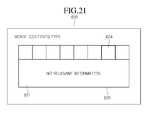
- Figs. 19 to 22 are views illustrating a method of displaying a 'MOVIE' list among 'CONTENTS TYPE' items shown in Fig. 8 according to embodiments.
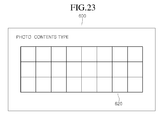
- Figs. 23 and 24 are views illustrating a method of displaying a 'PHOTO' list among 'CONTENTS TYPE' items shown in Fig. 8 according to embodiments.
- Fig. 25 is a view illustrating a method of displaying a 'RECORDED' list among 'CONTENTS TYPE' items shown in Fig. 8 according to embodiments.
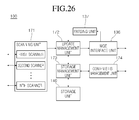
- Fig. 26 is a block diagram illustrating a configuration of an image display device according to another embodiment.
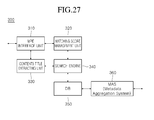
- Fig. 27 is a block diagram illustrating a configuration of a SDP according to an embodiment.
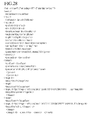
- Fig. 28 is a view illustrating a configuration of metadata transmitted from a SDP server to an image display device according to an embodiment.
- the invention may, however, be embodied in many different forms and should not be construed as being limited to the embodiments set forth herein; rather, that alternate embodiments included in other retrogressive inventions or falling within the spirit and scope of the present disclosure can easily be derived through adding, altering, and changing, and will fully convey the concept of the invention to those skilled in the art.
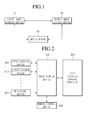
- Fig. 1 is a block diagram illustrating a configuration of a contents sharing system according to an embodiment.
- the contents sharing system may include a plurality of image display devices 10 and 20.
- the first image display device 10 and the second image display device 20 are connected to each other via a wired/wireless network, and transmit/receive contents data, so that they share specific contents
- the first and second image display devices 10 and 20 are connected to each other through various communication standards such as Digital Living Network Alliance (DLNA), Wireless Lan (WiFi), Wireless HD (WiHD), Wireless Home Digital Interface (WHDi), Blutooth, ZigBee, binary Code Division Multiple Access (CDMA), and Digital Interactive Interface for Video & Audio (DiiVA), and thus exchange data with each other.
- DLNA Digital Living Network Alliance
- WiFi Wireless Lan
- WiHD Wireless HD
- WPDi Wireless Home Digital Interface
- WBDi Wireless Home Digital Interface
- WBDi Wireless Home Digital Interface
- WCDMA binary Code Division Multiple Access
- CiiVA Digital Interactive Interface for Video & Audio
- each of the first and second image display devices 10 and 20 is connected to a media server 30 via a wired/wireless network such as internet, and shares contents by transmitting/receiving contents through the media server 30.
- a wired/wireless network such as internet
- each of the first and second image display devices 10 and 20 may be various devices such as a digital TV (for example, a network TV, an HBBTV, or a smart TV) , a PC, a notebook computer, a mobile communication terminal (for example, a smart phone), and a tablet PC.
- a digital TV for example, a network TV, an HBBTV, or a smart TV
- a PC for example, a PC
- a notebook computer for example, a notebook computer
- a mobile communication terminal for example, a smart phone
- tablet PC tablet PC
- An 'N-screen' service which continuously provides one content to various devices such as TVs, PCs, tablet PCs, and smart phones, may be provided through the contents sharing system described with reference to Fig. 1 .
- a user may continuously view a broadcast or movie that the user previously viewed using a TV through another smart phone or tablet PC, and also may view additional information on a corresponding drama through a smart phone or tablet PC while viewing the drama in a TV.
- a contents file or a screen of the first and second image display devices 10 and 20 may be shared therebetween.
- the first image display device 10 may transmit contents, received from an external or stored therein, to the second image display device 20 at a user's request through the above various communication methods.
- a user may play the contents in desired one of the first and second image display devices 10 and 20 as needed by downloading the contents from the media server 30 via internet.
- the first and second image display devices 10 and 20 are connected to at leas tone contents source via a wired/wireless network, so that contents are received from the contents source and shared with each other.
- the contents source may be a storage device equipped in or connected to an image display device, a Network-Attached Storage (NAS), a Digital Living Network Alliance (DLNA), or a media server, but the present invention is not limited thereto.
- NAS Network-Attached Storage
- DLNA Digital Living Network Alliance
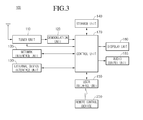
- Fig. 2 is a block diagram illustrating a configuration of a contents management system according to an embodiment.
- the contents management system includes an image display device 100 and a plurality of contents sources 400, 410, and 420 for providing contents to the image display device 100.
- the image display device 100 is connected to the plurality of contents sources 400, 410, and 420 for providing contents to the image display device 100 and thus receives contents including image signals and sound signals.
- the image display device 100 may include input/output terminals such as HDMI, USB, components, and RGB in order to transmit/receive data to/from the external devices 400, 410, and 420.
- the external devices 400, 410, and 420 may include various devices such as an image playback device (for example, a DVD player, Dvix player, and a Blu-ray player), a set top box (for example, an IPTV set top box, a cable set top box, or a satellite set top box), a PC, a game console, a home theater, a portable terminal, an HDD recorder, and a USB memory.
- an image playback device for example, a DVD player, Dvix player, and a Blu-ray player
- a set top box for example, an IPTV set top box, a cable set top box, or a satellite set top box
- PC for example, a PC, a game console, a home theater, a portable terminal, an HDD recorder, and a USB memory.
- the external devices 400, 410, and 420 connected to the image display device 100 are not limited to the above devices, and may be any devices connected to the image display device 100 to transmit image signals.
- the external device may include various devices such as digital TVs, PCs, notebook computers, mobile communication terminals (for example, smart phones), tablet PCs, NAS equipment, DLNA servers, and media servers, which are connected to the image display device 100 via a wired/wireless network.
- various devices such as digital TVs, PCs, notebook computers, mobile communication terminals (for example, smart phones), tablet PCs, NAS equipment, DLNA servers, and media servers, which are connected to the image display device 100 via a wired/wireless network.
- the image display device 100 may receive broadcast signals through a tuner (not shown), or may receive contents from an external device through various communication standards such as WiFi, WiHD, WHDi, Blutooth, ZigBee, binary CDMA, and DiiVA, or may download contents from the media server 30 of Fig. 1 via internet.
- a tuner not shown
- various communication standards such as WiFi, WiHD, WHDi, Blutooth, ZigBee, binary CDMA, and DiiVA, or may download contents from the media server 30 of Fig. 1 via internet.
- contents received from an external are stored in a storage device (not shown) equipped in or connected to the image display device 100, they may be played at a user's request.
- the contents management system may include a Service Delivery Platform (SDP) 300 according to an embodiment.
- SDP Service Delivery Platform
- the SDP maintains horizontal and common services in development, distribution authentication, billing, and messaging of services provided from Contents Providers (CPs) or Service Providers (SPs), and also integrates and develops them.
- CPs Contents Providers
- SPs Service Providers
- the image display device 100 requests metadata including detailed information on specific contents to the SDP server 300, and provides various information on contents to a user by receiving the requested metadata from the SDP server 300.
- the image display device 100 may receive metadata including movie title, director, actors, or plot information on specific video contents from the SDP server 300, and may display them on a screen.
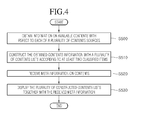
- Fig. 3 is a block diagram illustrating a configuration of an image display device according to an embodiment.
- the image display device 100 includes a broadcast receiving unit 130, an external device interface unit 135, a storage unit 149, a user input interface unit 150, a control unit 170, a display unit 180, an audio output unit 185, and a power supply unit 190.
- the broadcast receiving unit 130 may include a tuner 131, a demodulation unit 132, and a network interface unit 133.
- the tuner 131 may select an RF broadcast signal corresponding to a channel selected by a user or all pre-stored channels among Radio Frequency (RF) broadcast signals received through an antenna, and may convert the selected RF broadcast signal into an intermediate frequency signal or a base band image or sound signal.
- RF Radio Frequency
- the demodulation unit 132 may receive the digital IF signal DIF converted by the tuner 131, and then, may perform a demodulation operation thereon. For example, if the digital IF signal outputted from the tuner 131 is the ATSC format, the demodulator 132 may perform an 8-Vestigal Side Band (8-VSB) demodulation operation.
- 8-VSB 8-Vestigal Side Band
- the demodulation unit 132 may perform channel decoding, and for this, may include a Trellis Decoder, a De-interleaver, and a Reed Solomon Decoder in order to perform Trellis decoding, de-interleaving, and Reed Solomon decoding.
- the demodulation unit 132 may output a stream signal TS after performing the demodulation and channel decoding, and the stream signal may be a signal into which an image signal, sound signal, or a data signal is multiplexed.
- the stream signal may be an MPEG-2 Transport Stream (TS) into which an MPEG-2 standard image signal and a Dolby AC-3 standard sound signal are multiplexed.
- the MPEG-2 TS may include a 4 byte header and a 184 byte payload.
- the stream signal outputted from the demodulation unit 132 may be inputted to the control unit 170.
- the control unit 180 may output an image to the display unit 180 and a sound to the audio output unit 185 after demultiplexing and processing the image/sound signal.
- the external device interface unit 135 may connect an external device and the image display device 100, and for this, may include an A/V input/output unit (not shown) or a wireless communication unit (not shown).
- the external device interface unit 135 may be used for wired/wireless connection of an external device such as a Digital Versatile Disk (DVD) player, a Bluray player, a game console, a camera, a camcorder, and a computer (for example, a notebook computer).
- DVD Digital Versatile Disk
- a Bluray player a Bluray player
- a game console a camera
- a camcorder a computer
- a computer for example, a notebook computer
- the external device interface unit 135 may deliver an image, sound, or data signal inputted from a connected external into the control unit 170 of the image display device 100, and may output the image, sound, or data signal processed in the control unit 170 into the connected external device.
- the AN input/output unit may include a USB terminal, a Composite Video Banking Sync (CVBS) terminal, a component terminal, an S-video terminal (i.e., an analog type), a Digital Visual Interface (DVI) terminal, a High Definition Multimedia Interface (HDMI) terminal, an RGB terminal, and a D-SUB terminal, in order to input image and sound signals of an external device into the image display device 100.
- CVBS Composite Video Banking Sync
- S-video terminal i.e., an analog type
- DVI Digital Visual Interface
- HDMI High Definition Multimedia Interface
- RGB RGB terminal
- D-SUB terminal D-SUB terminal
- the wireless communication unit may perform a short-range wireless communication with another electronic device.
- the image display device 100 and another electronic device may be connected to a network through communication standards such as Bluetooth, Radio Frequency Identification (RFID), infrared Data Association (IrDA), Ultra Wideband (UWB), ZigBee, and Digital Living Network Alliance (DLNA).
- RFID Radio Frequency Identification
- IrDA infrared Data Association
- UWB Ultra Wideband
- ZigBee ZigBee
- DLNA Digital Living Network Alliance
- the external device interface unit 135 is connected to various set top boxes through at least one of the above various terminals in order to perform an input/output operation of a set top box.
- the external device interface unit 135 may receive applications or lists of applications in an adjacent external device, and then may deliver them to the control unit 170 or the storage unit 140.
- the network interface unit 133 may provide an interface for connecting the image display device 100 to a wire/wireless network including an internet network.
- the network interface unit 133 may include an Ethernet terminal for accessing a wired network or may be connected to a wireless network through communication standards such as WiFi, WiHD, WHDi, Blutooth, ZigBee, binary CDMA, DiiVA, Wibro, Wimax, and HSDPA.
- the network interface unit 133 may transmit/receive data to/from another user or another electronic device via a connected network or another network linked to the connected network.
- the network interface unit 133 may transmit some contents data stored in the image display device 100 to a selected user or electronic device among users or other electronic devices pre-registered in the image display device 100.
- the network interface unit 133 may access a predetermined web page via a connected network or another network linked to the connected network. That is, the network interface unit 133 may access a predetermined web page via a network to transmit/receive data to/from a corresponding sever.
- the network interface unit 133 may receive contents or data provided from a CP or a network operator. That is, the network interface unit 133 may receive contents such as movies, advertisings, games, VODs, and broadcast signals and information thereon, which are provided from a CP or a network provider via a network.
- the network interface unit 133 may receive update information and update files of a firmware provided from a CP or a network operator, and may transmit data to an internet provider, a CP, or a network operator.
- the network interface unit 133 may select and receive a wanted application from applications open to air via a network.
- the storage unit 140 may store a program for processing and controlling each signal in the control unit 170, and may store the processed image, sound or data signals.
- the storage unit 140 may perform a function for temporarily storing image, sound or data signals inputted from the external device interface unit 135 or the network interface unit 133, and may store information on a predetermined broadcast channel through a channel memory function.
- the image display device 100 may play contents files stored in the storage unit 140 such as movie files, still image files, music files, document files, and application files, and then, may provide them to a user.
- contents files stored in the storage unit 140 such as movie files, still image files, music files, document files, and application files, and then, may provide them to a user.
- the user input interface unit 150 may deliver a signal that a user inputs to the control unit 170 or may deliver a signal from the control unit 170 to a user.
- the user input interface unit 150 may receive a control signal such as power on/off, channel selection, and screen setting from a remote control device 200 and may process the received control signal according to various communication methods such as an RF communication method or an IR communication method.
- the user input interface unit 150 may transmit a control signal from the control unit 170 to the remote control device 200.
- the user input interface unit 150 may deliver to the control unit 170 a control signal inputted from a local key (not shown) such as a power key, a channel key, a volume key, and a setting key.
- a local key such as a power key, a channel key, a volume key, and a setting key.
- the user input interface unit 150 may deliver to the control unit 170 a control signal inputted from a sensing unit (not shown) that senses a gesture of a user, and may transmit a signal from the control unit 170 to a sensing unit (not shown).
- the sensing unit may include a touch sensor, a sound sensor, a position sensor, and a motion sensor.
- the control unit 170 may demultiplex a stream inputted from the tuner 131, the demodulation unit 132, or the external device interface unit 135, or may process demultiplexed signals in order to generate and output a signal for image or sound output.
- the image signal processed in the control unit 170 is inputted to the display unit 180, and then, is displayed as an image corresponding to a corresponding image signal. Additionally, the image signal processed in the control unit 170 is inputted to an external output device through the external device interface unit 135.
- the sound signal processed in the control unit 170 may be outputted to the audio output unit 185 as audio. Moreover, the sound signal processed in the control unit 170 is inputted to an external output device through the external device interface unit 135.
- control unit 170 may include a demultiplexing unit and an image processing unit.
- control unit 170 may control overall operations of the image display device 100.
- control unit 170 controls the turner 131 to tune an RF broadcast corresponding to a channel that a user selects or a pre-stored channel.
- control unit 170 may control the image display device 100 through a user command inputted through the user input interface unit 150 or an internal program, and may access a network to download applications that a user wants or lists of applications into the image display device 100.
- control unit 170 controls the tuner 131 to receive a signal of a selected channel according to a predetermined channel selection command received through the user input interface unit 150, and may process an image, sound, or data signal of the selected channel.
- the control unit 170 may output channel information that a user selects in addition to a processed image or sound signal through the display unit 180 or the audio output unit 185.
- control unit 170 may output an image or sound signal of an external device such as a camera or a camcorder, which is inputted through the external device interface unit 135, into the display unit 180 or the audio output unit 185 according to an external device image playback command received through the user input interface unit 150.
- an external device such as a camera or a camcorder
- control unit 170 may control the display unit 180 to display an image
- the control unit 170 may control the display unit 180 to display a broadcast image inputted through the tuner 131, an external input image inputted through the external device interface unit 135, an image inputted through a network interface unit, or an image stored in the storage unit 140.
- an image displayed on the display unit 180 may be a still or moving image or a 2D or 3D image.
- control unit 170 may play contents stored in the image display device 100, received broadcast contents, or external input contents inputted from an external.
- the contents may have various formats such as a broadcast image, an external input image, an audio file, a sill image, an accessed web page, and a document file.
- the image display device 100 integrates and manages contents provided from a plurality of contents sources in one screen, regardless of contents sources. Also, the image display device 100 may receive metadata on specific contents among the contents from the SDP 300, and then, may provide various information thereon to a user.
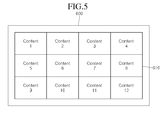
- Fig. 4 is a flowchart illustrating a method of managing contents according to an embodiment. The method will be described with reference to the block diagrams of Figs. 2 and 3 .
- the image display device 100 obtains information on available contents with respect to each of a plurality of contents sources in operation S500.
- control unit 170 of the image display device 100 searches for contents in each contents source connected to the image display device 100 in order to store information on the searched contents in the storage unit 140, and also periodically performs contents search on a plurality of contents sources in order to update contents information stored in the storage unit 140 according to a search result.
- control unit 170 of the image display device 100 constructs the obtained contents information with a plurality of contents lists according to at least two classified items in operation S510.
- control unit 170 constructs a list of available contents from the plurality of contents sources by using the contents information obtained in operation S500. Accordingly, the constructed contents list is not limited to a specific contents source, and thus, includes all available contents that a user can select in the image display device 100.
- the constructed contents list may be displayed on one screen of the display unit 180, and thus, a user may integrally mange various contents provided from a plurality of contents sources, regardless of contents sources (for example, selecting, playing, or transmitting contents in one screen).
- the contents list 610 including information on a plurality of contents may be displayed on the screen 600 of the image display device 100, and 'Content 1' to 'Content 12' in the contents list 610 may be contents provided from a plurality of contents sources.
- 'Content 1', 'Content 3', and 'Content 4' are contents provided from a first contents source.
- 'Content 2', 'Content 7', and 'Content 8' are contents provided from a second contents source.
- the contents may be aligned according to a predetermined standard, and then, may be displayed in the contents list 610.
- the contents information in the contents list 610 may be a thumbnail image representing corresponding contents.
- a thumbnail image may be an image obtained by reducing an image in video contents to the display area size of the contents list 610.
- one 611 of contents thumbnail images in the contents list 610 may be displayed larger then other images, and the displayed position or size of each thumbnail image is determined according to predetermined standards (or, user's settings).
- the above contents list may include a plurality of different lists according to classified items such as recommended contents, recently played contents, recently added contents, preferred contents, and contents type.
- contents provided from a plurality of contents sources may be represented as a plurality of contents lists corresponding to each of a plurality of predetermined classified items. Since the plurality of contents lists classify and align contents, provided from the plurality of contents sources, according to the standard based on different classified items, they may include contents of different groups.
- a plurality of contents lists 620, 630, and 640 corresponding to respective 'classified item 1', 'classified item 2', and 'classified item 3' may be simultaneously displayed on the screen 600 of the image display device 100.
- the first contents list 620 may include 'Content 1', 'Content 2', and 'Content 3' classified and aligned according to the 'classified item 1' among contents provided from a plurality of contents sources.
- the second contents list 630 may include 'Content 3', 'Content 4', 'Content 5', and 'Content 6' classified and aligned according to the 'classified item 2' among contents provided from a plurality of contents sources.
- the third contents list 640 may include 'Content 1', 'Content 3', 'Content 6', 'Content 7', 'Content 8', and 'Content 9' classified and aligned according to the 'classified item 3' among contents provided from a plurality of contents sources.
- the number of contents in a contents list and the size of an area where each contents information is displayed may set differently according to a classified item. This also may vary depending on a user's input.
- a plurality of contents lists configured according to at least two classified items may commonly include specific contents.
- the image display device 100 receives meta information on contents in operation S520, and displays the plurality of configured contents lists in addition to the received meta information in operation S530.
- the network interface unit 135 of the image display device 100 may request metadata transmission on video contents in the contents list to the SDP server 300, and then may receive the metadata on the video contents from the SDP server 300.
- the metadata received from the SDP server 300 may include meta information such as the title, director, actors, and plot of the video contents, and the meta information may be displayed on a contents list in correspondence to corresponding contents.
- the network interface unit 135 requests the transmission of metadata on the 'Content 1' to the SDP server 300, and then, receives meta information on the movie title, director, actors, or plot of the 'Content 1' from the SDP server 300.
- the received metadata on the 'Content 1' may be displayed together with the thumbnail image of the 'Content 1' in the first contents list 620.
- a user may integrally manage contents provided from a plurality of contents sources in one screen of the image display device 100, regardless of contents sources, and also, together with that, may easily confirm contents meta information provided from the SDP server 300 on the screen, regardless of an additional search process.
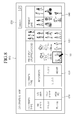
- the image display device 100 may display a 'CONTENTS SHARE' User Interface (UI) on the screen 600 in order to share contents with external devices at a user's request.
- UI User Interface
- the 'CONTENTS SHARE' UI includes a plurality of contents lists 620, 630, and 640 configured by at least two classified items, as described with reference to Figs. 4 to 7 , and a list 650 of external devices connectible to the image display device 100.
- a 'CONTENTS TYPE' item is to classify a list of contents provided from a plurality of contents sources by the types of the corresponding contents.
- a 'RECENTLY STOPPED/ADDED' item is to provide the list of contents provided from the plurality of contents sources according to a recently-played or added order.
- a 'FRIENDS' LIKE' item is to provide a contents list according to a contents preference (in more detail, whether it is recommended by friends).
- the 'CONTENTS TYPE' item may display contents provided from a plurality of contents sources as a contents type list 620, which classifies the contents into contents recorded in the image display device 100 (RECORDED), photo contents (PHOTO), music contents (MUSIC), and movie contents (MOVIE).
- RECORDED image display device 100
- PHOTO photo contents
- MUSIC music contents
- MOVIE movie contents
- the 'RECENTLY STOPPED/ADDED' item may be displayed as the recent contents list 630 including contents, which are the most recently stopped or added in the image display device 100, among the contents provided from the plurality of contents sources.
- the most recently stopped or added contents are selected by a predetermined number from contents stopped during playback or newly added to the 'CONTETS SHARE' UI.
- One content that is the most recently stopped among the selected stopped/added contents may be displayed greater than other contents in the recent contents list 630.
- thumbnail images in the recent contents list 630 may be stored in advance in the storage unit 140 so that they may be displayed without delay. Contents stopped or added on the same date may be grouped and displayed.
- the 'FRIENDS' LIKE' item may be displayed as the recommended contents list 640 including contents that friends recommend through a contents sharing service provided via internet among contents provided from a plurality of contents sources.
- a user may select at least one from the contents in the contents lists 620, 630, and 640, and then, may play it or transmit it to an external device. For this, a pointer displayed on the screen 600 may be moved or a highlighted box may be moved in order to select a specific content by using a remote control device200.
- a 'LINKED DEVICE' item may be displayed as the connected device list 650 including a plurality of contents-sharing external devices connected to the image display device or connected according to a user's input.
- a user may input a search word in a search object 660 displayed on the screen 600 in order to search for a desired content from contents provided from a plurality of sources.
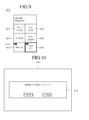
- Figs. 9 to 11 are views illustrating a method of displaying the connected device list 650 corresponding to the 'LINKED DEVICES' item according to embodiments.
- the connected device list 650 may include a plurality of external devices connectible to the image display device 100 such as 'My phone' 651, 'LG stick' 652, 'X-USB' 653, 'Your phone' 654, 'Blu-ray' 655, and 'RGB-PC' 656.
- External devices in the connected device list 650 may be displayed to be distinguished from each other by using a device name and icon, or may be displayed with different color cells according to a device type (for example, a storage device, a portable terminal, a playback device, or a server).
- a device type for example, a storage device, a portable terminal, a playback device, or a server.
- a user may select one of the external devices 651 to 656 in the connected device list 650, and then, may receive contents from the selected external device and play them, or may transmit contents to the selected external device in order to share the contents.
- devices for inputting contents in connection with the image display device 100 via a wired/wireless network for example, 'Blu-ray' 655 and 'RGB-PC' 656, may be displayed with an input device icon 658 for representing an input device.
- a popup window 670 for notifying that a screen of the image display device 100 switches to a screen of the selected RGB-PC may be displayed on the screen 600.
- external devices displayed in the connected device list 650 may be determined according to a predetermined priority order. For example, according to the priority order such as the order of devices connected within the last two weeks, devices connected using USB, DLNA, and WiFi direct, devices connected using WiFi display, devices connected using DiiVa, input devices, and power-off devices, external devices may be selected by a predetermined number, and then, arranged.
- a device that requires authentication among external devices in the connected device list 650 may be displayed with an additional icon in order to represent whether the authentication is successful.
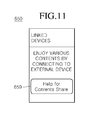
- a 'Help for Contents Share' button 659 for setting a connection with an external device may be displayed in the connected device list 650.
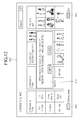
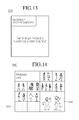
- Figs. 12 to 13 are views illustrating a method of displaying the recent contents list 430 corresponding to the 'RECENTLY STOPPED/ADDED' item according to embodiments.
- a 'CONTENTS SHARE' UI screen may include a 'History reset' button 661 for initializing a contents usage history.
- a popup window 670 for notifying that all items of'RECENTLY STOPPED/ADDED' are deleted may be displayed on the screen 600.
- Figs. 14 to 16 are views illustrating a method of displaying the recommended contents list 640 corresponding to the 'FRIENDS' LIKE' item according to embodiments.
- the network interface unit 135 of the image display device 100 may access a server providing a specific sharing service, which is preset during a device manufacturing process or set by a user.
- a user registered as a friend in a corresponding service may receive information on uploaded/downloaded or recommended contents.
- the received information may include thumbnail images for each of the contents, and accordingly, the recommended contents list 650 may arrange and display thumbnail images for contents that a user, who is registered as a friend, uploads/downloads or recommends according to a time sequence in the contents sharing service.
- one content 641 among the contents in the recommended contents list 640 may be displayed as a larger image then other contents.
- some cells 642 may be dimmed without an additional image.
- a 'Log-in' button 645 for logging in the contents sharing service may be displayed in the recommended contents list 640.
- contents information may not be displayed in the recommended contents list 640.
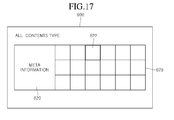
- Figs. 17 and 18 are views illustrating a method of displaying a contents list of an 'ALL' type among the 'CONTENTS TYPE' items according to embodiments.
- a list 620 for entire contents provided from contents sources connectible to the image display device 100 may be displayed on the list 620.
- meta information 621 on the selected content may be displayed on the screen 600 in addition to the contents list 620.
- the meta information 621 may be information received from the SDP server 300 at the request of the image display device 100.
- album jackets, song titles, or singers may be provided as detailed information.
- thumbnail images, file names, or shooting dates may be displayed.
- thumbnail images, titles, channels, recoding dates, or recording times may be displayed.
- the detailed information 692 on the movie content 622 may include information such as the title, director, actors, rating, review, impression, synopsis, or playing time of a corresponding movie.
- the above detailed information 692 may include metadata received from the SDP server 300.
- contents in the 'ALL' type contents list 620 may be arranged according to time order.
- contents in the 'Alphabetic order' button 663 displayed on the screen 600 may be rearranged according to an alphabetic order of the corresponding contents titles.
- the 'CONTENTS SHARE' UI of Fig. 18 may include a first scroll bar 680 by which a user can select a contents type.
- a user moves a scroll box 681 on the first scroll bar 680 by using the remote control device 200, in order to select a contents type corresponding to the position of the scroll bar 681.
- the 'CONTENTS SHARE' UI may include a second scroll bar 685 that allows a user to select a specific position of a contents list.
- a user moves a scroll box 685 on the second scroll bar 685 by using the remote control device 200, in order to display on the screen 600 a portion corresponding to the position of the scroll box 681 in the contents list.
- a contents list on the screen 600 moves in a corresponding direction. Also, new contents in the contents list may be displayed on the screen 600.
- a user may recognize a rough position of a portion displayed on the current screen 600 in the contents list by using the position of the scroll box 686 on the second scroll bar 685.
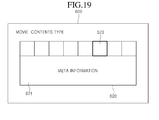
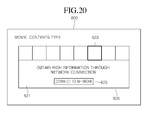
- Figs. 19 to 22 are views illustrating a method of displaying a contents list of a 'MOVIE' type among the 'CONTENTS TYPE' items according to embodiments.
- a movie contents list 620 may be displayed on the screen 600.
- meta information 621 on the selected movie content 623 may be displayed on the screen 600 in addition to the contents list 620 received from the SDP server 300.
- a 'network connection' button 625 may be displayed on the screen 600 in order to provide a connection with the SDP server 300.
- no meta information on one content 624 selected from the movie contents list 620 is stored in the SDP server 300, and thus, as shown in Fig. 21 , a message for notifying that there is no meta information on the selected movie content 624 may be provided to a user.
- contents related information that a file itself of movie contents, selected by a user, has may be displayed on an area 621 where meta information is displayed.
- a user moves the scroll box 681 on the first scroll bar 680 to a position corresponding to 'Movie', in order to display the movie contents list on the screen 600.
- series of contents in the movie contents list may be displayed on the screen 600 as one group contents 625.
- Figs. 23 and 24 are views illustrating a method of displaying a contents list of a 'PHOTO' type among the 'CONTENTS TYPE' items according to embodiments.
- a photo contents list 620 including photo contents may be displayed on the screen 600.
- a user moves the scroll box 681 on the first scroll bar 680 to a position corresponding to 'Photo', in order to display the photo contents list on the screen 600.
- information on the selected photo content 626 is displayed, and also information 627 on the file name, shooting date, size, and compression type of the photo content 626 may be displayed adjacent to the information on the one photo content 626.
- Fig. 25 is a view illustrating a method of displaying a contents list of a 'RECORDED' type among the 'CONTENTS TYPE' items according to an embodiment.
- a recordings list 620 may be displayed on the screen 600.
- meta information 621 on the selected recording 624 may be displayed.
- Fig. 26 is a block diagram illustrating a configuration of an image display device according to another embodiment. That is, a configuration of the control unit 170 in the image display device 100 is illustrated according to an embodiment. Overlapping descriptions for operations of the image display devices 100 of Fig. 26 and Figs. 1 to 25 will be omitted.
- a scanning unit 171 searches for contents in each of a plurality of contents sources, and an update management unit 172 obtains information on changed contents among the searched contents.
- the scanning unit 171 includes a plurality of scanners respectively corresponding to a plurality of contents sources, and scans and searches for contents in each corresponding external device.
- the scanning unit 171 may include a USB File Scanner, a DLNA File Scanner, and a Metadata Scanner, which respectively correspond to a USB device, a DLNA server, and a media server.
- the USB file scanner accesses a USB device connected to the image display device 100 through a USB Plug in/out Manager, and searches for contents stored in the USB device.
- the DLNA file scanner receives an event message through a DLNA status manager using UpnP when a network between the image display device 100 and a DLNA server is connected or disconnected, and searches for contents in the eDLNA server by using HTTP protocol.
- the metadata scanner receives an event message through a DLNA status manager using mDNS when a network is connected or disconnected, and searches for contents in the media server by using HTTP protocol.
- control unit 140 may further include a USB DVR manager (not shown).
- the USB DVR manager may search for contents stored in an Electronic DataBase Management System (EDBMS).
- EDBMS Electronic DataBase Management System
- information on the searched contents may be delivered to the update management unit 172.
- An MGE interface unit 136 may request the transmission of meta information on movie contents among the searched contents to the SDP server 300, and then, may receive an extensible MarkUp Language (XML) file including the meta information from the SDP server 300.
- XML extensible MarkUp Language
- a parsing unit 137 parses the received XML file in order to obtain meta information on the movie contents, and then delivers the meta information to the update management unit 172.
- the update management unit 172 obtains information on the contents searched from a plurality of contents sources and meta information matching some of the contents (for example, movie contents), and the matched contents information and meta information may be stored in the storage unit 140 through the storage management unit 173.
- the contents list management unit 174 constructs a contents list by using the contents information and meta information stored in the storage unit 140, and the constructed contents list is delivered to the display unit 180 in order to be displayed on the screen 600 of the image display device 100.
- the scanning unit 171 confirms whether contents information on each of a plurality of contents sources is changed (for example, contents addition, deletion, or modification) by using a plurality of scanners, and searches for all contents again in a corresponding contents source when the contents information is changed in order to deliver a contents list to the update management unit 172.
- the update management unit 172 obtains information on the changed contents by confirming the contents list delivered from the scanning unit 171.
- the changed contents information may be stored in the storage unit 140 through the storage management unit 173.
- the stored time information may represent a time at which the contents information is stored in the storage unit 140.
- the contents list management unit 174 may update a previously-constructed list according to recently added, deleted, or modified contents information by using the contents information and stored time information stored in the storage unit 140.
- time information on the contents playback stop may be stored in the storage unit 140, and accordingly, the contents list management unit 174 may update a previously constructed contents list according to recent playback information.
- the image display device 100 and the SDP server 300 may communicate with each other through Representational state transfer (REST), and the MGE interface unit 136 of the image display device 100 may transmit the name of a contents file to the SDP server 300 through HTTP, thereby requesting the transmission of meta information on corresponding contents.
- REST Representational state transfer
- the image display device 100 requests meta information on movie contents having an 'avartar.avi' file name to the SDP server 300.
- Fig. 27 is a block diagram illustrating a configuration of a SDP according to an embodiment. Overlapping descriptions for operations of the SDP servers of Fig. 27 and Figs. 1 to 26 will be omitted.
- the MGE interface unit 136 of the SDP server 300 receives the name of a contents file from the image display device 100 through HTTP.
- a Contents Title extracting unit 330 separates and extracts an actual title (for example, a movie title) from the file name received from the image display device 100.
- a search engine 340 may search a DB 350 for meta information on corresponding contents by using the contents title extracted from the Contents Title extracting unit 330.
- the search engine 340 reads updated meta information from the DB 350 periodically, and then indexes the read meta information in order to store it in a memory (not shown).
- the search engine 340 does not directly search the DB 350 for the contents title extracted from the Contents Title extracting unit 330, but searches the meta information by first using indexing information stored in the memory, so that search speed and accuracy on meta information may be improved.
- a Metadata Aggregation System (MAS) 360 receives meta information on various contents periodically from SPs, and parses the received meta information to store it in the DB 350.
- MAS Metadata Aggregation System
- a Matching Score calculating unit 320 may detect meta information that is the most corresponding to a corresponding contents file from the search results inputted from the search engine 340, and for this, a Levenshtein distance algorithm may be used.
- the MGE interface unit 310 constructs the meta information detected by the Matching Score calculating unit 320 with XML, and transmits the XML to the image display device 100 through HTTP, so that a response to the metal information transmission request from the image display device 100 may be completed.
- Fig. 28 is a view illustrating a configuration of metadata transmitted from a SDP server to an image display device according to an embodiment.
- the MGE interface unit 310 of the SDP server 300 may include the obtained meta information in XML, and then, provides it to the image display device 100.
- the MGE interface unit 310 constructs the XML of Fig. 28 by using items of the meta information and a meta information value corresponding to each item, and then, transmits the constructed XML to the image display device 100 through HTTP.
- the method of managing contents according to the present invention can also be embodied as computer readable codes on a computer readable recording medium.
- the computer readable recording medium is any data storage device that can store data which can be thereafter read by a computer system. Examples of the computer readable recording medium include read-only memory (ROM), random-access memory (RAM), CD-ROMs, magnetic tapes, floppy disks, and optical data storage devices, and also include carrier waves (such as data transmission through the Internet).
- the computer readable recording medium can also be distributed over network coupled computer systems so that the computer readable code is stored and executed in a distributed fashion. Also, functional programs, codes, and code segments for accomplishing the present invention can be easily construed by programmers skilled in the art to which the present invention pertains.
Landscapes
- Engineering & Computer Science (AREA)
- Multimedia (AREA)
- Signal Processing (AREA)
- Databases & Information Systems (AREA)
- Human Computer Interaction (AREA)
- Computer Networks & Wireless Communication (AREA)
- Automation & Control Theory (AREA)
- Software Systems (AREA)
- Two-Way Televisions, Distribution Of Moving Picture Or The Like (AREA)
- Controls And Circuits For Display Device (AREA)
- Information Transfer Between Computers (AREA)
- Information Retrieval, Db Structures And Fs Structures Therefor (AREA)
- Digital Computer Display Output (AREA)
- User Interface Of Digital Computer (AREA)
Applications Claiming Priority (1)
| Application Number | Priority Date | Filing Date | Title |
|---|---|---|---|
| KR1020110097484A KR101315608B1 (ko) | 2011-09-27 | 2011-09-27 | 컨텐츠 관리 방법 및 그를 이용한 영상 표시 장치 |
Publications (2)
| Publication Number | Publication Date |
|---|---|
| EP2575372A2 true EP2575372A2 (de) | 2013-04-03 |
| EP2575372A3 EP2575372A3 (de) | 2013-04-10 |
Family
ID=46851841
Family Applications (1)
| Application Number | Title | Priority Date | Filing Date |
|---|---|---|---|
| EP12183758.7A Ceased EP2575372A3 (de) | 2011-09-27 | 2012-09-10 | Verfahren zum Verwalten von Inhalten und Bildanzeigevorrichtung damit |
Country Status (4)
| Country | Link |
|---|---|
| US (1) | US9088820B2 (de) |
| EP (1) | EP2575372A3 (de) |
| KR (1) | KR101315608B1 (de) |
| CN (1) | CN103024522B (de) |
Cited By (2)
| Publication number | Priority date | Publication date | Assignee | Title |
|---|---|---|---|---|
| EP3128406A1 (de) * | 2015-08-03 | 2017-02-08 | Lg Electronics Inc. | Tragbares endgerät und verfahren zur steuerung davon |
| EP3107304A4 (de) * | 2014-02-10 | 2017-09-20 | LG Electronics Inc. | Verfahren und vorrichtung zur inhaltswiedergabe |
Families Citing this family (70)
| Publication number | Priority date | Publication date | Assignee | Title |
|---|---|---|---|---|
| CA2503791A1 (en) | 2002-10-22 | 2004-05-06 | Jason A. Sullivan | Non-peripherals processing control module having improved heat dissipating properties |
| KR20150040371A (ko) | 2002-10-22 | 2015-04-14 | 제이슨 에이. 설리반 | 프로세서를 수용하도록 구성된 장치의 비힌지식 용기 및 이를 포함하는 가전 기기 |
| EP1557074A4 (de) | 2002-10-22 | 2010-01-13 | Sullivan Jason | Robustes anpassbares computerverarbeitungsystem |
| US9210528B2 (en) | 2010-07-21 | 2015-12-08 | Tksn Holdings, Llc | System and method for control and management of resources for consumers of information |
| US9232046B2 (en) | 2010-07-21 | 2016-01-05 | Tksn Holdings, Llc | System and method for controlling mobile services using sensor information |
| US9274694B2 (en) * | 2011-05-17 | 2016-03-01 | Next Issue Media | Device, system and method for image-based content delivery |
| US8977964B2 (en) | 2011-05-17 | 2015-03-10 | Next Issue Media | Media content device, system and method |
| US8978149B2 (en) | 2011-05-17 | 2015-03-10 | Next Issue Media | Media content device, system and method |
| KR101851241B1 (ko) * | 2011-12-06 | 2018-04-24 | 삼성전자 주식회사 | 휴대 단말기의 컨텐츠 통합 관리 방법 및 장치 |
| KR101863197B1 (ko) | 2012-01-31 | 2018-05-31 | 삼성전자주식회사 | 컨텐츠 공유 네트워크에서 발견된 디바이스를 알리기 위한 장치 및 방법 |
| US10164979B2 (en) | 2012-05-17 | 2018-12-25 | Apple Inc. | Multi-source content generation |
| US9971743B2 (en) | 2012-05-17 | 2018-05-15 | Next Issue Media | Content generation and transmission with user-directed restructuring |
| US9971738B2 (en) | 2012-05-17 | 2018-05-15 | Next Issue Media | Content generation with restructuring |
| US9971744B2 (en) | 2012-05-17 | 2018-05-15 | Next Issue Media | Content generation and restructuring with provider access |
| US9971739B2 (en) | 2012-05-17 | 2018-05-15 | Next Issue Media | Content generation with analytics |
| WO2014028070A1 (en) * | 2012-08-17 | 2014-02-20 | Flextronics Ap, Llc | Channel changer for intelligent television |
| US9819986B2 (en) | 2012-08-17 | 2017-11-14 | Flextronics Ap, Llc | Automated DLNA scanning with notification |
| US9773228B2 (en) * | 2012-11-02 | 2017-09-26 | Facebook, Inc. | Systems and methods for sharing images in a social network |
| CN103023736B (zh) * | 2012-12-12 | 2016-05-11 | 惠州Tcl移动通信有限公司 | 显示dlna设备的方法及移动终端 |
| US20140281987A1 (en) * | 2013-03-07 | 2014-09-18 | Jason A. Sullivan | Providing a universal resource manager to access and display user customizable content, to switch content on demand, and to optimize the user environment |
| US10698930B2 (en) | 2013-08-22 | 2020-06-30 | Sensoriant, Inc. | Assignment of application (apps) and relevant services to specific locations, dates and times |
| CN103489432B (zh) * | 2013-08-30 | 2016-04-13 | 小米科技有限责任公司 | 电子设备及资源显示方法 |
| KR20150033215A (ko) * | 2013-09-23 | 2015-04-01 | 삼성전자주식회사 | 복합 방송 환경에서의 응용프로그램 처리장치 및 방법 |
| US20160019360A1 (en) | 2013-12-04 | 2016-01-21 | Apple Inc. | Wellness aggregator |
| US12080421B2 (en) | 2013-12-04 | 2024-09-03 | Apple Inc. | Wellness aggregator |
| US10599705B2 (en) | 2014-03-20 | 2020-03-24 | Gracenote Digital Ventures, Llc | Retrieving and playing out media content for a personalized playlist including a content placeholder |
| TW201606746A (zh) | 2014-05-09 | 2016-02-16 | 萊芙麥斯公司 | 照片分享裝置顯示器上之影像捲動 |
| WO2015182976A1 (en) | 2014-05-28 | 2015-12-03 | Samsung Electronics Co., Ltd. | Mobile apparatus, display apparatus, and multimedia output method using the same |
| KR102330109B1 (ko) * | 2014-05-28 | 2021-11-24 | 삼성전자주식회사 | 모바일 장치, 디스플레이 장치, 및 이를 이용하는 멀티미디어 출력방법 |
| CN105282601A (zh) * | 2014-07-07 | 2016-01-27 | 乐视致新电子科技(天津)有限公司 | 一种同屏共享的方法、装置及系统 |
| US10390289B2 (en) | 2014-07-11 | 2019-08-20 | Sensoriant, Inc. | Systems and methods for mediating representations allowing control of devices located in an environment having broadcasting devices |
| US10614473B2 (en) * | 2014-07-11 | 2020-04-07 | Sensoriant, Inc. | System and method for mediating representations with respect to user preferences |
| US10362094B2 (en) | 2014-07-25 | 2019-07-23 | Gracenote Digital Ventures, Llc | Retrieval and playout of media content |
| US10824440B2 (en) | 2014-08-22 | 2020-11-03 | Sensoriant, Inc. | Deriving personalized experiences of smart environments |
| CN116584928A (zh) | 2014-09-02 | 2023-08-15 | 苹果公司 | 身体活动和健身监视器 |
| CN104244099A (zh) * | 2014-09-28 | 2014-12-24 | 北京金山安全软件有限公司 | 一种媒体内容推荐方法和装置 |
| KR102309315B1 (ko) * | 2014-10-01 | 2021-10-05 | 엘지전자 주식회사 | 영상표시장치, 및 그 동작방법 |
| CN105657483B (zh) * | 2014-11-10 | 2019-06-04 | 扬智科技股份有限公司 | 多媒体播放系统、多媒体文件分享方法及其控制方法 |
| CN105740251B (zh) * | 2014-12-08 | 2020-02-14 | Tcl集团股份有限公司 | 一种总线式整合不同内容源的方法和系统 |
| CN104506923B (zh) * | 2014-12-31 | 2017-11-28 | 华为技术有限公司 | 一种多媒体处理装置、多媒体处理服务器及其方法 |
| KR20160098797A (ko) * | 2015-02-11 | 2016-08-19 | 삼성전자주식회사 | 영상처리장치, 영상처리장치의 제어방법 및 시스템 |
| CN105872758A (zh) * | 2015-08-12 | 2016-08-17 | 乐视致新电子科技(天津)有限公司 | 智能电视的频道操作、播放方法和相应装置 |
| US10304347B2 (en) | 2015-08-20 | 2019-05-28 | Apple Inc. | Exercised-based watch face and complications |
| CN105979386A (zh) * | 2015-11-30 | 2016-09-28 | 乐视致新电子科技(天津)有限公司 | 一种智能电视互动功能的入口控制方法和装置 |
| DK201770423A1 (en) | 2016-06-11 | 2018-01-15 | Apple Inc | Activity and workout updates |
| US11216119B2 (en) | 2016-06-12 | 2022-01-04 | Apple Inc. | Displaying a predetermined view of an application |
| WO2018016809A1 (en) * | 2016-07-19 | 2018-01-25 | Samsung Electronics Co., Ltd. | Display device, method of controlling thereof and display system |
| KR102369826B1 (ko) * | 2016-07-19 | 2022-03-04 | 삼성전자주식회사 | 디스플레이 장치, 이의 제어 방법 및 디스플레이 시스템 |
| US10534809B2 (en) * | 2016-08-10 | 2020-01-14 | Zeekit Online Shopping Ltd. | Method, system, and device of virtual dressing utilizing image processing, machine learning, and computer vision |
| US10736543B2 (en) | 2016-09-22 | 2020-08-11 | Apple Inc. | Workout monitor interface |
| US11763171B2 (en) | 2017-02-23 | 2023-09-19 | Safelishare, Inc. | System and methods for modulating dissemination of content to mobile devices and robots |
| CN110799971B (zh) | 2017-03-24 | 2023-08-25 | 苹果公司 | 用于媒体内容的生成和呈现的方法、装置和电子设备 |
| US10845955B2 (en) | 2017-05-15 | 2020-11-24 | Apple Inc. | Displaying a scrollable list of affordances associated with physical activities |
| KR102328121B1 (ko) * | 2018-02-12 | 2021-11-17 | 삼성전자주식회사 | 전자 장치 및 그 동작 방법 |
| DK201870380A1 (en) | 2018-05-07 | 2020-01-29 | Apple Inc. | DISPLAYING USER INTERFACES ASSOCIATED WITH PHYSICAL ACTIVITIES |
| US11317833B2 (en) | 2018-05-07 | 2022-05-03 | Apple Inc. | Displaying user interfaces associated with physical activities |
| KR102585067B1 (ko) * | 2018-05-15 | 2023-10-06 | (주)엠아이웨어 | 컨텐츠 확보 어플리케이션을 포함하는 서버와 이의 구동 방법 |
| WO2019223967A1 (en) * | 2018-05-22 | 2019-11-28 | Arcelik Anonim Sirketi | A display device having a source switching interface |
| US10953307B2 (en) | 2018-09-28 | 2021-03-23 | Apple Inc. | Swim tracking and notifications for wearable devices |
| CN109525889A (zh) * | 2018-11-23 | 2019-03-26 | 深圳市鹰硕技术有限公司 | 一种投屏方法、装置和系统、智能终端和存储介质 |
| CN109348285B (zh) * | 2018-11-30 | 2021-06-01 | 青岛海信传媒网络技术有限公司 | 频道切换方法及装置 |
| KR102689698B1 (ko) * | 2019-01-03 | 2024-07-31 | 삼성전자주식회사 | 디스플레이 장치 및 그 제어 방법 |
| DK201970532A1 (en) | 2019-05-06 | 2021-05-03 | Apple Inc | Activity trends and workouts |
| US11277485B2 (en) | 2019-06-01 | 2022-03-15 | Apple Inc. | Multi-modal activity tracking user interface |
| DK202070616A1 (en) | 2020-02-14 | 2022-01-14 | Apple Inc | User interfaces for workout content |
| US11616699B2 (en) * | 2020-07-27 | 2023-03-28 | Charter Communications Operating, Llc | Obtaining location metadata for network devices using augmented reality |
| US11082464B1 (en) * | 2020-12-10 | 2021-08-03 | Facebook, Inc. | Displaying additional external video content along with users participating in a video exchange session |
| CN120066649A (zh) | 2021-05-15 | 2025-05-30 | 苹果公司 | 用于团体训练的用户界面 |
| US12023567B2 (en) | 2022-06-05 | 2024-07-02 | Apple Inc. | User interfaces for physical activity information |
| US11977729B2 (en) | 2022-06-05 | 2024-05-07 | Apple Inc. | Physical activity information user interfaces |
Citations (1)
| Publication number | Priority date | Publication date | Assignee | Title |
|---|---|---|---|---|
| EP1712983A2 (de) * | 2005-04-15 | 2006-10-18 | Samsung Electronics Co., Ltd. | Benutzerschnittstelle mit paralleler Anzeige mehrerer zusammenhängender Menüinformationsteile verschiedener Kategorien sowie Vorrichtung und Verfahren zur Anzeige der Benutzerschnittstelle |
Family Cites Families (20)
| Publication number | Priority date | Publication date | Assignee | Title |
|---|---|---|---|---|
| US6957395B1 (en) * | 2000-01-04 | 2005-10-18 | Apple Computer, Inc. | Computer interface having a single window mode of operation |
| JPWO2003088665A1 (ja) * | 2002-04-12 | 2005-08-25 | 三菱電機株式会社 | メタデータ編集装置、メタデータ再生装置、メタデータ配信装置、メタデータ検索装置、メタデータ再生成条件設定装置、及びメタデータ配信方法 |
| US7668939B2 (en) | 2003-12-19 | 2010-02-23 | Microsoft Corporation | Routing of resource information in a network |
| JP2006031219A (ja) * | 2004-07-14 | 2006-02-02 | Sony Corp | コンテンツ利用システム、コンテンツ利用端末、参照サーバ、コンテンツ利用プログラム、及び、参照プログラム |
| WO2006066052A2 (en) | 2004-12-16 | 2006-06-22 | Sonic Solutions | Methods and systems for use in network management of content |
| KR100678954B1 (ko) * | 2005-08-08 | 2007-02-06 | 삼성전자주식회사 | UPnP 환경하에서 미디어 컨텐츠의 중지된 시점에 대한정보를 사용하는 방법 및 장치 |
| JP4797674B2 (ja) * | 2006-02-13 | 2011-10-19 | ソニー株式会社 | 情報処理装置および方法、並びにプログラム |
| US20080168487A1 (en) * | 2007-01-08 | 2008-07-10 | At&T Knowledge Ventures, L.P. | Software-based conditional access to IPTV content |
| KR100878909B1 (ko) * | 2007-04-27 | 2009-01-15 | 한국정보통신대학교 산학협력단 | 대화형 디엠비 방송 제공시스템 및 이의 제공방법 |
| US8856835B2 (en) * | 2007-07-26 | 2014-10-07 | The Directv Group, Inc. | Method and system for associating content and content information in a menu structure |
| KR101435140B1 (ko) * | 2007-10-16 | 2014-09-02 | 삼성전자 주식회사 | 영상 표시 장치 및 방법 |
| WO2009073682A1 (en) * | 2007-12-03 | 2009-06-11 | Vuzit, Llc | System and method for enabling viewing of documents not in html format |
| KR100912823B1 (ko) * | 2007-12-06 | 2009-08-18 | 한국전자통신연구원 | Ip기반 통합 맞춤형 방송 서비스 시스템 및 방법 |
| EP2272009A4 (de) * | 2008-04-24 | 2011-11-16 | Movideo Pty Ltd | System und verfahren zur nutzungsverfolgung |
| US20090327241A1 (en) | 2008-06-27 | 2009-12-31 | Ludovic Douillet | Aggregating contents located on digital living network alliance (DLNA) servers on a home network |
| JP2010081262A (ja) | 2008-09-25 | 2010-04-08 | Sony Corp | 情報処理装置、情報処理方法、情報処理システム、およびプログラム |
| KR20110011020A (ko) * | 2009-07-27 | 2011-02-08 | 엘지전자 주식회사 | 디지털 tv 및 그의 멀티미디어 파일 재생 방법 |
| US10264029B2 (en) * | 2009-10-30 | 2019-04-16 | Time Warner Cable Enterprises Llc | Methods and apparatus for packetized content delivery over a content delivery network |
| KR20110090599A (ko) * | 2010-02-04 | 2011-08-10 | 삼성전자주식회사 | 메뉴 표시 방법 및 장치 |
| US20120198384A1 (en) * | 2011-01-28 | 2012-08-02 | Konica Minolta Laboratory U.S.A., Inc. | Graphical user interface presenting a unified view of a main document image and thumbnail images |
-
2011
- 2011-09-27 KR KR1020110097484A patent/KR101315608B1/ko active Active
-
2012
- 2012-09-05 US US13/604,178 patent/US9088820B2/en active Active
- 2012-09-10 EP EP12183758.7A patent/EP2575372A3/de not_active Ceased
- 2012-09-14 CN CN201210342310.2A patent/CN103024522B/zh active Active
Patent Citations (1)
| Publication number | Priority date | Publication date | Assignee | Title |
|---|---|---|---|---|
| EP1712983A2 (de) * | 2005-04-15 | 2006-10-18 | Samsung Electronics Co., Ltd. | Benutzerschnittstelle mit paralleler Anzeige mehrerer zusammenhängender Menüinformationsteile verschiedener Kategorien sowie Vorrichtung und Verfahren zur Anzeige der Benutzerschnittstelle |
Cited By (2)
| Publication number | Priority date | Publication date | Assignee | Title |
|---|---|---|---|---|
| EP3107304A4 (de) * | 2014-02-10 | 2017-09-20 | LG Electronics Inc. | Verfahren und vorrichtung zur inhaltswiedergabe |
| EP3128406A1 (de) * | 2015-08-03 | 2017-02-08 | Lg Electronics Inc. | Tragbares endgerät und verfahren zur steuerung davon |
Also Published As
| Publication number | Publication date |
|---|---|
| CN103024522B (zh) | 2016-07-06 |
| US20130081083A1 (en) | 2013-03-28 |
| KR101315608B1 (ko) | 2013-10-18 |
| EP2575372A3 (de) | 2013-04-10 |
| KR20130033672A (ko) | 2013-04-04 |
| CN103024522A (zh) | 2013-04-03 |
| US9088820B2 (en) | 2015-07-21 |
Similar Documents
| Publication | Publication Date | Title |
|---|---|---|
| US9088820B2 (en) | Method of managing contents to include display of thumbnail images and image display device using the same | |
| AU2011353536B2 (en) | Systems and methods for navigating through content in an interactive media guidance application | |
| EP3472774B1 (de) | Verfahren und system zur empfehlung von medienbeständen für einen ersten nutzer zur aufnahme in die abspielliste eines zweiten nutzers basierend auf dessen abspielhistorie | |
| US12581162B2 (en) | Methods and systems for recommending media assets based on the geographic location at which the media assets are frequently consumed | |
| US11456019B2 (en) | Systems and methods for alerting users to differences between different media versions of a story | |
| US9571054B2 (en) | Systems and methods for dynamically adjusting volume based on media content | |
| US20130179783A1 (en) | Systems and methods for gesture based navigation through related content on a mobile user device | |
| US20130347038A1 (en) | Systems and methods for searching for media based on derived attributes | |
| US11270738B2 (en) | Systems and methods for determining playback points in media assets | |
| WO2013173128A1 (en) | Systems and methods for receiving multiple user messages that identify a media asset segment position | |
| US12328482B2 (en) | Methods and systems for filtering media content | |
| WO2018236751A1 (en) | Systems and methods for ranking content sources based on a number of media assets identified to be interesting to a user | |
| US9069764B2 (en) | Systems and methods for facilitating communication between users receiving a common media asset | |
| US20140245353A1 (en) | Methods and systems for displaying media listings | |
| US20210105529A1 (en) | Systems and methods for selecting network-connected devices to provide device functions for an event | |
| US10869084B2 (en) | Systems and methods for storing programs | |
| CA3028097C (en) | Methods and systems for recommending to a first user media assets for inclusion in a playlist for a second user based on the second user's viewing activity | |
| HK1164489A1 (zh) | 节目快捷方式 | |
| HK1164489B (en) | Program shortcuts |
Legal Events
| Date | Code | Title | Description |
|---|---|---|---|
| PUAL | Search report despatched |
Free format text: ORIGINAL CODE: 0009013 |
|
| PUAI | Public reference made under article 153(3) epc to a published international application that has entered the european phase |
Free format text: ORIGINAL CODE: 0009012 |
|
| 17P | Request for examination filed |
Effective date: 20120910 |
|
| AK | Designated contracting states |
Kind code of ref document: A2 Designated state(s): AL AT BE BG CH CY CZ DE DK EE ES FI FR GB GR HR HU IE IS IT LI LT LU LV MC MK MT NL NO PL PT RO RS SE SI SK SM TR |
|
| AX | Request for extension of the european patent |
Extension state: BA ME |
|
| AK | Designated contracting states |
Kind code of ref document: A3 Designated state(s): AL AT BE BG CH CY CZ DE DK EE ES FI FR GB GR HR HU IE IS IT LI LT LU LV MC MK MT NL NO PL PT RO RS SE SI SK SM TR |
|
| AX | Request for extension of the european patent |
Extension state: BA ME |
|
| RIC1 | Information provided on ipc code assigned before grant |
Ipc: H04N 21/278 20110101ALI20130307BHEP Ipc: H04N 21/81 20110101ALI20130307BHEP Ipc: H04N 21/442 20110101ALI20130307BHEP Ipc: H04N 21/462 20110101ALI20130307BHEP Ipc: H04N 21/482 20110101ALI20130307BHEP Ipc: H04L 12/28 20060101ALI20130307BHEP Ipc: H04N 21/436 20110101AFI20130307BHEP |
|
| RBV | Designated contracting states (corrected) |
Designated state(s): AL AT BE BG CH CY CZ DE DK EE ES FI FR GB GR HR HU IE IS IT LI LT LU LV MC MK MT NL NO PL PT RO RS SE SI SK SM TR |
|
| 17Q | First examination report despatched |
Effective date: 20150107 |
|
| STAA | Information on the status of an ep patent application or granted ep patent |
Free format text: STATUS: THE APPLICATION HAS BEEN REFUSED |
|
| 18R | Application refused |
Effective date: 20161010 |