EP2458481A1 - Input control apparatus - Google Patents
Input control apparatus Download PDFInfo
- Publication number
- EP2458481A1 EP2458481A1 EP10802033A EP10802033A EP2458481A1 EP 2458481 A1 EP2458481 A1 EP 2458481A1 EP 10802033 A EP10802033 A EP 10802033A EP 10802033 A EP10802033 A EP 10802033A EP 2458481 A1 EP2458481 A1 EP 2458481A1
- Authority
- EP
- European Patent Office
- Prior art keywords
- determination unit
- input
- unit
- touch panel
- control apparatus
- Prior art date
- Legal status (The legal status is an assumption and is not a legal conclusion. Google has not performed a legal analysis and makes no representation as to the accuracy of the status listed.)
- Withdrawn
Links
Images





Classifications
-
- G—PHYSICS
- G06—COMPUTING OR CALCULATING; COUNTING
- G06F—ELECTRIC DIGITAL DATA PROCESSING
- G06F3/00—Input arrangements for transferring data to be processed into a form capable of being handled by the computer; Output arrangements for transferring data from processing unit to output unit, e.g. interface arrangements
- G06F3/01—Input arrangements or combined input and output arrangements for interaction between user and computer
- G06F3/03—Arrangements for converting the position or the displacement of a member into a coded form
- G06F3/041—Digitisers, e.g. for touch screens or touch pads, characterised by the transducing means
- G06F3/0416—Control or interface arrangements specially adapted for digitisers
-
- G—PHYSICS
- G06—COMPUTING OR CALCULATING; COUNTING
- G06F—ELECTRIC DIGITAL DATA PROCESSING
- G06F3/00—Input arrangements for transferring data to be processed into a form capable of being handled by the computer; Output arrangements for transferring data from processing unit to output unit, e.g. interface arrangements
- G06F3/01—Input arrangements or combined input and output arrangements for interaction between user and computer
- G06F3/03—Arrangements for converting the position or the displacement of a member into a coded form
- G06F3/041—Digitisers, e.g. for touch screens or touch pads, characterised by the transducing means
- G06F3/044—Digitisers, e.g. for touch screens or touch pads, characterised by the transducing means by capacitive means
-
- G—PHYSICS
- G06—COMPUTING OR CALCULATING; COUNTING
- G06F—ELECTRIC DIGITAL DATA PROCESSING
- G06F3/00—Input arrangements for transferring data to be processed into a form capable of being handled by the computer; Output arrangements for transferring data from processing unit to output unit, e.g. interface arrangements
- G06F3/01—Input arrangements or combined input and output arrangements for interaction between user and computer
- G06F3/03—Arrangements for converting the position or the displacement of a member into a coded form
- G06F3/041—Digitisers, e.g. for touch screens or touch pads, characterised by the transducing means
- G06F3/045—Digitisers, e.g. for touch screens or touch pads, characterised by the transducing means using resistive elements, e.g. a single continuous surface or two parallel surfaces put in contact
-
- G—PHYSICS
- G06—COMPUTING OR CALCULATING; COUNTING
- G06F—ELECTRIC DIGITAL DATA PROCESSING
- G06F3/00—Input arrangements for transferring data to be processed into a form capable of being handled by the computer; Output arrangements for transferring data from processing unit to output unit, e.g. interface arrangements
- G06F3/01—Input arrangements or combined input and output arrangements for interaction between user and computer
- G06F3/048—Interaction techniques based on graphical user interfaces [GUI]
- G06F3/0487—Interaction techniques based on graphical user interfaces [GUI] using specific features provided by the input device, e.g. functions controlled by the rotation of a mouse with dual sensing arrangements, or of the nature of the input device, e.g. tap gestures based on pressure sensed by a digitiser
- G06F3/0488—Interaction techniques based on graphical user interfaces [GUI] using specific features provided by the input device, e.g. functions controlled by the rotation of a mouse with dual sensing arrangements, or of the nature of the input device, e.g. tap gestures based on pressure sensed by a digitiser using a touch-screen or digitiser, e.g. input of commands through traced gestures
-
- G—PHYSICS
- G06—COMPUTING OR CALCULATING; COUNTING
- G06F—ELECTRIC DIGITAL DATA PROCESSING
- G06F2203/00—Indexing scheme relating to G06F3/00 - G06F3/048
- G06F2203/041—Indexing scheme relating to G06F3/041 - G06F3/045
- G06F2203/04101—2.5D-digitiser, i.e. digitiser detecting the X/Y position of the input means, finger or stylus, also when it does not touch, but is proximate to the digitiser's interaction surface and also measures the distance of the input means within a short range in the Z direction, possibly with a separate measurement setup
Definitions
- the present invention especially relates to an input control apparatus that includes a plurality of touch panels.
- an article which includes a touch panel on which input instructions are performed by performing operations of touching any positions of an operational surface, is widely used as an input device of electronic equipments recently.
- a user performs a touch or a tracing operation with a finger or a stylus on the touch panel, to take desired actions such as selecting/inputting characters or scrolling a screen of the portable terminal in which the touch panel is mounted.
- Patent Literature 1 a touch panel which detects a plurality of points is disclosed, and Fig. 13 is a diagram that shows the outline of the touch panel of Patent Literature 1.
- Patent Literature 1 JP-T-2007-533044
- Patent Literature 1 limited operations like gesture operations such as flicks or pinches, besides touch or tracing operations, can be only recognized. Therefore, in order to perform complicated operations and use installed functions, it cannot necessarily be said that the operability is better than that of portable terminals which includes navigation keys or software keys. For example, when the panel is touched in order to perform a drag operation, it is possible that it is mistakenly recognized as a touch operation.
- the present invention has been made in order to solve these conventional problems, and provides two kinds of operations, in a portable terminal which is provided with a plurality of touch panels, including a contact operation which is performed by contacting the touch panel directly with a finger or the like, and a spatial operation which is performed without contacting the touch panel.
- a contact operation which is performed by contacting the touch panel directly with a finger or the like
- a spatial operation which is performed without contacting the touch panel.
- An input control apparatus includes: a first input unit that is configured to detect an input instruction in a first sensitivity range; a second input unit that is configured to detect an input instruction in a second sensitivity range; a first operation determination unit that is configured to receive detection data from the first input unit and to convert the detection data into a corresponding operational content; a second operation determination unit that is configured to receive detection data from the second input unit and to convert the detection data into a corresponding operational content; a space/contact determination unit that is configured to decide which of a spatial operation and a contact operation the first operation determination unit and the second operation determination unit determine as an operation to be determined, when the first operation determination unit and the second operation determination unit determine the operation; a management unit that is configured to manage information which indicates a type and a state of an application; and a data combining unit that is configured to combine and output operation data from the first operation determination unit and the second operation determination unit, as operational information of the application managed by the management unit.
- new operational methods can be provided by realizing two kinds of operations in the portable terminal that is provided with the plurality of touch panels, the methods including the contact operation which is performed by contacting a touch panel directly with a finger or the like, and the spatial operation which is performed without contacting the touch panel.
- Fig. 1 is a block diagram which shows a configuration of an input control apparatus in a first embodiment of the invention. In Fig. 1 , only those components that are related to the invention are illustrated, and illustrations of other elements in the terminal in which the invention is applied are omitted.
- the input control apparatus includes a touch panel 1, a touch panel 2, an application control unit 3, and various applications 4.
- the touch panel 1 is a capacitive touch panel which detects an operational position by catching a change of the surface charge of the panel surface, and includes a detection unit 1A, a sensitivity control unit 1B, a detection determination unit 1C, and an indication unit 1D.
- the detection unit 1A detects operational contents which are from an input instructing part (for example, a user's finger, a stylus, or the like) which is not shown in the figure.
- an input instructing part for example, a user's finger, a stylus, or the like
- the sensitivity control unit 1B has a function of setting the detection sensitivity of the touch panel 1 by an adjustment value, in which a value for adjustment is set beforehand.
- the detection determination unit 1C prepares detection data such as position information from the detected operation.
- the indication unit 1D indicates the detection data prepared by the detection determination unit 1C to the application control unit 3.
- the touch panel 2 is a capacitive touch panel, and includes a detection unit 2A, a sensitivity control unit 2B, a detection determination unit 2C, and an indication unit 2D.
- the detection unit 2A detects operational contents which are from an input instructing part (for example, a user's finger, a stylus, or the like) which is not shown in the figure.
- an input instructing part for example, a user's finger, a stylus, or the like
- the sensitivity control unit 2B has a function of setting the detection sensitivity of the touch panel 2 by an adjustment value, in which a value for adjustment is set beforehand.
- the detection sensitivity of the sensitivity control unit 2B should be adjusted to be different from that of the sensitivity control unit 1B.
- the detection determination unit 2C prepares detection data such as position information from the detected operation.
- the indication unit 2D indicates the detection data prepared by the detection determination unit 2C to the application control unit 3.
- the application control unit 3 includes an operation determination unit 3A, an operation determination unit 3B, an operation data combining unit 3C, a space/contact determination unit 3D, and a management unit 3E.
- the operation determination units 3A and 3B determine the detection data and convert them to operations of applications.
- the operation data combining unit 3C combines the operation data which are from the operation determination unit 3A and the operation determination unit 3B.
- the space/contact determination unit 3D holds setting information, which are used to determine whether the detection data correspond to contact operations or spatial operations which are described later, when the operation determination units 3A and 3B determine and convert the detection data to the operations of the applications in response to the detection data from the touch panel 1 and the touch panel 2.
- the management unit 3E supervises the whole of the application control unit 3, and acquires and holds information such as the types or the states of the various applications 4.
- Fig. 2 is a diagram which shows typical sensitivity ranges of the sensitivity control unit 1B and the sensitivity control unit 2B of the input control apparatus in the first embodiment of the invention.
- the touch panel 1 is arranged on the touch panel 2, and the touch panel 2 is arranged on a terminal body part.
- the sensitivity control unit 1B sets that the sensitivity of the touch panel 1 is higher than the sensitivity of the touch panel 2.
- the sensitivity control unit 2B sets that the sensitivity of the touch panel 2 is lower than the sensitivity of the touch panel 1.
- the input control apparatus in the first embodiment of the invention can distinguish an operation which the input instructing part performs by contacting the touch panel 1 (hereinafter briefly referred to as a contact operation) from an operation that the input instructing part performs without contacting the touch panel 1 (hereinafter briefly referred to as a spatial operation), and thus can detect both of the operations.
- the input control apparatus in the first embodiment of the invention not only can distinguish contact operations from spatial operations, but also can distinguish spatial operations in the sensitivity range of the touch panel 1 from spatial operations in the sensitivity range of the touch panel 2.
- Fig. 3 is a flowchart which explains operational procedures of the touch panel 1 and the touch panel 2 (flows of the touch panels 1 and 2) of the input control apparatus in the first embodiment of the invention.
- the sensitivity control unit 1B and the sensitivity control unit 2B are set so that the touch panel 1 detects spatial operations and the touch panel 2 detects contact operations.
- the space/contact determination unit 3D is set so that the operation determination unit 3A determines spatial operations and the operation determination unit 3B determines contact operations.
- the detection unit 1A determines whether there is an input made by the input instructing part (Step S01).
- the detection determination unit 1C calculates position information from a change of the capacitance due to the input instruction, and prepares detection data corresponding to the operation (Step S02).
- Step S01 determines that there is not an input made by the input instructing part (Step S01, No)
- the process of Step S01 is repeatedly performed.
- the indication unit 1D (or the indication unit 2D) inputs the detection data to the operation determination unit 3A (or the operation determination unit 3B) of the application control unit 3, respectively (Step S03).
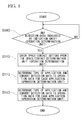
- Fig. 4 is a flowchart which explains operational procedures of the management unit 3E and the various applications 4 (flow of the management unit) in the application control unit of the input control apparatus in the first embodiment of the invention.
- the management unit 3E checks starts of the various applications 4 (Step S04).
- Step S04 when the management unit 3E identifies a start of an application 4 (Step S04, YES), the management unit 3E acquires information such as the type or the state of the application 4 (Step S05).
- Step S04 determines that there is not a start of the various applications (Step S04, NO)
- the process of Step S04 is repeatedly performed.
- the management unit 3E determines whether it is necessary to update the application information which the management unit 3E itself holds based on the change of the state of the application 4 or the like (Step S06).
- Step S06 determines that it is necessary to update the application information
- Step S07 the management unit 3E updates the application information which the management unit 3E itself holds to the latest information
- Step S06 determines that it is not necessary to update the application information (Step S06, NO)
- the process of Step S06 is repeatedly performed.
- the application information which the management unit 3E holds are shared by those parts that are included in the application control unit, that is, in the operation determination units 3A and 3B and the data combining unit 3C.
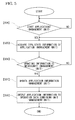
- Fig. 5 is a flowchart which explains operational procedures of the application control unit 3 (whole flow of the application control unit) of the input control apparatus in the first embodiment of the invention.
- the operation determination unit 3A determines whether there are any detection data indicated by the indication unit 1D (or the indication unit 2D) (Step S09).
- the operation determination unit 3A determines that there are detection data indicated by the indication unit 1D (or the indication unit 2D) (Step S09, Yes)
- the operation determination unit 3A converts the detection data to operation data corresponding to either of the spatial operation and the contact operation for each application based on the setting information from the space/contact determination unit 3D (Steps S10 and S11).
- Step S09 determines that there are not detection data indicated by the indication unit 1D (or the indication unit 2D) (Step S09, No).
- the process of Step S09 is repeatedly performed.
- the operation data combining unit 3C selects the detection data based on the contact operation since detections are performed by both touch panels in case of a contact operation due to the structure of touch panels.
- the detected operation data is selected (Step S12).
- a portable terminal provided with a plurality of touch panels
- different operations on/over the same point can be distinguished by changing the detection sensitivity of the touch panels.
- a spatial operation can be distinguished from a contact operation. Accordingly, new operations can be provided. Moreover, it can be prevented that contact operations which are similar to each other are recognized mistakenly until now.
- a second embodiment differs from the first embodiment in that the touch panel 1 and the touch panel 2 of the input control apparatus shown in Fig. 1 are capacitive and resistive film touch panels, respectively.
- the touch panel 2 is a resistive film touch panel which detects the position of an operation by catching a change of the pressure applied to the surface of the touch panel, and detects operational contents of an input instructing part which is not illustrated, for example, such as a stylus besides a finger of the user.
- the characteristic of the resistive film touch panel differs from that of the capacitive touch panels of the first embodiment in that it is assumed that the space/contact determination unit 3D sets that only contact operations are detected.
- the input control apparatus thus configured in a portable terminal which is provided with a plurality of touch panels as well as the first embodiment makes it possible to perform different operations, or spatial operations and contact operations. Meanwhile, the input control apparatus enables a stylus or the like to be applied as an input instructing part by changing the touch panel 2 into a resistive film touch panel.
- a third embodiment differs from the first embodiment in that the touch panel 1 and the touch panel 2 of the input control apparatus shown in Fig. 1 are optical and resistive film touch panels, respectively.
- the touch panel 1 (and touch panel 2) is an optical touch panel which detects the position of an operation by catching the position between a transmitting part such as an infrared ray unit arranged near the panel surface and a receiving part (a camera or the like) that is blocked with a finger or the like, and detects operational contents of an input instructing part which is not illustrated, for example, such as a stylus besides a finger of the user.
- a transmitting part such as an infrared ray unit arranged near the panel surface
- a receiving part a camera or the like
- the input control apparatus thus configured in a portable terminal which is provided with a plurality of touch panels as well as the first embodiment provides new operations.
- the input control apparatus makes it possible to distinguish different operations on/over the same point, or spatial operations and contact operations.
- the input control apparatus enables a stylus or the like to be applied as an input instructing part by changing the touch panel 1 (and 2) into an optical touch panel.
- a fourth embodiment differs from the first embodiment in that operations of the input instructing part (for example, a finger or the like) which is not illustrated are flick operations, and that it is assumed that the application 4 supports flick operations.
- a flick operation refers to an operation of blowing or rubbing a panel surface lightly with a finger, and which makes an image list or a Web screen mainly to be scrolled towards the direction in which the finger blows.
- the operation determination unit 3A determines whether there are any detection data indicated by the indication unit 1D (or the indication unit 2D) (Step S9).
- Step S9 when the operation determination unit 3A (or the operation determination unit 3B) determines that there are detection data indicated by the indication unit 1D (or the indication unit 2D) (Step S9, Yes), it is checked that the operation determination unit 3A (or the operation determination unit 3B) converts the detection data to the operation data corresponding to either the spatial operation or the contact operation based on the setting information from the space/contact determination unit 3D (Step S10).
- the type of the control application is checked based on the application information from the management unit 3E, and the detection data are converted to the operation data corresponding to either the spatial operation or the contact operation for each application (Step S11).
- Step S11 the flick operation is converted into operation data which make a screen such as a Web screen to be scrolled.
- the flick operation becomes something which is not contained in the selection list of operations, and an invalid or different operation is selected.
- the input control apparatus thus configured in a portable terminal which is provided with a plurality of touch panels as well as the first embodiment provides new operations.
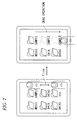
- the input control apparatus makes it possible to distinguish different operations on/over the same point, or spatial operations and contact operations. Meanwhile, a flick operation for scrolling a Web screen or the like when reading the screen can be prevented from being mistakenly recognized as a touch operation for selecting. These situations are illustrated in Figs. 6 and 7 .
- Fig. 6 illustrates that a Web screen is scrolled by a flick operation.
- FIG. 7 illustrates that when a flick operation is to be performed in a folder list screen, the folder which is displayed as "SAMPLE" is touched and dragged.
- a fifth embodiment differs from the first embodiment in that operations of the input instructing part (for example, a finger or the like) which is not illustrated are stay operations that the input instructing part stops in a place for a period of time, and that it is assumed that the applications 4 support stay operations.
- the input instructing part for example, a finger or the like
- stay operations that the input instructing part stops in a place for a period of time, and that it is assumed that the applications 4 support stay operations.
- the operation determination unit 3A determines whether there are any detection data indicated by the indication unit 1D (Step S9).
- Step S9 when the operation determination unit 3A determines that there are detection data indicated by the indication unit 1D (Step S9, Yes), it is checked that the operation determination unit 3A converts the detection data to the operation data corresponding to the spatial operation based on the setting information from the space/contact determination unit 3D (Step S10).
- Step S11 the type of the control application is checked based on the application information from the management unit 3E, the detection data are converted to the operation data corresponding to the spatial operation for each application (Step S11).
- Step S11 the operation of staying in a place for a period of time is converted into operation data which make an icon, which is at a point to be touched, to be highlighted (reversed) or enlarged.
- the stay operation becomes something which is not contained in the selection list of operations, and an invalid or different operation is selected.
- the operation determination unit 3B determines whether there are any detection data indicated by the indication unit 2D (Step S9).
- Step S9 when the operation determination unit 3B determines that there are detection data indicated by the indication unit 2D (Step S9, Yes), it is checked that the operation determination unit 3B converts the detection data to the operation data corresponding to the contact operation based on the setting information from the space/contact determination unit 3D (Step S10).
- Step S11 the type of the control application is checked based on the application information from the management unit 3E, and the detection data are converted to the operation data corresponding to the contact operation for each application (Step S11).
- Step S11 the contact operation near the above point is converted into operation data which make the preferably selected operation to be performed.
- the application 4 does not support the above operations, or the above operation is not received, the above operation becomes something which is not contained in the selection list of operations, and an invalid or different operation is selected.
- the input control apparatus thus configured in a portable terminal which is provided with a plurality of touch panels as well as the first embodiment provides new operations.
- the input control apparatus makes it possible to distinguish different operations on/over the same point, or spatial operations and contact operations.
- the point to be touched is known when a selection action or the like is taken on a touch panel, erroneous operations such as a touch on a point which is not intended to be touched can be prevented. These situations are illustrated in Figs. 8 and 9 .
- a selection objected not intended to be selected may be selected.
- a finger stays at a place for a period of time, the point to which the finger points is enlarged or highlighted as shown in Fig. 8 , and the object to be selected by a touch is checked beforehand.
- the object which is selected by being highlighted is preferably selected by a touch operation in such a state, compared with the surrounding selection objects as shown in Fig. 9 .
- a sixth embodiment differs from the first embodiment in that operations of the input instructing part (for example, a finger or the like) which is not illustrated are upwards and downwards operations that make the input instructing part move upwards and downwards, and that it is assumed that the application 4 supports those upwards and downwards operations.
- the input instructing part for example, a finger or the like
- the operation determination unit 3A determines whether there are any detection data indicated by the indication unit 1D (Step S9).
- Step S9 when the operation determination unit 3A determines that there are detection data indicated by the indication unit 1D (Step S9, Yes), it is checked that the operation determination unit 3A converts the detection data to the operation data corresponding to the spatial operation based on the setting information from the space/contact determination unit 3D (Step S10).
- Step S11 the type of the control application is checked based on the application information from the management unit 3E, and the detection data are converted to the operation data corresponding to the spatial operations for each application (Step S11).
- Step S11 the upwards and downwards operations are converted into operation data which make the applications displayed on the touch panel to be enlarged or reduced.
- the application 4 does not support the upwards and downwards operations, or the upwards and downwards operation are not received, the upwards and downwards operation becomes something which is not contained in the selection list of operations, and an invalid or different operation is selected.
- Step S9 when the operation determination unit 3B determines that there are detection data indicated by the indication unit 2D (Step S9, Yes), it is checked that the operation determination unit 3A converts the detection data to the operation data corresponding to the contact operation based on the setting information from the space/contact determination unit 3D (Step S10).
- Step S11 the type of the control application is checked based on the application information from the management unit 3E, the detection data are converted to the operation data corresponding to the contact operation for each application (Step S11).
- Step S11 the contact operation is converted into the operation data which make an operation of selecting an icon, which is a touch operation, to be performed.
- the application 4 does not support the above operations, or the above operation is not received, the above operation becomes something which is not contained in the selection list of operations, and an invalid or different operation is selected.
- the input control apparatus thus configured in a portable terminal which is provided with a plurality of touch panels like the first embodiment provides new operations.
- the input control apparatus makes it possible to distinguish different operations on/over the same point, or spatial operations and contact operations. Meanwhile, enlarging/reducing operations by the upwards/downwards moving of a finger or the like can be prevented from being mistakenly recognized as a touch operation on the same point. These situations are illustrated in Figs. 10 and 11 .
- a seventh embodiment differs from the first embodiment in that operations of the input instructing part (for example, a finger or the like) which is not illustrated are surrounding operations, and that it is assumed that the application 4 supports the surrounding operations.
- the input instructing part for example, a finger or the like
- the operation determination unit 3A determines whether there are any detection data indicated by the indication unit 1D (Step S9).
- Step S9 when the operation determination unit 3A determines that there are detection data indicated by the indication unit 1D (Step S9, Yes), it is checked that the operation determination unit 3A converts the detection data to the operation data corresponding to the spatial operation based on the setting information from the space/contact determination unit 3D (Step S10).
- Step S11 the type of the control application is checked based on the application information from the management unit 3E, and the detection data are converted to the operation data corresponding to the spatial operations for each application (Step S11).
- Step S11 the surrounding operation is converted into operation data which make an operation of selecting a plurality of objects in the selected area such as files and folders to be performed.
- the surrounding operation becomes something which is not contained in the selection list of operations, and an invalid or different operation is selected.
- Step S9 when the operation determination unit 3B determines that there are detection data indicated by the indication unit 2D (Step S9, Yes), it is checked that the operation determination unit 3A converts the detection data to the operation data corresponding to the contact operation based on the setting information from the space/contact determination unit 3D (Step S10).
- Step S11 the type of the control application is checked based on the application information from the management unit 3E, the detection data are converted to the operation data corresponding to the contact operation for each application (Step S11).
- Step S11 the contact operation is converted into the operation data which make an operation of selecting an icon, which is a touch operation, or an operation of dragging a file, to be performed.
- the application 4 does not support the above operations, or the above operation is not received, the above operation becomes something which is not contained in the selection list of operations, and an invalid or different operation is selected.
- the input control apparatus thus configured in a portable terminal which is provided with a plurality of touch panels as well as the first embodiment provides new operations.
- the input control apparatus makes it possible to distinguish different operations on/over the same point, or spatial operations and contact operations. Meanwhile, operations of multiple selection in a selected area by the surrounding operation of a finger or the like can be prevented from being mistakenly recognized as a drag or touch operation on the same point. These situations are illustrated in Fig. 12 .
- a finger is operated so that the folders or images selected as shown in Fig. 12 are surrounded, the folders or images in the surrounded area are multiply selected.
- new operating methods can be provided by realizing two operating method, that is, an operation performed by contacting a touch panel directly with a finger or the like, and an operation performed without contacting the touch panel. Therefore, the invention is suitable for electronic devices which receive complicated input instructions in a limited space, such as mobile phones and PDAs.
Landscapes
- Engineering & Computer Science (AREA)
- General Engineering & Computer Science (AREA)
- Theoretical Computer Science (AREA)
- Human Computer Interaction (AREA)
- Physics & Mathematics (AREA)
- General Physics & Mathematics (AREA)
- Position Input By Displaying (AREA)
- User Interface Of Digital Computer (AREA)
Applications Claiming Priority (2)
| Application Number | Priority Date | Filing Date | Title |
|---|---|---|---|
| JP2009169885A JP2011022961A (ja) | 2009-07-21 | 2009-07-21 | 入力制御装置 |
| PCT/JP2010/001479 WO2011010411A1 (ja) | 2009-07-21 | 2010-03-03 | 入力制御装置 |
Publications (1)
| Publication Number | Publication Date |
|---|---|
| EP2458481A1 true EP2458481A1 (en) | 2012-05-30 |
Family
ID=43498893
Family Applications (1)
| Application Number | Title | Priority Date | Filing Date |
|---|---|---|---|
| EP10802033A Withdrawn EP2458481A1 (en) | 2009-07-21 | 2010-03-03 | Input control apparatus |
Country Status (4)
| Country | Link |
|---|---|
| US (1) | US20120120021A1 (https=) |
| EP (1) | EP2458481A1 (https=) |
| JP (1) | JP2011022961A (https=) |
| WO (1) | WO2011010411A1 (https=) |
Families Citing this family (7)
| Publication number | Priority date | Publication date | Assignee | Title |
|---|---|---|---|---|
| JP5704854B2 (ja) * | 2010-07-26 | 2015-04-22 | オリンパスイメージング株式会社 | 表示装置 |
| EP2730998B1 (en) | 2011-07-04 | 2018-05-02 | NEC Corporation | Image processing device, image processing method, and image processing program |
| JP5949010B2 (ja) | 2012-03-16 | 2016-07-06 | 富士通株式会社 | 入力制御装置、入力制御プログラム、及び入力制御方法 |
| KR102162836B1 (ko) * | 2013-08-30 | 2020-10-07 | 삼성전자주식회사 | 필드 속성을 이용한 컨텐트를 제공하는 전자 장치 및 방법 |
| TWI649689B (zh) * | 2015-02-13 | 2019-02-01 | 新益先創科技股份有限公司 | 電容影像感測系統 |
| US9619137B2 (en) * | 2015-03-26 | 2017-04-11 | Motorola Mobility Llc | Portable device touchscreen optimization |
| CN118250605A (zh) * | 2018-09-19 | 2024-06-25 | 杜比实验室特许公司 | 用于控制音频参数的方法及装置 |
Family Cites Families (9)
| Publication number | Priority date | Publication date | Assignee | Title |
|---|---|---|---|---|
| JP3343987B2 (ja) * | 1993-04-28 | 2002-11-11 | カシオ計算機株式会社 | イメージ処理装置 |
| JPH1165769A (ja) * | 1997-08-25 | 1999-03-09 | Oki Electric Ind Co Ltd | タッチパネル表示制御方法及びそれを記録した記録媒体 |
| JP2003280812A (ja) * | 2002-03-20 | 2003-10-02 | Hitachi Ltd | タッチパネル付きディスプレイ装置及び表示方法 |
| US20080316182A1 (en) * | 2007-06-21 | 2008-12-25 | Mika Antila | Touch Sensor and Method for Operating a Touch Sensor |
| US20090096762A1 (en) * | 2007-10-16 | 2009-04-16 | Epson Imaging Devices Corporation | Input device, display device with input function, and electronic apparatus |
| JP5020165B2 (ja) * | 2007-10-16 | 2012-09-05 | ソニーモバイルディスプレイ株式会社 | 入力機能付き表示装置、および電子機器 |
| JP4997602B2 (ja) | 2008-01-21 | 2012-08-08 | 独立行政法人産業技術総合研究所 | 多画面表示システム |
| US20090231288A1 (en) * | 2008-03-17 | 2009-09-17 | Inventec Corporation | Hand-held electronic device and combined input method thereof |
| US20110017524A1 (en) * | 2009-07-27 | 2011-01-27 | Chien Lung Chen | Dual-substrate capacitive touch panel |
-
2009
- 2009-07-21 JP JP2009169885A patent/JP2011022961A/ja active Pending
-
2010
- 2010-03-03 EP EP10802033A patent/EP2458481A1/en not_active Withdrawn
- 2010-03-03 US US13/386,337 patent/US20120120021A1/en not_active Abandoned
- 2010-03-03 WO PCT/JP2010/001479 patent/WO2011010411A1/ja not_active Ceased
Non-Patent Citations (1)
| Title |
|---|
| See references of WO2011010411A1 * |
Also Published As
| Publication number | Publication date |
|---|---|
| US20120120021A1 (en) | 2012-05-17 |
| JP2011022961A (ja) | 2011-02-03 |
| WO2011010411A1 (ja) | 2011-01-27 |
Similar Documents
| Publication | Publication Date | Title |
|---|---|---|
| US8386950B2 (en) | Methods, systems and computer program products for arranging a plurality of icons on a touch sensitive display | |
| JP5184545B2 (ja) | 端末装置、リンク選択方法および表示プログラム | |
| US8300017B2 (en) | Mobile electronic apparatus with touch input device and display method using the same | |
| KR102091235B1 (ko) | 휴대 단말기에서 메시지를 편집하는 장치 및 방법 | |
| EP2631738B1 (en) | Method and apparatus for adjusting a user interface to reduce obscuration | |
| KR20210151956A (ko) | 다수의 애플리케이션 윈도우들과 상호작용하기 위한 시스템들, 방법들, 및 사용자 인터페이스들 | |
| US20100164878A1 (en) | Touch-click keypad | |
| EP3590034B1 (en) | Systems and methods for interacting with multiple applications that are simultaneously displayed on an electronic device with a touch-sensitive display | |
| EP2081107A1 (en) | Electronic device capable of transferring object between two display units and controlling method thereof | |
| US8456433B2 (en) | Signal processing apparatus, signal processing method and selection method of user interface icon for multi-touch panel | |
| EP2533146A2 (en) | Apparatus and method for providing web browser interface using gesture in device | |
| EP2154603A2 (en) | Display apparatus, display method, and program | |
| US20100138782A1 (en) | Item and view specific options | |
| EP2458481A1 (en) | Input control apparatus | |
| EP2613247B1 (en) | Method and apparatus for displaying a keypad on a terminal having a touch screen | |
| KR20140108993A (ko) | 페이지 운용 방법 및 그 전자 장치 | |
| US20140071049A1 (en) | Method and apparatus for providing one-handed user interface in mobile device having touch screen | |
| KR20150119135A (ko) | 전자 장치에 표시된 콘텐츠를 관리하기 위한 시스템 및 방법 | |
| WO2014024363A1 (ja) | 表示制御装置、表示制御方法及びプログラム | |
| US9442591B2 (en) | Electronic device, non-transitory storage medium, and control method for electronic device | |
| WO2010060502A1 (en) | Item and view specific options | |
| KR20160004590A (ko) | 전자 장치의 화면 표시 방법 및 전자 장치 | |
| KR102095039B1 (ko) | 터치 인터페이스를 제공하는 장치에서 터치 입력을 수신하는 방법 및 장치 | |
| JPWO2009022671A1 (ja) | 接触型入力装置、接触型入力方法及びプログラム | |
| JP2011192173A (ja) | 情報処理装置およびタッチパネル操作方法 |
Legal Events
| Date | Code | Title | Description |
|---|---|---|---|
| PUAI | Public reference made under article 153(3) epc to a published international application that has entered the european phase |
Free format text: ORIGINAL CODE: 0009012 |
|
| 17P | Request for examination filed |
Effective date: 20120120 |
|
| AK | Designated contracting states |
Kind code of ref document: A1 Designated state(s): AT BE BG CH CY CZ DE DK EE ES FI FR GB GR HR HU IE IS IT LI LT LU LV MC MK MT NL NO PL PT RO SE SI SK SM TR |
|
| DAX | Request for extension of the european patent (deleted) | ||
| STAA | Information on the status of an ep patent application or granted ep patent |
Free format text: STATUS: THE APPLICATION HAS BEEN WITHDRAWN |
|
| 18W | Application withdrawn |
Effective date: 20130916 |