WO2011010411A1 - 入力制御装置 - Google Patents
入力制御装置 Download PDFInfo
- Publication number
- WO2011010411A1 WO2011010411A1 PCT/JP2010/001479 JP2010001479W WO2011010411A1 WO 2011010411 A1 WO2011010411 A1 WO 2011010411A1 JP 2010001479 W JP2010001479 W JP 2010001479W WO 2011010411 A1 WO2011010411 A1 WO 2011010411A1
- Authority
- WO
- WIPO (PCT)
- Prior art keywords
- input
- unit
- determination unit
- touch panel
- application
- Prior art date
- Legal status (The legal status is an assumption and is not a legal conclusion. Google has not performed a legal analysis and makes no representation as to the accuracy of the status listed.)
- Ceased
Links
Images







Classifications
-
- G—PHYSICS
- G06—COMPUTING OR CALCULATING; COUNTING
- G06F—ELECTRIC DIGITAL DATA PROCESSING
- G06F3/00—Input arrangements for transferring data to be processed into a form capable of being handled by the computer; Output arrangements for transferring data from processing unit to output unit, e.g. interface arrangements
- G06F3/01—Input arrangements or combined input and output arrangements for interaction between user and computer
- G06F3/03—Arrangements for converting the position or the displacement of a member into a coded form
- G06F3/041—Digitisers, e.g. for touch screens or touch pads, characterised by the transducing means
- G06F3/0416—Control or interface arrangements specially adapted for digitisers
-
- G—PHYSICS
- G06—COMPUTING OR CALCULATING; COUNTING
- G06F—ELECTRIC DIGITAL DATA PROCESSING
- G06F3/00—Input arrangements for transferring data to be processed into a form capable of being handled by the computer; Output arrangements for transferring data from processing unit to output unit, e.g. interface arrangements
- G06F3/01—Input arrangements or combined input and output arrangements for interaction between user and computer
- G06F3/03—Arrangements for converting the position or the displacement of a member into a coded form
- G06F3/041—Digitisers, e.g. for touch screens or touch pads, characterised by the transducing means
- G06F3/044—Digitisers, e.g. for touch screens or touch pads, characterised by the transducing means by capacitive means
-
- G—PHYSICS
- G06—COMPUTING OR CALCULATING; COUNTING
- G06F—ELECTRIC DIGITAL DATA PROCESSING
- G06F3/00—Input arrangements for transferring data to be processed into a form capable of being handled by the computer; Output arrangements for transferring data from processing unit to output unit, e.g. interface arrangements
- G06F3/01—Input arrangements or combined input and output arrangements for interaction between user and computer
- G06F3/03—Arrangements for converting the position or the displacement of a member into a coded form
- G06F3/041—Digitisers, e.g. for touch screens or touch pads, characterised by the transducing means
- G06F3/045—Digitisers, e.g. for touch screens or touch pads, characterised by the transducing means using resistive elements, e.g. a single continuous surface or two parallel surfaces put in contact
-
- G—PHYSICS
- G06—COMPUTING OR CALCULATING; COUNTING
- G06F—ELECTRIC DIGITAL DATA PROCESSING
- G06F3/00—Input arrangements for transferring data to be processed into a form capable of being handled by the computer; Output arrangements for transferring data from processing unit to output unit, e.g. interface arrangements
- G06F3/01—Input arrangements or combined input and output arrangements for interaction between user and computer
- G06F3/048—Interaction techniques based on graphical user interfaces [GUI]
- G06F3/0487—Interaction techniques based on graphical user interfaces [GUI] using specific features provided by the input device, e.g. functions controlled by the rotation of a mouse with dual sensing arrangements, or of the nature of the input device, e.g. tap gestures based on pressure sensed by a digitiser
- G06F3/0488—Interaction techniques based on graphical user interfaces [GUI] using specific features provided by the input device, e.g. functions controlled by the rotation of a mouse with dual sensing arrangements, or of the nature of the input device, e.g. tap gestures based on pressure sensed by a digitiser using a touch-screen or digitiser, e.g. input of commands through traced gestures
-
- G—PHYSICS
- G06—COMPUTING OR CALCULATING; COUNTING
- G06F—ELECTRIC DIGITAL DATA PROCESSING
- G06F2203/00—Indexing scheme relating to G06F3/00 - G06F3/048
- G06F2203/041—Indexing scheme relating to G06F3/041 - G06F3/045
- G06F2203/04101—2.5D-digitiser, i.e. digitiser detecting the X/Y position of the input means, finger or stylus, also when it does not touch, but is proximate to the digitiser's interaction surface and also measures the distance of the input means within a short range in the Z direction, possibly with a separate measurement setup
Definitions
- the present invention particularly relates to an input control device provided with a plurality of touch panels.
- an input device for giving an input instruction in various electronic devices such as a mobile phone device, a mobile information terminal, a mobile music player and the like.
- an input device having a touch panel for performing an input instruction by performing an operation of touching an arbitrary position on the operation surface is widely used.
- the user performs operations such as touch and tracing on the touch panel using a finger or a touch pen, and performs desired operations such as selection / input of characters of the portable terminal mounted and screen scrolling.
- FIG. 13 is a figure showing the outline of the touch panel of patent documents 1. As shown in FIG.
- the present invention has been made to solve these conventional problems, and in a portable terminal equipped with a plurality of touch panels, a touch operation performed by bringing a finger or the like into direct contact with the touch panel and a space operation performed without contact. Provide two operation methods. Accordingly, it is an object of the present invention to provide an input control device which realizes an unprecedented new operation method.
- the input control device of the present invention comprises a first input unit for detecting an input instruction in a first sensitivity range, a second input unit for detecting an input instruction in a second sensitivity range, and the first input unit.
- a first operation determination unit that receives detection data from the control unit and converts it into corresponding operation content;
- a second operation determination unit that receives detection data from the second input unit and converts the detection data into corresponding operation content;
- the space / contact determination unit determines which operation content of space operation and touch operation is determined as the operation content;
- a management unit that manages information indicating types and states, and operation data from the first operation determination unit and the second operation determination unit are combined and output as operation information of an application managed by the management unit. Data synthesis Having the, with the configuration.
- a new operation method is realized by realizing two operation methods of an operation performed by directly touching a touch panel with a finger or the like and an operation performed without contact with a touch panel on a mobile terminal equipped with a plurality of touch panels. Can be provided.
- Block diagram showing the configuration of the input control device in the first embodiment of the present invention A diagram schematically showing sensitivity ranges of sensitivity control unit 1B and sensitivity control unit 2B of the input control device in the first embodiment of the present invention Flow chart for explaining the operation procedure of the touch panel 1 and the touch panel 2 of the input control device in the first embodiment of the present invention Flow chart for explaining the operation procedure of the management unit 3E and the various applications 4 in the application control unit 3 of the input control device in the first embodiment of the present invention Flow chart for explaining the operation procedure of the application control unit 3 of the input control device in the first embodiment of the present invention The figure which shows transition of a display screen when the screen scroll by space operation is scrolled in the input control apparatus in Embodiment 4 of this invention.
- the figure which shows transition of a display screen when dragging operation of the selection folder by contact operation is carried out in the input control apparatus in Embodiment 4 of this invention.
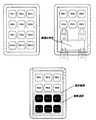
- the figure which shows transition of a display screen when multiple selection, such as a folder and an image, etc. by space operation is performed in the input control apparatus in Embodiment 7 of this invention.
- FIG. 1 is a block diagram showing a configuration of an input control device according to Embodiment 1 of the present invention.
- FIG. 1 only the structure which concerns on invention is shown in figure, and illustration about the other element in the terminal etc. which are applied is abbreviate
- the input control device includes a touch panel 1, a touch panel 2, an application control unit 3, and various applications 4.
- the touch panel 1 is a capacitance type that detects an operation position by capturing a change in surface charge on the panel surface, and includes a detection unit 1A, a sensitivity control unit 1B, a detection determination unit 1C, and a notification unit 1D.
- the detection unit 1A detects the content of an operation by an input instruction unit (for example, a user's finger, a stylus or the like) not shown.
- an input instruction unit for example, a user's finger, a stylus or the like
- the sensitivity control unit 1B has a function of setting the detection sensitivity of the touch panel 1 by an adjustment value, and a setting value for the adjustment is set in advance.
- the detection determination unit 1C creates the detected operation as detection data such as position information.
- the notification unit 1D notifies the application control unit 3 of the detection data created by the detection determination unit 1C.
- the touch panel 2 is an electrostatic capacitance type like the touch panel 1, and includes a detection unit 2A, a sensitivity control unit 2B, a detection determination unit 2C, and a notification unit 2D.
- the detection unit 2A detects an operation content by an input instruction unit (for example, a user's finger, a stylus, etc.) not shown.
- an input instruction unit for example, a user's finger, a stylus, etc.
- the sensitivity control unit 2B has a function of setting the detection sensitivity on the touch panel 2 by an adjustment value, and a setting value for the adjustment is set in advance.
- a setting value for the adjustment is set in advance.
- the detection determination unit 2C creates the detected operation as detection data such as position information.
- the notification unit 2D notifies the application control unit 3 of the detection data created by the detection determination unit 2C.
- the application control unit 3 includes an operation determination unit 3A, an operation determination unit 3B, an operation data combination unit 3C, a space / contact determination unit 3D, and a management unit 3E.
- the operation determination units 3A and 3B receive detection data from the touch panel 1 and the touch panel 2, and determine and convert them as an operation on an application.
- the operation data combining unit 3C combines the operation data determined and converted by the operation determining unit 3A and the operation determining unit 3B.
- the space / contact determination unit 3D is either the contact operation or the space operation described later. It holds setting information for determining whether there is any.
- the management unit 3E controls the entire application control unit 3 and acquires and holds information such as type information and status of the various applications 4.
- FIG. 2 is a diagram schematically showing sensitivity ranges of the sensitivity control unit 1B and the sensitivity control unit 2B of the input control device according to the first embodiment of the present invention.
- the touch panel 1 is disposed on the touch panel 2, and the touch panel 2 is disposed on the terminal main body.
- the sensitivity control unit 1 ⁇ / b> B sets the sensitivity of the touch panel 1 to be higher than the sensitivity of the touch panel 2.
- the sensitivity control unit 2B sets the sensitivity of the touch panel 2 to be lower than the sensitivity of the touch panel 1.
- the input control device is not only in contact with the touch panel 1 and operated (hereinafter referred to as a touch operation), but not in contact with the touch panel 1. It can distinguish and detect that it is operating (it abbreviates to space operation hereafter).
- the input control device can distinguish not only the touch operation and the space operation but also the space operation in the sensitivity range of the touch panel 1 and the space operation in the sensitivity range of the touch panel 2. Nor.
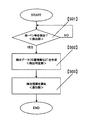
- FIG. 3 is a flowchart for explaining the operation procedure (the touch panels 1 and 2 flows) of the touch panel 1 and the touch panel 2 of the input control device in the first embodiment of the present invention.
- the sensitivity control unit 1B and the sensitivity control unit 2B are set such that the touch panel 1 detects a space operation and the touch panel 2 detects a touch operation.
- the operation determination unit 3A determines the space operation
- the operation determination unit 3B determines that the space / contact determination unit 3D is set so as to determine the touch operation.
- detection unit 1A determines whether or not there is an input from the input instructing unit (step S01).
- the detection determination unit 1C determines the capacitance according to the input instruction
- the position information is calculated from the change of the value of < ' > to create detection data for the operation (step S02).
- step S01 when the detection unit 1A (or the detection unit 2A) determines that there is no input by the input instructing unit (No in step S01), the process of step S01 is continuously performed.
- the notification unit 1D (or notification unit 2D) inputs detection data to the operation determination unit 3A (or the operation determination unit 3B) of the application control unit 3 (step S03).
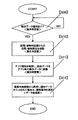
- FIG. 4 is a flowchart for explaining the operation procedure (management unit flow) of the management unit 3E and the various applications 4 in the application control unit of the input control device according to the first embodiment of the present invention.
- the management unit 3E checks the activation of the various applications 4 (step S04).
- the management unit 3E confirms the activation of the application 4 (step S04, YES)
- the management unit 3E acquires information such as the type and the state of the application 4 (step S05).
- step S04 when the management unit 3E determines that there is no activation of various applications (NO in step S04), the process of step S04 is continuously performed.
- the management unit 3E determines whether it is necessary to update the application information owned by itself, based on the status change of the application 4 or the like (step S06).
- the management unit 3E determines that the application information needs to be updated (YES in step S06)
- the management unit 3E updates the application information of its own to the latest information (step S07).
- step S06 determines that the application information need not be updated (NO in step S06).
- the application information held by the management unit 3E is shared in the application control unit including the operation determination units 3A and 3B and the data combining unit 3C.
- FIG. 5 is a flowchart for explaining the operation procedure (the entire flow of the application control unit) of the application control unit 3 of the input control device according to the first embodiment of the present invention.
- the operation determination unit 3A determines whether or not there is detection data notified from the notification unit 1D (or the notification unit 2D) (step S09).
- step S09 when operation determination unit 3A (or operation determination unit 3B) determines that there is detection data notified from notification unit 1D (or notification unit 2D) (step S09, Yes), space / contact determination unit 3D And convert the detected data into operation data corresponding to the operation of either space or contact for each application (steps S10 and S11).
- step S09 when operation determination unit 3A (or operation determination unit 3B) determines that there is no detection data notified from notification unit 1D (or notification unit 2D) (step S09, No), the process continues in step S09. Do the processing.
- the data combining unit 3C detects the operation data converted into the operation for each application at the same time by the operation determination unit 3A and the operation determination unit 3B. Since detection is performed by the touch panel, detection data by the touch operation is selected. If only one is detected, the detected operation data is selected (step S12).
- the detection sensitivity of the touch panel on the mobile terminal equipped with a plurality of touch panels by changing the detection sensitivity of the touch panel on the mobile terminal equipped with a plurality of touch panels, different operations of space operation and touch operation are distinguished on the same point. And can provide new operations. In addition, it is possible to prevent the erroneous recognition operation between the operations realized by the similar touch operation.
- the second embodiment differs from the first embodiment in that the touch panel 1 and the touch panel 2 of the input control device shown in FIG.
- the touch panel 2 is a resistive film type that detects an operation position by capturing a change in pressure applied to the panel surface, and detects an operation content by a stylus or the like in addition to the user's finger as an input instruction unit (not shown). However, it differs from the first embodiment in that it is assumed that the space / contact determination unit 3D is set so as to detect only the touch operation in terms of the resistance film type.
- the input control device configured in this way can perform different operations of space operation and touch operation on a portable terminal equipped with a plurality of touch panels as in the first embodiment, and change the touch panel 2 to a resistive film type. Thus, it is possible to cope with a stylus or the like as the input instruction unit.
- the third embodiment is different from the first embodiment in that the touch panel 1 and the touch panel 2 of the input control device shown in FIG.
- the touch panel 1 (and the touch panel 2) is an optical system that detects an operation position by capturing a position blocked by a finger or the like between a transmitter such as infrared light disposed on the panel surface and a receiver (such as a camera).
- a transmitter such as infrared light disposed on the panel surface
- a receiver such as a camera
- an input instruction unit for example, in addition to the user's finger, the operation content by the stylus or the like is also detected.
- the input control device configured in this way is a new operation that can distinguish different operations of space operation and touch operation on the same point on the portable terminal equipped with a plurality of touch panels as in the first embodiment.
- the touch panel 1 (and 2) With an optical method, it is possible to cope with a stylus or the like as an input instruction unit.
- Embodiment 4 is different from the first embodiment in that it is assumed that the operation by an input instruction unit (for example, a finger or the like) not shown is a flick operation and that the application 4 corresponds to the flick operation.
- the flick operation is an operation in which a panel surface is lightly touched or touched with a finger, and the operation is mainly an operation of scrolling an image list, a web screen, etc. in the direction in which the finger is paid.
- the operation determination unit 3A determines whether or not there is detection data notified from the notification unit 1D (or the notification unit 2D) (step S9).
- step S9 when operation determination unit 3A (or operation determination unit 3B) determines that there is detection data notified from notification unit 1D (or notification unit 2D) (step S9, Yes), space / contact determination unit 3D Based on the setting information from, it is checked whether to convert into operation data corresponding to either space or touch operation (step S10).
- control application is confirmed from the application information from the management unit 3E, and the detected data is converted into operation data corresponding to the operation of either space or contact for each application (step S11).
- the flick operation is converted into operation data for performing a screen scroll operation such as a Web screen in step S11.
- the application 4 does not correspond to the flick operation or does not accept the flick operation, the specification is not included in the selection list of the operation, and the invalid or different operation is selected.
- the input control device configured in this way is a new operation that can distinguish different operations of space operation and touch operation on the same point on the portable terminal equipped with a plurality of touch panels as in the first embodiment. While providing the method, it is possible to obtain an effect of preventing contents such as screen scrolling by flicking operation while browsing web screens etc. and erroneous recognition of selection operation by touch operation. These states are illustrated in FIG. 6 and FIG.
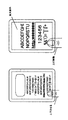
- FIG. 6 illustrates how the web screen is scrolled by the flick operation.
- FIG. 7 illustrates a state in which a drag operation is performed by touching a folder displayed as "SAMPLE" when performing a flick operation on the folder list screen.
- the operation of an input designating unit (for example, a finger or the like) not shown is an operation of placing the input designating unit in the space for a fixed time, and the application 4 corresponds to the operation of placing it in the space for a fixed time. Is different from the first embodiment in that it is assumed.
- the operation determination unit 3A determines whether or not there is detection data notified from the notification unit 1D (step S9).
- step S9 when the operation determination unit 3A determines that there is detection data notified from the notification unit 1D (Yes in step S9), operation data corresponding to the space operation is obtained from the setting information from the space / contact determination unit 3D. It is confirmed to convert to (step S10).
- control application is confirmed from the application information from the management unit 3E, and the detected data is converted into operation data corresponding to the space operation for each application (step S11).
- step S11 an operation of placing a predetermined time in space is converted into operation data for performing an operation of displaying an icon or the like in reverse or enlarged as a point touched in advance.
- the application 4 does not correspond to the operation to place in the space for a certain period of time, or if it is in a state not accepting the operation to place in the space for a certain period of time, it becomes a specification not included in the selection list of operations The operation is selected.
- the operation determination unit 3B determines whether or not there is detected data notified from the notification unit 2D (step S9).
- step S9 when the operation determination unit 3B determines that there is detection data notified from the notification unit 2D (Yes in step S9), operation data corresponding to the touch operation is obtained from the setting information from the space / contact determination unit 3D. It is confirmed to convert to (step S10).
- control application is confirmed from the application information from the management unit 3E, and the detected data is converted into operation data corresponding to the touch operation for each application (step S11).
- step S11 the contact operation to the said point vicinity is converted into the operation data which performs operation selected preferentially.
- the application 4 does not correspond to the operation or when the operation is not accepted, the specification is not included in the selection list of the operation, and the invalid or different operation is selected.
- the input control device configured in this way is a new operation that can distinguish different operations of space operation and touch operation on the same point on the portable terminal equipped with a plurality of touch panels as in the first embodiment.
- an effect of preventing an erroneous operation such as a touch to an unintended point can be obtained.
- an input instruction unit for example, a finger or the like
- the operation of an input instruction unit is an operation to move the input instruction unit up and down and corresponds to the operation to move the application 4 up and down. Is different from the first embodiment.
- the operation determination unit 3A determines whether or not there is detection data notified from the notification unit 1D (step S9).
- step S9 when the operation determination unit 3A determines that there is detection data notified from the notification unit 1D (Yes in step S9), operation data corresponding to the space operation is obtained from the setting information from the space / contact determination unit 3D. It is confirmed to convert to (step S10).
- control application is confirmed from the application information from the management unit 3E, and the detected data is converted into operation data corresponding to the space operation for each application (step S11).
- step S11 the operation of moving up and down in step S11 is converted into operation data for performing the enlargement / reduction operation of the application displayed on the touch panel.
- the application 4 does not correspond to the operation of moving up and down or in the state of not accepting the operation of moving up and down, the specification is not included in the selection list of operations and invalid or different operations are selected.
- step S9 when the operation determination unit 3B determines that there is detection data notified from the notification unit 2D (Yes in step S9), operation data corresponding to the touch operation is obtained from the setting information from the space / contact determination unit 3D. It is confirmed to convert to (step S10).
- control application is confirmed from the application information from the management unit 3E, and the detected data is converted into operation data corresponding to the touch operation for each application (step S11).
- step S11 the touch operation is converted into operation data for performing an operation of selecting an icon or the like as the touch operation.
- the application 4 does not correspond to the operation or when the operation is not accepted, the specification is not included in the selection list of the operation, and the invalid or different operation is selected.
- the input control device configured in this way is a new operation that can distinguish different operations of space operation and touch operation on the same point on the portable terminal equipped with a plurality of touch panels as in the first embodiment.
- an effect of preventing an enlargement / reduction operation by a finger or the like from being erroneously operated as a touch operation on the same point can be obtained.
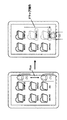
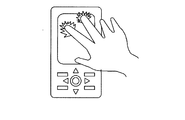
- the finger or the like When expanding to an arbitrary magnification on a screen such as a web or map application, as shown in FIG. 10, the finger or the like is operated upward at the portion to be enlarged, and conversely, when reducing to an arbitrary magnification, As shown in 11, the finger or the like is operated downward.
- the operation of an input instruction unit for example, a finger or the like (not shown) is an enclosure operation of the input instruction unit and that the application 4 corresponds to the enclosure operation. This is different from the first embodiment.
- the operation determination unit 3A determines whether or not there is detection data notified from the notification unit 1D (step S9).
- step S9 when the operation determination unit 3A determines that there is detection data notified from the notification unit 1D (Yes in step S9), operation data corresponding to the space operation is obtained from the setting information from the space / contact determination unit 3D. It is confirmed to convert to (step S10).
- control application is confirmed from the application information from the management unit 3E, and the detected data is converted into operation data corresponding to the space operation for each application (step S11).
- step S11 the enclosure operation is converted into operation data for performing multiple selection operation of objects such as files and folders within the selection range.
- the application 4 does not correspond to the enclosure operation or does not receive the enclosure operation, the specification is not included in the operation selection list, and an invalid or different operation is selected.
- step S9 when the operation determination unit 3B determines that there is detection data notified from the notification unit 2D (Yes in step S9), operation data corresponding to the touch operation is obtained from the setting information from the space / contact determination unit 3D. It is confirmed to convert to (step S10).
- control application is confirmed from the application information from the management unit 3E, and the detected data is converted into operation data corresponding to the touch operation for each application (step S11).
- step S11 the touch operation is converted into operation data for performing selection operation of an icon or the like as touch operation or drag operation of a file or the like.
- the application 4 does not correspond to the operation or when the operation is not accepted, the specification is not included in the selection list of the operation, and the invalid or different operation is selected.
- the input control device configured in this way is a new operation that can distinguish different operations of space operation and touch operation on the same point on the portable terminal equipped with a plurality of touch panels as in the first embodiment. While providing a method, the effect which prevents that multiple selection operation in the selection range by enclosure operation, such as a finger
- a new operation method can be provided by realizing two operation methods of an operation performed by bringing a finger or the like into direct contact with the touch panel and an operation performed without contact with a touch panel. It is suitable for electronic devices such as mobile phones and PDAs that may receive complicated input instructions in space.
Landscapes
- Engineering & Computer Science (AREA)
- General Engineering & Computer Science (AREA)
- Theoretical Computer Science (AREA)
- Human Computer Interaction (AREA)
- Physics & Mathematics (AREA)
- General Physics & Mathematics (AREA)
- Position Input By Displaying (AREA)
- User Interface Of Digital Computer (AREA)
Priority Applications (2)
| Application Number | Priority Date | Filing Date | Title |
|---|---|---|---|
| US13/386,337 US20120120021A1 (en) | 2009-07-21 | 2010-03-03 | Input control apparatus |
| EP10802033A EP2458481A1 (en) | 2009-07-21 | 2010-03-03 | Input control apparatus |
Applications Claiming Priority (2)
| Application Number | Priority Date | Filing Date | Title |
|---|---|---|---|
| JP2009-169885 | 2009-07-21 | ||
| JP2009169885A JP2011022961A (ja) | 2009-07-21 | 2009-07-21 | 入力制御装置 |
Publications (1)
| Publication Number | Publication Date |
|---|---|
| WO2011010411A1 true WO2011010411A1 (ja) | 2011-01-27 |
Family
ID=43498893
Family Applications (1)
| Application Number | Title | Priority Date | Filing Date |
|---|---|---|---|
| PCT/JP2010/001479 Ceased WO2011010411A1 (ja) | 2009-07-21 | 2010-03-03 | 入力制御装置 |
Country Status (4)
| Country | Link |
|---|---|
| US (1) | US20120120021A1 (https=) |
| EP (1) | EP2458481A1 (https=) |
| JP (1) | JP2011022961A (https=) |
| WO (1) | WO2011010411A1 (https=) |
Families Citing this family (7)
| Publication number | Priority date | Publication date | Assignee | Title |
|---|---|---|---|---|
| JP5704854B2 (ja) * | 2010-07-26 | 2015-04-22 | オリンパスイメージング株式会社 | 表示装置 |
| EP2730998B1 (en) | 2011-07-04 | 2018-05-02 | NEC Corporation | Image processing device, image processing method, and image processing program |
| JP5949010B2 (ja) | 2012-03-16 | 2016-07-06 | 富士通株式会社 | 入力制御装置、入力制御プログラム、及び入力制御方法 |
| KR102162836B1 (ko) * | 2013-08-30 | 2020-10-07 | 삼성전자주식회사 | 필드 속성을 이용한 컨텐트를 제공하는 전자 장치 및 방법 |
| TWI649689B (zh) * | 2015-02-13 | 2019-02-01 | 新益先創科技股份有限公司 | 電容影像感測系統 |
| US9619137B2 (en) * | 2015-03-26 | 2017-04-11 | Motorola Mobility Llc | Portable device touchscreen optimization |
| CN118250605A (zh) * | 2018-09-19 | 2024-06-25 | 杜比实验室特许公司 | 用于控制音频参数的方法及装置 |
Citations (4)
| Publication number | Priority date | Publication date | Assignee | Title |
|---|---|---|---|---|
| JPH06314158A (ja) * | 1993-04-28 | 1994-11-08 | Casio Comput Co Ltd | 手書き入力装置 |
| JP2003280812A (ja) * | 2002-03-20 | 2003-10-02 | Hitachi Ltd | タッチパネル付きディスプレイ装置及び表示方法 |
| JP2009116849A (ja) * | 2007-10-16 | 2009-05-28 | Epson Imaging Devices Corp | 入力装置、入力機能付き表示装置、および電子機器 |
| JP2009169885A (ja) | 2008-01-21 | 2009-07-30 | National Institute Of Advanced Industrial & Technology | 多画面表示システム |
Family Cites Families (5)
| Publication number | Priority date | Publication date | Assignee | Title |
|---|---|---|---|---|
| JPH1165769A (ja) * | 1997-08-25 | 1999-03-09 | Oki Electric Ind Co Ltd | タッチパネル表示制御方法及びそれを記録した記録媒体 |
| US20080316182A1 (en) * | 2007-06-21 | 2008-12-25 | Mika Antila | Touch Sensor and Method for Operating a Touch Sensor |
| US20090096762A1 (en) * | 2007-10-16 | 2009-04-16 | Epson Imaging Devices Corporation | Input device, display device with input function, and electronic apparatus |
| US20090231288A1 (en) * | 2008-03-17 | 2009-09-17 | Inventec Corporation | Hand-held electronic device and combined input method thereof |
| US20110017524A1 (en) * | 2009-07-27 | 2011-01-27 | Chien Lung Chen | Dual-substrate capacitive touch panel |
-
2009
- 2009-07-21 JP JP2009169885A patent/JP2011022961A/ja active Pending
-
2010
- 2010-03-03 EP EP10802033A patent/EP2458481A1/en not_active Withdrawn
- 2010-03-03 US US13/386,337 patent/US20120120021A1/en not_active Abandoned
- 2010-03-03 WO PCT/JP2010/001479 patent/WO2011010411A1/ja not_active Ceased
Patent Citations (4)
| Publication number | Priority date | Publication date | Assignee | Title |
|---|---|---|---|---|
| JPH06314158A (ja) * | 1993-04-28 | 1994-11-08 | Casio Comput Co Ltd | 手書き入力装置 |
| JP2003280812A (ja) * | 2002-03-20 | 2003-10-02 | Hitachi Ltd | タッチパネル付きディスプレイ装置及び表示方法 |
| JP2009116849A (ja) * | 2007-10-16 | 2009-05-28 | Epson Imaging Devices Corp | 入力装置、入力機能付き表示装置、および電子機器 |
| JP2009169885A (ja) | 2008-01-21 | 2009-07-30 | National Institute Of Advanced Industrial & Technology | 多画面表示システム |
Also Published As
| Publication number | Publication date |
|---|---|
| US20120120021A1 (en) | 2012-05-17 |
| JP2011022961A (ja) | 2011-02-03 |
| EP2458481A1 (en) | 2012-05-30 |
Similar Documents
| Publication | Publication Date | Title |
|---|---|---|
| US8739053B2 (en) | Electronic device capable of transferring object between two display units and controlling method thereof | |
| CN105122176B (zh) | 用于管理在电子设备上显示的内容的系统和方法 | |
| US8386950B2 (en) | Methods, systems and computer program products for arranging a plurality of icons on a touch sensitive display | |
| JP5703873B2 (ja) | 情報処理装置、情報処理方法およびプログラム | |
| KR102020345B1 (ko) | 터치스크린을 구비하는 단말에서 홈 화면의 구성 방법 및 장치 | |
| EP2835731B1 (en) | Image display apparatus, image display method, and image display program | |
| US20110265021A1 (en) | Touchpad controlling method and touch device using such method | |
| JP2020191113A (ja) | 画像処理装置、画像処理装置の制御方法及びプログラム | |
| CN103197880B (zh) | 在具有触摸屏的终端中显示键盘的方法和设备 | |
| KR20090070491A (ko) | 터치스크린을 이용한 화면 제어 장치 및 방법 | |
| KR20110041915A (ko) | 데이터 표시 방법 및 그를 수행하는 단말기 | |
| WO2009104064A1 (en) | Appartatus, method and computer program product for manipulating a reference designator listing | |
| WO2011010411A1 (ja) | 入力制御装置 | |
| KR20150007048A (ko) | 전자 장치의 디스플레이 방법 | |
| JP2016170674A (ja) | 表示装置、画像処理装置及びプログラム | |
| JP7244231B2 (ja) | 電子機器、制御プログラム及び表示制御方法 | |
| WO2018123320A1 (ja) | ユーザーインターフェイス装置及び電子機器 | |
| KR101251021B1 (ko) | 터치스크린 출력화면 조정방법 | |
| KR20100041150A (ko) | 멀티터치를 이용한 사용자 인터페이스 제어방법 | |
| JP2014203202A (ja) | 情報処理装置、情報処理装置の制御方法、およびプログラム | |
| KR20140019531A (ko) | 홈 화면의 오브젝트 메뉴 관리 방법 및 장치 | |
| JP2014153833A (ja) | 電子機器、文字列操作方法、及びプログラム | |
| KR20090106312A (ko) | 2개의 디스플레이를 포함하는 장치 및 그 사용자인터페이스 방법 | |
| JP7034856B2 (ja) | 電子機器、制御プログラム及び表示制御方法 | |
| JP2019204549A (ja) | 表示装置及びプログラム |
Legal Events
| Date | Code | Title | Description |
|---|---|---|---|
| 121 | Ep: the epo has been informed by wipo that ep was designated in this application |
Ref document number: 10802033 Country of ref document: EP Kind code of ref document: A1 |
|
| WWE | Wipo information: entry into national phase |
Ref document number: 13386337 Country of ref document: US Ref document number: 2010802033 Country of ref document: EP |
|
| NENP | Non-entry into the national phase |
Ref country code: DE |