EP2164064A2 - Informationsverarbeitungsvorrichtung, Informationsverarbeitungsverfahren und Programm - Google Patents
Informationsverarbeitungsvorrichtung, Informationsverarbeitungsverfahren und Programm Download PDFInfo
- Publication number
- EP2164064A2 EP2164064A2 EP09168814A EP09168814A EP2164064A2 EP 2164064 A2 EP2164064 A2 EP 2164064A2 EP 09168814 A EP09168814 A EP 09168814A EP 09168814 A EP09168814 A EP 09168814A EP 2164064 A2 EP2164064 A2 EP 2164064A2
- Authority
- EP
- European Patent Office
- Prior art keywords
- image quality
- information processing
- processing apparatus
- unit
- application program
- Prior art date
- Legal status (The legal status is an assumption and is not a legal conclusion. Google has not performed a legal analysis and makes no representation as to the accuracy of the status listed.)
- Ceased
Links
Images




Classifications
-
- G—PHYSICS
- G09—EDUCATION; CRYPTOGRAPHY; DISPLAY; ADVERTISING; SEALS
- G09G—ARRANGEMENTS OR CIRCUITS FOR CONTROL OF INDICATING DEVICES USING STATIC MEANS TO PRESENT VARIABLE INFORMATION
- G09G5/00—Control arrangements or circuits for visual indicators common to cathode-ray tube indicators and other visual indicators
-
- G—PHYSICS
- G09—EDUCATION; CRYPTOGRAPHY; DISPLAY; ADVERTISING; SEALS
- G09G—ARRANGEMENTS OR CIRCUITS FOR CONTROL OF INDICATING DEVICES USING STATIC MEANS TO PRESENT VARIABLE INFORMATION
- G09G2320/00—Control of display operating conditions
- G09G2320/06—Adjustment of display parameters
- G09G2320/0606—Manual adjustment
-
- G—PHYSICS
- G09—EDUCATION; CRYPTOGRAPHY; DISPLAY; ADVERTISING; SEALS
- G09G—ARRANGEMENTS OR CIRCUITS FOR CONTROL OF INDICATING DEVICES USING STATIC MEANS TO PRESENT VARIABLE INFORMATION
- G09G2320/00—Control of display operating conditions
- G09G2320/06—Adjustment of display parameters
- G09G2320/0613—The adjustment depending on the type of the information to be displayed
-
- G—PHYSICS
- G09—EDUCATION; CRYPTOGRAPHY; DISPLAY; ADVERTISING; SEALS
- G09G—ARRANGEMENTS OR CIRCUITS FOR CONTROL OF INDICATING DEVICES USING STATIC MEANS TO PRESENT VARIABLE INFORMATION
- G09G2320/00—Control of display operating conditions
- G09G2320/06—Adjustment of display parameters
- G09G2320/0666—Adjustment of display parameters for control of colour parameters, e.g. colour temperature
Definitions
- a display device such as a computer display is capable of adjustment of lightness, tint and the like of the display screen so as to give optimal screen images.
- the image quality parameters are adjusted by a user selecting image quality parameters for correction of image quality so as to give optimal images, setting image quality parameters in advance in accordance with types of LCD panel or the like.
- the image quality parameters are dependent on each other. For example, setting of color temperature of the display screen is changed, color setting is changed in accordance with the changed setting of color temperature. Then, there is disclosed a technique for clarifying the relation between the image quality parameters changed by the user and data changed in accordance with the parameter changes (see the patent document 1, for example). According to the patent document 1, the setting items set by the user and their setting data are in a unified relation thereby to be able to reduce errors in setting adjustment.
- Patent document 1 Japanese Patent Application Laid-open No. 11-102175
- the present invention addresses the above-identified, and other issues associated with related-art methods and apparatuses, and provides new and improved information processing apparatus, information processing method and program capable of readily setting an optimal image quality parameter.
- an information processing apparatus including: a display controlling unit for starting any one of a plurality of application programs and displaying contents on a display screen; a determining unit for determining the application program started by the display controlling unit; and a changing unit for changing a plurality of image quality parameters for setting image quality of the display screen in accordance with the application program determined by the determining unit.
- the running application program is determined and then, the determined application program is used as a basis to change the plurality of image quality parameters for setting the image quality of the display screen. Accordingly, optimal image quality parameters can be set in accordance with the running application program.
- the information processing apparatus may further include a storing unit for storing identification information of the application program as associated with the image quality parameters, wherein the determining unit may determine the identification information of the application program started by the display controlling unit, and the changing unit may change the image quality parameters for setting the image quality of the display screen to the image quality parameters in associated with identification information of the application program determined by the determining unit.
- the application programs may be programs for displaying static image contents or moving image contents on the display screen.
- the determining unit may determine a LCD panel and/or a graphics model used, and the changing unit may change the image quality parameters in accordance with the LCD panel and/or the graphics model determined by the determining unit.
- the image quality parameters may include parameters for correcting image quality of static image contents or moving image contents.
- the image quality parameters may include parameters for correcting panel color temperature
- the changing unit may invalidate change of the image quality parameters when the display screen is mounted on a display device external to the information processing apparatus.
- the storing unit may store the image quality parameters associated with a plurality of image quality modes set for respective display purposes
- the information processing apparatus further may include a selecting unit for selecting any of the image quality modes in accordance with the application program determined by the determining unit
- the changing unit may change the image quality parameters for setting the image quality of the display screen to the image quality parameters associated with the image quality mode selected by the selecting unit.
- the storing unit may store predetermined number of image quality modes as associated with identification information of the application programs.
- the selecting unit may select the image quality mode in accordance with user operation.
- an information processing method including the steps of: starting any one of a plurality of application programs and displaying contents on a display screen; determining the application program started; and changing a plurality of image quality parameters for setting image quality of the display screen in accordance with the application program determined.
- a program for making a computer function as an information processing apparatus including: a display controlling unit for starting any one of a plurality of application programs and displaying contents on a display screen; a determining unit for determining the application program started by the display controlling unit; and a changing unit for changing a plurality of image quality parameters for setting image quality of the display screen in accordance with the application program determined by the determining unit.
- an appropriate image quality parameter can be set easily.
- a display device such as a computer display
- its lightness, tint and the like are adjustable so that the display device is capable of optimal displays.
- image quality parameters are adjusted by a user's selecting image quality parameters for correcting the image quality so as to give optimal displays, setting the image quality parameters in advance in accordance with the LCD panel type, or the like.
- the plurality of image quality parameters are related to each other, for example, when the color temperature of the display screen is changed, the color is changed in accordance with the setting of changed color temperature.
- the color temperature and color In order to optimize the image quality of the display screen, not only the color temperature and color but also various image quality parameters for setting the contract, gamma and other properties need to be set. These parameters are dependent on each other. If one of them is changed, the others have to be changed in accordance with the changed parameter.
- the plurality of image quality parameters have to be changed with the LCD panel, running application and the like all considered.
- the user has to understand the meaning of the image quality parameter and consider all of the LCD panel, running application and other factors.
- the optimal image quality parameter setting is different for each running application, there is an issue that it is difficult for the user to set the image quality parameters optimally for each application.
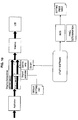
- FIG. 10 is an explanatory view for explaining the conventional image quality correction.
- image quality correction is performed based on the setting values of image quality parameters set in a Graphic Device Driver or BIOS (Basic Input/Output System).
- BIOS Basic Input/Output System
- contents input to the PC are subjected to decoding or the like by application and then to image quality correction by the driver.
- panel determination information of the BIOS can be used to change the image quality parameter settings.
- the image quality parameter settings have to be changed by changing the setting value table of BIOS binary.
- the image quality correction by the driver is independent from the image quality correction by the BIOS, it makes more difficult for a user to set the image quality parameters optimally.
- an information processing apparatus according to embodiments of the present invention has been created.
- the information processing apparatus 100 it is possible to set optimal image quality parameters easily.
- the image processing apparatus 100 capable of setting image quality parameters is structured to be integral with a display device such as the LCD, but is not limited to this example.
- the information processing apparatus may be structured as an apparatus separate from the display device.
- the information processing apparatus 100 is, for example, a personal computer (hereinafter referred to as PC).
- PC personal computer
- this embodiment is described by way of an example of a notebook PC having a PC main body including a processing device and storage device and a display device structured integrally.
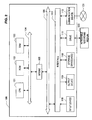
- FIG. 2 is used to explain the hardware configuration of the information processing apparatus 100 according to this embodiment.
- FIG. 2 is a block diagram showing the hardware configuration of the information processing apparatus 100 according to this embodiment.
- FIG. 2 is an explanatory view illustrating the hardware configuration of the information processing apparatus 100 according to this embodiment.
- the information processing apparatus 100 includes a CPU (Central Processing Unit) 101, a ROM (Read Only Memory) 102, a RAM (Random Access Memory) 103, a host bus 104, a bridge 105, an external bus 106, an interface 107, an input device 108, an output device 109, a storage device (HDD) 110, a drive 111 and a communication device 112.
- a CPU Central Processing Unit
- ROM Read Only Memory
- RAM Random Access Memory
- HDD storage device
- the CPU 101 functions as a processing device and control device and controls all operations inside the information processing apparatus 100 in accordance with various programs.
- the CPU 101 may be a micro processor.
- the ROM 102 stores computing parameters, programs by used the CPU 101 and the like.
- the RAM 103 temporarily stores programs used in execution of the CPU 101, parameters appropriately changed in the execution and the like. These are connected to each other via the host bus 104 made up of a CPU bus or the like.
- the host bus 104 is connected to the external bus 106 such as a PCI (Peripheral Component Interconnect/Interface) bus via the bridge 105.
- PCI Peripheral Component Interconnect/Interface
- the host bus 104, the bridge 105 and the external bus 106 are not necessarily structured separately, but may be embodied into one bus.
- the input device 108 has inputting means for a user to input information, such as a mouse, a keyboard, a touch panel, a button, a microphone, a switch and a lever and an input control circuit for generating an input signal based on the user's input to output the same to the CPU 101.
- the user of the information processing apparatus 100 operates the input device 108 thereby to input various type data into or give the instructions of processing to the information processing apparatus 100.
- the output device 109 has a display device such as a CRT (Cathode Ray Tube) display device, a liquid crystal display (LCD) device, a OLED (Organic Light Emitting Display) device and a lamp, and a speech output device such as a speaker and a headphone.
- the output device 109 outputs reproduce contents, for example. More specifically, the display device displays the various types of information such as reproduced video data in the form of texts or images. Meanwhile, the speech output device converts the reproduced speed data or the like into speech and outputs the same.
- the storage device 110 is a device for data storage and is structured as one example of storage of the information processing apparatus 100 according to this embodiment.
- the storage device 110 may include a recording medium, a recording device for recording data in the recording medium, a reading device for reading the data from the recording medium and a deletion device for deleting the data from the recording medium.
- the storage device 110 has, for example, a HDD (Hard Disk Drive). This storage device 110 starts the hard disk and stores the programs executed by the CPU 101 and various data. In addition, this storage device 110 stores content data, meta data, device data and the like.
- the drive 111 is a reader/writer for the recording medium and is mounted inside or outside of the information processing apparatus 100.
- the drive 111 reads the information stored in the removable recording medium 120 such as a mounted magnetic disk, optical disc, magnetic optical disk, semiconductor memory or the like, and outputs the information to the RAM 103.
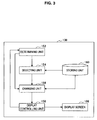
- FIG. 3 is a block diagram illustrating the functional structure of the information processing apparatus 100 according to this embodiment.
- the information processing apparatus 100 has a determining unit 152, a selecting unit 154, a changing unit 156, a display controlling unit 158, a storing unit 160, a display screen 109 and the like.
- the determining unit 152 has a function of determining an application program started by the display controlling unit 158 described later.
- the determining unit 152 determines the running application program and provides the determination results to the selecting unit 154 and/or the changing unit 156.
- the determining unit 152 detects the identification information of the application program thereby to be able to determine the application program.
- the determining unit 152 has a function of determining the used LCD panel. Further, the determining unit 152 has a function of determining the used graphics model. The determining unit 152 may determine both or any one of the LCD panel and the graphics model.
- the selecting unit 154 has a function of selecting the image quality mode in accordance with the application program determined by the determining unit 152.
- the image quality mode selected by the selecting unit 154 may be set by automatically or user's input. The image quality mode will be described in details later.
- the changing unit 156 has a function of changing a plurality of image quality parameters for setting the image quality of the display screen in accordance with the application program determined by the determining unit 152. Besides, when the used LCD panel and/or graphics model are determined by the determining unit 152, the LCD panel and/or graphics model may be used as a basis to change the plurality of image quality parameters.
- the storing unit 160 stores identification information pieces of application programs and a plurality of image quality parameters in association with each other.
- the changing unit 156 changes the plurality of image quality parameters for setting the image quality of the display screen to a plurality of image quality parameters stored in the storing unit 160 in association with the identification information of the application programs.
- the storing unit 160 stores a plurality of image quality parameters associated with the plurality of image quality modes set by display purpose. Further, the storing unit 160 stores a predetermined number of image quality modes in association with identification information of application programs.
- the selecting unit 154 selects an image quality mode associated with the identification information of the application program. Then, the changing unit 156 changes the plurality of image quality parameters for setting the image quality of the display screen to a plurality of image quality parameters associated with the image quality mode selected by the selecting unit 154.
- the selecting unit 154 may select the image quality mode in accordance with user's operation.
- the display controlling unit 158 has functions of running any of the plurality of application programs and displaying contents on the display screen 109.
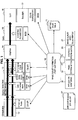
- FIG. 4 is an explanatory view for explaining setting of image quality correction parameters by the image quality correction utility 10.
- the image quality correction utility 10 first determines a used LCD panel and graphics model, a running application and the like and obtains setting conditions 31.
- the used LCD panel can be determined from the "Panel ID” provided from the BIOS
- the used graphics model can be determined from the "Video ID” provided from the OS.
- the foreground application in the window may be determined as the running application.
- the window title of the foreground application in the window is obtained.
- the image quality correction utility 10 regards the application program corresponding to this window title as a running application program and determines the application program.
- the image quality correction utility 10 obtains "Mode ID” for identifying the selected image quality mode.
- the image quality correction utility 10 determines the used LCD panel and graphics model, the running application model and the selected image quality mode. Then, the image quality correction utility 10 uses the "Panel ID”, the “Video ID”, the running application program, the "Mode ID” as search keys, searches in the setting value table and obtains the setting values. In the setting value table, the "Panel ID”, the "Video ID”, the running application program, the "Mode ID” are associated with the image quality setting values.
- the image quality correction utility 10 makes use of the API (Application Program Interface) of the OS, the API of the driver or the API of the BIOS to change setting of the image quality parameters of each step.
- API Application Program Interface
- a predetermined number of image quality modes are prepared in advance, and the image quality modes may be selected not only by user but also automatically in accordance with the used LCD panel and graphics model or the running application model. In the case of automatic selection, the image quality mode can be set optimally by simpler operation.
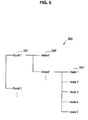
- FIG. 5 is an explanatory view for explaining the image quality correction utility 10 obtaining five image quality mode.
- the data structure 300 of the "Panel ID", the "Video ID” and the “Mode ID” are illustrated by way of an example.
- the image quality correction utility 10 determines the used LCD panel and graphics model to obtain the "Panel ID” 301 and the “Video ID” 302. For example, when the "Panel ID” 301 is Panel 1 and the “Video ID” 302 is Video 2, mode 1 to mode 5 of the "Mode ID” 303 associated with the Panel 1 and Video 2 are obtained.
- the image quality correction utility 10 determines the running application and selects any one of the mode 1 to mode 5 in accordance with the running application. When any one of the five image quality modes is selected by the user, the image quality correction utility 10 selects any one of the mode 1 to mode 5 in accordance with the selected image quality mode.
- FIG. 6 is an explanatory view for explaining an example of the image quality mode selecting screen.
- the user selects "display” on the setting screen in the window and then "color mode setting". After this selection, the color mode setting screen 400 is displayed in the window.
- the user selects either of "Select optical color mode automatically” or “Select from the following color modes” in the color mode setting screen 400.
- the image quality correction utility 10 select the image quality mode in accordance with the running application.
- the image quality correction utility 10 selects the image quality mode selected by the user.
- the image quality modes selected by the user may include, for example, standard mode, television mode, DVD/BD mode and print mode.
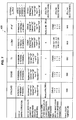
- FIG. 7 is an explanatory view showing the image quality mode setting list 500.
- the image quality modes include, for example, standard mode, DVD/BD mode, TV mode, x. v. color mode, print mode and external output mode.
- the plurality of image quality parameters are associated with the respective image quality modes and stored in the storing unit 160. Further, the application programs and the image quality modes are associated with each other and stored in the storing unit 160. Therefore, if the image quality correction utility 10 determines the running application program, the corresponding image quality mode is selected. Further, the image quality parameters are changed to image quality parameters associated with the selected image quality mode. Characteristics of respective modes are described below.
- the standard mode is a standard setting suitable for general use.
- the panel color temperature is set to D65 (about 6,500 K) and ICC monitor profile of the display is set. More specifically, the panel color temperature is set to D65, and this setting is used as a basis to perform gamma correction, which is then used as a basis to create and set the monitor profile.
- the monitor when pictures or the like are edited or reproduced by an application for ICC monitor profile, the monitor is capable of as displays of precise colors as possible. For moving images, the monitor is capable of display with natural colors or hue suitable for general use. This setting is suitable for general purpose and does not break any contents.
- the DVD/BD mode is a setting suitable for watching movie films by the DVD or BD.
- Image quality correction is performed in such a manner that the video reproduced by the DVD or BD is displayed with natural and rich colors or hue. More specifically, the moving image color correction values are optimized to display the images with clear colors. Then, the gamma correction of the display is optimized as necessary.
- the TV (television) mode is a setting suitable for watching TV programs or the like.
- Image quality correction is performed in such a manner that the video reproduced by TV application is displayed bright and vivid colors. More specifically, the moving image color correction values are optimized to display the images with clear colors. Then, the gamma correction of the display is optimized as necessary.
- the x. v. color mode is a setting suitable for display of the contents ready for x. v. colors so that vivid flower colors and beautiful blue and green of tropical islands, which were difficult to reproduce, can be reproduced more closely.
- color conversion coefficients created based on the color area information of the LCD panel are set, and color space conversion is validated for moving images.
- image creation is returned to the original, and color reproduction is performed with as close colors as possible.
- the display gamma correction is a parameter for correcting of RGN channels of the LCD panel to be displayed with smooth gradients.
- a gamma correction table is set using the API of the OS.
- the moving image color correction is a parameter for correcting the brightness contrast, tint, color saturation and the like in such a manner that contents can be displayed optimally on the TV, BD/DVD.
- the moving image color correction is set using the API of the graphics device driver.
- the color conversion Matrix (moving color space conversion parameter) is a parameter for displaying the contents having xvYcc color space on the monitor as close to the actual colors as possible.
- the LCD panel property information is set in the driver as Color Conversion Matrix.
- the panel color temperature is a parameter for making the color temperature selectable depending on the purpose. It is set with the use of a function specific to the LCD panel. Up to this point, the details of the image quality parameters have been described.
- FIG. 8 is an explanatory view for explaining a display example of the setting value creating screen 500.
- the setting value creating screen 500 includes a panel ID input area 501 for inputting a panel ID, a video ID selection area 502 for selecting a video ID, an interface selection area 503 for selecting an interface, a mode selection area 504, a color conversion matrix input area 505, a static image color correction/moving image color correction adjusting area 506, a static image color correction table designation area 507 and an ICC profile designation area 508.
- the image quality mode is associated with the plurality of image quality parameters by inputting and selecting of the user.
- Each image quality mode set in the setting value creating screen 500 is associated with the plurality of image quality parameters and stored in the storing unit 160. Description made up to this point is all about the setting value creating tool.
- FIG. 9 is a flowchart for explaining the information processing method of the information processing apparatus 100.
- the determining unit 152 determines the running application (S108). Further, it is determined whether the manual mode is selected or not, that is, whether the image quality mode is selected by the user or not (S110).
- the changing unit 156 changes the preset image parameters to image quality parameters associated with the image quality mode selected by the user (S112).
- the selecting unit 154 selects the image quality mode associated with the application program determined in the step S108. Then, the changing unit 156 changes the preset image quality parameters to the image quality parameters associated with the selected image quality mode (S 114).
- the image quality parameters changed in the step 112 or 114 are used to correct the image quality of the display (S116).
- the description made up to this point is all about the information processing method of the information processing apparatus 100.
- the running application program is determined, which is used as a basis to change the plurality of image quality parameters for setting the image quality of the display screen 109.
- the image quality parameters can be set optimally in accordance with the running application program.
- the image quality parameters can be set appropriately by changing the plurality of image quality parameters to those associated with the determined application program.
- the used LCD panel and/or graphics model can be used to change the plurality of image quality parameters.
- the plurality of image quality parameters can be set collectively in consideration of the LCD panel, the running application and the like.
- the plurality of image quality parameters include parameters for correcting image quality of static image contents or moving image contents and parameters for correcting the color temperature of the panel.
- the various image quality parameters depending on each other can be set collectively in consideration of the LCD panel, the running application and the like.
- the plurality of image quality parameters are associated with a plurality of image quality modes set for respective display purposes and stored, then the image quality mode is selected in accordance with the running application program.
- the plurality of image quality parameters may be set to a plurality of image quality parameter associated with the selected image quality mode.
- a predetermined number of image quality modes may be prepared so that the user can select a desired image quality mode from the predetermined number of image quality modes.
- the API of the application program may be used to determine what mode the running application program is.
- one application program may have a plurality of modes for playing a plurality of media like DVD and TV programs. In such a case, it may be determined of which mode the application program is, which determined mode may be used as a basis to set the image quality parameters.
Landscapes
- Engineering & Computer Science (AREA)
- Physics & Mathematics (AREA)
- Computer Hardware Design (AREA)
- General Physics & Mathematics (AREA)
- Theoretical Computer Science (AREA)
- Controls And Circuits For Display Device (AREA)
- Control Of Indicators Other Than Cathode Ray Tubes (AREA)
- Digital Computer Display Output (AREA)
- Television Signal Processing For Recording (AREA)
- Image Processing (AREA)
Applications Claiming Priority (1)
| Application Number | Priority Date | Filing Date | Title |
|---|---|---|---|
| JP2008221855A JP4636143B2 (ja) | 2008-08-29 | 2008-08-29 | 情報処理装置、情報処理方法およびプログラム |
Publications (2)
| Publication Number | Publication Date |
|---|---|
| EP2164064A2 true EP2164064A2 (de) | 2010-03-17 |
| EP2164064A3 EP2164064A3 (de) | 2010-08-11 |
Family
ID=41258170
Family Applications (1)
| Application Number | Title | Priority Date | Filing Date |
|---|---|---|---|
| EP09168814A Ceased EP2164064A3 (de) | 2008-08-29 | 2009-08-27 | Informationsverarbeitungsvorrichtung, Informationsverarbeitungsverfahren und Programm |
Country Status (4)
| Country | Link |
|---|---|
| US (1) | US8878868B2 (de) |
| EP (1) | EP2164064A3 (de) |
| JP (1) | JP4636143B2 (de) |
| CN (1) | CN101661739B (de) |
Cited By (1)
| Publication number | Priority date | Publication date | Assignee | Title |
|---|---|---|---|---|
| CN103747318A (zh) * | 2013-12-05 | 2014-04-23 | 乐视致新电子科技(天津)有限公司 | 一种参数设置方法及装置 |
Families Citing this family (10)
| Publication number | Priority date | Publication date | Assignee | Title |
|---|---|---|---|---|
| US20120287115A1 (en) * | 2011-05-10 | 2012-11-15 | Ding Junjie | Method for generating image frames |
| JP2013005010A (ja) * | 2011-06-13 | 2013-01-07 | Funai Electric Co Ltd | 映像再生装置 |
| JP6045405B2 (ja) * | 2013-03-07 | 2016-12-14 | シャープ株式会社 | 映像処理装置、表示装置、テレビジョン受信機及び映像処理方法 |
| JP2015102596A (ja) * | 2013-11-21 | 2015-06-04 | ラピスセミコンダクタ株式会社 | 表示デバイスの駆動装置 |
| CN103716714A (zh) * | 2013-12-04 | 2014-04-09 | 乐视致新电子科技(天津)有限公司 | 一种数据显示方法及装置 |
| US20150348496A1 (en) * | 2014-05-30 | 2015-12-03 | Pixtronix, Inc. | Systems and methods for selecting display operation modes |
| JP7139737B2 (ja) * | 2018-07-10 | 2022-09-21 | 富士フイルムビジネスイノベーション株式会社 | 情報処理装置、及び情報処理プログラム |
| US11778282B2 (en) * | 2018-07-30 | 2023-10-03 | Sony Group Corporation | Automatically setting picture mode for each media |
| JP7482779B2 (ja) | 2018-08-29 | 2024-05-14 | サターン ライセンシング エルエルシー | 画像処理装置、表示制御方法、およびプログラム |
| CN112801932B (zh) * | 2019-10-28 | 2024-11-05 | 深圳市万普拉斯科技有限公司 | 图像显示方法、装置、电子设备和存储介质 |
Citations (5)
| Publication number | Priority date | Publication date | Assignee | Title |
|---|---|---|---|---|
| JPH11102175A (ja) | 1997-09-26 | 1999-04-13 | Sony Corp | 映像表示装置及び映像表示装置の調整方法 |
| US6223283B1 (en) * | 1998-07-17 | 2001-04-24 | Compaq Computer Corporation | Method and apparatus for identifying display monitor functionality and compatibility |
| US20040212610A1 (en) * | 2003-04-25 | 2004-10-28 | Dell Products L.P. | Method and apparatus for associating display configuration information with respective displays of an information handling system |
| US20070291038A1 (en) * | 2006-06-16 | 2007-12-20 | Nvidia Corporation | System, method, and computer program product for adjusting a programmable graphics/audio processor based on input and output parameters |
| JP2008221855A (ja) | 2008-06-23 | 2008-09-25 | Seiko Epson Corp | プラテンを汚すことなく印刷用紙の端部まで行う印刷 |
Family Cites Families (10)
| Publication number | Priority date | Publication date | Assignee | Title |
|---|---|---|---|---|
| JP3998323B2 (ja) * | 1998-04-15 | 2007-10-24 | 株式会社バッファロー | 画面生成装置 |
| JPH11312072A (ja) * | 1998-04-28 | 1999-11-09 | Sony Corp | 表示制御方法及び表示制御装置 |
| JP4457277B2 (ja) * | 2000-04-25 | 2010-04-28 | ソニー株式会社 | 画像信号変換装置、画像信号変換方法、およびそれを使用した画像表示装置 |
| US7317439B2 (en) | 2000-10-30 | 2008-01-08 | Matsushita Electric Industrial Co., Ltd. | Electronic apparatus and recording medium therefor |
| JP2002278522A (ja) * | 2001-03-19 | 2002-09-27 | Matsushita Electric Ind Co Ltd | 携帯用映像表示装置 |
| JP2002341843A (ja) * | 2001-05-11 | 2002-11-29 | Nanao Corp | ディスプレイ装置及び画像表示システム |
| JP2004341131A (ja) * | 2003-05-14 | 2004-12-02 | Sony Corp | 画像生成表示装置およびその方法 |
| JP2007206644A (ja) * | 2006-02-06 | 2007-08-16 | Seiko Epson Corp | 画像表示システム,画像表示方法,画像表示プログラム,記録媒体,データ処理装置,画像表示装置 |
| DE102006006801A1 (de) | 2006-02-14 | 2007-08-23 | Fujitsu Siemens Computers Gmbh | Flüssigkristallbildschirm und Verfahren zur Anzeige eines Bildsignals |
| US8497870B2 (en) * | 2007-06-15 | 2013-07-30 | Adobe Systems Incorporated | Color management detection |
-
2008
- 2008-08-29 JP JP2008221855A patent/JP4636143B2/ja not_active Expired - Fee Related
-
2009
- 2009-08-04 US US12/535,217 patent/US8878868B2/en not_active Expired - Fee Related
- 2009-08-27 EP EP09168814A patent/EP2164064A3/de not_active Ceased
- 2009-08-31 CN CN200910170985.1A patent/CN101661739B/zh not_active Expired - Fee Related
Patent Citations (5)
| Publication number | Priority date | Publication date | Assignee | Title |
|---|---|---|---|---|
| JPH11102175A (ja) | 1997-09-26 | 1999-04-13 | Sony Corp | 映像表示装置及び映像表示装置の調整方法 |
| US6223283B1 (en) * | 1998-07-17 | 2001-04-24 | Compaq Computer Corporation | Method and apparatus for identifying display monitor functionality and compatibility |
| US20040212610A1 (en) * | 2003-04-25 | 2004-10-28 | Dell Products L.P. | Method and apparatus for associating display configuration information with respective displays of an information handling system |
| US20070291038A1 (en) * | 2006-06-16 | 2007-12-20 | Nvidia Corporation | System, method, and computer program product for adjusting a programmable graphics/audio processor based on input and output parameters |
| JP2008221855A (ja) | 2008-06-23 | 2008-09-25 | Seiko Epson Corp | プラテンを汚すことなく印刷用紙の端部まで行う印刷 |
Cited By (1)
| Publication number | Priority date | Publication date | Assignee | Title |
|---|---|---|---|---|
| CN103747318A (zh) * | 2013-12-05 | 2014-04-23 | 乐视致新电子科技(天津)有限公司 | 一种参数设置方法及装置 |
Also Published As
| Publication number | Publication date |
|---|---|
| US20100053189A1 (en) | 2010-03-04 |
| CN101661739B (zh) | 2014-01-22 |
| EP2164064A3 (de) | 2010-08-11 |
| JP4636143B2 (ja) | 2011-02-23 |
| US8878868B2 (en) | 2014-11-04 |
| JP2010054972A (ja) | 2010-03-11 |
| CN101661739A (zh) | 2010-03-03 |
Similar Documents
| Publication | Publication Date | Title |
|---|---|---|
| US8878868B2 (en) | Information processing apparatus, information processing method and program | |
| US11119635B2 (en) | Fanning user interface controls for a media editing application | |
| US7142226B2 (en) | Display device and image display system | |
| CN112114929B (zh) | 显示设备及其图像显示方法 | |
| US20090015593A1 (en) | Method and apparatus for automatically changing color | |
| US20140286628A1 (en) | Image processing apparatus and control method thereof | |
| US20190306555A1 (en) | Electronic apparatus, method of controlling the same and recording medium thereof | |
| US20050259113A1 (en) | Information processing apparatus and display control method | |
| US20120314136A1 (en) | Image display device and on-screen display method | |
| KR102413839B1 (ko) | 컨텐츠 제공장치, 그 제어방법 및 기록매체 | |
| AU2018358487B2 (en) | Apparatus and method for controlling image display device of slot machine device | |
| US7619619B2 (en) | Information processing apparatus and display control method | |
| US20060017852A1 (en) | Information processing apparatus and display control method | |
| US20090021525A1 (en) | Display apparatus, display system and method for setting color scheme | |
| KR20190132072A (ko) | 전자장치, 그 제어방법 및 기록매체 | |
| US20190213974A1 (en) | Color Matching for Output Devices | |
| US8497870B2 (en) | Color management detection | |
| JP3897786B2 (ja) | ディスプレイ装置及び画像表示システム | |
| JP2010283790A (ja) | コンテンツ再生装置 | |
| JP5316520B2 (ja) | 情報処理装置、情報処理方法およびプログラム | |
| JP2005165341A5 (de) | ||
| US20130070155A1 (en) | Method for displaying on-screen display image | |
| WO2022223009A1 (zh) | 一种显示设备及显示方法 | |
| JP2003302959A (ja) | 画像出力装置およびその画像信号調整方法 | |
| Chavez et al. | Real World Adobe Photoshop CS4 for Photographers |
Legal Events
| Date | Code | Title | Description |
|---|---|---|---|
| PUAI | Public reference made under article 153(3) epc to a published international application that has entered the european phase |
Free format text: ORIGINAL CODE: 0009012 |
|
| 17P | Request for examination filed |
Effective date: 20090827 |
|
| AK | Designated contracting states |
Kind code of ref document: A2 Designated state(s): AT BE BG CH CY CZ DE DK EE ES FI FR GB GR HR HU IE IS IT LI LT LU LV MC MK MT NL NO PL PT RO SE SI SK SM TR |
|
| AX | Request for extension of the european patent |
Extension state: AL BA RS |
|
| PUAL | Search report despatched |
Free format text: ORIGINAL CODE: 0009013 |
|
| AK | Designated contracting states |
Kind code of ref document: A3 Designated state(s): AT BE BG CH CY CZ DE DK EE ES FI FR GB GR HR HU IE IS IT LI LT LU LV MC MK MT NL NO PL PT RO SE SI SK SM TR |
|
| AX | Request for extension of the european patent |
Extension state: AL BA RS |
|
| 17Q | First examination report despatched |
Effective date: 20100723 |
|
| RIN1 | Information on inventor provided before grant (corrected) |
Inventor name: TSUYUHARA, TOMOHIRO Inventor name: KITAGAWA, TOMOYUKI Inventor name: KOIZUMI, NAOSHI Inventor name: TSUZUKI, AKIKO Inventor name: KUROSAKI, DAISUKE |
|
| STAA | Information on the status of an ep patent application or granted ep patent |
Free format text: STATUS: THE APPLICATION HAS BEEN REFUSED |
|
| 18R | Application refused |
Effective date: 20111209 |