EP1549007A1 - Email-server-vorrichtung - Google Patents
Email-server-vorrichtung Download PDFInfo
- Publication number
- EP1549007A1 EP1549007A1 EP03748617A EP03748617A EP1549007A1 EP 1549007 A1 EP1549007 A1 EP 1549007A1 EP 03748617 A EP03748617 A EP 03748617A EP 03748617 A EP03748617 A EP 03748617A EP 1549007 A1 EP1549007 A1 EP 1549007A1
- Authority
- EP
- European Patent Office
- Prior art keywords
- server apparatus
- screening data
- screening
- received
- Prior art date
- Legal status (The legal status is an assumption and is not a legal conclusion. Google has not performed a legal analysis and makes no representation as to the accuracy of the status listed.)
- Withdrawn
Links
Images






Classifications
-
- H—ELECTRICITY
- H04—ELECTRIC COMMUNICATION TECHNIQUE
- H04L—TRANSMISSION OF DIGITAL INFORMATION, e.g. TELEGRAPHIC COMMUNICATION
- H04L51/00—User-to-user messaging in packet-switching networks, transmitted according to store-and-forward or real-time protocols, e.g. e-mail
- H04L51/21—Monitoring or handling of messages
- H04L51/212—Monitoring or handling of messages using filtering or selective blocking
-
- H—ELECTRICITY
- H04—ELECTRIC COMMUNICATION TECHNIQUE
- H04L—TRANSMISSION OF DIGITAL INFORMATION, e.g. TELEGRAPHIC COMMUNICATION
- H04L51/00—User-to-user messaging in packet-switching networks, transmitted according to store-and-forward or real-time protocols, e.g. e-mail
- H04L51/58—Message adaptation for wireless communication
Definitions
- the present invention relates to technologies for prohibiting unnecessary delivery of electronic mail (email) to users.
- the email server apparatus disclosed in patent publication JP H10-161949A 1) stores keywords sent from an email user; 2) determines, when receiving an email addressed to the user, whether the received email contains any of the stored keywords; and 3) delivers the received email to the user when the received email contains any of the stored keywords.
- a user is able to configure the server apparatus not to deliver emails which contain no pre-stored keywords.
- an unwanted email may contain one or more of the pre-stored keywords, and may, therefore, still be delivered to the user, depending on the keyword settings.
- keywords such that only desired email is delivered to the user.
- the present invention provides a server apparatus which has:
- the present invention is further characterized by the determining means storing a history of the determination results in the storage means, in association with the determined email address; and by the reporting means reporting the history of the determination results to the determined email address.
- the present invention is further characterized by the storage means storing an order of priority in association with the delivery screening data and an order of priority in association with the non-delivery screening data, respectively, if the screening data includes both delivery screening data for screening email to be delivered and non-delivery screening data for screening email not to be delivered; the determining means outputting the determination result of "deliver", if received email contains only delivery screening data; outputting the determination result of "not deliver” if received email contains only non-delivery screening data; reading from the storage means the order of priority for the screening data contained in the received email if the screening data includes both delivery screening data and non-delivery screening data, and outputting the determination result of "deliver” if the screening data with the highest order of priority is delivery screening data, and outputting the determination result of "not deliver” if the screening data with the highest order of priority is non-delivery screening data.
- the order of priority for delivery screening data and the order of priority for non-delivery screening data be stored for each email address.
- the present invention is further characterized by the storage means storing one or more screening data candidates in association with category information; the server apparatus further having a sending means for sending category information on a plurality of screening data candidates to a communication terminal capable of receiving email; the receiving means receiving an email address assigned to a user of the communication terminal and sent from the communication terminal along with the category information selected by the user of the communication terminal from among the category information on a plurality of screening data candidates sent by the sending means and sent from the communication terminal; and the storage means storing, in association with the email address received by the receiving means, one or a plurality of screening data candidates associated with the category information received by the receiving means.
- the present invention is further characterized by the storage means storing screening data candidates, if the received email contains the screening data candidate in a case that the email address determined by the determining means is a second email address.
- morphological analysis be performed to determine whether screening data candidates are included in the received email.
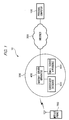
- FIG. 1 shows an entire configuration of a communications system 10 used together with an email server apparatus 600 according to an embodiment of the present invention.
- the communications system 10 has a plurality of personal computers PC 100, Internet 200 which is connected to each PC 100, a mobile packet communications network 300 which is connected to the Internet 200, and a plurality of mobile phones 700 covered by the mobile packet communications network 300. To keep the drawing simple, only one mobile phone 700 and one PC 100 are illustrated in FIG. 1.
- the PC 100 is a personal computer which can connect to the Internet 200.
- the PC 100 includes packet communications functionality and functionality for sending and receiving email according to a protocol such as SMTP (Simple Mail Transfer Protocol) or POP (Post Office Protocol).
- SMTP Simple Mail Transfer Protocol
- POP Post Office Protocol
- the PC 100 stores an email address "aaa@xyz.co.jp" granted to a user of the PC 100.
- the Internet 200 is connected to email server apparatuses, which are not illustrated.
- the PC 100 sends and receives email to and from the email server apparatuses.
- the mobile packet communications network 300 provides packet data communications services to persons subscribed to a data communications service (hereafter referred to as "subscribers") offered by a communications provider which operates the mobile packet communications network 300 (hereafter referred to as "communications provider").
- the mobile packet communications network 300 has a gateway server apparatus 400 which is connected to the Internet 200 shown in FIG. 1, a subscriber database device 500 and the email server apparatus 600 which are connected to the gateway server apparatus 400, and wireless base stations, switching devices connected to the wireless base stations, and gateway switches connected to the switching devices and fixed-line telephone networks, which are not illustrated.
- the gateway server apparatus 400 reciprocally converts protocols between the protocol used within the mobile packet communications network 300 and TCP/IP (Transmission Control Protocol/Internet Protocol) used in the Internet 200.
- TCP/IP Transmission Control Protocol/Internet Protocol
- the subscriber database device 500 stores subscriber data including names, a terminal identifier and telephone number for the mobile phone being used, an email address, and a residential address, for each subscriber.
- the subscriber's email address is assigned by the communications provider.
- the email server apparatus 600 includes WWW (World Wide Web) server functionality, in addition to email server functionality.
- the email server apparatus 600 further includes functionality for screening emails containing character strings specified by the subscriber and prohibiting the screened emails from being delivered to the mobile phone 700 used by the subscriber.
- the email server apparatus 600 is described in greater detail below.
- the mobile phone 700 includes a function for performing packet communications via the mobile packet communications network 300, a function for executing email software for sending and receiving email, and a function for performing communications in accordance with HTTP (Hyper Text Transfer Protocol) by executing WWW browser software (hereafter referred to as "browser software") which can interpret text files written using CHTML (Compact Hyper Text Markup Language) (hereafter referred to as "CHTML files").
- HTTP Hyper Text Transfer Protocol
- HTTP Hyper Text Transfer Protocol
- HTTP Hyper Text Transfer Protocol
- HTTP Hyper Text Transfer Protocol
- HTTP Hyper Text Transfer Protocol
- HTTP Hyper Text Transfer Protocol
- HTTP Hyper Text Transfer Protocol
- HTTP Hyper Text Transfer Protocol
- HTTP Hyper Text Transfer Protocol
- HTTP Hyper Text Transfer Protocol
- HTTP Hyper Text Transfer Protocol
- HTTP Hyper Text Transfer Protocol
- HTTP Hyper Text Transfer Protocol
- HTTP Hyper Text Transfer Protocol
- HTTP Hyper Text Transfer Protocol
- HTTP Hyper Text Transfer Protocol
- HTTP Hyper Text Transfer Protocol
- HTTP Hyper Text Transfer Protocol
- FIG. 3 shows a configuration of an email server apparatus 600.
- the email server apparatus 600 has a bus 601, a communication unit 602 which is connected to the bus 601, an operating unit 603, a display unit 604, a clock unit 605, a storage unit 606, a ROM (Read Only Memory) 607 which stores initialization software, etc., for initializing each portion of the email server apparatus 600, a RAM (Random Access Memory) 608, and a CPU (Central Processing Unit) 609.
- a bus 601 a communication unit 602 which is connected to the bus 601, an operating unit 603, a display unit 604, a clock unit 605, a storage unit 606, a ROM (Read Only Memory) 607 which stores initialization software, etc., for initializing each portion of the email server apparatus 600, a RAM (Random Access Memory) 608, and a CPU (Central Processing Unit) 609.
- a bus 601 a communication unit 602 which is connected to the bus 601, an operating unit 603, a display unit 604, a clock unit
- the bus 601 performs data transmission with each portion connected to the bus 601.
- the communication unit 602 is connected to a gateway server apparatus 400 via a communication line.
- the communication unit 602 is used when the email server apparatus 600 communicates with other devices.
- the operation portion 603 has a keyboard and a mouse. When the operating unit 603 is operated, signals are supplied to the CPU 609 in response to the operation.
- the display unit 604 has an LCD panel and control circuitry thereof.
- the display unit 604 displays characters, graphics, menu screens, etc., in the LCD panel under control from the CPU 609.
- the clock unit 605 supplies information indicating current date and time to the CPU 609.
- the storage unit 606 is configured such that it has a device for permanent storage of data, such as, for example, a hard disk device.
- the storage unit 606 stores a data table TB1, a character string table TB2, a history table TB3, a first CHTML file and a first CGI (Common Gateway Interface) program, a second CHTML file and a second CGI program, email server software, and general WWW server software, etc.
- the storage unit 606 includes a mailbox for storing email for every email address assigned to the subscriber. Once power is supplied from a power source, the CPU 609 reads the initialization software stored in the ROM 607 and initializes each portion of the email server apparatus 600, using the RAM 608 as a work area. Once initialization of each portion is finished, the CPU 609 reads and launches the email server software and WWW server software stored in the storage unit 606.
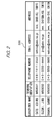
- the data table TB1 associates valid/invalid setting data, character strings (hereafter referred to also as "character strings for screening"), and a trial period due date with email addresses assigned to subscribers, and stores this data.
- the CPU 609 refers to the data table TB1 when determining whether to deliver received email to the subscriber.
- the valid/invalid setting data is data for setting email screening to valid or invalid. If the valid/invalid setting data is set to valid, the email server apparatus 600 screens received email to be delivered and email not to be delivered, and deletes email not to be delivered from the area where it is temporarily stored.
- the character strings for screening are character strings used when screening email to be delivered and email not to be delivered to the subscriber.
- the trial period due date is the final date of a fixed period, after which screening process of email is prevented from operating fully, even if the valid/invalid setting data is set to valid by the subscriber.
- the period will be referred to as a "trial period" hereafter.
- the character string table TB2 stores character strings for screening, extracted through analysis of unwanted bulk email and unsolicited email advertisements by the communications provider and registered in advance.
- the character string table TB2 is used when the subscriber registers character strings for screening in the data table TB 1.
- the history table TB3 associates email addresses of email addressees to whom an email is determined not to be delivered with the reception date, subject line, and email address of the sender of the email, and stores this information.
- the first CHTML file (hereafter referred to as the "settings file”) is written such that a valid/invalid setting screen is displayed, which has a "Set” button, valid/invalid radio buttons, and a textbox BX11, as shown in FIG. 7, when the settings file is interpreted by the browser software operating in the mobile phone 700.
- the first CGI program (hereafter referred to as the "CGI setting program”) is a CGI program which causes the CPU 609 to execute a process shown in FIG. 9.
- the settings file is specified by, for example, the URL (Uniform Resource Locator) "http://www.abc.ne.jp/settei.html".
- the CGI setting program is specified by, for example, the URL "http://www.abc.ne.jp/settei.cgi”.
- the "Set” button shown in FIG. 7 When the "Set” button shown in FIG. 7 is clicked, the settings file is written such that an HTTP request is sent with the URL of the CGI settings file, etc., as parameters.
- the settings file and CGI setting program are used when the subscriber registers valid/invalid setting data to the data table TB1.
- the CPU 609 when the CPU 609 receives an HTTP request containing a URL for the settings file from the mobile phone 700, it reads the settings file specified in the URL from the storage unit 606. The CPU 609 generates an HTTP response including the read settings file and sends the generated HTTP response to the mobile phone 700 via the communication unit 602.
- a valid/invalid setting screen such as that shown in FIG. 7
- an email address is entered into the textbox BX11
- one of the valid/invalid radio buttons is selected, and the operation of clicking the "Set” button (hereafter referred to as "clicking the button”
- the browser software sends an HTTP request with the URL of the CGI setting program, the entered email address, and the valid/invalid setting data as parameters.
- the CPU 609 When the CPU 609 receives the HTTP request, it launches the CGI setting program specified by the URL and performs the process shown in FIG. 9.
- the second CHTML file (hereafter referred to as the "character string registration file”) is written such that a character string registration screen is displayed which has a "Register” button and textboxes BX21 and BX22, as shown in FIG. 8, when the character string registration file is interpreted by the browser software operating in the mobile phone 700.
- the "Register” button in FIG. 8 is clicked, the character string registration file is written such that an HTTP request and the URL of the CGI character string registration file, etc., are sent as parameters.
- the second CGI program (hereafter referred to as the "CGI character registration program”) is a CGI program which causes the CPU 609 to execute a process shown in FIG. 10.
- the character string registration file is specified by, for example, the URL "http://www.abc.ne.jp/toroku.html”.
- the CGI character string registration program is specified by, for example, the URL "http://www.abc.ne.jp/toroku.cgi”.
- the character string registration file and CGI character string registration program are used by the subscriber when registering character strings for screening. Specifically, when the CPU 609 receives an HTTP request containing a URL for the character string registration file from the mobile phone 700, it reads the character string registration file specified in the URL from the storage unit 606. The CPU 609 generates an HTTP response including the read character string registration file and sends the generated HTTP response to the mobile phone 700 via the Communication unit 602.
- the browser software sends an HTTP request with the URL of the CGI character string registration program and the entered email address and character string as parameters.
- the CPU 609 receives the HTTP request, it launches the CGI character string registration program specified by the URL and performs the process shown in FIG. 10.
- the email server software is software that causes the CPU 609 to execute the processes shown in FIG. 11 through FIG. 15.
- FIG. 11 shows a flow of an entire process performed by the CPU 609 when an email is received.
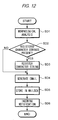
- the CPU 609 performs a process in accordance with the email address (hereafter referred to as the "destination email address") that indicates the addressee of the received email. If the CPU 609 determines that the destination email address is an email address for registration assigned to the email server apparatus 600 for registering character strings for screening, for example "toroku@abc.ne.jp", then it performs the character string registration process shown in FIG. 12.
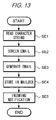
- the CPU 609 determines that the destination email address is a trial email address assigned, to the email server apparatus 600, for testing the function of screening email, for example "test@abc.ne.jp", then it performs the test process shown in FIG. 13. If the CPU 609 determines that the destination email address is not either of the email addresses described above assigned to the email server apparatus 600, then it executes the email screening process shown in FIG. 14. The CPU 609 also executes the history output process shown in FIG. 15 when it detects that the month has changed. Each process is described in detail below.
- the CPU 609 When, in the email server apparatus 600, the CPU 609 receives the HTTP request via the Communication unit 602, it reads the settings file specified by the URL of the settings file included in the HTTP request from the storage unit 606, generates an HTTP response including the read settings file, and sends it to the mobile phone 700 via the Communication unit 602.
- the mobile phone 700 When the mobile phone 700 receives this HTTP response, it extracts the settings file included in the HTTP response, interprets the extracted settings file, and displays the screen shown in FIG. 7 to the LCD display.
- the user enters his/her assigned email address "ichiro@abc.ne.jp" in the textbox BX11 in FIG. 7, selects "valid” from the valid/invalid radio buttons, and clicks the "Set” button, the browser software generates an HTTP request containing data indicating "valid," the URL of the CGI setting program, and the entered email address, and sends it to the email server apparatus 600.
- the CPU 609 When, in the email server apparatus 600, the CPU 609 receives the HTTP request via the Communication unit 602, it reads the CGI setting program specified by the URL of the CGI setting program contained in the HTTP request from the storage unit 606 and executes the read CGI setting program (FIG. 9). The CPU 609 extracts the email address "ichiro@abc.ne.jp" contained in the HTTP request (step SA1). Since data indicating "valid" is contained in the HTTP request, the CPU 609 sets to "valid” the "valid/invalid setting data" field in the data table TB1 corresponding to this email address (step SA2).
- the CPU 609 obtains information indicating the current date from the clock unit 605, calculates, from the obtained current date, a date which is the ending date for the trial period (in this example, one week ahead), associates the calculated date with the email address, and sets it in the "trial period due date" field in the data table TB1 corresponding to the email address (step SA3).
- the CPU 609 When, in the email server apparatus 600, the CPU 609 receives the HTTP request, it similarly reads the character string registration file from the storage unit 606 and sends an HTTP response including the read character string registration file to the mobile phone 700.
- the mobile phone 700 When the mobile phone 700 receives the HTTP response, it displays the screen shown in FIG. 8 on the LCD display.
- the user enters the email address "ichiro@abc.ne.jp" in the textbox BX21 in FIG. 8 and "futures trading" in the textbox BX22 and clicks the "Register” button, an HTTP request is generated including the email address entered in textbox BX21, the character string entered in textbox BX22, and the URL of the CGI character string registration program, and is sent to the email server apparatus 600.
- the CPU 609 When, in the email server apparatus 600, the CPU 609 receives the HTTP request, it reads the CGI character string registration program from the storage unit 606 and executes it (FIG. 10). The CPU 609 extracts the email address "ichiro@abc.ne.jp" included in the HTTP request (step SB1). When the CPU 609 searches the data table TB1 based on the email address and finds the appropriate email address, it registers the character string "futures trading" included in the HTTP request in the "character string” field in the data table TB1 corresponding to the email address (step SB2).
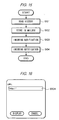
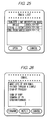
- the mobile phone 700 displays the selected email in the LCD display as shown in FIG. 18.
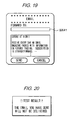
- the mobile phone 700 displays a forward screen shown in FIG. 19 in the LCD display for the selected email.
- the mobile phone 700 When the user enters the email address "test@abc.ne.jp" in a textbox BX41 shown in FIG. 19 to use the test function, and clicks the "Send” button in FIG. 19, the mobile phone 700 generates an email by writing the email address "ichiro@abc.ne.jp" assigned to the user and stored in the mobile phone 700 itself to the FROM field in the email headers, setting the entered email address for test as an addressee, and setting the content of the received email as the body, and sends it to the email server apparatus 600.
- the CPU 609 receives the email via the communication unit 602, as shown in FIG. 11, the email address specified as the addressee of the received email (hereafter referred to as the "destination email address") is determined regarding whether it is the email address "toroku@abc.ne.jp" for registration (step SC1). In this example, the destination email address is "test@abc.ne.jp", so the determination in step SC1 is "No.”
- the CPU 609 determines whether the destination email address is the email address "test@abc.ne.jp" for testing (step SC3). In this example, the destination email address is "test@abc.ne.jp", so the CPU 609 determines "Yes” in step SC3 and executes the test process (step SC4).
- test process operation in the email server apparatus 600 is described in detail, referring to FIG. 13.
- the CPU 609 extracts the email address "ichiro@abc.ne.jp" indicating the sender from the FROM field in the email header of the received email (hereafter referred to as the "sender email address").
- the CPU 609 searches the data table TB1 based on the extracted sender email address and reads the registered character string "futures trading" associated with the email address (step SE1).
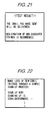
- the CPU 609 When the CPU 609 has read the character string for screening from the data table TB1, it determines whether the extracted character string for screening "futures trading" is present in the subject line or body of the received email (step SE2). As shown in FIG. 19, in this example the character string for screening "futures trading" is included in the body of the received email, so the CPU 609 determines that the received email is not to be delivered and generates an email, adding an expression along the lines of "not delivered” indicating the determination result, as shown in FIG. 20, to the body of the received email (step SE3).
- the CPU 609 determines that the received email is to be delivered and generates an email, adding an expression indicating the determination result that the message is to be "delivered", as shown in FIG. 21, to the body of the received email.
- the CPU 609 stores the generated email in a mailbox identified by the extracted sender email address "ichiro@abc.ne.jp" (step SE4) and sends an incoming notification to the mobile phone 700, which is the sender, to report that an email has been stored in the mailbox (step SE5).
- the mobile phone 700 When the mobile phone 700 receives the incoming notification, it generates an email request including its own terminal identifier "MS0001" and sends it to the email server apparatus 600, requesting the email server apparatus 600 to send the generated email stored in the mailbox.
- the CPU 609 When, in the email server apparatus 600, the CPU 609 receives this email request, it searches through the subscriber database device 500 based on the terminal identifier "MS0001" included in the email request, and reads the stored email address "ichiro@abc.ne.jp" which is associated with this terminal identifier. The CPU 609 reads the generated email stored in the email box identified by the read email address and sends it to the mobile phone 700.
- the mobile phone 700 When the mobile phone 700 receives the generated email, it emits a sound alert to let the user know that the email has been received. Thereafter, when the user performs the operation of displaying the email, the mobile phone 700 displays the email to which the determination result has been added in the LCD display.
- the user can verify whether an email will be delivered or rejected by sending an email to an email address used for testing.
- the CPU 609 when, in the email server apparatus 600, the CPU 609 receives an email whose subject line is "looking for email friends" and whose body is the content illustrated in FIG. 22, it determines whether the destination email address of the received email is "toroku@abc.ne.jp" (step SC1). In this example, the destination email address is "ichiro@abc.ne.jp", so the CPU 609 determines "No” in step SC1. Next, the CPU 609 determines whether the destination email address is "test@abc.ne.jp" (step SC3). In this example, the destination email address is "ichiro@abc.ne.jp", so the CPU 609 determines "No” in step SC3 and executes the email screening process (step SC5).
- the CPU 609 extracts the destination email address "ichiro@abc.ne.jp" from the received email and reads the valid/invalid setting data corresponding to the extracted destination email address from the data table TB1.
- the CPU 609 determines whether the valid/invalid setting data is set to valid (step SF1), and since it is set to "valid" in this example (step SF1: Yes), it executes the processes from step SF2 onward.
- the CPU 609 obtains the current date when the email was received (e.g., "February 12, 200X) from the clock unit 605, and reads the trial period due date (e.g., "February 17, 200X") corresponding to the destination email address from the data table TB1.
- the CPU 609 determines whether the trial period is valid based on whether the obtained current date has reached the trial period due date (step SF2). In this example, the current date has not reached the trial period due date, so the CPU 609 determines that the trial period is valid (step SF2: Yes) and reads the character string for screening corresponding to the extracted destination email address from the data table TB1.
- the CPU 609 screens received email into items to be delivered and items not to be delivered based on whether the read character string for screening is written in the email (step SF3).
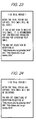
- the character string for screening "futures trading" is not written in the received email whose destination email address is "ichiro@abc.ne.jp", so the CPU 609 screens this email as an item to be delivered and generates an email in which expressions indicating that the "trial period is active" as exemplified in FIG. 23 and suggesting that character strings for screening can be registered (hereafter also referred to as the "message") are added to the body of the received email (step SF4).
- the CPU 609 screens the email as an item not to be delivered and generates an email in which an expression indicating that the "trial period is active" as exemplified in FIG. 24 is added.
- the CPU 609 stores the generated email in a mailbox identified by the destination email address "ichiro@abc.ne.jp" (step SF5) and sends an incoming notification to the mobile phone 700, which is the sender, to report that an email has been stored in the mailbox (step SF6).
- the mobile phone 700 receives this incoming notification, it performs the same process as described in B-3 and receives the email from the email server apparatus 600.
- the mobile phone 700 When the mobile phone 700 receives the email, it emits a sound to let the user know that the email has been received. Thereafter, when the user performs the operation of displaying the email, an email to which expressions have been added indicating that the "trial period is active" and suggesting that character strings for screening can be registered, is displayed on the LCD display.
- An email server apparatus 600 may also perform a registration operation different from the registration operation for character strings for screening described in B-2. This is described below.
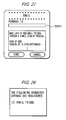
- the mobile phone 700 displays the selected email on the LCD display as shown in FIG. 26.
- the mobile phone 700 displays a forwarding screen shown in FIG. 27 on the LCD display for the selected email.
- the mobile phone 700 When the user enters the email address "toroku@abc.ne.jp" for registration in a textbox BX51 shown in FIG. 27, to register a character string for a screening function and clicks the "Send” button shown in FIG. 27, the mobile phone 700 generates an email by writing the email address "ichiro@abc.ne.jp" assigned to the user and stored in the mobile phone 700 to the FROM field in the email headers, setting the entered email address for registration as an addressee, and setting the content of the received email as the body, and sends it to the email server apparatus 600.
- the CPU 609 When, in the email server apparatus 600, the CPU 609 receives the email, as shown in FIG. 11, it determines whether the destination email address of the received email is the email address "toroku@abc.ne.jp" for registration (step SC1). In this example, the destination email address is "toroku@abc.ne.jp", so the CPU determines "Yes” in step SC1 and executes a character string registration process (step SC2).
- the CPU 609 breaks down the text in the received email into minimum unit character strings using morphological analysis (step SD1).
- the CPU 609 determines whether a character string identical to any of the broken down character strings is registered in a character string table TB2 (step SD2). In this example, the CPU 609 determines "Yes,” since the character string "email friend", which is written in the body of the received email, is registered in the character string table TB2 shown in FIG. 5.
- step SD2 When the CPU 609 determines "Yes” in step SD2, it reads the character string for screening "email friend” as identical to the broken down character string from the character string table TB2, associates the sender email address "ichiro@abc.ne.jp" extracted from the FROM field in the email headers of the received email, and registers this character string for screening to data table TB1 (step SD3).
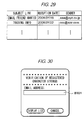
- step SD4 the CPU 609 generates an email including the character string for screening exemplified in FIG. 28 and an expression reporting the registration thereof (step SD4), stores this email in the mailbox identified with the sender email address (step SD5) and sends an incoming notification to the mobile phone 700 which is the sender (step SD6).
- the mobile phone 700 When the mobile phone 700 receives this incoming notification, it performs the same process as described in B-3 and receives the email from the email server apparatus 600. When the mobile phone 700 receives the email, it emits a sound to let the user know that the email has been received. Thereafter, when the user performs the operation of displaying the email, the character string for screening and the email reporting the registration thereof are displayed in the LCD display.
- the CPU 609 receives an email whose subject line is, for example, "looking for email friends", whose body is the content illustrated in FIG. 22, and whose destination email address is "ichiro@abc.ne.jp", this destination email address is neither an email address for registration nor an email for testing, so a determination of "No" is made at both step SC1 and step SC3, and the email screening process (step SC5) is executed.
- the CPU 609 extracts the destination email address "ichiro@abc.ne.jp" from the received email and reads the valid/invalid setting data corresponding to the extracted destination email address from the data table TB1.
- the CPU 609 determines whether the valid/invalid setting data is set to valid (step SF1), and since it is set to "valid" in this example (step SF1: Yes), it executes the processes from step SF2 onward.
- the CPU 609 obtains the date when the email was received (e.g., "February 19, 200X) from the clock unit 605, and reads the trial period due date (e.g., "February 17, 200X") corresponding to the destination email address from the data table TB1.
- the CPU 609 determines whether the trial period is valid based on whether the obtained current date has reached the trial period due date (step SF2). In this example, the CPU 609 determines that the trial period is terminated, since the current date falls after the expiry date of the trial period (step SF2: No).
- the trial period has terminated, so the CPU 609 reads the character strings for screening "futures trading" and "email friend” corresponding to the received destination email address "ichiro@abc.ne.jp" from the data table TB1.
- the CPU 609 determines whether the read character strings for screening are written in the received email (step SF7).
- the character string for screening "email friend” is contained in the received email, so the CPU 609 determines that this email is an item not to be delivered (step SF7: Yes).
- step SF7 When the CPU 609 determines "Yes" in step SF7, it extracts the subject line, sender email address, and destination email address from the email headers of the received email.
- the CPU 609 associates the subject line, sender email address, and reception date with the destination email address of the received email and stores them in a history table TB3 as shown in FIG. 6 (step SF8).
- the CPU 609 deletes the email by not storing it in a mailbox (step SF9).
- the history output operation in the email server apparatus 600 is described in detail, referring to FIG. 15.
- the CPU 609 obtains the current date on a regular basis from the clock unit 605, thereby monitoring the changing of the months.
- the CPU 609 detects that the month has changed, it reads from a history table TB3 a subject line "looking for email friends" from emails that were not delivered to email address "ichiro@abc.ne.jp", a sender email address "aaa@abc.co.jp", and a reception date "January 19, 200X", for example (step SG1).
- the CPU 609 From the data read from the history table TB3, the CPU 609 generates an email in a list format shown in FIG. 29 (step SG2).
- the CPU 609 stores it in a mailbox identified by the email address "ichiro@abc.ne.jp" (step SG3) and sends an incoming notification to the mobile phone 700 (step SG4).
- the mobile phone 700 receives this incoming notification, it performs the same process as described in B-3 and receives the email from the email server apparatus 600.
- the mobile phone 700 receives the email, it emits a sound to let the user know that the email has been received. Thereafter, when the user performs the operation of displaying the email, the mobile phone 700 displays a list of emails that were not delivered in the LCD display.
- a user of a mobile phone 700 can set up a screening process for email based on a test process and a history output process, and, accordingly, the user of the mobile phone 700 can repeatedly consider and register character strings for screening so that only necessary email is delivered.
- unwanted bulk email is delivered for a fixed period of time for people wishing to receive this type of email.
- determination results of email screening and notices regarding screening of emails are added to emails delivered during the trial period, so the email server apparatus 600 informs users who wish to receive unwanted bulk email that a process for screening email is performed. This allows users wishing to receive email generally referred to as unwanted bulk email to modify the valid/invalid setting data and receive email generally considered to be unwanted bulk email.
- the email server apparatus 600 stores a seventh HTML file for displaying the screen shown in FIG. 34 and a CGI program (hereafter referred to as a "CGI test program") for sending the mobile phone 700 the determination result for text entered in a textbox BX82 shown in FIG. 34. It is also possible for the email server apparatus 600 to execute the CGI character string registration program when it receives an HTTP request and to send the seventh HTML file to the mobile phone 700. In this fashion, the screen shown in FIG. 34 is displayed in the mobile phone 700 after the email server apparatus 600 registers character strings for screening. When the user enters his or her assigned email address in a textbox BX81 shown in FIG.
- the mobile phone 700 sends the email server apparatus 600 an HTTP request containing a URL for the CGI test program and the entered email address. It is also possible for the email server apparatus 600 to execute the CGI test program when it receives the HTTP request, determine the text contained in the received HTTP request, and send the determination result to the mobile phone 700. By this process, the user can set valid/invalid, and register character strings to complete test reception rejection in order.
Landscapes
- Engineering & Computer Science (AREA)
- Computer Networks & Wireless Communication (AREA)
- Signal Processing (AREA)
- Information Transfer Between Computers (AREA)
- Data Exchanges In Wide-Area Networks (AREA)
Applications Claiming Priority (3)
| Application Number | Priority Date | Filing Date | Title |
|---|---|---|---|
| JP2002291596A JP4007893B2 (ja) | 2002-10-03 | 2002-10-03 | サーバ装置、プログラムおよび記録媒体 |
| JP2002291596 | 2002-10-03 | ||
| PCT/JP2003/012509 WO2004032438A1 (ja) | 2002-10-03 | 2003-09-30 | 電子メールサーバ装置 |
Publications (2)
| Publication Number | Publication Date |
|---|---|
| EP1549007A1 true EP1549007A1 (de) | 2005-06-29 |
| EP1549007A4 EP1549007A4 (de) | 2010-09-15 |
Family
ID=32063846
Family Applications (1)
| Application Number | Title | Priority Date | Filing Date |
|---|---|---|---|
| EP03748617A Withdrawn EP1549007A4 (de) | 2002-10-03 | 2003-09-30 | Email-server-vorrichtung |
Country Status (6)
| Country | Link |
|---|---|
| US (1) | US7437416B2 (de) |
| EP (1) | EP1549007A4 (de) |
| JP (1) | JP4007893B2 (de) |
| CN (1) | CN1689289A (de) |
| TW (1) | TWI273794B (de) |
| WO (1) | WO2004032438A1 (de) |
Families Citing this family (19)
| Publication number | Priority date | Publication date | Assignee | Title |
|---|---|---|---|---|
| JP3142820B2 (ja) * | 1998-08-27 | 2001-03-07 | 株式会社エヌ・ティ・ティ・ドコモ | プッシュ型情報配信方法およびその中継装置 |
| US7218926B2 (en) * | 2004-11-12 | 2007-05-15 | Research In Motion Limited | Method, wireless handheld electronic device and system of remotely controlling e-mail settings from the device |
| JP4975619B2 (ja) | 2005-06-24 | 2012-07-11 | イビデン株式会社 | ハニカム構造体 |
| CA2622835C (en) * | 2005-09-29 | 2011-08-09 | Teamon Systems, Inc. | Email server for processing a threshold number of email jobs for a given user and related methods |
| US8275841B2 (en) * | 2005-11-23 | 2012-09-25 | Skype | Method and system for delivering messages in a communication system |
| JP2007241807A (ja) * | 2006-03-10 | 2007-09-20 | Fujitsu Ltd | 電子メール送信プログラム、電子メール送信装置、電子メール送信方法 |
| JP4721442B2 (ja) * | 2006-09-06 | 2011-07-13 | 株式会社ネクストビジョン | 電子メールシステム |
| JP2008123318A (ja) * | 2006-11-14 | 2008-05-29 | Sony Ericsson Mobilecommunications Japan Inc | 通信端末、宛先正誤判定方法および宛先正誤判定プログラム |
| JP4405503B2 (ja) | 2006-12-28 | 2010-01-27 | キヤノンItソリューションズ株式会社 | 情報処理装置および情報処理装置の制御方法およびプログラムおよび記録媒体 |
| US8131556B2 (en) | 2007-04-03 | 2012-03-06 | Microsoft Corporation | Communications using different modalities |
| US8983051B2 (en) | 2007-04-03 | 2015-03-17 | William F. Barton | Outgoing call classification and disposition |
| AU2008201643B1 (en) | 2007-07-24 | 2008-08-28 | Rambrandt Messaging Technologies, LP | Messaging service in a wireless communications network |
| US20090083826A1 (en) * | 2007-09-21 | 2009-03-26 | Microsoft Corporation | Unsolicited communication management via mobile device |
| US9911128B2 (en) * | 2007-10-31 | 2018-03-06 | The Rocket Science Group Llc | Systems and methods for determining and sending a preferred of two electronic mail communications |
| US20120221530A1 (en) * | 2011-02-24 | 2012-08-30 | Karen Cook | Method and apparatus for verifying stored data |
| JP2014139804A (ja) * | 2014-02-25 | 2014-07-31 | Faith Inc | 情報提供システム |
| US9712467B2 (en) * | 2014-02-28 | 2017-07-18 | International Business Machines Corporation | Iterative method to successfully send large electronic messages |
| JP6667993B2 (ja) * | 2015-03-04 | 2020-03-18 | Line株式会社 | サーバ、サーバの制御方法およびプログラム |
| JP6578035B1 (ja) * | 2018-04-03 | 2019-09-18 | ソフトバンク株式会社 | 電子メールシステム及びプログラム |
Family Cites Families (8)
| Publication number | Priority date | Publication date | Assignee | Title |
|---|---|---|---|---|
| US5619648A (en) | 1994-11-30 | 1997-04-08 | Lucent Technologies Inc. | Message filtering techniques |
| JPH10161949A (ja) | 1996-12-03 | 1998-06-19 | Casio Comput Co Ltd | 電子メール送受信システム及び装置 |
| JPH1115756A (ja) * | 1997-06-24 | 1999-01-22 | Omron Corp | 電子メール判別方法及び装置並びに記憶媒体 |
| US6654787B1 (en) * | 1998-12-31 | 2003-11-25 | Brightmail, Incorporated | Method and apparatus for filtering e-mail |
| GB2347053A (en) | 1999-02-17 | 2000-08-23 | Argo Interactive Limited | Proxy server filters unwanted email |
| JP3593931B2 (ja) * | 1999-09-20 | 2004-11-24 | 日本電気株式会社 | 電子メールシステム |
| EP1130845A3 (de) * | 2000-02-18 | 2001-09-12 | Agilent Technologies Inc. a Delaware Corporation | Publish/Subscribe-System |
| JP2002204264A (ja) * | 2000-12-28 | 2002-07-19 | Id Gate Co Ltd | 電子メール管理装置、及び、電子メール管理方法 |
-
2002
- 2002-10-03 JP JP2002291596A patent/JP4007893B2/ja not_active Expired - Fee Related
-
2003
- 2003-09-30 CN CNA038236567A patent/CN1689289A/zh active Pending
- 2003-09-30 US US10/530,161 patent/US7437416B2/en not_active Expired - Fee Related
- 2003-09-30 EP EP03748617A patent/EP1549007A4/de not_active Withdrawn
- 2003-09-30 WO PCT/JP2003/012509 patent/WO2004032438A1/ja not_active Ceased
- 2003-10-03 TW TW092127479A patent/TWI273794B/zh not_active IP Right Cessation
Also Published As
| Publication number | Publication date |
|---|---|
| TW200420038A (en) | 2004-10-01 |
| JP2004128991A (ja) | 2004-04-22 |
| JP4007893B2 (ja) | 2007-11-14 |
| CN1689289A (zh) | 2005-10-26 |
| TWI273794B (en) | 2007-02-11 |
| US20060112163A1 (en) | 2006-05-25 |
| WO2004032438A1 (ja) | 2004-04-15 |
| EP1549007A4 (de) | 2010-09-15 |
| US7437416B2 (en) | 2008-10-14 |
Similar Documents
| Publication | Publication Date | Title |
|---|---|---|
| EP1549007A1 (de) | Email-server-vorrichtung | |
| US7831834B2 (en) | Associating a postmark with a message to indicate trust | |
| US7660862B2 (en) | Apparatus and method of tracking access status of store-and-forward messages | |
| US7035903B1 (en) | Systems and methods for the discovery and presentation of electronic messages that are related to an electronic message | |
| US9838345B2 (en) | Generating a relationship history | |
| US7805492B1 (en) | Systems and methods to provide assistance during address input | |
| CN100336371C (zh) | 推式内容过滤 | |
| US9087323B2 (en) | Systems and methods to automatically generate a signature block | |
| US8539030B2 (en) | System and method for managing digests comprising electronic messages | |
| US20170039592A1 (en) | Advertisement coordination | |
| US20060053379A1 (en) | Multimodal interface for mobile messaging | |
| US20080120379A1 (en) | System and method for sorting e-mail | |
| EP1581923A1 (de) | Verfahren und vorrichtung zur anzeige und beantwortung elektronischer nachrichten | |
| JP3929464B2 (ja) | 電子メールサーバ、電子メールの受渡しの中継方法、およびコンピュータプログラム | |
| US20050144243A1 (en) | Multi-language wireless email transmission method for mobile communication | |
| KR100731011B1 (ko) | 메일 서비스 시스템의 운영 방법 | |
| JP2009521182A (ja) | 携帯デバイスおよび携帯デバイスからメッセージを送信する方法 | |
| US20040093429A1 (en) | System for targeted messaging and method of operation thereof | |
| JP2003218945A (ja) | 迷惑メール抑止システム | |
| KR20020003584A (ko) | 이메일 체킹 시스템 및 방법 | |
| JP4364899B2 (ja) | 電子メールサーバ、電子メールの受渡しの中継方法、およびコンピュータプログラム | |
| JP2007086821A (ja) | メール処理プログラム及び装置、並びにメール処理方法 | |
| KR20020040146A (ko) | 이메일 마케팅 서비스 시스템 및 방법 | |
| JP2009219094A (ja) | 電子メール文頭の指定文字数以内に指定名称を存在確認し迷惑メールかを判別分別するシステム又はプログラム | |
| GB2440775A (en) | Messaging system |
Legal Events
| Date | Code | Title | Description |
|---|---|---|---|
| PUAI | Public reference made under article 153(3) epc to a published international application that has entered the european phase |
Free format text: ORIGINAL CODE: 0009012 |
|
| 17P | Request for examination filed |
Effective date: 20050415 |
|
| AK | Designated contracting states |
Kind code of ref document: A1 Designated state(s): AT BE BG CH CY CZ DE DK EE ES FI FR GB GR HU IE IT LI LU MC NL PT RO SE SI SK TR |
|
| A4 | Supplementary search report drawn up and despatched |
Effective date: 20100813 |
|
| 17Q | First examination report despatched |
Effective date: 20111216 |
|
| STAA | Information on the status of an ep patent application or granted ep patent |
Free format text: STATUS: THE APPLICATION IS DEEMED TO BE WITHDRAWN |
|
| 18D | Application deemed to be withdrawn |
Effective date: 20180320 |