EP1524852A1 - Videosuchassistierverfahren, videosuchassistiereinrichtung und rundsendeempfangsvorrichtung - Google Patents
Videosuchassistierverfahren, videosuchassistiereinrichtung und rundsendeempfangsvorrichtung Download PDFInfo
- Publication number
- EP1524852A1 EP1524852A1 EP03741507A EP03741507A EP1524852A1 EP 1524852 A1 EP1524852 A1 EP 1524852A1 EP 03741507 A EP03741507 A EP 03741507A EP 03741507 A EP03741507 A EP 03741507A EP 1524852 A1 EP1524852 A1 EP 1524852A1
- Authority
- EP
- European Patent Office
- Prior art keywords
- program information
- image
- attributes
- monitor screen
- program
- Prior art date
- Legal status (The legal status is an assumption and is not a legal conclusion. Google has not performed a legal analysis and makes no representation as to the accuracy of the status listed.)
- Ceased
Links
Images



Classifications
-
- H—ELECTRICITY
- H04—ELECTRIC COMMUNICATION TECHNIQUE
- H04N—PICTORIAL COMMUNICATION, e.g. TELEVISION
- H04N21/00—Selective content distribution, e.g. interactive television or video on demand [VOD]
- H04N21/40—Client devices specifically adapted for the reception of or interaction with content, e.g. set-top-box [STB]; Operations thereof
- H04N21/43—Processing of content or additional data, e.g. demultiplexing additional data from a digital video stream; Elementary client operations, e.g. monitoring of home network or synchronising decoder's clock; Client middleware
- H04N21/431—Generation of visual interfaces for content selection or interaction; Content or additional data rendering
-
- H—ELECTRICITY
- H04—ELECTRIC COMMUNICATION TECHNIQUE
- H04N—PICTORIAL COMMUNICATION, e.g. TELEVISION
- H04N21/00—Selective content distribution, e.g. interactive television or video on demand [VOD]
- H04N21/40—Client devices specifically adapted for the reception of or interaction with content, e.g. set-top-box [STB]; Operations thereof
- H04N21/41—Structure of client; Structure of client peripherals
- H04N21/414—Specialised client platforms, e.g. receiver in car or embedded in a mobile appliance
- H04N21/4147—PVR [Personal Video Recorder]
-
- G—PHYSICS
- G11—INFORMATION STORAGE
- G11B—INFORMATION STORAGE BASED ON RELATIVE MOVEMENT BETWEEN RECORD CARRIER AND TRANSDUCER
- G11B27/00—Editing; Indexing; Addressing; Timing or synchronising; Monitoring; Measuring tape travel
- G11B27/10—Indexing; Addressing; Timing or synchronising; Measuring tape travel
- G11B27/102—Programmed access in sequence to addressed parts of tracks of operating record carriers
- G11B27/105—Programmed access in sequence to addressed parts of tracks of operating record carriers of operating discs
-
- G—PHYSICS
- G11—INFORMATION STORAGE
- G11B—INFORMATION STORAGE BASED ON RELATIVE MOVEMENT BETWEEN RECORD CARRIER AND TRANSDUCER
- G11B27/00—Editing; Indexing; Addressing; Timing or synchronising; Monitoring; Measuring tape travel
- G11B27/10—Indexing; Addressing; Timing or synchronising; Measuring tape travel
- G11B27/34—Indicating arrangements
-
- H—ELECTRICITY
- H04—ELECTRIC COMMUNICATION TECHNIQUE
- H04N—PICTORIAL COMMUNICATION, e.g. TELEVISION
- H04N21/00—Selective content distribution, e.g. interactive television or video on demand [VOD]
- H04N21/40—Client devices specifically adapted for the reception of or interaction with content, e.g. set-top-box [STB]; Operations thereof
- H04N21/41—Structure of client; Structure of client peripherals
- H04N21/426—Internal components of the client ; Characteristics thereof
-
- H—ELECTRICITY
- H04—ELECTRIC COMMUNICATION TECHNIQUE
- H04N—PICTORIAL COMMUNICATION, e.g. TELEVISION
- H04N21/00—Selective content distribution, e.g. interactive television or video on demand [VOD]
- H04N21/40—Client devices specifically adapted for the reception of or interaction with content, e.g. set-top-box [STB]; Operations thereof
- H04N21/43—Processing of content or additional data, e.g. demultiplexing additional data from a digital video stream; Elementary client operations, e.g. monitoring of home network or synchronising decoder's clock; Client middleware
- H04N21/432—Content retrieval operation from a local storage medium, e.g. hard-disk
- H04N21/4325—Content retrieval operation from a local storage medium, e.g. hard-disk by playing back content from the storage medium
-
- H—ELECTRICITY
- H04—ELECTRIC COMMUNICATION TECHNIQUE
- H04N—PICTORIAL COMMUNICATION, e.g. TELEVISION
- H04N21/00—Selective content distribution, e.g. interactive television or video on demand [VOD]
- H04N21/40—Client devices specifically adapted for the reception of or interaction with content, e.g. set-top-box [STB]; Operations thereof
- H04N21/45—Management operations performed by the client for facilitating the reception of or the interaction with the content or administrating data related to the end-user or to the client device itself, e.g. learning user preferences for recommending movies, resolving scheduling conflicts
- H04N21/4508—Management of client data or end-user data
- H04N21/4532—Management of client data or end-user data involving end-user characteristics, e.g. viewer profile, preferences
-
- H—ELECTRICITY
- H04—ELECTRIC COMMUNICATION TECHNIQUE
- H04N—PICTORIAL COMMUNICATION, e.g. TELEVISION
- H04N21/00—Selective content distribution, e.g. interactive television or video on demand [VOD]
- H04N21/40—Client devices specifically adapted for the reception of or interaction with content, e.g. set-top-box [STB]; Operations thereof
- H04N21/47—End-user applications
- H04N21/475—End-user interface for inputting end-user data, e.g. personal identification number [PIN], preference data
-
- H—ELECTRICITY
- H04—ELECTRIC COMMUNICATION TECHNIQUE
- H04N—PICTORIAL COMMUNICATION, e.g. TELEVISION
- H04N21/00—Selective content distribution, e.g. interactive television or video on demand [VOD]
- H04N21/40—Client devices specifically adapted for the reception of or interaction with content, e.g. set-top-box [STB]; Operations thereof
- H04N21/47—End-user applications
- H04N21/482—End-user interface for programme selection
-
- H—ELECTRICITY
- H04—ELECTRIC COMMUNICATION TECHNIQUE
- H04N—PICTORIAL COMMUNICATION, e.g. TELEVISION
- H04N21/00—Selective content distribution, e.g. interactive television or video on demand [VOD]
- H04N21/40—Client devices specifically adapted for the reception of or interaction with content, e.g. set-top-box [STB]; Operations thereof
- H04N21/47—End-user applications
- H04N21/482—End-user interface for programme selection
- H04N21/4828—End-user interface for programme selection for searching programme descriptors
-
- H—ELECTRICITY
- H04—ELECTRIC COMMUNICATION TECHNIQUE
- H04N—PICTORIAL COMMUNICATION, e.g. TELEVISION
- H04N21/00—Selective content distribution, e.g. interactive television or video on demand [VOD]
- H04N21/80—Generation or processing of content or additional data by content creator independently of the distribution process; Content per se
- H04N21/83—Generation or processing of protective or descriptive data associated with content; Content structuring
- H04N21/84—Generation or processing of descriptive data, e.g. content descriptors
-
- G—PHYSICS
- G11—INFORMATION STORAGE
- G11B—INFORMATION STORAGE BASED ON RELATIVE MOVEMENT BETWEEN RECORD CARRIER AND TRANSDUCER
- G11B2220/00—Record carriers by type
- G11B2220/20—Disc-shaped record carriers
- G11B2220/21—Disc-shaped record carriers characterised in that the disc is of read-only, rewritable, or recordable type
- G11B2220/215—Recordable discs
- G11B2220/216—Rewritable discs
-
- G—PHYSICS
- G11—INFORMATION STORAGE
- G11B—INFORMATION STORAGE BASED ON RELATIVE MOVEMENT BETWEEN RECORD CARRIER AND TRANSDUCER
- G11B2220/00—Record carriers by type
- G11B2220/20—Disc-shaped record carriers
- G11B2220/25—Disc-shaped record carriers characterised in that the disc is based on a specific recording technology
- G11B2220/2508—Magnetic discs
- G11B2220/2516—Hard disks
-
- G—PHYSICS
- G11—INFORMATION STORAGE
- G11B—INFORMATION STORAGE BASED ON RELATIVE MOVEMENT BETWEEN RECORD CARRIER AND TRANSDUCER
- G11B2220/00—Record carriers by type
- G11B2220/20—Disc-shaped record carriers
- G11B2220/25—Disc-shaped record carriers characterised in that the disc is based on a specific recording technology
- G11B2220/2537—Optical discs
- G11B2220/2562—DVDs [digital versatile discs]; Digital video discs; MMCDs; HDCDs
-
- G—PHYSICS
- G11—INFORMATION STORAGE
- G11B—INFORMATION STORAGE BASED ON RELATIVE MOVEMENT BETWEEN RECORD CARRIER AND TRANSDUCER
- G11B2220/00—Record carriers by type
- G11B2220/20—Disc-shaped record carriers
- G11B2220/25—Disc-shaped record carriers characterised in that the disc is based on a specific recording technology
- G11B2220/2537—Optical discs
- G11B2220/2562—DVDs [digital versatile discs]; Digital video discs; MMCDs; HDCDs
- G11B2220/2575—DVD-RAMs
-
- G—PHYSICS
- G11—INFORMATION STORAGE
- G11B—INFORMATION STORAGE BASED ON RELATIVE MOVEMENT BETWEEN RECORD CARRIER AND TRANSDUCER
- G11B2220/00—Record carriers by type
- G11B2220/40—Combinations of multiple record carriers
- G11B2220/45—Hierarchical combination of record carriers, e.g. HDD for fast access, optical discs for long term storage or tapes for backup
- G11B2220/455—Hierarchical combination of record carriers, e.g. HDD for fast access, optical discs for long term storage or tapes for backup said record carriers being in one device and being used as primary and secondary/backup media, e.g. HDD-DVD combo device, or as source and target media, e.g. PC and portable player
-
- H—ELECTRICITY
- H04—ELECTRIC COMMUNICATION TECHNIQUE
- H04N—PICTORIAL COMMUNICATION, e.g. TELEVISION
- H04N21/00—Selective content distribution, e.g. interactive television or video on demand [VOD]
- H04N21/40—Client devices specifically adapted for the reception of or interaction with content, e.g. set-top-box [STB]; Operations thereof
- H04N21/47—End-user applications
Definitions
- the present invention relates to an image retrieval assisting method, an image retrieval assisting apparatus, and a broadcast receiving set, which are well applicable to a method and an apparatus for retrieving a desired program among a number of recorded TV programs in a TV receiver having a function to record and reproduce the TV programs.
- a digital video recording apparatus With recent prevalence of digital broadcasting, a digital video recording apparatus, a personal computer, etc. have been developed for recording digital videos comprising image and audio on a hard disk.
- the digital video recording apparatus in which digital videos can possibly be compressed at a high rate, is capable of recording a number of image programs (TV programs). Further, with an appearance of a digital video disk-random access memory (DVD-RAM) changer and an increase in capacity of hard disk, it has been possible to record further more image programs as digitalized.
- DVD-RAM digital video disk-random access memory
- EPG electronic program guide
- the EPG includes keywords of categories (genres), titles (program names) of image programs, and performers.
- this EPG is displayed on a screen to enable retrieving a desired channel.
- started has a broadcasting service with an EPG being embedded in a vertical blanking interval (VBI), which is a blank region in a surface wave.
- VBI vertical blanking interval
- an EPG that indicates contents of programs such as their titles is displayed in a list on a TV screen, thus allowing the user to look for his or her desired recorded program with confirming the program titles etc., which is convenient.
- EPG electronic program-recording functions
- Japanese Patent Application Publication No. 2000-253325 a method is known for analyzing a user's viewing history to record apparent programs of his preference automatically and present a predetermined recommendation degree to the user.
- indexes comprises only recorded date and time, so that there still exists a problem that other information must depend on user's hunch and memory.
- information of the indexes comprises only recorded date and time, so that there still exists a problem that other information must depend on user's hunch and memory.
- recorded programs as well as the EPG have been saved beforehand so that a user may watch a list of title of the recorded programs displayed on a screen when he or she views them.
- the present invention has been developed and, it is an object of the present invention to provide an image retrieval assisting method, an image retrieval assisting apparatus, and a broadcast receiving set that enable a viewer to easily retrieve his or her desired one of a number of image programs and quickly view it.
- an image retrieval assisting method for assisting retrieval of image programs comprising the steps of defining beforehand classification criterion for classifying the image programs into a plurality of attributes, acquiring program information of the image programs, classifying the program information into the attributes according to the classification criterion, and displaying the attributes defined by the classification criterion in a first direction on a monitor screen in a selectable manner and displaying only the program information of the programs fallen in a selected one of the attributes in a second direction on the monitor screen in a selectable manner.
- a user can select attribute of his or her desired image program with him or her searching for the attributes of the image programs on the monitor screen in the first direction and then retrieve his or her desired image program in the second direction on the monitor screen with him or her watching only the program information fallen in the selected attribute thereon.
- the user can easily retrieve his or her desired one of a number of image programs and quickly view the desired image program.
- An image retrieval assisting apparatus for assisting retrieval of image programs related to the present invention comprises a classification criterion information storage portion for storing classification criterion for classifying the image programs into a plurality of attributes, program information acquisition means for acquiring program information of the image programs, program information classification means for classifying the program information into the attributes according to the classification criterion, a program information storage portion for storing the classified program information, and display means for displaying the attributes defined by the classification criterion in a first direction on a monitor screen in a selectable manner and displaying only the program information of the programs fallen in a selected one of the attributes in a second direction on the monitor screen in a selectable manner.
- a user can select an attribute of his or her desired image program with him or her searching for the attributes of the image programs in the first direction on the monitor screen and then retrieve the desired image program in the second direction on the monitor screen with him or her watching only the program information fallen in the selected attribute thereon.
- a broadcast receiving set related to the present invention having a function to record and reproduce image programs comprises a classification criterion information storage portion for storing classification criterion for classifying the image program into a plurality of attributes, program information acquisition means for acquiring program information of the image programs, program information classification means for classifying the program information into the attributes according to the classification criterion, a program information storage portion for storing the classified program information, and display means for displaying the attributes defined by the classification criterion in a first direction on a monitor screen in a selectable manner, displaying only the program information of the programs fallen in a selected one of the attributes in a second direction on the monitor screen in a selectable manner, and displaying an image program corresponding to the selected program information on the monitor screen.
- the broadcast receiving set related to the present invention since the above-mentioned apparatus for assisting retrieval of image programs is applied to it, a user can select an attribute of his or her desired image program with him or her searching for the attributes of the image programs in the first direction on the monitor screen and then retrieve the desired image program in the second direction on the monitor screen with him or her watching only the program information fallen in the selected attribute thereon.
- classification criteria for classifying the image programs into a plurality of attributes is defined beforehand, program information of the image programs is then acquired to classify the program information into the attributes according to the classification criteria, and the attributes defined by the classification criteria are further displayed in a first direction, for example, a horizontal direction on a monitor screen in a selectable manner and only the program information of the programs fallen in a selected one of said attributes is displayed in a second direction, for example, a vertical direction on said monitor screen in a selectable manner so that a viewer can easily retrieve his or her desired one of the many image programs and quickly view it.
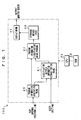
- FIG. 1 is a block diagram for showing an example of a configuration of an image retrieval assisting apparatus 100 related to the embodiment of the present invention.
- This image retrieval assisting apparatus 100 is installed in a recording/reproducing apparatus for recording and reproducing image programs, a reproducing apparatus for reproducing image programs, a broadcast receiving set having a recording/reproducing function, etc.
- This image retrieval assisting apparatus 100 classifies EPGs of image programs broadcast from broadcast stations in an ever-changing manner (hereinafter referred to as "broadcast contents” also) or image programs recorded (hereinafter referred to as “recorded contents” also) into a plurality of attributes based on their contents, and displays the EPGs on a monitor screen for each of the attributes.
- names of the contents that is, names of the programs (hereinafter referred to as "program titles” also) are displayed along a time axis.
- this image retrieval assisting apparatus 100 comprises a classification criteria information storage portion 21, program information acquisition means 23, program information classification means 27, storage means 29, display means 31, a central processing unit (CPU) 33, and an ROM 35.
- CPU central processing unit
- the program information acquisition means 23 for example, an antenna (not shown) is connected, while to the display means 31, a monitor screen (not shown) such as a broadcast receiving set is connected. Further, the classification criteria information storage portion 21 is provided with an external input terminal.
- the program information acquisition means 23 has a function to acquire an EPG, which is sent with it being superimposed on broadcast contents in digital broadcasting such as satellite broadcasting.
- the EPG acquired by the program information acquisition means 23 includes keywords such as program attributes (hereinafter referred to as “categories” or “genres” also), program titles, and performers. It is to be noted that this program information acquisition means 23 can be connected to a telephone line or the like to acquire EPGs disclosed on the Internet also.
- the classification criteria information storage portion 21 stores classification criteria for classifying into a plurality of categories recorded contents and broadcast contents received by a broadcast receiving set etc.
- the classification criteria include, for example, "news”, “sports”, “music”, “movie”, “variety”, “recency”, etc.
- "Recency” refers to a category that includes all contents within a lapse of time of 24 hours as measured from a starting time point of recording, for example.
- a category to which a company that supplies the EPG sets each of the broadcast contents can be used as it is. Further, a user may set the classification criteria arbitrarily.
- the classification criteria information storage portion 21 stores a desired classification criterion (category) through an external terminal of the image retrieval assisting apparatus 100.
- the program information classification means 27 classifies the EPGs acquired by the program information acquisition means 23 according to classification criteria stored in the classification criteria information storage portion 21. For example, if an EPG that is sent from a broadcast station with it being superimposed on the broadcast contents includes a keyword "news", the broadcast contents are classified into a category "news".
- This program information classification means 27 is constituted of, for example, a classification processing program, which is executed by the later-described CPU33.
- the storage means 29 stores a management table for managing recorded contents or contents on air. EPGs (program titles, recorded date and time of contents, etc.) classified for each category by the program information classification means 27 is managed on this management table.
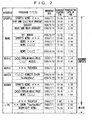
- FIG. 2 is a table for showing a management table stored in the storage means 29.
- FIG. 2 columns are provided for respectively writing "categories”, “program titles”, “broadcast date”, “broadcast starting time”, and “broadcasting lapse of time” from the left end. Into these columns, contents of EPGs classified by the program information classification means 27 (see FIG. 1) are written.
- classification criteria stored in the above-mentioned classification criteria information storage portion 21 are written. They are, for example, “news”, “sports”, “music”, “movie”, “variety”, “recency”, etc.
- “live” is also provided for managing contents on air. For example, from FIG. 2, it can be known that a program title “soccer”, which should be classified into “sports”, has been broadcast for one and a half hours starting from 15:00 on June 3, 2003. Further, it can be known that "HeyHeyHey”, which should be classified into “live”, is being broadcast starting from 23:00 on July 1, 2003 and scheduled to end at 1:00 on July 2, 2003.
- the program titles are arranged in chronological order with respect to broadcast (recorded) date/broadcast starting time. For example, as shown in FIG. 2, the more recent program titles are arranged higher and the less recent ones are arranged lower.
- this management table may be provided with columns for a broadcast station name and other information besides the columns for the program title, the broadcast date/time, and the like. Further, the arrangement of the program titles is not limited to chronological order. For example, in the column of "live”, it may be set that Channel 1 of broadcast station is arranged at the top and Channel 12 of broadcast station is arranged at the bottom. Further, it may be set that in the categories other than "live", the display order may be set depending on whether recorded contents are already reproduced or not.
- the display means 31 has a function to display the EPGs stored in the storage means 29 on the monitor screen for each category in response to a control signal from the CPU33, which will be described later. Forms in which contents are displayed on the monitor screen will be described later.
- the CPU33 which is a main controller of this image retrieval assisting apparatus 100, has a function to distribute control signals to various components of the image retrieval assisting apparatus 100, control their operations, and manage their statuses.
- This CPU33 is adapted to execute various applications on a platform which is provided by the operating system (OS).
- OS operating system
- the ROM (read only memory) 35 stores programs required for operating the CPU33. They include, for example, a self-diagnosis/initialization program, which is executed upon power application of the image retrieval assisting apparatus 100, control codes of the image retrieval assisting apparatus 100, and the like.
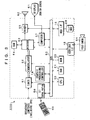
- FIG. 3 is a block diagram for showing an example of a configuration of a TV set 200 related to the embodiment of the present invention.
- This TV set 200 is formed by integrating the above-mentioned image retrieval assisting apparatus 100 and the broadcast receiving set having a recording/reproducing function. The following will describe hardware components of this TV set 200 in relation to the image retrieval assisting apparatus 100 shown in FIG. 1.
- the CPU33 serving as the main controller is connected to the various hardware components through a bus 50 and conducts governing control on these components.
- a broadcast wave received by the antenna is supplied to a tuner 51.
- the broadcast wave is given in a defined format and may include an EPG.
- the broadcast wave may be a surface wave, a satellite wave, a wireline wave, or a wireless wave.
- the tuner 51 performs tuning, that is, selects a station for a broadcast wave of a predetermined channel in accordance with an instruction from the CPU33 and outputs received data to a demodulator 52 provided on its downstream side.
- the demodulator 52 demodulates the received data which has undergone digital modulation. Note here that the tuner 51 can be altered or expanded in configuration depending on whether the broadcast wave transferred is an analog or digital one.
- digital data demodulated from a received broadcast wave is a "transport stream", which is formed by multiplexing AV data compressed according to MPEG2 (moving picture experts group 2) and data for data broadcasting.
- the former AV data is information of an image and an audio that constitute a body of broadcast contents.
- the latter data for data broadcasting is an EPG that accompanies this body of broadcast contents.
- a transport stream complies with the regulations of "transport layer” as referred to in the Open Systems Interconnection (OSI) reference model.
- a decoder 53 interprets this transport stream to separate it into the AV data compressed according to MPEG2 and the data for data broadcasting. Furthermore, it separates the real-time AV data compressed according to the MPEG2 standards into compressed image data and compressed audio data.
- the reproduced image signal is output via a composer 57 to be displayed on a display 61, while the reproduced audio signal is output via a mixer 55 to a speaker 62.
- PCM pulse code modulation
- the decoder 53 may be equipped with a memory 54 for storage of work data locally for itself.
- the decoder 53 transmits the data for data broadcasting separated from the transport stream to the CPU33 through the bus 50.
- a user interface control portion 56 is a module for processing input operations from the user and has a function to accept remote-control operations from a later-described remote controller 60, for example,
- the RAM (random access memory) 21 which is the classification criteria information storage portion shown in FIG. 1, stores classification criteria for classifying the categories of contents as described above. It is further used to load execution program codes for the CPU33 or write work data for the execution programs.
- An IEEE1394 interface 15 is a serial high-speed interface capable of transmission/reception of data having a rate of about several 10MBps.
- external devices accommodating IEEE1394 can be connected in a daisy chain or a tree.
- the devices accommodating IEEE1394 may include, for example, a video camera 64, a scanner (not shown), etc.
- a hard disk drive (hereinafter referred to as "HDD" also) 29 is the storage means shown in FIG. 1.
- This HDD 29 is capable of accumulating the management table of the recorded contents shown in FIG. 2 and a lot of received image and audio information etc. in a defined file format.
- It is an external memory device capable of random access and has a large capacity of, for example, about several tens of gigabytes (or not less than 100 gigabytes).
- the HDD29 is connected via a hard disk interface 16 to the bus 50.
- the mass-capacity external memory device is capable of high-speed random access, not limited to a hard disk drive.
- the CPU33 In response to a command from the remote controller 60 etc., the CPU33 issues instructions to record or reproduce broadcast contents, to the various hardware components. Further, these hardware components are adapted to be always ready for recording irrespective of whether a command is given from the remote controller 60.
- an MPEG2 stream that has not yet decompressed is transferred from the decoder 53 to the HDD29.
- the data transmission mode is not limited in particular and may be the program IO (PIO) transmission mode, the direct memory access (DMA) transmission mode, etc.
- PIO program IO
- DMA direct memory access
- various broadcast contents recorded are accumulated in accordance with the management table shown in FIG. 2.
- an MPEG2 stream taken out of the HDD29 is transferred via the bus 50 to the decoder 53.
- the decoder 53 separates the stream into compressed image data and compressed audio data, which then undergo MPEG2 decompression processing to be restored as the original image data and audio data and reproduced.
- a graphic processing controller 18 is a dedicated controller for generation of a later-described zapping bar 40 or the like in accordance with a drawing instruction issued by the CPU33. It has a drawing capability equivalent to, for example, a super video graphic array (SVGA) or an extended graphic array (XGA).
- SVGA super video graphic array
- XGA extended graphic array
- the tuner 51 as well as the demodulator 52 and the decoder 53 have the functions of the program information acquisition means 23 shown in FIG. 1.
- display means of the TV set 200 is constituted of the graphic processing controller 18, the mixer 55, the composer 57, the display 61, and the speaker 62.
- the display means of the TV set 200 constituted of these hardware components has the functions of the display means 31 shown in FIG. 1 as well as functions to (reproduce and) display selected (recorded) contents and programs on the monitor screen.
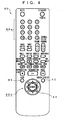
- FIG. 4 is a plan view of the remote controller 60 for showing an example of a configuration of an operation panel thereof. As shown in FIG. 4, on the operation panel, there are arranged a numeric key group 60a assigned for direct channel selection on broadcast contents, which are broadcast from a broadcast station and a cursor key group 60b assigned for vertical movement and horizontal movement.
- the cursor key group 60b includes a determination button 44 positioned roughly at its midpoint, upward-movement and downward-movement keys positioned above and below it respectively, and rightward-movement and leftward-movement keys positioned on its right and left sides respectively.
- the rightward and leftward cursor keys (hereinafter referred to as “right and left cursor keys” also) are assigned for selection operation of “category” shown in FIG. 2. Hereinafter, this category selection operation is referred to as “zapping” also.
- the upward and downward cursor keys (hereinafter referred to as “up and down cursor keys” also) are assigned for selection operation of "program title” shown in FIG. 2.
- this program title selection operation is referred to as "warping".
- the remote controller 60 is provided thereon with, for example, instruction buttons for stopping, rewinding, fast-forwarding, reproducing, pausing, recording, etc. as well as sound volume adjusting and sound switching buttons etc. Further, this remote controller 60 is provided thereon with a screen display button 45, a View button 46, etc. Functions assigned to the screen display button 45 and the View button 46 will be described later.
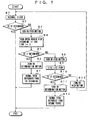
- FIG. 5 is a flowchart for showing an operation example of contents switching.
- a power supply switch of the TV set 200 shown in FIG. 3 is turned on.
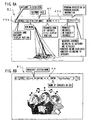
- an initial screen such as shown in FIG. 8A or 8B is displayed (step A2).
- FIG. 8A is an initial screen, which appears when recorded contents are reproduced.
- FIG. 8B is an initial screen, which appears when broadcast contents (live) are received and displayed.
- an image of contents is displayed on an entire display (monitor screen) 61 (which display mode is hereinafter referred to as "normal view") and the zapping bar 40 is displayed at an upper part on this screen.
- a channel name that is, a program category (genre) is displayed and, on its right side, a program title of the contents classified for each category and the like are displayed.
- a category display portion 40a an area in which a category name is displayed is referred to as a category display portion 40a and an area in which a program title name is displayed is referred to as a title display portion 40b.
- the zapping bar 40 for reproducing the recorded contents includes information of whether the recorded contents have been viewed, recorded date (broadcast date), whether a program is protected, whether contents have been recorded manually or automatically, etc.
- This zapping bar 40 is formed on the basis of the above-mentioned contents-management table (see FIG. 2).
- the zapping bar 40 is displayed as if sliding horizontally (in the right and left directions).
- the title display portion 40b of the zapping bar 40 is displayed as if sliding vertically (in the up and down directions).
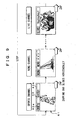
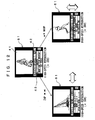
- FIG. 9 is a conceptual diagram for showing an example of screen transition by zapping.
- a category of the recorded contents being currently selected is, for example, "sports”. If a category other than "sports" is retrieved, that is, zapped in this case, the category displayed on the screen is switched using the right and left cursor keys on the remote controller 60 (see FIG. 4) (step A4).
- a zapping bar 40 in which "sports" is displayed in the category display portion 40a and “soccer” is displayed on the title display portion 40b moves, for example, rightward and disappears and, instead, a zapping bar 40 in which "news” is displayed in the category display portion 40a and "news xxx” is displayed on the title display portion 40b appears from the left side and is displayed at the upper part on the screen. Further, when display of this zapping bar 40 is switched, an image of the recorded contents whose program title is "news xxx" is displayed on the screen correspondingly (step A5).
- step A3 of FIG. 5 If the category desired to be retrieved is "news”, the process goes to step A6. If a category other than "news" is to be retrieved, the process goes to step A4 again for zapping.
- the right and left cursor keys on the remote controller 60 can be operated to sequentially switch the "categories" shown in FIG. 2. For example, when the rightward cursor key of the right and left cursor keys is operated, display of the category display portion 40a of the zapping bar 40 is switched to "news", “music”, “movie”, “variety”, “recency”, “live”, “sports”, and "news” in this order.
- the display of the category display portion 40a of the zapping bar 40 is switched to "news", “sports”, “live”, “recency”, “variety”, “movie”, “music”, and “news” in this order.
- a category displayed in this zapping bar 40 is equal to a category written in the management table (see FIG. 2). Further, category switching order in the zapping bar 40 is adapted to be equal to order in which the categories are arranged in the management table. Furthermore, in the zapping bar 40, these categories are displayed as looped automatically. By operating the right and left cursor keys on the remote controller 60, it is possible to make switchover between the recorded contents and seamless switchover between the recorded contents and live broadcasting.
- category display of the zapping bar 40 is set to, for example, "sports”.
- step A6 the process searches the recorded contents belonging to the selected category for broadcast contents desired to be viewed.
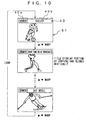
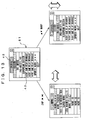
- FIG. 10 is a conceptual diagram for showing an example of screen transition by warping.
- the category of the recorded contents currently selected is "sports" and "soccer” is selected from among the program titles recorded so as to belong to this "sports”. If any other recorded contents whose category belongs to "sports" is retrieved, that is, warped, in this case, the up and down cursor keys on the remote controller 60 (see FIG. 4) are operated to switch the recorded contents displayed on the screen (step A7).
- zapping bar 40 in which "sports” is displayed in the category display portion 40a and “soccer” is displayed in the title display portion 40b disappears and a zapping bar 40 in which "sports” is similarly displayed in the category display portion 40a and "night game relay broadcast” is displayed in the title display portion 40b is displayed at the upper part on the screen. Further, when display of this zapping bar 40 is switched in such a manner, an image of the recorded contents whose program title is "night game relay broadcast” is displayed on the screen (step A8).
- step A6 of FIG. 5 After the program titles are switched, the process returns to step A6 of FIG. 5. In a case where warping is performed again, the process goes to step A7. In a case where no warping is performed, on the other hand, the process goes to step A9.
- the program titles displayed in the zapping bar 40 are equal to the program titles written in the management table (see FIG. 2). Further, a switching order of the program titles in the zapping bar 40 is adapted to be equal to the order in which the program titles are arranged in the management table. Furthermore, in the zapping bar 40, these program titles are displayed as looped automatically in the same category. By operating the up and down cursor keys on the remote controller 60, it is possible to make seamless switchover between the recorded contents classified into the same category.
- a program title to be displayed in the zapping bar 40 is set to, for example, "night game relay broadcast", which belongs to a category of "sports".
- step A9 the process decides whether "night game relay broadcast” selected at step A6 is to be viewed. To perform zapping or warping again without viewing "night game relay broadcast” in this case, the process returns to step A3. To view "night game relay broadcast", on the other hand, the user presses the determination button 44 on the remote controller 60 (step A10).
- step A1 the user presses the screen display button 45 on the remote controller 60 (step A1). This causes the zapping bar 40 to be displayed again at the upper part on the screen of the display 61.
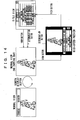
- FIG. 11 is a conceptual diagram for showing a display example of an animation.
- an image to be displayed on the screen is switched by zapping or warping. For example, to switch an image from “soccer” to "news", in FIG. 3, selection information indicating that "news” has been selected by the user is delivered to the CPU33, in response to which images of "news” etc. are called from the HDD29. Therefore, in this image switching, there occurs a time lag of about three seconds during which no image appears on the screen. To bridge this time lag, a screen frame (frame portion) referred to as an animation is displayed.
- switching of a relevant image program is assimilated to a process of a post-switching image expanding from, for example, a midpoint of the screen gradually.
- the user feels as if he or she is watching an image switching process and can view the screen without uncomfortable feeling as compared to a case where the image is switched suddenly or a case where nothing appears on the screen for about three seconds.
- an image retrieval assisting method related to the embodiment of the present invention assists retrieval of an image program (contents) in a recording/reproducing apparatus for recording reproducing image programs, a reproducing apparatus for reproducing image programs, a TV set having a recording/reproducing function, etc., the method comprising the steps of defining beforehand classification criteria (criterion) for classifying the contents into a plurality of categories, acquiring EPGs of the contents and classifying the EPGs into the categories in accordance with the classification criteria (criterion), and horizontally displaying the categories defined by the classification criteria (criterion) on a monitor screen in a selectable manner and vertically displaying only the EPGs that are classified into a selected one of the categories on the monitor screen in a selectable manner.
- the user can select a category of image programs he or she wishes to view with him or her retrieving the categories of contents horizontally and he or she can vertically retrieve the image program he or she wishes to view with him or her watching only the EPGs of image programs classified into the selected category on the monitor screen.
- settings of the image retrieval assisting apparatus 100 or the TV set 200 may be altered so that the zapping bar 40 may disappear automatically depending on whether the key operation on the remote controller 60 has been performed over steps A1-A10 of the flowchart (example of switching operation for contents) shown in FIG. 5.
- time-limited steps T1 and T2 may each be inserted immediately after step A3 in FIG. 5 (see FIG. 6).
- time-limited steps T3 and T4 may each be inserted immediately after step A6 of FIG. 5 (see FIG. 6).
- Steps A1-A11 shown in FIG. 6 perform the same processes as the steps A1-A11 of FIG. 5 respectively and so their description is omitted.
- Each of the Steps T1-T4 shown in FIG. 6 relates to time-limiting step.
- settings are made so that if a next key operation is not performed within two seconds after the zapping bar 40 is displayed or a right or left (or up or down) cursor key is operated, the zapping bar 40 disappears automatically and recorded contents displayed on the screen is reproduced (in the case of live broadcasting, broadcast contents are televised as they are).
- the zapping bar 40 disappears automatically and recorded contents displayed on the screen is reproduced (in the case of live broadcasting, broadcast contents are televised as they are).
- FIG. 12 is a conceptual diagram for showing an example of retrieving contents in a high-speed preview mode related to the first example of the present invention.
- the present first example will be described with reference to a case where, when retrieving desired contents along the flowchart of FIG. 5, instead of using the zapping bar 40, a category name and a program title name are displayed on the screen as separated from each other and an image to be displayed at the time of retrieval is reproduced at a high speed.
- the other conditions are the same as those for the embodiment. Therefore, components having the same symbols as those in the embodiment have the same function or perform the same processing and so their description is omitted.
- the category bar 42 corresponds to the category display portion 40a of the zapping bar 40 and displays in it three categories horizontally (in right and left directions). A selected category is displayed at a midpoint of this category field. In FIG. 12, a category of "sports" is selected.
- the category selection is performed by operating the right and left cursor keys on the remote controller 60 as in the case of the normal view mode (entire screen display mode) described with the embodiment.
- the contents-list 43 corresponds to the title display portion 40b of the zapping bar 40 and shows three program titles vertically (up and down directions). Further, although not shown, this contents-list 43 displays information of whether recorded contents have been viewed, a recorded date (broadcast date), whether a program is protected, whether a content has been recorded manually or automatically, etc. Selected broadcast contents are displayed as hatched in the contents-list 43 on the screen. In FIG. 12, "soccer" is selected as the contents. This category is also selected by operating the up and down cursor keys on the remote controller 60 as in the case of the normal view mode.
- a high-speed preview mode On a contents display screen 41 reduced in size and displayed together with the contents-list 43 and the category bar 42, selected contents are reproduced at a high speed of, for example, 300 times an ordinary speed.
- a display mode is referred to as a high-speed preview mode.
- the recorded contents belonging to a selected category are sequentially reproduced at a high speed (x 300) starting from the more recent contents in terms of recorded time (that is, downward from the top in the management table). For example, when high-speed reproduction of a soccer game is finished, a night game relay broadcast of contents belonging to a category of "sports" is reproduced.
- the recorded contents are reproduced at a high speed in a loop within a post-switching category.
- warping is performed by operating the up and down cursor keys on the remote controller 60, the recorded contents selected next are reproduced at a high speed.
- the determination button on the remote controller 60 is pressed during such a high-speed reproduction, the recorded contents which have been reproduced at a high speed at the time of this pressing of the determination button are selected and reproduced from the beginning (exordium) thereof at the ordinary speed (x 1).
- the recorded contents are not selected unless the determination button 44 on the remote controller 60 is pressed.
- the View button 46 on the remote controller 60 is pressed during high-speed reproduction, retrieval operation of contents is finished. Then, at a resume point of the recorded contents that have been reproduced before the retrieval operation, an ordinary-speed reproduction of the contents starts as displayed on the entire screen.
- the live broadcast cannot be reproduced at a high speed (x 300) but at an ordinary speed (x 1).
- FIG. 13 is a conceptual diagram for showing an example of screen transition in a title list view mode according to the second example of the present invention.
- the present second example will be described with reference to a case where a title list view is prepared in which a category name and a program title name are separated from each other and displayed on the screen, so that, when retrieving desired broadcast contents along the flowchart of FIG. 5, the screen display mode is switched arbitrarily among this title list view, the above-mentioned high-speed preview, and normal view.
- the other conditions are the same as those for the embodiment. Therefore, components having the same symbols as those in the embodiment have the same function or perform the same processing and so their description is omitted.
- the title list view refers to such a display mode that, as shown in FIG. 13, the category bar 42 is displayed at the top on the screen and, below this category bar 42, a plurality of program titles of recorded broadcast contents belonging to a category displayed in this category bar 42 is displayed.
- a category to be displayed in the category bar 42 is selected by operating the right and left cursor keys on the remote controller 60.
- nine broadcast contents are displayed in the contents list 43 in FIG. 13, the number of broadcast contents to be displayed is not limited to it; for example, six broadcast contents may be displayed.
- the contents to be displayed in the contents-list 43 are selected by operating the up and down cursor keys on the remote controller 60. Then, by pressing the determination button on the remote controller 60, the recorded contents thus selected are reproduced starting from its resume point.
- this contents list 43 is displayed information of whether recorded contents have been viewed, a recorded date (broadcast date), whether a program is protected, whether contents have been recorded manually or automatically, etc.
- This title list view mode has no image display region and so has an advantage that a plurality of contents belonging to a particular category can be displayed in a larger size or in large number in this mode than in the normal mode and the high-speed preview mode.
- FIG. 14 is a conceptual diagram for showing an example of screen display mode transition.
- the mode By pressing the View button 46 on the remote controller 60, the mode can be switched among the normal view mode, the high-speed preview mode, and the title list view mode as shown in FIG. 14.
- the screen display mode can be thus switched at any one of steps A1-A11 of the flowchart of FIGS. 5 and 6.
- FIG. 7 is a flowchart for showing an example of switching operation of screen display modes.
- step B2 of FIG. 7 the user decides whether he or she should press the determination button 44 on the remote controller 60. If the determination button 44 is pressed, the process goes to step A11 of the flowchart in FIG. 5 where a reproduction of the recorded contents, "soccer" starts. If the determination button 44 is not pressed, on the other hand, the process goes to step B3 of the flowchart in FIG. 7.
- step B3 of FIG. 7 the user presses the View button 46 on the remote controller 60.
- screen display switches from the normal view mode to the high-speed preview mode (step B4).
- the high-speed preview mode as described with the first example, an image of the recorded contents is reproduced at a high speed of 300 times an ordinary speed, for example.
- this step B4 by operating the right and left (or up and down) cursor keys on the remote controller 60, zapping or warping can be performed.
- step B5 the user decides whether he or she should press the determination button on the remote controller 60. If the user presses the determination button (step B6), the screen display is switched to the normal view mode where a reproduction of "soccer" starts (step B7). If the determination button is not pressed, on the other hand, the user presses the View button 46 on the remote controller 60 (step B8). Then, the screen display is switched from the high-speed preview mode to the title list view (step B9). At this step B9 also, by operating the right and left (or up and down) cursor keys on the remote controller 60, zapping or warping can be performed.
- step B10 the user decides whether he or she should press the determination button 44 on the remote controller 60 at step B10. If the determination button 44 is pressed (step B11), the screen display is switched to the normal view mode and a reproduction of "soccer" starts at its resume point (step B12). If the determination button 44 is not pressed, on the other hand, the user presses the View button 46 at step B13, so that the screen display returns to the normal view (step B1).
- any of the screen display modes by operating the right and left (or up and down) cursor keys on the remote controller 60, zapping or warping can be performed. Further, by pressing the View button 46 on the remote controller 60 repeatedly, the screen display modes can be switched sequentially in a loop as shown in FIG. 14. In this second example, the screen display mode can be switched easily in accordance with user's preference, thus allowing the recorded contents to be retrieved further more efficiently.
- a display direction of the program categories and that of the information of programs classified into the selected category are not limited to this configuration; for example, the program categories may be displayed vertically in such a manner that they can be scrolled and the information of programs classified into the selected category may be displayed horizontally in a selectable manner.
- each category (each program attribute) may be displayed horizontally on the screen in such a manner that it can be scrolled and the information of programs classified into the selected category is displayed in a selectable manner in a direction at a predetermined angle (e.g., 45 degrees, 60 degrees, etc.) with respect to the above-mentioned horizontal direction.
- a predetermined angle e.g. 45 degrees, 60 degrees, etc.
- the present invention is extremely well applicable to a method and apparatus for retrieving a desired program from among a number of recorded TV programs in a TV receiver having a function to record and reproduce TV programs.
Landscapes
- Engineering & Computer Science (AREA)
- Multimedia (AREA)
- Signal Processing (AREA)
- Databases & Information Systems (AREA)
- Human Computer Interaction (AREA)
- Television Signal Processing For Recording (AREA)
- Television Systems (AREA)
- Information Retrieval, Db Structures And Fs Structures Therefor (AREA)
Applications Claiming Priority (3)
| Application Number | Priority Date | Filing Date | Title |
|---|---|---|---|
| JP2002210998 | 2002-07-19 | ||
| JP2002210998A JP2004056462A (ja) | 2002-07-19 | 2002-07-19 | 映像検索支援方法及び映像検索支援装置、並びに放送受信装置 |
| PCT/JP2003/009190 WO2004010689A1 (ja) | 2002-07-19 | 2003-07-18 | 映像検索支援方法及び映像検索支援装置、並びに放送受信装置 |
Publications (2)
| Publication Number | Publication Date |
|---|---|
| EP1524852A1 true EP1524852A1 (de) | 2005-04-20 |
| EP1524852A4 EP1524852A4 (de) | 2005-12-07 |
Family
ID=30767756
Family Applications (1)
| Application Number | Title | Priority Date | Filing Date |
|---|---|---|---|
| EP20030741507 Ceased EP1524852A4 (de) | 2002-07-19 | 2003-07-18 | Videosuchassistierverfahren, videosuchassistiereinrichtung und rundsendeempfangsvorrichtung |
Country Status (6)
| Country | Link |
|---|---|
| US (2) | US7882523B2 (de) |
| EP (1) | EP1524852A4 (de) |
| JP (1) | JP2004056462A (de) |
| KR (1) | KR100982063B1 (de) |
| CN (2) | CN1984234A (de) |
| WO (1) | WO2004010689A1 (de) |
Cited By (3)
| Publication number | Priority date | Publication date | Assignee | Title |
|---|---|---|---|---|
| EP1773046A3 (de) * | 2005-10-08 | 2009-09-02 | Samsung Electronics Co., Ltd. | Anzeigevorrichtung und Steuerverfahren dafür |
| EP2007144A4 (de) * | 2006-03-27 | 2011-06-15 | Ptp Inc | Aufzeichnungs- und wiedergabeeinrichtung |
| EP2512148A1 (de) * | 2011-04-12 | 2012-10-17 | Samsung Electronics Co., Ltd. | Verfahren zum Durchschalten eines Kanals und Rundfunkempfangsvorrichtung dafür |
Families Citing this family (44)
| Publication number | Priority date | Publication date | Assignee | Title |
|---|---|---|---|---|
| JP2006094442A (ja) * | 2004-09-27 | 2006-04-06 | Toshiba Corp | 放送受信装置 |
| JP4349277B2 (ja) * | 2004-12-24 | 2009-10-21 | 株式会社日立製作所 | 動画再生装置 |
| US7290211B2 (en) * | 2005-01-05 | 2007-10-30 | Digital Networks North America, Inc. | Method and system for reconfiguring a selection system based on layers of categories descriptive of recordable events |
| US7657151B2 (en) | 2005-01-05 | 2010-02-02 | The Directv Group, Inc. | Method and system for displaying a series of recordable events |
| JP4562606B2 (ja) * | 2005-07-22 | 2010-10-13 | 富士通テン株式会社 | 受信装置及び受信方法 |
| US20070079332A1 (en) * | 2005-09-30 | 2007-04-05 | Microsoft Corporation | Network branded recorded programs |
| JP2007150975A (ja) * | 2005-11-30 | 2007-06-14 | Toshiba Corp | 映像記録再生装置及び映像記録再生方法 |
| KR100750150B1 (ko) * | 2005-12-23 | 2007-08-21 | 삼성전자주식회사 | 방송 콘텐츠 정보 표시 방법 및 그 장치 |
| KR100772864B1 (ko) * | 2006-01-20 | 2007-11-02 | 삼성전자주식회사 | 멀티미디어 컨텐츠를 디스플레이하는 장치 및 방법 |
| US20080235209A1 (en) * | 2007-03-20 | 2008-09-25 | Samsung Electronics Co., Ltd. | Method and apparatus for search result snippet analysis for query expansion and result filtering |
| US8115869B2 (en) | 2007-02-28 | 2012-02-14 | Samsung Electronics Co., Ltd. | Method and system for extracting relevant information from content metadata |
| US20070214123A1 (en) * | 2006-03-07 | 2007-09-13 | Samsung Electronics Co., Ltd. | Method and system for providing a user interface application and presenting information thereon |
| US8843467B2 (en) | 2007-05-15 | 2014-09-23 | Samsung Electronics Co., Ltd. | Method and system for providing relevant information to a user of a device in a local network |
| US8863221B2 (en) | 2006-03-07 | 2014-10-14 | Samsung Electronics Co., Ltd. | Method and system for integrating content and services among multiple networks |
| US8510453B2 (en) | 2007-03-21 | 2013-08-13 | Samsung Electronics Co., Ltd. | Framework for correlating content on a local network with information on an external network |
| US8732154B2 (en) | 2007-02-28 | 2014-05-20 | Samsung Electronics Co., Ltd. | Method and system for providing sponsored information on electronic devices |
| US20080221989A1 (en) * | 2007-03-09 | 2008-09-11 | Samsung Electronics Co., Ltd. | Method and system for providing sponsored content on an electronic device |
| US8200688B2 (en) | 2006-03-07 | 2012-06-12 | Samsung Electronics Co., Ltd. | Method and system for facilitating information searching on electronic devices |
| US8209724B2 (en) | 2007-04-25 | 2012-06-26 | Samsung Electronics Co., Ltd. | Method and system for providing access to information of potential interest to a user |
| KR100788696B1 (ko) * | 2006-06-21 | 2007-12-26 | 삼성전자주식회사 | 동적인 사용자 인터페이스를 이용하여 방송 프로그램을브라우즈하는 방법 및 장치 |
| JP4717762B2 (ja) * | 2006-09-04 | 2011-07-06 | キヤノン株式会社 | 画像再生装置、画像再生装置の制御方法、プログラム、及び記録媒体 |
| CN101179683B (zh) * | 2006-11-10 | 2011-06-15 | 乐金电子(中国)研究开发中心有限公司 | 一种可录电视的已录制节目信息处理系统和方法 |
| US8935269B2 (en) | 2006-12-04 | 2015-01-13 | Samsung Electronics Co., Ltd. | Method and apparatus for contextual search and query refinement on consumer electronics devices |
| US9286385B2 (en) | 2007-04-25 | 2016-03-15 | Samsung Electronics Co., Ltd. | Method and system for providing access to information of potential interest to a user |
| KR101462116B1 (ko) * | 2007-07-25 | 2014-11-17 | 삼성전자 주식회사 | 방송처리장치 및 그 제어방법 |
| US8176068B2 (en) | 2007-10-31 | 2012-05-08 | Samsung Electronics Co., Ltd. | Method and system for suggesting search queries on electronic devices |
| US8010536B2 (en) * | 2007-11-20 | 2011-08-30 | Samsung Electronics Co., Ltd. | Combination of collaborative filtering and cliprank for personalized media content recommendation |
| KR101487833B1 (ko) * | 2007-12-20 | 2015-01-30 | 삼성전자 주식회사 | 프로그램 기준의 epg 시스템 및 그 방법 |
| US8938465B2 (en) | 2008-09-10 | 2015-01-20 | Samsung Electronics Co., Ltd. | Method and system for utilizing packaged content sources to identify and provide information based on contextual information |
| KR101533699B1 (ko) * | 2009-02-25 | 2015-07-03 | 삼성전자 주식회사 | EPG를 이용한 Control UI 정보 전송 및 처리 장치 및 방법 |
| JP2009170090A (ja) * | 2009-04-21 | 2009-07-30 | Sharp Corp | 番組タイトル表示部付記録再生装置 |
| US20110010742A1 (en) * | 2009-07-10 | 2011-01-13 | At&T Intellectual Property I, L.P. | Enhanced network search |
| CN101771687B (zh) * | 2009-12-29 | 2013-06-05 | 北京牡丹电子集团有限责任公司 | 对互联网非法视频和图像节目的监测方法 |
| US9258175B1 (en) | 2010-05-28 | 2016-02-09 | The Directv Group, Inc. | Method and system for sharing playlists for content stored within a network |
| KR101750337B1 (ko) * | 2010-08-17 | 2017-06-23 | 삼성전자주식회사 | 정보 제공 방법 및 장치 |
| JP5956762B2 (ja) * | 2012-02-07 | 2016-07-27 | 株式会社ドワンゴ | 配信システム、配信方法及びコンピュータプログラム |
| JP2013174993A (ja) * | 2012-02-24 | 2013-09-05 | Ntt Comware Corp | コンテンツ選択装置、コンテンツ選択方法およびプログラム |
| EP3252586A4 (de) * | 2015-01-27 | 2018-08-15 | Ntt Docomo, Inc. | Anzeigesteuerungsvorrichtung und -programm |
| US20180046337A1 (en) * | 2015-03-27 | 2018-02-15 | Panasonic Intellectual Property Management Co., Ltd. | Video playback device and program information display method |
| CN106488270B (zh) * | 2016-09-08 | 2020-12-11 | 广州华多网络科技有限公司 | 一种直播间切换的方法和装置 |
| JP2018081390A (ja) * | 2016-11-14 | 2018-05-24 | Jcc株式会社 | 録画装置 |
| JP6841750B2 (ja) * | 2017-11-30 | 2021-03-10 | 東芝映像ソリューション株式会社 | 電子機器及び映像再生方法 |
| CN113132784A (zh) * | 2019-12-30 | 2021-07-16 | 阿里巴巴集团控股有限公司 | 交互控制方法、装置和电子设备以及窗口展示方法 |
| JP7699711B1 (ja) * | 2024-12-26 | 2025-06-27 | 株式会社ビデオリサーチ | 情報処理システム、情報処理方法およびプログラム |
Family Cites Families (27)
| Publication number | Priority date | Publication date | Assignee | Title |
|---|---|---|---|---|
| US4977455B1 (en) * | 1988-07-15 | 1993-04-13 | System and process for vcr scheduling | |
| JP3002471B2 (ja) * | 1988-08-19 | 2000-01-24 | 株式会社日立製作所 | 番組配信装置 |
| US5621456A (en) * | 1993-06-22 | 1997-04-15 | Apple Computer, Inc. | Methods and apparatus for audio-visual interface for the display of multiple program categories |
| US5822123A (en) * | 1993-09-09 | 1998-10-13 | Davis; Bruce | Electronic television program guide schedule system and method with pop-up hints |
| US5523796A (en) * | 1994-05-20 | 1996-06-04 | Prevue Networks, Inc. | Video clip program guide |
| US5619249A (en) * | 1994-09-14 | 1997-04-08 | Time Warner Entertainment Company, L.P. | Telecasting service for providing video programs on demand with an interactive interface for facilitating viewer selection of video programs |
| US5752160A (en) * | 1995-05-05 | 1998-05-12 | Dunn; Matthew W. | Interactive entertainment network system and method with analog video startup loop for video-on-demand |
| US6005631A (en) * | 1996-03-28 | 1999-12-21 | Scientific-Atlanta, Inc. | Methods and apparatus for organizing and searching an electronic programming guide |
| FR2752130B1 (fr) * | 1996-07-31 | 1999-03-19 | Thomson Multimedia Sa | Procede de selection de programmes, notamment de programmes de television et dispositif et interface graphique mettant en oeuvre ce procede |
| US5850218A (en) * | 1997-02-19 | 1998-12-15 | Time Warner Entertainment Company L.P. | Inter-active program guide with default selection control |
| JP3653958B2 (ja) * | 1997-11-14 | 2005-06-02 | 村田機械株式会社 | スキャナレンズホルダー及びこのレンズホルダーを有したスキャナフレーム |
| JPH11150693A (ja) | 1997-11-17 | 1999-06-02 | Sony Corp | 電子機器、電子機器における機能操作方法、電子機器において実行可能なプログラムが格納された媒体 |
| JPH11266413A (ja) | 1998-03-17 | 1999-09-28 | Sony Corp | 情報処理装置および方法、デジタル信号復調装置および方法、並びに提供媒体 |
| JPH11298821A (ja) | 1998-04-13 | 1999-10-29 | Matsushita Electric Ind Co Ltd | 番組情報表示装置 |
| US6243145B1 (en) * | 1998-05-01 | 2001-06-05 | Scientific-Atlanta, Inc. | Method and apparatus for browsing television channel information by category |
| JP4006182B2 (ja) | 1998-05-07 | 2007-11-14 | 株式会社日立製作所 | 情報信号の選択方法とその装置、かかる選択装置を備えた映像情報表示装置、並びに、そのための遠隔操作装置 |
| US6563515B1 (en) * | 1998-05-19 | 2003-05-13 | United Video Properties, Inc. | Program guide system with video window browsing |
| EP1102482B1 (de) * | 1998-07-01 | 2010-02-17 | Hitachi, Ltd. | Unterstützungsmethode zur betrachtung von aufgezeichneten programmen |
| WO2000033576A1 (en) * | 1998-12-04 | 2000-06-08 | Index System, Inc. | System and method for providing news, sports, and local guide services through an electronic program guide |
| JP3844901B2 (ja) | 1999-02-26 | 2006-11-15 | 株式会社東芝 | 電子番組ガイド受信システム |
| JP2000287179A (ja) | 1999-03-30 | 2000-10-13 | Toshiba Corp | 番組視聴装置および方法 |
| US6425129B1 (en) * | 1999-03-31 | 2002-07-23 | Sony Corporation | Channel preview with rate dependent channel information |
| JP2001148812A (ja) | 1999-11-18 | 2001-05-29 | Sony Corp | 情報表示装置、表示情報選択方法及びリモートコントロール装置 |
| US6754907B1 (en) * | 2000-02-09 | 2004-06-22 | Sprint Communications Company, L.P. | Remote control of video-on-demand system |
| US6857128B1 (en) * | 2000-02-14 | 2005-02-15 | Sharp Laboratories Of America | Electronic programming guide browsing system |
| JP4465856B2 (ja) | 2000-11-02 | 2010-05-26 | ソニー株式会社 | 映像特殊効果システム |
| JP4191932B2 (ja) * | 2001-03-08 | 2008-12-03 | パナソニック株式会社 | メディア配信装置およびメディア配信方法 |
-
2002
- 2002-07-19 JP JP2002210998A patent/JP2004056462A/ja active Pending
-
2003
- 2003-07-18 CN CNA2006101631872A patent/CN1984234A/zh active Pending
- 2003-07-18 WO PCT/JP2003/009190 patent/WO2004010689A1/ja not_active Ceased
- 2003-07-18 CN CNB03801095XA patent/CN1298164C/zh not_active Expired - Fee Related
- 2003-07-18 US US10/489,833 patent/US7882523B2/en not_active Expired - Fee Related
- 2003-07-18 EP EP20030741507 patent/EP1524852A4/de not_active Ceased
- 2003-07-18 KR KR1020047003976A patent/KR100982063B1/ko not_active Expired - Fee Related
-
2010
- 2010-12-15 US US12/968,813 patent/US8214860B2/en not_active Expired - Fee Related
Cited By (4)
| Publication number | Priority date | Publication date | Assignee | Title |
|---|---|---|---|---|
| EP1773046A3 (de) * | 2005-10-08 | 2009-09-02 | Samsung Electronics Co., Ltd. | Anzeigevorrichtung und Steuerverfahren dafür |
| EP2007144A4 (de) * | 2006-03-27 | 2011-06-15 | Ptp Inc | Aufzeichnungs- und wiedergabeeinrichtung |
| EP2512148A1 (de) * | 2011-04-12 | 2012-10-17 | Samsung Electronics Co., Ltd. | Verfahren zum Durchschalten eines Kanals und Rundfunkempfangsvorrichtung dafür |
| US8667534B2 (en) | 2011-04-12 | 2014-03-04 | Samsung Electronics Co., Ltd. | Method for performing broadcast channel zapping and broadcast receiving apparatus applying the same |
Also Published As
| Publication number | Publication date |
|---|---|
| US8214860B2 (en) | 2012-07-03 |
| CN1298164C (zh) | 2007-01-31 |
| US20040244038A1 (en) | 2004-12-02 |
| JP2004056462A (ja) | 2004-02-19 |
| CN1984234A (zh) | 2007-06-20 |
| US20110081091A1 (en) | 2011-04-07 |
| WO2004010689A1 (ja) | 2004-01-29 |
| CN1557094A (zh) | 2004-12-22 |
| KR20050020744A (ko) | 2005-03-04 |
| EP1524852A4 (de) | 2005-12-07 |
| US7882523B2 (en) | 2011-02-01 |
| KR100982063B1 (ko) | 2010-09-13 |
Similar Documents
| Publication | Publication Date | Title |
|---|---|---|
| US8214860B2 (en) | Image retrieval assisting method, image retrieval assisting apparatus, and broadcast receiving set | |
| JP5046471B2 (ja) | 情報処理装置及び情報処理方法、並びにコンピュータ・プログラム | |
| US7031596B2 (en) | Digital video reproduction method, digital video reproducing apparatus and digital video recording and reproducing apparatus | |
| US9998792B2 (en) | Electronic program guide for indicating availability of past programs | |
| US7124431B2 (en) | Transmit device and method thereof, record/play device and method thereof as well as recording system and media | |
| KR101111537B1 (ko) | 컨텐츠 시청 지원 장치 및 컨텐츠 시청 지원 방법 | |
| US20050034650A1 (en) | Ultrahard diamonds and method of making thereof | |
| US20100154000A1 (en) | Systems and methods for providing real-time services in an interactive television program guide application | |
| JP2007019751A (ja) | 情報処理装置,情報処理方法,およびコンピュータプログラム | |
| JP2000507407A (ja) | ビデオカセットレコーダインデックスと電子番組ガイドの組み合わせ | |
| JP2002525923A (ja) | デジタル格納部を備えた電子番組ガイド | |
| JP2000287179A (ja) | 番組視聴装置および方法 | |
| US7519269B2 (en) | Video recording/reproducing apparatus and method based on program information | |
| JP2005175850A (ja) | 情報処理装置及び情報処理方法、並びにコンピュータ・プログラム | |
| US20030095792A1 (en) | Information recording and playback apparatus | |
| JP2009152668A (ja) | 放送番組視聴システム | |
| JP4162014B2 (ja) | 表示制御装置及び表示制御方法 | |
| JP2005109529A (ja) | 番組記録再生装置 | |
| EP1816864B1 (de) | Ein Gerät und ein Verfahren zum dauernden Speichern eines Rundfunkprogramms bei Zeitschiebefunktion. | |
| KR101242758B1 (ko) | 디지털 방송 수신기의 녹화상태 확인방법 | |
| JP2007158441A (ja) | 番組表作成装置及び番組表作成方法 | |
| US20020126587A1 (en) | Apparatus for recording and playing back information | |
| JP2001128093A (ja) | 映像記録再生装置 |
Legal Events
| Date | Code | Title | Description |
|---|---|---|---|
| PUAI | Public reference made under article 153(3) epc to a published international application that has entered the european phase |
Free format text: ORIGINAL CODE: 0009012 |
|
| 17P | Request for examination filed |
Effective date: 20040315 |
|
| AK | Designated contracting states |
Kind code of ref document: A1 Designated state(s): AT BE BG CH CY CZ DE DK EE ES FI FR GB GR HU IE IT LI LU MC NL PT RO SE SI SK TR |
|
| RBV | Designated contracting states (corrected) |
Designated state(s): DE FR GB IT NL |
|
| A4 | Supplementary search report drawn up and despatched |
Effective date: 20051026 |
|
| RIC1 | Information provided on ipc code assigned before grant |
Ipc: 7H 04N 5/445 B Ipc: 7H 04N 5/76 A |
|
| REG | Reference to a national code |
Ref country code: DE Ref legal event code: R003 |
|
| STAA | Information on the status of an ep patent application or granted ep patent |
Free format text: STATUS: THE APPLICATION HAS BEEN REFUSED |
|
| 18R | Application refused |
Effective date: 20151125 |