EP1497719B1 - Verfahren zur installation von einem softwaremodul in einem gerät - Google Patents
Verfahren zur installation von einem softwaremodul in einem gerät Download PDFInfo
- Publication number
- EP1497719B1 EP1497719B1 EP02774336.8A EP02774336A EP1497719B1 EP 1497719 B1 EP1497719 B1 EP 1497719B1 EP 02774336 A EP02774336 A EP 02774336A EP 1497719 B1 EP1497719 B1 EP 1497719B1
- Authority
- EP
- European Patent Office
- Prior art keywords
- installation
- software
- software module
- operating system
- manager
- Prior art date
- Legal status (The legal status is an assumption and is not a legal conclusion. Google has not performed a legal analysis and makes no representation as to the accuracy of the status listed.)
- Expired - Lifetime
Links
Images

Classifications
-
- G—PHYSICS
- G06—COMPUTING OR CALCULATING; COUNTING
- G06F—ELECTRIC DIGITAL DATA PROCESSING
- G06F8/00—Arrangements for software engineering
- G06F8/60—Software deployment
- G06F8/61—Installation
Definitions
- the invention relates to a method for installing a software module in a device according to the preamble of the independent claim.
- the inventive method for installing a software module in a device having the features of the independent claim has the advantage that an easy retrofitting of the operating system is possible, the system-independent software environment is used.
- this system-independent software environment for example a Java processor, need not have knowledge of the operating system itself. This allows easy portability of the software environment and further facilitates the upgrade or retrofitting of the operating system.
- the method according to the invention enables the error handling and the development of system capabilities by the subsequent installation of appropriate software modules, such as operating system patchers, drivers, operating system applications and diagnostic routines of systems that are in the field, for example via the Internet in connection with an air interface, ie a radio interface.
- appropriate software modules such as operating system patchers, drivers, operating system applications and diagnostic routines of systems that are in the field, for example via the Internet in connection with an air interface, ie a radio interface.
- the mechanisms implemented in the software environment are platform independent. When changing the platform, ie the operating system or the hardware is only a corresponding installation manager for the operating system reload, while the installation interface to call remains the same.
- the file can get into the system in a variety of ways. Once the file is in the access area of the software environment, the installation can begin. This is particularly relevant in telematics terminals, where the transfer of CD or wired or wireless from a server or memory card is likely. From the point of view of the source of the software that generates the file, a transparent transport path is available in the operating system area to the operating system installation manager. The source needs no knowledge about the transport route, ie wireless, wired. The structure of the file is completely independent of the transport route, since the mechanisms for authentication, transport security including an integrity test are realized by means of the software environment, for example Java.
- the file additionally has data on the origin of the software module and / or at least one signature and / or encryption information and / or a textual description and / or at least one software tool.
- This makes it possible on the one hand to make the installation more secure and to avoid that an unwanted installation is made, which could lead to malfunction or destruction of the device.
- the transfer of software tools enables easy installation of the software module.
- the textual description makes it easier for a user to install the software.
- the file which can also be referred to as a container, in different fields is divided.
- the first field is provided for the identification, so for example a so-called "header".
- This header has a specific identification for the software module.
- the necessary resources such as the memory space, the drivers, etc., which are necessary for the software module specified.
- the installation commands are specified in a third field, for example "Copy" or "Execute”.
- the actual data of the software module are specified. This includes the file name, the size of the file name, the size of the data, the data itself and a check box.
- the software module data may be compressed and then decompressed by the installation manager. It is also possible to format this data of the software module to convert it into executable form.
- a signature can be specified, which allows increased security of the installation process.
- the installation manager also allows remote maintenance or remote diagnostics of the device.
- the device then has a processor, a memory, a communication interface with an operating system and the system-independent software environment, wherein here according to the invention an installation interface in the software environment and the installation manager are present in the operating system.
- FIG. 1 a block diagram of the device according to the invention
- FIG. 2 the software architecture
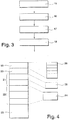
- FIG. 3 a flow chart of the method
- FIG. 4 a file structure.
- Java Virtual Machine Java Virtual Machine
- Some software environments such as the Java Virtual Machine (JVM)
- JVM Java Virtual Machine
- Some software environments such as the Java Virtual Machine (JVM)
- JVM Java Virtual Machine
- packages such as applets or JAR files
- Java modules used for the software installation are also platform-independent and thus transferable on any computer platform with a JVM.
- the described process of software installation initially only allows the modification of the software that runs inside the JVM. Access to software outside the JVM for software that is directly based on the operating system or that is part of the operating system, such as drivers or application software, is not readily possible. In this case, for example when installing software for a workstation computer, a software package is usually installed interactively in connection with an installation program.
- the software environment that is to say a JVM
- the software environment has an installation interface which makes it possible to transfer a file with the necessary installation data to an installation manager, which itself is arranged in the operating system.
- the installation manager then performs the actual installation, shielded from the software environment.
- the remote access, the remote installation, the remote maintenance and remote diagnostics in a simple manner possible. Due to the separation of operating system and software environment, the importability of such software environments as JVM is also guaranteed for such installations.
- the JVM also enables the installation of operating systems for relevant software modules.
- the transport and deployment of the software modules are performed by methods provided by the JVM. Then, the installation of the operating system software modules from the JVM is initiated by calling a corresponding installation program, which is the installation manager, in the operating system.
- the interface to the installation program at the level of the operating system is designed in such a way that no information regarding the installation of the operating system software such as system resources, type of operating system, destination of the software test must be available within the JVM.
- FIG. 1 shows a block diagram of an inventive device, here a radio receiver, which is designed in particular for the reception of digital broadcast signals, such as DAB (Digital Audio Broadcasting) or DRM (Digital Radio Mondiale) or DVB (Digital Video Broadcasting) are.
- digital broadcast signals such as DAB (Digital Audio Broadcasting) or DRM (Digital Radio Mondiale) or DVB (Digital Video Broadcasting) are.
- DAB Digital Audio Broadcasting
- DRM Digital Radio Mondiale
- DVB Digital Video Broadcasting
- the radio receiver has an antenna 1 which is connected to an input of a radio-frequency receiver 2, which performs amplification, filtering and conversion of the received radio signals.
- the high-frequency receiver 2 may also be associated with an A / D converter, which provides a digitization of the received broadcast signals.
- the digital broadcast signals are then subjected to channel decoding and / or source decoding.
- the so-decoded user data are then examined in a processor 4 and then passed on before an application, that is, for example, an audio and / or a video playback. If, however, these are software modules that are to be loaded into the operating system of the radio receiver, then the processor 4 leads to a software environment, that is to say with a Java virtual machine, which is loaded in the memory 5, via which the processor is provided with a data input. Exit, complete an installation process. However, if audio data is present in the data stream, then these are played back via an audio signal processor 6 and a loudspeaker 7.
- video data is contained in the received data, then via video signal processing 8 and a screen 9, this data is reproduced here like SWR.
- screen 9 various display techniques can be used. In addition to an LCD, these include other flat screen techniques, but also a cathode ray tube.
- FIG. 2 It is shown how the software that the processor 4 loads is constructed.
- a platform-independent software environment 10 is constructed, here a Java Virtual Machine, ie the JVM 10 is.
- the JVM 10 is a Java Framework 12, in which the applications, the communication with servers and other applications are performed.
- the Java Framework 12 also provides the installation interface 11, which establishes the connection to an installation manager 14, which is arranged in the operating system 13. Via the interface 11 14 parameters are passed to the installation manager. These parameters indicate the location of the file in which the installation data is specified. This part is also called a container.
- the container containing the software module to be installed may contain, in addition to the actual code for the software module and corresponding installation commands, additional information about the origin of the software signatures, encryption information, textual descriptions up to the temporary software tools required for the installation, ie installation test and the commissioning tools. Thus, the container also controls installation and commissioning of the software module.
- the installation manager 14 extracts the container and interprets the installation commands, which are referred to here as commands. These can be calls to the operating system software, in the simplest case copying files to the file system or calls to temporary software tools that have been installed with the help of previous subfiles, ie subcontainers. This includes further installation decisions, eg whether the system has to be booted (started) after the installation. These mechanisms running during the installation process are completely shielded from the JVM 10, that is, the JVM 10 has no information regarding the JVM 10 Installation of operating system software such as system resources, type of operating system, software target and test.
- the operating system software to be installed, ie the software module is transparently transmitted by the JVM 10 into the area of the operating system 13 and installed there from the perspective of the source of the software container.
- FIG. 3 shows a flow chart of the inventive method.
- the software module to be installed is received via a data receiving device.
- a data receiving device instead of in FIG. 1 illustrated broadcasting signals, which are provided for receiving the software module, storage media can also be used, a duplex radio connection such as mobile (UMTS), a wired connection, for example via the telephone network or a satellite-based data connection.
- UMTS mobile
- the JVM 10 transfers corresponding parameters to the file which the software module receives via the interface 11 to a Installation Manager 14 this data. With this data, the installation manager 14 can then load the file and perform the installation in steps 17 and 18.
- FIG. 4 shows an exemplary structure of the file that the installation manager 14 uses to install the software module.
- the file has a first field header 19, which, as shown in block 26, divides into various subfields.
- a second field 20 follows for the necessary resources which are provided for installation of the software module.
- the second field 20 is followed by a third field 21, which consists of two so-called subcontainers, in which the commands are given, which the installation manager 14 has to execute.
- Block 25 indicates that such commands may be labeled Copy or Execute.
- a fourth field 22 further subcontainers are specified, in which ultimately the data is contained, which make up the software module itself.
- information about the size, the file name, and check boxes are also available. Also images of images, the size of the flags and the size of the command line are given here. This is represented by block 24.
- the last field 23 indicates a coverall signature.
- the process can be retrofitted.
- the first step is to load an appropriate installation manager via JAR using Java and copy it to the operating file system.
- the JAR file will contain, in addition to the code for the installation manager and corresponding methods for copying the code to the file system operating system, the interfaces for later access to the software download installation manager presented here.
- the installation manager can be reinstalled or supplemented, for example, to increase the scope for the container commands or its performance.
- a system with return channel before, for example, a telematics device with Internet connection then the installation result in a positive, negative or error message to the sender of the software werewer sent back to initiate further steps in a failed installation. For example, a repetition of the download with correspondingly modified content.
Landscapes
- Engineering & Computer Science (AREA)
- Software Systems (AREA)
- General Engineering & Computer Science (AREA)
- Theoretical Computer Science (AREA)
- Physics & Mathematics (AREA)
- General Physics & Mathematics (AREA)
- Stored Programmes (AREA)
- Information Transfer Between Computers (AREA)
Description
- Die Erfindung geht aus von einem Verfahren zur Installation von einem Softwaremodul in einem Gerät nach der Gattung des unabhängigen Patentanspruchs.
- Aus der Offenlegungsschrift D1
196 19 491 A1 US 5 966 540 ist ein Verfahren und Gerät zum Installieren einer JAVA-Anwendung auf einem Computersystem bekannt, wobei zunächst das Betriebssystem des Computersystems bestimmt wird, anschließend zu dem Betriebsystem korrespondierende Installationskommandos ausgewählt werden, welche dann durch das Betriebssystem ausgeführt werden. - Das erfindungsgemäße Verfahren zur Installation von einem Softwaremodul in einem Gerät mit den Merkmalen des unabhängigen Patentanspruchs hat demgegenüber den Vorteil, dass eine leichte Nachrüstbarkeit des Betriebssystems möglich ist, wobei die systemunabhängige Softwareumgebung dazu genutzt wird. Dabei muß diese systemunabhängige Softwareumgebung, beispielsweise ein Java-Prozessor keine Kenntnis über das Betriebssystem selbst aufweisen. Dies ermöglicht eine leichte Portierbarkeit der Softwareumgebung und erleichtert weiterhin die Aufrüstung beziehungsweise Nachrüstung des Betriebssystems.
- Zu dem Betriebssystem gehörig werden Softwaretreiber gezählt. Das erfindungsgemäße Verfahren ermöglicht die Fehlerbehandlung sowie das Ausbauen der Systemfähigkeiten durch die Nachinstallation von entsprechenden Softwaremodulen, beispielsweise Betriebssystem-Patchers, Treibern, Betriebssystem-Applikationen und Diagnoseroutinen von Systemen, die sich im Feld befinden, beispielsweise über das Internet in Verbindung mit einer Luftschnittstelle, also einer Funkschnittstelle. Die in der Softwareumgebung implementierten Mechanismen sind plattformunabhängig. Bei Wechsel der Plattform, also des Betriebssystems beziehungsweise der Hardware ist lediglich ein entsprechender Installationsmanager für das Betriebssystem nachzuladen, während die Installationsschnittstelle zum Aufruf gleichbleibt.
- Die Datei kann auf den verschiedensten Wegen in das System gelangen. Sobald die Datei sich im Zugriffsbereich der Softwareumgebung befindet, kann die Installation beginnen. Dies ist insbesondere bei Telematik-Endgeräten relevant, wo die Übertragung von CD oder drahtgebunden beziehungsweise drahtlos von einem Server oder per Speicherkarte wahrscheinlich ist. Aus der Sicht der Quelle der Software, die die Datei erzeugt, steht ein transparenter Transportweg in dem Betriebssystembereich zum Betriebssystem Installationsmanager zur Verfügung. Die Quelle braucht keine Kenntnisse über den Transportweg, also drahtlos, drahtgebunden, zu haben. Der Aufbau der Datei ist vollkommen unabhängig vom Transportweg, da die Mechanismen zur Authentisierung, Transportsicherung inklusive eines Integritätstests mittels der Softwareumgebung, also beispielsweise Java, realisiert werden.
- Durch die in den abhängigen Ansprüchen aufgeführten Maßnahmen und Weiterbildungen sind vorteilhafte Verbesserungen des im unabhängigen Patentanspruch angegebenen Verfahrens zur Installation von einem Softwaremodul in einem Gerät möglich.
- Besonders vorteilhaft ist, dass die Datei zusätzlich Daten über die Herkunft des Softwaremoduls und/oder wenigstens eine Signatur und/oder eine Verschlüsselungsinformation und/oder eine textuelle Beschreibung und/oder wenigstens ein Softwarewerkzeug aufweist. Dadurch ist es einerseits möglich, die Installation sicherer zu gestalten und zu vermeiden, dass eine ungewollte Installation vorgenommen wird, die zu einer Fehlfunktion beziehungsweise Zerstörung des Geräts führen könnte. Weiterhin ermöglicht die Übertragung von Softwarewerkzeugen eine leichte Installation des Softwaremoduls. Die textuelle Beschreibung erleichtert einem Nutzer die Installation der Software.
- Darüber hinaus ist es von Vorteil, dass die Datei, die auch als Container bezeichnet werden kann, in verschiedene Felder aufgeteilt ist. Das erste Feld ist für die Identifikation vorgesehen, also beispielsweise ein sogenannter "Header". Dieser Header weist eine bestimmte Identifikation für das Softwaremodul auf. In einem zweiten Feld sind die notwendigen Ressourcen, also beispielsweise der Speicherplatz, die Treiber usw., die für das Softwaremodul notwendig sind, angegebenen. In einem dritten Feld sind die Installationskommandos angegebenen, beispielsweise "Copy" oder "Execute". In einem vierten Feld sind die eigentlichen Daten des Softwaremoduls angegebenen. Dazu gehört der Dateiname, die Größe des Dateinamens, die Größe der Daten, die Daten selbst und ein Prüffeld. Die Daten des Softwaremoduls können komprimiert vorliegen und sind dann zu dekomprimieren und zwar durch den Installationsmanager. Es ist auch möglich, eine Formatierung dieser Daten des Softwaremoduls durchzuführen, um sie in die ausführbare Form umzuwandeln. In einem fünften Feld kann eine Signatur angegebenen sein, die eine erhöhte Sicherheit des Installationsprozesses ermöglicht.
- Über den Installationsmanager ist weiterhin eine Fernwartung beziehungsweise eine Ferndiagnose des Geräts möglich.
- Das erfindungsgemäße Gerät weist dann dazu einen Prozessor, einen Speicher, eine Kommunikationsschnittstelle mit einem Betriebssystem und der systemunabhängigen Softwareumgebung auf, wobei hier erfindungsgemäß eine Installationsschnittstelle in der Softwareumgebung und der Installationsmanager im Betriebssystem vorhanden sind.
- Ausführungsbeispiele der Erfindung sind in der Zeichnung dargestellt und werden in der nachfolgenden Beschreibung näher erläutert. Es zeigen
Figur 1 ein Blockschaltbild des erfindungsgemäßen Geräts,Figur 2 die Softwarearchitektur,Figur 3 ein Flußdiagramm des erfindungsgemäßen Verfahrens undFigur 4 eine Dateistruktur. - Wenn bei einem per Software konfigurierbaren System der Funktionsumfang oder die Leistungsfähigkeit verbessert werden soll, ist die Installation eines neuen Softwaremoduls erforderlich. Einige Softwareumgebungen, wie beispielsweise die Java Virtual Machine (JVM), ermöglichen in bestimmten Konfigurationen die bequeme Installation von Software in Form von Paketen, beispielsweise Applets oder JAR-Dateien, die von einem Server, beispielsweise im Internet geladen und dann direkt gestartet werden können. Da die Java-Software prinzipiell plattformunabhängig ist, das heißt ausführbar in jeder passenden JVM, sind die für die Softwareinstallation verwendeten Java-Module ebenfalls plattformunabhängig und damit auf jeder Rechnerplattform mit einer JVM übertragbar.
- Allerdings ermöglicht der beschriebene Vorgang der Softwareinstallation zunächst nur die Modifikation der Software, die innerhalb der JVM abläuft. Ein Zugriff auf Software außerhalb der JVM auf Software, die direkt auf dem Betriebssystem aufsetzt oder die Bestandteil des Betriebssystems ist, beispielsweise Treiber oder Applikationssoftware, ist nicht ohne weiteres möglich. In diesem Fall, z.B. bei der Installation von Software für einen Arbeitsplatzrechner wird in der Regel ein Softwarepaket in Verbindung mit einem Installationsprogramm interaktiv installiert.
- Für Geräte wie es Telematikgeräte sind, Rundfunkempfänger und Navigationsgeräte, ist jedoch eine möglichst einfache vom Benutzer abgeschirmte Installation von Softwaremodulen vorzusehen. Dies wird erfindungsgemäß dadurch erreicht, dass die Softwareumgebung, das heißt, eine JVM, eine Installationsschnittstelle aufweist, die die Übertragung einer Datei mit den notwendigen Installationsdaten zu einem Installationsmanager ermöglicht, der selbst im Betriebssystem angeordnet ist. Der Installationsmanager führt dann abgeschirmt von der Softwareumgebung die eigentliche Installation durch. Insbesondere ist damit der Fernzugriff, die Ferninstallation, die Fernwartung und die Ferndiagnose in einfacher Weise möglich. Durch die Trennung von Betriebssystem und Softwareumgebung ist weiterhin die Importierbarkeit von solchen Softwareumgebungen wie JVM auch für solche Installationen gewährleistet. Gleichzeitig ermöglicht die JVM auch die Installation von Betriebssystemen bei relevanten Softwaremodulen.
- Der Transport und die Bereitstellung der Softwaremodule werden durch Verfahren durchgeführt, die durch die JVM bereitgestellt werden. Anschließend wird die Installation der Betriebssystem-Softwaremodule aus der JVM heraus initiiert, indem ein entsprechendes Installationsprogramm, das ist der Installationsmanager, im Betriebssystem aufgerufen wird. Dabei ist die Schnittstelle zu dem Installationsprogramm auf der Ebene des Betriebssystems so konzipiert, dass innerhalb der JVM keinerlei Information bezüglich der Installation der Betriebssystemsoftware wie Systemressourcen, Art des Betriebssystems, Zielort des Softwaretest vorliegen müssen.
- Die Erfindung dient der flexiblen und ausbaufähigen Modifikation des Softwarebestands auf der Ebene des Betriebssystems eines Rechnersystems. Für den Transport der Software auf das System werden plattformunabhängige Mechanismen genutzt, die durch eine Softwareumgebung bereitgestellt werden, z.B. "Download" von einer Java-Software in eine JVR. Dazu gehören Verfahren zur Authentisierung, Verschlüsselung und zum sicheren Transport der Software auf das System, die von Java bereitgestellt werden. In diesem Zuge wird die Software in einem Paket, beispielsweise JAR-Archiv, geladen und gespeichert. Für die Installation der Software auf die Ebene des Betriebssystems wird aus der JVM ein Installationsmanager im Betriebssystem aufgerufen, dem die geladene Software, das Softwaremodul, übergeben wird und der die Installation auf Betriebssystemebene vornimmt. Der Installationsmanager ist selbst plattformabhängig und muß für jede Zielplattform bereitgestellt werden. Der Aufruf des Installationsmanagers ist allerdings für alle Plattformen identisch, das heißt, der Zugang, also die Installationsschnittstelle zum Installationsmanager ist aus Sicht einer Softwareumgebung wie die JVM immer gleich:
- Dem Installationsmanager wird nur eine einzige Datei, im Folgenden auch als "Container" bezeichnet, übergeben, welche die gesamten Informationen für die Installation des Softwaremodul beinhaltet.
-
Figur 1 zeigt als Blockschaltbild ein erfindungsgemäßes Gerät, hier ein Rundfunkempfänger, der insbesondere für den Empfang von digitalen Rundfunksignalen ausgebildet ist, wie es DAB (Digital Audio Broadcasting) oder DRM (Digital Radio Mondiale) oder DVB (Digital Video Broadcasting) sind. Diese breitbandigen Übertragungsverfahren ermöglichen die Übertragung von beliebigen Daten, wie es auch Softwaremodule sind, die in das Betriebssystem eines Rundfunkempfängers geladen werden sollen. Der Rundfunkempfänger weist eine Antenne 1 auf, die an einen Eingang eines Hochfrequenzempfängers 2 angeschlossen ist, der eine Verstärkung, Filterung und Umsetzung der empfangenen Rundfunksignale durchführt. Dem Hochfrequenzempfänger 2 kann auch ein A/D-Wandler zugeordnet sein, der eine Digitalisierung der empfangenen Rundfunksignale besorgt. - Innerhalb eines Digitalteils 3 werden dann die digitalen Rundfunksignale einer Kanaldekodierung und beziehungsweise auch einer Quellendekodierung unterzogen. Die so dekodierten Nutzdaten werden dann in einem Prozessor 4 untersucht und dann vor einer Anwendung, also beispielsweise einer Audio- und/oder einer Videowiedergabe weiter gegeben. Handelt es sich jedoch um Softwaremodule, die in das Betriebssystem des Rundfunkempfängers geladen werden sollen, dann führt der Prozessor 4 mit einer Softwareumgebung, also mit einer Java Virtual Machine, die im Speicher 5 geladen ist, über den der Prozessor mit einem Daten-Ein-Ausgang verbunden ist, einen Installationsprozeß durch. Sind jedoch Audio-Daten im Datenstrom vorhanden, dann werden diese über eine Audio-Signalverarbeitung 6 und einen Lautsprecher 7 wiedergegeben. Sind Video-Daten in den empfangenen Daten enthalten, dann werden über eine Video-Signalverarbeitung 8 und einen Bildschirm 9 diese Daten hier wie SWR wiedergegeben. Als Bildschirm 9 können verschiedene Anzeigentechniken zum Einsatz kommen. Dazu zählen neben einer LCD andere Flachbildschirmtechniken, aber auch eine Kathodenstrahlröhre.
- In
Figur 2 ist dargestellt, wie die Software, die der Prozessor 4 lädt, aufgebaut ist. Auf einem Betriebssystem 13 ist eine plattformunabhängige Softwareumgebung 10 aufgebaut, die hier eine Java Virtual Machine, also die JVM 10, ist. In der JVM 10 befindet sich ein Java Framework 12, in dem die Applikationen, die Kommunikation mit Servern und andere Anwendungen durchgeführt werden. In dem Java Framework 12 wird auch die Installationsschnittstelle 11 bereitgestellt, die die Verbindung zu einem Installationsmanager 14, der im Betriebssystem 13 angeordnet ist, herstellt. Über die Schnittstelle 11 werden dem Installationsmanager 14 Parameter übergeben. Diese Parameter geben den Ort der Datei an, in der die Installationsdaten angegeben sind. Dieser Teil wird auch als Container bezeichnet. Der das zu installierende Softwaremodul beinhaltende Container kann neben dem eigentlichen Code für das Softwaremodul und entsprechenden Installationskommandos zusätzlich Information zur Herkunft der Softwaresignaturen, Verschlüsselungsinformationen, textuelle Beschreibungen bis hin zur für die Installation erforderliche temporäre Softwaretools, das sind Installationstest und die Inbetriebnahmetools, enthalten. Damit kontrolliert der Container auch Installation und Inbetriebnahme des Softwaremoduls. - Der Installationsmanager 14 extrahiert den Container und interpretiert die Installationsbefehle, die hier als commands bezeichnet werden. Bei ihm kann es sich um Aufrufe der Betriebssystemsoftware, im einfachsten Fall das Kopieren von Dateien in das Dateisystem oder um Aufrufe von temporären Softwarewerkzeugen handeln, die mit Hilfe vorheriger Unterdateien, also Subcontainern, installiert wurden. Dies beinhaltet auch weiterführende Installationsentscheidungen, z.B. ob das System nach der Installation gebootet (gestartet) werden muß. Diese beim Installationsvorgang ablaufende Mechanismen laufen vollständig abgeschirmt von der JVM 10 ab, das heißt, die JVM 10 besitzt keinerlei Information bezüglich der Installation der Betriebssystemsoftware wie Systemressourcen, Art des Betriebssystems, Ziel der Software und Test. Die zu installierende Betriebssystemsoftware, also das Softwaremodul, wird aus Sicht der Quelle des Softwarecontainers transparent durch die JVM 10 in den Bereich des Betriebssystem 13 übertragen und dort installiert.
-
Figur 3 zeigt als Flußdiagramm das erfindungsgemäße Verfahren. In Verfahrensschritt 15 wird das zu installierende Softwaremodul über eine Datenempfangseinrichtung empfangen. Anstatt der inFigur 1 dargestellten Rundfunksignale, die für das Empfangen des Softwaremoduls vorgesehen sind, können auch Speichermedien verwendet werden, eine Duplex-Funkverbindung wie beispielsweise der Mobilfunk (UMTS), eine leitungsgebundene Verbindung beispielsweise über das Telefonnetz oder eine satellitengestützte Datenverbindung. Hat das erfindungsgemäße Gerät in der plattformunabhängigen Softwareumgebung 10 erkannt, dass es sich um ein Softwaremodul handelt, das zu dem Betriebssystem 13 installiert werden soll, dann übergibt die JVM 10 entsprechende Parameter auf die Datei, die das Softwaremodul erhält, über die Schnittstelle 11 an einen Installationsmanager 14 diese Daten. Mit diesen Daten kann der Installationsmanager 14 dann die Datei laden und die Installation in den Verfahrensschritten 17 und 18 durchführen. -
Figur 4 zeigt einen beispielhaften Aufbau der Datei, die der Installationsmanager 14 zur Installation des Softwaremoduls verwendet. Die Datei weist ein erstes Feld Header 19 auf, das sich wie im Block 26 dargestellt, in verschiedene Unterfelder aufteilt. - Nach dem Header 19 folgt ein zweites Feld 20 für die notwendigen Ressourcen, die zur Installation des Softwaremoduls vorgesehen sind. Auf das zweite Feld 20 folgt ein drittes Feld 21, das aus zwei sogenannten Subcontainern besteht, in denen die Kommandos angegeben sind, die der Installationsmanager 14 auszuführen hat. Block 25 weist darauf hin, dass solche Kommandos mit Copy oder Execute bezeichnet sein können. In einem vierten Feld 22 werden weitere Subcontainer angegeben, in denen letztlich die Daten enthalten sind, die das Softwaremodul selbst ausmachen. Zusätzlich zu dem reinen Code für das Softwaremodul sind auch Angaben über die Größe, den Dateinamen und Prüffelder vorhanden. Auch Angaben von Bildern, die Größe der Flags und die Größe der Befehlszeile sind hier angegeben. Dies wird über den Block 24 dargestellt. Im letzten Feld 23 ist eine Overall-Signatur angegeben.
- Das Verfahren ist nachrüstbar. Auf einem System, auf dem bislang noch kein Installationsmanager installiert ist, kann im ersten Schritt mittels Java ein entsprechender Installationsmanager per JAR-Datei geladen und in das Betriebsdateisystem kopiert werden. Die JAR-Datei enthält in dem Fall neben dem Code für den Installationsmanager und entsprechende Methoden zum Kopieren des Codes in das Betriebssystem Dateisystem auch die Schnittstellen für den späteren Zugriff auf den Installationsmanager für den Software-Download, der hier dargestellt wurde. Auch später kann noch mittels des existierenden Installationsmanager der Installationsmanager neu installiert oder ergänzt werden, beispielsweise um den Umfang für die Container-Befehle oder dessen Leistungsfähigkeit zu erhöhen.
- Liegt ein System mit Rückkanal vor, beispielsweise ein Telematikgerät mit Internetanbindung, dann kann in einer Weiterbildung das Installationsergebnis in der Form positiv, negativ oder eine Fehlermeldung zum Absender der Software zurückgeschickt weren, um bei einer misslungenen Installation weitere Schritte einleiten zu können. Beispielsweise eine Wiederholung des Downloads mit entsprechend modifiziertem Inhalt.
Claims (7)
- Verfahren zur Installation von einem Softwaremodul in einem Gerät, wobei auf einem Prozessor (4) in dem Gerät ein Betriebssystem (13) und eine geräteunabhängige Softwareumgebung (10) betrieben werden, wobei die Installation des Softwaremoduls im Betriebssystem (13) über die Softwareumgebung (10) erreicht wird, wobei
die Softwareumgebung (10) eine Installationsschnittstelle (11) zu einem Installationsmanager (14) im Betriebssystem (13) für die Installation des Softwaremoduls nutzt, und dass dann der Installationsmanager (14) die Installation des Softwaremoduls durchführt, dadurch gekennzeichnet, dass über die Installationsschnittstelle wenigstens ein Installationskommando übergeben wird, die das Softwaremodul und wenigstens ein Installationskommando aufweist. - Verfahren nach Anspruch 1, dadurch gekennzeichnet, dass die Datei zusätzlich Daten über die Herkunft des Softwaremoduls und/oder wenigstens eine Signatur und/oder eine Verschlüsselungsinformation und/oder eine textuelle Beschreibung und/oder wenigstens ein Softwarewerkzeug aufweist.
- Verfahren nach Anspruch 1 oder 2, dadurch gekennzeichnet, dass die Datei mit einem ersten Feld (19) für eine Identifikation, einem zweiten Feld (20) für die notwendigen Ressourcen für das Softwaremodul, einem dritten Feld (21) für das wenigstens eine Installationskommando, einem vierten Feld (22) für das Softwaremodul, in einem fünften Feld (23) für die Signatur verwendet wird.
- Verfahren nach einem der vorhergehenden Ansprüche,
dadurch gekennzeichnet, dass über den Installationsmanager (14) eine Fernwartung und/oder Ferndiagnose durchgeführt wird. - Verfahren nach einem der vorhergehenden Ansprüche,
dadurch gekennzeichnet, dass über das Ergebnis der Installation eine Meldung abgegeben wird. - Gerät zur Durchführung des Verfahrens nach einem der Ansprüche 1 bis 5, dadurch gekennzeichnet, dass das Gerät einen Prozessor (4), einen Speicher (5) und eine Kommunikationsschnittstelle (1, 2) aufweist, wobei das Betriebssystem (13) und die Softwareumgebung (10) sowie die Installationsschnittstelle (11) und der Installationsmanager (14) im Speicher (5) abgelegt sind.
- Gerät nach Anspruch 6, dadurch gekennzeichnet, dass das Gerät als Telematikgerät vorzugsweise Rundfunkempfänger oder Navigationsgerät oder Auto-PC ausgebildet ist.
Applications Claiming Priority (3)
| Application Number | Priority Date | Filing Date | Title |
|---|---|---|---|
| DE10158991A DE10158991A1 (de) | 2001-11-30 | 2001-11-30 | Verfahren und Installation von einem Softwaremodul in einem Gerät |
| DE10158991 | 2001-11-30 | ||
| PCT/DE2002/003388 WO2003048932A2 (de) | 2001-11-30 | 2002-09-12 | Verfahren zur installation von einem softwaremodul in einem gerät |
Publications (2)
| Publication Number | Publication Date |
|---|---|
| EP1497719A2 EP1497719A2 (de) | 2005-01-19 |
| EP1497719B1 true EP1497719B1 (de) | 2018-02-21 |
Family
ID=7707662
Family Applications (1)
| Application Number | Title | Priority Date | Filing Date |
|---|---|---|---|
| EP02774336.8A Expired - Lifetime EP1497719B1 (de) | 2001-11-30 | 2002-09-12 | Verfahren zur installation von einem softwaremodul in einem gerät |
Country Status (5)
| Country | Link |
|---|---|
| US (1) | US7793280B2 (de) |
| EP (1) | EP1497719B1 (de) |
| JP (1) | JP2005512189A (de) |
| DE (1) | DE10158991A1 (de) |
| WO (1) | WO2003048932A2 (de) |
Families Citing this family (10)
| Publication number | Priority date | Publication date | Assignee | Title |
|---|---|---|---|---|
| DE10340372A1 (de) * | 2003-09-02 | 2005-03-24 | Robert Bosch Gmbh | Verfahren zur Installation einer Programmkomponente |
| GB2421323B (en) * | 2004-12-15 | 2009-07-22 | Symbian Software Ltd | A method of maintaining applications in a computing device |
| KR100793056B1 (ko) * | 2005-12-01 | 2008-01-10 | 한국전자통신연구원 | 텔레매틱스 서비스 시험을 위한 시험 제어 장치 및 그 방법 |
| JP4577225B2 (ja) * | 2006-01-31 | 2010-11-10 | セイコーエプソン株式会社 | 情報処理装置、情報処理装置の制御方法および制御プログラム |
| US8505003B2 (en) * | 2010-04-28 | 2013-08-06 | Novell, Inc. | System and method for upgrading kernels in cloud computing environments |
| US20140157253A1 (en) * | 2011-03-31 | 2014-06-05 | Alcatel-Lucent India Limited | Retrofitting a processor cluster |
| US8918782B2 (en) * | 2011-05-27 | 2014-12-23 | Microsoft Corporation | Software image distribution |
| US8789034B1 (en) * | 2011-12-31 | 2014-07-22 | Parallels IP Holdings GmbH | Method for updating operating system without memory reset |
| CN104854558B (zh) | 2012-12-14 | 2018-10-23 | 瑞典爱立信有限公司 | 用于使用编译和部署服务进行软件构建和负载处理的系统、方法和计算机程序产品 |
| CN114625382B (zh) * | 2022-02-14 | 2022-11-08 | 武汉达梦数据技术有限公司 | 一种自动发现地质灾害监测设备的方法及装置 |
Family Cites Families (8)
| Publication number | Priority date | Publication date | Assignee | Title |
|---|---|---|---|---|
| DE19619491C2 (de) | 1995-08-23 | 1999-03-25 | Fraunhofer Ges Forschung | Verfahren zur Übertragung und Installation und/oder Aktualisierung von Software und/oder Daten |
| GB2321981B (en) | 1997-02-06 | 2002-01-09 | Ibm | Hosted machine code installation |
| US6349408B1 (en) | 1998-03-23 | 2002-02-19 | Sun Microsystems, Inc. | Techniques for implementing a framework for extensible applications |
| US6269480B1 (en) * | 1999-03-29 | 2001-07-31 | International Business Machines Corporation | Cross platform installer-with the ability to create platform independent variables of specific operating system variables from a scripting language |
| JP2001005622A (ja) | 1999-05-26 | 2001-01-12 | Xerox Corp | プリントレットシステム及び方法 |
| EP1087293A3 (de) * | 1999-09-24 | 2006-02-01 | Hitachi, Ltd. | Ein Rechnersystem und ein Programminstallierungsverfahren davon |
| US6832373B2 (en) * | 2000-11-17 | 2004-12-14 | Bitfone Corporation | System and method for updating and distributing information |
| US20030018964A1 (en) * | 2001-07-19 | 2003-01-23 | International Business Machines Corporation | Object model and framework for installation of software packages using a distributed directory |
-
2001
- 2001-11-30 DE DE10158991A patent/DE10158991A1/de not_active Withdrawn
-
2002
- 2002-09-12 WO PCT/DE2002/003388 patent/WO2003048932A2/de not_active Ceased
- 2002-09-12 JP JP2003550057A patent/JP2005512189A/ja active Pending
- 2002-09-12 EP EP02774336.8A patent/EP1497719B1/de not_active Expired - Lifetime
- 2002-09-12 US US10/497,067 patent/US7793280B2/en not_active Expired - Fee Related
Also Published As
| Publication number | Publication date |
|---|---|
| JP2005512189A (ja) | 2005-04-28 |
| DE10158991A1 (de) | 2003-06-12 |
| US7793280B2 (en) | 2010-09-07 |
| US20050081197A1 (en) | 2005-04-14 |
| EP1497719A2 (de) | 2005-01-19 |
| WO2003048932A3 (de) | 2004-10-28 |
| WO2003048932A2 (de) | 2003-06-12 |
Similar Documents
| Publication | Publication Date | Title |
|---|---|---|
| DE69637182T2 (de) | Vorrichtung und verfahren zur vorverarbeitung von computerprogrammen vor netzwerkübertragung | |
| DE68926567T2 (de) | Nachrichten- und Bildschirmübertragung für Rechner in einem mehrsprachigen Netzwerk | |
| EP1360588B1 (de) | Verfahren zur automatischen ergänzung von software | |
| DE69802926T2 (de) | Push-auslegung von softwarepaketen durch meldungstransporten | |
| DE69405408T2 (de) | Objektorientiertes system und verfahren zur hardwarekonfiguration | |
| DE102005021103B4 (de) | Verfahren für eine Fernaktualisierung | |
| EP1532797A1 (de) | Verfahren zum übertragen von nutzdatenobjekten gemüss einem profilinformationsobjekt | |
| EP2396718B1 (de) | Verfahren und anordnung zur ermittlung von druckern, sowie ein entsprechendes computerprogramm und ein entsprechendes computerlesbares speichermedium | |
| DE102005059223A1 (de) | Steuern eines Testinstruments von einem drahtlosen Testobjekt aus | |
| DE602004006186T2 (de) | Elektronisches Gerät und Programm zur Ausführung des Skripts welches zu dem Gerät gehört. | |
| EP1497719A2 (de) | Verfahren zur installation von einem softwaremodul in einem gerät | |
| DE10312630A1 (de) | Vorrichtung für und Verfahren von einem nahtlosen, drahtlosen Multimedia-Download-Weg zu vernetzten Partneranwendungen | |
| DE10352400A1 (de) | Netzwerkdienst-Abfangvorrichtung | |
| EP1284065A1 (de) | Verfahren zum hinzufügen eines geräts in einem fahrzeugkommunikationsnetz | |
| DE112005003597T5 (de) | Bedienung eines Mobilgeräts | |
| DE102021210024A1 (de) | Verfahren und System zur Steuerung einer Übertragung von Daten in Abhängigkeit wenigstens eines Attributs einer Datei | |
| EP2895985B1 (de) | Inhalteverwaltung für mobilstation mit laufzeitumgebung | |
| DE102005000653A1 (de) | Skriptbasierte Software-Installation über Broadcast-Transportmedien | |
| EP1665031A2 (de) | Verfahren zur installation einer programmkomponente | |
| DE10025929B4 (de) | Verfahren zum Übertragen von Daten | |
| EP1901527B1 (de) | Verfahren zur Durchführung einer Kommunikation zwischen Fahrzeugen | |
| EP2390788B1 (de) | Kommunikationssystem zur mobilen Kommunikation | |
| EP1563670B1 (de) | Verfahren zum ermöglichen eines austausches von daten zwischen einem xlet-basierten und einem bundle-basierten datensatz über eine bundle-basierte schnittstelle | |
| DE60123083T2 (de) | Verfahren zur Fernbedienung von Mensch-Maschine-Schnittstellen | |
| DE10223926A1 (de) | Verfahren, Computersystem und Computerprogrammprodukt zum Übertragen eines Druckauftrages von einem Host Computer an einen Druckserver |
Legal Events
| Date | Code | Title | Description |
|---|---|---|---|
| PUAI | Public reference made under article 153(3) epc to a published international application that has entered the european phase |
Free format text: ORIGINAL CODE: 0009012 |
|
| AK | Designated contracting states |
Kind code of ref document: A2 Designated state(s): AT BE BG CH CY CZ DE DK EE ES FI FR GB GR IE IT LI LU MC NL PT SE SK TR |
|
| 17P | Request for examination filed |
Effective date: 20050428 |
|
| GRAP | Despatch of communication of intention to grant a patent |
Free format text: ORIGINAL CODE: EPIDOSNIGR1 |
|
| INTG | Intention to grant announced |
Effective date: 20171109 |
|
| GRAS | Grant fee paid |
Free format text: ORIGINAL CODE: EPIDOSNIGR3 |
|
| GRAA | (expected) grant |
Free format text: ORIGINAL CODE: 0009210 |
|
| AK | Designated contracting states |
Kind code of ref document: B1 Designated state(s): DE FR GB |
|
| REG | Reference to a national code |
Ref country code: GB Ref legal event code: FG4D Free format text: NOT ENGLISH |
|
| REG | Reference to a national code |
Ref country code: DE Ref legal event code: R096 Ref document number: 50216277 Country of ref document: DE |
|
| REG | Reference to a national code |
Ref country code: FR Ref legal event code: PLFP Year of fee payment: 17 |
|
| REG | Reference to a national code |
Ref country code: DE Ref legal event code: R097 Ref document number: 50216277 Country of ref document: DE |
|
| PLBE | No opposition filed within time limit |
Free format text: ORIGINAL CODE: 0009261 |
|
| STAA | Information on the status of an ep patent application or granted ep patent |
Free format text: STATUS: NO OPPOSITION FILED WITHIN TIME LIMIT |
|
| 26N | No opposition filed |
Effective date: 20181122 |
|
| PGFP | Annual fee paid to national office [announced via postgrant information from national office to epo] |
Ref country code: FR Payment date: 20190924 Year of fee payment: 18 |
|
| PGFP | Annual fee paid to national office [announced via postgrant information from national office to epo] |
Ref country code: GB Payment date: 20190924 Year of fee payment: 18 |
|
| PGFP | Annual fee paid to national office [announced via postgrant information from national office to epo] |
Ref country code: DE Payment date: 20191125 Year of fee payment: 18 |
|
| REG | Reference to a national code |
Ref country code: DE Ref legal event code: R119 Ref document number: 50216277 Country of ref document: DE |
|
| GBPC | Gb: european patent ceased through non-payment of renewal fee |
Effective date: 20200912 |
|
| PG25 | Lapsed in a contracting state [announced via postgrant information from national office to epo] |
Ref country code: FR Free format text: LAPSE BECAUSE OF NON-PAYMENT OF DUE FEES Effective date: 20200930 Ref country code: DE Free format text: LAPSE BECAUSE OF NON-PAYMENT OF DUE FEES Effective date: 20210401 |
|
| PG25 | Lapsed in a contracting state [announced via postgrant information from national office to epo] |
Ref country code: GB Free format text: LAPSE BECAUSE OF NON-PAYMENT OF DUE FEES Effective date: 20200912 |