EP1291814A2 - Verfahren zum Auswählen von Medien für einen Druckauftrag - Google Patents
Verfahren zum Auswählen von Medien für einen Druckauftrag Download PDFInfo
- Publication number
- EP1291814A2 EP1291814A2 EP02019140A EP02019140A EP1291814A2 EP 1291814 A2 EP1291814 A2 EP 1291814A2 EP 02019140 A EP02019140 A EP 02019140A EP 02019140 A EP02019140 A EP 02019140A EP 1291814 A2 EP1291814 A2 EP 1291814A2
- Authority
- EP
- European Patent Office
- Prior art keywords
- media
- paper catalog
- user
- output
- printing device
- Prior art date
- Legal status (The legal status is an assumption and is not a legal conclusion. Google has not performed a legal analysis and makes no representation as to the accuracy of the status listed.)
- Withdrawn
Links
Images


Classifications
-
- G—PHYSICS
- G06—COMPUTING OR CALCULATING; COUNTING
- G06K—GRAPHICAL DATA READING; PRESENTATION OF DATA; RECORD CARRIERS; HANDLING RECORD CARRIERS
- G06K15/00—Arrangements for producing a permanent visual presentation of the output data, e.g. computer output printers
- G06K15/02—Arrangements for producing a permanent visual presentation of the output data, e.g. computer output printers using printers
- G06K15/16—Means for paper feeding or form feeding
-
- B—PERFORMING OPERATIONS; TRANSPORTING
- B41—PRINTING; LINING MACHINES; TYPEWRITERS; STAMPS
- B41J—TYPEWRITERS; SELECTIVE PRINTING MECHANISMS, i.e. MECHANISMS PRINTING OTHERWISE THAN FROM A FORME; CORRECTION OF TYPOGRAPHICAL ERRORS
- B41J11/00—Devices or arrangements of selective printing mechanisms, e.g. ink-jet printers or thermal printers, for supporting or handling copy material in sheet or web form
- B41J11/48—Apparatus for condensed record, tally strip, or like work using two or more papers, or sets of papers, e.g. devices for switching over from handling of copy material in sheet form to handling of copy material in continuous form and vice versa or point-of-sale printers comprising means for printing on continuous copy material, e.g. journal for tills, and on single sheets, e.g. cheques or receipts
- B41J11/485—Means for selecting a type of copy material amongst different types of copy material in the printing apparatus
-
- G—PHYSICS
- G06—COMPUTING OR CALCULATING; COUNTING
- G06K—GRAPHICAL DATA READING; PRESENTATION OF DATA; RECORD CARRIERS; HANDLING RECORD CARRIERS
- G06K15/00—Arrangements for producing a permanent visual presentation of the output data, e.g. computer output printers
-
- G—PHYSICS
- G06—COMPUTING OR CALCULATING; COUNTING
- G06Q—INFORMATION AND COMMUNICATION TECHNOLOGY [ICT] SPECIALLY ADAPTED FOR ADMINISTRATIVE, COMMERCIAL, FINANCIAL, MANAGERIAL OR SUPERVISORY PURPOSES; SYSTEMS OR METHODS SPECIALLY ADAPTED FOR ADMINISTRATIVE, COMMERCIAL, FINANCIAL, MANAGERIAL OR SUPERVISORY PURPOSES, NOT OTHERWISE PROVIDED FOR
- G06Q10/00—Administration; Management
- G06Q10/06—Resources, workflows, human or project management; Enterprise or organisation planning; Enterprise or organisation modelling
- G06Q10/063—Operations research, analysis or management
- G06Q10/0631—Resource planning, allocation, distributing or scheduling for enterprises or organisations
- G06Q10/06315—Needs-based resource requirements planning or analysis
-
- G—PHYSICS
- G06—COMPUTING OR CALCULATING; COUNTING
- G06K—GRAPHICAL DATA READING; PRESENTATION OF DATA; RECORD CARRIERS; HANDLING RECORD CARRIERS
- G06K2215/00—Arrangements for producing a permanent visual presentation of the output data
- G06K2215/0082—Architecture adapted for a particular function
- G06K2215/0097—Printing on special media, e.g. labels, envelopes
Definitions
- the present invention relates to a method for selecting media for one Print job in a printing device.
- a digital printing device can have a paper catalog to select from in a Print job to include output media to use.
- the paper catalog is a list whose entries the entire inventory of media, which in a print shop are available and can be selected by a user at the printing device or by are available to a user on the remote processing system.
- the Entry for a selected medium in the paper catalog includes an identifier for the medium, e.g. a paper name and its respective attributes, such as Size, Weight and type.
- Each print shop may need its own specific list, which corresponds to all media available in the print shop.
- An advantage of using the paper catalog is that everyone's attributes Medium are stored in the entries in the paper catalog and not every time if a medium is selected for printing, must be entered. Since the Attributes in the paper catalog are assigned a name for the media, the Users just make a single selection from the paper catalog to the media too define and not a selection for each individual attribute of the media. Choosing every single attribute for the media usually brings that for every attribute Select a value for the attribute from a list of all possible values for the Attribute with itself.
- the paper catalog often contains entries for many types of media in the Print shop are available. In a large print shop, the number of different available media types are over one hundred. In this case the selection could of a medium from the complete paper catalog can be very tedious, if it is too is easier than selecting each of the attributes individually. Therefore there is a need for one improved method of selecting media for a print job.
- the invention is accordingly based on the object of a method for selection to create media for a print job on a printing device.
- a method for selecting media for a Print job creating a reduced paper catalog from a complete Paper catalog Each in the complete paper catalog and the reduced paper catalog available medium is assigned to the attributes for the available medium.
- the Reduced paper catalog includes less available media than the complete one Paper catalog.
- the process also includes the step of selecting the media for the print job from the reduced paper catalog.
- a printing device under a printing device is a digital printing device, to understand a copier or both.
- the present invention relates to a Printing device, the at least one input source and preferably several Input sources and at least one output target. If multiple input sources are present, each of the input sources can be filled with different media (e.g. different types of paper or paper sizes).
- the printing device 26 may be able to create sorted output sets of sheets that are in one or in several of the output destinations are filed.
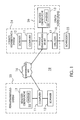
- Fig. 1 shows a block diagram of the document creation system 19.
- Das Document creation system 19 includes a remote processing system 20, a Communication network 10, a local processing system 24 and one Printing device 26.
- Remote processing system 20 can communicate with printing device 26 communicate via the communication network 10.
- the local processing system 24 can communicate directly with the printing device 26.
- Document creation system 19 facilitates the conversion of a physical one Representation (e.g. a printed page) of an input image in an electronic Representation on the local processing system 24 or the remote processing system 20.
- the document creation system 19 enables via the communication network 10 Transmission of an electronic representation of one or more input images from a remote processing system 20 to the printing device 26.
- the printing device 26 processes the electronic representation in a way that the page-wise forwarding the output pages to one or more output destination (s) of the printer 18.
- the remote processing system 20 includes one coupled to a computer 11 User interface 13.
- the computer 11 is in turn coupled to a scanner 12.
- user interface 13 provides a graphical one User interface, which is a keyboard, a pointing device (e.g. mouse), a Display 22 and associated software instructions to support the keyboard, the Pointing device and the display 22 includes.
- the computer 11 can be a source or a Destination for one or more print jobs for printer 26 represent.
- the computer 11 can support a print job that is from the Operation of the scanner 12 has been derived.
- the computer 11 can print the jobs including the electronic representation of the input images or documents about transmit the communication network 10 to the printing device 26.
- Communication network 10 can be the Internet, an intranet, a coupling network, a data packet transmitting network, an ethernet system or another suitable one Communication network.
- the local processing system 24 includes one coupled to a computer 11 Scanner 12.
- the computer 11 manages the communication with a central Processing unit (“CPU") 17 of the printing device 26.
- the local Processing system 24 may be a source or destination for a print job or represent multiple print jobs for the printing device 26.
- Remote processing system 20 or local processing system 24 can electronic representations of input images for execution by the Generate printing device 26.
- the scanner 12 also supports the scanning of pages Input images and the creation of an electronic representation of the input images for printing on the printing device 26.
- the printing device 26 comprises a CPU 17, which has a user interface 13 and is coupled to a printer 18.
- the user interface 13 includes a display 22.
- Die CPU 17 is a computer or data processing system that receives print jobs through the Accept communication network 10 or in another way. For example the print jobs from the remote processing system 20, the local one Processing system 24 or originate from both systems.
- the CPU 17 controls many or all aspects of printing one or more Print jobs on the printer 18 concern.
- the CPU 17 can be physically powered by a or more data processors can be implemented, in a conventional or in a parallel computer architecture to control the printing process.
- the CPU 17 can determine a media feed pattern for each output set of a print job, to achieve a desired display characteristic of the sheets of an output set.
- the desired display characteristic can be the scaling of an image, the resolution of an image, the contrast of an image, the brightness of an image, the order of Sheets in one output set, the choice of media for different sheets in one Output set, stacking sheets in an output set, binding Output sets, holes in media of the output set, or other attributes concern the visual representation of a print job.
- the printing device 26 can reconfigure or otherwise change data bits the operation of the CPU in memory locations in their respective memory systems contain.
- the storage locations e.g. Random Access Memory ("RAM") physical locations that have certain electrical, magnetic, or optical properties according to the data bits, depending on the type of memory used.
- RAM Random Access Memory
- the local processing system 24 and remote processing system 20 also each include central processing units (not shown) in their computers 11 and likewise each Storage systems (not shown).
- the data bits can also be contained on a computer readable medium, e.g. Magnetic disks, optical disks, and other temporary or hard drive systems that from CPU 17, printing device 26, or computers 11 in the local Processing system 24 and the remote processing system 20 can be read.
- the computer-readable medium includes interacting or interconnected computer-readable media that are located exclusively on the printing device 26 or distributed over several interconnected processing systems, e.g. the local processing system 24 or the remote processing system 20.
- the user interface 13 supports the function selection of a user Printing device 26 or preferences in the final representation of the output set or the print job printed by the printing device 26.
- Upon receipt of a Print jobs at the CPU 17 are used by a user of the printing device 26 User interface 13 to check the status of the print job or jobs.
- the user can also determine via the user interface 13 how the print jobs are set up.
- the display 22 of the user interface 13 can have separate screens be equipped, the corresponding functions are assigned, such as the Status display for the print job and the structuring of the establishment of the Print jobs.
- a screen represents an image displayed on the display 22 of the User interface 13 is displayed.
- An additional screen enables the operator to display the attributes of the media, which are inserted into the input sources, as shown in Fig. 2.
- Another screen shows Instructions for removing jams so that the user has such instructions or prompt feedback about the remedial measures the User has made to the printer 18.
- FIG. 2 shows a block diagram of a printing device 26 having multiple input sources 38 and includes multiple output targets 39.
- input sources 38 include a first one Input source 32, a second input source 33 and a third input source 34.
- Die Output targets 39 include a first output target 35, a second output target 36, and a third spending target 37.
- the input sources 38 can have several different alternative structures.
- the output sources may include 38 print compartments that contain a selection of different types of media (e.g. paper). If the printer 18 is in operation, the media in the print compartments pass through the printer 18 and can capture an image printed by a printing section (not shown).
- the input sources can insert devices which include a further selection of different types of media that the Pass through printer 18 without being printed. Media from the Inserters can travel another paper path in printer 18, which is does not lead through the printing section. Examples of inserted media include media, which are not printed with an image by the printer 18, such as e.g. finished photographic inserts, pre-printed inserts, ordered media (e.g. register) and Dividers.
- the output targets 39 can represent several, different, alternative structures.
- the output targets 39 can be used as subjects for taking up Assortments of different types of media can be formed.
- the output targets 39 can represent various finishing devices that process one or more pages after the pages have been printed, or after the pages have passed through the printer 18 without being printed.
- the Finishing devices can include a stapler, stacker, folder, a binder or other processing stations for further processing of Media that has been sent to the output destination include.
- the second Output destination 36 may be associated with a stacker that is sequential in paper Order stacks while the third output destination 37 may be associated with a folder, the paper folds around the selective processing of the output pages of an output set enable a print job.
- FIG. 3 is a flow diagram of a method for routing input pages to a or more selected output destinations of a printer 18 according to the present Invention. The method shown in FIG. 3 begins with step S10.
- the printing device 26 provides at least one input source 38 (e.g. a first input source 32) for storing a medium before printing or the medium to handle differently.
- the printable medium can be paper, a polymer film, a slide Photo paper, a tissue or any other medium that is suitable for printing is.
- step S12 which can take place before, after or simultaneously with step S10, the Printing device 26 one or more output targets 39 for recording or processing the media after printing or after the pages pass through the printer 18 have, without being printed, ready.
- the Output goals 39 paper trays to hold or process the medium.
- Such one Paper tray is known to those skilled in the art as the "top tray” that can collect media that be disposed of by the print job.
- step S14 the user interface 13 supports the selection of one of the output destinations 39 for any page of a print job in at least one of the input sources 38 printing.
- the CPU 17 stores a print job identifier and page identifier (e.g. page numbers) that are assigned to the print job identifier.
- page identifier e.g. page numbers
- Each Page identifier in the print job the CPU 17 can use a particular input source 38 assign to select a desired input medium and an output target 39.
- the Choice of the output target 39 can be customized processing of an individual Support page, for example processing after printing.
- step S16 the CPU 17 determines a pattern of media feeds for the Page label or pages of a print job to a desired one Representation characteristics or several characteristics for a print job generate that is assigned to the output targets 39.
- the CPU 17 can print a job Organize in a table or database based on the media feed pattern one or more of the following fields are defined: order identifier, page identifier, Input source and output source.
- the CPU 17 can also in the table or database have a pressure display field.
- the print display field indicates whether a printer 18 is one certain page (with an associated page identifier) printed or these pages free leaves before or while the page is directed to the output destination.
- step S18 the CPU 17 determines media feeding instructions for directing the Pages (e.g. including the printed pages after printing) of the Print job between at least one of the input sources and at least one of the Spending targets.
- the CPU 17 converts the information in the table or database printer readable language or instructions to control printing operations and Routing the pages from the at least one input source 38 to one or more Output targets 39 um.
- Figure 4 shows several examples of groups (51, 61 and 71) of sequentially ordered pages for arrangement in the input source 38 of the printing device 26.
- a first group 51 sequentially ordered pages includes register 57, the location of which is on each subsequent page changes.
- the first group 51 has a first side 52, a second side 53, a third Page 54, a fourth page 55 and a fifth page 56 includes an alternative Embodiment include more or fewer pages for the first group 51.
- a second Group 61 of sequentially arranged pages includes pages of different colors. Although the second group 61 comprises a red side 62, a blue side 63 and a green side 64, For the second group, 61 differently colored pages can fall within the scope of the Invention fall.
- a third group 71 of sequentially ordered pages includes pages with at least two different register positions 74.
- the registers of the third group 71 can be printed even if they are first inserted into the input source 38.
- the third group 71 comprises a first side 72 and a second side 73, but the number in an alternative embodiment, the pages can generally be the same size as the number of register positions.
- Input sources 38 can be A4 paper (210 mm x 297 mm, corresponds to about the 8.5 x 11 inch (216 mm x 279 mm)) or another medium instead of the previously mentioned media.
- a user of the printer 18 can be the first group 51, the second group 61 or the Load third group 71 into corresponding input sources 38.
- the User repeating sentences of the first group 51 into the first input source 32 load, repeating sentences of the second group 61 into the second input source 33 and repetitive sentences of the third group 71 in the third input source 34.
- Der User gives a selection of input sources 38 or a selection of a particular one Medium or an arrangement of media associated with an input source 38, before printing on the pages for a print job or otherwise Processing the pages in the input sources 38.
- 5A to 5D show various screens that are on the user interface 13 of the Remote processing system 20, the printing device 26, or both are shown can.
- a screen is an image on the display 22 that illustrates the user's dialog with the user Printing device 26 supports.
- a screen can be shown on the display 22 to allow a user to control various aspects of the printing device 26 enable.
- Screen 101 of Figure 5A includes a media display 102 (e.g., "paper"), one Exception mode 105, an output destination display 106 (e.g., "exit”) and one Editing display 107 (e.g. "edit”).
- the operating parameters of the Media display 102, the exception operation 105, the output target display 106 and the Editing display 107 can be selected from pull-down menus.
- a user can use a Pulldown menu using the pointing device of the user interface 13 or on others Open way.
- the media display 102, the exceptional operation 105, the output target display 106 and / or the editing display 107 as a text window appear, giving the user a selected list of operating parameters at the same time display instead of the pulldown menus.
- the user can choose a medium for the pages to be printed, using the pulldown menu associated with media display 102.
- For those through the media selection e.g., "paper" displayed on media display 102 will be the corresponding attributes are shown in a text field 104.
- the user selects the media from one Paper catalog.
- the paper catalog is a list, the entries of which are the whole Stock of media that are accessible and available to the user in the print shop the printer 18 can be loaded correspond.
- the entry for a selected one Medium in the paper catalog includes an identifier for the medium and its respective attributes. Each print shop may need its own specific list, which corresponds to the stock available in the print shop.
- the print catalog is described in more detail below.
- the user can make a duplex copy (i.e. double-sided copy) or a simplex copy (i.e. one-sided copy) via the pull-down menu associated with exception operation 105 choose.
- the user can view an output target 39 through that of the output target display 106 select assigned pulldown menu.
- the selected output target can generally be used as " ⁇ Order issue>" can be designated.
- the respective output target considered as the primary output destination for the print job.
- the selected output target determines how a page from an input source 38 to the output destination 39 of the printer 18 is directed.
- the output target display 106 pull-down menu options are: “ ⁇ Order output>”, “Off 1", “Aus2”, “Aus3”, “Aus1 +”, “Aus2 +”, “Aus3 +”, where "Aus1” is an abbreviation for the first output target 35, "Aus2” is an abbreviation for the second output target 36 and "Aus3” an abbreviation for the third output target 37.
- the jam removal indicator is represented by the "+" sign that the abbreviation of the output targets mentioned above is attached.
- the jam removal indicator indicates that the user is assisted with the designated pages and media Jams.
- the user gives a list of page identifiers (e.g. page numbers) and that Keyword "last" in the page identifier list 103 (e.g. "page list”) to include the previously entered media display 102, exception operation 105 and Output destination display 106 to the pages designated in the page identifier list 103 apply.
- page list e.g. "page list”
- the Users from the edit menu 107 have an edit option for the print job choose.
- Figure 5B shows a screen as it would look after a user has a list with Page numbers via the user interface 13 on the page identifier list 103 has entered.
- the user also chose a new medium called "RegisterB" by making an appropriate selection in a pulldown menu that the Media display 102 is assigned.
- the User "RegisterB” from the paper catalog, as detailed below.
- the selected medium is described in text field 104.
- the Users select the "Paste" option from one assigned to the edit display 107 Menu.
- Figure 5C shows the screen after executing the procedure of Figure 5B.
- the text window 120 5C has four major columns (116, 117, 118 and 119).
- the left column 116 identifies the media display 102.
- the first intermediate column 117 has one Page identifier list 103.
- the second intermediate column 118 has the Exceptional operation 105 off.
- the right column 119 shows the output target display 106.
- the instructions in text window 120 are in a format suitable for Processing by the CPU 17 is suitable.
- the user can populate text window 120 as shown in Figure 5D.
- the screen from Fig. 5D has a plurality of lines numbered from 108 to 115 inclusive.
- the user interface 13 Based on the input from the user, the user interface 13 generates the lines 113 and 114 in the text window 120 of the user interface 13, as shown in FIG. 5D.
- in the Text window 120 of FIG. 5D is the media name "RegisterA" in the left column.
- the User wants to print all pages.
- the user activates the Clear jam messages by placing the plus sign "+" at the desired destination appends (e.g. "Off2 +") as shown in column 119.
- the printing device generates 26 for the user graphical representations on the display 22 to the user at a Support jam removal.
- the jam removal function can be particularly in Printing devices may be important in which ordered media have different sheets include physical properties, such as tabs.
- the user sets up the print job by arranging the paper for the Loads the main part of the document to be printed into the first input source 32.
- the second input source 33 sets of ordered media (at least one) provided. Each sheet of ordered media encompasses a variety of different ones Sheets to insert at certain points in this part of the document to be printed are.
- CPU 17 is programmed to that it determines the correct place in the source of the orderly media, where the Operation continues again after a jam has occurred in the printing device 26 is.
- the CPU 17 thus determines which sheets, if any, in which before the occurrence of the Jams used to remove jams.
- the CPU 17 creates the arc assigned graphic representation and transfers the graphic representation to the Display 22 of the user interface 13.
- the graphic representation shows the corresponding one Starting point of the ordered media after a jam occurs.
- the graphic representation can be, for example, a graphic in which the finished pages are highlighted to inform the user of the starting point to continue the process.
- the system can display a graphic that shows the respective sheet with which the Process must be started again. The user then removes the sheets from the ordered media to be disposed of from the input source, the ordered ones Contains media.
- the system preferably displays the Display 22 displays a graphical representation of the correct register with which the operation is to be continued again.
- scanner 12 can be used to scan an image from the set of ordered media. This can be particularly the case with Orderly media can be helpful, which include photographs that are bad from each other are to be distinguished.
- the scanned image is then stored in memory; in case of a
- the CPU 17 determines the starting point for the ordered media.
- the CPU 17 The delivered picture of the ordered media in the correct order will then be sent to the Display 22 shown.
- This implementation is preferably carried out by generating one Miniature representation of the ordered media on the screen and by highlighting the correct thumbnail to tell the user which image the The process is to be continued again.
- the CPU 17 is preferably programmed in such a way that they have an enlarged image of the correct sheet for better viewing by the User displays.
- the system can be programmed that an image of the scanned set of ordered media or tabs is saved, which are necessary for a specific order.
- the saved Data can then be used as part of specified order slips. This feature can be particularly useful for regularly recurring orders. If an order For example, once processed monthly, the user can view the scanned images file with an order slip so that in the following months only the To have to call up the order slip.
- the user can create line 110. in the In contrast to the previous examples, the user activates the in line 110 Not clearing jams.
- page nineteen of the order appears the first output destination 35 is sent.
- the user can for example for page nineteen, another processing by the Provide printing device 26.
- page nineteen can be a printed one Instructions sheet for the user, showing what happens to the rest of the Has to be printed. It can also be a status page.
- the user can enter lines 111, 112 and 115.
- the instructions from line 111 in text window 120 would instruct printing device 26, a "colored" medium to print on pages seven and fifteen.
- the instructions from line 112 indicate the Printing device 26 on, two blank sheets of a "colored” medium at the end to send each set to the first output destination 35.
- the instructions from line 115 indicate the printing device, an unprinted sheet of "colored" medium for second output destination 36 to send.
- the screens 101 from FIGS. 5A to 5B are only closed
- the user interface 13 of the present invention is not limited to the screens shown in FIGS. 5A to 5D.
- the User interface 13 may have other screen arrangements that are more or less Ads included.
- the user interface can have multiple screens instead of the one screen shown in FIGS. 5A and 5B.
- the majority of Umbrellas allow the user to control various aspects of the screen Printing device 26.
- the output set 91 can be thirteen Input pages are generated from one or more input sources 38.
- the first input source 32 contains paper or other media with two registers.
- the second input source 33 contains media of the type "A4", ie 210 mm x 297 mm paper.
- the media name for the two-tab paper is "RegisterB" as shown in column 116 of text window 120 in Figure 5D.
- the user would like all pages of the output set with "RegisterB" for pages 4, 8 and 12 to press.
- the user activates the jam clearance messages for page thirteen by he appends the plus sign "+" to the desired output destination, as shown in column 119.
- FIG. 6A and 6B show an output set 91 of a print job that corresponds to the in Text window 120 corresponds to instructions entered via the user interface 13.
- the pages in the group of FIG. 6A are sent to the second output destination 36.
- the Pages of the group from FIG. 6A are superimposed on one another in the second output target 36 stacked.
- Figure 6A represents the A4 sheets and "RegisterB" media sheets next to each other so that the media sheets of type "RegisterB" clearly differentiate can be.
- the CPU 17 controls pages one, two and three, collectively referred to as group 92 from the second input source 33 to the second output destination 36. Those from the pages One, two and three existing group 92 represents printed or unprinted media from the Type "A4". Then the CPU 17 directs the input page four designated 93 from the first Input source 32 to the second output target 36. Page four 93 represents the first type of printed or unprinted "RegisterB" media. Third, the CPU 17 directs the Pages five, six and seven, collectively referred to as Group 94, of the second input source 33 to the second output target 36. Pages five, six and seven represent media of the type "A4" or printable A4 media. Fourth controls the CPU 17 the input page designated 95 from the first input source 32 to second output target 36.
- Page eight will be on the second type of "RegisterB” media printed.
- Fifth, pages nine, ten and eleven, collectively referred to as 96 are printed on "A4" media from the second input source 33 and to the second Target 36 directed.
- the thirteenth page from the first input source 32 removed and directed to one of the output targets 35 or 36.
- FIG. 6C shows a table of a media output pattern for the output set of FIG. 6A and Fig. 6B.
- the table gives the output record based on a page identifier, one Pressure display field and an output target for processing by the CPU 17.
- FIGS. 7A and 7B show a second example of an output set represented by the Printing device 26 from FIG. 1 can be created.
- the output set of FIGS. 7A and 7B can be generated from fourteen input pages from input sources 38.
- the first Input source 32 contains a five-part register medium.
- the second input source 33 Contains "A4" media, i.e. 210 mm x 297 mm paper.
- FIG. Figure 7A shows the pages side by side so that the "RegisterA" media sheets are unique can be distinguished.
- the first pages are pages one, two and three, collectively as Group 82 are designated.
- Group 82 is printed on "A4" media.
- Input page four that with Reference numeral 83 is printed on the first "RegisterA” medium.
- Pages five, six and seven designated Group 84 are printed on "A4" media.
- the system sends an unprinted "RegisterA” medium 88 to the first output destination 35, as shown in Fig. 7B.
- the input page labeled 85 eight is printed on the third "RegisterA” medium 85.
- the together with 86 designated input pages nine, ten and eleven are printed on "A4" media.
- the Input page twelve, designated 87 is printed on the fifth "RegisterA” medium.
- the system sends an unprinted "RegisterA” medium 89 to the first issue target 35.
- the printer device 26 can create a page feed command for the printer 18 by using a specific, coordinated media release pattern that the 7C corresponds to the table.
- the user activates the coordinated Media output pattern by using the identifier "B" in the page identifier list 103 as shown in line 114 of text window 120 in column 117 of FIG. 5D.
- the term "coordinated media issue pattern" refers to a media issue pattern, the media for a print job in a generally identical or equal manner distributed between or among different output targets 39.
- Fig. 7D shows a table of a mismatched media delivery pattern.
- the media are repeated for two consecutive sheets, while the job request in the table is repeated every four sheets.
- the media output pattern of Figure 7D corresponds to that Media output pattern of Fig. 7C.
- the user can use a medium for the pages to be printed by selecting the pull-down menu from FIG. 5 associated with media display 102 used.
- the Users select the medium from a paper catalog.
- the paper catalog is a list of whose Entries the entire stock of media, which the user in the print shop are accessible, correspond.
- the entry for a selected medium in the paper catalog includes an identifier for the medium, e.g. a paper name and the respective Properties of the paper. It may be necessary for each print shop to have its own has a specific list of the total inventory available at this printer, equivalent.
- An advantage of using the paper catalog is that everyone's attributes Medium are stored in the entries in the paper catalog and not every time if a medium is selected for printing, must be entered. With some Printing devices, it is necessary that when the user lists the page identifier 103 created for each medium in the print job, it separate each attribute of the media must define, i.e. Size, color, weight, type and / or type of use individually. If in contrast, the attributes associated with a name for the media in the Paper catalogs exist, the user only needs to make a single selection from the Make a paper catalog to define the media and not a selection for each meet individual attribute of the media.
- the printer changes the paper catalog when new media are added to the inventory become.
- the print shop uses a tool to help the paper catalog to edit a name for the new media as well as the attributes of the new media enter.
- the utility saves the entry for the new media in the Paper catalog.
- the auxiliary program can replace the entry for the medium from the paper catalog delete or a dialog window for changing the attributes of the medium entry offer to customize the various physical properties.
- the user interface shows the user the Paper Catalog as a pull-down menu associated with media display 102.
- the Pulldown menu can include the names of all media in the paper catalog. If the When the user selects the media from the pull-down menu, the media display 102 displays the Name of the selected media, and text box 104 shows the attributes of the selected one Media that were saved in the paper catalog when the media was entered.
- the paper catalog can have entries for many types of media used in the print shop are available. In a large print shop, the number of different available media types are over one hundred. In this case the use would be of a pulldown menu is very tedious.
- the paper catalog is shown as another screen on the user interface.
- the paper catalog screen 130 includes one Text window 132 that contains a selection of names stored in the paper catalog Displays media.
- the text window 132 can comprise a scroll bar 138, with the help of which the user can "browse" the list of media names in the paper catalog if the media listed in the paper catalog are so numerous that they cannot be used simultaneously can be displayed.
- Paper catalog screen 130 may also include a text field 134 include that the attributes of the highlighted media entry 140 indicates.
- the paper catalog is only displayed in a text window 132 here Illustration purposes.
- the present invention is not based on that shown in FIG Configuration limited.
- the user interface 13 can, for example, the Represent the paper catalog as a collection of icons as is known to those skilled in the art. Each icon corresponds to a medium in the paper catalog.
- the icons can be in one expandable tree and root configuration or be grouped by a scrollable Windows can be selected independently, as is known to the expert.
- the user can operate of the highlighted entry 140 in the paper catalog screen 130 using the User interface 13, e.g. by double-clicking the mouse or pressing the "Enter" key on the keyboard, using the paper catalog entry on screen 101 Activate Fig. 5.
- media display 102 can only display those media selected from the paper catalog screen 130 according to the procedure described above have been.
- the reduced paper catalog is usually less comprehensive than the full paper catalog and makes it easier Allocate the pages of the print job to the media, since searching for specific ones Media in the reduced paper catalog happens more efficiently than it does in the complete one Paper catalog is the case.
- the paper catalog screen includes a Another text window that contains entries for the reduced paper catalog.
- Figure 9 is one exemplary representation of a further display screen 146, which with a User interface 13 is connected to a paper catalog according to the invention display.
- the paper catalog screen 146 includes a text window 132 that provides a selection of names of the media stored in the paper catalog.
- the Paper catalog screen 146 also includes a second text window 148, which is a graphical one Displays the names of the media assigned to the reduced paper catalog.
- the reduced paper catalog comprises two Media entries that correspond to the "RegisterB" and "Insert" media, so-called “Inserts" correspond.
- the user can view the selected medium in the reduced paper catalog add an active user interface element such as the "take" button 150 operated on the user interface.
- the appears highlighted entry 140 in the complete paper catalog also in the second Text window 148 for the reduced paper catalog associated with the print job.
- Removing medium from the reduced paper catalog involves the steps of Highlight the entry to be removed in the second text window 148 and that Activate a "Remove” button 152 on the user interface 13. On this Way, the user can get a reduced paper catalog from the complete Create paper catalog.
- the user can save the reduced paper catalog by pressing the "Save" button 154 actuated on the paper catalog screen 146 of the user interface 13.
- the saved, reduced paper catalog can be assigned to the print job by a file header for the print job is created, which tells the printing device which Media can be used during the run. Mapping the reduced Paper catalogs for the print job can be helpful in that it helps the user reminds which media must be loaded in the printer 18 so that the Print job can be executed.
- By saving the reduced The operator does not have to have a paper catalog with the print job for later print jobs Reconstruct the reduced paper catalog from the complete paper catalog.
- the user if he has one Select media entry in the paper catalog and the entry as a highlighted Display entry 140 in text window 132 for the complete paper catalog that selected medium the reduced paper catalog in the second text window 148 add by dragging highlighted entry 140 from text window 132 moves over and arranges it in the second text window 148 ("drag and drop").
- the Dragging and arranging are operations on the user interface that are based on the pointing devices known to those skilled in the art are carried out.
- Displaying the paper catalog in text window 132 and second text window 148 is for illustration only.
- the present invention is not on configuration limited in Fig. 9.
- the user interface 13 can, for example, the complete Paper catalog and / or the reduced paper catalog as a collection of icons in Show respective windows, as is familiar to the specialist. Each icon corresponds to one Medium in the paper catalogs.
- the icons can be expanded into a tree and Root configuration grouped or selectable independently from a scrollable window be, as is also known to the person skilled in the art.
- the user can highlighted entry for a medium from a text window 132 that the Contains paper catalog on screens as shown in Fig. 8 or Fig. 9, drag over and the dragged entry onto a screen 101 as shown in FIG. 5 is shown, arrange.
- the highlighted entry on the Screen 101 may have an entry of the medium in one associated with media display 102 Pulldown menu will be provided.
Landscapes
- Engineering & Computer Science (AREA)
- Business, Economics & Management (AREA)
- Human Resources & Organizations (AREA)
- Physics & Mathematics (AREA)
- Theoretical Computer Science (AREA)
- General Physics & Mathematics (AREA)
- General Engineering & Computer Science (AREA)
- Economics (AREA)
- Entrepreneurship & Innovation (AREA)
- Strategic Management (AREA)
- Educational Administration (AREA)
- Quality & Reliability (AREA)
- Tourism & Hospitality (AREA)
- Operations Research (AREA)
- General Business, Economics & Management (AREA)
- Marketing (AREA)
- Game Theory and Decision Science (AREA)
- Development Economics (AREA)
- Accessory Devices And Overall Control Thereof (AREA)
- Sheets, Magazines, And Separation Thereof (AREA)
- User Interface Of Digital Computer (AREA)
Abstract
Description
- Fig. 1
- ein Blockdiagramm eines Dokumentproduktionssystems gemäß der vorliegenden Erfindung;
- Fig. 2
- ein Diagramm einer Druckvorrichtung mit mehreren Eingabequellen und Ausgabezielen gemäß der vorliegenden Erfindung;
- Fig. 3
- ein Ablaufdiagramm eines Verfahrens zur Lenkung von Seiten zu einem oder mehreren gewählten Ausgabezielen der Druckvorrichtung gemäß der vorliegenden Erfindung;
- Fig. 4
- ein Beispiel verschiedener Eingabemedien mit einer sich wiederholenden Sortiersequenz gemäß der vorliegenden Erfindung;
- Fig. 5A
- eine beispielhafte Darstellung eines Anzeigeschirms, der mit einer Benutzeroberfläche verbunden ist, um einen Druckauftrag gemäß der vorliegenden Erfindung anzufordern;
- Fig. 5B
- eine beispielhafte Darstellung eines Anzeigeschirms zur Darstellung einer frühen Stufe einer Druckauftragsanforderung gemäß der vorliegenden Erfindung;
- Fig. 5C
- eine beispielhafte Darstellung eines Anzeigeschirms zur Darstellung einer laufenden Druckauftragsanforderung nach dem in Fig. 5B dargestellten Schirm;
- Fig. 5D
- eine beispielhafte Darstellung eines Anzeigeschirms zur Darstellung einer laufenden Druckauftragsanforderung nach dem in Fig. 5C dargestellten Schirm;
- Fig. 6A u. 6B
- Beispiele eines Ausgabesatzes der Druckvorrichtung gemäß der vorliegenden Erfindung;
- Fig. 6C
- eine Tabelle eines Medienausgabemusters für den Ausgabesatz aus Fig. 6A und Fig. 6B;
- Fig. 7A u. 7B
- Beispiele eines Ausgabesatzes der Druckvorrichtung gemäß der vorliegenden Erfindung;
- Fig. 7C
- eine Tabelle eines Medienausgabemusters für den Ausgabesatz aus Fig. 7A und Fig. 7B;
- Fig. 7D
- eine Tabelle eines Beispiels eines nicht abgestimmten Medienausgabemusters für die Druckvorrichtung gemäß der vorliegenden Erfindung;
- Fig. 8
- eine beispielhafte Darstellung eines Anzeigeschirms, der mit einer Benutzeroberfläche verbunden ist, um einen Papierkatalog gemäß der Erfindung anzuzeigen;
- Fig. 9
- eine weitere beispielhafte Darstellung eines Anzeigeschirms, der mit einer Benutzeroberfläche verbunden ist, um einen Papierkatalog gemäß der vorliegenden Erfindung anzuzeigen.
- 10
- Kommunikationsnetz
- 11
- Computer
- 12
- Scanner
- 13
- Benutzeroberfläche
- 17
- CPU (zentrale Verarbeitungseinheit)
- 18
- Drucker
- 19
- Dokumenterstellungssystem
- 20
- Fernverarbeitungssystem
- 22
- Anzeige
- 24
- lokales Verarbeitungssystem
- 26
- Druckvorrichtung
- 32
- erste Eingabequelle
- 33
- zweite Eingabequelle
- 34
- dritte Eingabequelle
- 35
- erstes Ausgabeziel
- 36
- zweites Ausgabeziel
- 37
- drittes Ausgabeziel
- 38
- Eingabequellen
- 39
- Ausgabeziele
- 51
- erste Gruppe
- 52
- erste Seite
- 53
- zweite Seite
- 54
- dritte Seite
- 55
- vierte Seite
- 56
- fünfte Seite
- 61
- zweite Gruppe
- 62
- rote Seite
- 63
- blaue Seite
- 64
- grüne Seite
- 71
- dritte Gruppe
- 72
- erste Seite
- 73
- zweite Seite
- 74
- Registerpositionen
- 81
- Ausgabesatz
- 82, 83, 84, 85, 86, 87
- Gruppen von Seiten
- 88
- "RegisterA"-Medium
- 89
- "RegisterA"-Medium
- 91
- Ausgabesatz
- 92, 93, 94, 95, 96, 97
- Gruppen von Seiten
- 101
- Schirm
- 102
- Medienanzeige
- 103
- Seitenbezeichnerliste
- 104
- Textfeld
- 105
- Ausnahmebetrieb
- 106
- Ausgabezielanzeige
- 107
- Bearbeitungsanzeige
- 108-115
- Zeilen
- 116
- linke Spalte
- 117
- erste Zwischenspalte
- 118
- zweite Zwischenspalte
- 119
- rechte Spalte
- 120
- Textfenster
- 130
- Papierkatalogschirm
- 132
- Textfenster
- 134
- Textfeld
- 138
- Scrollleiste
- 140
- hervorgehobener Eintrag
- 146
- Papierkatalogschirm
- 148
- zweites Textfenster
- 150
- "Nehmen"-Schaltfläche
- 152
- "Entfernen"-Schaltfläche
- 154
- "Speichern"-Schaltfläche
- S10
- Verfahrensschritt
- S12
- Verfahrensschritt
- S14
- Verfahrensschritt
- S16
- Verfahrensschritt
- S18
- Verfahrensschritt
Claims (6)
- Verfahren zum Auswählen von Medien für einen Druckauftrag an einer Druckvorrichtung (26) mit den folgenden Verfahrensschritten:Erstellen eines reduzierten Papierkatalogs aus einem kompletten Papierkatalog, wobei jedes erhältliche Medium in dem kompletten Papierkatalog und dem reduzierten Papierkatalog den Attributen für die erhältlichen Medien zugeordnet ist, und der reduzierte Papierkatalog weniger erhältliche Medien als der komplette Papierkatalog umfasst; undAuswählen der Medien für den Druckauftrag aus dem reduzierten Papierkatalog.
- Verfahren nach Anspruch 1,
dadurch gekennzeichnet, dass der Schritt des Erstellens folgende Verfahrensschritte umfasst:Verwenden einer Oberfläche (13) der Druckvorrichtung, Auswählen eines Eintrags in dem kompletten Papierkatalog;Herüberziehen des ausgewählten Eintrags zu einer grafischen Darstellung des reduzierten Papierkatalogs auf der Oberfläche (13); undAnordnen des ausgewählten Eintrags in der grafischen Darstellung des reduzierten Papierkatalogs. - Verfahren nach Anspruch 2
dadurch gekennzeichnet, dass das Verfahren folgenden weiteren Verfahrensschritt umfasst:Wiederholen der Schritte des Auswählens, Herüberziehens und Anordnens bis der reduzierte Papierkatalog fertig gestellt ist. - Verfahren nach einem der Ansprüche 1,
dadurch gekennzeichnet, dass der Schritt des Erstellens folgende Verfahrensschritte umfasst:Verwenden einer Oberfläche (13) der Druckvorrichtung (26), Auswählen eines Eintrag in dem kompletten Papierkatalog;Betätigen eines aktiven Elements (150) auf der Oberfläche (13), um den Eintrag dem reduzierten Papierkatalog hinzuzufügen. - Verfahren nach Anspruch 4,
dadurch gekennzeichnet, dass der Schritt des Erstellens folgende Verfahrensschritte umfasst:Verwenden einer Oberfläche (13) der Druckvorrichtung (26), Auswählen eines Eintrag in dem reduzierten Papierkatalog;Betätigen eines aktiven Elements (152) auf der Oberfläche (13), um einen Eintrag aus dem reduzierten Papierkatalog zu entfernen. - Verfahren nach einem der Ansprüche 1 bis 5,
dadurch gekennzeichnet, dass das Verfahren folgenden weiteren Verfahrensschritt umfasst:Speichern des reduzierten Papierkatalogs mit dem Druckauftrag auf der Druckvorrichtung (26).
Applications Claiming Priority (2)
| Application Number | Priority Date | Filing Date | Title |
|---|---|---|---|
| US31769801P | 2001-09-05 | 2001-09-05 | |
| US317698P | 2001-09-05 |
Publications (2)
| Publication Number | Publication Date |
|---|---|
| EP1291814A2 true EP1291814A2 (de) | 2003-03-12 |
| EP1291814A3 EP1291814A3 (de) | 2004-05-06 |
Family
ID=23234868
Family Applications (1)
| Application Number | Title | Priority Date | Filing Date |
|---|---|---|---|
| EP02019140A Withdrawn EP1291814A3 (de) | 2001-09-05 | 2002-08-30 | Verfahren zum Auswählen von Medien für einen Druckauftrag |
Country Status (3)
| Country | Link |
|---|---|
| US (1) | US20030046131A1 (de) |
| EP (1) | EP1291814A3 (de) |
| DE (1) | DE10239921A1 (de) |
Cited By (1)
| Publication number | Priority date | Publication date | Assignee | Title |
|---|---|---|---|---|
| DE102009010908A1 (de) * | 2009-03-02 | 2010-09-09 | SOFHA GmbH Gesellschaft für Soft- und Hardware | Verfahren und Anordnung zur Steuerung des Einfügens von Registerblättern in einen Druckauftrag sowie ein entsprechendes Computerprogramm und ein entsprechendes computerlesbares Speichermedium |
Families Citing this family (6)
| Publication number | Priority date | Publication date | Assignee | Title |
|---|---|---|---|---|
| US6752082B2 (en) * | 2002-02-21 | 2004-06-22 | Océ Display Graphics Systems | Systems and method for selecting a media for a print job |
| US20030188020A1 (en) * | 2002-03-29 | 2003-10-02 | Steven Barile | Tangible artifact referencing digital content |
| US6962449B2 (en) * | 2003-06-30 | 2005-11-08 | Electronics For Imaging, Inc. | Methods and apparatus for media selection in cluster printing systems |
| JP6235774B2 (ja) * | 2012-10-24 | 2017-11-22 | キヤノン株式会社 | 印刷装置及びその制御方法とプログラム |
| EP3115883B1 (de) | 2015-07-09 | 2020-10-21 | Canon Production Printing Netherlands B.V. | Drucksystem zum drucken auf einer vielzahl von in einem druckmedienkatalog gespeicherten druckmedien |
| CN107194585A (zh) * | 2017-05-24 | 2017-09-22 | 杭州纳戒科技有限公司 | 资料生产服务装置以及系统 |
Family Cites Families (18)
| Publication number | Priority date | Publication date | Assignee | Title |
|---|---|---|---|---|
| NL256580A (de) * | 1959-10-14 | 1900-01-01 | ||
| US3210211A (en) * | 1962-07-13 | 1965-10-05 | Owens Illinois Glass Co | Paper coated with an anti-abrasive compound |
| US3619342A (en) * | 1969-07-18 | 1971-11-09 | Alton Box Board Co | Corrugated fiberboard |
| US3911191A (en) * | 1970-01-12 | 1975-10-07 | Blandin Paper Company | Coated paper products |
| US3849224A (en) * | 1972-07-21 | 1974-11-19 | Westvaco Corp | Water resistant corrugated paperboard |
| US4202723A (en) * | 1977-01-10 | 1980-05-13 | Westvaco Corporation | Automatically controlled machine for making double-face, polymer plastic coated, corrugated paperboard |
| US5242545A (en) * | 1989-02-27 | 1993-09-07 | Union Camp Corporation | Starch treated high crush linerboard and medium |
| US5292391A (en) * | 1991-04-29 | 1994-03-08 | Wyerhaeuser Company | Corrugated paperboard strength enhancing process |
| US5229814A (en) * | 1992-07-31 | 1993-07-20 | Xerox Corporation | System for identifying a substitute paper stock for unavailable paper stock when printing a job |
| US5604860A (en) * | 1994-10-27 | 1997-02-18 | Xerox Corporation | Feature library and stored customized control interfaces |
| US5726883A (en) * | 1995-10-10 | 1998-03-10 | Xerox Corporation | Method of customizing control interfaces for devices on a network |
| US6247000B1 (en) * | 1996-08-21 | 2001-06-12 | Crossmar, Inc. | Method and system for confirmation and settlement for financial transactions matching |
| US6069624A (en) * | 1998-03-02 | 2000-05-30 | Xerox Corporation | Message management system for a user interface of a multifunctional printing system |
| US6304732B1 (en) * | 1999-11-19 | 2001-10-16 | Xerox Corporation | Stock library mechanism for providing visual representations of stock objects in an image reproducing system |
| US20020101607A1 (en) * | 2001-01-29 | 2002-08-01 | Heidelberg Digital, L.L.C. | Method and apparatus of disposing of unused ordered media within a print job |
| US20030081102A1 (en) * | 2001-09-05 | 2003-05-01 | Tomas Roztocil | Method of determining a number of sequentially ordered pages in an ordered media set |
| US6799005B2 (en) * | 2001-09-05 | 2004-09-28 | Nexpress Digital Llc | Method and system of pre-selecting ordered media in a printing system |
| US7068380B2 (en) * | 2001-12-21 | 2006-06-27 | Microsoft Corporation | Print media catalog service |
-
2002
- 2002-08-30 EP EP02019140A patent/EP1291814A3/de not_active Withdrawn
- 2002-08-30 DE DE10239921A patent/DE10239921A1/de not_active Withdrawn
- 2002-09-05 US US10/236,686 patent/US20030046131A1/en not_active Abandoned
Cited By (2)
| Publication number | Priority date | Publication date | Assignee | Title |
|---|---|---|---|---|
| DE102009010908A1 (de) * | 2009-03-02 | 2010-09-09 | SOFHA GmbH Gesellschaft für Soft- und Hardware | Verfahren und Anordnung zur Steuerung des Einfügens von Registerblättern in einen Druckauftrag sowie ein entsprechendes Computerprogramm und ein entsprechendes computerlesbares Speichermedium |
| US8711374B2 (en) | 2009-03-02 | 2014-04-29 | Sofha GmbH Gesellschaft fur Soft-und Hardware | Method, apparatus, computer program, and computer readable storage media for controlling the insertion of tab sheets into a print job |
Also Published As
| Publication number | Publication date |
|---|---|
| DE10239921A1 (de) | 2003-03-20 |
| EP1291814A3 (de) | 2004-05-06 |
| US20030046131A1 (en) | 2003-03-06 |
Similar Documents
| Publication | Publication Date | Title |
|---|---|---|
| EP1155850B1 (de) | System und Verfahren zur Darstellung und Steuerung des Druckproduktions-Workflows in der Hochleistungsdruckproduktion | |
| DE69230547T2 (de) | Dialogfilterung | |
| EP1156412A2 (de) | Effektiver Gebrauch von Bearbeitungsvorrichtungen für Druckmedien in einem Druckauftragsdatenfluss | |
| EP1156437A2 (de) | Schnittstelle und Verfahren zur Handhabung von zusammengesetzten Dokumenten | |
| EP1179201B1 (de) | Verfahren und system zum ausschiessen von druckdaten | |
| EP1156410A2 (de) | Automatische Erzeugung von Druckanweisungen | |
| EP1451766B1 (de) | Verfahren, gerätesystem und computerprogrammprodukt zur erzeugung eines gedruckten dokuments aus mehreren eingangsdateien | |
| DE10309241A1 (de) | Drucken mit variablen Daten unter Verwendung einer dynamischen Ausschießvorlage | |
| DE10315054A1 (de) | Drucken mit variablen Daten unter Verwendung von Varianten | |
| EP1221382A2 (de) | Späte Anbindung von Registerbildinhalten an geordnete Registerbogen | |
| DE10344343B4 (de) | Vorrichtung zum Erzeugen eines Workflows zum Herstellen von Bildträgern, Druck- und Druckvorstufenfertigungsanlage mit einer derartigen Vorrichtung, Verfahren zum Erzeugen eines Workflows zum Herstellen von Bildträgern und elektronischer Datenträger mit einem Programm zur Durchführung dieses Verfahrens | |
| DE60031335T2 (de) | Drucker mit Buchbindefunktion für das Binden von Druckschriften | |
| EP2184178A2 (de) | Verfahren zur Wahl einer Weiter- oder Endbearbeitungsvorrichtung für das digitale Drucken | |
| US6799005B2 (en) | Method and system of pre-selecting ordered media in a printing system | |
| EP1211099A2 (de) | Verfahren zum digitalen Drucken von zusammengesetzten Dokumenten | |
| DE60126885T2 (de) | Leiten von Seiten zu einen ausgewählten Ausgabeort eines Drucksystems | |
| EP1226955A2 (de) | Verfahren und Vorrichtung zum Entsorgen unbenutzter geordneter Medien eines Druckauftrags | |
| EP1291813A2 (de) | Ermitteln einer Anzahl sequentiell geordneter Seiten in einem geordneten Mediensatz | |
| DE10239921A1 (de) | Verfahren zum Auswählen von Medien für einen Druckauftrag | |
| DE69505419T2 (de) | Druckersystem, das eine reihe von druckbefehlen hat | |
| DE102007037032A1 (de) | Verfahren zum Erzeugen eines Templates | |
| DE10335124B4 (de) | Drucksystem, Druckdatenerzeugungsvorrichtung des Drucksystems, Druckverfahren, Programm zum Betreiben der Druckdatenerzeugungsvorrichtung | |
| DE102007036985B4 (de) | Verfahren, System und Computerprogrammprodukt zum automatischen Aufbereiten von Dokumentenbearbeitungsdaten | |
| US20070081171A1 (en) | Method of determining a number of sequentially ordered pages of an ordered media set | |
| EP1156411A2 (de) | Flexible Verteilung von Druckaufträgen an Bearbeitungsstationen |
Legal Events
| Date | Code | Title | Description |
|---|---|---|---|
| PUAI | Public reference made under article 153(3) epc to a published international application that has entered the european phase |
Free format text: ORIGINAL CODE: 0009012 |
|
| AK | Designated contracting states |
Kind code of ref document: A2 Designated state(s): AT BE BG CH CY CZ DE DK EE ES FI FR GB GR IE IT LI LU MC NL PT SE SK TR Designated state(s): AT BE BG CH CY CZ DE DK EE ES FI FR GB GR IE IT LI LU MC NL PT SE SK TR |
|
| AX | Request for extension of the european patent |
Extension state: AL LT LV MK RO SI |
|
| PUAL | Search report despatched |
Free format text: ORIGINAL CODE: 0009013 |
|
| AK | Designated contracting states |
Kind code of ref document: A3 Designated state(s): AT BE BG CH CY CZ DE DK EE ES FI FR GB GR IE IT LI LU MC NL PT SE SK TR |
|
| AX | Request for extension of the european patent |
Extension state: AL LT LV MK RO SI |
|
| RIC1 | Information provided on ipc code assigned before grant |
Ipc: 7G 03G 15/00 B Ipc: 7G 06K 15/00 B Ipc: 7G 06K 15/16 A |
|
| RAP1 | Party data changed (applicant data changed or rights of an application transferred) |
Owner name: EASTMAN KODAK COMPANY |
|
| AKX | Designation fees paid | ||
| REG | Reference to a national code |
Ref country code: DE Ref legal event code: 8566 |
|
| STAA | Information on the status of an ep patent application or granted ep patent |
Free format text: STATUS: THE APPLICATION IS DEEMED TO BE WITHDRAWN |
|
| 18D | Application deemed to be withdrawn |
Effective date: 20041109 |