EP0820002B1 - Fenêtre à multi-carreaux intégrant la reconfiguration des espaces de travail - Google Patents
Fenêtre à multi-carreaux intégrant la reconfiguration des espaces de travail Download PDFInfo
- Publication number
- EP0820002B1 EP0820002B1 EP97304748A EP97304748A EP0820002B1 EP 0820002 B1 EP0820002 B1 EP 0820002B1 EP 97304748 A EP97304748 A EP 97304748A EP 97304748 A EP97304748 A EP 97304748A EP 0820002 B1 EP0820002 B1 EP 0820002B1
- Authority
- EP
- European Patent Office
- Prior art keywords
- panes
- contents
- window
- overlapping
- resizeable
- Prior art date
- Legal status (The legal status is an assumption and is not a legal conclusion. Google has not performed a legal analysis and makes no representation as to the accuracy of the status listed.)
- Expired - Lifetime
Links
Images



Classifications
-
- G—PHYSICS
- G06—COMPUTING OR CALCULATING; COUNTING
- G06F—ELECTRIC DIGITAL DATA PROCESSING
- G06F3/00—Input arrangements for transferring data to be processed into a form capable of being handled by the computer; Output arrangements for transferring data from processing unit to output unit, e.g. interface arrangements
- G06F3/01—Input arrangements or combined input and output arrangements for interaction between user and computer
- G06F3/048—Interaction techniques based on graphical user interfaces [GUI]
- G06F3/0481—Interaction techniques based on graphical user interfaces [GUI] based on specific properties of the displayed interaction object or a metaphor-based environment, e.g. interaction with desktop elements like windows or icons, or assisted by a cursor's changing behaviour or appearance
-
- G—PHYSICS
- G06—COMPUTING OR CALCULATING; COUNTING
- G06F—ELECTRIC DIGITAL DATA PROCESSING
- G06F2203/00—Indexing scheme relating to G06F3/00 - G06F3/048
- G06F2203/048—Indexing scheme relating to G06F3/048
- G06F2203/04803—Split screen, i.e. subdividing the display area or the window area into separate subareas
Definitions
- the present invention relates generally to user interfaces for computer systems. More particularly, the present invention relates to multiple workspaces in a user interface environment for a computer system.
- Windows may overlap each other and obscure windows beneath the topmost window in what is often referred to as a "cascade" or windows may be "tiled" across the screen so that the windows do not overlap.
- the tile method of displaying windows has previously been utilized primarily as a user selected option after creation of cascaded overlapping windows, in for example, Windows and Windows applications such as WordPerfect* 4 for Windows.
- the creation or destruction of windows does not affect the sizing of existing windows on the screen.
- windows may be independently moved about the screen to relocate the window on the desktop.
- present user interfaces only allow independently sized and positioned windows or windows which bear a fixed relationship between each other. Thus, as a user opens new windows the older windows may be overlapped and obscured. When the user resizes one window the remaining windows open on the desktop are not resized and the user may resize each window individually to correct for overlap of multiple windows that the user desires to be visible.
- window based operating systems such as Windows 95 and Apple System 7 display disk information within windows.
- Windows 95 and Apple System 7 display disk information within windows.
- a user interface for a data processing system comprising:
- the present invention may be embodied as a method, data processing system or program product. Accordingly, the present invention may take the form of an entirely hardware embodiment, an entirely software embodiment or an embodiment combining software and hardware aspects. Furthermore, the present invention may take the form of a computer program product on a computer-readable storage medium having computer-readable program code means embodied in the medium. Any suitable computer readable medium may be utilized including hard disks, CD-ROMs, optical storage devices, or magnetic storage devices.
- FIG. 1 illustrates a data processing system on which user interfaces according to the present invention may be utilized.
- a data processor 20 may have an operating system 21 resident in the processor 20 .
- An application 22 may be running on the operating system 21 .
- the processor 20 displays information on a display device 23 .
- the display device 23 has a plurality of picture elements (collectively referred to as a screen) which may define the appearance of a user interface environment displayed on the display device 23 .
- the contents of the screen of the display device 23 and, therefore, the appearance of the user interface environment may be controlled or altered by the application 22 or the operating system 21 either individually or in combination.
- the operating system 21 may utilize user input devices 24 .
- User input devices 24 may include a pointing device 25 and a keyboard 26 or other input devices known to those of skill in the art.
- User input devices 24 may be used to designate areas of the screen or locations on the screen such as the border of a workspace or the corner of the borders of the workspace.
- the user interface may display a separate icon to indicate that selection of that location of the screen may translate the feature of the workspace or the workspace itself to a different location on the screen.
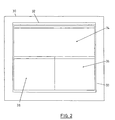
- Figures 2 and 3 illustrate a user interface for a data processing system which utilizes automatically resized panes.
- a screen 30 which may be displayed on display device 23 , has a window 32 having a workspace 33 .
- Figure 2 illustrates a first set of non-overlapping resizeable panes 34 , 36 and 38 . This plurality of non-overlapping resizeable panes is contained within the workspace 33 of window 32 and occupy substantially the entirety of the workspace.
- User input received from user input devices 24 may create or open a new pane, uncover or expose a minimized or existing pane or close or hide an existing pane.
- Figure 3 illustrates the creation of a new pane. As discussed below, this operation on a pane may be accomplished by a single user input of a check box or other fast path to manipulation of a pane within a window. As seen in Figure 3 , user input has instructed the processor 20 to open a new pane. Thus a second set of panes 34 , 36 , 38 and 39 in window 32 is created.
- This second set of panes includes the first set of panes 34 , 36 and 38 and the new pane 39 in non-overlapping relationship with each other and without requiring resizing of the new pane 39 or the first set of panes 34 , 36 , and 38 by the user.
- the reverse operation of closing a pane within the workspace 33 may also be carried out based on user input.
- user input from the user input devices 24 selects one of a set of panes.
- the selected pane is closed and a set of panes comprising the non-selected panes is created.
- This new set of panes is created such that the remaining panes are in non-overlapping relationship without requiring resizing by the user.
- the resized non-selected panes occupy substantially the entirety of the workspace 33 .
- Figure 2 may illustrate the resized panes after one of the panes of Figure 3 is closed.
- FIG. 4 and Figure 5 illustrate windows within a screen.
- a plurality of icons are provided as contents of a pane.
- Pane 40 contained within the workspace 33 of window 32 has four icons 42, 44, 46 and 48 . These icons may represent any number of user selectable options, such as, for example, applications, directories, folders or files in a directory structure.
- the icons 42 , 44, 46 and 48 are contained within pane 40 which also has a title bar 50 with a title 54 which may be utilized to identify the grouping of icons.
- the pane 40 may also have means for deactivating, hiding or closing the pane such as is illustrated by the check box 52 .
- Check box 52 allows for a single user input to manipulate the visibility of the pane through either hiding or closing the pane.
- a user selectable option such as with pointing device icon 56
- the user activates a user selectable option which replaces the contents of a pane, such as pane 40 , with contents based upon the user selected option.
- selection of the "Recovery" icon 44 has replaced the contents of pane 40 with the Recovery application user interface.
- the title bar 50 of pane 40 now has a title 58 which indicates the "Recovery” application occupies pane 40 .
- the menu bar 62 and a button bar 64 have been included in pane 40 as part of the "Recovery” user interface.
- a dialogue box 60 for the "Recovery” application is illustrated in pane 40 to indicate that the contents of pane 40 is now controlled by the "Recovery” application.
- Figure 5 illustrates the creation of a view stack 66 which contains a view icon 68 .
- the view stack 66 indicates the contents of pane 40 which have been replaced by selection of a user selectable option.
- the view icon 68 is associated with the replaced contents such that selection of the view icon 68 would cause the contents of pane 40 to revert to the "Tools" view of Figure 4.
- any number of previous panes may be reflected in the view stack such that a plurality of icons may be contained in the stack with each icon associated with previous contents of the pane.
- deactivation of a pane by the user selectable check box 52 or its equivalent may remove from the view stack any icon associated with the deactivated contents of the pane.
- selection of a user selectable option provides the desired results of that selection to the user without a proliferation of windows.
- any contents in the path to the topmost contents of the pane are also available to the user in a single operation and may be selectively removed from the stack of views to further reduce the complication and clutter of the interface.
- Figure 6 illustrates a further user interface for a data processing system.
- the contents of pane 40 from Figure 5 have been removed from window 30 and a new window 80 has been created with the workspace 83 of window 80 containing the contents of pane 40 from Figure 5.
- the new window 80 has a title bar 82 with a title 84 indicating that the "Recovery" application controls the contents of the workspace 83 of window 80.
- the menu bar 62, button bar 64 and dialogue box 56 are now removed from pane 40 and reside in window 80.
- pane 40 has reverted to the underlying contents of Figure 4.
- transfer of the contents of a pane to a new, stand-alone, window may simply close the pane in the original window.
- the pane could also close when the contents are transferred to a new window.
- the user may simultaneously display the contents of multiple windows selectively without the proliferation of every window in the path to the desired contents.
- New window 80 may be created by selecting the contents of pane 40 by user input, such as with a pointing device, and then "dragging" the contents of pane 40 to outside window 32 on screen 30 . This operation creates a new window in a single user operation.
- any number of methods of selecting a pane and creating an new window with the contents of the selected pane may be utilized, including, for example, keyboard input, pointing device input or a combination of the two input methods.
- the contents of the panes of a window contain related information or related user selectable options. Accordingly, selection of a user selectable option in one pane may cause the contents of a related pane to also change. Furthermore, it is desirable that the panes within a window be resizeable with minimal user input. Accordingly, methods such as those described in United States Patent No. 5,771,042 entitled Multi-size Control for Multiple Adjacent Workspaces may be utilized. Utilizing such methods, the resizing of one pane causes the automatic resizing of other panes within the window so as to maintain their non-overlapping relationship.
- FIGS 7 and 8 are flowchart illustrations of methods, apparatus (systems) and computer program products according to the above examples. It will be understood that each block of the flowchart illustrations, and combinations of blocks in the flowchart illustrations, can be implemented by computer program instructions. These computer program instructions may be loaded onto a computer or other programmable data processing apparatus to produce a machine, such that the instructions which execute on the computer or other programmable data processing apparatus create means for implementing the functions specified in the flowchart block or blocks. These computer program instructions may also be stored in a computer-readable memory that can direct a computer or other programmable data processing apparatus to function in a particular manner, such that the instructions stored in the computer-readable memory produce an article of manufacture including instruction means which implement the function specified in the flowchart block or blocks.
- the computer program instructions may also be loaded onto a computer or other programmable data processing apparatus to cause a series of operational steps to be performed on the computer or other programmable apparatus to produce a computer implemented process such that the instructions which execute on the computer or other programmable apparatus provide steps for implementing the functions specified in the flowchart block or blocks.
- blocks of the flowchart illustrations support combinations of means for performing the specified functions, combinations of steps for performing the specified functions and program instruction means for performing the specified functions. It will also be understood that each block of the flowchart illustrations, and combinations of blocks in the flowchart illustrations, can be implemented by special purpose hardware-based computer systems which perform the specified functions or steps, or combinations of special purpose hardware and computer instructions.
- a window is created with a plurality of panes 90 .
- User input is then received as reflected in block 91 . If the user input specified opening a new pane, then as seen in blocks 92 and 94 , a new set of panes is created incorporating the new pane and resizing the existing panes. If the user input specifies the closing or deactivation of a pane, then, as seen in blocks 96 and 98 , a new set of panes is created removing the pane to be closed and with the remaining panes resized to occupy substantially all of the workspace of the created window.
- Figure 8 illustrates the selection of a user selectable option by user input.
- the contents of the pane containing that icon are replaced with the contents associated with that icon. This operation is reflected in block 102 . If there are no underlying layers for the pane, then a view stack does not exist for the pane and one is created, as reflected in blocks 104 and 106. A stack item or view icon is then created and added to the view stack as seen in block 108.
- the terms "open” and “close” when used with regard to a pane within a window refer to operations to make the contents of a pane visible or to hide the contents of a pane. Accordingly, any method known to those of skill in the art to hide a pane, such as minimizing, iconizing or closing a pane may be utilized. Furthermore, any method known to those of skill in the art of making a pane visible, such as creating a pane, opening a pane, or expanding from an iconized or minimized pane may be utilized in practicing the present invention.
Landscapes
- Engineering & Computer Science (AREA)
- General Engineering & Computer Science (AREA)
- Theoretical Computer Science (AREA)
- Human Computer Interaction (AREA)
- Physics & Mathematics (AREA)
- General Physics & Mathematics (AREA)
- User Interface Of Digital Computer (AREA)
Claims (11)
- Interface d'utilisateur destinée à un système de traitement de données, l'interface d'utilisateur comprenant :une fenêtre (32) comportant un espace de travail (33), une pluralité de panneaux pouvant être redimensionnés sans chevauchement (34, 36, 38) à l'intérieur dudit espace de travail (33) de ladite fenêtre (32),des contenus pouvant être sélectionnés contenus à l'intérieur d'au moins l'un desdits panneaux pouvant être redimensionnés sans chevauchement, où lesdits contenus pouvant être sélectionnés comprennent au moins une icône d'option parmi les options pouvant être sélectionnées par l'utilisateur et où la sélection de ladite au moins une icône d'option amène le contenu dudit au moins un desdits panneaux pouvant être redimensionnés sans chevauchement à être remplacé par le contenu associé à ladite icône d'option sélectionnée et une pile de visualisation associée audit au moins l'un desdits panneaux pouvant être redimensionnés sans chevauchement dont le contenu a été remplacé, ladite pile de visualisation comprenant un affichage pouvant être visualisé d'une ou plusieurs icônes de visualisation, dans laquelle:chacune desdites icônes de visualisation est associée à un contenu précédemment remplacé dudit panneau associé pouvant être redimensionné sans chevauchement,ledit affichage pouvant être visualisé est une représentation visuelle d'une pile, etla sélection de l'une quelconque desdites icônes de visualisation dans un chemin vers un sommet de ladite pile amène le contenu dudit panneau associé pouvant être redimensionné sans chevauchement à être remplacé par le contenu précédemment remplacé associé à ladite icône de visualisation sélectionnée en une seule opération.
- Interface d'utilisateur selon la revendication 1, dans laquelle ladite fenêtre constitue une première fenêtre, ladite interface d'utilisateur comprenant en outre :un moyen destiné à créer une seconde fenêtre comportant un espace de travail,un moyen répondant à une entrée de l'utilisateur pour sélectionner un panneau de ladite pluralité de panneaux pouvant être redimensionnés sans chevauchement, etun moyen répondant audit moyen destiné à créer une seconde fenêtre et audit moyen destiné à sélectionner, pour placer le contenu qui correspond audit panneau sélectionné de ladite pluralité de panneaux pouvant être redimensionnés sans chevauchement dans ladite seconde fenêtre.
- Interface d'utilisateur selon la revendication 1, dans laquelle ladite fenêtre comprend une première fenêtre, ladite interface d'utilisateur comprenant en outre :un moyen associé à ladite pluralité de panneaux pouvant être redimensionnés sans chevauchement en vue de sélectionner un panneau de ladite pluralité de panneaux pouvant être redimensionnés sans chevauchement,un moyen associé audit moyen de sélection pour entraíner ledit panneau sélectionné de ladite pluralité de panneaux pouvant être redimensionnés sans chevauchement vers l'extérieur de ladite première fenêtre, etun moyen associé audit moyen destiné à sélectionner et audit moyen destiné à entraíner, destiné à créer une seconde fenêtre comportant un espace de travail dont le contenu correspond audit panneau sélectionné et entraíné de ladite pluralité des panneaux pouvant être redimensionnés sans chevauchement.
- Interface d'utilisateur selon l'une quelconque des revendications précédentes, dans laquelle le redimensionnement d'un panneau de ladite pluralité de panneaux pouvant être redimensionnés provoque le redimensionnement d'un autre desdits panneaux pouvant être redimensionnés.
- Interface d'utilisateur selon l'une quelconque des revendications précédentes, dans laquelle ladite pluralité de panneaux pouvant être redimensionnés contient des informations associées et dans laquelle la sélection du contenu pouvant être sélectionné dudit au moins un panneau de ladite pluralité de panneaux pouvant être redimensionnés amène le contenu d'un autre panneau de ladite pluralité de panneaux pouvant être redimensionnés à être corrigé.
- Procédé consistant à fournir une interface d'utilisateur pour un système de traitement de données comprenant les étapes consistant à :fournir une fenêtre (32) comportant un espace de travail (33),fournir une pluralité de panneaux pouvant être redimensionnés sans chevauchement (34, 36, 38) à l'intérieur dudit espace de travail (33) de ladite fenêtre (32),fournir des contenus pouvant être sélectionnés contenus à l'intérieur d'au moins un desdits panneaux pouvant être redimensionnés sans chevauchement, où lesdits contenus pouvant être sélectionnés comprennent au moins une icône d'option parmi des options pouvant être sélectionnées par l'utilisateur et où la sélection de ladite au moins une icône d'option amène le contenu dudit au moins l'un desdits panneaux pouvant être redimensionnés sans chevauchement à être remplacé par un contenu associé à ladite icône d'option sélectionnée etfournir une pile de visualisation associée audit au moins un desdits panneaux pouvant être redimensionnés sans chevauchement dont le contenu a été remplacé, ladite pile de visualisation comprenant un affichage pouvant être visualisé d'une ou plusieurs icônes de visualisation, dans lequel :chacune desdites icônes de visualisation est associée à un contenu remplacé précédemment dudit panneau associé pouvant être redimensionné sans chevauchement,ledit affichage pouvant être visualisé est une représentation visuelle d'une pile, etla sélection de l'une quelconque desdites icônes de visualisation dans un chemin vers un sommet de ladite pile amène le contenu dudit panneau associé pouvant être redimensionné sans chevauchement à être remplacé par le contenu remplacé précédemment associé à ladite icône de visualisation sélectionnée en une seule opération.
- Procédé selon la revendication 6 où ladite fenêtre constitue une première fenêtre, ledit procédé comprenant en outre les étapes consistant à:créer une seconde fenêtre comportant un espace de travail, sélectionner un panneau de ladite pluralité de panneaux pouvant être redimensionnés sans chevauchement, etplacer le contenu qui correspond audit panneau sélectionné de ladite pluralité de panneaux pouvant être redimensionnés sans chevauchement dans ladite seconde fenêtre.
- Procédé selon la revendication 6, dans lequel ladite fenêtre constitue une première fenêtre, ledit procédé comprenant en outre les étapes consistant à:sélectionner un panneau de ladite pluralité de panneaux pouvant être redimensionnés sans chevauchement,obtenir une entrée de l'utilisateur indiquant que ledit panneau sélectionné de ladite pluralité de panneaux pouvant être redimensionnés sans chevauchement a été entraíné vers l'extérieur de ladite première fenêtre, etcréer une seconde fenêtre comportant un espace de travail dont le contenu correspond audit panneau sélectionné et entraíné de ladite pluralité de panneaux pouvant être redimensionnés sans chevauchement.
- Procédé selon la revendication 6, 7 ou 8, comprenant en outre l'étape consistant à :obtenir une entrée de l'utilisateur afin de redimensionner un panneau de ladite pluralité de panneaux pouvant être redimensionnés du premier ensemble de panneau, puis redimensionner un autre desdits panneaux pouvant être redimensionnés sur la base de l'entrée obtenue de l'utilisateur.
- Procédé consistant à fournir une interface d'utilisateur selon la revendication 6, 7, 8 ou 9, comprenant en outre les étapes consistant à :sélectionner les contenus pouvant être sélectionnés (42, 44, 46, 48) contenus à l'intérieur d'au moins l'un panneau desdits panneaux pouvant être redimensionnés sans chevauchement, puiscorriger le contenu d'un autre panneau de ladite pluralité de panneaux pouvant être redimensionnés sur la base de ladite sélection du contenu pouvant être sélectionné.
- Support de mémorisation lisible par un ordinateur comportant un moyen de code de programme lisible par un ordinateur, destiné à mettre en oeuvre le procédé selon l'une quelconque des revendications 6 à 10.
Applications Claiming Priority (2)
| Application Number | Priority Date | Filing Date | Title |
|---|---|---|---|
| US685899 | 1996-07-17 | ||
| US08/685,899 US5920315A (en) | 1996-07-17 | 1996-07-17 | Multi-pane window with recoiling workspaces |
Publications (2)
| Publication Number | Publication Date |
|---|---|
| EP0820002A1 EP0820002A1 (fr) | 1998-01-21 |
| EP0820002B1 true EP0820002B1 (fr) | 2002-10-09 |
Family
ID=24754138
Family Applications (1)
| Application Number | Title | Priority Date | Filing Date |
|---|---|---|---|
| EP97304748A Expired - Lifetime EP0820002B1 (fr) | 1996-07-17 | 1997-07-01 | Fenêtre à multi-carreaux intégrant la reconfiguration des espaces de travail |
Country Status (3)
| Country | Link |
|---|---|
| US (1) | US5920315A (fr) |
| EP (1) | EP0820002B1 (fr) |
| DE (1) | DE69716186T2 (fr) |
Families Citing this family (110)
| Publication number | Priority date | Publication date | Assignee | Title |
|---|---|---|---|---|
| US6832355B1 (en) * | 1998-07-28 | 2004-12-14 | Microsoft Corporation | Web page display system |
| US7117452B1 (en) | 1998-12-15 | 2006-10-03 | International Business Machines Corporation | System and method for customizing workspace |
| AUPP926899A0 (en) * | 1999-03-17 | 1999-04-15 | O'neill, Damien | System and method for implementing a computer help function |
| US7058647B1 (en) | 1999-08-31 | 2006-06-06 | Charles E. Hill & Associates | Electronic presentation generation system and method |
| US7149982B1 (en) | 1999-12-30 | 2006-12-12 | Microsoft Corporation | System and method for saving user-specified views of internet web page displays |
| US7210093B1 (en) * | 2000-03-09 | 2007-04-24 | International Business Machines Corporation | Method, system, and program for displaying pages downloaded from over a network in an application window |
| US6654036B1 (en) | 2000-06-05 | 2003-11-25 | International Business Machines Corporation | Method, article of manufacture and apparatus for controlling relative positioning of objects in a windows environment |
| US7433881B1 (en) | 2000-08-31 | 2008-10-07 | Charles E. Hill & Associates, Inc. | System and method for handling multi-resolution graphics files |
| TW594556B (en) * | 2000-11-03 | 2004-06-21 | Synq Technology Inc | Computer system for displaying multiple window screens |
| US6864905B2 (en) | 2001-03-23 | 2005-03-08 | International Business Machines Corporation | Method to redisplay active panels |
| US20020191028A1 (en) * | 2001-06-19 | 2002-12-19 | Senechalle David A. | Window manager user interface |
| US6971068B2 (en) | 2001-07-26 | 2005-11-29 | International Business Machines Corporation | Dialog box positioning |
| US20030043197A1 (en) * | 2001-09-05 | 2003-03-06 | Kremer Karl Heinz | Image-forming system having a graphic user interface with a companion application window |
| US7620908B2 (en) | 2001-12-28 | 2009-11-17 | Sap Ag | Managing a user interface |
| US7036089B2 (en) * | 2002-04-23 | 2006-04-25 | Hewlett-Packard Development Company, L.P. | Distribution of application windows in a computing device display |
| DE10225316A1 (de) * | 2002-06-06 | 2003-12-18 | Philips Intellectual Property | Verfahren zur Optimierung der Darstellung von mittels Bedienelemente frei platzier-und skalierbaren Objekten einer Benutzeroberfläche auf einem Bildschirm |
| US7343566B1 (en) | 2002-07-10 | 2008-03-11 | Apple Inc. | Method and apparatus for displaying a window for a user interface |
| US20040066407A1 (en) * | 2002-10-08 | 2004-04-08 | Microsoft Corporation | Intelligent windows movement and resizing |
| US8225224B1 (en) | 2003-02-25 | 2012-07-17 | Microsoft Corporation | Computer desktop use via scaling of displayed objects with shifts to the periphery |
| US8230359B2 (en) * | 2003-02-25 | 2012-07-24 | Microsoft Corporation | System and method that facilitates computer desktop use via scaling of displayed objects with shifts to the periphery |
| US7536650B1 (en) | 2003-02-25 | 2009-05-19 | Robertson George G | System and method that facilitates computer desktop use via scaling of displayed objects with shifts to the periphery |
| WO2004097615A2 (fr) * | 2003-05-01 | 2004-11-11 | Maz Laboratory | Procede d'affichage d'un document |
| US20040230914A1 (en) * | 2003-05-16 | 2004-11-18 | Udo Arend | Displaying view sets of an object for data input |
| EP1477894A3 (fr) * | 2003-05-16 | 2006-10-25 | Sap Ag | Système, procédé, programme informatique et article de fabrication pour manipuler une interface utilisateur graphique |
| US7486291B2 (en) * | 2003-07-08 | 2009-02-03 | Berson Barry L | Systems and methods using enhanced vision to provide out-the-window displays for a device |
| JP4193629B2 (ja) * | 2003-07-25 | 2008-12-10 | ソニー株式会社 | 画面表示装置,プログラム,および画面表示方法 |
| US20050050301A1 (en) * | 2003-08-29 | 2005-03-03 | Yahoo!, Inc. | Extensible user interface |
| CA2537100A1 (fr) * | 2003-09-24 | 2005-03-31 | Nokia Corporation | Presentation amelioree d'objets de grande dimension sur des afficheurs de petite dimension |
| US8745515B2 (en) * | 2004-04-07 | 2014-06-03 | Nokia Corporation | Presentation of large pages on small displays |
| US7743322B2 (en) * | 2003-09-30 | 2010-06-22 | Hewlett-Packard Development Company, L.P. | Automatic photo album page layout |
| US8056013B2 (en) | 2005-05-13 | 2011-11-08 | Hewlett-Packard Development Company, L.P. | Method for arranging graphic assemblies |
| US8065627B2 (en) * | 2003-09-30 | 2011-11-22 | Hewlett-Packard Development Company, L.P. | Single pass automatic photo album page layout |
| US7555730B2 (en) * | 2005-05-12 | 2009-06-30 | Hewlett-Packard Development Company, L.P. | Method for arranging graphic assemblies |
| US8276095B2 (en) * | 2004-02-20 | 2012-09-25 | Advanced Intellectual Property Group, Llc | System for and method of generating and navigating within a workspace of a computer application |
| US7376912B2 (en) * | 2004-03-25 | 2008-05-20 | Morgan Stanley | Interactive user interface for displaying supply chain information |
| US8276096B2 (en) * | 2004-04-02 | 2012-09-25 | International Business Machines Corporation | Multicast file viewing and editing |
| US7694233B1 (en) | 2004-04-30 | 2010-04-06 | Apple Inc. | User interface presentation of information in reconfigured or overlapping containers |
| KR101117835B1 (ko) * | 2004-05-06 | 2012-03-22 | 다카토시 야나세 | 윈도우 표시시스템, 윈도우 표시방법, 프로그램 개발지원장치 및 서버장치 |
| US7173619B2 (en) * | 2004-07-08 | 2007-02-06 | Microsoft Corporation | Matching digital information flow to a human perception system |
| US7721197B2 (en) * | 2004-08-12 | 2010-05-18 | Microsoft Corporation | System and method of displaying content on small screen computing devices |
| DE102004043175A1 (de) * | 2004-09-03 | 2006-03-23 | Siemens Ag | Grafische Benutzeroberfläche, Computervorrichtung, Verwendung, Verfahren zur Darstellung von Informationen mit einer Benutzeroberfläche, Computerprogramm-Produkt und computerlesbares Medium |
| US7656543B2 (en) * | 2004-11-12 | 2010-02-02 | Hewlett-Packard Development Company, L.P. | Albuming images |
| US8418075B2 (en) | 2004-11-16 | 2013-04-09 | Open Text Inc. | Spatially driven content presentation in a cellular environment |
| US8001476B2 (en) | 2004-11-16 | 2011-08-16 | Open Text Inc. | Cellular user interface |
| US20060184895A1 (en) * | 2005-02-17 | 2006-08-17 | Dolph Blaine H | Visibly persisting one or more computer desktop windows |
| US8161377B2 (en) * | 2005-03-01 | 2012-04-17 | Hewlett-Packard Development Company, L.P. | Arranging images on pages of an album |
| US7760956B2 (en) | 2005-05-12 | 2010-07-20 | Hewlett-Packard Development Company, L.P. | System and method for producing a page using frames of a video stream |
| US7644356B2 (en) * | 2005-06-10 | 2010-01-05 | Hewlett-Packard Development Company, L.P. | Constraint-based albuming of graphic elements |
| US20070016875A1 (en) * | 2005-07-12 | 2007-01-18 | International Business Machines Corporation | Method and system for partial sizing adjacency constraint in a multi-pane window frame |
| US7590940B2 (en) | 2005-10-11 | 2009-09-15 | Morgan Stanley | Interactive user interface for displaying correlation |
| US7437678B2 (en) * | 2005-10-27 | 2008-10-14 | International Business Machines Corporation | Maximizing window display area using window flowing |
| USD551247S1 (en) * | 2005-11-14 | 2007-09-18 | Microsoft Corporation | Icon for a portion of a display screen |
| US7783990B2 (en) * | 2006-05-05 | 2010-08-24 | Microsoft Corporation | Association of display elements |
| KR20080024734A (ko) * | 2006-09-14 | 2008-03-19 | 삼성전자주식회사 | 웹문서 구성 장치 및 방법과 웹문서 배열 설정 장치 |
| USD563982S1 (en) * | 2006-10-13 | 2008-03-11 | Microsoft Corporation | Icon for a display screen or packaging |
| KR101406289B1 (ko) | 2007-03-08 | 2014-06-12 | 삼성전자주식회사 | 스크롤 기반 아이템 제공 장치 및 방법 |
| US8839142B2 (en) * | 2007-06-08 | 2014-09-16 | Apple Inc. | Desktop system object removal |
| JP4342578B2 (ja) | 2007-07-24 | 2009-10-14 | 株式会社エヌ・ティ・ティ・ドコモ | 情報処理装置およびプログラム |
| US20090113292A1 (en) * | 2007-10-26 | 2009-04-30 | Microsoft Corporation | Flexibly editing heterogeneous documents |
| US8214760B2 (en) * | 2008-01-16 | 2012-07-03 | Microsoft Corporation | Window minimization trigger |
| US9189250B2 (en) * | 2008-01-16 | 2015-11-17 | Honeywell International Inc. | Method and system for re-invoking displays |
| US20100175104A1 (en) * | 2008-03-03 | 2010-07-08 | Khalid Atm Shafiqul | Safe and secure program execution framework with guest application space |
| TWI386843B (zh) * | 2008-07-03 | 2013-02-21 | Wistron Corp | 螢幕顯示區分割方法、螢幕顯示區分割系統,及電腦程式產品 |
| JP2010191935A (ja) * | 2009-01-26 | 2010-09-02 | Toshiba Tec Corp | 注文受付装置およびプログラム |
| US9152292B2 (en) | 2009-02-05 | 2015-10-06 | Hewlett-Packard Development Company, L.P. | Image collage authoring |
| KR101640460B1 (ko) | 2009-03-25 | 2016-07-18 | 삼성전자 주식회사 | 휴대 단말기의 분할 화면 운용 방법 및 이를 지원하는 휴대 단말기 |
| US8161384B2 (en) * | 2009-04-23 | 2012-04-17 | Hewlett-Packard Development Company, L.P. | Arranging graphic objects on a page with text |
| US8291314B2 (en) * | 2009-04-23 | 2012-10-16 | Hewlett-Packard Development Company, L.P. | Arranging graphic objects on a page |
| USD613756S1 (en) * | 2009-04-29 | 2010-04-13 | Microsoft Corporation | Icon for a display screen |
| US9542202B2 (en) | 2010-10-19 | 2017-01-10 | Apple Inc. | Displaying and updating workspaces in a user interface |
| US9292196B2 (en) * | 2010-10-19 | 2016-03-22 | Apple Inc. | Modifying the presentation of clustered application windows in a user interface |
| US10740117B2 (en) * | 2010-10-19 | 2020-08-11 | Apple Inc. | Grouping windows into clusters in one or more workspaces in a user interface |
| US9658732B2 (en) * | 2010-10-19 | 2017-05-23 | Apple Inc. | Changing a virtual workspace based on user interaction with an application window in a user interface |
| US8689123B2 (en) | 2010-12-23 | 2014-04-01 | Microsoft Corporation | Application reporting in an application-selectable user interface |
| US10152192B2 (en) | 2011-02-21 | 2018-12-11 | Apple Inc. | Scaling application windows in one or more workspaces in a user interface |
| US9104307B2 (en) | 2011-05-27 | 2015-08-11 | Microsoft Technology Licensing, Llc | Multi-application environment |
| US20130057587A1 (en) | 2011-09-01 | 2013-03-07 | Microsoft Corporation | Arranging tiles |
| US9146670B2 (en) | 2011-09-10 | 2015-09-29 | Microsoft Technology Licensing, Llc | Progressively indicating new content in an application-selectable user interface |
| US9424439B2 (en) | 2011-09-12 | 2016-08-23 | Microsoft Technology Licensing, Llc | Secure data synchronization |
| US9075566B2 (en) | 2012-03-02 | 2015-07-07 | Microsoft Technoogy Licensing, LLC | Flexible hinge spine |
| US9158383B2 (en) | 2012-03-02 | 2015-10-13 | Microsoft Technology Licensing, Llc | Force concentrator |
| US9146655B2 (en) * | 2012-04-06 | 2015-09-29 | Samsung Electronics Co., Ltd. | Method and device for executing object on display |
| US20130300590A1 (en) | 2012-05-14 | 2013-11-14 | Paul Henry Dietz | Audio Feedback |
| KR101961860B1 (ko) | 2012-08-28 | 2019-03-25 | 삼성전자주식회사 | 사용자 단말 장치 및 그 제어 방법 |
| US9921711B2 (en) | 2013-03-14 | 2018-03-20 | Samsung Electronics Co., Ltd. | Automatically expanding panes |
| US11294529B2 (en) * | 2013-04-15 | 2022-04-05 | Microsoft Technology Licensing, Llc | Application window divider control for window layout management |
| US9594603B2 (en) | 2013-04-15 | 2017-03-14 | Microsoft Technology Licensing, Llc | Application-to-application launch windowing |
| US10754536B2 (en) | 2013-04-29 | 2020-08-25 | Microsoft Technology Licensing, Llc | Content-based directional placement application launch |
| KR20140133072A (ko) * | 2013-05-09 | 2014-11-19 | 삼성디스플레이 주식회사 | 모바일 장치 및 이의 구동 방법 |
| US9535565B2 (en) * | 2013-05-13 | 2017-01-03 | Microsoft Technology Licensing, Llc | Smart insertion of applications into layouts |
| USD749109S1 (en) * | 2013-09-03 | 2016-02-09 | Samsung Electronics Co., Ltd. | Display screen or portion thereof with graphical user interface |
| USD749610S1 (en) * | 2013-09-03 | 2016-02-16 | Samsung Electronics Co., Ltd. | Display screen or portion thereof with graphical user interface |
| USD776688S1 (en) * | 2014-02-10 | 2017-01-17 | Vision Dealer Services, LLC | Display screen or portion thereof with a graphical user interface |
| USD776671S1 (en) * | 2014-02-10 | 2017-01-17 | Vision Dealer Services, LLC | Display screen or portion thereof with a graphical user interface |
| USD753710S1 (en) * | 2014-02-10 | 2016-04-12 | Vision Dealer Services, LLC | Display screen or portion thereof with a transitional graphical user interface |
| US10402034B2 (en) | 2014-04-02 | 2019-09-03 | Microsoft Technology Licensing, Llc | Adaptive user interface pane manager |
| US10324733B2 (en) | 2014-07-30 | 2019-06-18 | Microsoft Technology Licensing, Llc | Shutdown notifications |
| US10678412B2 (en) | 2014-07-31 | 2020-06-09 | Microsoft Technology Licensing, Llc | Dynamic joint dividers for application windows |
| US10592080B2 (en) | 2014-07-31 | 2020-03-17 | Microsoft Technology Licensing, Llc | Assisted presentation of application windows |
| US10254942B2 (en) | 2014-07-31 | 2019-04-09 | Microsoft Technology Licensing, Llc | Adaptive sizing and positioning of application windows |
| US9787576B2 (en) | 2014-07-31 | 2017-10-10 | Microsoft Technology Licensing, Llc | Propagating routing awareness for autonomous networks |
| US20160132301A1 (en) | 2014-11-06 | 2016-05-12 | Microsoft Technology Licensing, Llc | Programmatic user interface generation based on display size |
| US10949075B2 (en) | 2014-11-06 | 2021-03-16 | Microsoft Technology Licensing, Llc | Application command control for small screen display |
| US10042655B2 (en) | 2015-01-21 | 2018-08-07 | Microsoft Technology Licensing, Llc. | Adaptable user interface display |
| US10209849B2 (en) | 2015-01-21 | 2019-02-19 | Microsoft Technology Licensing, Llc | Adaptive user interface pane objects |
| USD841661S1 (en) * | 2016-06-07 | 2019-02-26 | Amadeus S.A.S. | Display screen with animated graphical user interface |
| WO2018063107A1 (fr) | 2016-09-27 | 2018-04-05 | E-Kalite Yazilim Donanim Muhendislik Tasarim Ve Internet Hizmetleri San. Tic. Ltd. Sti. | Fonction de clone permettant de comparer une visualisation de données |
| CN107015721A (zh) * | 2016-10-20 | 2017-08-04 | 阿里巴巴集团控股有限公司 | 一种应用界面的管理方法和装置 |
| CN114816620A (zh) | 2019-07-29 | 2022-07-29 | 华为技术有限公司 | 一种显示方法及电子设备 |
| US11487397B2 (en) * | 2021-03-30 | 2022-11-01 | Slack Technologies, Llc | Multiple windows for a group-based communication system |
Family Cites Families (14)
| Publication number | Priority date | Publication date | Assignee | Title |
|---|---|---|---|---|
| US5394521A (en) * | 1991-12-09 | 1995-02-28 | Xerox Corporation | User interface with multiple workspaces for sharing display system objects |
| US5233687A (en) * | 1987-03-25 | 1993-08-03 | Xerox Corporation | User interface with multiple workspaces for sharing display system objects |
| US5072412A (en) * | 1987-03-25 | 1991-12-10 | Xerox Corporation | User interface with multiple workspaces for sharing display system objects |
| US4975690A (en) * | 1988-11-07 | 1990-12-04 | Ibm Corporation | Method for concurrent data entry and manipulation in multiple applications |
| US5289574A (en) * | 1990-09-17 | 1994-02-22 | Hewlett-Packard Company | Multiple virtual screens on an "X windows" terminal |
| US5390295A (en) * | 1991-12-20 | 1995-02-14 | International Business Machines Corporation | Method and apparatus for proportionally displaying windows on a computer display screen |
| DE69321289T2 (de) * | 1992-05-26 | 1999-06-02 | Ibm | Objektorientiertes Anzeigesystem |
| US5371847A (en) * | 1992-09-22 | 1994-12-06 | Microsoft Corporation | Method and system for specifying the arrangement of windows on a display |
| CA2161023C (fr) * | 1993-04-20 | 2009-12-22 | Andrew Shalit | Interface utilisateur interactive |
| US5583984A (en) * | 1993-06-11 | 1996-12-10 | Apple Computer, Inc. | Computer system with graphical user interface including automated enclosures |
| US5572649A (en) * | 1993-11-12 | 1996-11-05 | Intel Corporation | Process for dynamically switching between a single top level window and multiple top level windows |
| US5487143A (en) * | 1994-04-06 | 1996-01-23 | Altera Corporation | Computer user interface having tiled and overlapped window areas |
| US5577187A (en) * | 1994-05-20 | 1996-11-19 | Microsoft Corporation | Method and system for tiling windows based on previous position and size |
| US5712995A (en) * | 1995-09-20 | 1998-01-27 | Galileo Frames, Inc. | Non-overlapping tiling apparatus and method for multiple window displays |
-
1996
- 1996-07-17 US US08/685,899 patent/US5920315A/en not_active Expired - Fee Related
-
1997
- 1997-07-01 DE DE69716186T patent/DE69716186T2/de not_active Expired - Lifetime
- 1997-07-01 EP EP97304748A patent/EP0820002B1/fr not_active Expired - Lifetime
Also Published As
| Publication number | Publication date |
|---|---|
| EP0820002A1 (fr) | 1998-01-21 |
| DE69716186D1 (de) | 2002-11-14 |
| DE69716186T2 (de) | 2003-06-12 |
| US5920315A (en) | 1999-07-06 |
Similar Documents
| Publication | Publication Date | Title |
|---|---|---|
| EP0820002B1 (fr) | Fenêtre à multi-carreaux intégrant la reconfiguration des espaces de travail | |
| US5140678A (en) | Computer user interface with window title bar icons | |
| US5771042A (en) | Multi-size control for multiple adjacent workspaces | |
| US6348935B1 (en) | Programmable tree viewer graphical user interface with integrated control panel | |
| US5920316A (en) | Taskbar with start menu | |
| US5664128A (en) | Object storage apparatus for use with data sets in computer applications | |
| US6806892B1 (en) | Layer viewport for enhanced viewing in layered drawings | |
| US5745718A (en) | Folder bar widget | |
| US6133918A (en) | Computer system with graphical user interface including drawer-like windows | |
| US5140677A (en) | Computer user interface with window title bar mini-icons | |
| US6025841A (en) | Method for managing simultaneous display of multiple windows in a graphical user interface | |
| US6970749B1 (en) | Grouped palette stashing | |
| US5550969A (en) | Graphical method of indicating the position of and performing an operation on a plurality of selected objects in a computer system | |
| US6040833A (en) | Method and system for display manipulation of multiple applications in a data processing system | |
| US7350154B2 (en) | Virtual desktop manager | |
| US6201539B1 (en) | Method and system for customizing a data processing system graphical user interface | |
| US6710788B1 (en) | Graphical user interface | |
| US5917483A (en) | Advanced windows management for a computer system | |
| JPH09269885A (ja) | ウィンドウのサイズ変更方法及びグラフィカル・ユーザ・インタフェース | |
| US6072484A (en) | Graphic user interface for tab setting with a re-sizeable scale | |
| JP2001255976A (ja) | 共通レジストリを含むタブ付きノートブックおよびその表示操作方法 | |
| Wang | Organizing Windows | |
| JPH04295924A (ja) | 折りたたみページ形式を備えたグラフィカルコンピュータユーザインタフェースにおけるデータ表示方法 | |
| JPH10293672A (ja) | データ処理システムおよびデータ処理システムを操作するための方法 |
Legal Events
| Date | Code | Title | Description |
|---|---|---|---|
| PUAI | Public reference made under article 153(3) epc to a published international application that has entered the european phase |
Free format text: ORIGINAL CODE: 0009012 |
|
| AK | Designated contracting states |
Kind code of ref document: A1 Designated state(s): DE GB |
|
| AX | Request for extension of the european patent |
Free format text: AL;LT;LV;RO;SI |
|
| 17P | Request for examination filed |
Effective date: 19980512 |
|
| 17Q | First examination report despatched |
Effective date: 19980723 |
|
| AKX | Designation fees paid |
Free format text: DE GB |
|
| RBV | Designated contracting states (corrected) |
Designated state(s): DE GB |
|
| GRAG | Despatch of communication of intention to grant |
Free format text: ORIGINAL CODE: EPIDOS AGRA |
|
| GRAG | Despatch of communication of intention to grant |
Free format text: ORIGINAL CODE: EPIDOS AGRA |
|
| GRAH | Despatch of communication of intention to grant a patent |
Free format text: ORIGINAL CODE: EPIDOS IGRA |
|
| GRAH | Despatch of communication of intention to grant a patent |
Free format text: ORIGINAL CODE: EPIDOS IGRA |
|
| GRAA | (expected) grant |
Free format text: ORIGINAL CODE: 0009210 |
|
| AK | Designated contracting states |
Kind code of ref document: B1 Designated state(s): DE GB |
|
| REG | Reference to a national code |
Ref country code: GB Ref legal event code: FG4D |
|
| REF | Corresponds to: |
Ref document number: 69716186 Country of ref document: DE Date of ref document: 20021114 |
|
| PLBE | No opposition filed within time limit |
Free format text: ORIGINAL CODE: 0009261 |
|
| STAA | Information on the status of an ep patent application or granted ep patent |
Free format text: STATUS: NO OPPOSITION FILED WITHIN TIME LIMIT |
|
| 26N | No opposition filed |
Effective date: 20030710 |
|
| REG | Reference to a national code |
Ref country code: GB Ref legal event code: 746 Effective date: 20080704 |
|
| PGFP | Annual fee paid to national office [announced via postgrant information from national office to epo] |
Ref country code: GB Payment date: 20160726 Year of fee payment: 20 Ref country code: DE Payment date: 20160819 Year of fee payment: 20 |
|
| REG | Reference to a national code |
Ref country code: DE Ref legal event code: R071 Ref document number: 69716186 Country of ref document: DE |
|
| REG | Reference to a national code |
Ref country code: GB Ref legal event code: PE20 Expiry date: 20170630 |
|
| PG25 | Lapsed in a contracting state [announced via postgrant information from national office to epo] |
Ref country code: GB Free format text: LAPSE BECAUSE OF EXPIRATION OF PROTECTION Effective date: 20170630 |