EP0674279A2 - Automatisches System zum Verwalten von Betriebsmitteln - Google Patents
Automatisches System zum Verwalten von Betriebsmitteln Download PDFInfo
- Publication number
- EP0674279A2 EP0674279A2 EP95301817A EP95301817A EP0674279A2 EP 0674279 A2 EP0674279 A2 EP 0674279A2 EP 95301817 A EP95301817 A EP 95301817A EP 95301817 A EP95301817 A EP 95301817A EP 0674279 A2 EP0674279 A2 EP 0674279A2
- Authority
- EP
- European Patent Office
- Prior art keywords
- user
- resources
- resource
- cls
- search
- Prior art date
- Legal status (The legal status is an assumption and is not a legal conclusion. Google has not performed a legal analysis and makes no representation as to the accuracy of the status listed.)
- Withdrawn
Links
Images























Classifications
-
- G—PHYSICS
- G09—EDUCATION; CRYPTOGRAPHY; DISPLAY; ADVERTISING; SEALS
- G09B—EDUCATIONAL OR DEMONSTRATION APPLIANCES; APPLIANCES FOR TEACHING, OR COMMUNICATING WITH, THE BLIND, DEAF OR MUTE; MODELS; PLANETARIA; GLOBES; MAPS; DIAGRAMS
- G09B7/00—Electrically-operated teaching apparatus or devices working with questions and answers
- G09B7/02—Electrically-operated teaching apparatus or devices working with questions and answers of the type wherein the student is expected to construct an answer to the question which is presented or wherein the machine gives an answer to the question presented by a student
- G09B7/04—Electrically-operated teaching apparatus or devices working with questions and answers of the type wherein the student is expected to construct an answer to the question which is presented or wherein the machine gives an answer to the question presented by a student characterised by modifying the teaching program in response to a wrong answer, e.g. repeating the question or supplying a further explanation
-
- G—PHYSICS
- G06—COMPUTING OR CALCULATING; COUNTING
- G06F—ELECTRIC DIGITAL DATA PROCESSING
- G06F16/00—Information retrieval; Database structures therefor; File system structures therefor
- G06F16/10—File systems; File servers
- G06F16/18—File system types
- G06F16/182—Distributed file systems
- G06F16/1834—Distributed file systems implemented based on peer-to-peer networks, e.g. gnutella
-
- G—PHYSICS
- G06—COMPUTING OR CALCULATING; COUNTING
- G06F—ELECTRIC DIGITAL DATA PROCESSING
- G06F40/00—Handling natural language data
- G06F40/10—Text processing
- G06F40/12—Use of codes for handling textual entities
-
- G—PHYSICS
- G06—COMPUTING OR CALCULATING; COUNTING
- G06F—ELECTRIC DIGITAL DATA PROCESSING
- G06F40/00—Handling natural language data
- G06F40/10—Text processing
- G06F40/12—Use of codes for handling textual entities
- G06F40/151—Transformation
-
- G—PHYSICS
- G09—EDUCATION; CRYPTOGRAPHY; DISPLAY; ADVERTISING; SEALS
- G09B—EDUCATIONAL OR DEMONSTRATION APPLIANCES; APPLIANCES FOR TEACHING, OR COMMUNICATING WITH, THE BLIND, DEAF OR MUTE; MODELS; PLANETARIA; GLOBES; MAPS; DIAGRAMS
- G09B5/00—Electrically-operated educational appliances
- G09B5/08—Electrically-operated educational appliances providing for individual presentation of information to a plurality of student stations
- G09B5/14—Electrically-operated educational appliances providing for individual presentation of information to a plurality of student stations with provision for individual teacher-student communication
Definitions
- the present invention relates to an automated resource management system and in particular to a system in which the resources include computer databases.
- a database is somewhat analogous to a card catalog of a library.
- the card catalog cross-indexes books in several ways.
- an "author” card exists. This card is located in the catalog at the alphabetical position of the author's surname.
- a "title” card exists, located in the alphabetical position of the book's title.
- a "subject” card generally exists, which describes the subject of the book, and which is located in the alphabetical position of the subject, such as "pressed flower collecting," for example.
- other cards can exist for a given book (for example, books having multiple authors generally have an author card for each).
- these cards represent "fields" within the database. For example, in a library, to find all of the books written by Ernest Hemingway, one looks up "Hemingway" in the card catalog. All of the library's books written by any Hemingway are identified by respective author cards. In a computer database, a similar search could be done, upon the "author" field.
- Computer databases in general, have more fields than does the card catalog. For example, if the card catalog were contained within a computer database, there would probably exist a "date" field. To search using the "date" field, one specifies a date, or range of dates, and the database responds by listing all books having a copyright which complies with the specified date, or range.
- Some databases contain only that information which is owned by the database owner. Returning to the library analogy, if a public library were to computerize its card catalog, by entering all of the information contained within the card catalog into the database program, the database program would, of course, only contain the card catalog information. A user could not, for example, gain access to the card catalog of a second library, in order to locate a book not owned by the first library. The user must go to the second library.
- a RESOURCE management system characterized by multiple SERVERs, each serving one or more PCs and means for allowing all PCs to store PROFILEs of RESOURCEs into a SERVER and all PCs to search all PROFILEs.
- a method of managing RESOURCEs characterized by the following steps: a) maintaining the RESOURCEs at multiple sites; b) maintaining PROFILEs for the RESOURCEs, each PROFILE containing information relating to its RESOURCE; and c) allowing a user to search, from a single site, all PROFILEs.
- FIG 1A illustrates a SERVER, which is a computer, or equivalent, which acts as a REPOSITORY, by holding a collection of RESOURCEs, for the benefit of microcomputers, labeled PC's.
- the PC's are the clients of the SERVER.
- RESOURCEs can be viewed as computer files. However, as will be seen shortly, the RESOURCEs actually include a vastly larger, and more diverse, collection of objects than mere computer files.
- RESOURCEs include (a) data, (b) information, and (c) knowledge, both as these terms are generally defined, and also as defined by computer scientists. This data, information, and knowledge can take the form of computer-downloadable data, or other forms, such as printed matter.
- Each RESOURCE has an associated PROFILE, which contains descriptive information about the RESOURCE.
- Figure 48 illustrates an exemplary PROFILE. The user of a PC uses the PROFILEs to locates RESOURCEs of interest by searching through the PROFILEs.
- each PROFILE contains a descriptive title. If a user is a manufacturer of golf equipment, and is developing a new golf ball having improved aerodynamic dimples, the user may search the RESOURCEs by looking for phrases such as "golf ball” or "aerodynamic” in combination with "golf ball” within the PROFILEs. (This searching is standard Boolean key-word searching.) The invention will locate the PROFILEs, and thus the RESOURCEs, containing titles which match the search criteria.
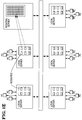
- FIG 1A As well as Figures 1B through 1D, indicate, for ease of explanation, that the PROFILEs are stored in the same SERVER as the RESOURCEs. However, the preferred method of storage is shown in Figure 1E.
- the PROFILEs are stored in the REGIONAL SERVERs.
- the RESOURCEs are stored in the LOCAL SERVERs.
- REGIONAL SERVERs serve a region, and hold the PROFILEs for RESOURCEs associated with multiple LOCAL SERVERs located within the region. Both types of SERVER (LOCAL and REGIONAL) have ADMINISTRATORs, as that term is explained later. (Of course, the same person can act as ADMINISTRATOR for more than one SERVER, and for both LOCAL and REGIONAL SERVERs.)
- the RESOURCEs are not limited to computer-type data, or files.
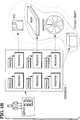
- Figure 1B provides an example. That Figure shows four different types of RESOURCEs, namely, a computer FILE (or data), a BOOK, a reel of MOVIE FILM, and a PHYSICAL OBJECT.
- the PHYSICAL OBJECT can take the form of any physical object, such as a computer disc drive, or a diesel-electric railroad locomotive.
- these four RESOURCEs are exemplary only; numerous different types of RESOURCEs can exist.
- RESOURCEs can be divided into two pairs of classes, based on two different criteria, as indicated by the two dashed loops.
- One class pair is based on the fact that the BOOK, MOVIE FILM, and FILE all contain information, although stored on different media (paper, celluloid, and magnetic or optical media, respectively).
- the RESOURCEs can be transmitted over a data link, such as a telephone communication channel, provided they are first translated into the proper format, such as digitized data.
- the PHYSICAL OBJECT in general, does not contain information.
- the second class pair is based on the fact that the BOOK, MOVIE FILM, and PHYSICAL OBJECT are all tangible material objects, while the FILE (when stored within the mass storage of the SERVER) is not.
- material objects the objects themselves cannot be transmitted in the same way as the information which they contain. The objects require physical transportation for a user to obtain them.
- the invention treats all RESOURCEs identically, irrespective of their classification as data or material object. For example, every RESOURCE, irrespective of its classification, is associated with a PROFILE. All PROFILEs, without regard to classification, are stored, processed, and made available to the user of a client-PC, without regard to classification.
- Each PROFILE when created, is assigned a category. (If the creator of the PROFILE does not find a suitable, pre-existing category, then the creator can establish a new category, which is added to the system.)
- the categories are different from the "classifications" described above.
- Figure 19 illustrates exemplary categories.
- the access is controlled by the owner of the RESOURCE.
- the owner can, of desired, restrict access to the RESOURCE, by designating certain classes of users who are allowed to see the RESOURCE. (The access restriction is accomplished by placing the restrictions into the PROFILE, as later discussed.)
- ADMINISTRATOR of a system.
- the preceding discussion has been framed in terms of a single SERVER.
- the invention allows multiple SERVERs (ie, multiple REPOSITORIEs) to be linked together, as shown in Figure 1C.
- the linking is done by commercially available telecommunication channels.
- the user of PC 1 can obtain access to the following RESOURCEs:
- the user obtains this access without additional steps or procedures. That is, the fact that the RESOURCEs are located within different SERVERs (ie, REPOSITORIES), which may be located in different cities, imposes no requirements of additional procedures. The user sees all RESOURCEs as though they were located in the user's own SERVER.
- SERVERs ie, REPOSITORIES
- the REPOSITORY holding RESOURCE 6 is not a SERVER which runs the software of the invention. Instead, this REPOSITORY is a commercially available data SERVICE. In 1994, three such commercially available SERVICEs are Compuserve, GEnie, and Paradox. (The Inventors are not endorsing these particular three SERVICEs, but only pointing to them as providing definitions of the term "SERVICE. ”)
- the SERVICEs use their own software to maintain their RESOURCEs. Nevertheless, the invention allows a user to obtain access to the RESOURCEs within the SERVICEs. (License fees and other considerations are matters to be handled between the users themselves and the SERVICEs. The invention does not provide the user rights to obtain entry into, or connection with, the SERVICEs.)
- FIG 1C can, conceptually, be viewed as shown in Figure 1D.
- Other SERVERs, and the SERVICEs, are tantamount to RESOURCEs themselves. That is, the user of a PC which is a client of SERVER 14 sees no significant differences between a RESOURCE located in SERVER 14 and a RESOURCE located within another SERVER.
- a user can create a RESOURCE, such as a computer document, within any REPOSITORY.
- RESOURCE 15 within SERVER 16.
- SERVER 16 provides this user permission to do so.
- SERVICEs as opposed to SERVERs, may impose restrictions upon a user's ability to place RESOURCEs within them.
- This user can restrict access to the RESOURCE.
- the PROVIDER can specify that only certain groups (or TEAMs) of other users can obtain access.
- ADMINISTRATORs can, in effect, restrict access in a similar way, by at least two different mechanisms.
- One, the ADMINISTRATORs determine who gains access to the SERVER under control of the ADMINISTRATOR.
- the ADMINISTRATOR can assign users of the SERVER into the TEAMS discussed in the previous paragraph.
- Any user can request that the PROFILEs of newly added RESOURCEs be searched for items of interest to the user.
- the user can request that the "aerodynamic dimple” search, mentioned above, be performed upon every new PROFILE which is added to every REPOSITORY.
- the search criteria "aerodynamic", "golf ball” etc.)
- the standing search is done periodically, at intervals (such as once daily) specified by the user at the time the standing search is established. Then, at every interval, the invention automatically performs the search. The inventors point out that the standing search is not done upon each new PROFILE when it is added to the invention, but at the intervals specified by the user.
- the invention as just described, has several aspects of continuity.
- CLS Continuous Learning System
- the CLS makes available to a user all of the types of materials (books, newspapers, microfilm, video tapes, etc.) which an ordinary library makes available to a user. (In addition, as discussed above, the CLS makes available the PHYSICAL OBJECTs shown in Figure 1B).
- the CLS provides a "virtual" aspect to this library.
- the term “virtual” means that the CLS provides many, if not all, of the functions of an actual library, but without requiring the physical presence of many of the accessories of a physical library.
- an actual library contains a card catalog. There is at least one card for each book within the library's collection.
- the CLS contains a PROFILE for each RESOURCE.
- the PROFILEs give important information about each RESOURCE, such as a descriptive title, the location of the RESOURCE, etc.
- an actual library contains another type of listing of its books, namely, a "shelf list.”
- the shelf list enumerates all of the books, but in order of ascending library call number, instead of alphabetically.
- the shelf list tells the physical location of the books, since the books, on their shelves, are arranged in numerical order, according to call number.
- an actual library categorizes the books according to subjects, in at least two different ways.
- the card catalog contains cards, in alphabetical order, for various subjects.
- the Dewey Decimal System places books on similar topics at physically neighboring places.
- the invention possesses some of the characteristics of a library.
- the invention adds a virtual aspect to the library, as discussed above.
- the invention allows a user to order a RESOURCE held by a REPOSITORY, and the RESOURCE will be delivered. If the RESOURCE is of the down-loadable type, it will be down-loaded to the user. Otherwise, a message is sent to the custodian of the RESOURCE, requesting physical delivery.
- GUI Graphical User Interface
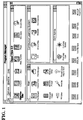
- FIG 1 illustrates a typical display which the GUI generates after the computer's power-up sequence has been executed.
- a user actuates the icon labeled "CLS,” in the usual manner.
- CLS is an acronym for the phrase “Continuous Learning System,” as stated above.
- the invention responds by displaying the screen shown in Figure 2.
- This screen prompts the user to enter the user's LOGIN, which is the user's account number for computer usage.
- the screen also prompts the user to enter the user's PASSWORD.
- Exemplary LOGINs and PASSWORDs are shown in Figure 3.
- the PASSWORD is represented by cross-hatchings, because the PASSWORD is to be kept confidential. The cross-hatchings prevent a nearby observer from stealing the user's PASSWORD.
- the LOGIN and PASSWORD are assigned to the user by the administrator of the CLS, as explained later.
- the invention After entry of the PASSWORD, the invention displays the screen shown in Figure 4, which informs the user that the process of logging on has commenced.
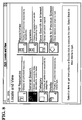
- the screen shown in Figure 5 appears, which can be taken as illustrating Level 1.
- This screen provides the user with four options, as indicated by the four buttons labeled 1 through 4. These four options actually encompass a much larger range of available options, but the screen of Figure 5 presents four options for convenience of the user. In brief, these four options allow the user to perform the following actions:
- the CLS system can be viewed as a repository of RESOURCEs.
- the CLS can be viewed as a virtual library. That is, all of the types of materials which are found in a library are made available by the CLS. However, much of the material is stored, and made available to the user, in downloadable computer format. These materials are termed RESOURCEs, and the "library" is termed a REPOSITORY.
- RESOURCEs include items which are customarily stored within computer databases, such as computer programs and data.
- RESOURCEs include items which are not stored in computer-downloadable format. Examples of these latter RESOURCEs are newspapers, video tapes, 35 millimeter films, books, microfilm, maps, and all other media which are used to carry information. Further, the concept of a RESOURCE extends to non-informational subject matter, such as physical objects.
- Each PROFILE contains important information about the RESOURCE, such as a description of the RESOURCE, where it is located, etc.
- the LOCATE AND VIEW option allows a user to view the PROFILEs.
- This option allows a user to add RESOURCEs to the CLS.
- the CLS allows a user to search the collection of repositories for RESOURCEs in which the user is interested.
- the "LOCATE AND VIEW" option allows a user to order a search, according to specific criteria, as discussed above. The search is done once, at the time it is made.
- the "IDENTIFY INTERESTS" option allows the user to establish a search which will be done at periodic intervals in the future.
- the intervals are specified by the user.
- CLS automatically performs the searches, at the specified intervals, and informs the user of the results.
- This option allows a user to view and modify information associated with the user's PROFILE.
- the search provides three pieces of information about each RESOURCE identified by the search.
- the phrase "On Line” indicates that the RESOURCE is “On-Line,” or in a computer-down-loadable format (as opposed to being on paper or 35 mm film). If a RESOURCE takes a non-downloadable form, such as a 35 mm film, then the "Media" column so indicates.
- the "Date/Time” column indicates the date and time when the PROFILE corresponding to a RESOURCE was created.
- the "Title” refers to the title carried by the PROFILE corresponding to each RESOURCE.
- the screen does not indicate the location of each RESOURCE.
- all RESOURCEs appear as though residing at a common location, even though they may be scattered over a vast geographic area.
- the user could do so, using other options described herein.
- the screen shown in Figure 14 is generated. This screen indicates three important facts. One fact is indicated by the background of the screen, and the heading at the top of the screen. The background and the heading indicate that a computer program was launched.
- CLS examined the RESOURCE which was downloaded, and looked for indicia which identified a computer program which was used to create the RESOURCE.
- the RESOURCE was a file which was generated by a word-processing program, namely, Microsoft Word (TM).
- the second fact is that CLS caused the word processing program to load the RESOURCE which was downloaded, namely, that which was located during the search for the UNIX title.
- the third fact is that the screen shown in Figure 14 informs the user that the RESOURCE which has been downloaded does not exist elsewhere in the user's computer, and, to be saved, must be saved by a specific action taken by the user. (Of course, the RESOURCE maintains its existence in the REPOSITORY from which it was retrieved).
- the prompt in Figure 14 reminds the user to save the RESOURCE when the user exits the word processing program; otherwise the RESOURCE will be lost.
- Figure 15 illustrates the display generated by the CLS after the user responds to the prompt of Figure 14.
- the RESOURCE is displayed by the same type of word processing program which generated the RESOURCE.
- Level 2 the user wishes to Locate and View by CATEGORY, as indicated by the button actuated in Figure 18.
- the CLS responds by presenting a list of the CATEGORIEs of RESOURCEs which are available, as shown in Figure 19.
- This list in general, includes RESOURCEs from multiple REPOSITORIEs. That is, the list is global in scope, because the REPOSITORIEs are, physically, located at multiple locations throughout the world.
- the global aspect of the list is transparent to the user: to the user, the list is simply a list of locally available RESOURCEs.
- the location of the RESOURCEs is not emphasized to the user, partly because the location does not affect access: downloadable RESOURCEs are available immediately, while non-DOWNLOADABLE RESOURCEs are available as fast as modern transport can deliver them, typically within one day.
- the CLS responds by displaying a list of the RESOURCEs contained within the CATEGORY, as shown in Figures 20 and 21.
- the RESOURCEs are grouped according to fixed categories, such as those shown in Figure 19.
- the RESOURCEs can also be grouped into categories by a search call.
- the user wishes to obtain the RESOURCE which is highlighted in Figure 21.
- the user actuates the proper button on the screen, using a mouse, and the CLS retrieves the RESOURCE.
- the RESOURCE takes the form of downloadable data, so that the CLS is able to obtain the RESOURCE, by telephone, or other data channel, from the RESOURCE's REPOSITORY.
- the CLS examines the RESOURCE, in order to ascertain whether a computer program is required to display the resource in its intended manner.
- the CLS found that such a program is required, but also found, in attempting to launch that program, that the program was unavailable, or otherwise unsuitable for displaying the RESOURCE.
- the CLS displays the screen shown in Figure 22.
- This screen informs the user that the program is unavailable, and reminds the user that, to save the downloaded RESOURCE, the user must take active steps. Otherwise, the RESOURCE will be lost, and, to be obtained again, must be retrieved from the REPOSITORY.
- the CLS presents the user with the screen shown in Figures 23 and 24, and allows the user to save the RESOURCEs, which in this example take the form of computer files, in the usual manner.
- word processing programs display their documents in formats which are somewhat unique to each program, and also store their documents in different data formats on floppy diskettes.
- the two word processing programs will probably store the document on floppy diskettes as different sequences of bytes. That is, the sequences stored on diskettes contain two (or more) types of data.
- the first type includes the bytes for the actual text of the document.
- ASCII codes are commonly used, although other codes exist, such as EBCDIC.
- the second type includes formatting codes, which indicate special characteristics of given sections of text, such as the underlining discussed above. Different word processing programs, in general, use different codes to signal different characteristics of the text.
- a given formatting code may have different meanings in different documents created by different word processors.
- the given code may cause a given piece of text to appear with underlining when displayed on one word processor, yet cause the same text to appear as a different color in another processor.
- processors when some processors display documents generated in another processor, they simply strip out all such codes, and display the document in a predetermined, default format.
- the CLS identifies the program which generated the RESOURCE (such as a word processing document) which is retrieved, and attempts to launch the program which generated the RESOURCE, so that the RESOURCE will appear in the same manner as when it was created.
- This identification is done not only for word processing documents, but for all RESOURCEs which are retrieved, such as graphics RESOURCEs, spreadsheet RESOURCEs, and so on.
- Multi-media systems display information to a user in several formats, simultaneously.
- the information can be visual, as on a computer display.
- the visual information can be static, as a graphic, or sheet of text.
- the visual information can be dynamic, as in a changing sequence of images, as in video or animation.
- the information can also be audible, and played from a speaker.
- the information can be tactile.
- Morse Code can be represented as a sequence of long and short beeps.
- a proper transducer can make these beeps detectable to the sense of touch, by vibrating a pad which is touched by the fingers.
- Visually impaired persons may utilize such a transducer.
- Another type of tactile information results from the conversion of visual text into Braille text.
- the conversion is done by an electromechanical device, known in the art, containing a matrix of parallel pins.
- the device raises the proper pins to display each letter of the visual text in the proper Braille format.
- the identification process under discussion examines a RESOURCE which is downloaded, and ascertains whether additional files, information, or data are required to generate a presentation for the user in the format intended by the RESOURCE.
- the invention locates the necessary files and information, and launches the proper computer programs necessary for communication with the user, in the manner intended by the RESOURCE.
- a variation of launching the program can be taken with RESOURCEs which take the form of compressed data files.
- the suffix ".zip” is commonly attached to files which are in compressed format, and require de-compression for use.
- the CLS examines the file, it will see the suffix, and launch the proper decompression program to unpack the file. Then, after unpacking, the CLS again examines the file to ascertain the program which will display the file in its intended manner.
- Level 2 the user wishes to Locate and View RESOURCEs by MEDIA type, as indicated by the button actuated in Figure 25.
- the CLS responds by presenting a list of the different types of MEDIA on which RESOURCEs are stored, as shown in Figure 26.
- the user can select a RESOURCE, and then view the PROFILE associated with that RESOURCE. In addition, the user can retrieve the RESOURCE.
- the REPOSITORY holding the RESOURCE may not possess equipment capable of downloading the video by a data link to the user. (That is, the MEDIA may take the form of a videocassette tape. Data stored on such tape can be analog data, rather than digital data. Analog data is not directly downloadable.)
- the CLS informs the user of the inability to download, and inquires whether the user wishes to request that the RESOURCE be physically delivered to the user. If so, the CLS notifies the REPOSITORY holding the RESOURCE of the user's request.
- This notification takes the form of a message sent to the ADMINISTRATOR of the REPOSITORY in question, using the CLS.
- the notification can take the form of the CLS sending a message by a commercially available electronic mail service. Sometimes, for added reliability, both types of notification can be undertaken.
- the CLS in addition to notifying the REPOSITORY of the request, also notifies a transportation agent.
- the CLS can notify the organization's mail service that the REPOSITORY will soon have a parcel ready for delivery.
- the mail service takes the appropriate steps to pick up the parcel.
- the CLS can be arranged such that the PROFILEs of RESOURCEs which are non-downloadable contain relevant shipment information, such as a notation that the RESOURCE is especially delicate, large, or heavy.
- relevant shipment information such as a notation that the RESOURCE is especially delicate, large, or heavy.
- the CLS informs the mail service that a parcel (the video tape) will be awaiting retrieval at the REPOSITORY
- the CLS also informs the mail service of the size of the parcel (very small) so that the mail service knows whether special preparations are required for the pick-up.
- the CLS may notify a public, common carrier, of the impending shipment, and request that carrier to pick up the parcel. This notification can be accomplished by using commercially available electronic mail services.
- the user may choose that a facsimile message (or FAX) be sent, requesting order of the RESOURCE.
- FAX facsimile message
- One implementation of this FAXing capability requires that the LOCAL SERVER, or the user's PC, be equipped with a facsimile modem, which are known in the art.
- the content of the FAX is a predetermined "form" letter, to which CLS adds the identify of the RESOURCE, plus other ordering information required by the custodian of the RESOURCE.
- RESOURCEs can be classified as "physical,” as physical objects, such as flex diskettes, videotapes, etc., or "soft,” as in computer-downloadable RESOURCEs, such as software.
- a message is sent to the custodian of the RESOURCE, requesting delivery.
- a message is sent to the custodian of the RESOURCE, requesting delivery.
- the RESOURCE is downloaded to the user directly.
- Figure 26 displays a list of RESOURCEs, containing both "soft” and “physical” RESOURCEs.
- the "On Line” entry contains soft RESOURCEs, while most of the remainder are physical RESOURCEs.
- the information which CLS transmits to the custodian of the RESOURCE is in a format which facilitates automatic order-filling by the custodian, if the custodian is so equipped.
- a common electronic mail message will contain the ordering user's name and address.
- This information is in an electronic format which is easy to assimilate into custodian's inventory management, or product ordering. That is, the information is contained within a data file which the custodian can retrieve into the system which handles the custodian's order entry system. The custodian can manually transfer the ordering information (such purchaser's name and address) to the files used in filling orders. Alternately, the custodian can be equipped with a computer program which searches the electronic mail message for ordering information, and automatically loads the information into the custodian's order-filling software system. An example will illustrate.
- the custodian's program searches the text for the phrase "Item ordered.” When the program finds this text, it then searches the subsequent text for the stock number to be ordered, and copies the stock number to the order-filling file.
- the program copies the rest of the information to the order-filling file in a similar manner.
- the "How to Bill” phrase is followed by three possibilities. The ordering person selects one of these, as by entering a numeral "1", “2", or "3". The custodian's program detects the selection, and sets into motion the proper billing action.
- the message which CLS sends to the custodians will contain all information which is necessary for completion of a normal business transaction, resulting in transfer of the ordered RESOURCE. And, as described above, the message can automatically trigger initiation of the ordering process.
- Level 2 the user now wishes to Locate and View by REPOSITORY, as indicated by the button actuated in Figure 29.
- the CLS displays all REPOSITORIEs holding RESOURCEs, as indicated in Figure 30.
- the user selects the REPOSITORY "Marketing Core Server Team,” as indicated by the highlighted entry in the Figure.
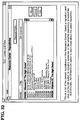
- the CLS displays the RESOURCEs held by the selected REPOSITORY, as indicated in Figures 31 and 32. Assume that the user selects the RESOURCE entitled "Windows NT 'The Right Choice"', as indicated by the highlighted entry in Figure 32.
- the CLS retrieves the RESOURCE and examines (as explained above) the RESOURCE to ascertain which, if any, program is required to display the RESOURCE.
- This particular RESOURCE requires the program entitled "Powerpoint,” available from Microsoft Corporation, as indicated by the suffix ".PPT" contained in the name of the RESOURCE.
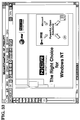
- the CLS launches the Powerpoint program, and loads the RESOURCE into the program, thereby displaying the RESOURCE in its intended format, as indicated in Figure 33.
- Level 2 the user now wishes to Locate and View by SYSTEMs, as indicated by the button actuated in Figure 34.
- the CLS provides a list of systems which are available to the user, as shown in Figure 35.
- system refers to organizations which maintain collections of information, such as stock market reports, newspapers, magazines, and so on, which are downloadable to a user.
- Three exemplary SYSTEMs were identified above.
- the CLS connects the user with that SYSTEM.
- the user obtains access to the system, and obtains the same use of the system as if the user had connected to the system outside the CLS.
- the CLS displays an appropriate screen, such as that shown in Figure 37.
- the user can return to Level 1 by actuating the button shown in Figure 38, which causes the screen shown in Figure 39 to be displayed.
- the CLS has returned the user to Level 1.
- the CLS displays the screen shown in Figure 40, which allows the user to select the "Provide” option, as indicated. If the user selects the "Provide” option, the CLS responds with the screen shown in Figure 41.
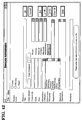
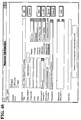
- This screen represents the PROFILE of the RESOURCE which the user is about to provide to a REPOSITORY. The user fills out the PROFILE in the usual manner, as by the sequence illustrated by Figures 41 - 49.
- the user who is now a PROVIDER, declares an "Access Level,” by selecting a box at the upper right part of Figure 41. If the user selects "Public,” then any person gaining access to the CLS can obtain access to the RESOURCE now being added.
- the "Resource Title” is, of course, the title which appears on the PROFILE. When another user, at a later time, performs searches using the CLS, this title will appear in the list of titles returned to the later user.
- the "Resource Category” refers to the "Category” described in connection with Figures 18 - 21.
- the RESOURCE now being created will become located within the CATEGORY specified on the PROFILE in Figure 41. Whenever a later user searches this CATEGORY, the title of the newly created RESOURCE will be found. (Of course, if the new RESOURCE has access limited to a particular "Team,” and if the later user is not a member of this "Team,” then the later user will not see the title when any searches are performed. This aspect is described near the end of the Specification.)
- the PROVIDER finds the CATEGORIEs which CLS provides to be unsuitable (these have been created previously by other users of the system), then the PROVIDER can create a new CATEGORY.
- the PROVIDER does this by choosing the option "OTHER," which is presented when the PROVIDER actuates the box labeled "INFORMATION CATEGORY” in Figures 41 - 49.
- the new CATEGORY is then added to the list of CATEGORIEs, and is shown to all users who subsequently elect to view the CATEGORIEs.
- Repository in Figure 41 refers to the REPOSITORY which will receive and then maintain the RESOURCE.
- Media refers to the media type, such as those shown in Figure 27.
- Bitmap refers to a graphical image, or picture, which the PROVIDER can associate with the PROFILE.
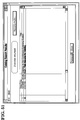
- Figures 46 and 47 illustrate how the PROVIDER identifies the file which contains this image, at the time of creation of the PROFILE. Once the file has been identified, CLS stores it with the PROFILE. At subsequent times, when other users call up the PROFILE, they can actuate the "Bitmap” option, and CLS will display the graphical image.
- the graphical image may take the form of a picture of the pump.
- Figures 41 - 49 described creating a PROFILE for a new RESOURCE. It was entitled “Test Resource for Training,” as indicated in Figure 49.
- Figure 50 illustrates a search request, undertaken under the LOCATE AND VIEW option, done in pursuit of this newly created RESOURCE.
- Figure 51 illustrates the results of the search.
- the new RESOURCE is highlighted by the user, and the RESOURCE PROFILE option is selected.
- CLS displays the PROFILE of this highlighted RESOURCE, as shown in Figure 52.
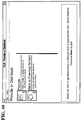
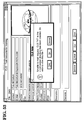
- This message indicates that the file could not be mailed electronically, but specifies the location of the RESOURCE, and inquires whether the user wishes to view the RESOURCE. If the user selects YES, then CLS displays the RESOURCE, as shown in Figure 54.
- this option allows a user to establish a standing search, analogous to a search described in Figures 9 - 12, above.
- this standing search examines new RESOURCEs shortly after they are added to their REPOSITORIEs, instead of searching the REPOSITORIEs immediately. How often the standing search is executed is controlled by the user.
- a user can select option #3, "Identify Interests.”
- the CLS responds by displaying the screen shown in Figure 56. Assume that the user selects option #2, "Add/Delete Interests. "
- the CLS displays the screen shown in Figure 57, which invites the user to enter a phrase which describes the interest.
- the user can enter a phrase or, as indicated in Figure 58, opt to view the user's presently established INTERESTs (if any exist).
- Figure 59 illustrates the present INTERESTs, namely, "CLS.” This INTEREST was saved after a previous search was performed.
- the CLS automatically, searches each new PROFILE , at the times specified by the user when the INTEREST was created, according to the search criteria established by the INTEREST.
- the CLS During a search, if the search criteria are fulfilled, the CLS notifies the user.
- the CLS accomplishes the notification by placing a small icon on the screen of the user's computer. This icon does not disrupt any current activity of the user.
- One such icon is that located in the lower left corner of Figure 5, indicating "9 notifications,” meaning that nine PROFILEs were found which match the standing search, or INTEREST.
- the user can view the search results, as shown in Figure 62, by actuating the button at the lower left, associated with the phrase "10 notifications.”
- the search results are then displayed, as shown in Figure 62.
- Figure 60 illustrates a screen from which a user may exit.
- the GUI Upon exiting, the GUI will display a screen of the type shown in Figure 61.
- the icon containing the number "10" and labeled "NCR Continuous Learning” indicates the results of a standing search, or INTEREST.
- the user actuates this icon, which causes the display shown in Figure 62 to be generated.
- the display lists the PROFILEs found which match the search criteria.
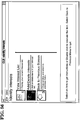
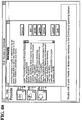
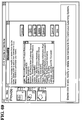
- the user When a user wishes to exit the CLS, the user actuates the exit button, as shown in Figure 63. If the CLS contains local files, which have been downloaded, but not yet saved, the CLS reminds the user of this fact at this time, by means of the screen shown in Figure 64. The user takes appropriate action. (Of course, the originals of the downloaded items are still located at their respective RESOURCEs, and are not lost if the user does not heed the warning screen shown in Figure 64.)
- the Graphical User Interface Upon exiting the CLS, the Graphical User Interface displays a screen resembling that in Figure 65.
- Figure 66 explains the fact that the CLS Administrators manage the membership of teams, and provides a scenario wherein subsequent Figures illustrate modification of team membership. These screens are available only to the Administrator of the SERVER running CLS, and not to the users.
- the CLS adds the person identified in the screen shown in Figure 70 to the proper team.
- the membership of the new team can be viewed as shown in Figure 71.
- the screen of Figure 71 can also be used as a launching point to modify membership of the TEAMs under the control of the Administrator.
- the Administrator of each SERVER handles the TEAM membership of that SERVER.
- the Administrator actuates the button TEAMs, causing the CLS to display the screen shown in Figure 72.
- a single team is illustrated, namely "CLS ADMIN USERS.”
- the Administrator actuates the MODIFY button, causing the CLS to display the screen shown in Figure 73.
- the upper frame lists the current members of the TEAM selected in Figure 72.
- the lower frame provides a roster of possible members. This roster includes all users which the SERVER, under control of the ADMINISTRATOR, serves.
- the ADMINISTRATOR selects users in the lower frame to be added to the TEAM, as indicated by the highlighting in Figure 74, and then actuates the ADD button, as shown in Figure 75.
- the CLS adds the selected users to the TEAM, as indicated in Figure 76.
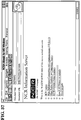
- Figure 77 illustrates a PROFILE of an exemplary RESOURCE which is being created by the ADMINISTRATOR, and which is entitled "CONFIDENTIAL REPORT ON CLS SECURITY REQUIREMENTS.”
- the PROFILE is generated as shown in Figure 78, and, as indicated, access to it has been restricted by the entry adjacent the symbol "CLS ADMIN USERS.”
- the ADMINISTRATOR first performs a SEARCH (using steps not shown, but explained above, in connection with Figures 10 - 12) which would ordinarily locate the newly created RESOURCE.
- the results of the search are shown in Figure 79.
- This sequence illustrates the fact that the creator of a RESOURCE controls the access to the RESOURCE, by identifying the TEAMS which can gain access to the RESOURCE.
- Figures 84 - 96 illustrate a flow chart of the logic followed by a program in accordance with the present invention. This program was written to run on computers using the 80X86 family of microprocessors, available from Intel Corporation. The flow chart, will allow a user to write code which can run on other processors.
- PC Personal Computer
- a significant feature of the invention is that the invention allows a given PC to act as either a SERVER or as a CLIENT of a SERVER.
- RESOURCEs have been described above. RESOURCEs are located in REPOSITORIEs. If a RESOURCE takes the form of downloadable data, then such a RESOURCE will most likely be stored in mass storage (eg, disc drives or tape systems) of a SERVER.
- this mass storage be directly "on-line.” That is, for example, a given RESOURCE may be stored on magnetic media, such as magnetic tape or floppy diskettes, which are kept on storage racks. While the media are located on the racks, they cannot be read by a computer, and are not considered “on-line.” To obtain access to the data, the tapes or discs must be loaded onto appropriate drives.
- magnetic media such as magnetic tape or floppy diskettes
- RESOURCE takes the form of a physical object, then the RESOURCE is stored in the same manner as others of its type, as in a warehouse.
- PROFILEs are collections of information which describe RESOURCEs.
Landscapes
- Engineering & Computer Science (AREA)
- Theoretical Computer Science (AREA)
- General Physics & Mathematics (AREA)
- Physics & Mathematics (AREA)
- General Engineering & Computer Science (AREA)
- Educational Administration (AREA)
- Educational Technology (AREA)
- Health & Medical Sciences (AREA)
- Artificial Intelligence (AREA)
- Audiology, Speech & Language Pathology (AREA)
- Computational Linguistics (AREA)
- General Health & Medical Sciences (AREA)
- Business, Economics & Management (AREA)
- Data Mining & Analysis (AREA)
- Databases & Information Systems (AREA)
- Management, Administration, Business Operations System, And Electronic Commerce (AREA)
- Electrically Operated Instructional Devices (AREA)
- Information Retrieval, Db Structures And Fs Structures Therefor (AREA)
Applications Claiming Priority (2)
| Application Number | Priority Date | Filing Date | Title |
|---|---|---|---|
| US21706594A | 1994-03-24 | 1994-03-24 | |
| US217065 | 1994-03-24 |
Publications (2)
| Publication Number | Publication Date |
|---|---|
| EP0674279A2 true EP0674279A2 (de) | 1995-09-27 |
| EP0674279A3 EP0674279A3 (de) | 1996-04-24 |
Family
ID=22809547
Family Applications (1)
| Application Number | Title | Priority Date | Filing Date |
|---|---|---|---|
| EP95301817A Withdrawn EP0674279A3 (de) | 1994-03-24 | 1995-03-20 | Automatisches System zum Verwalten von Betriebsmitteln. |
Country Status (3)
| Country | Link |
|---|---|
| US (4) | US5810605A (de) |
| EP (1) | EP0674279A3 (de) |
| JP (1) | JPH07271828A (de) |
Cited By (1)
| Publication number | Priority date | Publication date | Assignee | Title |
|---|---|---|---|---|
| US7818150B2 (en) | 2005-03-11 | 2010-10-19 | Hyperformix, Inc. | Method for building enterprise scalability models from load test and trace test data |
Families Citing this family (379)
| Publication number | Priority date | Publication date | Assignee | Title |
|---|---|---|---|---|
| US5951300A (en) * | 1997-03-10 | 1999-09-14 | Health Hero Network | Online system and method for providing composite entertainment and health information |
| US6334779B1 (en) * | 1994-03-24 | 2002-01-01 | Ncr Corporation | Computer-assisted curriculum |
| US5810605A (en) * | 1994-03-24 | 1998-09-22 | Ncr Corporation | Computerized repositories applied to education |
| US6336813B1 (en) * | 1994-03-24 | 2002-01-08 | Ncr Corporation | Computer-assisted education using video conferencing |
| US6688888B1 (en) * | 1996-03-19 | 2004-02-10 | Chi Fai Ho | Computer-aided learning system and method |
| US5727951A (en) * | 1996-05-28 | 1998-03-17 | Ho; Chi Fai | Relationship-based computer-aided-educational system |
| US6139330A (en) * | 1996-03-19 | 2000-10-31 | Ho; Chi Fai | Computer-aided learning system and method |
| WO1997036273A2 (en) * | 1996-03-27 | 1997-10-02 | Michael Hersh | Application of multi-media technology to psychological and educational assessment tools |
| US6535713B1 (en) * | 1996-05-09 | 2003-03-18 | Verizon Services Corp. | Interactive training application |
| US7483670B2 (en) * | 1996-05-09 | 2009-01-27 | Walker Digital, Llc | Method and apparatus for educational testing |
| US6427063B1 (en) * | 1997-05-22 | 2002-07-30 | Finali Corporation | Agent based instruction system and method |
| US6273727B1 (en) * | 1996-07-29 | 2001-08-14 | Chemical Concepts Corporation | Method and apparatus for calculating drug dosages and unit conversions and for teaching how to calculate drug dosages and unit conversions |
| US5944530A (en) * | 1996-08-13 | 1999-08-31 | Ho; Chi Fai | Learning method and system that consider a student's concentration level |
| US6804489B2 (en) | 1996-09-25 | 2004-10-12 | Laureate Education, Inc. | Learning system and method for teacher load balancing |
| US20030198930A1 (en) * | 1997-09-24 | 2003-10-23 | Sylvan Learning Systems, Inc. | System and method for conducting a learning session based on a teacher privilege |
| ATE229214T1 (de) * | 1996-09-25 | 2002-12-15 | Sylvan Learning Systems Inc | Automatische prüfung und elektronisches system für die vermittlung des lehrstoffes und die verwaltung der studenten |
| US6733295B2 (en) | 1996-09-25 | 2004-05-11 | Sylvan Learning Systems, Inc. | Learning system for enabling separate teacher-student interaction over selected interactive channels |
| US6729885B2 (en) | 1996-09-25 | 2004-05-04 | Sylvan Learning Systems, Inc. | Learning system and method for engaging in concurrent interactive and non-interactive learning sessions |
| US8342854B2 (en) * | 1996-09-25 | 2013-01-01 | Educate Online Technology, Llc | Language-based computer generated instructional material |
| US6733296B2 (en) | 1996-09-25 | 2004-05-11 | Sylvan Learning Systems, Inc. | Learning system and method for holding incentive-based learning |
| US7756721B1 (en) * | 1997-03-14 | 2010-07-13 | Best Doctors, Inc. | Health care management system |
| US6256613B1 (en) * | 1997-03-14 | 2001-07-03 | Health Resources And Technology Inc. | Medical consultation management system |
| US6270351B1 (en) * | 1997-05-16 | 2001-08-07 | Mci Communications Corporation | Individual education program tracking system |
| US6141528A (en) * | 1997-09-23 | 2000-10-31 | Sony Corporation | Learning system with roster files |
| US6198905B1 (en) * | 1997-10-01 | 2001-03-06 | Sony Corporation | Learning system with student tape auto compile |
| US6347943B1 (en) * | 1997-10-20 | 2002-02-19 | Vuepoint Corporation | Method and system for creating an individualized course of instruction for each user |
| US6062862A (en) * | 1997-11-12 | 2000-05-16 | Koskinen; Robin S. | Financial services product training apparatus and method related thereto |
| US6154631A (en) * | 1997-11-14 | 2000-11-28 | Sony Corporation | Learning system with synchronized control of hardware and switching network |
| US6141529A (en) * | 1997-11-14 | 2000-10-31 | Sony Corporation | Learning system with random assignments, conferencing and modeling |
| US6208832B1 (en) * | 1997-11-14 | 2001-03-27 | Sony Corporation | Learning system with response analyzer |
| US6148174A (en) * | 1997-11-14 | 2000-11-14 | Sony Corporation | Learning systems with patterns |
| US6411796B1 (en) * | 1997-11-14 | 2002-06-25 | Sony Corporation | Computer assisted learning system |
| JP3371791B2 (ja) * | 1998-01-29 | 2003-01-27 | ヤマハ株式会社 | 音楽教習システムおよび音楽教習装置、ならびに、音楽教習用プログラムが記録された記録媒体 |
| USRE38432E1 (en) | 1998-01-29 | 2004-02-24 | Ho Chi Fai | Computer-aided group-learning methods and systems |
| US6000945A (en) * | 1998-02-09 | 1999-12-14 | Educational Testing Service | System and method for computer based test assembly |
| US6361326B1 (en) * | 1998-02-20 | 2002-03-26 | George Mason University | System for instruction thinking skills |
| US6077085A (en) * | 1998-05-19 | 2000-06-20 | Intellectual Reserve, Inc. | Technology assisted learning |
| US6285993B1 (en) * | 1998-06-01 | 2001-09-04 | Raytheon Company | Method and apparatus for modeling individual learning styles |
| GB2338333B (en) * | 1998-06-09 | 2003-02-26 | Aubrey Nunes | Computer assisted learning system |
| US6801751B1 (en) | 1999-11-30 | 2004-10-05 | Leapfrog Enterprises, Inc. | Interactive learning appliance |
| US6882824B2 (en) | 1998-06-10 | 2005-04-19 | Leapfrog Enterprises, Inc. | Interactive teaching toy |
| US6322366B1 (en) * | 1998-06-30 | 2001-11-27 | Assessment Technology Inc. | Instructional management system |
| US6398556B1 (en) * | 1998-07-06 | 2002-06-04 | Chi Fai Ho | Inexpensive computer-aided learning methods and apparatus for learners |
| US9792659B2 (en) * | 1999-04-13 | 2017-10-17 | Iplearn, Llc | Computer-aided methods and apparatus to access materials in a network environment |
| US6164975A (en) * | 1998-12-11 | 2000-12-26 | Marshall Weingarden | Interactive instructional system using adaptive cognitive profiling |
| US6347333B2 (en) | 1999-01-15 | 2002-02-12 | Unext.Com Llc | Online virtual campus |
| US6301462B1 (en) * | 1999-01-15 | 2001-10-09 | Unext. Com | Online collaborative apprenticeship |
| US6325632B1 (en) * | 1999-05-05 | 2001-12-04 | Anabas, Inc. | Computer-aided learning method and systems matching students with instructors |
| US20020138590A1 (en) * | 2000-05-05 | 2002-09-26 | Beams Brian R. | System method and article of manufacture for creating a virtual university experience |
| US7908602B2 (en) * | 1999-06-30 | 2011-03-15 | Blackboard Inc. | Internet-based education support system, method and medium providing security attributes in modular, extensible components |
| EP1192615A4 (de) * | 1999-06-30 | 2010-11-10 | Blackboard Inc | Internet-basiertes lernhilfssystem und -methode |
| US9053500B2 (en) * | 1999-06-30 | 2015-06-09 | Blackboard Inc. | Internet-based education support system and method with multi-language capability |
| US20040153509A1 (en) * | 1999-06-30 | 2004-08-05 | Alcorn Robert L. | Internet-based education support system, method and medium with modular text-editing component for use in a web-based application |
| US6988138B1 (en) * | 1999-06-30 | 2006-01-17 | Blackboard Inc. | Internet-based education support system and methods |
| US7251607B1 (en) * | 1999-07-06 | 2007-07-31 | John Peter Veschi | Dispute resolution method |
| US6288753B1 (en) | 1999-07-07 | 2001-09-11 | Corrugated Services Corp. | System and method for live interactive distance learning |
| US20030069866A1 (en) * | 1999-07-29 | 2003-04-10 | Hiromasa Ohno | Management system for education and training, computer for management of training, terminal device for trainee, terminal device for manager, and method for management of education and training |
| US6470171B1 (en) * | 1999-08-27 | 2002-10-22 | Ecollege.Com | On-line educational system for display of educational materials |
| US6965752B2 (en) * | 1999-08-27 | 2005-11-15 | Ecollege.Com | On-line educational system having an electronic notebook feature |
| WO2001016918A1 (en) * | 1999-09-01 | 2001-03-08 | Intelligent Learning Corporation | System and method for real-time multimedia learning that adjusts the delivery mode to optimize user comprehension |
| GB9921697D0 (en) * | 1999-09-14 | 1999-11-17 | Catlin David | Teaching system |
| JP2003511744A (ja) * | 1999-10-14 | 2003-03-25 | ルネッサンス ラーニング インコーポレイテッド | トレーニング/知識管理システム |
| US20060233346A1 (en) * | 1999-11-16 | 2006-10-19 | Knowlagent, Inc. | Method and system for prioritizing performance interventions |
| US20040202308A1 (en) * | 1999-11-16 | 2004-10-14 | Knowlagent, Inc. | Managing the selection of performance interventions in a contact center |
| EP1242949A4 (de) * | 1999-11-16 | 2005-11-02 | Lrn The Legal Knowledge Compan | System und verfahren zur verteilung juristischer information |
| US20050175971A1 (en) * | 1999-11-16 | 2005-08-11 | Knowlagent, Inc., Alpharetta, Ga | Method and system for scheduled delivery of training to call center agents |
| US20040202309A1 (en) * | 1999-11-16 | 2004-10-14 | Knowlagent, Inc. | Managing the rate of delivering performance interventions in a contact center |
| US9640083B1 (en) | 2002-02-26 | 2017-05-02 | Leapfrog Enterprises, Inc. | Method and system for providing content for learning appliances over an electronic communication medium |
| US9520069B2 (en) * | 1999-11-30 | 2016-12-13 | Leapfrog Enterprises, Inc. | Method and system for providing content for learning appliances over an electronic communication medium |
| US6654748B1 (en) | 1999-12-07 | 2003-11-25 | Rwd Technologies, Inc. | Dynamic application browser and database for use therewith |
| TW434524B (en) * | 1999-12-16 | 2001-05-16 | Mustek Systems Inc | Correlative real-time sound teaching method |
| US7610233B1 (en) | 1999-12-22 | 2009-10-27 | Accenture, Llp | System, method and article of manufacture for initiation of bidding in a virtual trade financial environment |
| US7167844B1 (en) | 1999-12-22 | 2007-01-23 | Accenture Llp | Electronic menu document creator in a virtual financial environment |
| US6652283B1 (en) * | 1999-12-30 | 2003-11-25 | Cerego, Llc | System apparatus and method for maximizing effectiveness and efficiency of learning retaining and retrieving knowledge and skills |
| US20030129574A1 (en) * | 1999-12-30 | 2003-07-10 | Cerego Llc, | System, apparatus and method for maximizing effectiveness and efficiency of learning, retaining and retrieving knowledge and skills |
| US6683611B1 (en) * | 2000-01-14 | 2004-01-27 | Dianna L. Cleveland | Method and apparatus for preparing customized reading material |
| US6775377B2 (en) | 2001-09-10 | 2004-08-10 | Knowlagent, Inc. | Method and system for delivery of individualized training to call center agents |
| US7505921B1 (en) | 2000-03-03 | 2009-03-17 | Finali Corporation | System and method for optimizing a product configuration |
| US6721726B1 (en) * | 2000-03-08 | 2004-04-13 | Accenture Llp | Knowledge management tool |
| US6807535B2 (en) | 2000-03-08 | 2004-10-19 | Lnk Corporation | Intelligent tutoring system |
| WO2001065912A2 (en) * | 2000-03-09 | 2001-09-13 | The Mead Corporation | School and office product system |
| AU2001252947A1 (en) * | 2000-03-22 | 2001-10-03 | Virtual Gold, Inc. | Data-driven self-training system and technique |
| US20030049592A1 (en) * | 2000-03-24 | 2003-03-13 | Nam-Kyo Park | Database of learning materials and method for providing learning materials to a learner using computer system |
| US6419496B1 (en) | 2000-03-28 | 2002-07-16 | William Vaughan, Jr. | Learning method |
| US6438353B1 (en) * | 2000-03-29 | 2002-08-20 | General Electric | Method, system and storage medium for providing training to multiple users |
| WO2001075790A2 (en) * | 2000-04-03 | 2001-10-11 | 3-Dimensional Pharmaceuticals, Inc. | Method, system, and computer program product for representing object relationships in a multidimensional space |
| US6498920B1 (en) * | 2000-04-18 | 2002-12-24 | We-Comply, Inc. | Customizable web-based training system |
| US20040115596A1 (en) * | 2001-04-23 | 2004-06-17 | Jonathan Scott Snyder | System for scheduling classes and managing educational resources |
| US20040009461A1 (en) * | 2000-04-24 | 2004-01-15 | Snyder Jonathan Scott | System for scheduling classes and managing eductional resources |
| US7050753B2 (en) * | 2000-04-24 | 2006-05-23 | Knutson Roger C | System and method for providing learning material |
| KR20010098149A (ko) * | 2000-04-28 | 2001-11-08 | 홍범준 | 자가학습계획을 통한 인터랙티브한 인터넷 학습방법 |
| KR20000037493A (ko) * | 2000-04-28 | 2000-07-05 | 안병윤 | 인터넷을 이용한 가상 학교 시스템 및 이를 이용한 교육방법 |
| US20050177574A1 (en) * | 2000-05-08 | 2005-08-11 | James Riley | Electronic course generation systems and methods |
| US7043193B1 (en) | 2000-05-09 | 2006-05-09 | Knowlagent, Inc. | Versatile resource computer-based training system |
| US20020051956A1 (en) * | 2000-05-09 | 2002-05-02 | Thomsen David J. | System and method for remote learning, such as for costs and benefits personnel and professionals |
| US6685476B1 (en) | 2000-05-23 | 2004-02-03 | Robert L. Safran, Sr. | Computer-based educational learning |
| KR20010113250A (ko) * | 2000-06-17 | 2001-12-28 | 전경헌 | 인터넷을 이용한 맞춤형 교육 서비스 방법 |
| WO2001099083A1 (en) * | 2000-06-19 | 2001-12-27 | Use Your Cell Ab | System and method for individually adapted training |
| US6675010B1 (en) * | 2000-06-22 | 2004-01-06 | Hao Ming Yeh | Mobile communication system for learning foreign vocabulary |
| KR20020001122A (ko) * | 2000-06-26 | 2002-01-09 | 이준범 | 인터넷을 이용한 교육시스템 |
| KR20000058777A (ko) * | 2000-06-28 | 2000-10-05 | 양기훈 | 경력개발과 지식경영을 통한 업무현장의 총체적 학습 |
| AUPQ852000A0 (en) * | 2000-07-03 | 2000-07-27 | E-Learning Australia Ltd | Method of electronically producing a lesson plan |
| IL154003A0 (en) * | 2000-07-18 | 2003-07-31 | Learningideas Inc | Interactive online learning with student-to-tutor matching |
| US6741833B2 (en) * | 2000-07-21 | 2004-05-25 | Englishtown, Inc. | Learning activity platform and method for teaching a foreign language over a network |
| US7031651B2 (en) | 2000-07-21 | 2006-04-18 | Englishtown, Inc. | System and method of matching teachers with students to facilitate conducting online private instruction over a global network |
| AU2001296246A1 (en) * | 2000-08-04 | 2002-04-22 | Sylvan Learning Systems, Inc. | Automated testing and electronic instructional delivery and student management system |
| US6439893B1 (en) * | 2000-08-10 | 2002-08-27 | Jacqueline Byrd | Web based, on-line system and method for assessing, monitoring and modifying behavioral characteristic |
| US6622003B1 (en) | 2000-08-14 | 2003-09-16 | Unext.Com Llc | Method for developing or providing an electronic course |
| WO2002017276A1 (en) * | 2000-08-22 | 2002-02-28 | Vital Source Technologies, Inc. | System and method for providing a curriculum repository |
| KR20000064174A (ko) * | 2000-08-25 | 2000-11-06 | 김종복 | 디.에스.이.씨 시스템에 의한 유기적 소그룹 교육방법 |
| US6960088B1 (en) * | 2000-08-28 | 2005-11-01 | Long Eliot R | Method for evaluating standardized test results |
| US20020091656A1 (en) * | 2000-08-31 | 2002-07-11 | Linton Chet D. | System for professional development training and assessment |
| US20110070567A1 (en) * | 2000-08-31 | 2011-03-24 | Chet Linton | System for professional development training, assessment, and automated follow-up |
| US6551109B1 (en) * | 2000-09-13 | 2003-04-22 | Tom R. Rudmik | Computerized method of and system for learning |
| US6540521B1 (en) * | 2000-09-20 | 2003-04-01 | The Ohana Foundation | System and method for applying standards to adapt generic educational materials for use in different states and regions |
| WO2002029762A1 (en) * | 2000-09-29 | 2002-04-11 | The Board Of Regents Of The University Of Nebraska | System and method for delivering content in a computerized distance-learning environment |
| US6921268B2 (en) * | 2002-04-03 | 2005-07-26 | Knowledge Factor, Inc. | Method and system for knowledge assessment and learning incorporating feedbacks |
| US8165518B2 (en) * | 2000-10-04 | 2012-04-24 | Knowledge Factor, Inc. | Method and system for knowledge assessment using confidence-based measurement |
| US20060029920A1 (en) * | 2002-04-03 | 2006-02-09 | Bruno James E | Method and system for knowledge assessment using confidence-based measurement |
| WO2002029763A1 (en) * | 2000-10-04 | 2002-04-11 | Bruno James E | Method and system for knowledge assessment and learning |
| US6964044B1 (en) | 2000-10-06 | 2005-11-08 | Genworth Financial, Inc. | System and process for management of changes and modifications in a process |
| US20020127528A1 (en) * | 2000-10-13 | 2002-09-12 | Spar Inc. | Incentive based training system and method |
| WO2002037228A2 (en) * | 2000-10-30 | 2002-05-10 | Harvard Business School Publishing | System and method for network-based personalized educational environment |
| US6561812B1 (en) | 2000-10-30 | 2003-05-13 | Learncity, Inc. | System and method of correlating learning materials with educational objectives |
| US6910045B2 (en) | 2000-11-01 | 2005-06-21 | Collegenet, Inc. | Automatic data transmission in response to content of electronic forms satisfying criteria |
| US6606480B1 (en) | 2000-11-02 | 2003-08-12 | National Education Training Group, Inc. | Automated system and method for creating an individualized learning program |
| US7260355B2 (en) * | 2000-11-02 | 2007-08-21 | Skillsoft Corporation | Automated individualized learning program creation system and associated methods |
| US6551107B1 (en) * | 2000-11-03 | 2003-04-22 | Cardioconcepts, Inc. | Systems and methods for web-based learning |
| WO2002042942A1 (en) * | 2000-11-21 | 2002-05-30 | Protigen, Inc. | Interactive assessment tool |
| FR2817072A1 (fr) * | 2000-11-21 | 2002-05-24 | Conception Realisation Edition | Systeme interactif d'enseignement assiste par ordinateur |
| US20030009742A1 (en) * | 2000-12-06 | 2003-01-09 | Bass Michael D. | Automated job training and performance tool |
| US6704541B1 (en) | 2000-12-06 | 2004-03-09 | Unext.Com, L.L.C. | Method and system for tracking the progress of students in a class |
| US6652287B1 (en) | 2000-12-21 | 2003-11-25 | Unext.Com | Administrator and instructor course management application for an online education course |
| JP3986252B2 (ja) * | 2000-12-27 | 2007-10-03 | 修 家本 | 学習者に応じた教材提示パターンの適応的決定方法および装置 |
| US20020058234A1 (en) * | 2001-01-11 | 2002-05-16 | West Stephen G. | System and method for teaching a language with interactive digital televison |
| US6743024B1 (en) * | 2001-01-29 | 2004-06-01 | John Mandel Ivler | Question-response processing based on misapplication of primitives |
| US6871043B2 (en) * | 2001-02-02 | 2005-03-22 | Ecollege.Com | Variable types of sensory interaction for an on-line educational system |
| CA2438831A1 (en) * | 2001-02-28 | 2002-09-06 | Cisco Learning Institute | System for distributed learning |
| WO2002071258A2 (en) * | 2001-03-02 | 2002-09-12 | Breakthrough To Literacy, Inc. | Adaptive instructional process and system to facilitate oral and written language comprehension |
| US6688889B2 (en) | 2001-03-08 | 2004-02-10 | Boostmyscore.Com | Computerized test preparation system employing individually tailored diagnostics and remediation |
| US20020143961A1 (en) * | 2001-03-14 | 2002-10-03 | Siegel Eric Victor | Access control protocol for user profile management |
| KR20020073896A (ko) * | 2001-03-16 | 2002-09-28 | 주식회사 씨아이엠티 | 인터넷을 이용한 유아 교육기관 관리 시스템 및 그 방법 |
| US6978115B2 (en) * | 2001-03-29 | 2005-12-20 | Pointecast Corporation | Method and system for training in an adaptive manner |
| JP2003006391A (ja) * | 2001-03-30 | 2003-01-10 | Fujitsu Ltd | 人材ミックス育成方法、人材ミックス育成計画立案装置及びプログラム |
| GB0108355D0 (en) * | 2001-04-03 | 2001-05-23 | Gemstar Dev Ltd | Retrospective electronic program guide |
| US8096809B2 (en) | 2001-04-05 | 2012-01-17 | Convergys Cmg Utah, Inc. | System and method for automated end-user support |
| US7614014B2 (en) * | 2001-04-05 | 2009-11-03 | Daniel Keele Burgin | System and method for automated end-user support |
| US20020147848A1 (en) * | 2001-04-05 | 2002-10-10 | Burgin Daniel Keele | System and method for enabling communication between browser frames |
| US6789047B1 (en) | 2001-04-17 | 2004-09-07 | Unext.Com Llc | Method and system for evaluating the performance of an instructor of an electronic course |
| US6554618B1 (en) | 2001-04-20 | 2003-04-29 | Cheryl B. Lockwood | Managed integrated teaching providing individualized instruction |
| US6832069B2 (en) * | 2001-04-20 | 2004-12-14 | Educational Testing Service | Latent property diagnosing procedure |
| WO2002089094A1 (en) * | 2001-05-01 | 2002-11-07 | Trainingfox S.A. | Computer-assisted system for designing training programs |
| KR20010074252A (ko) * | 2001-05-03 | 2001-08-04 | 변영태 | 정보통신망을 이용한 맞춤교육시스템 및 방법 |
| US7286793B1 (en) * | 2001-05-07 | 2007-10-23 | Miele Frank R | Method and apparatus for evaluating educational performance |
| US7210938B2 (en) * | 2001-05-09 | 2007-05-01 | K12.Com | System and method of virtual schooling |
| US7353252B1 (en) | 2001-05-16 | 2008-04-01 | Sigma Design | System for electronic file collaboration among multiple users using peer-to-peer network topology |
| US20030207245A1 (en) * | 2001-05-23 | 2003-11-06 | Parker Alexander F. | Method and system for providing online distance learning |
| US20020188583A1 (en) * | 2001-05-25 | 2002-12-12 | Mark Rukavina | E-learning tool for dynamically rendering course content |
| US6790045B1 (en) | 2001-06-18 | 2004-09-14 | Unext.Com Llc | Method and system for analyzing student performance in an electronic course |
| US6608992B2 (en) * | 2001-07-06 | 2003-08-19 | Ncr Corporation | Web-based education |
| US6905340B2 (en) * | 2001-07-18 | 2005-06-14 | Mentormate Llc | Educational device and method |
| US7200609B2 (en) * | 2001-07-19 | 2007-04-03 | Emc Corporation | Attribute based resource allocation |
| US6643493B2 (en) * | 2001-07-19 | 2003-11-04 | Kevin P. Kilgore | Apparatus and method for registering students and evaluating their performance |
| US7074128B2 (en) | 2001-08-03 | 2006-07-11 | Drb Lit Ltd. | Method and system for enhancing memorization by using a mnemonic display |
| US6793129B2 (en) * | 2001-08-17 | 2004-09-21 | Leapfrog Enterprises, Inc. | Study aid apparatus and method of using study aid apparatus |
| US20030055699A1 (en) * | 2001-09-18 | 2003-03-20 | O'connor Joseph J. | Employee development management method and system |
| JP2003099545A (ja) * | 2001-09-25 | 2003-04-04 | Sharp Corp | 教科書配布装置,教科書配布システム,教科書配布方法,教科書配布プログラム,教科書配布プログラムを記録した記録媒体および教科書表示システム |
| US10347145B1 (en) | 2001-10-05 | 2019-07-09 | Vision Works Ip Corporation | Method and apparatus for periodically questioning a user using a computer system or other device to facilitate memorization and learning of information |
| US7632101B2 (en) | 2001-10-05 | 2009-12-15 | Vision Works Ip Corporation | Method and apparatus for periodically questioning a user using a computer system or other device to facilitate memorization and learning of information |
| US6999954B2 (en) * | 2001-10-10 | 2006-02-14 | The Mcgraw-Hill Companies, Inc. | Modular instruction using cognitive constructs |
| US7174010B2 (en) * | 2001-11-05 | 2007-02-06 | Knowlagent, Inc. | System and method for increasing completion of training |
| US20030104344A1 (en) * | 2001-12-03 | 2003-06-05 | Sable Paula H. | Structured observation system for early literacy assessment |
| EP1324212A3 (de) * | 2001-12-12 | 2009-08-19 | Accenture Global Services GmbH | System und Verfahren zum Kompilieren und Verteilen modularer Veröffentlichungen und Lehrmaterial in einer elekronischen Umgebung |
| US9852649B2 (en) * | 2001-12-13 | 2017-12-26 | Mind Research Institute | Method and system for teaching vocabulary |
| CN1620677A (zh) * | 2001-12-21 | 2005-05-25 | 布赖尔敦软件有限公司 | 同步的形成性学习系统、方法和计算机程序 |
| US20030130836A1 (en) * | 2002-01-07 | 2003-07-10 | Inventec Corporation | Evaluation system of vocabulary knowledge level and the method thereof |
| US8632340B1 (en) | 2002-01-08 | 2014-01-21 | EdGate Correlation Services, LLC | Internet-based educational framework for the correlation of lessons, resources and assessments to state standards |
| KR20030063821A (ko) * | 2002-01-24 | 2003-07-31 | 윤미선 | 온라인을 통한 유아교육정보 제공방법 |
| US20030172052A1 (en) * | 2002-03-11 | 2003-09-11 | Thomas Crandell | Conceptual framework and assessment tool for designing a personalized electronic textbook and other online educational software |
| JP3735307B2 (ja) * | 2002-03-20 | 2006-01-18 | 富士通株式会社 | 学習支援方法及び学習支援プログラム |
| US20030190593A1 (en) * | 2002-04-05 | 2003-10-09 | Wisnosky Dennis E. | Systems and methods for the automated generation of individual transition plans |
| US20030207242A1 (en) * | 2002-05-06 | 2003-11-06 | Ramakrishnan Balasubramanian | Method for generating customizable comparative online testing reports and for monitoring the comparative performance of test takers |
| US8892895B1 (en) | 2002-05-07 | 2014-11-18 | Data Recognition Corporation | Integrated system for electronic tracking and control of documents |
| US20040009462A1 (en) * | 2002-05-21 | 2004-01-15 | Mcelwrath Linda Kay | Learning system |
| US6772081B1 (en) | 2002-05-21 | 2004-08-03 | Data Recognition Corporation | Priority system and method for processing standardized tests |
| US20030219708A1 (en) * | 2002-05-23 | 2003-11-27 | Koninklijke Philips Electronics N.V. | Presentation synthesizer |
| US8155577B1 (en) | 2002-06-19 | 2012-04-10 | Saad Ihab L | Expert systems recommendations matching consumer profiles to product evaluations |
| US7702531B2 (en) | 2002-06-28 | 2010-04-20 | Accenture Global Services Gmbh | Business driven learning solution particularly suitable for sales-oriented organizations |
| US7860736B2 (en) | 2002-06-28 | 2010-12-28 | Accenture Global Services Gmbh | Course content development method and computer readable medium for business driven learning solutions |
| CA2433536A1 (en) * | 2002-06-28 | 2003-12-28 | Accenture Global Services Gmbh | Delivery module and related platforms for business driven learning solution |
| CA2433588A1 (en) * | 2002-06-28 | 2003-12-28 | Accenture Global Services Gmbh | Decision support and work management for synchronizing learning services |
| WO2004006210A1 (en) * | 2002-07-09 | 2004-01-15 | Vocab Ab | Learning system and method |
| GB2390734A (en) * | 2002-07-10 | 2004-01-14 | Learning Expanse Ltd | Learning management system |
| US8128414B1 (en) | 2002-08-20 | 2012-03-06 | Ctb/Mcgraw-Hill | System and method for the development of instructional and testing materials |
| US20040043362A1 (en) * | 2002-08-29 | 2004-03-04 | Aughenbaugh Robert S. | Re-configurable e-learning activity and method of making |
| US20040043373A1 (en) * | 2002-09-04 | 2004-03-04 | Kaiserman Jeffrey M. | System for providing computer-assisted development |
| AU2003270402A1 (en) * | 2002-09-09 | 2004-03-29 | Adeboyejo A. Oni | Enablement of collaborative and integrated decision-making |
| US8491311B2 (en) * | 2002-09-30 | 2013-07-23 | Mind Research Institute | System and method for analysis and feedback of student performance |
| US20040152055A1 (en) * | 2003-01-30 | 2004-08-05 | Gliessner Michael J.G. | Video based language learning system |
| US9646311B2 (en) * | 2003-02-04 | 2017-05-09 | First Principles, Inc. | Electronic course evaluation |
| US8385811B1 (en) | 2003-02-11 | 2013-02-26 | Data Recognition Corporation | System and method for processing forms using color |
| US20040161728A1 (en) * | 2003-02-14 | 2004-08-19 | Benevento Francis A. | Distance learning system |
| CA2516160A1 (en) * | 2003-02-14 | 2004-09-02 | Ctb/Mcgraw-Hill | System and method for creating, assessing, modifying, and using a learning map |
| US20040236598A1 (en) * | 2003-03-21 | 2004-11-25 | Thomsen David J. | System and method for providing occupational information |
| US9472114B2 (en) * | 2003-05-01 | 2016-10-18 | International Business Machines Corporation | Computer-implemented method, system and program product for providing an educational program |
| US20040219492A1 (en) * | 2003-05-01 | 2004-11-04 | International Business Machines Corporation | Method, system and program product for designing an educational program and providing educational content |
| US8620831B1 (en) | 2003-06-03 | 2013-12-31 | Phillip M. Adams | Student-centered, cross-institutional curriculum management system apparatus and method |
| GB0314591D0 (en) * | 2003-06-21 | 2003-07-30 | Ibm | Profiling data in a data store |
| JP2005024635A (ja) * | 2003-06-30 | 2005-01-27 | Univ Shizuoka | 実力評価システム、その方法およびプログラム |
| US7357640B2 (en) * | 2003-07-02 | 2008-04-15 | Drb Lit Ltd. | Lock-In Training system |
| US20110159472A1 (en) * | 2003-07-15 | 2011-06-30 | Hagen Eck | Delivery methods for remote learning system courses |
| US20070111180A1 (en) * | 2005-10-24 | 2007-05-17 | Sperle Robin U | Delivery methods for remote learning system courses |
| US8182270B2 (en) | 2003-07-31 | 2012-05-22 | Intellectual Reserve, Inc. | Systems and methods for providing a dynamic continual improvement educational environment |
| EP1664992A4 (de) * | 2003-08-15 | 2010-05-19 | Blackboard Inc | Inhaltssystem und assoziierte verfahren |
| US7158628B2 (en) * | 2003-08-20 | 2007-01-02 | Knowlagent, Inc. | Method and system for selecting a preferred contact center agent based on agent proficiency and performance and contact center state |
| US20050055222A1 (en) * | 2003-08-29 | 2005-03-10 | Valery Leonov | Genetic people's health: the biocultural microcomputers and microprocessor toys for grown-ups and kids and for all the world, and the science and technological art of the computerized global humanitarian biocultural genetic 'public health' (health without the medical 'health service') |
| US20050053903A1 (en) * | 2003-09-10 | 2005-03-10 | Sandra Darling | Method for aligning instruction and content to increase learning |
| US20050058978A1 (en) * | 2003-09-12 | 2005-03-17 | Benevento Francis A. | Individualized learning system |
| US20050125196A1 (en) * | 2003-12-09 | 2005-06-09 | Len Swanson | Method and system for computer-assisted test construction performing specification matching during test item selection |
| US8529270B2 (en) | 2003-12-12 | 2013-09-10 | Assessment Technology, Inc. | Interactive computer system for instructor-student teaching and assessment of preschool children |
| US20050149615A1 (en) * | 2003-12-17 | 2005-07-07 | Nedimyer Joseph P. | System and method for processing resource registry updates without regard to chronological order |
| TWM249950U (en) * | 2004-01-02 | 2004-11-11 | Cvc Technologies Inc | Cap tightening machine capable of controlling tightening torque |
| US6905883B1 (en) * | 2004-01-16 | 2005-06-14 | Mobile Thinking, Llc | Process for recording, storing, and displaying discrete trial data |
| US20050175973A1 (en) * | 2004-02-05 | 2005-08-11 | Miller David E. | Textbook with supplemental multimedia capability |
| US20050186550A1 (en) * | 2004-02-23 | 2005-08-25 | Mubina Gillani | System and method for dynamic electronic learning based on continuing student assessments and responses |
| US7364432B2 (en) * | 2004-03-31 | 2008-04-29 | Drb Lit Ltd. | Methods of selecting Lock-In Training courses and sessions |
| US7995735B2 (en) | 2004-04-15 | 2011-08-09 | Chad Vos | Method and apparatus for managing customer data |
| US7362997B2 (en) * | 2004-04-22 | 2008-04-22 | Aurelia Hartenberger | Methods and apparatus for curriculum planning |
| US20050255429A1 (en) * | 2004-05-14 | 2005-11-17 | Robbie Linda R | Novel teaching methodology and syllabus |
| US7980855B1 (en) | 2004-05-21 | 2011-07-19 | Ctb/Mcgraw-Hill | Student reporting systems and methods |
| US20060026213A1 (en) * | 2004-06-02 | 2006-02-02 | Blackboard Inc. | Content and portal systems and associated methods |
| EP1770551A1 (de) * | 2004-06-10 | 2007-04-04 | Educamigos, S.L. | Task-planungssystem und verfahren zur verwendung bei einer kognitive fähigkeit betreffenden behandlung |
| WO2007014186A2 (en) * | 2005-07-22 | 2007-02-01 | The Thomson Corporation | Systems, methods, and software for online courses |
| US20060024654A1 (en) * | 2004-07-31 | 2006-02-02 | Goodkovsky Vladimir A | Unified generator of intelligent tutoring |
| US8597030B2 (en) * | 2004-08-23 | 2013-12-03 | At&T Intellectual Property I, L.P. | Electronic profile based education service |
| US8187004B1 (en) | 2004-09-03 | 2012-05-29 | Desensi Jr Francis Joseph | System and method of education administration |
| US20060073460A1 (en) * | 2004-09-07 | 2006-04-06 | Holubec Holly A | Method and system for achievement test preparation |
| US20060072739A1 (en) * | 2004-10-01 | 2006-04-06 | Knowlagent Inc. | Method and system for assessing and deploying personnel for roles in a contact center |
| US20110256521A1 (en) * | 2004-11-17 | 2011-10-20 | The New England Center For Children, Inc. | Method and apparatus for customizing lesson plans |
| US20060127870A1 (en) * | 2004-12-15 | 2006-06-15 | Hotchalk, Inc. | System and method for communicating student information among student, parents guardians and educators |
| US20060154226A1 (en) * | 2004-12-27 | 2006-07-13 | Maxfield M R | Learning support systems |
| US20060141428A1 (en) * | 2004-12-28 | 2006-06-29 | Symbol Technologies, Inc. | System and method for monitoring and training users of mobile devices in a network |
| US20060141441A1 (en) * | 2004-12-29 | 2006-06-29 | Foundation For Behavioral Resources | Programmed classroom instruction |
| US8385810B2 (en) | 2004-12-30 | 2013-02-26 | Norman J. Nolasco | System and method for real time tracking of student performance based on state educational standards |
| US20060166174A1 (en) * | 2005-01-21 | 2006-07-27 | Rowe T P | Predictive artificial intelligence and pedagogical agent modeling in the cognitive imprinting of knowledge and skill domains |
| US20060188862A1 (en) * | 2005-02-18 | 2006-08-24 | Harcourt Assessment, Inc. | Electronic assessment summary and remedial action plan creation system and associated methods |
| US20060223040A1 (en) * | 2005-03-30 | 2006-10-05 | Edward Brown | Interactive computer-assisted method of instruction and system for implementation |
| US8764455B1 (en) * | 2005-05-09 | 2014-07-01 | Altis Avante Corp. | Comprehension instruction system and method |
| US20060256953A1 (en) * | 2005-05-12 | 2006-11-16 | Knowlagent, Inc. | Method and system for improving workforce performance in a contact center |
| US8170466B2 (en) * | 2005-05-27 | 2012-05-01 | Ctb/Mcgraw-Hill | System and method for automated assessment of constrained constructed responses |
| US20070009871A1 (en) * | 2005-05-28 | 2007-01-11 | Ctb/Mcgraw-Hill | System and method for improved cumulative assessment |
| US20070031801A1 (en) * | 2005-06-16 | 2007-02-08 | Ctb Mcgraw Hill | Patterned response system and method |
| US20070009872A1 (en) * | 2005-06-21 | 2007-01-11 | Sonsteng John O | System and method for teaching |
| US20080254437A1 (en) * | 2005-07-15 | 2008-10-16 | Neil T Heffernan | Global Computer Network Tutoring System |
| US20070020603A1 (en) * | 2005-07-22 | 2007-01-25 | Rebecca Woulfe | Synchronous communications systems and methods for distance education |
| US20070048722A1 (en) * | 2005-08-26 | 2007-03-01 | Donald Spector | Methods and system for implementing a self-improvement curriculum |
| US20070046678A1 (en) * | 2005-09-01 | 2007-03-01 | Peterson Matthew R | System and method for training with a virtual apparatus |
| US20070065788A1 (en) * | 2005-09-20 | 2007-03-22 | Inscape Publishing, Inc. | Method for developing a curriculum |
| US20070065795A1 (en) * | 2005-09-21 | 2007-03-22 | Erickson Ranel E | Multiple-channel learner-centered whole-brain training system |
| US7467947B2 (en) * | 2005-10-24 | 2008-12-23 | Sap Aktiengesellschaft | External course catalog updates |
| US20070122790A1 (en) * | 2005-10-24 | 2007-05-31 | Sperle Robin U | Monitoring progress of external course |
| US8571462B2 (en) * | 2005-10-24 | 2013-10-29 | Sap Aktiengesellschaft | Method and system for constraining learning strategies |
| US20070123757A1 (en) * | 2005-10-24 | 2007-05-31 | Chervinsky Alexander B | Neuropsychological assessment platform (NPAP) and method |
| US7840175B2 (en) * | 2005-10-24 | 2010-11-23 | S&P Aktiengesellschaft | Method and system for changing learning strategies |
| US20070111184A1 (en) * | 2005-10-24 | 2007-05-17 | Sperle Robin U | External booking cancellation |
| US8121985B2 (en) * | 2005-10-24 | 2012-02-21 | Sap Aktiengesellschaft | Delta versioning for learning objects |
| US20070111183A1 (en) * | 2005-10-24 | 2007-05-17 | Krebs Andreas S | Marking training content for limited access |
| US7516274B2 (en) * | 2005-11-15 | 2009-04-07 | Sun Microsystems, Inc. | Power conservation via DRAM access reduction |
| US20070141539A1 (en) * | 2005-12-02 | 2007-06-21 | Veronique Lemieux | Educational method for improving dietary habits |
| IL172657A0 (en) * | 2005-12-18 | 2006-04-10 | Aljamiado Ltd | Adaptive computer-based evaluation with constrained genetic algorithm |
| US20090042177A1 (en) * | 2006-01-17 | 2009-02-12 | Ignite Learning, Inc. | Portable standardized curriculum content delivery system and method |
| US8271643B2 (en) * | 2006-02-01 | 2012-09-18 | Ca, Inc. | Method for building enterprise scalability models from production data |
| US20070218448A1 (en) * | 2006-02-08 | 2007-09-20 | Tier One Performance Solutions Llc | Methods and systems for efficient development of interactive multimedia electronic learning content |
| US20070196798A1 (en) * | 2006-02-17 | 2007-08-23 | Innertalent Corporation | Self-improvement system and method |
| US20070202481A1 (en) * | 2006-02-27 | 2007-08-30 | Andrew Smith Lewis | Method and apparatus for flexibly and adaptively obtaining personalized study content, and study device including the same |
| US20080014569A1 (en) * | 2006-04-07 | 2008-01-17 | Eleutian Technology, Llc | Teacher Assisted Internet Learning |
| US20070254275A1 (en) * | 2006-05-01 | 2007-11-01 | Dan Gonos | Training system assembly, and associated methodology, providing for personnel training remote from a training host location |
| US20080010376A1 (en) * | 2006-07-06 | 2008-01-10 | Jesse Nahan | System and method for personalized online education |
| US20080038705A1 (en) * | 2006-07-14 | 2008-02-14 | Kerns Daniel R | System and method for assessing student progress and delivering appropriate content |
| US10347148B2 (en) * | 2006-07-14 | 2019-07-09 | Dreambox Learning, Inc. | System and method for adapting lessons to student needs |
| US20110300519A1 (en) * | 2006-07-17 | 2011-12-08 | Veronique Lemieux | Educational method for improving dietary habits |
| GB0616107D0 (en) * | 2006-08-15 | 2006-09-20 | Iti Scotland Ltd | Games-based learning |
| US7869988B2 (en) | 2006-11-03 | 2011-01-11 | K12 Inc. | Group foreign language teaching system and method |
| US7818164B2 (en) | 2006-08-21 | 2010-10-19 | K12 Inc. | Method and system for teaching a foreign language |
| US20080070218A1 (en) * | 2006-08-30 | 2008-03-20 | The Boeing Company | System, method, and computer program product for delivering a training course |
| US8647126B2 (en) | 2006-08-30 | 2014-02-11 | The Boeing Company | System and computer program product for developing and delivering a training course |
| US20080057480A1 (en) * | 2006-09-01 | 2008-03-06 | K12 Inc. | Multimedia system and method for teaching basal math and science |
| US20080059484A1 (en) * | 2006-09-06 | 2008-03-06 | K12 Inc. | Multimedia system and method for teaching in a hybrid learning environment |
| US20080102428A1 (en) * | 2006-10-25 | 2008-05-01 | Monitor Company Group Limited Partnership | System and Method for Providing a User-Centric Interactive Learning Environment |
| US20100068688A1 (en) * | 2006-11-06 | 2010-03-18 | Howard Shapiro | Management of teaching processes for individualized instruction in a multistudent environment |
| GB0623942D0 (en) * | 2006-11-30 | 2007-01-10 | Iti Scotland Ltd | User profiles |
| GB0624033D0 (en) * | 2006-12-01 | 2007-01-10 | Iti Scotland Ltd | Dynamic intervention with software applications |
| US20080166686A1 (en) * | 2007-01-04 | 2008-07-10 | Cristopher Cook | Dashboard for monitoring a child's interaction with a network-based educational system |
| AU2008200370B2 (en) * | 2007-01-24 | 2008-12-04 | Dms Systems Pty Ltd | Teaching management system |
| GB2446427A (en) * | 2007-02-07 | 2008-08-13 | Sharp Kk | Computer-implemented learning method and apparatus |
| US8465288B1 (en) * | 2007-02-28 | 2013-06-18 | Patrick G. Roers | Student profile grading system |
| JP2008243007A (ja) * | 2007-03-28 | 2008-10-09 | Fujitsu Ltd | 情報処理装置、情報処理方法および情報処理プログラム |
| US20100285441A1 (en) * | 2007-03-28 | 2010-11-11 | Hefferman Neil T | Global Computer Network Self-Tutoring System |
| US20080275732A1 (en) * | 2007-05-01 | 2008-11-06 | Best Doctors, Inc. | Using patterns of medical treatment codes to determine when further medical expertise is called for |
| US20080306956A1 (en) * | 2007-06-07 | 2008-12-11 | Quantia Communications | Method and system for developing user profile on a network |
| US9214090B2 (en) | 2007-06-11 | 2015-12-15 | Distance EDU Learning, Inc. | Computer systems for capturing student performance |
| US8326211B1 (en) * | 2007-06-11 | 2012-12-04 | Distance EDU Learning, Inc. | Computer systems for capturing student performance |
| US8503924B2 (en) * | 2007-06-22 | 2013-08-06 | Kenneth W. Dion | Method and system for education compliance and competency management |
| US20090023124A1 (en) * | 2007-07-19 | 2009-01-22 | Pharos Resources, Llc | Software Application System as an Efficient Client or Case Management Tool |
| US20090075247A1 (en) * | 2007-09-14 | 2009-03-19 | Victoria Ann Tucci | Interactive educational tool |
| US8108786B2 (en) * | 2007-09-14 | 2012-01-31 | Victoria Ann Tucci | Electronic flashcards |
| US8630577B2 (en) * | 2007-08-07 | 2014-01-14 | Assessment Technology Incorporated | Item banking system for standards-based assessment |
| US20090123902A1 (en) * | 2007-08-10 | 2009-05-14 | Higgs Nancy N | Method And System For The Preparation Of The General Education Development Test |
| US8672686B2 (en) | 2007-08-14 | 2014-03-18 | Knewton, Inc. | Methods, media, and systems for computer-based learning |
| US8398404B2 (en) | 2007-08-30 | 2013-03-19 | Conflict Kinetics LLC | System and method for elevated speed firearms training |
| US9355572B2 (en) * | 2007-08-30 | 2016-05-31 | Conflict Kinetics Corporation | System and method for elevated speed firearms training |
| US20110200979A1 (en) * | 2007-09-04 | 2011-08-18 | Brian Benson | Online instructional dialogs |
| US20090089238A1 (en) * | 2007-09-27 | 2009-04-02 | Henry Colburn Stevenson-Perez | Knowledge management portal for rapid learning and assessment of science |
| WO2009058344A1 (en) * | 2007-10-31 | 2009-05-07 | Worcester Polytechnic Institute | Computer method and system for increasing the quality of student learning |
| US20090162818A1 (en) * | 2007-12-21 | 2009-06-25 | Martin Kosakowski | Method for the determination of supplementary content in an electronic device |
| US8506304B2 (en) * | 2008-01-23 | 2013-08-13 | Carol Conner | Method for recommending a teaching plan in literacy education |
| WO2009117068A1 (en) * | 2008-03-21 | 2009-09-24 | Complete Consulting, Inc. | Online classroom quality control system and method |
| US8639177B2 (en) * | 2008-05-08 | 2014-01-28 | Microsoft Corporation | Learning assessment and programmatic remediation |
| US20090287771A1 (en) * | 2008-05-14 | 2009-11-19 | Michael Boerner | Intelligent Content Management System for Effective Knowledge Transfer |
| US8666298B2 (en) * | 2008-05-15 | 2014-03-04 | Coentre Ventures Llc | Differentiated, integrated and individualized education |
| US20090325140A1 (en) * | 2008-06-30 | 2009-12-31 | Lou Gray | Method and system to adapt computer-based instruction based on heuristics |
| WO2010002395A1 (en) * | 2008-06-30 | 2010-01-07 | Dreambox Learning Inc. | Method and system to adapt computer-based instruction based on heuristics |
| US20100035220A1 (en) * | 2008-07-10 | 2010-02-11 | Herz Frederick S M | On-line student safety learning and evaluation system |
| US8644755B2 (en) * | 2008-09-30 | 2014-02-04 | Sap Ag | Method and system for managing learning materials presented offline |
| US20100145870A1 (en) * | 2008-11-24 | 2010-06-10 | Rodney Luster James Rodney Luster | T.E.S.S. Teacher Evaluation Systems Software |
| US20100129783A1 (en) * | 2008-11-25 | 2010-05-27 | Changnian Liang | Self-Adaptive Study Evaluation |
| US20100209896A1 (en) * | 2009-01-22 | 2010-08-19 | Mickelle Weary | Virtual manipulatives to facilitate learning |
| US20100190144A1 (en) * | 2009-01-26 | 2010-07-29 | Miller Mary K | Method, System and Computer Program Product for Studying for a Multiple-Choice Exam |
| WO2010118311A1 (en) * | 2009-04-09 | 2010-10-14 | Polytechnic Institute Of Nyu | System and method for the automated tracking and analysis of educational games and interactive teaching tools |
| US20100291529A1 (en) * | 2009-05-18 | 2010-11-18 | Carter Stephen R | Techniques for competitive education |
| US8381112B2 (en) * | 2009-06-09 | 2013-02-19 | Empire Technology Development Llc | Data management tool |
| US20100323336A1 (en) * | 2009-06-19 | 2010-12-23 | Alert Life Sciences Computing, S.A. | Electronic system for assisting the study and practice of medicine |
| WO2011005973A2 (en) * | 2009-07-08 | 2011-01-13 | The University Of Memphis Research Foundation | Methods and computer-program products for teaching a topic to a user |
| US20110010306A1 (en) * | 2009-07-08 | 2011-01-13 | Gonzalez Daniel P | Educational Information Management System and Education Recommendation Generator |
| US8768240B2 (en) * | 2009-08-14 | 2014-07-01 | K12 Inc. | Systems and methods for producing, delivering and managing educational material |
| US8838015B2 (en) | 2009-08-14 | 2014-09-16 | K12 Inc. | Systems and methods for producing, delivering and managing educational material |
| US20110039246A1 (en) * | 2009-08-14 | 2011-02-17 | Ronald Jay Packard | Systems and methods for producing, delivering and managing educational material |
| US20110039249A1 (en) * | 2009-08-14 | 2011-02-17 | Ronald Jay Packard | Systems and methods for producing, delivering and managing educational material |
| US20110076654A1 (en) * | 2009-09-30 | 2011-03-31 | Green Nigel J | Methods and systems to generate personalised e-content |
| US20110097698A1 (en) * | 2009-10-27 | 2011-04-28 | Henderson Charles A | System and method for interactive learning |
| US20110200978A1 (en) * | 2010-02-16 | 2011-08-18 | Assessment Technology Incorporated | Online instructional dialog books |
| US20110225550A1 (en) * | 2010-03-12 | 2011-09-15 | Creedon Michael S | System and method for displaying and navigating library information with a virtual library collections browser |
| US20110223574A1 (en) * | 2010-03-15 | 2011-09-15 | Crawford Benjamin F | Directed Collaboration Platform for Online Virtual Coaching and Training |
| US8628331B1 (en) | 2010-04-06 | 2014-01-14 | Beth Ann Wright | Learning model for competency based performance |
| KR101172369B1 (ko) * | 2010-06-29 | 2012-08-08 | 정영주 | 가상 카드를 이용한 학습 시스템 및 가상 카드를 이용한 학습 방법 |
| US9135086B2 (en) | 2010-09-22 | 2015-09-15 | Rosetta Stone, Ltd. | Performing a computerized language teaching lesson using a main computer and a mobile device |
| US8727781B2 (en) | 2010-11-15 | 2014-05-20 | Age Of Learning, Inc. | Online educational system with multiple navigational modes |
| US9324240B2 (en) | 2010-12-08 | 2016-04-26 | Age Of Learning, Inc. | Vertically integrated mobile educational system |
| US20120226528A1 (en) * | 2011-03-03 | 2012-09-06 | Roswitha Warda | Result-based Payment Method and System |
| US20120295242A1 (en) * | 2011-05-16 | 2012-11-22 | Microsoft Corporation | Computer-based active teaching |
| US20120308980A1 (en) * | 2011-06-03 | 2012-12-06 | Leonard Krauss | Individualized learning system |
| CA2844899A1 (en) | 2011-08-12 | 2013-02-21 | School Improvement Network, Llc | Prescription of electronic resources based on observational assessments |
| US9575616B2 (en) | 2011-08-12 | 2017-02-21 | School Improvement Network, Llc | Educator effectiveness |
| US9875663B2 (en) * | 2011-09-13 | 2018-01-23 | Monk Akarshala Design Private Limited | Personalized testing of learning application performance in a modular learning system |
| US20140342335A1 (en) * | 2011-09-13 | 2014-11-20 | Monk Akarshala Design Private Limited | Personalized learning streams in a modular learning system |
| US10343085B2 (en) | 2011-10-14 | 2019-07-09 | W. L. Gore & Associates, Inc. | Multilayer porous composite |
| US8731454B2 (en) | 2011-11-21 | 2014-05-20 | Age Of Learning, Inc. | E-learning lesson delivery platform |
| US8606170B2 (en) | 2012-01-20 | 2013-12-10 | Northrop Grumman Systems Corporation | Method and apparatus for interactive, computer-based, automatically adaptable learning |
| US8909653B1 (en) * | 2012-02-06 | 2014-12-09 | Su-Kam Intelligent Education Systems, Inc. | Apparatus, systems and methods for interactive dissemination of knowledge |
| US8832117B2 (en) | 2012-02-06 | 2014-09-09 | Su-Kam Intelligent Education Systems, Inc. | Apparatus, systems and methods for interactive dissemination of knowledge |
| US20140038162A1 (en) * | 2012-07-31 | 2014-02-06 | Laureate Education, Inc. | Learning system and method that uses student-selected and mandatory contacts for communicating student messages |
| US20140272905A1 (en) * | 2013-03-15 | 2014-09-18 | Adapt Courseware | Adaptive learning systems and associated processes |
| US20150199912A1 (en) * | 2013-12-31 | 2015-07-16 | FreshGrade Education, Inc. | Methods and systems for a student guide, smart guide, and teacher interface |
| US10276055B2 (en) | 2014-05-23 | 2019-04-30 | Mattersight Corporation | Essay analytics system and methods |
| US9652675B2 (en) * | 2014-07-23 | 2017-05-16 | Microsoft Technology Licensing, Llc | Identifying presentation styles of educational videos |
| US20160155345A1 (en) * | 2014-12-02 | 2016-06-02 | Yanlin Wang | Adaptive learning platform |
| KR20160082078A (ko) * | 2014-12-30 | 2016-07-08 | 한국전자통신연구원 | 교육 서비스 시스템 |
| CN104540111A (zh) * | 2014-12-31 | 2015-04-22 | 天津市育华教育科技发展有限公司 | 一种e校通手机系统 |
| US20160275804A1 (en) * | 2015-03-16 | 2016-09-22 | eSpark, Inc. | Delivery of Personalized Educational Content |
| US10679512B1 (en) | 2015-06-30 | 2020-06-09 | Terry Yang | Online test taking and study guide system and method |
| US10170015B2 (en) | 2016-02-22 | 2019-01-01 | International Business Machines Corporation | Educational media planning and delivery for in-class lessons with limited duration |
| US10902736B2 (en) | 2016-03-03 | 2021-01-26 | The Boeing Company | System and method of developing and managing a training program |
| US20170278151A1 (en) * | 2016-03-25 | 2017-09-28 | Adeboyejo Adetokunbo Oni | Systems And Methods for Creating An Online Educational And Career Marketplace |
| EP3449473A4 (de) | 2016-04-26 | 2019-10-23 | Ponddy Education Inc. | Auf affinitätswissen basiertes computergestütztes lernsystem |
| US20170345327A1 (en) * | 2016-05-28 | 2017-11-30 | Pac-Fung Coeus Limited | Motivational online studying systems and methods |
| US10803765B2 (en) | 2017-12-22 | 2020-10-13 | Knowledge Factor, Inc. | Display and report generation platform for testing results |
| US11238750B2 (en) * | 2018-10-23 | 2022-02-01 | International Business Machines Corporation | Evaluation of tutoring content for conversational tutor |
| US12079423B2 (en) | 2021-05-27 | 2024-09-03 | Jonathan White | Rapidly capturing user input |
| US12333958B1 (en) * | 2022-10-04 | 2025-06-17 | Hope Artificial Intelligence Inc. | Methods and systems for secure scalable platform providing education programs to adults in custody |
Family Cites Families (15)
| Publication number | Priority date | Publication date | Assignee | Title |
|---|---|---|---|---|
| US4992940A (en) * | 1989-03-13 | 1991-02-12 | H-Renee, Incorporated | System and method for automated selection of equipment for purchase through input of user desired specifications |
| DE69031164T2 (de) * | 1989-09-14 | 1998-01-02 | Fujitsu Ltd | Zeitlich begrenztes zentrumsystem für dezentralisiertes datenbanksystem |
| US5318450A (en) * | 1989-11-22 | 1994-06-07 | Gte California Incorporated | Multimedia distribution system for instructional materials |
| US5311422A (en) * | 1990-06-28 | 1994-05-10 | The United States Of America As Represented By The Administrator Of The National Aeronautics And Space Administration | General purpose architecture for intelligent computer-aided training |
| JPH04357549A (ja) * | 1991-03-07 | 1992-12-10 | Hitachi Ltd | 教育システム |
| US5267865A (en) * | 1992-02-11 | 1993-12-07 | John R. Lee | Interactive computer aided natural learning method and apparatus |
| US5303042A (en) * | 1992-03-25 | 1994-04-12 | One Touch Systems, Inc. | Computer-implemented method and apparatus for remote educational instruction |
| US5302132A (en) * | 1992-04-01 | 1994-04-12 | Corder Paul R | Instructional system and method for improving communication skills |
| FR2690267B1 (fr) * | 1992-04-15 | 1996-10-25 | Levin Jacques | Systeme de tele-enseignement et procede d'etablissement d'un cours utilisable dans ce systeme. |
| US5310349A (en) * | 1992-04-30 | 1994-05-10 | Jostens Learning Corporation | Instructional management system |
| US5473367A (en) * | 1993-06-30 | 1995-12-05 | At&T Corp. | Video view selection by a chairperson |
| EP0674283A3 (de) | 1994-03-24 | 1996-03-27 | At & T Global Inf Solution | Anfordern und Fernladung von Betriebsmitteln von rechnergeführten Speichern. |
| US5564043A (en) * | 1994-03-24 | 1996-10-08 | At&T Global Information Solutions | Launching computer program upon download of data created by program |
| US5721906A (en) | 1994-03-24 | 1998-02-24 | Ncr Corporation | Multiple repositories of computer resources, transparent to user |
| US5810605A (en) * | 1994-03-24 | 1998-09-22 | Ncr Corporation | Computerized repositories applied to education |
-
1994
- 1994-11-04 US US08/334,776 patent/US5810605A/en not_active Expired - Lifetime
- 1994-11-04 US US08/334,775 patent/US6386883B2/en not_active Expired - Lifetime
- 1994-11-04 US US08/334,778 patent/US5904485A/en not_active Expired - Lifetime
-
1995
- 1995-03-20 JP JP7060622A patent/JPH07271828A/ja active Pending
- 1995-03-20 EP EP95301817A patent/EP0674279A3/de not_active Withdrawn
-
1997
- 1997-03-07 US US08/813,714 patent/US20020194179A1/en not_active Abandoned
Cited By (1)
| Publication number | Priority date | Publication date | Assignee | Title |
|---|---|---|---|---|
| US7818150B2 (en) | 2005-03-11 | 2010-10-19 | Hyperformix, Inc. | Method for building enterprise scalability models from load test and trace test data |
Also Published As
| Publication number | Publication date |
|---|---|
| US5904485A (en) | 1999-05-18 |
| US20020194179A1 (en) | 2002-12-19 |
| US20010055749A1 (en) | 2001-12-27 |
| JPH07271828A (ja) | 1995-10-20 |
| EP0674279A3 (de) | 1996-04-24 |
| US5810605A (en) | 1998-09-22 |
| US6386883B2 (en) | 2002-05-14 |
Similar Documents
| Publication | Publication Date | Title |
|---|---|---|
| EP0674281B1 (de) | Rechnersystem zum Verwalten von Informations-Resourcen | |
| US5564043A (en) | Launching computer program upon download of data created by program | |
| US6480855B1 (en) | Managing a resource on a network where each resource has an associated profile with an image | |
| US5721906A (en) | Multiple repositories of computer resources, transparent to user | |
| US5991791A (en) | Security aspects of computer resource repositories | |
| US5699526A (en) | Ordering and downloading resources from computerized repositories | |
| US20020194179A1 (en) | Automated resource management system | |
| US5418908A (en) | System for automatically establishing a link between an electronic mail item and a remotely stored reference through a place mark inserted into the item | |
| US9330144B2 (en) | Tagging of facet elements in a facet tree | |
| US20020178394A1 (en) | System for processing at least partially structured data | |
| US6711564B2 (en) | System and method for opening and activating applications, windows or data sets based on search criteria | |
| US20060288039A1 (en) | Method and apparatus for configuration of facet display including sequence of facet tree elements and posting lists | |
| EP0866408A2 (de) | Informationssystem | |
| EP0674282B1 (de) | Verfahren und Vorrichtung zum Durchsuchen von Informations-Resourcen-Speichern | |
| US20040083231A1 (en) | Management of information relating to construction industry products | |
| Manoff et al. | The MIT Libraries Electronic Journals Project | |
| JPH0756827A (ja) | グループ回覧システム | |
| Chiang | Reaching NLM Through the Internet | |
| Loney | The University of Guelph Library's SearchMe Public-Access Catalogue | |
| Haselwander et al. | BITS: basic information technology skills | |
| Care | Online and Internet resources |
Legal Events
| Date | Code | Title | Description |
|---|---|---|---|
| PUAI | Public reference made under article 153(3) epc to a published international application that has entered the european phase |
Free format text: ORIGINAL CODE: 0009012 |
|
| AK | Designated contracting states |
Kind code of ref document: A2 Designated state(s): DE FR GB |
|
| PUAL | Search report despatched |
Free format text: ORIGINAL CODE: 0009013 |
|
| AK | Designated contracting states |
Kind code of ref document: A3 Designated state(s): DE FR GB |
|
| RAP1 | Party data changed (applicant data changed or rights of an application transferred) |
Owner name: NCR INTERNATIONAL, INC. |
|
| 17P | Request for examination filed |
Effective date: 19961024 |
|
| 17Q | First examination report despatched |
Effective date: 19991005 |
|
| STAA | Information on the status of an ep patent application or granted ep patent |
Free format text: STATUS: THE APPLICATION IS DEEMED TO BE WITHDRAWN |
|
| 18D | Application deemed to be withdrawn |
Effective date: 20010625 |