EP0243671A2 - Menu-Verwaltungssystem - Google Patents
Menu-Verwaltungssystem Download PDFInfo
- Publication number
- EP0243671A2 EP0243671A2 EP87104304A EP87104304A EP0243671A2 EP 0243671 A2 EP0243671 A2 EP 0243671A2 EP 87104304 A EP87104304 A EP 87104304A EP 87104304 A EP87104304 A EP 87104304A EP 0243671 A2 EP0243671 A2 EP 0243671A2
- Authority
- EP
- European Patent Office
- Prior art keywords
- menu
- user
- list
- menus
- manager
- Prior art date
- Legal status (The legal status is an assumption and is not a legal conclusion. Google has not performed a legal analysis and makes no representation as to the accuracy of the status listed.)
- Granted
Links
Images
Classifications
-
- G—PHYSICS
- G06—COMPUTING OR CALCULATING; COUNTING
- G06F—ELECTRIC DIGITAL DATA PROCESSING
- G06F3/00—Input arrangements for transferring data to be processed into a form capable of being handled by the computer; Output arrangements for transferring data from processing unit to output unit, e.g. interface arrangements
- G06F3/01—Input arrangements or combined input and output arrangements for interaction between user and computer
- G06F3/048—Interaction techniques based on graphical user interfaces [GUI]
- G06F3/0481—Interaction techniques based on graphical user interfaces [GUI] based on specific properties of the displayed interaction object or a metaphor-based environment, e.g. interaction with desktop elements like windows or icons, or assisted by a cursor's changing behaviour or appearance
- G06F3/0482—Interaction with lists of selectable items, e.g. menus
Definitions
- the present invention relates to mechanisms by which users direct the action of computer-based systems.
- Menu systems can be arranged to operate in various ways.
- the keys can be used in different ways, such as using the arrow keys to move the cursor among the menu picks or using the space and backspace key to move the cursor among the menu picks. If the key usage and display conventions for menus is different when using a computer system for different functions, the user's efficiency will be diminished; in extreme cases, incorrect menu selections may be made.
- a menu-driven system may organize its commands in a hierarchy of menus.
- the top level menu might be used to select among different applications such as word processing, data base management, a message system; if the user selects the message system from the top level menu, then the next level menu is presented with options such as reading, creating, or sending messages; if the user selects message creation, then the next level menu might provide various commands for editing the text of messages.
- the other options on the top level menu lead to other branches in the menu tree or hierarchy.
- tree-like structures are typically used, the organization need not be perfectly tree-like. For example, it may be desirable to have the same option appear on menus in separate branches; this would be like two branches with a common sub-branch.
- menu by-pass commands One way to address this problem is to provide menu by-pass commands.
- a mechanism is provided by which the user can enter a code or some command text identifying directly the menu to which the user desires to proceed.
- by-passing menus in this way, the user is also giving up the benefit menus provide; this form of menu by-pass is a return to command-line operation with the associated limitation that the user must remember the by-pass commands.
- menu navigation aid is a "menu" key.
- the system switches directly to the top level menu. This key enables a user to proceed directly from any lower level menu directly to a predetermined menu.
- a mechanism is provided to enable a user to proceed directly to a previous menu by selection from a list of previous menus.
- Mechanisms are provided for maintaining a list of the path of menus through which a user has passed, displaying that list to the user in response to a particular command selection by the user, accepting a selection from the user of one of the menus in the list, and returning the user to the selected menu.
- the command by which the user activates the menu list display may be arranged to result from selection of a menu pick, pressing a PF key, or typing the text of the command.
- the present invention is advantageously embodied in a menu management system.
- the menu management system includes data bases of information that adapts the system to any particular use.
- the data bases hold information that defines menus, users, and actions for programmable function keys (PF keys).
- the menu management system includes two modules that use these data bases:
- the menu management system is a tool that can be used to interconnect a collection of subsystems. It can provide the mechanism by which a user directs the overall operation, in effect, building a single system from the collection of subsystems.
- an accounting system may include program modules that update the accounting system's data base, produce reports, back up critical files, etc.
- a menu management system could provide the mechanism by which the user selects which of these program modules should be executed.
- the menu management system could be used by an individual program module to obtain selections from the user (e.g., the report program may use the menu management system to display a menu of all report types from which menu the user selects the reports that the user wishes to produce).
- menu management system uses various advantages. Savings in both programming time and program size may be obtained, because the program to display menus and accept user selections need only be written once and is thereafter shared among various programs.
- a menu management system helps provide consistency in the user interface -- e.g., the keyboard always operates the same way when making menu picks.
- the illustrative menu management system includes data bases with information defining:
- the menu data base contains the information defining the menus to be displayed by the menu manager.
- a menu management system may include a plurality of menu data bases; each data base is stored in its own file.
- a menu data base file is specified by the caller.
- the caller may also direct the menu manager to display to the user a screen allowing the user to specify the menu data base file to be used.
- Each menu data base file can include some information that will apply to all menus included in that data base (i.e., applying to the entire data base file).
- Each menu data base file will include information for each of the menus which are defined in the file.
- the menu data base file will include information defining each of the menu picks.
- a typical menu data base file will contain some information common to all menus, a plurality of menu definitions, and as part of each menu definition a plurality of menu pick definitions.
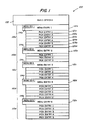
- Fig. 1 illustrates the structure of a menu data base 100 containing definitions of five menus. (Typical data bases define far more than five menus; only five are shown in this example so as to keep the figure reasonable in size.)
- the information common to all of the menus in the data base is stored in a basic options section 102.
- the information in the basic options section 102 includes the following: - window format - defining aspects of the screen display that will not differ from one menu to the next; - a file-level entry procedure; - a file-level exit procedure; - file-level security information; - identification of a file containing PF key definitions; and - identification of a file containing user definition information.
- menu entries 110a, 110b, 110c, 110d, 110e Following the basic options section 102 is a series of menu entries 110a, 110b, 110c, 110d, 110e.
- the information in the data base for each menu includes: - a menu identifier 114a, 114b, 114c, 114d, 114e (each menu has a name which is unique within the data base and is used as a key for retrieving the record(s) relating to a particular menu); - a menu title (displayed at the top of the screen when the menu is displayed and used in the below-described display of the menu list); - menu-level security information; - identification of a menu entry procedure; - identification of a menu exit procedure; - timeout information; and - a series of menu pick entries (further described below).
- pick entries are stored in a main portion 112a, 112b, 112c, 112d, 112e of each of the menu entries 110a, 110b, 110c, 110d, 110e. Following each main portion is a series of pick entries, which will vary in number from menu to menu. For the first menu in the illustrative menu data base there are six menu pick entries 121a, 122a, 123a, 124a, 125a, 126a.
- Each menu pick entry includes: - a pick title to be displayed as part of the menu (this is what the user identifies as the "menu pick”); - pick-level security information; and - identification of the action associated with the pick (program, menu, internal function, or keyword).
- the action taken when the user selects a menu pick can be one of four types: - program - the program is executed, then the current menu is again displayed for another user selection; - menu - the menu is added to the menu list and becomes the current menu (i.e., the basis for the next user selection); - internal menu manager function (e.g., back up one menu or terminate menu manager processing); or - keyword - the keyword is returned to the calling program (the calling program may choose to call the menu manager again without altering its state, in which case the current menu is displayed again for another user selection).
- the menu management system provides for pseudo-pick entries in the menu data base. These cannot be selected by the user; they are not associated with an action.
- the pseudo-pick entries are used to control the display arrangement of menu picks and to display information on the menu screen in addition to the titles of the menu picks that do have associated actions.
- menu manager uses default values.
- the pick-level security information controls which menu picks are actually displayed to any particular user. Each user will only see those menu picks of the security classes to which that user is defined to have access. Thus, a menu may be displayed with different sets of picks for different users.
- Other data bases used by the menu management system include data bases of users and of PF key definitions.
- a data base of users defines logon information for each user and the security classes available to each user.
- the security classes determine what menu data base files and data base elements the user can modify (using the maintenance module), and what data base files, menus, and menu picks are available to the user through the menu manager.
- a PF key data base defines which action, if any, is bound to each PF key. This set of PF key definitions determines what will happen, if anything, when a user presses a PF key.
- the menu management system includes a maintenance module that is used to create and modify the various data bases used by the menu management system.
- the menu manager Based on the contents of the menu management system data bases and the selections made by the user, the menu manager provides for movement among menus, execution of programs, and the return to a calling program of keywords.
- the data bases determine what is possible, and the user determines what actually happens.
- the menu manager can be employed in various ways:
- Keywords and running programs are not separate modes of operation for the menu manager.
- whether a keyword will be returned or whether further programs will be executed depends upon what actions have been associated with the menu picks and the PF keys in the data bases and what the user actually selects. Selection of one pick on a menu may result in running a program, while selection of a different pick on the same menu may result in the menu manager returning a keyword to the program that called the menu manager.
- the menu manager can accept a selection from the user in three ways:
- the currently displayed menu as defined in the menu data base may not provide a command area; all, some, or none of the PF keys may have actions defined for them; in a very unusual case, a menu may have no menu picks defined.
- action identifier The user's selection, however identified (e.g. by PF key, menu pick, or typed command), is symbolized by an action identifier.
- the action identifiers are character strings and each explicitly indicates (by the use of special characters such as parentheses) which of the four possible types of action it indicates:
- one of the types of action that may be taken in response to a user's selection from a menu is the presentation of a second menu. From the second menu the user may, in many cases be able to select a menu pick whose action is a third menu.
- a user's current "menu path" is the sequence of menus from some initial menu to the current menu.
- the path gets longer.
- the user backs up along the path the path gets shorter.
- the menu manager provides four internal functions that can be used to back up (in order of increasing degree of back up): ⁇ EXIT> shortens the menu path by one and results in presentation to the user of the immediately previous menu; ⁇ RETURN> displays a list of previous menus, the user selects one from the list, the selected menu is displayed, and the menu path is shortened to the selected menu; ⁇ START> displays the very first menu in the path and eliminates all other menus from the path; and ⁇ QUIT> the menu manager returns to the program that called it with no menu being displayed.
- These internal menu manager functions may be bound to PF keys or menu picks, or they may be entered directly as commands.
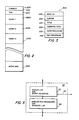
- Fig. 2 illustrates the overall structure of a menu list 200, which the menu manager uses to store information about the user's menu path.
- Heading the list 200 is an element 202 indicating how many menu entries are currently active in the list and an element 204 indicating the maximum number of menus that can be represented in the list 200.
- Following the two heading elements 202 and 204 is a series of entries 206a through 206z.
- the list 200 is used as a stack, with the element 202 pointing the "top of the stack", which is the current menu.
- Each of the entries 206a - 206z can be used to represent one menu in the menu path.
- the first menu in the path is represented by the first entry 206a.
- Succeeding menus are represented by entries 206b, 206c and so forth. If the number of menus in the path is the maximum number that can be represented by the list 200, then the last menu in the path would be represented by entry 206z.
- Fig. 3 shows a representative entry 206 which illustrates the structure of each of the entries 206a - 206z in the menu list 200.
- the entry 206 includes elements 230, 232, 234, 236, 238, and 240.
- the element 230 stores the menu identifier of the menu represented by the entry 206.
- the element 232 stores the location of the cursor on the display the last time the menu represented by the entry 206 was displayed; this makes it possible when the user backs up to that menu to restore the cursor to the same place it was the last time the user was saw that menu.
- the element 234 stores the title of the menu; this is used in the list displayed to the user in response to the RETURN command (as will be further explained below).
- the element 236 is used to store the contents of the command area as it appeared the last time the menu was displayed. As described above, the command area can be filled in by the user in order to select an action that may not be available as a menu pick. The element 236 permits information the user had previously entered in the command area to again be displayed if the user backs up to that menu.
- the element 238 is a flag indicating whether the menu's entry procedure has been executed.
- the element 230 is a flag indicating whether an exit procedure is defined for the menu.
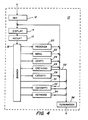
- Fig. 4 The major components of the illustrative menu manager 10 are shown in Fig. 4.
- various initialization operations 12 are performed, including the following.
- the file-level security information is checked to verify that the user's security classes allow access to that menu data base. If a file-level entry procedure is defined in the menu data base file, then the procedure is performed.
- the menu list 200 is initialized: the first entry 206a is cleared and its menu identifier element 230 is set to be the menu identifier for the starting menu (as defined by the menu data base or optionally by the program that called the manager); the element 202 of the menu list 200 is set to indicate that the list 200 contains a single active entry.
- menu manager 10 begins its main processing loop, which consists of components 14, 16, 18, 20, 22, 24, 26, 28, and 32:
- the display component 14 uses the menu identifier found in the element 230 of the current entry (determined by the value of element 102) in the menu list 200 as a key into the menu data base 100. From the information thereby located in the menu data base 100, the display of the current menu is built. The pick-level security information is checked, and only those menu picks to which the user is allowed access are displayed.
- the component 16 accepts a selection from the user. As described above, the selection may be indicated by pressing a PF key, pointing to a menu pick, or typing a command. However the selection is indicated, it is one of the four above-described types of action.
- menu-type actions and keyword-type actions component 18 directs processing to components 20, 22, and 34, respectively.
- processing is directed to a component designed for processing the particular internal function.
- branch mechanism 18 causes processing to proceed with the component 20, which calls the named program.
- the component 20 causes processing to proceed with the display 14 of the current menu.
- the branch mechanism 18 causes processing to proceed with the component 22.
- the component 22 refers to the menu data base (in particular to the menu-level security information) to verify that the user has the security permission to access the identified menu.
- the component 22 then stores the cursor location and the value of the command area in the elements 232 and 236 respectively of the current entry in the menu list 200, increments the element 202 of the menu list 200 (making the entry following the current entry now the current entry), and stores the selected menu identifier in element 230 of the newly current entry in the menu list. If a menu-level entry procedure is defined for the newly current menu, then it is performed. When the entry procedure has been performed, the flag element 238 is set to indicate that the procedure has been performed.
- the flag element 240 is set to indicate that an exit procedure is defined; when backing up and performing exit procedures, this avoids the need to refer to the menu data base for those menus for which no exit procedure is defined.
- processing is directed to the component 34.
- the value of the keyword is saved for use by the program that called the menu manager. Processing then proceeds with the termination component 36, which ultimately returns control to the calling program.
- Modules 24, 26, 28, 36, and 32 handle the processing of the internal menu manager functions ⁇ EXIT>, ⁇ RETURN>, ⁇ START>, ⁇ QUIT>, and ⁇ SHOWPF>, respectively.
- the first four of these functions provide ways that a user can back up along the user's menu path.
- the fifth function displays to the user the current bindings for the PF keys. Additional internal functions could also be provided; they would be given unique names and their components would be added to the main processing loop in the same fashion as the component 32.
- the ⁇ EXIT> component 24 implements the internal function that backs up one menu.
- the component 24 calls the exit procedure defined for the current menu (if any is defined), decrements the element 202 of the menu list 200 (i.e., popping the "top” menu off the stack), and passes control to the display component 14.
- Fig. 5 illustrates the major subcomponents of the component 26 that does the processing to implement the ⁇ RETURN> function.
- a subcomponent 50 displays a list of menus from which the user selects. Then operations are performed by subcomponent 54 to back up the menu path to the selected menu.
- the display of menu titles is prepared by extracting the menu titles from the elements 234 of the menu list 200.
- the menu identifiers (stored in the elements 230 of the menu list 200) may displayed along with the menu titles.
- the menu identifier can be typed in a command area to direct the menu manager to go directly to that menu; displaying the menu identifier helps the user become familiar with the names of the commands.
- Selection of one of the listed menus is accepted from the user by the user placing the cursor at the title of the desired menu and pressing the return key. If the list of menus is too long to be displayed on the screen in its entirety, then certain keys are arranged to enable the user to page or scroll through the list, so that all entries in the list are accessible. If, instead of selecting a menu, the user presses the key typically used to terminate programs, then, as is indicated by the line 52, control is passed to the termination component 36.
- the menu path is truncated so that the selected menu is the last menu in the path, and the exit procedures (if any are defined) are executed for each of the menus that are thereby removed from the list 200. For example, if the selected menu is the fourth menu in the menu list 200 which which currently contains six menus, then the truncation is accomplished by setting the element 202 of the menu list 200 to a value of four, and exit procedures are performed for the sixth and then the fifth menus.
- the ⁇ START> function returns the user to the first menu in the menu path.
- the component 28 sets the element 202 of the menu list 200 to a value of one, and performs the exit procedures defined for all menus in the list except for the first.
- the ⁇ QUIT> function terminates menu manager processing and returns to the program that called the menu manager. This is accomplished by the termination component 36.
- the branch corresponding to the ⁇ QUIT> function is indicated in Fig. 4 by a line 30.
- the termination component performs any exit procedures which are defined for the menus listed in the menu list 200 (from the current menu back through the first menu). If the menu data base file defines a file-level exit procedure, it is performed. Finally, control is passed from the menu manager back to the program which called the menu manager.
- a menu title need not be displayed as part of the menu.
- the menu title is merely something by which the user can identify a menu. It is useful to display the menu title as part of the menu because this helps the user become familiar with the titles and thus makes it easier for the user to identify the menus when the menu list is displayed.
- a menu path is an example of one way of defining a list of menus which adapts to the activities of each user.
- Alternative ways to define a list of menus which is customized to the activities of the user include: the most recent N menus (irrespective of "forward” or “backward” movement through the menus, and not remembering more than N menus at one time); the menus visited most frequently; the past "major” menus (like above-described path, but eliminating the less important menus).
- Display need not be a visual display.
- menus might be present aurally; this would be particularly useful when the user is interacting through a telephone, which has no visual display.
Landscapes
- Engineering & Computer Science (AREA)
- General Engineering & Computer Science (AREA)
- Theoretical Computer Science (AREA)
- Human Computer Interaction (AREA)
- Physics & Mathematics (AREA)
- General Physics & Mathematics (AREA)
- User Interface Of Digital Computer (AREA)
- Input From Keyboards Or The Like (AREA)
- Digital Computer Display Output (AREA)
Applications Claiming Priority (2)
| Application Number | Priority Date | Filing Date | Title |
|---|---|---|---|
| US84490986A | 1986-03-27 | 1986-03-27 | |
| US844909 | 1986-03-27 |
Publications (3)
| Publication Number | Publication Date |
|---|---|
| EP0243671A2 true EP0243671A2 (de) | 1987-11-04 |
| EP0243671A3 EP0243671A3 (de) | 1991-09-18 |
| EP0243671B1 EP0243671B1 (de) | 1994-08-10 |
Family
ID=25293940
Family Applications (1)
| Application Number | Title | Priority Date | Filing Date |
|---|---|---|---|
| EP87104304A Expired - Lifetime EP0243671B1 (de) | 1986-03-27 | 1987-03-24 | Menu-Verwaltungssystem |
Country Status (5)
| Country | Link |
|---|---|
| EP (1) | EP0243671B1 (de) |
| JP (1) | JPS62232020A (de) |
| AU (1) | AU594109B2 (de) |
| CA (2) | CA1278103C (de) |
| DE (1) | DE3750346T2 (de) |
Cited By (9)
| Publication number | Priority date | Publication date | Assignee | Title |
|---|---|---|---|---|
| WO1989009963A1 (en) * | 1988-04-15 | 1989-10-19 | Digital Equipment Corporation | System for managing hierarchical information in a digital data processing system |
| EP0336560A3 (de) * | 1988-04-08 | 1991-01-30 | International Business Machines Corporation | Methode und System zur Darstellung einer Benutzeroberfläche auf einem Computerbildschirm |
| DE4028144A1 (de) * | 1990-09-05 | 1992-03-12 | Eccard H Ec Montageautomaten | Vorrichtung zum sortieren von lose geschuetteten werkstuecken |
| EP0351768A3 (de) * | 1988-07-18 | 1992-09-02 | Fujitsu Limited | Menüauswahl |
| EP0398646A3 (de) * | 1989-05-15 | 1993-01-13 | International Business Machines Corporation | Anwenderschnittstellenwerkzeug |
| EP0587355A1 (de) * | 1992-08-31 | 1994-03-16 | Pioneer Electronic Corporation | Anzeigesteuerungsvorrichtung |
| EP0691605A1 (de) * | 1994-07-06 | 1996-01-10 | International Business Machines Corporation | Verfahren und System zur Verwaltung von mehreren Desktop umgebungen in einem Datenverarbeitungssystem |
| EP0851346A3 (de) * | 1996-12-06 | 2003-09-17 | Sun Microsystems, Inc. | Rechnerprogrammprodukt zur Steuerung von Menü-Listen |
| EP1289230A3 (de) * | 2001-08-30 | 2005-06-15 | Nokia Corporation | Mobile Telekommunikationsbrowsersgeräte |
Family Cites Families (2)
| Publication number | Priority date | Publication date | Assignee | Title |
|---|---|---|---|---|
| US4464652A (en) * | 1982-07-19 | 1984-08-07 | Apple Computer, Inc. | Cursor control device for use with display systems |
| EP0140302A3 (de) * | 1983-10-28 | 1989-01-25 | International Business Machines Corporation | Datenzugriffsverfahren mit Selbstbedienungskassenterminal |
-
1986
- 1986-12-31 AU AU67083/86A patent/AU594109B2/en not_active Ceased
-
1987
- 1987-01-09 CA CA000527016A patent/CA1278103C/en not_active Expired - Lifetime
- 1987-02-16 JP JP62033135A patent/JPS62232020A/ja active Pending
- 1987-03-24 DE DE3750346T patent/DE3750346T2/de not_active Expired - Fee Related
- 1987-03-24 EP EP87104304A patent/EP0243671B1/de not_active Expired - Lifetime
-
1990
- 1990-08-30 CA CA000615851A patent/CA1296105C/en not_active Expired - Lifetime
Cited By (14)
| Publication number | Priority date | Publication date | Assignee | Title |
|---|---|---|---|---|
| US5121477A (en) * | 1988-04-08 | 1992-06-09 | International Business Machines Inc. | System for interactively creating action bar pull-down windows of a user interface for use at program run time |
| EP0336560A3 (de) * | 1988-04-08 | 1991-01-30 | International Business Machines Corporation | Methode und System zur Darstellung einer Benutzeroberfläche auf einem Computerbildschirm |
| US5230072A (en) * | 1988-04-15 | 1993-07-20 | Digital Equipment Corporation | System for managing hierarchical information in a digital data processing system |
| WO1989009963A1 (en) * | 1988-04-15 | 1989-10-19 | Digital Equipment Corporation | System for managing hierarchical information in a digital data processing system |
| EP0351768A3 (de) * | 1988-07-18 | 1992-09-02 | Fujitsu Limited | Menüauswahl |
| US5432902A (en) * | 1988-07-18 | 1995-07-11 | Fujitsu Limited | Method of selecting a menu in accordance with a maximum correlation between a user input and stored parameters |
| EP0398646A3 (de) * | 1989-05-15 | 1993-01-13 | International Business Machines Corporation | Anwenderschnittstellenwerkzeug |
| US7456832B1 (en) | 1989-05-15 | 2008-11-25 | International Business Machines Corporation | Object database-driven interactive shell for a data processing system |
| DE4028144A1 (de) * | 1990-09-05 | 1992-03-12 | Eccard H Ec Montageautomaten | Vorrichtung zum sortieren von lose geschuetteten werkstuecken |
| EP0587355A1 (de) * | 1992-08-31 | 1994-03-16 | Pioneer Electronic Corporation | Anzeigesteuerungsvorrichtung |
| EP0691605A1 (de) * | 1994-07-06 | 1996-01-10 | International Business Machines Corporation | Verfahren und System zur Verwaltung von mehreren Desktop umgebungen in einem Datenverarbeitungssystem |
| EP0851346A3 (de) * | 1996-12-06 | 2003-09-17 | Sun Microsystems, Inc. | Rechnerprogrammprodukt zur Steuerung von Menü-Listen |
| EP1289230A3 (de) * | 2001-08-30 | 2005-06-15 | Nokia Corporation | Mobile Telekommunikationsbrowsersgeräte |
| US7469153B2 (en) | 2001-08-30 | 2008-12-23 | Nokia Corporation | Mobile telecommunications device browser |
Also Published As
| Publication number | Publication date |
|---|---|
| DE3750346D1 (de) | 1994-09-15 |
| AU6708386A (en) | 1987-10-01 |
| DE3750346T2 (de) | 1995-05-11 |
| EP0243671A3 (de) | 1991-09-18 |
| AU594109B2 (en) | 1990-03-01 |
| CA1296105C (en) | 1992-02-18 |
| EP0243671B1 (de) | 1994-08-10 |
| JPS62232020A (ja) | 1987-10-12 |
| CA1278103C (en) | 1990-12-18 |
Similar Documents
| Publication | Publication Date | Title |
|---|---|---|
| US5261042A (en) | Menu management system | |
| JP2549268B2 (ja) | ノートブック・グラフィカル・ユーザ・インタフェースのリスト・アイテム | |
| US5115501A (en) | Procedure for automatically customizing the user interface of application programs | |
| US5261104A (en) | Flexible computer initialization | |
| JP2752040B2 (ja) | マルチメディア適用業務を作成する方法 | |
| US9864489B2 (en) | Command user interface for displaying multiple sections of software functionality controls | |
| US6121968A (en) | Adaptive menus | |
| US5423034A (en) | Network file management with user determined hierarchical file structures and means for intercepting application program open and save commands for inputting and displaying user inputted descriptions of the location and content of files | |
| US5530869A (en) | System and method for locating and implementing commands without invoking a menu hierarchy | |
| US5864338A (en) | System and method for designing multimedia applications | |
| US20030071860A1 (en) | System and method for managing graphical components | |
| WO1999066394A1 (en) | Method for adapting user interface elements based on historical usage | |
| JPH09231042A (ja) | グラフィカル・ユーザ・インターフェース・メニューを共用するための方法およびシステム | |
| JPH10289251A (ja) | データ検索方法およびその処理を実行するためのプログラムを記録した記録媒体 | |
| JPH113200A (ja) | グラフィカル・ユーザ・インタフェースにおけるオブジェクトへの英数字キーボード・アクセス機能を有するコンピュータ・システム | |
| US6567825B2 (en) | System and method for processing a working file | |
| EP0243671B1 (de) | Menu-Verwaltungssystem | |
| EP0322332A2 (de) | Graphisches Verfahren zur Echtzeitverbraucheranpassung eines Benutzermenüs | |
| JPH04190421A (ja) | アプリケーション起動方法およびその装置 | |
| US5291595A (en) | Batch/application program processing | |
| US6246405B1 (en) | Method and apparatus for managing a plurality of objects on a graphical user interface | |
| US7548902B2 (en) | Context of use differentiation in a pocket computer | |
| JP2000148761A (ja) | インデックス・タブ作成方法 | |
| US5659772A (en) | Method for customizing kana-kanji conversion system and kana-kanji conversion system | |
| JP2645016B2 (ja) | メニュー切替え処理方式 |
Legal Events
| Date | Code | Title | Description |
|---|---|---|---|
| PUAI | Public reference made under article 153(3) epc to a published international application that has entered the european phase |
Free format text: ORIGINAL CODE: 0009012 |
|
| AK | Designated contracting states |
Kind code of ref document: A2 Designated state(s): BE DE FR GB |
|
| PUAL | Search report despatched |
Free format text: ORIGINAL CODE: 0009013 |
|
| AK | Designated contracting states |
Kind code of ref document: A3 Designated state(s): BE DE FR GB |
|
| RHK1 | Main classification (correction) |
Ipc: G06F 15/40 |
|
| 17P | Request for examination filed |
Effective date: 19920313 |
|
| 17Q | First examination report despatched |
Effective date: 19930419 |
|
| GRAA | (expected) grant |
Free format text: ORIGINAL CODE: 0009210 |
|
| AK | Designated contracting states |
Kind code of ref document: B1 Designated state(s): BE DE FR GB |
|
| REF | Corresponds to: |
Ref document number: 3750346 Country of ref document: DE Date of ref document: 19940915 |
|
| ET | Fr: translation filed | ||
| PLBE | No opposition filed within time limit |
Free format text: ORIGINAL CODE: 0009261 |
|
| STAA | Information on the status of an ep patent application or granted ep patent |
Free format text: STATUS: NO OPPOSITION FILED WITHIN TIME LIMIT |
|
| 26N | No opposition filed | ||
| PGFP | Annual fee paid to national office [announced via postgrant information from national office to epo] |
Ref country code: GB Payment date: 20000302 Year of fee payment: 14 Ref country code: FR Payment date: 20000302 Year of fee payment: 14 Ref country code: DE Payment date: 20000302 Year of fee payment: 14 |
|
| PGFP | Annual fee paid to national office [announced via postgrant information from national office to epo] |
Ref country code: BE Payment date: 20000328 Year of fee payment: 14 |
|
| PG25 | Lapsed in a contracting state [announced via postgrant information from national office to epo] |
Ref country code: GB Free format text: LAPSE BECAUSE OF NON-PAYMENT OF DUE FEES Effective date: 20010324 |
|
| PG25 | Lapsed in a contracting state [announced via postgrant information from national office to epo] |
Ref country code: BE Free format text: LAPSE BECAUSE OF NON-PAYMENT OF DUE FEES Effective date: 20010331 |
|
| BERE | Be: lapsed |
Owner name: WANG LABORATORIES INC. Effective date: 20010331 |
|
| GBPC | Gb: european patent ceased through non-payment of renewal fee |
Effective date: 20010324 |
|
| PG25 | Lapsed in a contracting state [announced via postgrant information from national office to epo] |
Ref country code: FR Free format text: LAPSE BECAUSE OF NON-PAYMENT OF DUE FEES Effective date: 20011130 |
|
| REG | Reference to a national code |
Ref country code: FR Ref legal event code: ST |
|
| PG25 | Lapsed in a contracting state [announced via postgrant information from national office to epo] |
Ref country code: DE Free format text: LAPSE BECAUSE OF NON-PAYMENT OF DUE FEES Effective date: 20020101 |