EP0094494B1 - Verwaltung der Referenzgebietsanzeige zur Spaltenplanung - Google Patents
Verwaltung der Referenzgebietsanzeige zur Spaltenplanung Download PDFInfo
- Publication number
- EP0094494B1 EP0094494B1 EP83102953A EP83102953A EP0094494B1 EP 0094494 B1 EP0094494 B1 EP 0094494B1 EP 83102953 A EP83102953 A EP 83102953A EP 83102953 A EP83102953 A EP 83102953A EP 0094494 B1 EP0094494 B1 EP 0094494B1
- Authority
- EP
- European Patent Office
- Prior art keywords
- column
- reference area
- display
- viewport
- editable
- Prior art date
- Legal status (The legal status is an assumption and is not a legal conclusion. Google has not performed a legal analysis and makes no representation as to the accuracy of the status listed.)
- Expired
Links
Images

Classifications
-
- G—PHYSICS
- G09—EDUCATION; CRYPTOGRAPHY; DISPLAY; ADVERTISING; SEALS
- G09G—ARRANGEMENTS OR CIRCUITS FOR CONTROL OF INDICATING DEVICES USING STATIC MEANS TO PRESENT VARIABLE INFORMATION
- G09G1/00—Control arrangements or circuits, of interest only in connection with cathode-ray tube indicators; General aspects or details, e.g. selection emphasis on particular characters, dashed line or dotted line generation; Preprocessing of data
-
- G—PHYSICS
- G06—COMPUTING OR CALCULATING; COUNTING
- G06F—ELECTRIC DIGITAL DATA PROCESSING
- G06F40/00—Handling natural language data
- G06F40/10—Text processing
- G06F40/166—Editing, e.g. inserting or deleting
-
- G—PHYSICS
- G06—COMPUTING OR CALCULATING; COUNTING
- G06F—ELECTRIC DIGITAL DATA PROCESSING
- G06F40/00—Handling natural language data
- G06F40/10—Text processing
- G06F40/166—Editing, e.g. inserting or deleting
- G06F40/177—Editing, e.g. inserting or deleting of tables; using ruled lines
Definitions
- This invention relates to a word processing system and more particularly to a word processing system having means for an operator to select column headings and/or row headings for display while working with tables in a recorded document.
- Present word processing systems allow an operator to edit a multicolumn table in a visual display area.
- the editing operation is controlled by operator entered keyboard instructions.
- When working with large multicolumn tables it is not possible to display the column headings and the column entries at the same time.
- the operator is forced to work on the multicolumn table without reference to the column heading which can result in disorientation.
- When the operator is working with tables with long rows it is not possible to display the row headings and table entries at the same time. Lack of such visual references to the row headings can cause disorientation if the operator forgets which row is being worked on.
- such word processing systems provide no method to display both column headings and row headings at the same time the operator is working with a table.
- US patent 4112423 describes a data display terminal wherein a heading protect circuit prevents a designated heading from being scrolled off the top of the screen as additional information is scrolled onto the bottom of the screen. But, such a system does not solve the problem of the operator working with tables having long rows.
- the column reference area display management method of the present invention enables a multicolumn table having a plurality of columns and rows to be displayed.
- This method consists in generating commands via the keyboard for specifying a top reference area and side reference area of the display, selecting column and row heading data via the keyboard for the top and side reference areas, respectively, of the display, displaying a first portion of the multicolumn table on an editable column viewport of the display, and displaying the column and row heading data in the top and side reference areas of the display, respectively, generating commands via the keyboard for editing data in a second portion of the multicolumn table not presently on the display, displaying the second portion of the multicolumn table in the editable column viewport, and segmenting the top reference area and scrolling the side reference area by the same amount as data is segmented and scrolled in the second portion of the multicolumn table displayed in the editable column viewport, whereby proper column and row heading data is continually displayed on the display.
- the operator may elect to display table headings (which may run horizontally across the top of table or may constitute the first column of the table on the side of the table) and table entries at the same time regardless of how far the headings are from the table entries.
- the operator presses a key to display the column reference area menu for setting up the top and side reference areas.
- the first column When the operator specifies the first option to define a side reference area, the first column will display in the left side of viewport of the display area, provided a column is not inserted prior to the first column. A vertical separator display column will appear on the display area to separate the first column from the rest of the viewport. The operator will be able to see the row headings in the side reference area while inserting or revising other columns.
- the second operator selectable option available from the column reference area menu is the selection and definition of the top reference area.
- the option is defined by the operator's entry of the number of lines to be reserved for the reference area at the top of the table editing viewport. If the top reference area option is selected by the operator, a horizontal separator bar of video-reverse spaces separates the top reference area from the remainder of the viewport. In the preferred embodiment, the operator may define up to fifteen lines in the top reference area.
- the column layout menu When the operator has finished with the column reference area set up menu, the column layout menu will be redisplayed. The operator defined reference area will not be shown until the column typing operations are performed.
- the operator defined top and side reference areas are maintained in synchronism with the table section displayed in the viewport, regardless of where the cursor is placed in the table editable area.
- a page of the text where the editable table is located is stored in a text storage buffer.
- the operator editing instructions are interfaced with the text storage buffer through a text storage buffer manager.
- the word processing system includes a display access method that interfaces through the text storage buffer and places it on the video display.
- a top reference buffer area is generated in RAM to store the operated selected top reference area.
- the editable column is also read into an area generated in RAM, the editable column text storage buffer.
- the side reference area is contained within the text storage buffer and is not copied into another buffer. The side reference area is identified by pointers set to the first column in the buffer.
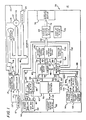
- a word processing system 10 which includes a keyboard 12 for receiving text character entries and transmitting the text to a signal path 14 to a microprocessor 16.
- the processor 16 may be implemented by a commercially available microprocessor, such as the Intel Corporation's 8086 processor.
- the Intel 8086 processor executes on one level with one set of registers.
- a memory bus 18 couples the processor 16 to a CRT display 20, a diskette drive 22, a printer 24 and a random access memory 26.
- the processor 16 performs the various control functions necessary for the word processing system 10 to process, edit and display data.
- the keyboard 12 also applies a hardware interrupt signal via interrupt line 13 to an interrupt arbitrator 17.
- the 8259-A Interrupt Controller was selected to implement the interrupt arbitrator 17 to resolve interrupt requests from the incoming interrupt lines.
- the 8259-A Interrupt Controller may resolve interrupt requests from up to eight interrupt lines into eight priority levels for the 8086 processor 16 and communicates with the processor 16 over signal path 15.
- the display 20, diskettes 22, and printer 24 apply interrupt signals to the interrupt arbitrator 17 over signal paths 19, 21 and 23, respectively.
- An operator enters a text stream through the keyboard 12. Each page of the text is stored and processed in the memory 26. As the text stream is received in the memory 26, it is simultaneously presented to the display 20. After the buffering of the text in the text storage buffer 28 of memory 26, the stream can be saved on to diskette 22 or hard copy outprinted on printer 24.
- the random access memory 26 includes a number of data areas and functional programs for operating with the text stored in the word processing system 10.
- the text and ready control functions are saved in the text storage buffer (TSB) 28 which includes an active document format storage section 30 and a diskette buffer section 32.
- the active document format storage section 30 and TSB 28 communicate with a TSB control block 34 via signal paths 38 and 40.
- the TSB 28 communicates with a cursor 36 over a path 42.
- a TSB manager block 44 passes data to the TSB 28 over a data bus 46.
- TSB control block 34 and cursor 36 communicate with TSB Manager block 44 via path 48.
- a keystroke control routine block 52 communicates with the keystroke service routines 50 over path 54.
- the keystroke service routines 50 communicate with TSB manager block 44 over signal path 58 and bus 60 and with TSB control block 34 over signal path 56.
- the active document format section 30 and TSB diskette buffer 32 communicate with keystroke service routines 50 over signal paths 62 and 64, respectively.
- the text stream stored in the TSB 28 is simultaneously entered via data bus 66 to display access method block 68 and bus 74 into a display refresh buffer 76 which drives the display 20.
- a display control block 70 and the display method block 68 provide a viewport or window which may be both vertically scrolled and horizontally segmented relative to the contents of the text storage buffer 28. Both the diskette drive 22 and the printer 24 have dedicated buffer areas assigned to them.
- the display control block 70 also serves to store flags and status information as required by the operation of the display access method block 68.
- a top reference storage buffer 80 is defined in memory 26 to store the operator defined top reference area.
- the operator entered instructions are processed by the keystroke service routines 50 connected by a signal line 82 to a text storage buffer (TSB) control block 84.
- a cursor 86 to the top reference storage buffer 80 communicates with the TSB manager block 44 through a signal line 88.
- a column format storage area 90 is included as part of the top reference storage buffer 80 and is connected via a data bus 92 to the TSB manager block 44.
- the top reference TSB control block 84 communicates with column format 90 and top reference buffer 80 via path 83 and 85, respectively.
- the cursor 86 communicates with top reference buffer 80 over path 87.
- the editable column TSB buffer 94 includes a column format storage area 96.
- the editable column TSB 94 is connected to the TSB manager block 44 via a data bus 98.
- An editable column TSB control block 100 and its associated cursor 102 communicate with TSB manager block 44 over signal path 101.
- the editable column TSB control block 100 communicates with the keystroke service routines 50 through a signal path 104.
- the editable column TSB control block 100 communicates with the column format 96 through a signal line 106, and the editable column TSB 94 through signal path 108.
- the cursor 102 communicates through a signal path 110 to the editable column TSB 94.
- a corresponding signal is transmitted to the processor 16 over signal path 14 which enters the keystroke command to the memory 26.
- the keystroke routine is invoked for keystroke service routine block 50 in order to process the keyed command.
- the keyed command is executed by the processor 16 according as to whether it is a control command or a graphic command (text character) entry.
- the process command is entered into the TSB 28. While graphics and commands are built up in the TSB 28, the text information is retained in display refresh buffer 76 and presented at the display 20.
- an operator By actuating a control command, an operator can transfer information about the memory 26, display 20, diskette drive 22, and printer 24. Pages can be called from the diskette 22 and the memory 26 so that the operator can make changes and corrections to the text and then enter the corrected text into the diskette 22 or have the corrected text hard copied on the printer 24.
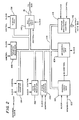
- the processor 16 is shown in further detail to show the typical hardware elements found in such processors.
- the processor 16 includes a control logic unit 120 which receives priority interrupt signals from the interrupt arbitrator 17 ( Figure 1) over signal path 122.
- the control logic unit 120 communicates via a two-way data and address bus 124 to an arithmetic logic unit 126, a program I/0 control 128, stack point register 130, data point register 132, program counter 134, temporary scratch registers 136, status registers 138 and bus control logic unit 140.
- control logic unit 120 In response to a fetch instruction from the random access memory 26, the control logic unit 120 generates control signals to the other logic units of the processor, including the arithmetic logic unit 126, the program I/O control 128, the program counter 134, temporary scratch register 136, and bus control logic unit 140. Data processed in the processor 16 is input through the bus control logic unit 140 connected to the memory bus 18. The program I/O control 128 is connected to the input/output data bus 142. The bus control logic unit 140 connected to the memory bus 18 receives instructions for processing data to the input/output control 128. The synchronous operation of the control logic unit 120 with other logic elements of the processor 16 is achieved by means of clock pulses input to the processor 16 from an external clock source. Different storage sections of the random access memory 26 are identifiable for instruction storage and data storage.
- Processed data from the processor 16 is output through the program I/0 control 128 to the I/O data bus 142.
- Input data on the data bus 124 is passed internally through the processor 16 to the control logic unit 120 by the arithmetic logic unit 126.
- the arithmetic logic unit 126 in response to a control signal from the control logic unit 120 and in accordance with instructions received on the memory bus 18, performs arithmetic computations which may be stored in the temporary scratch registers 136.
- Other transfers of data between the arithmetic logic unit 126 and other logic elements of the processor 16 are possible. Such additional transfers may be to the program counter 134, the data pointer register 132 or stack pointer register 130.
- the status register 138 is also in a data stream for these various object elements and a means of the internal data bus 124. Operation of the processor 16 is determined by instructions on a memory bus 18 and input data on the input/output data bus 142. As an example of the operation in response to instructions, the processor 16 may transfer data stored in the scratch registers 136 to one of the registers 130, 132 or 138. Such operation of the processor 16 as detailed in Figure 2 are well known to those in the data processing field. A more detailed description of each operation of the processor 16 is not necessary for a complete understanding of the invention as claimed.
- a screen layout 150 of the display appearing on display 20 is illustrated.
- a typical screen layout 150 is partitioned such that lines 1 and 2 of the screen heading contain system information.
- the indented lines 1 and 2 of the body of the display are typically partitioned so that they are status lines reflecting the information state of the display.
- the lines following the status lines, lines 3-23, define a viewport to set out menus, text, or information necessary for interactive processing.
- the third line would be a scale line spanning the entire width of the screen layout 150. As described hereinbelow, the scale line may be included in the viewport for the editable column.
- Line 24 is a prompt line which provides information instructing the operator on the next menu function or activity.
- Line 25 is a message line which indicates where the messages are flashing or queued.
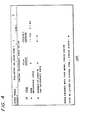
- a column reference area menu 160 is displayed on the display 20 in response to the operator's depressing that key on the keyboard 12 in order to set up the reference areas.
- the reference areas menu 160 provides the operator with a first option to define a side reference area and a second option to define the number of lines in the top reference area.
- the message line at the bottom of the menu 160 instructs the operator to type the ID letter to choose an item on the menu.
- the operator has entered the letter "2", indicating that no side reference area is to be defined.
- the operator has specified a side reference area to cause the first column to be displayed in the left side of the viewport for the editable column, unless a column is inserted prior to the first column which would then cause it to display in that area.
- the operator may enter "0" as the default for this operation.
- the operator's entries of the numbers "1-15" specifies the selection of a top reference area, and the number selected specifies the number of lines to be reserved for a reference area at the top of the viewport. If the number of lines specified on the top reference area exceeds the number of lines in the column being revised, then carrier returns will be inserted into the reference area to match the number of lines specified.
- the prompt line advises the operator to press the ENTER key following the reference area set up.
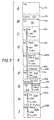
- reference screen examples are provided illustrating the reference area screen formats which may be created from the column reference area set up menu 160.
- a reference screen 230 is illustrated in which the operator has defined a top reference area and a side reference area for the column insert operation before column 1.
- the vertical separator display column 184 defines a left viewport 232 as the editable column area and a right viewport 234 for the defined side reference area to display the table.
- pseudocode listings provided below are used in conjunction with operating systems produced by the IBM Corporation for its DISPLAYWRITER word processing system to carry out the present invention.
- the application and use of pseudocode is described in "An Introduction To Programming", (a structural approach using PU1 and PUC-7), Second Edition, by Richard Conway and David Gries, Winthrop Publishers, Cambridge, Mass., Copyright 1975.
- the operator may display table headings and table entries while working with tables, regardless of how far the headings are from the entries.
- the operator calls up the column reference area menu for display.
- the operator is presented with the choice of defining a side reference area or not, or defining a top reference area or not, including the number of lines to be included in the top reference area.
- the ENTER key is pressed for setting up the column reference area.
- the column reference area set up will resemble one of the examples of the reference screen displays illustrated in Figure 5.
- the left portion of the display screen is the editable portion and the right portion of display screen becomes the reference area:
- the reference portion of the display screen is not editable.
- the cursor will always be in the editable portion of display. The operator cannot cursor pass the separator while in the reference area, and scrolling or segmenting data from the reference area into the editable portion of the display is not permitted.
- a maximum size may be defined for this side reference area, which in the preferred embodiment is one-half the width of the screen. Similarly, the maximum size is defined for the top reference area, which in the preferred embodiment is fifteen lines.
- the reference area screen headings will scroll (vertically) as the editable screen or viewport scrolls. Similarly, the top reference area screen headings will segment (horizontally) as the editable screen or viewport segments across the display.
- the column layout menu will be redisplayed.
- the defined column reference area will not be shown on the display until the column typing operations are performed.
- the top and side column reference areas will be displayed during column revise. If the first column is being revised, then it will appear on the left side of the viewport as the editable portion, and the remainder of the table will be shown on the right side as the side reference area. If reference areas were defined in column layout, then the scale line will reside on line 3 of the display and will reflect the editable portion of the viewport. If the side reference area is selected, a partial line scale which reflects the editable portion of the viewport will be displayed.
- a scale line In inserting a column, if the side reference area is displayed then a scale line will be a partial line scale line which only reflects the editable position of the viewport. The remainder of the scale line on the display will be blank.
Landscapes
- Engineering & Computer Science (AREA)
- Theoretical Computer Science (AREA)
- Physics & Mathematics (AREA)
- General Physics & Mathematics (AREA)
- Audiology, Speech & Language Pathology (AREA)
- Computational Linguistics (AREA)
- General Health & Medical Sciences (AREA)
- Health & Medical Sciences (AREA)
- General Engineering & Computer Science (AREA)
- Artificial Intelligence (AREA)
- Radar, Positioning & Navigation (AREA)
- Remote Sensing (AREA)
- Computer Hardware Design (AREA)
- Digital Computer Display Output (AREA)
- Document Processing Apparatus (AREA)
Claims (8)
Applications Claiming Priority (2)
| Application Number | Priority Date | Filing Date | Title |
|---|---|---|---|
| US06/379,163 US4506343A (en) | 1982-05-17 | 1982-05-17 | Column layout reference area display management |
| US379163 | 1982-05-17 |
Publications (3)
| Publication Number | Publication Date |
|---|---|
| EP0094494A2 EP0094494A2 (de) | 1983-11-23 |
| EP0094494A3 EP0094494A3 (en) | 1985-04-17 |
| EP0094494B1 true EP0094494B1 (de) | 1987-09-09 |
Family
ID=23496080
Family Applications (1)
| Application Number | Title | Priority Date | Filing Date |
|---|---|---|---|
| EP83102953A Expired EP0094494B1 (de) | 1982-05-17 | 1983-03-25 | Verwaltung der Referenzgebietsanzeige zur Spaltenplanung |
Country Status (4)
| Country | Link |
|---|---|
| US (1) | US4506343A (de) |
| EP (1) | EP0094494B1 (de) |
| JP (1) | JPS58211237A (de) |
| DE (1) | DE3373574D1 (de) |
Families Citing this family (36)
| Publication number | Priority date | Publication date | Assignee | Title |
|---|---|---|---|---|
| US5105285A (en) * | 1982-03-19 | 1992-04-14 | Canon Kabushiki Kaisha | Image transmission system |
| DE3382543D1 (de) * | 1982-10-11 | 1992-05-14 | Fujitsu Ltd | Datenverarbeitungssystem fuer kartenbilder. |
| JPS60189568A (ja) * | 1984-03-09 | 1985-09-27 | Canon Inc | 情報処理装置 |
| JPS60226717A (ja) * | 1984-04-25 | 1985-11-12 | 株式会社東芝 | デイジタル保護継電器 |
| US5089990A (en) * | 1984-08-14 | 1992-02-18 | Sharp Kabushiki Kaisha | Word processor with column layout function |
| USRE36653E (en) * | 1984-09-06 | 2000-04-11 | Heckel; Paul C. | Search/retrieval system |
| EP0381299B1 (de) * | 1984-11-14 | 1998-08-12 | Canon Kabushiki Kaisha | Bildverarbeitungssystem |
| GB2170335B (en) * | 1984-12-29 | 1989-07-26 | Canon Kk | Information processing apparatus |
| JPS6283787A (ja) * | 1985-10-09 | 1987-04-17 | 株式会社日立製作所 | 表示画面の出力制御方式 |
| JPS62100121A (ja) * | 1985-10-24 | 1987-05-09 | 日新電機株式会社 | デイジタルリレ−の表示方式 |
| EP0225191B1 (de) * | 1985-11-28 | 1991-12-11 | Canon Kabushiki Kaisha | Dokumentverarbeitungssystem |
| US4903233A (en) * | 1986-06-20 | 1990-02-20 | Sharp Kabushiki Kaisha | Word processor having capability of continuously entering documents into a column or a block of an editing system |
| JPS6320671A (ja) * | 1986-07-15 | 1988-01-28 | Brother Ind Ltd | 文章処理装置 |
| US4953108A (en) * | 1986-07-15 | 1990-08-28 | Canon Kabushiki Kaisha | Document processor having a document composition function |
| US5029114A (en) * | 1986-07-22 | 1991-07-02 | Kabushiki Kaisha Toshiba | Method of displaying reduced-layout and apparatus for embodying the method |
| US4870599A (en) * | 1986-09-26 | 1989-09-26 | International Business Machines Corporation | Traversal method for a graphics display system |
| JPS63155257A (ja) * | 1986-12-18 | 1988-06-28 | Brother Ind Ltd | ワ−ドプロセツサ |
| US5157763A (en) * | 1987-10-15 | 1992-10-20 | International Business Machines Corporation | Visually assisted method for transfer of data within an application or from a source application to a receiving application |
| US5179646A (en) * | 1988-03-29 | 1993-01-12 | Brother Kogyo Kabushiki Kaisha | Frame processing system capable of expanding and contracting a frame |
| NL8901151A (nl) * | 1989-05-08 | 1990-12-03 | Oce Nederland Bv | Documentopmaaksysteem en werkwijze voor het samenstellen van documenten. |
| EP0411749B1 (de) * | 1989-05-29 | 1995-12-13 | Sharp Kabushiki Kaisha | Datenverarbeitungsanordnung mit einem Anzeigebereich für die Textverarbeitung |
| US5390296A (en) * | 1989-08-30 | 1995-02-14 | Comshare Incorporated | Method and apparatus for calculation with display data |
| US5752016A (en) * | 1990-02-08 | 1998-05-12 | Hewlett-Packard Company | Method and apparatus for database interrogation using a user-defined table |
| US5317306A (en) * | 1991-08-02 | 1994-05-31 | International Business Machines Corporation | System and method for dynamic control of horizontal scrolling |
| JPH0589153A (ja) * | 1991-09-26 | 1993-04-09 | Mitsubishi Electric Corp | フイ−ルド結合方法 |
| JPH06342357A (ja) * | 1993-06-01 | 1994-12-13 | Mitsubishi Electric Corp | ユーザインタフェース方式 |
| US5768606A (en) * | 1995-08-31 | 1998-06-16 | International Business Machines Corporation | Method, system, computer program product and program storage device for declaring column widths of matrices |
| US6101509A (en) * | 1996-09-27 | 2000-08-08 | Apple Computer, Inc. | Method and apparatus for transmitting documents over a network |
| US6078306A (en) * | 1997-10-21 | 2000-06-20 | Phoenix Technologies Ltd. | Basic input-output system (BIOS) read-only memory (ROM) with capability for vertical scrolling of bitmapped graphic text by columns |
| US7320105B1 (en) * | 1998-12-01 | 2008-01-15 | Intel Corporation | Data display using multicolumn scrolling |
| US6690401B1 (en) * | 1999-07-22 | 2004-02-10 | At&T Corp. | Method and apparatus for cell scrolling a data structure |
| US7216291B2 (en) * | 2003-10-21 | 2007-05-08 | International Business Machines Corporation | System and method to display table data residing in columns outside the viewable area of a window |
| US20060117051A1 (en) * | 2004-11-26 | 2006-06-01 | Chin Philip K | Method of displaying data in a table |
| US20080104091A1 (en) * | 2004-11-26 | 2008-05-01 | Chin Philip K | Method of displaying data in a table |
| CN101470570B (zh) * | 2007-12-27 | 2011-02-02 | 鸿富锦精密工业(深圳)有限公司 | 移动网页报表的系统及方法 |
| US20100017699A1 (en) * | 2008-07-20 | 2010-01-21 | Farrell Glenn H | Multi-choice controls for selecting data groups to be displayed |
Family Cites Families (12)
| Publication number | Priority date | Publication date | Assignee | Title |
|---|---|---|---|---|
| US3610902A (en) * | 1968-10-07 | 1971-10-05 | Ibm | Electronic statistical calculator and display system |
| US3623012A (en) * | 1969-06-30 | 1971-11-23 | Ibm | Accounting system with program by example facilities |
| US4057849A (en) * | 1974-09-23 | 1977-11-08 | Atex, Incorporated | Text editing and display system |
| US4112423A (en) * | 1976-09-13 | 1978-09-05 | Kelsey-Hayes Co. | Dual-screen data display terminal for data processing units |
| US4190835A (en) * | 1976-09-22 | 1980-02-26 | U.S. Philips Corporation | Editing display system with dual cursors |
| US4141003A (en) * | 1977-02-07 | 1979-02-20 | Processor Technology Corporation | Control device for video display module |
| US4204206A (en) * | 1977-08-30 | 1980-05-20 | Harris Corporation | Video display system |
| IT1090888B (it) * | 1977-09-23 | 1985-06-26 | Olivetti & Co Spa | Macchina contabile elettronica avente un display di visualizzazione polivalente |
| GB2030827B (en) * | 1978-10-02 | 1982-06-16 | Ibm | Video display terminal with partitioned screen |
| US4412294A (en) * | 1981-02-23 | 1983-10-25 | Texas Instruments Incorporated | Display system with multiple scrolling regions |
| US4416558A (en) * | 1981-05-18 | 1983-11-22 | International Business Machines Corporation | Method of controlling a printer in an interactive text processing system to print records from stored files of spatially related data |
| US4417322A (en) * | 1981-06-16 | 1983-11-22 | International Business Machines Corporation | Report generation control system for text processing machines |
-
1982
- 1982-05-17 US US06/379,163 patent/US4506343A/en not_active Expired - Lifetime
-
1983
- 1983-03-25 EP EP83102953A patent/EP0094494B1/de not_active Expired
- 1983-03-25 DE DE8383102953T patent/DE3373574D1/de not_active Expired
- 1983-05-17 JP JP58085182A patent/JPS58211237A/ja active Granted
Non-Patent Citations (3)
| Title |
|---|
| IBM Technical Disclosure Bulletin, Vol. 21, No. 11, April 1979, pp. 4323-4329, Vol. 15, No. 6, Nov. 1972, pp. 1902-1904 * |
| Proceedings of the Fall Joint Computer Conference , Nov. 16-18, 1971, pp. 533-540 * |
| Tekscope, Vol. 7, No. 5, 1975, pp. 1-10 * |
Also Published As
| Publication number | Publication date |
|---|---|
| EP0094494A2 (de) | 1983-11-23 |
| DE3373574D1 (en) | 1987-10-15 |
| JPS58211237A (ja) | 1983-12-08 |
| US4506343A (en) | 1985-03-19 |
| JPH0142418B2 (de) | 1989-09-12 |
| EP0094494A3 (en) | 1985-04-17 |
Similar Documents
| Publication | Publication Date | Title |
|---|---|---|
| US4506343A (en) | Column layout reference area display management | |
| US4688167A (en) | Screen manager for data processing system | |
| EP0052755B1 (de) | Textverarbeitungsanlage zum Erzeugen mehrerer virtueller Anzeigen auf einem einzigen Bildschirm | |
| EP0075734B1 (de) | Verfahren zum selbsttätigen Tabulieren eines Textes | |
| US4454592A (en) | Prompt line display in a word processing system | |
| EP0066038A2 (de) | Verfahren zur Anzeige und Ausgabe von räumlich verbundenen Daten bei einem interaktiven Textverarbeitungssystem | |
| US4370645A (en) | Ghost cursor in display all codes mode | |
| EP0052723B1 (de) | Verfahren zur vieldirektionalen Positionierung einer Schiebemarke auf einer Anzeigeeinrichtung eines Textverarbeitungssystems | |
| EP0185845A2 (de) | Hilfestellung am Bildschirm für einen Computerbenutzer | |
| EP0361422A2 (de) | Textverarbeitungsapparat mit Steuerungsfunktion eines Abbildungsmassstabes | |
| US4448557A (en) | Method and means for inhibiting interleaving or cave-in among table text columns resulting from column insertion | |
| JPH01116758A (ja) | 文書作成装置 | |
| EP0234933B1 (de) | Datenausgabe-Steuerungssystem | |
| EP0066688B1 (de) | Verfahren zur leichteren Erkennung der Richtigkeit von in ein interaktives Textverarbeitungssystem eingegebenen Befehlen | |
| JPS6214853B2 (de) | ||
| EP0075731A2 (de) | Spaltenformatierung durch maschinegeschriebenes Beispiel | |
| JPH0733105B2 (ja) | 罫線印字方法 | |
| JPH0113113B2 (de) | ||
| JPH0522933B2 (de) | ||
| KR940007820B1 (ko) | Crt 표시화면상에서 쓰는 방향이 다른 보조언어 문자를 삽입하는 장치 | |
| EP0094516B1 (de) | Fussnotenformatierung | |
| JP2513606B2 (ja) | 表示制御装置 | |
| JP2516898B2 (ja) | 図版組み込み処理方法 | |
| JPH0378260B2 (de) | ||
| JPH0496097A (ja) | スクロール制御方式 |
Legal Events
| Date | Code | Title | Description |
|---|---|---|---|
| PUAI | Public reference made under article 153(3) epc to a published international application that has entered the european phase |
Free format text: ORIGINAL CODE: 0009012 |
|
| AK | Designated contracting states |
Designated state(s): DE FR GB IT |
|
| 17P | Request for examination filed |
Effective date: 19840320 |
|
| PUAL | Search report despatched |
Free format text: ORIGINAL CODE: 0009013 |
|
| AK | Designated contracting states |
Designated state(s): DE FR GB IT |
|
| 17Q | First examination report despatched |
Effective date: 19860430 |
|
| GRAA | (expected) grant |
Free format text: ORIGINAL CODE: 0009210 |
|
| AK | Designated contracting states |
Kind code of ref document: B1 Designated state(s): DE FR GB IT |
|
| PG25 | Lapsed in a contracting state [announced via postgrant information from national office to epo] |
Ref country code: IT Free format text: LAPSE BECAUSE OF FAILURE TO SUBMIT A TRANSLATION OF THE DESCRIPTION OR TO PAY THE FEE WITHIN THE PRESCRIBED TIME-LIMIT;WARNING: LAPSES OF ITALIAN PATENTS WITH EFFECTIVE DATE BEFORE 2007 MAY HAVE OCCURRED AT ANY TIME BEFORE 2007. THE CORRECT EFFECTIVE DATE MAY BE DIFFERENT FROM THE ONE RECORDED. Effective date: 19870909 |
|
| REF | Corresponds to: |
Ref document number: 3373574 Country of ref document: DE Date of ref document: 19871015 |
|
| ET | Fr: translation filed | ||
| PLBE | No opposition filed within time limit |
Free format text: ORIGINAL CODE: 0009261 |
|
| STAA | Information on the status of an ep patent application or granted ep patent |
Free format text: STATUS: NO OPPOSITION FILED WITHIN TIME LIMIT |
|
| 26N | No opposition filed | ||
| PGFP | Annual fee paid to national office [announced via postgrant information from national office to epo] |
Ref country code: FR Payment date: 20000316 Year of fee payment: 18 |
|
| PG25 | Lapsed in a contracting state [announced via postgrant information from national office to epo] |
Ref country code: FR Free format text: LAPSE BECAUSE OF NON-PAYMENT OF DUE FEES Effective date: 20011130 |
|
| REG | Reference to a national code |
Ref country code: FR Ref legal event code: ST |
|
| REG | Reference to a national code |
Ref country code: GB Ref legal event code: IF02 |
|
| PGFP | Annual fee paid to national office [announced via postgrant information from national office to epo] |
Ref country code: GB Payment date: 20020306 Year of fee payment: 20 |
|
| PGFP | Annual fee paid to national office [announced via postgrant information from national office to epo] |
Ref country code: DE Payment date: 20020320 Year of fee payment: 20 |
|
| PG25 | Lapsed in a contracting state [announced via postgrant information from national office to epo] |
Ref country code: GB Free format text: LAPSE BECAUSE OF EXPIRATION OF PROTECTION Effective date: 20030324 |
|
| REG | Reference to a national code |
Ref country code: GB Ref legal event code: PE20 |