WO2025018097A1 - 表示装置及び表示システム - Google Patents
表示装置及び表示システム Download PDFInfo
- Publication number
- WO2025018097A1 WO2025018097A1 PCT/JP2024/022559 JP2024022559W WO2025018097A1 WO 2025018097 A1 WO2025018097 A1 WO 2025018097A1 JP 2024022559 W JP2024022559 W JP 2024022559W WO 2025018097 A1 WO2025018097 A1 WO 2025018097A1
- Authority
- WO
- WIPO (PCT)
- Prior art keywords
- image
- notification
- driver
- control unit
- display screen
- Prior art date
- Legal status (The legal status is an assumption and is not a legal conclusion. Google has not performed a legal analysis and makes no representation as to the accuracy of the status listed.)
- Pending
Links
Images



Classifications
-
- B—PERFORMING OPERATIONS; TRANSPORTING
- B60—VEHICLES IN GENERAL
- B60K—ARRANGEMENT OR MOUNTING OF PROPULSION UNITS OR OF TRANSMISSIONS IN VEHICLES; ARRANGEMENT OR MOUNTING OF PLURAL DIVERSE PRIME-MOVERS IN VEHICLES; AUXILIARY DRIVES FOR VEHICLES; INSTRUMENTATION OR DASHBOARDS FOR VEHICLES; ARRANGEMENTS IN CONNECTION WITH COOLING, AIR INTAKE, GAS EXHAUST OR FUEL SUPPLY OF PROPULSION UNITS IN VEHICLES
- B60K35/00—Instruments specially adapted for vehicles; Arrangement of instruments in or on vehicles
- B60K35/20—Output arrangements, i.e. from vehicle to user, associated with vehicle functions or specially adapted therefor
- B60K35/21—Output arrangements, i.e. from vehicle to user, associated with vehicle functions or specially adapted therefor using visual output, e.g. blinking lights or matrix displays
- B60K35/23—Head-up displays [HUD]
-
- G—PHYSICS
- G08—SIGNALLING
- G08G—TRAFFIC CONTROL SYSTEMS
- G08G1/00—Traffic control systems for road vehicles
- G08G1/16—Anti-collision systems
Definitions
- the present invention relates to a display device and a display system.
- Patent document 1 describes how, when the vehicle speed exceeds the speed limit, a graphic of the speed limit is highlighted (for example, alternately displayed in inverted and non-inverted) on the head-up display.
- the purpose of notifications about exceeding the speed limit, etc. is to alert the driver. However, if notifications about exceeding the speed limit, etc. are displayed near the driver's point of view, there is a risk that the driver will find them annoying.
- the present invention aims to solve the conflicting problems of alerting the driver while minimizing discomfort to the driver.
- One embodiment of the present invention for achieving the above object is a display device that includes an image generating unit that generates an image, an optical system that projects the image as image light onto a transmissive reflecting unit to display a virtual image, and a control unit that displays a notification image for notification in a strip-like region at the bottom edge of the virtual image.
- the present invention makes it possible to alert the driver while minimizing discomfort to the driver.
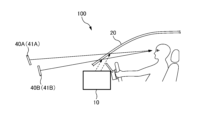
- FIG. 1 is an explanatory diagram of a display device 10.
- FIG. 2 is a block diagram of the display device 10.
- FIG. 3 is an explanatory diagram of a display screen 41 on which a virtual image 40 is projected.
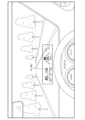
- Fig. 4A is an explanatory diagram of an example of the display screen 41.
- Fig. 4B is an explanatory diagram of the display screen 41 including a notification image 44.
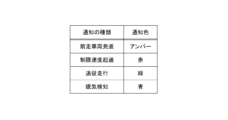
- FIG. 5 is a table showing the relationship between the type of notification and the color (notification color) of the notification image 44.
- FIG. 6 is an explanatory diagram of a display device 10 according to a modified example.
- Fig. 1 is an explanatory diagram of a display device 10.
- Fig. 2 is a block diagram of the display device 10.
- the display device 10 is a device that displays an image to the driver.
- the display device 10 is a so-called head-up display (HUD) device.
- the display device 10 is a device that displays an image (virtual image 40) superimposed on an actual background within the driver's field of vision.
- the figure shows the display device 10 projecting image light onto the windshield (front glass) and projecting the virtual image 40 onto the windshield.
- the transmission reflection unit 20 that projects the virtual image 40 is not limited to the windshield, and may be a combiner installed inside the vehicle.
- the display device 10 includes an image generation unit 11, an optical system 12, and a control unit 13.
- the display system 100 is a system in which the transmission reflection unit 20 is added to the display device 10 (which includes the image generation unit 11, the optical system 12, and the control unit 13).
- the image generating unit 11 is a device that generates an image.
- the image generating unit 11 is, for example, configured with a liquid crystal display device, an organic EL display device, a micro LED display device, or a projector device using a laser light source.
- the image generating unit 11 generates an image based on a signal (image signal) from the control unit 13.
- the image generated by the image generating unit 11 is irradiated to the optical system 12 as image light.
- the optical system 12 projects the image generated by the image generation unit 11 onto the transmission reflection unit 20 as image light.
- the optical system 12 is composed of one or more optical elements.
- the optical elements that make up the optical system 12 are, for example, lenses, mirrors, prisms, etc.
- the optical system 12 is configured so that a virtual image 40 is displayed to the driver.
- the optical system 12, together with the transmission reflection unit 20, constitutes an imaging optical system that allows the driver to visually recognize the virtual image 40. For this reason, the optical system 12 is designed taking into account the optical characteristics of the transmission reflection unit 20.
- the transmissive reflector 20 reflects the image light from the optical system 12 while transmitting light from outside the vehicle.
- the transmissive reflector 20 functions as a so-called half mirror.
- the transmissive reflector 20 is a windshield (front glass).
- the transmissive reflector 20 may also be a combiner installed inside the vehicle.
- the transmissive reflector 20 forms a virtual image 40 by reflecting the image light from the optical system 12. The driver sees a superimposed image of the background seen due to the transmission of light by the transmissive reflector 20 and the virtual image 40 (spatial image) seen due to the reflection of the image light by the transmissive reflector 20.
- the control unit 13 is responsible for controlling the display device 10.
- the control unit 13 outputs an image signal to the image generation unit 11, causing the image generation unit 11 to generate an image.
- the image generation unit 11 generates an image according to the image signal from the control unit 13. In this way, the control unit 13 controls the image generation unit 11 via the image signal.
- the control unit 13 obtains a detection signal from the detection unit 30.
- the detection unit 30 detects a physical quantity indicating the external situation and outputs the detection result as a detection signal to the control unit 13.
- the detection unit 30 includes, for example, a vehicle speed detection unit (e.g., a vehicle speed sensor) that detects the vehicle speed, a distance measuring device such as LiDAR (Light Detection and Ranging, Laser Imaging Detection and Ranging), and a position detection unit (e.g., a GPS (Global Positioning System) module) that detects the current position.
- a vehicle speed detection unit e.g., a vehicle speed sensor
- LiDAR Light Detection and Ranging, Laser Imaging Detection and Ranging
- a position detection unit e.g., a GPS (Global Positioning System) module
- the detection unit 30 includes not only a conversion element such as a sensor that detects a physical quantity and converts it into a detection signal, but also a device (e.g., an EUC, etc.) that converts the output signal of the sensor and outputs another signal (detection signal).
- the control unit 13 outputs an image signal according to the detected situation based on the detection signal from the detection unit 30.
- the control unit 13 also determines whether or not a notification is required based on the detection signal from the detection unit 30, and if a notification is required, generates an image signal for displaying a notification image 44 (described later).
- the control unit 13 includes an image processing unit 14 and a determination unit 15.
- the image processing unit 14 generates an image signal to be output to the image generation unit 11.
- the determination unit 15 determines the external situation based on a detection signal from the detection unit 30.
- the determination unit 15 also determines whether or not a notification is required for events such as the departure of a vehicle ahead or exceeding the speed limit based on the detection signal from the detection unit 30.
- the image processing unit 14 outputs an image signal according to the determination result of the determination unit 15. The processing of the image processing unit 14 and the determination unit 15 will be described later.
- the control unit 13 is composed of a computer equipped with an arithmetic processing unit such as a CPU or MPU, and a storage device such as a RAM or ROM (main storage device or auxiliary storage device). Each process performed by the control unit 13 (each process performed by the image processing unit 14 and the determination unit 15) is realized by the arithmetic processing unit executing a program stored in the storage device.
- an arithmetic processing unit such as a CPU or MPU
- a storage device such as a RAM or ROM (main storage device or auxiliary storage device).
- FIG. 3 is an explanatory diagram of a display screen 41 on which a virtual image 40 is projected.
- the display screen 41 is a screen (image) that the display device 10 displays as the virtual image 40.
- the display screen 41 is a screen that is projected in the area of the virtual image 40, and is visually recognized by the driver as being located outside the transmissive reflection unit 20 (outside the vehicle).
- the dotted area in FIG. 3 indicates the area in which the display screen 41 is displayed. In other words, the dotted area in FIG. 3 indicates the area of the virtual image 40 shown in FIG. 1, and indicates the area that the display device 10 can display.
- the display device 10 displays the display screen 41 that shows various information within the dotted area in FIG. 3.
- control unit 13 image processing unit 14
- the display screen 41 that is projected as the virtual image 40 will be mainly described, and the image generated by the image generation unit 11 will not be described.
- FIG. 4A is an explanatory diagram of an example of the display screen 41.
- FIG. 4A shows the display screen 41 when no notification is being sent.
- FIG. 4A shows an example of the display screen 41 and information image 42 (42A-42F), and the display screen 41 and information image 42 are not limited to those shown in FIG. 4A.
- an information image other than the information image 42 (42A-42F) shown in FIG. 4A may be displayed on the display screen 41.
- any of the information images 42 (42A-42F) shown in FIG. 4A may not be displayed on the display screen 41.
- all of the information images 42 (42A-42F) shown in FIG. 4A may not be displayed on the display screen 41 (for example, only the notification image 44 described later may be displayed on the display screen 41).
- the display screen 41 shown in FIG. 4A includes information images 42 such as a vehicle speed image 42A, a shift position image 42B, a road sign image 42C, an indicator bar image 42D, a driving assistance image 42E, and a navigation image 42F.
- information images 42 such as a vehicle speed image 42A, a shift position image 42B, a road sign image 42C, an indicator bar image 42D, a driving assistance image 42E, and a navigation image 42F.
- the vehicle speed image 42A is an image showing vehicle speed information.
- the control unit 13 acquires the vehicle speed information from the detection unit 30, and causes the display screen 41 to display the vehicle speed image 42A.
- the shift position image 42B is an image showing a shift position (for example, P, R, N, D, etc.).
- the control unit 13 acquires the shift position information from the ECU functioning as the detection unit 30, and causes the display screen 41 to display the shift position image 42B.
- the road sign image 42C is an image showing a road sign.
- the detection unit 30 includes a camera that captures an image of the front and an image analysis unit, and the image analysis unit analyzes the captured data of the camera to detect road signs and outputs a detection signal showing information about the road signs to the control unit 13.
- the control unit 13 obtains the information about the road signs from the detection unit 30 and displays the display screen 41 including the road sign image 42C.
- the indicator bar image 42D is an image that displays the measurement result of the indicator as a bar.
- the control unit 13 acquires information indicating the measurement result from the detection unit 30 (e.g., an ECU or an indicator) and causes the display screen 41 to display the indicator bar image 42D.
- the driving assistance image 42E is an image showing the status of the driving assistance system.
- the driving assistance system includes a lane keeping function and a following driving function
- the driving assistance image 42E includes an image of a lane showing that the lane keeping function is operating, and an image showing a set speed and a following distance set in the following driving function.
- the control unit 13 acquires information about the driving assistance system from the detection unit 30 (e.g., ECU) and displays the display screen 41 including the driving assistance image 42E.
- the navigation image 42F is an image showing navigation information.
- the control unit 13 acquires the navigation information from a car navigation device functioning as the detection unit 30, and causes the display screen 41 to display the navigation image 42F.
- FIG. 4B is an explanatory diagram of the display screen 41 including a notification image 44.
- FIG. 4B shows the display screen 41 when a notification is in progress.
- the display screen 41 when a notification is in progress is a screen in which the notification image 44 has been added to the display screen 41 when no notification is in progress (see FIG. 4A).
- the notification image 44 is an image for notifying the driver.
- the notification image 44 is an image (information image) for displaying information (notification information) for drawing the driver's attention.
- the notification image 44 is an image that is additionally displayed on the non-notification display screen 41 (see FIG. 4A) when it is necessary to draw the driver's attention.
- the notification image 44 is displayed in a strip-like region at the bottom of the display screen 41 (virtual image 40).
- the control unit 13 image processing unit 14 causes the image generation unit 11 to display an image such that the notification image 44 is displayed in the strip-like region at the bottom of the virtual image 40.
- lower edge refers to the area (region) near the edge (lower edge) that constitutes the lower edge. Additionally, “near” the lower edge means closer to the lower edge than the center in the vertical direction.
- the "lower edge” of the display screen 41 (virtual image 40) refers to the area (region) that occupies the lower 1/4 of the display screen 41 (virtual image 40).
- the notification image 44 is displayed on the lower edge of the display screen 41 (virtual image 40), and therefore occupies the lower 1/4 of the region of the display screen 41 (virtual image 40).
- the lower edge of the notification image 44 shown in FIG. 4B is in contact with the lower side of the display screen 41 (virtual image 40). However, blank pixels may exist between the lower edge of the notification image 44 and the lower side of the display screen 41 (virtual image 40).
- the upper edge of the notification image 44 is located closer to the lower side than the center in the vertical direction of the display screen 41 (virtual image 40).
- the display screen 41 shown in FIG. 4B at least the area between the other information images 42 (for example, the indicator bar image 42D and the driving assistance image 42E located at the bottom) and the lower side of the display screen 41 (virtual image 40) corresponds to the lower side.
- at least a part of the notification image 44 is displayed in the area between the other information images 42 (for example, the indicator bar image 42D and the driving assistance image 42E located at the bottom) and the lower side of the display screen 41 (virtual image 40).
- a "strip-shaped region” refers to a region having an elongated shape (strip-like). Since the notification image 44 is displayed in a strip-shaped region at the bottom edge of the display screen 41 (virtual image 40), the notification image 44 is an elongated image extending in the left-right direction. The left and right edges of the notification image 44 shown in FIG. 4B are in contact with the left and right edges of the display screen 41 (virtual image 40), respectively. However, blank pixels may exist between the left edge of the notification image 44 and the left edge of the display screen 41 (virtual image 40), and blank pixels may exist between the right edge of the notification image 44 and the right edge of the display screen 41 (virtual image 40).
- the notification image 44 is an elongated image along the left-right direction, so that the driver can easily notice it when it appears on the display screen 41.
- the notification image 44 is arranged on the lower side of the display screen 41 (virtual image 40)
- the angle between the line connecting the driver's eyes and the notification image 44 and the driver's line of sight can be made large, so that the discomfort caused to the driver when it appears on the display screen 41 can be suppressed.
- the control unit 13 displays the notification image 44 in a strip-shaped area on the lower side of the display screen 41 (virtual image 40), so that it is possible to solve both the conflicting issues of calling the driver's attention and suppressing the discomfort caused to the driver.
- the width (vertical dimension) of the notification image 44 is set to be relatively narrow. Unlike the vehicle speed image 42A and the road sign image 42C, the notification image 44 does not represent letters (including numbers) or marks, but represents a specific color. Therefore, the notification image 44 can be displayed in a narrower area than the other information images 42, and can perform the notification function even when displayed in a narrow area. For this reason, for example, the width of the notification image 44 can be set narrower than the vertical dimension of the vehicle speed image 42A and the road sign image 42C. By setting the width (vertical dimension) of the notification image 44 narrow, it is possible to prevent the driver from feeling uncomfortable when the notification image 44 appears on the display screen 41.
- the notification image 44 shown in FIG. 4A is composed of a predetermined color (single color), and the displayed area of the notification image 44 is composed of the same color.
- the notification image 44 may also be composed of a gradation image in which the density (brightness) of a single color (same hue) is gradually changed in the left-right direction.
- the control unit 13 displays the notification image 44 by blinking it.
- the blinking notification image 44 strongly calls the driver's attention. Since the notification image 44 represents a predetermined color, there is an advantage that the blinking notification image 44 is less likely to annoy the driver than blinking an information image 42 such as letters or marks.
- control unit 13 may display the notification image 44 continuously (may keep the notification image 44 lit).
- the control unit 13 may animate the notification image 44 so that the shading moves in the left-right direction. This gives movement to the notification image 44, making it easier for the driver to notice the notification.
- the control unit 13 may display the notification image 44 for only a predetermined time (e.g., 10 seconds) and remove the notification image 44 from the display screen 41 after the predetermined time has elapsed.
- the control unit 13 may display the notification image 44 by flashing it a predetermined number of times (e.g., 10 times) and remove the notification image 44 from the display screen 41 after the predetermined number of flashes. This can reduce discomfort to the driver.
- the control unit 13 (image processing unit 14) displays the notification image 44 in different colors depending on the type of notification.
- Figure 5 is a table showing the relationship between the type of notification and the color (notification color) of the notification image 44.
- the control unit 13 When notifying the driver that a vehicle in front has started moving, the control unit 13 displays an amber notification image 44.
- the control unit 13 determineation unit 15 acquires vehicle speed information and distance information to the vehicle in front from the detection unit 30 (e.g., vehicle speed detection unit or LiDAR), and determines that a notification of the vehicle in front is necessary if the driver's own vehicle continues to be stopped even after a predetermined time (e.g., 3 seconds) has elapsed since the vehicle in front started moving after the vehicle in front had stopped together with the own vehicle.
- a predetermined time e.g. 3 seconds
- the control unit 13 When notifying the driver that the speed limit is exceeded, the control unit 13 displays a red notification image 44.
- the control unit 13 determineation unit 15 acquires vehicle speed information and road sign information from the detection unit 30, and determines that a notification of exceeding the speed limit is necessary if the vehicle speed exceeds the speed limit by 10% or more. If a notification of exceeding the speed limit is necessary, the control unit 13 (image processing unit 14) displays a red notification image 44 in a strip-shaped area at the bottom of the virtual image 40. Note that the control unit 13 may increase the blinking speed of the notification image 44 the greater the vehicle speed exceeds the speed limit.
- the control unit 13 may increase the brightness of the notification image 44 the greater the vehicle speed exceeds the speed limit.
- the control unit 13 displays a green notification image 44 when the follow-up driving function of the driving assistance system is activated.
- the control unit 13 determineation unit 15 acquires information about the driving assistance system from the detection unit 30 (e.g., ECU) and determines whether the follow-up driving function is activated.
- the control unit 13 image processing unit 14 displays a green notification image 44 in a strip-shaped area at the bottom edge of the virtual image 40. Note that, in the case of a notification with a high level of urgency, a red or amber notification image 44 is displayed, whereas in the case of a notification with a low level of urgency, a green notification image 44 is displayed.
- the low-level urgency notification image 44 may blink at a slower rate than the high-level urgency notification image 44. This can reduce discomfort to the driver.
- the control unit 13 When notifying the driver of drowsiness detection, the control unit 13 displays a blue notification image 44.
- the detection unit 30 includes a camera that photographs the driver and an image analysis unit, and the image analysis unit analyzes the driver's eye movements based on the camera's photographic data to detect the driver's drowsiness and outputs a detection signal to the control unit 13.
- the control unit 13 determineation unit 15) obtains information about drowsiness from the detection unit 30 and determines whether or not a notification of drowsiness detection is necessary. If a notification of drowsiness detection is necessary, the control unit 13 (image processing unit 14) displays a blue notification image 44 in a strip-shaped region at the bottom of the virtual image 40.
- blue light has an awakening effect, so by having the control unit 13 display the blue notification image 44 when drowsiness is detected, not only can the control unit 13 notify the driver that drowsiness has been detected, but the control unit 13 can also suppress the driver's drowsiness.
- the control unit 13 displays notification images 44 of different colors according to the type of notification in a strip-shaped area at the bottom of the display screen 41 (virtual image 40). Since the color of the notification image 44 differs depending on the type of notification, the driver can distinguish the notification content by the color of the notification image 44. In addition, since the notification image 44 is displayed in the same place, it is easier for the driver to notice the notification. Note that the types of notifications are not limited to those shown in FIG. 5, and other types of notifications may be provided. Furthermore, the color of the notification image 44 is not limited to that shown in FIG. 5, and other colors may be used.
- a warning sound may be generated from a speaker (not shown).
- the warning sound may cause strong discomfort to the driver.
- the control unit 13 image processing unit 14
- the control unit 13 displays a notification screen on the display screen 41 (virtual image 40) before the warning sound is generated. For example, if a warning sound is set to be generated 5 seconds after the vehicle ahead starts, the control unit 13 displays an amber notification image 44 3 seconds after the vehicle ahead starts. This allows the driver to be alerted before the warning sound is generated, and if the driver responds immediately, there is no need to generate a warning sound, which can prevent the warning sound from causing discomfort to the driver.
- the ambient light (not shown) may be flashed when the driver is alerted to the departure of a vehicle ahead, exceeding the speed limit, etc.
- the ambient light is a linear environmental light installed inside the vehicle.
- the control unit 13 obtains a synchronization signal for the flashing of the ambient light from the ECU, and flashes the notification image 44 in sync with the flashing of the ambient light.
- the control unit 13 image processing unit 14 to flash the notification image 44 in the same color family as the ambient light.
- the ambient light When an ambient light is installed above the glove box of the passenger seat, the ambient light is often arranged in a line extending in the left-right direction. If the notification image 44, which is a long, thin strip extending in the left-right direction, flashes in sync with the flashing of the ambient light in a line extending in the left-right direction, the driver will be more likely to notice the flashing of the light. For this reason, when the ambient light is arranged in a line extending in the left-right direction, it is particularly effective to flash the notification image 44 in sync with the flashing of the ambient light.
- the notification image 44 it is desirable for the notification image 44 to overlap with a portion of another information image 42.
- the notification image 44 overlaps with a portion of the text image included in the indicator bar image 42D and the image showing the set speed in the driving assistance image 42E.
- the notification image 44 does not have to overlap with the other information images 42.
- the notification image 44 does not get in the way when the driver checks the other information images 42, and this has the effect of reducing the annoyance felt by the driver.
- the driver's gaze point when driving at high speed on a highway is located higher than the driver's gaze point when driving at low speed in a city area. In this way, when the vehicle speed increases, the driver's gaze point moves upward.
- the notification image 44 of this embodiment is displayed at the lower side of the display screen 41 (virtual image 40)
- the control unit 13 may change the position of the upper edge of the notification image 44 according to the vehicle speed. For example, when the vehicle speed increases, the control unit 13 moves the upper edge of the notification image 44 upward by increasing the width (vertical dimension) of the notification image 44.
- the control unit 13 moves the upper edge of the notification image 44 downward by decreasing the width (vertical dimension) of the notification image 44. This reduces the annoyance felt by the driver. Note that instead of changing the width of the notification image 44, the position of the upper edge of the notification image 44 may be changed by changing the display position of the notification image 44 in the vertical direction.
- the virtual image 40 is inclined with respect to the vertical direction so that the closer it is to the bottom side, the closer it is to the driver (the optical system 12 is configured so that the virtual image 40 is inclined in this way).
- the distance (distance in the front-to-rear direction) between the driver's gaze point and the bottom side of the virtual image 40 is longer than that of the top side. For this reason, the notification image 44 is displayed closer to the driver on the display screen 41.
- the driver's focus (point of gaze) is farther away than the virtual image 40, by displaying the notification image 44 on the bottom side of the inclined virtual image 40 in this way, the distance (distance in the front-to-rear direction) between the driver's focus and the notification image 44 can be increased, and the annoyance felt by the driver when the notification image 44 is displayed can be reduced.
- the notification image 44 does not represent letters or marks, but represents a predetermined color, so the driver can distinguish the color of the notification image 44 without focusing on the notification image 44. For this reason, it is permitted to increase the distance between the driver's focus (point of gaze) and the notification image 44 on the virtual image 40.
- the arrangement of the virtual images 40 is not limited to that shown in FIG. 1.
- the virtual images 40 may be arranged parallel to the vertical direction.
- FIG. 6 is an explanatory diagram of a display device 10 according to a modified example.
- the display device 10 of the modified example forms two virtual images 40 (a first virtual image 40A and a second virtual image 40B).
- the image generating unit 11 (not shown in FIG. 6) has a first image generating unit that generates a first image and a second image generating unit that generates a second image
- the optical system 12 (not shown in FIG. 6) has a first optical system that displays the first virtual image 40A using the first image and a second optical system that displays the second virtual image 40B using the second image.
- the first image generating unit and the second image generating unit may be configured as separate devices (e.g., two liquid crystal display devices), or may be configured as a single device by using a portion of a single image as the first image and another portion as the second image.
- two virtual images 40 are arranged at different positions in the vertical direction.
- two display screens 41 are displayed at different positions in the vertical direction.
- the upper virtual image 40 is the first virtual image 40A
- the lower virtual image 40 is the second virtual image 40B.
- the control unit 13 image processing unit 14
- the angle between the line connecting the driver's eyes and the notification image 44 and the driver's line of sight can be made larger than when the notification image 44 is displayed on the first virtual image 40A on the upper side, so that the discomfort felt by the driver when the notification image 44 appears on the display screen 41 can be suppressed.
- the second virtual image 40B is disposed closer to the driver than the first virtual image 40A.
- the control unit 13 image processing unit 14 displays the notification image 44 in a strip-shaped area at the bottom of the second virtual image 40B arranged near the driver. Since the driver's focus is farther away than the first virtual image 40A and the second virtual image 40B, by displaying the notification image 44 at the bottom of the second virtual image 40B, the distance (distance in the front-rear direction) between the driver's focus and the notification image 44 can be increased, and the annoyance felt by the driver when the notification image 44 is displayed can be reduced. Note that since the notification image 44 represents a predetermined color, the driver can distinguish the color of the notification image 44 without focusing on the notification image 44. For this reason, it is permitted to increase the distance between the driver's focus and the notification image 44.
- 10 display device 11 image generation unit, 12 optical system, 13 Control unit, 14 Image processing unit, 15 Determination unit, 20 Transmission/reflection unit, 30 Detection unit, 40 virtual image, 40A first virtual image, 40B second virtual image, 41 display screen, 42 information image, 42A vehicle speed image, 42B shift position image, 42C Road sign image, 42D Indicator bar image, 42E Driving assistance image, 42F Navigation image, 44 notification image, 100 Display System
Landscapes
- Engineering & Computer Science (AREA)
- Chemical & Material Sciences (AREA)
- Combustion & Propulsion (AREA)
- Transportation (AREA)
- Mechanical Engineering (AREA)
- Physics & Mathematics (AREA)
- General Physics & Mathematics (AREA)
- Traffic Control Systems (AREA)
Priority Applications (1)
| Application Number | Priority Date | Filing Date | Title |
|---|---|---|---|
| JP2025533926A JPWO2025018097A1 (https=) | 2023-07-14 | 2024-06-21 |
Applications Claiming Priority (2)
| Application Number | Priority Date | Filing Date | Title |
|---|---|---|---|
| JP2023115873 | 2023-07-14 | ||
| JP2023-115873 | 2023-07-14 |
Publications (1)
| Publication Number | Publication Date |
|---|---|
| WO2025018097A1 true WO2025018097A1 (ja) | 2025-01-23 |
Family
ID=94281363
Family Applications (1)
| Application Number | Title | Priority Date | Filing Date |
|---|---|---|---|
| PCT/JP2024/022559 Pending WO2025018097A1 (ja) | 2023-07-14 | 2024-06-21 | 表示装置及び表示システム |
Country Status (2)
| Country | Link |
|---|---|
| JP (1) | JPWO2025018097A1 (https=) |
| WO (1) | WO2025018097A1 (https=) |
Citations (8)
| Publication number | Priority date | Publication date | Assignee | Title |
|---|---|---|---|---|
| JP2008123092A (ja) * | 2006-11-09 | 2008-05-29 | Aisin Aw Co Ltd | ディスプレイ表示システム |
| JP2008209724A (ja) * | 2007-02-27 | 2008-09-11 | Calsonic Kansei Corp | 車両用ヘッドアップディスプレイ装置 |
| EP2196961A1 (en) * | 2008-12-15 | 2010-06-16 | Ford Global Technologies, LLC | A driver information system for a vehicle, for providing input to a driver regarding the traffic environment external of said vehicle |
| JP2013242346A (ja) * | 2012-05-17 | 2013-12-05 | Toshiba Alpine Automotive Technology Corp | 車載用表示装置 |
| JP2016196289A (ja) * | 2015-04-03 | 2016-11-24 | 株式会社デンソー | 情報提示装置 |
| JP2017114468A (ja) * | 2015-12-21 | 2017-06-29 | 株式会社Jvcケンウッド | 画像表示装置、画像表示方法および制御プログラム |
| JP2020111202A (ja) * | 2019-01-11 | 2020-07-27 | 株式会社リコー | 表示制御装置、表示装置、表示システム、移動体、プログラム、画像生成方法 |
| JP2021181255A (ja) * | 2020-05-18 | 2021-11-25 | 矢崎総業株式会社 | 車載表示システム |
-
2024
- 2024-06-21 JP JP2025533926A patent/JPWO2025018097A1/ja active Pending
- 2024-06-21 WO PCT/JP2024/022559 patent/WO2025018097A1/ja active Pending
Patent Citations (8)
| Publication number | Priority date | Publication date | Assignee | Title |
|---|---|---|---|---|
| JP2008123092A (ja) * | 2006-11-09 | 2008-05-29 | Aisin Aw Co Ltd | ディスプレイ表示システム |
| JP2008209724A (ja) * | 2007-02-27 | 2008-09-11 | Calsonic Kansei Corp | 車両用ヘッドアップディスプレイ装置 |
| EP2196961A1 (en) * | 2008-12-15 | 2010-06-16 | Ford Global Technologies, LLC | A driver information system for a vehicle, for providing input to a driver regarding the traffic environment external of said vehicle |
| JP2013242346A (ja) * | 2012-05-17 | 2013-12-05 | Toshiba Alpine Automotive Technology Corp | 車載用表示装置 |
| JP2016196289A (ja) * | 2015-04-03 | 2016-11-24 | 株式会社デンソー | 情報提示装置 |
| JP2017114468A (ja) * | 2015-12-21 | 2017-06-29 | 株式会社Jvcケンウッド | 画像表示装置、画像表示方法および制御プログラム |
| JP2020111202A (ja) * | 2019-01-11 | 2020-07-27 | 株式会社リコー | 表示制御装置、表示装置、表示システム、移動体、プログラム、画像生成方法 |
| JP2021181255A (ja) * | 2020-05-18 | 2021-11-25 | 矢崎総業株式会社 | 車載表示システム |
Also Published As
| Publication number | Publication date |
|---|---|
| JPWO2025018097A1 (https=) | 2025-01-23 |
Similar Documents
| Publication | Publication Date | Title |
|---|---|---|
| JP6175589B2 (ja) | 投写型表示装置及び投写表示方法 | |
| JP5162132B2 (ja) | 情報を表示する方法およびシステム | |
| JP5109750B2 (ja) | 運転者状態検出装置、意識状態検出方法 | |
| US20200051529A1 (en) | Display device, display control method, and storage medium | |
| JP2019113809A (ja) | ヘッドアップディスプレイ装置 | |
| KR20250095715A (ko) | 차량용 표시 장치 및 화상 표시 방법 | |
| JP6801508B2 (ja) | ヘッドアップディスプレイ装置 | |
| JP7508763B2 (ja) | 画像制御装置、表示装置、移動体、画像制御方法、及びプログラム | |
| CN110481429B (zh) | 车辆用显示控制装置 | |
| US10914948B2 (en) | Display device, display control method, and storage medium | |
| US11009702B2 (en) | Display device, display control method, storage medium | |
| CN105572872B (zh) | 车辆的警告消息显示系统 | |
| WO2019189393A1 (en) | Image control apparatus, display apparatus, movable body, and image control method | |
| JP2019206262A (ja) | 表示装置 | |
| US20200050002A1 (en) | Display device and display control method | |
| JP6729327B2 (ja) | ヘッドアップディスプレイ装置、表示方法およびプログラム | |
| JP6642103B2 (ja) | ヘッドアップディスプレイ装置 | |
| WO2025018097A1 (ja) | 表示装置及び表示システム | |
| WO2019031291A1 (ja) | 車両用表示装置 | |
| JP2019207632A (ja) | 表示装置 | |
| JP7429875B2 (ja) | 表示制御装置、表示装置、表示制御方法、及びプログラム | |
| JP2018189956A (ja) | スクリーンシステム、表示システム、スクリーンシステムの制御方法、プログラム、及び表示システムを備える移動体 | |
| JP2023147782A (ja) | 表示システム | |
| JP2017149354A (ja) | ヘッドアップディスプレイ装置 | |
| JP2005324745A (ja) | 車両用表示装置 |
Legal Events
| Date | Code | Title | Description |
|---|---|---|---|
| 121 | Ep: the epo has been informed by wipo that ep was designated in this application |
Ref document number: 24842893 Country of ref document: EP Kind code of ref document: A1 |
|
| ENP | Entry into the national phase |
Ref document number: 2025533926 Country of ref document: JP Kind code of ref document: A |
|
| WWE | Wipo information: entry into national phase |
Ref document number: 2025533926 Country of ref document: JP |
|
| NENP | Non-entry into the national phase |
Ref country code: DE |