WO2024241496A1 - 表示方法、表示装置及び表示システム - Google Patents
表示方法、表示装置及び表示システム Download PDFInfo
- Publication number
- WO2024241496A1 WO2024241496A1 PCT/JP2023/019168 JP2023019168W WO2024241496A1 WO 2024241496 A1 WO2024241496 A1 WO 2024241496A1 JP 2023019168 W JP2023019168 W JP 2023019168W WO 2024241496 A1 WO2024241496 A1 WO 2024241496A1
- Authority
- WO
- WIPO (PCT)
- Prior art keywords
- display
- application
- display device
- control device
- display area
- Prior art date
- Legal status (The legal status is an assumption and is not a legal conclusion. Google has not performed a legal analysis and makes no representation as to the accuracy of the status listed.)
- Ceased
Links
Images



Classifications
-
- G—PHYSICS
- G09—EDUCATION; CRYPTOGRAPHY; DISPLAY; ADVERTISING; SEALS
- G09G—ARRANGEMENTS OR CIRCUITS FOR CONTROL OF INDICATING DEVICES USING STATIC MEANS TO PRESENT VARIABLE INFORMATION
- G09G5/00—Control arrangements or circuits for visual indicators common to cathode-ray tube indicators and other visual indicators
-
- G—PHYSICS
- G09—EDUCATION; CRYPTOGRAPHY; DISPLAY; ADVERTISING; SEALS
- G09G—ARRANGEMENTS OR CIRCUITS FOR CONTROL OF INDICATING DEVICES USING STATIC MEANS TO PRESENT VARIABLE INFORMATION
- G09G5/00—Control arrangements or circuits for visual indicators common to cathode-ray tube indicators and other visual indicators
- G09G5/36—Control arrangements or circuits for visual indicators common to cathode-ray tube indicators and other visual indicators characterised by the display of a graphic pattern, e.g. using an all-points-addressable [APA] memory
- G09G5/37—Details of the operation on graphic patterns
-
- G—PHYSICS
- G09—EDUCATION; CRYPTOGRAPHY; DISPLAY; ADVERTISING; SEALS
- G09G—ARRANGEMENTS OR CIRCUITS FOR CONTROL OF INDICATING DEVICES USING STATIC MEANS TO PRESENT VARIABLE INFORMATION
- G09G5/00—Control arrangements or circuits for visual indicators common to cathode-ray tube indicators and other visual indicators
- G09G5/36—Control arrangements or circuits for visual indicators common to cathode-ray tube indicators and other visual indicators characterised by the display of a graphic pattern, e.g. using an all-points-addressable [APA] memory
- G09G5/38—Control arrangements or circuits for visual indicators common to cathode-ray tube indicators and other visual indicators characterised by the display of a graphic pattern, e.g. using an all-points-addressable [APA] memory with means for controlling the display position
Definitions
- the present invention relates to a display method, a display device, and a display system.
- a technology is known in which a first screen corresponding to a first function and a second screen corresponding to a second function are displayed on the display screen of a touch screen, and when a specific operation is performed on the touch screen, the display position of the first screen and the display position of at least a portion of the display content of the second screen are swapped within the display screen (Patent Document 1).
- the problem that this invention aims to solve is to provide a display method, a display device, and a display system that can reduce user erroneous operations when a user moves the contents displayed on one screen to another screen.
- the present invention solves the above problem by having the second display device have a first display area that displays, for each application, an object for the user to select an application, and a second display area that displays the selected application, and when a predetermined display movement operation is performed on the first display area, the control device displays information on the application displayed in the second display area on the first display device.
- the present invention can reduce user erroneous operations when a user moves the contents displayed on one screen to another.
- FIG. 1 is a block diagram showing the configuration of a display system according to this embodiment.
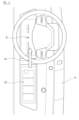
- FIG. 2 is a diagram for explaining an example of the first display device and the second display device according to the present embodiment.
- FIG. 3 is a diagram showing an example of a display screen of the second display device in this embodiment.
- FIG. 4 is a diagram illustrating an example of a display form of an object of an application in this embodiment.
- FIG. 5 is a diagram showing an example of a flowchart of a control process of a display method executed by the control device.
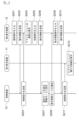
- FIG. 6 is a diagram showing an example of a sequence chart of a control process of a display method executed by the display system in this embodiment.
- FIG. 1 is a block diagram showing the configuration of the display system according to the present embodiment.
- the display system 1 includes a first display device 11, a second display device 12, and a control device 10. These devices are mounted on a vehicle, and are provided, for example, in an in-vehicle display device 100. These devices are connected by CAN communication, Ethernet (registered trademark) communication, or other in-vehicle LAN, and can transmit and receive information between them.
- the control device 10 controls the first display device 11 and the second display device 12 to display an image on the first display device 11 and the second display device 12.
- the control device 10 transmits a control instruction to the first display device 11 and the second display device 12 to display an image.
- the first display device 11 and the second display device 12 display an image to the user based on the control instruction received from the control device 10.
- the user is a vehicle occupant, and is primarily the driver of the vehicle, but the user may also be a passenger other than the driver.
- an example of controlling a display device mounted on a vehicle is described, but the present invention is not limited to this as long as the display device displays information to a user.
- the control device 10, the first display device, and the second display device are not limited to devices provided in the display device 100.
- the display device may be a portable terminal device such as a personal computer or a smartphone.
- the first display device 11 and the second display device 12 are displays arranged in the vehicle width direction in the instrument panel portion located in front of the driver's seat of the vehicle.
- the first display device 11 and the second display device 12 are composed of, for example, a liquid crystal display or an organic EL display.
- the first display device 11 and the second display device 12 may be a single display having multiple display screens, or may be composed of multiple displays, each of which has a display screen. When composed of multiple displays, the multiple displays are arranged close to each other.
- the first display device 11 and the second display device 12 may also be equipped with a speaker that outputs audio information.
- the first display device 11 and the second display device 12 start displaying a screen when the user turns on the accessory power supply or ignition power supply of the vehicle.
- FIG. 2 is a diagram for describing an example of the first display device and the second display device according to this embodiment.
- FIG. 2 shows a display device mounted on a vehicle as an example of the first display device and the second display device.
- the first display device 11 and the second display device 12 are installed in the instrument panel portion of the vehicle V, from the driver's seat to the passenger seat.
- the first display device 11 displays information related to the vehicle's meter.
- the first display device 11 is located forward of the driver's seat and behind the steering wheel so that the meter information is easily visible to the user, the driver.
- the second display device 12 displays information related to an application that realizes a specified function.
- the application is, for example, an application that realizes a navigation function.
- the second display device 12 is located on the passenger seat side, at a distance that is easy for the driver to reach and operate.
- the first display device 11 is located on the right side and the second display device 12 is located on the left side when viewed from the driver's seat, assuming that the vehicle V is a right-hand drive vehicle.
- the vehicle V is a left-hand drive vehicle
- the first display device 11 may be located on the left side and the second display device 12 may be located on the right side.
- the predetermined display movement operation is, for example, a flick operation in the direction S (rightward) in which the first display device 11 is located. A specific method will be described later.
- the first display device 11 includes a display unit 111 and an input unit 112 as functional blocks.
- the display unit 111 displays an image to the user.
- the displayed image includes information related to the vehicle's meters.
- the information related to the meters includes, for example, vehicle speed information and vehicle energy information.
- the display unit 111 receives a control instruction from the control device 10, it displays an image showing information related to the vehicle's meters based on the control instruction.
- the image displayed by the first display device is not limited to an image including information related to the vehicle's meters, and may be an image including information provided to the user other than information related to the application.
- the input unit 112 accepts operational input from the user. When the input unit 112 accepts operational input, it transmits operational information to the control device 10.
- the display unit 111 and the input unit 112 are touch screens in which a touch panel is overlaid on a display. The user visually recognizes the image displayed on the display of the first display device 11 and performs operational input on the display.
- the first display device 11 may also display an image including information about the application in addition to information about the vehicle meter. For example, when the user performs a display movement operation described below, the control device 10 causes the first display device 11 to display information about the application displayed on the second display device 12. At this time, the first display device 11 may display an image including information about the vehicle meter and information about the application, or may display an image including information about the application instead of the information about the vehicle meter. The first display device 11 may also display an image including the same information as the information about the application displayed on the second display device 12, or may display an image with less information than the information about the application displayed on the second display device 12.
- the second display device 12 has a display unit 121 and an input unit 122 as functional blocks.
- the display unit 121 displays an image to the user.
- the displayed image includes information about an application that realizes a predetermined function.
- the application is, for example, an application that provides a navigation function, an application that provides a function to play entertainment content such as music and videos, and so-called infotainment (In-Vehicle Infotainment, IVI) applications.
- infotainment In the case of an application that provides a navigation function
- the information about the application is information that indicates route guidance for the vehicle.
- the information that indicates route guidance for the vehicle includes, for example, map information, the current position of the vehicle, route information from the current position to the destination, and guidance information for the vehicle to travel the route.
- the information about the application is information that includes entertainment content such as music and videos, and is, for example, an image that shows a music playback screen, or a moving image such as a movie.
- the display unit 121 when the display unit 121 receives a control instruction from the control device 10, it displays an image showing information related to the application based on the control instruction.
- the input unit 122 accepts operation input from the user. When the input unit 122 accepts operation input, it transmits operation information to the control device 10.
- the display unit 121 and the input unit 122 are touch screens in which a touch panel is overlaid on a display. The user visually recognizes the displayed image via the display of the second display device 12 and performs operation input on the display.
- the second display device 12 includes a first display area that displays, for each application, an object (also referred to as a selection object) for the user to select an application, and a second display area that displays the selected application.
- the object for the user to select an application is an application start switch, for example, an icon image representing the application.
- a plurality of objects for selecting applications may be arranged.
- FIG. 3 is a diagram showing an example of the display screen of the second display device in this embodiment.
- the display screen D2 of the second display device 12 is divided into a first display area R1 that displays, for each application, an object for the user to select an application, and a second display area R2 that displays the selected application.
- a plurality of objects for selecting an application are arranged in the first display area R1.
- the applications include applications that realize a navigation function, a music playback function, a telephone function, and an air conditioning function.
- the object for selecting an application is, for example, an icon image that represents the application.
- an icon P1 that represents an application that realizes a navigation function is displayed.
- the second display device 12 displays the selected application in the second display area R2.
- the second display area R2 displays a screen of an application that realizes a navigation function.
- the screen of the application for the navigation function displays a map image including the position of the vehicle and the route of the vehicle.
- the first display area is a band-shaped area that is arranged along the outer edge of the display screen.
- the first display area R1 is arranged along the outer edges of the right and bottom sides of the display screen D2. This is not limited to this in the present embodiment, and the first display area may be arranged only on the right side, or on the top or left side.
- the second display area is an area of the display screen other than the first display area.
- the first display area may also include an icon image representing a home button for returning to the home screen, and images representing information such as temperature, time, notifications, etc.
- the input unit 122 accepts user operation input.
- User operations are classified into a number of different types depending on the input method.
- the types of user operations include a selection operation for selecting an application to be launched, a predetermined application operation for operating an application that is being launched, a predetermined display movement operation, and a predetermined switching operation.
- a selection operation is, for example, a touch operation (single tap) for touching an object once on the touch screen to select an application in the first display area.
- the selection operation is a touch operation for selecting an icon representing an application, such as icon P1 in display area R1.
- the specified application operation is for operating an application displayed in the second display area, and is an operation on the second display area, for example, a touch operation of touching a specified object in the second display area once on a touch screen.
- the specified object in the second display area is an object for executing the function of the running application.
- the specified object is an icon for realizing a map zoom function.
- the application operation is a touch operation for selecting an icon included in the application screen in the second display area R2.
- the predetermined display movement operation is an operation for displaying information related to an application displayed on the second display device 12 on the first display device 11.
- the predetermined display movement operation is an operation on the first display area, such as a flick operation in which a finger is touched on the first display area and then the finger is moved in a flicking manner in a predetermined direction.
- the operation on the first display area may be a flick operation in which a finger is touched on a selected object in the first display area and then the finger is moved in a flicking manner in a predetermined direction.
- the predetermined direction is the direction in which the first display device 11 is located.
- a swipe operation may be used instead of a flick operation.
- the flick operation may be a flick operation with one finger or a flick operation with two fingers.
- the predetermined display movement operation is not limited to a flick operation, but may also be a single tap on the selected object, a double tap in which a touch operation is performed twice, or a long press operation in which touch is continued for a predetermined period of time (long press).
- the specified switching operation is, for example, an operation for switching operation modes.
- the specified switching operation is a touch operation in which an object for selecting an application displayed in the second display area is touched once in the first display area.
- the touch operation may be a long press operation (long press), a short press operation (single tap), or a double tap.
- the switching operation is an operation on a selection object of an application displayed in the second display area, and is therefore an operation that is input after an application is displayed in the second display area by a selection operation. In other words, when a selection operation is executed, the switching operation can be input.
- the specified switching operation may be an operation on an object for selecting an application in the first display area in a hidden state where no application is displayed in the second display area.
- the specified switching operation is set as an operation different from a selection operation. For example, when the selection operation is a single tap, the switching operation is a long press.
- the control device 10 is a device that controls the display of images on the first display device 11 and the second display device 12.
- the control device 10 is equipped with a computer having hardware and software, and this computer includes a ROM that stores programs, a CPU that executes the programs stored in the ROM, and a RAM that functions as an accessible storage device.
- the control device 10 controls the first display device 11 and the second display device 12 to display images based on operation information by a user. For example, the control device 10 transmits a control instruction to the first display device 11 and the second display device 12 to display an image.
- the control device 10 acquires operation information by the user from the first display device 11 and the second display device 12.
- the operation information includes a selection operation, an application operation, a display movement operation, and a switching operation.
- a selection operation is performed to select a selected object in the first display area
- the control device 10 displays the screen of the selected application in the second display area of the second display device 12 as the selected application starts.
- the control device 10 changes the application screen displayed in the second display area according to the execution result of the application and the user's application operation.
- the control device 10 displays information on the application displayed in the second display area on the first display device 11.
- the control device 10 displays information on the application that realizes the navigation function displayed in the second display area R2 on the first display device 11.
- the control device 10 may display an image on the first display device 11 that includes information on the vehicle meter and information on the application, or may display an image on the first display device 11 that includes information on the application instead of information on the vehicle meter.
- the control device 10 may display an image on the first display device 11 that includes the same information as the information on the application displayed on the second display device 12 (for example, a screen of the application), or may display an image with a smaller amount of information on the first display device 11.
- the control device 10 may display information related to the application displayed in the second display area on the first display device 11. For example, when a predetermined switching operation is performed on an object for selecting an application in the first display area, the control device 10 sets the operation mode to the display movement mode.
- the predetermined switching operation on an object of an application is, for example, a predetermined switching operation on a selected object of the application displayed in the second display area.
- the control device 10 may change the display mode of the object of the application displayed in the second display area. For example, the control device 10 changes the color and/or shape of the icon of the application in the first display area.
- the control device 10 may display a figure indicating the direction in which the first display device 11 is located, adjacent to the object of the application displayed in the second display area.
- the figure indicating the direction in which the first display device 11 is located is, for example, an arrow.
- the figure may also be a triangle with one vertex pointing in the direction in which the first display device 11 is located.
- the control device 10 may display the object of the application displayed in the second display area by animation.
- the animation is, for example, the blinking of the object.
- the animation may be an animation in which an arrow repeatedly moves in the direction in which the first display device 11 is located.
- FIG. 4 is a diagram illustrating an example of the display mode of an application object in this embodiment.
- FIG. 4 shows an enlarged view of part A surrounded by a dashed line in FIG. 3 when the operation mode is set to the display movement mode.
- the color of icon P1 which represents an application that realizes a navigation function, has changed.
- an arrow icon P2 is displayed in a position adjacent to icon P1. The direction of the arrow icon is the direction in which the first display device 11 is located.
- the control device 10 may also set the operation mode to the display movement mode when a specified switching operation is performed when no application is displayed in the second display area.
- a specified switching operation when no application is displayed in the second display area is an operation different from a selection operation. In other words, when no application is displayed in the second display area, by distinguishing between a selection operation and a switching operation, the control device 10 can determine whether a selection operation has been performed to launch an application or whether a switching operation has been performed to set the operation mode to the display movement mode.
- An object on which a specified switching operation has been performed is referred to as a target object.
- the control device 10 displays information related to the application of the target object on the first display device 11.
- a selection operation on an object of a specified application launches the application, and the launched application is displayed in the second display area.
- a specified switching operation on an object of the launched application switches the operation mode to the display movement mode.
- the operation mode is set to the display movement mode, thereby reducing the number of operations required to display information about the application on the first display device 11.
- FIG. 5 is a diagram showing an example of a flowchart of the control process of the display method executed by the control device 10.
- step S101 the control device 10 acquires user operation information from the second display device 12.
- the operation information is, for example, operation information indicating a display movement operation.
- step S102 the control device 10 proceeds to step S103 if a predetermined display movement operation has been performed on the first display area based on the operation information. If a predetermined display movement operation has not been performed on the first display area, the control device 10 ends the control flow.
- step S103 the control device 10 controls the first display device 11. For example, the control device 10 causes the first display device 11 to display information on an application displayed on the second display device 12. After executing the process of step S103, the control device 10 ends the control flow.
- step S102 if the operation information is an operation other than the predetermined display movement operation, for example, an application operation, the control device 10 may control the display device according to the operation content. Note that the control when the operation information is an operation other than the predetermined display movement operation is not a required configuration, and may be appropriately configured as necessary.
- FIG. 6 is a diagram showing an example of a sequence chart of the control process of the display method executed by the display system according to this embodiment.
- the control flow starts from step S201 when the first display device 11 and the second display device 12 are started up and the second display device 12 starts displaying an image including an object for the user to select an application in the first display area.
- each step shown in FIG. 6 is an example of a control procedure for executing the display method according to this embodiment, and is not a required configuration, and may be configured appropriately as necessary.
- step S201 the second display device 12 accepts input of a selection operation by the user.
- the selection operation is an operation in which the user selects an application to be launched.
- step S202 the second display device 12 transmits operation information of the selection operation to the control device 10.
- step S203 the control device 10 transmits a control instruction to the second display device 12 to display information related to the application selected by the user in the second display area.
- step S204 the second display device 12 displays a screen of the application including information related to the application based on the control instruction.
- the second display device 12 accepts input of a switching operation by the user.
- the switching operation is an operation to switch the operation mode to a display movement mode, for example, a predetermined operation on an object of an application displayed in the second display area.
- the second display device 12 transmits operation information of the switching operation to the control device 10. If a switching operation is performed, in step S207, the control device 10 sets the operation mode to the display movement mode. For example, when the display device 100 receives operation information of a switching operation from the second display device 12, it sets the operation mode to the display movement mode.
- the control device 10 notifies the second display device 12 of the display movement mode.
- the second display device 12 accepts input of a display movement operation by the user.
- step S210 the second display device 12 transmits operation information of the display movement operation to the control device 10.
- the control device 10 transmits a control instruction to the first display device 11 to display information related to the application displayed in the second display area.
- step S212 the first display device 11 displays information about the application. For example, the first display device displays an image including meter information and information about the application.
- the second display device has a first display area that displays, for each application, an object for the user to select an application, and a second display area that displays the selected application, and when a specified display movement operation is performed on the first display area, the control device displays, on the first display device, information related to the application displayed in the second display area.
- the control device sets the operation mode to a display movement mode when a predetermined switching operation is performed on an object, and displays information about the application displayed in the second display area on the first display device when a predetermined display movement operation is performed while the operation mode is set to the display movement mode. This further prevents confusion with operations of the application displayed on the second display device by limiting the operations for displaying the display contents of the second display device on the first display device to predetermined operations when the operation mode is set.
- the control device sets the operation mode to the display movement mode when a predetermined switching operation is performed on an object of an application displayed in the second display area.
- the control device when the operation mode is set to the display movement mode, changes the display mode of the object of the application displayed in the second display area. This makes it easier for the user to intuitively understand the target of operation.
- the specified display movement operation is a flick operation in the direction in which the first display device is located
- the control device displays a figure indicating the direction in which the first display device is located, adjacent to an object of the application displayed in the second display area. This makes it easy for the user to intuitively understand the required operation.
- the control device displays the object of the application displayed in the second display area using animation. This makes it easy for the user to intuitively understand the object to be operated.
- the control device when a predetermined switching operation is performed while no application is displayed in the second display area, the control device sets the operation mode to a display movement mode, and when a predetermined display movement operation is performed on the target object while the operation mode is set to the display movement mode, the control device displays information about the application of the target object on the first display device, with the object on which the predetermined switching operation is performed being the target object. This makes it possible to display information about an application selected by the user on the first display device with fewer operations, even when the application is not running.
- the predetermined display movement operation is a flick operation in the direction in which the first display device is located. This makes it easy for the user to intuitively understand the required operation.
- Reference Signs List 1 Display system 10: Control device 11: First display device 111: Display section 112: Input section 12: Second display device 121: Display section 122: Input section
Landscapes
- Engineering & Computer Science (AREA)
- Physics & Mathematics (AREA)
- Computer Hardware Design (AREA)
- General Physics & Mathematics (AREA)
- Theoretical Computer Science (AREA)
- User Interface Of Digital Computer (AREA)
Priority Applications (3)
| Application Number | Priority Date | Filing Date | Title |
|---|---|---|---|
| CN202380098410.1A CN121153077A (zh) | 2023-05-23 | 2023-05-23 | 显示方法、显示装置以及显示系统 |
| PCT/JP2023/019168 WO2024241496A1 (ja) | 2023-05-23 | 2023-05-23 | 表示方法、表示装置及び表示システム |
| JP2025521697A JPWO2024241496A1 (https=) | 2023-05-23 | 2023-05-23 |
Applications Claiming Priority (1)
| Application Number | Priority Date | Filing Date | Title |
|---|---|---|---|
| PCT/JP2023/019168 WO2024241496A1 (ja) | 2023-05-23 | 2023-05-23 | 表示方法、表示装置及び表示システム |
Publications (1)
| Publication Number | Publication Date |
|---|---|
| WO2024241496A1 true WO2024241496A1 (ja) | 2024-11-28 |
Family
ID=93589196
Family Applications (1)
| Application Number | Title | Priority Date | Filing Date |
|---|---|---|---|
| PCT/JP2023/019168 Ceased WO2024241496A1 (ja) | 2023-05-23 | 2023-05-23 | 表示方法、表示装置及び表示システム |
Country Status (3)
| Country | Link |
|---|---|
| JP (1) | JPWO2024241496A1 (https=) |
| CN (1) | CN121153077A (https=) |
| WO (1) | WO2024241496A1 (https=) |
Citations (4)
| Publication number | Priority date | Publication date | Assignee | Title |
|---|---|---|---|---|
| WO2013145485A1 (ja) * | 2012-03-29 | 2013-10-03 | 日本電気株式会社 | 情報処理装置 |
| US8587546B1 (en) * | 2010-10-09 | 2013-11-19 | Cypress Semiconductor Corporation | Mutli-panel display system and method for operating the same |
| JP2017157057A (ja) * | 2016-03-03 | 2017-09-07 | 京セラドキュメントソリューションズ株式会社 | 表示制御装置 |
| JP2020198488A (ja) * | 2019-05-31 | 2020-12-10 | セイコーエプソン株式会社 | 制御プログラム、電子機器 |
-
2023
- 2023-05-23 CN CN202380098410.1A patent/CN121153077A/zh active Pending
- 2023-05-23 JP JP2025521697A patent/JPWO2024241496A1/ja active Pending
- 2023-05-23 WO PCT/JP2023/019168 patent/WO2024241496A1/ja not_active Ceased
Patent Citations (4)
| Publication number | Priority date | Publication date | Assignee | Title |
|---|---|---|---|---|
| US8587546B1 (en) * | 2010-10-09 | 2013-11-19 | Cypress Semiconductor Corporation | Mutli-panel display system and method for operating the same |
| WO2013145485A1 (ja) * | 2012-03-29 | 2013-10-03 | 日本電気株式会社 | 情報処理装置 |
| JP2017157057A (ja) * | 2016-03-03 | 2017-09-07 | 京セラドキュメントソリューションズ株式会社 | 表示制御装置 |
| JP2020198488A (ja) * | 2019-05-31 | 2020-12-10 | セイコーエプソン株式会社 | 制御プログラム、電子機器 |
Also Published As
| Publication number | Publication date |
|---|---|
| JPWO2024241496A1 (https=) | 2024-11-28 |
| CN121153077A (zh) | 2025-12-16 |
Similar Documents
| Publication | Publication Date | Title |
|---|---|---|
| JP5413448B2 (ja) | 表示システム、表示装置、及び操作装置 | |
| EP2726970B1 (en) | Vehicle operation device and vehicle operation method | |
| US9221342B2 (en) | Method and device for displaying information in a vehicle | |
| KR102355683B1 (ko) | 차량의 그래픽 사용자 인터페이스의 조립체 및 차량에 그래픽 사용자 인터페이스를 제공하는 방법 | |
| JP5456899B2 (ja) | 車両用操作装置 | |
| JP6035828B2 (ja) | 表示操作装置および表示システム | |
| JP6299162B2 (ja) | 車載機器操作システム、及び操作装置 | |
| US10921982B2 (en) | Device and method for operating a device | |
| US20160231977A1 (en) | Display device for vehicle | |
| CN103180812A (zh) | 车辆交互系统 | |
| EP2751646A1 (en) | Vehicle's interactive system | |
| JP5452770B2 (ja) | 入力装置 | |
| JP2013161230A (ja) | 入力装置 | |
| US9213435B2 (en) | Method and system for selecting items using touchscreen | |
| JP2014172413A (ja) | 操作支援システム、操作支援方法及びコンピュータプログラム | |
| JP2018132824A (ja) | 操作装置 | |
| WO2024241496A1 (ja) | 表示方法、表示装置及び表示システム | |
| JP2014178942A (ja) | 車載端末、ステアリング装置、これらを含む操作システムおよび操作方法 | |
| JP6463457B2 (ja) | 地図表示制御装置および地図スクロールの操作感触制御方法 | |
| CN203766531U (zh) | 用于显示和操作功能组和/或功能的设备 | |
| US20180232115A1 (en) | In-vehicle input device and in-vehicle input device control method | |
| JP7517604B2 (ja) | 表示制御装置及び表示制御方法 | |
| EP4517499A1 (en) | Information processing method, information processing device, and program | |
| JP6489253B2 (ja) | 表示装置、及び車載機器操作システム | |
| WO2024117168A1 (ja) | 操舵装置、制御装置、および非一時的なコンピュータ可読媒体 |
Legal Events
| Date | Code | Title | Description |
|---|---|---|---|
| 121 | Ep: the epo has been informed by wipo that ep was designated in this application |
Ref document number: 23937777 Country of ref document: EP Kind code of ref document: A1 |
|
| ENP | Entry into the national phase |
Ref document number: 2025521697 Country of ref document: JP Kind code of ref document: A |
|
| NENP | Non-entry into the national phase |
Ref country code: DE |