WO2024171617A1 - 情報処理方法、プログラム、及び情報処理端末 - Google Patents
情報処理方法、プログラム、及び情報処理端末 Download PDFInfo
- Publication number
- WO2024171617A1 WO2024171617A1 PCT/JP2023/045756 JP2023045756W WO2024171617A1 WO 2024171617 A1 WO2024171617 A1 WO 2024171617A1 JP 2023045756 W JP2023045756 W JP 2023045756W WO 2024171617 A1 WO2024171617 A1 WO 2024171617A1
- Authority
- WO
- WIPO (PCT)
- Prior art keywords
- information processing
- condition
- constraint
- simulation
- processing system
- Prior art date
- Legal status (The legal status is an assumption and is not a legal conclusion. Google has not performed a legal analysis and makes no representation as to the accuracy of the status listed.)
- Ceased
Links
Images













Classifications
-
- G—PHYSICS
- G06—COMPUTING OR CALCULATING; COUNTING
- G06F—ELECTRIC DIGITAL DATA PROCESSING
- G06F30/00—Computer-aided design [CAD]
- G06F30/10—Geometric CAD
- G06F30/15—Vehicle, aircraft or watercraft design
-
- G—PHYSICS
- G08—SIGNALLING
- G08G—TRAFFIC CONTROL SYSTEMS
- G08G1/00—Traffic control systems for road vehicles
Definitions
- This disclosure relates to an information processing method, program, and information processing terminal for simulating mobility services.
- Non-Patent Document 1 simulation is used to design and evaluate mobility services when introducing and improving them.
- Patent Document 1 discloses a method for automatically generating an operation plan that increases the number of autonomous mobile devices that can operate within a certain space at the same time.
- Non-Patent Document 1 and Patent Document 1 are problematically solved.
- the present disclosure therefore provides an information processing method etc. that makes it easy to perform efficient simulations that take constraint conditions into account.
- the information processing method disclosed herein is an information processing method executed by a computer, which executes a simulation of the movement of a moving object carrying a person or delivery item and the travel demand of the person or delivery item according to the operation parameters of the moving object, calculates the transition of the state of the object in the simulation based on the results of the execution of the simulation, determines whether or not the constraint conditions are satisfied based on the transition, and if the constraint conditions are satisfied, outputs an evaluation result in which the execution result of the simulation is evaluated with at least one of an index of safety in the operation of the moving object, an index of economic rationality, and an index of convenience.
- the information processing method makes it easy to perform efficient simulations that take constraint conditions into account.
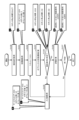
- FIG. 1 is a block diagram illustrating an example of an information processing system according to an embodiment.
- FIG. 2 is a diagram showing an example of a temporal logic formula used to determine whether or not a constraint condition is satisfied.
- FIG. 3 is an explanatory diagram of a determination using a temporal logic formula.
- FIG. 4 is a diagram illustrating the first condition.
- FIG. 5 is a diagram illustrating the second condition.
- FIG. 6 is a diagram illustrating the third condition.
- FIG. 7 is a diagram illustrating the fourth condition.
- FIG. 8 is a diagram illustrating the fifth condition.
- FIG. 9 is a diagram illustrating the sixth condition.
- FIG. 10 is a diagram illustrating the seventh condition.
- FIG. 11 is a diagram illustrating the eighth condition.
- FIG. 12 is a diagram illustrating the ninth condition.
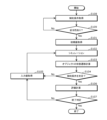
- FIG. 13 is a flowchart showing an example of a basic operation of the information processing system according to the embodiment.
- FIG. 14 is a diagram showing an example of a screen showing the correlation between the transition of the state of an object and the degree of violation of constraints.
- FIG. 15 is a diagram showing an example of the input value setting screen.
- FIG. 16 is a diagram showing an example of a screen showing the satisfaction status of the constraint conditions.
- FIG. 17 is a flowchart illustrating a first operation example of the information processing system according to the embodiment.
- FIG. 18 is a diagram showing an example of the constraint condition setting screen.
- FIG. 19 is a flowchart showing a specific example of the first operation example of the information processing system according to the embodiment.
- FIG. 20 is a flowchart showing another specific example of the first operation example of the information processing system according to the embodiment.
- FIG. 21 is a flowchart showing a second operation example of the information processing system according to the embodiment.
- FIG. 22 is a diagram showing an example of a screen for verifying the validity of constraint conditions.
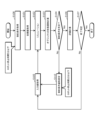
- FIG. 23 is a flowchart showing a third operation example of the information processing system according to the embodiment.
- FIG. 24 is a flowchart showing a specific example of the third operation example of the information processing system according to the embodiment.
- FIG. 25 is a flowchart showing a fourth operation example of the information processing system according to the embodiment.
- FIG. 26 is a flowchart showing a specific example of the fourth operation example of the information processing system according to the embodiment.
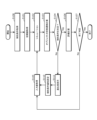
- FIG. 27 is a flowchart showing a fifth operation example of the information processing system according to the embodiment.
- FIG. 28 is a flowchart showing a specific example of the fifth operation example of the information processing system according to the embodiment
- the information processing method is an information processing method executed by a computer, which executes a simulation of the movement of a moving object carrying a person or delivery item and the travel demand of the person or delivery item according to the operation parameters of the moving object, calculates the transition of the state of the object in the simulation based on the result of the execution of the simulation, determines whether or not the constraint condition is satisfied based on the transition, and if the constraint condition is satisfied, outputs an evaluation result in which the execution result of the simulation is evaluated with at least one of an index of safety in the operation of the moving object, an index of economic rationality, and an index of convenience.
- the constraint condition includes a plurality of conditions, and in the process of determining whether the constraint condition is satisfied, the determination is made based on one function that references a different state of the object for each condition.
- the function is described using a temporal logic formula.
- the constraint conditions include conditions regarding the movement or stopping of the mobile object in a specified area or in a specified time period.
- the constraint conditions include conditions related to the travel time of the moving object.
- the constraint conditions include conditions related to movement based on a base point of the mobile object.
- the constraint conditions include conditions related to an operator who remotely controls the moving object.
- the constraint conditions include conditions regarding the inventory of the delivery items transported by the mobile body.
- the constraint conditions specified by the user are obtained before the simulation is executed.
- any one of the first to ninth aspects if the constraint conditions are not satisfied, at least a portion of the constraint conditions are relaxed.
- the degree of violation of the constraint condition is output.
- any one of the first to eleventh aspects if the evaluation result does not satisfy a predetermined condition, at least a part of the constraint condition is strengthened.
- the degree of margin for the constraint condition is output.
- a program according to a fourteenth aspect of the present disclosure causes a computer to execute an information processing method according to any one of the first to thirteenth aspects.
- an information processing terminal includes an input unit and an output unit.
- the input unit accepts input of operation parameters of the moving body.
- the output unit outputs an execution result of the information processing method of any one of the first to thirteenth aspects based on the operation parameters of the moving body input to the input unit. If the constraint conditions are satisfied, the output unit outputs the evaluation result as the execution result.
- FIG. 1 is a block diagram showing an example of an information processing system 100 according to an embodiment.
- the information processing system 100 is a system for simulating a service using a moving body 1 (see FIG. 3) carrying a person or a delivery, that is, a mobility service.
- the simulation is a simulation of the movement of the moving body 1 and the demand for movement of a person or a delivery.
- the simulation may include a simulation of collision avoidance (collision determination) between the moving body 1 and an object.
- the mobility service includes, for example, a service of delivering a delivery, such as a home delivery service or food delivery, to a requester.
- the mobility service also includes, for example, a service of transporting a person to a destination.
- the moving body 1 is, for example, an autonomous robot, but may also be a vehicle such as an automobile or motorcycle, or a moving body other than a vehicle such as an aircraft or ship.
- the moving body 1 may also be a manually driven type, or a semi-automatic or fully automatic type. In the following, unless otherwise specified, the moving body 1 will be described as being an autonomous robot.
- the information processing system 100 is an example of a computer that executes an information processing method.
- the components that make up the information processing system 100 may be provided in a single housing, or may be distributed. When the components that make up the information processing system 100 are distributed, the information processing method may be executed by multiple computers.
- the information processing system 100 is realized, for example, by a personal computer or a server device. In the embodiment, the information processing system 100 is realized by a server device. Also, in the embodiment, at least a part of the information required for the simulation executed by the information processing system 100 is acquired from an information processing terminal 200 owned by a user.
- the user here is a user of the information processing system 100, for example, a designer of a mobility service.
- the information processing terminal 200 is, for example, a mobile terminal such as a smartphone or a tablet, and includes an input unit 21 and an output unit 22.
- the input unit 21 accepts user input via an input device such as a mouse or a keyboard, or via the user's finger.
- the output unit 22 is, for example, a liquid crystal display, and displays an input screen used to input initial values and input values, which will be described later.
- the output unit 22 is configured as a touch panel display. Therefore, in the embodiment, the output unit 22 also serves as the input unit 21.
- the information processing system 100 may be mounted on the information processing terminal 200 as one function of the information processing terminal 200.
- the information processing terminal 200 may be mounted on the information processing system 100 as one function of the information processing system 100.
- the information processing system 100 and the information processing terminal 200 may be realized as a single device.
- the information processing system 100 includes an acquisition unit 11, an execution unit 12, a judgment unit 13, an evaluation unit 14, and an output unit 15.
- the information processing system 100 is a computer including a processor, a communication interface, a memory, etc.
- the memory is a ROM (Read Only Memory) and a RAM (Random Access Memory), etc., and can store a program executed by the processor.
- the acquisition unit 11, the execution unit 12, the judgment unit 13, the evaluation unit 14, and the output unit 15 are realized by a processor that executes a program stored in the memory, a communication interface, etc.
- the acquisition unit 11 acquires operation parameters of the mobile body 1, which are various parameters used in the simulation in the execution unit 12.
- the acquisition unit 11 acquires information input by the user through the input unit 21 of the information processing terminal 200 when the user performs initial settings as operation parameters of the mobile body 1.
- the initial settings the user sets the environment in which the mobility service is provided, the demand that will occur in the set environment, and the elements (service factors) that make up the mobility service. More specifically, in the initial settings, the user sets the target area in which the mobility service is provided, the variables, the constraint conditions, and the objective function.
- the target area is set by the user inputting, for example, map data of the target area, the traffic volume of mobile objects 1 and traffic participants in the target area, and data indicating the demand volume generated in the target area.
- Traffic participants include, for example, pedestrians as well as vehicles such as bicycles and automobiles.
- the demand volume is the volume of requests for the transportation of people or the delivery of goods from users of mobility services in the target area.
- the demand volume is set by the user inputting, for example, existing performance data for the target area.
- the variables are set by the user inputting data indicating, for example, the type of moving body 1, the travel route of moving body 1, the operating hours of moving body 1, the passenger capacity of moving body 1, the speed of moving body 1, the number of moving bodies 1, the performance of the sensors installed in moving body 1, the performance of the brakes installed in moving body 1, the acceleration performance of moving body 1, the degree of system duplication, remote monitoring of moving body 1, and remote control of moving body 1, etc.
- the constraint conditions are set by the user inputting data indicating, for example, locations in the target area where entry of the mobile unit 1 is permitted (or prohibited), locations in the target area where the movement speed of the mobile unit 1 is restricted, and the speed limit of the mobile unit 1 at those locations. Constraint conditions will be explained in detail in [2. Constraint Conditions] below.
- the objective function is set by the user inputting data that indicates, for example, minimizing the initial costs required when introducing a mobility service, minimizing the operating costs required when operating a mobility service, and maximizing the number of transports or deliveries.
- the user may perform all of the above-mentioned initial settings, or may perform only some of the initial settings. In the latter case, for parameters that the user has not performed among the initial settings, default values that are pre-stored in the information processing system 100 may be used.
- the execution unit 12 executes a simulation of the movement of the mobile body 1 and the movement demand of people or deliveries according to the operation parameters of the mobile body 1 acquired by the acquisition unit 11.
- the execution unit 12 executes a simulation of the movement of one or more mobile bodies 1 and one or more traffic participants according to the traffic volume, demand volume, variables, constraint conditions, objective function, etc., of the target area set in the initial settings.
- the execution unit 12 executes the simulation to calculate an optimal solution of the objective function, thereby obtaining one simulation execution result.
- the execution unit 12 executes the simulation to calculate multiple Pareto solutions, thereby obtaining multiple simulation execution results.
- the determination unit 13 calculates the transition of the state of an object in the simulation based on the result of the execution of the simulation by the execution unit 12.
- the object is an entity whose state is defined in the simulation, such as the moving body 1 or an operator who remotely monitors or remotely operates the moving body 1, and whose state may transition in the simulation.
- the determination unit 13 calculates the transition of the state of the moving body 1 as an object in the simulation, such as whether it is moving, stopped, or present at a specified location.
- the determination unit 13 calculates the transition of the state of an operator as an object in the simulation, such as whether it is remotely operating or not remotely operating.
- the determination unit 13 also determines whether or not the constraint conditions are satisfied based on the calculated transitions. For example, the determination unit 13 determines whether or not the state transition of the moving body 1 as an object in the simulation satisfies the constraint conditions. For example, the determination unit 13 also determines whether or not the state transition of the operator as an object in the simulation satisfies the constraint conditions. The process of determining whether or not the constraint conditions are satisfied will be described in detail in [2. Constraint Conditions] below.
- the evaluation unit 14 evaluates the results of the simulation executed by the execution unit 12.
- the evaluation unit 14 evaluates the results of the simulation execution using three indexes: an index of safety (Risk) in the operation of the mobile body 1, an index of economic rationality (Cost) in the operation of the mobile body 1, and an index of convenience (Value) in the operation of the mobile body 1. Note that the evaluation unit 14 only needs to evaluate the results of the simulation execution using at least one of the above three indexes.
- the safety index is an index that comprehensively indicates, for example, risks such as approach between the mobile unit 1 and traffic participants during the operation of the mobility service.
- the economic rationality index is an index that comprehensively indicates, for example, the price and fuel cost of the mobile unit 1, as well as the costs involved in operating the mobility service.
- the convenience index is an index that comprehensively indicates, for example, the number of people transported or the number of deliveries of goods that the mobility service can provide per day.
- the safety index is evaluated, for example, by calculating the collision risk for each moving body 1 based on the degree of distance proximity to traffic participants, and adding up the calculated collision risk for each moving body 1.
- the evaluation of the safety index is calculated, for example, by the following formula (1).
- "i" represents the moving body 1
- "j” represents a predetermined range based on the position of the moving body 1
- "w j” represents a weighting coefficient of the degree of danger according to the size of the predetermined range
- "n ij” represents the number of times the moving body 1 and traffic participants come into close proximity within the predetermined range.
- the weighting coefficient of the degree of danger is, in other words, the magnitude of harm.
- the collision risk may be calculated by further multiplying the collision risk by a weighting factor according to the type of traffic participant (car, motorcycle, bicycle, or pedestrian), for example.
- the collision risk may be calculated by further multiplying the collision risk by a weighting factor according to the speed of the traffic participant, for example.
- the evaluation of the convenience index is calculated using either one of the following formulas (3) or (4).
- formula (3) “i” represents the mobile unit 1
- VT i represents the number of deliveries of deliveries in a certain period of time.
- formula (4) “j” represents the delivery of the deliveries
- RT j represents the actual time when the delivery is completed
- PT j represents the scheduled time when the delivery is completed.
- formula (4) represents the sum of the delay times for each delivery of the deliveries.
- formula (5) represents the total sales amount of goods sold during business hours.
- the output unit 15 outputs the evaluation result by the evaluation unit 14.
- the evaluation unit 14 evaluates the results of the simulation executed by the execution unit 12 as described above using each of the safety index, the economic rationality index, and the convenience index for the operation of the mobile body 1. Therefore, in the embodiment, the evaluation result includes the results of evaluation using each of the safety index, the economic rationality index, and the convenience index for the operation of the mobile body 1.
- the output unit 15 may output a determination result that the constraint conditions are not satisfied.
- the constraint conditions include a plurality of conditions such as a first condition to a ninth condition described later.
- the determination unit 13 performs a process of determining whether or not the constraint conditions are satisfied based on one function that refers to a different state of an object for each condition.
- the function is described using a temporal logic formula as shown in FIG. 2. That is, in the embodiment, the determination unit 13 determines whether or not the constraint conditions are satisfied using a temporal logic formula.
- FIG. 2 is a diagram showing an example of a temporal logic formula used to determine whether a constraint condition is satisfied.
- "Area” represents a function that accumulates (or adds) a penalty value whenever ("G") the aspect of the object (" ⁇ ") deviates from the allowable range ([- ⁇ , 0]) during the entire simulation period ([0, inf]).
- the constraint condition includes multiple conditions, but the process for judging whether each condition is satisfied can be described by the single temporal logic formula. Specifically, in the embodiment, by changing " ⁇ ", " ⁇ ”, and the penalty value in the single temporal logic formula for each condition, it is possible to uniformly and systematically execute the process of accumulating the penalty value, including the judgment of whether the constraint condition is satisfied.
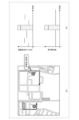
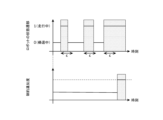
- FIG. 3 is an explanatory diagram of a determination method using temporal logic expressions.
- FIG. 3(a) is an explanatory diagram of an example of a determination method of a comparative example
- FIG. 3(b) is an explanatory diagram of an example of a determination method using temporal logic expressions.
- FIG. 3(a) and FIG. 3(b) show examples of determining whether or not a constraint condition ([- ⁇ , 0] ⁇ ) that prohibits a mobile object 1 from stopping for a long period of time in a no-parking zone is satisfied.
- (a) in Figure 3 shows a map of the target area, the locations of no-parking zones in the target area, and the movement routes of each mobile body 1 in the target area.
- the upper graph shows the state transition of the robot (mobile body 1)
- the lower graph shows the degree of constraint violation.
- the degree of constraint violation indicates the extent to which the state of the object (mobile body 1) deviates from the allowable range.
- the example shown in (b) in Figure 3 shows that the robot is stopped in a no-parking zone during the shaded time period, and therefore the degree of constraint violation increases during that time period.
- a judgment method using temporal logic expressions even if the constraints contain a large number of conditions, it is sufficient to change the permissible range, object state, and penalty value referenced in the temporal logic expressions for each condition. Therefore, a judgment method using temporal logic expressions has the advantage that it is easy to write the judgment process and is less likely to introduce errors in writing the judgment process.
- the conditions to be determined using the temporal logic formula shown in FIG. 2 are listed.
- the first to ninth conditions shown below are examples of conditions included in the constraint conditions, and the information processing system 100 according to the embodiment does not have to execute a simulation in which all of the first to ninth conditions are included in the constraint conditions.
- the information processing system 100 according to the embodiment may execute a simulation in which conditions other than the first to ninth conditions are included in the constraint conditions.
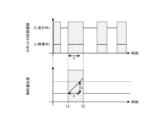
- FIG. 4 is an explanatory diagram of the first condition.
- the first condition prohibits the mobile body 1 from stopping for an extended period of time in a no-parking zone.
- the first condition corresponds to a condition regarding the movement or stopping of the mobile body 1 in a specified zone or during a specified time period.
- the purpose of the first condition is to prevent the mobile body 1 from committing a parking violation.
- the upper graph shows the state transition of the robot (mobile body 1), and the lower graph shows the degree of constraint violation.
- the state of the robot shows "1" when it is stopped, and "2" when it is moving.
- ⁇ is the allowable stopping time
- ⁇ is a function that becomes “1” while the robot is stopped
- the penalty value “time parked beyond ⁇ ” accumulates over time, and the degree of violation of the constraint increases.
- the robot is parked in a no-parking zone from time t1 to t2.
- the time that the robot is parked in the no-parking zone exceeds the allowable time " ⁇ ”
- the degree of constraint violation exceeds a threshold (see the dashed line in the figure), and the first condition is no longer met.
- G threshold of constraint violation
- the degree of constraint violation is accumulated using the Area function. That is, in the case of Figure 4, "t2 - ⁇ " is accumulated as the degree of constraint violation.
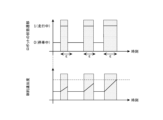
- FIG. 5 is an explanatory diagram of the second condition.
- the second condition prohibits the moving body 1 from traveling for long periods of time.
- the second condition corresponds to a condition related to the traveling time of the moving body 1.
- the purpose of the second condition is to prevent the moving body 1 from falling into a state where the remaining battery charge becomes zero.
- the upper graph shows the state transition of the robot (moving body 1)
- the lower graph shows the degree of constraint violation.
- the state of the robot is "0" when it is stopped at a base and charging, and "1" when it is away from the base and traveling (including temporary stops along the way).
- ⁇ represents the robot's allowable running time on a single battery charge (e.g., 180 minutes), and “ ⁇ ” represents a function that becomes “1" while the robot is running.
- “Area” represents a function that constantly accumulates a value that increases in proportion to time from 0 to 1.5 times " ⁇ " (the robot's maximum running time) up to the robot's recovery cost when the remaining battery power becomes zero (e.g., 20,000 yen).
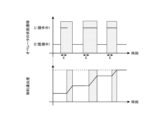
- FIG. 6 is an explanatory diagram of the third condition.
- the third condition prohibits the moving body 1 from traveling during a specified time period.
- the third condition corresponds to a condition regarding the movement or stopping of the moving body 1 in a specified area or during a specified time period.
- the purpose of the third condition is to prevent the moving body 1 from committing a traffic violation.
- the upper graph shows the state transition of the robot (moving body 1)
- the lower graph shows the degree of constraint violation.
- the state of the robot shows "0" when it is stopped, and "1" when it is traveling.
- ⁇ is a function that is "0” and " ⁇ ” is a function that is "1" while the robot is moving.
- “Area” is a function that adds a fine (e.g., 6,000 yen) for traffic division violations if the robot is moving during a time when driving is prohibited (e.g., during a pedestrian zone).
- the robot is traveling during the prohibited travel time period from time t3 to t4, so the degree of constraint violation reaches the threshold (see the dashed line in the figure), and the third condition is no longer met.
- FIG. 7 is an explanatory diagram of the fourth condition.
- the fourth condition prohibits the moving body 1 from traveling after a specified time.
- the fourth condition corresponds to a condition regarding the movement or stopping of the moving body 1 in a specified area or a specified time period.
- the purpose of the fourth condition is to avoid accidents occurring due to the moving body 1 traveling at night.
- the upper graph shows the state transition of the robot (moving body 1)
- the lower graph shows the degree of constraint violation.
- the state of the robot shows "0" when it is stopped, and "1" when it is traveling.
- ⁇ represents the time (e.g., 30 minutes) after sunset (a specified time) during which the camera mounted on the robot is unable to detect surrounding objects
- ⁇ represents a function that becomes "1" while the robot is moving.
- “Area” represents a function that accumulates a penalty value that increases in proportion to time from sunset until the environmental illuminance around the robot reaches 0 lux (e.g., 90 minutes) up to the cost of recovering the robot when it becomes unable to move (e.g., 20,000 yen).
- Fig. 8 is an explanatory diagram of the fifth condition.
- the fifth condition prohibits multiple mobile units 1 from departing and arriving at a base at the same time.
- the fifth condition corresponds to a condition regarding the movement of the mobile units 1 based on the base.
- the purpose of the fifth condition is to improve the efficiency of the operation of the mobile units 1 at the base.
- the upper graph shows the state transitions of multiple robots (mobile units 1) (here, three), and the lower graph shows the degree of constraint violation. The state of each robot shows a significant value when it is waiting at the base, and shows "0" when it is away from the base.
- ⁇ represents the permissible number of waiting robots at a base (here, one), and " ⁇ ” represents a function that outputs the fee (here, express fee) to be refunded to the customer in the event of a delivery delay when the number of waiting robots exceeds the number indicated by " ⁇ .” Additionally, “Area” represents a function that constantly adds this penalty value.
- the degree of constraint violation is incremented each time the time that the number of robots waiting at the base, more than the allowable amount, exceeds a predetermined time.
- the degree of constraint violation reaches a threshold value (see the dashed line in the figure), the fifth condition is no longer met.
- FIG. 9 is an explanatory diagram of the sixth condition.
- the sixth condition prohibits more than a certain number of moving bodies 1 from moving simultaneously on a crosswalk.
- the sixth condition corresponds to a condition related to the operator remotely operating the moving body 1.
- the purpose of the sixth condition is to improve the efficiency of remote operation of the moving body 1 by the operator on a crosswalk.
- the upper graph shows the state transition of the robot (moving body 1)
- the lower graph shows the degree of constraint violation.
- the state of the robot changes depending on the number of robots traveling on one or more crosswalks.
- ⁇ represents the number of operators that can work simultaneously (here, two)
- ⁇ represents a function that becomes “1” when the number of robots traveling across one or more crosswalks exceeds the value indicated by " ⁇ ”
- FIG. 10 is an explanatory diagram of the seventh condition.
- the seventh condition prohibits the operator from performing remote operation continuously for more than a predetermined time.
- the seventh condition corresponds to a condition related to the operator who remotely operates the mobile object 1.
- the purpose of the seventh condition is to prevent the operator from violating the Labor Standards Act.
- the upper graph shows the state transition of the operator, and the lower graph shows the degree of constraint violation.
- the operator's state shows "1" when the robot is being remotely operated, and "0" when the robot is being remotely monitored.
- ⁇ represents the time during which the operator can perform remote control operations continuously
- ⁇ represents a function that becomes “1” when the operator performs remote control operations continuously beyond the time indicated by " ⁇ ”
- “Area” represents a function that constantly accumulates this value.
- FIG. 11 is an explanatory diagram of the eighth condition.
- the eighth condition prohibits the mobile unit 1 from transporting deliveries beyond a specified range based on the base.
- the eighth condition corresponds to a condition related to the movement of the mobile unit 1 based on the base.
- the purpose of the eighth condition is to set an area in which orders from customers can be accepted within an area in which deliveries can be transported.
- the upper graph shows the state transition of the robot (mobile unit 1), and the lower graph shows the degree of constraint violation.
- the state of the robot shows "0" when it is returning to the base, and "1" when it is traveling away from the base (including temporary stops along the way).
- ⁇ represents the time allowed for the robot to return after leaving the base (for example, 60 minutes)
- ⁇ represents a function that outputs "1” or the delay time if the robot has been traveling beyond the time indicated by " ⁇ ”
- “Area” represents a function that constantly adds to this value.
- the degree of constraint violation is incremented each time the time the robot is moving exceeds a predetermined time " ⁇ ".
- the eighth condition is no longer satisfied.
- FIG. 12 is an explanatory diagram of the ninth condition.
- the ninth condition prohibits the mobile unit 1, which sells goods on the move, from moving when it is out of stock.
- the ninth condition corresponds to a condition regarding the inventory of deliveries transported by the mobile unit 1.
- the purpose of the ninth condition is to avoid losing opportunities to sell goods in a mobile sale.
- the upper graph shows the state transition of the robot (mobile unit 1), and the lower graph shows the degree of constraint violation.
- the state of the robot is "0" when it is returning to the base, "1" when it is away from the base and in business conducting a mobile sale, and "2" when a person is approaching the robot.
- ⁇ is the average predicted time from when the robot leaves the base until it runs out of stock (e.g., 240 minutes)
- ⁇ is a function that outputs "1” if a person approaches while the robot is out of stock
- “Area” is a function that constantly accumulates this value.
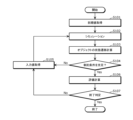
- Fig. 13 is a flowchart showing an example of the basic operation of the information processing system 100 according to the embodiment.
- the information processing system 100 acquires the initial values of the operation parameters of the moving body 1 (S101). Specifically, the user performs initial settings by inputting the operation parameters of the moving body 1 to be used in the simulation while viewing, for example, an input screen displayed on the output unit 22 of the information processing terminal 200. In this way, the information processing system 100 acquires the initial values of the operation parameters of the moving body 1 input to the information processing terminal 200.
- the information processing system 100 executes a simulation (S102). Specifically, the information processing system 100 executes a simulation according to the operation parameters of the moving body 1 obtained by the user performing initial settings.
- the information processing system 100 calculates the transition of the state of the object in the simulation based on the result of the execution of the simulation (S103). Specifically, when the constraint conditions include one or more conditions, the information processing system 100 calculates the transition of the state of the object to be judged (e.g., the moving body 1 or the operator) for each condition.
- the constraint conditions include one or more conditions
- the information processing system 100 calculates the transition of the state of the object to be judged (e.g., the moving body 1 or the operator) for each condition.
- the information processing system 100 determines whether the constraint conditions are satisfied based on the calculated transition of the state of the object (S104). Specifically, when the constraint conditions include one or more conditions, the information processing system 100 determines whether each condition is satisfied using a temporal logic formula for each condition.
- the information processing system 100 may display on the output unit 22 of the information processing terminal 200 a screen showing the correlation between the transition of the object's state and the degree of constraint violation for each condition, for example, in the judgment using the temporal logic formula in step S104.
- FIG. 14 is a diagram showing an example of a screen showing the correlation between the transition of the object's state and the degree of constraint violation.
- FIG. 14 shows the correlation between the transition of the object's state and the degree of constraint violation under the second condition.
- FIG. 14(a) shows a diagram when the object is robot A (moving body 1)
- FIG. 14(b) shows a diagram when the object is robot B (moving body 1).
- the user may manually determine whether or not the transition of the object's state satisfies the constraint condition while looking at the above screen displayed on the output unit 22.
- the information processing system 100 does not need to display the above screen on the output unit 22 of the information processing terminal 200.
- the information processing system 100 acquires input values that modify at least a portion of the operation parameters of the moving body 1 (S105). Specifically, the information processing system 100 displays an input value setting screen as shown in FIG. 15 on the output unit 22 of the information processing terminal 200. The user then sets the input values while looking at the input value setting screen. This causes the information processing system 100 to acquire the input values entered into the information processing terminal 200. The information processing system 100 then executes steps S102 to S104 again in accordance with the acquired input values.
- FIG. 15 is a diagram showing an example of an input value setting screen.
- the input value setting screen displays a first area B11, a second area B12, a third area B13, and a fourth area B14 for each type of operation parameter of the moving body 1.
- the first area B11 displays a name indicating the type of operation parameter of the moving body 1.
- the second area B12 displays the setting value at the time of the previous simulation.
- the third area B13 allows the input of a setting value at the time of the next simulation.
- the fourth area B14 displays the result of whether the setting value is appropriate or not.
- the user has changed the number of robots (moving bodies 1) from "10" to "6", and the number of operators from "5" to "3".
- the information processing system 100 then executes a calculation to evaluate the results of the simulation (S106). Specifically, the information processing system 100 executes a calculation to evaluate the results of the simulation using at least one of an index of safety in the operation of the mobile object 1, an index of economic rationality, and an index of convenience.
- the information processing system 100 determines whether to end the simulation (S107). Specifically, the information processing system 100 determines to end the simulation if the calculated evaluation exceeds the threshold value, and determines not to end the simulation if the calculated evaluation does not exceed the threshold value. For example, the information processing system 100 determines to end the simulation if the first score indicating the evaluation using safety as an index, the second score indicating the evaluation using economic rationality as an index, and the third score indicating the evaluation using convenience as an index exceed the first threshold value, the second threshold value, and the third threshold value, respectively, and determines not to end the simulation if they do not.
- the information processing system 100 ends the simulation and outputs an evaluation result obtained by evaluating the results of the simulation. Specifically, the information processing system 100 displays the results of the simulation evaluation using at least one of an index of safety in the operation of the mobile body 1, an index of economic rationality, and an index of convenience on the output unit 22 of the information processing terminal 200.
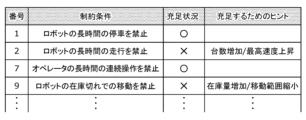
- the information processing system 100 may display a screen showing the satisfaction status of the constraint conditions on the output unit 22 of the information processing terminal 200, as shown in FIG. 16, for example.
- FIG. 16 is a diagram showing an example of a screen showing the satisfaction status of the constraint conditions. In the example shown in FIG. 16, the satisfaction status showing the degree of satisfaction of the condition and hints for satisfying the constraint conditions are displayed for each condition.
- each condition included in the constraint conditions includes required conditions that must be satisfied in the simulation, and recommended conditions that are stricter than the required conditions and are preferably satisfied.
- the satisfaction status indicates "X" when only the required conditions are satisfied, and "O” when both the required conditions and the recommended conditions are satisfied.
- the hint indicates how the operating parameters of the mobile unit 1 should be set to satisfy the recommended conditions. While looking at the above screen, the user may decide to end the simulation as is, or may decide to change the operating parameters of the mobile unit 1 and run the simulation again.
- the above hints may be prepared in advance by the system designer, or may be generated automatically by the information processing system 100 by comparing the values of the operation parameters before and after the simulation. In other words, if it is found that the recommended conditions are not satisfied when a simulation is performed with a relatively small number of vehicles, but that the constraint condition (e.g., the second condition) is satisfied when a simulation is performed with a relatively large number of vehicles, the information processing system 100 may automatically generate and present an "increase in the number of vehicles" as a hint for satisfying the recommended conditions. In other words, the information processing system 100 may display the knowledge obtained by the sensitivity analysis of the operation parameters on the output unit 22 of the information processing terminal 200.
- the constraint condition e.g., the second condition
- the information processing system 100 may display a screen indicating the satisfaction status of the above constraint conditions on the output unit 22 of the information processing terminal 200 after executing step S104.
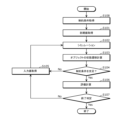
- Fig. 17 is a flowchart showing the first operation example of the information processing system 100 according to the embodiment. Note that the first operation example is the same as the basic operation example except for step S108, and therefore a description of the common points will be omitted here.
- the first operation example differs from the basic operation example in that the information processing system 100 executes step S108 before executing step S101.
- the information processing system 100 acquires the constraint conditions specified by the user before acquiring the initial values (S108).
- the information processing system 100 acquires the constraint conditions specified by the user before executing a simulation.
- the information processing system 100 displays a constraint condition setting screen as shown in FIG. 18 on the output unit 22 of the information processing terminal 200. Then, the user sets the constraint conditions while looking at the constraint condition setting screen. In this way, the information processing system 100 acquires the constraint conditions input to the information processing terminal 200.
- FIG. 18 is a diagram showing an example of a constraint condition setting screen.
- a first area B21, a second area B22, a third area B23, and a fourth area B24 are displayed for each condition.
- a name indicating the type of parameter that can be changed in the condition is displayed.
- the second area B22 it is possible to input an equal sign or an inequality sign.
- the third area B23 it is possible to input a setting value that the user can accept in the condition.
- the fourth area B24 a result indicating whether the setting value is appropriate or not is displayed.
- the user has set the allowable stop time ("RobotStopDuration") of the robot (mobile body 1) in the first condition to "less than 5 minutes.”
- FIG. 19 is a flowchart showing a specific example of the first operation example of the information processing system 100 according to the embodiment. Note that the flowchart shown in FIG. 19 is the same as the flowchart shown in FIG. 17 except that multiple speech bubbles are included, and therefore a description of the common points will be omitted here. Also, to simplify the explanation, the explanation will be given assuming that the constraint condition is only the first condition.
- step S108 the user sets the constraint conditions, and the information processing system 100 acquires the constraint conditions.
- the information processing system 100 acquires the constraint condition that the "robot downtime” is "5 minutes or less.”
- step S101 the user performs initial settings, and the information processing system 100 acquires initial values.
- the information processing system 100 acquires initial values of "service area (target area)" as "XXX,” "number of robots” as "5,” and "number of operators” as "1.”
- step S102 the information processing system 100 executes a simulation according to the acquired initial values, and in step S103, calculates the transition of the object's state in the simulation based on the results of the execution of the simulation.
- step S104 the information processing system 100 determines whether or not the constraint condition is satisfied based on the calculated transition of the object's state.
- the "robot down time" of one of the robots in the simulation is "10 minutes", which does not satisfy the constraint condition that the "robot down time” is "5 minutes or less” (step S104: No). Therefore, the information processing system 100 displays an input value setting screen on the output unit 22 of the information processing terminal 200.
- step S105 the user sets the input values, and the information processing system 100 acquires the input values.
- the information processing system 100 acquires input values in which the "number of robots" has been changed to 10 and the "number of operators" to 5.
- the information processing system 100 then executes steps S102 to S104 again in accordance with the acquired input values.
- step S104 again, as shown in the fifth speech bubble, the "robot downtime" for all robots in the simulation is "2 minutes", satisfying the constraint that the "robot downtime” is "5 minutes or less” (S104: Yes). Therefore, in step 106, the information processing system 100 performs a calculation to evaluate the results of the simulation.
- the information processing system 100 calculates an evaluation based on an index of economic rationality, where "economic efficiency (converted cost per day)" is 100,000 yen.
- step S107 the information processing system 100 determines whether or not to end the simulation.
- the "economic efficiency (converted cost per day)," which is an evaluation of the index of economic rationality, is 100,000 yen, which does not exceed (is above) the threshold value (here, 80,000 yen) (step S107: No). Therefore, the information processing system 100 causes the output unit 22 of the information processing terminal 200 to display the input value setting screen again.
- step S105 the user sets the input values, and the information processing system 100 acquires the input values.
- the information processing system 100 acquires input values in which the "number of robots" has been changed to six and the "number of operators" to three.
- the information processing system 100 then executes steps S102 to S104 again in accordance with the acquired input values.
- step S104 again, as shown in the eighth speech bubble, the "robot downtime" for all robots in the simulation is "3 minutes", satisfying the constraint that the "robot downtime” is "5 minutes or less” (S104: Yes). Therefore, in step 106, the information processing system 100 performs a calculation to evaluate the results of the simulation.
- the information processing system 100 calculates an evaluation based on an index of economic rationality, where "economic efficiency (converted cost per day)" is 60,000 yen.
- step S107 the information processing system 100 determines whether or not to end the simulation.
- the "economic efficiency (converted cost per day)," which is an evaluation of the index of economic rationality, is 60,000 yen, which exceeds (is below) the threshold value (step S107: Yes). Therefore, the information processing system 100 ends the simulation and outputs the evaluation result of the execution result of the simulation.
- FIG. 20 is a flowchart showing another specific example of the first operation example of the information processing system 100 according to the embodiment. Note that the flowchart shown in FIG. 20 is the same as the flowchart shown in FIG. 17 except that multiple speech bubbles are included, and therefore a description of the common points will be omitted here. Also, to simplify the explanation, the explanation will be given assuming that the only constraint is the fifth condition.
- step S108 the user sets the constraint conditions, and the information processing system 100 acquires the constraint conditions.
- the information processing system 100 acquires the constraint condition that the "number of simultaneous departures and arrivals from bases" is "0 times.”
- step S101 the user sets the initial settings, and the information processing system 100 acquires the initial values.
- the information processing system 100 acquires the initial values of "Service area (target area)" being "XXX,” “Number of robots” being 10, and "Business hours” being 13:00 to 17:00.
- step S102 the information processing system 100 executes a simulation according to the acquired initial values, and in step S103, calculates the transition of the object's state in the simulation based on the results of the execution of the simulation.
- step S104 the information processing system 100 determines whether the constraint condition is satisfied based on the calculated transition of the object's state.
- simultaneous departure and arrival of multiple robots at the base occurred a total of "three times" in the simulation, at 13:45, 14:50, and 16:10, and the constraint condition that the "number of simultaneous departures and arrivals at base" is "0 times" is not satisfied (step S104: No). Therefore, the information processing system 100 displays an input value setting screen on the output unit 22 of the information processing terminal 200.
- step S105 the user sets the input value, and the information processing system 100 acquires the input value.
- the information processing system 100 acquires the input value in which "Business hours” has been changed to 10:00-17:00.
- the information processing system 100 then executes steps S102-S104 again in accordance with the acquired input value.
- step S104 as shown in the fifth speech bubble, simultaneous departure and arrival of multiple robots at the base occurred "twice" in the simulation, at 11:35 and 15:20, and the constraint that the "number of simultaneous departures and arrivals at base" is "0 times" is not satisfied (step S104: No). Therefore, the information processing system 100 causes the output unit 22 of the information processing terminal 200 to display the input value setting screen again.
- step S105 the user sets the input value, and the information processing system 100 acquires the input value.
- the information processing system 100 acquires an input value in which the "number of robots" has been changed to five.
- the information processing system 100 then executes steps S102 to S104 again in accordance with the acquired input value.
- step S104 again, as shown in the seventh speech bubble, the "number of simultaneous departures and arrivals from base" in the simulation is "0 times", satisfying the constraint that the "number of simultaneous departures and arrivals from base” is "0 times" (S104: Yes). Therefore, in step 106, the information processing system 100 performs a calculation to evaluate the results of the simulation.
- the information processing system 100 calculates an evaluation using the economic rationality index of "economic efficiency (delivery completion time)" being 18:30.
- step S107 the information processing system 100 determines whether or not to end the simulation.
- the "economic efficiency (delivery completion time)" which is an evaluation based on an index of economic rationality, is 18:30, which does not exceed (is above) the threshold value (here, 17:00) (step S107: No). Therefore, the information processing system 100 causes the output unit 22 of the information processing terminal 200 to display the input value setting screen again.
- step S105 again, the user sets the input value, and the information processing system 100 acquires the input value.
- the information processing system 100 acquires an input value in which the "number of robots" has been changed to seven.
- the information processing system 100 then executes steps S102 to S104 again in accordance with the acquired input value.
- step S104 again, as shown in the tenth speech bubble, the "number of simultaneous departures and arrivals at base" in the simulation is "0 times", satisfying the constraint that the "number of simultaneous departures and arrivals at base” is “0 times” (S104: Yes). Therefore, in step 106, the information processing system 100 performs a calculation to evaluate the results of the simulation.
- the information processing system 100 calculates an evaluation using the economic rationality index of "economic efficiency (delivery completion time)" being 16:30.
- step S107 the information processing system 100 determines whether or not to end the simulation.
- the "economic efficiency (delivery completion time)" which is an evaluation of the index of economic rationality, is 16:30, which exceeds (is below) the threshold value (step S107: Yes). Therefore, the information processing system 100 ends the simulation and outputs the evaluation result of the execution result of the simulation.
- FIG. 21 is a flowchart showing the second operation example of the information processing system 100 according to the embodiment. Note that the second operation example is the same as the first operation example except for step S109, and therefore a description of the common points will be omitted here.
- the second operation example differs from the first operation example in that the information processing system 100 executes step S109 before executing step S101.
- the information processing system 100 determines whether the acquired constraint condition is valid or not before acquiring the initial value (S109). Specifically, the information processing system 100 displays a screen on the output unit 22 of the information processing terminal 200 for the user to verify whether the acquired constraint condition is valid or not. The user then verifies whether the constraint condition is valid or not while looking at the screen. For example, the screen displays a temporal logic formula according to the constraint condition set on the constraint condition setting screen, and the user verifies whether the temporal logic formula is written correctly or not.
- the user If the user's verification reveals that the temporal logic formula is written correctly, the user operates the information processing terminal 200 to input information indicating that the constraint conditions are valid. This causes the information processing system 100 to determine that the acquired constraint conditions are valid (S109: Yes) and execute the subsequent steps S101 to S107. On the other hand, if the temporal logic formula is written incorrectly, the user operates the information processing terminal 200 to input information indicating that the constraint conditions are invalid. This causes the information processing system 100 to determine that the acquired constraint conditions are invalid (S109: No) and executes step S108 again.
- step S109 may be executed in step S107.
- the information processing system 100 may display a screen indicating the degree to which the constraint conditions in the simulation are satisfied on the output unit 22 of the information processing terminal 200, together with an evaluation of the results of the simulation execution, as shown in FIG. 22, for example.
- FIG. 22 is a diagram showing an example of a screen for verifying the validity of constraint conditions.
- the screen displays a three-dimensional graph with an axis representing an evaluation using the safety (Risk) of the operation of the mobile unit 1 as an index, an evaluation using the economic rationality (Cost) of the operation of the mobile unit 1 as an index, and an evaluation using the convenience (Value) of the operation of the mobile unit 1 as an index.
- Each point shown in FIG. 22 represents an evaluation of the results of the execution of a simulation.
- the size of each point shown in FIG. 22 represents the degree of satisfaction of the constraint conditions in the simulation.
- the larger the size of each point the more the essential conditions of the constraint conditions are satisfied and there is a margin for the constraint conditions.
- the smaller the size of each point the more the essential conditions of the constraint conditions are satisfied but there is no margin for the constraint conditions.
- the user verifies whether the constraint conditions are valid while viewing the screen. If the user determines that the constraint conditions are valid as a result of the user's verification, the user operates the information processing terminal 200 to input information indicating that the constraint conditions are valid. This causes the information processing system 100 to determine that the constraint conditions are valid (S109: Yes) and, for example, to end the simulation. On the other hand, if the user determines that the constraint conditions are invalid, the user operates the information processing terminal 200 to input information indicating that the constraint conditions are invalid. This causes the information processing system 100 to determine that the acquired constraint conditions are invalid (S109: No) and, for example, to execute step S105.
- FIG. 23 is a flowchart showing the third operation example of the information processing system 100 according to the embodiment. Note that the third operation example is the same as the first operation example except for step S110, and therefore a description of the common points will be omitted here.
- the third operation example differs from the first operation example in that if at least one of the constraint conditions is not satisfied (S104: No), the information processing system 100 executes step S110 before executing step S105. Specifically, if the constraint conditions are not satisfied, the information processing system 100 executes relaxation settings that relax at least some of the constraint conditions so that all conditions included in the constraint conditions are satisfied in the simulation (S110).
- the information processing system 100 relaxes the condition so that it can be satisfied, and displays the relaxed condition on the output unit 22 of the information processing terminal 200.
- the relaxed condition may be displayed, for example, on an input value setting screen.
- the user can set the input values while referring to the relaxed condition displayed on the input value setting screen, making it easier to determine to what extent the constraint conditions need to be relaxed in order to satisfy the constraint conditions.
- FIG. 24 is a flowchart showing a specific example of the third operation example of the information processing system 100 according to the embodiment. Note that the flowchart shown in FIG. 24 is the same as the flowchart shown in FIG. 23 except that multiple speech bubbles are included, and therefore a description of the common points will be omitted here. Also, the flowchart shown in FIG. 24 shows a case where the constraint condition is the first condition only, as in the specific example of the first operation example, and therefore a description of the common points will be omitted here.
- step S110 the information processing system 100 relaxes the constraint that the "robot downtime” is "5 minutes or less” to a constraint that the "robot downtime” is "10 minutes or less.” This allows the user to set the input values while referring to this relaxed condition.
- Fig. 25 is a flowchart showing the fourth operation example of the information processing system 100 according to the embodiment. Note that the fourth operation example is the same as the third operation example except for step S111, and therefore a description of the common points will be omitted here.
- the fourth operation example differs from the third operation example in that the information processing system 100 executes step S11 before executing step S110. Specifically, when the constraint conditions are not satisfied, the information processing system 100 calculates the degree of violation of the constraint conditions and outputs the degree of violation of the constraint conditions.
- the information processing system 100 calculates the degree of violation of that condition.
- the degree of violation represents the difference between the threshold and a constraint violation degree that exceeds a threshold, for example, as shown in Figures 4 to 12.
- the information processing system 100 can easily determine the extent to which the constraint conditions should be relaxed in the relaxation setting by referring to the calculated degree of violation.
- the calculated degree of violation may be displayed, for example, on an input value setting screen. In this case, the user can set the input values while referring to the degree of violation displayed on the input value setting screen, making it easier to determine the extent to which the constraint conditions need to be relaxed in order to satisfy the constraint conditions.
- FIG. 26 is a flowchart showing a specific example of the fourth operation example of the information processing system 100 according to the embodiment. Note that the flowchart shown in FIG. 26 is the same as the flowchart shown in FIG. 25 except that multiple speech bubbles are included, and therefore a description of the common points will be omitted here. Also, the flowchart shown in FIG. 26 shows a case where the constraint condition is the first condition only, as in the specific example of the first operation example, and therefore a description of the common points will be omitted here.
- step S111 the information processing system 100 calculates the degree of violation for the time period during which the robot's downtime exceeds the "robot downtime" indicated by the constraint. For this reason, the information processing system 100 can perform mitigation settings by referring to this degree of violation.
- the information processing system 100 relaxes the constraint condition of "robot downtime” being "5 minutes or less” to a constraint condition of "robot downtime” being "7 minutes or less.” The user can also set the input value by referring to this degree of violation.
- Fig. 27 is a flowchart showing the fifth operation example of the information processing system 100 according to the embodiment. Note that the fifth operation example is the same as the fourth operation example except for steps S112 and S113, and therefore a description of the common points will be omitted here.
- the fifth operation example differs from the fourth operation example in that, when it is determined that the simulation is not to be terminated (S107: No), the information processing system 100 executes steps S112 and S113 before executing step S105. Specifically, when the evaluation result of the simulation execution result does not satisfy a predetermined condition (here, the calculated evaluation does not exceed the threshold), the information processing system 100 calculates the margin of the constraint condition and outputs the margin of the constraint condition.
- the margin represents the difference between the threshold and the constraint violation degree that does not exceed the threshold among the constraint violation degrees shown in, for example, Figures 4 to 12. In this case, the information processing system 100 can easily determine how much the constraint condition should be strengthened in the strengthening setting described later by referring to the calculated margin.
- the calculated margin may be displayed, for example, on an input value setting screen.
- the user can set the input value while referring to the margin displayed on the input value setting screen, so that it is easy to determine how much the constraint condition should be strengthened so that the evaluation result satisfies the predetermined condition.
- the information processing system 100 executes strengthening setting to strengthen at least a part of the constraint conditions so that the evaluation result can satisfy the predetermined condition (S113). For example, the information processing system 100 strengthens a condition among one or more conditions included in the constraint conditions that has a margin before the degree of constraint violation reaches a threshold, and displays the strengthened condition on the output unit 22 of the information processing terminal 200.
- the strengthened condition may be displayed, for example, on an input value setting screen. In this case, the user can set the input value while referring to the strengthened condition displayed on the input value setting screen, making it easier to determine to what extent the constraint condition needs to be strengthened so that the evaluation result can satisfy the predetermined condition.
- FIG. 28 is a flowchart showing a specific example of the fifth operation example of the information processing system 100 according to the embodiment. Note that the flowchart shown in FIG. 28 is the same as the flowchart shown in FIG. 27 except that multiple speech bubbles are included, and therefore a description of the common points will be omitted here. Also, the flowchart shown in FIG. 28 shows a case where the constraint condition is the first condition only, as in the specific example of the first operation example, and therefore a description of the common points will be omitted here.
- the information processing system 100 calculates the margin for the time period in which the robot's downtime has a margin relative to the "robot downtime" indicated by the constraint. Therefore, the information processing system 100 can perform strengthening settings by referring to this margin.
- the information processing system 100 strengthens the constraint condition of "robot downtime” being "5 minutes or less” to a constraint condition of "robot downtime” being "3 minutes or less”. The user can also set the input value by referring to this margin.
- the information processing system 100 may execute step S113 without executing step S112 if the evaluation result of the simulation execution result does not satisfy a predetermined condition.
- the information processing method and information processing system 100 determine whether or not a constraint condition is satisfied based on the transition of the state of an object in a simulation, and output an evaluation result obtained by evaluating the execution result of the simulation when the constraint condition is satisfied. Therefore, since it is possible to determine whether or not a constraint condition is satisfied including not only temporal changes in an object but also spatial changes, there is an advantage that it is easy to execute an efficient simulation that takes the constraint conditions into consideration.
- the information processing method and information processing system 100 make the determination based on a single function (here, a function described using a temporal logic expression) in which the state of the object referenced differs for each condition. Therefore, the information processing method and information processing system 100 according to the embodiment can uniformly and systematically execute the determination process of determining whether a constraint condition is satisfied, which has the advantage that even if the constraint condition contains a large number of conditions, it is easy to write the determination process and errors in writing the determination process are less likely to occur.
- a single function here, a function described using a temporal logic expression
- the information processing method and information processing system 100 according to the embodiment have the advantage that a common understanding can be easily achieved even if multiple people use the simulation.
- the information processing system 100 acquires the input value input by the user using the information processing terminal 200 in step S105, but this is not limited to the above.
- the information processing system 100 may automatically determine and acquire an input value that can satisfy the constraint condition in step S105, without relying on the user's input.
- the present disclosure can be realized as a program for causing a processor to execute steps included in an information processing method.
- the present disclosure can be realized as a non-transitory computer-readable recording medium, such as a CD-ROM, on which the program is recorded.
- each step is performed by running the program using hardware resources such as a computer's CPU, memory, and input/output circuits.
- hardware resources such as a computer's CPU, memory, and input/output circuits.
- each step is performed by the CPU obtaining data from memory or input/output circuits, etc., performing calculations, and outputting the results of the calculations to memory or input/output circuits, etc.
- each component included in the information processing system 100 may be configured with dedicated hardware, or may be realized by executing a software program suitable for each component.
- Each component may be realized by a program execution unit such as a CPU or processor reading and executing a software program recorded on a recording medium such as a hard disk or semiconductor memory.
- LSI is an integrated circuit. These may be individually integrated into a single chip, or may be integrated into a single chip that includes some or all of the functions. Furthermore, the integrated circuit is not limited to an LSI, and may be realized using a dedicated circuit or a general-purpose processor. An FPGA (Field Programmable Gate Array) that can be programmed after the LSI is manufactured, or a reconfigurable processor that can reconfigure the connections and settings of the circuit cells inside the LSI may also be used.
- FPGA Field Programmable Gate Array
- This disclosure can be applied to systems that provide mobility services.
Landscapes
- Physics & Mathematics (AREA)
- Engineering & Computer Science (AREA)
- Geometry (AREA)
- General Physics & Mathematics (AREA)
- Theoretical Computer Science (AREA)
- Mathematical Optimization (AREA)
- Computational Mathematics (AREA)
- Mathematical Analysis (AREA)
- Aviation & Aerospace Engineering (AREA)
- Pure & Applied Mathematics (AREA)
- Computer Hardware Design (AREA)
- Evolutionary Computation (AREA)
- General Engineering & Computer Science (AREA)
- Automation & Control Theory (AREA)
- Management, Administration, Business Operations System, And Electronic Commerce (AREA)
- Traffic Control Systems (AREA)
Priority Applications (3)
| Application Number | Priority Date | Filing Date | Title |
|---|---|---|---|
| CN202380093074.1A CN120641962A (zh) | 2023-02-15 | 2023-12-20 | 信息处理方法、程序以及信息处理终端 |
| JP2025500687A JPWO2024171617A1 (https=) | 2023-02-15 | 2023-12-20 | |
| US19/285,377 US20250356072A1 (en) | 2023-02-15 | 2025-07-30 | Information processing method, non-transitory computer-readable recording medium, and information processing terminal |
Applications Claiming Priority (2)
| Application Number | Priority Date | Filing Date | Title |
|---|---|---|---|
| US202363445817P | 2023-02-15 | 2023-02-15 | |
| US63/445,817 | 2023-02-15 |
Related Child Applications (1)
| Application Number | Title | Priority Date | Filing Date |
|---|---|---|---|
| US19/285,377 Continuation US20250356072A1 (en) | 2023-02-15 | 2025-07-30 | Information processing method, non-transitory computer-readable recording medium, and information processing terminal |
Publications (1)
| Publication Number | Publication Date |
|---|---|
| WO2024171617A1 true WO2024171617A1 (ja) | 2024-08-22 |
Family
ID=92421426
Family Applications (1)
| Application Number | Title | Priority Date | Filing Date |
|---|---|---|---|
| PCT/JP2023/045756 Ceased WO2024171617A1 (ja) | 2023-02-15 | 2023-12-20 | 情報処理方法、プログラム、及び情報処理端末 |
Country Status (4)
| Country | Link |
|---|---|
| US (1) | US20250356072A1 (https=) |
| JP (1) | JPWO2024171617A1 (https=) |
| CN (1) | CN120641962A (https=) |
| WO (1) | WO2024171617A1 (https=) |
Citations (4)
| Publication number | Priority date | Publication date | Assignee | Title |
|---|---|---|---|---|
| JP2001202352A (ja) * | 2000-01-19 | 2001-07-27 | Shimizu Corp | 物流拠点立地計画支援システム |
| WO2022044476A1 (ja) * | 2020-08-26 | 2022-03-03 | パナソニック インテレクチュアル プロパティ コーポレーション オブ アメリカ | 情報処理方法及び情報処理システム |
| JP2022047265A (ja) * | 2020-09-11 | 2022-03-24 | トヨタ自動車株式会社 | 配車システム、配車サーバ、及び配車方法 |
| WO2022244285A1 (ja) * | 2021-05-19 | 2022-11-24 | パナソニックIpマネジメント株式会社 | 保険料算定方法、プログラム及び保険料算定システム |
-
2023
- 2023-12-20 JP JP2025500687A patent/JPWO2024171617A1/ja active Pending
- 2023-12-20 CN CN202380093074.1A patent/CN120641962A/zh active Pending
- 2023-12-20 WO PCT/JP2023/045756 patent/WO2024171617A1/ja not_active Ceased
-
2025
- 2025-07-30 US US19/285,377 patent/US20250356072A1/en active Pending
Patent Citations (4)
| Publication number | Priority date | Publication date | Assignee | Title |
|---|---|---|---|---|
| JP2001202352A (ja) * | 2000-01-19 | 2001-07-27 | Shimizu Corp | 物流拠点立地計画支援システム |
| WO2022044476A1 (ja) * | 2020-08-26 | 2022-03-03 | パナソニック インテレクチュアル プロパティ コーポレーション オブ アメリカ | 情報処理方法及び情報処理システム |
| JP2022047265A (ja) * | 2020-09-11 | 2022-03-24 | トヨタ自動車株式会社 | 配車システム、配車サーバ、及び配車方法 |
| WO2022244285A1 (ja) * | 2021-05-19 | 2022-11-24 | パナソニックIpマネジメント株式会社 | 保険料算定方法、プログラム及び保険料算定システム |
Also Published As
| Publication number | Publication date |
|---|---|
| JPWO2024171617A1 (https=) | 2024-08-22 |
| US20250356072A1 (en) | 2025-11-20 |
| CN120641962A (zh) | 2025-09-12 |
Similar Documents
| Publication | Publication Date | Title |
|---|---|---|
| KR101826647B1 (ko) | 머신 러닝 기술을 통한 개인 맞춤형 자동차 중개 시스템 | |
| Litman | Autonomous vehicle implementation predictions | |
| Owais et al. | When to decide to convert a roundabout to a signalized intersection: Simulation approach for case studies in Jeddah and Al-Madinah | |
| KR20210088457A (ko) | 자율 주행 차량의 도로 테스트 방법, 장치, 기기 및 저장매체 | |
| KR102094250B1 (ko) | 셰어링된 차량의 지연 반납 검출을 제공하기 위한 방법 및 장치 | |
| JP2021168193A (ja) | テレマティックス接続サーチエンジンを使用する動的なスコアベースの危険性測定及び集約のためのインテリジェントな自己適応型車両用装置及びその対応する方法 | |
| CN109409982B (zh) | 共享车辆推荐方法及装置 | |
| TW201741993A (zh) | 確定運輸服務路線之系統及方法 | |
| US20220335545A1 (en) | System and method for estimating electric vehicle charge needs among a population in a region | |
| CN113423063A (zh) | 基于车载t-box的车辆监控方法、装置、车辆及介质 | |
| Giannoutakis et al. | Making a business case for intelligent transport systems: a holistic business model framework | |
| EP4327258A2 (en) | System and method for estimating electric vehicle charge needs among a population in a region | |
| CN112650794B (zh) | 位置数据处理方法、装置、电子设备和存储介质 | |
| Sánchez et al. | Prediction horizon requirements for automated driving: optimizing safety, comfort, and efficiency | |
| WO2023084847A1 (ja) | 情報出力方法、プログラム、及び情報出力システム | |
| JP7821971B2 (ja) | 情報処理方法、情報処理装置、および、プログラム | |
| WO2024171617A1 (ja) | 情報処理方法、プログラム、及び情報処理端末 | |
| CN113012455B (zh) | 风险路段确定方法、装置、电子设备和可读存储介质 | |
| Coelho et al. | A numerical tool for estimating pollutant emissions and vehicles performance in traffic interruptions on urban corridors | |
| Jungblut et al. | Automated and Connected Driving: State-of-the-Art and Implications for Future Scenario Analysis | |
| CN111861538A (zh) | 信息推送方法、装置、电子设备和存储介质 | |
| Bozorg et al. | Potential implication of automated vehicle technologies on travel behavior and system modeling | |
| CN109506666A (zh) | 车辆还车区域推荐方法与装置 | |
| Viti et al. | Dynamic modeling of VISSIM's critical gap parameter at unsignalized intersections | |
| WO2019132700A1 (ru) | Способ и система приобретения электронных билетов на транспорт |
Legal Events
| Date | Code | Title | Description |
|---|---|---|---|
| 121 | Ep: the epo has been informed by wipo that ep was designated in this application |
Ref document number: 23922950 Country of ref document: EP Kind code of ref document: A1 |
|
| ENP | Entry into the national phase |
Ref document number: 2025500687 Country of ref document: JP Kind code of ref document: A |
|
| WWE | Wipo information: entry into national phase |
Ref document number: 2025500687 Country of ref document: JP Ref document number: 202380093074.1 Country of ref document: CN |
|
| WWP | Wipo information: published in national office |
Ref document number: 202380093074.1 Country of ref document: CN |
|
| NENP | Non-entry into the national phase |
Ref country code: DE |
|
| 122 | Ep: pct application non-entry in european phase |
Ref document number: 23922950 Country of ref document: EP Kind code of ref document: A1 |