WO2024166284A1 - 表示装置 - Google Patents
表示装置 Download PDFInfo
- Publication number
- WO2024166284A1 WO2024166284A1 PCT/JP2023/004340 JP2023004340W WO2024166284A1 WO 2024166284 A1 WO2024166284 A1 WO 2024166284A1 JP 2023004340 W JP2023004340 W JP 2023004340W WO 2024166284 A1 WO2024166284 A1 WO 2024166284A1
- Authority
- WO
- WIPO (PCT)
- Prior art keywords
- display
- content
- display mode
- displayed
- screen
- Prior art date
- Legal status (The legal status is an assumption and is not a legal conclusion. Google has not performed a legal analysis and makes no representation as to the accuracy of the status listed.)
- Ceased
Links
Images

Classifications
-
- B—PERFORMING OPERATIONS; TRANSPORTING
- B60—VEHICLES IN GENERAL
- B60K—ARRANGEMENT OR MOUNTING OF PROPULSION UNITS OR OF TRANSMISSIONS IN VEHICLES; ARRANGEMENT OR MOUNTING OF PLURAL DIVERSE PRIME-MOVERS IN VEHICLES; AUXILIARY DRIVES FOR VEHICLES; INSTRUMENTATION OR DASHBOARDS FOR VEHICLES; ARRANGEMENTS IN CONNECTION WITH COOLING, AIR INTAKE, GAS EXHAUST OR FUEL SUPPLY OF PROPULSION UNITS IN VEHICLES
- B60K35/00—Instruments specially adapted for vehicles; Arrangement of instruments in or on vehicles
-
- B—PERFORMING OPERATIONS; TRANSPORTING
- B60—VEHICLES IN GENERAL
- B60R—VEHICLES, VEHICLE FITTINGS, OR VEHICLE PARTS, NOT OTHERWISE PROVIDED FOR
- B60R16/00—Electric or fluid circuits specially adapted for vehicles and not otherwise provided for; Arrangement of elements of electric or fluid circuits specially adapted for vehicles and not otherwise provided for
- B60R16/02—Electric or fluid circuits specially adapted for vehicles and not otherwise provided for; Arrangement of elements of electric or fluid circuits specially adapted for vehicles and not otherwise provided for electric constitutive elements
Definitions
- This case concerns a display device installed in a vehicle.
- Display devices that display various content information related to a vehicle are known. Examples of content information include vehicle speed information, output information, position information, navigation information, audio information, application information, and current time. Display devices have been proposed for recent vehicles that have large display screens, provide users with a wealth of information, and improve operability and visibility.
- Patent Document 1 discloses a display control device that can provide excellent operability by making it possible to switch between the first screen and the second screen on a display screen that is enlarged in the left-right direction.
- the display control device in Patent Document 1 allows two screens to be swapped horizontally, making it possible to display information and accept user operations on each screen, but it can only display two types of information and cannot change the display size. Therefore, there is room for improvement in order to obtain a good user experience (emotions experienced by the user through operational input to the display device and output from the display device, impressions the user has, user reactions, etc.). For example, it is desirable to develop a display device that can broadly meet the needs of users who want to see only one piece of information displayed large, or who want to see multiple pieces of information simultaneously.
- the present invention was conceived in consideration of these problems, and one of its objectives is to provide a display device that can improve the user experience. However, this objective is not the only objective. Another objective of the present invention is to achieve effects that cannot be obtained with conventional technology, which are derived from the configurations shown in the "Mode for carrying out the invention" described below.
- the disclosed display device can be realized as the aspects (application examples) disclosed below, which solve at least part of the above problems.
- Each of the aspects from aspect 2 onwards is an aspect that can be selected additionally as appropriate, and each of the aspects can be omitted. None of the aspects from aspect 2 onwards discloses an essential aspect or configuration for the present case.
- the disclosed display device has a first display mode in which a plurality of content display sections displaying content information related to a vehicle are displayed side by side on the same screen, a second display mode in which one of the plurality of content display sections selected by a user is enlarged and displayed to an area of the content display section adjacent to the one content display section in the first display mode, and a part of the content display section displayed in the first display mode is displayed side by side on the same screen as the enlarged content display section, and a third display mode in which the content display section enlarged and displayed in the second display mode is displayed on the full screen, and a display enlargement operation by the user causes a screen transition from the first display mode to the second display mode and a screen transition from the second display mode to the third display mode.
- each of the content display units has a first area showing a title of the content information and a second area showing the content of the content information, and the amount of information in the second area increases as the screen transition occurs in accordance with the display enlargement operation.
- the display enlargement operation includes a touch operation on the first area.
- Aspect 4 In any of Aspects 1 to 3 above, it is preferable that a screen transition from the third display mode to the second display mode and a screen transition from the second display mode to the first display mode are caused by a display reduction operation by the user. Aspect 5. In Aspect 4 which cites Aspect 2 or 3 above, it is preferable that the display reduction operation includes a pressing operation on a physical button provided separately from a screen on which the content display portion is displayed.
- the display reduction operation when transitioning the screen from the second display mode to the first display mode includes a swipe operation in the direction of the edge of the content display section that is enlarged and displayed at the edge of the screen in the second display mode or the content display section that is in the same screen.
- Aspect 7 in any of aspects 1 to 6 above, it is preferable that in the first display mode, the three content display sections are displayed side-by-side in a row, that in the second display mode, the one content display section enlarged to approximately twice the size of the content display section displayed in the first display mode and the content display section of the same size as the content display section displayed in the first display mode are displayed side-by-side, and that in the third display mode, only the one content display section is displayed.
- the disclosed display device can meet various user needs and improve the user experience.
- 1 is a block diagram showing a configuration of a display device according to an embodiment.
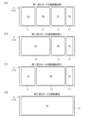
- 1A to 1D are diagrams for explaining examples of screen configurations in each of the three display modes.
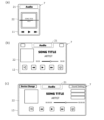
- 13A to 13C are diagrams for explaining specific examples of the content display section displayed in each of the three display modes.
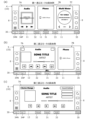
- 1A to 1C are diagrams for explaining specific examples of each of the three display modes.
- FIG. 1 is a block diagram showing the configuration of a display device 1 according to an embodiment.
- the display device 1 is mounted on a vehicle (not shown) and displays various content information related to the vehicle.
- the content information is mainly information that indicates the running state of the vehicle and the operating state of the in-vehicle equipment.
- Specific examples of content information that indicates the running state of the vehicle include speed, shift position, gear reduction ratio of the transmission, name of the running mode, running distance, estimated remaining running distance, fuel consumption, electricity consumption, remaining battery capacity, yaw rate, roll rate, pitch rate, longitudinal acceleration, lateral acceleration, road surface inclination angle, tire pressure, energy flow of the powertrain, running direction (orientation), altitude, temperature, and road surface friction coefficient.
- Content information representing the operating status of in-vehicle equipment includes audio information, car navigation information, lighting status information, cruise control related information, vehicle distance information, air conditioning information, etc.
- the display device 1 may also be connected to a user's smartphone and display content information representing the operating status of the smartphone (e.g., call information and email sending/receiving information, etc.). This information is generated or acquired by, for example, various ECUs, various in-vehicle equipment, various sensors, etc., and transmitted to the display device 1.
- the content information may also include vehicle speed information, output information, etc.
- the display device 1 includes an electronic control device 2 and an output device 3.
- the electronic control device 2 is a computer for controlling the content displayed on the output device 3, and includes a processor (arithmetic processing unit) and a memory (storage device).
- the processing content (program) of the electronic control device 2 is stored in the memory, and is executed by loading the content into the processor as appropriate.
- the electronic control device 2 may be formed integrally with the output device 3 (built into the output device 3), or may be provided separately from the output device 3.
- the output device 3 is a device that displays information about the vehicle described above, and is, for example, a liquid crystal display, an organic EL (Electro-Luminescence) display, a projector, etc.
- the display or projector screen on which information is displayed is also referred to as the display screen 10 (see FIG. 2(a), etc.). All information displayed on the display screen 10 is controlled by the electronic control unit 2.
- the shape of the display screen 10 (the shape of the area in which information is displayed) is not particularly limited, but is, for example, rectangular.
- the output device 3 is placed in a position that is easy for the driver to see, such as in the front center of the vehicle cabin (forward of the halfway point between the driver's seat and the passenger seat) or in front of the driver (forward of the steering wheel).
- An input device that accepts input operations for the contents of the display screen 10 may be provided as an auxiliary device of the output device 3.
- Specific examples of input devices include a touch panel device that detects touch operations on the display screen 10, an input device equipped with a keyboard, physical buttons, or a touchpad, a gaze detection device that detects gaze, and a gesture reading device that detects gesture operations.
- the display device 1 has at least three display modes (a first display mode 4, a second display mode 5, and a third display mode 6) as display modes (display modes) of information to be displayed on the output device 3. These display modes 4, 5, and 6 are switched by a display enlargement operation or a display reduction operation by the user, which will be described later.
- the first display mode 4 is a mode in which the content display sections 7 (7A to 7D) that display the above content information are displayed side by side on the same screen.
- the contents (content information) displayed on each content display section 7 are different.
- the multiple content display sections 7 displayed in the first display mode 4 all have the same screen size (size of the display area).
- the screen size of the content display section 7 in the first display mode 4 is referred to as the "first size 11".
- the first size 11 is, for example, rectangular, and its aspect ratio is not particularly limited. As shown in FIG.
- the screen size 11' of the content display section 7D located at the edge of the display screen 10 may be an incomplete size smaller than the first size 11.
- the first size 11 may be set to a size obtained by equally dividing the size of the display screen 10 into multiple parts so that an incomplete screen size 11' is not displayed.
- the display device 1 may change the displayed content display section 7 by scrolling the contents of the display screen 10 (e.g., by swiping left or right). For example, by scrolling the contents of the display screen 10 shown in FIG. 2(a) leftward, the content display section 7A at the left end may become an incomplete screen size 11' or disappear, and instead the content display section 7D at the right end or the content display section 7 to the right of this may be displayed.
- the display device 1 may also have non-display content display sections 7, and all of the content display sections 7, including the non-display content display sections 7, may be arranged, for example, in a horizontal row.
- the order of the content display sections 7 may be changeable by user operation, but it is preferable that it is not changed without user operation.
- the user can check all content information and select the content information that he or she wants to view.
- the second display mode 5 shown in Figures 2(b) and (c) is a mode in which one of the multiple content display sections 7 selected by the user is enlarged to the area of the content display section 7 that was adjacent to that one content display section 7 in the first display mode 4, and a part of the content display section 7 that was displayed in the first display mode 4 is displayed side by side on the same screen as the enlarged content display section 7.
- the screen size of the content display section 7 that is enlarged and displayed in the second display mode 5 is referred to as the "second size 12.”
- the second size 12 is approximately twice the size of the first size 11.
- the content display section 7A is enlarged to the area of the content display section 7B in FIG. 2(a), and other parts of the content display section 7B and the content display section 7C are displayed together. That is, in FIG. 2(b), the "one content display section 7" is the content display section 7A, and the "part of the content display section 7” is the content display section 7B and part of the content display section 7C.
- the content display section 7 selected by the user is located at the edge of the display screen 10 (here, the left edge)
- the content display section 7 is enlarged to approximately twice its original size on the opposite side from the edge (here, the right side).
- the order of the content display sections 7 does not change. For example, when the content display section 7A is enlarged to the area of the content display section 7B, the content display section 7B is shifted accordingly, or is not displayed as a result of being shifted.
- content display section 7B is expanded to the area of content display section 7C in FIG. 2(a), and the other content display sections 7A and parts of content display section 7C are displayed together. That is, in FIG. 2(c), the "one content display section 7" is content display section 7B, and the "part of content display section 7” is content display section 7A and parts of content display section 7C. In this way, if the content display section 7 selected by the user is not located at the edge of the display screen 10, content display section 7 may be expanded in either the left or right direction.
- the content display section 7 that can be selected by the user may be limited to those displayed in the first size 11.
- the content display section 7D shown in FIG. 2(a) cannot be selected.
- the content display section 7C in FIG. 2(a) is included in the content display section 7 located at the "edge of the display screen 10" described above.
- the content display section 7C is enlarged to approximately twice its size on the opposite side from the edge (i.e., the left side).
- the content display section 7B in the first size 11, the content display section 7C in the second size 12, and the content display section 7D in the incomplete screen size 11' are displayed on the display screen 10 in this order from the left.
- the user wants to enlarge and display the content display section 7D in the incomplete screen size 11' he or she can perform a swipe operation in the first display mode 4 and select the content display section 7D after it is displayed in the first size 11.
- the user can select the content display portion 7 in the first size 11 in the first display mode 4, the user can also select the content display portion 7 in the first size 11 in the second display mode 5.
- the mode itself, second display mode 5 does not change, and the content display portion 7 displayed in the second size 12 changes.
- the screen switches to the second display mode 5 screen shown in FIG. 2(c).
- the user can view multiple pieces of content information while enlarging the content information that he or she primarily wants to check.
- the third display mode 6 shown in FIG. 2(d) is a mode in which the content display section 7, which was enlarged in the second display mode 5, is displayed full screen.
- the screen size of the content display section 7 displayed full screen in the third display mode 6 will be referred to as the "full screen size 13".
- the full screen size 13 is approximately the same as the size of the display screen 10.
- the content display section 7A which was displayed in the second size 12 in FIG. 2(b), is displayed full screen.
- the user can view only one piece of content information on a large screen.
- the display enlargement operation is a predetermined operation set according to the output device 3 (or an accessory device of the output device 3). For example, if a touch panel device is attached, a touch operation or a swipe operation on an image or a screen is set as the display enlargement operation. Also, for example, if an input device is attached, a click operation or a press operation on a keyboard, a physical button, or a touchpad can be set as the display enlargement operation. Only one display enlargement operation may be set, or multiple display enlargement operations may be set.
- FIGS. 3(a) to (c) are specific examples of content display sections 7 of a first size 11, a second size 12, and a full screen size 13, which are displayed in three display modes 4, 5, and 6, respectively.
- Each content display section 7 has a first area 21 that shows the title of the content information, and a second area 22 that shows the content of the content information.
- the first area 21 is also called a header.
- the second area 22 may have a function of accepting user operations (such as a touch operation or a swipe operation) in addition to the function of showing the content of the content information.
- the above-mentioned display enlargement operation includes a touch operation on the first area 21. That is, the first area 21 has a function of accepting touch operations in addition to a title display function. Also, as shown in FIGS. 3(a) to (c), the amount of information in the second area 22 increases the more screens are changed in accordance with the display enlargement operation.
- incrementing the amount of information does not simply mean that characters, images, etc. are enlarged, but rather that the type, number, and amount of information displayed increases.
- the content display section 7 shown in Figs. 3(a) to (c) shows audio information.
- the second area 22 displays the song title and jacket image, a seek bar, a play/stop icon, a rewind icon, a fast-forward icon, and the like.
- the second area 22 further displays a plurality of icons such as a playback time, a shuffle icon, and a repeat icon.
- icons that allow the selection of radio or Bluetooth (registered trademark) connection may also be displayed.
- the amount of information displayed increases by changing the screen from the first size 11 to the second size 12 in the enlargement direction, and more information is provided to the user.
- the type and number of information is the same as in the second size 12, but further information may be added from the second size 12.
- first display mode 4 the second display mode 5, and the third display mode 6 are shown in Figs. 4(a) to (c).
- first display mode 4 three content display sections 7A, 7B, and 7C of the first size 11 are displayed in a horizontal row.
- the content display section 7A shows the audio information shown in Fig. 3(a)
- the content display section 7B shows the call information
- the content display section 7C shows the content information in a meter display using, for example, letters, numbers, scales, images, etc.
- a launcher display area 8 in which a launcher for launching an application is displayed is provided within the display screen 10, and an operation section 30 in which physical buttons 31 to 35 that can be operated by the user are arranged is provided separately from the display screen 10 (outside the display screen 10).
- the launcher display area 8 is provided vertically on each side of the display screen 10, but the arrangement and shape of the launcher display area 8 are not limited to this.
- Applications launched by the launcher include, for example, a video recording application, a navigation application, and a settings application. Note that icons indicating the time, the signal status of the linked smartphone, the remaining battery level, the email reception status, etc. may be displayed in the four corners of the display screen 10 (for example, the upper right and upper left).
- the operation unit 30 is provided, for example, below the display screen 10.
- the operation unit 30 has a home button 31 in the center in the horizontal direction, a call button 32 and an audio button 33 on either side of the home button 31, volume buttons 34N and 34P on the left edge, and a power button 35 on the right edge.
- the electronic control unit 2 controls the output device 3 in accordance with the pressed button 31 to 35.
- the screen transitions to second display mode 5 shown in FIG. 4(b).
- second display mode 5 one content display section 7A enlarged to approximately twice the size of the content display section 7 displayed in first display mode 4 is displayed side by side with a content display section 7B of the same size as the content display section 7 displayed in first display mode 4. This makes it possible to display audio information in an easy-to-read manner while also displaying call information.
- the screen transitions to the third display mode 6 shown in FIG. 4(c).
- the third display mode 6 In the third display mode 6, only one content display section 7A is displayed.
- the launcher display area 8 may continue to be displayed without change in any of the display modes 4, 5, and 6, or may be switched to hidden in the third display mode 6, for example.
- a screen transition is made from the third display mode 6 to the second display mode 5 and from the second display mode 5 to the first display mode 4 in response to a display reduction operation by the user.
- the reduction operation is a predetermined operation set according to the output device 3 (or an accessory of the output device 3). For example, if a touch panel device is attached, the reduction operation may be performed by touching the image or the screen.
- a swipe operation is set as the display reduction operation. Also, for example, if an input device is attached, a click operation or a press operation on a keyboard, a physical button, or a touch pad can be set as the display reduction operation. Only one may be set, or multiple may be set.
- the display reduction operation includes pressing the home button 31 (physical button).
- pressing the home button 31 once changes the content display unit 7 from the full screen size 13 of the third display mode 6 to the second size 12 of the second display mode 5, and pressing the home button 31 once more changes the content display unit 7 from the second size 12 of the second display mode 5 to the first size 11 of the first display mode 4.
- the display enlargement operation and the display reduction operation are separate operations in separate locations, so the user will not be confused.
- the screen transition in the shrinking direction by pressing the home button 31 may be performed in the reverse order to the screen transition in the enlargement direction. For example, if the screen transition is performed in the direction in which the content display section 7A expands in the order of FIG. 4(a), FIG. 4(b), and FIG. 4(c), the content display section 7A shrinks in the order of FIG. 4(c), FIG. 4(b), and FIG. 4(a). By transitioning the screen back in this way, the display switches to one that is familiar to the user, improving ease of use for the user.
- the display reduction operation that transitions the screen from the second display mode 5 to the first display mode 4 includes a swipe operation in a predetermined direction. Specifically, when the content display section 7 that is enlarged and displayed at the edge of the display screen 10 in the second display mode 5 or a content display section 7 in the same screen is swiped in the direction of the edge, the screen transitions to the first display mode 4.
- the content display section 7A of the second size 12 is on the left side, so the predetermined direction is the left direction. That is, in FIG. 2(b), swiping content display section 7A, or content display section 7B or 7C on the same screen to the left is a display reduction operation.
- This swipe operation changes content display section 7A of the second size 12 to the first size 11, resulting in first display mode 4 shown in FIG. 2(a). Note that in second display mode 5 shown in FIG. 2(b), even if content display section 7A, 7B, or 7C is swiped to the right, content display section 7A does not reduce and the second size 12 is maintained.
- the display device 1 described above has at least three display modes.
- the first display mode 4 is a mode in which a plurality of content display sections 7 displaying content information are displayed side by side on the same screen (display screen 10)
- the second display mode 5 is a mode in which a selected content display section 7 is displayed side by side with other content display sections 7 on the same screen while being enlarged to the area of the adjacent content display section 7,
- the third display mode 6 is a mode in which one content display section 7 is displayed full screen.
- the screen transitions from the first display mode 4 to the second display mode 5 and from the second display mode 5 to the third display mode 6 by the user's display enlargement operation, so that various needs of users can be met and the user experience can be improved.
- first display mode 4 and second display mode 5 can meet the needs of users who want to view multiple pieces of content information
- second display mode 5 can meet the needs of users who want to enlarge one piece of content information slightly and view it together with other pieces of content information
- third display mode 6 can meet the needs of users who want to view only one piece of content information on a large screen.
- the amount of information in the second area 22 increases as the screen transitions in accordance with the display enlargement operation. In this way, not only does the size of the content display section 7 (display area, character size, etc.) increase, but the amount of content information displayed therein also increases, making it possible to provide the user with more information and further improving the user experience.
- each content display section 7 is provided with a first area 21 indicating the title of the content information and a second area 22 indicating the content of the content information, and the display enlargement operation includes a touch operation on the first area 21.
- the user can change the screen by simply touching the first area 21 indicating the title of the content display section 7 that the user wants to enlarge, thereby improving operability.
- a user's display reduction operation causes a screen transition from the third display mode 6 to the second display mode 5, and also causes a screen transition from the second display mode 5 to the first display mode 4.
- the display mode can be switched in the reduction direction one step at a time, improving the user experience.
- the display reduction operation includes pressing a physical button (e.g., the home button 31) that is provided separately from the display screen 10 on which the content display section 7 is displayed, making it easy to identify the location of the operation.
- a physical button e.g., the home button 31
- the display enlargement operation and the display reduction operation are set as separate operations for different locations (i.e., within a specified area of the display screen 10 or the physical button 31 outside the display screen 10), the user is less likely to make operational errors, and operability can be improved.
- the display reduction operation when transitioning the screen from the second display mode 5 to the first display mode 4 includes swiping the content display section 7 that is enlarged and displayed at the edge of the display screen 10 in the second display mode 5, or the content display section 7 in the same screen, toward that edge. This improves operability. Furthermore, when a swipe operation is performed toward the side where the content display section 7 in the second size 12 is located (the side offset to the left or right), the content display section 7 switches (becomes smaller) from the second size 12 to the first size 11, making it easier to intuitively understand the swipe operation and the screen transition.
- the above-described display device 1 is an example, and is not limited to the above. 4A to 4C, a launcher display area 8 is provided within the display screen 10, but the launcher display area 8 is not essential.
- an operation unit 30 in which physical buttons 31 to 35 that can be operated by the user are arranged is provided separately from the display screen 10 (outside the display screen 10), but the physical buttons 31 to 35 are merely an example, and the operation unit 30 may be omitted. Note that, when the display reduction operation includes a pressing operation of a physical button, the pressing operation may be a pressing operation of the physical buttons 32 to 35 other than the home button 31.
- the manner of screen transition when a display reduction operation is performed is not limited to the reverse order of when the screen transitions in the enlargement direction.
- second display mode 5 may be skipped and the display mode may be switched to first display mode 4.
- the display enlargement operation and the display reduction operation may be different operations on the same target (e.g., a specified display area or a physical button).
- first display mode 4 an example is given of a case in which multiple content display sections 7 displayed in first display mode 4 all have the same screen size (first size 11), but content display sections 7 of different screen sizes may be displayed side-by-side in first display mode 4.
- first display mode 4 when five content display sections 7 are displayed in first display mode 4, they may be arranged like an Olympic rings symbol, with the top three content display sections 7 being different sizes from the bottom two content display sections 7.
- the second size 12 may not be approximately twice the first size 11, depending on the size of the content display section 7 that is selected and enlarged.
- the content display portion 7 displayed alongside one enlarged content display portion 7 on the same screen does not have to be the first size 11.
- the content display portion 7 displayed in first display mode 4 may be displayed in a reduced size compared to the size in first display mode 4 or the shape may be changed to a square so that the entire content display portion 7 displayed in first display mode 4 is also displayed in second display mode 5.
- the display device 1 is exemplified as being provided with three display modes, the first display mode 4, the second display mode 5, and the third display mode 6, but other display modes may be provided.
- a display mode (fourth display mode) may be provided in which one of the multiple content display sections 7 selected by the user is enlarged and displayed in the upper half of the display screen 10, and the remaining content display sections 7 are displayed side by side below the enlarged content display section 7.
- This invention can be used in the manufacturing industry of display devices mounted on vehicles, and also in the manufacturing industry of vehicles equipped with such display devices.
Landscapes
- Engineering & Computer Science (AREA)
- Mechanical Engineering (AREA)
- Chemical & Material Sciences (AREA)
- Combustion & Propulsion (AREA)
- Transportation (AREA)
- User Interface Of Digital Computer (AREA)
Abstract
Description
態様3.上記の態様2において、前記表示拡大操作には、前記第一領域に対するタッチ操作が含まれることが好ましい。
態様5.上記の態様2又は3を引用する態様4において、前記表示縮小操作には、前記コンテンツ表示部が表示される画面とは別体で設けられた物理ボタンに対する押圧操作が含まれることが好ましい。
図1は、実施例としての表示装置1の構成を示すブロック図である。この表示装置1は、図示しない車両に搭載され、車両に関する様々なコンテンツ情報を表示する装置である。コンテンツ情報は、おもに、車両の走行状態や車載機器の作動状態を表す情報である。車両の走行状態を表すコンテンツ情報の具体例としては、速度,シフトポジション,変速機の減速比,走行モードの名称,走行距離,推定走行可能距離,燃費,電費,バッテリ残容量,ヨーレート,ロールレート,ピッチレート,前後加速度,横加速度,路面傾斜角度,タイヤ空気圧,パワートレインのエネルギーフロー,走行方向(方位),標高,気温,路面摩擦係数といった情報が挙げられる。
[2-1.各表示モード]
表示装置1は、出力装置3に表示される情報の表示モード(表示態様)として、少なくとも三種類の表示モード(第一表示モード4,第二表示モード5,第三表示モード6)を備える。これらの表示モード4,5,6は、後述するユーザの表示拡大操作又は表示縮小操作により切り替わる。
表示装置1は、ユーザの表示拡大操作により、第一表示モード4から第二表示モード5に画面遷移するとともに、第二表示モード5から第三表示モード6に画面遷移する。表示拡大操作は、出力装置3に応じて(あるいは出力装置3の付属装置)に応じて設定された所定の操作である。例えば、タッチパネル装置が付属されている場合は、画像やスクリーンに対するタッチ操作やスワイプ操作が表示拡大操作として設定される。また、例えば入力装置が付属されている場合は、キーボードや物理ボタンやタッチパッドに対するクリック操作や押圧操作が表示拡大操作として設定されうる。表示拡大操作は一つだけ設定されていてもよいし、複数設定されていてもよい。
本実施形態の表示装置1は、ユーザの表示縮小操作により、第三表示モード6から第二表示モード5に画面遷移するとともに、第二表示モード5から第一表示モード4に画面遷移する。表示縮小操作は、出力装置3に応じて(あるいは出力装置3の付属装置)に応じて設定された所定の操作である。例えば、タッチパネル装置が付属されている場合は、画像やスクリーンに対するタッチ操作やスワイプ操作が表示縮小操作として設定される。また、例えば入力装置が付属されている場合は、キーボードや物理ボタンやタッチパッドに対するクリック操作や押圧操作が表示縮小操作として設定されうる。表示縮小操作は一つだけ設定されていてもよいし、複数設定されていてもよい。
(1)上述した表示装置1では、少なくとも三種類の表示モードが設けられる。第一表示モード4は、コンテンツ情報を表示するコンテンツ表示部7を同一画面(表示画面10)に複数並べて表示するモードであり、第二表示モード5は、選択された一つのコンテンツ表示部7を隣のコンテンツ表示部7の領域まで拡大表示しつつ他のコンテンツ表示部7と同一画面に並べて表示するモードであり、第三表示モード6は一つのコンテンツ表示部7を全画面に表示するモードである。そして、ユーザの表示拡大操作により、第一表示モード4から第二表示モード5に画面遷移するとともに第二表示モード5から第三表示モード6に画面遷移することから、ユーザの様々なニーズに応えることができ、ユーザエクスペリエンスを改善できる。
上述した表示装置1は一例であって、上述したものに限られない。
例えば、図4(a)~(c)に示す具体例では、表示画面10内にランチャー表示領域8が設けられているが、ランチャー表示領域8は必須ではない。また、この具体例では、表示画面10とは別体で(表示画面10外に)、ユーザが操作可能な物理ボタン31~35が並ぶ操作部30が設けられているが、物理ボタン31~35は一例であり、また、操作部30を省略してもよい。なお、表示縮小操作に物理ボタンの押圧操作が含まれる場合、ホームボタン31以外の物理ボタン32~35の押圧操作としてもよい。
2 電子制御装置
3 出力装置
4 第一表示モード
5 第二表示モード
6 第三表示モード
7,7A,7B,7C,7D コンテンツ表示部
8 ランチャー表示領域
10 表示画面(画面)
11 第一サイズ
11′ 画面サイズ
12 第二サイズ
13 全画面サイズ
21 第一領域
22 第二領域
30 操作部
31 ホームボタン(物理ボタン)
32 通話ボタン(物理ボタン)
33 オーディオボタン(物理ボタン)
34N,34P ボリュームボタン(物理ボタン)
35 電源ボタン(物理ボタン)
Claims (7)
- 車両に関するコンテンツ情報を表示するコンテンツ表示部を同一画面に複数並べて表示する第一表示モードと、
複数の前記コンテンツ表示部のうちユーザにより選択された一つを、前記第一表示モードで当該一つのコンテンツ表示部に隣接していた前記コンテンツ表示部の領域まで拡大表示するとともに、前記第一表示モードで表示されていた前記コンテンツ表示部の一部を、拡大表示する前記コンテンツ表示部と同一画面に並べて表示する第二表示モードと、
前記第二表示モードで拡大表示されていた前記コンテンツ表示部を全画面に表示する第三表示モードと、を備え、
前記ユーザの表示拡大操作により、前記第一表示モードから前記第二表示モードに画面遷移するとともに前記第二表示モードから前記第三表示モードに画面遷移する
ことを特徴とする、表示装置。 - 各々の前記コンテンツ表示部は、前記コンテンツ情報の表題を示す第一領域と、前記コンテンツ情報の内容を示す第二領域と、を有し、
前記表示拡大操作に従って画面遷移するほど前記第二領域内の情報量が増す
ことを特徴とする、請求項1に記載の表示装置。 - 前記表示拡大操作には、前記第一領域に対するタッチ操作が含まれる
ことを特徴とする、請求項2に記載の表示装置。 - 前記ユーザの表示縮小操作により、前記第三表示モードから前記第二表示モードに画面遷移するとともに前記第二表示モードから前記第一表示モードに画面遷移する
ことを特徴とする、請求項1~3のいずれか一項に記載の表示装置。 - 前記表示縮小操作には、前記コンテンツ表示部が表示される画面とは別体で設けられた物理ボタンに対する押圧操作が含まれる
ことを特徴とする、請求項2又は3を引用する請求項4に記載の表示装置。 - 前記第二表示モードから前記第一表示モードに画面遷移するときの前記表示縮小操作には、前記第二表示モード時に画面の端で拡大表示されている前記コンテンツ表示部又はこれと同一画面内にある前記コンテンツ表示部を、前記端の方向へスワイプ操作することが含まれる
ことを特徴とする、請求項4又は5に記載の表示装置。 - 前記第一表示モードでは、三つの前記コンテンツ表示部が横一列に並べて表示され、
前記第二表示モードでは、前記第一表示モードで表示される前記コンテンツ表示部の約二倍の大きさに拡大表示された前記一つのコンテンツ表示部と、前記第一表示モードで表示される前記コンテンツ表示部と同一の大きさの前記コンテンツ表示部とが並べて表示され、
前記第三表示モードでは、前記一つのコンテンツ表示部のみが表示される
ことを特徴とする、請求項1~6のいずれが一項に記載の表示装置。
Priority Applications (2)
| Application Number | Priority Date | Filing Date | Title |
|---|---|---|---|
| JP2024575979A JPWO2024166284A1 (ja) | 2023-02-09 | 2023-02-09 | |
| PCT/JP2023/004340 WO2024166284A1 (ja) | 2023-02-09 | 2023-02-09 | 表示装置 |
Applications Claiming Priority (1)
| Application Number | Priority Date | Filing Date | Title |
|---|---|---|---|
| PCT/JP2023/004340 WO2024166284A1 (ja) | 2023-02-09 | 2023-02-09 | 表示装置 |
Publications (1)
| Publication Number | Publication Date |
|---|---|
| WO2024166284A1 true WO2024166284A1 (ja) | 2024-08-15 |
Family
ID=92262225
Family Applications (1)
| Application Number | Title | Priority Date | Filing Date |
|---|---|---|---|
| PCT/JP2023/004340 Ceased WO2024166284A1 (ja) | 2023-02-09 | 2023-02-09 | 表示装置 |
Country Status (2)
| Country | Link |
|---|---|
| JP (1) | JPWO2024166284A1 (ja) |
| WO (1) | WO2024166284A1 (ja) |
Citations (7)
| Publication number | Priority date | Publication date | Assignee | Title |
|---|---|---|---|---|
| JP2005239042A (ja) * | 2004-02-27 | 2005-09-08 | Nippon Seiki Co Ltd | 車両用情報表示装置及び車両用情報表示方法 |
| JP2007257220A (ja) * | 2006-03-22 | 2007-10-04 | Matsushita Electric Ind Co Ltd | 表示装置 |
| JP2013033451A (ja) * | 2011-06-29 | 2013-02-14 | Toyota Motor Corp | 車両用操作装置 |
| WO2014129197A1 (ja) * | 2013-02-22 | 2014-08-28 | パナソニック株式会社 | 表示制御装置および表示制御プログラム |
| US20160288643A1 (en) * | 2012-11-14 | 2016-10-06 | Volkswagen Aktiengesellschaft | Information playback system and method for information playback |
| JP2019164674A (ja) * | 2018-03-20 | 2019-09-26 | トヨタ自動車株式会社 | 車両用表示装置 |
| JP2022063674A (ja) * | 2020-10-12 | 2022-04-22 | アルプスアルパイン株式会社 | 表示システム |
-
2023
- 2023-02-09 JP JP2024575979A patent/JPWO2024166284A1/ja active Pending
- 2023-02-09 WO PCT/JP2023/004340 patent/WO2024166284A1/ja not_active Ceased
Patent Citations (7)
| Publication number | Priority date | Publication date | Assignee | Title |
|---|---|---|---|---|
| JP2005239042A (ja) * | 2004-02-27 | 2005-09-08 | Nippon Seiki Co Ltd | 車両用情報表示装置及び車両用情報表示方法 |
| JP2007257220A (ja) * | 2006-03-22 | 2007-10-04 | Matsushita Electric Ind Co Ltd | 表示装置 |
| JP2013033451A (ja) * | 2011-06-29 | 2013-02-14 | Toyota Motor Corp | 車両用操作装置 |
| US20160288643A1 (en) * | 2012-11-14 | 2016-10-06 | Volkswagen Aktiengesellschaft | Information playback system and method for information playback |
| WO2014129197A1 (ja) * | 2013-02-22 | 2014-08-28 | パナソニック株式会社 | 表示制御装置および表示制御プログラム |
| JP2019164674A (ja) * | 2018-03-20 | 2019-09-26 | トヨタ自動車株式会社 | 車両用表示装置 |
| JP2022063674A (ja) * | 2020-10-12 | 2022-04-22 | アルプスアルパイン株式会社 | 表示システム |
Also Published As
| Publication number | Publication date |
|---|---|
| JPWO2024166284A1 (ja) | 2024-08-15 |
Similar Documents
| Publication | Publication Date | Title |
|---|---|---|
| CN102483680B (zh) | 用于显示信息的方法和设备 | |
| EP2726970B1 (en) | Vehicle operation device and vehicle operation method | |
| US11798758B2 (en) | Steering switch device and steering switch system | |
| KR101609024B1 (ko) | 사용자 인터페이스를 제공하는 방법 및 장치 | |
| US8970647B2 (en) | Pushing a graphical user interface to a remote device with display rules provided by the remote device | |
| US9311115B2 (en) | Pushing a graphical user interface to a remote device with display rules provided by the remote device | |
| JP5456899B2 (ja) | 車両用操作装置 | |
| CN102742265B (zh) | 操作车辆显示器的方法和车辆显示系统 | |
| JP6035828B2 (ja) | 表示操作装置および表示システム | |
| CN105027065A (zh) | 信息播放系统和用于信息播放的方法 | |
| KR102082555B1 (ko) | 목록에서 객체를 선택하기 위한 방법 및 장치 | |
| WO2009128148A1 (ja) | 遠隔操作装置 | |
| CN103857552B (zh) | 用于显示尤其在车辆中的信息的方法和用于车辆的显示设备 | |
| JP6266090B2 (ja) | 操作装置 | |
| JP2013095289A (ja) | 入力装置 | |
| JP2009286175A (ja) | 車両用表示装置 | |
| KR102385060B1 (ko) | 입력 장치 및 그 제어방법 | |
| WO2024166284A1 (ja) | 表示装置 | |
| JP7388590B1 (ja) | 自動車用ディスプレイ | |
| JP2004243834A (ja) | 車両用操作系操作状態表示方法および操作系操作状態表示システム | |
| CN113733910A (zh) | 用于机动车辆的智能交互式控制系统 | |
| JP7401017B1 (ja) | 自動車用ディスプレイ | |
| JP7795720B2 (ja) | 自動車用ディスプレイ | |
| WO2020196561A1 (ja) | 操作装置 | |
| JP7283607B2 (ja) | 車両用表示制御装置、表示制御方法及び表示制御プログラム |
Legal Events
| Date | Code | Title | Description |
|---|---|---|---|
| 121 | Ep: the epo has been informed by wipo that ep was designated in this application |
Ref document number: 23921115 Country of ref document: EP Kind code of ref document: A1 |
|
| DPE1 | Request for preliminary examination filed after expiration of 19th month from priority date (pct application filed from 20040101) | ||
| WWE | Wipo information: entry into national phase |
Ref document number: 2024575979 Country of ref document: JP |
|
| WWE | Wipo information: entry into national phase |
Ref document number: 2501005260 Country of ref document: TH |
|
| NENP | Non-entry into the national phase |
Ref country code: DE |
|
| 122 | Ep: pct application non-entry in european phase |
Ref document number: 23921115 Country of ref document: EP Kind code of ref document: A1 |