WO2023026878A1 - 情報処理プログラム、情報処理方法および情報処理システム - Google Patents
情報処理プログラム、情報処理方法および情報処理システム Download PDFInfo
- Publication number
- WO2023026878A1 WO2023026878A1 PCT/JP2022/030788 JP2022030788W WO2023026878A1 WO 2023026878 A1 WO2023026878 A1 WO 2023026878A1 JP 2022030788 W JP2022030788 W JP 2022030788W WO 2023026878 A1 WO2023026878 A1 WO 2023026878A1
- Authority
- WO
- WIPO (PCT)
- Prior art keywords
- information
- playlist
- music
- screen
- display
- Prior art date
- Legal status (The legal status is an assumption and is not a legal conclusion. Google has not performed a legal analysis and makes no representation as to the accuracy of the status listed.)
- Ceased
Links
Images














Classifications
-
- A—HUMAN NECESSITIES
- A63—SPORTS; GAMES; AMUSEMENTS
- A63F—CARD, BOARD, OR ROULETTE GAMES; INDOOR GAMES USING SMALL MOVING PLAYING BODIES; VIDEO GAMES; GAMES NOT OTHERWISE PROVIDED FOR
- A63F13/00—Video games, i.e. games using an electronically generated display having two or more dimensions
- A63F13/50—Controlling the output signals based on the game progress
- A63F13/52—Controlling the output signals based on the game progress involving aspects of the displayed game scene
-
- A—HUMAN NECESSITIES
- A63—SPORTS; GAMES; AMUSEMENTS
- A63F—CARD, BOARD, OR ROULETTE GAMES; INDOOR GAMES USING SMALL MOVING PLAYING BODIES; VIDEO GAMES; GAMES NOT OTHERWISE PROVIDED FOR
- A63F13/00—Video games, i.e. games using an electronically generated display having two or more dimensions
- A63F13/50—Controlling the output signals based on the game progress
- A63F13/54—Controlling the output signals based on the game progress involving acoustic signals, e.g. for simulating revolutions per minute [RPM] dependent engine sounds in a driving game or reverberation against a virtual wall
-
- A—HUMAN NECESSITIES
- A63—SPORTS; GAMES; AMUSEMENTS
- A63F—CARD, BOARD, OR ROULETTE GAMES; INDOOR GAMES USING SMALL MOVING PLAYING BODIES; VIDEO GAMES; GAMES NOT OTHERWISE PROVIDED FOR
- A63F13/00—Video games, i.e. games using an electronically generated display having two or more dimensions
- A63F13/80—Special adaptations for executing a specific game genre or game mode
- A63F13/814—Musical performances, e.g. by evaluating the player's ability to follow a notation
-
- A—HUMAN NECESSITIES
- A63—SPORTS; GAMES; AMUSEMENTS
- A63F—CARD, BOARD, OR ROULETTE GAMES; INDOOR GAMES USING SMALL MOVING PLAYING BODIES; VIDEO GAMES; GAMES NOT OTHERWISE PROVIDED FOR
- A63F13/00—Video games, i.e. games using an electronically generated display having two or more dimensions
- A63F13/50—Controlling the output signals based on the game progress
- A63F13/53—Controlling the output signals based on the game progress involving additional visual information provided to the game scene, e.g. by overlay to simulate a head-up display [HUD] or displaying a laser sight in a shooting game
- A63F13/533—Controlling the output signals based on the game progress involving additional visual information provided to the game scene, e.g. by overlay to simulate a head-up display [HUD] or displaying a laser sight in a shooting game for prompting the player, e.g. by displaying a game menu
Definitions
- the present invention relates to an information processing program, an information processing method, and an information processing system.
- rhythm games in which touch panels are operated in time with music.
- game images are reproduced in time with music.
- MV music video
- Music videos are also produced for game songs and may be implemented in games.
- Music video data (hereinafter also referred to as MV data) implemented in the game includes background image data that matches the world view and image of the music, motion data representing the actions of a single character or a plurality of characters, and the like.
- An object of the present invention is to provide an information processing program, an information processing method, and an information processing system that can improve the interest of a game.
- the information processing program A process of generating a playlist including a plurality of pieces of music identification information; A process of setting display object information in association with each of the plurality of music identification information included in the playlist based on the player's operation input; a process of continuously playing back a plurality of songs corresponding to the plurality of song identification information included in the playlist; a process of controlling the display of images during the continuous reproduction based on the display object information associated with the music identification information; is performed by a computer.
- processing for controlling the display of the image may be performed based on the music display information of the music corresponding to the music identification information and the display information of the display object based on the display object information. good.
- the playlist includes order information indicating the playback order of the songs
- the continuous playback process may include continuously playing back the plurality of songs based on the order information, and starting playback of the next song in the playback order upon completion of playback of the song.
- the process of setting the display object information may change settings of the plurality of display object information associated with the plurality of music identification information based on the player's first operation input.
- the same display object information may be set in association with the plurality of pieces of music identification information based on the player's second operation input.
- the process of setting the display object information includes setting basic display object information preset in association with the plurality of pieces of music identification information as the display object information based on a third operation input by the player. good too.
- the process of controlling the display of the image includes information about the music corresponding to the music identification information and the display associated with the music identification information when the reproduction of the music is paused during the continuous reproduction.
- Object information may be displayed on the display unit.
- the information processing method includes: An information processing method performed by one or more computers, comprising: A process of generating a playlist including a plurality of pieces of music identification information; A process of setting display object information in association with each of the plurality of music identification information included in the playlist based on the player's operation input; a process of continuously playing back a plurality of songs corresponding to the plurality of song identification information included in the playlist; a process of controlling the display of images during the continuous reproduction based on the display object information associated with the music identification information; including.
- the information processing system comprising one or more computers,
- the computer is A process of generating a playlist including a plurality of pieces of music identification information; A process of setting display object information in association with each of the plurality of music identification information included in the playlist based on the player's operation input; a process of continuously playing back a plurality of songs corresponding to the plurality of song identification information included in the playlist; a process of controlling the display of images during the continuous reproduction based on the display object information associated with the music identification information; carry out
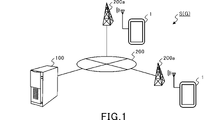
- FIG. 1 is an explanatory diagram showing a schematic configuration of an information processing system.
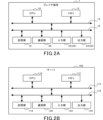
- FIG. 2A is a diagram for explaining the hardware configuration of the player terminal.
- FIG. 2B is a diagram for explaining the hardware configuration of the server.
- FIG. 3A is a diagram illustrating an example of a home screen.
- FIG. 3B is a diagram illustrating an example of a live screen.
- FIG. 4 is a diagram illustrating an example of the MV playlist selection screen.
- FIG. 5 is a diagram illustrating an example of the official playlist selection screen.
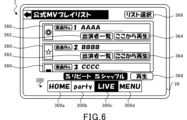
- FIG. 6 is a diagram illustrating an example of the official MV playlist screen.
- FIG. 7 is a diagram illustrating an example of a music video pause screen.
- FIG. 8 is a diagram illustrating an example of the my playlist selection screen.
- FIG. 1 is an explanatory diagram showing a schematic configuration of an information processing system.
- FIG. 2A is a diagram for explaining the hardware configuration of the player terminal.
- FIG. 2B is a
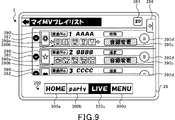
- FIG. 9 is a diagram illustrating an example of the My MV playlist screen.
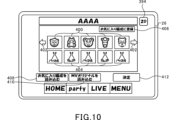
- FIG. 10 is a diagram illustrating an example of the party organization screen.
- FIG. 11 is a diagram illustrating an example of a character selection screen.
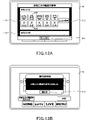
- FIG. 12A is a diagram illustrating an example of a 3D costume selection screen.
- FIG. 12B is a diagram illustrating an example of a 2D costume selection screen.
- FIG. 13A is a diagram illustrating an example of a favorite organization saving screen.
- FIG. 13B is a diagram illustrating an example of a favorite organization saving result screen.
- FIG. 14A is a diagram illustrating an example of a favorite organization reading screen.
- FIG. 14B is a diagram illustrating an example of the MV original read screen.
- FIG. 15 is a diagram illustrating an example of the folding menu operation section 396 of the My MV playlist screen.
- FIG. 16 is a diagram illustrating an example of a song addition screen.
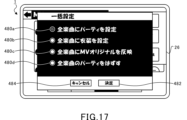
- FIG. 17 is a diagram illustrating an example of a collective setting screen.
- FIG. 18 is a diagram illustrating an example of the collective party setting screen.
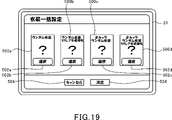
- FIG. 19 is a diagram illustrating an example of the costume batch setting screen.
- FIG. 20 is a diagram illustrating an example of an MV original read screen.
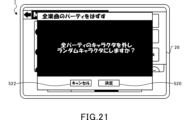
- FIG. 21 is a diagram illustrating an example of the collective party release screen.
- FIG. 22 is a diagram illustrating an example of a list saving confirmation screen.
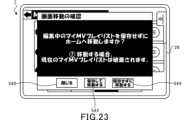
- FIG. 23 is a diagram illustrating an example of a screen movement confirmation screen.
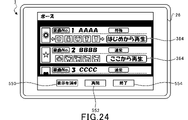
- FIG. 24 is a diagram illustrating an example of a music video pause screen.
- FIG. 25 is a diagram illustrating an example of a my MV playlist according to this embodiment.
- FIG. 26 is a diagram for explaining the configuration of a memory in a player terminal and functions as a computer.
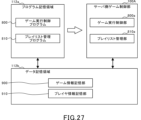
- FIG. 27 is a diagram for explaining the configuration of a memory in a server and functions as a computer.
- FIG. 28 is a sequence diagram illustrating basic processing of the player terminal and server.
- FIG. 29 is a flowchart illustrating an example of my MV playlist generation processing.
- FIG. 30 is a flowchart illustrating an example of party setting processing according to this embodiment.
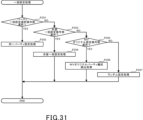
- FIG. 31 is a flowchart illustrating an example of batch setting processing according to this embodiment.
- FIG. 32 is a flowchart illustrating an example of playlist continuous reproduction processing according to the present embodiment.
- FIG. 1 is an explanatory diagram showing a schematic configuration of an information processing system S.
- the information processing system S is a so-called client-server system including a player terminal 1, a server 100, and a communication network 200 having a communication base station 200a.
- the player terminal 1 can establish communication with the server 100 via the communication network 200.
- the player terminal 1 includes a wide range of electronic devices that can be connected to the server 100 for wireless or wired communication. Examples of the player terminal 1 include smart phones, mobile phones, tablet devices, personal computers, game machines, and the like. In this embodiment, a case where a smart phone is used as the player terminal 1 will be described.
- the server 100 is connected to a plurality of player terminals 1 for communication.
- the server 100 accumulates various types of information (hereinafter referred to as player information) for each player identification information (hereinafter referred to as player ID) for identifying a player who plays the game. Also, the server 100 updates the accumulated information based on an operation input from the player terminal 1 .
- the communication base station 200a is connected to the communication network 200 and wirelessly transmits and receives information to and from the player terminal 1.
- the communication network 200 is composed of a mobile phone network, an Internet network, a LAN (Local Area Network), a dedicated line, etc., and realizes wireless or wired communication connection between the player terminal 1 and the server 100 .
- the player terminal 1 and the server 100 function as the game device G.
- the player terminal 1 and the server 100 are responsible for controlling the progress of the game, respectively.
- FIG. 2A is a diagram for explaining the hardware configuration of the player terminal 1.
- FIG. 2B is a diagram for explaining the hardware configuration of the server 100.
- the player terminal 1 includes one or more CPUs (Central Processing Units) 10, a memory 12, a bus 14, an input/output interface 16, a storage unit 18, a communication unit 20, an input unit 22, and an output unit 24.
- CPUs Central Processing Units
- the server 100 includes one or more CPUs 110, memory 112, bus 114, input/output interface 116, storage unit 118, communication unit 120, input unit 122, and output unit 124. be.
- the configurations and functions of the CPU 110, the memory 112, the bus 114, the input/output interface 116, the storage unit 118, the communication unit 120, the input unit 122, and the output unit 124 of the server 100 are the same as those of the CPU 10, the memory 12, and the They are substantially the same as the bus 14 , input/output interface 16 , storage section 18 , communication section 20 , input section 22 and output section 24 . Therefore, the hardware configuration of the player terminal 1 will be described below, and the description of the server 100 will be omitted.
- the CPU 10 operates programs stored in the memory 12 to control the progress of the game.
- the memory 12 is composed of ROM (Read Only Memory) or RAM (Random Access Memory), and stores programs and various data necessary for controlling the progress of the game.
- Memory 12 is connected to CPU 10 via bus 14 .
- An input/output interface 16 is connected to the bus 14 .
- a storage unit 18 , a communication unit 20 , an input unit 22 and an output unit 24 are connected to the input/output interface 16 .
- the storage unit 18 is composed of a semiconductor memory such as a DRAM (Dynamic Random Access Memory), and stores various programs and data.
- the programs and data stored in the storage unit 18 are loaded by the CPU 10 into the memory 12 (RAM).
- the communication unit 20 is wirelessly connected to the communication base station 200 a and transmits and receives information such as various data and programs to and from the server 100 via the communication network 200 .
- the program or the like received from the server 100 is stored in the memory 12 or the storage section 18 .
- the input unit 22 is composed of, for example, a touch panel, buttons, a keyboard, a mouse, a cross key, an analog controller, etc., through which player's operations are input (accepts operations). Also, the input unit 22 may be a dedicated controller provided in the player terminal 1 or connected (externally attached) to the player terminal 1 . Furthermore, the input unit 22 may be configured with an acceleration sensor that detects the tilt or movement of the player terminal 1, or a microphone that detects the voice of the player. That is, the input unit 22 broadly includes a device capable of inputting the player's intention in an identifiable manner.
- the output unit 24 includes a display device and a speaker. Note that the output unit 24 may be a device connected (externally attached) to the player terminal 1 .
- the player terminal 1 includes a touch panel 26 that functions as the input section 22 and the output section 24 .
- the touch panel 26 also functions as a display unit that displays images or videos.
- the player downloads a dedicated application from the server 100 to the player terminal 1 in advance and registers the player ID in the server 100 before starting the game.
- the player terminal 1 receives information such as play history information stored in the server 100 and displays a game screen on the touch panel 26 .
- the player can play the rhythm game using a plurality of characters (display objects) that have already been acquired.
- a music video is displayed in time with the music being played.
- a music video is a game screen generated by either the server 100 or the player terminal 1 .
- the music video includes a background image that matches the worldview and image of the music, and characters that act in accordance with the worldview and image of the music.
- the music video data includes background image data that matches the worldview and image of the music, motion data that represents the actions of characters, and the like.
- FIG. 3A is a diagram explaining an example of the home screen.
- FIG. 3B is a diagram illustrating an example of a live screen.
- the touch panel 26 displays the home screen shown in FIG. 3A.
- a menu bar 300 is displayed at the bottom of the touch panel 26, as shown in FIG. 3A, for example.
- the menu bar 300 is provided with a plurality of operation units that can be operated (tapped) by the player.
- the menu bar 300 includes a home screen selection operation section 300a labeled "home”, a party screen selection operation section 300b labeled “party”, a live screen selection operation section 300c labeled "live”, and a "menu A menu screen selection operation section 300d marked with ".
- the home screen selection operation unit 300a When the home screen selection operation unit 300a is tapped, the home screen shown in FIG. 3A is displayed on the touch panel 26. Further, when the party screen selection operation section 300b is tapped, a party screen (not shown) is displayed on the touch panel 26. FIG. Further, when the live screen selection operation section 300c is tapped, the live screen shown in FIG. 3B is displayed on the touch panel 26. FIG. Further, when the menu screen selection operation section 300d is tapped, a menu screen (not shown) is displayed on the touch panel 26. FIG. Although detailed explanation is omitted, the game settings and various information can be confirmed on the menu screen. In the menu bar 300, the operation units corresponding to each screen are highlighted so that the screen being displayed on the touch panel 26 can be identified.
- the home screen shown in FIG. 3A corresponds to the initial screen, and a header display area 310 is provided at the top.
- the header display area 310 displays level information 310a indicating the player level associated with the player ID, and a stamina display bar 310b indicating the stamina of the player associated with the player ID.
- stamina is a parameter required to play the rhythm game.
- a plurality of types of rhythm games are provided, and a stamina consumption value required for playing is set for each rhythm game.
- the consumption of stamina required for playing changes according to the type and difficulty of each rhythm game.
- the player consumes stamina to play the rhythm game. Therefore, when the stamina is insufficient, the rhythm game cannot be played.
- the player can obtain a predetermined value as a player experience value. Each time the player experience value reaches a certain value, the player level increases.
- the upper limit of stamina is set for the player level, and the higher the player level, the higher the upper limit of stamina.
- Stamina recovers by a predetermined value (for example, 1 point) at regular intervals (for example, 5 minutes) within the range of the upper limit.
- the stamina display bar 310b displays the current remaining amount of stamina with respect to the upper limit of stamina so that the user can visually grasp the remaining amount of stamina.
- a home menu 320 is displayed between the menu bar 300 and the header display area 310 on the home screen.
- the home menu 320 includes a notification screen selection operation section 320a labeled "notice”, a gift screen selection operation section 320b labeled "present”, and a MV playlist screen selection operation section labeled "MV playlist”. 320c is provided.
- a notification screen (not shown) displaying update information, maintenance information, etc. is displayed on the touch panel 26.
- a present screen (not shown) displaying items distributed by the game operator is displayed on the touch panel 26, for example.
- the MV playlist screen selection operation section 320c is tapped, the MV playlist screen shown in FIG. 4 is displayed on the touch panel 26.
- the home menu 320 is set so as to be customizable by the player. Specifically, by performing home screen button settings from a menu screen (not shown), each selection operation section displayed on the home menu 320 can be customized.
- the live screen shown in FIG. 3B is displayed on the touch panel 26.
- the live screen is a screen for the player to select the game type of the rhythm game.
- a plurality of game types are provided that differ in music played during the rhythm game.
- a plurality of game types with different degrees of difficulty may be provided for the same song.
- a music information tab 330a, a title display tab 330b, and a determination tab 332 are displayed on the live screen.
- the song information tab 330a displays the title of the temporarily registered song, the play history information of the temporarily registered game type, and the like. Further, in this embodiment, as shown in FIG. 3B, in the song information tab 330a, "random" may be displayed instead of the title of the song that is being temporarily registered.
- a plurality of title display tabs 330b are displayed above and below the music information tab 330a.
- the title display tab 330b displays only the title of the song.
- a selection operation flick operation in the vertical direction
- the title is moved and displayed in the operation direction.
- the temporarily registered song is changed, and the display content of the song information tab 330a is also changed.
- the song under provisional registration is changed to a song corresponding to the tapped title display tab 330b.
- a music video playback tab 334 is displayed in the song information tab 330a.
- the music information tab 330a displaying “random”, when the decision tab 332 is tapped after the music video playback tab 334 is tapped, a random playback setting screen is displayed on the touch panel 26.
- FIG. 3B shows a state in which the folding menu operation portion 336 is expanded.
- the folding menu operation portion 336 is tapped from the unfolded state shown in FIG. 3B, the folding menu operation portion 336 is folded so that the title display tab 330b hidden under the folding menu operation portion 336 can be seen. Become.
- a MV playlist screen selection operation section 336a is displayed in the folding menu operation section 336.
- the MV playlist screen selection operation section 336a is tapped, the MV playlist selection screen shown in FIG. 4 is displayed on the touch panel 26.
- FIG. 1 A MV playlist screen selection operation section 336a is displayed in the folding menu operation section 336.
- FIG. 4 is a diagram explaining an example of the MV playlist selection screen.
- a playlist selection operation section 340 is displayed on the MV playlist selection screen.
- the playlist selection operation section 340 includes an official playlist selection operation section 340a and a my playlist selection operation section 340b.
- an official playlist selection screen is displayed on the touch panel 26.
- FIG. 5 is a diagram explaining an example of the official playlist selection screen.
- a plurality of official playlist display tabs 350 are displayed on the official playlist selection screen.
- Each official playlist display tab 350 displays a playlist selection operation section 350a that can be selected by the player.
- One playlist selection operation section 350a out of the plurality of playlist selection operation sections 350a is set to be selectable by the player.
- the playlist selection operation section 350a is tapped, the official MV playlist screen shown in FIG. 6 is displayed.
- the official playlist selection screen displays a closed selection operation section 352 labeled "Close”.
- the close selection operation unit 352 is tapped, the MV playlist selection screen shown in FIG. 4 is displayed on the touch panel 26.
- FIG. 352 When the close selection operation unit 352 is tapped, the MV playlist selection screen shown in FIG. 4 is displayed on the touch panel 26.
- FIG. 6 is a diagram explaining an example of the official MV playlist screen.
- the official MV playlist is created according to the set list when the songs in the game were actually used for live performances, and the music videos created exclusively for each song are played continuously according to the set list. It is a function for the player to appreciate.
- the official MV playlist screen displays a list of a plurality of music video display tabs 360 in which songs of the official MV playlist selected by the player are arranged in the order of the songs.
- Each music video display tab 360 displays song number information, song name information, and song image information.
- a performer list selection operation section 362 and a reproduction start position selection operation section 364 are displayed.
- the performer list selection operation unit 362 is tapped, information about characters appearing in the music video of the song is displayed on a performer list screen (not shown).
- the playback start position selection operation unit 364 when the playback start position selection operation unit 364 is tapped, the music videos are played continuously in order starting from the tapped song in the official MV playlist. Note that the playback start position selection operation unit 364 is displayed in such a way that the player cannot operate it, as indicated by hatching in FIG. Also, the reproduction start position selection operation section 364 is displayed so that it can be operated by the player, for example, as indicated by non-hatching in FIG.
- rhythm game if a song whose music video has not been released is included in the official MV playlist, that song is excluded from continuous playback of the official MV playlist and skipped.
- a list selection operation section 366 is displayed on the official MV playlist screen.
- the list selection operation section 366 is tapped, the official playlist selection screen shown in FIG. 5 is displayed on the touch panel 26.
- FIG. 5 is a list selection operation section 366 displayed on the official MV playlist screen.
- a playback selection operation section 368 is displayed on the official MV playlist screen.
- the playback selection operation section 368 is tapped, the music videos are played back continuously in the order of the official MV playlist displayed in FIG.
- the touch panel 26 is tapped during continuous reproduction of the music video, the music video is paused and a music video pause screen is displayed on the touch panel 26.
- FIG. 7 is a diagram illustrating an example of a music video pause screen.
- a non-display selection operation section 370 a restart selection operation section 372, and an end selection operation section 374 are displayed on the music video pause screen.
- the non-display selection operation section 370 is tapped, the music video pause screen shown in FIG. 7 is hidden.
- the resume selection operation section 372 is tapped, the paused music video is resumed.
- the end selection operation section 374 is tapped, the continuous reproduction of the music video is ended, and the official MV playlist screen shown in FIG. 6 is displayed on the touch panel 26 .
- FIG. 8 is a diagram explaining an example of the My Playlist selection screen.
- a my playlist selection screen shown in FIG. 8 is displayed on the touch panel .
- a plurality of my playlist display tabs 380 are displayed on the my playlist selection screen.
- Each my playlist display tab 380 displays list number information, maximum number of songs information, and playlist name information.
- a value of 50 is set as the maximum number of songs information.
- the maximum number of songs may be plural, and the value of the maximum number of songs information may be any value of 2 or more.
- each my playlist display tab 380 displays a playlist selection operation section 380a that can be selected by the player.
- One playlist selection operation section 380a out of the plurality of playlist selection operation sections 380a is set to be selectable by the player.
- the playlist selection operation section 380a is tapped, the my MV playlist screen shown in FIG. 9 is displayed.
- a close selection operation section 382 labeled "Close” is displayed on the My Playlist selection screen.
- the close selection operation section 382 is tapped, the MV playlist selection screen shown in FIG. 4 is displayed on the touch panel 26.
- FIG. 9 is a diagram explaining an example of the My MV Playlist screen.
- the My MV playlist is a function that allows the player to freely customize and generate a personal set list.
- the My MV Playlist it is possible for the player to set and register his/her favorite songs in the desired order from among the songs used in the rhythm game within the game.
- the My MV Playlist allows the player to view the music videos of each song by continuously playing them in the order (setlist) set by the player.
- the number of songs that can be registered in the My MV playlist is determined according to the maximum number of songs information shown in FIG.
- a value of 50 is set as the maximum number of songs information, and the maximum number of songs that the player can set and register as each My MV playlist is 50.
- the My MV playlist screen displays a list of a plurality of music video display tabs 390 in which songs of the My MV playlist selected by the player are arranged in the order of the songs.
- Each music video display tab 390 displays song number information (song order information), song name information, and party formation form information.
- the song number information is information indicating the playback order of songs in the My MV playlist.
- the party formation type information includes information regarding the normal type marked as "normal” and information regarding the special type marked as "special".
- the maximum number of characters that can be registered as one party is smaller than in the special mode. For example, the maximum number of characters that can be registered as one party in the normal form is "5", while the maximum number of characters that can be registered as one party in the special form is "15".
- a delete selection operation section 392 is displayed on the left side of each music video display tab 390 .
- Each music video display tab 390 is associated with one deletion selection operation section 392, and when the deletion selection operation section 392 is tapped, the music video display tab 390 corresponding to the tapped deletion selection operation section 392 is displayed. is deleted.
- the song ID and party organization information associated with the tapped song order information which will be described later in detail, are deleted from the My MV playlist. This allows the player to delete unnecessary songs in the My MV playlist.
- a 2D-3D switching operation section 394 is displayed at the top of the My MV playlist.
- the 2D-3D switching operation unit 394 switches the display format of characters included in the music video between 2D format and 3D format.
- each music video display tab 390 a music selection operation section 390a, a character selection operation section 390b, a sound source selection operation section 390c, and a replacement selection operation section 390d are displayed.
- a rhythm game music list (not shown) is displayed on the touch panel 26.
- the player can change the song set in the current My MV playlist and tapped by the player. Specifically, when one song is selected by the player from a rhythm game song list (not shown), it is set in the current My MV playlist, and the identification information of the song tapped by the player (hereinafter referred to as song ID). ) is updated to the selected song ID.
- the party formation screen shown in FIG. 10 is displayed on the touch panel 26.
- the details of the special form party formation will be described below. Since the normal form of party formation is the same as the special form of party formation, the explanation is omitted.
- FIG. 10 is a diagram explaining an example of the party organization screen.
- the party organization screen is a screen for the player to set characters included in the music video.
- the party formation screen displays five identification images 400 representing the characters formed in the party.
- a party of up to 15 characters can be organized, so switching operation sections 402 are displayed on the left and right of the five identification images 400 .
- the switching operation portion 402 By tapping the switching operation portion 402, it is possible to switch and display the identification images 400 showing the five characters in the special form of the party formation.
- the character selection screen shown in FIG. 11 is displayed on the touch panel 26.
- FIG. 11 is displayed on the touch panel 26.
- FIG. 11 is a diagram explaining an example of the character selection screen.
- the character selection screen displays a list of characters possessed by the player.
- the player information includes character identification information (hereinafter referred to as character ID).
- the character IDs included in the player information include character IDs of characters that the player has possessed even once in the past.
- the character ID of the identification image 400 tapped on the party formation screen shown in FIG. 10 is tapped on the character selection screen shown in FIG. can be changed (updated) to the character ID of
- a random selection operation section 400b is displayed on the upper left of the character list shown in FIG.
- the random selection operation section 400b is tapped, one character ID is randomly selected from the character IDs included in the player information. Then, the character ID of the identification image 400 tapped on the party formation screen shown in FIG. 10 is changed (updated) to a randomly selected character ID.
- identification images 404 indicating costumes (display objects) associated with each character are displayed below the identification image 400 of each character on the party organization screen.
- a costume is an item that each character can wear.
- costume selection screens shown in FIGS. 12A and 12B are displayed on touch panel 26 .
- the costume selection screen is a screen for the player to set the costume of the character included in the music video.
- FIG. 12A is a diagram explaining an example of the 3D costume selection screen.
- FIG. 12B is a diagram illustrating an example of a 2D costume selection screen. 12A or 12B is displayed on the touch panel 26 according to the character display format switched by the 2D-3D switching operation unit 394 shown in FIG. 9 or 10.
- FIG. 12A or 12B is displayed on the touch panel 26 according to the character display format switched by the 2D-3D switching operation unit 394 shown in FIG. 9 or 10.
- one or more 3D costume information tabs 420a, 3D random costume information tabs 420b, 3D random costume priority information tabs 420c, and closed tabs 424 are displayed on the 3D costume selection screen.
- the 3D costume information tab 420a displays costume images and costume names displayed in the 3D music video.
- the 3D random costume information tab 420b displays that the costume displayed in the 3D music video is randomly determined.
- the identification information hereinafter referred to as costume ID
- the identification information hereinafter referred to as costume ID of the costume with a high rarity (for example, SS rare) is preferentially determined. will be displayed.
- the costume ID of the identification image 404 tapped on the party organization screen shown in FIG. 10 can be changed to the costume ID tapped on the costume selection screen shown in FIG. 12A.
- the player information includes the costume ID of the character that the player has owned.
- the change tab 422b of the 3D random costume information tab 420b or the change tab 422c of the 3D random costume priority information tab 420c is tapped, one costume ID is randomly selected from the costume IDs included in the player information. be done. Then, the costume ID of the identification image 404 tapped on the party organization screen shown in FIG. 10 is changed to a randomly selected costume ID.
- the close tab 424 is tapped on the 3D costume selection screen, the party organization screen shown in FIG. 10 is displayed on the touch panel 26.
- the 2D costume selection screen displays one or more 2D costume information tabs 430a, 2D random costume information tabs 430b, 2D random costume priority information tabs 430c, and closed tabs 434.
- the 2D costume information tab 430a displays costume images and costume names displayed in the 2D music video.
- the 2D random costume information tab 430b displays that the costume displayed in the 2D music video is randomly determined.
- the 2D random costume priority information tab 430c displays that costume IDs with high rarity (for example, SS rare) among the character costumes displayed in the 2D music video are preferentially determined.
- the costume ID of the identification image 404 tapped on the party organization screen shown in FIG. 10 can be changed to the costume ID tapped on the costume selection screen shown in FIG. 12B. can.
- the favorite registration selection operation section 406 is displayed above the identification image 400 of each character on the party organization screen.
- the favorite registration selection operation section 406 is tapped on the party organization screen, the favorite organization save screen shown in FIG. 13A is displayed on the touch panel 26 .
- FIG. 13A is a diagram illustrating an example of a favorite organization saving screen.
- FIG. 13B is a diagram illustrating an example of a favorite organization saving result screen. As shown in FIG. 13A, a plurality of favorite organization registration tabs 440 are displayed on the favorite organization saving screen.
- Each favorite organization registration tab 440 displays the character identification image 400 and costume identification image 404 of the party organization screen shown in FIG.
- a save selection operation section 442 and a cancel selection operation section 444 are displayed on each favorite organization registration tab 440 .
- favorite organization save processing is executed.
- information regarding the party formation set on the party formation screen shown in FIG. 10 (hereinafter referred to as party formation information) is stored as favorite formation information in association with the player information.
- the favorite formation information includes character IDs, costume IDs, formation order information regarding the arrangement order of party formations, and the like.
- the cancel selection operation section 444 is tapped, the favorite organization saving process is not executed, and the party organization screen shown in FIG.
- the favorite knitting saving result screen shown in FIG. 13B is displayed on the touch panel 26 .
- a confirmation sentence to the effect that the favorite organization has been saved and a close selection operation section 446 marked with "close” are displayed.
- the close selection operation section 446 is tapped, the favorite organization saving process is completed, and the party organization screen shown in FIG.
- a favorite read selection operation section 408 an MV original read selection operation section 410, and a decision selection operation section 412 are displayed.
- the favorite reading selection operation section 408 is tapped on the party organization screen
- the favorite organization reading screen shown in FIG. 14A is displayed on the touch panel 26 .
- the MV original read selection operation unit 410 is tapped
- the MV original read screen shown in FIG. 14B is displayed on the touch panel 26.
- the decision selection operation section 412 is tapped, the currently set party formation in FIG. 10 is decided.
- the party organization information (character ID, costume ID, etc.) is stored (saved) in the my MV playlist in association with the song ID.
- FIG. 14A is a diagram illustrating an example of a favorite organization reading screen.
- FIG. 14B is a diagram illustrating an example of the MV original read screen.
- a plurality of favorite organization reading tabs 450 are displayed on the favorite organization reading screen.
- the plurality of favorite organization reading tabs 450 correspond to the plurality of favorite organization registration tabs 440 shown in FIG. 13A.
- the character identification image 400 and costume identification image 404 of the favorite organization registration tab 440 shown in FIG. 13A are displayed on each favorite organization read tab 450 . Further, a read selection operation section 452 and a cancel selection operation section 454 are displayed on each favorite organization read tab 450 .
- the party formation on the party formation screen shown in FIG. 10 is updated based on the read favorite formation information.
- the MV original reading screen displays a warning message to the effect that reading the MV original party will overwrite the currently organized party shown in FIG. Also, on the MV original read screen, a read selection operation section 460 and a close selection operation section 462 marked with "close” are displayed.
- the MV original party formation read processing is executed.
- a music video is set corresponding to each song of the rhythm game, and each music video contains information on party formation (hereinafter referred to as MV original party formation) composed of preset MV original characters (basic display objects). information) are associated.
- the MV original party organization information is stored in the game information storage unit in association with the song ID, song data and MV data.
- the MV original party organization reading process is executed, the MV original party organization information is read from the game information storage unit based on the song name information (music ID) shown in FIG. Then, the party formation on the party formation screen shown in FIG. 10 is updated based on the read MV original party formation information, and the MV original party formation read processing is completed.
- each music video display tab 390 displays a sound source selection operation section 390c and a replacement selection operation section 390d.
- a sound source selection screen (not shown) is displayed on the touch panel 26, and the player can customize the sound source of the music according to the player's own preference.
- the replacement selection operation section 390d it is possible to change the order of the songs in the My MV playlist, and move the tapped position of the music video display tab 390 to the position where the tap is released. be able to.
- a folding menu operation section 396 is displayed on the My Playlist screen shown in FIG. 9 shows a state in which the folding menu operation section 396 is folded, and FIG. 15 shows a state in which the folding menu operation section 396 is unfolded.
- FIG. 15 is a diagram illustrating an example of the folding menu operation section 396 of the My MV Playlist screen.
- the folding menu operation unit 396 includes a list selection operation unit 396a, a music addition operation unit 396b, a collective setting operation unit 396c, a list saving operation unit 396d, a repeat switching operation unit 396e, and a shuffle switching operation unit 396f.
- a playback selection operation section 396g is displayed.
- FIG. 16 is a diagram explaining an example of the song addition screen. As shown in FIG. 16, the rhythm game song list is displayed on the song addition screen. In the rhythm game song list, identification images 470 of a plurality of songs are displayed so as to be selectable by the player.
- a plurality of music selection frames 472 and a decision selection operation section 474 are displayed at the bottom of the rhythm game music list.
- Song order information indicating the order of songs in the My MV playlist is displayed in the plurality of song selection frames 472 .
- the plurality of song selection frames 472 correspond to the order of songs and song IDs in the My MV playlist, and images of song IDs that have already been set are displayed.
- a delete selection operation section 472a is displayed in the music selection frame 472 in which the music ID is set. When the delete selection operation portion 472a is tapped, the song ID set in the tapped song selection frame 472 is deleted. In this way, it is possible to delete the song ID set in the My MV playlist.
- the image of the music ID is not displayed and the column is blank.
- the music identification image 470 displayed in the rhythm game music list is tapped while the blank music selection frame 472 is selected, the music ID is added to the music selection frame 472, and the added music ID is added to the personal list. Stored in association with the MV playlist. In this way, a new song ID can be added to the My MV playlist.
- the decision selection operation section 474 When the decision selection operation section 474 is tapped, the song order and song ID of the my MV playlist are decided, and the my MV playlist screen shown in FIG. 15 is displayed on the touch panel 26.
- FIG. 17 is a diagram explaining an example of the collective setting screen.
- the collective setting screen displays a collective party setting selection operation section 480a, a collective costume setting selection manipulation section 480b, an MV original setting selection manipulation section 480c, and a collective party cancellation selection manipulation section 480d.
- a determination selection operation section 482 and a cancellation selection operation section 484 are displayed on the collective setting screen.
- the collective party setting selection operation portion 480a When the collective party setting selection operation portion 480a is tapped, the collective party setting selection operation portion 480a is selected, and when the determination selection operation portion 482 is tapped in this state, the collective party setting screen shown in FIG. 18 is displayed. It is displayed on the touch panel 26 . On the other hand, when the cancel selection operation section 484 is tapped, the collective party setting process is canceled, and the my MV playlist screen shown in FIG. 15 is displayed on the touch panel 26 .
- FIG. 18 is a diagram explaining an example of the collective party setting screen.
- the collective party setting screen displays an identification image 400 indicating the character formed in the party, a switching operation section 402, and an identification image 404 indicating the costume.
- a favorite read selection operation section 490 and a determination selection operation section 492 are displayed on the party collective setting screen.
- the favorite reading selection operation section 490 When the favorite reading selection operation section 490 is tapped, the favorite organization reading screen shown in FIG. 14A is displayed on the touch panel 26. FIG. Then, when the favorite formation reading process is executed as described with reference to FIG. 14A, the party formation on the party collective setting screen shown in FIG. 18 is updated based on the read favorite formation information.
- the party formation on the party collective setting screen shown in FIG. 18 is collectively set for all songs in the My MV playlist.
- the party organization information (character ID, costume ID, organization order information) shown in FIG. 18 is associated with all song IDs in the My MV playlist and stored.
- the party organization information may include identification information of an accessory that can be attached to the character (hereinafter referred to as an accessory ID).
- the form of party formation includes the normal form and the special form as described above. If the party formation shown in FIG. 18 is a special form, and the special form party formation is collectively set for all songs, the normal form party formation in all the songs includes a part of the special form party formation. set. For example, of the party formation consisting of 15 characters in the special form, the party formation consisting of 5 characters displayed on the collective party setting screen of FIG. 18 is set as the party formation in the normal form. However, among the 15 characters in the special form, the party consisting of 5 characters not displayed on the collective party setting screen of FIG. 18 may be set as the normal form of the party.
- FIG. 19 is a diagram explaining an example of the costume batch setting screen.
- the costume collective setting screen displays a random costume information tab 500a, a random costume priority information tab 500b, an all-character random costume information tab 500c, and an all-character random costume priority information tab 500d.
- a determination selection operation section 504 is displayed on the costume collective setting screen, and when the determination selection operation section 504 is tapped, the costume collective setting process described below is executed.
- the random costume information tab 500a displays that one type of costume displayed in the music video is randomly determined.
- a selection operation tab 502a is displayed in the random costume information tab 500a. When the selection operation tab 502a is tapped, the random costume information tab 500a is selected.
- the random costume priority information tab 500b one type of costume displayed in the music video is randomly determined, and if there is a character with a costume ID with a high rarity (for example, SS rare), the costume ID is given priority. is displayed.
- a selection operation tab 502b is displayed in the random costume priority information tab 500b. When the selection operation tab 502b is tapped, the random costume priority information tab 500b is selected.
- the all-character random costume information tab 500c displays that the costumes of all characters displayed in the music video are randomly determined.
- a selection operation tab 502c is displayed in the all-character random costume information tab 500c. When the selection operation tab 502c is tapped, the all character random costume information tab 500c is selected.
- costumes for all characters displayed in the music video are randomly determined.
- a message indicating that the ID is determined with priority is displayed.
- a selection operation tab 502d is displayed in the all character random costume priority information tab 500d. When the selection operation tab 502d is tapped, the all character random costume priority information tab 500d is selected.
- one type of costume displayed in the music video is randomly decided, and the one type of costume is set for all characters. be. Specifically, all character IDs are stored in association with one type of costume ID.
- one type of costume displayed in the music video is randomly decided, and the one type of costume is set for all characters. be done.
- the costume ID is preferentially set only for that character.
- a character ID having a costume ID with a high rarity is associated with a costume ID with a high rarity and stored, and other character IDs are associated with a costume ID of one type and stored. be done.
- the costumes of all the characters displayed in the music video are randomly determined, and all of the determined costumes are displayed. set to a character. Specifically, each character ID is stored in association with a randomly determined costume ID.
- the costumes of all the characters displayed in the music video are randomly determined, and each determined costume is selected.
- the costumes of all the characters displayed in the music video are randomly determined, and each determined costume is selected.
- the costumes of all the characters displayed in the music video are randomly determined, and each determined costume is selected.
- the costumes of all the characters displayed in the music video are randomly determined, and each determined costume is selected.
- the costumes of all the characters displayed in the music video are randomly determined, and each determined costume is selected.
- the costumes of all the characters displayed in the music video are randomly determined, and each determined costume is selected.
- a high rarity for example, SS rare
- FIG. 20 is a diagram explaining an example of the MV original reading screen.
- the MV original loading screen displays a warning text to the effect that reading the MV original party will overwrite all the parties in the My MV playlist.
- a read selection operation section 510 and a close selection operation section 512 marked with "close” are displayed.
- the MV original party organization read processing described in FIG. 14B is executed.
- the MV original reading process is executed for each song in the My MV playlist, and the MV original party organization information (basic display object information) set in advance for the music video of each song is displayed on the character displayed in the music video. is set as party organization information for
- the prescribed number for example, 5
- randomly selected characters may be added to make the number equal to or greater than the prescribed number.
- additional party formation information in which a randomly determined character ID is associated with MV original party formation information may be set as the party formation information of characters displayed in the music video.
- FIG. 21 is a diagram explaining an example of the batch party release screen.
- the batch party cancellation screen displays a confirmation text to the effect that all party formations for all songs in the My MV playlist will be canceled and all party formations will be composed of randomly selected characters.
- a determination selection operation section 520 and a cancellation selection operation section 522 are displayed on the party batch release screen.
- FIG. 22 is a diagram illustrating an example of a list saving confirmation screen.
- the list save confirmation screen displays a confirmation message that the my MV playlist has been saved.
- a close selection operation section 530 marked with "close” is displayed on the list saving confirmation screen.
- the close selection operation unit 530 When the close selection operation unit 530 is tapped, the my MV playlist is saved, and the my MV playlist screen shown in FIG. 15 is displayed on the touch panel 26 .
- FIG. 23 is a diagram illustrating an example of a screen movement confirmation screen.
- the case where the home screen selection operation section 300a of the menu bar 300 is tapped without tapping the list saving operation section 396d will be described.
- a warning message is displayed to the effect that the current My MV playlist will be discarded if the home screen is moved to without saving the My MV playlist being edited. be.
- a save selection operation portion 542 marked with "save and move” and a "move without saving”.
- a marked non-save selection operation portion 544 is displayed.
- the screen movement confirmation screen is closed, and the my MV playlist screen shown in FIG. 15 is displayed on the touch panel 26.
- the save selection operation section 542 is tapped, the save processing of the my MV playlist is performed, and the save confirmation screen shown in FIG. 22 is displayed on the touch panel 26 .
- the non-save selection operation portion 544 is tapped, the screen movement confirmation screen is closed without saving the my MV playlist, and the home screen shown in FIG. 3A is displayed on the touch panel 26 .
- the repeat switching operation section 396e when the repeat switching operation section 396e is tapped, the repeat playback of my MV playlist is switched between the ON state and the OFF state. Further, when the shuffle switching operation section 396f is tapped, the shuffle playback of my MV playlist is switched between an ON state and an OFF state.
- the reproduction selection operation section 396g when the reproduction selection operation section 396g is tapped, the music and the music video corresponding to the music are synchronized and continuously reproduced in accordance with the order of the music in the My MV playlist.
- the touch panel 26 is tapped during continuous reproduction of the music and music video, the music and music video are paused and a music video pause screen is displayed on the touch panel 26 .
- FIG. 24 is a diagram illustrating an example of a music video pause screen.
- the music video pause screen displays music image information, music number information, music name information, party formation form information, and party formation information.
- the music ID of the My MV playlist is associated with information about the music (music image information, music name information, party formation information), and the music order information of the My MV playlist (music number information). ) and party formation information.
- a music video pause screen is generated based on these various pieces of information.
- a non-display selection operation section 550, a restart selection operation section 552, and an end selection operation section 554 are displayed on the music video pause screen.
- the non-display selection operation section 550 is tapped, the music video pause screen is hidden.
- the resume selection operation section 552 is tapped, the paused song and music video are resumed.
- the end selection operation portion 554 is tapped, the continuous reproduction of the song and music video is ended, and the my MV playlist screen shown in FIG. 15 is displayed on the touch panel 26.
- FIG. 25 is a diagram illustrating an example of a my MV playlist according to this embodiment.
- the My MV playlist includes song order information, song IDs, and party organization information.
- One piece of music order information, one piece of music ID, and one piece of party formation information are associated and stored in my MV playlist.
- the song order information indicates the order in which the music videos of the song corresponding to the song ID are to be played consecutively, and is order information indicating the playback order of the songs (music videos).
- the song ID is identification information of songs that can be played back in the rhythm game.
- Party organization information includes character position information, character IDs, and costume IDs.
- the character position information is information indicating the composition position (or composition order) of the characters in the party composition. Note that the positions of the characters displayed in the music video are determined based on the organization positions of the characters. In other words, the position of the character displayed in the music video changes according to the organization position of the character.
- the character ID is identification information of the character
- the costume ID is identification information of the costume that can be worn on the character.
- the player can freely change the settings of the song order information, song IDs, and party formation information in the My MV playlist.
- it is possible to create a player's own My MV playlist that matches the player's taste, and freely customize the characters, party organization, costumes, etc. displayed in the music video for each song in the My MV playlist. can be done.
- the interest in the game can be improved.
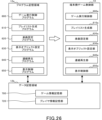
- FIG. 26 is a diagram for explaining the configuration of the memory 12 in the player terminal 1 and its function as a computer.
- the memory 12 is provided with a program storage area 12a and a data storage area 12b.
- the CPU 10 stores a terminal-side game control program (module) in the program storage area 12a.
- the terminal-side game control program includes a game execution control program 600, a playlist generation program 610, a music setting program 620, a display object setting program 630, a continuous playback program 640, and a display control program 650.
- the programs listed in FIG. 26 are only examples, and many other programs are provided in the terminal-side game control program.
- a game information storage unit 700 and a player information storage unit 710 are provided in the data storage area 12b as storage units for storing data.
- the storage units described above are only examples, and the data storage area 12b is provided with a large number of other storage units.
- the CPU 10 operates each program stored in the program storage area 12a and updates data in each storage section in the data storage area 12b. Then, the CPU 10 causes the player terminal 1 (computer) to function as the terminal-side game control section 1A by operating each program stored in the program storage area 12a.
- the terminal-side game control unit 1A includes a game execution control unit 600a, a playlist generation unit 610a, a music setting unit 620a, a display object setting unit 630a, a continuous playback unit 640a, and a display control unit 650a.
- the CPU 10 operates the game execution control program 600 and causes the computer to function as the game execution control section 600a.
- the CPU 10 operates a playlist generation program 610, a music setting program 620, a display object setting program 630, a continuous playback program 640, and a display control program 650, and executes a playlist generation section 610a, a music setting section 620a, and a display object. It functions as a setting unit 630a, a continuous playback unit 640a, and a display control unit 650a.
- the game execution control section 600a controls the progress of the entire game.
- the game execution control unit 600a transmits login information to the server 100 when logging in, for example. Further, the game execution control unit 600a receives the game information from the server 100 and stores it in the game information storage unit 700 when the game information of the game in general is updated.
- This game information includes music information and MV data associated with the music ID.
- the playlist generation unit 610a generates the my MV playlist shown in FIG. 25 based on the player's operation input. Specifically, the playlist generation unit 610a generates a my MV playlist including multiple pieces of music order information, multiple pieces of music ID (music identification information), and multiple pieces of party organization information.
- the music setting unit 620a sets information related to music in the My MV playlist based on the player's operation input. Specifically, the music setting unit 620a sets the music ID and the order of music in the My MV playlist.
- the display object setting unit 630a sets display object information to be displayed in the music video of each song in the My MV playlist based on the player's operation input.
- the display object information is, for example, character IDs and costume IDs of characters organized in a party.
- the display object setting unit 630a sets display object information (for example, character IDs, costume IDs, etc.) in association with each of the plurality of song IDs included in the My MV playlist based on the player's operation input. do.
- the display object setting section 630a changes settings of a plurality of display object information associated with a plurality of music IDs based on the player's first operation input. For example, when the decision selection operation section 520 is tapped (first operation input) on the party collective release screen shown in FIG. The party formation information will be changed all at once. As a result, the player can enjoy an effect different from that of the music video of the rhythm game without having to set the characters appearing in the music video of each song one by one.
- the display object setting unit 630a sets the same display object information in association with a plurality of music IDs based on the player's second operation input. For example, on the collective party setting screen shown in FIG. 18, when the decision selection operation section 492 is tapped (second operation input), the same party organization information is collectively set in relation to all the song IDs in the My MV playlist. be done. As a result, the player can collectively set the party formation of the characters appearing in the music video of each song, and set the party formation for each song one by one. can be omitted.
- the display object setting unit 630a sets basic display object information preset in association with a plurality of music IDs as display object information based on the player's third operation input. For example, on the MV original read screen shown in FIG. 20, when the read selection operation unit 510 is tapped (third operation input), the MV original party organization information preset for the music video of each song in the My MV playlist is displayed. (basic display object information) are collectively set. As a result, the player can easily enjoy the presentation of the music video specially created for each song of the rhythm game without setting the characters appearing in the music video of each song.
- the continuous reproduction unit 640a continuously reproduces a plurality of songs included in the My MV playlist in accordance with the order of the songs in the My MV playlist. Specifically, the continuous reproduction unit 640a continuously reproduces the music data corresponding to the plurality of music IDs included in the my MV playlist in accordance with the order of the music in the my MV playlist. The continuous reproduction unit 640a continuously reproduces a plurality of pieces of music data based on the music order information, and performs processing for starting reproduction of the next music data in the reproduction order according to the end of reproduction of the music. The music data is reproduced in synchronization with the music video (image) controlled by the display control section 650a.
- the display control unit 650a synchronizes with the music reproduced by the continuous reproduction unit 640a and continuously reproduces the music video corresponding to the music.
- the display control unit 650a controls the display of images displayed on the touch panel 26 during continuous reproduction of music videos based on the My MV playlist. Specifically, the display control unit 650a performs display control of images displayed on the touch panel 26 during continuous playback of music videos based on the display object information associated with the music ID of the My MV playlist.
- the display control unit 650a performs display control of the image displayed on the touch panel 26 based on the music display information of the music corresponding to the music ID and the display information of the display object based on the display object information. . That is, the display control unit 650a performs real-time rendering from the music display information (background information and motion information) of the music (music video) and the display information of the display object (character image information and costume image information). The display control of the image displayed on the touch panel 26 is performed.
- display objects included in real-time rendered images cannot be operated by the player. In other words, while the music video is being reproduced, the game mode is for viewing only by the player, and the player cannot operate the display object (for example, character).
- an image to be rendered in real time may be a 2D image (2D object image) or a 3D image (3D object image).
- the display control unit 650a displays, on the touch panel 26, the information about the music corresponding to the music ID and the display object information associated with the music ID when the reproduction of the music is paused during the continuous reproduction of the music video. Let Specifically, when the continuous playback of the music video is paused, the display control unit 650a displays information about the music (music image information, music number information, music name information, party formation information) and display object information ( party formation information) is displayed on the touch panel 26.
- FIG. 27 is a diagram for explaining the configuration of memory 112 in server 100 and its function as a computer.
- the memory 112 is provided with a program storage area 112a and a data storage area 112b.
- the CPU 110 stores a server-side game control program (module) in the program storage area 112a.
- the server-side game control program includes a game execution control program 800 and a playlist management program 810.
- the programs listed in FIG. 27 are only examples, and many other programs are provided in the server-side game control program.
- a game information storage unit 900 and a player information storage unit 910 are provided in the data storage area 112b as storage units for storing data.
- the storage units described above are only examples, and the data storage area 112b is provided with a large number of other storage units.
- the CPU 110 operates each program stored in the program storage area 112a and updates the data in each storage section in the data storage area 112b. Then, the CPU 110 causes the server 100 to function as the server-side game control section 100A by operating each program stored in the program storage area 112a.
- the server-side game control unit 100A includes a game execution control unit 800a and a playlist management unit 810a.
- the CPU 110 operates the game execution control program 800 and causes the computer to function as the game execution control section 800a.
- the CPU 110 operates the playlist management program 810 to function as a playlist management section 810a.
- the game execution control section 800a controls the progress of the entire game. For example, when the login information is received from the player terminal 1 , the game execution control section 800 a enables the player terminal 1 to download the player information stored in the player information storage section 910 from the server 100 . Further, when the game information of the game in general is updated, the game execution control section 800a reads out the updated game information from the game information storage section 900 and enables the player terminal 1 to download it from the server 100.
- the playlist management unit 810a When the playlist management unit 810a receives the information about the my MV playlist (my MV playlist information) from the player terminal 1, the playlist management unit 810a checks whether the contents of the my MV playlist are consistent. If so, a process of storing in the player information storage unit 910 is performed.
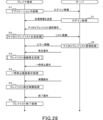
- FIG. 28 is a sequence diagram illustrating basic processing of the player terminal 1 and the server 100.
- Pn the processing performed by the player terminal 1
- Sn a process performed by the server 100
- the game execution control unit 600a transmits login information to the server 100.
- the game execution control unit 800a of the server 100 identifies the player ID associated with the login information and performs login processing (S1).
- the game execution control unit 800a reads the player information corresponding to the specified player ID and the my MV playlist information (hereinafter also referred to as list information) shown in FIG. Information can be downloaded from the server 100 by the player terminal 1. - ⁇ Further, the game execution control unit 800a enables the player terminal 1 to download the changed game information from the server 100 when the game information stored in the game information storage unit 900 is changed.
- the playlist generation section 610a executes my MV playlist generation processing (P2).
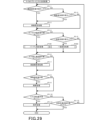
- FIG. 29 is a flowchart illustrating an example of my MV playlist generation processing.
- the music setting section 620a determines whether or not the music selection operating section 390a has been tapped (P2-1).
- the music setting section 620a performs music setting for setting the music ID in the my MV playlist according to the selection operation of the music (music ID) shown in the rhythm game music list (not shown). Execute the process (P2-2).
- the music setting section 620a determines whether or not the music addition operation section 396b has been tapped (P2-3).
- the music setting section 620a performs music setting for setting a music ID in the My MV playlist according to the selection operation of the music (music ID) shown in the rhythm game music list in FIG. Execute the process (P2-2).
- the display object setting section 630a determines whether or not the character selection operation section 390b has been tapped (P2-4). When the character selection operation section 390b is tapped, the display object setting section 630a executes party setting processing for setting party organization information in the My MV playlist (P100). The party setting process will be described later.
- the display object setting section 630a determines whether or not the batch setting operation section 396c has been tapped (P2-5).
- the display object setting section 630a executes collective setting processing (P200). The batch setting process will be described later.
- the display object setting section 630a determines whether or not the replacement selection operation section 390d has been swiped (P2-6). When the replacement selection operation section 390d is swiped, the display object setting section 630a executes song order change processing for changing the order of songs in the My MV Playlist in accordance with the swipe operation of the replacement selection operation section 390d (P2-7). ).
- the display object setting section 630a determines whether or not the deletion selection operation section 392, 472a has been tapped (P2-8).
- the display object setting section 630a deletes the music video display tab 390, and adds the song ID and party organization information corresponding to the deleted music video display tab 390 to my MV playlist. (P2-9).
- the display object setting section 630a determines whether the list saving operation section 396d has been tapped (P2-10). When the list save operation unit 396d is tapped, the display object setting unit 630a executes a save process of saving the my MV playlist in the player information storage unit 710 in association with the player information (P2-11), and my MV play. End the list generation process.
- the display object setting section 630a determines whether the non-save selection operation section 544 has been tapped (P2-12). When the non-save selection operation section 544 is tapped, the my MV playlist generation process ends without performing the save process of P2-11. If the non-save selection operating portion 544 is not tapped, the process returns to P2-1.
- FIG. 30 is a flowchart illustrating an example of party setting processing according to this embodiment.
- the display object setting unit 630a determines whether or not the character identification image 400 shown in FIG. 10 has been tapped (P101).
- the display object setting unit 630a executes a character setting process for setting characters to be organized as a party according to a character (character ID) selection operation in the character list shown in FIG. P102).
- the display object setting unit 630a determines whether or not the costume identification image 404 shown in FIG. 10 is tapped (P103). When the identification image 404 is tapped, the display object setting unit 630a performs costume setting processing for setting clothes as items to be worn on the character according to selection operations of the change tabs 422a, 422b, and 422c shown in FIGS. 12A and 12B. (P104).
- the display object setting unit 630a determines whether the favorite read selection operation unit 408 has been tapped (P105). When the favorite read selection operation section 408 is tapped, the display object setting section 630a sets the party organization based on the read favorite organization information in response to the selection operation of the read selection operation section 452 shown in FIG. 14A. Party organization setting processing is executed (P106).
- the display object setting section 630a determines whether or not the MV original read selection operation section 410 has been tapped (P107).
- the display object setting section 630a organizes the party based on the read MV original party organization information in response to the selection operation of the read selection operation section 460 shown in FIG. 14B.
- the MV original party formation setting process to be set is executed (P108).
- the display object setting section 630a determines whether or not the decision selection operation section 412 has been tapped (P109). When the decision selection operation section 412 is tapped, the display object setting section 630a ends the party organization process. On the other hand, if the decision selection operation section 412 is not tapped, the display object setting section 630a returns the process to P101.
- FIG. 31 is a flowchart explaining an example of collective setting processing according to this embodiment.
- the display object setting section 630a includes a party batch setting selection operating section 480a, a costume batch setting selection operating section 480b, and a MV original setting selection section 480b when the decision selection operating section 482 shown in FIG. 17 is tapped. It is determined which one of the operating section 480c and the collective party cancellation selection operating section 480d is selected.
- the display object setting section 630a determines whether or not the collective party setting selection operation section 480a has been selected (P201). When the collective party setting selection operation section 480a is selected, the display object setting section 630a executes same party setting processing to associate the party organization information currently set in FIG. 18 with all the song IDs in the My MV playlist. (P202).
- the display object setting section 630a determines whether or not the collective costume setting selection operation section 480b has been selected (P203). When the collective costume setting selection operation section 480b is selected, the display object setting section 630a executes the collective costume setting process described with reference to FIG. 19 (P204).
- the display object setting section 630a determines whether or not the MV original setting selection operation section 480c has been selected (P205). When the MV original setting selection operating section 480c is selected, the display object setting section 630a executes the MV original party formation read processing described with reference to FIG. 20 (P206).
- the display object setting section 630a assumes that the collective party release selection operation section 480d has been selected, and executes the random setting process described with reference to FIG. 21 (P207). End the setting process.
- the playlist generation unit 610a transmits list information regarding the generated my MV playlist to the server 100 (P2).
- the playlist management unit 810a checks whether or not the contents of the list information are consistent, and if consistent, associates the list information with the player information.
- My MV playlist management processing to be stored in the player information storage unit 910 is executed (S2). Further, if the content of the list information is inconsistent, the list information is discarded, and error information indicating that an error has occurred in the list information is made available for the player terminal 1 to download from the server 100 (S2). .
- Continuous playback unit 640a determines that a playback operation has been accepted when playback selection operation unit 396g shown in FIG. Playlist continuous playback processing for continuous playback is executed (P3).
- FIG. 32 is a flowchart illustrating an example of playlist continuous playback processing according to the present embodiment.
- the continuous playback unit 640a refers to the My MV playlist shown in FIG. 25, and executes song identification processing for specifying songs to be played based on the song order information and song IDs (P3 -1).
- the display control unit 650a refers to the My MV playlist shown in FIG. 25, and based on the song ID of the song specified in P3-1, reads the MV data associated with the song from the game information storage unit 700. Data read processing is executed (P3-2).
- the display control unit 650a executes a party organization information reading process for reading the party organization information corresponding to the song specified in P3-1 from the My MV playlist based on the song ID of the song specified in P3-1 (P3-3 ).
- the continuous reproduction unit 640a executes music reproduction processing for reproducing the music data of the music identified in P3-1, and the display control unit 650a controls the MV data read in P3-2 and the music data read in P3-3.
- an image control process for generating and controlling an image to be displayed on the touch panel 26 is executed (P3-4).
- the MV data includes music display information (information related to the background image of the music video, character motion information, etc.).
- the display control unit 650a performs real-time rendering using the character position information, character ID, and costume ID included in the party organization information, and the music display information included in the MV data. Controls the display of images displayed on the .
- the continuous playback unit 640a determines whether or not there is a song in the next playback order when the playback of the song ends (P3-5). Determination of the presence/absence of the next music piece in the reproduction order is made based on the information of the My MV playlist shown in FIG. 25 . If there is a song to be played next, the continuous playback unit 640a returns to the process of P3-1 and executes a song identification process for specifying the song to be played next. Further, the display control unit 650a executes the processes P3-2, P3-3, and P3-4 based on the music ID of the specified music and the my MV playlist shown in FIG.
- the continuous playback section 640a ends the playlist continuous playback process.
- the continuous playback section 640a determines that a pause operation has been received, and executes a process of pausing the song (music video) being played. do.
- the display control unit 650a executes a pause screen display process for displaying the music video pause screen described with reference to FIG. 24 on the touch panel 26 (P4).
- the continuous reproduction unit 640a determines that the restart operation has been received, and executes playlist reproduction restart processing for restarting the reproduction of the paused music (music video). (P5).
- the continuous playback unit 640a determines that the end operation has been received when the end selection operation unit 554 shown in FIG. 24 is tapped, or when the last song in the playback order ends when the repeat of the My MV playlist is OFF. Then, playlist end processing for ending the playlist continuous reproduction processing is executed (P6).
- the player terminal 1 is provided with the game execution control program 600, playlist generation program 610, music setting program 620, display object setting program 630, continuous playback program 640, and display control program 650.
- the player terminal 1 also includes a game execution control section 600a, a playlist generation section 610a, a music setting section 620a, a display object setting section 630a, a continuous playback section 640a, and a display control section 650a.
- some or all of these programs and functional units may be provided in server 100 . In other words, these programs and functional units may be provided in one or both of the player terminal 1 and the server 100 .
- the server 100 is provided with a game execution control program 800 and a playlist management program 810 .
- the server 100 also includes a game execution control section 800a and a playlist management section 810a.
- some or all of these programs and functional units may be provided in the player terminal 1 .
- these programs and functional units may be provided in one or both of the player terminal 1 and the server 100 .
- the information processing program in the above embodiment may be stored in a computer-readable storage medium and provided as the storage medium. Furthermore, it may be provided as a player terminal or an information processing system including this storage medium. Further, the above embodiment may be an information processing method that implements each function and the steps shown in the flowchart.
Landscapes
- Engineering & Computer Science (AREA)
- Multimedia (AREA)
- Physics & Mathematics (AREA)
- Acoustics & Sound (AREA)
- User Interface Of Digital Computer (AREA)
Priority Applications (2)
| Application Number | Priority Date | Filing Date | Title |
|---|---|---|---|
| CN202280071360.3A CN118159344A (zh) | 2021-08-27 | 2022-08-12 | 信息处理程序、信息处理方法和信息处理系统 |
| US18/587,286 US20240189717A1 (en) | 2021-08-27 | 2024-02-26 | Non-transitory computer readable medium, information processing method, and information processing system |
Applications Claiming Priority (2)
| Application Number | Priority Date | Filing Date | Title |
|---|---|---|---|
| JP2021-139143 | 2021-08-27 | ||
| JP2021139143A JP7543226B2 (ja) | 2021-08-27 | 2021-08-27 | 情報処理プログラム、情報処理方法および情報処理システム |
Related Child Applications (1)
| Application Number | Title | Priority Date | Filing Date |
|---|---|---|---|
| US18/587,286 Continuation US20240189717A1 (en) | 2021-08-27 | 2024-02-26 | Non-transitory computer readable medium, information processing method, and information processing system |
Publications (1)
| Publication Number | Publication Date |
|---|---|
| WO2023026878A1 true WO2023026878A1 (ja) | 2023-03-02 |
Family
ID=85323227
Family Applications (1)
| Application Number | Title | Priority Date | Filing Date |
|---|---|---|---|
| PCT/JP2022/030788 Ceased WO2023026878A1 (ja) | 2021-08-27 | 2022-08-12 | 情報処理プログラム、情報処理方法および情報処理システム |
Country Status (4)
| Country | Link |
|---|---|
| US (1) | US20240189717A1 (enExample) |
| JP (3) | JP7543226B2 (enExample) |
| CN (1) | CN118159344A (enExample) |
| WO (1) | WO2023026878A1 (enExample) |
Families Citing this family (1)
| Publication number | Priority date | Publication date | Assignee | Title |
|---|---|---|---|---|
| JP7886978B1 (ja) * | 2025-02-13 | 2026-07-08 | 株式会社Cygames | プログラム、画面表示方法、情報処理システム、及び情報処理装置 |
Citations (1)
| Publication number | Priority date | Publication date | Assignee | Title |
|---|---|---|---|---|
| JP6865877B1 (ja) * | 2020-04-23 | 2021-04-28 | 株式会社Cygames | 情報処理プログラム、ゲーム装置および情報処理方法 |
-
2021
- 2021-08-27 JP JP2021139143A patent/JP7543226B2/ja active Active
-
2022
- 2022-08-12 CN CN202280071360.3A patent/CN118159344A/zh active Pending
- 2022-08-12 WO PCT/JP2022/030788 patent/WO2023026878A1/ja not_active Ceased
- 2022-09-13 JP JP2022145360A patent/JP2023033250A/ja active Pending
-
2024
- 2024-02-26 US US18/587,286 patent/US20240189717A1/en active Pending
-
2026
- 2026-02-17 JP JP2026024086A patent/JP2026069618A/ja active Pending
Patent Citations (1)
| Publication number | Priority date | Publication date | Assignee | Title |
|---|---|---|---|---|
| JP6865877B1 (ja) * | 2020-04-23 | 2021-04-28 | 株式会社Cygames | 情報処理プログラム、ゲーム装置および情報処理方法 |
Non-Patent Citations (2)
| Title |
|---|
| ANONYMOUS : "[Dereste] Where is the MV playlist? Can I change clothes? Where is the MV playlist?", 5 March 2021 (2021-03-05), XP093038431, Retrieved from the Internet <URL:https://dere-ken.com/?p=1129> [retrieved on 20230412] * |
| ANONYMOUS: "Summarizing the bad points and improvement points of Deresute. How to become a Kamige? Tanage!", TANAGE HATENA BLOG, XP009543833, Retrieved from the Internet <URL:https://web.archive.org/web/20210301134748/https://tanage.hatenablog.jp/entry/2018/02/01/224019> * |
Also Published As
| Publication number | Publication date |
|---|---|
| JP7543226B2 (ja) | 2024-09-02 |
| JP2023033250A (ja) | 2023-03-09 |
| US20240189717A1 (en) | 2024-06-13 |
| CN118159344A (zh) | 2024-06-07 |
| JP2023032821A (ja) | 2023-03-09 |
| JP2026069618A (ja) | 2026-04-23 |
Similar Documents
| Publication | Publication Date | Title |
|---|---|---|
| JP6043819B2 (ja) | 構築方法、プログラム、情報処理システム及び情報処理装置 | |
| JP2019164792A (ja) | ゲーム動画配信装置、ゲーム動画配信方法、ゲーム動画配信プログラム | |
| JP2026069618A (ja) | 情報処理プログラム、情報処理方法および情報処理システム | |
| JP2016504646A (ja) | 情報処理装置および情報処理方法 | |
| JP2013013509A (ja) | コンテンツ関連情報表示システム | |
| JP6472912B1 (ja) | 表示処理プログラム、表示処理装置、および表示処理方法 | |
| JP6865877B1 (ja) | 情報処理プログラム、ゲーム装置および情報処理方法 | |
| JP7177731B2 (ja) | 情報処理装置、情報処理方法およびコンピュータプログラム | |
| WO2024114518A1 (zh) | 显示控制方法、显示控制装置及电子设备 | |
| JP7007505B1 (ja) | 情報処理プログラム、情報処理方法および情報処理システム | |
| JP6734355B2 (ja) | ゲームプログラム及びゲームシステム | |
| JP2022505813A (ja) | ゲーム内オブジェクトのクロスプラットフォーム消費 | |
| JP2022078842A (ja) | 情報処理プログラム、情報処理方法および情報処理システム | |
| HK40105278A (en) | Information processing program, information processing method, and information processing system | |
| JP6922010B1 (ja) | 情報処理プログラム、情報処理方法および情報処理システム | |
| WO2020149222A1 (ja) | 情報処理システム、情報処理方法およびコンピュータプログラム | |
| US8690672B2 (en) | Media reproduction device | |
| JP2025020957A (ja) | 情報処理プログラム、情報処理方法および情報処理システム | |
| JP7185002B1 (ja) | 情報処理プログラム、情報処理方法および情報処理システム | |
| JP5992085B2 (ja) | 構築方法、プログラム、情報処理システム及び情報処理装置 | |
| JP2020069316A (ja) | ゲームプログラム、記録媒体、ゲーム処理方法 | |
| JP6694106B1 (ja) | 情報処理方法、情報処理端末、およびプログラム | |
| WO2020149221A1 (ja) | 情報処理装置、情報処理方法およびコンピュータプログラム | |
| JP7535151B1 (ja) | 情報処理プログラム、情報処理方法および情報処理システム | |
| JP7464774B1 (ja) | 情報処理システム、情報処理方法、ゲーム装置および情報処理プログラム |
Legal Events
| Date | Code | Title | Description |
|---|---|---|---|
| 121 | Ep: the epo has been informed by wipo that ep was designated in this application |
Ref document number: 22861167 Country of ref document: EP Kind code of ref document: A1 |
|
| NENP | Non-entry into the national phase |
Ref country code: DE |
|
| WWE | Wipo information: entry into national phase |
Ref document number: 202280071360.3 Country of ref document: CN |
|
| 122 | Ep: pct application non-entry in european phase |
Ref document number: 22861167 Country of ref document: EP Kind code of ref document: A1 |