WO2023013311A1 - 作業支援システム、及び、プログラム - Google Patents
作業支援システム、及び、プログラム Download PDFInfo
- Publication number
- WO2023013311A1 WO2023013311A1 PCT/JP2022/025914 JP2022025914W WO2023013311A1 WO 2023013311 A1 WO2023013311 A1 WO 2023013311A1 JP 2022025914 W JP2022025914 W JP 2022025914W WO 2023013311 A1 WO2023013311 A1 WO 2023013311A1
- Authority
- WO
- WIPO (PCT)
- Prior art keywords
- work
- support system
- list
- intention
- work support
- Prior art date
- Legal status (The legal status is an assumption and is not a legal conclusion. Google has not performed a legal analysis and makes no representation as to the accuracy of the status listed.)
- Ceased
Links
Images








Classifications
-
- G—PHYSICS
- G06—COMPUTING OR CALCULATING; COUNTING
- G06Q—INFORMATION AND COMMUNICATION TECHNOLOGY [ICT] SPECIALLY ADAPTED FOR ADMINISTRATIVE, COMMERCIAL, FINANCIAL, MANAGERIAL OR SUPERVISORY PURPOSES; SYSTEMS OR METHODS SPECIALLY ADAPTED FOR ADMINISTRATIVE, COMMERCIAL, FINANCIAL, MANAGERIAL OR SUPERVISORY PURPOSES, NOT OTHERWISE PROVIDED FOR
- G06Q50/00—Information and communication technology [ICT] specially adapted for implementation of business processes of specific business sectors, e.g. utilities or tourism
- G06Q50/10—Services
-
- G—PHYSICS
- G16—INFORMATION AND COMMUNICATION TECHNOLOGY [ICT] SPECIALLY ADAPTED FOR SPECIFIC APPLICATION FIELDS
- G16H—HEALTHCARE INFORMATICS, i.e. INFORMATION AND COMMUNICATION TECHNOLOGY [ICT] SPECIALLY ADAPTED FOR THE HANDLING OR PROCESSING OF MEDICAL OR HEALTHCARE DATA
- G16H40/00—ICT specially adapted for the management or administration of healthcare resources or facilities; ICT specially adapted for the management or operation of medical equipment or devices
- G16H40/20—ICT specially adapted for the management or administration of healthcare resources or facilities; ICT specially adapted for the management or operation of medical equipment or devices for the management or administration of healthcare resources or facilities, e.g. managing hospital staff or surgery rooms
-
- G—PHYSICS
- G16—INFORMATION AND COMMUNICATION TECHNOLOGY [ICT] SPECIALLY ADAPTED FOR SPECIFIC APPLICATION FIELDS
- G16H—HEALTHCARE INFORMATICS, i.e. INFORMATION AND COMMUNICATION TECHNOLOGY [ICT] SPECIALLY ADAPTED FOR THE HANDLING OR PROCESSING OF MEDICAL OR HEALTHCARE DATA
- G16H40/00—ICT specially adapted for the management or administration of healthcare resources or facilities; ICT specially adapted for the management or operation of medical equipment or devices
- G16H40/40—ICT specially adapted for the management or administration of healthcare resources or facilities; ICT specially adapted for the management or operation of medical equipment or devices for the management of medical equipment or devices, e.g. scheduling maintenance or upgrades
Definitions
- the present invention relates to a work support system for supporting work performed by medical equipment and a program executed by the work support system.
- Regular maintenance work for medical equipment is necessary to maintain the performance of the equipment. For example, a laboratory technician periodically replenishes or replaces reagents used in medical equipment, or performs cleaning or replacement of equipment used in medical equipment. When maintenance work becomes necessary, the medical equipment notifies the examination technician's operation unit PC that the maintenance work is necessary.
- Patent Document 1 discloses an automatic analysis system that includes an analysis device that analyzes a sample, a processing device that preprocesses the sample, and a management device that manages each device.
- the management device of this automatic analysis system has an anomaly detection means for detecting an alarm generated in the analysis device or the processing device, and an anomaly notification means for notifying an operator of the alarm detected by the anomaly detection means. Then, the management device registers the operator who has dealt with the alarm, and shares information about who has dealt with the alarm with other operators.
- the present invention proposes a technology for providing a work list of work that is recommended to be voluntarily performed by a medical device without depending on an alarm of the device, and for sharing a declaration of intention to be in charge of the work among laboratory technicians. .
- the present invention includes a plurality of means for solving the above problems.
- a list creation unit that creates a work list including one or more tasks that are recommended to be performed;
- a list transmission unit that transmits the work list created by the list creation unit to a plurality of information processing devices;
- a declaration-of-intention receiving unit for receiving from one of a plurality of information processing devices information indicating a declaration of intention to be in charge of the work in the work list; and a manifestation of intention transmission unit that transmits information indicating the to an information processing apparatus different from the information processing apparatus that transmitted the information.
- the laboratory technician can voluntarily check the work list of the work recommended to be performed by the medical device without being alarmed by the device, and check the manifestation of intention to be in charge of the work. Can be shared among technicians. Problems, configurations and effects other than those described above will be clarified by the following description of the embodiments.
- FIG. 1 is a diagram showing the configuration of a medical system according to Example 1;
- FIG. 3 is a diagram showing the hardware configuration of the medical device of Example 1.
- FIG. 4 is a diagram showing transmission data that the medical device of Example 1 transmits to the work support system;
- FIG. 1 is a diagram illustrating a hardware configuration of a work support system of Example 1;
- FIG. 1 is a functional block diagram of a work support system of Example 1;
- FIG. 4 is a diagram showing log data stored by the work support system of Example 1.
- FIG. This is a table that associates and manages the ID, password, and role of each user.
- 3 is a diagram illustrating a hardware configuration of a terminal of Example 1;
- FIG. It is a ToDo list screen displayed on the display unit of the terminal.
- FIG. 4 is a data flow diagram for explaining a work support method; 10 is a ToDo list screen displayed on the display unit of the terminal of Example 2.
- FIG. 11 is a ToDo list screen displayed on the display unit of the terminal of Example 3.
- FIG. 15 is a ToDo list screen displayed on the display unit of the terminal of Example 4.
- FIG. 15 is a ToDo list screen displayed on the display unit of the terminal of Example 5.
- FIG. 1 is a diagram showing the configuration of the medical system of Example 1. As shown in FIG. The medical system 1 includes a work support system 100 , multiple medical devices 200 , and multiple terminals 300 .
- the work support system 100 of the first embodiment is a system arranged on the cloud. Note that the work support system 100 may be on-premise.
- the work support system 100 is communicatively connected to a plurality of medical devices 200 and communicatively connected to a plurality of terminals 300 .
- This work support system 100 is a system that supports laboratory technicians by providing them with tasks that are recommended to be performed with a plurality of medical devices 200 .
- the work support system 100 has a web application program 104a (see FIG. 4) that supports laboratory technicians.
- the work support system 100 collects information about the medical equipment 200 from a plurality of medical equipment 200 and stores the collected information. Also, based on the collected information, a list of recommended tasks to be performed by the medical device 200 is generated, and the list is transmitted to the plurality of terminals 300 .
- the medical device 200 is a medical device such as an analyzer that analyzes a sample and a processing device that pre-processes or post-processes the sample.
- the medical device 200 is not limited to an analyzer or a processing device as long as it is a medical device.
- the medical device 200 of the present invention is a device intended for diagnosis, treatment, or prevention of humans or animals.
- the medical equipment 200 includes various equipment such as X-ray CT (computed tomography), MRI (magnetic resonance imaging), pacemaker, dialysis machine, and endoscope.
- Each of the plurality of medical devices 200 is communicably connected to the work support system 100, and transmits information about the medical device 200 to the work support system 100 periodically or in response to a request from the work support system 100. do.
- the terminal 300 is an information processing device used by the laboratory technician, such as a personal computer, a smartphone, a smart watch, or a tablet.
- a web browser is installed in the terminal 300, and the terminal 300 is connected to the web application program 104a of the work support system 100 via the web browser.
- the program executed on the terminal 300 is not limited to a web browser as long as it can receive services provided by the work support system 100, and may be, for example, a native application.
- FIG. 2 is a diagram showing the hardware configuration of the medical equipment of Example 1.
- the medical device 200 of Example 1 has a transport section 210 , a processing section 220 and a control section 230 .
- the transport unit 210 has a function of transporting specimens and reagents such as blood, cerebrospinal fluid, and urine to predetermined positions.
- the processing unit 220 separates the sample transported by the transport unit 210 and dispenses it into reaction containers. Also, the processing unit 220 dispenses the reagent transported by the transport unit 210 and dispenses it into the reaction container.
- the processing unit 220 agitates the sample and reagent in the reaction container, and irradiates the stirred reaction liquid in the reaction container with light.
- the light emitted from the reaction liquid is measured by a photometer and output to the control section 230 .
- the control unit 230 includes a processor 231, a communication interface 232 (hereinafter, the interface is abbreviated as I/F), a main storage device 233, an auxiliary storage device 234, an input/output I/F 235, and each module described above. and a bus 236 communicatively connected.
- the processor 231 is a central processing unit that controls the operation of each unit of the medical device 200 .
- the processor 231 is, for example, a CPU (Central Processing Unit), a DSP (Digital Signal Processor), an ASIC (Application Specific Integrated Circuit), or the like.
- the processor 231 expands the programs stored in the auxiliary storage device 234 into the working area of the main storage device 233 so that they can be executed.
- the main storage device 233 stores programs executed by the processor 231, data processed by the processor, and the like.
- the main storage device 233 is flash memory, RAM (Random Access Memory), ROM (Read Only Memory), or the like.
- the auxiliary storage device 234 stores various programs and various data.
- the auxiliary storage device 234 stores, for example, an OS (Operating System), various programs, various tables, and the like.
- the auxiliary storage device 234 is a silicon disk including a non-volatile semiconductor memory (flash memory, EPROM (Erasable Programmable ROM)), a solid state drive device, a hard disk (HDD, Hard Disk Drive) device, or the like.
- the communication I/F 232 is an interface for communicably connecting the medical device 200 to the work support system 100 via a network.
- the input/output I/F 235 receives operation instructions and the like from a laboratory technician who operates an input device connected to the input/output I/F 235 .
- Input devices are, for example, keyboards, touch panels, mice, microphones, and the like.
- a display device such as an LCD, EL (Electroluminescence) panel, or organic EL panel, or an output device such as a printer or speaker can be connected.
- the input/output I/F 235 outputs data and information processed by the processor 231 and data and information stored in the main storage device 233 and the auxiliary storage device 234 to an output device.
- FIG. 3 is a diagram showing transmission data that the medical device of the first embodiment transmits to the work support system.
- the medical device 200 transmits data 240 regarding the remaining amount of consumables and data 250 regarding an alarm generated in the medical device 200 to the work support system 100 via the network.
- FIG. 3(a) shows data 240 regarding the remaining amount of consumables
- FIG. 3(b) shows data 250 regarding an alarm generated in the medical equipment.
- the data 240 regarding the remaining amount of consumables is data in which the reagent name of the reagent and information indicating the remaining amount of the reagent are linked, and for example, data indicating that the remaining amount of the AAA reagent is 70%. .
- the information indicating the remaining amount of the reagent may be the remaining amount.
- the remaining amount of reagent is shown as the data related to the remaining amount of consumables. is data 240 relating to In addition to the reagents described above, consumables include detergents and cleaning agents used in the apparatus.
- the data 250 related to the alarm generated in the medical device 200 is data that associates the type of alarm with the target of the alarm. is data or the like indicating that the is malfunctioning.
- FIG. 4 is a diagram illustrating the hardware configuration of the work support system of the first embodiment
- FIG. 5 is a functional block diagram of the work support system of Example 1.
- the task support system 100 collects information from a plurality of medical devices 200 and provides a task list including one or more tasks recommended to be performed by the medical devices 200 to a plurality of terminals 300 .
- the work support system 100 can also provide a plurality of terminals 300 with information regarding alarms generated by the medical equipment 200 .
- the work support system 100 includes a processor 101, a communication I/F 102, a main storage device 103, an auxiliary storage device 104, an input/output I/F 105, and each module described above. and a connecting bus 106 .
- the work support system 100 may be a single computer such as a server, or a plurality of computers such as servers may work together to provide various functions.
- the processor 101 is a central processing unit that controls the operation of each part of the work support system 100 .
- the processor 101 is, for example, a CPU (Central Processing Unit), a DSP (Digital Signal Processor), an ASIC (Application Specific Integrated Circuit), or the like.
- the processor 101 develops the programs stored in the auxiliary storage device 104 into the work area of the main storage device 103 so that they can be executed.
- the main storage device 103 stores programs executed by the processor 101, data processed by the processor, and the like.
- the main storage device 103 is flash memory, RAM (Random Access Memory), ROM (Read Only Memory), or the like.
- Auxiliary storage device 104 stores various programs and various data.
- the auxiliary storage device 104 stores, for example, an OS (Operating System), various programs, various tables, and the like.
- the auxiliary storage device 104 is a silicon disk including a non-volatile semiconductor memory (flash memory, EPROM (Erasable Programmable ROM)), a solid state drive device, a hard disk (HDD, Hard Disk Drive) device, or the like.
- the communication I/F 102 is an interface for communicably connecting the work support system 100 to the medical equipment 200 and the terminal 300 via a network.
- Input/output I/F 105 receives operation instructions and the like from an operator of work support system 100 who operates an input device connected to input/output I/F 105 .
- Input devices are, for example, keyboards, touch panels, mice, microphones, and the like.
- a display device such as an LCD, EL (Electroluminescence) panel, or organic EL panel, or an output device such as a printer or speaker can be connected.
- the input/output I/F 105 outputs data and information processed by the processor 101 and data and information stored in the main storage device 103 and auxiliary storage device 104 to an output device.
- the auxiliary storage device 104 of the work support system 100 stores various programs such as a web application program (hereinafter abbreviated as web application) 104a that supports work recommended to be executed by the medical device 200.
- the work support system 100 that executes the web application program 104a functions as a web server and provides various information to the terminal 300, which is a web client.
- the web application 104a of the first embodiment provides the web browser of the terminal 300 with screens shown in FIGS. 9 to 12, which will be described later.
- the work support system 100 can execute various functions.
- the work support system 100 includes a consumables data reception unit 110 , an alarm reception unit 111 , an alarm transmission unit 112 , a list creation unit 113 , a list storage unit 115 and a list transmission unit 114 .
- the work support system 100 includes a manifestation of intention reception unit 116, a manifestation of intention transmission unit 117, a completion information reception unit 118, a completion information transmission unit 119, an expression of support reception unit 120, an expression of support transmission unit 121, Prepare.
- the work support system 100 also includes a work addition unit 122 , a message transmission unit 123 , an upper limit setting unit 124 , an intention manifestation cancellation unit 125 , and a work procedure transmission unit 126 .
- the work support system 100 also includes a recommending unit 127, an assigning unit 128, and an editing/deleting unit 129.
- the recommending unit 127, the assigning unit 128, and the editing/deleting unit 129 are each 2, Example 3, and Example 4.
- the modules shown in FIG. 5 are software modules, but may be hardware modules.
- the consumables data receiving unit 110 receives data 240 (see FIG. 3a) regarding the remaining amount of consumables from one or more medical devices 200 that can communicate with the work support system 100 .
- the consumables data receiving unit 110 receives data 240 from the medical device 200 in accordance with requests from the work support system 100, and receives data 240 transmitted from the medical device 200 by periodic transmission.
- the alarm receiver 111 receives data 250 (see FIG. 3b) regarding alarms generated by the medical device 200 .
- the medical device 200 transmits data 250 to the work support system 100 when an alarm occurs. Based on the data 250 received from the medical equipment 200 , the alarm transmission unit 112 transmits information indicating that an alarm has occurred in the medical equipment 200 to each terminal 300 .
- the list creation unit 113 creates a work list including one or more work recommended to be performed by the medical device 200 .
- the list creation unit 113 creates a work list including reagent replacement work, maintenance work, and other work.
- the list creation unit 113 Based on the data 240 on the remaining amount of consumables received by the consumables data receiving unit 110, the list creation unit 113 creates a reagent replacement task, which is one or more reagent replacement or replenishment tasks.
- the reagent replacement work is, for example, the work of replacing two AAA reagents in machine No. 1 by June 10, 2021.
- the list creating unit 113 creates a task including the deadline for the task, the name of the device that is the target of the task, and the content of the task.
- the work created by the list creation unit 113 is not limited to reagent replacement or replenishment work.
- the list creation unit 113 may create a task including the replacement timing of the belt of the transport unit 210, the name of the device having the belt recommended to be replaced, and the details of the task.
- the list creation unit 113 creates maintenance work related to maintenance of one or more medical devices 200 .
- the list creation unit 113 creates maintenance work that is recommended to be performed at intervals of a predetermined time period or a predetermined number of days.
- the maintenance work is, for example, work such as replacing the lamp in Unit 1 by June 21, 2021.
- the list creation unit 113 creates a task including the due date of the task, the name of the device that is the target of the task, and the content of the task.
- the list creation unit 113 may be a trained model.
- the learned model list creation unit 113 executes based on various data collected from the medical device 200 (data such as the frequency of alarms, the operating time of the medical device 200, the number of specimens handled by the medical device 200, etc.). can create recommended maintenance tasks.
- the list creation unit 113 creates a work list in which one or more reagent replacement work and maintenance work are listed.
- List storage unit 115 stores the work list created by list creation unit 113 .
- the list transmission unit 114 transmits the work list created by the list creation unit 113 to each terminal 300 connected to the work support system 100 .
- the list screen information is data in HTML format, and is data for displaying the work list on the display unit 306 of the terminal 300 .
- the list screen information is created by the list creating section 113 functioning as a screen information generating section.
- the web browser of the terminal 300 that has received the list screen information displays a work list including reagent replacement work and maintenance work on the display unit 306 .
- the declaration of intention receiving unit 116 receives from the terminal 300 information indicating the declaration of intention to be in charge of the work in the work list.
- the manifestation of intention to be in charge of the task is "raise hand” and the information indicating the manifestation of intention is "raise hand data”.
- the hand-raising data includes the time when the intention was expressed, information for identifying the person who made the intention, the work for which the intention was expressed, and the type of data (raise hand).
- the manifestation of intention transmitting unit 117 transmits to each terminal 300 information indicating that the intention to be in charge of the work in the work list (“raise hand”) has been made.
- a ToDo list screen 900 is displayed so that it can be seen who has indicated the intention to be in charge of which work.
- the user of the terminal 300 can notify the work support system 100 that the work in the work list has been completed.
- the medical device 200 can detect that the work is completed using a sensor or the like, and the medical device 200 can notify the work support system 100 that the work has been completed.
- the medical device 200 can detect reagent replacement using a sensor or the like.
- the completion information receiving unit 118 receives information indicating completion of work (hereinafter referred to as “completion data”) from the terminal 300 or the medical device 200 .
- Completion data includes the time the work was completed, information identifying the person who completed the work, the work completed, and the type of data (completion).
- the completion information transmission unit 119 transmits information indicating that the work in the work list has been completed to each terminal 300 .
- a done ToDo list tab 902 is displayed so that it can be seen who has completed which task.
- the user of the terminal 300 can express support for the person in charge of the completed work.
- "Like” is an expression of support for the person in charge of the completed work
- “Like data” is information indicating the expression of support.
- Like data includes the time the endorsement was made, information identifying the person who made the endorsement, the work for which the endorsement was made, and the type of data (like).
- the declaration of support transmitting unit 121 transmits to each terminal 300 information indicating that the person in charge of the completed work has expressed its support.
- a completed ToDo list tab 902 is displayed so that it can be seen who has expressed support for which person in charge of the task. Note that the user of the terminal 300 can express support not only for the person in charge of the completed work, but also to the person in charge of the work whose intention has been indicated.
- the work addition unit 122 adds work recommended to be performed to the work list according to instructions from the user of the terminal 300 .
- the work added by the work addition unit 122 may be work related to the medical device 200 or work unrelated to the medical device 200 .
- the work addition unit 122 may add, as work related to the medical devices 200 , the work of removing dust between a plurality of medical devices 200 to the work list.
- the work adding section 122 may add to the work list the work of discarding empty cardboard boxes in the stockyard as work unrelated to the medical device 200 .
- the message transmission unit 123 notifies the terminal 300 of the message by e-mail, pop-up, or the like. In addition to the terminal 300, the message transmitting unit 123 can also notify a message to a pre-registered terminal, for example, a private terminal of the laboratory technician. When the intention to be in charge of the work is indicated, the message transmission unit 123 transmits to each terminal 300 or pre-registered terminals that the intention to be in charge of the work has been indicated by e-mail or the like. In addition, when the work is completed, the message transmission unit 123 transmits to each terminal 300 or pre-registered terminals that the work has been completed by e-mail or the like.
- a pre-registered terminal for example, a private terminal of the laboratory technician.
- the message transmitting unit 123 when the message transmitting unit 123 expresses support for the person in charge of the completed work or the work whose intention has been indicated, the message transmission unit 123 notifies each terminal 300 or a pre-registered terminal that the support has been expressed. Send by e-mail, etc.
- the upper limit setting unit 124 sets the upper limit of the number of persons in charge of work.
- the upper limit of the number of persons in charge may be one or more than one.
- the manifestation of intention canceling unit 125 receives from the terminal 300 information indicating that the manifestation of intention is to be cancelled.
- the manifestation of intention canceling unit 125 cancels the manifestation of intention when a predetermined condition is satisfied.
- the predetermined condition is a case where the elapsed time from the declaration of intention exceeds a predetermined period of time, or a case where the user who has made the declaration of intention cancels the declaration of intention. Only the user who made the declaration of intention can cancel the declaration of intention, all users can cancel the declaration of intention, or only the administrator can cancel the declaration of intention.
- the work procedure transmission unit 126 transmits information (work procedure information) indicating the work procedure of the work selected in the work list to the inspection engineer or the like who performs the work.
- the operation procedure transmission unit 126 transmits information indicating operation procedures such as moving images and animations to the terminal 300 used by the inspection engineer in response to a request from the inspection engineer.
- the work procedure transmission unit 126 also transmits work procedures in text format in addition to moving images and animations.
- FIG. 6 is a diagram showing log data stored by the work support system of the first embodiment.
- the log data 130 is data indicating the history of operations performed on the terminal 300 .
- the log data 130 of Example 1 includes a plurality of logs A to G, each log including time, user name, task name, and log type.
- log A is a log indicating that Mr. A raised his hand for work (1) at 08:30 on 07/07/2021.
- Log data 130 is stored in auxiliary storage device 104 .
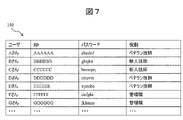
- FIG. 7 is a table that links and manages each user's ID, password, and role.
- the management table 140 shown in FIG. 7 may be recorded in the auxiliary storage device 104 of the work support system 100, or may be recorded in an external device such as a directory server communicably connected to the work support system 100. .
- a directory server communicably connected to the work support system 100.
- a user using the terminal 300 inputs an ID and a password on the terminal 300 .
- the work support system 100 that has received the ID and password from the terminal 300 refers to the management table 140 of FIG. 7 and performs user authentication. If the user authentication succeeds, the user is logged into the work support system 100 and can use the web application 104a.
- the users of the management table 140 are assigned roles.
- the roles of users A, C, and E are veteran technicians
- the roles of users B and C are novice technicians
- the roles of users F and G are managers.
- a veteran engineer is assumed to be, for example, an engineer in a position to guide newcomers.
- a system user is given a role, and is assigned a work difficulty level and a right and authority.
- the work difficulty level includes the work history of a newcomer, a veteran, etc., and the strengths and weaknesses of the work.
- FIG. 8 is a diagram illustrating a hardware configuration of a terminal according to the first embodiment.
- the terminal 300 is an information processing device used by a laboratory technician or a manager, such as a personal computer, a tablet, or a smart phone.
- the terminal 300 can execute a web browser, and transmits and receives information to and from the web application 104a of the work support system 100 via the web browser.
- a terminal 300 includes a processor 301, a communication I/F 302, a main storage device 303, an auxiliary storage device 304, an input/output I/F 305, a display unit 306, and each module described above. and a bus 307 communicatively connected.
- the processor 301 is a central processing unit that controls the operation of each unit of the terminal 300 .
- the processor 301 is, for example, a CPU (Central Processing Unit), a DSP (Digital Signal Processor), an ASIC (Application Specific Integrated Circuit), or the like.
- the processor 301 expands the programs stored in the auxiliary storage device 304 into the working area of the main storage device 303 so that they can be executed.
- the main storage device 303 stores programs executed by the processor 301, data processed by the processor, and the like.
- the main storage device 303 is flash memory, RAM (Random Access Memory), ROM (Read Only Memory), or the like.
- Auxiliary storage device 304 stores various programs and various data.
- the auxiliary storage device 304 stores, for example, an OS (Operating System), various programs including a web browser, various tables, and the like.
- the auxiliary storage device 304 is a silicon disk including a nonvolatile semiconductor memory (flash memory, EPROM (Erasable Programmable ROM)), a solid state drive device, a hard disk (HDD, Hard Disk Drive) device, or the like.
- the communication I/F 302 is an interface for communicably connecting the terminal 300 to the work support system 100 via a network.
- the input/output I/F 305 receives operation instructions and the like from the user of the terminal 300 who operates the input device connected to the input/output I/F 305 .
- Input devices are, for example, keyboards, touch panels, mice, microphones, and the like.
- the input/output I/F 305 can be connected to display devices such as LCDs, EL (Electroluminescence) panels, and organic EL panels, and output devices such as printers and speakers.
- the input/output I/F 305 outputs data and information processed by the processor 301 and data and information stored in the main storage device 303 and the auxiliary storage device 304 to an output device (for example, the display unit 306 and a printing device (not shown)). do.
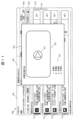
- the ToDo list screen 9 to 12 are ToDo list screens displayed on the display of the terminal.
- the web browser of the terminal 300 displays the ToDo list screen 900 provided by the web application 104 a of the work support system 100 on the display unit 306 .
- the ToDo list screen 900 has a ToDo list tab 901 that displays a ToDo list that has not been completed, and a completed ToDo list tab 902 that displays a ToDo list that has been completed.
- the ToDo list tab 901 includes a display area 910 for displaying one or more tasks 911 to 914, an order selection area 920 for selecting the display order of the tasks in the display area 910, and a filter for filtering the tasks displayed in the display area 910. and a region 930 .
- Each of the tasks 911 to 914 includes a cell A displaying the content of the task, the name of the medical device 200 that is the target of the task, and the deadline for performing the task, a cell B displaying the person in charge, a completion button C, have
- operation 911 specifies that by 17:00 on June 10, 2021, on Medical Device 200 Unit 1, 2 AAA reagents, 15 BBB reagents, 5 CCC reagents, 3 DDD reagents and The operation of exchanging five EEE reagents is shown.
- the person in charge of task 911 has not yet been determined, and when the user selects the raise hand button D in cell B, the selected user becomes the person in charge.
- the selection means selection of the raise hand button D by a touch operation detected by a touch sensor mounted on the display unit 306 of the terminal 300, and selection of the raise hand button D detected by a pointing device such as a mouse connected to the terminal 300. including selection, etc.
- the raise hand button D is selected, the raised hand data is transmitted from the terminal 300 to the work support system 100 .
- Mr. A who is the logged-in user, has selected the raise hand button D, so Mr. A is the person in charge. And the raise hand button D is active.
- a plurality of persons in charge may be the persons in charge.
- the completion button C is a button for completing the work. By selecting the completion button C, the person in charge who carried out the work can change the status of the work to "completed".
- completion data is transmitted from the terminal 300 to the work support system 100 .
- the order selection area 920 is an area for selecting the display order of the tasks displayed in the display area 910 .
- the display order 921 is “in order of due date”, so the tasks are displayed in the display area 910 in order of due date.
- a ToDo add button 922 for adding work is arranged in the order selection area 920.
- FIG. 10 shows a screen displayed when the add ToDo button 922 is selected.
- the screen of FIG. 10 includes a pop-up 923 for creating an arbitrarily created ToDo task.
- the creator of the arbitrarily created ToDo task can enter the recommended deadline for performing the added task, the creator who creates the added task, the category of the added task, the priority of the added task, the Enter the details of the work, etc.
- the arbitrarily created ToDo work is added to the work list.
- the content entered in the pop-up 923 is sent to the work support system 100, and the work addition unit 122 of the work support system 100 adds the arbitrarily created ToDo work to the work list.
- a filter area 930 is an area for filtering the work displayed in the display area 910 .
- the user can filter the tasks displayed in display area 910 by due date by checking the due date check boxes (by today/by 4 days/after 5 days) in filter area 930 .
- the user can also filter the tasks displayed in display area 910 by category by checking the check boxes for the categories in filter area 930 (reagent replacement/maintenance/other).
- the user can filter the operations displayed in the display area 910 by the name of the medical device 200 by selecting the device No. (machine No. 1/machine No. 2/machine No. 3, etc.) in the filter area 930 .
- the user can also filter the tasks displayed in the display area 910 by type by selecting the type of task (all To-Dos/device-created To-Dos/arbitrarily-created To-Dos) in the filter area 930 .
- the arbitrarily created ToDo work is the work added in the popup 923 of FIG. 10, and the device created ToDo work is the work created by the work support system 100 .
- the user can filter the tasks displayed in the display area 910 by the person in charge by selecting the person in charge of the work in the filter area 930 (person in charge/everyone).
- Fig. 11 is a screen for conveying the details of the work procedure to the laboratory technician.
- a pop-up 924 is displayed on the display unit 306 of the terminal 300 to inform the laboratory technician of the details of the reagent replacement method.
- the pop-up 924 includes a moving image area 925 displaying moving images and animations of reagent replacement procedures, and a text area 926 displaying each procedure of reagent replacement in text format.
- a play button 927 in the moving image area 925 is selected, a moving image or animation showing the reagent replacement procedure is played.
- the completed ToDo list tab 902 is displayed in a display area 950 that displays completed tasks 951 to 955, an order selection area 960 that selects the display order of the tasks, and a display area 950. and a filter area 970 for filtering the work.
- Each of the order selection area 960 and the filter area 970 has the same function as the order selection area 920 and the filter area 930 described above, so description thereof will be omitted.
- one or more completed tasks 951 to 955 are displayed grayed out. By moving the scroll bar 915, other performed work is displayed. Each task 951 and 955 is a completed task, and the status of the task is "Completed”. By selecting the completion button C, the work status becomes “completed”. A like button E is displayed for the work with the "completed” status. A like button E is displayed to endorse the person responsible for the completed work. When the like button E is selected, like data is transmitted to the work support system 100 . The endorsement reception unit 120 of the work support system 100 receives the like data.
- each task 952 to 954 is "completed and canceled".
- each task 952 to 954 has a status of "completed”.
- the status of each task 952 to 954 has been changed from "completed” to "completed canceled" by selecting the completed button F.
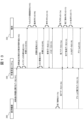
- FIG. 13 is a data flow diagram for explaining the work support method by the work support system.
- the work support method will be described with reference to the data flow diagram of FIG.
- Each medical device 200 periodically or in response to a request from the work support system 100 transmits data 240 (FIG. 3(a)) regarding the remaining amount of consumables to the work support system 100 (S101).
- the work support system 100 is running a web application 104a.
- the list creation unit 113 of the work support system 100 creates a reagent replacement work as a work recommended to be executed by the medical device 200 based on the data 240 regarding the remaining amount of consumables received from the medical device 200 ( S102).
- the list creation unit 113 creates maintenance work related to maintenance of one or a plurality of medical devices 200 as work recommended to be performed by the medical device 200 (S103). Then, the list creation unit 113 distributes to each terminal 300 a work list in which one or more reagent replacement work and maintenance work are listed (S104). The terminal 300 that has received the work list displays the ToDo list screen 900 on the display unit 306 (S105).
- the content of the arbitrarily created ToDo work is input by the ToDo add button 922 and the popup 923 (S106).
- the terminal 300 transmits the content of the arbitrarily created ToDo work (deadline for which the work is recommended to be performed, creator who creates the work, work category, work priority, work content) to the work support system 100. (S107).
- the work support system 100 adds and updates the arbitrarily created To-Do work to the work list based on the content of the arbitrarily created To-Do work received (S108). Then, the work support system 100 distributes the work list including the added work to each terminal 300 (S109).
- the raise hand button D When the raise hand button D is selected on the terminal 300 on which the ToDo list tab 901 is displayed (S110), the raise hand button D becomes active and the name of the person who selected the raise hand button D is displayed next to the raise hand button D. be done.
- raised hand data is transmitted from the terminal 300 to the work support system 100 (S111).
- the hand-raising data includes the time when the hand-raising button D was selected, information for specifying the person who selected the hand-raising button D, the work corresponding to the hand-raising button D, and the selected button type.
- the work support system 100 Based on the received hand raising data, the work support system 100 distributes a work list including the work associated with the active hand raising button D and the name of the person in charge, and causes the display unit 306 of each terminal 300 to display the work list.
- the message transmission unit 123 of the work support system 100 transmits, by e-mail or the like, information indicating that the raise hand button D has been selected to the other pre-registered terminals 300 (S112).
- the completion button C When the completion button C is selected on the terminal 300 on which the ToDo list tab 901 is displayed (S113a), the status of the work corresponding to the completion button C becomes “completed” and the work is deleted from the ToDo list tab 901. be. Then, the task deleted from the ToDo list tab 901 is added to the completed ToDo list tab 902 .
- completion data is transmitted from the terminal 300 to the work support system 100 (S114a). The completion data includes the time when the completion button C was selected, information for identifying the person who selected the completion button C, the task corresponding to the completion button C, and the type of button selected.
- the work support system 100 deletes the completed work from the ToDo list tab 901 and adds the completed work to the completed ToDo list tab 902 based on the received completion data. Then, the work list including the updated To-Do list tab 901 and completed To-Do list tab 902 is distributed and displayed on the display unit 306 of each terminal 300 .
- completion data including the time when the work was completed, the completed work, etc. is transmitted from the medical device 200 to the work support system 100 (S114b). ).
- the work support system 100 deletes the completed work from the ToDo list tab 901 and adds the completed work to the completed ToDo list tab 902 based on the received completion data. Then, the work list including the updated To-Do list tab 901 and completed To-Do list tab 902 is distributed and displayed on the display unit 306 of each terminal 300 .
- the status of the selected task changes to “completed canceled” and the task is added to the ToDo list tab 901. be.
- completion cancellation data is transmitted to the work support system 100 (S116).
- Completed undo data includes the time the completed button F was selected, information identifying the person who selected the completed button F, the task corresponding to the completed button F, and the type of button selected.
- the work support system 100 adds the completed work to the ToDo list tab 901 based on the received completion cancellation data. Then, the work list including the updated ToDo list tab 901 is distributed and displayed on the display unit 306 of each terminal 300 .
- like data is transmitted from the terminal 300 to the work support system 100 (S118).
- the like data includes the time when the like button E was selected, information for identifying the person who selected the like button E, the work corresponding to the like button E, and the type of selected button.
- the work support system 100 distributes a work list including the work for which the like button E is activated, and causes the display unit 306 of each terminal 300 to display the work list.
- the medical device 200 transmits data 240 (FIG. 3(b)) regarding the alarm to the work support system 100 (S119). Based on the alarm data 240 transmitted from the medical device 200, the work support system 100 transmits to each terminal 300 that the medical device 200 has generated an alarm and details of the generated alarm (S120). .
- the work support system 100 transmits the work list to the terminal 300 so that the laboratory technician can see the work list including the work recommended to be performed by the medical device 200 before an alarm is generated in the medical device 200. , can voluntarily indicate their intention to be in charge of the work in the work list. Furthermore, other laboratory technicians can recognize on the ToDo list screen 900 that the person in charge of the work has been decided, so that the laboratory technicians can share the intention of the person in charge of the work. As a result, it is possible to prevent duplication of work from being performed.
- Inspection engineers, managers, etc. can grasp the tasks that have not been raised on the ToDo list screen 900, so that it is possible to prevent the omission of tasks. Furthermore, since the laboratory technician and manager can grasp the status of the declaration of intention on the ToDo list screen 900, they can grasp the progress of the entire work.
- ToDo list tab 901 displays a ToDo list of tasks that have not been completed, the laboratory technician can easily grasp only the tasks that are recommended to be handled at this time.
- the laboratory technician can easily grasp only the work for which he has indicated his intention. can.
- the laboratory technician can confirm the work sorted by deadline. This makes it easier to grasp the work that is recommended to be performed before the holiday.
- the laboratory technician can grasp the details of the alarm that has occurred on the medical device 200 .
- An arbitrarily created To-Do task can be added to the work list by using the To-Do add button 922 and pop-up 923 of the terminal 300 and the work addition unit 122 of the work support system 100 . This allows the laboratory technician to remember to perform the added arbitrarily created ToDo work.
- the work support system 100 includes the upper limit setting unit 124, it is possible to prevent more than the set number of persons in charge from being in charge of one work. As a result, it is possible to suppress the bias of the person in charge, such as by distributing the person in charge for each task.
- the manifestation of intention canceling unit 125 of the work support system 100 can cancel the manifestation of intention when the work for which the manifestation of intention is expressed is not completed even after waiting for a long time. You can expect a declaration of intent.
- the like data can be used as an approval record by the administrator.
- log data 130 in FIG. 6 can be used as an approval record by a manager.
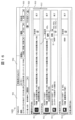
- FIG. 14 shows a screen 1400 provided to the terminal 300 by the work support system 100 of the second embodiment, and the screen 1400 displays an ASSIGN button G for assigning a person in charge.
- An ASSIGN button G is displayed for a task to which a person in charge is not assigned.
- a user list 928 is displayed as candidates for the person in charge of the work. By checking the check box next to the user name displayed in the list 928, the person in charge of the work can be assigned.
- the assigning unit 128 of the work support system 100 receives information about the person in charge selected in the list 928 and assigns the selected person in charge to the work.
- the person in charge may be one person or a plurality of persons.
- the recommended number of workers may be displayed in the list 928 .
- the authority for assigning persons in charge may be given to the roles shown in FIG. For example, if the role is a managerial position, the assignment of a person in charge is permitted, but if the role is a veteran engineer or a new engineer, it is possible to prohibit the assignment of a person in charge.
- the ASSIGN button G is displayed in the second embodiment, the hand icon in FIG. 14 may have the function of the ASSIGN button G without displaying the ASSIGN button G. In this case, the specification may be such that the display form (for example, color) of the hand icon is changed before the person in charge is assigned and after the person in charge is assigned.
- the person in charge can be assigned to the work using the ASSIGN button G, it is possible to assign the inspection engineer who is the right person for the work as the person in charge. In addition, it is also possible to assign an appropriate laboratory technician as the person in charge, taking into consideration the workload of the laboratory technician.
- FIG. 15 shows a screen 1500 provided to the terminal 300 by the work support system 100 of the third embodiment.
- a message 929 recommending other work related to the hand-raised work to the user who raised the hand. is displayed.
- a message 929 recommending that work 914 be done at the same time is displayed on the display unit 306 of the terminal 300 .
- the tasks 912 and 914 are registered in advance as related tasks, and when a hand is raised for the task 912, the recommendation unit 127 of the task support system 100 recommends the task 914 to the user as a task related to the task 912. to recommend.
- the recommendation unit 127 recommends the work that is efficient if performed simultaneously with the hand-raised work or the work that can be dealt with at a place physically close to the hand-raised work.
- a recommendation can be made to the laboratory technician who raises his/her hand.
- FIG. 16 shows a screen 1600 provided to the terminal 300 by the work support system 100 of the fourth embodiment, and the screen 1600 displays a delete button H and an edit button I for deleting work.
- the delete button H related to the task 913
- the edit/deletion unit 129 of the work support system 100 deletes work and edits work according to the operation of the delete button H and the edit button I.
- the authority to delete work may be given to the roles in FIG. For example, if the role is manager or veteran engineer, deletion of work is permitted, but if the role is novice engineer, deletion of work is prohibited.
- the contents of the task 913 can be edited.
- the edit button I When the user selects the edit button I related to the task 913, the contents of the task 913 can be edited.
- a pop-up 923 in FIG. 10 is displayed, and the work deadline, work creator, work category, work priority, work content, etc. are edited in the pop-up 923. can do.
- FIG. 17 shows a screen 1700 provided to the terminal 300 by the work support system 100 of the fifth embodiment, and is used for confirming the details of the remaining amount of consumables.
- the detailed screen information is data for displaying the details of the remaining amount of consumables on the display unit 306 of the terminal 300 .
- the detailed screen information is created by the list creating unit 113 functioning as a screen information creating unit.
- the web browser of the terminal 300 displays a screen 1700 showing details of the remaining amount of consumables on the display unit 306 .
- the laboratory technician can view screen 1700 to determine whether task 912 should be performed, when to perform the task, and the like. On this screen 1700, by changing the predicted date, it is possible to confirm the prediction of the remaining amount of consumables on the changed predicted date.
- the user using the terminal 300 can indicate his or her intention to be in charge of the work 912 on the screen 1700 for checking the details of the remaining amount of consumables.
- it is possible to indicate the intention to be in charge of the task on the ToDo list screen 900, and to indicate the intention to be in charge of the task on the screen 1700 for confirming the estimated remaining amount of consumables. can be done.
- a hand-raising button D is displayed on the screen 1700 , and the user can indicate his or her intention to take charge of the work 912 on the screen 1700 .
- the intention can be indicated on at least one of the ToDo list screen 900 and the screen 1700 for confirming the estimated remaining amount of consumables.
Landscapes
- Business, Economics & Management (AREA)
- Health & Medical Sciences (AREA)
- Engineering & Computer Science (AREA)
- General Business, Economics & Management (AREA)
- General Health & Medical Sciences (AREA)
- Biomedical Technology (AREA)
- Primary Health Care (AREA)
- Tourism & Hospitality (AREA)
- Epidemiology (AREA)
- Medical Informatics (AREA)
- Public Health (AREA)
- Physics & Mathematics (AREA)
- Strategic Management (AREA)
- General Physics & Mathematics (AREA)
- Marketing (AREA)
- Theoretical Computer Science (AREA)
- Human Resources & Organizations (AREA)
- Economics (AREA)
- Medical Treatment And Welfare Office Work (AREA)
- Management, Administration, Business Operations System, And Electronic Commerce (AREA)
Priority Applications (3)
| Application Number | Priority Date | Filing Date | Title |
|---|---|---|---|
| CN202280050492.8A CN117716439A (zh) | 2021-08-05 | 2022-06-29 | 作业辅助系统以及程序 |
| JP2023539709A JP7656049B2 (ja) | 2021-08-05 | 2022-06-29 | 作業支援システム、及び、プログラム |
| KR1020247001514A KR20240021946A (ko) | 2021-08-05 | 2022-06-29 | 작업 지원 시스템 및 프로그램 |
Applications Claiming Priority (2)
| Application Number | Priority Date | Filing Date | Title |
|---|---|---|---|
| JP2021129217 | 2021-08-05 | ||
| JP2021-129217 | 2021-08-05 |
Publications (1)
| Publication Number | Publication Date |
|---|---|
| WO2023013311A1 true WO2023013311A1 (ja) | 2023-02-09 |
Family
ID=85154015
Family Applications (1)
| Application Number | Title | Priority Date | Filing Date |
|---|---|---|---|
| PCT/JP2022/025914 Ceased WO2023013311A1 (ja) | 2021-08-05 | 2022-06-29 | 作業支援システム、及び、プログラム |
Country Status (4)
| Country | Link |
|---|---|
| JP (1) | JP7656049B2 (https=) |
| KR (1) | KR20240021946A (https=) |
| CN (1) | CN117716439A (https=) |
| WO (1) | WO2023013311A1 (https=) |
Cited By (1)
| Publication number | Priority date | Publication date | Assignee | Title |
|---|---|---|---|---|
| JP7561299B1 (ja) | 2023-12-26 | 2024-10-03 | 日機装株式会社 | 情報処理装置、情報処理方法及びプログラム |
Families Citing this family (1)
| Publication number | Priority date | Publication date | Assignee | Title |
|---|---|---|---|---|
| KR20250125739A (ko) | 2024-02-15 | 2025-08-22 | 주식회사 엘지에너지솔루션 | 배터리 모듈, 이를 포함하는 배터리 팩 및 자동차 |
Citations (4)
| Publication number | Priority date | Publication date | Assignee | Title |
|---|---|---|---|---|
| WO2013065528A1 (ja) * | 2011-10-31 | 2013-05-10 | 株式会社日立ハイテクノロジーズ | 自動分析システム |
| JP2019045446A (ja) * | 2017-09-07 | 2019-03-22 | 株式会社日立ハイテクノロジーズ | 自動分析装置 |
| JP2020009269A (ja) * | 2018-07-10 | 2020-01-16 | 株式会社エナジード | タスク管理システム、タスク管理サーバ、タスク管理方法、及びタスク管理プログラム |
| WO2021024539A1 (ja) * | 2019-08-07 | 2021-02-11 | 株式会社日立ハイテク | 自動分析システム及びアラーム対処方法 |
-
2022
- 2022-06-29 WO PCT/JP2022/025914 patent/WO2023013311A1/ja not_active Ceased
- 2022-06-29 JP JP2023539709A patent/JP7656049B2/ja active Active
- 2022-06-29 CN CN202280050492.8A patent/CN117716439A/zh active Pending
- 2022-06-29 KR KR1020247001514A patent/KR20240021946A/ko active Pending
Patent Citations (4)
| Publication number | Priority date | Publication date | Assignee | Title |
|---|---|---|---|---|
| WO2013065528A1 (ja) * | 2011-10-31 | 2013-05-10 | 株式会社日立ハイテクノロジーズ | 自動分析システム |
| JP2019045446A (ja) * | 2017-09-07 | 2019-03-22 | 株式会社日立ハイテクノロジーズ | 自動分析装置 |
| JP2020009269A (ja) * | 2018-07-10 | 2020-01-16 | 株式会社エナジード | タスク管理システム、タスク管理サーバ、タスク管理方法、及びタスク管理プログラム |
| WO2021024539A1 (ja) * | 2019-08-07 | 2021-02-11 | 株式会社日立ハイテク | 自動分析システム及びアラーム対処方法 |
Cited By (2)
| Publication number | Priority date | Publication date | Assignee | Title |
|---|---|---|---|---|
| JP7561299B1 (ja) | 2023-12-26 | 2024-10-03 | 日機装株式会社 | 情報処理装置、情報処理方法及びプログラム |
| JP2025102614A (ja) * | 2023-12-26 | 2025-07-08 | 日機装株式会社 | 情報処理装置、情報処理方法及びプログラム |
Also Published As
| Publication number | Publication date |
|---|---|
| JP7656049B2 (ja) | 2025-04-02 |
| JPWO2023013311A1 (https=) | 2023-02-09 |
| CN117716439A (zh) | 2024-03-15 |
| KR20240021946A (ko) | 2024-02-19 |
Similar Documents
| Publication | Publication Date | Title |
|---|---|---|
| CN103020789B (zh) | 库存管理的系统和方法 | |
| US20190205166A1 (en) | Integrated monitoring and control of processing environment | |
| JP6889520B2 (ja) | 診断分析装置関連情報の集約方法および集約システム | |
| US8219431B2 (en) | Workflow management system, method and device for managing a workflow including plural hierarchically-classified tasks | |
| JP7656049B2 (ja) | 作業支援システム、及び、プログラム | |
| CN112463421A (zh) | 信息处理系统 | |
| US20180293533A1 (en) | System of standardized api interpretation for inter application communication | |
| BR112013007832B1 (pt) | Aparelho e método para detectar automaticamente um problema em um dispositivo de uma frota de dispositivos em uma instalação | |
| US11756000B2 (en) | Systems and methods to effectuate sets of automated actions within a collaboration environment including embedded third-party content based on trigger events | |
| Carstensen et al. | Let's talk about bugs! | |
| US20230045235A1 (en) | Trusted application release architecture and dashboard | |
| US20140058740A1 (en) | Method and system for pre-operative document management | |
| JP2023145762A (ja) | 分析装置の部品管理システムおよびプログラム | |
| CN114730258A (zh) | 用于基础设施编排服务的用户界面技术 | |
| CN115841310A (zh) | 预案流程模型的构建方法、事件处理方法和装置 | |
| US20140195624A1 (en) | System and method for transferring data with electronic messages | |
| JP2006018529A (ja) | ワークフローシステムおよびワークフローシステムの制御方法およびプログラムおよび記録媒体 | |
| Eytan et al. | Maintenance Service Platform (MSP) for maintenance information collection and sharing | |
| JP7171458B2 (ja) | シナリオ実行システム、管理装置、シナリオ実行管理方法及びプログラム | |
| JP6570604B2 (ja) | スケジュール管理システムおよびスケジュール管理プログラム | |
| JP7036603B2 (ja) | 運用管理システム | |
| JP2017102870A (ja) | システム運用自動化装置、システム運用自動化プログラム及びシステム運用自動化方法 | |
| JP2023144208A (ja) | 作業支援システム、作業支援方法及びプログラム | |
| JP2015082179A (ja) | 分析装置の情報システム、分析装置及びユーザ端末 | |
| JP2002063294A (ja) | 設備管理サーバ、設備管理方法および設備管理プログラムを記録した記録媒体 |
Legal Events
| Date | Code | Title | Description |
|---|---|---|---|
| 121 | Ep: the epo has been informed by wipo that ep was designated in this application |
Ref document number: 22852737 Country of ref document: EP Kind code of ref document: A1 |
|
| DPE1 | Request for preliminary examination filed after expiration of 19th month from priority date (pct application filed from 20040101) | ||
| WWE | Wipo information: entry into national phase |
Ref document number: 2023539709 Country of ref document: JP |
|
| ENP | Entry into the national phase |
Ref document number: 20247001514 Country of ref document: KR Kind code of ref document: A |
|
| WWE | Wipo information: entry into national phase |
Ref document number: 1020247001514 Country of ref document: KR |
|
| WWE | Wipo information: entry into national phase |
Ref document number: 202280050492.8 Country of ref document: CN |
|
| NENP | Non-entry into the national phase |
Ref country code: DE |
|
| 122 | Ep: pct application non-entry in european phase |
Ref document number: 22852737 Country of ref document: EP Kind code of ref document: A1 |