WO2022209255A1 - 情報処理装置、情報処理装置の作動方法、情報処理装置の作動プログラム - Google Patents
情報処理装置、情報処理装置の作動方法、情報処理装置の作動プログラム Download PDFInfo
- Publication number
- WO2022209255A1 WO2022209255A1 PCT/JP2022/003922 JP2022003922W WO2022209255A1 WO 2022209255 A1 WO2022209255 A1 WO 2022209255A1 JP 2022003922 W JP2022003922 W JP 2022003922W WO 2022209255 A1 WO2022209255 A1 WO 2022209255A1
- Authority
- WO
- WIPO (PCT)
- Prior art keywords
- image
- event
- user
- future
- images
- Prior art date
- Legal status (The legal status is an assumption and is not a legal conclusion. Google has not performed a legal analysis and makes no representation as to the accuracy of the status listed.)
- Ceased
Links
Images









Classifications
-
- G—PHYSICS
- G06—COMPUTING OR CALCULATING; COUNTING
- G06F—ELECTRIC DIGITAL DATA PROCESSING
- G06F3/00—Input arrangements for transferring data to be processed into a form capable of being handled by the computer; Output arrangements for transferring data from processing unit to output unit, e.g. interface arrangements
- G06F3/01—Input arrangements or combined input and output arrangements for interaction between user and computer
- G06F3/048—Interaction techniques based on graphical user interfaces [GUI]
- G06F3/0481—Interaction techniques based on graphical user interfaces [GUI] based on specific properties of the displayed interaction object or a metaphor-based environment, e.g. interaction with desktop elements like windows or icons, or assisted by a cursor's changing behaviour or appearance
- G06F3/0482—Interaction with lists of selectable items, e.g. menus
-
- G—PHYSICS
- G06—COMPUTING OR CALCULATING; COUNTING
- G06F—ELECTRIC DIGITAL DATA PROCESSING
- G06F16/00—Information retrieval; Database structures therefor; File system structures therefor
- G06F16/50—Information retrieval; Database structures therefor; File system structures therefor of still image data
- G06F16/53—Querying
- G06F16/535—Filtering based on additional data, e.g. user or group profiles
-
- G—PHYSICS
- G06—COMPUTING OR CALCULATING; COUNTING
- G06F—ELECTRIC DIGITAL DATA PROCESSING
- G06F16/00—Information retrieval; Database structures therefor; File system structures therefor
- G06F16/50—Information retrieval; Database structures therefor; File system structures therefor of still image data
- G06F16/54—Browsing; Visualisation therefor
-
- G—PHYSICS
- G06—COMPUTING OR CALCULATING; COUNTING
- G06F—ELECTRIC DIGITAL DATA PROCESSING
- G06F3/00—Input arrangements for transferring data to be processed into a form capable of being handled by the computer; Output arrangements for transferring data from processing unit to output unit, e.g. interface arrangements
- G06F3/01—Input arrangements or combined input and output arrangements for interaction between user and computer
- G06F3/048—Interaction techniques based on graphical user interfaces [GUI]
- G06F3/0481—Interaction techniques based on graphical user interfaces [GUI] based on specific properties of the displayed interaction object or a metaphor-based environment, e.g. interaction with desktop elements like windows or icons, or assisted by a cursor's changing behaviour or appearance
- G06F3/04817—Interaction techniques based on graphical user interfaces [GUI] based on specific properties of the displayed interaction object or a metaphor-based environment, e.g. interaction with desktop elements like windows or icons, or assisted by a cursor's changing behaviour or appearance using icons
-
- G—PHYSICS
- G06—COMPUTING OR CALCULATING; COUNTING
- G06Q—INFORMATION AND COMMUNICATION TECHNOLOGY [ICT] SPECIALLY ADAPTED FOR ADMINISTRATIVE, COMMERCIAL, FINANCIAL, MANAGERIAL OR SUPERVISORY PURPOSES; SYSTEMS OR METHODS SPECIALLY ADAPTED FOR ADMINISTRATIVE, COMMERCIAL, FINANCIAL, MANAGERIAL OR SUPERVISORY PURPOSES, NOT OTHERWISE PROVIDED FOR
- G06Q10/00—Administration; Management
- G06Q10/02—Reservations, e.g. for tickets, services or events
-
- G—PHYSICS
- G06—COMPUTING OR CALCULATING; COUNTING
- G06Q—INFORMATION AND COMMUNICATION TECHNOLOGY [ICT] SPECIALLY ADAPTED FOR ADMINISTRATIVE, COMMERCIAL, FINANCIAL, MANAGERIAL OR SUPERVISORY PURPOSES; SYSTEMS OR METHODS SPECIALLY ADAPTED FOR ADMINISTRATIVE, COMMERCIAL, FINANCIAL, MANAGERIAL OR SUPERVISORY PURPOSES, NOT OTHERWISE PROVIDED FOR
- G06Q10/00—Administration; Management
- G06Q10/10—Office automation; Time management
- G06Q10/109—Time management, e.g. calendars, reminders, meetings or time accounting
-
- G—PHYSICS
- G06—COMPUTING OR CALCULATING; COUNTING
- G06Q—INFORMATION AND COMMUNICATION TECHNOLOGY [ICT] SPECIALLY ADAPTED FOR ADMINISTRATIVE, COMMERCIAL, FINANCIAL, MANAGERIAL OR SUPERVISORY PURPOSES; SYSTEMS OR METHODS SPECIALLY ADAPTED FOR ADMINISTRATIVE, COMMERCIAL, FINANCIAL, MANAGERIAL OR SUPERVISORY PURPOSES, NOT OTHERWISE PROVIDED FOR
- G06Q10/00—Administration; Management
- G06Q10/10—Office automation; Time management
- G06Q10/109—Time management, e.g. calendars, reminders, meetings or time accounting
- G06Q10/1093—Calendar-based scheduling for persons or groups
-
- G—PHYSICS
- G06—COMPUTING OR CALCULATING; COUNTING
- G06Q—INFORMATION AND COMMUNICATION TECHNOLOGY [ICT] SPECIALLY ADAPTED FOR ADMINISTRATIVE, COMMERCIAL, FINANCIAL, MANAGERIAL OR SUPERVISORY PURPOSES; SYSTEMS OR METHODS SPECIALLY ADAPTED FOR ADMINISTRATIVE, COMMERCIAL, FINANCIAL, MANAGERIAL OR SUPERVISORY PURPOSES, NOT OTHERWISE PROVIDED FOR
- G06Q50/00—Information and communication technology [ICT] specially adapted for implementation of business processes of specific business sectors, e.g. utilities or tourism
- G06Q50/10—Services
-
- G—PHYSICS
- G06—COMPUTING OR CALCULATING; COUNTING
- G06T—IMAGE DATA PROCESSING OR GENERATION, IN GENERAL
- G06T1/00—General purpose image data processing
Definitions
- the processor displays, on the image list screen, images captured by the user in the registration event experienced by the user in a distinguishable manner from images not related to the registration event.
- the processor includes, in the image list screen, a link for accessing the selected image and the registered event image of the registered event experienced by the user if an image taken by the user in the registered event experienced by the user is selected. It is preferable to generate an image display screen and output the generated image display screen.
- the processor generates a registration screen including a registration event image of the registration event experienced by the user, a button for re-registering the registration event as a schedule, and a button for recommending the registration event to an acquaintance of the user, and the generated registration screen. is preferably output.
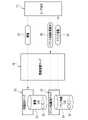
- FIG. 1 illustrates an image management system
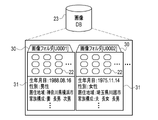
- FIG. FIG. 4 is a diagram showing information exchanged between an image management server and a user terminal; It is a figure which shows the inside of image DB. It is a figure which shows the inside of event information DB, and the content of event information.
- 2 is a block diagram showing a computer that constitutes an image management server and user terminals;
- FIG. 4 is a block diagram showing a processing section of a CPU of the image management server;
- FIG. FIG. 10 is a diagram showing an event information acquisition request and event information corresponding to the event information acquisition request;
- FIG. 4 is a block diagram showing a processing unit of a CPU of the user terminal;
- FIG. FIG. 10 is a diagram showing an image list screen displayed when an image browsing AP is started;
- the event information DB server 21 has an event information DB 24.
- Event information 25 is stored in the event information DB 24 .
- the event information 25 is information on future events related to the user 13 .
- the event includes places where the user 13 visits, such as resorts, theme parks, historic sites, museums, and museums, and programs in which the user 13 participates, such as agricultural experiences, craft experiences, and lifelong learning experiences. Other events may include concerts, soccer games, exhibitions, or webinars.
- the event information 25 is registered in advance by the person in charge of the place when the event is a place, and by the organizer of the program when the event is a program.
- the image DB 23 is provided with a plurality of image folders 30 .
- the image folder 30 is a folder assigned to each user 13 and is unique to one user 13 . Therefore, image folders 30 are provided for the number of users 13 .
- the image folder 30 is associated with a user ID (Identification Data) for uniquely identifying the user 13, such as [U0001] and [U0002].
- the event information DB 24 is divided into a plurality of categories 35, and each category 35 stores a plurality of event information 25.
- Category 35 is a large classification of events such as "farming experience” and "theme park”. In addition to these, category 35 includes "shrines and temples”, “burial mounds”, “hot spring spas”, “art museums and museums”, “craft experiences”, and "lifelong learning experiences”.
- the event information 25 includes basic information 36, future event images 37, ranking information 38, registered user information 39, and the like.
- the basic information 36 includes the name, evaluation value, total number of word-of-mouth, location, recommendation time, and the like.
- the name is the name of the place if the event is a place, and the name of the program if the event is a program.
- the evaluation value is a numerical value input through the user terminal 11 by the user 13 who has experienced the event, and is represented by five levels, for example.
- the word-of-mouth total is the total number of word-of-mouth input through the user terminal 11 by the user 13 who experienced the event.
- the location is the address of the place if the event is a place, and the address of the place where the program is implemented if the event is a program.
- the recommended time is a time when the event is particularly recommended, such as winter, summer, Christmas, New Year, October, and the like.
- computers constituting the image management server 10 and the user terminal 11 basically have the same configuration, and include a storage 40, a memory 41, a CPU (Central Processing Unit) 42, a communication section 43, A display 44 and an input device 45 are provided. These are interconnected via bus lines 46 .
- a storage 40 a storage 40, a memory 41, a CPU (Central Processing Unit) 42, a communication section 43, A display 44 and an input device 45 are provided. These are interconnected via bus lines 46 .
- CPU Central Processing Unit
- the communication unit 43 is a network interface that controls transmission of various information via the network 12 and the like.
- the display 44 displays various screens. Various screens are provided with operation functions by GUI (Graphical User Interface).
- GUI Graphic User Interface
- the computer that configures the image management server 10 and the user terminal 11 accepts input of operation instructions from the input device 45 through various screens.
- the input device 45 is a keyboard, mouse, touch panel, or the like.
- the image DB server 20 reads the attribute information 31 corresponding to the attribute information acquisition request 60 from the image DB 23 and transmits the read attribute information 31 to the image management server 10 .
- the attribute information acquisition unit 56 acquires the attribute information 31 transmitted from the image DB server 20 in response to the attribute information acquisition request 60 .
- the attribute information acquisition section 56 outputs the acquired attribute information 31 to the event information acquisition section 57 .
- the event information acquisition unit 57 sends an event information acquisition request 61 requesting the event information 25 according to the user ID of the event information distribution request 26 from the request reception unit 55 and the attribute information 31 from the attribute information acquisition unit 56. Send to the information DB server 21 .
- the event information DB server 21 reads the event information 25 requested by the event information acquisition request 61 from the event information DB 24 and transmits the read event information 25 to the image management server 10 .
- the event information acquisition unit 57 acquires the event information 25 transmitted from the event information DB server 21 .
- the event information acquisition portion 57 outputs the acquired event information 25 to the distribution control portion 58 .
- the distribution control unit 58 controls distribution of the event information 25 from the event information acquisition unit 57 to the user terminal 11 that sent the event information distribution request 26 . At this time, the distribution control unit 58 identifies the user terminal 11 that is the transmission source of the event information distribution request 26 based on the terminal ID of the event information distribution request 26 from the request reception unit 55 .
- the event information acquisition request 61 includes a user ID.
- the event information DB 24 has the event information 25 in which the user ID of the event information acquisition request 61 is registered in the registered user information 39
- the event information DB server 21 registers the event information 25 as registered event information 25A from the event information DB 24. read out.
- the registered event information 25A means information relating to a registered event for which the user 13 has registered the event as a schedule.
- the future event image 37 registered in the registered event information 25A is hereinafter referred to as a registered event image 37A.
- the event information acquisition request 61 includes ranking conditions 65 .
- the ranking condition 65 is set based on the attribute information 31 and time.
- the ranking conditions 65 are conditions for ranking related to the age, sex, and family structure of the user 13 that are known from the attribute information 31, conditions for ranking related to the area of residence of the user 13, and conditions for ranking related to time. be.
- FIG. 7 as an example of the ranking condition 65 for the ranking related to the user's 13 age, sex, and family structure, "ranking of men in their 30s with families within the top 3" is exemplified.
- the ranking condition 65 for the ranking related to the area of residence of the user 13 "Kanagawa Prefecture Resident Ranking Top 3" is exemplified.
- the ranking condition 65 for the ranking related to the season "winter ranking within 3rd place” is exemplified.
- the event information DB server 21 reads event information 25 having ranking information 38 that satisfies each ranking condition 65 from the event information DB 24 as recommended event information 25B.
- the recommended event information 25B means information on a recommended event that recommends the event to the user 13 .
- the future event image 37 registered in the recommended event information 25B is hereinafter referred to as a recommended event image 37B.
- the recommended event information 25B that satisfies the ranking conditions 65 for ranking related to the age, gender, and family structure of the user 13 is information of events selected based on the user's 13 attributes.
- the recommended event information 25B that satisfies the ranking condition 65 for the ranking related to the area of residence of the user 13 is also event information selected based on the attributes of the user 13 . Therefore, the recommended events include events selected based on the user's 13 attributes.
- the event information 25 acquired by the event information acquisition unit 57 and delivered from the delivery control unit 58 to the user terminal 11 includes at least the recommended event information 25B.
- the registered event information 25A may or may not be included in the event information 25 delivered to the user terminal 11 .
- the registered event information 25A is not included in the event information 25 delivered to the user terminal 11.
- an image viewing AP 70 is stored in the storage 40B of the user terminal 11.
- the image viewing AP 70 is an AP for causing a computer that configures the user terminal 11 to function as an "information processing device" according to the technology of the present disclosure. That is, the image browsing AP 70 is an example of the "operation program of the information processing apparatus" according to the technology of the present disclosure.
- the CPU 42B of the user terminal 11 functions as a browser control section 75 in cooperation with the memory 41 and the like.
- a browser control unit 75 controls the operation of a dedicated web browser for the image viewing AP 70 .
- the browser control unit 75 has an instruction reception unit 77 , a request transmission unit 78 , a screen generation unit 79 and a screen output unit 80 .
- the instruction reception unit 77 receives various operation instructions input from the input device 45B by the user 13 through various screens.
- the request transmission unit 78 transmits various requests to the image management server 10 according to the operation instructions. For example, the request transmission unit 78 transmits the event information distribution request 26 to the image management server 10 in accordance with the activation instruction of the image viewing AP 70 .
- the screen generator 79 generates various screens such as the image list screen 90A (see FIG. 9) based on the images 22 (not shown) locally stored in the storage 40B and the event information 25 from the image management server 10. .
- the screen generation unit 79 outputs screen data of various generated screens to the screen output unit 80 .
- the screen output unit 80 displays and outputs various screens on the display 44B based on the screen data of the various screens from the screen generation unit 79 .
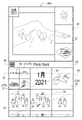
- FIG. 9 shows an example of an image list screen 90A displayed when the image viewing AP 70 is activated.
- the image list screen 90A has a combined image display area 91, a menu button display area 92, a future event display area 93, and a past image display area 94 in order from the top.
- the combined image display area 91 a plurality of randomly selected images 22 of relatively distant past years are displayed according to a preset layout.
- the images 22 in the combined image display area 91 are selectable.
- a screen is displayed in which the images 22 are magnified one by one so that they can be sent back.
- the combined image display area 91 allows the user 13 to look back on memories of the relatively distant past.
- FIG. 9 shows an example in which one of the four images 22 in October 2014 is enlarged and displayed on the left side, and three images are vertically displayed side by side on the right side.
- the "forwarding" of "each image 22 can be forwarded back” means that, for example, by a left swipe operation, the display of one enlarged image 22 is displayed one after another so that the date and time of acquisition are updated in order. means to switch to
- the "return" of "each image 22 can be sent back” means that, for example, by swiping to the right, the display of one enlarged image 22 is displayed one after another so that the date and time of acquisition become older. means to switch. The same applies to "possible to send back" in the following description.
- the screen on which the image 22 in the combined image display area 91 is enlarged can be returned to the image list screen 90A by selecting, for example, a close button provided on the screen on which the image 22 in the combined image display area 91 is enlarged. can be done.
- the date and time of acquisition is any of the date and time when the image 22 was captured, the date and time when the image 22 was downloaded, and the date and time when the image 22 was read by a scanner.
- the menu button display area 92 is located substantially in the center of the image list screen 90A and separates the upper combined image display area 91 from the lower future event display area 93 and past image display area 94 .
- a menu button 95 is displayed at the left corner of the menu button display area 92 . When the menu button 95 is selected, various menus are pop-up displayed on the image list screen 90A so as to be selectable.
- Icons 96 are arranged in the future event display area 93 so as to be selectable.
- a representative image 37R of the future event image 37 registered in the event information 25 transmitted from the image management server 10 is displayed on the icon 96 .
- the representative image 37R includes a registered event image 37A and/or a recommended event image 37B.
- the past images 22 are arranged in chronological order following the frame 97 representing the current year and month. More specifically, as indicated by the dashed-dotted arrow 98, the images 22 are arranged from bottom to top and right to left in chronological order from oldest to newest. That is, when viewed as a whole, the direction in which the images 22 are arranged in time series is from bottom to top. When viewed as one line in which a plurality of images 22 (here, three frames of images 22) having different acquisition dates and times are arranged, the direction in which the images 22 are arranged in time series is from right to left. For this reason, the image 22 arranged next to the frame 97 is the latest image 22N of the past images 22 .
- the images 22 in the past image display area 94 are selectable. When an image 22 in the past image display area 94 is selected, a screen is displayed in which each image 22 is enlarged so as to be able to be sent back, as in the combined image display area 91 .
- past images 22 can be further displayed in the past image display area 94 by a swipe operation.
- the past image display area 94 is swiped from bottom to top, the past images 22 are displayed in the past image display area 94 in chronological order of acquisition date and time.
- the display of the icon 96 remains as it is, and the frame 97 representing the current year and month displays the year and month to which the acquisition date and time of the image 22 displayed in the past image display area 94 belongs.
- the year and month when the latest image 22N of the plurality of images 22 displayed in 94 was acquired is displayed.
- the icon 96 and/or the frame 97 representing the current year and month may disappear.
- the past image 22 may be arranged at the position of the icon 96 and/or the frame 97 representing the current year and month.
- the future event display area 93 in which the icon 96 is arranged is on the left side of the latest image 22N across the frame 97 in the first row of the past image display area 94 in which the latest image 22N is arranged.
- the time-series arrangement direction of the images 22 when viewed as one line is from right to left. That is, the future event display area 93 is an example of the "future area" according to the technology of the present disclosure.
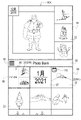
- the screen transitions to an image list screen 90B shown in FIG. 10 as an example.
- the image list screen 90B is a screen in which the combined image display area 91 and the menu button display area 92 are eliminated, and the combined image display area 91 and the menu button display area 92 are all replaced with the future event display area 93.
- FIG. 10 the representative image 37R within the icon 96 is grayed out. Note that the combined image display area 91, the menu button display area 92, and the icon 96 may not be displayed from the beginning, and the image list screen 90B of FIG. 10 may be displayed when the image browsing AP 70 is started. .
- one 1/4 frame on which the character "FUTURE” is drawn and three 1/4 frames on which the representative image 37R of the future event image 37 is drawn are combined to form an icon 96, and the icon 96 is selected.
- the target is, but not limited to.
- a 1/4 frame on which the characters "FUTURE” are drawn and a 1/4 frame on which the representative image 37R of the future event image 37 is drawn may be displayed so as to be selectable.
- the screen transitions to the image list screen 90B.
- a first registration screen 105 (see FIG. 11), which will be described later, is displayed without going through the image list screen 90B. Transition.
- a plurality of pieces of simple event information 100 are displayed vertically.
- the simple event information 100 can be scrolled up and down.
- the simple event information 100 is information simply showing the event information 25 from the image management server 10 .
- the simple event information 100 includes the name of the event, the type of the registered event or recommended event, a star mark and numerical value representing the evaluation value, and the future event image 37 .
- the image list screen 90B in which the simple event information 100 including the future event images 37 are arranged is an example of the "future event image list screen" according to the technology of the present disclosure.
- the multiple future event images 37 of the simple event information 100 are arranged in rows, unlike the past images 22, they are not arranged in order of date and time of acquisition. Therefore, the multiple future event images 37 of the simple event information 100 are treated in the same manner as the image 22 for one frame.
- a future event display area 93 that replaces the combined image display area 91 and the menu button display area 92 is located above the latest image 22N. As described above, when viewed as a whole, the direction in which the images 22 are arranged in time series is from bottom to top. That is, the future event display area 93 that replaces the combined image display area 91 and the menu button display area 92 is also an example of the "future area" according to the technology of the present disclosure.
- the simple event information 100 is arranged in order of arrival time of the event. More specifically, as indicated by a dashed-dotted line arrow 101 continuing from a dashed-dotted line arrow 98 , the simple event information 100 is arranged from the bottom to the top in order of earliest arrival time to furthest arrival time. Since the simple event information 100 includes the future event images 37 as described above, by arranging the simple event information 100 in order of event arrival time, the future event images 37 are arranged in order of event arrival time. If the event represented by the simple event information 100 is a registered event, the arrival time is the scheduled date of the registered event. If the event represented by the simple event information 100 is a recommended event, the arrival time is the recommended time registered in the basic information 36 .
- FIG. 10 shows an example in which simple event information 100B (recommended event images 37B) of recommended events such as "Yamanakako Park" and "Echigozawa Ski Resort" are displayed side by side.
- the simple event information 100 is selectable.
- the screen transitions to the first registration screen 105 shown in FIG. 11 as an example.
- recommended event images 37B are enlarged and displayed one by one so that they can be sent back.
- detailed information 106 obtained by appropriately extracting the basic information 36 and the ranking information 38 is displayed.
- a new registration button 107 is provided on the first registration screen 105 .
- a screen (not shown) for newly registering the recommended event whose detailed information 106 etc. are displayed on the first registration screen 105 as a registered event is displayed. On this screen, it is possible to input the scheduled date of the registered event using the GUI for date selection.
- the 1st registration screen 105 for registering the recommended event of "Lake Yamanaka Park” is illustrated.
- FIG. 12 shows an example of an image list screen 90B including simple event information 100A of registered events.
- the scheduled date of the registered event is displayed in the simplified event information 100A of the registered event.
- By displaying the scheduled date of the registered event it is distinguished from the simple event information 100B of the recommended event in which the characters "recommended" are displayed.
- FIG. 12 shows an example in which simple event information 100A of a registered event of "Yamanakako Park" is displayed.
- the user 13 goes to the location of the registered event on the scheduled date and experiences the registered event.
- the user 13 takes an image 22 using the camera function of the user terminal 11 or the like while experiencing the registration event.
- the captured image 22 is displayed in the past image display area 94 as the past image 22 in the image list screens 90A and 90B.
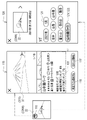
- FIG. 13 shows an example of an image list screen 90A in which the images 22 captured by the user 13 at the registration event experienced by the user 13 are displayed in the past image display area 94.
- FIG. A mark 110 is displayed on the latest image 22NN of the images 22 taken by the user 13 at the registration event that the user 13 has experienced. This mark 110 distinguishes between images 22 taken by the user at an enrollment event experienced by the user and images 22 not associated with the enrollment event. Instead of or in addition to the mark 110, an image 22 taken by the user 13 in a registered event experienced by the user 13 is surrounded by a colored frame or the like to be displayed so as to be distinguishable from the image 22 not related to the registered event. may
- the screen transitions to the second registration screen 115 shown in the center of FIG. 14 as an example.
- registration event images 37A of registration events experienced by the user 13 are enlarged and displayed one by one so that they can be sent back.
- the second registration screen 115 also displays detailed information 106 of the registered event experienced by the user 13 .
- the second registration screen 115 is provided with a re-registration button 116 and a recommend to others button 117 instead of the new registration button 107 .
- a screen (not shown) for re-registering the registered event experienced by the user 13 as a registered event, in which the detailed information 106 and the like are displayed on the second registration screen 115, is displayed. be. On this screen, it is possible to input the scheduled date of the registered event using the GUI for date selection.
- a forwarding setting screen (not shown) is displayed.
- acquaintances of the user 13 who have been set in advance by the user 13 as telephone contacts or the like are displayed in a selectable manner.
- the browser control unit 75 retrieves the registered event information 25A of the registered event experienced by the user 13 whose detailed information 106 and the like are displayed on the second registration screen 115 on the user terminal 11 of the acquaintance of the user 13 selected on the transfer setting screen. transfer.
- the acquaintances of the user 13 are, for example, the user's 13 family, relatives, lovers, friends, colleagues at work, and the like.
- the second registration screen 115 is an example of a “registration screen” according to the technology of the present disclosure.
- the re-registration button 116 is an example of a “button for re-registering a registered event as a schedule” according to the technology of the present disclosure.
- the recommend to others button 117 is an example of a “button for recommending a registered event to acquaintances of the user” according to the technology of the present disclosure.
- the image list screen 90A or 90B when the image 22 (the image 22NN with the mark 110 displayed) taken by the user 13 in the registration event experienced by the user 13 is selected, as an example, the image shown on the right side of FIG.
- the screen transitions to the display screen 120 .
- the selected image 22NN is enlarged and displayed on the image display screen 120 .
- the image display screen 120 also displays a tag 121 attached to the image 22NN.
- the tags 121 are words representing the shooting date of the image 22NN (“2021” and “January”), words representing the shooting location (“Japan”, “Yamanashi”, and “Lake Yamanaka”), and appearing in the image 22NN. Contains words that describe the subject ("Mt. Fuji”, “Sunrise”, and "Asahi”).
- the tag 121 representing the shooting date is extracted from the shooting date and time of the image 22NN.
- the tag 121 representing the shooting location is extracted from the GPS (Global Positioning System) information of the image 22NN.
- the tag 121 representing the subject appearing in the image 22NN is extracted by image analysis of the image 22NN.
- the tag 121 includes the name of the registered event.
- the name of the registered event is extracted by matching the scheduled date of the registered event with the shooting date and time of the image 22NN and referring to the GPS information of the image 22NN.
- a link 122 is attached to the name tag 121 of the registered event as indicated by hatching.
- the screen transitions to the second registration screen 115 displaying the registered event image 37A of the registered event experienced by the user 13, and the like. That is, the link 122 is an example of "a link for accessing a registration event image of a registration event experienced by the user" according to the technology of the present disclosure.
- the second registration screen 115 is displayed not only when the mark 110 is selected, but also when the tag 121 (link 122) of the registered event name is selected.
- the CPU 42A of the image management server 10 functions as a request reception unit 55, an attribute information acquisition unit 56, an event information acquisition unit 57, and a distribution control unit 58, as shown in FIG. Further, the CPU 42B of the user terminal 11 functions as a browser control section 75 as shown in FIG. In the browser control unit 75, an instruction reception unit 77, a request transmission unit 78, a screen generation unit 79, and a screen output unit 80 are constructed.
- the event information distribution request 26 is sent from the request transmitting unit 78 to the image management server 10 (step ST110).
- the event information acquisition unit 57 acquires the event information 25 corresponding to the event information distribution request 26, as shown in FIGS.
- the event information 25 includes registered event information 25A of a registered event registered as a schedule by the user 13 and/or recommended event information 25B of a recommended event recommended to the user 13 .
- Recommended events include events selected based on user 13 attributes.
- the event information 25 is output from the event information acquisition unit 57 to the distribution control unit 58. Then, the event information 25 is distributed by the distribution control unit 58 to the user terminal 11 that sent the event information distribution request 26 .
- the image list screen 90B including the simple event information 100 shown in FIG. 10 and the like is generated by the screen generation unit 79.
- the screen generator 79 arranges the simple event information 100 and future event images 37 in order of event arrival time (step ST160).
- the user 13 can get an overview of the future event image 37 from the icon 96 . Also, the user 13 can know the whole picture of the future event image 37 from the image list screen 90B. By stepping up the form of the display from the outline to the whole in this way, the expectations of the future event of the user 13 can be gradually raised.
- the second registration screen 115 can be displayed even while experiencing the registration event.
- a registered event image 37A is displayed on the second registration screen 115 . Therefore, when the second registration screen 115 is displayed while experiencing the registration event, the registered event image 37A can be used to check whether or not the user has forgotten to take a picture.
- Recommended events include events selected based on the user's 13 attributes. Therefore, it is possible to increase the probability that the user 13 will register the recommended event as a schedule, compared to the case of recommending an event that the user 13 has no connection with. Considering a business model in which compensation is obtained by having the user 13 register an event, it is possible to contribute to an increase in sales.
- FIG. 16 shows an example in which simple event information 100B (recommended event image 37B) of "Sarugasawa Onsen” is displayed in addition to "Yamanakako Park” and "Echigozawa Ski Resort” shown in FIG. ing.
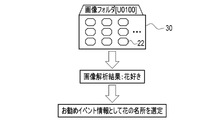
- the modes shown in FIGS. 17 and 18 may be adopted. That is, image analysis is performed by the CPU 42A of the image management server 10 on the images 22 held by the user 13 and stored in the image folder 30, and a recommended event is selected based on the image analysis results.
- the recommended event information 25B when an image analysis result indicating that the user 13 likes flowers is obtained because flowers are shown in a relatively large number of images 22, a famous place of flowers is selected as the recommended event information 25B. example.
- the recommended event information 25B when an image analysis result is obtained indicating that the user 13 likes the outdoors and food because a relatively large number of images 22 show the outdoors and cooking, the recommended event information 25B is It shows an example of selecting a fishing pond and a vegetable harvesting experience. In this way, it is possible to recommend an event that matches the preferences of the user 13 .
- the attributes obtained as the result of the image analysis are the attributes related to the preferences of the user 13, such as a flower lover and a gourmet lover. Therefore, there is no change in selecting recommended events based on the attributes of the user 13 .
- the user 13 may himself/herself search for desired event information 25 in the event information DB 24 and register the event of the searched event information 25 as a schedule.
- the simple event information 100B (recommended event image 37B) of the recommended event is not displayed on the image list screen 90B, and the simple event information 100A of the registered event (registered event image 37A) is displayed.
- the image viewing AP 70 and a general-purpose scheduler AP may be linked. That is, an event registered as a schedule by the user 13 in the scheduler AP may be notified to the image viewing AP 70 as a registered event.
- the future event image 37 is not limited to an image taken by the person in charge or organizer of the event, or an image taken by another user 13 who has experienced the event. Future event images 37 may be searched from images on the Internet using event names and the like as search keywords. As an example, as shown in FIG. 20, an image 22 taken in the past by the user 13 who registered the event may be selected and used as the future event image 37 (registered event image 37A). Furthermore, an image selected from images on the Internet by the user 13 who registered the event may be used as the future event image 37 .
- the event information distribution request 26 may be transmitted from the user terminal 11 to the image management server 10 at a preset time. Examples of preset times include 20:00 every Thursday or Friday night when a holiday is near, or conversely 20:00 every Monday night after a holiday, or the beginning or end of the month.
- a notification message to the effect that the recommended event information 25B has been received may be displayed on the home screen of the user terminal 11.
- the notification message may include the recommended event image 37B.
- the first registration screen 105 may be immediately displayed on the display 44B without displaying the image list screen 90A or the like.
- a frame 97 representing the current year and month is placed between the latest image 22N of the past images 22 and the icon 96, but the frame 97 may be omitted.
- the latest image 22N may be arranged at the position of the frame 97.
- a favorite button may be provided on the first registration screen 105 and the second registration screen 115.
- the events for which the favorite button has been selected may be collectively displayed on the favorite event list screen so that the user 13 can collectively view them later.
- a button having the same function as the recommend to others button 117 on the second registration screen 115 may be provided on the first registration screen 105 as well.
- the recommended event information can be shared between the user 13 and acquaintances of the user 13, and it is possible to determine whether or not to newly register the recommended event as a schedule while listening to the opinions of the acquaintances.
- a part or all of the function of each processing unit of the user terminal 11 may be performed by the image management server 10, and the image management server 10 may function as an information processing apparatus according to the technology of the present disclosure.
- various screens such as the image list screen 90A are generated in the image management server 10, and are displayed on the user terminal 11 in the form of screen data for web distribution created in a markup language such as XML (Extensible Markup Language).
- XML Extensible Markup Language
- the browser control unit 75 of the user terminal 11 reproduces various screens to be displayed on the web browser based on the screen data, and displays them on the display 44B.
- JSON Javascript (registered trademark) Object Notation
- the hardware configuration of the computer that constitutes the image management server 10 can be modified in various ways.
- the image management server 10 can be composed of a plurality of computers separated as hardware for the purpose of improving processing capability and reliability.
- the functions of the request reception unit 55 and the attribute information acquisition unit 56, and the functions of the event information acquisition unit 57 and the distribution control unit 58 are distributed to two computers.
- the image management server 10 is composed of two computers.
- the image management server 10, the image DB server 20, and the event information DB server 21 may be integrated into one server.
- the hardware configuration of the computer of the image management server 10 can be appropriately changed according to required performance such as processing power, safety, and reliability.
- the operating program 50 and the AP such as the image viewing AP 70 can be duplicated or distributed and stored in multiple storages for the purpose of ensuring safety and reliability. is.
- One processing unit may be configured with one of these various processors, or a combination of two or more processors of the same or different type (for example, a combination of a plurality of FPGAs and/or a CPU and combination with FPGA). Also, a plurality of processing units may be configured by one processor.
- an electric circuit combining circuit elements such as semiconductor elements can be used.
- the technology of the present disclosure can also appropriately combine various embodiments and/or various modifications described above. Moreover, it is needless to say that various configurations can be employed without departing from the scope of the present invention without being limited to the above-described embodiment. Furthermore, the technology of the present disclosure extends to storage media that non-temporarily store programs in addition to programs.
- a and/or B is synonymous with “at least one of A and B.” That is, “A and/or B” means that only A, only B, or a combination of A and B may be used.
- a and/or B means that only A, only B, or a combination of A and B may be used.
- image management system 10 image management server 11 user terminal 12 network 13 user 20 image database server (image DB server) 21 event information database server (event information DB server) 22 Image 22N Latest image 22NN The latest image among the images taken by the user at the registration event experienced by the user 23 Image database (image DB) 24 event information database (event information DB) 25 Event information 25A Registered event information 25B Recommended event information 26 Event information delivery request 30 Image folder 31 Attribute information 35 Category 36 Basic information 37 Future event image 37A Registered event image 37B Recommended event image 37R Representative image 38 Ranking information 39 Registered user Information 40, 40A, 40B Storage 41 Memory 42, 42A, 42B CPU 43 communication unit 44, 44B display 45, 45B input device 46 bus line 50 operating program 55 request reception unit 56 attribute information acquisition unit 57 event information acquisition unit 58 distribution control unit 60 attribute information acquisition request 61 event information acquisition request 65 ranking condition 70 Image viewing application program (image viewing AP) 75 browser control unit 77 instruction reception unit 78 request transmission unit 79 screen generation unit 80 screen output units 90A, 90B, 90C image
Landscapes
- Engineering & Computer Science (AREA)
- Theoretical Computer Science (AREA)
- Business, Economics & Management (AREA)
- General Physics & Mathematics (AREA)
- Physics & Mathematics (AREA)
- Human Resources & Organizations (AREA)
- General Engineering & Computer Science (AREA)
- Tourism & Hospitality (AREA)
- Strategic Management (AREA)
- Entrepreneurship & Innovation (AREA)
- Economics (AREA)
- General Business, Economics & Management (AREA)
- Marketing (AREA)
- Data Mining & Analysis (AREA)
- Human Computer Interaction (AREA)
- Operations Research (AREA)
- Quality & Reliability (AREA)
- Databases & Information Systems (AREA)
- Development Economics (AREA)
- Health & Medical Sciences (AREA)
- General Health & Medical Sciences (AREA)
- Primary Health Care (AREA)
- User Interface Of Digital Computer (AREA)
Priority Applications (4)
| Application Number | Priority Date | Filing Date | Title |
|---|---|---|---|
| CN202280023395.XA CN117043766A (zh) | 2021-03-30 | 2022-02-02 | 信息处理装置、信息处理装置的工作方法及信息处理装置的工作程序 |
| EP22779484.9A EP4312181A4 (en) | 2021-03-30 | 2022-02-02 | INFORMATION PROCESSING DEVICE, METHOD FOR OPERATING THE INFORMATION PROCESSING DEVICE AND PROGRAM FOR OPERATING THE INFORMATION PROCESSING DEVICE |
| JP2023510555A JPWO2022209255A1 (https=) | 2021-03-30 | 2022-02-02 | |
| US18/468,326 US20240004523A1 (en) | 2021-03-30 | 2023-09-15 | Information processing apparatus, operation method of information processing apparatus, and operation program of information processing apparatus |
Applications Claiming Priority (2)
| Application Number | Priority Date | Filing Date | Title |
|---|---|---|---|
| JP2021057321 | 2021-03-30 | ||
| JP2021-057321 | 2021-03-30 |
Related Child Applications (1)
| Application Number | Title | Priority Date | Filing Date |
|---|---|---|---|
| US18/468,326 Continuation US20240004523A1 (en) | 2021-03-30 | 2023-09-15 | Information processing apparatus, operation method of information processing apparatus, and operation program of information processing apparatus |
Publications (1)
| Publication Number | Publication Date |
|---|---|
| WO2022209255A1 true WO2022209255A1 (ja) | 2022-10-06 |
Family
ID=83458660
Family Applications (1)
| Application Number | Title | Priority Date | Filing Date |
|---|---|---|---|
| PCT/JP2022/003922 Ceased WO2022209255A1 (ja) | 2021-03-30 | 2022-02-02 | 情報処理装置、情報処理装置の作動方法、情報処理装置の作動プログラム |
Country Status (5)
| Country | Link |
|---|---|
| US (1) | US20240004523A1 (https=) |
| EP (1) | EP4312181A4 (https=) |
| JP (1) | JPWO2022209255A1 (https=) |
| CN (1) | CN117043766A (https=) |
| WO (1) | WO2022209255A1 (https=) |
Cited By (1)
| Publication number | Priority date | Publication date | Assignee | Title |
|---|---|---|---|---|
| JP7620762B1 (ja) | 2024-08-26 | 2025-01-23 | ソフトバンク株式会社 | 処理サーバ、処理方法、及びプログラム |
Citations (5)
| Publication number | Priority date | Publication date | Assignee | Title |
|---|---|---|---|---|
| JP2006072481A (ja) * | 2004-08-31 | 2006-03-16 | Canon Inc | 表示装置、表示方法、記憶媒体及びプログラム |
| JP2013084282A (ja) | 2012-11-27 | 2013-05-09 | Olympus Imaging Corp | 表示制御装置,カメラ,表示制御方法,表示制御プログラム |
| JP2013210868A (ja) * | 2012-03-30 | 2013-10-10 | Sony Corp | 情報処理装置、情報処理方法及びコンピュータプログラム |
| JP2015090705A (ja) * | 2013-11-06 | 2015-05-11 | ネイバー コーポレーションNAVER Corporation | ソーシャルネットワークサービス提供システム及びその方法 |
| JP2019128613A (ja) * | 2018-01-19 | 2019-08-01 | 京セラ株式会社 | 電子機器 |
Family Cites Families (6)
| Publication number | Priority date | Publication date | Assignee | Title |
|---|---|---|---|---|
| JP4513507B2 (ja) * | 2004-11-01 | 2010-07-28 | 株式会社ニコン | カレンダー画像生成装置およびカレンダー画像データ生成プログラム |
| JP2006211257A (ja) * | 2005-01-27 | 2006-08-10 | Olympus Corp | 電子撮像装置及び画像管理プログラム |
| JP2006245832A (ja) * | 2005-03-01 | 2006-09-14 | Olympus Imaging Corp | 画像再生装置 |
| JP2008165459A (ja) * | 2006-12-28 | 2008-07-17 | Sony Corp | コンテンツ表示方法、コンテンツ表示装置、及びコンテンツ表示プログラム |
| US8634662B2 (en) * | 2010-08-25 | 2014-01-21 | Apple Inc. | Detecting recurring events in consumer image collections |
| US20120265758A1 (en) * | 2011-04-14 | 2012-10-18 | Edward Han | System and method for gathering, filtering, and displaying content captured at an event |
-
2022
- 2022-02-02 WO PCT/JP2022/003922 patent/WO2022209255A1/ja not_active Ceased
- 2022-02-02 JP JP2023510555A patent/JPWO2022209255A1/ja active Pending
- 2022-02-02 EP EP22779484.9A patent/EP4312181A4/en active Pending
- 2022-02-02 CN CN202280023395.XA patent/CN117043766A/zh active Pending
-
2023
- 2023-09-15 US US18/468,326 patent/US20240004523A1/en active Pending
Patent Citations (5)
| Publication number | Priority date | Publication date | Assignee | Title |
|---|---|---|---|---|
| JP2006072481A (ja) * | 2004-08-31 | 2006-03-16 | Canon Inc | 表示装置、表示方法、記憶媒体及びプログラム |
| JP2013210868A (ja) * | 2012-03-30 | 2013-10-10 | Sony Corp | 情報処理装置、情報処理方法及びコンピュータプログラム |
| JP2013084282A (ja) | 2012-11-27 | 2013-05-09 | Olympus Imaging Corp | 表示制御装置,カメラ,表示制御方法,表示制御プログラム |
| JP2015090705A (ja) * | 2013-11-06 | 2015-05-11 | ネイバー コーポレーションNAVER Corporation | ソーシャルネットワークサービス提供システム及びその方法 |
| JP2019128613A (ja) * | 2018-01-19 | 2019-08-01 | 京セラ株式会社 | 電子機器 |
Non-Patent Citations (1)
| Title |
|---|
| See also references of EP4312181A4 |
Cited By (2)
| Publication number | Priority date | Publication date | Assignee | Title |
|---|---|---|---|---|
| JP7620762B1 (ja) | 2024-08-26 | 2025-01-23 | ソフトバンク株式会社 | 処理サーバ、処理方法、及びプログラム |
| JP2026040875A (ja) * | 2024-08-26 | 2026-03-10 | ソフトバンク株式会社 | 処理サーバ、処理方法、及びプログラム |
Also Published As
| Publication number | Publication date |
|---|---|
| JPWO2022209255A1 (https=) | 2022-10-06 |
| US20240004523A1 (en) | 2024-01-04 |
| EP4312181A1 (en) | 2024-01-31 |
| CN117043766A (zh) | 2023-11-10 |
| EP4312181A4 (en) | 2024-09-18 |
Similar Documents
| Publication | Publication Date | Title |
|---|---|---|
| US20180300821A1 (en) | Group event or activity recommendations via social-relationship-related override conditions | |
| US20140289611A1 (en) | System and method for end users to comment on webpage content for display on remote websites | |
| WO2009145902A1 (en) | System and method for interfacing interactive systems with social networks and media playback devices | |
| KR101641342B1 (ko) | 스마트폰 애플리케이션을 이용한 반려 동물 관리 서비스 장치 및 방법 | |
| US20140255001A1 (en) | System for Simultaneously Playing Video Files in a Platform Independent Environment | |
| US12336512B2 (en) | Systems and methods for providing and associating data from pet expert interactions with pet profiles | |
| US20190056841A1 (en) | Apparatus, method, and computer-readable storage medium for mobile keyboard content delivery | |
| JP2012238286A (ja) | 医薬等情報提供システム | |
| US20190213611A1 (en) | System for online polling | |
| WO2022209255A1 (ja) | 情報処理装置、情報処理装置の作動方法、情報処理装置の作動プログラム | |
| JP2019211896A (ja) | サービス提供者とサービス被提供者との組み合わせの特定を支援するサーバ装置、そのサーバ装置において実行される方法およびプログラム | |
| US20160042413A1 (en) | Systems and Methods for the Recording and Selective Distribution and Selective Communal Analysis of Consumer Reviews | |
| JP6161014B2 (ja) | 面会スケジュール調整システムおよび面会スケジュール調整プログラム | |
| JP2017174166A (ja) | 施設予約提供サーバ及び施設予約提供プログラム | |
| JP6212304B2 (ja) | 情報処理装置並びにその制御方法及び制御プログラム | |
| US20100131448A1 (en) | Hypothesis based solicitation of data indicating at least one objective occurrence | |
| US20080319871A1 (en) | Systems and Methods for Auto-Generation of Rich Media Purchase, Reservation and/or Activity Information | |
| JP2021033643A (ja) | ライフデータ処理システム、ライフデータ処理方法及びコンピュータプログラム | |
| JP7115793B1 (ja) | タグに関連付けられているアクションを実行することを端末装置に行わせるサーバ装置、方法、プログラム、およびシステム | |
| JP2016164716A (ja) | 情報提供装置、情報提供方法及びプログラム | |
| US20170103351A1 (en) | Systems and methods for providing and manipulating travel information | |
| US20230091973A1 (en) | Medzone. | |
| JP2018206033A (ja) | 情報処理装置、情報処理方法及びプログラム | |
| JP2006185286A (ja) | ポータルサイト提供システム | |
| EP4336439B1 (en) | Information processing device, information processing method, and information processing program |
Legal Events
| Date | Code | Title | Description |
|---|---|---|---|
| 121 | Ep: the epo has been informed by wipo that ep was designated in this application |
Ref document number: 22779484 Country of ref document: EP Kind code of ref document: A1 |
|
| WWE | Wipo information: entry into national phase |
Ref document number: 2023510555 Country of ref document: JP |
|
| WWE | Wipo information: entry into national phase |
Ref document number: 202280023395.X Country of ref document: CN |
|
| WWE | Wipo information: entry into national phase |
Ref document number: 2022779484 Country of ref document: EP |
|
| NENP | Non-entry into the national phase |
Ref country code: DE |
|
| ENP | Entry into the national phase |
Ref document number: 2022779484 Country of ref document: EP Effective date: 20231030 |